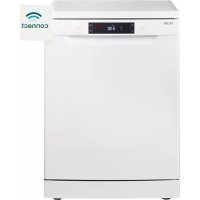
VWV242CWIT - Dishwasher ETNA - Free user manual and instructions
Find the device manual for free VWV242CWIT ETNA in PDF.


User questions about VWV242CWIT ETNA
0 question about this device. Answer the ones you know or ask your own.
Ask a new question about this device
Download the instructions for your Dishwasher in PDF format for free! Find your manual VWV242CWIT - ETNA and take your electronic device back in hand. On this page are published all the documents necessary for the use of your device. VWV242CWIT by ETNA.
USER MANUAL VWV242CWIT ETNA
Scan the QR code or visit the website etna.nl/connected to find out how to establish a connection with your appliance.
Contact a registered installer to fit your appliance (see "Installation instructions"). Do not connect the appliance to the electrical mains until the installation is complete.
This appliance is intended to be used in household and similar applications such as:
staff kitchen areas in shops, offices and other working environments;
farmhouses;
by clients in hotels, motels and other residential type environments;
bed and breakfast type environments.
For EN60335-1:
- This appliance can be used by children aged from 8 years and above and persons with reduced physical, sensory or mental capabilities or lack of experience and knowledge if they have been given supervision or instruction concerning use of the appliance in a safe way and understand the hazards involved. Children shall not play with the appliance. Cleaning and user maintenance shall not be done by children without supervision.
For IEC60335-1:
- This appliance is not intended for use by persons (including children) with reduced physical, sensory or mental capabilities, or lack of experience and knowledge, unless they have been given supervision or instruction concerning use of the appliance by a person responsible for their safety.
- Packaging material could be dangerous for children!
- This appliance is for indoor household use only.
- To protect against the risk of electrical shock, do not immerse the unit, cord or plug in water or other liquid.
- Please unplug before cleaning and performing maintenance on the appliance.
- Use a soft cloth moistened with mild soap, and then use a dry cloth to wipe it again.
Earthing Instructions
- This appliance must be earthed. In the event of a malfunction or breakdown, earthing will reduce the risk of an electric shock by providing a path of least resistance of electric current. This appliance is equipped with an earthing conductor plug.
- The plug must be plugged into an appropriate outlet that is installed and earthed in a cccordance with all local codes and ordinances.
-
Improper connection of the equipment-earthing conductor can result in the risk of an electric shock.
-
Check with a qualified electrician or service representative if you are in doubt whether the appliance is properly grounded.
- Do not modify the plug provided with the appliance, if it does not fit the outlet.
- Have a proper outlet installed by a qualified electrician.
- Do not abuse, sit on, or stand on the door or dish rack of the dishwasher.
- Do not operate your dishwasher unless all enclosure panels are properly in place.
- Open the door very carefully if the dishwasher is operating, there is a risk of water squirting out.
- Do not place any heavy objects on or stand on the door when it is open. The appliance could tip forward.
When loading items to be washed:
Locate sharp items so that they are not likely to damage the door seal;
Warning: Knives and other utensils with sharp points must be loaded in the basket with their points facing down or placed in a horizontal position.
-
Some dishwasher detergents are strongly alkaline. They can be extremely dangerous if swallowed. Avoid contact with the skin and eyes and keep children away from the dishwasher when the door is open.
-
Check that the detergent powder is empty after completion of the wash cycle.
- Do not wash plastic items unless they are marked "dishwasher safe" or the equivalent.
- For unmarked plastic items not so marked, check the manufacturer's recommendations.
- Use only detergent and rinse agents recommended for use in an automatic dishwasher.
- Never use soap, laundry detergent, or hand washing detergent in your dishwasher.
- The door should not be left open, since this could increase the risk of tripping.
- If the supply cord is damaged, it must be replaced by the manufacturer or its service agent or a similarly qualified person in order to avoid a hazard.
- During installation, the power supply must not be excessively or dangerously bent or flattened.
- Do not tamper with controls.
- The appliance needs to be connected to the main water valve using new hose sets. Old sets should not be reused.
- To save energy, the appliance will go to standby mode automatically when there is no operation during some time.
Your dishwasher
Introduction 4
Etna Connected 4
Using your dishwasher
Description 5
Quick start 5
Control panel 6
Water softener 8
Adding salt 9
Preparing and loading dishes 10
Function of the rinse aid and dishwasher detergent 14
Filling the rinse aid reservoir 15
Filling the detergent dispenser 16
Programming the dishwasher
Wash cycle table 17
Saving energy 18
Starting a wash cycle 18
Changing the program mid-cycle 18
Forget to add a dish? 19
Maintenance
Filtering system 20
Cleaning the spray arms 21
Caring for the dishwasher 22
Cleaning the door 23
Errors
What should I do, if... 24
Error table 24
Technical data sheet 28
Your dishwasher and the environment
Disposal 29
Introduction
You have chosen to purchase a Etna dishwasher.
Optimum user comfort and easy operation were paramount during the development of this product.
This manual describes how you can get the most out of your dishwasher. It provides you with information on how to operate the appliance, as well as background information about how it works. You will furthermore also find maintenance tips.
The safety instructions that are relevant during the installation are included in the installation guide. This is intended for the installation technician.
Read this manual before using the appliance. Keep this manual somewhere safe so that subsequent users can also benefit from the information contained within.
You can find the most recent version of the instructions for use on our website.
Etna Connected
This appliance can be remotely controlled using a smartphone. This requires an app and a connection between the device and the 2.4 GHz WiFi network. It is not necessary to connect your device to the WiFi network. If the appliance is not connected to the WiFi network, it operates in the same way as a regular appliance.
Scan the QR code or visit the website etna.nl/connected to find out how to establish a connection with your appliance.

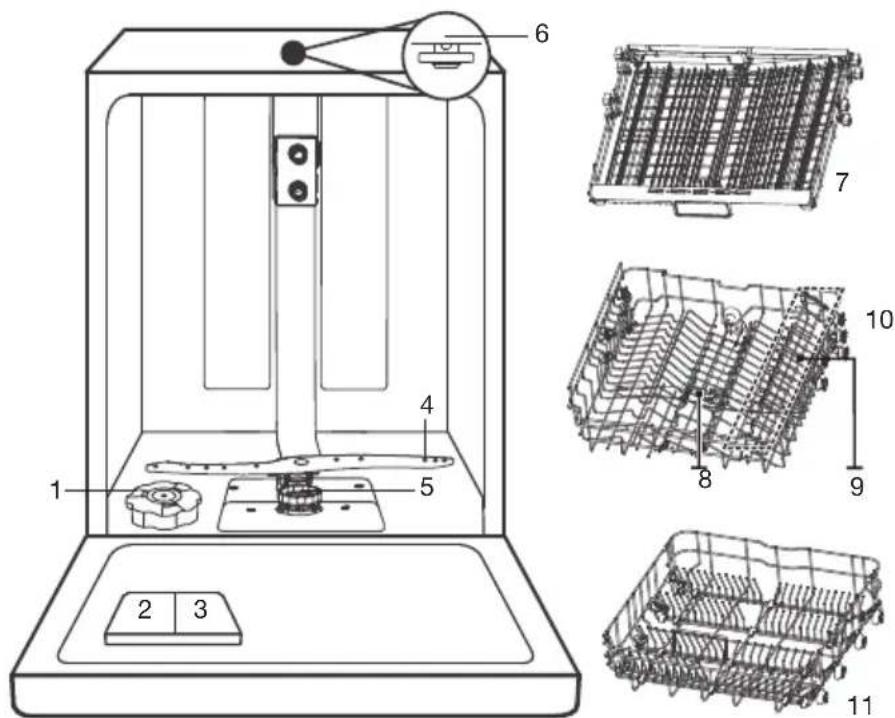
Description
Features and appearance of baskets and cutlery baskets may vary, depending on your model.
- Salt container
- Detergent dispenser
- Rinse aid reservoir
- Lower spray arm
- Filtering system
- Top spray arm
- Cutlery rack
- Upper spray arm
- Cup rack
- Upper basket
- Lower basket
Quick start
Please read the corresponding content in this manual for more details about the operation.

- Setting the water softener/ loading the salt.
- Removing larges residues on the cutlery/dishes. Avoid pre-rinsing.
- Loading the baskets.
- Filling the dispenser and the rinse aid reservoir.
- Selecting a program and running the dishwasher.
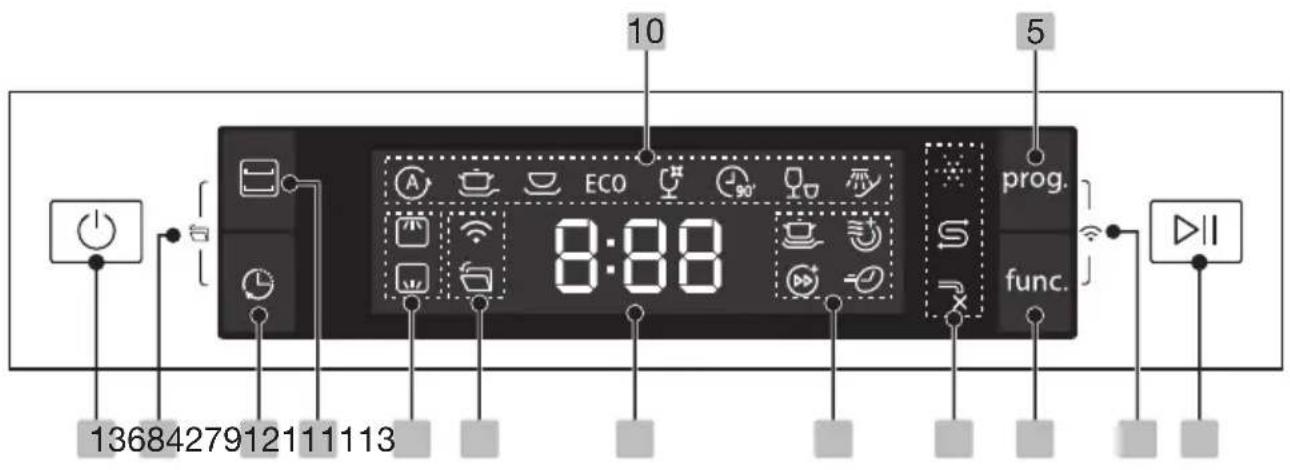
Control panel
| Operation (push buttons) | ||
| 1 | On/Off Press this button to turn on your dishwasher, the screen lights up. | |
| 2 | Alt Press this button for specifically cleaning the load in the selected basket. You do not have to wait until the whole dishwasher is loaded completely. The corresponding indicator will be lit. | |
| 3 | Delayed start | Press this button to set a delayed start (up to 24 hours). One press on this button delays the start by one hour. |
| 4 | Auto open | The dishwasher door opens automatically at the end of the program, which improves the drying results. Default this function is active. The corresponding indicator will be lit. Press the Alt button and Delayed start button to cancel this function. |
| 5 | Program | Select the appropriate washing program. The corresponding indicator will be lit. |
| 6 | Function | Press this button to select a function. The corresponding indicator will be lit. |
| 7 | Wifi | Press the Program button and Function button at the same time for 3 seconds to switch on the WiFi. The corresponding indicator will flash slowly (the app is connecting). The corresponding indicator lights up when the connection is established. |
| 8 | Start/Pause | Press this button to start a selected program or to pause a program. Press and hold this button for 3 seconds to cancel a selected program. |
| Display | ||
| 9 | 8:88 | To show the remaining time, delayed start time, error codes etc. |
| Indicators | |||
| 10 Program indicator | A Auto An auto sensing wash for lightly, normally or heavily soiled crockery, with or without dried-on food. A sensor detects how dirty the water in the machine is and automatically adjusts the program temperature and duration. | ||
| Intensive Heavily soiled items include pots and pans. With dried on food. | |||
| Universal For normally soiled loads, such as pots, plates, glasses and lightly soiled pans. | |||
| ECO ECO This is the standard program suitable for normally soiled loads, such as pots, plates, glasses and lightly soiled pans. It is the most efficient program in terms of its combined energy and water consumption for normally soiled loads. | |||
| Glass For lightly soiled crockery and glass. | |||
| 90 Min For normally soiled loads that need a quick wash. | |||
| Rapid A shorter wash for lightly soiled loads that do not need drying. | |||
| Soak To rinse dishes that you plan to wash later that day. | |||
| 11 Function indicator | WiFi When this indicator is lit steadily, it means that the appliance is connected to the WiFi network and can be controlled remotely using a smartphone. When this indicator blinks, the appliance is ready to connect to the 2.4 GHz WiFi network. See instructions in the app. | ||
| Auto open The dishwasher door opens automatically at the end of the program, which improves the drying results. | |||
| Extra cleaning To wash very dirty, hard to clean dishes. It can only be used with Intensive, Universal, ECO, Glass and 90 min. | |||
| Turbo Speed+ Reduce the program time by up to 50%. It can only be used with Intensive, Universal, ECO, Glass and 90 Min. | |||
| Extra drying To dry dishes more completely. It can only be used with Intensive, Universal, ECO, Glass and 90 Min. | |||
| Express Reduce the program time by 10-20 minutes. It can only be used with Intensive, Universal, ECO, Glass and 90 Min. | |||
| Indicators | |||
| 12 Warning indicator | Rinse aid If this indicator is lit, it means the dishwasher is low on dishwasher rinse aid and requires a refill. | ||
| S | Salt If this indicator is lit, it means the dishwasher is low on dishwasher salt and needs to be refilled. | ||
| × | Water faucet If this indicator is lit, it means the water faucet is closed. | ||
| 13 Alt indicator | Upper When you select Upper, only the dishes in the upper basket will be washed. The spray system of the lower basket will not operate. | ||
| Lower When you select Lower, only the dishes in the lower basket will be washed. The spray system of the upper basket will not operate. | |||
Water softener
- The hardness of the water varies from place to place. If hard water is used in the dishwasher, deposits will form on the dishes and utensils.
- The appliance is equipped with a special softener that uses a salt container specifically designed to eliminate lime and minerals from the water.
Water hardness table
Adjust the salt consumption according to the table below:
| Water hardness | Setting in display | Regeneration occurs every X program sequence* | Salt consumption (grams/cycle) | ||
| °Clarke °dH mmol/l | |||||
| 0 - 6 0 - | 5 0 - 0.94 | H1 No regeneration 0 | |||
| 7 - 14 6 | - 11 1.0 - | 2.0 H2 10 9 | |||
| 15 - 21 12 | - 17 2 | 1 - 3.0 H3 | 5 12 | ||
| 22 - 28 18 | - 22 3 | 1 - 4.0 H4 | 3 20 | ||
| 29 - 42 23 | - 34 4 | 1 - 6.0 H5 | 2 30 | ||
| 43 - 69 35 | - 55 6 | 1 - 9.8 H6 | 1 60 | ||
The factory setting: H3
- Every cycle with a regeneration operation consumes additional 2.0 litres of water, the energy consumption increases by 0.02kWh and the program extents by 4 minutes.
Adjusting salt consumption
The dishwasher is designed to allow for adjustment in the amount of salt consumed based on the hardness of the water used. This is intended to optimise and customise the level of salt consumption. Please follow the steps below for adjustment in salt consumption.
- Switch on the appliance;
- Press the Program button for more than 5 seconds to open the water softener settings mode within 60 seconds after the appliance was switched on;
- Press the Program button to select the correct setting according to your local environment. The settings will change in the following sequence: H1->H2->H3->H4->H5->H6;
- Press the On/Off button to confirm the setting and to end the setting mode.
Adding salt
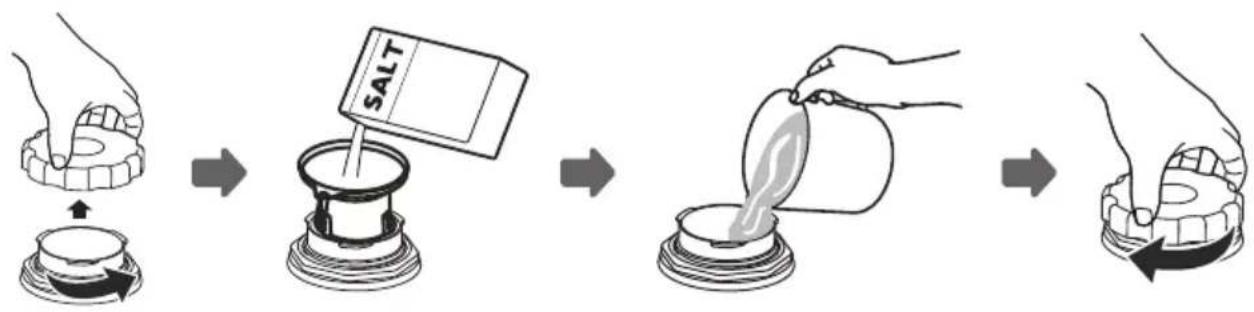
- Remove the lower basket and unscrew the reservoir cap.
- Place the end of the funnel (supplied) into the container
- Fill the salt container to its maximum limit with dishwasher salt (about 1.5kg ). It is normal for a small amount of water to come out of the salt container.
- After filling the container, put back the cap (tighten firmly).
- The salt warning light will go off after the salt container has been filled with salt.
- Immediately after filling the salt into the salt container, a washing program should be started (we suggest to use a short program). Otherwise the filter system, pump or other important parts of the machine may be damaged by salty water. This is out of warranty.

Note! The salt container must only be refilled when the salt warning light in the control panel comes on. Depending on how well the salt dissolves, the salt warning light may still be on even though the salt container is filled. If salt has spilled, run a soak or quick program to remove it.
Preparing and loading dishes
- Consider buying utensils which are identified as dishwasher-proof.
- For particular items, select a program with the lowest possible temperature.
- To prevent damage, do not take glass and cutlery out of the dishwasher immediately after the program has ended.
For washing the following cutlery/dishes are not suitable:
Cutlery with wooden, horn china or mother-of-pearl handles
Plastic items that are not heat resistant
Older cutlery with glued parts that are not temperature resistant
Bonded cutlery items or dishes
Pewter or cooper items
Crystal glass
Steel items subject to rusting
Wooden platters
Items made from synthetic fibres
For washing the following cutlery/dishes are of limited suitability:
Some types of glasses can become dull after a large number of washes
Silver and aluminum parts have a tendency to discolour during washing
Glazed patterns may fade if machine washed frequently
Recommendations for loading the dishwasher
Scrape off any large amounts of leftover food. Soften remnants of burnt food in pans. It is not necessary to rinse the dishes under running water. For best performance of the dishwasher, follow these loading guidelines. Features and appearance of baskets and cutlery baskets may vary, depending on your model.
- Place objects in the dishwasher in the following way:
Items such as cups, glasses, pots/pans, etc. are faced downwards.
Curved items, or ones with recesses, should be loaded aslant so that water can run off.
All utensils are stacked securely and cannot tip over.
All utensils are placed in the way that the spray arms can rotate freely during washing.
Load hollow items such as cups, glasses, pans etc. with the opening facing downwards so that water cannot collect in the container or a deep base.
Dishes and items of cutlery must not lie inside one another, or cover each other.
To avoid damage, glasses should not touch one another.
The upper basket is designed to hold more delicate and lighter dishware such as glasses, coffee and tea cups.
Long bladed knives stored in an upright position are a potential hazard!
Long and / or sharp items of cutlery such as carving knives must be positioned horizontally in the upper basket.
Please do not overload your dishwasher. This is important for good results and for reasonable consumption of energy.

Note: Very small items should not be washed in the dishwasher as they could easily fall out of the basket.
Loading the upper basket
The upper basket is designed to hold more delicate and lighter dishware such as glasses, coffee and tea cups and saucers, as well as plates, small bowls and shallow pans (as long as they are not too dirty). Position the dishes and cookware so that they will not get moved by the spray of water.
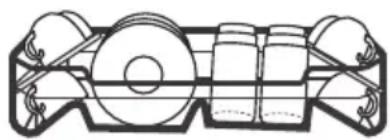
Loading the lower basket
We suggest that you place large items and the most difficult to clean items into the lower basket: such as pots, pans, lids, serving dishes and bowls. It is preferable to place serving dishes and lids on the side of the racks in order to avoid blocking the rotation of the top spray arm. The maximum diameter advised for plates in front of the detergent dispenser is of 19 cm, this not to hamper the opening of it.
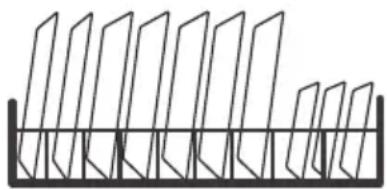
Loading the cutlery basket/cutlery rack
Cutlery should be placed separately from each other in the appropriate positions, and do make sure the utensils do not nest together, this may cause bad performance.

Warning! Do not let any item extend through the bottom.
Removing the dishes
To prevent water dripping from the upper basket into the lower basket, we recommend that you empty the lower basket first, followed by the upper basket.

Warning! Items will be hot! To prevent damage, do not take glass and cutlery out of the dishwasher for around 15 minutes after the program has ended.
Adjusting the height of the upper basket type 1 (depending on the model)
The height of the upper basket can be easily adjusted to accommodate taller dishes in either the upper or lower basket. To adjust the height of the upper basket, follow these steps:
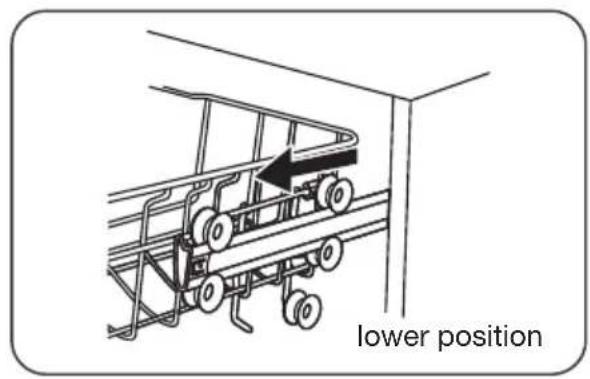
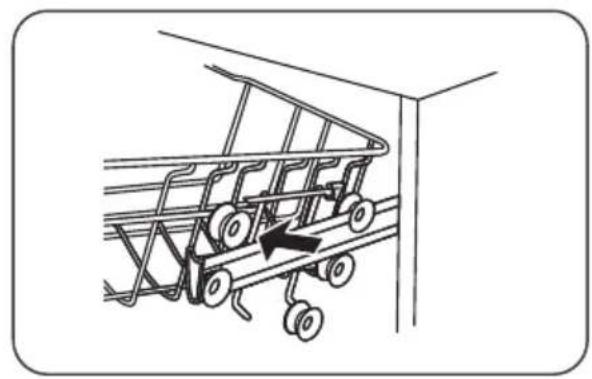
- Pull out the upper basket.
- Remove the upper basket.
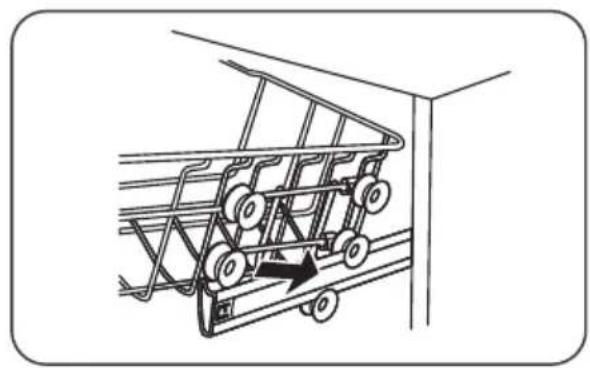
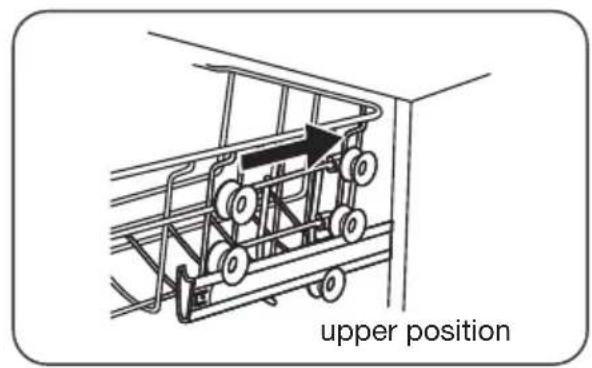
- Re-attach the upper basket to the upper or lower rollers.
- Push in the upper basket.
Adjusting the height of the upper basket type 2 (depending on the model)
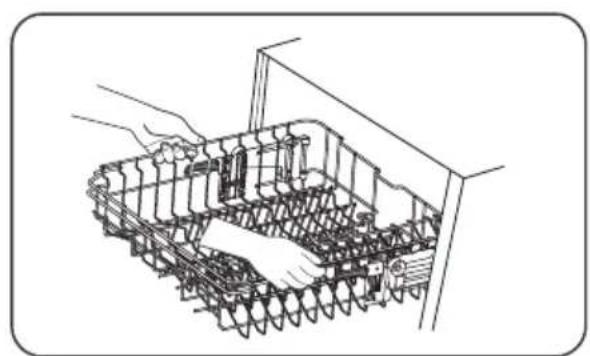
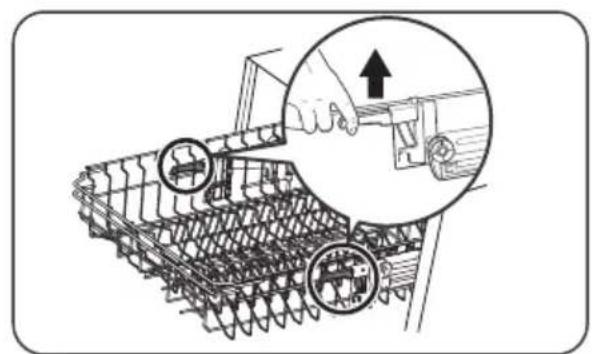
- To raise the basket to the upper position, lift the basket until both sides are at the same height. The basket will secure into place.
- To lower the basket, push down on the handle and release.
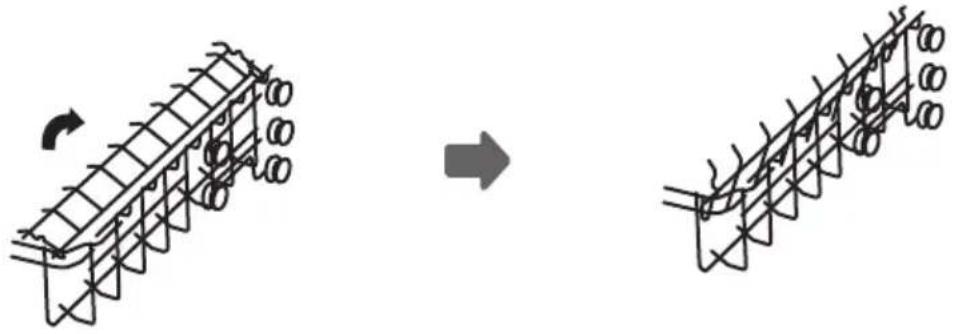
Folding back the cup shelves
To make room for taller items in the dishwasher basket, raise the cup rack upwards. You can then lean the tall glasses against it. You can also remove it when it is not required for use.
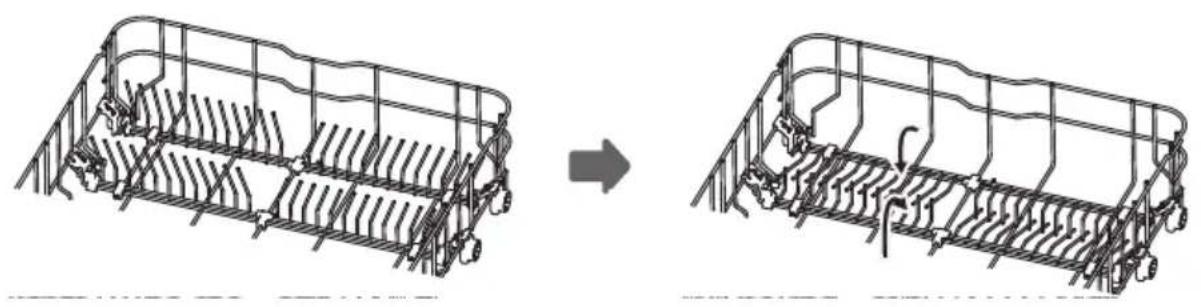
Folding back the rack shelves
The rack shelves can be lowered to make more room for large items.
fold backwardsraise upwards
Function of the rinse aid and dishwasher detergent
The rinse aid is released during the final rinse to prevent water from forming droplets on your dishes, which can leave spots and streaks. It also improves drying by allowing water to roll off the dishes. Your dishwasher is designed to use liquid rinse aids.

Warning! Only use branded rinse aid for dishwasher. Never fill the rinse aid dispenser with any other substances (e.g. Dishwasher cleaning agent, liquid detergent). This would damage the appliance.
When to refill the rinse aid dispenser
The regularity of the dispenser needing to be refilled depends on how often dishes are washed and the rinse aid setting used.
- The Low Rinse Aid indicator ( ) will be lit when more rinse aid is needed.
- Do not overfill the rinse aid dispenser.
Function of the dishwasher detergent
The chemical ingredients that compose the detergent are necessary to remove, crush and dispense all dirt out of the dishwasher. Most of the commercial quality detergents are suitable for this purpose.

Warning! Proper use of the dishwasher detergent
- Use only detergent specifically made for dishwashers use.
- Keep your dishwasher detergent fresh and dry.
- Don't put powdered detergent into the dispenser until you are ready to wash dishes.
- Dishwasher detergent is corrosive! Keep dishwasher detergent out of the reach of children.
Filling the rinse aid reservoir
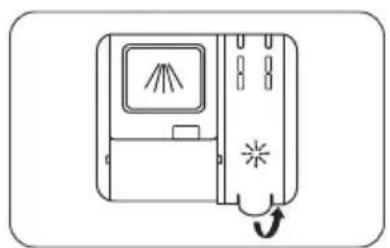
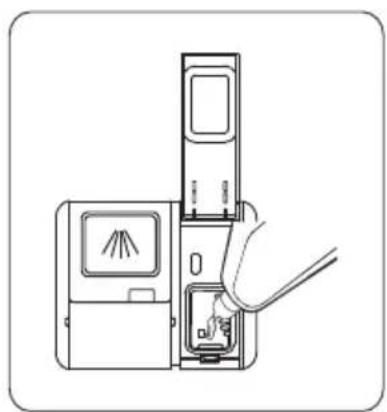
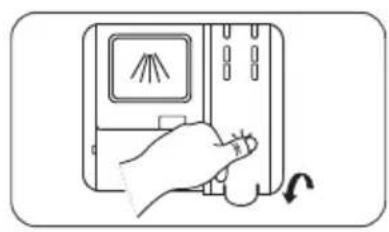
- Open the reservoir cap.
- Carefully pour in the rinse-aid into its dispenser, whilst avoiding it to overflow.
- Close the reservoir cap.

Note: Clean up any spilled rinse aid with an absorbent cloth to avoid excessive foaming during the next wash.
Adjusting the rinse aid reservoir
To achieve a better drying performance with limited rinse aid, the dishwasher is designed to adjust the consumption by the user. If the dishes are not drying properly or are spotted, select a higher setting until your dishes are spot-free. Select a lower setting if there are sticky whitish stains on your dishes or a bluish film on glassware or knife blades.
- Switch on the appliance.
- Within 60 seconds after step 1, press and hold the Program button for more than 5 seconds.
- Press the Delay button to enter the setting mode. The rinse aid indicator blinks.
- Press the Program button to select the proper setting according to your using habits. The settings will change in the following sequence: D1->D2->D3->D4->D5->D1. The factory setting is D3.
- Press the On/Off button to confirm the setting and to end the setting mode.
| Setting Amount of rinse aid (ml) | |
| D1 1.2 | |
| D2 2.4 | |
| D3 3.6 | |
| D4 4.8 | |
| D5 6.0 | |
Filling the detergent dispenser
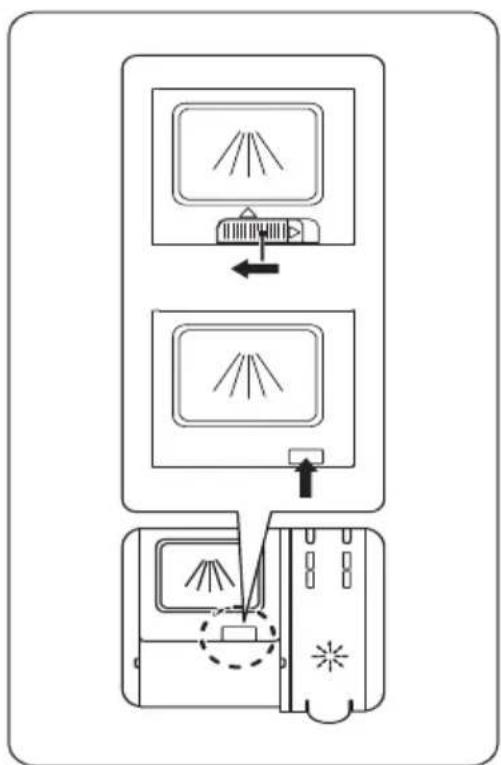
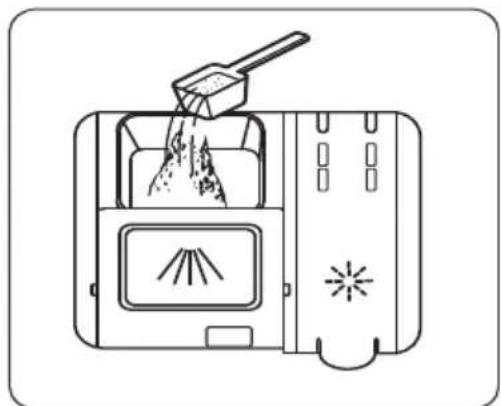
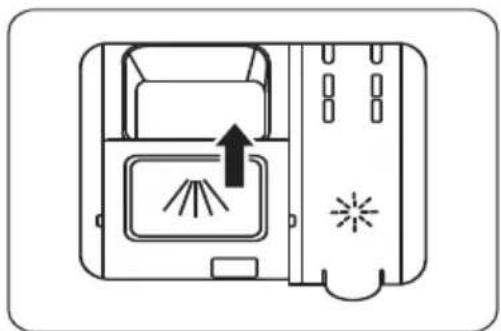
- Open the flap (slide or press, according to the actual situation).
- Add detergent into the cavity for the main wash cycle.
- Close the flap by sliding it to the front and then pressing it down.

Note: Be aware that depending on the soiling of water, setting may be different. Please observe the manufacturer's recommendations on the detergent packaging.
Wash cycle table
The table shows information about the programs. Consumption values and program duration are only indicative except for the ECO program.
| Program Steps of the wash cycle | Detergent pre wash/ main wash | Running time (min) | Energy (kWh) | Water (I) | Rinse aid | |
| A Auto | Pre-wash (45°C) Auto wash (55~65°C) Rinse Rinse (50~55°C) Drying | 4/18g (1 or 2 pieces) | 85-150 0.850- | 1.550 | 8.5-18.0 | Yes |
| Intensive | Pre-wash (50°C) Wash (65°C) Rinse Rinse Rinse (60°C) Drying | 4/18g (1 or 2 pieces) | 205 1.500 16.6 | Yes | ||
| Universal | Pre-wash (45°C) Wash (55°C) Rinse Rinse (55°C) Drying | 4/18g (1 or 2 pieces) | 175 0.980 13.6 | Yes | ||
| ECO ECO(1) | Pre-wash Wash (50°C) Rinse (50°C) Rinse (50°C) Drying | 4/18g (1 or 2 pieces) | 198 0.747 9.8 | Yes | ||
| Glass | Pre-wash Wash (50°C) Rinse (50°C) Rinse (50°C) Drying | 4/18g (1 or 2 pieces) | 120 0.950 13.5 | Yes | ||
| 90' 90 Min | Wash (60°C) Rinse Rinse (50°C) Drying | 22g (1 piece) | 90 1.180 12.5 | Yes | ||
| Rapid | Wash (45°C) Rinse (45°C) | 12g (1 piece) | 30 0.820 11.2 | No | ||
| Soak | Prewash 15 - 4.1 | No | ||||
(1) The ECO program is suitable to clean normally soiled tableware, that for this use, it is the most efficient program in terms of its combined energy and water consumption, and it is used to assess compliance with the EU ecodesign legislation.
According to standard EN 60436.
Saving energy
- Pre-rinsing of tableware items leads to increased water and energy consumption and is not recommended.
- Washing tableware in a household dishwasher usually consumes less energy and water in the use phase than hand dishwashing when the household dishwasher is used according to the instructions.
Starting a wash cycle
- Draw out the lower and upper basket, load the dishes and push them back. It is commended to load the lower basket first, then the upper one.
- Pour in the detergent.
- Insert the plug into the socket. The power supply can be found on the "rating plate" which is located on the side of the inner dishwasher door, where also the serial number is mentioned.
Make sure that the water supply is turned on to full pressure.
- Close the door and press the on/off button to switch on the appliance.
- Choose a program, the response light will turn on.
- Press the start/pause button, the dishwasher will start its cycle.
Changing the program mid-cycle
A wash cycle can only be changed if it has been running for a short time. Otherwise the detergent may have already been released and the dishwasher may have already drained the wash water. If this is the case, the dishwasher needs to be reset and the detergent dispenser must be refilled. To reset the dishwasher, follow the instructions below:
- Press the start/pause button to pause the program.
- Press the program button for more than three seconds to set the appliance into standby state.
- You can change the program to the desired cycle setting.
- Press the start/pause button. After 10 seconds the dishwasher will start.

Forget to add a dish?
A forgotten dish can be added any time before the detergent dispenser opens. If this is the case, follow the instructions below:
- Press the start/pause button to pause the program.
- Wait for 5 seconds, then open the door.
- Add the forgotten dishes.
- Close the door.
- Press the start/pause button. After 10 seconds the dishwasher will start.


Warning! It is dangerous to open the door mid-cycle, as hot steam may scald you.
Filtering system
The filtering system in the base of the wash cabinet retains coarse debris from the washing cycle, including foreign objects such as tooth picks or shards. The collected coarse debris may cause the filters to clog. Check the condition of the filters regularly. Carefully remove foreign objects and clean the parts of the filtering system if necessary with water. Follow the steps below to clean the filters.

Note: Pictures are only for reference. The models of the filtering system and spray arms can be different.
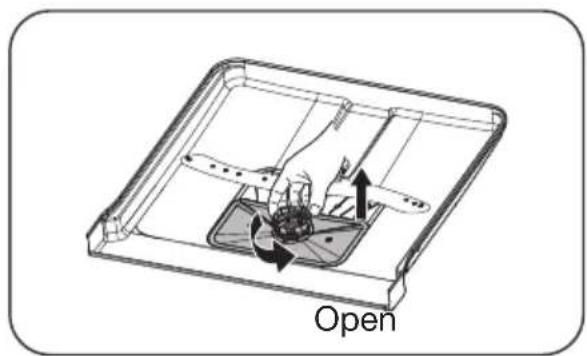
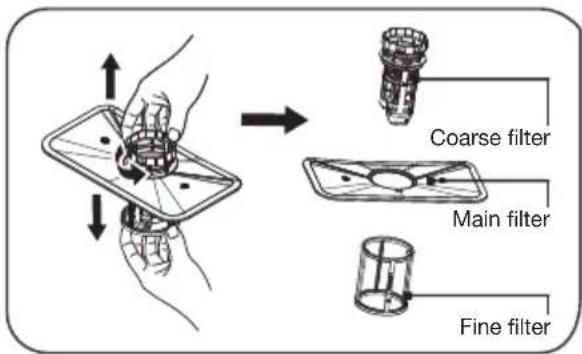
-
Hold the coarse filter and rotate it anticlockwise to unlock the filter. Lift the filter upwards and out of the dishwasher.
-
The fine filter can be pulled off the bottom of the filter assembly. The coarse filter can be detached from the main filter by gently squeezing the tabs at the top and pulling it away.
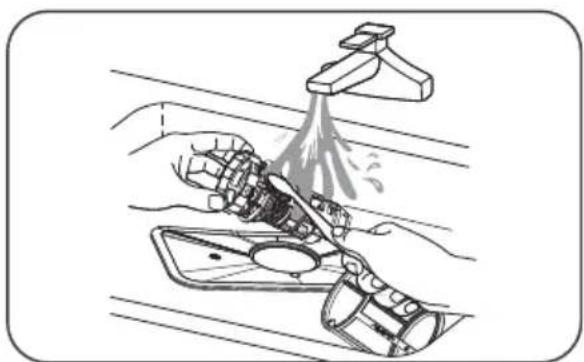
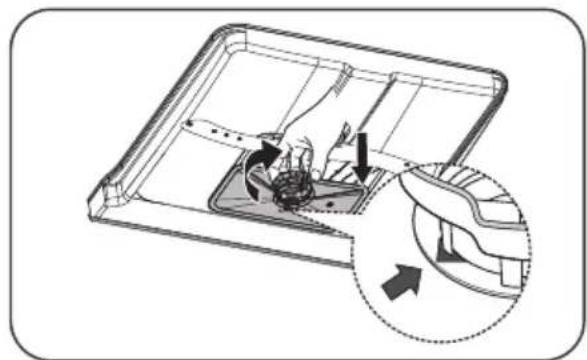
-
Larger food remnants can be cleaned by rinsing the filter under running water. For a more thorough clean, use a soft cleaning brush.
-
Reassemble the filters in the reverse order of the dissassembly, replace the filter insert, and rotate clockwise to the close arrow.

Warning! Do not over tighten the filters. Put the filters back in sequence securely, otherwise coarse debris could get into the system and cause a blockage. NEVER use the dishwasher without filters in place. Improper replacement of the filter may reduce the performance level of the appliance and damage dishes and utensils.
Cleaning the spray arms
It is necessary to clean the spray arms regularly for hard water chemicals will clog the spray arm jets and bearings. To clean the spray arms, follow the instructions below:
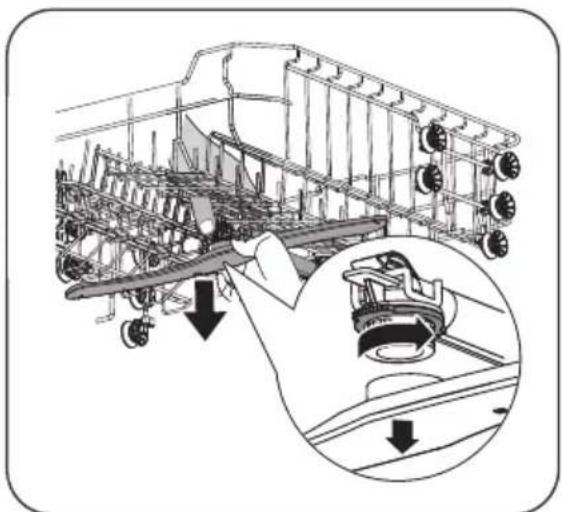
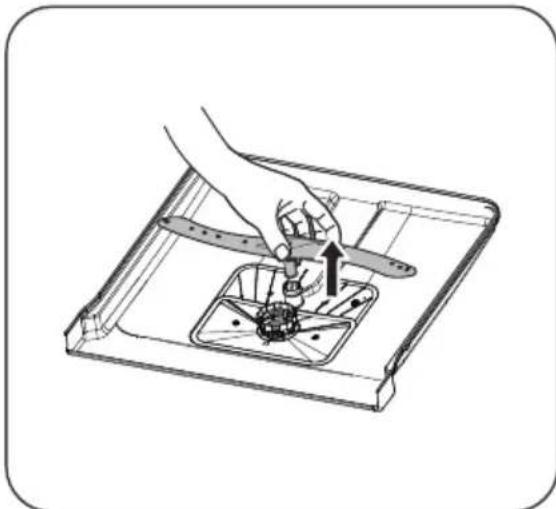
- To remove the upper spray arm, hold the nut, rotate the arm clockwise to remove it.
- To remove the lower spray arm, pull out the spray arm upward.
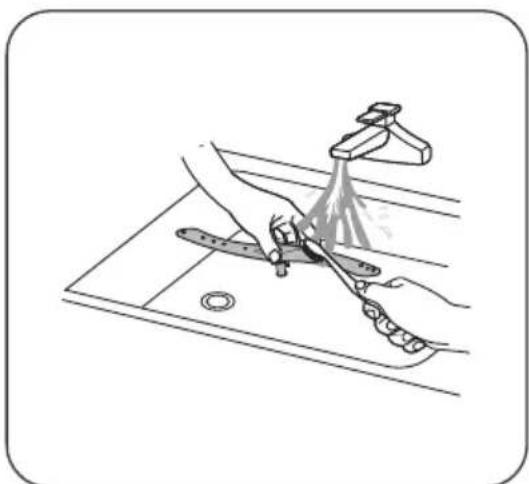
- Wash the arms in soapy and warm water and use a soft brush to clean the jets. Replace them after rinsing them thoroughly.
Caring for the dishwasher
Frost precaution
Please take frost protection measures on the dishwasher in winter. Every time after a washing cycle, please operate as follows:
- Cut off the electrical power to the dishwasher at the supply source.
- Turn off the water supply and disconnect the water inlet pipe from the water valve.
- Drain the water from the inlet pipe and water valve (use a pan to gather the water).
- Reconnect the water inlet pipe to the water valve.
- Remove the filter at the bottom of the dishwasher and use a sponge to soak up water in the sump.
After every wash
- After every wash, turn off the water supply to the appliance and leave the door slightly open so that moisture and odours are not trapped inside.
Remove the plug
- Before cleaning or performing maintenance, always remove the plug from the socket.
No solvents or abrasive cleaning
- To clean the exterior and rubber parts of the dishwasher, do not use solvents or abrasive cleaning products. Only use a cloth with warm soapy water. To remove spots or stains from the surface of the interior, use a cloth dampened with water an a little vinegar, or a cleaning product made specifically for dishwashers.
When not in use for a longtime
- It is recommend that you run a wash cycle with the dishwasher empty and then remove the plug from the socket, turn off the water supply and leave the door of the appliance slightly open. This will help the door seals to last longer and prevent odours from forming within the appliance.
Moving the appliance
- If the appliance must be moved, try to keep it in the vertical position. If absolutely necessary, it can be positioned on its back.
Cleaning the door
- Clean the edge of the door, including the sealing rubber, with a soft, damp cloth.
- Take care to ensure that water does not enter the door locking mechanism or electrical components.
- Spray-type cleaning products should not be used, nor aggressive cleaning products such as scourers. These cleaning products can damage the finish.
What should I do, if...
If the appliance is not functioning well, this does not always mean that it is faulty. Try to resolve the fault yourself first. If the recommendations below do not solve your problem, telephone our service department.

Note!
Disconnect the appliance from the power supply before beginning repairs. It is preferable if you remove the plug from the socket.
Error table
| Problem Potential causes Solution | ||
| The dishwasher is not working. | Fuse is faulty or the earthing switch has been activated. | Replace the fuse or reset the isolating switch. Remove other appliances that are connected to the same group. |
| The power supply is not switched on. | Make sure that the dishwasher is switched on and the door closed. Make sure that the plug is correctly inserted into the socket. | |
| The water pressure is too low. | Check whether the dishwasher is correctly connected to the water mains and that the tap is open. | |
| The door of the dishwasher is not closed properly. | Make sure the door is closed properly. | |
| The drainage pump does not shut off. | The water is running over. The system is designed so that it can automatically detect overflowing water. In that instance, the appliance shuts off the circulation pump and switches on the drainage pump. | |
| Problems with setting up the connection or other connection problems. | Various options depending on the situation. | Look at etna.nl/connected. |
| Noise. Some noises are | normal. Noise of rotating pump/washing noises; the detergent compartment opening. | |
| Cutlery is rattling in cutlery basket or something small has fallen out of the basket. | Ensure that everything is loaded securely in the dishwasher. | |
| The motor makes an unusual noise. | The pump is blocked. Contact an installer. | |
| A spray arm touches an item. | Pause the program and re-arrange the items so the spray arm is not blocked when rotating. | |
| Problem Potential causes | Solution | |
| Contamination of the tub. | Poor quality detergent. Only use detergent suitable for dishwashers to prevent contamination. | |
| Blocked filters. Open the door and clean the filters. Run the pre-wash cycle. | ||
| Rinse agent has been spilled. Always wipe up spilled rinse agent immediately. | ||
| Dishes are not dry. The | inse agent reservoir is empty. | Ensure that the rinse agent reservoir is filled. |
| Improper loading. Load the dishwasher as suggested in the manual. | ||
| The dishwasher is unloaded too soon. | Do not unload your dishwasher immediately after washing. Open the door slightly so the steam can come out. Wait for the inside temperature to be safe. Unload the lower basket first. | |
| Incorrect cycle. A short program with low temperature can have worse washing and drying results compared to a longer program with a higher temperature. Select another wash cycle. | ||
| Dishes and flat objects are not clean. | Incorrect cycle. Select a higher cycle. | |
| Baskets are incorrectly loaded. Make sure that the detergent compartment and spray arms are not obstructed by large dishes/pans. | ||
| The filter system is not clean or is not correctly fitted in the base of wash cabinet. This may cause the spray arms to get blocked. | Clean and/or fit the filter combination correctly. Clean the spray arms. | |
| Spotting and scaling on glasses and flat dishes. | Extremely hard water. Incoming water temperature is low. The dishwasher is overloaded. Baskets are incorrectly loaded. Old or damp detergent. Rinse agent reservoir is empty. Incorrect detergent dosage. | To remove spotting from glass objects: Remove all metal objects from the dishwasher. Use the prescribed quantity of detergent. Select the longest cycle. Allow the dishwasher to run for approximately 18 to 22 minutes. It should by then have reached the main wash cycle. Open the door carefully and pour 2 cups of white vinegar into the base. Close the door and allow the dishwasher to complete its cycle. If vinegar does not work: Repeat the above steps, but use a quarter cup (60 ml) of citric acid crystals in place of white vinegar. |
| Problem Potential causes Solution | ||
| Cloudy stains on the glassware. | Combination of soft water and too much detergent. | Use less detergent and choose the glass cycle, which you can use to clean glassware. |
| Yellow or brown scale on the inside of the tub. | Traces of iron in the water may cause spotting to the tub of the dishwasher. | Contact a manufacturer of water softeners for a special filter. |
| White scale on the inside of the tub. | Hard water. Increase salt consumption setting. | |
| Dishwasher detergent is left in the detergent compartment. | The detergent compartment is blocked by dishes. | Load the baskets so that the dishes no longer block the detergent compartment. Clean the upper spray arm. |
| Steam. When opening the door. This is possible at the end of the cycle. | ||
| Black or grey stains on the dishes. | Aluminium cooking utensils have scraped the dishes. | Aluminium can tarnish. |
| Water remains under the filters. | This is normal. A small amount of water around the drain on the rear of the tub base keeps the seal flexible. | |
| The dishwasher is leaking. | Rinse agent reservoir too full or rinse agent is leaking. | Take care not to overfill the rinse agent reservoir. Spilled rinse agent can lead to foam/flooding. Wipe up spilled rinse agent with a damp cloth. |
| The dishwasher is not standing level. | Adjust the dishwasher so that it is standing level. | |
| Water not pumped from the dishwasher. | Twisted or trapped drain hose. | Check the drain hose. |
| Filter clogged. Check the filter system | ||
| Kitchen sink clogged. Check the kitchen sink to make sure it is draining well. If the problem is the kitchen sink that is not draining, you may need a plumber rather than a serviceman for dishwashers. | ||
| Error code E1 Water intake time is too long. Faucets is not opened, or water intake is restricted, or water pressure is too low. | ||
| Error code E3 Not reaching required temperature. | Malfunction of heating element. | |
| Error code E4 Overflow. Some element of dishwasher leaks. | ||
| Error code E8 Failure of orientation of distributary valve. | Open circuit or break of distributary valve. | |
| Error code Ec Washing control system fail. PCB or motor fail. | ||
| Error code Ed Failure of communication between main PCB with display pcb. | An open circuit or break in wiring for the communication. | |

Should the appliance become overfilled or exhibit excessive leaking, shut off the inlet tap and alert the service department. If all indicators are flashing simultaneously: switch off the dishwasher immediately, shut off the inlet tap and alert the service department.

Self-repair or non-professional repair may cause serious risks to the safety of the user of the appliance and impact warranty.

If there is an error code that cannot be solved, telephone our service department.
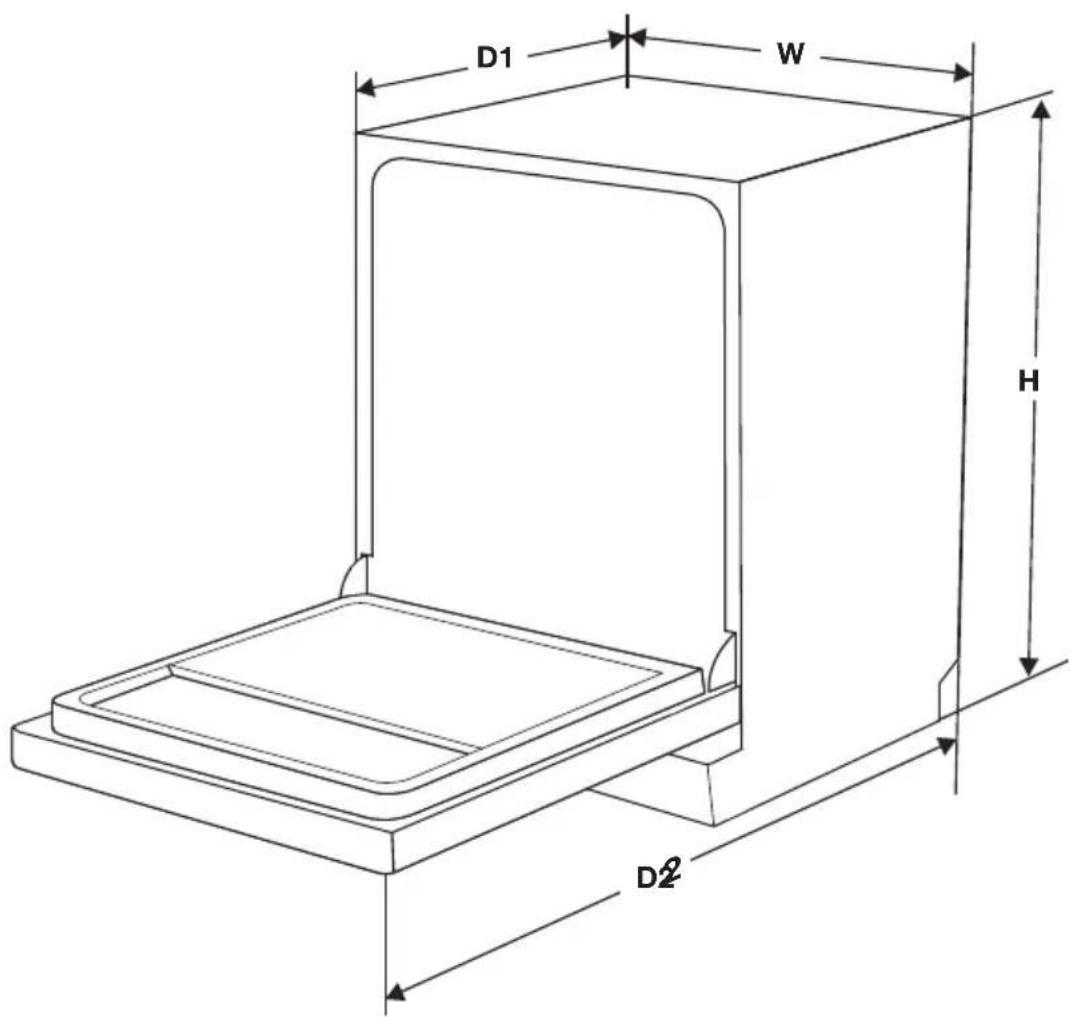
| Height (H) 845 mm | |
| Width (W) 598 mm | |
| Depth (D1) 610 mm (with the door closed) | |
| Depth (D2) 1175 mm (with the door opened 90°) |
Link to the EU EPREL database
The QR code on the energy label supplied with the appliance provides a web link to the registration of this appliance in the EU EPREL database. Keep the energy label for reference together with the user manual and all other documents provided with this appliance.
It is possible to find information related to the performance of the product in the EU EPREL database using the link https://eprel.ec.europa.eu and the model name and product number that you can find on the rating plate of the appliance. Refer to the chapter "Product description".
For more detailed information about the energy label, visit www.theenergylabel.eu.
Disposal
Disposing of the packaging and appliance
Sustainable materials were used in the manufacture of this appliance. At the end of its life cycle, this appliance should be disposed of in a responsible manner. The government can provide you with information in this regard.
The packaging for the appliance is recyclable. The following may be used:
cardboard;
polyethylene film (PE);
CFC-free polystyrene (PS hard foam).
The materials should be disposed of in a responsible manner and in accordance with government regulations.
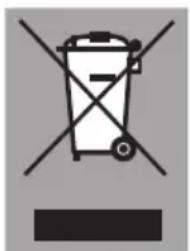
The product bears the symbol of a crossed out waste bin to draw attention to the obligation regarding separate processing of electrical household appliances. This means that the appliance cannot be added to your normal household waste at the end of its lifecycle. The appliance must be taken to a special municipal waste collection centre, or to a sales outlet that offers this service.

Separate processing of household appliances prevents the potentially negative consequences for the environment and health that can arise as a result of inadequate processing. It ensures that the materials which the appliance is composed of can be reclaimed, allowing for considerable savings to be made in terms of energy and materials.
C
Note! The packaging material may be hazardous for children.
Declaration of conformity
We hereby declare that our products satisfy the applicable European directives, orders and regulations