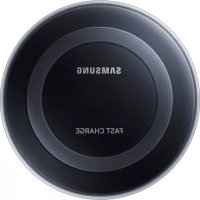
EPPN920 - Cellphone SAMSUNG - Free user manual and instructions
Find the device manual for free EPPN920 SAMSUNG in PDF.



| Product Type | Wireless Charging Station |
| Brand | Samsung |
| Model | EPPN920 |
| Compatibility | WPC certified devices |
| Required Power | Samsung approved charger (5 V/2 A, 5.3 V/2 A or 9 V/1.67 A) |
| Main Functions | Standard and fast wireless charging |
| Indicator Light | Blue (charging), green (fully charged), orange (low power), blue flashing (error) |
| Ventilation | Internal fan active during fast charging |
| Safety | Use only Samsung approved accessories; do not obstruct ventilation areas; do not place metal or magnetic objects between the device and the station |
| Maintenance and Cleaning | Unplug the charger when not in use; clean with a soft, dry cloth |
| Warranty | Damage caused by unapproved accessories is not covered |
Frequently Asked Questions - EPPN920 SAMSUNG
User questions about EPPN920 SAMSUNG
0 question about this device. Answer the ones you know or ask your own.
Ask a new question about this device
Download the instructions for your Cellphone in PDF format for free! Find your manual EPPN920 - SAMSUNG and take your electronic device back in hand. On this page are published all the documents necessary for the use of your device. EPPN920 by SAMSUNG.
USER MANUAL EPPN920 SAMSUNG
Please read this manual before using the device to ensure safe and proper use.
- Images may differ in appearance from the actual product. Content is subject to change without prior notice.
Instructional icons

Warning: situations that could cause injury to yourself or others

Caution: situations that could cause damage to your device or other equipment

Notice: notes, usage tips, or additional information
Getting started
Package contents
Check the product box for the following items:
- Wireless charger
Quick start guide

- Wireless charging covers and chargers are sold separately.
- The items supplied with the device and any available accessories may vary depending on the region or service provider.
- The supplied items are designed only for this device and may not be compatible with other devices.
- Appearances and specifications are subject to change without prior notice.
- You can purchase additional accessories from your local Samsung retailer. Make sure they are compatible with the device before purchase.
- Use only Samsung-approved accessories. Using unapproved accessories may cause the performance problems and malfunctions that are not covered by the warranty.
- Availability of all accessories is subject to change depending entirely on manufacturing companies. For more information about available accessories, refer to the Samsung website.
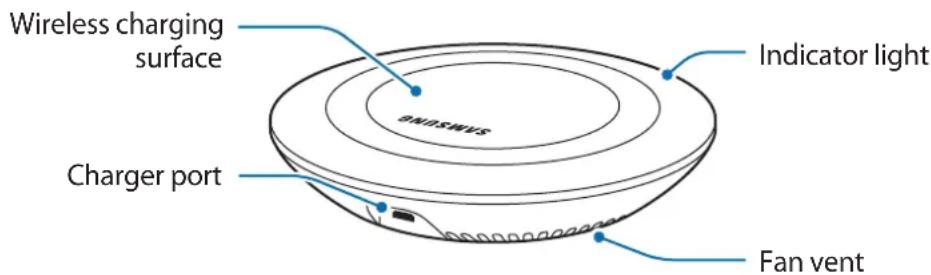
Device layout
Using the wireless charger
Charging your mobile device
Wireless charging
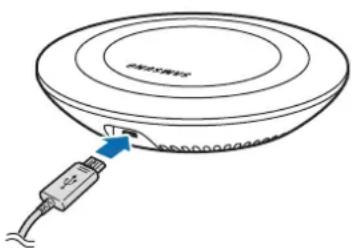
1 Connect a charger to the wireless charger.
When the charger is correctly connected to the wireless charger, the indicator light flashes blue, green, and cyan, and then turns off.


Use only Samsung-approved chargers (5 V/2 A, 5.3 V/2 A, and 9 V/1.67 A).
Unauthorised chargers may cause damage or the wireless charger may malfunction.
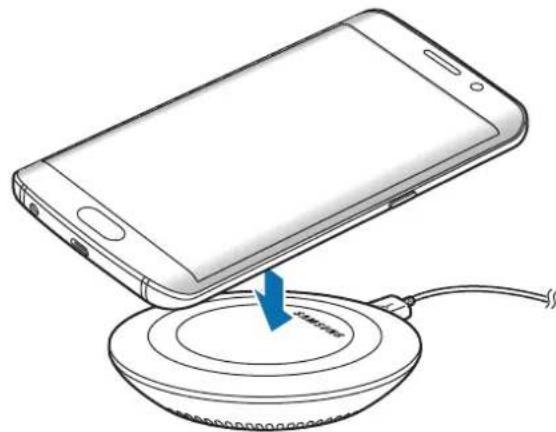
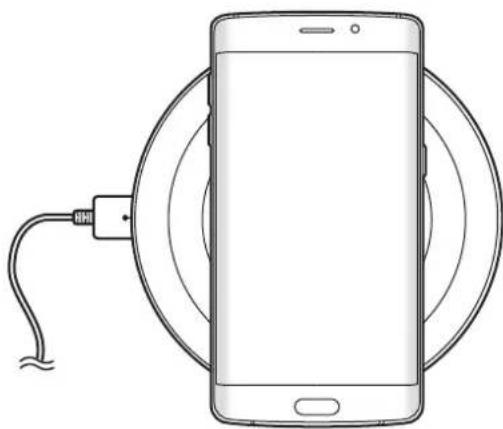
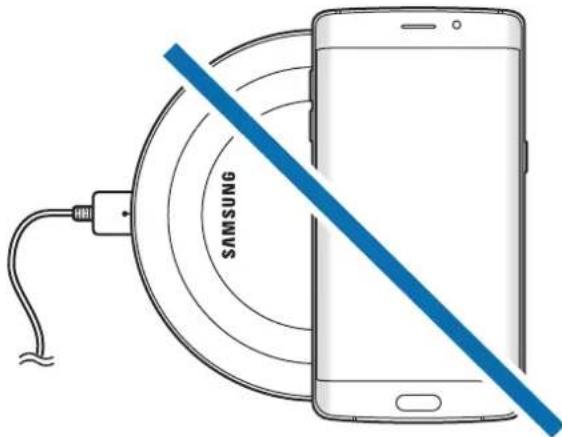
2 Place a supported mobile device in the centre of the charging surface.
Check the charging icon displayed on the mobile device's screen for the charging status.
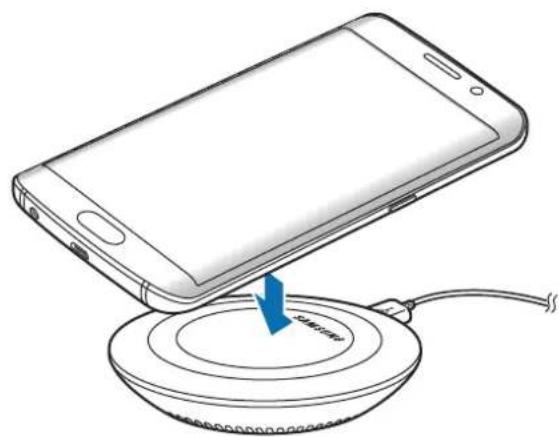
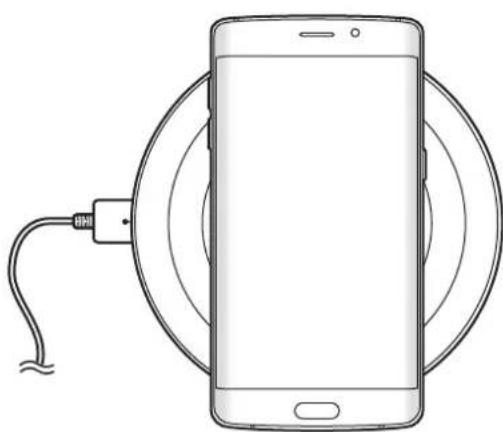
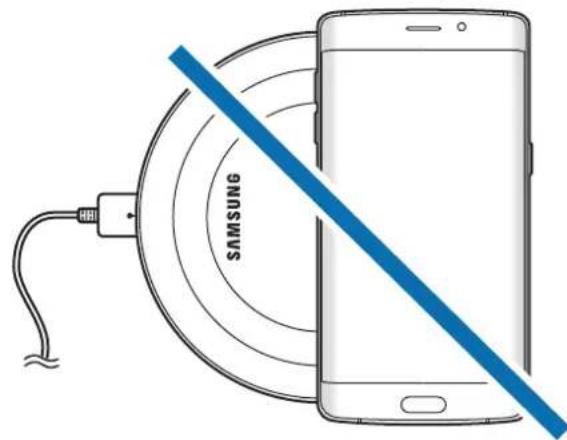

To charge a mobile device that does not have a built-in wireless charging coil, attach a wireless charging cover to the mobile device. Then, place the mobile device on the wireless charger.

- Do not place the wireless charging cover solely on the wireless charger. Doing so may overheat the wireless charger and cause a fire. It may also result in serious burn or device malfunction.
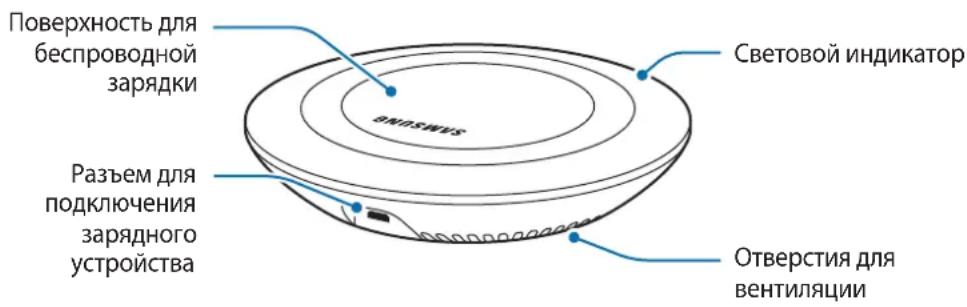
- Do not cover or block the wireless charger's fan vent.
3 When the mobile device is fully charged, remove it from the wireless charger.

Do not place foreign materials, such as metal objects, magnets, and magnetic stripe cards, between the mobile device and the wireless charger. The mobile device may not charge properly or may be damaged due to overheating.

- You may need to purchase a charger separately depending on the wireless charger you bought.
- When the mobile device is not placed on the charging surface properly, or depending on the location of the mobile device's wireless charging coil, your mobile device may not charge properly.
- Depending on the location of the mobile device's wireless charging coil, your mobile device may not charge properly.
- Wireless charging may not work properly if you have attached a thick case to your mobile device. If your case is thick, remove it before placing your mobile device on the wireless charger.
- If you use the wireless charger in areas with weak network signals, you may lose network reception.
- If you connect a charger to the mobile device during wireless charging, the wireless charging feature will be unavailable.
- The wireless charger is compatible with WPC certified devices.
- To save energy, unplug the charger when not in use. The charger does not have a power switch, so you must unplug the charger from the electric socket when not in use to avoid wasting power. The charger should remain close to the electric socket and be easily accessible while charging.
- The socket-outlet shall be installed near the equipment and shall be easily accessible.
Fast wireless charging
The wireless charger supports fast wireless charging. To begin fast wireless charging, place a mobile device that supports fast wireless charging on the wireless charger.

Use only Samsung-approved chargers that support fast charging (EP-TA20 series 9 V/1.67 A).

The fan inside the wireless charger operates during fast wireless charging. The fan will not operate when this feature is deactivated on your mobile device.
Activating or deactivating the fast wireless charging feature
The fast wireless charging option will be added in your mobile device's settings menu when you place it on the wireless charger for the first time.
Place the mobile device on the wireless charger. On the Home screen of the mobile device, tap Apps → Settings → Accessories, and then tap the Fast wireless charging switch to activate or deactivate it. Deactivating this feature will switch the charging mode to normal wireless charging and result in slower charging times.
Indicator light identification
The indicator light alerts you to the wireless charger's status.
| Colour Status | |
| Blue → Green → Cyan | When connected to a power outlet |
| Blue When charging | |
| Green When fully charged | |
| Cyan When charging at low power (less than 5 V/2 A) | |
| Flashing blue When not charging properly due to a general error | |
| Off | When the mobile device is removed from the wireless charger or when the wireless charger is not connected to a power outlet |

- If the indicator light does not work as described, disconnect the charger from the wireless charger and reconnect it.
- The indicator light may work differently depending on the mobile device or the wireless charging cover.
Copyright
Copyright © 2015 Samsung Electronics
This manual is protected under international copyright laws.
No part of this manual may be reproduced, distributed, translated, or transmitted in any form or by any means, electronic or mechanical, including photocopying, recording, or storing in any information storage and retrieval system, without the prior written permission of Samsung Electronics.
Trademarks
SAMSUNG and the SAMSUNG logo are registered trademarks of Samsung Electronics.
All other trademarks and copyrights are the property of their respective owners.
Copyright © 2015 Samsung Electronics
Copyright © 2015 Samsung Electronics
Ricarica velocity wireless
Copyright © 2015 Samsung Electronics
Copyright © 2015 Samsung Electronics
Copyright © 2015 Samsung Electronics
Copyright © 2015 Samsung Electronics
Copyright © 2015 Samsung Electronics
ToBa pBkoBOdCTBO e 3aUHTeHO OT MeKdyHapOHN 3aKOHN 3a ABTOpCKn PpaBa.
HnkOaCT O pBkoBOcTBOTO He MoKe da 6bDe Bb3POn3BexJaHa, pa3nPoCTpaHraHa, npeBeXdaHa nn npexBbPrlHa NOD KaKBaTO I da e oopMa nn NO KaKbBTO I da e NaHH, eJeKTPOHeH nn MexaHnueH, B TOBa YnCNo oToKoNipaHe, 3aInc nn CbXpaHeHne B KaKBaTO I da e CnCTema 3a HOpMaunOH No CbXpaHeHne I n3BnUaHe, 6e3 npedBapntelHoto pa3peSeHne Ha Samsung Electronics.
TbproBckn MapKn
SAMSUNG n IoroTo Ha SAMSUNG ca pernctpupaH TbproBckn MapKn Ha Samsung Electronics.
- Bcunkn npyn Tbprobcn Mapkn n aBtOpckn npaba ca co6ctBeHOCT Ha CbOTBeHTHe IM co6ctBeHnCn.
Najprije pročitajte
Pije uporabe uredaja pažljivo procitajte ovaj prisučnik kako biste osigurali sigurnu i pravilnu uporabu.
Copyright © 2015 Samsung Electronics
Ovaj je prisucnik zasticen medunarodnim zakonima o zastiti autorskih prava.
Niti jegan dio ovog prisučnika ne smije se reproducirati, distribuirati, prevoditi ili prenositi u bilokojem obliku, ni na koji način, elektronici ili mehanički, ukljućujuci fotokopiranje, snimanje ili pohranjivanje na bilo kojem mediju za pohranu informacije i sustavu dohvata podataka, bez prethodnog pisanog dopusteŋa Samsung Electronicsa.
Zašitni znakovi
SAMSUNG i SAMSUNG logotip su registrarani zašitni znakovi tvrtke Samsung Electronics.
Svi su ostali zašitni znakovi i autorska prava vlasništro svojih odgovarajućih vlasnika.
Prvo pročitajte
Pre Ngo sto pocnete da koristite uredaj procitajte ovo uputstvo kako biste bili sigurni da ga koristite na bezbedan i ispravan način.
Copyright © 2015 Samsung Electronics
Ovaj prisucnik je zasticen medunarodnim zakonima o autorskim pravima.
Nijedan deo ovog prisučnika se ne smerodukovati, distribuirati, prevoditi niti prenositi ni u Jednom obliku niti bilo kojim putem, elektronskim niti mehaničkim, što podrazumeva fotokopiranje, snimanje i skladistenje u okviru bilo kog skladišta informacija i systemdama za preuzimanje, bez prethodne dozvole kompanije Samsung Electronics u pisanom obliku.
Trgovačke marke
SAMSUNG i SAMSUNG logotip su registrovane trgovace marke kompanije Samsung Electronics.
Sve ostale trgovačke marke i autorska prava su vlasništro njihovih vlasnika.
Leia primeiro
Copyright © 2015 Samsung Electronics
Copyright © 2015 Samsung Electronics
Copyright © 2015 Samsung Electronics
Copyright © 2015 Samsung Electronics
Alternativekanduringevarkundesupportpatelefon81556480.
Opphavsrett
Copyright © 2015 Samsung Electronics
Copyright © 2015 Samsung Electronics
Identification of indicatorlys
Copyright © 2015 Samsung Electronics
| RenkDurum | |
| Mavi → Yeşil → Açık Mavi | Elektrik przyine®,®,®,®,®,®,®,®,®,®,®,®,®,®,®,®,®,®,®,®,®,®,®,®,®,®,®,®,®,®,®,®,®,®,®,®,®,®,®,®,®,®,®,®,®,®,®,®,®,®,®,®,®,®,®,®,®,®,®,®,®,®,®,®,®,®,®,®,®,®,®,®,®,®,®,®,®,®,®,®,®,®,®,®,®,®,®,®,®,®,®,®,®,®,®,®,®,®,®,®,® |
| Mavi Şarj olurken | |
| Yeşil Şarj tam doluyken | |
| Açık mavi Düşük®,®,®,®,®,®,®,®,®,®,®,®,®,®,®,®,®,®,®,®,®,®,®,®,®,®,®,®,®,®,®,®,®,®,®,®,®,®,®,®,®,®,®,®,®,®,®,®,®,®,®,®,®,®,®,®,®,®,®,®,®,®,®,®,®,®,®,®,®,®,®,®,®,®,®,®,®,®,®,®,®,®,®,®,®,®,®,®,®,®,®,®,®,®,®,®,®,®,®, ® | |
| Mavi yanıp,sonme Mavi renkte yanıp,soner | |
| Kapalı | Mobil cihaz, kablosuz Şarj cihazindan,ayrild ,(inda veya kablosuz Şarjcihazıbir,guc ,(inda b ],değilken |

Telif hakki © 2015 Samsung Electronics
jss j 10s j 10s 10s 10s 10s 10s 10s
.
Copyright © 2015 Samsung Electronics
.
Samsung Electronics j 1j 0j 0j 0j 0j 0j 0j 0j 0j 0j 0j 0j 0j 0j 0j 0j 0j 0j 0j 0j 0j 0j 0j 0j 0j 0j 0j 0j
J 14 j j j j j j j j j j j j j j j j j j
s
Samsung Electronics
BheuHn BvD yCTpoiCTBa
ИспOLSванne
6ecnpobODHOro 3apJdHOrO
yctpoiCTBa
3apяdka mo6nIbHoro yCTpoiCTBa
Бесправовая заюка
1 IopKJIIOHTe 3apAINHe yCTpoiCTBO K 6ecnpoBODHomy 3apAINOMy yCTpoiCTBy.
Iocne npabnHoro nokKIOueHna 3apdHoro yctpoNCTBa K 6ecnpoBOHOmy 3apdHOMy yctpoNCTBy CBeTOBOn INHdkaTOp 3AMrAeT CINHM, 3eNEhBM I rOly6bIM, a 3aTeM BblKIOUHTcra.

IcnoJIb3yIte TOnbKO 3apAaHbIe yCTpoiCTBa, Odo6peHHbIe KOMpaHnei Samsung (5 B/2 A, 5,3 B/2 A n 9 B/1,67 A). IcnoJIb3ObaHnE HeABTOpU3nPoBaHHbIX 3apAaHbIX yCTPOICTB MOxET Bbl3BaTb IOBpeXdHnE nn C6oB B pa6Ote 6ecnpoBOJHO 3apAaHoro yCTPOICTBa.
2 IIOJXitte Mo6nIbHoe yCTpOcTBO, NOdEpxBaIOUe eYHKuIO 6ecnpoBODHO 3apAKn B cHTpe IOBepxHOCTN dIa 3apAkn.
IpoBepbTe, OTo6paKaetc IHa 3KpaHe Mo6uHbHO rCTpOcTBA 3HaQOK 3apAdkn, KOTOpbl coo6aet O COCTOaHN 3apAdkn.

YTo6bI 3apAINtB MO6nIbHoe yCTpoiCTBO, He OChaUeHHoe BCTpoEHHO CNIPAbIO DJI
6ecnpoBOJHO 3apAKn, NOkLNouHTe KpbIshky IJIa 6ecnpoBOJHO 3apAkn K MO6nIbHOMy
yCTPOICTBy. 3aTeM pa3MeCTInTe MO6nIbHoe yCTpoiCTBO Ha 6ecnpoBOJHom 3apAHDOM
yCTPOICTBe.

He KlaIte KpbIshky IJy 6ecnpoBOHNo 3apAkn Ha 6ecnpoBOHOe 3apAHOe yCTPOIcTBO. 3TO MOxET BblBAtb nepepeB 6ecnpoBOHOrO 3apAHOrO yCTPOIcTBA N BO3HnKHOBeHne noXapa.KpOME TORO,3TO MOxET npUBeCTN K BO3HnKHOBeHIO OXOROB NN C6OAM B pa6Ote yCTPOIcTBA.
He hakpbBaIte n He 6nokpyTe OTBepCTnJa BeHTnlaun Ha 6ecnpoBOdHOM 3apdHOM yctpoiCTBe.
3 Iocne noJHO 3apdKn MO6nIbHoro yCTpoiCTBa OTKIOUHTe erO OT 6ecnpoBOHorO 3apdHoro yCTPOICTBa.

He nomeuTe KaKne-Jn6o NoCTOpOHnE PpeMeTbI, TaKne KaK MeaJIInueCKne OBeKeTbI, MaHHTbI N KapTbIC MaHHTHOJ NOLOCO MExy MObINbHbIM UcTPOINCTBOM N 6ecnpOBODhIM 3apAnbIM UcTPOINCTBOM. MoBInbHOe UcTPOINCTBO MoXeT He 3apXKaTbcNdoJXhbIM O6pa3OM NNMOXET NOBpeINTBcBA CNeIcSTBnE NperpeBa.

B 3aBnCmOCTn OT npNo6peTeHHoro 6ecnpoBOJHO 3apdHoro yCTpoIcTBA BO3MOxHo nOTpe6yeTcdoONHtEnbHO npNo6peCTn 3apdHoe yCTpoIcTBO.
Mo6nIbHoe yctpoiCTBO MOKeT He 3apJxatbcra DOnKHBIM O6pa3OM npn HnnpaBnHOM paCnoLoXeHnn Ha nOBepxHOCTn dJa 3apJxN uIN B 3aBNCUMOcTN OT noLoXeHn KaTyuKN dJa 6ecnpoBODHO 3apJxN Mo6nIbHoro yctpoiCTBa.
Mo6nIbHoe yctpoiCTBO MOxet 3apjKaTbC HnPaBnIbHO B 3aBNCMOCTN NOIOXeHN KaTyuKn 6ecnpoBOJHO 3apJdHO rOy cTpoiCTBa B Mo6nIbHOM yCTpoiCTBe.
- Φункцяб ecnpobodnoi 3aprakmoKeT pa6oTaB HeKOppeKTHO,ecnMo6nIbHoe yctpoICTBO HaxOHTcB B pIoTHom qexHe. Ecn qexon nIoTHbI, cHmUte erO, npexDe yem pa3MeCTNb MO6nIbHoe yCTpoIcTBO Ha 6ecnpobODHom 3aprAnHom yCTpoIcTBe.
- Пи ИспOLTьОвани 6eСпрОвODнОЗapянОуCTpoICTBa B MeCTax CO cIa6bIM CnHAnOM cETNприем OT Hee MoKet 6bITb yTeprH.
Bcnyae npoknuehen 3apndoro yctpoCTBa K MO6nbHomy yctpoCTby BO BpeM 6ecnpoBODHO 3apdKn fynKcuiy 6ecnpoBODHO 3apdKn HeodctynHa.
- BeçnpoBODHoe 3apJHoe yCTpoIcTBO COBmecTUMO C yCTpoIcTBaMn c noIePxxKo WPC.
BueJx 3Kohomn 3JeKtpo3Heprn OTKIOUaIte cTeBoe 3apdHoe yCTPOcTBO, eCNI OHO He nCnoJIb3yeTc. CTeBOe 3apdHoe yCTPOcTBO He oChauEHO nepeKIOuateJeM NITAHN, PO3Tomy erO HxHNO OTKIOUaTb OT 3JeKtpuuecko p03eTKn, UTO6bl npepBaTb Ipocecc 3ApAKn i C3KOHOMNTb 3JeKtpo3Heprn. PpN nCNoIb3OBaHmN 3apdHoe yCTPOcTBO DOJXHO IIOTHO pInIeRaTb K 3JeKtpuuecko po3eTke i 6bl TneKo DoCTynhblm.
© Samsung Electronics, 2015.
Данhoe рукововсBO 3aишениМждуновимЗakoHamOб abTOPСИХпраВax.
3a nppeaeta CBOcnpoH3BOJntb, paCnpocTpaHraTb, nepeBoNTb nIi nepeDaBaTb KaKne-Jn6o qactn DaHHoro pukOBODCTBa B IIO6o fOpMe n IIO6bIM cNoOC6OM, 3JeKTPoHbIM nIi MexaHnueCKM, BKJIouyA foTOkOIpOBaHne, 3aNcB n XpaHene B IIO6o CNCTeMe XpaHene n NOncKa INΦopMaun, 6e3 npedBaPHTbHO rncbMeHHOro pa3peSeHnKOMpAHn Samsung Electronics.
TobapHbIe 3HaKn
SAMSUNG iIorotn SAMSUNG 3apeHCTpnpOBaHHbIMN TOBapHbIMN 3HaKaMn KOMpaHn Samsung Electronics.
OctaIbHbIe aBTOpCKn IpaBa I TOBapHbIe 3HaKn ABJIOTc CO6CTBeHHOCtBIO INx BlaJeNbCeB.
Ozhannomtece nepeid noyaTkOM BnKOpncTaHn
Длгбeзпeуногут haJIeЖного KOpIcTuBaHnЯ npIcTpoEМ nepш 3a BCE yBaJxHo O3HaIOMTeCЯ 3цИ m noci6HnKoM.
3OBHIiHnI BnIyKty MoKe BiDiPI3HrTncB iD 306paXeHHa. BmCT MoKe 3MiHIOBaTncs 6e3 3aBuachoro nonepdXeHHa.
PONCHIOBAJIbHi 3HaayKn

PonepeJxHn: cTyaui, 0 MoKytb npu3Becn I do TpaBMyBaHHa6e a6o iHux oci6

Ybara: cnTuayi, iO MOxKyb npn3BecTIO NO WKOJKeHHN pnpCTPOo a6o IHwOrO 6bnHaHNN

Pnmitka: npmitkn, npa3 KOpNCTyBaHHa6o daTkoiaHopmaia
Початок роботи
Komplektaця
IpebeipTe HareBHCtby KOMnneKti Taknx KOMnoHeHTiB:
- Be3dpoTobn 3apAHN npucTpri
KopoTkn noci6nK KopncTyBaHa

Kpnikn dny 6e3dpoTOBOrO 3apJxHHe Ta 3apAHi npNCTpoI He BXoAryy KOMnneKT NOCTaHaHH.
KOMnoHeHTn, rki BXoJaTb Do KOMnIeKTy npNcTpoU, MoKyTb pi3HNTuc 3aIexHo BiD KpaIH naO onepatopa 3B'ra3ky.
KOMnoHeHTn, 1o nocTaauToBcB KOMnIeKti, po3po6JIeHi cneuaIbHo Ira zboI npIcTpoTO Ta moKyTB 6TuH HeCymicHMn 3 iHIMN npIcTpOAMn.
3OBHIHINBnIaXapAKTePncTNIKMOKyTb 3MIHOBaTnC8e33aBuachoro nonepxeHH.
-ДоаТКОВIakceCyapnMoJHa npuδbTuB MiceBOro noCTaayalbHnka Samsung.пердix npuδbaHHampekeOHaYTeC,ю BOHc cyMiCi i3 cI M npicTpoE M.
BukopncToByuTe Iiue akcecyapn, peKomeHIOBaHI KOMpaHIEO Samsung. BukOpncTaHHa HepeKomeHIOBaHnx akcecyapIB MOKe npn3BeCTn Do BUNHKHeHHra npo6Je m y po6oti Ta HecnpabHocTe, Ha kI He p03NoBcIOJxUeTbcra rapaHTi.
- Доступнисту усix akcecyapib може 3minIOBATNCSЯлжно BiД komпаи-BИрОБнкIB. Ддаткову inhopmaцю пpo дostуни akcecyapn можна Di3HaTNCЯ Habe6-caNTi Samsung.
3OBHiShiBnIaD npIcTpoI
BnKopncTaHn8 6e3dpoTOBOrO 3apYdHOrO npNcTpoU
3apjxehnmo6ilbHoro npnctroo
3 Mo6nJIbdi Kypblfbl ToJIbIFbIMeH 3apraTalFaH 6oJca, cbIMcbl3 3apraTaBbIHTaH aXbipaTbIHbI3.

MeTann HbicaHap, MarHHTep XaHe MaHNT Kolaftb6ap KapTaIap CnAKTb 6Orde 3aTTapDb3aprTaIaTbIH MoBnIbDi KypblfBi MeH cbIMCbI3 3aprTaftbIHTbIH apacbHa caImaHbI3. MoBnIbDi KypblfBi Tnicti TypDe 3aprTaIaMaybi MymKIn Hemece KbIbIN KeTyi caIdApbHaH 6y3blNybl MyMKIn.

- CatbI anbIHfAH cbIMcbI3 3aprAdTaftbIwka 6aIIaHbICTbI TaftbI da 6ip 3aprAdTaftbIwTbI catbI any kaxket 6olybIMMKIN.
MoibI Kypblfbl, 3apraTafbltbiH, 6eTKi Ka6aTbIHda dypbc opHaIacnafan Ke3de Hemece MoibI KypblfblHbI CbIMCbI3 3aprTay ywiH opayblTbH, KyiHe 6aJIaHbICTbl, TniCTI TypDe 3apraTalMaybl MymKiH.
Mo6nIbdi Kypblfbl CbIMCbI3 3apraTafblITbIH opayblbHbIH, Mo6nIbdi KypblfblaftbI KaIfacblMaHa 6aJIaHbICTbl dypbc 3apraTalMaybl MymKiH.
C3diH MO6nIbDi KypblfbiHbI3Fa KaIbIH TbIC 6ekiTirreH 6oJca, cbIMcbI3 3aprTay dypbc I Kymbic icTeMeyi MymKih. Tbc KaIbIH 6oJca, e3 Mo6nIbDi KypblfbiHbI3da CbIMcbI3 3apraTafblka caanydbIH aIbIHda, OHbI aIbIN TaCTaHbI3.
3apraTafbiXeI ciHbI TeMeH 6oHaBn XepJIepDe KOJaHbIrfaH Ke3e, XeJI KocblbIMbl aXbIPaybl MymKiH.
CbIMcbI3 3aprTay Ke3iHde 3apraTaBbITbIM MobnIbI KypblfbiFa KaIfacaHbI3, CbIMcbl3 3aprTay yHKznaCbl KOJ JeTeIMdi eMeC 6oJaBl.
CbIMcbI3 3apraTafbl WPC KyaJIkTeHdipireh KpypbIflapMeH yJnecimdi.
KyaTbI yHemDey ywiH naJaIaHaBImMaFah Ke3e 3apraTaftbIXeJIeH aXbipaTbIHbI3. 3aprTaftbITbIH Kyat KocBbIbIXoK, COHbIKTaH KyaTbI bICbpantaydbI 6OJIbIPmay yuH naJaIaHa6aFah Ke3e 3apraTaftbIXeJIeKtp po3ETka YacbIH aXbipaTyKepeK. 3aprTay Ke3iHde 3apraTaftbIXeJIeKtp po3ETka YacbIH XaKbIH XaHe OHai KOJ XeTimDi 6Olybl KepeK.
CbIMcbl3 XbIJaM 3apydTay
CbIMcbI3 3aprTaftbIcBIMcbI3 XblIaM 3aprTayfa KOnday KepeTei. CbIMcbI3 3aprTaybl
6actay ywiH, cbIMcbI3 XblIaM 3aprTayfa KOnday KepeTeIH MoNbIbI KypbIrfHbI CbIMcbI3
3aprTaftbIka CaJIbIbI3.

Samsung TapaNbHah 6ekitilreH, Te3 3apayfa KoJaay KOpceTeiH 3apraTbIHTapdbfHa KaJaHbHbI3 (EP-TA20 cepnacb9 V/1,67 A).

CbIMcbI3 3apraTafbltbiH iwiHderi keJeTeKlW cbIMcbl3 XblldaM 3apraTay yaKbITbIHda
XyMbIC icTeeDi. Mo6nJIbdi Kypblfblda ocbl MymkIHdk eWipyli 6oJfah Ke3de, XeJIeTkiw
XyMbIC icTeMeYTIH 6oJaBl.
CbIMcbl3 XbIldam 3apTay MymKiHdiirH Kocy XaHe cOndipy.
CbIMcbI3 XbIaam 3apTay onuYcbl, ci3 OHbl cbIMcbI3 3apTaBliWka 6ipHwi pet caHaH Ke3de, CbIMcbI3 KypblfblHbIH npaMeTpJIepi M3ipiHe KocblaTbH 6olaDbI.
Mo6nJIbdi KypblfblHbI CbIMCbI3 3apraTafblkca calbIHbI3. Mo6nJIbdi KypblfblHbIH BaCTbl
3KpaHbIHda Ba4apnp → KOHNbIP-p → Akceccyapnap TapMaftbIH TpyTIHI, CODaH KeiH
XbIaM cbIMcbl3 3aprTay KockblWBH Kocy HeMeCe cHdpy ywiH, Ohbl TpyTIHI. OcbI
MymKiHdIKTI ceHipren Ke3de 3apraTay pexNMI aDeTTerI cbIMCbI3 3apraTayfa aybICTbIPblIN,
3aprTay yaKblbl Y3apaTBH 6OlaDbI.
HdNKaTOP 7aMhbIn ndeHTnΦNKaTopbI
HnkaTOp 1am CbIMcbI3 3apraTaftbIH Kyni Typalbi eckepTei.
| Тус Күй | |
| Көк → Хасыл → Kөгдip | Желілік розеткаfa косылу keзінде |
| Көк 3арядтам катkaнда | |
| Жасыл Толыfcыmen 3арядталfaнда | |
| Kөгдip Төмен Куатпен 3арядтам катkaнда (5 V/2 A мэндеріна зырak) | |
| Көк түSENЖылblыктay | Жалны kafterе 6айlaнысты дүрьс 3арядталын катпafнда |
| Өшypүl | Еgre мбильді кррьлfaы SCIMCSIЗ 3арядтавитан aльинлт actalcaHemece sbIMCSI3 3арядтавitsх күсылмaca |

- INHdkatop wam cunnatafahdai kymbic icTeMece, 3apraTafbltbl cbIMcbi3 3apraTafblTaH aXbipaTbIn, KaT Ta XaIFaHbI3.
- INHdkaTop Ⅲam MO6nIbdi KypblfbiFa Hemece cbIMcbI3 3apraTay KaKaIaFbIH aBaiJaHbICTbl 6ackaawa JyMbIC icTeyi MYMKiH.
EAC
ABTOPJIbIK KyKbIK
Copyright © 2015 Samsung Electronics
BvI HycKayIbIK XaIbIKapaIbIK aBTopJIbIK KyKbIKTap TypaJIbI 3aHapMeH KopfaiFaH.
Samsung Electronics KOMnHcBbH aIbH aHa Ka36aHa pyKcTbHcbI3, 6yI HycaybIKtbH e6ip 6eirin Ke3 KeIreH Tpyde HeMece Ke3 KeIreH adic, 3JeKTPOHdbIK HeMece MexaHnKaIbIK, coHbH iwiHde, fotoKewipy, Jazy HeMece Ke3 KeIreH aKnapaTbIK KOImada XHe IblfapBIn aIy KxYeciHde caTay apKbIbI Kewipyre, TaPaTyfa, aydapyFa HeMece TaCbMaJdAyfa 6oMaJdbI.
Cayda 6eIrilepi
SAMSUNG Jxhe SAMSUNG Iorotni — Samsung Electronics KOMpaHnrcbHbIH TipKeJIreH cayda 6eIriepi.
- Baplbyk 6aca cayda 6eirilepi xhe aBTOpIbIK KyKbIKTap caikec nelepiHmehi r 6oJIbIn Ta6blnAdbI.
Read me first
Please read this manual before using the device to ensure safe and proper use.
- Images may differ in appearance from the actual product. Content is subject to change without prior notice.
Instructional icons

Warning: situations that could cause injury to yourself or others

Caution: situations that could cause damage to your device or other equipment

Notice: notes, usage tips, or additional information
Getting started
Package contents
Check the product box for the following items:
- Wireless charger
Quick start guide

- Wireless charging covers and chargers are sold separately.
- The items supplied with the device and any available accessories may vary depending on the region or service provider.
- The supplied items are designed only for this device and may not be compatible with other devices.
- Appearances and specifications are subject to change without prior notice.
- You can purchase additional accessories from your local Samsung retailer. Make sure they are compatible with the device before purchase.
- Use only Samsung-approved accessories. Using unapproved accessories may cause the performance problems and malfunctions that are not covered by the warranty.
- Availability of all accessories is subject to change depending entirely on manufacturing companies. For more information about available accessories, refer to the Samsung website.
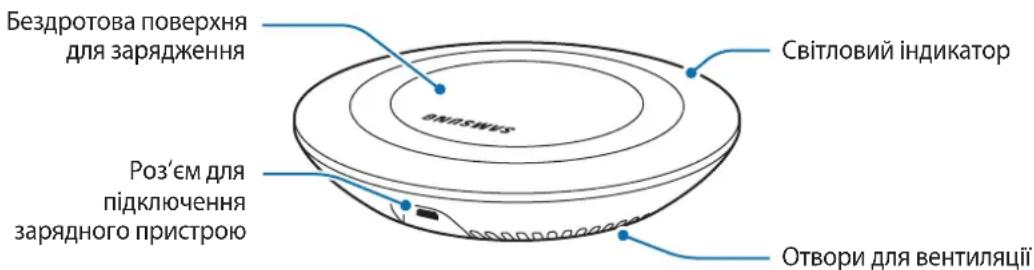
Device layout
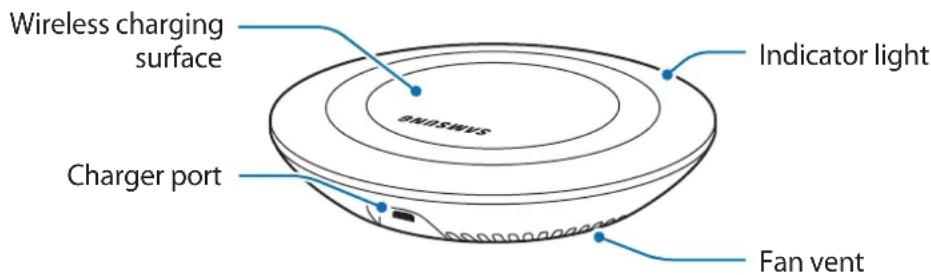
Using the wireless charger
Charging your mobile device
Wireless charging
1 Connect a charger to the wireless charger.
When the charger is correctly connected to the wireless charger, the indicator light flashes blue, green, and cyan, and then turns off.
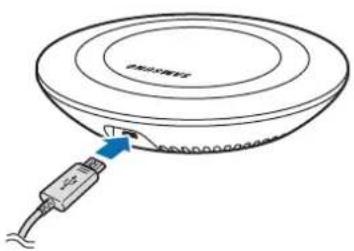

Use only Samsung-approved chargers (5 V/2 A, 5.3 V/2 A, and 9 V/1.67 A). Unauthorized chargers may cause damage or the wireless charger may malfunction.
2 Place a supported mobile device in the center of the charging surface.
Check the charging icon displayed on the mobile device's screen for the charging status.
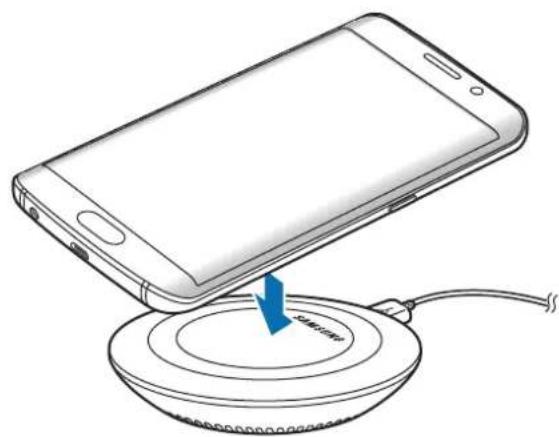
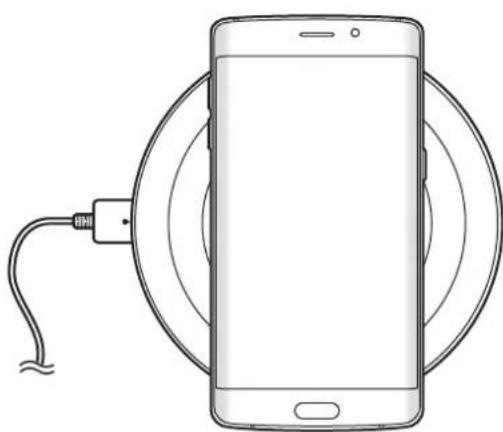
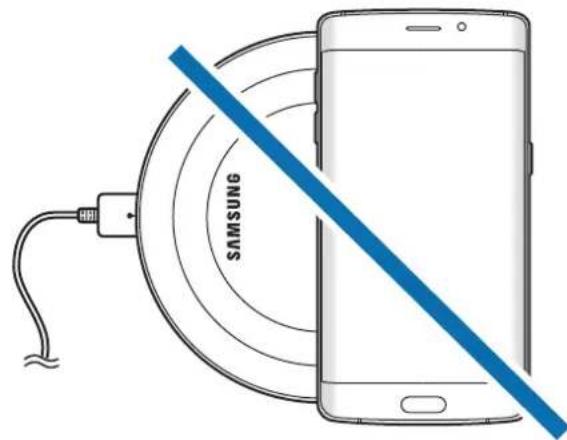

To charge a mobile device that does not have a built-in wireless charging coil, attach a wireless charging cover to the mobile device. Then, place the mobile device on the wireless charger.

- Do not place the wireless charging cover solely on the wireless charger. Doing so may overheat the wireless charger and cause a fire. It may also result in serious burn or device malfunction.
- Do not cover or block the wireless charger's fan vent.
3 When the mobile device is fully charged, remove it from the wireless charger.

Do not place foreign materials, such as metal objects, magnets, and magnetic stripe cards, between the mobile device and the wireless charger. The mobile device may not charge properly or may be damaged due to overheating.

- You may need to purchase a charger separately depending on the wireless charger you bought.
- When the mobile device is not placed on the charging surface properly, or depending on the location of the mobile device's wireless charging coil, your mobile device may not charge properly.
- Depending on the location of the mobile device's wireless charging coil, your mobile device may not charge properly.
- Wireless charging may not work properly if you have attached a thick case to your mobile device. If your case is thick, remove it before placing your mobile device on the wireless charger.
- If you use the wireless charger in areas with weak network signals, you may lose network reception.
- If you connect a charger to the mobile device during wireless charging, the wireless charging feature will be unavailable.
- The wireless charger is compatible with WPC certified devices.
- To save energy, unplug the charger when not in use. The charger does not have a power switch, so you must unplug the charger from the electric socket when not in use to avoid wasting power. The charger should remain close to the electric socket and be easily accessible while charging.
Fast wireless charging
The wireless charger supports fast wireless charging. To begin fast wireless charging, place a mobile device that supports fast wireless charging on the wireless charger.

Use only Samsung-approved chargers that support fast charging (EP-TA20 series 9 V/1.67 A).

The fan inside the wireless charger operates during fast wireless charging. The fan will not operate when this feature is deactivated on your mobile device.
Activating or deactivating the fast wireless charging feature
The fast wireless charging option will be added in your mobile device's settings menu when you place it on the wireless charger for the first time.
Place the mobile device on the wireless charger. On the Home screen of the mobile device, tap Apps → Settings → Accessories, and then tap the Fast wireless charging switch to activate or deactivate it. Deactivating this feature will switch the charging mode to normal wireless charging and result in slower charging times.
Indicator light identification
The indicator light alerts you to the wireless charger's status.
| Color Status | |
| Blue → Green → Cyan | When connected to a power outlet |
| Blue When charging | |
| Green When fully charged | |
| Cyan When charging at low power (less than 5 V/2 A) | |
| Flashing blue When not charging properly due to a general error | |
| Off | When the mobile device is removed from the wireless charger or when the wireless charger is not connected to a power outlet |

- If the indicator light does not work as described, disconnect the charger from the wireless charger and reconnect it.
- The indicator light may work differently depending on the mobile device or the wireless charging cover.
Copyright
Copyright © 2015 Samsung Electronics
This manual is protected under international copyright laws.
No part of this manual may be reproduced, distributed, translated, or transmitted in any form or by any means, electronic or mechanical, including photocopying, recording, or storing in any information storage and retrieval system, without the prior written permission of Samsung Electronics.
Trademarks
SAMSUNG and the SAMSUNG logo are registered trademarks of Samsung Electronics.
All other trademarks and copyrights are the property of their respective owners.
Copyright © 2015 Samsung Electronics
Copyright © 2015 Samsung Electronics
本手册受國際版權法保護。
© Samsung Electronics, 2015.



- INSTRUCTIONAL ICONS
- GETTING STARTED
- PACKAGE CONTENTS
- DEVICE LAYOUT
- USING THE WIRELESS CHARGER
- CHARGING YOUR MOBILE DEVICE
- WIRELESS CHARGING
- FAST WIRELESS CHARGING
- ACTIVATING OR DEACTIVATING THE FAST WIRELESS CHARGING FEATURE
- INDICATOR LIGHT IDENTIFICATION
- COPYRIGHT
- TRADEMARKS
- RICARICA VELOCITY WIRELESS
- TBPROBCKN MAPKN
- NAJPRIJE PROČITAJTE
- ZAŠITNI ZNAKOVI
- PRVO PROČITAJTE
- TRGOVAČKE MARKE
- LEIA PRIMEIRO
- OPPHAVSRETT
- IDENTIFICATION OF INDICATORLYS
- BHEUHN BVD YCTPOICTBA
- ИСПOLSВАНNE
- 6ECNPOBODHORO 3APJDHORO
- YCTPOICTBA
- 3APЯDKA MO6NIBHORO YCTPOICTBA
- БЕСПРАВОВАЯ ЗАЮКА
- TOBAPHBIE 3HAKN
- OZHANNOMTECE NEPEID NOYATKOM BNKOPNCTAHN
- PONCHIOBAJIBHI 3HAAYKN
- ПОЧАТОК РОБОТИ
- KOMPLEKTAЦЯ
- 3OBHISHIBNIAD NPICTPOI
- BNKOPNCTAHN8 6E3DPOTOBORO 3APYDHORO NPNCTPOU
- CBIMCBL3 XBIJAM 3APYDTAY
- CBIMCBL3 XBILDAM 3APTAY MYMKIHDIIRH KOCY XAHE CONDIPY
- HDNKATOP 7AMHBIN NDEHTNΦNKATOPBI
- EAC
- ABTOPJIBIK KYKBIK
- CAYDA 6EIRILEPI
- READ ME FIRST
Brand : SAMSUNG
Model : EPPN920
Category : Cellphone