K5534 - Watch Calypso - Free user manual and instructions
Find the device manual for free K5534 Calypso in PDF.



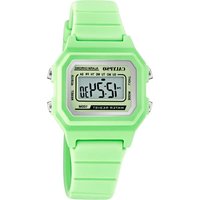
| Product Type | Quartz Watch |
| Brand | Calypso |
| Model | K5534 |
| Category | Watch |
| Accuracy | ±30 seconds per month (at normal temperature of 25°C) |
| Operating Temperature | 10°C to 40°C |
| Battery Type | CR2016, CR1620, CR2025, CR2032 |
| Standard Display | Hours, minutes, month, date, day of week, PM |
| Backlight | Electroluminescent (EL) light; loss of brightness after prolonged use |
| Time Functions | Alarm with tone, hourly chime, 12/24h selector, second time zone, timer |
| Stopwatch | Yes, with lap time function |
| Calendar | Month, day, date |
| Care | Clean with a soft cloth and clean water; avoid chemicals |
| Water Resistance | Do not use buttons underwater; internal condensation requires immediate inspection |
| Precautions | Avoid strong shocks, extreme temperatures, electric fields |
| Repairability | Do not open the case; have it serviced by a professional |
| Recycling | Selective collection at end of life in accordance with WEEE regulations |
Frequently Asked Questions - K5534 Calypso
User questions about K5534 Calypso
0 question about this device. Answer the ones you know or ask your own.
Ask a new question about this device
Download the instructions for your Watch in PDF format for free! Find your manual K5534 - Calypso and take your electronic device back in hand. On this page are published all the documents necessary for the use of your device. K5534 by Calypso.
USER MANUAL K5534 Calypso
text_image
CALYPSO WATCHES- HOW TO CHANGE THE DISPLAY MODE
- HOW TO DISPLAY CALENDAR
EnglishF

flowchart
graph TD
    A["25.84V 12:50 48"] --> B["SP 0.0000 ALARM"]
    B --> C["AL 12:00 E 1"]
    C --> D["TR 0:00 00"]
    D --> E["12:50 48"]
    E --> F["B"]
    style A fill:#f9f,stroke:#333
    style B fill:#ccf,stroke:#333
    style C fill:#cfc,stroke:#333
    style D fill:#fcc,stroke:#333
    style E fill:#cff,stroke:#333
    style F fill:#ffc,stroke:#333
- HOW TO SET NORMAL TIME

flowchart
graph TD
    A["English F"] --> B["25.00:00 12:50"]
    B --> C["25.00:00 12:50"]
    C --> D["25.00:00 12:50"]
    D --> E["25.00:00 12:50"]
    E --> F["25.00:00 12:50"]
    F --> G["25.00:00 12:50"]
    G --> H["25.00:00 12:50"]
    H --> I["25.00:00 12:50"]
    I --> J["25.00:00 12:50"]
    J --> K["25.00:00 12:50"]
    K --> L["25.00:00 12:50"]
    L --> M["25.00:00 12:50"]
    M --> N["25.00:00 12:50"]
    N --> O["25.00:00 12:50"]
    O --> P["25.00:00 12:50"]
    P --> Q["25.00:00 12:50"]
    Q --> R["25.00:00 12:50"]
    R --> S["25.00:00 12:50"]
    S --> T["25.00:00 12:50"]
    T --> U["25.00:00 12:50"]
    U --> V["25.00:00 12:50"]
    V --> W["25.00:00 12:50"]
    W --> X["25.00:00 12:50"]
    X --> Y["25.00:00 12:50"]
    Y --> Z["25.00:00 12:50"]
    Z --> AA["25.00:00 12:50"]
    AA --> AB["25.00:00 12:50"]
    AB --> AC["25.00:00 12:50"]
    AC --> AD["25.00:00 12:50"]
    AD --> AE["25.00:00 12:50"]
    AE --> AF["25.00:00 12:50"]
    AF --> AG["25.00:00 12:50"]
    AG --> AH["25.00:00 12:50"]
    AH --> AI["25.00:00 12:50"]
    AI --> AJ["25.00:00 12:50"]
    AJ --> AK["25.00:00 12:50"]
    AK --> AL["25.00:00 12:50"]
    AL --> AM["25.00:00 12:50"]
    AM --> AN["25.00:00 12:50"]
    AN --> AO["25.00:00 12:50"]
    AO --> AP["25.00:00 12:50"]
    AP --> AQ["25.00:00 12:50"]
    AQ --> AR["25.00:00 12:50"]
    AR --> AS["25.00:00 12:50"]
    AS --> AT["25.00:00 12:50"]
    AT --> AU["25.00:00 12:50"]
    AU --> AV["25.00:00 12:50"]
    AV --> AW["25.00:00 12:50"]
    AW --> AX["25.00:00 12:50"]
    AX --> AY["25.88:36"]
    AY --> AZ["RESET SECONDS SET SECONDS"]
    AZ --> BA["SET HOURS SET HOURS"]
    BA --> BB["SET MINUTES SET MINUTES"]
    BB --> BC["SET MONTHS SET MONTHS"]
    BC --> BD["SET DATE SET DATE"]
    BD --> BE["SET DAY OF WEEK SET DAY OF WEEK"]
    BE --> BF["SET Day OF WEEK SET Day OF WEEK SET Day OF WEEK SET Day OF WEEK SET Day OF Week"]
    BF --> BG[SET Day OF Week SET Day OF Week SET Day OF Week SET Day OF Week SET Day OF Week SET Day OF Week SET Day OF Week SET Day OF Week SET Day OF Week SET Day OF Week SET Day OF Week SET Day OF Week SET Day OF Week SET Day OF Week SET Day OF Week SET Day OF Week SET Day OF Week SET Day OF Week SET Day OF Week SET Day OF Week SET Day OF Week SET Day OF Week SET Day OF Week SET Day OF Week SET Day OF Week SET Day OF Week NET Period ON/ON/ON/ON/ON/ON/ON/ON/ON/ON/ON/ON/ON/ON/ON/ON/ON/ON/ON/ON/ON/ON/ON/ON/ON/ON/ON/ON/ON/ON/ON/ON/ON/ON/ON/ON/ON/ON/ON/ON/ON/ON/ON/ON/ON/ON/ON/ON/ON/ON/ON/On/On/On/On/On/On/On/On/On/On/On/On/On/On/On/On/On/On/On/On/On/On/On/On/On/On/On/On/On/On/On/On/On/On/On/On/On/On/On/On/On/On/On/On/On/On/On/On/On/On/Off Period ON/OFF Period ON/OFF Period ON/OFF Period ON/OFF Period ON/OFF Period ON/OFF Period ON/OFF Period ON/OFF Period ON/OFF Period ON/OFF Period ON/OFF Period ON/OFF Period ON/OFF Period ON/OFF Period ON/OFF Period ON/OFF Period ON/OFF Period ON/OFF Period ON/OFF Period ON/OFF Period ON/OFF Period ON/OFF Period ON/OFF Period ON/OFF Period ON/OFF Period ON/Off Period ON/OFF Period ON/OFF Period ON/OFF Period ON/OFF Period ON/OFF Period ON/OFF Period ON/OFF Period ON/OFF Period ON/OFF Period ON/OFF Period ON/OFF Period ON/OFF Period ON/OFF Period ON/OFF Period ON/OFF Period ON/OFF Period ON/OFF Period ON/OFF Period ON/OFF Period ON/OFF Period ON/OFF Period ON/OFF Period ON/OFF Period ON/OFF Period ON/OCC Period ON/OCC Period ON/OCC Period ON/OCC Period ON/OCC Period ON/OCC Period ON/OCC Period ON/OCC Period ON/OCC Period ON/OCC Period ON/OCC Period ON/OCC Period ON/OCC Period ON/OCC Period ON/OCC Period ON/OCC Period ON/OCC Period ON/OCC Period ON/OCC Period ON/OCC Period ON/OCC Period ON/OCC Period ON/OCC Period ON/OCC Period ON/OCC Period ON/Occ Period ON/Occ Period ON/Occ Period ON/Occ Period ON/Occ Period ON/Occ Period ON/Occ Period ON/Occ Period ON/Occ Period ON/Occ Period ON/Occ Period ON/Occ Period ON/Occ Period ON/Occ Period ON/Occ Period ON/Occ Period ON/Occ Period ON/Occ Period ON/Occ Period ON/Occ Period ON/Occ Period ON/Occ Period ON/Occ Period ON/Occ Period ON/Occ Period ON/OCC Period ON/OCC Period ON/OCC Period ON/OCC Period ON/OCC Period ON/OCC Period ON/OCC Period ON/OCC Period ON/OCC Period ON/OCC Period ON/OCC Period ON/OCC Period ON/OCC Period ON/OCC Period ON/OCC Period ON/OCC Period ON/OCC Period ON/OCC Period ON/OCC Period ON/OCC Period ON/OCC Period ON/OCC Period ON/OCC Period ON/OCC Period ON/OSSPeriod ON/OSSPeriod ON/OSSPeriod ON/OSSPeriod ON/OSSPeriod ON/OSSPeriod ON/OSSPeriod ON/OSSPeriod ON/OSSPeriod ON/OSSPeriod ON/OSSPeriod ON/OSSPeriod ON/OSSPeriod ON/OSSPeriod ON/OSSPeriod ON/OSSPeriod ON/OSSPeriod ON/SATPeriod ON/SATPeriod ON/SATPeriod ON/SATPeriod ON/SATPeriod ON/SATPeriod ON/SATPeriod ON/SATPeriod ON/SATPeriod ON/SATPeriod ON/SATPeriod ON/SATPeriod ON/SATPeriod ON/SATPeriod ON/SATPeriod ON/SATPeriod ON/SATPeriod ON/SATPeriod ON/SATPeriod ON/SATPeriod ON/SATPeriod ON/SATPeriod ON/SATPeriod ON/SATPeriod ON/SATPeriod ON/SOTPeriod ON/SOTPeriod ON/SOTPeriod ON/SOTPeriod ON/SOTPeriod ON/SOTPeriod ON/SOTPeriod ON/SOTPeriod ON/SOTPeriod ON/SOTPeriod ON/SOTPeriod ON/SOTPeriod ON/SOTPeriod ON/SOTPeriod ON/SOTPeriod ON/SOTPeriod ON/SOTPeriod On/SATPeriod On/SATPeriod On/SATPeriod On/SATPeriod On/SATPeriod On/SATPeriod On/SATPeriod On/SATPeriod On/SATPeriod On/SATPeriod On/SATPeriod On/SATPeriod On/SATPeriod On/SATPeriod On/SATPeriod On/SATPeriod On/SATPeriod On/SATPeriod On/SATPeriod On/SATPeriod On/SATPeriod On/SATPeriod On/SATPeriod On/SATPeriod On/SATPeriod On/SatPeriod On/SatPeriod On/SatPeriod On/SatPeriod On/SatPeriod On/SatPeriod On/SatPeriod On/SatPeriod On/SatPeriod On/SatPeriod On/SatPeriod On/SatPeriod On/SatPeriod On/SatPeriod On/SatPeriod On/SatPeriod On/SatPeriod On/SatPeriod On/SatPeriod On/SatPeriod On/SatPeriod On/SatPeriod On/SatPeriod On/SatPeriod On/SatPeriod On/SATperiod On/SatPeriod On/SatPeriod On/SatPeriod On/SatPeriod On/SatPeriod On/SatPeriod On/SatPeriod On/SatPeriod On/SatPeriod On/SatPeriod On/SatPeriod On/SatPeriod On/SatPeriod On/SatPeriod On/SatPeriod On/SatPeriod On/SatPeriod On/SatPeriod On/SatPeriod On/SatPeriod On/SatPeriod On/SatPeriod On/SatPeriod On/SatPeriod On/Satperiod On/Satperiod On/Satperiod On/Satperiod On/Satperiod On/Satperiod On/Satperiod On/Satperiod On/Satperiod On/Satperiod On/Satperiod On/Satperiod On/Satperiod On/Satperiod On/Satperiod On/Satperiod On/Satperiod On/Satperiod On/Satperiod On/Satperiod On/Satperiod On/Satperiod On/Satperiod On/Satperiod On/Satperiod On/Sat period on/sat period on/sat period on/sat period on/sat period on/sat period on/sat period on/sat period on/sat period on/sat period on/sat period on/sat period on/sat period on/sat period on/sat period on/sat period on/sat period on/sat period on/sat period on/sat period on/sat period on/sat period on/sat period on/sat period on/sat period on/sat period on/not period on/not period on/not period on/not period on/not period on/not period on/not period on/not period on/not period on/not period on/not period on/not period on/not period on/not period on/not period on/not period on/not period on/not period on/not period on/not period on/not period on/not period on/not period on/not period on/not period on/nonnot period on/nonnot period on/nonnot period on/nonnot period on/nonnot period on/nonnot period on/nonnot period on/nonnot period on/nonnot period on/nonnot period on/nonnot period on/nonnot period on/nonnot period on/nonnot period on/nonnot period on/nonnot period on/nonnot period on nonnot period on/nonnot period on/nonnot period on/nonnot period on/nonnot period on/nonnot period on/nonnot period on/nonnot period on/nonnot period on/nonnot period on/nonnot period on/nonnot period on/nonnot period on/nonnot period on/nonnot period on/nonnot period on/nonnot duration
    style EnglishF fill:#f9f,stroke:#333,stroke-width:4px
- HOW TO SET ALARM TIME
- HOW TO USE ALARM AND CHIME DISPLAY

flowchart
graph TD
    A["25.00Hz 12:50"] --> B["AL 888 12:00"]
    B --> C["AL 888 12:00"]
    C --> D["AL 888 12:00"]
    D --> E["AL 888 12:00"]
    E --> F["AL 888 12:00"]
    F --> G["AL 888 12:00"]
    G --> H["AL 888 12:00"]
    H --> I["AL 888 12:00"]
    I --> J["AL 888 12:00"]
    J --> K["AL 888 12:00"]
    K --> L["AL 888 12:00"]
    L --> M["AL 888 12:00"]
    M --> N["AL 888 12:00"]
    N --> O["AL 888 12:00"]
    O --> P["AL 888 12:00"]
    P --> Q["AL 888 12:00"]
    Q --> R["AL 888 12:00"]
    R --> S["AL 888 12:00"]
    S --> T["AL 888 12:00"]
    T --> U["AL 888 12:00"]
    U --> V["AL 888 12:00"]
    V --> W["AL 888 12:00"]
    W --> X["AL 888 12:00"]
    X --> Y["AL 888 12:00"]
    Y --> Z["AL 888 12:00"]
    Z --> AA["AL 888 12:00"]
    AA --> AB["AL 888 12:00"]
    AB --> AC["AL 888 12:00"]
    AC --> AD["AL 888 12:00"]
    AD --> AE["AL 888 12:00"]
    AE --> AF["AL 888 12:00"]
    AF --> AG["AL 888 12:00"]
    AG --> AH["AL 888 12:00"]
    AH --> AI["AL 888 12:00"]
    AI --> AJ["AL 888 12:00"]
    AJ --> AK["AL 888 12:00"]
    AK --> AL["AL 888 12:00"]
    AL --> AM["AL 888 12:00"]
    AM --> AN["AL 888 12:00"]
    AN --> AO["AL 888 12:00"]
    AO --> AP["AL 888 12:00"]
    AP --> AQ["AL 888 12:00"]
    AQ --> AR["AL 888 12:00"]
    AR --> AS["AL 888 12:00"]
    AS --> AT["AL 888 12:00"]
    AT --> AU["AL 888 12:00"]
    AU --> AV["AL 888 12:00"]
    AV --> AW["AL 888 12:00"]
    AW --> AX["AL 888 12:00"]
    AX --> AY["AL 888 12:00"]
    AY --> AZ["AL 888 12:00"]
    AZ --> BA["AL 888 12:00"]
    BA --> BB["AL 888 12:00"]
    BB --> BC["AL 888 12:00"]
    BC --> BD["AL 888 12:00"]
    BD --> BE["AL 888 12:00"]
    BE --> BF["AL 888 12:00"]
    BF --> BG["AL 888 12:00"]
    BG --> BH["AL 888 12:00"]
    BH --> BI["AL 888 12:00"]
    BI --> BJ["AL 888 12:00"]
    BJ --> BK["AL 888 12:00"]
    BK --> BL["AL 888 12:00"]
    BL --> BM["AL 888 12:00"]
    BM --> BN["AL 888 12:00"]
    BN --> BO["AL 888 12:00"]
    BO --> BP["AL 888 12:00"]
    BP --> BQ["AL 88B"]
    style A fill:#f9f,stroke:#333
    style B fill:#f9f,stroke:#333
    style C fill:#f9f,stroke:#333
    style D fill:#f9f,stroke:#333
    style E fill:#f9f,stroke:#333
    style F fill:#f9f,stroke:#333
    style G fill:#f9f,stroke:#333
    style H fill:#f9f,stroke:#333
    style I fill:#f9f,stroke:#333
    style J fill:#f9f,stroke:#333
    style K fill:#f9f,stroke:#333
    style L fill:#f9f,stroke:#333
    style M fill:#f9f,stroke:#333
    style N fill:#f9f,stroke:#333
    style O fill:#f9f,stroke:#333
    style P fill:#f9f,stroke:#333
    style Q fill:#f9f,stroke:#333
    style R fill:#f9f,stroke:#333
    style S fill:#f9f,stroke:#333
    style T fill:#f9f,stroke:#333
    style U fill:#f9f,stroke:#333
    style V fill:#f9f,stroke:#333
    style W fill:#f9f,stroke:#333
    style X fill:#f9f,stroke:#333
22
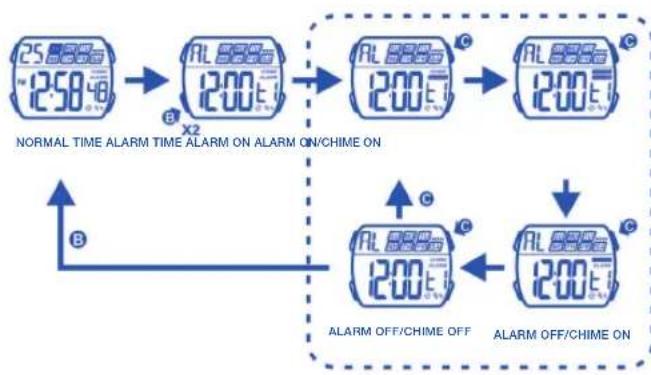
flowchart
graph TD
    A["25 8880 ~ 250 48"] --> B["AL 8880 1200 E"]
    B --> C["AL 8880 1200 E"]
    C --> D["AL 8880 1200 E"]
    D --> E["AL 8880 1200 E"]
    style A fill:#f9f,stroke:#333
    style B fill:#ccf,stroke:#333
    style C fill:#ccf,stroke:#333
    style D fill:#ccf,stroke:#333
    style E fill:#ccf,stroke:#333
    subgraph Normal Time Alarm
        A
        B
        C
    end
    subgraph Alarm Off/Chime On
        D
        E
    end
23

- HOW TO USE THE CHRONOGRAPH

flowchart
graph LR
    A["25.0000 ~12:50"] --> B["SP 80000"]
    B --> C["SP 80000"]
    C --> D["SP 80000"]
    D --> E["SP 80000"]
    E --> F["SP 80000"]
    F --> G["25.0000 ~12:50"]

    H["MINUTES"] --> I["29.59 seconds"]
    I --> J["1/10 seconds"]
    J --> K["1/100 seconds"]
    K --> L["100 seconds MINUTESHOURS"]

    M["SECONDS"] --> N["SECONDS"]
    N --> O["LAP"]
    O --> P["FIRST LAP READ"]
    P --> Q["SECOND LAP COUNTING"]
    Q --> R["SECOND LAP READ"]
    R --> S["LAST LAP COUNTING"]
    S --> T["LAST LAP READ"]
    T --> U["STOP TIME"]

    V["A"] --> W["A"]
    W --> X["A"]
    X --> Y["A"]
    Y --> Z["A"]
    Z --> AA["A"]
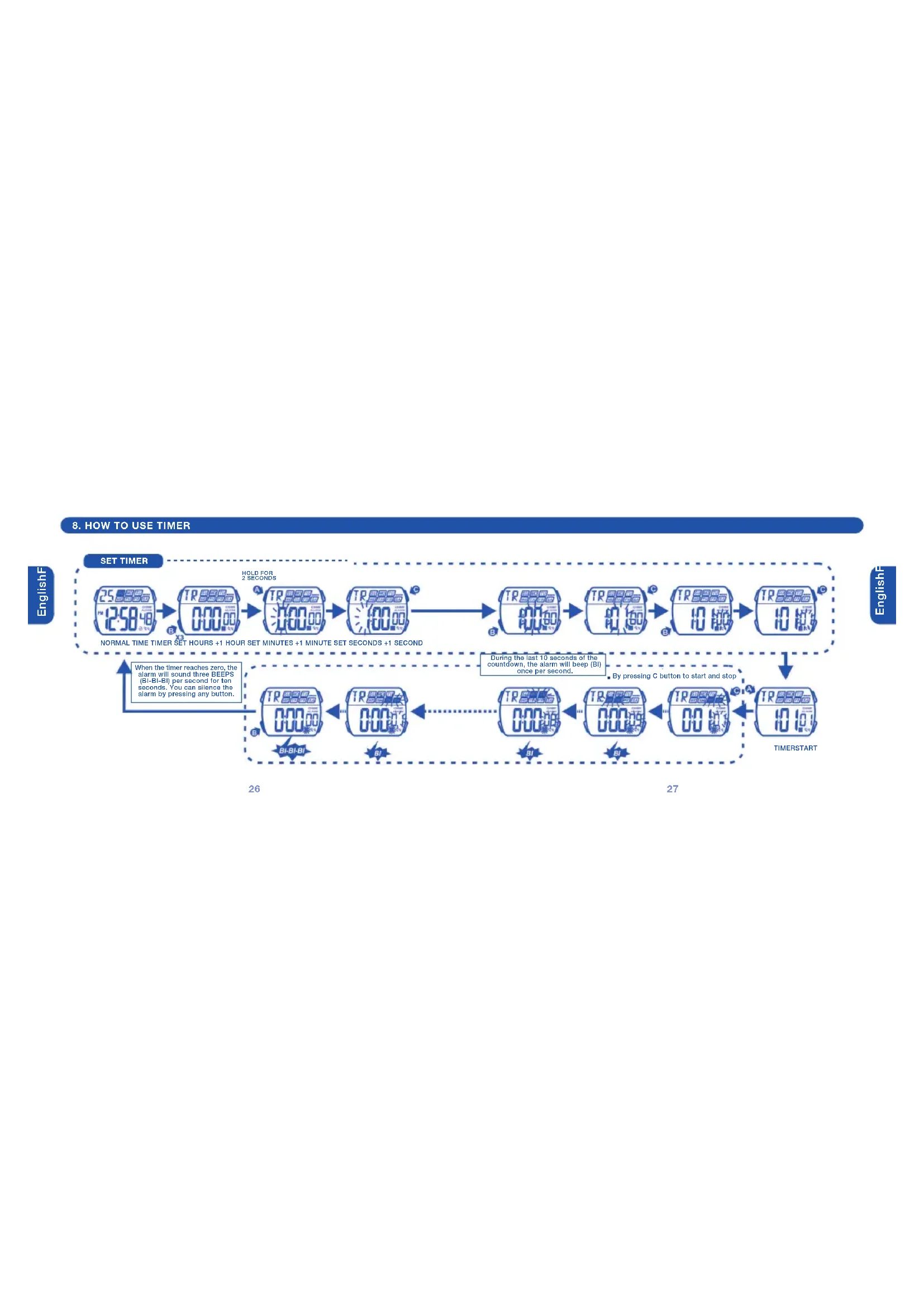
- HOW TO USE TIMER
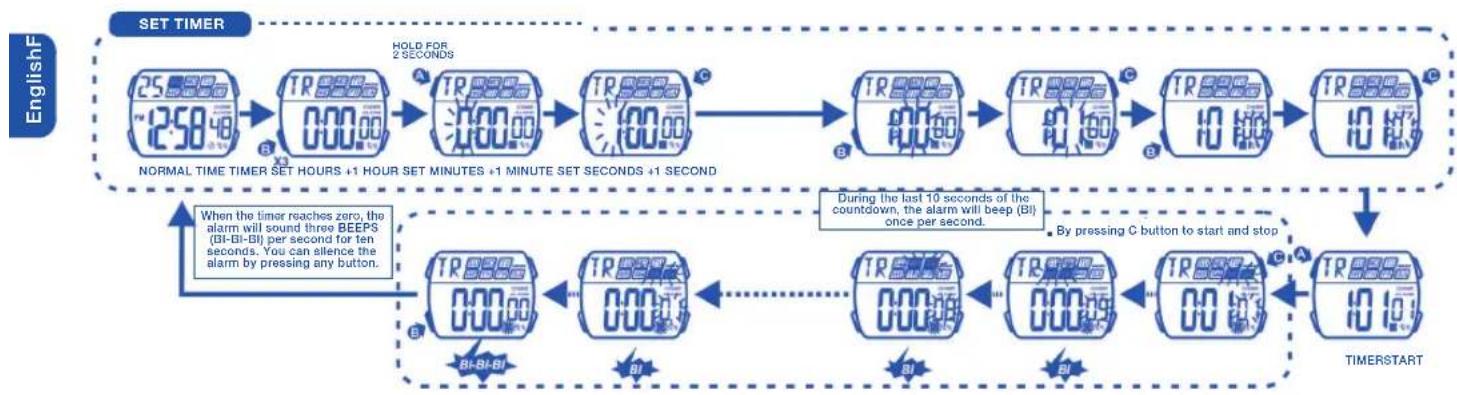
flowchart
graph TD
    A["25:00:00 ~12:50:48"] --> B["TR 000:00"]
    B --> C["TR 000:00"]
    C --> D["TR 000:00"]
    D --> E["TR 000:00"]
    E --> F["TR 000:00"]
    F --> G["TR 000:00"]
    G --> H["TR 000:00"]
    H --> I["TR 000:00"]
    I --> J["TR 000:00"]
    J --> K["TIMERSTART"]

    L["When the timer reaches zero, the alarm will sound three BEEPS (BI-BI-BI) per second for ten seconds. You can silence the alarm by pressing any button."] --> M["TR 000:00"]
    M --> N["TR 000:00"]
    N --> O["TR 000:00"]
    O --> P["TR 000:00"]
    P --> Q["TR 000:00"]
    Q --> R["TR 000:00"]
    R --> S["TIMER START"]

    T["HOLD FOR 2 SECONDS"] --> U["TR 000:00"]
    U --> V["TR 000:00"]
    V --> W["TR 000:00"]
    W --> X["TR 000:00"]
    X --> Y["TR 000:00"]
    Y --> Z["TIMER START"]

    AA["During the last 10 seconds of the countdown, the alarm will beep (BI) once per second."] --> AB["TR 000:00"]
    AB --> AC["TR 000:00"]
    AC --> AD["TR 000:00"]
    AD --> AE["TR 000:00"]
    AE --> AF["TIMER START"]

    AG["By pressing C button to start and stop"] --> AH["TR 11:11"]
9. HOW TO SET SECOND TIME ZONE
10. HOW TO USE EL LIGHT
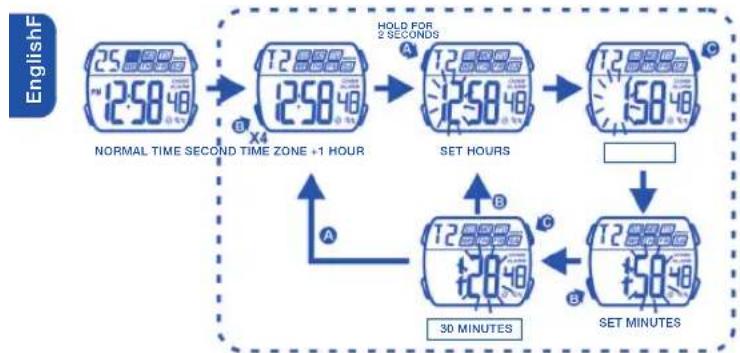
flowchart
graph TD
    A["25.00:12:50"] --> B["12.00:12:50"]
    B --> C["12.00:12:50"]
    C --> D["12.00:15:00"]
    D --> E["12.00:15:00"]
    E --> F["SET MINUTES"]
    F --> G["SET HOURS"]
    G --> H["SET HOURS"]
    H --> I["SET HOURS"]
    I --> J["SET HOURS"]
    J --> K["SET HOURS"]
    K --> L["SET HOURS"]
    L --> M["SET HOURS"]
    M --> N["SET HOURS"]
    N --> O["SET HOURS"]
    O --> P["SET HOURS"]
    P --> Q["SET HOURS"]
    Q --> R["SET HOURS"]
    R --> S["SET HOURS"]
    S --> T["SET HOURS"]
    T --> U["SET HOURS"]
    U --> V["SET HOURS"]
    V --> W["SET HOURS"]
    W --> X["SET HOURS"]
    X --> Y["SET HOURS"]
    Y --> Z["SET HOURS"]
    Z --> AA["SET HOURS"]
    AA --> AB["SET HOURS"]
    AB --> AC["SET HOURS"]
    AC --> AD["SET HOURS"]
    AD --> AE["SET HOURS"]
    AE --> AF["SET HOURS"]
    AF --> AG["SET HOURS"]
    AG --> AH["SET HOURS"]
    AH --> AI["SET HOURS"]
    AI --> AJ["SET HOURS"]
    AJ --> AK["SET HOURS"]
    AK --> AL["SET HOURS"]
    AL --> AM["SET HOURS"]
    AM --> AN["SET HOURS"]
    AN --> AO["SET HOURS"]
    AO --> AP["SET HOURS"]
    AP --> AQ["SET HOURS"]
    AQ --> AR["SET HOURS"]
    AR --> AS["SET HOURS"]
    AS --> AT["SET HOURS"]
    AT --> AU["SET HOURS"]
    AU --> AV["SET HOURS"]
    AV --> AW["SET HOURS"]
    AW --> AX["SET HOURS"]
    AX --> AY["SET HOURS"]
    AY --> AZ["SET HOURS"]
    AZ --> BA["SET HOURS"]
    BA --> BB["SET HOURS"]
    BB --> BC["SET HOURS"]
    BC --> BD["SET HOURS"]
    BD --> BE["SET HOURS"]
    BE --> BF["SET HOURS"]
    BF --> BG["SET HOURS"]
    BG --> BH["SET HOURS"]
    BH --> BI["SET HOURS"]
    BI --> BJ["SET HOURS"]
    BJ --> BK["SET HOURS"]
    BK --> BL["SET HOURS"]
    BL --> BM["SET HOURS"]
    BM --> BN["SET HOURS"]
    BN --> BO["SET HOURS"]
    BO --> BP["SET HOURS"]
    BP --> BQ["SET HOURS"]
    BQ --> BR["SET HOURS"]
    BR --> BS["SET HOURS"]
    BS --> BT["SET HOURS"]
    BT --> BU["SET HOURS"]
    BU --> BV["SET HOURS"]

text_image
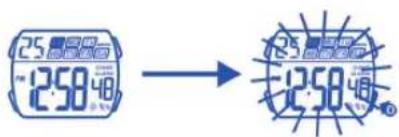
25.晶晶显示 ~12:50 48 → 12:50NOTE:
1) This watch features an electro-luminescent (EL) backlight, which tends to lose illuminating power after very long use.
2) The illumination provided by backlight may be hard to see under direct sunlight.
11. CARE OF YOUR WATCH
1) This watch contains precise electronic components. Never attempt to open the case or remove the back cover.
2) Do not operate push buttons below the surface of the water when swimming or diving.
3) Should water or condensation appear in the watch, immediately have the watch checked. Water can corrode electronic parts inside the case.
4) Avoid severing impact: The watch is designed to with stand impact under normal use. It is inadvisable to subject it to severe impact of rough usage or drops onto hard surfaces.
5) Avoid exposing the watch to temperature extremes.
6) Clean the watch with a soft cloth and clean water only. Avoid using chemicals, especially soap.
7) Keep your watch away from the conditions of strong electric field and estatic electricity.
12. FEATURES AND SPECIFICATIONS
1) Standard display mode: Hour, minutes, seconds, month, day of week.
2) Function:
• Month, date AM/PM and Electro-Luminiscent light.
• Alarm function with buzzer signal output.
• Chronograph function with lap operation.
- Hourly chime.
• 12/24 hour format switch option.
- Timer.
- Second time zone.
3) Accuracy at normal temperature (25°C): ± 30 seconds a month.
4) Normal operating temperature range: 10°C - 40°C
5) Battery: CR2016, CR1620, CR2025, CR2032.

By virtue of the regulations pursuant to the handling of waste products deriving from electronic and electrical equipment, end of lifecycle watch making products must be selectively collected for processing. You may therefore dispose of your quartz watch making products at any of our retail outlets or any other authorized collection point. The selective collection, processing, rating and recycling of these products helps contribute to safeguarding the environment and protecting our health.
- AFFICHAGE NORMALE ET BOUTON D'UTILISATION

text_image
DATE A 25 NO T4 WE TH FR SA C JOUR DE LA SEMAINE SONNERIE DES HEURES HEURE D'ALARME PM 12:50 PM SECONDS CHRONOMETRE B D MINUTES MINUTEURBOUTONS D'UTILISATION
RÉGLAGE MODE
ADJUSTMENT, MARCHE/ARRETÉR LUMIÈRE
- COMMENT CHANGER LE MODE D'AFFICHAGE
- COMMENT AFFICHER LE MOIS, LA DATE

flowchart
graph TD
    A["25.00 AM/18:48"] --> B["SP 0.00"]
    B --> C["AL 12:00 L"]
    C --> D["TR 0:00.00"]
    D --> E["12.50 AM/18:48"]
    E --> F["DEUXIEME ZONE D'HEURE MINUTEUR"]
    F --> G["B"]
    G --> H["HEURE NORMALE CHRONOMETRE ALARME"]
34

text_image
25 12:58:48 HEURE NORMALE MOIS DATE35
- COMMENT RÉGLER L'HEURE NORMALE

flowchart
graph LR
    A["250:00"] --> B["250:00"]
    B --> C["250:00"]
    C --> D["250:00"]
    D --> E["225:00"]
    E --> F["125:00"]
    F --> G["125:00"]
    G --> H["125:00"]
    H --> I["125:00"]
    I --> J["125:00"]

    subgraph Timeframe
        K["SERREZ 2 SECONDS"] --> L["HEURE NORMALE SECONDS HEURES MINUTES MOIS JOURS DE LA SEMAINE FORMAT 12 HEURES"]
        M["REMISE A ZERO"] --> N["RÉGLAGE DES SECONDS"]
        O["RÉGLAGE DES HEURES"] --> P["RÉGLAGE DES MINUTES"]
        Q["+1 MINUTE+1 HEURE"] --> R["RÉGLAGE DES MINUTES"]
        S["RÉGLAGE DES MOIS"] --> T["RÉGLAGE DES MOIS"]
        U["FAIT AVANCER LES JOURS FAIT AVANCER JOUR LEVER GEMAINES"] --> V["RÉGLAGE DU JOUR"]
        W["FORMAT 24 HEURES"] --> X["RÉGLAGE DES FORMAT 12/24 HEURES"]
    end
- CÓMMENT RÉGLER L'ALARME
- COMMENT UTILISER L'AFFICHAGE ALARME ET CARILLON
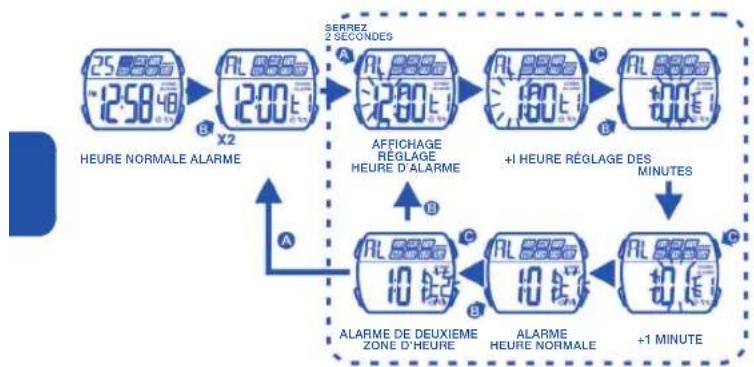
flowchart
graph TD
    A["25:00:00 12:50:48"] --> B["X2"]
    B --> C["AL 00:00 12:00 E"]
    C --> D["SERREZ 2 SECONDS"]
    D --> E["AFFICHAGE RÉGLAGE HEURE D'ALARME"]
    E --> F["+1 HEURE RÉGLAGE DES MINUTES"]
    F --> G["ALARME DE DEUXIÈME ZONE D'HEURE"]
    G --> H["+1 MINUTE"]
    H --> I["ALARME HEURE NORMALE"]
    I --> J["ALARME"]
38

flowchart
graph TD
    A["25/880A ~1:50Hz"] --> B["X2"]
    B --> C["AL 880A 200E"]
    C --> D["AL 880A 200E"]
    D --> E["AL 880A 1200E"]
    E --> F["AL 880A 1200E"]
    G["SONNERIE ARRÊT ALARME ARRÊT"] --> H["AL 880A 1200E"]
    I["SONNERIE ARRÊT ALARME MARCHE"] --> J["AL 880A 1200E"]
    K["HEURE NORMALE HEURE ALARME SONNERIE MARCHE SONNERIE MARCHE"] --> L["AL 880A 1200E"]
    M["AL ARME MARCHE"] --> N["AL 880A 1200E"]
39

- COMMENT UTILISER LE CHRONOMÈTRE

flowchart
graph LR
    A["25.00"] --> B["SP 8880"]
    B --> C["SP 23502"]
    C --> D["SP 8880"]
    D --> E["SP 8880"]
    E --> F["25.00"]

    G["HEURE NORMALE CHRONOMÈTRE DÉMARRAGE EN RONCTION ARRÊT REMISE À ZERO HEURE NORMALE"] --> H["AVANT 30 MINUTES A"]
    H --> I["30 MINUTES"]
    I --> J["FONCTION TEMPS INTERMEDIAIRE"]

    K["SP 8880 1/10 SECONDS\n1/100 SECONDS\nSECONDS MINUTESHEURESMINUTES"] --> L["SP 8880 100"]
    L --> M["SP 8880 202"]
    M --> N["LIRE 1°-TEMPS INTERMEDIAIRE"]
    N --> O["2v: TEMPS INTERMEDIAIRE COMPTE"]
    O --> P["LIRE 2v: TEMPS INTERMEDIAIRE"]
    P --> Q["DERNIRER CHRONOMETRE COMPTE"]
    Q --> R["DERNIRER CHRONOMETRE"]
    R --> S["DERNIRER CHRONOMETRE"]
    S --> T["INDICATION DERNIRER CHRONOMETRE"]
- POUR UTILISER LE MINUTEUR DU COMPTE A REBOURS
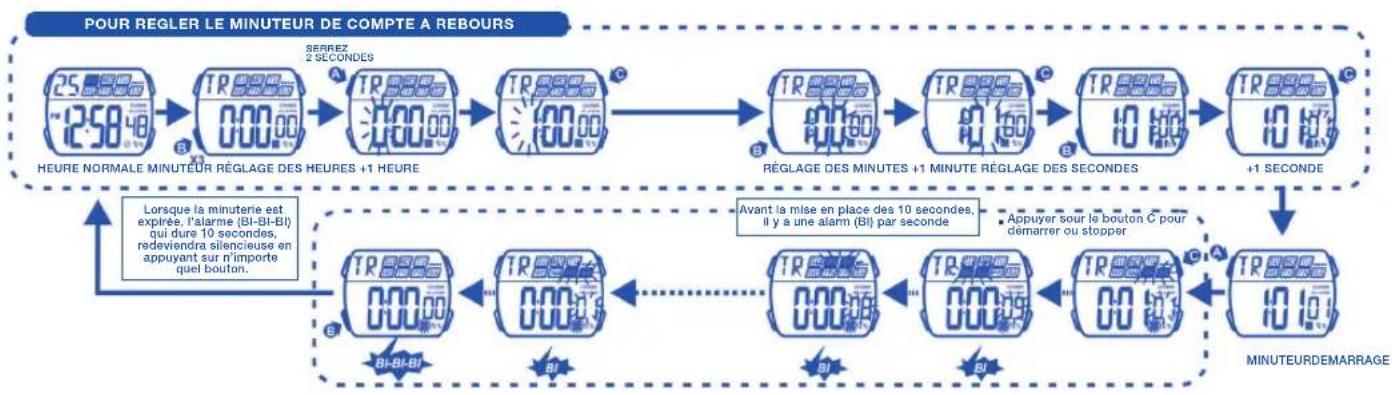
flowchart
graph TD
    A["25.00:00 12:58:48"] --> B["TR 000:00"]
    B --> C["TR 000:00"]
    C --> D["TR 000:00"]
    D --> E["TR 000:00"]
    E --> F["TR 000:00"]
    F --> G["TR 000:00"]
    G --> H["TR 000:00"]
    H --> I["TR 000:00"]
    I --> J["TR 000:00"]
    J --> K["TR 000:00"]
    K --> L["TR 000:00"]
    L --> M["TR 000:00"]
    M --> N["TR 000:00"]
    N --> O["TR 000:00"]
    O --> P["TR 000:00"]
    P --> Q["TR 000:00"]
    Q --> R["TR 000:00"]
    R --> S["TR 000:00"]
    S --> T["TR 000:00"]
    T --> U["TR 000:00"]
    U --> V["TR 000:00"]
    V --> W["TR 000:00"]
    W --> X["TR 000:00"]
    X --> Y["TR 000:00"]
    Y --> Z["TR 000:00"]
    Z --> AA["TR 000:00"]
    AA --> AB["TR 000:00"]
    AB --> AC["TR 000:00"]
    AC --> AD["TR 000:00"]
    AD --> AE["TR 000:00"]
    AE --> AF["TR 000:00"]
    AF --> AG["TR 000:00"]
    AG --> AH["TR 000:00"]
    AH --> AI["TR 000:00"]
    AI --> AJ["TR 000:00"]
    AJ --> AK["TR 000:00"]
    AK --> AL["TR 000:00"]
    AL --> AM["TR 000:00"]
    AM --> AN["TR 01:16"]
    AN --> AO["TR 17:16"]
    AO --> AP["TR 17:16"]
    AP --> AQ["TR 17:16"]
    AQ --> AR["TR 17:16"]
    AR --> AS["TR 17:16"]
    AS --> AT["TR 17:16"]
    AT --> AU["TR 17:16"]
    AU --> AV["TR 17:16"]
    AV --> AW["TR 17:16"]
    AW --> AX["TR 17:16"]
    AX --> AY["TR 17:16"]
- COMMENT RÉGLER L'HEURE D'UNE DEUXIEME ZONE
- COMMENT ALLUMER LA LUMIÈRE ÉLECTRO-LUMINISCENTE
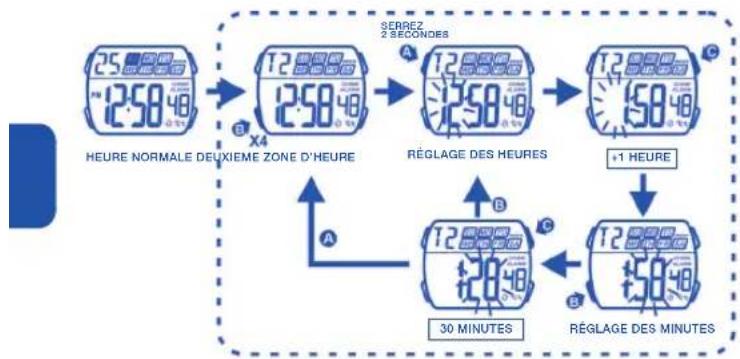
flowchart
graph TD
    A["25.00:00 DEUIME ZONE D'HEURE"] --> B["12.00:00 SEERREZ 2 SECONDS"]
    B --> C["12.00:00 RÉGLAGE DES HEURES"]
    C --> D["12.00:00 +1 HEURE"]
    D --> E["15.00:00 RÉGLAGE DES MINUTES"]
    E --> F["12.00:00 30 MINUTES"]
    F --> G["30 MINUTES"]
    style A fill:#f9f,stroke:#333
    style B fill:#f9f,stroke:#333
    style C fill:#f9f,stroke:#333
    style D fill:#f9f,stroke:#333
    style E fill:#f9f,stroke:#333
    style F fill:#f9f,stroke:#333
    style G fill:#f9f,stroke:#333
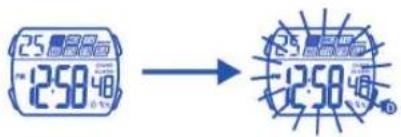
text_image
25.00'蓝光窗 12:50'48 → 12:50'蓝光窗 12:50'蓝光窗NOTE:
text_image
25 PM 12:58:48 ORA NORMALE MESE DATA- PER REGOLARE L'ORA NORMALE
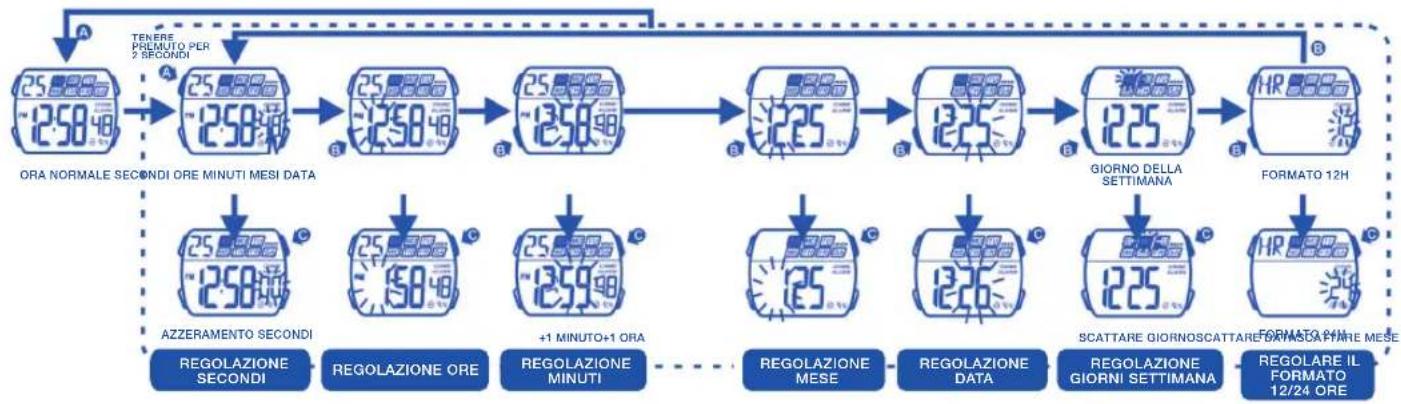
flowchart
graph TD
    A["ORA NORMALE SECONDI ORE MINUTI MESI DATA"] --> B["25.880"]
    B --> C["25.880"]
    C --> D["25.880"]
    D --> E["25.880"]
    E --> F["225"]
    F --> G["125"]
    G --> H["125"]
    H --> I["GIORNO DELLA SETTIMANA"]
    I --> J["HR 888"]
    J --> K["FORMATO 12H"]

    L["AZZERAMENTO SECONDI"] --> M["25.880"]
    M --> N["5048"]
    N --> O["25.880"]
    O --> P["+1 MINUTO+1 ORA"]
    P --> Q["1259"]
    Q --> R["REGOLAZIONE MESE"]
    R --> S["126"]
    S --> T["REGOLAZIONE DATA"]
    T --> U["125"]
    U --> V["SCATTARE GIORNOSCATTARE BASASCAPIRE MESE"]
    V --> W["REGOLARE IL FORMATO 12/24 ORE"]
- PER METTERE LA SVEGLIA
- PER UTILIZZARE IL DISPLAY SVEGLIA E SONERIA

flowchart
graph TD
    A["250x2 ORA NORMALE SVEGLIA"] --> B["X2"]
    B --> C["AL 8887 200x2"]
    C --> D["AL 8887 200x2"]
    D --> E["AL 8887 200x2"]
    E --> F["AL 8887 200x2"]
    F --> G["AL 8887 200x2"]
    G --> H["AL 8887 200x2"]
    H --> I["AL 8887 200x2"]
    I --> J["AL 8887 200x2"]
    J --> K["AL 8887 200x2"]
    K --> L["AL 8887 200x2"]
    L --> M["AL 8887 200x2"]
    M --> N["AL 8887 200x2"]
    N --> O["AL 8887 200x2"]
    O --> P["AL 8887 200x2"]
    P --> Q["AL 8887 200x2"]
    Q --> R["AL 8887 200x2"]
    R --> S["AL 8887 200x2"]
    S --> T["AL 8887 200x2"]
    T --> U["AL 8887 200x2"]
    U --> V["AL 8887 200x2"]
    V --> W["AL 8887 200x2"]
    W --> X["AL 8887 200x2"]
    X --> Y["AL 8887 200x2"]
    Y --> Z["AL 8887 200x2"]
    Z --> AA["AL 8887 200x2"]
    AA --> AB["AL 8887 200x2"]
    AB --> AC["AL 8887 200x2"]
    AC --> AD["AL 8887 200x2"]
    AD --> AE["AL 8887 200x2"]
    AE --> AF["AL 8887 200x2"]
    AF --> AG["AL 8887 200x2"]
    AG --> AH["AL 8887 200x2"]
    AH --> AI["AL 8887 200x2"]
    AI --> AJ["AL 8887 200x2"]
    AJ --> AK["AL 8887 200x2"]
    AK --> AL["AL 8887 200x2"]
    AL --> AM["AL 8887 200x2"]
    AM --> AN["AL 8887 200x2"]
    AN --> AO["AL 8887 200x2"]
    AO --> AP["AL 8887 200x2"]
    AP --> AQ["AL 8887 200x2"]
    AQ --> AR["AL 8887 200x2"]
    AR --> AS["AL 8887 200x2"]
    AS --> AT["AL 8887 200x2"]
    AT --> AU["AL 8887 200x2"]
    AU --> AV["AL 8887 200x2"]
    AV --> AW["AL 8887 200x2"]
    AW --> AX["AL 8887 200x2"]
    AX --> AY["AL 8887 200x2"]
    AY --> AZ["AL 8887 200x2"]
    AZ --> BA["AL 8887 200x2"]
    BA --> BB["AL 8887 200x2"]
    BB --> BC["SVEGLIA SECONDO FUSO ORARIO"]
    BC --> BD["SVEGLIA ORA NORMALE"]
    BD --> BE["SVEGLIA DEI MINUTI"]
    BE --> BF["SVEGLIA DEI MINUTO"]
70
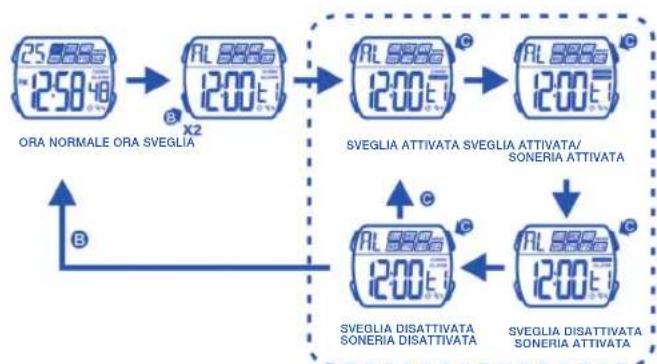
flowchart
graph TD
    A["ORA NORMALE ORA SVEGLIA"] --> B["SVEGLIA ATTIVATA SVEGLIA ATTIVATA/SONERIA ATTIVATA"]
    B --> C["SVEGLIA DISATTIVATA SONERIA DISATTIVATA"]
    C --> D["SVEGLIA DISATTIVATA SONERIA DISATTIVATA"]
71
- PER UTILIZZARE IL CRONOGRAFO
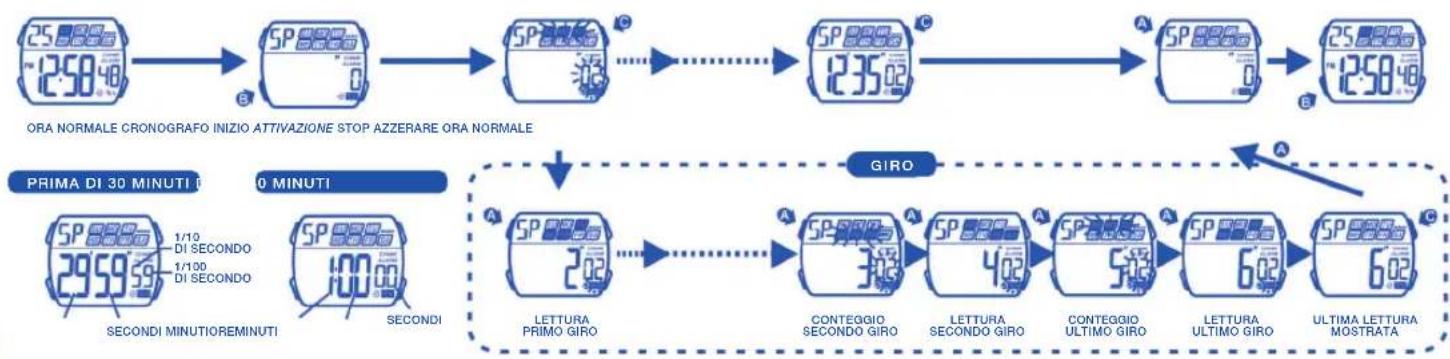

- PER UTILIZZARE IL CONTO ALLA ROVESCIA

flowchart
graph TD
    A["ORA NORMALE 25.880"] --> B["TR 9200 000.00"]
    B --> C["REGOLAZIONE ORE +1 ORA"]
    C --> D["TR 9200 000.00"]
    D --> E["REGOLAZIONE MINUTI +1 MINUTI REGOLAZIONE SECONDI +1 SECONDO"]
    E --> F["TR 9200 10.00"]
    F --> G["TR 9200 10.00"]
    G --> H["TR 9200 10.00"]
    H --> I["TR 9200 10.00"]
    I --> J["TR 9200 10.00"]
    J --> K["TR 9200 10.00"]
    K --> L["TR 9200 10.00"]
    L --> M["TR 9200 10.00"]
    M --> N["TR 9200 10.00"]
    N --> O["TR 9200 10.00"]
    O --> P["TR 9200 10.00"]
    P --> Q["TR 9200 10.00"]
    Q --> R["TR 9200 10.00"]
    R --> S["TR 9200 10.00"]
    S --> T["TR 9200 10.00"]
    T --> U["TR 9200 10.00"]
    U --> V["TR 9200 10.00"]
    V --> W["TR 9200 10.00"]
    W --> X["TR 9200 10.00"]
    X --> Y["TR 9200 10.00"]
    Y --> Z["TR 9200 10.00"]
    Z --> AA["TR 9200 10.00"]
    AA --> AB["TR 9200 10.00"]
    AB --> AC["TR 9200 10.00"]
    AC --> AD["TR 9200 10.00"]
    AD --> AE["TR 9200 10.00"]
    AE --> AF["TR 9200 10.00"]
    AF --> AG["TR 9200 10.00"]
    AG --> AH["TR 9200 10.00"]
    AH --> AI["TR 9200 10.00"]
    AI --> AJ["TR 9200 10.00"]
    AJ --> AK["TR 9200 10.00"]
    AK --> AL["TR 9200 10.00"]
    AL --> AM["TR 9200 10.00"]
    AM --> AN["TR 9200 10.00"]
    AN --> AO["TR 9200 10.00"]
    AO --> AP["TR 9200 10.00"]
    AP --> AQ["TR 9200 10.00"]
    AQ --> AR["TR 9200 10.00"]
    AR --> AS["TR 9200 10.00"]
    AS --> AT["TR 92,67,67"]
    AT --> AU["L'allarme di 15 secondi è preceduto da un avviso sonoro (BI) al secondo, Premendo il pulsante C per dare lo start e lo stop"]
    AU --> AV["Trascorso l'intervallo di temporizzazione è possibile spegnere l'allarme (BI BI BI), della durata di 15 secondi, premendo qualsiasi pulsante."]
74
75
9. PER REGOLARE IL SECONDO FUSO ORARIO
10. PER UTILIZZARE LA LUCE
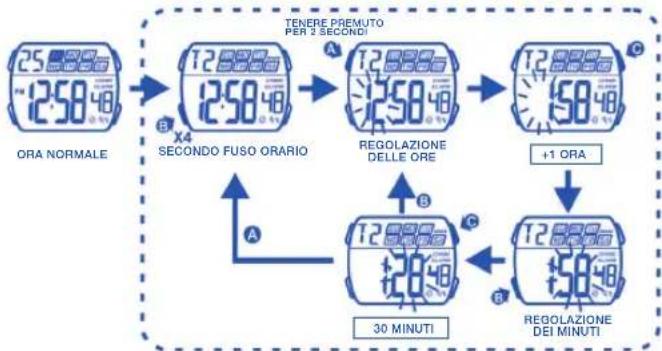
flowchart
graph TD
    A["ORA NORMALE 25:00:30"] --> B["X4 SECONDO FUSO ORARIO 12:50:40"]
    B --> C["REGOLAZIONE DELLE ORE 12:50:40"]
    C --> D["+1 ORA 15:00:30"]
    D --> E["REGOLAZIONE DEI MINUTI 12:50:40"]
    E --> F["30 MINUTI"]
    F --> G["A"]
    G --> H["B"]
    H --> I["C"]
    I --> J["D"]
    style A fill:#f9f,stroke:#333
    style B fill:#f9f,stroke:#333
    style C fill:#f9f,stroke:#333
    style D fill:#f9f,stroke:#333
    style E fill:#f9f,stroke:#333
    style F fill:#f9f,stroke:#333
    style G fill:#f9f,stroke:#333
    style H fill:#f9f,stroke:#333
    style I fill:#f9f,stroke:#333
    style J fill:#f9f,stroke:#333