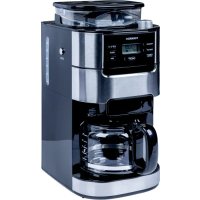
TCM1025AGS - Coffee machine TORNADO - Free user manual and instructions
Find the device manual for free TCM1025AGS TORNADO in PDF.



| Brand | Tornado |
| Model | TCM1025AGS |
| Product Type | Coffee maker with built-in grinder |
| Power Supply | 220-240 V ~ 50 Hz, 900-1050 W |
| Water Tank Capacity | 1.5 L |
| Maximum Bean Capacity | 200 g |
| Number of Cups | 2 to 12 |
| Grinder Function | Yes, with grind adjustment |
| Filter Coffee Maker Function | Yes, with ground coffee or beans |
| Coffee Strength Adjustment | Yes (Strength Control) |
| Delayed Programming | Yes (automatic start up to 24 h) |
| Keep Warm | Yes, up to 35 minutes |
| Automatic Shut-off | Yes |
| LCD Screen | Yes, with time and function display |
| Descaling | Possible with descaling solution or citric acid |
| Cleaning | Removable parts washable with soapy water |
| Safety | Protection against electric shock, hot surfaces, automatic shut-off |
| Included Accessories | Funnel, permanent filter, carafe, measuring spoon (not specified) |
Frequently Asked Questions - TCM1025AGS TORNADO
User questions about TCM1025AGS TORNADO
0 question about this device. Answer the ones you know or ask your own.
Ask a new question about this device
Download the instructions for your Coffee machine in PDF format for free! Find your manual TCM1025AGS - TORNADO and take your electronic device back in hand. On this page are published all the documents necessary for the use of your device. TCM1025AGS by TORNADO.
USER MANUAL TCM1025AGS TORNADO
American Coffee Machine
TCM1025A-GS
Technical Data
Voltage : 220-240V \~50Hz
Power : 900-1050W Capacity : 1.5 L
Important Safeguards
When using electrical appliances, basic precautions should always be followed, including the following:
- Read all instructions.
- Check voltage to be sure that the voltage indicated on the name plate agrees with your voltage.
- Do not touch hot surfaces. Use handles or knobs.
- To protect against fire, electric shock and injury to persons do not immerse cord, plug, or in water or other liquid.
- Not allow children to use without supervision.
- Remove plug from wall outlet before cleaning and when not in use. Allow appliance cool down completely before taking off, attaching components or before cleaning.
- Do not operate any appliance with a damaged cord or plug or after the appliance malfunctions, or has been damaged in any manner. Return appliance to the nearest authorized service facility for examination, repair or adjustment.
-
The use of accessory attachments not recommended by the appliance manufacturer may result in fire, electric shock or injury to persons.
-
Overfilling can also cause scalding.
-
Only ever use the coffee mill for grinding roasted coffee beans. Never use it for other granular foods.
-
Do not let cord hang over edge of table or counter, or touch hot surface.
-
Do not place on or near a hot gas or electric burner, or in a heated oven.
-
Do not use a cracked container or a container having a loose or weakened handle.
-
This appliance is not intended for used by persons (including children) with reduced physical, sensory or mental capabilities, or lack of experience and knowledge, unless they have been given supervision or instruction concerning use of the appliances by a person responsible for their safety.
-
Children should be supervised to ensure that they do not play with the appliance.
-
Do not use appliance for other than intended use.
-
Avoid contacting moving parts, as the blade is sharp.
-
Never use warm or hot water to fill the water tank. Use cold water only.
-
Do not use outdoors.
-
This appliance is intended to be used in household and similar applications such as:
- Staff kitchen areas in shops, offices and other working environments; - Farm houses; - By clients in hotels, motels and other residential type environments; - Bed and breakfast type environments.
-
Don't pour water or other substance through window film passageway.
-
Save these instructions.
Know Your Coffee Machine
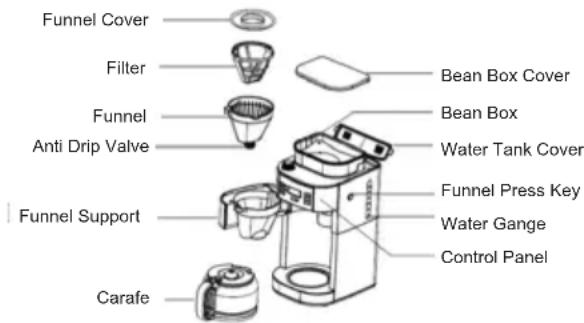
Control Panel

flowchart
graph TD
    A["PROGRAM Cup 2-12"] --> B["Grind Off"]
    B --> C["Strength Control"]
    C --> D["ON / OFF"]
    D --> E["Hour"]
    E --> F["Min"]
Before The First Use
Inspect whether all the accessories are complete and the product is damaged. Ensure that the unit is at the OFF position. Rotate the funnel support to the left, remove the funnel and other detachable parts, clean them in warm water, if necessary you can add some detergents, then replace them. Pour cold drinking water into water tank until max water level, do not place coffee and filter paper. Plug the power outlet, boil water directly through press 'ON/OFF' button until no water is left. You can repeat 2-3 times to ensure the coffee machine is clean.
Operation Instruction
Make drip coffee with coffee beans
- Open the water tank cover, pour clean cold water into water tank as needed.
Note: 1) The coffee you get would less than the water you pour in as some water had been absorbed with coffee powder.
2) Never pour hot water, milk, coffee powder or tea into water tank.
3) Please don't fill the water tank exceed 12 mark indicated on water gauge.
-
Press Funnel Press Key once and rotate the funnel support to the left, ensure the filter is inside of the Funnel Support.
-
Turn the funnel support to the right until it is locked.
-
Put proper coffee beans (not more than 200g) into Coffee Bean Box, then cover its lid. To avoid the coffee beans turn moist, we suggest not placing too much coffee bean in Coffee Bean Box.
Warning: To prevent the unit blocked, please don't use unroasted or damped coffee bean. It may damage the unit.
- Plug in the power cord into the outlet. The display will show "12:00" (see "control panel"), and the number will flash, then press 'HOUR' and 'MIN' button to set current time.
Note: Number will flash until Pressing Hour or Min button to set time, Automatic function cannot be available when number is flashing.
- Set the number of cups (2,4,6,8,10,12) through press "CUP 2-12" button (see "control panel"), if you do not press the "CUP 2-12" button to set the number of cup, the default number of cup is 12 cups. Then you can turn the Knob to set the thickness of coffee powder.
Note:1) Please ensure the cup size is the same as the water amount filled in water tank, when brewing the unit will finish boiling all of the water in water tank.
2) You can adjust the coffee powder coarseness by turning the knob, we recommend you turn the knob to the middle position.
- Press "STRENGTH CONTROL" to select coffee strength
- Press the "ON/OFF" button one time, waiting for about 3 seconds, the grinder will start grinding, after grinding,
wait for about 3 seconds, the LCD will display the Photo of “”, the brewing process begins.
-
After brewing, the “” on the LCD will disappear, and buzzer will sound 3 times.
-
When finish brewing, if you do not unplug the power cord from the power outlet, the coffee can be warmed in the carafe for some time, after some time, the appliance will cut off power automatically. The whole process Of warming lasts for 35 minutes.
Make drip coffee with coffee powder directly
- Open the water tank cover, pour clean cold water into water tank as needed.
Note: 1) The coffee you get would less than the water you pour in as some water had been absorbed with coffee powder.
2) Never pour hot water, milk, coffee powder or tea into water tank.
3) Please don't fill the water tank exceed 12 mark indicated on water gauge.
-
Press Funnel Press Key once and rotate the funnel support to the left, ensure the filter is inside of the Funnel Support. Add desired coffee powder into the filter according to your experience, then turn the Funnel Support to the right until it is locked.
-
Plug in the power cord into the outlet. The display will show "12:00" (see "control panel"), and the number will flash, then press 'HOUR 'and' MIN 'button to set current time.
Note: Number will flash until Pressing Hour or Min button to set time, the unit is not available when number is flash.
- Set the number of cup (2,4,6,8,10,12) through press "CUP 2-12" button (see "control panel"), if you do not press the "CUP 2-12" button to set the number of cup, the default number of cup is 12 cups.
Note: Please ensure the cup size is the same as the water amount filled in water tank, when brewing, the unit will finish boiling all of the water in water tank.
-
Press the "Grind off" button once, the blue "Grind off" indicator will be illuminated, then press the "ON/OFF" button once, the LCD will display the "", the coffee machine will brew directly.
-
After brewing, the "on the LCD will disappear, and buzzer will sound 3 times.
-
When finish brewing, if you do not unplug the power cord from the power outlet, the coffee can be warmed in the carafe for some time, after some time, the appliance will cut off power automatically. The whole process Of warming lasts for 35 minutes.
Automatic Start Function
Operate according to 1-7 steps at "make drip coffee with coffee beans or make drip coffee with coffee powder directly" section.
-
Set the current time, the number will stop flash, pressing "PROGRAM" button until the time into timer mode (the number flash again), setting the time of AUTOMATIC START you wanted through pressing "Min" and "Hour" button.
-
Press "PROGRAM" button again, the " " will show on the display, the blue "PROGRAM" indicator will be illuminated, the appliance into automatic mode.
Note: the time cycle is 24 hours.
- The coffee machine will start to brew at the preset time, the "PROGRAM" indicator will be extinguished and the "ON/OFF" indicator will be illuminated. The appliance will start to work automatically.
CANCEL THE PRESETTING PROGRAM
If the coffee machine is at the state of presetting (the "PROGRAM" indicator is on), but you want it to operate immediately, you just need to press "PROGRAM" button once, then the "PROGRAM" indicator will be extinguished, the automatic mode will be canceled.
Cleaning and Maintenance
CAUTION: Be sure to unplug this appliance before cleaning. To protect against electrical shock, do not immerse cord, plug or unit in water or liquid.
1) Clean the funnel, filter and coffee carafe after each use in hot, sudsy water.
2) Wipe the ground container and the product's exterior surface with a soft, damp cloth to remove stains.
3) Use a damp cloth to gently wipe the keeping warm plate. Never use abrasive cleaner to clean it.
Cleaning Mineral Deposits
- Fill the tank with water and descaler to the MAX level (the scale of water and descaler is 4:1, the detail refers to the instruction of descaler. Please use "household descaler", you can use the citric acid instead of the descaler (the one hundred parts of water and three parts of citric acid).
- Press "Grind off" button, the blue "Grind off" indicator will be illuminated, then press the "ON/OFF" button once, the appliance will start to brew directly.
- Rinse by operating the appliance with clean water at least 3 times.
Hints For Great-Tasting Coffee
- A clean coffee machine is essential for making great-tasting coffee. Regularly clean the coffee machine as specified in the "CLEANING AND MAINRENANCE" section. Always use fresh, cold water in the coffee machine.
- Store unused coffee grounds in a cool, dry place. After opening a package of coffee grounds, reseal it tightly and store it in a refrigerator to maintain its freshness.
- For an optimum coffee taste, buy whole coffee beans and finely grind them just before brewing.
- Do not reuse coffee grounds since this will greatly reduce the coffee' flavor. Reheating coffee is not recommended as coffee is at its peak flavor immediately after brewing.
- Clean the coffee machine when over-extraction causes oiliness. Small oil droplets on the surface of brewed, black coffee are due to the extraction of oil from the coffee grounds.
- Oiliness may occur more frequently if heavily roasted coffees are used.
Correct Disposal of This Product
(Waste Electrical & Electronic Equipment)
(Applicable in countries with separate collection systems)
This marking on the product, accessories or literature indicates that the product and its electronic accessories should not be disposed of with other household waste.
To prevent possible harm to the environment or human health from uncontrolled waste disposal, please separate these items from other types of waste and recycle them responsibly to promote the sustainable reuse of material resources.
Household users should contact either the retailer where they purchased this product, or their local government office, for details of where and how they can take these items for environmentally safe recycling.
natural_image
Symbol of a trash bin crossed out by two diagonal lines (no text or labels)
natural_image
Symbol of a trash bin crossed with no text or numbers, representing waste sorting or disposal (no text present)natural_image
Symbol of a trash bin crossed out by two diagonal lines (no text or labels)
natural_image
Symbol of a trash bin crossed with no text or numbers, representing environmental restriction (no text present)
- American Coffee Machine
- Technical Data
- Important Safeguards
- Know Your Coffee Machine
- Control Panel
- Before The First Use
- Operation Instruction
- Make drip coffee with coffee powder directly
- Automatic Start Function
- Note: the time cycle is 24 hours.
- CANCEL THE PRESETTING PROGRAM
- Cleaning and Maintenance
- Cleaning Mineral Deposits
- Hints For Great-Tasting Coffee
- Correct Disposal of This Product
Brand : TORNADO
Model : TCM1025AGS
Category : Coffee machine