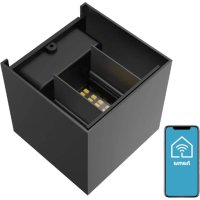
176606 - Lighting HAMA - Free user manual and instructions
Find the device manual for free 176606 HAMA in PDF.


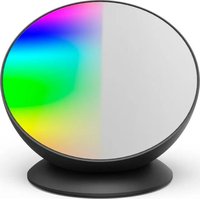
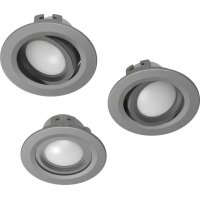
| Product type | WiFi wall light |
| Brand | Hama |
| Model | 176606 |
| Luminous flux | 360 lm |
| Power | 3.6 W |
| Color temperature | 2700 K - 6500 K (warm white to cold white) |
| Input voltage | 220-240 V ~ / 50 Hz |
| Frequency band | 2.4 GHz |
| Maximum transmission power | < 100 mW |
| Protection class | II |
| Connectivity | WiFi 2.4 GHz |
| Dedicated app | Hama SmartHome (Solution) |
| Light source type | Integrated non-replaceable LED |
| Installation | Wall-mounted, on flush-mounted box |
| Usage | Indoor, domestic |
| Maintenance and cleaning | Slightly damp lint-free cloth, disconnect before |
| Recycling | Do not dispose of with household waste, follow local regulations |
| Safety | Do not look directly at the light source, risk of burns |
| Protection rating | IP20 (estimated for indoor use) |
Frequently Asked Questions - 176606 HAMA
User questions about 176606 HAMA
0 question about this device. Answer the ones you know or ask your own.
Ask a new question about this device
Download the instructions for your Lighting in PDF format for free! Find your manual 176606 - HAMA and take your electronic device back in hand. On this page are published all the documents necessary for the use of your device. 176606 by HAMA.
USER MANUAL 176606 HAMA
OperatingInstructions
Bedienungsanleitung
Moded'emploi
Instruccionesdeuso
Gebruiksaanwijzing
Istruzioniperl'uso
Instrukcjaobsługi
Használatiútmutató
Manualdeutilizare
Návodkpoužití
Návodnapoužitie
Manualdeinstruções
Bruksanvisning
LinktoApp
- This quick-reference guide contains the most important basic information, such as safety instructions and the steps necessary to operate the product.
- Thefulltext ofthe manualisavailableatthe followinginternetaddress:
www.hama.com->00176606,00176607
->Downloads
- Savethemanualonyourcomputerforreference andprintitoutifpossible.
1. Explanation of symbols used on the product label

Electricaldeviceofsafety classII.
Protectionagainstelectricshock thankstoreinforcedordouble insulationofliveparts.

Theproductmustonlybeused withalternatingcurrent.

Non-dimmable.
Thelampisnotsuitableforuse withaconventionaldimmer.

Thearticlemayonlybeconnectedbyaqualifiedelectrician whocomplieswithnational regulationsandthoseofthelocalenergysupplycompany,and whohassufficientknowledge regardinginstallationlocations, fireprotectionandelectrical installationwork.
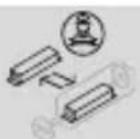
Replaceablecontrol gearbyaprofessional
2. Explanationofwarningsymbolsandnotes
Riskofelectricshock
This symbol indicates a risk of electric shock from touching product part of carrying hazardous voltage.

Warning
This symbol is used to indicate safety instructions ortodraw your attention to specific hazards and risks.

Note
This symbol is used to indicate additional information or important notes.

3.Packagecontents
• 1 Walllight
• 2Insulationtubes
- Mountinghardware
- Quick-startguide
4. Safetyinstructions
- Thisproductisintendedforprivate,non-commercialuseonly.
- Usetheproductonlyfortheintendedpurpose.
- Donotdropheproductanddonotexposeitto anymajorshocks.
- Donotoperatetheproductoutsidethepower limitsspecifiedinthetechnicaldata.
- Donotmodifytheproductinanyway.Doingso voidsthewarranty.
- Childrenmustnotplaywiththedevice.Cleaning andusermaintenancemustnotbecarriedoutby childrenwithoutsupervision.
- Aswithallelectricalproducts, this devices should be kept out of thereachofchildren.
- Disposeofpackagingmaterialimmediately inaccordancewiththelocallyapplicable regulations.
• The product must only be operated on as supply networks described on the type plate. - Beforemounting, check that the wally you have chosen issuitable for the weight to be mounted. Als o makes sure that there are no electric, water, gas or other lines running through the wall at the mountingsite.
• Electricalcablesmustneverbecometrappedor twistedbetweentheproductandthesurface. -
If the product is attached to an metals surface, it must be connected to an earth lead or the installation's potential equalising cable.
-
Onlyusethearticleundermoderateclimatic conditions.
- Donotusetheproductinareasinwhich electronicproductsarenotpermitted.
- Donotusetheproductinadampenvironment andavoidsplashingwater.
- Donotbendorcrushthecable.
- Donotattempttoserviceorrepairtheproduct yourself.Leaveanyandallserviceworkto qualifiedexperts.
- Donotcontinuetooperatethedeviceifitis visiblydamaged
• Nobarespotsmustbevisibleafterconnection
Warning
- Pleasenotethatlights(evenLEDs)cangenerateheatandmaybecomehot.Alwayslet theightcooldownforafewminutesbefore touchingit.
• The device can only be operated on a 230 V50Hz AC voltagenetwork. Work on the 230 Vnetwork must only be carried out by an electrician certified in your country. The applicable accident prevention regulations must be adhered to.
• To avoid an electric shock from the device, pleased disconnect themains voltage (switch off the automatic circuit breaker). Failure to comply with the installation instructions can cause fires or other hazards.
Riskofelectricshock
Donotopentheproductanddonotoperateitif itisdamaged,ifsmoke,astrangesmellorloud noisesarecomingfromit.Immediatelycontact yourdealerorourservicedepartment(seeitem "ServiceandSupport").

Note
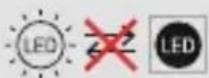
Thelightsourceofthislightisnotreplaceable;
whenthelightsourcehas reachedtheendofitslife, youneedtoreplacethe entirelight.

Warning
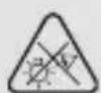
Neverlookstraightintothelightsourceanddo notaimitsbeamoflightstraightintotheeyesof otherpeopleoranimals.Thiscould damageyour/theireyes.

Note
Thislightcontainsalightsourceofenergy efficiencyclass"F".

5. Installation
- Switchofftherelevantfuse(fusebox)forthe roominwhichyouwishtoinstallthelight.
- Check that the wires are de-energised using a suitable measuring device (e.g. multimeter).
• Pullthehousingupwardsandoff. - Loosenthegrubscrewsonthesideusingthe Allenkeyprovided.
- Neverlookstraightintothelightsourceanddo notaimitsbeamoflightstraightintotheeyes ofotherpeopleoranimals.Thiscoulddamage your/theireyes.
- Pleasenotethatlights(evenLEDs)cangenerate heatandmaybecomehot.Alwaysletthelight cooldownforafewminutesbeforetouchingit.
- Pullthewiresthroughthehole(withrubber insulation)onthemountingplateandattach theinsulationtubes. Thetubesmustcoverthe connectingcableinsidethelightuptothe terminals.Shortenanyconnectingwiresthat aretoolong.
• Insulatethecablesasspecifiedontheterminals (10mm). - Noearthwirecanbeconnectedtothelamp, nor shoulditbe.
- Attachthemountingplatetothewallusingthe screwsanddowelssupplied.
- Connectthewirestothelightterminals. Please ensure that these is correctly inserted.
- Placethewalllightonthemountingplate and tightenthegrubscrewsontheside.
- Nowpushthehousingbackontothewalllight.
6. Here'showeasyitis:
Downloadtheapp
- DownloadtheHamaSmartHome(Solution) APPfromtheAppleAppStoreorGooglePlay Store.
- OpentheHamaSmartHome(Solution)APP.
- Thefirsttimeyousetheapp,youneedto registerandcreateanewaccount.Ifyoualready haveanaccount,loginwithyouraccessdetails.
• Followtheinstructionsintheapp.
Note

Adetaileddescriptionofthe
HamaSmartHome(Solution)App
anditsfullscopeoffunctionscanbefoundinour AppGuideat:
www.hama.com Article number Downloads AppOperatingInstructions
7. Careandmaintenance

Note
Disconnect the product from themains before cleaning and during prolonged period sof non-use.
- Onlycleanthisproductwithaslightlydamp, lint-freeclothandonotuseaggressivecleaning agents.
- Ensure that now waterisable to enter the product.
8.Warrantydisclaimer
HamaGmbH&CoKGassumesnoliabilityandprovidesnowarrantyfordamageresultingfromimproperinstallation/mounting,improperuseoftheproductorfromfailuretoobservetheoperatinginstructions and/orsafetynotes.
9. Recycling information
Noteonenvironmentalprotection:
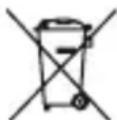

Following the implementation of European Directives 2012/19/EU and 2006/66/EU into thenational illegal systems, the following applies: Electrical and electronic devices
aswellasbatteriesmustnotbedisposedofwith householdwaste. Consumersareobligedbylawto returnelectricalandelectronicdevicesaswellas batteriestothedesignatedpubliccollectionpointsor tothepointofsaleattheendoftheirservicelives. Detailedinformationonthistopicisdefinedinthe nationallawsoftherespectivecountry. Thispresence oftheabovesymbolontheproduct,operating instructionsorpackageindicatesthattheproduct issubjecttotheseregulations.Byrecycling,reusing thematerialsorotherformsofutilisingolddevices/ batteries,youaremakinganimportantcontribution toprotectingourenvironment.
10.RFexposureinformation
This device complies with the EU requirements for limiting the exposure of the general public to electromagnetic fields by means of health protection. The device complies with RF specifications provided it is used 20 cm away from the body.
11. Declaration of conformity
HamaGmbH&CoKGhereby declaresthattheradioequipment type[00176606,00176607]isin compliancewithDirective2014/53/
EU.ThefulltextoftheEUdeclarationofconformity isavailableatthefollowingInternetaddress: www.hama.com->00176606, 00176607->Downloads.
12.Technicaldata
| WiFiWallLight | |
| Luminousflux360lm | |
| Power3.6W | |
| Lightcolour | 2700K-6500K(warmwhitetocool white) |
| Inputvoltage220-240V~/50Hz | |
| Frequencyband/frequencybands | 2.4GHz |
| Maximumradio-frequencypower transmitted | <100mW |
AppHamaSmartHome(Solution)
All listed brands are trademark so the corresponding companies. Errors and omission excepted, and subject to technical changes. Our general terms of delivery and payment are applied.
- Explanation of symbols used on the product label
- Electricaldeviceofsafety classII.
- Non-dimmable.
- Explanationofwarningsymbolsandnotes
- Riskofelectricshock
- Warning
- Note
- 3.Packagecontents
- Safetyinstructions
- Installation
- Here'showeasyitis:
- Downloadtheapp
- HamaSmartHome(Solution)App
- Careandmaintenance
- 8.Warrantydisclaimer
- Recycling information
- Noteonenvironmentalprotection:
- 10.RFexposureinformation
- Declaration of conformity
- AppHamaSmartHome(Solution)
Brand : HAMA
Model : 176606
Category : Lighting