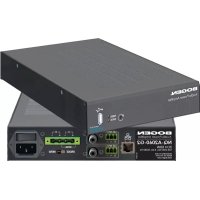
NQA2060G2 - Receiver Bogen - Free user manual and instructions
Find the device manual for free NQA2060G2 Bogen in PDF.


| Product type | Network Power Audio Amplifier |
| Brand | Bogen |
| Model | NQ-A2060-G2 |
| Output Power | 2 x 60 W (2-channel mode) or 1 x 120 W (bridged mode) |
| Minimum Load Impedance | 4 Ω per channel in 2-channel mode, 8 Ω in bridged mode |
| Line Voltages | 25 V, 70 V (depending on mode) |
| Network Connectivity | Ethernet RJ45 |
| Audio Inputs | 2 x balanced line inputs (Phoenix), 1 x RCA input (alternative) |
| Speaker Outputs | Phoenix terminals A+/-, B+/- |
| USB Port | Yes (for maintenance or configuration) |
| Power Supply | Mains, requires circuit with max 20 A breaker |
| Power Consumption | Not specified |
| Dimensions (approx.) | 24.1 x 4.4 x 30.5 cm (1/2 rack 1U) |
| Weight (approx.) | 2.3 kg |
| LED Indicators | Power (red/green), Status (red, green, blue, flashing) |
| Protection Features | Overload, temperature, short-circuit protection |
| Maintenance and Cleaning | Clean with a dry cloth; do not obstruct ventilation openings |
| Safety | Do not expose to rain or moisture; unplug during storms; maintain 10 cm minimum distance for ventilation |
| Warranty | 5-year limited (parts and labor) |
Frequently Asked Questions - NQA2060G2 Bogen
User questions about NQA2060G2 Bogen
0 question about this device. Answer the ones you know or ask your own.
Ask a new question about this device
Download the instructions for your Receiver in PDF format for free! Find your manual NQA2060G2 - Bogen and take your electronic device back in hand. On this page are published all the documents necessary for the use of your device. NQA2060G2 by Bogen.
USER MANUAL NQA2060G2 Bogen
NQ-A2060-G2, NQ-A2120-G2 Audio Power Amplifiers
Installation and Use Manual
WARNING: To reduce the risk of fire or electric shock, do not expose this apparatus to rain or moisture.
The apparatus shall not be exposed to dripping or splashing and that no objects filled with liquids, such as vases, shall be placed on apparatus.
The mains plug is used as disconnect device. The mains plug of apparatus should not be obstructed OR should be easily accessed during intended use. To be completely disconnect the power input, the mains plug of apparatus shall be disconnected from the mains.
CAUTION: DO NOT INSTALL OR PLACE THIS UNIT IN A BOOK CASE, BUILT-IN CABINET, OR IN ANOTHER CONFINED SPACE.
ENSURE THAT THE UNIT IS WELL VENTILATED. TO PREVENT THE RISK OF SHOCK OR FIRE HAZARD DUE TO OVER HEATING.
ENSURE THAT CURTAINS AND ANY OTHER MATERIALS DO NOT OBSTRUCT THE VENTILATION VENTS.
Always comply with the following basic safety precautions when installing and using the unit:
- Read these instructions.
- Keep these instructions.
- Heed all warnings.
- Follow all instructions.
- DO NOT use this apparatus near water.
- Clean only with dry cloth.
- DO NOT block any ventilation openings. Install in accordance with the manufacturer's instructions.
- DO NOT install near any heat sources such as radiators, heat registers, stoves, or other apparatus (including amplifiers) that produce heat.
- DO NOT defeat the safety purpose of the polarized or grounding-type plug. A polarized plug has two blades with one wider than the other. A grounding-type plug has two blades and a third grounding prong. The wide blade, or the third prong, are provided for your safety. If the provided plug does not fit into your outlet, consult an electrician for replacement of the obsolete outlet.
- Protect the power cord from being walked on and/or pinched, particularly at plugs, convenience receptacles, and the point where they exit from the apparatus.
- Only use attachments/accessories which are specified by the manufacturer.
- Unplug this apparatus during lightning storms or when unused for long periods of time.
- Refer all servicing to qualified service personnel. Servicing is required when the apparatus has been damaged in any way, such as power-supply cord or plug is damaged, liquid has been spilled or objects have fallen into the apparatus, the apparatus has been exposed to rain or moisture, does not operate normally, or has been dropped.
This equipment is not suitable for use in locations where children are likely to be present. Equipment is intended for use only in a restricted access area.
CAUTION
RISK OF ELECTRIC SHOCK DO NOT OPEN
CAUTION: TO PREVENT THE RISK OF ELECTRIC SHOCK, DO NOT REMOVE ANY FRONT/BACK COVERS OR PANELS. NO USER-SERVICEABLE PARTS ARE NSIDE. REFER ANY SERVICING TO QUALIFIED PERSONNEL.
The lightning flash with arrowhead symbol, within an equilateral triangle, is intended to alert the user to the presence of uninsulated "dangerous voltage" within the product's enclosure that may be of sufficient magnitude to constitute a risk of electric shock to persons.
The exclamation point within a unilateral triangle is intended to alert the user to the presence of important operating and maintenance (servicing) instructions.

WARNING:
The apparatus shall be connected to a mains socket outlet with a protective earthing connection.
To reduce the risk of fire or electric shock, do not expose this apparatus to rain or moisture.

The apparatus shall not be exposed to dripping or splashing and that no objects filled with liquids, such as vases, shall be placed on the apparatus.
Where the mains plug or an appliance coupler is used as the disconnect device, the disconnect device shall remain readily operable.
Minimum distances 10cm around the apparatus for sufficient ventilation.
The ventilation should not be impeded by covering the ventilation openings with items, such as newspapers, table-cloths, curtains, etc.
No naked flame sources, such as lighted candles, should be placed on the apparatus.
The use of apparatus in moderate climates.
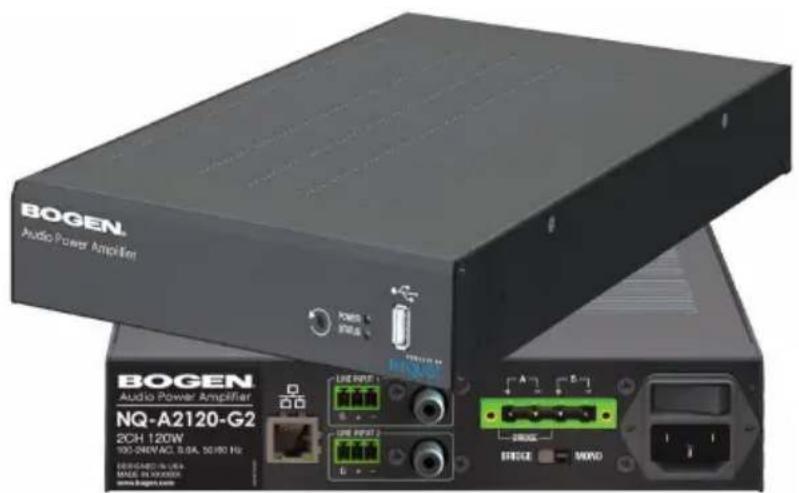
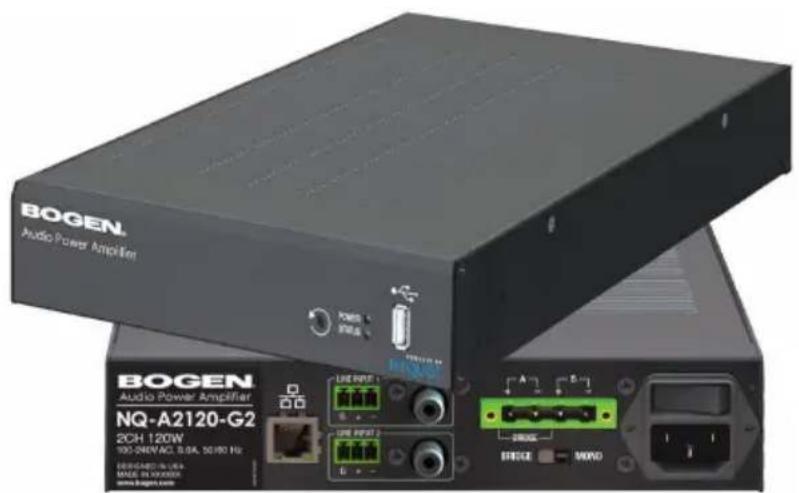
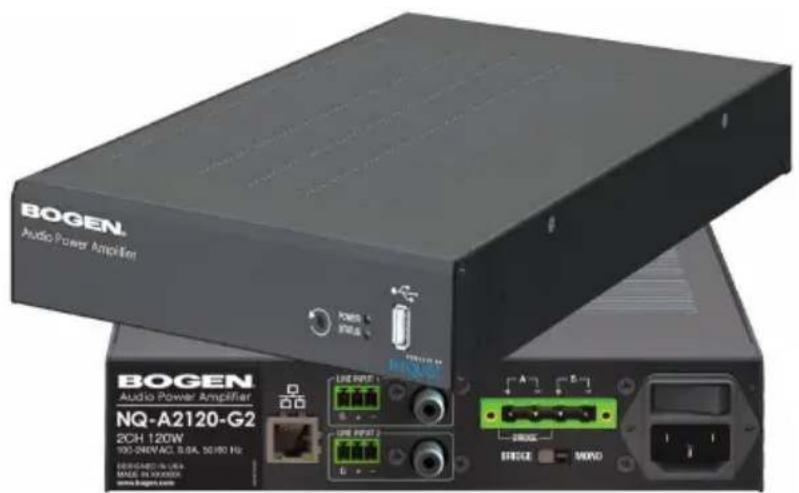
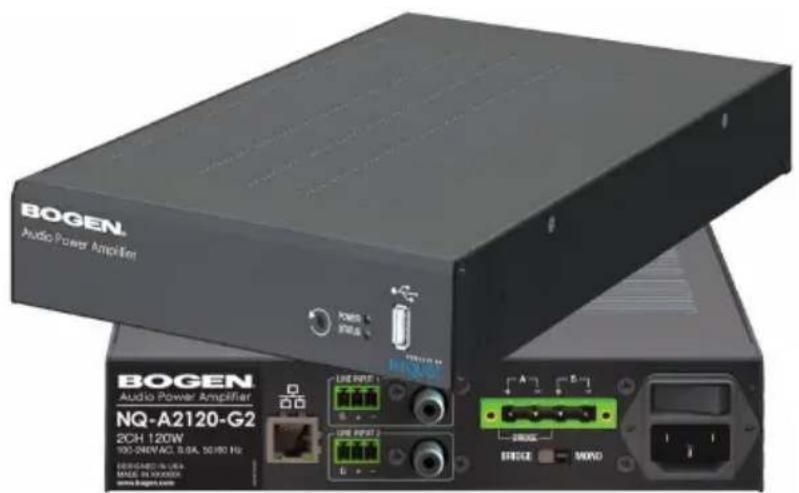
These networked Audio Power Amplifiers support a full range of commercial paging, public address applications, and residential audio applications, regardless of the venue size. Both the NQ-A2060 and the NQ-A2120 can operate in 2-channel or single channel bridged mode, depending on the application need.
Each networked audio power amplifier is a half-rack 1RU high enclosure containing a Class D audio power amplifier, a universal switched-mode power supply, an RJ45 network jack, a USB port, and pluggable Phoenix style terminals for loudspeaker and Line-In connections. Optionally, Line-In can be connected using the available RCA connectors.
Installation
To install the Nyquist NQ-A4060-G2 & NQ-A4120-G2 Power Amplifiers:
- Ensure the POWER switch is in the off position.
- This product requires a connection to a Mains circuit with a maximum of a 20A breaker.
- Connect a Cat-5 type cable into the amplifier's Ethernet port and ensure the other end of the cable is correctly connected to your network.
- Set the Amplifier Mode switch to the desired setting.
This amplifier can be configured for single-channel bridged mode (aka bridged-tied load) operation for 70V/25V/8Ω applications, or 2-channel operation for 25V/8Ω/4Ω applications. The Amplifier Mode switch is used in conjunction with the Bridged Signal routing setting in the system console.
Bridged Mode is typically used when higher power, single channel operation with a high impedance loudspeaker load is desired.
A typical use-case would be for 70V or 25V loudspeaker runs, where the total load is no less than 8
2-Channel Mode is typically used for 8 or 4 loudspeakers runs. This mode allows the two amplifier channels to operate independently.
In Bridged Mode, Line Input 1 is used as input. For 2-Channel Mode operation, Line Inputs 1 and 2 are used.
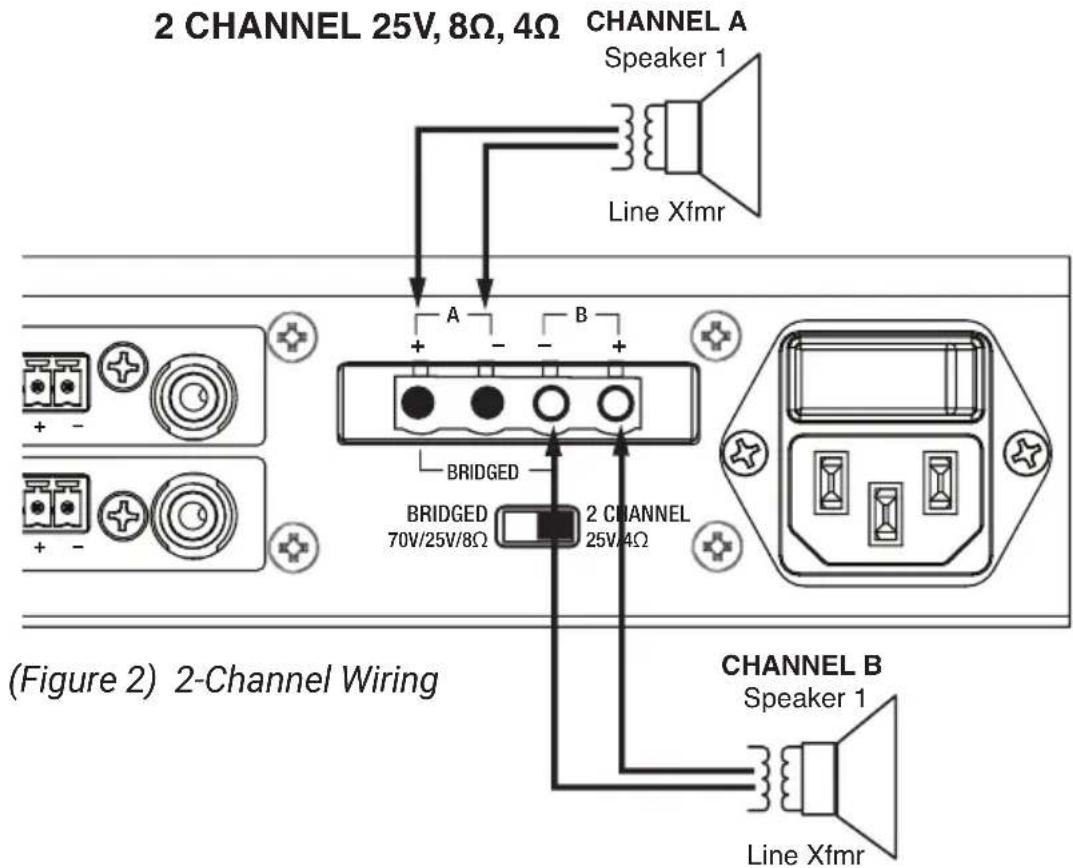
- Connect the loudspeaker wires to the Amplifier Output Terminals, which are labeled A +/- and B +/-, as appropriate for the desired mode of operation (see Figures 1 and 2).
Bridged Mode operation requires the speaker wires to be connected across a single, different terminal on each channel (A+ and B-) (see Figure 1).
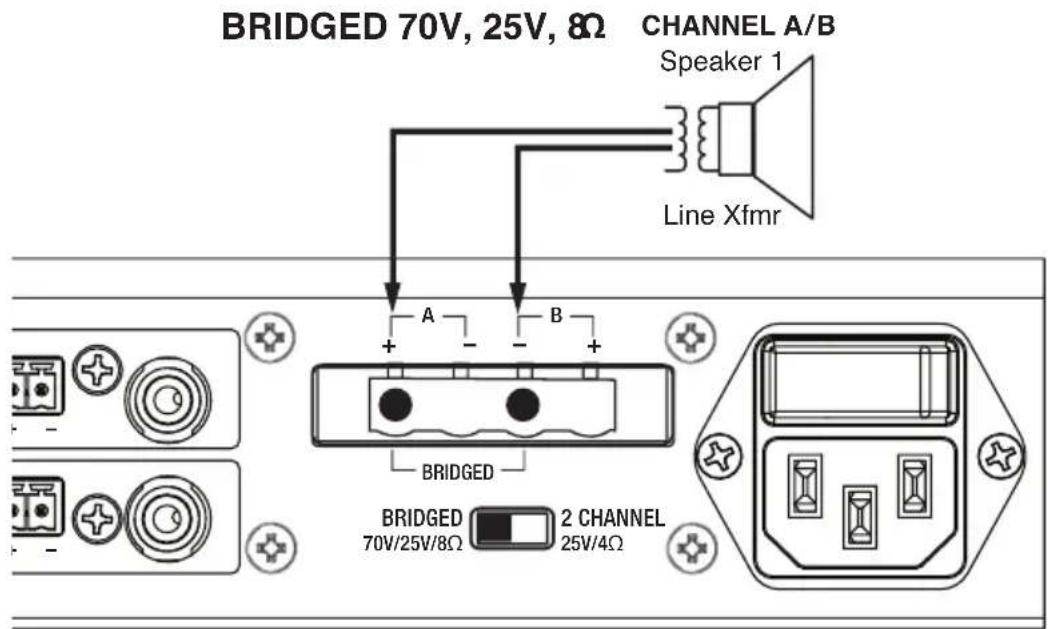
Figure 1) Bridged Wiring
If 2-Channel Mode is used, then Channel A is connected to the A + and A- terminals and B channel is connected to the B + and B- terminals (see Figure 2).
- If using Line Input, route the input.
The amplifier uses a balanced line level (up to 2V RMS) analog audio input. You can use either RCA or Phoenix (but not both) as the input.
This input can be routed to either or both amplifier channels, depending on the setting of the Amplifier Mode switch.
Note: If you use the RCA input and experience a ground hum, place a jumper on the Phoenix balanced Line-In connector from Pin 1 (shield) to Pin 3 (-) pin to remove the hum.
- Plug the power line cord into the power source.
- Toggle the Power switch to the On position.
For information about configuring the amplifier for the Nyquist system, refer to the Nyquist Audio Power Amplifiers Configuration Manual.
NOTICE
The minimum impedance of a Bridged 70V/25V/8Ω High-Impedance system should not be less than 8Ω. The minimum impedance of a 2CH 25V/8/4Ω system should not be less than 4Ω per channel.
The combined total power of each speaker tap must not exceed 80% of the rated amplifier power in either Bridged 70V/25V/8Ω mode or 2CH 25V/8/4Ω mode.
Failure to observe minimum speaker impedance will cause the amplifier to self protect until the speaker configuration is corrected.
Power Ratings
The NQ-A2060-G2 can provide 60 Watts by two channels into 25V, or 8Ω, or 4Ω loads, or 120 Watts Bridged by one channel into 70V, or 25V, or 8Ω load configurations.
The NQ-A2120-G2 can provide 120 Watts by two channels into 25V, or 8Ω, or 4Ω loads, or 240 Watts Bridged by one channel into 70V, or 25V, or 8Ω load configurations.
Viewing and Understanding LEDs
Two LEDs appear on the front of the amplifier. One is labeled POWER and appears as solid red during initial power up, flashes green during a boot sequence, and appears solid green when fully booted.
The STATUS LED uses the following indicators to provide information about the appliance:
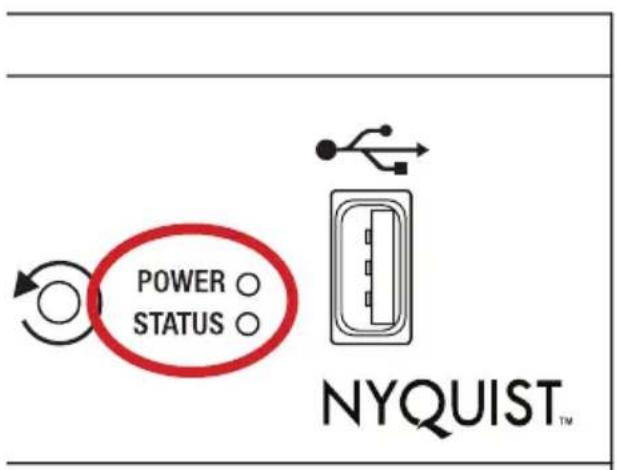
FLASHING RED - No network connection found.
- SOLID BLUE - The amplifier is in an uninitialized state and is not associated to a server. (The server may be in a discovery mode.)
- SOLID GREEN - The amplifier is registered to a Nyquist server and is in normal operation.
- FLASHING GREEN - The amplifier has an IP address but is not registered with the Nyquist server.
- SOLID RED - The amplifier needs to be rebooted or reset so that the Nyquist application can resume.
- FLASHING BLUE - The amplifier is updating.
Clipping, Protection, and Temperature Indicators
In addition to the LEDs that appear on the actual appliance, separate amplifier module signal clipping, protection mode, and temperature status indicators appear in the Nyquist amplifier's web-based user interface.
For more information about these status indicators, refer to the Nyquist Audio Power Amplifiers Configuration Manual.
Using the Reset Button
The Reset button allows you to restart the appliance or to reset the appliance's configuration settings to the factory default settings. For more information about resetting configuration settings, refer to the Nyquist Audio Power Amplifiers Configuration Manual.
POWER STATUS
NYQUIST
NOTICE
Every effort was made to ensure that the information in this manual was complete and accurate at the time of printing; however, all information is subject to change.
Compliance
NOTE: This equipment has been tested and found to comply with the limits for a Class B digital device, pursuant to Part 15 of the FCC Rules. These limits are designed to provide reasonable protection against harmful interference in a residential installation. This equipment generates, uses and can radiate radio frequency energy and, if not installed and used in accordance with the instructions, may cause harmful interference to radio communications. However, there is no guarantee that interference will not occur in a particular installation. If this equipment does cause harmful interference to radio or television reception, which can be determined by turning the equipment off and on, the user is encouraged to try to correct the interference by one or more of the following measures:
Re-orient or relocate the receiving antenna.
Increase the separation between the equipment and receiver.
Connect the equipment into an outlet on a circuit different from that to which the receiver is connected.
Consult the dealer or an experienced radio/TV technician for help.
Limited Warranty, Exclusion of Certain Damages
The Nyquist NQ-A2120-G2 and NQ-A2060-G2 are warranted to be free from defects in materials and workmanship for five (5) years from the date of sale to the original purchaser. Any part of the product covered by this warranty that, with normal installation and use, becomes defective (as confirmed by Bogen upon inspection) during the warranty period will be repaired or replaced by Bogen, at Bogen's option, with new or refurbished product, provided the product is shipped insured and prepaid to: Bogen Factory Service Department: 4570 Shelby Air Drive, Suite 11, Memphis, TN 38118, USA. Repaired or replacement product(s) will be returned to you freight prepaid. This warranty does not extend to any of our products that have been subjected to abuse, misuse, improper storage, neglect, accident, improper installation or have been modified or repaired or altered in any manner whatsoever, or where the serial number or date code has been removed or defaced.
THE FOREGOING LIMITED WARRANTY IS BOGEN'S SOLE AND EXCLUSIVE WARRANTY AND THE PURCHASER'S SOLE AND EXCLUSIVE REMEDY. BOGEN MAKES NO OTHER WARRANTYES OF ANY KIND, EITHER EXPRESS OR IMPLIED, AND ALL IMPLIED WARRANTYES OF MERCHANTABILITY OR FITNESS FOR A PARTICULAR PURPOSE ARE HEREBY DISCLAIMED AND EXCILLED TO THE MAXIMUM EXTENT ALLOWABLE BY LAW. Bogen's liability arising out of the manufacture, sale or supplying of products or their use or disposition, whether based upon warranty, contract, tort or otherwise, shall be limited to the price of the product. IN NO EVENT SHALL BOGEN BE LIABLE FOR SPECIAL, INCIDENTAL OR CONSEQUENTIAL DAMAGES (INCLUDING, BUT NOT LIMITED TO, LOSS OF PROFITS, LOSS OF DATA OR LOSS OF USE DAMAGES) ARISING OUT OF THE MANUFACTURE, SALE OR SUPPLYING OF PRODUCTS, EVEN IF BOGEN HAS BEEN ADVISED OF THE POSSIBILITY OF SUCH DAMAGES OR LOSSES. Some States do not allow the exclusion or limitation of incidental or consequential damages, so the above limitation or exclusion may not apply to you. This warranty gives you specific legal rights, and you may also have other rights which vary from State to State.
Products that are out of warranty will also be repaired by Bogen Factory Service Department - same address as above or call 201-934-8500, at owner's expense. Returned products which do not qualify for warranty service, may be repaired or replaced at Bogen's option with a previously repaired or refurbished items. The parts and labor involved in these repairs are warranted for 90 days when repaired by the Bogen Factory Service Department. All parts and labor charges as well as shipping charges will be at the owner's expense.
All returns require a Return Authorization number. For most efficient warranty or repair service, please include a description of the failure.
NOTES
BOGEN®
COMMUNICATIONS, INC.
www.bogen-ip.com
COMMUNICATIONS, INC.
Copyright 2020, Bogen Communications, Inc.
740-00130A 2010
COMMUNICATIONS, INC.
www.bogen-ip.com
COMMUNICATIONS, INC.
www.bogen-ip.com
NQ-A2060-G2, NQ-A2120-G2
COMMUNICATIONS, INC.
Copyright 2020 Bogen Communications, Inc.
740-00130A 2010
COMMUNICATIONS, INC.
www.bogen-ip.com
COMMUNICATIONS, INC.
www.bogen-ip.com