DRZ120 - Receiver Bogen - Free user manual and instructions
Find the device manual for free DRZ120 Bogen in PDF.


| Product Type | Commercial Audio Receiver |
| Brand | Bogen |
| Model | DRZ120 |
| Dimensions (W x H x D) | 17 x 3.5 x 12 inches (rackmount) |
| Weight | 12 lbs |
| Power Supply | 120V AC, 60Hz |
| Power Consumption | 100W maximum |
| Audio Inputs | 4 balanced line-level inputs (XLR/terminal block) |
| Audio Outputs | 2 amplified outputs (70V/25V), 1 line-level output |
| Frequency Response | 50 Hz - 20 kHz ±3 dB |
| Audio Power | 120W continuous (70V output) |
| Controls | Volume, bass, treble, input selector, power switch |
| Indicators | Power LED, signal/clip LED for each channel |
| Cooling | Fan cooled, front and rear vents |
| Mounting | 19-inch rackmountable (2U) |
| Operating Temperature | 32°F to 104°F (0°C to 40°C) |
| Safety Certifications | UL, cUL, CE |
| Maintenance | Clean with dry cloth; avoid liquids and solvents |
| Spare Parts & Repairability | Contact Bogen customer service for replacement parts |
| General Information | Owner's manual available for download from Bogen website |
Frequently Asked Questions - DRZ120 Bogen
User questions about DRZ120 Bogen
0 question about this device. Answer the ones you know or ask your own.
Ask a new question about this device
Download the instructions for your Receiver in PDF format for free! Find your manual DRZ120 - Bogen and take your electronic device back in hand. On this page are published all the documents necessary for the use of your device. DRZ120 by Bogen.
USER MANUAL DRZ120 Bogen
NOTICE: Every effort was made to ensure that the information in this guide was complete and accurate at the time of printing. However, information is subject to change.
WARNING: To reduce the risk of Fire or Electric Shock, Do Not Expose this apparatus to rain or moisture. The apparatus shall not be exposed to dripping or splashing and no objects filled with liquids, such as vases shall be placed on the apparatus.
WARNING: Only connect unit to AC mains outlet providing protective earthing connection.
NOTE: Mains plug is used as disconnect device from the mains and shall remain readily accessible and operable.
CAUTION: These servicing instructions are for use by qualified service personnel only. To reduce the risk of electric shock, do not perform any servicing other than that contained in the operating instructions unless you are qualified to do so.
CAUTION: DO NOT INSTALL OR PLACE THIS UNIT IN A BOOKCASE, BUILT-IN CABINET, OR IN ANOTHER CONFINED SPACE. ENSURE THE UNIT IS WELL VENTILATED. TO PREVENT THE RISK OF SHOCK OR FIRE HAZARD DUE TO OVERHEATING, ENSURE THAT CURTAINS AND ANY OTHER MATERIALS DO NOT OBSTRUCT THE VENTILATION VENTS.
Always follow these basic safety precautions when installing and using the unit:
IMPORTANT SAFETY INSTRUCTIONS
- Read these instructions.
- Keep these instructions.
- Heed all warnings.
- Follow all instructions.
- Do not use this apparatus near water.
- Clean unit with dry cloth.
- Do not block any ventilation openings. Install in accordance with the manufacturer's instructions.
- Do not install near any heat sources such as radiators, heat registers, stoves, or other apparatus (including amplifiers) that produce heat.
- Do not defeat the safety purpose of the polarized or grounding-type plug. A polarized plug has two blades with one wider than the other. A grounding-type plug has two blades and a third grounding prong. The wide blade, or the third prong, are provided for your safety. If the provided plug does not fit into your outlet, consult an electrician for replacement of the obsolete outlet.
- Protect the power cord from being walked on or pinched particularly at plugs, convenience receptacles, and the point where they exit from the apparatus.
- Only use attachments/accessories specified by manufacturer.
- Unplug this apparatus during lightning storms or when not used for long periods of time.
- Refer all servicing to qualified service personnel. Servicing is required when the apparatus has been damaged in any way, such as power-supply cord or plug is damaged, liquid has been spilled or objects have fallen into the apparatus, the apparatus has been exposed to rain or moisture, does not operate normally, or has been dropped.
CAUTION
Changes or modifications not expressly approved by the party responsible for compliance could void the user's authority to operate the equipment.
This equipment has been tested and found to comply with the limits for a Class B digital device, pursuant to Part 15 of the FCC Rules. These limits are designed to provide reasonable protection against harmful interference in a residential installation. This equipment generates, uses, and can radiate radio frequency energy and, if not installed and used in accordance with the instructions, may cause harmful interference to radio communications. However, there is no guarantee that interference will not occur in a particular installation. If this equipment does cause harmful interference to radio or television reception, which can be determined by turning the equipment off and on, the user is encouraged to try to correct the interference by one or more of the following measures:
— Reorient or relocate the receiving antenna.
— Increase the separation between the equipment and receiver.
— Connect the equipment into an outlet on a circuit different from that to which the receiver is connected.
— Consult the dealer or an experienced radio/TV technician for help.
CAUTION
RISK OF ELECTRIC SHOCK DO NOT OPEN
CAUTION: TO PREVENT THE RISK OF ELECTRIC SHOCK, DO NOT REMOVE ANY FRONT/ BACK COVERS OR PANELS. NO USER-SERVICEABLE PARTS INSIDE.
REFER SERVICING TO QUALIFIED PERSONNEL.

The lightning flash with arrowhead symbol, within an equilateral triangle, is intended to alert the user to the presence of uninsulated "dangerous voltage" within the product's enclosure that may be of sufficient magnitude to constitute a risk of electric shock to persons.

The exclamation point that is within an equilateral triangle is intended to alert the user to the presence of important operating and maintenance (servicing) instructions.
DRZ120 6-Zone Music & Paging System
Page
DRZ120 FRONT PANEL 2
DRZ120 REAR PANEL ....3
INFRARED REMOTE CONTROLLER....4
INSTALLATION ....5
CONNECTIONS....6
OPERATION ....7
TECHNICAL SPECIFICATIONS....8
LIMITED WARRANTY; EXCLUSION OF CERTAIN DAMAGES ....9
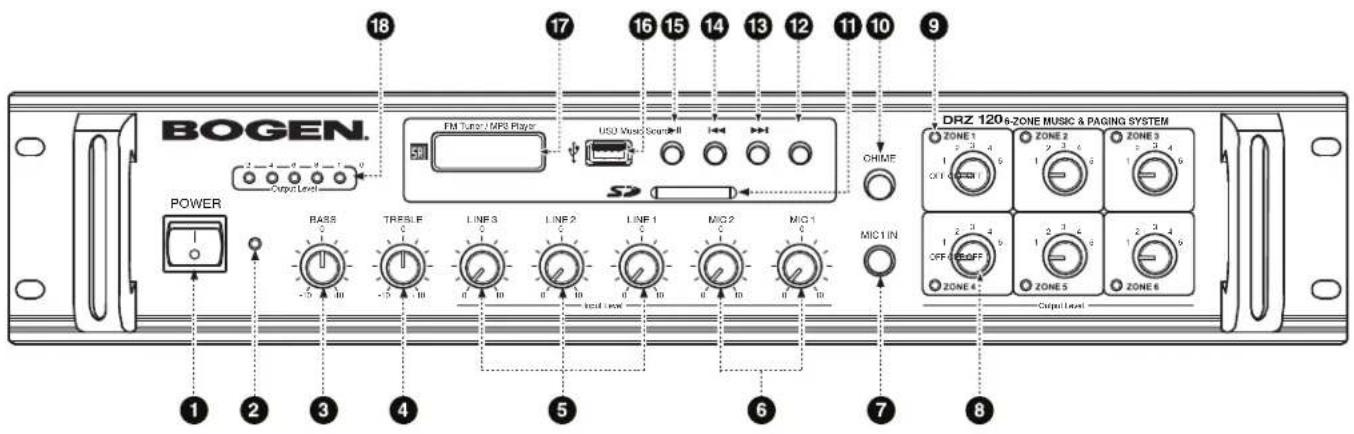
- Master POWER Switch
Turns Power to DRZ120 unit ON or OFF.
- Power ON Indicator
Indicates when Power is on.
- BASS Tone Control
Controls the amount of cut or boost of Bass frequencies below 100 Hz.
- TREBLE Tone Control
Controls the amount of cut or boost of Treble frequencies above 10 kHz.
- LINE Input Level Controls
Controls level of each Line input.
- MIC1 and MIC2 Input Level Controls
Controls level of MIC1 and MIC2 inputs.
- MIC1 IN Input
Accepts 1/4" TRS-type microphone input connector.
- Zone Output Level Controls
Individual control levels for the output of each of six zones (ZONE 1 thru ZONE 6).
- Zone Level LED Indicators
Indicates zone output level visually by LED intensity. The brighter the LED, the louder the zone level.
- Chime
When the CHIME button is pushed, a short melodic series of four ascending bell-like tones is generated to all outputs. These tones are generated at a high output level, so care should be taken when using CHIME with high zone output settings.
- SD Card Slot
Slot for SD Card connection for MP3 files.
- MP3/TUNER Button
Select MP3 or FM Tuner as input source. Current selection is displayed on Status Display (#17).
13-15. FM Tuner/MP3 Multi-Operation Buttons
▶▶▶ FM Tuner Mode: Advances to the next station preset.
MP3 Mode: Advances to next track.
IF FM Tuner Mode: Selects the previous station preset.
MP3 Mode: Selects previous track.
▶II FM Tuner Mode: Scans preset FM bands. MP3 Mode: Play/Pause selected track.
- USB Port
Port for USB drive connection for MP3 files.
- FM Tuner/MP3 Player Status Display
Indicates which mode source is active (RAD, USB, SD and AUX).
- Output Level Indicator
Five-segment LED output level indicator. Maximum recommended operating output level is 8.
Note: When all five units of the LED output level indicator remain lit, it indicates that the sound is distorted and may result in undesired audio quality. To resolve this issue, decrease one or more of the Line/MIC Input levels until at least one LED does not light. If the output level is allowed to 'max. out' (i.e., output level of 10) for any extended period, then the unit will enter 'protection mode' - opening a output protection relay and sounding an alarm. To reset the alarm, the Power Switch (#1) must be turned OFF and then back ON.
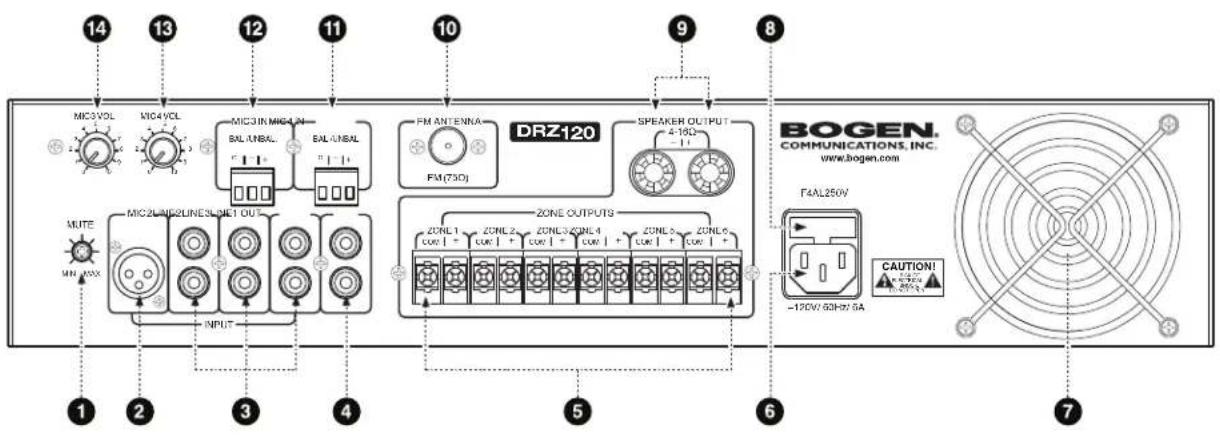
1. MUTE Control
Controls the sensitivity of the MUTE function.
2. MIC2 Input Connection
XLR style microphone input connector.
3. LINE INPUT Connections
RCA style auxiliary input connections for each of 3 LINE inputs.
4. AUX Output Connection
RCA-style connector for post-mix, line-level auxiliary output.
5. 6-Zone Output Terminal Strip
Connect up to 6 groups of 70V speakers to this terminal strip. Output level controls are located on the front panel.
6. AC Power Cord Socket
Connection for power cord to 120V AC, 60 Hz outlet.
7. Fan Exhaust
Cooling air outlet.
8. AC Power Fuse
The fuse is a fast-blow (fast-acting fuse), glass, 4 Amp, 250 Volt fuse. (F4AL250V)
9. Speaker Output: 4-16
Low-impedance speaker output (4Ω min. load).
10. FM Antenna Connection
F-type coax connector for 75-ohm FM antenna.
11. MIC4 IN Input Connection
Terminal block microphone input connector.
12. MIC3 IN Input Connection
Terminal block microphone input connector.
13. MIC4 VOL Input Level Control
Controls level of MIC 4 input.
14. MIC3 VOL Input Level Control
Controls level of MIC 3 input.
1. POWER
Turns power to the FM Tuner/ MP3 Player ON or OFF.
2. Mode
Cycles through the RAD (i.e., FM Tuner), USB, SD and AUX sources each time the button is pressed.*
3. Mute
Press once to silence audio output, press again to cancel mute. Display on front of DRZ120 will flash when mute is active.
4. Play/Pause
MP3 Mode: Toggle play/pause operation. While pause is active, "PAU" is shown on display. TUNER (RAD) Mode: Press repeatedly to advance through the preset FM channels.
5. Next
MP3 Mode: Advances to next track. TUNER (RAD) Mode: Increases FM frequency selection.
6. Previous
MP3 Mode: Plays previous track. TUNER (RAD) Mode: Decreases FM frequency selection.
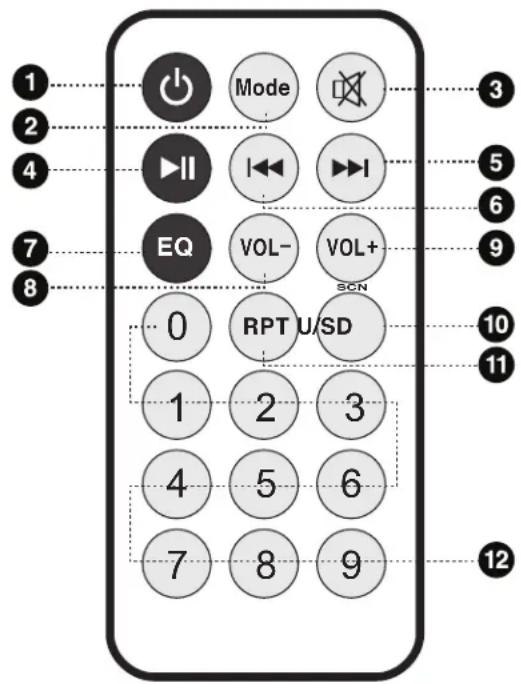
7. EQ
MP3 Mode: Selects desired equalizer mode (None / Classics / Jazz / Rock / Bass / Pop). TUNER (RAD) Mode: Cycles through tuner station presets.
8. VOL -
Decreases Tuner/MP3 volume.
9. VOL +
Increases Tuner/MP3 volume.
10. SCN (U/SD)
TUNER Mode: Causes the FM tuner to scan the entire 88 to 108 MHz FM band. When a station is detected, the station is stored in the PRESET memory. This is repeated continuously until the entire FM radio band has been searched. This process takes about 3 seconds per station stored. These numbered presets can then be selected by either entering a preset's assigned number on the remote (#12), or by cycling through them in ascending or descending order using the Play/Pause and EQ buttons on the remote (respectively). Alternatively, the numbered presets can be cycled through by using the Previous and Next buttons on the front panel.
MP3 Mode: Switches between the USB and SD card as the MP3 input source.
USB Mode: Toggles the MP3 play mode between "ALL" or "INTRO".
SD Mode: Places the MP3 player mode in "ALL".
AUX Mode: This mode is not supported by this particular model.
11. RPT
Repeat will replay current track continuously, or all tracks continuously. (This functions only in MP3 mode.)
12.0 thru 9
MP3 Mode: Input track number to play desired track. TUNER Mode: Selects FM Tuner frequency.
*Note: The source selection for "USB" or "SD" is only displayed if a USB drive or SD card is plugged into the DRZ120. Also, although the source selection will display an "AUX" mode, this mode is not supported by this particular model.
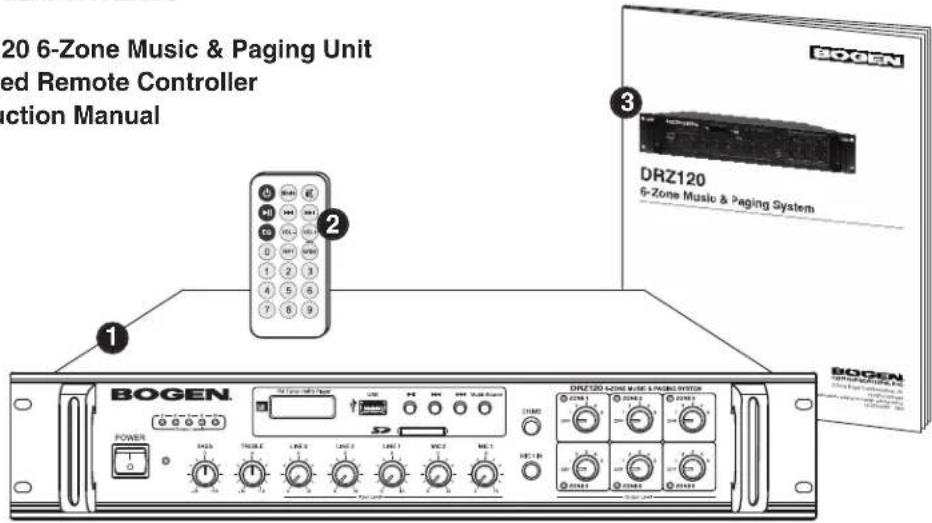
PACKAGE CONTENTS
- DRZ120 6-Zone Music & Paging Unit
- Infrared Remote Controller
- Instruction Manual
RACK MOUNTING
When assembling equipment in a rack, the DRZ120 should either be on the bottom of the rack or above any equipment that does not produce heat to ensure a source of cool air to the bottom of the unit. Provide at least 1 RU (Rack Unit) of space above and below the DRZ120 so that cool air is available to the unit. Rack mounting brackets are attached to the unit. Use appropriately sized screws.
SHELF / TABLE MOUNTING
When placing the DRZ120 on a shelf or table, the unit should ideally stand alone with no equipment on top of or beneath it. If the DRZ120 must be stacked with other equipment, care must be taken to ensure that the DRZ120, which is passively cooled, be allowed a minimum clearance of 1/2" for the bottom (set by height of the unit's feet) and a minimum of 1" from the top to other obstructions. Be sure that any equipment situated below the unit produces little heat. The sides of the DRZ120 have no specific clearance area requirements. These are minimum acceptable clearances, however the more space provided, both top and bottom, the better. Rubber feet must be installed on the unit to allow it to be placed on a shelf or tabletop.
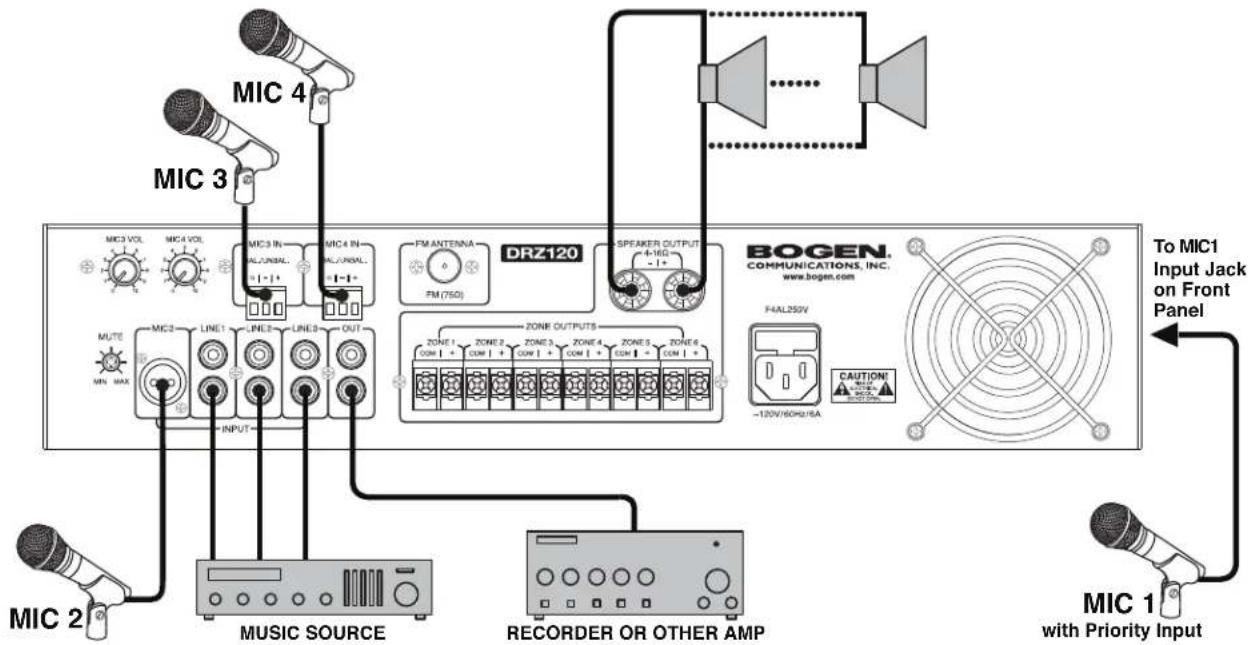
Without Multi-Zone Outputs
flowchart
graph TD
    A["MIC 2"] --> B["MUSIC SOURCE"]
    C["MIC 3"] --> D["DRZ120"]
    E["MIC 4"] --> D
    F["MIC 1"] --> G["RECORDER OR OTHER AMP"]
    H["To MIC1 Input Jack on Front Panel"] --> I["BOGEN. COMMUNICATIONS, INC. www.bogen.com"]
    J["MIC 2"] --> K["INPUT"]
    L["MIC 3"] --> M["LINE1"]
    N["MIC 4"] --> O["LINE2"]
    P["MIC 1"] --> Q["RECORDER OR OTHER AMP"]
    R["MIC 2"] --> S["INPUT"]
    T["MIC 3"] --> U["LINE3"]
    V["MIC 4"] --> W["LINE4"]
    X["MIC 1"] --> Y["RECORDER OR OTHER AMP"]
    Z["MIC 3"] --> AA["LINE5"]
    AB["MIC 4"] --> AC["LINE6"]
    AD["MIC 1"] --> AE["RECORDER OR OTHER AMP"]
With Multi-Zone Outputs
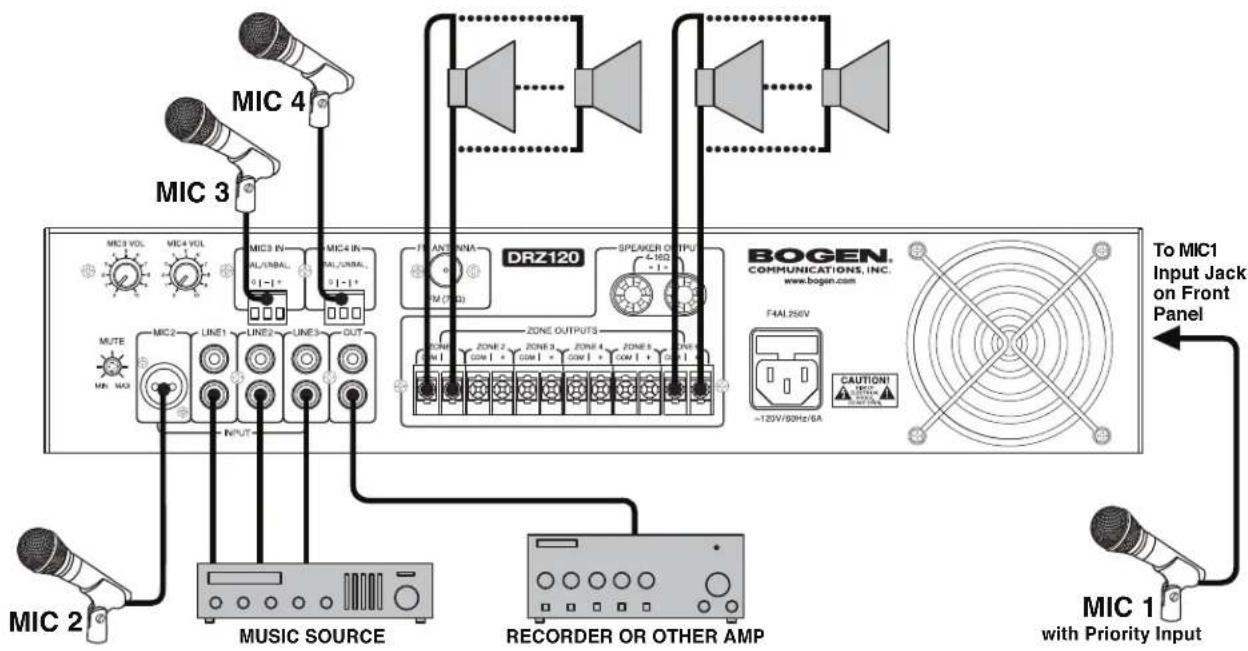
Note: Individual zone output levels are set by adjusting the Zone Volume Controls on the Front Panel.
Set up the system according to the connection diagrams on page 6, connect the power supply, and then turn on the master power switch on the front panel. If an MP3 storage device is connected at startup, the system will autoplay MP3s present on the device. Otherwise, the system will initially be set to accept audio from the AUX/MIC inputs.
MP3 Operation
In order to play from an MP3 device, insert the USB stick or SD card and press "MP3/TUNER" button or the "Mode" button on the infrared remote to select the applicable playback mode. Use the I◀◀ and ▶▶Ibuttons on the remote control or on the front panel of the amplifier to select the desired track. Pressing the ▶▶II button on the remote or on the front panel toggles the pause function.
Repeat
Two repeat modes can be selected when playing MP3 audio. Using the remote control, press the "RPT" button to toggle between the two options. When "ONE" is appears on the display of the DRZ120, the current track will be continuously repeated. When "ALL" is displayed, all tracks will play and repeat starting from the first track. If this option is selected while a track is playing, the repeat feature will begin when the final track has finished playing.
EQ
When playing MP3 audio, equalization (EQ) settings can be used. There are 6 total options: none, Classic, Jazz, Rock, Bass, and Pop. Pressing the "EQ" button on the remote control will cause the system to cycle to the next EQ preset. EQ settings appear on the display are represented by "Eq0, Eq1, Eq2, Eq3, Eq4, Eq5" on the display.
Note: If multiple MP3 devices are inserted into the amplifier, audio will automatically play from the device that was inserted last.
TUNER Operation
To play an FM radio station, press the "MP3/TUNER" button or the "Mode" button on the remote control to select the applicable playback mode.
Scan
Before playing, it is beneficial for the user to utilize the FM Scan option to have the system memorize station frequencies. Pressing "SCN" on the remote control will automatically have the system scan through the FM radio band and save stations that can be easily selected at a later time. The display will show the stations being searched from low to high frequency signals. Saved stations are saved as numbers starting from "1". The stations can be recalled by pressing the appropriate saved station numbers on the remote, pressing ▶II and "EQ" on the remote to browse through the saved stations, or by using the ◀◀ and ▶▶buttons on the front panel.
Station Select
Stations can also be manually selected by inputting a specific station frequency via the "0-9" buttons on the IR remote, or by using the ◄◀ and ▶▶buttons on the remote to decrease/increase the selected frequency by 0.1 MHz.
Mute Function
MIC 1 Input Jack and Chime Button have the highest level of priority. Input signals from them can override other input signals. The sensitivity of this MUTE function can be adjusted by the trim knob on the rear panel.
MUTE

MIN MAX
Amplifier
Power Rating (RMS): 120 Watts into 8-ohms
Distortion: ≤ 1% THD (Rated output power@1 kHz)
Signal to Noise Ratio: ≤ -74 dB
Audio Frequency Response: 80 Hz - 16 kHz @ 4Ω (+/-3 dB)
Zone Outputs:....120 Watts @70V max. for any single zone, or 20 Watts @70V max. for each zone (assuming equal loads)
AUX Speaker Output: 4-16Ω
Tone Controls: Bass: +/-10 dB @ 100 Hz Treble: +/-10 dB @ 10 kHz
Microphone Input: ≤ 3mV/1k unbalanced
MIC1 Precedence: ...... VOX-activated, with adjustable MUTE Control
LINE Inputs: ≤ 300mV/10k unbalanced; RCA jacks
AUX Line Output: 50Ω/ (1V); RCA jacks
Tuner
Station Tuning: Digital, 0.1 MHz increments, with PLL Synthesizer
Band Coverage: FM: 87.5 to 108 MHz
Antenna: 75-ohm coaxial
Memory Scan:....Automatically Preset stations
Channel Indicator: Back-lit LCD
Power/Dimensions
Power Required: 120V AC nominal @ 60 Hz
Power Consumption: 250 Watts
Dimensions: 19-1/8" W x 3-1/2" H x 13-3/4" D
Product Weight: 25.2 lbs.
The Bogen DRZ120 is warranted to be free from defects in material and workmanship for 2 (two) years from the date of sale to the original purchaser. Any part of the product covered by this warranty that, with normal installation and use, becomes defective (as confirmed by Bogen upon inspection) during the applicable warranty period, will be repaired or replaced by Bogen, at Bogen's option, provided the product is shipped insured and prepaid to: Bogen Factory Service Department, 4570 Shelby Air Drive, Suite 11, Memphis TN 38118, USA. Repaired or replacement product will be returned to you freight prepaid. This warranty does not extend to any of our products that have been subjected to abuse, misuse, improper storage, neglect, accident, improper installation or have been modified or repaired or altered in any manner whatsoever, or where the serial number or date code has been removed or defaced.
THE FOREGOING LIMITED WARRANTY IS BOGEN'S SOLE AND EXCLUSIVE WARRANTY AND THE PURCHASER'S SOLE AND EXCLUSIVE REMEDY. BOGEN MAKES NO OTHER WARRANTIES OF ANY KIND, EITHER EXPRESS OR IMPLIED, AND ALL IMPLIED WARRANTIES OF MERCHANTABILITY OR FITNESS FOR A PARTICULAR PURPOSE ARE HEREBY DISCLAIMED AND EXCLUDED TO THE MAXIMUM EXTENT ALLOWABLE BY LAW. Bogen's liability arising out of the manufacture, sale or supplying of products or their use or disposition, whether based upon warranty, contract, tort or otherwise, shall be limited to the price of the product. IN NO EVENT SHALL BOGEN BE LIABLE FOR SPECIAL, INCIDENTAL OR CONSEQUENTIAL DAMAGES (INCLUDING, BUT NOT LIMITED TO, LOSS OF PROFITS, LOSS OF DATA OR LOSS OF USE DAMAGES) ARISING OUT OF THE MANUFACTURE, SALE OR SUPPLYING OF PRODUCTS, EVEN IF BOGEN HAS BEEN ADVISED OF THE POSSIBILITY OF SUCH DAMAGES OR LOSSES. Some States do not allow the exclusion or limitation of incidental or consequential damages, so the above limitation or exclusion may not apply to you. This warranty gives you specific legal rights, and you may also have other rights which vary from State to State.
Products that are out of warranty will also be repaired by the Bogen Factory Service Department – same address as above or call 201-934-8500. The parts and labor involved in these repairs are warranted for 90 days when repaired by the Bogen Factory Service Department. All shipping charges in addition to parts and labor charges will be at the owner's expense. All returns require a Return Authorization number. For most efficient warranty or repair service, please include a description of the failure.
11/2014