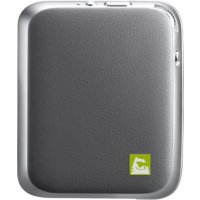
CBG700 - Camera LG - Free user manual and instructions
Find the device manual for free CBG700 LG in PDF.



| Product Type | Camera grip with additional battery |
| Brand | LG |
| Model | CBG-700 (CAM Plus) |
| Dimensions (L x W x H) | 73.9 x 61.4 x 15.9 mm |
| Weight | 55.4 g |
| Battery type | Rechargeable lithium-ion |
| Battery capacity | 1200 mAh |
| Charging time | Less than 200 minutes |
| Input voltage | 5 V ±10 %, 9 V ±10 % |
| Power consumption | 25 mA (not charging), 1 mA (power off) |
| Charge/output current | 500 mA |
| USB connector | USB 2.0 Type-C |
| Buttons and controls | Shutter (half-press), zoom in/out, power on/off, record, photo |
| Indicator light | Red (charging), green (charged), solid red (battery ≤10%), flashing (battery ≤5%) |
| Audio | Speaker and digital microphone |
| Antenna | GSM/CDMA, WCDMA, LTE |
| Operating temperature | -20 °C to 40 °C |
| Compatibility | LG G5 only |
| Package contents | CAM Plus, user guide |
| Care and cleaning | Soft dry cloth, avoid alcohol, benzene, thinners |
| Safety | Do not disassemble, avoid shocks, keep out of reach of children, do not expose to water |
| Warranty | 1 year |
| Recycling | Do not dispose of with household waste, return to collection point |
Frequently Asked Questions - CBG700 LG
User questions about CBG700 LG
0 question about this device. Answer the ones you know or ask your own.
Ask a new question about this device
Download the instructions for your Camera in PDF format for free! Find your manual CBG700 - LG and take your electronic device back in hand. On this page are published all the documents necessary for the use of your device. CBG700 by LG.
USER MANUAL CBG700 LG
Any modifications or changes to this manual due to typographical errors or inaccuracies of stated information shall only be made by LG Electronics Inc.

LG
Life's Good
User guide
LG
CAM Plus
CBG-700
Compatible with G5 worldwide except Korea, Canada and AT&T powered G5
Contact office for compliance of this product :
LG Electronics European Shared Service Center B.V.
Krijgsman 1, 1186 DM Amstelveen, The Netherlands

LG
Life's Good
User guide
LG
CAM Plus
CBG-700
All rights reserved. LG Electronics Inc., 2016
Note: Please read all information carefully prior to using the LG CAM Plus for best performance and to prevent product damage.
Product Overview
The LG CAM Plus is a camera grip and extra battery that can be attached to the bottom of your LG G5.
- With the LG CAM Plus, you can use your LG G5 like a digital camera. Use it to take pictures by pressing the shutter button and zooming in and out. Half-press the shutter button to use the half-shutter function.
- The LG CAM Plus is equipped with a 1200 mAh battery that can be used as an extra battery when using the camera.
Important Safety Information
• Always use genuine products. Only use this product for the intended purpose.
- Using or connecting non-genuine products may shorten the product's lifespan or cause an explosion. Doing so may also damage the product and thereby voids the service warranty.
- If you insert a module that is not compatible with your service provider (for example, a module bought from another service provider or in an area that is not covered by your service provider), your device does not operate normally.
- Do not disassemble the product or allow it to be crushed. Doing so may cause electric shock, short circuit or fire.
- Applying heavy pressure to the product may damage it.
- Some functions of this product may be damaged, or its appearance may be altered or impaired, if it is bent or crushed and not repaired correctly.
- To prevent damage, be careful not to drop the product on hard surfaces or subject it to severe shock.
- Keep the product away from water, alcohol, benzene or other liquids.
- Do not use or store the product in extreme temperatures. Do not leave the product in direct sunlight for long periods of time. Doing so may cause damage or an explosion.
- Do not use alcohol, benzene, thinners or detergents to clean the product. Doing so may cause a fire.
- Use a soft cloth to wipe the product.
- Do not place the product near metal objects, such as jewellery, keys, coins, nails, or clocks. If the product short-circuits, there is a risk of explosion.
- Keep the product out of the reach of small children and pets. Do not put the product in your mouth or subject it to severe shock. There is a risk of electric shock, explosion, or suffocation.
- Do not connect or insert conductive materials (pieces of metal, pencil leads, etc.) into the connectors.
- Do not cover or wrap the product with a blanket while using the product.
- The product may become hot after long periods of use. Avoid touching the product while it is hot as it could cause a low-temperature burn.
- Do not dispose of the product as household waste. Doing so may cause a fire or be harmful to the environment.
- For your safety, do not remove this product's battery.
- If you must replace the battery, take the device to your nearest authorised LG Electronics service centre for assistance.
- The li-ion battery is hazardous component which can cause injury.
- Battery replacement by a non-qualified person can cause damage to your device.
- Do not replace the battery yourself. You could damage the battery, which may cause overheating and injury. The battery must be replaced by an authorised service provider. The battery should be recycled or disposed of separately from household waste.
- In case this product contains a battery incorporated within the product which cannot be readily removed by end-users, LG recommends that only qualified professionals remove the battery, either for replacement or for recycling at the end of this product's working life. To prevent damage to the product, and for personal safety, users should not attempt to remove the battery but should contact LG Service Helpline, or an independent service provider for advice.
- Removal of the battery will involve dismantling the product case, disconnection of the electrical cables/contacts and careful extraction of the battery cell using specialised tools. If you need to provide a qualified professional with instructions on how to remove the battery safely, please visit http://www.lge.com/global/sustainability/environment/take-back-recycling.
Product Components
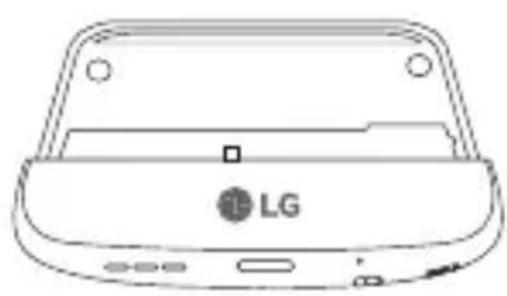
natural_image
Line drawing of a LG device casing with buttons and ports (no text or symbols)LG CAM Plus User guide
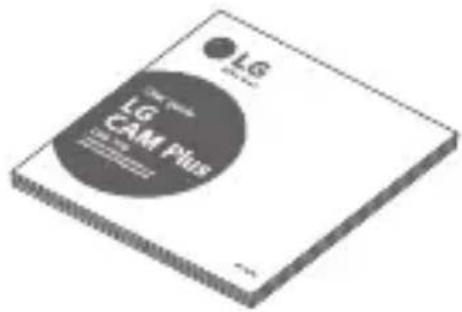
- If there are any missing components, contact the retailer from whom you purchased the product.
- Some items are subject to change without prior notice.
- The appearance and specifications of the product are subject to change without prior notice to improve performance.
Product Description
Front
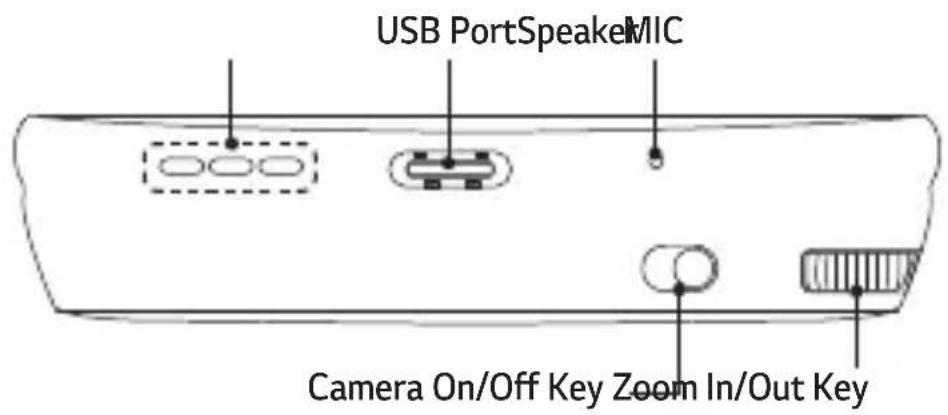
Side
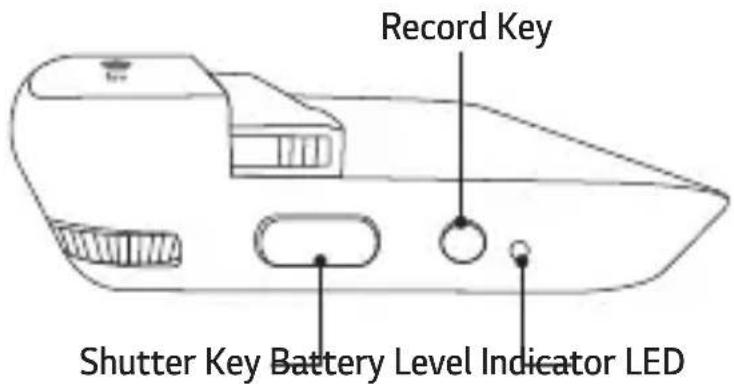
Some functions may not be available depending on the product specifications.
Connections
Inserting the Battery
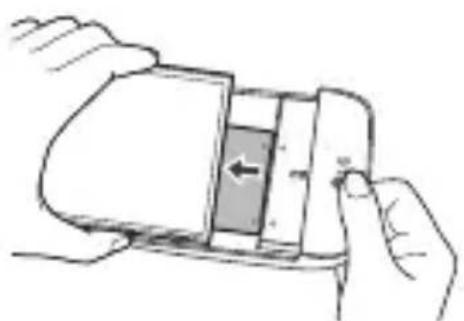
1 Align the arrows on both the battery and the module and firmly connect the battery terminals to the module.
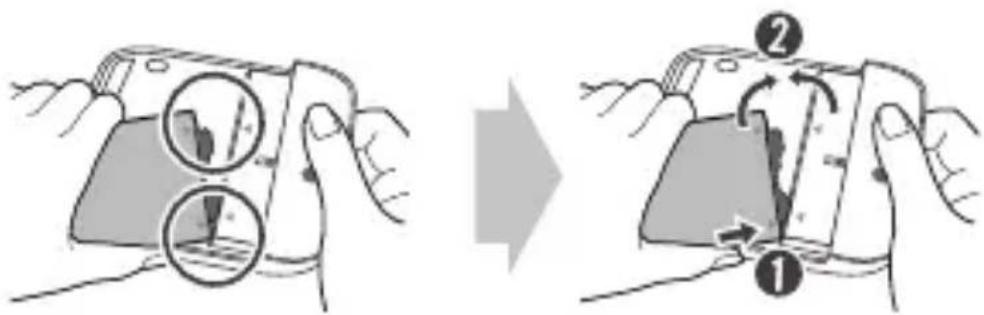
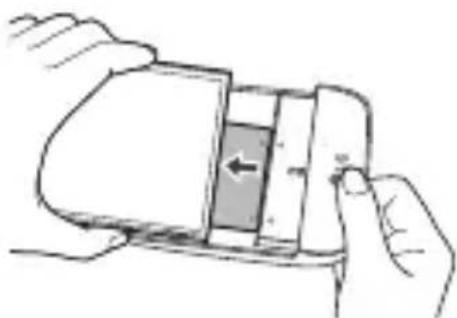
2 Align the battery with the lower edge and carefully slide the module back into the device.
natural_image
Illustration of hands holding a smartphone with an arrow indicating left-side motion (no text or symbols)- Never press the Module Eject Key when inserting the module into the device.
- When inserting the battery into the device, make sure the battery is attached to the module.
Removing the Battery
1 Press the Module Eject Key to partly eject the module from the device.
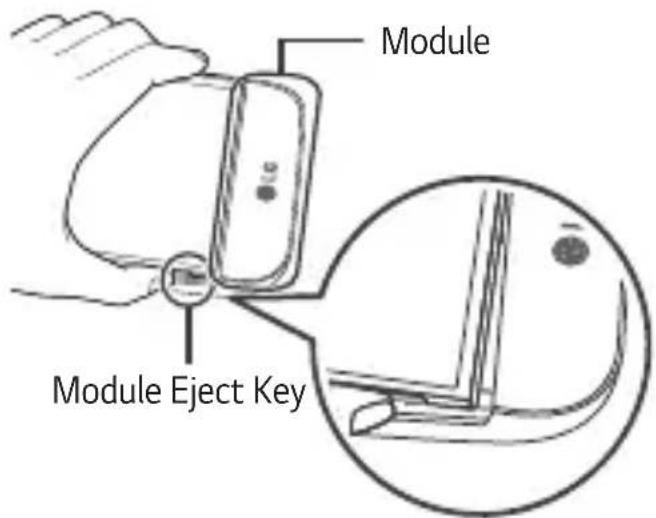
2 Grip the middle of the ejected module and pull it out.
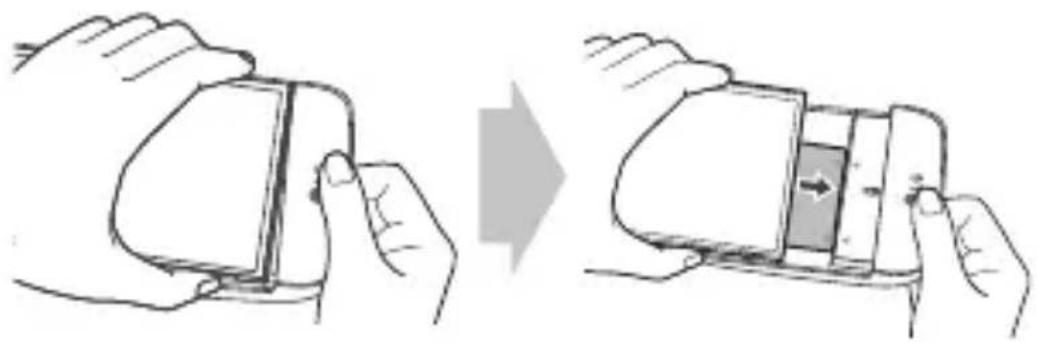
natural_image
Illustration of two hands holding a smartphone, showing the change from left to right (no text or symbols present)3 Hold the battery and module with both hands and separate them from one another in an outward arc (as indicated below) to disconnect the battery terminals.
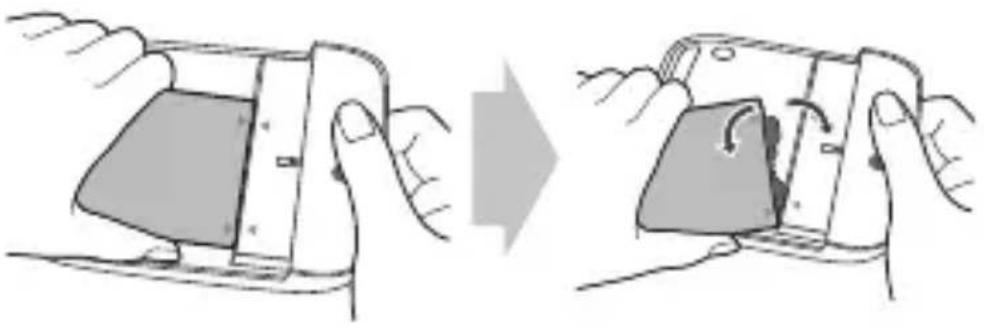
natural_image
Illustration of two hands holding a smartphone, showing the change in device state (no text or symbols present)- Do not detach the module while it is in use.
- Immediately attach the module to the main unit if it becomes loose or detached during use.
- Be careful to not hurt your hands or fingers when attaching or detaching the module.
- Be careful to not be injured by the edges of the product or the module.
- Make sure the battery and the module are properly inserted. Otherwise, the product may be damaged or fail to turn on.
- Failing to follow the instructions in this user guide may result in damage to the product.
Instructions
- This product will not operate normally if your G5 and LG CAM Plus are supported by different countries or operators.
- The LG CAM Plus cannot be operated while the USB is connected (data communication and charging are still available).
- If you press the Camera On/Off, Shutter or Recording buttons, the low-capacity battery in the LG CAM Plus will charge your LG G5 for some time. The charging feature is not available when the LG G5's battery is completely empty (power off).
- OTG devices that are connected to the LG CAM Plus will not be recognised (OTG is not supported).
- The product may not be compatible with camera apps available on online marketplaces.
LED Notifications
- The LED light turns red when charging. It turns green when fully charged.
- After the LG CAM Plus is connected to the phone, the Battery Level Indicator LED will turn red if the battery level is at 10% or less, and the LED will blink if the battery level is at 5% or less. (The LED will remain off if it is at 11% or more.)
About Firmware Upgrades
- Firmware upgrades are available through CAM Plus Manager, which can be downloaded and installed from Google Play™ Store (Supported OS: Android™ 6.0 [Marshmallow OS] or above).
- Firmware upgrade is also available using the LG Friends Manager app.
Information about Burst Shot feature support
The following Burst Shot feature, which uses the LG CAM Plus, will be made available through a future G5 software upgrade.
- Burst Shot
Take continuous shots to create moving photos.
Tap and hold 📷 on the Auto mode screen, or tap and hold the Shutter button on the LG CAM Plus.
Continuous shots are taken at a fast speed while 📷 or the Shutter button is held down.
Specifications and features
| USB Type USB 2.0 (Type-C) | |
| Battery Li-ion 1,200 mAh | |
| Charging time | Less than 200 minutes |
| Voltage | 5 V ±10%, 9 V ±10% |
| Current consumption | 25 mA (no Charging), 1 mA (Power Off) |
| Charging Consumption | 500 mA |
| Output Consumption | 500 mA |
| Audio Speaker and digital | MIC |
| Sound pressure | 1 m sound pressure 60 dB ↑ (100%) (based on full charge) |
| Antenna GSM/CDMA, WCDMA, LTE ^TM | |
| LED Battery indicator | |
| Operating temperature | -20 °C – 40 °C |
| Dimensions/weight | 73.9 mm X 61.4 mm X 15.9 mm / 55.4 g |
Additional Information
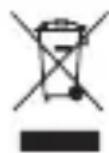
Disposal of your old appliance
1 This crossed-out wheeled bin symbol indicates that waste electrical and electronic products (WEEE) should be disposed of separately from the municipal waste stream.
2 Old electrical products can contain hazardous substances so correct disposal of your old appliance will help prevent potential negative consequences for the environment and human health. Your old appliance may contain reusable parts that could be used to repair other products, and other valuable materials that can be recycled to conserve limited resources.
3 You can take your appliance either to the shop where you purchased the product, or contact your local government waste office for details of your nearest authorised WEEE collection point. For the most up to date information for your country please see www.lg.com/global/recycling
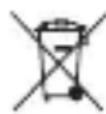
Disposal of waste batteries/accumulators
1 This symbol may be combined with chemical symbols for mercury (Hg), cadmium (Cd) or lead (Pb) if the battery contains more than 0.0005% of mercury, 0.002% of cadmium or 0.004% of lead.
2 All batteries/accumulators should be disposed separately from the municipal waste stream via designated collection facilities appointed by the government or the local authorities.
3 The correct disposal of your old batteries/accumulators will help to prevent potential negative consequences for the environment, animal and human health.
4 For more detailed information about disposal of your old batteries/accumulators, please contact your city office, waste disposal service or the shop where you purchased the product.
Limited Warranty
SUBJECT TO THE CONDITIONS OF THIS LIMITED WARRANTY, LG ELECTRONICS WARRANTS THIS PRODUCT TO BE FREE FROM DEFECTS IN DESIGN, MATERIAL AND WORKMANSHIP AT THE TIME OF ITS ORIGINAL PURCHASE BY A CONSUMER, AND FOR A SUBSEQUENT PERIOD OF ONE (1) YEAR. SHOULD YOUR PRODUCT NEED WARRANTY SERVICE, PLEASE RETURN IT TO THE DEALER FROM WHOM IT WAS PURCHASED OR CONTACT YOUR LOCAL LG ELECTRONICS CONTACT CENTRE TO GET FURTHER INFORMATION.
According to the regional service policies, Spain, Sweden, Czech Republic, Poland, Greece, Portugal, Romania, Denmark, Slovakia, Turkey, Montenegro, Norway, Finland, Iceland, Serbia and Bulgaria will now offer two-year warranties.

LG
Life's Good
natural_image
Line drawing of a LG device casing with buttons and ports (no text or symbols beyond branding)
natural_image
Illustration of hands holding a smartphone with an open panel showing internal components (no text or symbols)natural_image
Illustration of two hands holding a smartphone, showing the change from left to right (no text or symbols present)natural_image
Illustration of a smartphone being held, showing the blade and handle (no text or symbols)natural_image
Line drawing of a LG device casing with ports and buttons (no text or symbols beyond branding)
LG CAM Plus Brugervejledning
natural_image
Illustration of a hand holding a smartphone with an open screen showing the internal portion (no text or symbols)natural_image
Illustration of two hands holding a smartphone, showing the change from left to right (no text or symbols present)natural_image
Illustration of two hands holding a smartphone, showing the change in device state (no text or symbols present)natural_image
Line drawing of a LG device casing with buttons and ports (no text or symbols)
natural_image
Illustration of a hand holding a smartphone with an open screen showing the internal portion (no text or symbols)natural_image
Illustration of a smartphone being held, showing the blade and handle (no text or symbols)natural_image
Illustration of a smartphone being held, showing the blade and handle (no text or symbols)LG Electronics Inc., 2016
natural_image
Line drawing of a LG device casing with buttons and ports (no text or symbols beyond branding)
natural_image
Illustration of hands holding a smartphone with an open screen showing internal components (no text or symbols)natural_image
Illustration of a smartphone being held, showing the blade and handle (no text or symbols)natural_image
Illustration of a smartphone being held, showing the blade and handle mechanism (no text or symbols)natural_image
Line drawing of a LG device casing with buttons and ports (no text or symbols beyond branding)
natural_image
Illustration of a hand holding a smartphone with an open screen showing internal components (no text or symbols)natural_image
Illustration of two hands holding a smartphone, showing the change from left to right (no text or symbols present)natural_image
Illustration of a smartphone being held, showing the blade and handle (no text or symbols)natural_image
Illustration of a hand holding a smartphone with an open screen showing internal components (no text or symbols)natural_image
Illustration of a smartphone being held, showing the blade and handle (no text or symbols)natural_image
Illustration of two hands holding a smartphone, showing the change in screen position (no text or symbols present)natural_image
Line drawing of a LG device casing with buttons and ports (no text or symbols beyond branding)natural_image
Illustration of hands holding a smartphone with an open screen and a left arrow indicating the screen area (no text or symbols present)natural_image
Illustration of a smartphone being held, showing the blade and handle (no text or symbols)natural_image
Illustration of two hands holding a smartphone, showing the change in device state (no text or symbols present)natural_image
Line drawing of a LG device casing with buttons and ports (no text or symbols beyond branding)
natural_image
Illustration of a hand holding a smartphone with an open screen showing the internal portion (no text or symbols)natural_image
Illustration of two hands holding a smartphone, showing the change from left to right (no text or symbols present)natural_image
Illustration of a smartphone being held, showing the blade and handle (no text or symbols)Over firmware-upgrades
natural_image
Line drawing of a LG device casing with buttons and ports (no text or symbols beyond branding)
natural_image
Illustration of hands holding a smartphone with a partially open screen and a left-pointing arrow (no text or symbols)natural_image
Illustration of a smartphone being held, showing the blade and handle (no text or symbols)natural_image
Illustration of a smartphone being held, showing the blade and handle (no text or symbols)natural_image
Illustration of hands holding a smartphone with an open screen showing internal components (no text or symbols)natural_image
Illustration of a smartphone being held, showing the blade and handle (no text or symbols)natural_image
Illustration of two hands holding a smartphone, showing the change in device state (no text or symbols present)natural_image
Illustration of hands holding a smartphone with an open panel showing internal structure (no text or symbols)natural_image
Illustration of a smartphone being held, showing the blade and handle (no text or symbols)natural_image
Illustration of a smartphone being held, showing the blade and handle (no text or symbols)natural_image
Line drawing of a LG device casing with buttons and ports (no text or symbols)
LG CAM Plus Návod na používanie
2 Zarovnajte batériu so spodným okrajom a opatrne zasuňte modul spät do zariadenia.
natural_image
Illustration of hands holding a smartphone with an open screen and a left-pointing arrow (no text or symbols)- Pri vkladaní modulu do zariadenia nikdy nestláčajte tlačidlo na vysunutie modulu.
- Pri vkladaní batérie do zariadenia sa uistite, že je batéria pripojená k modulu.
Vybratie batérie
natural_image
Illustration of a smartphone being held, showing the blade and handle (no text or symbols)natural_image
Illustration of two hands holding a smartphone, showing the change in device state (no text or symbols present)natural_image
Line drawing of a LG device casing with buttons and ports (no text or symbols beyond branding)
natural_image
Illustration of hands holding a smartphone with an open panel showing internal structure (no text or symbols)natural_image
Illustration of a smartphone being held, showing the blade and handle (no text or symbols)natural_image
Illustration of two hands holding a smartphone, showing the change in device state (no text or symbols present)natural_image
Illustration of hands holding a smartphone with an arrow indicating left touch (no text or symbols)natural_image
Illustration of a smartphone being held, showing the blade and handle (no text or symbols)natural_image
Illustration of a smartphone being held, showing the blade and handle (no text or symbols)natural_image
Illustration of hands holding a smartphone with an open panel showing internal components (no text or symbols)natural_image
Illustration of a smartphone being held, showing the blade and handle (no text or symbols)natural_image
Illustration of a smartphone being held, showing the blade and handle (no text or symbols)EU DECLARATION OF CONFORMITY
1

LG
Number
DoC_MC_CBG700_160420
Name and address of the Manufacturer ^3
LG Electronics Inc
LG Twin Tower
128 Yeoui-daero, Yeongdeungpo-gu
Seoul 150-721
Korea
This declaration of conformity is issued under the sole responsibility of the manufacturer.
Object of the declaration 5
| Product information6 | Product NameCamera Grip and Extended Battery |
| Model NameCBG-700 | |
| Additional information7 | N/A |
| The object of the declaration described above is in conformity with the relevant Union harmonisation legislation8- References to the relevant harmonised standards used or references to the technical specifications in relation to which conformity is declared 9 | |
Electromagnetic Directive 2014/30/EU RoHS Directive 2011/65/EU
| EN 55022:2010/AC:2011EN 55024:2010EN 61000-3-2:2014EN 61000-3-3:2013 | EN 50581:2012 |
| The notified body10N/A | performed | a conformity assessment of the technical construction file | |
| and issued the certificate | N/A | ||
| The last two digits of the year in which the CE marking was affixed | N/A | ||
| Additional information 7 | |||
| N/A | |||
Signed for and on behalf of: ^11 LG Electronics Inc.
Authorised Representative:
LG Electronics European Shared Service Center B.V.
Krijgsman 1, 1186 DM Amstelveen, The Netherlands
Date of issue:
20.Apr. 2016
Name and Sumame / Function:
Jeong Won Lee / Director
Annex
(EN/BG/ES/CS/DA/DE/ET/EL/FR/GAIT/LV/LT/HUM/TND/PL/PT/RO/SK/SL/F/SV/TR/NO/HR/IS)

- (GENIE Declaration of Conformità BIVBULIKAPALNI CA CONDUCTIVE C. KWCCHIWA HA LE EC XRS/Derodario UE de Conformidad IKGCU Pahalari, a shade dAIEU-Cretelemonitekoreinking (DEJ).HOMO/Kochminderung (LE) EU Vasturionskarlandum (VLO) LTR. LYS. WYKOSZI E. LI. NFR/Derodario UE du Conformité IG A/Cerabita Contribuiering an AE (HT)Dicharazione UE di Conformità (LV)CS Altirititas Dekardatae (LT)ES Attitudes Dolaracete (HU)EU-MoglohkoStgi Nylatokazni(MT)DIkorazioni Tai-Koniforma Tai UE (NL)EU Conformità/avtkring (NPL)Delegare Akredida U(PI)CT:Declaro de Conformidade UE (RO)Adaganda ce Conformata UE (RO)Hydlersta o Zrada EU (L)GIyuba O y Sodinosti (IF) EU-Vasturionskarlandum (VLO) EV-Dedicated en Cocondominium (TR)Lyguntis Beijani(NO) ELzama ezelechinen (HEZ) F/Zyos a suadomini (USF) E/S Sarnamini/Hyjing
2 (EN) Number / (BG) N. / (ES) N. / (SI) C. / (DA) N. / (DE) N. / (ET) N. / (EL) A(n) / (FR) N. / (GA) Ulmir / (IT) N. / (LV) Nr. / (LT) Nr. / (HU) Szám / (MT) Numru. / (NL) Nr. / (PL) Nr. / (PT) N. " / (RO) Nr. / (SK) CI(n) / (SL) SL / (F) N.o. / (SV) Nr. / (TR) Gayis / (NO) Nr. / (HR) Uro / (IS) Numcr
- (EN)Name and address of the M manufacturer (IBG)Name/renzamide and adressa nonmonotrigues (NSB)/Name or directional del fabricante (ICS)Chobradini, jrmino a adresa výrobo (VA) Fabrikanteras ován og adreso; IDEI/mere and inschüttte de Hemolitroli (IEV)Involvata niú a apóssis (VIL)Ourea rota belüklom komporurom, (IFR)/Name og adreso e cuportato; VGA/naú osyag seoulad na vénonara (IVN)/Name i měnizzi dofrámodice (IVN)/dezeta poslukum un adres: (VLY)/seminilidovor acinnisatir adosos (VIX)/syste hove ce chiro (VII)/sloju i diní z zači měshalání (NCI)/Namei adres van de fabrikant (KPL)/Hezora i dosas producidos (PT)/Nome e anderede; de fabrikant (JE) Ohumala i desie Produktional (BK)Chobradini meno a adresa výrobo; VELtime in náscyi pružnajedra (WJ)/Vikubdajeri nino je osible (SW)/Tilverserens, nen och adress a (TR)/Indalaprum udr. ve adres: (NO)/Ilevi pa og adresse il produsteven (HR)/Nafri i adresse produstevit/IS/Nafo og termisfang teimtendano



- Product Overview
- Important Safety Information
- Product Components
- Product Description
- Connections
- Inserting the Battery
- Removing the Battery
- Instructions
- LED Notifications
- About Firmware Upgrades
- Information about Burst Shot feature support
- - Burst Shot
- Additional Information
- Disposal of your old appliance
- Disposal of waste batteries/accumulators
- Limited Warranty
- Over firmware-upgrades
- Vybratie batérie
- EU DECLARATION OF CONFORMITY
- Annex
Brand : LG
Model : CBG700
Category : Camera