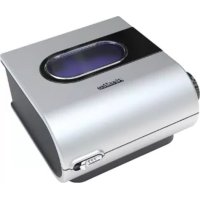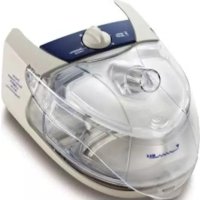
H4i - Humidifier ResMed - Free user manual and instructions
Find the device manual for free H4i ResMed in PDF.



| Product type | Heated humidifier for ResMed CPAP, VPAP, and non-invasive ventilation devices |
| Dimensions (H x W x D) | 130 mm x 170 mm x 212 mm (docking station and water tub) |
| Weight | 786 g (docking station and empty water tub) |
| Water tub capacity | 390 ml (up to maximum level mark) |
| Power supply | 100-240 V, 50/60 Hz, 0.7-1.6 A; 110 V, 400 Hz, 0.8 A |
| Power consumption | Average < 115 W, peak < 400 W |
| Maximum heating plate temperature | 85 °C |
| Cut-out temperature | 93 °C |
| Maximum humidified air temperature | 41 °C |
| Operating temperature | +5 °C to +35 °C |
| Operating humidity | 10 to 95% non-condensing |
| Storage and transport temperature | -20 °C to +60 °C |
| Storage and transport humidity | 10 to 95% non-condensing |
| IEC 60601-1 classification | Class II (double insulation), Type BF applied part |
| Materials | Docking station: flame-retardant thermoplastic, die-cast aluminum; Water tub: injection-molded plastic, stainless steel, and silicone seal |
| Water tub cleaning | Daily: warm water and mild detergent; Weekly: dishwasher gentle cycle (cleanable tub only) |
| Docking station cleaning | Wipe with a damp cloth. Do not immerse. |
| Humidity settings | 6 positions, from (heater off) to (max) |
| Preheat function | Available with certain ResMed devices (VPAP, S8, Stellar series); automatic shut-off after 30 min |
| Warranty | 1 year for humidifier and cleanable water tub; 90 days for single-patient-use water tub |
| Contraindications | Tracheostomized or intubated patients; treatment pressure > 35 cm H₂O |
Frequently Asked Questions - H4i ResMed
User questions about H4i ResMed
0 question about this device. Answer the ones you know or ask your own.
Ask a new question about this device
Download the instructions for your Humidifier in PDF format for free! Find your manual H4i - ResMed and take your electronic device back in hand. On this page are published all the documents necessary for the use of your device. H4i by ResMed.
USER MANUAL H4i ResMed
natural_image
Two transparent medical devices with clear internal structures, one with blue and purple highlights (no text or symbols visible)H4i ^TM
HEATED HUMIDIFIER
User Guide
English

Manufacturer:
ResMed Pty Ltd 1 Elizabeth Macarthur Drive Bella Vista NSW 2153 Australia.
See www.resmed.com for other ResMed locations worldwide.
For patent information, see www.resmed.com/ip.
H4i, S8, Stellar and VPAP are trademarks of ResMed. Stellar and VPAP are registered in U.S. Patent and Trademark Office.
© 2020 ResMed. 248831/1 2020-12

0123
Contents
Introduction 1
Indications for use 1
Contraindications
Components of your H4i 1
Setting up your H4i for use 1
Preparation
System setup 2
Filling the water chamber 3
Detaching your H4i 3
Starting and stopping treatment 4
Warming your H4i with the VPAP or S8 Series 4
Warming your H4i with the Stellar 4
Starting your treatment 4
Stopping your treatment 5
Cleaning and maintenance 5
Disassembling the H4i cleanable water chamber 5
Cleaning your H4i 6
Reassembling the H4i cleanable water chamber 7
Reassembling your H4i 8
Servicing 8
Frequently asked questions 8
Troubleshooting 9
Technical specifications 10
Humidifier performance 10
Symbols which appear on the device 11
General warnings 11
Limited warranty 12
Introduction
The H4i ^™ is designed to moisten the air delivered to your airway during Positive Airway Pressure (PAP) therapy.
Indications for use
The H4i is indicated for humidification of the air delivered from a ResMed compatible CPAP, bilevel and non-invasive ventilation device. The H4i is for use only as recommended by a physician.
Contraindications
The H4i is contraindicated for use with patients whose upper (supraglottic) airway has been bypassed. Please also refer to the relevant system manual for contraindications associated with PAP therapy.
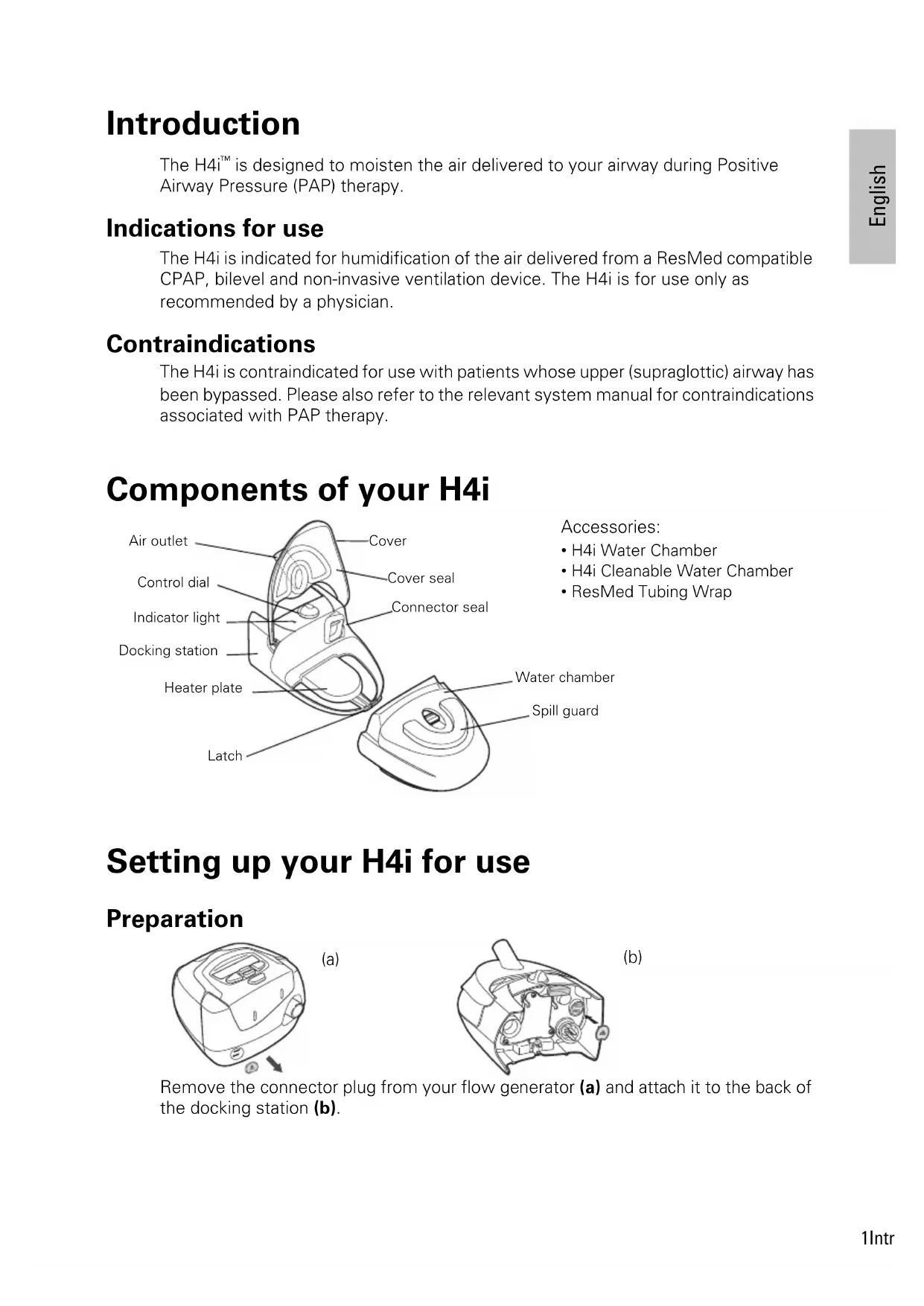
Components of your H4i
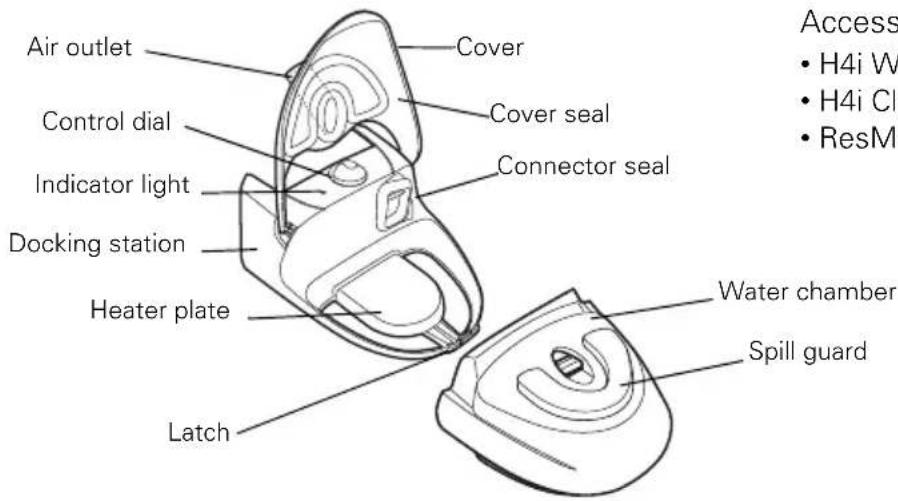
Accessories:
• H4i Water Chamber
• H4i Cleanable Water Chamber
• ResMed Tubing Wrap
Setting up your H4i for use
Preparation
natural_image
Line drawing of a robotic vacuum cleaner with control panel and buttons (no text or symbols)(a)
natural_image
Technical line drawing of a mechanical component with no visible text or symbols(b)
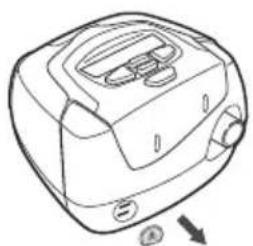
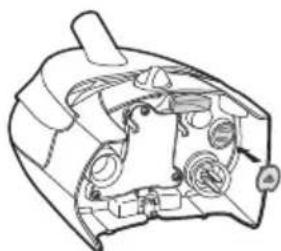
Remove the connector plug from your flow generator (a) and attach it to the back of the docking station (b).
System setup
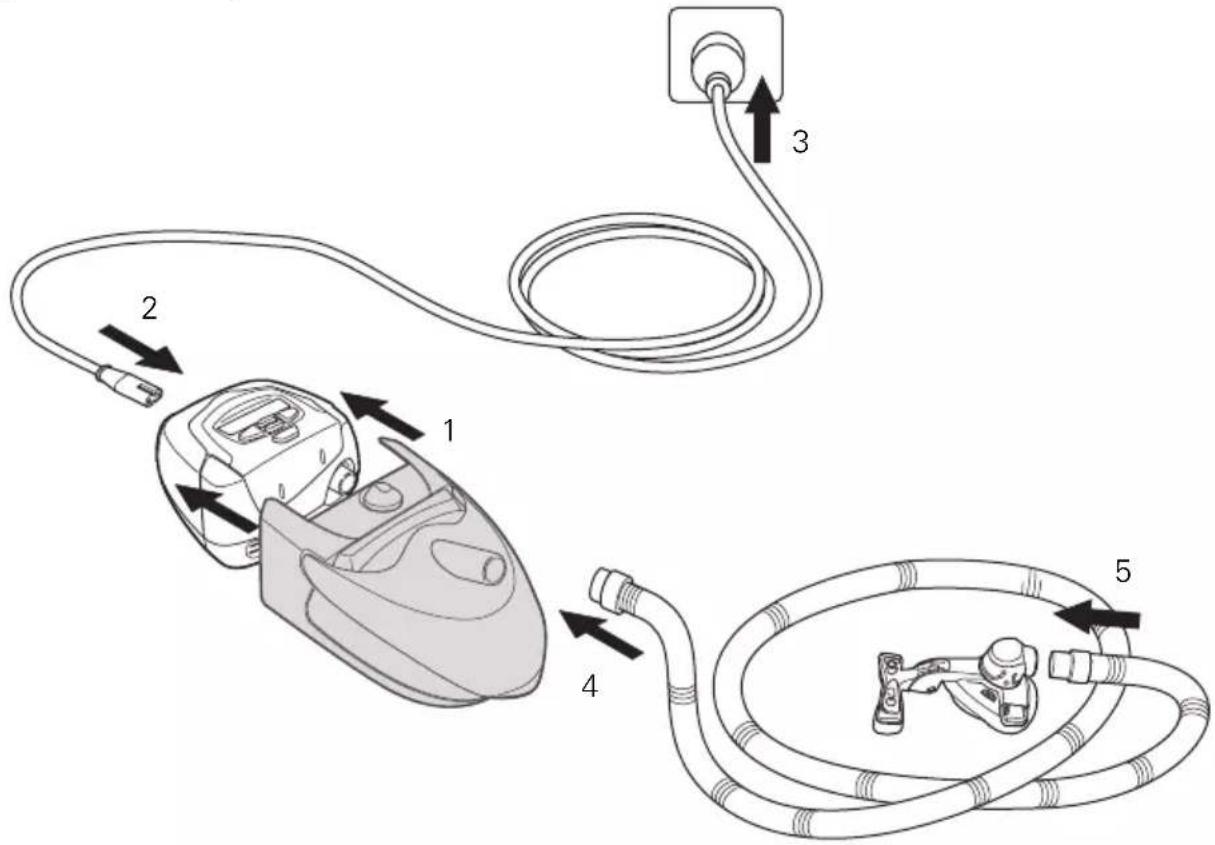
1 Align your H4i with your flow generator and push them together until they click into place.
2 Connect the power cord to the socket on the rear of your flow generator.
3 Plug the other end of the power cord into the power outlet.
Place the combined unit on a firm, level surface near your bed at a level lower than your sleeping position. Ensure the surface is not sensitive to heat and/or moisture, or use a protective mat.
4 Connect one end of the air tubing firmly onto the air outlet.
5 Connect the assembled mask system to the free end of air tubing.

WARNING
- Make sure your flow generator is switched off at the power outlet before connecting the H4i.
- The H4i docking station should only be connected or disconnected when the water chamber is empty.
• Water must be prevented from entering your flow generator. Do not transport the flow generator with the H4i attached. - The H4i is contraindicated for invasive use. An external humidifier approved for invasive use is recommended according to EN ISO 8185.
Filling the water chamber
1
natural_image
Line drawing of a hand holding a small object with an arrow indicating motion (no text or symbols)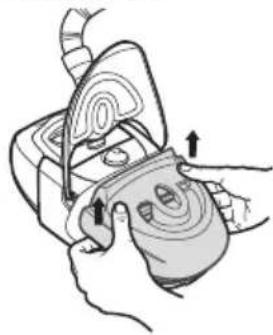
natural_image
Illustration of hands performing a medical procedure on a device (no text or symbols visible)3
natural_image
Illustration of a hand pouring liquid into a container with a label showing 'Water' (no text or symbols on the diagram itself)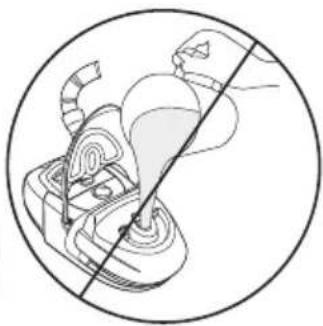
natural_image
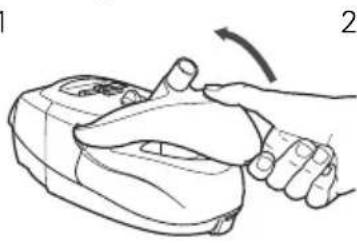
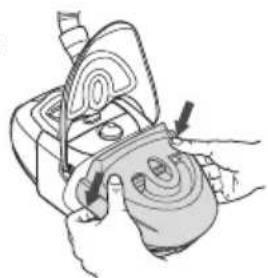
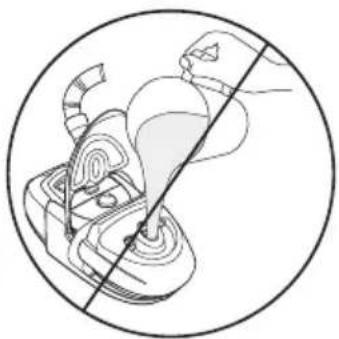
Diagram of a human pelvic device with internal components and a diagonal line (no text or labels)1 Open the cover.
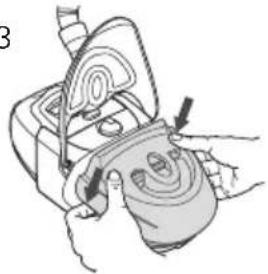
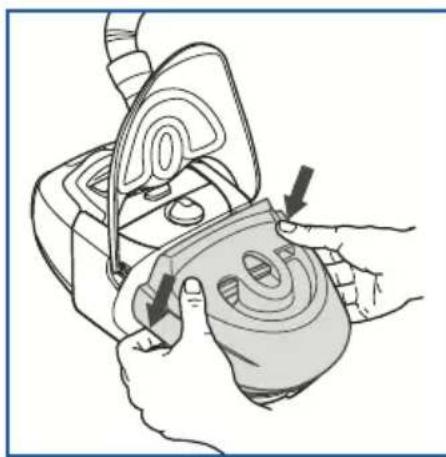
2 Remove the water chamber.
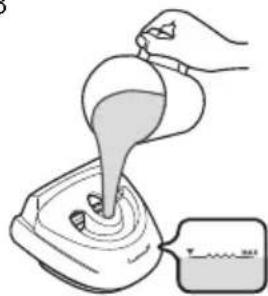
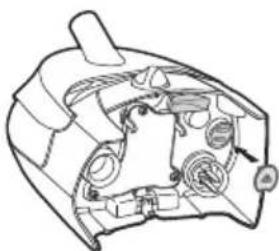
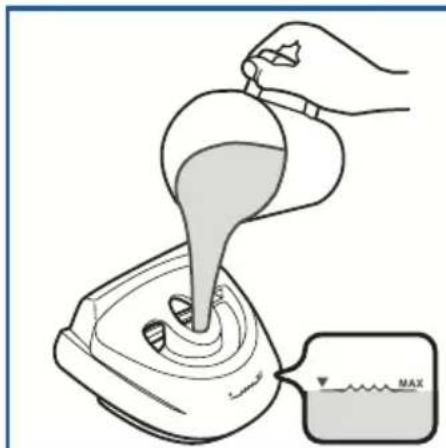
3 Fill with fresh, clean water up to or below the maximum water level mark.
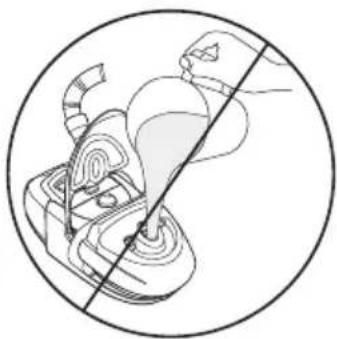
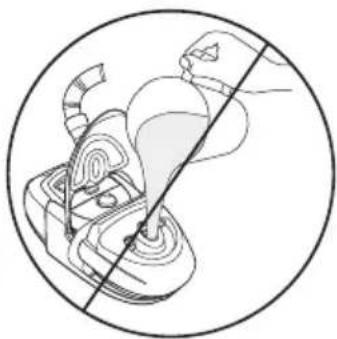
Note: The water chamber must be removed from the H4i before it is filled or water may enter the flow generator. The spill guard must also be in place.
4 Return the water chamber to the docking station.
Note: Ensure that no water is collected between the heater plate and the water chamber.
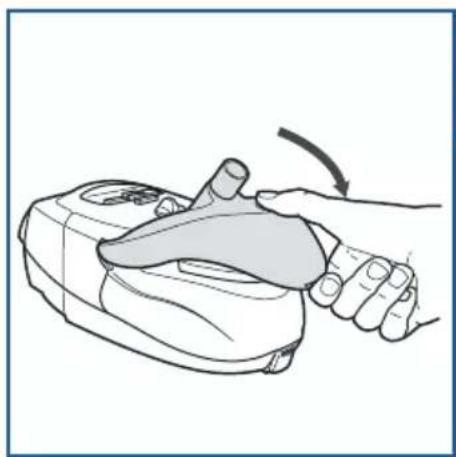
5 Close the cover ensuring that it clicks into place.

CAUTION
- Do not overfill the water chamber as water may enter the flow generator and air tubing.
- Do not use any additives (eg, scented oils and perfumes). They may reduce the humidification output of the H4i and/or cause deterioration of the water chamber materials.
Detaching your H4i
1
natural_image
Line drawing of a mechanical device with a circular component and connecting wires (no text or symbols)2
natural_image
Illustration of hands performing a medical procedure on a device with arrows indicating motion (no text or symbols)3
natural_image
Line drawing of a mechanical device with internal components and a small component (no text or symbols)4
natural_image
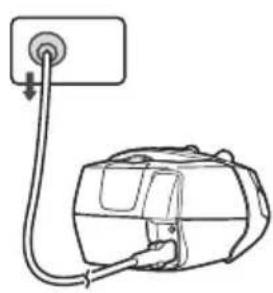
Illustration of hands holding a device with a magnified view (no text or symbols)1 Unplug the power cord from the power outlet.

WARNING
Take care when handling your H4i. The water and the water chamber base may both be hot. Allow 10 minutes for the heater plate and any excess water to cool.
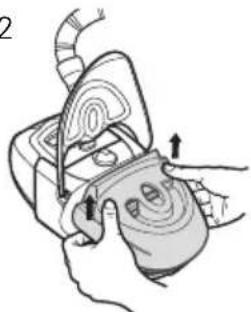
2 Remove the water chamber from the docking station.
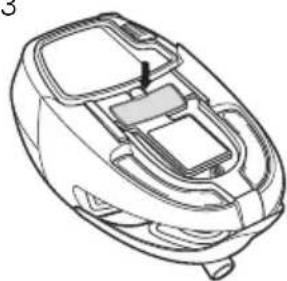
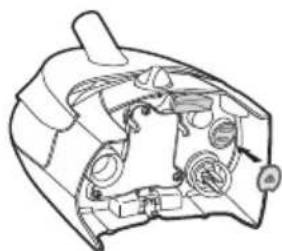
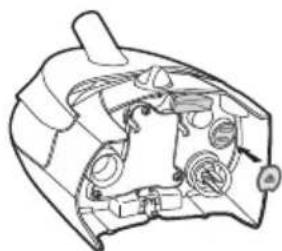
3 Press the large silver button located midway underneath the docking station.
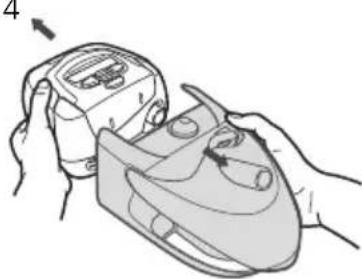
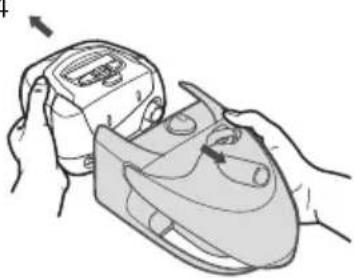
4 Pull the H4i and flow generator apart.
Note: Re-attach the connector plug firmly to your flow generator.
Starting and stopping treatment
Warming your H4i with the VPAP or S8 Series
The Warm-Up feature (not available on all ResMed PAP devices) is used to pre-heat the water before starting treatment. Skip this step if you want to start immediately. To start the Warm-Up feature:
1 Select warmup by pressing — on the control panel.
2 The WARMING screen will appear to indicate that the Warm-Up feature is activated.
3 While your H4i is in Warm-Up mode you can:
- Start treatment at any time by pressing . START / STOP
- Access the menus by pressing. - Stop the Warm-Up feature at any time by pressing. (This may not apply on all devices.)
The Warm-Up feature will automatically turn off after 30 minutes if treatment has not started.
Warming your H4i with the Stellar
Your H4i will be automatically detected when the Stellar is turned on. The treatment screen will give you the option to start warming up the humidifier prior to starting treatment. If the humidifier is heating, the related symbol is displayed at the top of the LCD screen.
Note: The H4i can only be used when the device is connected to mains power supply.
CAUTION ! H4i cannot
Starting your treatment
1 Turn the humidity control dial to three (Ⅲ). You can adjust the control dial up or down at any time to find the setting that is most comfortable for you. The ○ setting switches heated humidification off and delivers minimum humidification while a setting of six (Ⅱ) delivers maximum humidification.
Note: The ResMed Tubing Wrap is designed to enhance comfort by maximising heat retention along the air tube.
2 Start treatment as described in your device user guide.
Note: The H4i is thermostatically controlled to maintain a constant temperature. The indicator light will brighten to indicate when the device is actively heating and dim when it has reached its set temperature.
3 Lie down and arrange the tubing so that it moves freely when you turn in your sleep.

WARNING
Do not leave an excessive length of air tubing around the top of your bed. It could twist around your head or neck while you are sleeping.
Stopping your treatment
To stop your treatment, refer to your device user guide.
Note: In order to assist the heater plate in cooling, some flow generators continue to blow air gently for up to an hour after treatment has stopped. However, you can unplug the device from the power outlet at any time and allow the heater plate to cool without airflow.
Cleaning and maintenance
You should regularly carry out cleaning and maintenance of the water chamber, cover and cover seal as described in this section.

WARNING
- Beware of electrocution. Do not immerse your flow generator, docking station or power cord in water. Always unplug the device before cleaning and be sure that it is dry before plugging it back in.
• Take care when handling your H4i. The water and the water chamber base may both be hot. Allow 10 minutes for the heater plate and any excess water to cool.
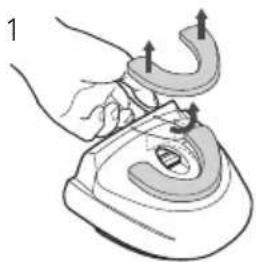
Disassembling the H4i cleanable water chamber
natural_image
Illustration of a hand using a curved tool to lift a steamer (no text or symbols present)
natural_image
Illustration of a hand holding a rolled-up object with a label '2' and a small arrow pointing to it (no text or symbols on the object itself)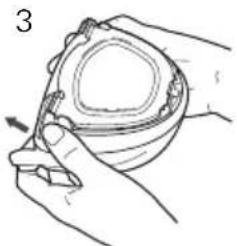
natural_image
Illustration of hands holding a small container with a tool, no text or symbols present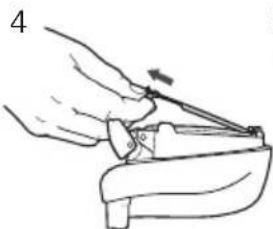
natural_image
Line drawing of a hand using a tool to lift or adjust a component (no text or symbols present)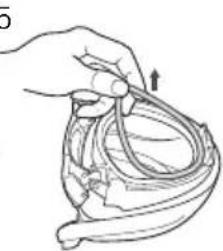
natural_image
Illustration of a hand holding a tool interacting with a biological structure (no text or symbols)1 Remove the spill guard by pushing up from inside the air inlet and pulling it away from the water chamber.
2 Discard any excess water from the water chamber.
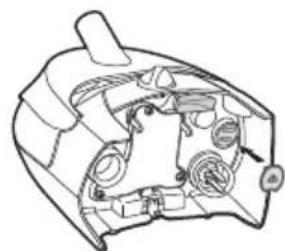
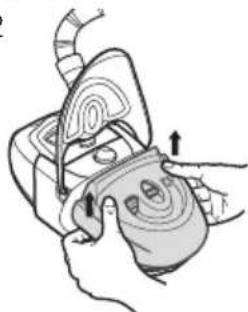
3 Turn the water chamber upside down. Using the side tabs, disengage the latch by pushing the latch up and away.
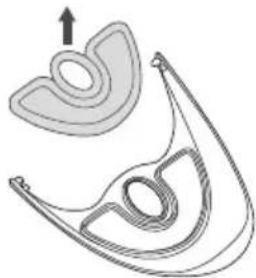
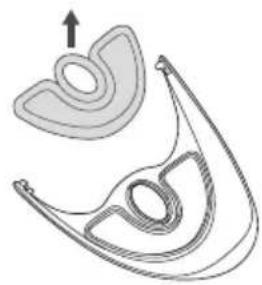
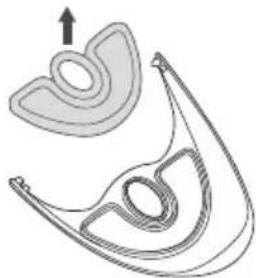
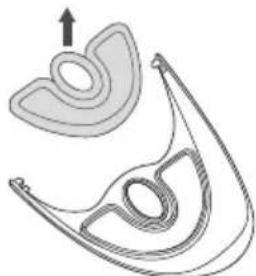
4 Remove the tub plate.
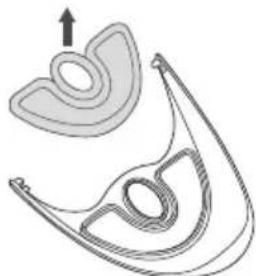
5 Remove the tub plate seal.
Note: Only the H4i Cleanable Water Chamber can be disassembled/reassembled.
Cleaning your H4i
Water chamber
Daily
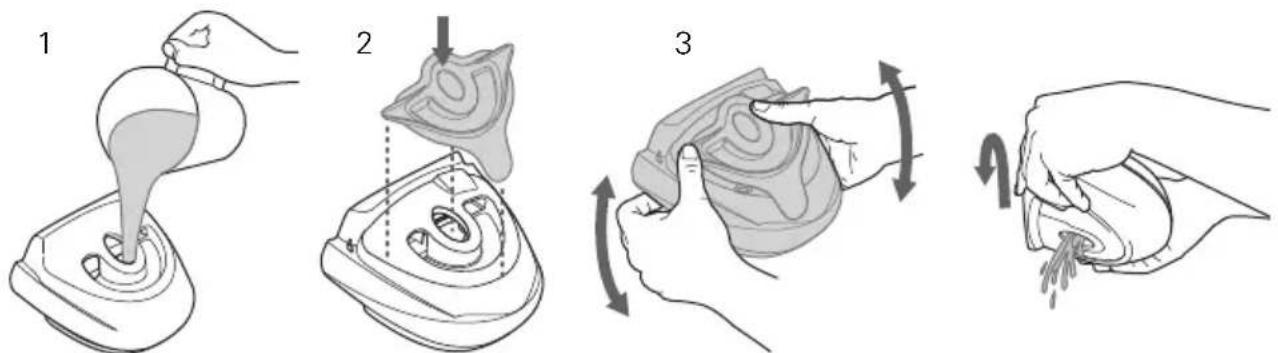
Wash the water chamber, spill guard, tub plate and tub plate seal in warm water, using a mild detergent. Use the yellow cleaning plug to assist in the cleaning process (see steps 1 to 4). Rinse thoroughly in clean water and allow them to dry away from direct sunlight.
Weekly
The disassembled cleanable water chamber, spill guard, tub plate and tub plate seal may be washed in a dishwasher on the delicate or glassware cycle (top shelf only).
Note: Not applicable to the H4i Water Chamber.
Inspect the water chamber for wear and deterioration. Replace the water chamber if any component has cracked, become cloudy or pitted. Replace immediately if there is any leaking from the water chamber.
White powder or deposits in the water chamber can be cleaned using a solution of one part vinegar to 10 parts water, as follows:
natural_image
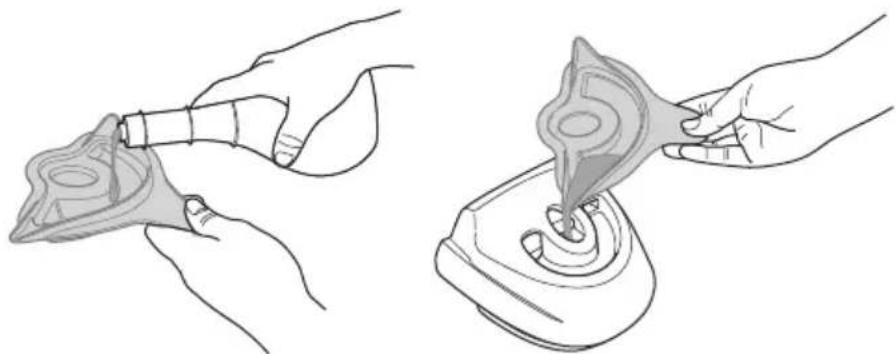
Illustration of two hands performing a medical procedure: adding a tube to a device and using a pipette (no text or symbols present)1 Fill the cleaning plug to the rim with vinegar and pour into empty water chamber.
2 Add clean water to the water chamber until the solution reaches the maximum water level mark.
3 Let the solution soak for 10 minutes.
4 Discard the solution and rinse the water chamber with clean water.
Cover and cover seal
1
natural_image
Illustration of a hand holding a handheld device with an arrow pointing to a device component (no text or symbols present)2
natural_image
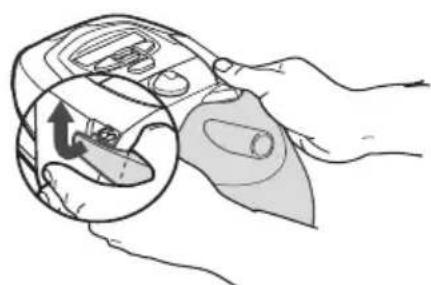
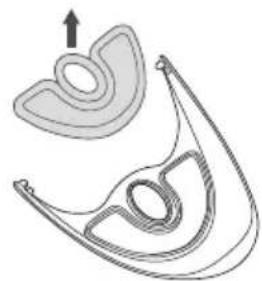
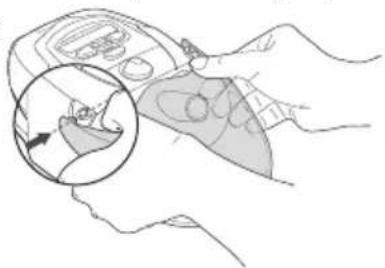
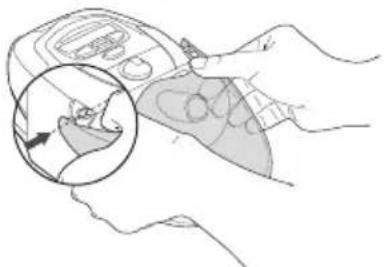
Diagram of a mechanical component with curved and straight sections, no visible text or symbols1 Remove the cover by gently flexing one cover arm away and up from the docking station until the cover detaches completely.
2 Peel the cover seal away from the cover.
3 Inspect the cover and cover seal weekly for wear and deterioration. Replace any damaged parts. When required, wash the cover and cover seal in warm water, using a mild detergent. Rinse them thoroughly with clean water and allow it to dry away from direct sunlight.
Docking station
Periodically wipe the outside of the docking station (including the connector seal) with a damp cloth.

CAUTION
Do not use any of the following to clean any part of the H4i as these solutions may cause damage and reduce the life of the product:
- bleach, chlorine-, alcohol- or ammonia-based solutions
- moisturising, antibacterial or glycerine based soaps
• water softening and unapproved descaling agents.
Heater plate
Do not allow water to collect on the heater plate. Wipe it with a clean cloth if necessary.
Reassembling the H4i cleanable water chamber
natural_image
Illustration of a hand holding a medical device with an arrow indicating force or pressure (no text or symbols present)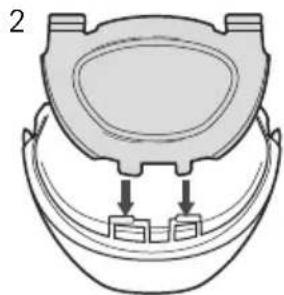
natural_image
Diagram of a toilet with two ports and a lid, no text or symbols present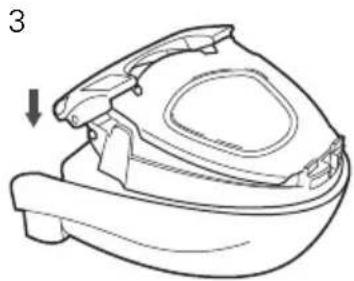
natural_image
Line drawing of a small boat hull with a handle and side panel, no text or symbols present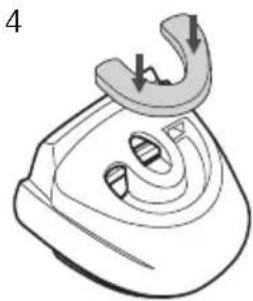
natural_image
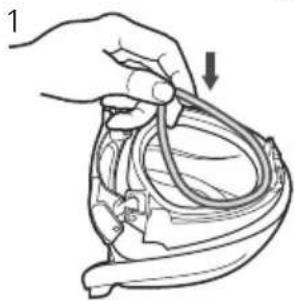
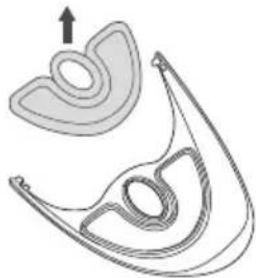
Line drawing of a steam iron with a curved handle and internal slots (no text or symbols)1 Refit the tub plate seal into its groove on the cleanable water chamber.
2 Reinsert the tub plate by slotting its feet into the catches.
3 Reassemble the catch by lifting up and over the water chamber and then pushing down to lock into place.
Note: Only the H4i Cleanable Water Chamber can be disassembled/reassembled.
4 Reinsert the spill guard into the water chamber recess and push down to fit firmly into place.
Reassembling your H4i
Reassemble the parts when they are clean and dry.
natural_image
Diagram of a medical catheter or tube device with an arrow indicating a point of interest (no text or labels present)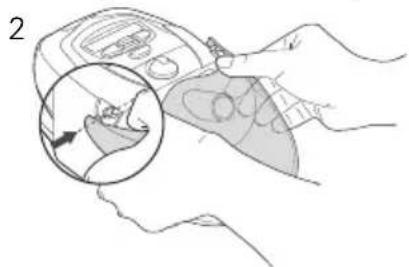
natural_image
Illustration of a hand holding a device with an inset showing a close-up of a small object (no text or symbols present)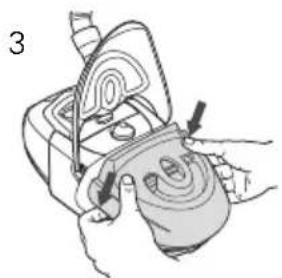
natural_image
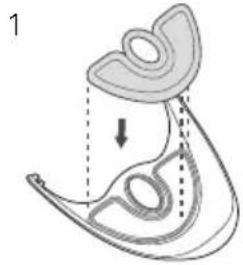
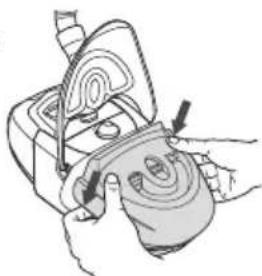
Illustration of hands using a handheld device to interact with a surface (no text or symbols visible)1 Align the cover seal to the guides on the cover and press along the edges to ensure it is fitted properly.
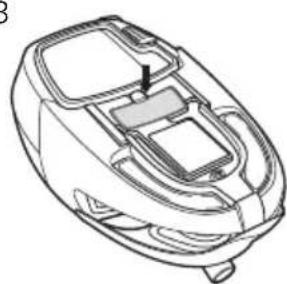
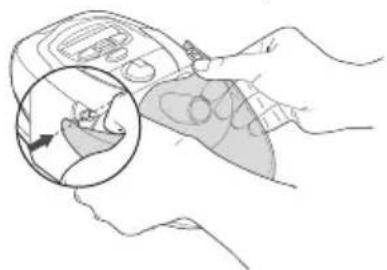
2 Put one cover arm into its pivot point on the docking station and gently flex the other arm into its corresponding point. The cover should be able to open and close freely while securely attached to the docking station.
3 Replace the water chamber in the humidifier docking station.
Servicing
The H4i should be inspected by an authorised ResMed Service Centre five years from the date of manufacture. Prior to this, the device is intended to provide safe and reliable operation provided that it is operated and maintained in accordance with the instructions provided by ResMed. Warranty details are provided with the device at the time of original supply. As with all electrical devices, if any irregularity becomes apparent, you should exercise caution and have the device inspected by an authorised ResMed Service Centre.
Frequently asked questions
| Question Answer | |
| Why is there condensation in my mask and/or air tubing? | Excessive condensation in your mask or air tubing may occur when the room temperature is low. To prevent condensation, turn the control dial down to a lower setting. You may need to adjust your humidity setting from season to season. The use of a ResMed Tubing Wrap can help reduce the effects of condensation. |
| Do I have to use distilled water in the water chamber? | Using distilled water will maximise the life of the water chamber and reduce mineral deposits. |
| What if I still have symptoms of dryness? | If you have symptoms of dryness, then your humidity setting may be set too low to be effective. Turn the humidity control dial up.If you are still experiencing symptoms of dryness, you may be breathing through your mouth. Mouth breathing or mouth leaks cause drying and irritation of the upper airway. If this is a problem, a full face mask or chin strap may help. Consult your clinician or equipment supplier for details. |
Troubleshooting
If there is a problem, try the following suggestions. If the problem cannot be solved, contact your equipment supplier or ResMed. Do not open the unit.

WARNING
Service and repair should only be performed by an authorised service agent.
Problem Possible cause Solution
| Device not working (no display on LCD screen and/or indicator light not lighting up) | Power cord is not plugged in properly. | Check that the power cord is plugged firmly into the power outlet and the switch (if available) is on at the outlet. |
| Faulty power outlet. | Try another power outlet. | |
| Flow generator and docking station not connected correctly. | Check that the docking station is securely attached to the flow generator. | |
| Indicator light is permanently dull and/or air does not feel warm | H4i reflector is dirty. Clean the reflector with a damp cloth. | |
| Leaking water chamber | The water chamber may be damaged or cracked. | Contact your supplier for a replacement. |
| The tub plate is not attached correctly (not applicable to the H4i Water Chamber). | Make sure the tub plate is fitted correctly. | |
| No/low air flow The air tubing is not connected properly. | Connect the air tubing as described in "Setting up your H4i for use" on page 1. | |
| The air tubing is blocked, pinched or punctured. | ||
| The flow generator is not working correctly. | ||
| The cover is not latched correctly. | ||
| The cover seal is not fitted correctly. | ||
| Water splashing on your face | The water chamber is overfilled. | Empty some water from the water chamber. |
| Condensation is forming in the air tube and mask. | Turn the control dial down. | |
| Use the ResMed Tubing Wrap. | ||
Technical specifications
Maximum heater plate temperature 85°C
Temperature cut-out 93°C
Maximum gas temperature 41°C
Dimensions (H x W x D) Docking station and water chamber: 130 mm x 170 mm x 212 mm
Weight Docking station and unfilled water chamber: 786 g
Water capacity To maximum fill line: 390 mL
Power supply 100-240V 50/60Hz, 0.7-1.6A; 110V 400Hz, 0.8A
Instantaneous power consumption: <400W
Average power: <115W
Docking station Flame retardant engineering thermoplastic, plated cast aluminium
Water chamber Injection molded plastic, stainless steel and silicon seal
Operating temperature +5°C to +35°C
Operating humidity 10–95% non-condensing
Operating altitude Please refer to your CPAP, bilevel or non-invasive ventilation device user guide
Storage and transport temperature -20^ to +60^
Storage and transport humidity 10–95% non-condensing
IEC 60601-1 classification Class II (double insulation), Type BF Applied Part
Electromagnetic compatibility Please refer to your flow generator user's manual for details
Humidifier performance
The following settings have been tested at 22^ C, 40% RH ambient conditions:
| CPAP mask pressure cm H2O | RH output % | Nominal system output AH*, BTPS† | ||
| Setting 3 | Setting 6 | Setting 3 | Setting 6 | |
| 4 | >95 | >95 | 16 | 20 |
| 10 | >85 | >95 | 14 | 18 |
| 20 | >75 | >85 13 | 16 | |
* AH- Absolute Humidity in mg/L.
† BTPS- Body Temperature Pressure Saturated.
Note: The manufacturer reserves the right to change these specifications without notice.
Symbols which appear on the device

Caution;

ad instructions before use; European Authorised
Representative; Type BF Applied Part; Hot surface; Class II equipment;

Do not touch;

midifier control;
Maximum water

Manufacturer;

Environmental information
WEEE 2002/96/EC is a European Directive that requires the proper disposal of electrical and electronic equipment. This device should be disposed of separately, not as unsorted municipal waste. To dispose of your device, you should use appropriate collection, reuse and recycling systems available in your region. The use of these collection, reuse and recycling systems is designed to reduce pressure on natural resources and prevent hazardous substances from damaging the environment.
If you need information on these disposal systems, please contact your local waste administration. The crossed-bin symbol invites you to use these disposal systems. If you require information on collection and disposal of your ResMed device please contact your ResMed office, local distributor or go to www.resmed.com/environment.
General warnings
A warning alerts you to possible injury. Specific warnings and cautions appear next to the relevant instructions in the manual.
- Use the H4i only for its intended use as described in this manual.
• Make sure that the water chamber is empty before transporting the H4i. - The H4i is designed only for use with specific ResMed PAP devices. Do not use the H4i with any other PAP device.
- The H4i should only be used with delivery tubes or accessories recommended by ResMed. Connection of other delivery tubes or accessories could result in injury, or damage to the device.
- The H4i, including the associated tubing, is for single-patient use and must not be reused on another person. This is to avoid the risk of cross-infection.
- There exists the possibility that if the device is placed above the level of the patient and is tipped over, or if the tubing is filled with condensate, the mask might fill with heated water. The H4i should therefore be used with caution in patients who are unable to guard their airways, or are unable to pull the mask off, for example following a stroke. Attention should be given to the relative risks and benefits.
- Do not attempt to dismantle the H4i docking station. There are no user-serviceable parts inside. Repairs and internal servicing should only be performed by an authorised service agent.
- If liquids are inadvertently spilled into or on the H4i docking station, unplug the PAP device from the power outlet. Disconnect the docking station from the PAP device and allow the docking station to drain and dry before using.
- Do not operate the H4i if it is not working properly or if any part of the PAP device or H4i has been dropped or damaged.
- Keep the PAP device power cord away from hot surfaces.
- Do not drop or insert any object into any opening or tubes.
- Do not use the H4i in the presence of flammable or explosive materials.
• Explosion hazard—do not use in the vicinity of flammable anesthetics.
• Follow all precautions when using supplemental oxygen.
Limited warranty
ResMed Pty Ltd (hereafter 'ResMed') warrants that your ResMed product shall be free from defects in material and workmanship from the date of purchase for the period specified below.
| Product Warranty period | |
| Mask systems (including mask frame, cushion, headgear and tubing)—excluding single-use devicesAccessories—excluding single-use devicesFlex-type finger pulse sensorsHumidifier water tubs | 90 days |
| Batteries for use in ResMed internal and external battery systems | 6 months |
| Clip-type finger pulse sensorsCPAP and bilevel device data modulesOximeters and CPAP and bilevel device oximeter adaptersHumidifiers and humidifier cleanable water tubsTitration control devices | 1 year |
| CPAP, bilevel and ventilation devices (including external power supply units)Battery accessoriesPortable diagnostic/screening devices | 2 years |
This warranty is only available to the initial consumer. It is not transferable.
If the product fails under conditions of normal use, ResMed will repair or replace, at its option, the defective product or any of its components.
This limited warranty does not cover: a) any damage caused as a result of improper use, abuse, modification or alteration of the product; b) repairs carried out by any service organization that has not been expressly authorized by ResMed to perform such repairs; c) any damage or contamination due to cigarette, pipe, cigar or other smoke; and d) any damage caused by water being spilled on or into an electronic device.
Warranty is void on product sold, or resold, outside the region of original purchase. Warranty claims on defective product must be made by the initial consumer at the point of purchase.
This warranty replaces all other expressed or implied warranties, including any implied warranty of merchantability or fitness for a particular purpose. Some regions or states do not allow limitations on how long an implied warranty lasts, so the above limitation may not apply to you.
ResMed shall not be responsible for any incidental or consequential damages claimed to have resulted from the sale, installation or use of any ResMed product. Some regions or states do not allow the exclusion or limitation of incidental or consequential damages, so the above limitation may not apply to you.
This warranty gives you specific legal rights, and you may also have other rights which vary from region to region. For further information on your warranty rights, contact your local ResMed dealer or ResMed office.
H4i™
WARMLUFTBEFEUCHTER
Gebrauchsanweisung
Deutsch
Inhalt
Einleitung 1
Indikationen
Kontraindikationen
natural_image
Line drawing of a robotic device with control panel and buttons, showing a directional arrow (no text or symbols)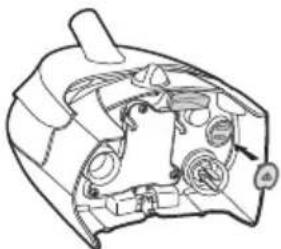
natural_image
Technical line drawing of a mechanical component with no visible text or symbols(b)
natural_image
Illustration of two hands performing a medical procedure: one using a tool to lift a patient's mouth, the other handling a device with a bulb (no text or symbols present)natural_image
Illustration of hands holding a handheld device with a magnified inset showing a hand turning a curved object (no text or symbols)2
natural_image
Diagram of a mechanical component with curved and straight sections, no visible text or symbolsnatural_image
Line drawing of a robotic vacuum cleaner with control panel and buttons (no text or symbols)(a)
natural_image
Technical line drawing of a mechanical component with no visible text or symbols(b)
natural_image
Illustration of a hand using a curved tool to lift a steamer (no text or symbols present)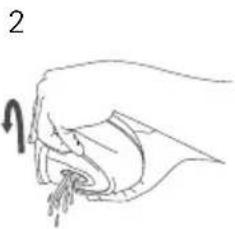
natural_image
Line drawing of a hand holding a small object with a looped handle (no text or symbols)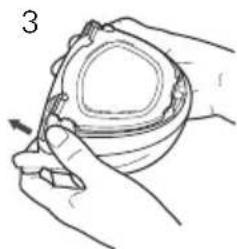
natural_image
Illustration of hands holding a small bowl with a tool, no text or symbols present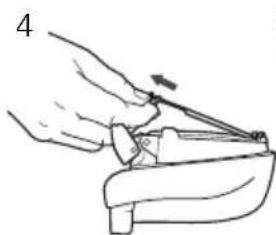
natural_image
Illustration of hands using a tool to adjust or install a mechanical component (no text or symbols visible)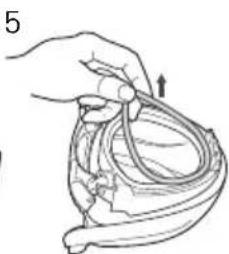
natural_image
Illustration of a hand holding a medical instrument over a anatomical structure (no text or symbols)natural_image
Illustration of a hand pouring liquid into a container (no text or symbols)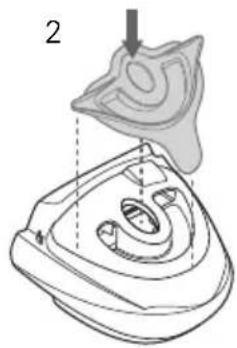
natural_image
Technical illustration of a mechanical component with a highlighted section and dashed alignment lines (no text or symbols)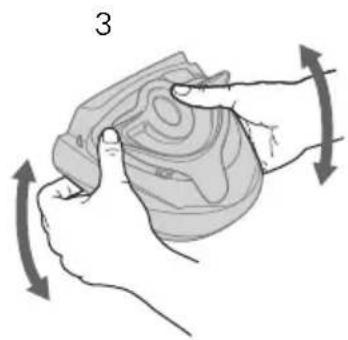
natural_image
Illustration of a hand holding a circular object with directional arrows indicating rotation or movement (no text or symbols)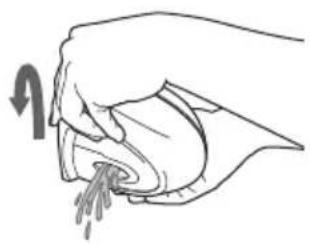
natural_image
Line drawing of a hand washing clothes with a cloth (no text or symbols)natural_image
Illustration of two hands performing a medical procedure: one using a pipette to apply fluid, the other handling a container with liquid (no text or symbols present)natural_image
Illustration of a hand holding a handheld device with a magnified inset showing a hand turning a key (no text or symbols present)2
natural_image
Diagram of a mechanical component with curved and straight sections, no text or symbols presentnatural_image
Illustration of a hand holding a medical device with a downward arrow indicating force or pressure (no text or symbols present)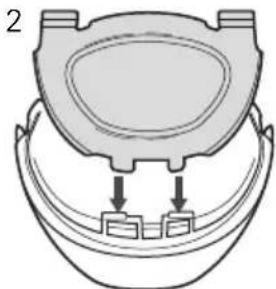
natural_image
Diagram of a toilet with two connectors inserted into a bowl (no text or symbols)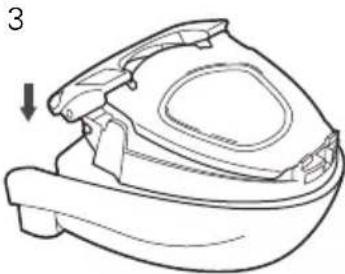
natural_image
Line drawing of a mechanical component with a downward arrow indicating direction (no text or symbols)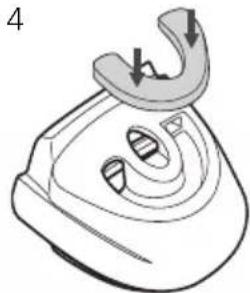
natural_image
Line drawing of a steam iron with a curved handle and two arrows indicating force or movement (no text or symbols)natural_image
Diagram of a medical catheter or tube with an arrow indicating direction (no text or labels)2
natural_image
Illustration of a hand holding a device with a magnified inset showing a close-up of a small object (no text or symbols present)3
natural_image
Illustration of a hand using a tool to adjust or install a mechanical component (no text or symbols visible)natural_image
Line drawing of a robotic vacuum cleaner with control panel and buttons (no text or symbols)(a)
natural_image
Technical line drawing of a mechanical component with no visible text or symbols(b)
natural_image
Illustration of a hand using a curved tool to lift a small object, no text or symbols present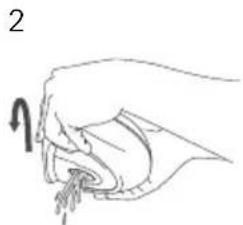
natural_image
Line drawing of a hand holding an object with a looped arm (no text or symbols)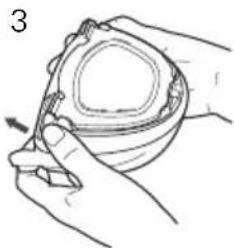
natural_image
Line drawing of hands holding a small container with a pen, no text or symbols present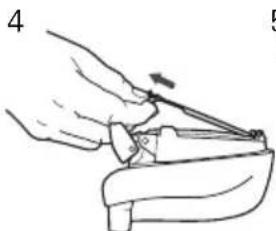
natural_image
Line drawing of a hand using a tool to lift or adjust a component (no text or symbols present)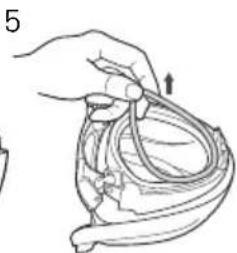
natural_image
Illustration of a hand holding a medical device with tubing and a valve (no text or symbols)natural_image
Illustration showing two steps of a medical procedure: adding a needle to a device and using a pipette (no text or symbols present)natural_image
Illustration of hands using a handheld device to interact with a device, showing a close-up of the screen (no text or symbols present)2
natural_image
Diagram of a mechanical component with curved surfaces and a top view showing internal structure (no text or symbols)natural_image
Illustration of a hand holding a medical device with tubing and a downward arrow indicating force (no text or symbols)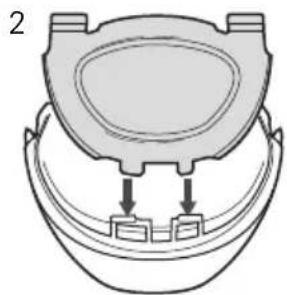
natural_image
Diagram of a toilet with two ports and a lid, showing internal components (no text or labels)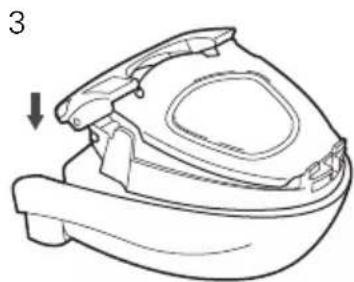
natural_image
Line drawing of a small mechanical component with a downward arrow indicating direction (no text or symbols)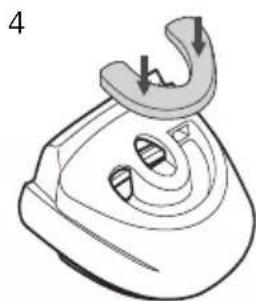
natural_image
Line drawing of a steam iron with a curved handle and internal slots (no text or symbols)natural_image
Line drawing of a robotic vacuum cleaner with control panel and buttons (no text or symbols)(a)
natural_image
Technical line drawing of a mechanical component with no visible text or symbols(b)
natural_image
Line drawing of a hand holding a device with an arrow indicating motion (no text or symbols)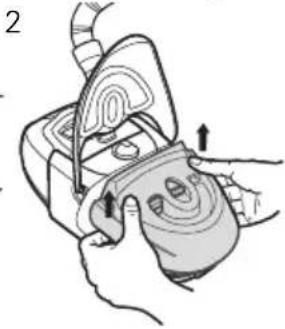
natural_image
Illustration of a hand holding a device with a curved surface and directional arrows indicating motion (no text or symbols)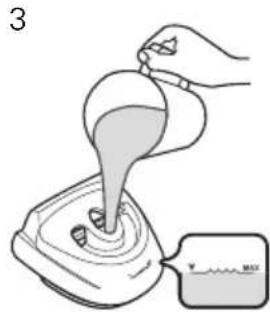
natural_image
Diagram of a mechanical component with internal curved structure and intersecting lines (no text or symbols)natural_image
Simple line drawing of a device with a bulb and cable, no text or symbols present2
natural_image
Illustration of a hand holding a device with a curved panel and directional arrows indicating motion (no text or symbols)3
natural_image
Line drawing of a mechanical device with internal components and a labeled arrow (no text or symbols)4
natural_image
Illustration of hands holding a device with a control panel (no text or symbols visible)natural_image
Illustration of a hand using a curved tool to lift a motor (no text or symbols present)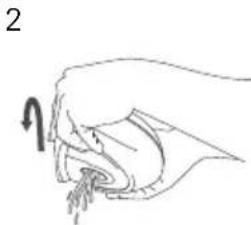
natural_image
Line drawing of a hand holding an object with a curved arrow indicating direction (no text or symbols)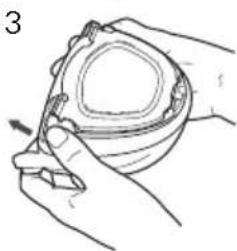
natural_image
Line drawing of hands holding a small bowl with a pen inserted (no text or symbols)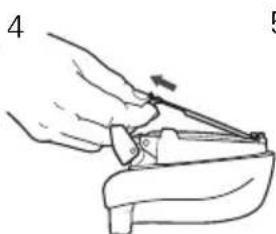
natural_image
Illustration of a hand using a tool to lift or lift a small object (no text or symbols present)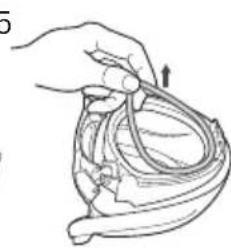
natural_image
Illustration of a hand holding a cable with an arrow indicating direction (no text or symbols)natural_image
Illustration of a hand pouring liquid into a container (no text or symbols)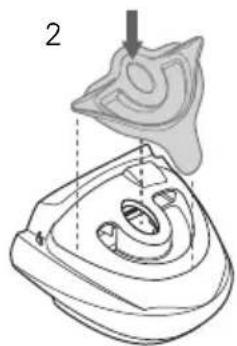
natural_image
Technical illustration of a mechanical component with a highlighted section and dashed line indicating a dimension (no text or symbols present)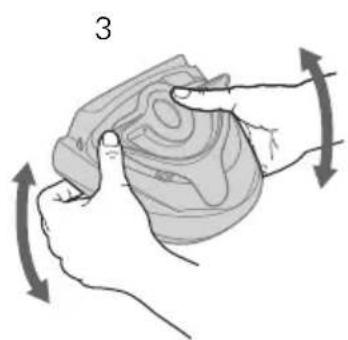
natural_image
Illustration of a hand holding a textured object with directional arrows indicating movement or force (no text or symbols)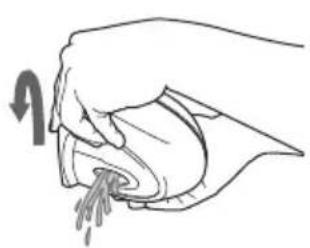
natural_image
Illustration of a hand pouring liquid into a container (no text or symbols)natural_image
Illustration of two hands performing a medical procedure: one using a pipette to apply fluid, the other handling a device with a bulb (no text or symbols present)natural_image
Illustration of a hand holding a handheld device with an inset showing a hand holding a small object (no text or symbols present)2
natural_image
Diagram of a mechanical component with curved and straight sections, no text or symbols presentnatural_image
Illustration of a hand holding a medical catheter or tube with an arrow indicating force (no text or symbols present)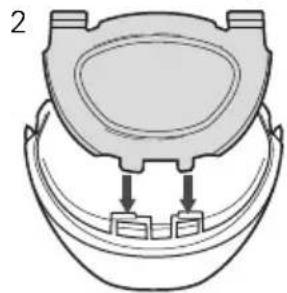
natural_image
Diagram of a toilet with two connectors, no text or symbols present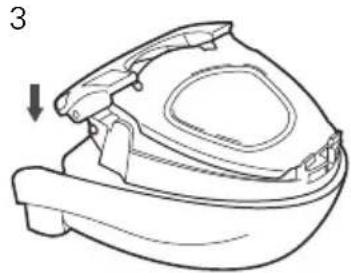
natural_image
Line drawing of a small mechanical component with a downward arrow indicating direction (no text or symbols)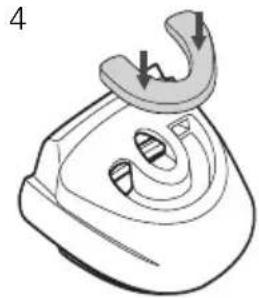
natural_image
Line drawing of a steam iron with a curved handle and internal slots (no text or symbols)natural_image
Diagram of a medical device with internal components and directional arrows (no text or labels)2
natural_image
Illustration of a hand holding a medical device with an inset showing a hand holding a small object (no text or symbols present)3
natural_image
Illustration of hands using a tool to adjust or install a mechanical component (no text or symbols visible)Aquecer o H4i with the VPAP or S8 Series 4
natural_image
Line drawing of a mechanical device with control buttons and a directional arrow (no text or symbols)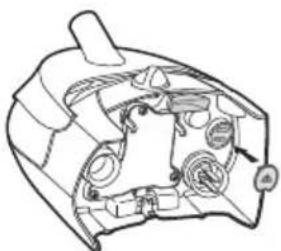
natural_image
Technical line drawing of a mechanical component with no visible text or symbols(b)
natural_image
Line drawing of a hand holding a device with an arrow indicating motion (no text or symbols)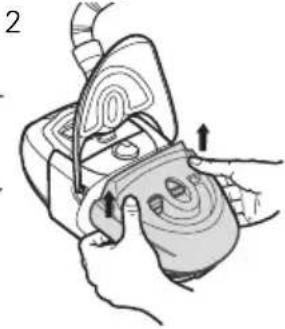
natural_image
Illustration of a hand holding a device with a curved surface and directional arrows indicating motion or force (no text or symbols)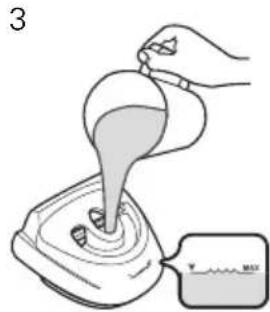
natural_image
Diagram of a mechanical component with internal channels and a central axis, enclosed in a circle (no text or labels)natural_image
Simple line drawing of a device with a bulb and cable, no text or symbols present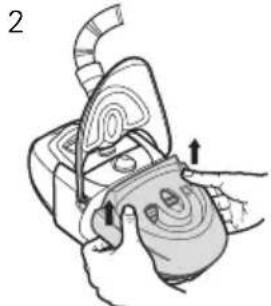
natural_image
Illustration of a hand holding a device with a curved handle and directional arrows indicating motion (no text or symbols)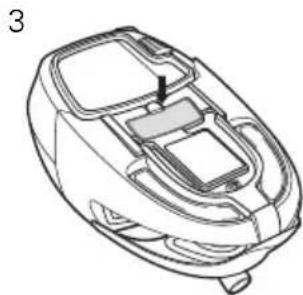
natural_image
Line drawing of a mechanical device casing with internal compartments and a highlighted section (no text or symbols)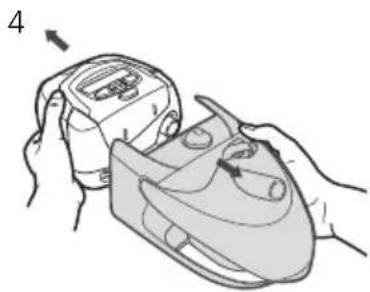
natural_image
Illustration of hands holding a device with a button, no text or symbols presentnatural_image
Illustration of a hand using a curved tool to lift a motor (no text or symbols)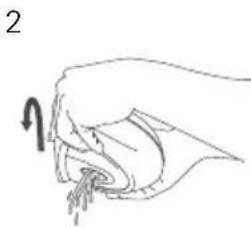
natural_image
Illustration of a hand holding a piece of meat or vegetable, with no visible text or symbols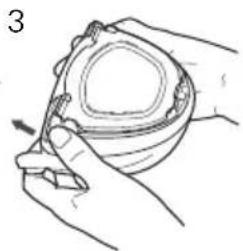
natural_image
Line drawing of hands holding a bowl with a pen, no text or symbols present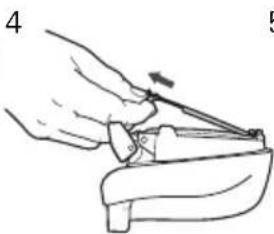
natural_image
Illustration of a hand using a tool to adjust or install a mechanical component (no text or symbols visible)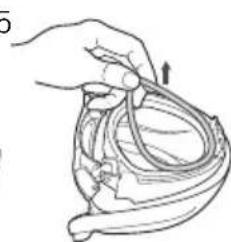
natural_image
Line drawing of a hand holding a coiled cable or wire, with an arrow indicating direction (no text or symbols)natural_image
Illustration of two hands performing a medical procedure: one using a tool to apply a nasal tube, the other handling a device with a pointed tip (no text or symbols present)natural_image
Illustration of hands holding a handheld device with a magnified inset showing a hand inserting a plug into a socket (no text or symbols present)2
natural_image
Diagram of a mechanical component with curved and straight sections, no text or symbols presentnatural_image
Illustration of a hand holding a cable with an arrow indicating direction (no text or symbols)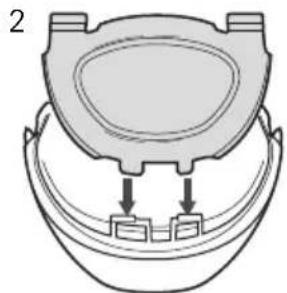
natural_image
Diagram of a toilet with two connectors and a lid, no text or symbols present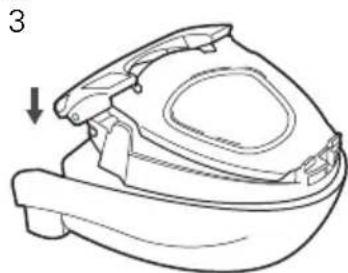
natural_image
Line drawing of a small mechanical component with a downward arrow indicating direction (no text or symbols)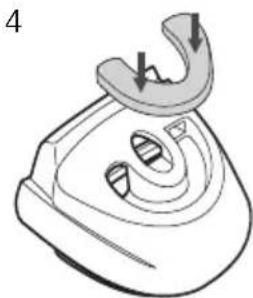
natural_image
Line drawing of a steam iron with a curved handle and internal slots (no text or symbols)natural_image
Diagram of a medical catheter with an arrow indicating force or movement (no text or labels)2
natural_image
Illustration of a hand holding a device with an inset showing a magnified view of a small object (no text or symbols present)3
natural_image
Illustration of a hand holding a device with a tool, no visible text or symbolsnatural_image
Line drawing of a robotic vacuum cleaner with control panel and buttons (no text or symbols)(a)
natural_image
Technical line drawing of a mechanical component with no visible text or symbols(b)
natural_image
Line drawing of a hand holding a device with an arrow indicating motion (no text or symbols)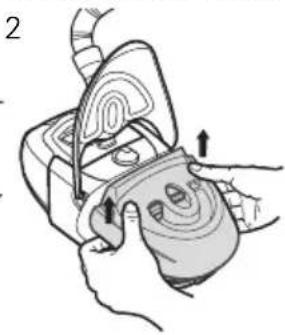
natural_image
Illustration of a hand holding a device with arrows indicating motion or force (no text or symbols present)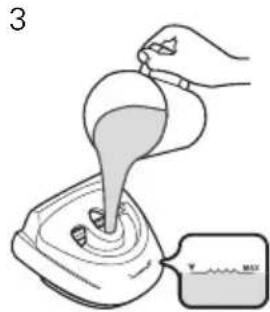
natural_image
Diagram of a mechanical device with a central shaft and curved components, enclosed in a circle (no text or symbols)natural_image
Simple line drawing of a device with a plug and cable, no text or symbols present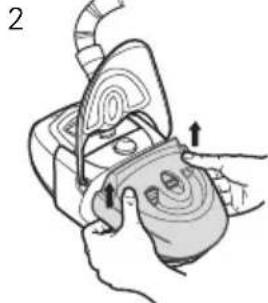
natural_image
Illustration of a hand holding a device with arrows indicating movement or force (no text or symbols present)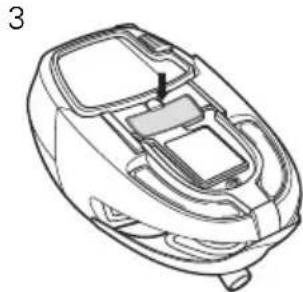
natural_image
Line drawing of a mechanical component with internal compartments and a highlighted section (no text or symbols)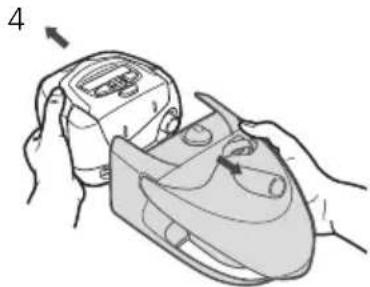
natural_image
Illustration of hands holding a device with a labeled component (no text or symbols present)natural_image
Illustration of a hand using a curved tool to lift a motor (no text or symbols present)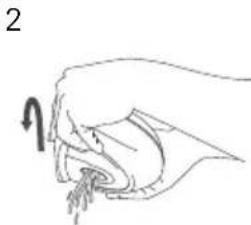
natural_image
Line drawing of a hand holding an object with a curved arrow indicating direction (no text or symbols)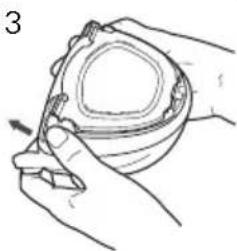
natural_image
Line drawing of a hand holding a small bowl with a pen inserted, no text or symbols present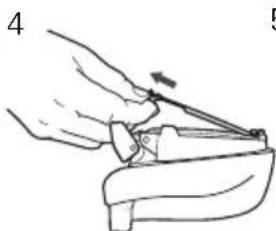
natural_image
Illustration of a hand using a tool to lift or adjust a small object (no text or symbols present)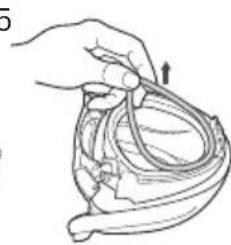
natural_image
Line drawing of a hand holding a coiled medical device with an arrow indicating motion (no text or symbols)natural_image
Illustration of a hand pouring liquid into a container (no text or symbols)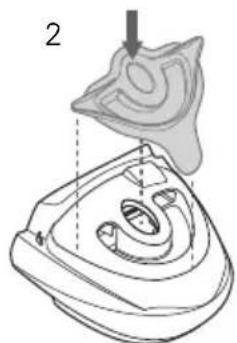
natural_image
Technical illustration of a mechanical component with a numbered callout (no text or symbols present)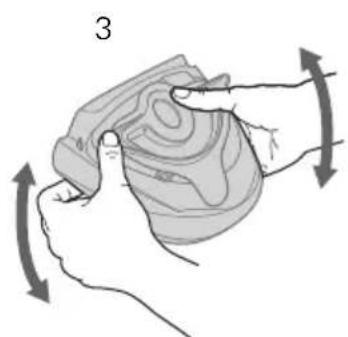
natural_image
Illustration of a hand holding a textured object with directional arrows indicating movement or force (no text or symbols)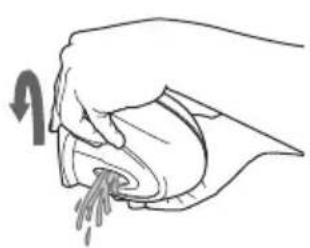
natural_image
Illustration of a hand pouring liquid into a container (no text or symbols)natural_image
Illustration showing two steps of a medical procedure: adding a tube to a device and using a pipette (no text or symbols present)natural_image
Illustration of a hand holding a handheld device with an inset showing a hand holding a small object (no text or symbols present)2
natural_image
Diagram of a mechanical component with curved and straight sections, no visible text or symbolsnatural_image
Illustration of a hand holding a medical instrument with an arrow indicating force or pressure (no text or symbols present)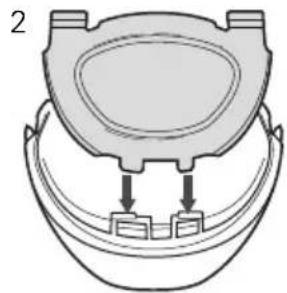
natural_image
Diagram of a toilet with two connectors, no text or symbols present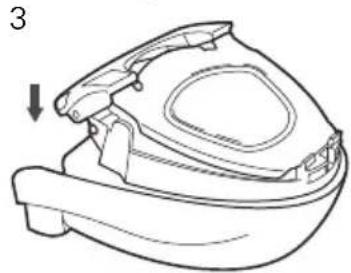
natural_image
Line drawing of a mechanical component with a downward arrow indicating direction (no text or symbols)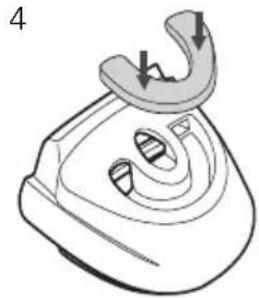
natural_image
Line drawing of a steam iron with a curved handle and internal slots (no text or symbols)natural_image
Diagram of a medical device with internal structure and directional arrow (no text or labels)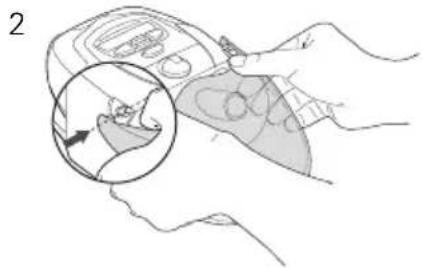
natural_image
Illustration of a hand holding a medical device with an inset showing a hand performing a procedure (no text or symbols present)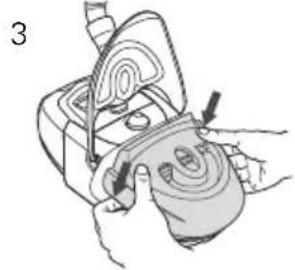
natural_image
Illustration of a hand holding a device with arrows indicating motion or force (no text or symbols)natural_image
Line drawing of a hand holding a small object with an arrow indicating motion (no text or symbols)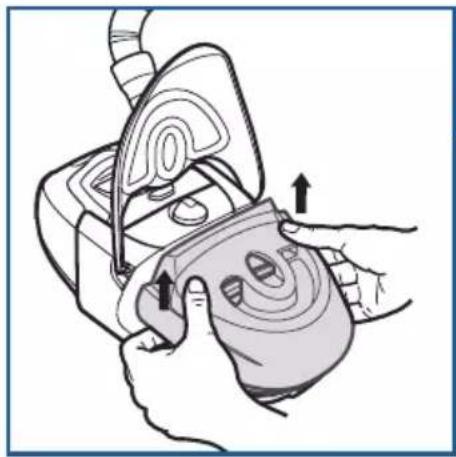
natural_image
Illustration of hands performing a medical procedure on a device with measurement scales (no text or symbols)2
natural_image
Illustration of a hand pouring liquid into a machine with a magnified view showing 'MAX' label (no text or symbols on the diagram itself)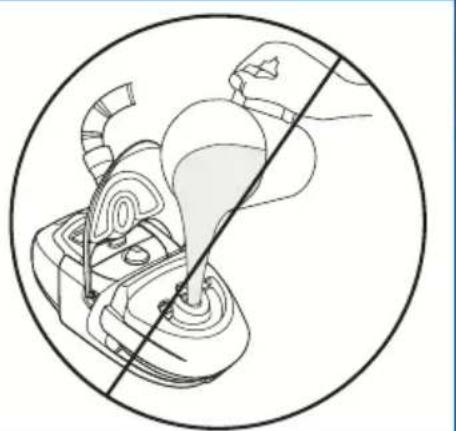
natural_image
Diagram of a mechanical device with a diagonal line crossing through it, no text or symbols present3
natural_image
Illustration of hands using a handheld device to adjust or install a component (no text or symbols visible)4
natural_image
Illustration of a hand holding a medical device with a curved arrow indicating motion (no text or symbols)5
| 248831/1 2020-12 |
| H4i |
| USER |
| EUR 1 |