HUSQVARNA LC 247i - Electric mower

LC 247i - Electric mower HUSQVARNA - Free user manual and instructions

Find the device manual for free LC 247i HUSQVARNA in PDF.

📄 740 pages English EN Download 💬 AI Question
Notice HUSQVARNA LC 247i - page 4
Pick your language and provide your email: we'll send you a specifically translated version.

User questions about LC 247i HUSQVARNA

0 question about this device. Answer the ones you know or ask your own.

Ask a new question about this device

The email remains private: it is only used to notify you if someone responds to your question.

No questions yet. Be the first to ask one.

Download the instructions for your Electric mower in PDF format for free! Find your manual LC 247i - HUSQVARNA and take your electronic device back in hand. On this page are published all the documents necessary for the use of your device. LC 247i by HUSQVARNA.

USER MANUAL LC 247i HUSQVARNA

natural_image Silhouette of a lawn mower (no text or symbols)

LC 247i, LC 347iVX, LC 353iVX

EAC

EN Operator's manual 2-26

Troubleshooting.... 19
Transportation, storage and disposal.... 21
Technical data.... 22
Declaration of Conformity.... 25
Registered trademarks.... 26

Introduction

Product description

The product is a pedestrian-controlled rotary lawn mower. The grass is collected in a grass catcher. Remove the grass catcher to get rear discharge of the grass. Attach a mulch kit (accessory) to cut the grass into fertilizer.

Intended use

Use the product to cut grass. Do not use the product for other tasks.
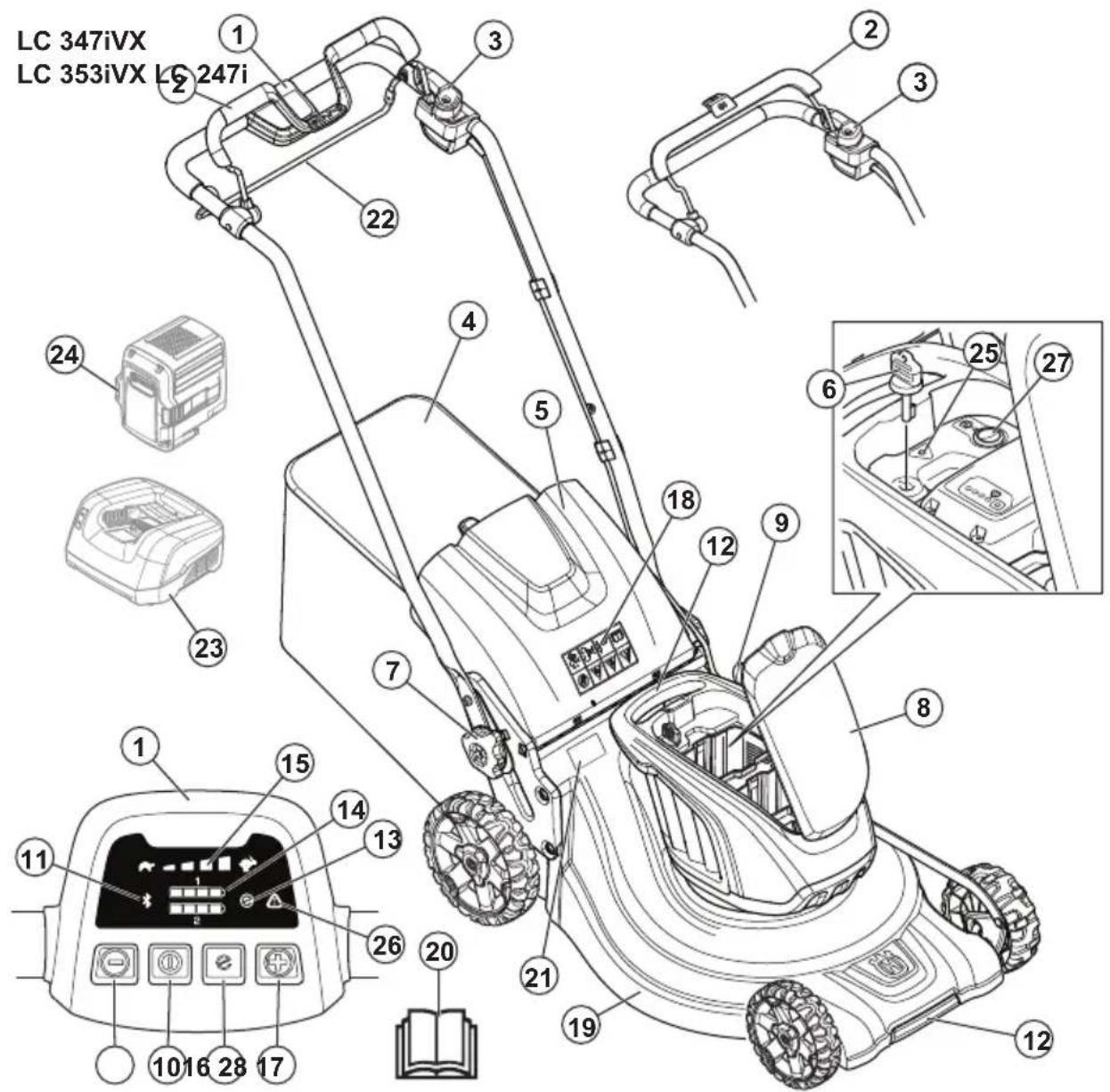
HUSQVARNA LC 247i - Intended use - 1

text_image LC 347iVX LC 353iVX LC 247i 1 2 3 22 4 5 18 12 9 8 23 24 25 27 1 15 14 13 11 26 20 21 19 12 10 16 28 17
  1. Control panel (LC 347iVX, LC 353iVX)
  2. Motor brake handle
  3. Start inhibitor
  4. Grass catcher
  5. Rear cover
  6. Safety key
  7. Handle knob
  8. Battery cover
  9. Cutting height control
  10. ON/OFF button
  11. Indicator for Bluetooth® wireless technology
  12. Lift handles
  13. SavE indicator
  14. Battery indicator
  15. Speed level indicator (LC 347iVX, LC 353iVX)

  16. Decrease speed button (LC 347iVX, LC 353iVX)

  17. Increase speed button (LC 347iVX, LC 353iVX)
  18. Symbols
  19. Cutting cover
  20. Operator's manual
  21. Rating plate
  22. Drive bail (LC 347iVX, LC 353iVX)
  23. Battery charger (Accessory)
  24. Battery (Accessory)
  25. Error LED (LC 247i)
  26. Error LED (LC 347iVX, LC 353iVX)
  27. SavE button (LC 247i)
  28. SavE button (LC 347iVX, LC 353iVX)

Symbols on the product

HUSQVARNA LC 247i - Symbols on the product - 1
WARNING

HUSQVARNA LC 247i - Symbols on the product - 2
Read the instructions.

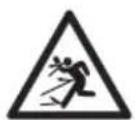
HUSQVARNA LC 247i - Symbols on the product - 3
WARNING - Beware of thrown objects.

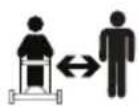
HUSQVARNA LC 247i - Symbols on the product - 4
Keep bystanders away.

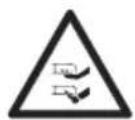
HUSQVARNA LC 247i - Symbols on the product - 5
WARNING – Keep hands and feet away from the blades.
HUSQVARNA LC 247i - Symbols on the product - 6
WARNING – Disconnect battery before maintenance.
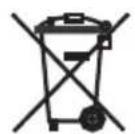
HUSQVARNA LC 247i - Symbols on the product - 7
The product or package of the product is not domestic waste. Recycle it at a recycling station for electrical and electronic equipment.

HUSQVARNA LC 247i - Symbols on the product - 8
The product agrees with applicable EC directives.
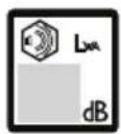
HUSQVARNA LC 247i - Symbols on the product - 9
Noise emission to the environment label as per EU and UK directives and regulations. The guaranteed sound power level of the product is specified in

Technical data on page 22 and on the label.

HUSQVARNA LC 247i - Symbols on the product - 10
The product is drip protected.

HUSQVARNA LC 247i - Symbols on the product - 11
Release the motor brake handle to stop.

HUSQVARNA LC 247i - Symbols on the product - 12
Scannable code

Note: Other symbols/decals on the product refer to certification requirements for some markets.

Label on the product

HUSQVARNA LC 247i - Label on the product - 1

text_image DANGER KEEP HANDS AND FEET AWAY GARDER MAINS ET PIEDS A DISTANCE

DANGER – Keep hands and feet away.

Product liability

As referred to in the product liability laws, we are not liable for damages that our product causes if:

• the product is incorrectly repaired.
• the product is repaired with parts that are not from the manufacturer or not approved by the manufacturer.
• the product has an accessory that is not from the manufacturer or not approved by the manufacturer.
- the product is not repaired at an approved service center or by an approved authority.

Safety

Safety definitions

Warnings, cautions and notes are used to point out specially important parts of the manual.

HUSQVARNA LC 247i - Safety definitions - 1

WARNING: Used if there is a risk of injury or death for the operator or bystanders

if the instructions in the manual are not obeyed.

HUSQVARNA LC 247i - Safety definitions - 2

CAUTION: Used if there is a risk of damage to the product, other materials or

the adjacent area if the instructions in the manual are not obeyed.

Note: Used to give more information that is necessary in a given situation.

General product safety warnings

HUSQVARNA LC 247i - General product safety warnings - 1

WARNING: Read all safety warnings, instructions, illustrations and specifications provided with this product. Failure to follow all instructions listed below may result in electric shock, fire and/or serious injury.

Save all warnings and instructions for future reference. The term "product" in the warnings refers to your mains-operated (corded) product or battery-operated (cordless) product.

Work area safety

  • Keep work area clean and well lit. Cluttered or dark areas invite accidents.
  • Do not operate the product in explosive atmospheres, such as in the presence of flammable liquids, gases or dust. The product create sparks which may ignite the dust or fumes.
  • Keep children and bystanders away while operating the product. Distractions can cause you to lose control.

Electrical safety

  • Product plugs must match the outlet. Never modify the plug in any way. Do not use any adapter plugs with earthed (grounded) products. Unmodified plugs and matching outlets will reduce risk of electric shock.
  • Avoid body contact with earthed or grounded surfaces, such as pipes, radiators, ranges and refrigerators. There is an increased risk of electric shock if your body is earthed or grounded.
  • Do not expose products to rain or wet conditions. Water entering a product will increase the risk of electric shock.
  • Do not abuse the cord. Never use the cord for carrying, pulling or unplugging the product. Keep cord away from heat, oil, sharp edges or moving parts. Damaged or entangled cords increase the risk of electric shock.
  • When operating a product outdoors, use an extension cord suitable for outdoor use. Use of a cord suitable for outdoor use reduces the risk of electric shock.
  • If operating a product in a damp location is unavoidable, use a residual current device (RCD) protected supply. Use of an RCD reduces the risk of electric shock.

Personal safety

  • Stay alert, watch what you are doing and use common sense when operating a product. Do not use a product while you are tired or under the influence of drugs, alcohol or medication. A moment of inattention while operating products may result in serious personal injury.
  • Use personal protective equipment. Always wear eye protection. Protective equipment such as dust mask, non-skid safety shoes, hard hat or hearing protection used for appropriate conditions will reduce personal injuries.
  • Prevent unintentional starting. Ensure the switch is in the off-position before connecting to power source and/or battery pack, picking up or carrying the product. Carrying products with your finger on the switch or energising products that have the switch on invites accidents.
  • Remove any adjusting key or wrench before turning the product on. A wrench or a key left attached to a rotating part of the product may result in personal injury.
  • Do not overreach. Keep proper footing and balance at all times. This enables better control of the product in unexpected situations.
  • Dress properly. Do not wear loose clothing or jewellery. Keep your hair and clothing away from moving parts. Loose clothes, jewellery or long hair can be caught in moving parts.
  • If devices are provided for the connection of dust extraction and collection facilities, ensure these are connected and properly used. Use of dust collection can reduce dust-related hazards.
  • Do not let familiarity gained from frequent use of products allow you to become complacent and ignore product safety principles. A careless action can cause severe injury within a fraction of a second.

Product use and care

  • Do not force the product. Use the correct product for your application. The correct product will do the job better and safer at the rate for which it was designed.
  • Do not use the product if the switch does not turn it on and off. Any product that cannot be controlled with the switch is dangerous and must be repaired.
  • Disconnect the plug from the power source and/or remove the battery pack, if detachable, from the product before making any adjustments, changing accessories, or storing products. Such preventive safety measures reduce the risk of starting the product accidentally.
  • Store idle products out of the reach of children and do not allow persons unfamiliar with the product or these instructions to operate the product. Products are dangerous in the hands of untrained users.
  • Maintain products and accessories. Check for misalignment or binding of moving parts, breakage of parts and any other condition that may affect the

product's operation. If damaged, have the product repaired before use. Many accidents are caused by poorly maintained products.

  • Keep cutting tools sharp and clean. Properly maintained cutting tools with sharp cutting edges are less likely to bind and are easier to control.
  • Use the product, accessories and tool bits etc. in accordance with these instructions, taking into account the working conditions and the work to be performed. Use of the product for operations different from those intended could result in a hazardous situation.
  • Keep handles and grasping surfaces dry, clean and free from oil and grease. Slippery handles and grasping surfaces do not allow for safe handling and control of the product in unexpected situations.

Service

  • Have your product serviced by a qualified repair person using only identical replacement parts. This will ensure that the safety of the product is maintained.
  • Never service damaged battery packs. Service of battery packs should only be performed by the manufacturer or authorized service providers.

Battery tool use and care

  • Recharge only with the charger specified by the manufacturer. A charger that is suitable for one type of battery pack may create a risk of fire when used with another battery pack.
  • Use products only with specifically designated battery packs. Use of any other battery packs may create a risk of injury and fire.
  • When battery pack is not in use, keep it away from other metal objects, like paper clips, coins, keys, nails, screws or other small metal objects, that can make a connection from one terminal to another. Shorting the battery terminals together may cause burns or a fire.
  • Under abusive conditions, liquid may be ejected from the battery; avoid contact. If contact accidentally occurs, flush with water. If liquid contacts eyes, additionally seek medical help. Liquid ejected from the battery may cause irritations or burns.
  • Do not use a battery pack or tool that is damaged or modified. Damaged or modified batteries may exhibit unpredictable behavior resulting in fire, explosion or risk of injury.
  • Do not expose a battery pack or tool to fire or excessive temperature. Exposure to fire or temperature above 130^ / 265^ may cause explosion.
  • Follow all charging instructions and do not charge the battery pack or tool outside the temperature range specified in the instructions. Charging improperly or at temperatures outside the specified range may damage the battery and increase the risk of fire.

Lawnmower safety warnings

  • Do not use the lawnmower in bad weather conditions, especially when there is a risk of lightning. This decreases the risk of being struck by lightning.
  • Thoroughly inspect the area for wildlife where the lawnmower is to be used. Wildlife may be injured by the lawnmower during operation.
  • Thoroughly inspect the area where the lawnmower is to be used and remove all stones, sticks, wires, bones, and other foreign objects. Thrown objects can cause personal injury.
  • Before using the lawnmower, always visually inspect to see that the blade and the blade assembly are not worn or damaged. Worn or damaged parts increase the risk of injury.
  • Before use, check the supply cord and any extension cord for signs of damage or aging. Do not use the lawnmower if the cord is damaged or worn. If the cord is damaged or worn during use, switch off the lawnmower and do not touch the cord before disconnecting it from the supply. A damaged supply cord or extension cord may result in electric shock, fire and/or serious injury.
  • Check the grass catcher frequently for wear or deterioration. A worn or damaged grass catcher may increase the risk of personal injury.
  • Keep guards in place. Guards must be in working order and be properly mounted. A guard that is loose, damaged, or is not functioning correctly may result in personal injury.
  • Keep all cooling air inlets clear of debris. Blocked air inlets and debris may result in overheating or risk of fire.
  • While operating the lawnmower, always wear non-slip and protective footwear. Do not operate the lawnmower when barefoot or wearing open sandals. This reduces the chance of injury to the feet from contact with the moving blade.
  • While operating the lawnmower, always wear long trousers. Exposed skin increases the likelihood of injury from thrown objects.
  • Do not operate the lawnmower in wet grass. Walk, never run. This reduces the risk of slipping and falling which may result in personal injury.
  • Do not operate the lawnmower on excessively steep slopes. This reduces the risk of loss of control, slipping and falling which may result in personal injury.
  • When working on slopes, always be sure of your footing, always work across the face of slopes, never up or down and exercise extreme caution when changing direction. This reduces the risk of loss of control, slipping and falling which may result in personal injury.
  • Use extreme caution when reversing or pulling the lawnmower towards you. Always be aware of your surroundings. This reduces the risk of tripping during operation.

  • Keep the supply cord away from the cutting blades. A damaged supply cord may result in electric shock, fire and/or serious injury.

  • Switch off and remove plug from mains if the cord is entangled or damaged. Entangled or damaged cords can increase the risk of electric shock.
  • Do not touch blades and other hazardous moving parts while they are still in motion. This reduces the risk of injury from moving parts.
  • When clearing jammed material or cleaning the lawnmower, make sure all power switches are off and the power cord is disconnected. Unexpected operation of the lawnmower may result in serious personal injury.

Residual current device

- Use a residual current device with a tripping current of maximum 30 mA.

General safety instructions

HUSQVARNA LC 247i - General safety instructions - 1

WARNING: Read the warning instructions that follow before you use the product.

  • This product is dangerous if used incorrectly or if you are not careful. Injury or death can occur if you do not obey the safety instructions.
  • This product produces an electromagnetic field during operation. This field may under some circumstances interfere with active or passive medical implants. To reduce the risk of serious or fatal injury we recommend persons with medical implants to consult their physician and the medical implant manufacturer before operating this product.
    • Always be careful and use your common sense. If you are not sure how to operate the product in a special situation, stop and speak to your Husqvarna dealer before you continue.
  • Keep in mind that the operator will be held responsible for accidents that involve other persons or their property.
  • Keep the product clean. Make sure that you can clearly read signs and decals.
  • Never allow children or people unfamiliar with these instructions to use the appliance. Local regulations may restrict the age of the operator.
    • Always monitor a person, with decreased physical capacity or mental capacity, that uses the product. A responsible adult must be there at all times.
  • Do not use the product if you are tired, ill, or under the influence of alcohol, drugs or medicine. This has a negative effect on your vision, alertness, coordination and judgment.
  • Do not use the product if it is defective.
  • Do not change this product or use it if it is possible that it has been changed by others.

Work safety

HUSQVARNA LC 247i - Work safety - 1

WARNING: Read the warning instructions that follow before you use the product.

  • Use this product to cut grass lawns only. It is not permitted to use it for other tasks.
  • Use personal protective equipment. Refer to Personal protective equipment on page 8.
  • Make sure that you know how to stop the motor quickly in an emergency.
  • Do not operate the product in rain or wet conditions. The risk of electrical shock increases if water enters the product.
  • Do not operate the product unless the blade and all covers are attached correctly. An incorrectly attached blade can come loose and cause personal injury.
  • Make sure that the blade does not hit objects such as stones and roots. This can do damage to the blade and bend the motor shaft. A bent axle causes heavy vibration and a very high risk that the blade becomes loose.
  • If the blade hits an object or if vibrations occur, stop the product immediately. Stop the motor, turn the safety key to 0 and remove the battery. Wait until moving parts stop. Examine the product for damages. Tighten loose parts. Repair damages and replace damaged parts. Let an approved service agent do the repair.
  • Never attach the motor brake handle permanently to the handle when the motor is started.
  • Put the product on a stable, flat surface and start it. Make sure that the blade does not hit the ground or other objects.
    • Always stay behind the product when you operate it.
  • Let all the wheels stay on the ground and keep 2 hands on the handle when you operate the product. Keep your hands and feet away from the rotating blades.
  • Do not tilt the product when you start the motor or during operation of the product.
  • Be careful when you pull the product rearward.
  • Never lift up the product when the motor is started. If you must lift the product, first stop the motor, turn the safety key to 0 and remove the battery.
  • Do not walk rearward when you operate the product.
  • Stop the motor when it is necessary to tilt the product for transportation or before you move across areas without grass, for example paths made of gravel, stone and asphalt.
  • Do not run with the product when the motor is started. Always walk when you operate the product.
  • Stop the motor before you change the cutting height. Never make adjustments with the motor started.

  • Never let the product stay out of view with the motor started. Stop the motor and make sure that the cutting equipment does not rotate.

  • The vibrations in the product during operation can be different from the declared vibration value in Technical data on page 22. The difference is caused by variations in how the product is used. If you operate the product frequently or for long periods of time, take breaks regularly to prevent injury from vibrations.

Safety instructions for operation

Personal protective equipment

HUSQVARNA LC 247i - Personal protective equipment - 1

WARNING: Read the warning instructions that follow before you use the product.

  • Personal protective equipment cannot fully prevent injury but it decreases the degree of injury if an accident does occur. Let your dealer help you select the right equipment.
  • Use heavy-duty slip-resistant boots or shoes. Do not use open shoes or go with bare feet.
  • Use heavy, long pants.
  • Use protective gloves when necessary, for example when you attach, examine or clean the cutting equipment.
    • We recommend to use hearing protection.

Safety devices on the product

HUSQVARNA LC 247i - Safety devices on the product - 1

WARNING: Read the warning instructions that follow before you use the product.

  • Do not use a product with defective safety devices.
  • Do not remove or do modifications to safety devices.
  • Do a check of the safety devices regularly. If the safety devices are defective, speak to your Husqvarna service agent.

To do a check of the cutting cover

The cutting cover decreases vibrations in the product and decreases the risk of injury from the blade.

- Examine the cutting cover to make sure that there are no damages such as cracks.

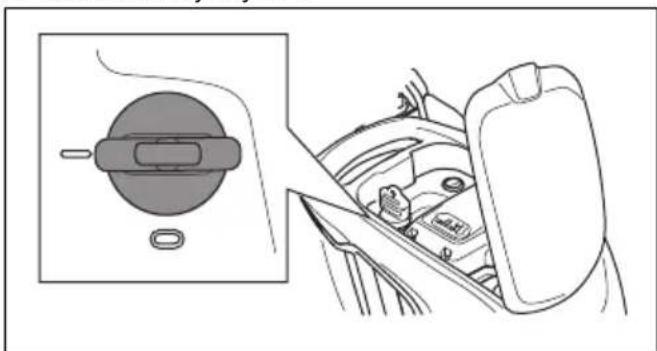
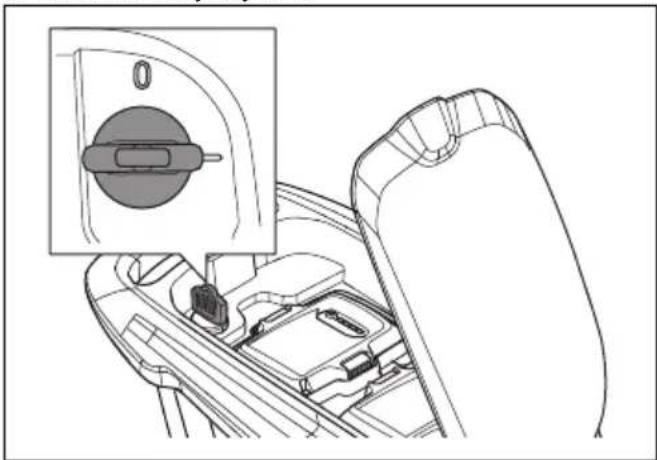
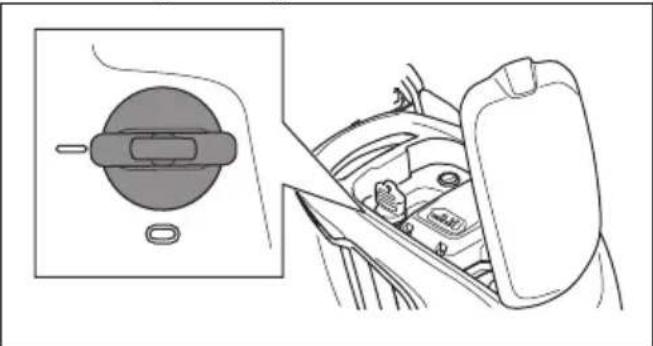
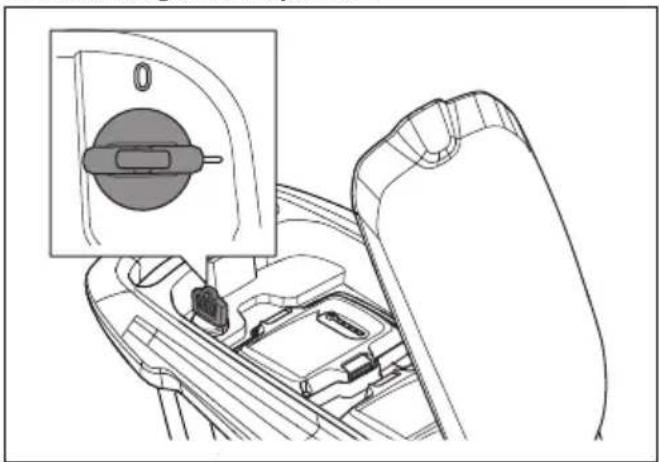
To do a check of the safety key

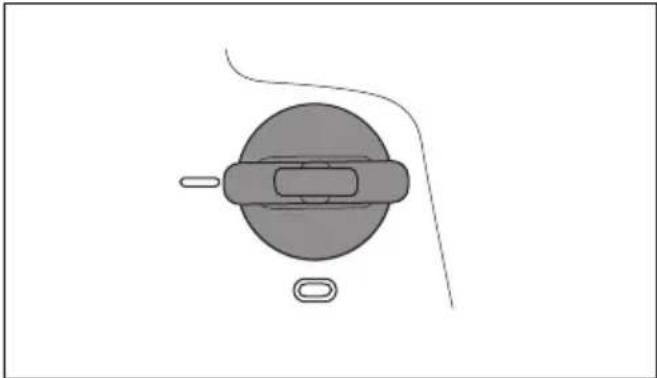
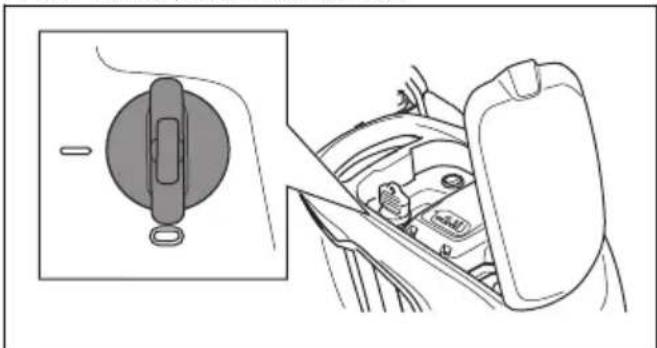
The safety key is below the battery lid. The safety key connects the battery that supplies the motor with power.

- Start and stop the motor to do a check of the safety key.

- If the safety key operates correctly, the motor can only start when the safety key is in position 1.
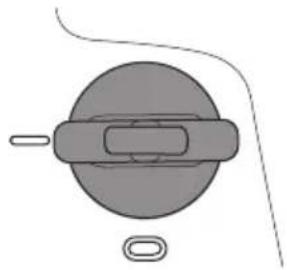
HUSQVARNA LC 247i - To do a check of the safety key - 1

natural_image Simple line drawing of a mechanical component with a circular body and rectangular slot, no text or symbols present.

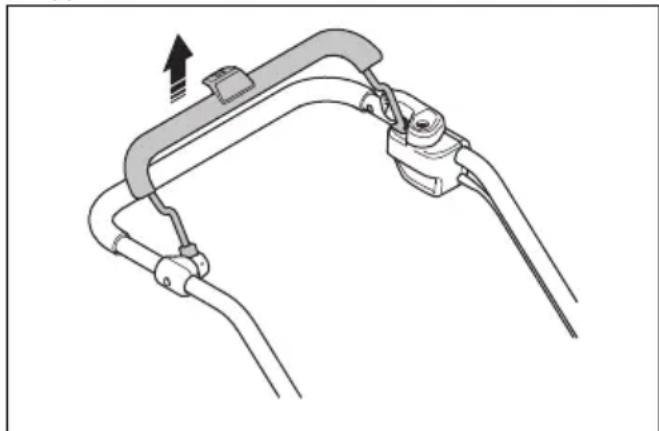
To do a check of the motor brake handle

The motor brake handle stops the motor. When the motor brake handle is released, the motor stops.

  • Start the product. Refer to Operation on page 11.
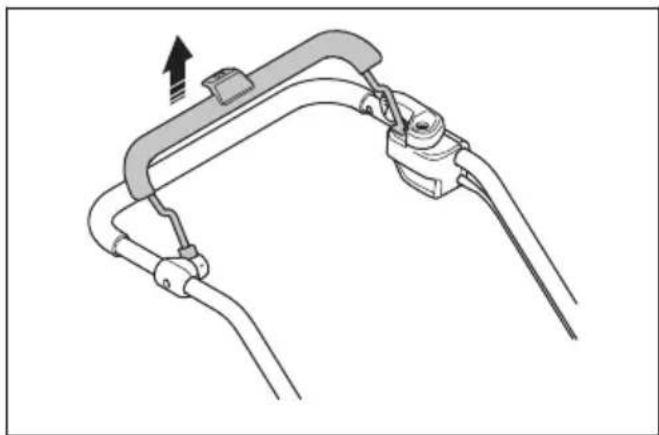
  • Release the motor brake handle.

HUSQVARNA LC 247i - To do a check of the motor brake handle - 1

natural_image Diagram of a mechanical clamp or bracket assembly with no visible text or symbols

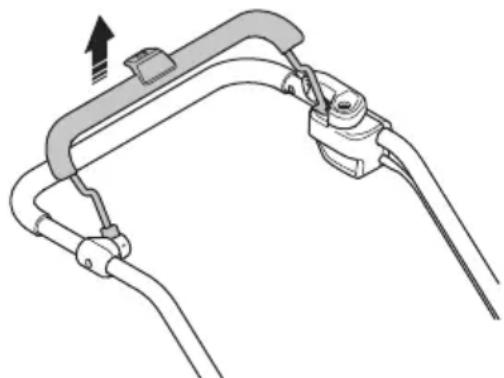
- Make sure that the product stops. If the motor does not stop in 3 seconds, let an approved Husqvarna service agent adjust the motor brake.

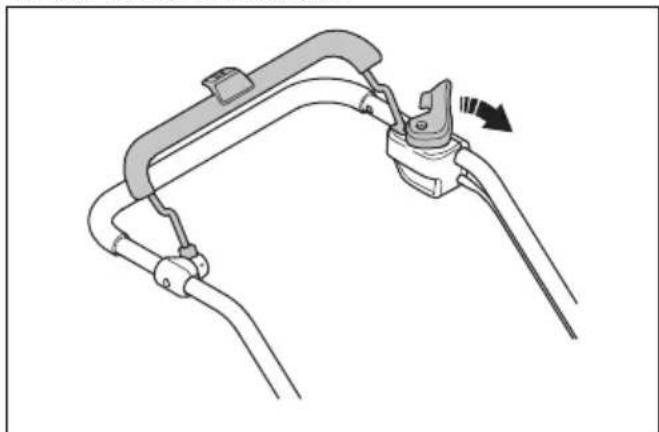
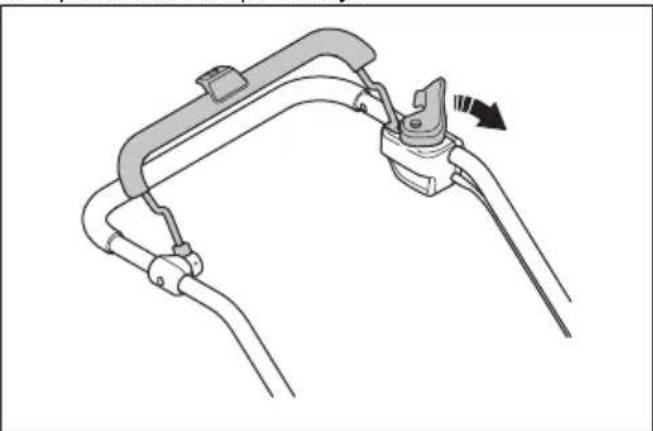
To do a check of the start inhibitor

Do a check of the start inhibitor to make sure that it prevents operation of the motor.

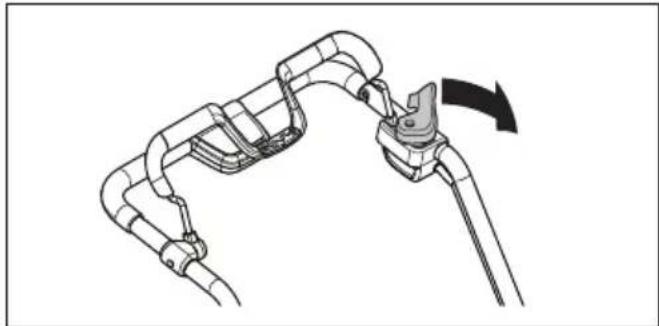
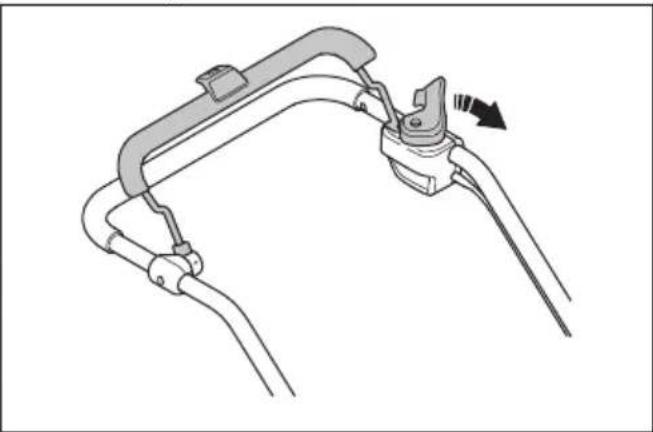
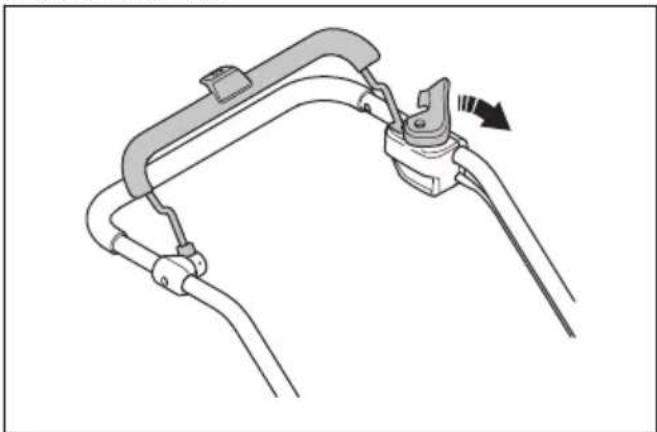
  1. Push the motor brake handle in the direction of the handlebar. The start inhibitor stops the movement.

  2. Push the start inhibitor out.

HUSQVARNA LC 247i - To do a check of the start inhibitor - 1

natural_image Diagram of a mechanical clamp or bracket assembly with a directional arrow indicating motion (no text or symbols present)
  1. Release the start inhibitor and make sure that it goes back to its initial position.

Battery safety

HUSQVARNA LC 247i - Battery safety - 1

WARNING: Read the warning instructions that follow before you use the product.

  • Use Husqvarna rechargeable batteries as a power supply for related Husqvarna products only. To prevent injury, do not use the battery as a power supply for other devices.
  • Do not use non-rechargeable batteries.
  • Risk of electrical shock. Do not connect the battery terminals to keys, coins, screws or other metal. This can cause a short circuit of the battery.
  • Do not put objects into the air slots of the battery.
  • Keep the battery away from sunlight, heat or open flame. The battery can explode and cause burns and/or chemical burns.
  • Keep the battery away from rain and wet conditions.
  • Keep the battery away from microwaves and high pressure.
  • Do not try to disassemble or break the battery.
  • If the battery leaks, do not let the liquid touch your body or eyes. If you have touched the liquid, clean the area with a large quantity of water and get medical aid.
  • Use the battery in the product only when the ambient temperature is between 5^ - 40^ .
  • Use the battery charger only when the ambient temperature is between 5^ - 40^ .
  • The battery will not charge if the battery temperature is more than 50^ .
  • Do not clean the battery or the battery charger with water. Refer to To clean the battery and the battery charger on page 18.
  • Do not use a defective or damaged battery.
  • Keep batteries in storage away from metal objects such as nails, coins, jewellery.

Battery charger safety

HUSQVARNA LC 247i - Battery charger safety - 1

WARNING: Read the warning instructions that follow before you use the product.

  • Use the QC battery chargers to charge Husqvarna replacement batteries only.
  • Risk of electrical shock or short circuit. Do not put objects into the air slots of the charger. Do not try to disassemble the battery charger. Do not connect the charger terminals to metal objects. Use an approved mains socket.
  • This product produces an electromagnetic field during operation. This field may under some circumstances interfere with active or passive medical implants. To reduce the risk of serious or

fatal injury, we recommend persons with medical implants to consult their physician and the medical implant manufacturer before operating this product.

  • Regularly make sure that the power cord of the battery charger is not damaged and that there are no cracks in it.
  • Do not lift the battery charger by the power cord. To disconnect the battery charger from a mains socket, pull out the plug. Do not pull the power cord.
  • Keep the power cord and extension cables away from water, oil and sharp edges. Make sure that the cable is not pinched in doors, fences or equivalent. It can cause the charger to become energized.
  • Do not clean the battery charger with water.
  • The battery charger can be used by children aged from 8 years and above and persons with reduced physical, sensory, or mental capabilities or lack of experience and knowledge if they have been given supervision or instruction concerning use of the battery charger in a safe way and understand the hazards involved. Children shall not play with the battery charger. Cleaning and user maintenance shall not be made by children without supervision.
  • Do not charge non-rechargeable batteries in the battery charger.
  • Do not use the battery charger near flammable materials or materials that can cause corrosion. Do not cover the battery charger. Pull out the plug to the battery charger if there is smoke or fire.
  • Do not use a defective or damaged battery charger.
  • Only charge the battery indoors in a room with good airflow and away from sunlight. Do not charge the battery in wet conditions.

Safety instructions for maintenance

HUSQVARNA LC 247i - Safety instructions for maintenance - 1

WARNING: Read the warning instructions that follow before you use the product.

  • To prevent accidental start during maintenance, turn the safety key to 0 and remove the battery. Wait at minimum 5 seconds before you start the maintenance.
  • Only do the maintenance work written in this operator's manual. More extensive work and professional repairs must be done by an approved service agent. Speak to your nearest service agent for more information.
  • Do the maintenance work correctly to increase the lifetime of the product and decrease the risk of accidents.
  • Replace damaged, worn or broken parts. Always use original spare parts from the manufacturer. Other spare parts can cause damage to the product and increase the risk of accidents.
  • To prevent injury, do not remove or do modifications to safety devices.

  • Put on heavy duty gloves when you use the cutting equipment. The blade is very sharp and cuts can easily occur.

  • Keep the cutting edges sharp and clean for the best and safest performance.
  • Let your service agent regularly examine the product and make necessary adjustments and repairs.

  • Obey the instructions for how to change accessories. Only use accessories from the manufacturer.

  • When not in operation, keep the product, battery and battery charger apart in a dry, indoor and locked area. Make sure that children and persons that are not approved cannot get access to the product, battery or battery charger.

Assembly

Introduction

HUSQVARNA LC 247i - Introduction - 1

WARNING: Before you assemble the product, read the safety chapter.

HUSQVARNA LC 247i - Introduction - 2

WARNING: To prevent accidental start during assembly, turn the safety key to 0, remove the battery and wait at minimum 5 seconds.

To adjust the handle

  1. Loosen the lower knobs.
  2. Move the knobs to the lower end of the grooves on the left and the right side of the product.
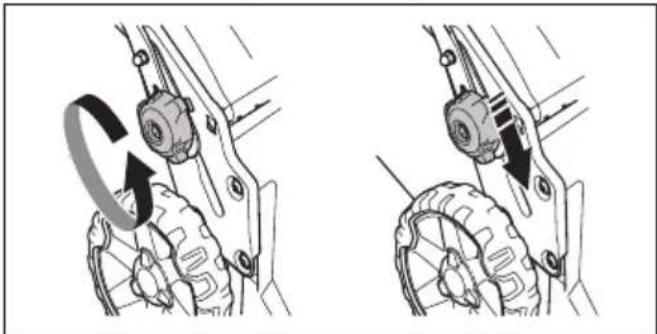
HUSQVARNA LC 247i - To adjust the handle - 1

natural_image Mechanical assembly diagram showing two stages of a gear mechanism with rotational motion arrows (no text or labels)
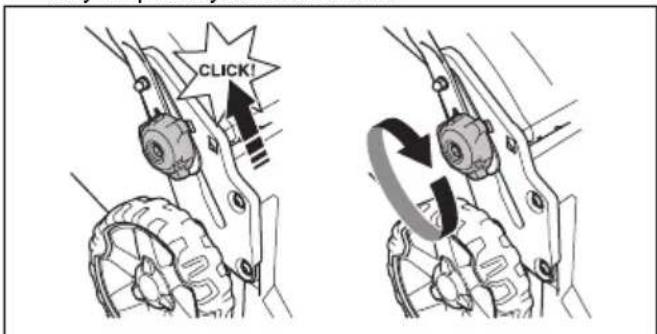
  1. Set the handle height in one of the 2 available positions.

  2. Move the knobs up in the direction of the handle until they stop and you hear a click.
HUSQVARNA LC 247i - To adjust the handle - 2

text_image CLICK!
  1. Tighten the knobs fully.

To assemble the grass catcher

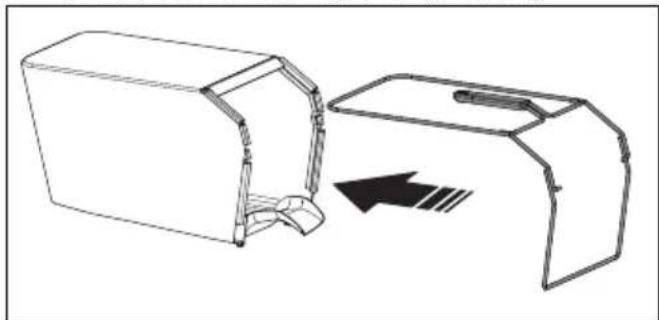
  1. Attach the grass catcher frame to the grass bag with the rigid part of the bag on the bottom. Keep the handle of the frame on top of the grass bag.
HUSQVARNA LC 247i - To assemble the grass catcher - 1

natural_image Technical line drawing of a mechanical device with an open lid and internal components, showing a directional arrow (no text or symbols)
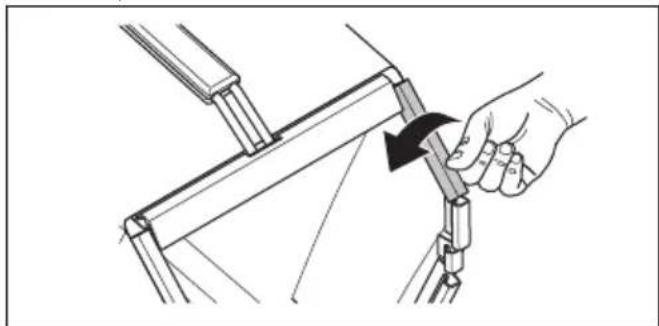
  1. Attach the bottom section of the grass catcher frame in the groove on the bottom of the grass catcher.

  2. Attach the grass bag to the grass catcher frame with the clips.
HUSQVARNA LC 247i - To assemble the grass catcher - 2

natural_image Illustration of a hand using a tool to adjust or install a mechanical component, showing a black arrow indicating rotation (no text or symbols present)
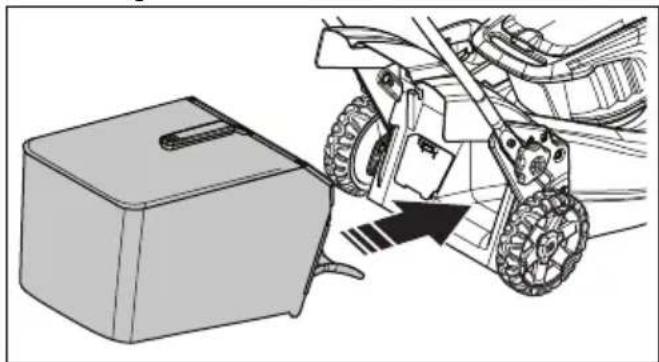
  1. Lift the rear cover.
  2. Attach the grass catcher to the top edge of the chassis.

  3. Put the lower part of the grass catcher into the grass discharge channel.
HUSQVARNA LC 247i - To assemble the grass catcher - 3

natural_image Technical illustration of a mechanical assembly with a box and gear mechanism (no text or symbols)

To assemble the mulch plug (accessory)

  1. Lift up the rear cover and remove the grass catcher.
  2. Put the mulch plug into the discharge channel.
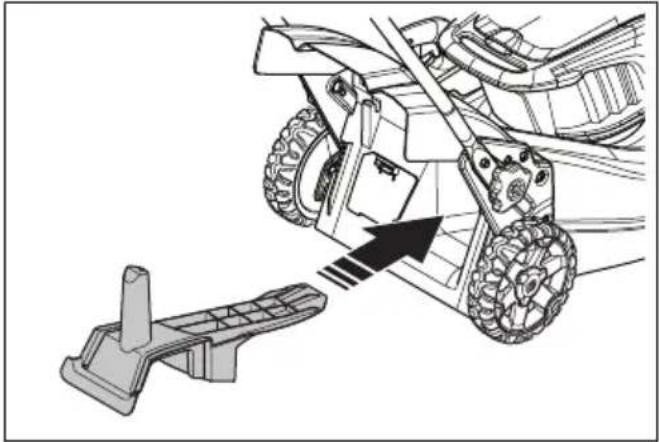
HUSQVARNA LC 247i - To assemble the mulch plug (accessory) - 1

natural_image Technical illustration of a vehicle's wheel assembly with a foot pushpin and motion arrow (no text or symbols)
  1. Replace the blade with the mulch blade that is supplied in the mulch kit. Refer to To replace the blade on page 18.

Operation

Introduction

HUSQVARNA LC 247i - Introduction - 1

WARNING: Before you operate the product, you must read and understand the safety chapter.

Husqvarna Connect

Husqvarna Connect is a free app for your mobile device. The Husqvarna Connect app gives extended functions for your Husqvarna product:

• Extended product information.
• Information about, and help with, product parts and servicing.

To start to use Husqvarna Connect

  1. Download the Husqvarna Connect app on your mobile device.
  2. Register in the Husqvarna Connect app.
  3. Follow the instruction steps in the Husqvarna Connect app to connect and register the product.

Note: Husqvarna Connect app is not available for download in all markets. Speak to your servicing dealer for more information.

Bluetooth® information (LC 347iVX, LC 353iVX)

Bluetooth® wireless technology

The symbol for Bluetooth® wireless technology comes on when your mobile device is connected to the product.
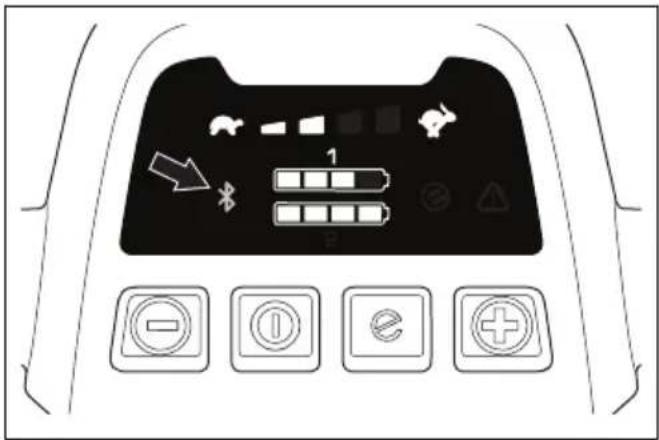
HUSQVARNA LC 247i - Bluetooth® wireless technology - 1

text_image Diagram of a car dashboard with control buttons and icons, including battery, battery, and function labels

To set the product in operation position

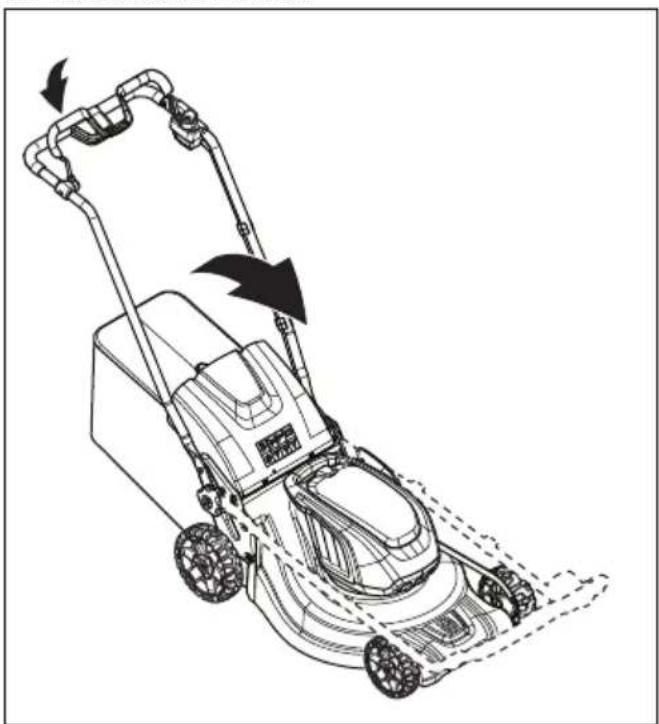
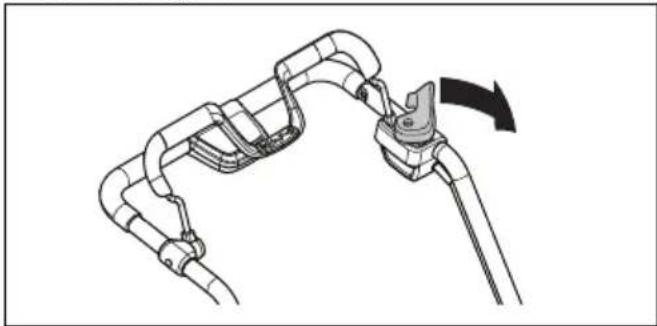
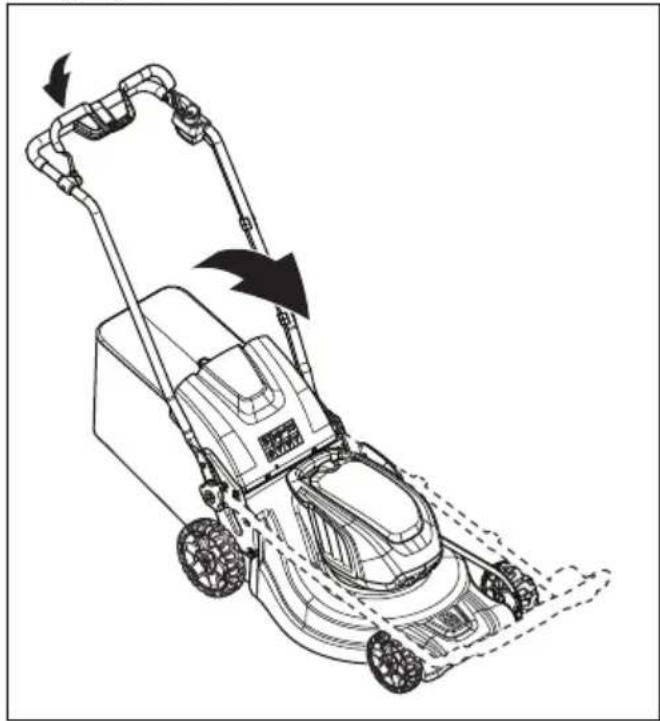
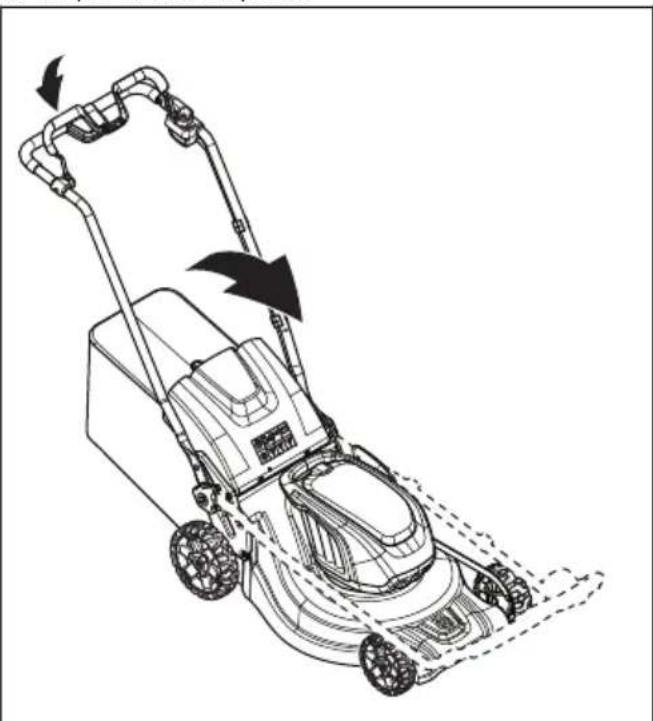
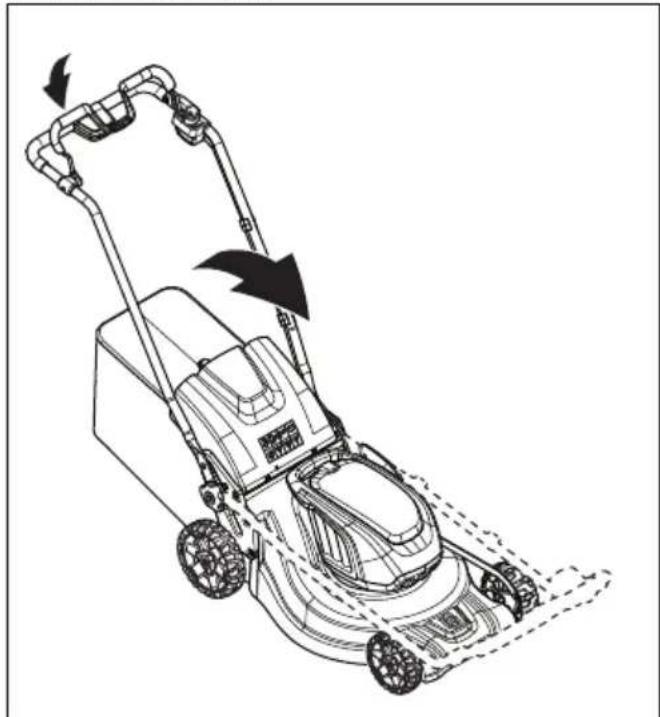
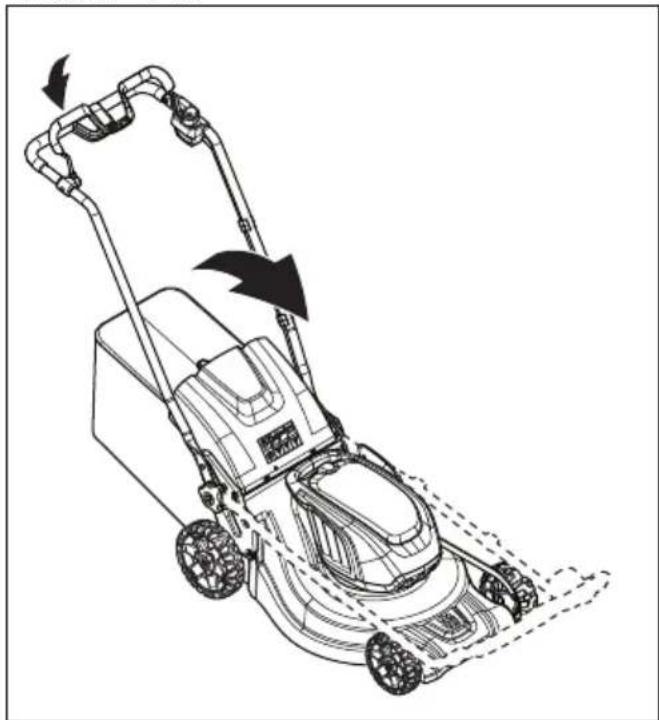
  1. Fold the handle to upright position.

HUSQVARNA LC 247i - To set the product in operation position - 1

natural_image Line drawing of a lawn mower with motion arrows indicating blade movement (no text or symbols)
  1. Move the knobs up in the direction of the handle until they stop and you hear a click.
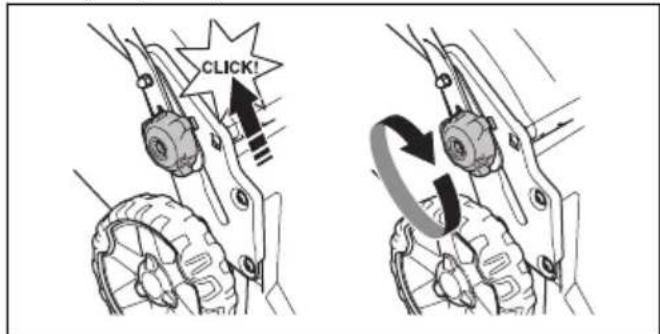
HUSQVARNA LC 247i - To set the product in operation position - 2

text_image CLICK!
  1. Tighten the knobs fully.

HUSQVARNA LC 247i - To set the product in operation position - 3

WARNING: Do not operate the product unless the handle is fully folded up and set in one of the applicable height positions. Refer to To adjust the handle on page 10.

To set the cutting height

The cutting height can be adjusted in 6 levels.

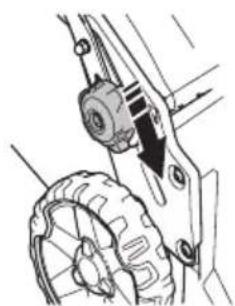
  1. Move the cutting height lever down to decrease the cutting height.

  2. Move the cutting height lever up to increase the cutting height.

HUSQVARNA LC 247i - To set the cutting height - 1

natural_image Mechanical assembly diagram showing gear and wheel components with directional arrows (no text or labels)

HUSQVARNA LC 247i - To set the cutting height - 2

CAUTION: Do not set the cutting height too low. The blades can hit the ground if the surface of the lawn is not level.

Battery

HUSQVARNA LC 247i - Battery - 1

WARNING: Before you use the battery, you must read and understand the safety chapter. You must also read and understand the operator's manual for the battery and the battery charger.

Keep the battery and the battery charger in correct ambient temperatures.

Ambient temperature
Operation of the battery5 °C - 40 °C
Charging of the battery5 °C - 40 °C

Battery status

The display shows the remaining battery capacity and if there are problems with the battery. The battery capacity is shown for 5 seconds after the product is switched off or the battery indicator button is pressed. The warning symbol on the battery is on when an error has occurred. See Battery on page 19.
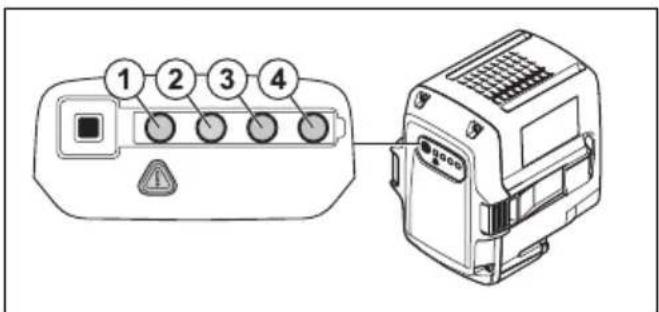
HUSQVARNA LC 247i - Battery status - 1

text_image 1 2 3 4
LED lights Battery status
All LEDs are lit Fully charged(75-100%)
LED 1, LED 2, LED 3 are litThe battery is 50%-75% charged
LED 1, LED 2 are lit The battery is 0%-25% charged.
LED 1 is lit The battery is empty. Charge the battery.

To charge the battery

Charge the battery before the first use. The battery is only 30% charged when supplied to the customer.

Note: The battery charger must be connected to the voltage and frequency specified on the rating plate.

The battery does not charge if the battery temperature is above 50^ . The battery charger decreases the temperature of the battery before it starts to charge.

  1. Connect one end of the power cord for the battery charger into the socket of the battery charger.
  2. Connect the other end of the power cord for the battery charger in an grounded mains socket. The LED on the battery charger flashes green one time.
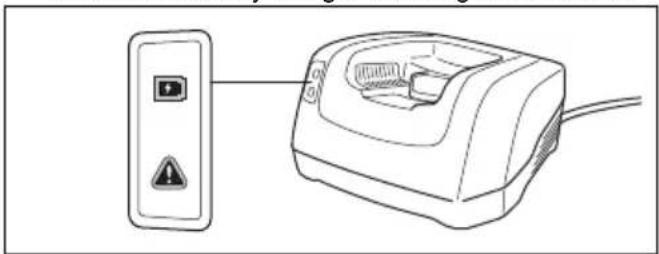
HUSQVARNA LC 247i - To charge the battery - 1

natural_image Line drawing of a device with a switch and warning symbol, connected to a wall-mounted device (no text or labels)
  1. Put the battery in the battery charger. The green light on the charger comes on when the battery is correctly connected to the battery charger.
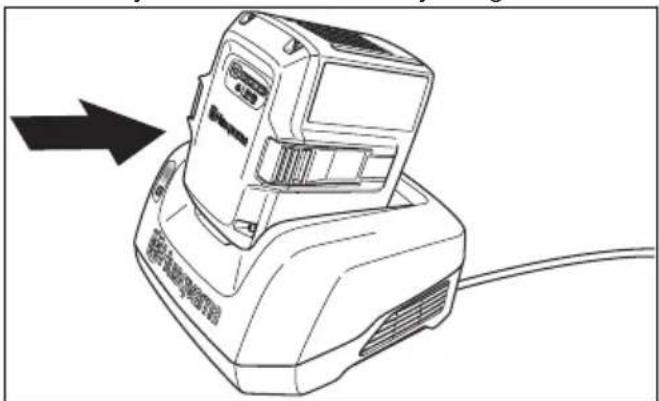
HUSQVARNA LC 247i - To charge the battery - 2

natural_image Line drawing of a portable electronic device with a black arrow pointing to its left side (no text or symbols present)
  1. When all LEDs on the battery have come on the battery is fully charged. Charge the battery for maximum 24 hours.

  2. To disconnect the battery charger from the mains socket, pull the plug, not the power cord.

  3. Remove the battery from the battery charger.

Battery charging status

A Husqvarna Li-ion battery can be charged or used at all charging levels. The battery is not damaged. A fully charged battery will not decrease its charge when the battery is left in the charger.

LED display Charging status
LED 1 flashes 0%-25%
LED 1 is lit, LED 2 flashes25%-50%
LED 1, LED 2 are lit, LED 3 flashes50%-75%
LED 1, LED 2, LED 3 are lit, LED 4 flashes75%-100%
LED 1, LED 2, LED 3, LED 4 are litFully charged

To start the product (LC 247i)

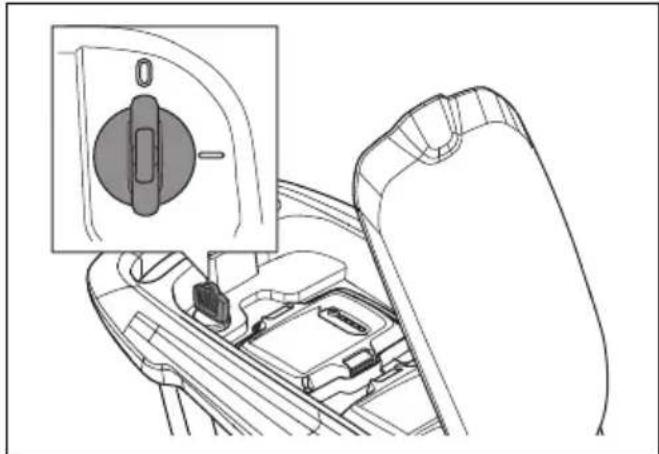
  1. Open the battery lid.
  2. Put a charged battery in 1 of the battery holders. For longer operation time, put a second charged battery in the other battery holder.
  3. Turn the safety key to 1.

HUSQVARNA LC 247i - To start the product (LC 247i) - 1

natural_image Diagram showing a car seatbelt switch and its internal components (no text or labels)
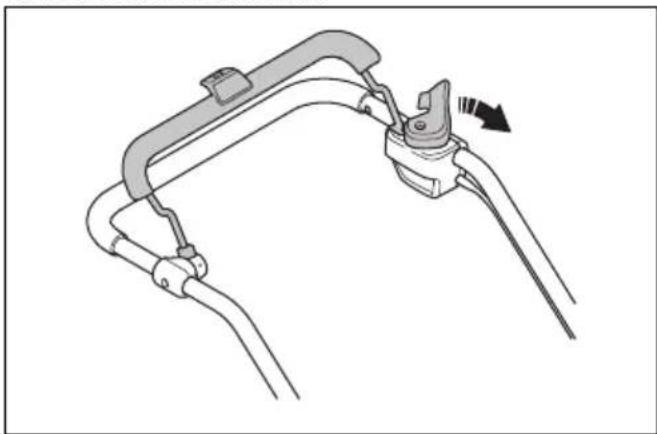
  1. Stay behind the product.

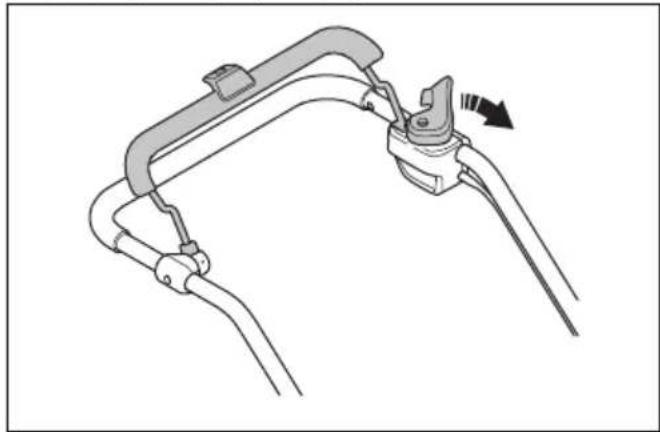
  2. Loosen the start inhibitor.

HUSQVARNA LC 247i - To start the product (LC 247i) - 2

natural_image Diagram of a mechanical clamp or bracket assembly with a directional arrow indicating motion (no text or symbols present)
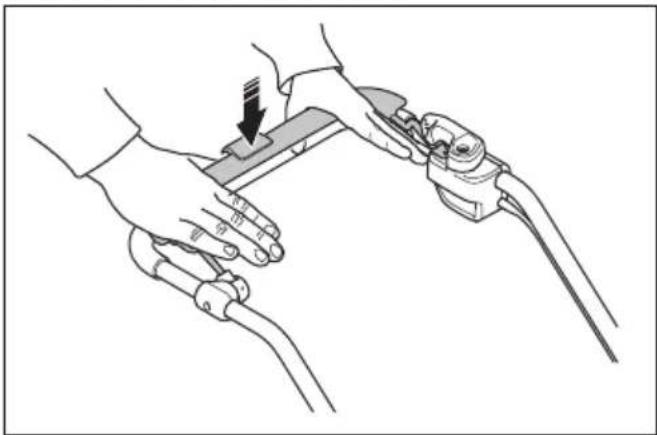
  1. Push the motor brake handle in the direction of the handlebar.
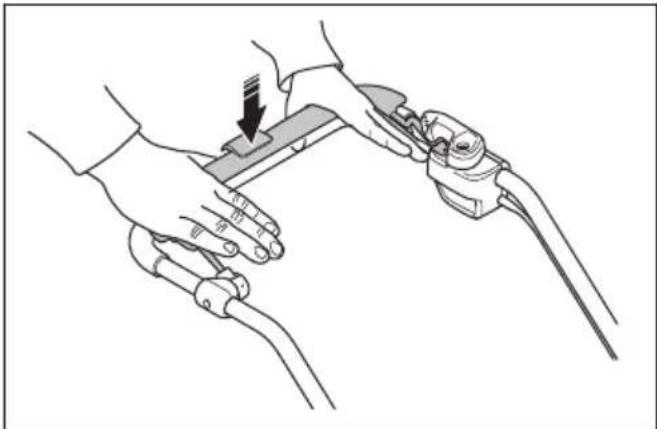
HUSQVARNA LC 247i - To start the product (LC 247i) - 3

natural_image Line drawing of two hands operating a tool with a clip, showing a downward arrow indicating motion (no text or symbols present)

To start the product (LC 347iVX, LC 353iVX)

  1. Open the battery lid.
  2. Put a charged battery in 1 of the battery holders. For longer operation time, put a second charged battery in the other battery holder.

  3. Turn the safety key to 1.

HUSQVARNA LC 247i - To start the product (LC 347iVX, LC 353iVX) - 1

natural_image Diagram of a car interior showing a gear shift and internal components (no text or symbols)
  1. Stay behind the product.

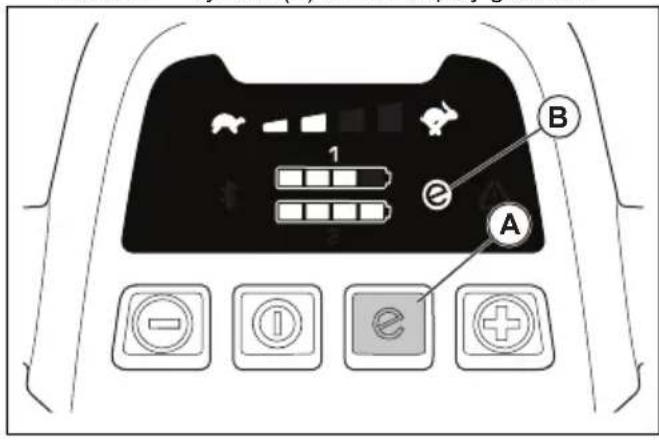
  2. Push the ON/OFF button (A) on the control panel. The display comes on. The battery indicator (B) shows the battery charge of the 2 batteries. The number of the battery that operates is shown adjacent to the battery indicator. For models LC 347iVX, LC 353iVX, the display also shows the set speed.

HUSQVARNA LC 247i - To start the product (LC 347iVX, LC 353iVX) - 2

text_image B 1 A
  1. Loosen the start inhibitor.

HUSQVARNA LC 247i - To start the product (LC 347iVX, LC 353iVX) - 3

natural_image Mechanical assembly diagram showing a lever mechanism with a curved pipe and lever handle (no text or symbols)
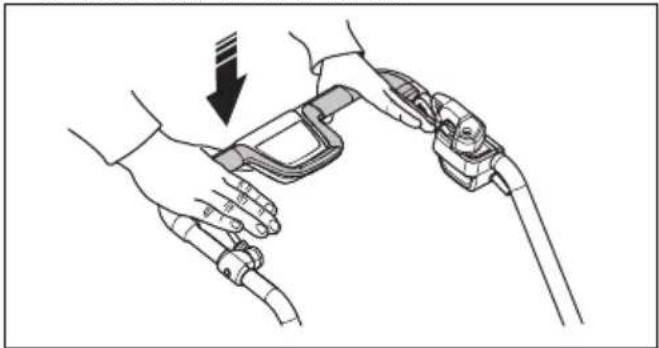
  1. Push the motor brake handle in the direction of the handlebar.
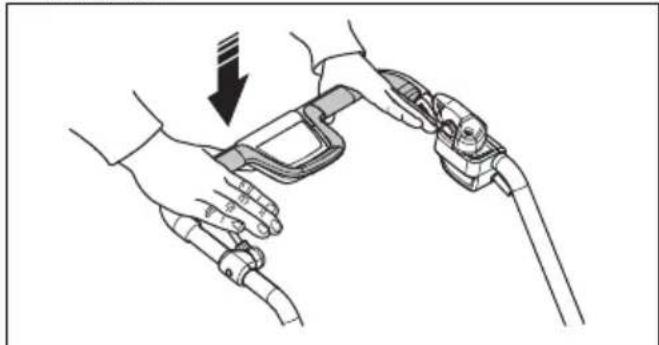
HUSQVARNA LC 247i - To start the product (LC 347iVX, LC 353iVX) - 4

natural_image Line drawing of hands holding a device with a black arrow indicating downward motion (no text or symbols)

To use the drive on the wheels LC 347iVX, LC 353iVX

- Pull the drive bail in the direction of the handlebar to start the drive.
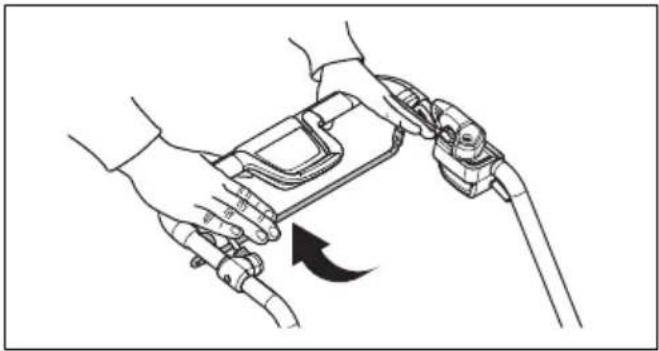
HUSQVARNA LC 247i - To use the drive on the wheels LC 347iVX, LC 353iVX - 1

natural_image Line drawing of hands holding a device with a cable, showing a curved arrow indicating rotation (no text or symbols)

- Push + and - on the control panel to set the drive speed in 4 steps.
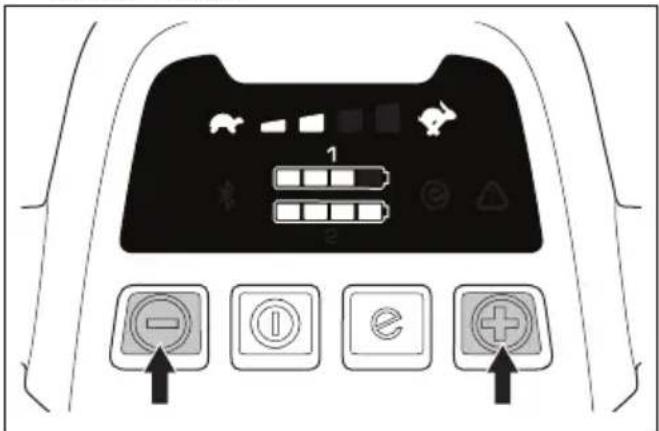
HUSQVARNA LC 247i - To use the drive on the wheels LC 347iVX, LC 353iVX - 2

text_image Diagram of a car dashboard with labeled buttons and icons, including battery, battery pack, battery level, and function buttons.

- Release the drive bail to disengage the drive, for example when you go near an obstacle.

To use the SavE™ function (LC 247i)

The product has a battery saving function (SavE ^TM ) that gives longer operation time.

- Push the SavE ^TM button to position 1 to start the function.
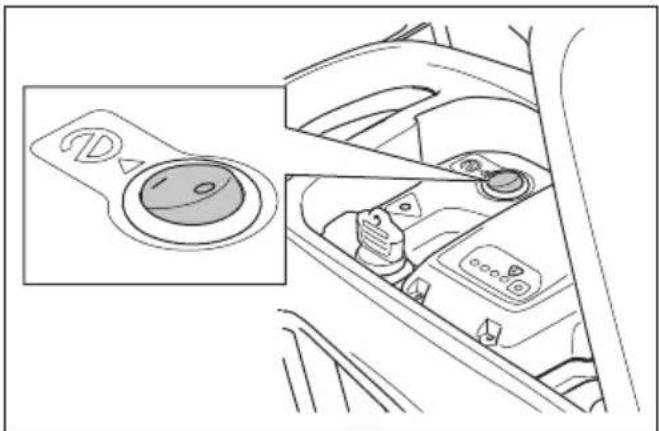
HUSQVARNA LC 247i - To use the SavE™ function (LC 247i) - 1

natural_image Interior view of a car showing the dashboard and seatbelt with no visible text or symbols

- Push the SavE™ button to position 0 to stop the function.

Note: The SavE ^™ function stops automatically if the ground conditions make it necessary to have a higher

output. The SavE ^™ function starts automatically again when the ground conditions let it.

To use the SavE™ function (LC 347iVX, LC 353iVX)

The product has a battery saving function (SavE ^TM ) that gives longer operation time.

  1. Push the SavE ^TM button (A) to start the function. The SavE ^TM symbol (B) on the display comes on.
  2. Push the SavE ^TM button again to stop the function. The SavE ^TM symbol (B) on the display goes out.

HUSQVARNA LC 247i - To use the SavE™ function (LC 347iVX, LC 353iVX) - 1

text_image 1 e A B

Note: The SavE ^™ function stops automatically if the ground conditions make it necessary to have a higher output. The SavE ^™ function starts automatically again when the ground conditions let it.

High load function

When the product cuts long or wet grass, the motor automatically increases rpm. The motor goes back to standard mode when high load is not necessary.

Automatic restart

During operation, the blade and motor can temporarily stop because of obstacles such as grass blockage below the cutting cover. If this occurs and you keep the motor brake handle pushed down, the product tries to restart automatically. If the product does not restart in 5 seconds, it can be necessary to clean below the cutting cover. Refer to To clean the product on page 18.

HUSQVARNA LC 247i - Automatic restart - 1

WARNING: Before a check of the cutting cover, release the motor brake handle, turn the safety key to 0, remove the battery and wait at minimum 5 seconds. There is a risk of injury if the obstacle is removed and the product accidentally starts.

To stop the product (LC 247i)

HUSQVARNA LC 247i - To stop the product (LC 247i) - 1

WARNING: Turn the safety key to 0 before you let the product out of view.

  1. Release the motor brake handle to stop the motor.
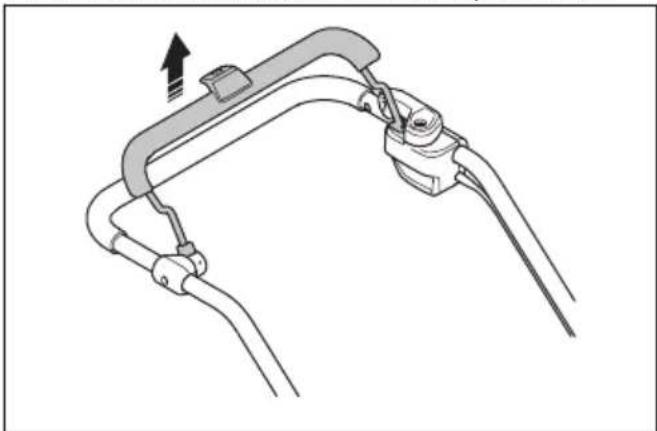
HUSQVARNA LC 247i - To stop the product (LC 247i) - 2

natural_image Diagram of a mechanical clamp or bracket assembly with no visible text or symbols
  1. Open the battery lid and turn the safety key to 0.

HUSQVARNA LC 247i - To stop the product (LC 247i) - 3

natural_image Diagram showing a car interior with a steering wheel and dashboard, alongside a close-up of the wheel (no text or symbols present)
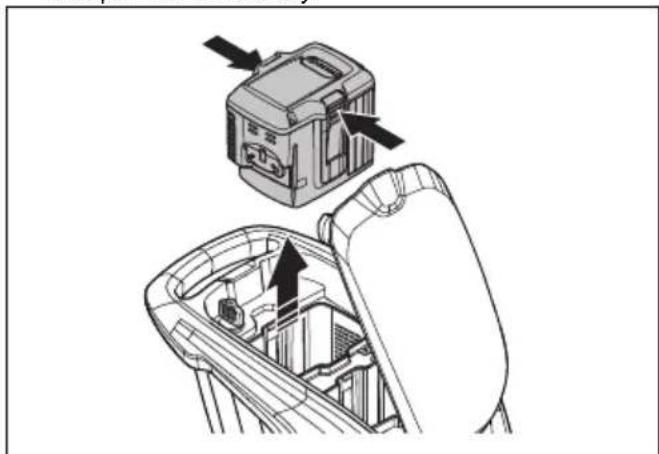
  1. To remove the battery, push the 2 release buttons and pull out the battery.
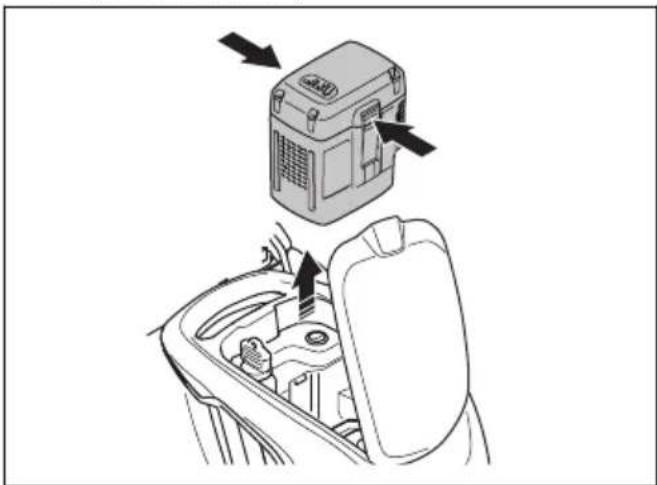
HUSQVARNA LC 247i - To stop the product (LC 247i) - 4

natural_image Diagram showing a device with directional arrows pointing to a central component, no text or symbols present.
  1. Charge the battery if it is weak. For more information, refer to To charge the battery on page 13.

To stop the product (LC 347iVX, LC 353iVX)

HUSQVARNA LC 247i - To stop the product (LC 347iVX, LC 353iVX) - 1

WARNING: Turn the safety key to 0 before you let the product out of view.

  1. Release the motor brake handle to stop the motor.
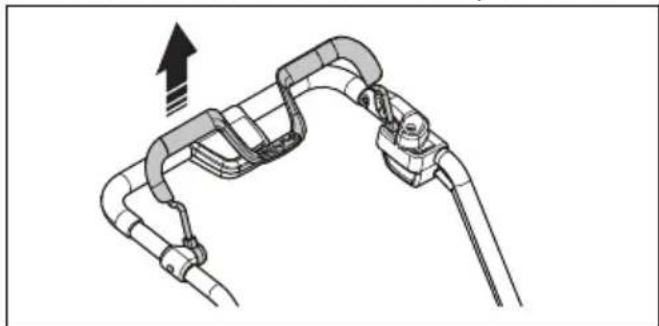
HUSQVARNA LC 247i - To stop the product (LC 347iVX, LC 353iVX) - 2

natural_image Diagram of a mechanical or electrical component with curved and straight lines, no visible text or symbols
  1. Push the ON/OFF button on the control panel. All LED lights and symbols on the display go out.
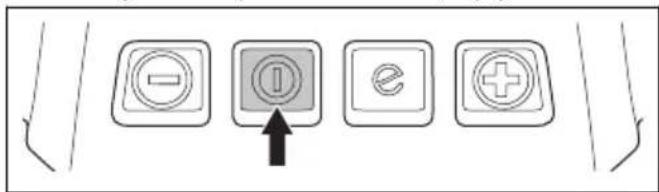
HUSQVARNA LC 247i - To stop the product (LC 347iVX, LC 353iVX) - 3

text_image Diagram showing four labeled buttons with icons: minus, ⓘ, e, and plus, connected by an arrow pointing to the ⓘ.
  1. Open the battery lid and turn the safety key to 0.
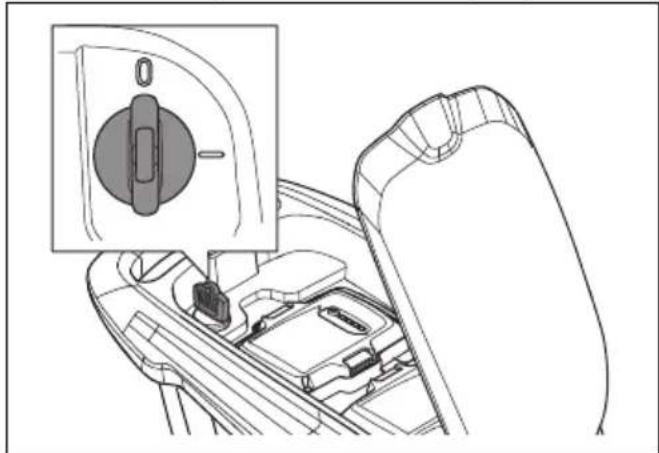
HUSQVARNA LC 247i - To stop the product (LC 347iVX, LC 353iVX) - 4

natural_image Technical line drawing of a car interior showing a switch and gear mechanism (no text or symbols)
  1. To remove the battery, push the 2 release buttons and pull out the battery.
HUSQVARNA LC 247i - To stop the product (LC 347iVX, LC 353iVX) - 5

natural_image Technical diagram showing a device being inserted into a mechanical component, with arrows indicating the process (no text or symbols present)
  1. Charge the battery if it is weak. For more information, refer to To charge the battery on page 13

Note: The product is automatically de-energized if you do not operate it for some minutes. To start the product again, refer to To start the product (LC 347iVX, LC 353iVX) on page 14.

To get a good result

  • Always use a sharp blade. A blunt blade gives an irregular result and the cut surface of the grass becomes yellow. A sharp blade also uses less energy than a blunt blade.
  • Do not cut more than 13 of the length of the grass. Cut first with the cutting height set high. Examine the result and lower the cutting height to an applicable level. If the grass is very long, drive slowly and cut 2 times if necessary.

  • Cut in different directions each time to prevent stripes in the lawn.

  • Keep the cutting cover clean. Buildup from grass and dirt on the inner side of the cutting cover can decrease the cutting result. Refer to To clean the product on page 18.

To cut grass without a grass catcher or mulch plug attached

  • Lift up the rear cover and remove the grass catcher.
  • If a mulch plug and a mulch blade are attached, remove them.
  • Close the rear cover before you operate the product.

When you operate the product, the cut grass discharges below the rear cover.

Maintenance

Introduction

HUSQVARNA LC 247i - Introduction - 1

WARNING: Before you do maintenance, you must read and understand the safety chapter.

For all servicing and repair work on the product, special training is necessary. We guarantee the availability of professional repairs and servicing. If your dealer is not a service agent, speak to them for information about the nearest service agent.

For more detailed information, refer to www.husqvarna.com.

Maintenance schedule

The maintenance intervals are calculated from daily use of the product. The intervals change if the product is not used daily.

For maintenance identified with * see instructions in Safety on page 4.

Each useMonthlyEach season
Do a general inspection X
Clean the product X
Do a check of the start inhibitor * X
Make sure that the safety devices on the product are not defective * X
Examine the cutting equipment X
Examine the cutting cover * X
Do a check of the motor brake handle * X
Make sure that the ON/OFF button operates correctly and is not defective X
Examine the battery for damage X
Do a check of the battery charge X
Make sure that the release buttons on the battery operates correctly and that the battery locks into the productX
Examine the battery charger for damage and make sure that it operates correctly.X
Examine the connections between the battery and the product. Also examine the connection between the battery and the battery charger.X

To do a general inspection

• Make sure that the nuts and screws on the product are tightened.
• Make sure that the cables on the product are not in a position where they can get damaged.

To clean the product

  • Clean plastic parts with a clean and dry cloth.
  • Do not use water to clean the product. Water can enter the battery or the motor and cause short circuit or damage to the product.
  • Do not use a high pressure washer to clean the product.
  • Do not flush water directly on the motor.
  • Use a brush to remove leaves, grass and dirt.

To clean the battery and the battery charger

HUSQVARNA LC 247i - To clean the battery and the battery charger - 1

WARNING: Do not clean the battery or the battery charger with water.

• Make sure that the battery and the battery charger are clean and dry before you put the battery into the battery charger.
- Clean the battery terminals with compressed air or use a soft and dry cloth.
- Clean the surfaces of the battery and the battery charger with a soft and dry cloth.

To examine the cutting equipment

HUSQVARNA LC 247i - To examine the cutting equipment - 1

WARNING: To prevent accidental start, turn the safety key to 0, remove the battery and wait a minimum 5 seconds.

HUSQVARNA LC 247i - To examine the cutting equipment - 2

WARNING: Use protective gloves when you do maintenance on the cutting equipment. The blade is very sharp and cuts can easily occur.

  1. Examine the cutting equipment for damage or cracks. Always replace a damaged cutting equipment.
  2. Look at the blade to see if it is damaged or blunt.

Note: It is necessary to balance the blade after it is sharpened. Let a service center sharpen, replace and balance the blade. If you hit an obstacle that causes the product to stop, replace the damaged blade. Let the service center estimate if the blade can be sharpened or must be replaced.

To replace the blade

Refer to Technical data on page 22 for the correct type of blade.

HUSQVARNA LC 247i - To replace the blade - 1

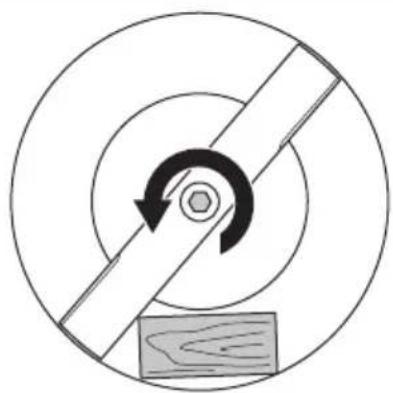
WARNING: Lock the blade with a block of wood to prevent injury to fingers when you replace the blade. The blade can be moved when the motor is off and fingers can become trapped between the blade and stationary parts.

  1. Lock the blade with a block of wood.

HUSQVARNA LC 247i - To replace the blade - 2

natural_image Circular diagram with concentric rings and a central arrow, featuring a wooden block at the bottom (no text or symbols)
  1. Remove the blade bolt.
  2. Remove the blade.
  3. Examine the blade support and blade bolt to see if there are damages.
  4. Examine the motor shaft to make sure that it is not bent.

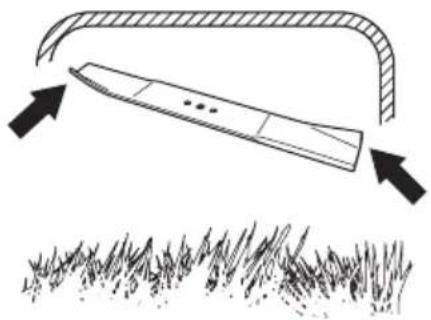
  5. When you attach the new blade, point the angled ends of the blade in the direction of the cutting cover.
HUSQVARNA LC 247i - To replace the blade - 3

natural_image Diagram showing a tool interacting with grass under an arch, with arrows indicating direction (no text or symbols)
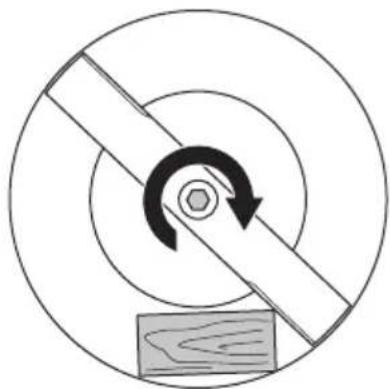
  1. Make sure that the blade is aligned with the center of the motor shaft.
  2. Lock the blade with a block of wood. Attach the spring washer and tighten the bolt and washer with a torque of 23–28 Nm.
HUSQVARNA LC 247i - To replace the blade - 4

natural_image Diagram of a mechanical gear or cam mechanism with concentric circles and a central rotating arrow, no text or symbols present.
  1. Pull the blade around by hand and make sure that it turns freely.

HUSQVARNA LC 247i - To replace the blade - 5

WARNING: Use heavy duty gloves. The blade is very sharp and cuts can easily occur.

  1. Start the product to do a test of the blade. If the blade is not correctly attached, there is vibration in the product or the cutting result is unsatisfactory.

Troubleshooting

Battery

LED on the battery CauseSolution
The green LED flashes.The battery voltage is low. Charge the battery. Refer to on page 13.To charge the battery
The error LED flashes.The battery is weak. Charge the battery. Refer to on page 13.To charge the battery
The temperature in the work environment is too high or too low.Use the battery in temperatures between 5 °C - 40 °C.
Overvoltage. Make sure that the mains voltage is the same as on the rating plate on the product.
The error LED is on. Thecell difference too much (1V). Speak to an approved service agent.

Battery charger

LED on the battery chargerCause Solution
The error LED flashes.The temperature in the work environment is too high or too low.Use the battery charger in temperatures between 5 °C - 40 °C.
The error LED is on. SSpeak to an approved service agent.

Lawn mower

The warning indicator (error LED) is found below

the battery lid ((LC 247i)) or on the control panel

((LC 347iVX, LC 353iVX)).

Problem Error LED (number of flashes)Cause Solution
Error LED flash-es. The product does not operate correctly.3 The blade is blocked. Turn the safety key to 0 to prevent ac- cidental start. Remove the battery and wait a minimum of 5 seconds. Remove possible obstacles and make sure that the blade can rotate freely. If the prob- lem continues, speak to an approved service agent.
5 The motor speed drops too much, and the motor stops.Increase the cutting height. Refer to To set the cutting height on page 12.
6^1 The wheels or transmission is blocked. Turn the safety key to 0 to prevent ac- cidental start. Remove the battery and wait a minimum of 5 seconds. Remove the possible obstacles and make sure that the wheels can rotate freely. If the problem continues, speak to an ap- proved service agent.
10 The motor control is too hot. Stop the motor and wait until it has be- come cool.
Error LED flashes. The product stops.0 Battery connector failure. Examine the battery connector.
3 There is overload in the mo- tor.Increase the cutting height. Refer to To set the cutting height on page 12.
8 The battery is weak. Charge the battery. Refer to To charge the battery on page 13.
9 Battery error or no signal from battery.Put the battery in the product correctly and examine the battery connector. If the error LED on the battery flashes. Refer to Battery on page 19.
12 Incorrect start procedure. The motor brake handle has been engaged before the motor starts.Release the motor brake handle and wait approximately 5 seconds. Push the motor brake handle down again to start the product.
Other errors. If othererrors occur, turn the safety key to 0, remove the battery and speak to an approved service agent.

Transportation, storage and disposal

Introduction

HUSQVARNA LC 247i - Introduction - 1

WARNING: To prevent unintentional start during transport turn the safety key to "0", remove the battery and wait at least 5 seconds.

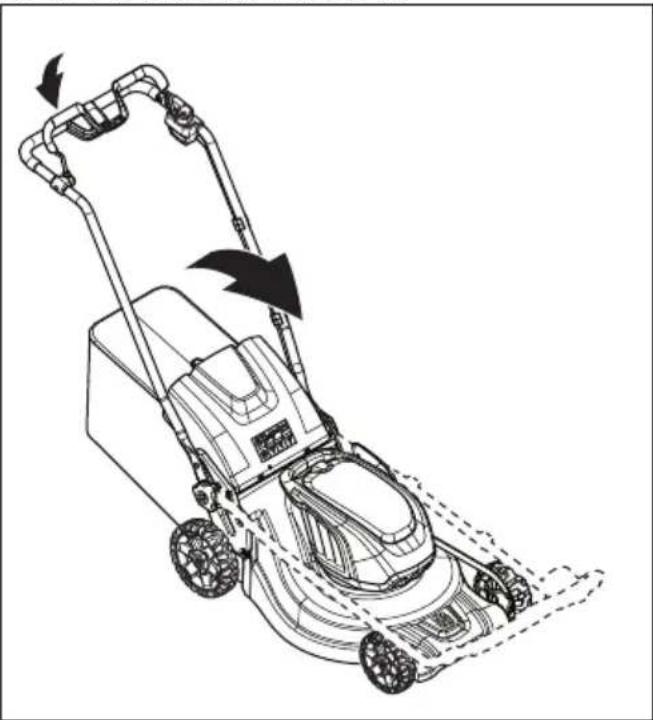
To set the product in transport position

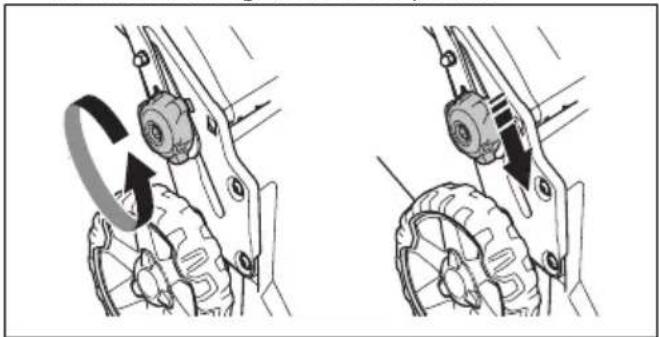
  1. Loosen the lower knobs.
  2. Move the knobs to the lower end of the grooves on the left and the right side of the product.
HUSQVARNA LC 247i - To set the product in transport position - 1

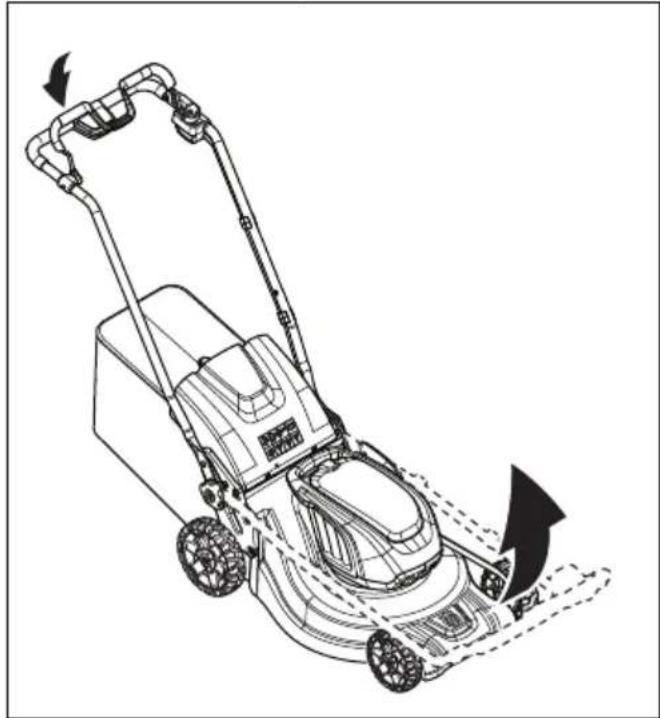
natural_image Mechanical assembly diagram showing two stages of a gear mechanism with rotational motion arrows (no text or labels)
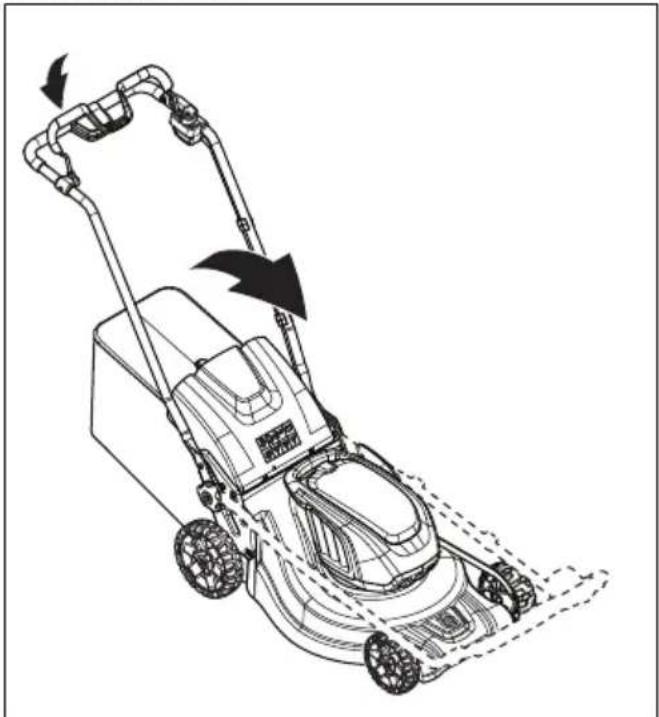
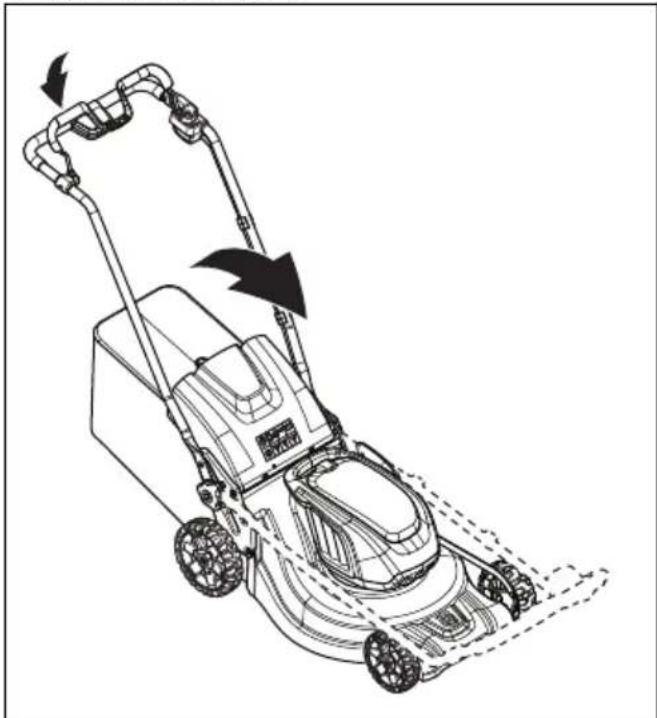
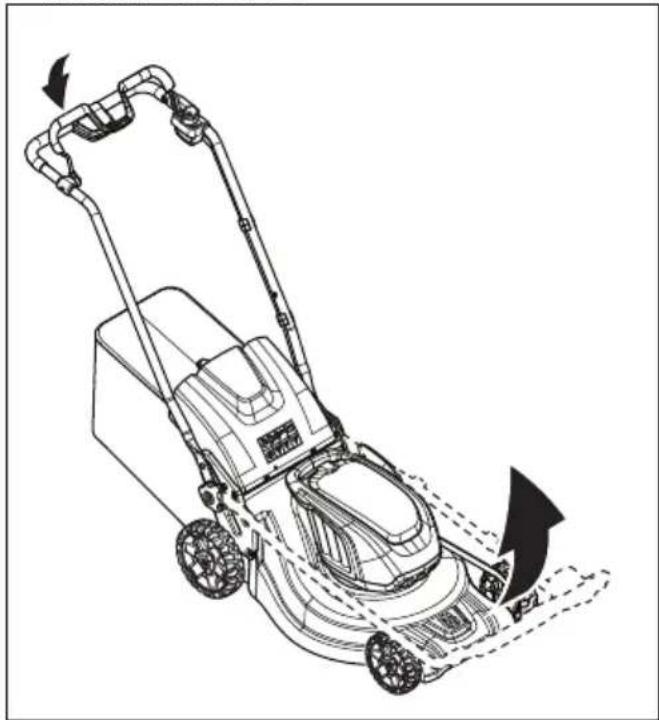
  1. Fold the handle forward.

HUSQVARNA LC 247i - To set the product in transport position - 2

natural_image Line drawing of a lawn mower with motion arrows indicating blade movement (no text or symbols)
  1. Remove the grass catcher.

Transportation

• The Dangerous Goods Legislation requirements apply to the contained Li-ion batteries.
- For commercial transports special requirements on package and labels must be obeyed.
- Make sure that you obey the regulations for dangerous material when you prepare the product for transport. Local regulations can apply.
• Always remove the battery for transport.
- Put tape on the battery connectors and make sure that the battery cannot move around during transport.
- Attach the product during transport.

Storage

  • Before storage, let the product become cool.
    • Always remove the battery for storage.
    • To prevent accidents, make sure that the battery is not connected to the product during storage.
  • Keep the battery charger in a closed and dry space.

- Keep the battery and the battery charger in a dry space where there is no moisture or frost.

- Disconnect the battery from the battery charger during storage.

- Do not keep the battery where static electricity can occur. Do not keep the battery in a metal box.

- Keep the product where the ambient temperature is between -10°C and 40°C.

- Keep the battery where the ambient temperature is between 5 °C and 25 °C and out of sunlight.

- Keep the battery charger where the ambient temperature is between 5 °C and 45 °C and out of sunlight.

• Make sure that the battery is charged to 30% - 50% before you put it in storage for long periods.

- Keep the product, battery and battery charger in a locked area out of reach for children and not approved persons.

- Clean the product and make sure that the grass catcher is empty.

- Do the maintenance procedures given in this operator's manual. Refer to Maintenance on page 17.

- Do a complete servicing before you put the product in storage for a long time.

Disposal

Symbols on the product or the packaging of the product indicate that this product cannot be handled as domestic waste. It must be submitted to an appropriate recycling station for the recovery of electrical and electronic equipment.

By ensuring that this product is taken care of correctly, you can help to counteract the potential negative impact on the environment and people that can otherwise result through the incorrect waste management of this product. For more detailed information about recycling

this product, contact your municipality, your domestic waste service or the shop from where you purchased the product.
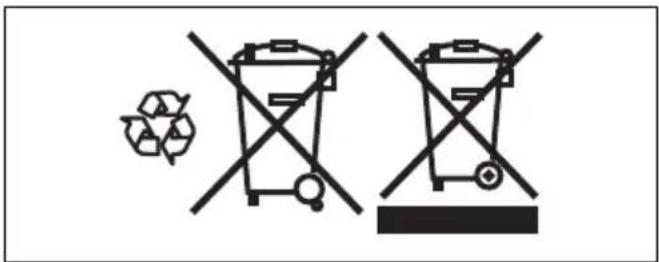
HUSQVARNA LC 247i - Disposal - 1

text_image Diagram showing two crossed bins with a recycling symbol, indicating no waste or reuse in the waste bin system.

Technical data

Technical data

LC 247i LC 347iVX LC353iVX
Cutting motor
Motor type BLDC (brushless)36VBLDC (brushless)36VBLDC (brushless)36V
Motor speed – SavE, rpm 2600/min 2600/min2600/min
Motor speed – Nominal, rpm 3000/min 3000/min3000/min
Motor speed – High load, rpm 3500/min 3500/min3500/min
Motor output – max. kW 0.96 0.96 1.05
Motor output – Nominal, kW 0.75 0.75 0.9
Drive motor
Motor output – Nominal, kW N/A 0.25 0.25
Self walk speed, km/h N/A 3.0–4.5 3.0–4.5
Speed adjustment levels N/A 4 4
Weight
Weight without bag (excl. battery), kg 24.5 2628
Weight with bag (incl. 2 x BLi30), kg30.5 32.0 34.5
Battery
Type of batteryHusqvarna Battery Series
Battery runtime
Battery runtime, min, (free run) with SavE activated, with one Husqvarna 7.7 Ah battery (Bli30).626246
Battery runtime, min, (free run) with standard mode activated, with one Husqvarna 7.7 Ah battery (Bli30).434328
Noise emissions ^2
Sound power level, measured dB (A) 94 94 97
Sound power level, guaranteed LWA dB (A) 9595 98
Sound levels ^3
Sound pressure level at the operator's ear, dB (A)82 82 86
Vibration levels ^4
Handle, m/s ^2 0.42 0.42 2.64
Cutting equipment
Cutting height, mm 20-75 mm 20-75 mm 20-75 mm
Cutting width, cm 47 47 53
Blade Standard Collect 5905934-10 Collect 5905934-10 Collect 5940757-10
Blade accessory Mulch 5907010-10 Mulch 5907010-10 Mulch 5950072-10
Grass catcher capacity, liters 55 55 60
Radio frequency data for Bluetooth®LC 247i LC 347iVX LC 353iVX
Frequency band, GHzN/A2.4-2.4835 2.4-2.4835
Output power, max. dBmN/A44
Approved batteriesTypeBattery capacity, AhVoltage, VWeight, lb/kg
BLi20Lithium-ion4.0362.6/1.2
BLi30Lithium-ion7.7364.2/1.9
Approved chargers for the specified batteries, BLiInput voltage, V Frequency, Hz Power, W
QC80100–24050–60 80
40-C80100-24050-6068.8
Approved chargers for the specified batteries, BLi Input volltage, V FrequencyHz Power, W
QC250 100–240 50–60 250

Declaration of Conformity

EU Declaration of conformity

We, Husqvarna AB, SE-561 82 Huskvarna, Sweden, tel: +46-36-146500, declare on our sole responsibility that the product:

Description Lawn mower
Brand Husqvarna
Type / Model LC 247i
Identification Serial numbers dating from 2021 and onwards

complies fully with the following EU directives and regulations:

Directive/Regulation Description
2006/42/EC "relating to machinery"
2014/30/EU "relating to electromagnetic compatibility"
2000/14/EC "relating to the noise emissions in the environment"
2011/65/EU “on the restriction of the use of certain hazardous substances in electrical and electronic equipment”

and that the following standards and/or technical specifications are applied: EN 62841-1:2015+AC:2015, EN 62841-4-3:2021+A11:2021, EN ISO 12100:2010, EN 55014-1:2017+A11:2020, EN 55014-2:2015, EN IEC 63000:2018.

Notified body: 0404, RISE SMP Svensk Maskinprovning AB, Box 7035, SE-750 07 Uppsala has certified conformity with the council's directive 2000/14/EC, conformity assessment procedure: Annex VI.

For information relating to noise emissions, refer to Technical data on page 22.

Huskvarna, 2021-12-01

$$ \Delta s \mathrm {d u} $$

Claes Losdal, Development Manager/Garden Products, Husqvarna AB

Responsible for technical documentation

HUSQVARNA LC 247i - EU Declaration of conformity - 1

EU Declaration of conformity

We, Husqvarna AB, SE-561 82 Huskvarna, Sweden, tel: +46-36-146500, declare on our sole responsibility that the product:

Description Lawn mower
Brand Husqvarna
Type / Model LC 347iVX, LC 353iVX
Identification Serial numbers dating from 2021-12-01 and onwards

complies fully with the following EU directives and regulations:

Directive/Regulation Description
2006/42/EC "relating to machinery"
2014/53/EU "relating to radio equipment"
2000/14/EC "relating to the noise emissions in the environment"
2011/65/EU “on the restriction of the use of certain hazardous substances in electrical and electronic equipment”

and that the following standards and/or technical specifications are applied: EN 62841-1:2015+AC:2015, EN 62841-4-3:2021+A11:2021, EN ISO 12100:2010, EN 55014-1:2017+A11:2020, EN 55014-2:2015, EN IEC 63000:2018, EN ETSI 300 328 v.2.2.2, EN 50663: 2017, ETSI EN 301 489-1 V2.2.3, ETSI EN 301 489-17 V3.2.4.

Notified body: 0404, RISE SMP Svensk Maskinprovning AB, Box 7035, SE-750 07 Uppsala has certified conformity with the council's directive 2000/14/EC, conformity assessment procedure: Annex VI.

For information relating to noise emissions, refer to Technical data on page 22.

Huskvarna, 2021-12-01

$$ \Delta \cdot 2 m $$

Claes Losdal, Development Manager/Garden Products, Husqvarna AB

Responsible for technical documentation

HUSQVARNA LC 247i - EU Declaration of conformity - 1

Registered trademarks

The Bluetooth® word mark and logos are registered trademarks owned by Bluetooth SIG, inc. and any use of such marks by Husqvarna is under license.

Съдържание

Въведение.... 27

Безопасност....29

Монтаж....36

Операция.... 37

Поддръжка....43

text_image DANGER KEEP HANDS AND FEET AWAY GARDER MAINS ET PIEDS A DISTANCE
natural_image Simple line drawing of a mechanical component with a circular body and rectangular shaft, no text or symbols present.
natural_image Diagram of a mechanical clamp or bracket assembly with no visible text or symbols
natural_image Diagram of a mechanical clamp or bracket assembly with a directional arrow indicating motion (no text or symbols present)
natural_image Mechanical assembly diagram showing two stages of a gear mechanism with no visible text or symbols
natural_image Technical line drawing of a mechanical device with an open lid and internal components, showing a directional arrow (no text or symbols)
natural_image Illustration of a hand using a tool to adjust or install a mechanical component (no text or symbols visible)
natural_image Technical illustration of a mechanical assembly with a box and gear mechanism, showing motion direction (no text or symbols)
natural_image Technical illustration of a vehicle's steering wheel assembly with a bracket and guide mechanism (no text or symbols)
text_image Diagram of a car dashboard with control buttons and navigation icons, including battery, battery, and function buttons.
natural_image Line drawing of a lawn mower with motion arrows indicating blade movement (no text or symbols)
natural_image Mechanical assembly diagram showing gear and wheel components with directional arrows (no text or labels)

HUSQVARNA LC 247i - Съдържание - 1

natural_image Line drawing of a device with a warning symbol and connection point (no text or labels)
natural_image Line drawing of a portable electronic device with a black arrow pointing to its top panel (no text or symbols present)
natural_image Diagram showing a car interior with a steering wheel and dashboard, alongside a close-up of the wheel (no text or symbols present)
natural_image Diagram of a car hood with lever mechanism and directional arrow (no text or symbols)
natural_image Line drawing of two hands operating a robotic gripper device (no text or symbols present)
natural_image Technical line drawing of a car interior showing a gear shift and internal components (no text or symbols)
natural_image Mechanical assembly diagram showing a pipe clamp and lever mechanism (no text or symbols)
natural_image Illustration of two hands holding a device with a cable, showing a downward arrow indicating motion (no text or symbols present)
natural_image Line drawing of hands holding a device with a cable, showing a right-hand rule for change (no text or symbols present)
text_image Diagram of a car interior control panel with labeled buttons and icons, including function keys and navigation buttons.
natural_image Interior view of a car showing the dashboard and seatbelt with no visible text or symbols
natural_image Diagram of a mechanical clamp or bracket assembly with no visible text or symbols
natural_image Diagram showing a car interior with a circular switch and directional arrow, no text or symbols present
natural_image Diagram showing a device being inserted into a car intake frame, with arrows indicating the process (no text or symbols present)
natural_image Diagram of a mechanical or electrical component with curved and straight pipes, no visible text or symbols
text_image Diagram showing four labeled buttons with icons: minus, ⓘ, ex, and plus, connected by an arrow pointing to the ⓘ.
natural_image Technical line drawing of a car interior showing a gear shift and mode dial (no text or symbols)
natural_image Technical illustration of a mechanical device with an open lid and internal components, showing no text or symbols.
natural_image Diagram of a circular mechanical or electrical component with concentric rings and a central rotating arrow, featuring a wooden block at the bottom (no text or symbols)
natural_image Diagram showing a blade under an arch with arrows indicating direction, above a grassy field (no text or symbols)
natural_image Diagram of a mechanical or electrical component with concentric circles and a rotating arrow, no text or symbols present.
natural_image Mechanical assembly diagrams showing gear and cam mechanism (no text or labels)
natural_image Line drawing of a lawn mower with motion arrows indicating blade movement (no text or symbols)

4.Извадете коша за трева.

Транспортиране

text_image Diagram showing two crossed bins with recycling symbols and a blank space for no waste or disposal.
text_image DANGER KEEP HANDS AND FEET AWAY GARDER MAINS ET PIEDS A DISTANCE
natural_image Simple line drawing of a mechanical component with a circular body and rectangular shaft (no text or symbols)

Kontrola rukojeti brzdy motoru

natural_image Technical line drawing of a mechanical clamp or bracket assembly (no text or symbols)
natural_image Diagram of a mechanical clamp or bracket assembly with no visible text or symbols
natural_image Mechanical assembly diagrams showing gear and cam mechanism (no text or labels)
natural_image Technical line drawing of a mechanical device with an open lid and internal components, showing a directional arrow (no text or symbols)
natural_image Illustration of a hand using a tool to adjust or install a mechanical component (no text or symbols visible)
natural_image Diagram showing a mechanical device connected to a box, with an arrow indicating motion or force direction (no text or symbols present)
natural_image Technical illustration of a mechanical assembly with a tool and guide mechanism (no text or symbols)
text_image Diagram of a car dashboard with control buttons and icons, including battery, switch, battery, and function buttons.
natural_image Line drawing of a lawn mower with motion arrows indicating blade movement (no text or symbols)
natural_image Mechanical assembly diagram showing gear and wheel components with directional arrows (no text or labels)

HUSQVARNA LC 247i - Kontrola rukojeti brzdy motoru - 1

natural_image Line drawing of a device with a wall-mounted switch and warning symbol, connected to a cable (no text or labels)
natural_image Line drawing of a portable electronic device with a black arrow pointing to its left side (no text or symbols present)
natural_image Diagram showing a car seatbelt mechanism with a magnified inset of the wheel (no text or symbols)
natural_image Diagram of a mechanical clamp or bracket assembly with a directional arrow indicating motion (no text or symbols present)
natural_image Illustration of two hands operating a tool with a clip, showing a downward force (no text or symbols present)
natural_image Technical line drawing of a car interior showing a gear shift and internal components (no text or symbols)
natural_image Mechanical linkage diagram showing a lever mechanism with a black arrow indicating motion (no text or symbols)
natural_image Line drawing of two hands holding a device with a cable, showing a downward arrow indicating motion (no text or symbols)

Použití pohonu kol (LC 347iVX, LC 353iVX)

natural_image Line drawing of two hands holding a device with a cable, showing a right-hand rule for change (no text or symbols present)
text_image Diagram of a game controller panel with labeled buttons and icons, showing navigation arrows and function keys.
natural_image Interior view of a car showing the dashboard and steering wheel (no text or symbols visible)
natural_image Diagram of a mechanical clamp or bracket assembly with no visible text or symbols
natural_image Diagram showing a car seatbelt mechanism with a circular component and a hand operating the wheel (no text or symbols present)
natural_image Diagram showing a device inside a car intake bay with directional arrows indicating movement (no text or symbols present)
natural_image Diagram of a mechanical linkage or cable assembly with an upward arrow indicating motion (no text or symbols present)
text_image Diagram showing four labeled buttons with icons: minus, ⓘ, e, and plus, connected by an arrow pointing to the ⓘ.
natural_image Technical line drawing of a car gear shift lever with inset showing the internal component (no text or symbols)
natural_image Technical illustration of a mechanical device with arrows indicating assembly or operation (no text or symbols present)
natural_image Diagram of a circular mechanical or electrical component with concentric rings and a central rotating arrow, featuring a wooden block at the base (no text or symbols)
natural_image Diagram showing a blade under an arch with arrows indicating direction, above grass (no text or symbols)
natural_image Diagram of a mechanical or electrical component with concentric circles and a central rotating arrow, no text or symbols present.
natural_image Mechanical assembly diagram showing two stages of a gear mechanism with no visible text or symbols
natural_image Line drawing of a lawn mower with directional arrows indicating motion (no text or symbols)
text_image Diagram showing two crossed-out waste bins with recycling symbols, indicating no disposal or reuse.

Technické údaje

Technické údaje

text_image DANGER KEEP HANDS AND FEET AWAY GARDER MAINS ET PIEDS A DISTANCE
natural_image Simple line drawing of a mechanical component with no text or symbols

Sådan kontrolleres motorbremsehändtaget

Motorbremsehåndtaget standser motoren. Når motorbremsehåndtaget slippes, standser motoren.

- Start produktet. Se Drift på side 87.

natural_image Diagram of a mechanical clamp or bracket assembly with no visible text or symbols
natural_image Diagram of a mechanical clamp or bracket with a directional arrow indicating motion (no text or symbols present)
natural_image Mechanical assembly diagram showing two stages of a gear mechanism with no visible text or symbols
natural_image Technical line drawing of a mechanical device with an open lid and internal components, showing a directional arrow (no text or symbols)
natural_image Illustration of a hand using a tool to adjust or install a mechanical component (no text or symbols visible)
natural_image Technical illustration of a mechanical assembly with a box and gear mechanism, showing motion direction (no text or symbols)
natural_image Technical illustration of a vehicle's wheel assembly with a mechanical component below (no text or symbols)
text_image Diagram of a car dashboard with control buttons and icons, including battery, battery, battery, and function buttons.
natural_image Line drawing of a lawn mower with motion arrows indicating blade movement (no text or symbols)
natural_image Mechanical assembly diagram showing gear and wheel components with directional arrows (no text or labels)

HUSQVARNA LC 247i - Sådan kontrolleres motorbremsehändtaget - 1

natural_image Line drawing of a device with a wall-mounted switch and warning symbol, connected to a power adapter (no text or labels)
natural_image Line drawing of a portable electronic device with a black arrow pointing to its top panel (no text or symbols present)
natural_image Diagram showing a car interior with a steering wheel and dashboard, alongside a close-up of the wheel (no text or symbols)
natural_image Diagram of a mechanical clamp or bracket assembly with directional arrow indicating motion (no text or symbols)
natural_image Illustration of two hands operating a tool with a clip, showing a downward force (no text or symbols present)

Sådan startes produktet (LC 347iVX, LC 353iVX)

natural_image Technical line drawing of a car interior showing a gear shift and internal components (no text or symbols)
natural_image Mechanical linkage diagram showing a lever mechanism with a black arrow indicating motion (no text or symbols present)
natural_image Line drawing of two hands holding a device with a cable, showing a downward arrow indicating motion (no text or symbols)
natural_image Line drawing of two hands holding a device with a cable, showing a right-hand rule for change (no text or symbols present)
text_image Diagram of a game controller panel with labeled buttons and icons, showing navigation arrows and function keys.
natural_image Interior view of a car showing the dashboard and steering wheel (no text or symbols visible)

- Tryk SavE ^TM -knappen til position 0 for at standse funktionen.

natural_image Diagram of a mechanical clamp or bracket assembly with an arrow indicating direction (no text or symbols present)
natural_image Diagram showing a car interior with a door panel and a side view of the dashboard (no text or symbols)
natural_image Diagram showing a car interior with a device and directional arrows indicating movement or operation (no text or symbols present)
natural_image Diagram of a mechanical linkage or cable assembly with an arrow indicating direction (no text or symbols present)
text_image Diagram showing four labeled buttons with icons: minus, circled, minus, and plus, with an arrow pointing to the circled button.
natural_image Technical line drawing of a car interior showing a gear shift and internal components (no text or symbols)
natural_image Technical illustration of a mechanical device with arrows indicating assembly or operation (no text or symbols present)
natural_image Diagram of a circular mechanical or electrical component with internal rotation arrows and a wooden block, no text or symbols present.
natural_image Diagram showing a blade cutting through a curved channel with arrows indicating direction, above grass (no text or symbols)
natural_image Diagram of a mechanical or electrical component with concentric circles and a central rotating arrow, no text or symbols present.
natural_image Mechanical assembly diagram showing two stages of a gear mechanism with no visible text or symbols
natural_image Line drawing of a lawn mower with motion arrows indicating blade movement (no text or symbols)
text_image Diagram showing two crossed recycling bins with a recycling symbol and no text labels

Tekniske data

Tekniske data

text_image DANGER KEEP HANDS AND FEET AWAY GARDER MAINS ET PIEDS A DISTANCE
natural_image Simple line drawing of a mechanical component with a circular body and attached shaft (no text or symbols)
natural_image Diagram of a mechanical clamp or bracket assembly with no visible text or symbols
natural_image Diagram of a car hood with a lever and handle, showing motion direction (no text or symbols)
natural_image Mechanical assembly diagrams showing gear and cam mechanism (no text or labels)
natural_image Line drawing of a device with an open lid and a closed lid, showing internal components and a directional arrow (no text or symbols)
natural_image Illustration of a hand using a tool to adjust or install a mechanical component (no text or symbols visible)
natural_image Diagram showing a mechanical device with a box and wheels, connected to a motor (no text or symbols present)
natural_image Technical line drawing of a mechanical assembly with a guide pin and a force arrow (no text or symbols)
text_image Diagram of a car front panel with labeled buttons and icons for battery, battery, and control buttons
natural_image Line drawing of a lawn mower with directional arrows indicating motion (no text or symbols)
natural_image Mechanical assembly diagram showing gear and wheel components with directional arrows (no text or labels)

HUSQVARNA LC 247i - Tekniske data - 1

natural_image Line drawing of a device with a warning symbol and a control panel (no text or labels)
natural_image Line drawing of a portable electronic device with a black arrow pointing to its top panel (no text or symbols present)
natural_image Diagram showing a car interior with a steering wheel and dashboard, alongside a close-up of the wheel (no text or symbols present)
natural_image Diagram of a mechanical clamp or bracket assembly with directional arrow indicating motion (no text or symbols)
natural_image Illustration of hands using a tool to adjust or install a component, showing a downward arrow indicating motion (no text or symbols present)
natural_image Diagram of a car interior showing a gear shift lever and internal components (no text or labels)
natural_image Diagram of a mechanical device with curved pipes and a lever mechanism, showing motion direction (no text or symbols)
natural_image Illustration of a hand holding a tool with a downward arrow indicating motion (no text or symbols)
natural_image Line drawing of hands holding a device with a cable, showing a curved arrow indicating rotation (no text or symbols)
text_image Diagram of a car dashboard with labeled buttons and icons, including function keys and navigation controls
natural_image Interior view of a car dashboard with control panel and driver shift (no text or symbols visible)
natural_image Technical line drawing of a mechanical clamp or bracket assembly (no text or symbols)
natural_image Diagram showing a car seatbelt switch and its internal components, with no visible text or symbols.
natural_image Diagram showing a device with arrows pointing to a component inside a car gear shift (no text or symbols)
natural_image Diagram of a mechanical or electrical component with curved and straight lines, showing a directional arrow (no text or symbols present)
text_image Diagram showing four labeled buttons with icons: minus, circled, minus, and plus, with an arrow pointing to the minus button.
natural_image Technical line drawing of a car interior showing a gear shift and internal components (no text or symbols)
natural_image Technical diagram showing a mechanical assembly with an open lid and a container, no visible text or symbols
natural_image Diagram of a circular mechanical or electrical component with concentric rings and a central rotating arrow, featuring a wooden block at the base (no text or symbols)
natural_image Diagram showing a blade under an arch with arrows indicating direction, above grass (no text or symbols)
natural_image Diagram of a mechanical or electrical component with concentric circles and a central rotating arrow, no text or symbols present.
natural_image Mechanical assembly diagram showing two stages of a gear mechanism with no visible text or symbols
natural_image Line drawing of a lawn mower with motion arrows indicating clockwise motion (no text or symbols)
text_image Diagram showing two waste sorting bins with a recycling symbol and crossed-out bins, indicating no disposal or recycling.

Technische Angaben

Technische Daten

text_image DANGER KEEP HANDS AND FEET AWAY GARDER MAINS ET PIEDS A DISTANCE
natural_image Simple line drawing of a mechanical component with no text or symbols
natural_image Diagram of a mechanical clamp or bracket assembly with directional arrow (no text or symbols)
natural_image Diagram of a mechanical clamp or bracket assembly with a directional arrow indicating motion (no text or symbols present)
natural_image Mechanical assembly diagrams showing gear and motor components with rotational motion arrows (no text or labels)
natural_image Technical line drawing of a mechanical device with an open lid and internal components, showing a directional arrow (no text or symbols)
natural_image Illustration of a hand using a tool to adjust or install a mechanical component, showing a black arrow indicating rotation (no text or symbols present)
natural_image Diagram showing a mechanical device with a box and gear assembly, no text or symbols present
natural_image Technical illustration of a vehicle's wheel assembly with a mechanical component and directional arrow (no text or symbols)
text_image Diagram of a car front panel with control buttons and icons, including battery, switch, battery flame, and function buttons.
natural_image Line drawing of a lawn mower with motion arrows indicating blade movement (no text or symbols)
natural_image Mechanical assembly diagram showing gear shift and mounting mechanism (no text or labels)

HUSQVARNA LC 247i - Technische Angaben - 1

text_image Diagram showing a device with numbered components and an external labeled device with warning symbol
natural_image Line drawing of a device with warning symbol and cable, no text or labels present
natural_image Line drawing of a portable electronic device with a black arrow pointing to its top panel (no text or symbols present)
natural_image Line drawing of a car interior showing steering wheel, dashboard, and gear shift (no text or symbols)
natural_image Diagram of a mechanical clamp or bracket assembly with no visible text or symbols
natural_image Line drawing of two hands operating a tool with a clip, showing a downward arrow indicating motion (no text or symbols present)
natural_image Technical line drawing of a car gear shift lever with inset showing internal components (no text or symbols)
natural_image Diagram of a mechanical clamp or bracket assembly with a directional arrow indicating motion (no text or symbols present)
natural_image Line drawing of a robotic hand holding a device with a cable, showing a downward motion (no text or symbols)
natural_image Line drawing of hands holding a device with a cable, showing a right-hand rule for change (no text or symbols present)
text_image Diagram of a car dashboard with labeled buttons and icons, including function keys and navigation controls.
natural_image Interior view of a car showing the dashboard and steering wheel (no text or symbols visible)
natural_image Diagram of a mechanical clamp or bracket assembly with no visible text or symbols
natural_image Diagram showing a car interior with a door panel and a side view of the dashboard (no text or symbols)
natural_image Diagram showing a device inside a car intake frame with arrows indicating motion (no text or symbols)
natural_image Diagram of a mechanical or electrical component with curved and straight lines, showing a directional arrow (no text or symbols present)
text_image Diagram showing four labeled buttons with icons: minus, ⓘ, ex, and plus, connected by an arrow pointing to the ⓘ.
natural_image Technical line drawing of a car gear shift lever with inset showing the mode dial (no text or symbols)
natural_image Diagram of a device being inserted into a mechanical component, showing internal components and directional arrows (no text or symbols)
natural_image Diagram of a circular mechanical or electrical component with concentric rings and a central rotating arrow, no text or symbols present.
natural_image Diagram showing a blade under an arch with arrows indicating direction, above grass (no text or symbols)
natural_image Diagram of a mechanical or electrical component with concentric circles and a central rotating arrow, no text or symbols present.
natural_image Mechanical assembly diagram showing two stages of a gear mechanism with no visible text or symbols
natural_image Line drawing of a lawn mower with motion arrows indicating clockwise motion (no text or symbols)
text_image Diagram showing two crossed recycling bins with a recycling symbol, likely indicating waste management restrictions.

Τεχνικά στοιχεία

Τεχνικά στοιχεία

text_image DANGER KEEP HANDS AND FEET AWAY GARDER MAINS ET PIEDS A DISTANCE
natural_image Simple line drawing of a mechanical component with a circular body and attached brackets, no text or symbols present.
natural_image Diagram of a mechanical clamp or bracket assembly with no visible text or symbols
natural_image Mechanical assembly diagrams showing gear and motor components with rotational motion arrows (no text or labels)
natural_image Technical line drawing of a mechanical device with an open lid and internal components, showing a directional arrow (no text or symbols)
natural_image Line drawing of a hand using a tool to adjust or install a mechanical component (no text or symbols present)
natural_image Technical illustration of a mechanical assembly with a box and wheels, showing a directional arrow (no text or symbols)
natural_image Technical line drawing of a truck's wheel assembly with a foot pushpin and guide mechanism (no text or symbols)
text_image Diagram of a car dashboard with labeled buttons and icons, including battery, switch, battery, and function buttons.
natural_image Line drawing of a lawn mower with motion arrows indicating clockwise motion (no text or symbols)
text_image Technical diagram showing mechanical assembly with labeled parts and directional arrows indicating motion or movement

HUSQVARNA LC 247i - Technische Angaben - 2

natural_image Line drawing of a device with a D button and warning symbol connected to a cable (no text or labels)
natural_image Line drawing of a portable electronic device with a black arrow pointing to its side (no text or symbols present)
natural_image Diagram showing a car interior with a steering wheel and dashboard, alongside a close-up of the wheel (no text or symbols present)
natural_image Diagram of a car hood with attached lever and handle, showing motion direction (no text or symbols)
natural_image Illustration of hands operating a manual tool with a device, showing a downward arrow indicating motion (no text or symbols present)
natural_image Technical line drawing of a car interior showing a gear shift and internal components (no text or symbols)
natural_image Diagram of a mechanical clamp or bracket assembly with a directional arrow indicating motion (no text or symbols present)
natural_image Line drawing of hands holding a tool with a clip, showing a downward motion (no text or symbols)
natural_image Illustration of hands connecting a device to a cable with an arrow indicating rotation (no text or symbols)
text_image Diagram of a car dashboard with labeled buttons and icons, including battery, battery pack, battery stop, and function buttons.
natural_image Interior view of a car showing the dashboard and seatbelt with a circular dial indicator (no text or symbols)
natural_image Diagram of a mechanical clamp or bracket assembly with no visible text or symbols
natural_image Diagram showing a car interior with a door, seatbelt, and dashboard (no text or symbols)
natural_image Diagram showing a device mounted on a car intake frame with directional arrows indicating motion (no text or symbols present)
natural_image Diagram of a mechanical linkage or connector assembly with an upward arrow indicating motion (no text or symbols present)
text_image Diagram showing four labeled buttons with icons: minus, ⓘ, ex, and plus, connected by an arrow pointing to the ⓘ button.
natural_image Technical line drawing of a car interior showing a camera module and gear shift (no text or symbols)
natural_image Technical illustration of a mechanical device with arrows indicating assembly or operation (no text or symbols present)
natural_image Diagram of a circular mechanical or electrical component with concentric rings and a central rotating arrow, no text or symbols present.
natural_image Diagram showing a blade under an arch with arrows indicating direction, above grass (no text or symbols)
natural_image Diagram of a mechanical or electrical component with concentric circles and a central rotating arrow, no text or symbols present.
natural_image Mechanical assembly diagrams showing gear and cam mechanism (no text or labels)
natural_image Line drawing of a lawn mower with motion arrows indicating blade movement (no text or symbols)
text_image Diagram showing two crossed bins with a recycling symbol, indicating no waste or reuse.

Datos técnicos

Datos técnicos

text_image DANGER KEEP HANDS AND FEET AWAY GARDER MAINS ET PIEDS A DISTANCE
natural_image Simple line drawing of a mechanical component with a circular body and rectangular shaft (no text or symbols)

Mootori pidurikäepideme kontrollimine

Mootori pidurikäepideme abil saab mootori seisata. Mootori pidurikäepideme vabastamisel mootor seiskub.

natural_image Diagram of a mechanical clamp or bracket with a directional arrow indicating motion (no text or symbols present)
natural_image Diagram of a mechanical clamp or bracket assembly with a directional arrow indicating motion (no text or symbols present)
natural_image Mechanical assembly diagram showing two stages of a gear mechanism with no visible text or symbols
natural_image Line drawing of a device with an open lid and internal structure, showing a directional arrow (no text or symbols)
natural_image Illustration of a hand using a tool to adjust or install a mechanical component (no text or symbols visible)
natural_image Technical illustration of a mechanical assembly with a box and gear mechanism, showing motion direction (no text or symbols)

Multšikorgi (lisatarvik) kokkupanek

natural_image Technical illustration of a vehicle's wheel assembly with a mechanical component below (no text or symbols)

Bluetooth®-i teave (LC 347iVX, LC 353iVX)

text_image Diagram of a car dashboard with control buttons and navigation icons, including directional arrows and function keys.
natural_image Line drawing of a lawn mower with motion arrows indicating blade movement (no text or symbols)
natural_image Mechanical assembly diagram showing gear and wheel components with directional arrows (no text or labels)

HUSQVARNA LC 247i - Bluetooth®-i teave (LC 347iVX, LC 353iVX) - 1

natural_image Line drawing of a device with a wall-mounted switch and warning symbol, connected to a cable (no text or labels)
natural_image Line drawing of a portable electronic device with a black arrow pointing to its top panel (no text or symbols on the device itself)
natural_image Diagram showing a car seatbelt mechanism with a magnified inset of the wheel (no text or symbols)
natural_image Diagram of a mechanical clamp or bracket assembly with a directional arrow indicating motion (no text or symbols present)
natural_image Illustration of two hands operating a tool with a clip, showing a downward arrow indicating motion (no text or symbols present)

Toote käivitamine (LC 347iVX, LC 353iVX)

natural_image Technical line drawing of a car interior showing a gear shift and internal components (no text or symbols)
natural_image Mechanical linkage diagram showing a lever mechanism with a black arrow indicating motion (no text or symbols present)
natural_image Line drawing of two hands holding a device with a cable, showing a downward arrow indicating motion (no text or symbols)

Veo kasutamine ratastel LC 347iVX, LC 353iVX

natural_image Line drawing of two hands holding a device with a cable, showing a right-hand rule for change (no text or symbols present)
text_image Diagram of a game controller panel with labeled buttons and icons, showing navigation arrows for action buttons.
natural_image Interior view of a car showing the dashboard and steering wheel (no text or symbols visible)
natural_image Diagram of a mechanical clamp or bracket assembly with directional arrow (no text or symbols)
natural_image Diagram showing a car interior with a door panel and dashboard, no text or symbols present
natural_image Diagram showing a car interior with a device and directional arrows indicating movement or operation (no text or symbols present)
  1. Laadige akut, kui see on tühjenenud. Lisateavet vt Aku laadimine Ik 195.

(LC 347iVX, LC 353iVX) toote seiskamine

HUSQVARNA LC 247i - (LC 347iVX, LC 353iVX) toote seiskamine - 1

natural_image Diagram of a mechanical or electrical component with curved and straight lines, showing a directional arrow (no text or symbols present)
text_image Diagram showing four labeled buttons with icons: minus, circled, minus, and plus, connected by an arrow pointing to the circled button.
natural_image Technical line drawing of a car interior showing a gear shift and component placement (no text or symbols)
natural_image Technical illustration of a mechanical device with arrows indicating assembly or operation (no text or symbols present)
natural_image Diagram of a circular mechanical or electrical component with concentric rings and a central rotating arrow, no text or symbols present.
natural_image Diagram showing a blade under an arch with arrows indicating direction, above grass (no text or symbols)
natural_image Diagram of a mechanical or electrical component with concentric circles and a central rotating arrow, no text or symbols present.
natural_image Mechanical assembly diagrams showing gear and cam mechanism (no text or labels)
natural_image Line drawing of a lawn mower with directional arrows indicating motion (no text or symbols)
text_image Diagram showing two crossed recycling bins with a recycling symbol, indicating no waste or non-recyclable disposal.

Tehnilised andmed

Tehnilised andmed

text_image DANGER KEEP HANDS AND FEET AWAY GARDER MAINS ET PIEDS A DISTANCE
natural_image Simple line drawing of a mechanical component with a circular head and rectangular body, no text or symbols present.
natural_image Diagram of a mechanical clamp or bracket assembly with no visible text or symbols
natural_image Diagram of a mechanical clamp or bracket assembly with a directional arrow indicating motion (no text or symbols present)
natural_image Mechanical assembly diagram showing two stages of a gear mechanism with no visible text or symbols
natural_image Technical line drawing of a mechanical device with an open lid and internal components, showing a directional arrow (no text or symbols)
natural_image Line drawing of a hand using a tool to adjust or install a mechanical component (no text or symbols present)
natural_image Technical illustration of a mechanical assembly with a box and wheels, showing a directional arrow (no text or symbols)
natural_image Technical illustration of a truck's wheel assembly with a foot pushpin and guide mechanism (no text or symbols)
text_image Diagram of a car dashboard with control buttons and icons, including battery, battery flame, battery plug, battery tray, and function buttons.
natural_image Line drawing of a lawn mower with motion arrows indicating blade movement (no text or symbols)
natural_image Mechanical assembly diagram showing gear and wheel components with directional arrows (no text or labels)

HUSQVARNA LC 247i - Tehnilised andmed - 1

text_image Diagram showing a device panel with numbered labels and warning indicators, alongside a labeled electronic device.
natural_image Line drawing of a device with a warning symbol and a terminal block (no text or labels)
natural_image Line drawing of a power supply unit with a black arrow pointing to its left side (no text or symbols present)
natural_image Diagram showing a car seatbelt mechanism with a close-up inset of the wheel (no text or symbols)
natural_image Diagram of a mechanical clamp or bracket assembly with a directional arrow indicating motion (no text or symbols present)
natural_image Illustration of two hands operating a tool with a clip, showing a downward force (no text or symbols present)
natural_image Technical line drawing of a car interior showing a gear shift and internal components (no text or symbols)
natural_image Mechanical linkage diagram showing a lever mechanism with a black arrow indicating motion (no text or symbols present)
natural_image Line drawing of two hands holding a device with a cable, showing a downward arrow indicating motion (no text or symbols)
natural_image Line drawing of two hands holding a device with a cable, showing a right-hand rule for change (no text or symbols present)
text_image Diagram of a game controller panel with labeled buttons and icons, showing navigation arrows for action buttons.
natural_image Interior view of a car showing the dashboard and steering wheel (no text or symbols visible)
natural_image Diagram of a mechanical clamp or bracket assembly with no visible text or symbols
natural_image Diagram showing a car interior with a steering wheel and dashboard, alongside a close-up of the wheel (no text or symbols present)
natural_image Diagram showing a car interior with a device and directional arrows indicating movement or operation (no text or symbols present)
natural_image Diagram of a mechanical or electrical component with curved and straight lines, showing a directional arrow (no text or symbols present)
text_image Diagram showing four labeled buttons with icons: minus, circled, minus, and plus, connected by an arrow pointing to the minus button.
natural_image Technical line drawing of a car gear shift lever with a close-up inset showing the central component (no text or symbols)
natural_image Technical illustration of a mechanical device with arrows indicating assembly or operation (no text or symbols present)
natural_image Diagram of a circular mechanical or electrical component with concentric rings and a central rotating arrow, featuring a wooden block at the base (no text or symbols)
natural_image Diagram showing a blade under an arch with arrows indicating direction, above grass (no text or symbols)
natural_image Diagram of a mechanical or electrical component with concentric circles and a central rotating arrow, no text or symbols present.
natural_image Mechanical assembly diagram showing two stages of a gear mechanism with no visible text or symbols
  1. Taita kahva eteen.

HUSQVARNA LC 247i - Tehnilised andmed - 2

natural_image Line drawing of a lawn mower with motion arrows indicating blade movement (no text or symbols)
text_image Diagram showing two crossed recycling bins with a recycling symbol and no text labels
text_image DANGER KEEP HANDS AND FEET AWAY GARDER MAINS ET PIEDS A DISTANCE
natural_image Simple line drawing of a mechanical component with a circular body and attached brackets, no text or symbols present.
natural_image Diagram of a mechanical clamp or bracket assembly with no visible text or symbols
natural_image Diagram of a mechanical clamp or bracket assembly with a directional arrow indicating motion (no text or symbols present)
natural_image Mechanical assembly diagram showing two stages of a gear mechanism with no visible text or symbols
natural_image Line drawing of a device with an open lid and internal structure, showing a directional arrow (no text or symbols)
natural_image Illustration of a hand using a tool to adjust or install a mechanical component, showing a black arrow indicating rotation (no text or symbols present)
natural_image Diagram showing a mechanical device with a box and gear assembly, no text or symbols present
natural_image Technical illustration of a truck's wheel assembly with a foot pushpin and motion arrow (no text or symbols)
text_image Diagram of a car dashboard with control buttons and icons, including battery, battery, battery stop, and function buttons.
natural_image Line drawing of a lawn mower with motion arrows indicating clockwise motion (no text or symbols)
natural_image Mechanical assembly diagram showing gear and wheel components with directional arrows (no text or labels)

HUSQVARNA LC 247i - Tehnilised andmed - 3

natural_image Line drawing of a device with a warning symbol and cable, no text or labels present
natural_image Line drawing of a portable electronic device with a black arrow pointing to its left side (no text or symbols present)
natural_image Diagram showing a car seatbelt mechanism with a magnified inset of the wheel (no text or symbols)
natural_image Diagram of a mechanical clamp or bracket assembly with a directional arrow indicating motion (no text or symbols present)
natural_image Line drawing of two hands operating a tool with a clip and connector (no text or symbols)
natural_image Diagram of a car gear shift lever with a close-up inset showing the internal component (no text or symbols)
natural_image Diagram of a mechanical clamp or connector assembly with a curved pipe and lever mechanism (no text or symbols)
natural_image Line drawing of hands holding a device with a cable, showing a downward arrow indicating motion (no text or symbols)
natural_image Line drawing of hands holding a device with a cable, showing a right-hand rule for change (no text or symbols present)
text_image Diagram of a car dashboard with labeled buttons and icons, including navigation controls and function keys
natural_image Interior view of a car dashboard with a circular dial indicator and control panel (no text or symbols visible)
natural_image Diagram of a mechanical clamp or bracket assembly with a directional arrow indicating motion (no text or symbols present)
natural_image Diagram showing a car interior with a door panel and a side view of the dashboard (no text or symbols)
natural_image Diagram showing a device inside a car intake seat with arrows indicating motion (no text or symbols)
natural_image Diagram of a mechanical or electrical component with curved and straight pipes, no visible text or symbols
text_image Diagram showing four electrical switch icons with an arrow pointing to the current symbol inside a button
natural_image Technical line drawing of a car interior showing a gear shift and mode dial (no text or symbols)
natural_image Technical diagram showing a device with arrows pointing to a component inside a mechanical assembly (no text or symbols present)
natural_image Diagram of a circular mechanical or electrical component with concentric rings and a central rotating arrow, featuring a wooden block at the bottom (no text or symbols)
natural_image Diagram showing a blade under an arch with arrows indicating direction, above grass (no text or symbols)
natural_image Diagram of a mechanical or electrical component with concentric circles and a rotating arrow, no text or symbols present.
natural_image Mechanical assembly diagram showing two stages of a gear mechanism with no visible text or symbols
natural_image Line drawing of a lawn mower with motion arrows indicating clockwise motion (no text or symbols)
text_image Diagram showing two crossed bins with a recycling symbol, indicating no waste or reuse in the waste bin system.
text_image DANGER KEEP HANDS AND FEET AWAY GARDER MAINS ET PIEDS A DISTANCE

OPASNOST – ruke i stopala držite podalje.

Pouzdanost proizvoda

natural_image Simple line drawing of a mechanical component with no text or symbols
natural_image Diagram of a mechanical clamp or bracket assembly with no visible text or symbols

- Provjerite je li se proizvod zaustavio. Ako se motor ne zaustavi za 3 sekunde, podesite kočnicu motora kod servisera tvrtke Husqvarna.

Provjera blokade paljenja

natural_image Diagram of a mechanical clamp or bracket assembly with directional arrow indicating motion (no text or symbols)
natural_image Mechanical assembly diagram showing two stages of a gear mechanism with no visible text or symbols
  1. Postavite visinu ručke u jednu od dva dostupna položaja.

  2. Pomičite kotačiće gore u smjeru ručke dok se ne zaustave uz škljocaj.

HUSQVARNA LC 247i - Provjera blokade paljenja - 1

text_image CLICK!
natural_image Line drawing of a mechanical device with an open lid and internal components, showing a directional arrow (no text or symbols)
natural_image Illustration of a hand using a tool to adjust or install a mechanical component (no text or symbols visible)
natural_image Technical illustration of a mechanical device with a box and wheels, showing a directional arrow (no text or symbols)

Sastavljanje priključka za sječku (dodatna oprema)

natural_image Technical illustration of a vehicle's parking mechanism showing wheel assembly and steering wheel (no text or symbols)
  1. Zamijenite nož s nožem za sječku iz kompleta za sječku. Pogledajte Zamjena noža na stranici 275.

Rad

Uvod

HUSQVARNA LC 247i - Uvod - 1

UPOZORENJE: Prije rada s proizvodom morate pročitati i usvojiti poglavlje o sigurnosti.

Husqvarna Connect

Husqvarna Connect besplatna je aplikacija za mobilni uređaj. Aplikacija Husqvarna Connect pruža vam dodatne funkcije za proizvod Husqvarna.

text_image Diagram of a car dashboard with labeled buttons and icons, including battery, switch, and function buttons.
natural_image Line drawing of a lawn mower with motion arrows indicating clockwise motion (no text or symbols)
natural_image Mechanical assembly diagram showing gear and wheel components with directional arrows (no text or labels)

HUSQVARNA LC 247i - Husqvarna Connect - 1

natural_image Line drawing of a device with a wall-mounted switch and warning symbol, connected to a cable (no text or labels)
  1. Postavite bateriju u punjač baterije. Ako je baterija pravilno priključena na punjač baterije, na punjaču se uključuje zeleni indikator.
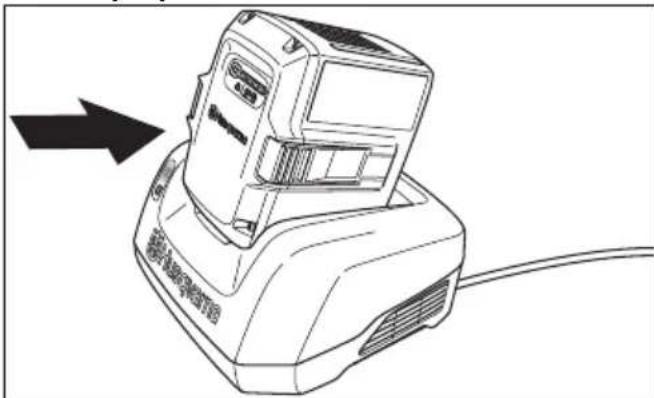
HUSQVARNA LC 247i - Husqvarna Connect - 2

natural_image Line drawing of a portable electronic device with a black arrow pointing to its left side (no text or symbols present)
  1. Kada na bateriji svijetle svi LED indikatori, baterija je potpuno napunjena. Bateriju punite najdulje 24 sata.
  2. Za odspajanje punjača baterije od mrežne utičnice povucite priključak, ne kabel.

  3. Izvadite bateriju iz punjača baterije.

Status punjača baterije

Litij-ionsku bateriju tvrtke Husqvarna možete puniti ili upotrebljavati pri bilo kojoj razini napunjenosti. Baterija nije oštećena. Potpuno napunjena baterija neće se prazniti kada je ostavite u punjaču.

LED zaslon Stanje punjenja
Indikator LED 1 treperi 0%-25%
Svijetli indikator LED 1, indikator LED 2 treperi25% – 50%
Svijetle indikatori LED 1, LED 2, indikator LED 3 treperi50% – 75%
Svijetle indikatori LED 1, LED 2, LED 3, indikator LED 4 treperi75% – 100%
Svijetle indikatori LED 1, LED 2, LED 3 i LED 4Potpuno napunjena

Pokretanje proizvoda (LC 247i)

  1. Otvorite poklopac baterije.
  2. Napunjenu bateriju stavite u 1 od pretinaca za baterije. Za dulje vrijeme rada umetnite i drugu napunjenu bateriju u drugi pretinac za baterije.
  3. Okrenite sigurnosni ključ na 1.

HUSQVARNA LC 247i - Pokretanje proizvoda (LC 247i) - 1

natural_image Diagram showing a device with a circular component and a close-up of its side panel (no text or symbols)
  1. Stanite iza proizvoda.
  2. Otpustite blokadu pokretanja.

HUSQVARNA LC 247i - Pokretanje proizvoda (LC 247i) - 2

natural_image Diagram of a mechanical clamp or bracket assembly with a directional arrow indicating motion (no text or symbols present)
natural_image Line drawing of two hands operating a tool with a clip, showing a downward arrow indicating motion (no text or symbols)

Pokretanje proizvoda (LC 347iVX, LC 353iVX)

  1. Otvorite poklopac baterije.
  2. Napunjenu bateriju stavite u 1 od pretinaca za baterije. Za dulje vrijeme rada umetnite i drugu napunjenu bateriju u drugi pretinac za baterije.
  3. Okrenite sigurnosni ključ na 1.

HUSQVARNA LC 247i - Pokretanje proizvoda (LC 347iVX, LC 353iVX) - 1

natural_image Line drawing of a car interior showing a switch and battery component, with an inset close-up highlighting the internal structure (no text or symbols)
  1. Stanite iza proizvoda.
  2. Pritisnite gumb ON/OFF (UKLJUČIVANJE / ISKLJUČIVANJE) (A) na upravljačkoj ploči. Uključuje se zaslon. Indikator baterije (B) pokazuje napunjenost 2 baterije. Broj umetnutih baterija prikazan je pokraj indikatora baterije. Za modele LC 347iVX, LC 353iVX na zaslonu se također prikazuje i postavljeni broj okretaja.
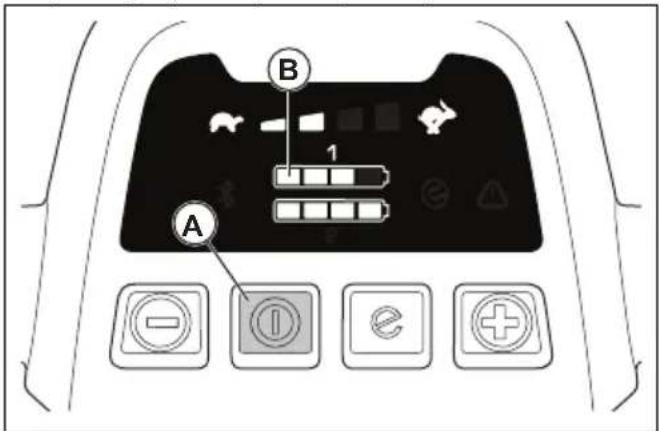
HUSQVARNA LC 247i - Pokretanje proizvoda (LC 347iVX, LC 353iVX) - 2

text_image B 1 A
  1. Otpustite blokadu pokretanja.

HUSQVARNA LC 247i - Pokretanje proizvoda (LC 347iVX, LC 353iVX) - 3

natural_image Diagram of a mechanical clamp or bracket assembly with a directional arrow indicating motion (no text or symbols present)
natural_image Illustration of hands holding a tool with a cable, showing a downward force (no text or symbols present)

Upotreba pogona na kotačima LC 347iVX, LC 353iVX

natural_image Line drawing of hands holding a device with a cable, showing a right-hand rule for change (no text or symbols present)

- Pritisnite + i - na upravljačkoj ploči za postavljanje brzine pogona u 4 koraka.
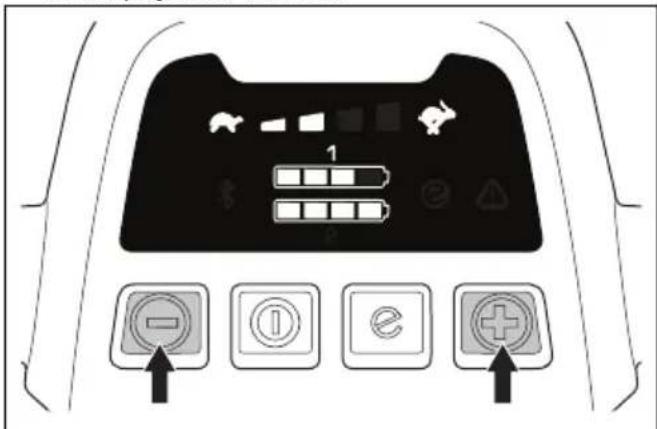
HUSQVARNA LC 247i - Upotreba pogona na kotačima LC 347iVX, LC 353iVX - 1

text_image Diagram of a car dashboard with labeled buttons and icons, including navigation and function buttons
natural_image Interior view of a car dashboard with a circular dial indicator and control panel (no text or symbols visible)

- Pritisnite gumb SavE ^TM u položaj 0 da biste zaustavili funkciju.

natural_image Diagram of a mechanical clamp or bracket assembly with no visible text or symbols
  1. Otvorite poklopac baterije i okrenite sigurnosni ključ na 0.
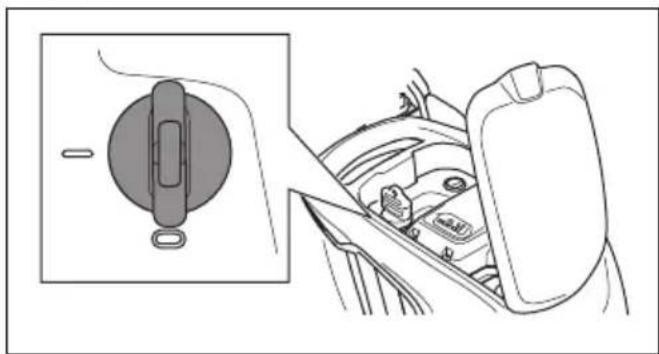
HUSQVARNA LC 247i - Upotreba pogona na kotačima LC 347iVX, LC 353iVX - 2

natural_image Diagram showing a car interior with a circular switch and directional arrow, no text or symbols present
  1. Za uklanjanje baterije pritisnite 2 gumba za otpuštanje i izvadite bateriju.
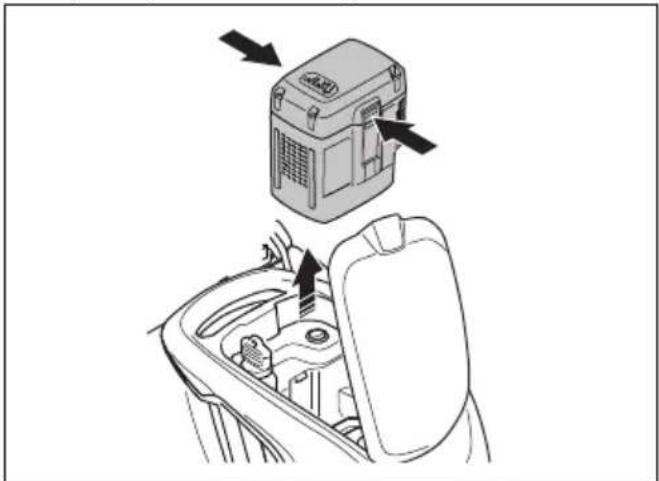
HUSQVARNA LC 247i - Upotreba pogona na kotačima LC 347iVX, LC 353iVX - 3

natural_image Diagram showing a device inside a car intake frame with arrows indicating motion or assembly (no text or symbols present)
  1. Zamijenite slabu bateriju. Dodatne informacije potražite u odjeljku Zamjena baterije na stranici 270.

Zaustavljanje proizvoda (LC 347iVX, LC 353iVX)

HUSQVARNA LC 247i - Zaustavljanje proizvoda (LC 347iVX, LC 353iVX) - 1

UPOZORENJE: Prije ostavljanja proizvoda bez nadzora okrenite sigurnosni ključ na 0.

  1. Otpustite ručicom kočnice motora kako biste zaustavili motor.
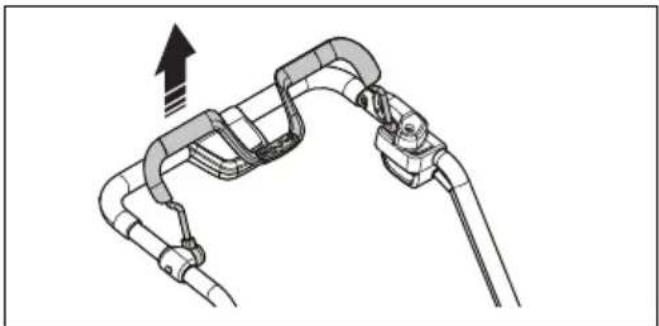
HUSQVARNA LC 247i - Zaustavljanje proizvoda (LC 347iVX, LC 353iVX) - 2

natural_image Diagram of a mechanical linkage or cable assembly with an upward arrow indicating motion (no text or symbols present)
  1. Pritisnite gumb ON/OFF na upravljačkoj ploči. Isključuju se svi LED indikatori i simboli na zaslonu.
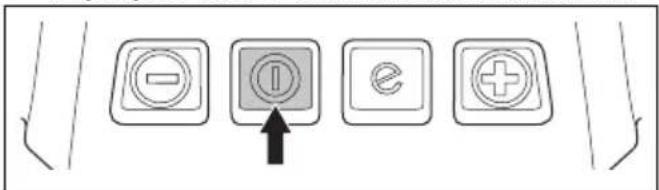
HUSQVARNA LC 247i - Zaustavljanje proizvoda (LC 347iVX, LC 353iVX) - 3

text_image Diagram showing five labeled buttons with icons: minus, circled, minus, plus, and plus, with an arrow pointing to the minus button.
  1. Otvorite poklopac baterije i okrenite sigurnosni ključ na 0.
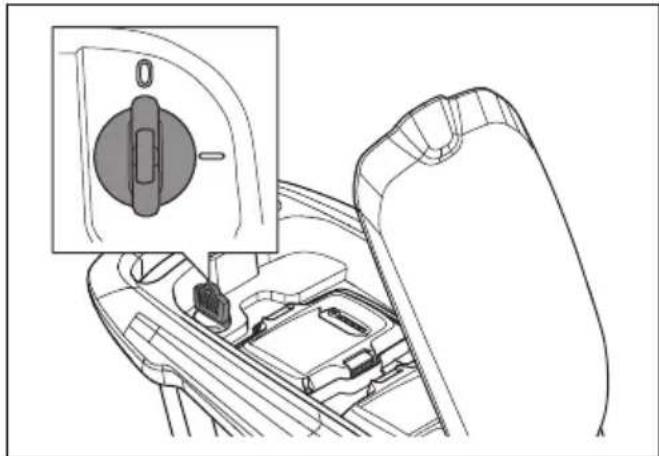
HUSQVARNA LC 247i - Zaustavljanje proizvoda (LC 347iVX, LC 353iVX) - 4

natural_image Technical line drawing of a car gear shift lever with inset showing the internal component (no text or symbols)
  1. Za uklanjanje baterije pritisnite 2 gumba za otpuštanje i izvadite bateriju.
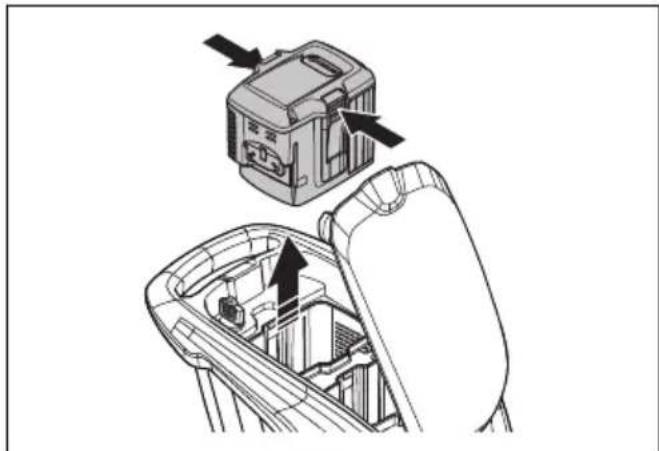
HUSQVARNA LC 247i - Zaustavljanje proizvoda (LC 347iVX, LC 353iVX) - 5

natural_image Technical diagram showing a mechanical assembly with an upper component and a lower view of internal components (no text or symbols)
  1. Zamijenite slabu bateriju. Dodatne informacije potražite u odjeljku Zamjena baterije na stranici 270.

Napomena: Proizvod se automatski zaustavlja ako ga ne upotrebljavate nekoliko minuta. Kako biste ponovno pokrenuli proizvod pogledajte Pokretanje proizvoda (LC 347iVX, LC 353iVX) na stranici 271.

Za dobar ishod

natural_image Diagram of a circular mechanical or electrical component with concentric rings and a central rotating arrow, featuring a wooden block at the base (no text or symbols)
natural_image Diagram showing a blade under an arch with arrows indicating direction, above grass (no text or symbols)
  1. Nož mora biti poravnat sa središtem vratila motora.
  2. Blokirajte nož drvenim blokom. Postavite elastični rasječeni prsten i zategnite vijak i podlošku na zatezni moment od 23 – 28 Nm.
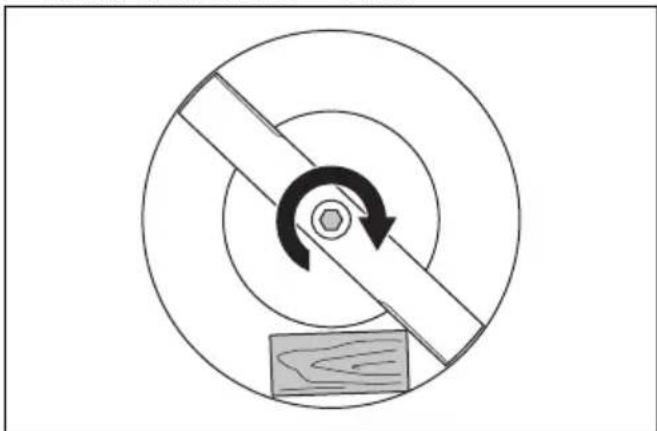
HUSQVARNA LC 247i - Za dobar ishod - 1

natural_image Diagram of a mechanical or electrical component with concentric circles and a central rotating shaft, featuring a wooden block and a hexagonal nut (no text or symbols)
natural_image Mechanical assembly diagram showing two stages of a gear mechanism with no visible text or symbols
natural_image Line drawing of a lawn mower with directional arrows indicating motion (no text or symbols)
text_image Diagram showing two waste sorting bins with crossed-out recycling symbols, indicating no disposal or recycling.

Tehnički podaci

Tehnički podaci

LC 247i LC 347iVX LC353iVX
Rezni motor
Vrsta motora BLDC (beskontaktni)36 VBLDC (beskontaktni)36 VBLDC (beskontaktni)36 V
Broj okretaja motora – SavE, o/min 2600/min2600/min 2600/min
Broj okretaja motora – nazivni, o/min 3000/min3000/min 3000/min
Broj okretaja motora – veliko opterećenje,o/min3500/min 3500/min 3500/min
Snaga motora – maks. kW 0,96 0,96 1,05
Snaga motora – nazivna, kW 0,75 0,75 0,9
Pogonski motor
Snaga motora – nazivna, kW Nije dostupno 0,25 0,25
Brzina samostalnog hoda, km/h Nije dostupno3,0 – 4,5 3,0 – 4,5
Razine prilagodbe brzine Nije dostupno 4 4
Težina
Težina bez vreće (bez baterije), kg 24,5 26 28
Težina s vrećom (s 2 x BLi30), kg30,5 32,0 34,5
Baterija
Vrsta baterijeSerije baterije Husqvarna
Trajanje baterije
Trajanje baterije, min, (slobodni pogon) s uk-ljučenom funkcijom SavE, s jednom baterijom tvrtke Husqvarna od 7,7 Ah (Bli30).62 62 46
Trajanje baterije, min, (slobodni pogon) s uk-ljučenom standardnim načinom rada, s jed-nom baterijom tvrtke Husqvarna od 7,7 Ah (Bli30).43 43 28
Emisije buke 42
Razina jačine zvuka, mjerena u dB (A)94 94 97
Razina jačine zvuka, zajamčena LWA dB (A)95 95 98
Razine buke 43
Razine tlaka zvuka na uhu rukovatelja, dB (A)82 82 86
Razine vibracije ^44
Ručka, m/s ^2 0,42 0,42 2,64
Rezna oprema
Visina rezanja, mm 20 – 75 mm 20 – 75 mm 20 – 75 mm
Širina rezanja, cm 47 47 53
Standardni nož Skupljanje,5905934-10Skupljanje,5905934-10Skupljanje,5940757-10
Dodatna oprema za nož Malčiranje5907010-10Malčiranje5907010-10Malčiranje5950072-10
Zapremnina sakupljača trave, litri 55 55 60
Podaci o radijskoj frekvenciji za Bluetooth®LC 247i LC 347iVX LC 353iVX
Frekvencijski pojas, GHz Nije dostupno2,4 – 2,4835 2,4 – 2,4835
Izlazna snaga, maks. dBm Nije dostupno4 4
Odobrene baterije VrstaKapacitet baterije, AhNapon, VTežina, lb/kg
BLi20Litij-ion4,036
BLi30Litij-ion7,736
Odobreni punjači za navedene baterije, BLiUlazni napon, VFrekvencija, HzSnaga, W
QC80100 – 24050 – 6080
40-C80100 – 24050 – 6068,8
QC250100 – 24050 – 60250

Izjava o sukladnosti

Izjava o sukladnosti EU

Mi, Husqvarna AB, SE-561 82 Huskvarna, Švedska, tel.: +46-36-146500, pod punom odgovornošću izjavljujemo da proizvod:

Opis Kosilica
Marka Husqvarna
Vrsta / Model LC 247i
Identifikacija Serijski brojevi iz 2021 i noviji

u potpunosti sukladan sljedećim EU direktivama i propisima:

text_image DANGER KEEP HANDS AND FEET AWAY GARDER MAINS ET PIEDS A DISTANCE
natural_image Simple line drawing of a mechanical component with a circular body and rectangular plate (no text or symbols)
natural_image Diagram of a mechanical clamp or bracket assembly with no visible text or symbols
natural_image Diagram of a mechanical clamp or bracket assembly with a directional arrow indicating motion (no text or symbols present)
natural_image Mechanical assembly diagram showing two stages of gear meshing and rotational motion (no text or symbols)
natural_image Line drawing of a device with an open lid and internal structure, showing a directional arrow (no text or symbols)
natural_image Illustration of a hand using a tool to adjust or install a mechanical component (no text or symbols visible)
natural_image Diagram showing a mechanical device connected to a box, with an arrow indicating motion or force direction (no text or symbols present)
natural_image Technical illustration of a truck's wheel assembly with a guide mechanism (no text or symbols)
text_image Diagram of a car front panel with battery, battery icons, and control buttons below
natural_image Line drawing of a lawn mower with motion arrows indicating maneuvering motion (no text or symbols)
natural_image Mechanical assembly diagram showing gear and wheel components with directional arrows (no text or labels)

HUSQVARNA LC 247i - Izjava o sukladnosti EU - 1

text_image Diagram showing a device with four labeled buttons connected to a device, one with warning symbol and the other with grid lines.
natural_image Line drawing of a device with a warning symbol and connection point (no text or labels)
natural_image Line drawing of a portable electronic device with a black arrow pointing to its left side (no text or symbols present)
natural_image Diagram showing a car interior with a steering wheel and dashboard, alongside a close-up of the wheel (no text or symbols present)
natural_image Diagram of a mechanical clamp or bracket assembly with a directional arrow indicating motion (no text or symbols present)
natural_image Line drawing of two hands operating a tool with a clip, showing a downward force (no text or symbols present)
natural_image Technical line drawing of a car gear shift lever with a close-up inset showing the internal components (no text or symbols)
natural_image Diagram of a mechanical clamp or connector assembly with a directional arrow indicating motion (no text or symbols present)
natural_image Illustration of a hand holding a medical device with a catheter, showing a downward arrow (no text or symbols present)
natural_image Line drawing of hands holding a device with a cable, showing a right-hand rule for change (no text or symbols present)
text_image Diagram of a car dashboard with labeled buttons and icons, including battery, switch, battery, and plus button.
natural_image Interior view of a car dashboard with a circular vent and control panel (no text or symbols visible)
natural_image Diagram of a mechanical clamp or bracket assembly with no visible text or symbols
natural_image Diagram showing a car interior with a circular component and a side view of the dashboard (no text or symbols)
natural_image Diagram showing a device inside a car intake bay with arrows indicating action or operation (no text or symbols present)
natural_image Diagram of a mechanical linkage or cable assembly with an upward arrow indicating motion (no text or symbols present)
text_image Diagram showing four labeled buttons with icons: minus, ⓘ, e, and plus, connected by an arrow pointing to the ⓘ.
natural_image Line drawing of a car interior showing a gear shift and mode dial (no text or symbols)
natural_image Technical diagram showing a device being inserted into a gear mechanism (no text or symbols present)
natural_image Diagram of a circular mechanical or electrical component with concentric rings and a central rotating arrow, featuring a wooden block at the base (no text or symbols)
natural_image Diagram showing a blade under load with arrows indicating direction, above grass (no text or symbols)
natural_image Diagram of a mechanical or electrical component with concentric circles and a central rotating arrow, no text or symbols present.
natural_image Mechanical assembly diagram showing two stages of a gear mechanism with no visible text or symbols
natural_image Line drawing of a lawn mower with directional arrows indicating motion (no text or symbols)
text_image Diagram showing two waste sorting bins with recycling symbols, indicating no disposal or recycling.

Műszaki adatok

Müszaki adatok

text_image DANGER KEEP HANDS AND FEET AWAY GARDER MAINS ET PIEDS A DISTANCE
natural_image Simple line drawing of a mechanical component with a circular body and rectangular shaft, no text or symbols present.
natural_image Diagram of a mechanical clamp or bracket assembly with no visible text or symbols
natural_image Mechanical assembly diagrams showing gear and cam mechanism (no text or labels)
natural_image Line drawing of a mechanical device with an open lid and internal components, showing a directional arrow (no text or symbols)
natural_image Illustration of a hand using a tool to adjust or install a mechanical component, showing a black arrow indicating the motion direction (no text or symbols present)
natural_image Diagram showing a mechanical device connected to a box, with an arrow indicating motion or force direction (no text or symbols present)
natural_image Technical illustration of a vehicle's wheel assembly with a foot pushpin and directional arrow (no text or symbols)
text_image Diagram of a car dashboard with control buttons and icons for battery, battery, battery, and function buttons
natural_image Line drawing of a lawn mower with motion arrows indicating blade movement (no text or symbols)
natural_image Mechanical assembly diagram showing gear and wheel components with directional arrows (no text or labels)

HUSQVARNA LC 247i - Izjava o sukladnosti EU - 2

natural_image Line drawing of a wall-mounted device connected to a vertical panel with warning symbol (no text or labels)
natural_image Line drawing of a portable electronic device with a black arrow pointing to its top panel (no text or symbols present)
natural_image Diagram showing a car seatbelt mechanism with a magnified inset of the wheel (no text or symbols)
natural_image Diagram of a mechanical clamp or bracket with a directional arrow indicating motion (no text or symbols present)
natural_image Illustration of hands using a tool to adjust or install a component, showing a downward arrow indicating motion (no text or symbols present)
natural_image Diagram of a car interior showing the dashboard and gear shift (no text or symbols)
natural_image Diagram of a mechanical clamp or bracket assembly with a directional arrow indicating motion (no text or symbols present)
natural_image Illustration of hands holding a tool with a downward arrow indicating motion (no text or symbols)
natural_image Line drawing of hands holding a device with a cable, showing a curved arrow indicating rotation (no text or symbols)
text_image Diagram of a car dashboard with labeled buttons and icons, including battery, battery, and function buttons
natural_image Interior view of a car dashboard with steering wheel and control panel (no text or symbols visible)
text_image Diagram of a car dashboard with labeled buttons and icons, including symbols like 'e', 'A', and 'B'
natural_image Diagram of a mechanical clamp or bracket assembly with no visible text or symbols
natural_image Diagram showing a car interior with a circular component and a side view of the dashboard (no text or symbols)
natural_image Diagram showing a car interior with a device and directional arrows indicating movement or operation (no text or symbols present)
natural_image Diagram of a mechanical or electrical component with curved and straight lines, showing a directional arrow (no text or symbols present)
text_image Diagram showing four labeled buttons with icons: minus, ⓘ, e, and plus, connected by an arrow pointing to the ⓘ.
natural_image Technical line drawing of a car interior showing a gear shift and internal components (no text or symbols)
natural_image Technical illustration of a mechanical device with arrows indicating assembly or operation (no text or symbols present)
natural_image Diagram showing concentric circles with a central hexagon and a diagonal stripe, no text or symbols present.
natural_image Diagram showing a blade cutting through a curved structure with arrows indicating direction, above grass (no text or symbols)
natural_image Diagram of a mechanical gear or wheel assembly with concentric circles and a rotating arrow, no text or symbols present.
natural_image Mechanical assembly diagram showing two stages of a gear mechanism with no visible text or symbols
natural_image Line drawing of a lawn mower with motion arrows indicating cycle (no text or symbols)
text_image Diagram showing two crossed-out waste bins with recycling symbols, indicating no disposal or recycling.

Dati tecnici

Dati tecnici

text_image DANGER KEEP HANDS AND FEET AWAY GARDER MAINS ET PIEDS A DISTANCE
natural_image Simple line drawing of a mechanical component with no text or symbols

モーターブレーキハンドルの点検

natural_image Diagram of a mechanical clamp or bracket assembly with no visible text or symbols
natural_image Diagram of a car hood with a lever and handle, showing motion direction (no text or symbols)
natural_image Mechanical assembly diagram showing two stages of a gear mechanism with no visible text or symbols
natural_image Technical line drawing of a device with an open lid and internal components, showing a directional arrow (no text or symbols)
natural_image Illustration of a hand using a tool to adjust or install a mechanical component (no text or symbols visible)
natural_image Diagram showing a mechanical device with a box and wheels, connected to a motor (no text or symbols present)

マルチプラグ(別売り)の組み立て方法

natural_image Technical illustration of a vehicle's wheel assembly with a foot pushpin and guide mechanism (no text or symbols)
text_image Diagram of a car dashboard with control buttons and navigation icons, including directional arrows and function keys

製品を操作位置にセットする方法

natural_image Line drawing of a lawn mower with motion arrows indicating clockwise motion (no text or symbols)
natural_image Mechanical assembly diagram showing gear and wheel components with directional arrows (no text or labels)

HUSQVARNA LC 247i - 製品を操作位置にセットする方法 - 1

natural_image Line drawing of a device with a switch and warning symbol, connected to a wall-mounted device (no text or labels)
natural_image Line drawing of a portable electronic device with a black arrow pointing to its left side (no text or symbols on the device itself)
natural_image Diagram showing a car interior with a steering wheel and dashboard, alongside a close-up of the wheel (no text or symbols present)
natural_image Diagram of a mechanical clamp or bracket assembly with a directional arrow indicating motion (no text or symbols present)
natural_image Illustration of two hands operating a robotic device with a downward arrow indicating motion (no text or symbols)
natural_image Line drawing of a car interior showing a gear shift lever and internal components (no text or symbols)
natural_image Mechanical linkage diagram showing a lever mechanism with a curved arrow indicating rotation (no text or symbols present)
natural_image Line drawing of hands using a tool to grip a device, with a downward arrow indicating motion (no text or symbols)
natural_image Line drawing of hands connecting a device to a cable with an arrow indicating rotation (no text or symbols)
text_image Diagram of a car dashboard with labeled buttons and icons, including battery, battery pack, and function buttons.
natural_image Interior view of a car showing the dashboard and steering wheel (no text or symbols visible)
natural_image Diagram of a mechanical clamp or bracket assembly with no visible text or symbols
natural_image Diagram showing a car interior with a door handle and a side view of the dashboard (no text or symbols)
natural_image Diagram showing a car interior with a device and directional arrows indicating movement or operation (no text or symbols present)
natural_image Diagram of a mechanical linkage or cable assembly with an upward arrow indicating motion (no text or symbols present)
text_image Diagram showing four labeled buttons with icons: minus, ⓘ, ex, and plus, connected by an arrow pointing to the ⓘ.
natural_image Technical line drawing of a car gear shift lever with inset showing the mode dial (no text or symbols)
natural_image Technical diagram showing a mechanical assembly with an upper component and a lower component, no visible text or symbols.
natural_image Diagram of a circular mechanical or electrical component with concentric rings and a central rotating arrow, featuring a wooden block at the bottom (no text or symbols)
natural_image Diagram showing a blade under load with arrows indicating force direction, above grass (no text or symbols)
natural_image Diagram of a circular mechanical or electrical component with a diagonal bar and circular arrow, featuring a wooden block at the base (no text or symbols)
natural_image Mechanical assembly diagram showing two stages of a gear mechanism with no visible text or symbols
  1. ハンドルを前側に折り畳みます。

HUSQVARNA LC 247i - 製品を操作位置にセットする方法 - 2

natural_image Line drawing of a lawn mower with motion arrows indicating blade movement (no text or symbols)
  1. グラスキャッチャーを取り外します。

搬送

text_image Diagram showing two crossed recycling bins with a recycling symbol and no text labels

主要諸元

主要諸元

text_image DANGER KEEP HANDS AND FEET AWAY GARDER MAINS ET PIEDS A DISTANCE
natural_image Simple line drawing of a mechanical component with a circular body and rectangular shaft (no text or symbols)

Variklio stabdymo rankenos patikra

Variklio stabdymo rankena sustabdo variklj. Atleidus variklio stabdymo rankeną variklis sustoja.

natural_image Diagram of a mechanical clamp or bracket assembly with no visible text or symbols
natural_image Diagram of a mechanical clamp or bracket with a directional arrow indicating motion (no text or symbols present)
natural_image Mechanical assembly diagrams showing gear and cam mechanism (no text or labels)
natural_image Line drawing of a mechanical device with an open lid and internal components, showing a directional arrow (no text or symbols)
natural_image Illustration of a hand using a tool to adjust or install a mechanical component (no text or symbols visible)
natural_image Technical illustration of a mechanical assembly with a box and gear mechanism, showing motion direction (no text or symbols)
natural_image Technical illustration of a vehicle's wheel assembly with a mechanical component below (no text or symbols)
text_image Diagram of a car dashboard with control buttons and navigation icons, including battery, battery, and function buttons.
natural_image Line drawing of a lawn mower with motion arrows indicating blade movement (no text or symbols)
natural_image Mechanical assembly diagram showing gear and wheel components with directional arrows (no text or labels)

HUSQVARNA LC 247i - Variklio stabdymo rankenos patikra - 1

natural_image Line drawing of a device with a warning symbol and a control panel (no text or labels)
natural_image Line drawing of a portable electronic device with a black arrow pointing to its top panel (no text or symbols present)
natural_image Diagram showing a car interior with a steering wheel and dashboard, alongside a close-up of the wheel (no text or symbols)
natural_image Diagram of a mechanical clamp or bracket assembly with directional arrow indicating motion (no text or symbols)
natural_image Line drawing of two hands operating a tool with a device, showing a downward arrow indicating motion (no text or symbols present)

Gaminio paleidimas(LC 347iVX, LC 353iVX)

natural_image Technical line drawing of a car gear shift lever with inset showing the internal component (no text or symbols)
natural_image Diagram of a mechanical clamp or lever mechanism with a directional arrow indicating motion (no text or symbols present)
natural_image Line drawing of hands holding a device with a downward arrow indicating motion (no text or symbols)
natural_image Line drawing of hands connecting a device to a cable with an arrow indicating rotation (no text or symbols)
text_image Diagram of a car dashboard with labeled buttons and icons, including battery, battery pack, battery level, and function buttons.
natural_image Interior view of a car dashboard with a circular dial indicator and control panel (no text or symbols visible)
natural_image Diagram of a mechanical clamp or bracket assembly with no visible text or symbols
natural_image Diagram showing a car interior with a circular component and a side view of the dashboard (no text or symbols)
natural_image Diagram showing a device with arrows pointing to a central component, no text or symbols present
natural_image Diagram of a mechanical linkage or cable assembly with an upward arrow indicating motion (no text or symbols present)
text_image Diagram showing four labeled buttons with icons: minus, ⓘ, e, and plus, connected by an arrow pointing to the ⓘ button.
natural_image Technical line drawing of a car interior showing a gear shift and mechanical components (no text or symbols)
natural_image Technical diagram of a mechanical device with an open lid and internal components, showing no text or symbols.
natural_image Diagram of a circular mechanical or electrical component with concentric rings and a central rotating arrow, featuring a wooden block at the base (no text or symbols)
natural_image Diagram showing a blade under load with arrows indicating force or movement, above grass (no text or symbols)
natural_image Diagram of a mechanical or electrical component with concentric circles and a central rotating arrow, no text or symbols present.
  1. Ranka pasukite peilj ir patikrinkite, ar jis laisvai sukasi.

HUSQVARNA LC 247i - Gaminio paleidimas(LC 347iVX, LC 353iVX) - 1

natural_image Mechanical assembly diagram showing two stages of a gear mechanism with no visible text or symbols
natural_image Line drawing of a lawn mower with directional arrows indicating motion (no text or symbols)
text_image Diagram showing two crossed bins with recycling symbols, indicating no waste or non-recyclable disposal.

Techniniai duomenys

Techniniai duomenys

text_image DANGER KEEP HANDS AND FEET AWAY GARDER MAINS ET PIEDS A DISTANCE
natural_image Simple line drawing of a mechanical component with a circular body and rectangular shaft (no text or symbols)

Motora bremžu roktura pārbaude

natural_image Diagram of a mechanical clamp or bracket assembly with directional arrow (no text or symbols)
natural_image Diagram of a mechanical clamp or bracket assembly with a directional arrow indicating motion (no text or symbols present)
natural_image Mechanical assembly diagrams showing gear and cam mechanism (no text or labels)
natural_image Line drawing of a device with an open lid and internal structure, showing a directional arrow (no text or symbols)
natural_image Illustration of a hand using a tool to adjust or install a mechanical component (no text or symbols visible)
natural_image Technical illustration of a mechanical assembly with a box and gear mechanism (no text or symbols)
natural_image Technical illustration of a truck's wheel assembly with a mechanical component below (no text or symbols)
text_image Diagram of a car front panel with labeled buttons and icons, including battery, battery, battery stop, and control buttons.
natural_image Line drawing of a lawn mower with motion arrows indicating blade movement (no text or symbols)
natural_image Mechanical assembly diagram showing gear and wheel components with directional arrows (no text or labels)

HUSQVARNA LC 247i - Motora bremžu roktura pārbaude - 1

text_image Diagram showing a device with four labeled buttons connected to a device with warning symbols and a warning triangle.
natural_image Line drawing of a device with a warning symbol and connection point (no text or labels)
natural_image Line drawing of a power supply unit with a black arrow pointing to its left side (no text or symbols present)
natural_image Diagram showing a car interior with a steering wheel and dashboard, alongside a magnified view of the wheel (no text or symbols present)
natural_image Diagram of a mechanical clamp or bracket assembly with a directional arrow indicating motion (no text or symbols present)
natural_image Illustration of two hands operating a robotic device with a downward arrow indicating motion (no text or symbols)
natural_image Diagram of a car gear shift lever with a close-up inset showing the internal components (no text or symbols)
natural_image Diagram of a mechanical clamp or connector assembly with a directional arrow indicating motion (no text or symbols present)
natural_image Illustration of hands holding a cable with a plug, no text or symbols present
natural_image Line drawing of hands holding a device with a cable, showing a right-hand rule for change (no text or symbols present)
text_image Diagram of a car dashboard with labeled buttons and icons, including battery, navigation, and function buttons.
natural_image Interior view of a car showing the dashboard and steering wheel (no text or symbols visible)
natural_image Diagram of a mechanical clamp or bracket assembly with a directional arrow indicating motion (no text or symbols present)
natural_image Diagram showing a car interior with a circular component and a side view of the dashboard (no text or symbols)
  1. Lai iznemtu akumulatoru, nospiediet abas atbrivošanas pogas un iznemiet akumulatoru.
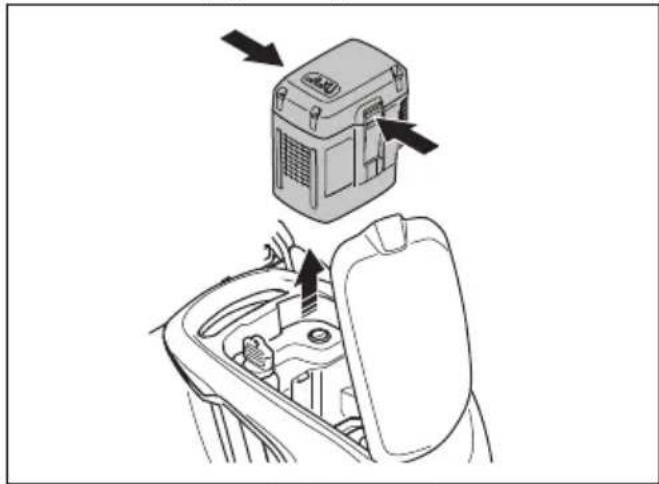
HUSQVARNA LC 247i - Motora bremžu roktura pārbaude - 2

natural_image Diagram showing a device inside a car's gear shift, with arrows indicating motion (no text or symbols present)
natural_image Diagram of a mechanical linkage or cable assembly with an upward arrow indicating motion (no text or symbols present)
text_image Diagram showing four labeled buttons with icons: minus, circled, minus, and plus, with an arrow pointing to the circled button.
natural_image Technical line drawing of a car interior showing a gear shift and internal components (no text or symbols)
  1. Lai iznemtu akumulatoru, nospiediet abas atbrīvošanas pogas un iznemiet akumulatoru.
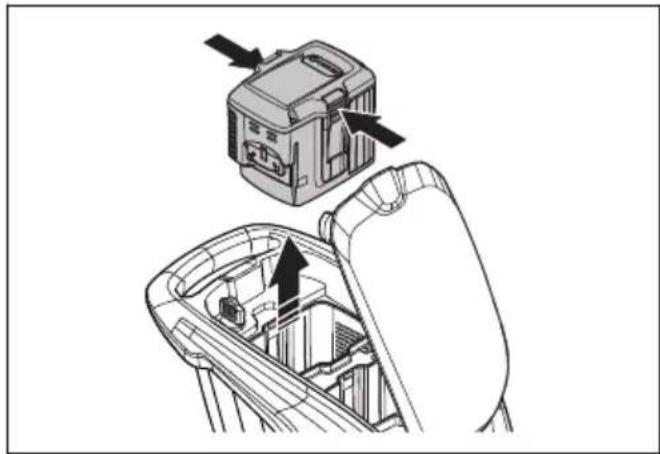
HUSQVARNA LC 247i - Motora bremžu roktura pārbaude - 3

natural_image Technical diagram showing a device with arrows pointing to a component inside a mechanical assembly (no text or symbols present)
natural_image Diagram of a circular mechanical or electrical component with concentric rings and a central rotating arrow, featuring a wooden block at the base (no text or symbols)
natural_image Diagram showing a blade under load with arrows indicating direction, above grass (no text or symbols)
natural_image Diagram of a mechanical or electrical component with concentric circles and a central rotating arrow, no text or symbols present.
natural_image Mechanical assembly diagram showing two stages of a gear mechanism with no visible text or symbols
natural_image Line drawing of a lawn mower with motion arrows indicating clockwise motion (no text or symbols)
text_image Diagram showing two crossed bins with recycling symbols, indicating no waste or non-recyclable disposal.

Tehniskie dati

Tehniskie dati

text_image DANGER KEEP HANDS AND FEET AWAY GARDER MAINS ET PIEDS A DISTANCE
natural_image Simple diagram of a mechanical component with a circular body and rectangular shaft, no text or symbols present.

HUSQVARNA LC 247i - Motora bremžu roktura pārbaude - 4

natural_image Simple line drawing of a mechanical component with no text or symbols

De remhendel van de motor controleren

natural_image Diagram of a mechanical clamp or bracket assembly with no visible text or symbols
natural_image Mechanical assembly diagram showing two stages of gear meshing and rotational motion (no text or symbols)
natural_image Technical line drawing of a mechanical device with an open lid and internal components, showing a directional arrow (no text or symbols)
natural_image Illustration of a hand using a tool to adjust or install a mechanical component, showing a black arrow indicating rotation (no text or symbols present)
natural_image Technical illustration of a mechanical device with a box and wheels, showing a directional arrow (no text or symbols)

Mulchplug monteren (accessoire)

natural_image Technical line drawing of a vehicle's front wheel assembly with a mechanical component below (no text or symbols)
text_image Diagram of a car dashboard with labeled buttons and icons, including navigation arrows, battery, and function buttons.
natural_image Line drawing of a lawn mower with motion arrows indicating blade movement (no text or symbols)
natural_image Mechanical assembly diagram showing gear and wheel components with directional arrows (no text or labels)

HUSQVARNA LC 247i - Mulchplug monteren (accessoire) - 1

natural_image Line drawing of a device with a wall-mounted switch and warning symbol, connected to a power adapter (no text or labels)
natural_image Line drawing of a portable electronic device with a black arrow pointing to its top panel (no text or symbols present)
LED-display Laadstatus
LED 1 knippert 0%-25%
Led 1 brandt, led 2 knip-pert25%-50%
Led 1 en led 2 branden, led 3 knippert50%-75%
Led 1, led 2 en led 3 bran-den, led 4 knippert75%-100%
Led 1, led 2, led 3, led 4 brandenVolledig opgeladen
natural_image Diagram showing a car interior with a steering wheel and dashboard, alongside a close-up of the wheel (no text or symbols present)
natural_image Diagram of a mechanical clamp or bracket assembly with directional arrow indicating motion (no text or symbols)
natural_image Line drawing of two hands operating a tool with a device, showing a downward arrow indicating motion (no text or symbols present)

Het product starten (LC 347iVX, LC 353iVX)

natural_image Technical line drawing of a car interior showing a gear shift and component placement (no text or symbols)
natural_image Diagram of a mechanical clamp or connector assembly with a directional arrow indicating motion (no text or symbols present)
natural_image Illustration of hands using a tool to grip a device, showing a downward arrow (no text or symbols present)
natural_image Illustration of hands connecting a device to a cable with an arrow indicating rotation (no text or symbols)
text_image Diagram of a car dashboard with labeled buttons and icons, including battery, battery pack, and function buttons.
natural_image Interior view of a car showing the dashboard and seatbelt with a circular dial indicator (no text or symbols)
natural_image Diagram of a mechanical clamp or bracket assembly with no visible text or symbols
natural_image Technical line drawing of a mechanical component with a close-up inset showing a circular component (no text or symbols)
natural_image Diagram showing a device with arrows pointing to a component inside a car intake frame (no text or symbols)
natural_image Diagram of a mechanical linkage or connector assembly with an upward arrow indicating motion (no text or symbols present)
text_image Diagram showing four labeled buttons with icons: minus, ⓘ, e, and plus, connected by an arrow pointing to the ⓘ button.
natural_image Technical line drawing of a car interior showing a door handle and internal components (no text or symbols)
natural_image Technical diagram of a vehicle rearview assembly showing internal components and directional arrows (no text or labels)
natural_image Diagram of a circular mechanical or electrical component with concentric rings and a central rotating arrow, featuring a wooden block at the base (no text or symbols)
natural_image Diagram showing a blade under an arch with arrows indicating direction, above grass (no text or symbols)
natural_image Diagram of a mechanical or electrical component with concentric circles and a central rotating arrow, no text or symbols present.
natural_image Mechanical assembly diagram showing two stages of a gear mechanism with no visible text or symbols
natural_image Line drawing of a lawn mower with motion arrows indicating blade movement (no text or symbols)
text_image Diagram showing two waste sorting bins with crossed-out recycling symbols, indicating no disposal or reuse.

Technische gegevens

Technische gegevens

Claes Losdal, Development Manager/Garden Products, Husqvarna AB

Claes Losdal, Development Manager/Garden Products, Husqvarna AB

text_image DANGER KEEP HANDS AND FEET AWAY GARDER MAINS ET PIEDS A DISTANCE
natural_image Simple line drawing of a mechanical component with a circular body and rectangular shaft (no text or symbols)

Kontroller motorbremshåndtaket

Motorbremshåndtaket stopper motoren. Når du slipper motorbremshåndtaket, stopper motoren.

  • Start produktet. Se Drift på side 446.
  • Slipp motorbremsehåndtaket.

HUSQVARNA LC 247i - Kontroller motorbremshåndtaket - 1

natural_image Diagram of a mechanical clamp or bracket with a directional arrow indicating motion (no text or symbols present)

- Kontroller at produktet stopper. Hvis motoren ikke stopper innen tre sekunder, må du la et godkjent Husqvarna-serviceverksted justere motorbremsen.

Kontroller startsperren

natural_image Diagram of a car hood with a lever and handle, showing motion direction (no text or symbols)
natural_image Mechanical assembly diagram showing two stages of a gear mechanism with no visible text or symbols
natural_image Line drawing of a mechanical device with an open lid and internal components, showing a directional arrow (no text or symbols)
natural_image Illustration of a hand using a tool to adjust or install a mechanical component (no text or symbols visible)
natural_image Diagram showing a mechanical device with a box and gear assembly, no text or symbols present
natural_image Technical illustration of a vehicle's wheel assembly with a foot pushpin and guide mechanism (no text or symbols)
text_image Diagram of a car dashboard with control buttons and navigation icons, including symbols like arrows, blocks, and function keys.

Slik setter du produktet i arbeidsstilling

natural_image Line drawing of a lawn mower with motion arrows indicating clockwise motion (no text or symbols)
natural_image Mechanical assembly diagram showing gear and wheel components with directional arrows (no text or labels)

HUSQVARNA LC 247i - Slik setter du produktet i arbeidsstilling - 1

natural_image Line drawing of a device with a warning symbol and connection point (no text or labels)
  1. Sett batteriet i batteriladeren. Den grønne lampen på laderen tennes når batteriet er riktig koblet til laderen.
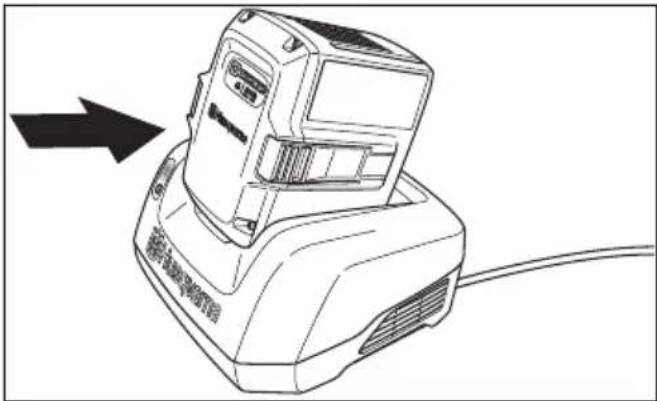
HUSQVARNA LC 247i - Slik setter du produktet i arbeidsstilling - 2

natural_image Line drawing of a portable electronic device with a black arrow pointing to its left side (no text or symbols on the device itself)
  1. Når alle LED-indikatorene på batteriet lyser, er batteriet fulladet. Lad batteriet i maks. 24 timer.
  2. For å koble laderen fra stikkontakten må du dra i selve støpselet, ikke i ledningen.
  3. Fjern batteriet fra batteriladeren.

Batteriladestatus

Et Husqvarna Li-ionbatteri kan lades eller brukes ved et hvilket som helst ladenivå. Batteriet blir ikke skadet. Et fulladet batteris ladenivå reduseres ikke när batteriet blir stående i laderen.

LED-display Ladestatus
LED 1 blinker 0–25 %
LED 1 lyser, LED 2 blinker25–50 %
LED 1, LED 2 lyser, LED 3 blinker50–75 %
LED 1, LED 2, LED 3 ly-ser, LED 4 blinker75–100 %
Lampe 1, lampe 2, lampe 3 og lampe 4 tennesFulladet

Slik starter du produktet (LC 247i)

natural_image Line drawing of a car interior showing steering wheel, dashboard, and seatbelt (no text or symbols)
  1. Stå bak produktet.
  2. Løsne startsperren.

HUSQVARNA LC 247i - Slik starter du produktet (LC 247i) - 1

natural_image Diagram of a mechanical clamp or bracket assembly with a directional arrow indicating movement (no text or symbols present)
natural_image Line drawing of two hands operating a tool with a clip, showing a downward arrow indicating motion (no text or symbols)

Slik starter du produktet (LC 347iVX, LC 353iVX)

natural_image Technical line drawing of a car interior showing a switch and gear assembly (no text or symbols)
  1. Stå bak produktet.
  2. Trykk på PÅ/AV-knappen (A) på kontrollpanelet. Displayet slås på. Batteriindikatoren (B) viser batterinivået til de to batteriene. Nummeret på batteriet som er i bruk, vises ved siden av batteriindikatoren. For modellene LC 347iVX, LC 353iVX viser displayet også den angitte hastigheten.
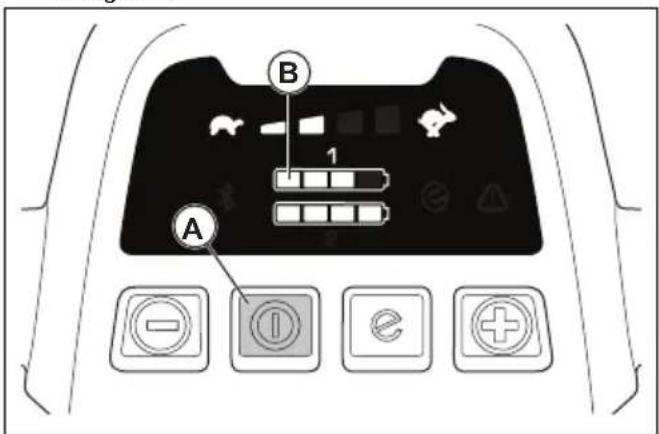
HUSQVARNA LC 247i - Slik starter du produktet (LC 347iVX, LC 353iVX) - 1

text_image A B 1
  1. Løsne startsperren.

HUSQVARNA LC 247i - Slik starter du produktet (LC 347iVX, LC 353iVX) - 2

natural_image Mechanical assembly diagram showing a lever mechanism with a curved handle and directional arrow (no text or symbols)
natural_image Illustration of hands holding a tool with a cable, showing a downward force (no text or symbols)

Slik brukes hjuldriften LC 347iVX, LC 353iVX

natural_image Line drawing of hands holding a device with a cable, showing a right-hand rule for change (no text or symbols present)
text_image Diagram of a car dashboard with labeled buttons and icons, including navigation controls and function keys
natural_image Interior view of a car dashboard with a circular vent and control panel (no text or symbols visible)
natural_image Diagram of a mechanical clamp or bracket assembly with directional arrow (no text or symbols)
natural_image Line drawing of a car interior showing the left side of the door and the right side of the seat, with no visible text or symbols.
natural_image Diagram showing a device inside a car intake seat with arrows indicating motion (no text or symbols)
natural_image Diagram of a mechanical linkage or cable assembly with an upward arrow indicating motion (no text or symbols present)
  1. Trykk på PÅ/AV-knappen på kontrollpanelet. Alle LED-lamper og -symboler på displayet slukkes.
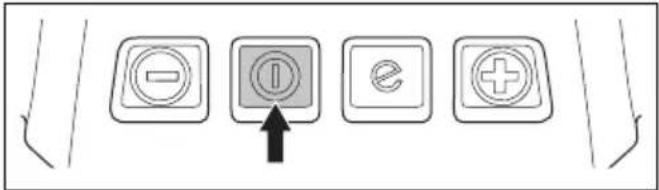
HUSQVARNA LC 247i - Slik brukes hjuldriften LC 347iVX, LC 353iVX - 1

text_image Diagram showing four labeled buttons with icons: minus, circled, minus, and plus, with an arrow pointing to the circled button.
natural_image Technical line drawing of a car gear shift lever with inset showing the mode dial (no text or symbols)
natural_image Technical diagram showing a device with an attached box and a hand inside a mechanical component (no text or symbols)
natural_image Diagram of a circular mechanical or electrical component with concentric rings and a central rotating arrow, featuring a wooden block at the base (no text or symbols)
natural_image Diagram showing a blade under load with arrows indicating direction, above grass (no text or symbols)
natural_image Diagram of a mechanical or electrical component with concentric circles and a central rotating shaft, no text or symbols present.
natural_image Mechanical assembly diagrams showing gear and wheel components with directional arrows (no text or labels)
  1. Vipp styret forover.

HUSQVARNA LC 247i - Slik brukes hjuldriften LC 347iVX, LC 353iVX - 2

natural_image Line drawing of a lawn mower with motion arrows indicating blade movement (no text or symbols)
  1. Tøm oppsamleren.

Transport

text_image Diagram showing two crossed bins with recycling symbols, indicating no waste or non-recyclable disposal.

Tekniske data

Tekniske data

LC 247i LC 347iVX LC353iVX
Klippemotor
Motortype BLDC (børsteløs)36 VBLDC (børsteløs)36 VBLDC (børsteløs)36 V
Motorhastighet – SavE, turtall 2600/min 2600/min 2600/min
Motorhastighet – nominell, turtall 3000/min 3000/min 3000/min
Motorhastighet – høybelastning, turtall 3500/min 3500/min
Motoreffekt – maks. kW 0,96 0,96 1,05
Motoreffekt – nominell, kW 0,75 0,75 0,9
Drivmotor
Motoreffekt – nominell, kW Ikke tilgjengelig 0,25 0,25
Selvgående hastighet, km/t Ikke tilgjengelig 3,0–4,5 3,0–4,5
Nivåer for hastighetsjustering Ikke tilgjengelig 4 4
Vekt
Vekt uten pose (uten batteri), kg 24,5 2628
Vekt med pose (inkl. 2 stk. BLi30), kg30,5 32,0 34,5
Batteri
BatteritypeHusqvarna-batteriserien
Batteriets driftstid
Batteriets driftstid, min., (frikjøring) med Sa-vE aktivert, med ett Husqvarna 7,7 Ah-batteri (Bli30)626246
Batteriets driftstid, min., (frikjøring) med stan-dardmodus aktivert, med ett Husqvarna 7,7 Ah-batteri (Bli30)434328
Støyutslipp 70
Lydeffektnivå, målt dB (A)949497
Lydeffektnivå, garantert LWA dB (A)959598
Lydnivåer 71
Lydtrykknivå ved brukerens øre, dB (A)828286
Vibrasjonsnivåer 72
Styre, m/s 20,42 0,42 2,64
Klippeutstyr
Klippehøyde, mm20–75 mm20–75 mm20–75 mm
Klippebredde, cm474753
Kniv, standard Oppsamling5905934-10Oppsamling5905934-10Oppsamling5940757-10
Knivtilbehør Mulch 5907010-10 Mulch 5907010-10 Mulch 5950072-10
Gressoppsamlerkapasitet, liter 55 55 60
text_image DANGER KEEP HANDS AND FEET AWAY GARDER MAINS ET PIEDS A DISTANCE
natural_image Simple line drawing of a mechanical component with a circular body and rectangular shaft (no text or symbols)
natural_image Technical line drawing of a mechanical clamp or bracket assembly (no text or symbols)
natural_image Diagram of a mechanical clamp or bracket assembly with no visible text or symbols
natural_image Mechanical assembly diagram showing two stages of a gear mechanism with no visible text or symbols
natural_image Line drawing of a device with an open lid and internal components, showing a directional arrow (no text or symbols)
natural_image Illustration of a hand using a tool to adjust or install a mechanical component (no text or symbols visible)
natural_image Diagram showing a mechanical device with a box and gear assembly, no text or symbols present
natural_image Technical illustration of a vehicle's wheel assembly and steering mechanism, showing a bracket and gear assembly (no text or symbols)
  • Extended product information.
    • Information about, and help with, product parts and servicing.

text_image Diagram of a car dashboard with control buttons and icons, including battery, battery flame, battery plug, battery tray, battery stop, battery minus sign, battery check, battery minus icon, battery plus sign, battery minus symbol, battery minus circle, battery minus square, battery minus triangle, battery minus triangle, battery minus circle, battery minus square, battery minus triangle, battery minus circle, battery minus square, battery minus triangle, battery minus circle, battery minus square, battery minus triangle, battery minus circle, battery minus square, battery minus triangle, battery minus circle, battery minus square, battery minus triangle, battery minus circle, battery minus square, battery minus triangle, battery minus circle, battery minus square, battery minus triangle, battery minus circle, battery minus square, battery minus triangle, battery minus circle, battery minus square, battery minus circle, battery minus square, battery minus triangle, battery minus circle, battery minus square, battery minus triangle, battery minus circle, battery minus square, battery minus triangle, battery minus circle, battery minus square, battery minus triangle, battery minus circle, battery minus square, battery minus triangle, battery minus circle, battery minus square, battery minus triangle, battery minus circle, battery minus square, battery minus triangle, battery minus circle, battery minus square, battery minus triangle, battery minus Circle, battery minus Square, battery minus Triangle, battery minus Circle, battery minus Square, battery minus Triangle, battery minus Circle, battery minus Square, battery minus Triangle, battery minus Circle, battery minus Square, battery minus Triangle, battery minus Circle, battery minus Square, battery minus Triangle, battery minus Circle, battery minus Square, battery minus Triangle, battery minus Circle, battery minus Square, battery minus Triangle, battery minus Circle, battery minus Square, battery minus Triangle, battery minus Circle, battery minus Square, battery minus Triangle, battery minusCircle, battery minus Square, battery minus Triangle, battery minus Circle, battery minus Square, battery minus Triangle, battery minus Circle, battery minus Square, battery minus Triangle
natural_image Line drawing of a lawn mower with motion arrows indicating blade movement (no text or symbols)
natural_image Mechanical assembly diagram showing gear and wheel components with directional arrows (no text or labels)

HUSQVARNA LC 247i - Tekniske data - 1

natural_image Line drawing of a device with a warning symbol and a terminal block (no text or labels)
natural_image Line drawing of a portable electronic device with a black arrow pointing to its left side (no text or symbols present)
natural_image Diagram showing a car interior with a steering wheel and dashboard, alongside a close-up of the wheel (no text or symbols present)
natural_image Diagram of a car hood with lever mechanism and directional arrow (no text or symbols)
natural_image Line drawing of two hands operating a tool with a clip, showing a downward arrow indicating motion (no text or symbols)
natural_image Technical line drawing of a car interior showing a gear shift and internal components (no text or symbols)
natural_image Diagram of a mechanical device with curved pipes and a lever mechanism, showing a right-hand rule (no text or symbols)
natural_image Line drawing of two hands holding a device with a cable, showing a downward arrow indicating motion (no text or symbols)
natural_image Line drawing of hands connecting a device to a cable with an arrow indicating rotation (no text or symbols)
text_image Diagram of a car dashboard with labeled buttons and icons, including navigation controls and function keys
natural_image Interior view of a car dashboard with a circular vent and control panel (no text or symbols visible)
natural_image Diagram of a mechanical clamp or bracket assembly with no visible text or symbols
natural_image Line drawing of a car interior showing the left side of the door and the right side of the seat, with no visible text or symbols.
natural_image Diagram showing a device with arrows pointing to a component inside a car gear shift (no text or symbols)
natural_image Diagram of a mechanical or electrical component with curved and straight lines, no visible text or symbols
text_image Diagram showing four labeled buttons with icons: minus, I, e, and plus, connected by an arrow pointing to the I button.
natural_image Technical line drawing of a car interior showing a gear shift and mode dial (no text or symbols)
natural_image Technical diagram showing a device with an upper component and a hand holding the interior frame (no text or symbols visible)
natural_image Diagram of a mechanical or electrical component with concentric circles and a central rotating arrow, no text or symbols present.
natural_image Diagram showing a blade under an arch with arrows indicating direction (no text or symbols)

HUSQVARNA LC 247i - Tekniske data - 2

text_image Handwritten Chinese characters in a brushstroke style, possibly a signature or artistic mark
natural_image Diagram of a mechanical or electrical component with concentric circles and a rotating arrow, no text or symbols present.
natural_image Mechanical assembly diagram showing two stages of a gear mechanism with no visible text or symbols
natural_image Line drawing of a lawn mower with motion arrows indicating clockwise motion (no text or symbols)
text_image Diagram showing two crossed bins with a recycling symbol, indicating no waste or reuse.

Dane techniczne

Dane techniczne

text_image DANGER KEEP HANDS AND FEET AWAY GARDER MAINS ET PIEDS A DISTANCE
natural_image Simple line drawing of a mechanical component with a circular head and rectangular body, no text or symbols present.
natural_image Diagram of a mechanical clamp or bracket assembly with no visible text or symbols
natural_image Diagram of a mechanical clamp or bracket assembly with a directional arrow indicating motion (no text or symbols present)
natural_image Mechanical assembly diagram showing two stages of a gear mechanism with no visible text or symbols
natural_image Line drawing of a device with a handle and internal components, showing a close-up of its internal structure (no text or symbols)
natural_image Line drawing of a hand using a tool to adjust or install a mechanical component (no text or symbols present)
natural_image Diagram showing a mechanical device with a box and wheels, connected by an arrow indicating motion or force (no text or symbols present)
natural_image Technical illustration of a vehicle's front wheel assembly with a mechanical component below (no text or symbols)
text_image Diagram of a car dashboard with control buttons and navigation icons, including battery, battery, and function buttons.
natural_image Line drawing of a lawn mower with motion arrows indicating clockwise motion (no text or symbols)
natural_image Mechanical assembly diagram showing gear and wheel components with directional arrows (no text or labels)

HUSQVARNA LC 247i - Tekniske data - 3

natural_image Line drawing of a device with a D button and warning symbol connected to a cable (no text or labels)
natural_image Line drawing of a portable electronic device with a black arrow pointing to its top panel (no text or symbols present)
natural_image Diagram showing a device with a circular component and a hand interacting with a car interior (no text or symbols)
natural_image Diagram of a mechanical clamp or bracket assembly with a directional arrow indicating motion (no text or symbols present)
natural_image Illustration of two hands operating a tool with a device, showing a downward arrow indicating motion (no text or symbols present)
natural_image Technical line drawing of a car interior showing a gear shift and internal components (no text or symbols)
natural_image Mechanical linkage diagram showing a lever mechanism with a curved arrow indicating rotation (no text or symbols present)
natural_image Line drawing of hands holding a device with a cable, showing a downward arrow indicating motion (no text or symbols)
natural_image Line drawing of hands connecting a device to a cable with an arrow indicating rotation (no text or symbols)
text_image Diagram of a car dashboard with labeled buttons and icons, including battery, battery pack, and function buttons.
natural_image Interior view of a car dashboard with control panel and driver shift (no text or symbols)

Utilizar a função SavE™ (LC 347iVX, LC 353iVX)

natural_image Diagram of a mechanical clamp or bracket assembly with no visible text or symbols
natural_image Diagram showing a car interior with a circular component and a side view of the dashboard (no text or symbols)
natural_image Diagram showing a device inside a car's seat with directional arrows indicating movement (no text or symbols present)
natural_image Diagram of a mechanical or electrical component with curved and straight lines, showing a directional arrow (no text or symbols present)
text_image Diagram showing four labeled buttons with icons: minus, ID, e, and plus, connected by an arrow pointing to the ID button.
natural_image Technical line drawing of a car gear shift lever with inset showing the internal component (no text or symbols)
natural_image Technical diagram showing a mechanical component being inserted into a gear mechanism (no text or symbols present)
natural_image Diagram of a circular mechanical or electrical component with concentric rings and a central rotating arrow, featuring a wooden block at the bottom (no text or symbols)
natural_image Diagram showing a blade under an arch with arrows indicating direction, above grass (no text or symbols)
natural_image Diagram of a mechanical or electrical component with concentric circles and a central rotating arrow, no text or symbols present.
natural_image Mechanical assembly diagram showing two stages of a gear mechanism with no visible text or symbols
natural_image Line drawing of a lawn mower with motion arrows indicating blade movement (no text or symbols)
text_image Diagram showing two crossed bins with a recycling symbol and no text labels
text_image DANGER KEEP HANDS AND FEET AWAY GARDER MAINS ET PIEDS A DISTANCE
natural_image Simple line drawing of a mechanical component with a circular body and rectangular shaft, no text or symbols present.
natural_image Diagram of a mechanical clamp or bracket assembly with no visible text or symbols
natural_image Diagram of a mechanical clamp or bracket assembly with a directional arrow indicating motion (no text or symbols present)
natural_image Mechanical assembly diagram showing two stages of a gear mechanism with no visible text or symbols
natural_image Line drawing of a device with an open lid and internal structure, showing a directional arrow (no text or symbols)
natural_image Illustration of a hand using a tool to adjust or install a mechanical component (no text or symbols present)
natural_image Technical illustration of a mechanical assembly with a box and wheels, showing motion direction (no text or symbols)
natural_image Technical illustration of a vehicle's parking and steering mechanism, showing a ramp and wheel assembly (no text or symbols)

Informații despre Bluetooth® (LC 347iVX, LC 353iVX)

Tecnologia wireless Bluetooth®

text_image Diagram of a car front panel with control buttons and icons for battery, battery, and function buttons
natural_image Line drawing of a lawn mower with motion arrows indicating blade movement (no text or symbols)
natural_image Mechanical assembly diagram showing gear and wheel components with directional arrows (no text or labels)

HUSQVARNA LC 247i - Tecnologia wireless Bluetooth® - 1

natural_image Line drawing of a device with a warning symbol and a connected terminal block (no text or labels)
natural_image Line drawing of a portable electronic device with a black arrow pointing to its top panel (no text or symbols present)
natural_image Diagram showing a car seatbelt mechanism with a close-up inset of the seatbelt (no text or symbols present)
natural_image Diagram of a mechanical clamp or bracket assembly with a directional arrow indicating motion (no text or symbols present)
natural_image Line drawing of two hands operating a tool with a device, showing a downward arrow indicating motion (no text or symbols present)
natural_image Technical line drawing of a car gear shift lever with inset showing the internal component (no text or symbols)
natural_image Mechanical assembly diagram showing a lever mechanism with a curved handle and directional arrow (no text or symbols)
natural_image Illustration of two hands holding a device with a cable, showing a downward arrow indicating motion (no text or symbols present)
natural_image Line drawing of hands connecting a device to a cable with an arrow indicating rotation (no text or symbols)
text_image Diagram of a car interior control panel with labeled buttons and icons, including function keys and navigation buttons.
natural_image Interior view of a car showing the dashboard and steering wheel (no text or symbols visible)
natural_image Diagram of a mechanical clamp or bracket assembly with no visible text or symbols
natural_image Diagram showing a car seatbelt switch and its internal components (no text or labels)
natural_image Diagram showing a device inside a car gear shift, with arrows indicating motion (no text or symbols present)
natural_image Diagram of a mechanical or electrical component with curved and straight pipes, no visible text or symbols
text_image Diagram showing four labeled buttons with icons: minus, ⓘ, e, and plus, connected by an arrow pointing to the ⓘ button.
natural_image Technical line drawing of a car gear shift lever with inset showing the internal component (no text or symbols)
natural_image Diagram of a device interior showing a switch and battery casing with arrows indicating direction (no text or symbols present)
natural_image Diagram of a circular mechanical or electrical component with concentric rings and a central rotating arrow, featuring a wooden block at the bottom (no text or symbols)
natural_image Diagram showing a blade under an arch with arrows indicating direction, above grass (no text or symbols)
natural_image Diagram of a mechanical or electrical component with concentric circles and a central rotating arrow, no text or symbols present.
natural_image Mechanical assembly diagram showing two stages of a gear mechanism with no visible text or symbols
natural_image Line drawing of a lawn mower with motion arrows indicating blade movement (no text or symbols)
text_image Diagram showing two crossed bins with recycling symbols, indicating no waste or non-recyclable disposal.

Date tehnice

Date tehnice

text_image DANGER KEEP HANDS AND FEET AWAY GARDER MAINS ET PIEDS A DISTANCE
natural_image Simple line drawing of a mechanical component with a circular body and rectangular shaft (no text or symbols)
natural_image Diagram of a mechanical clamp or bracket assembly with a directional arrow indicating motion (no text or symbols present)
natural_image Diagram of a car hood with lever mechanism and directional arrow (no text or symbols)
natural_image Mechanical assembly diagram showing two stages of a gear mechanism with no visible text or symbols
natural_image Line drawing of a device with a handle and internal components, showing a close-up of its internal structure (no text or symbols)
natural_image Illustration of a hand using a tool to adjust or install a mechanical component, showing a black arrow indicating rotation (no text or symbols present)
natural_image Diagram of a mechanical device with a box and gear assembly, showing motion direction (no text or symbols)
natural_image Technical illustration of a vehicle's wheel assembly and steering mechanism, showing a bracket and guide mechanism (no text or symbols)
text_image Diagram of a car dashboard with control buttons and navigation icons, including battery, battery flame, and function buttons.
natural_image Line drawing of a lawn mower with motion arrows indicating maneuvering motion (no text or symbols)
natural_image Mechanical assembly diagram showing gear and wheel components with directional arrows (no text or labels)

HUSQVARNA LC 247i - Tecnologia wireless Bluetooth® - 2

natural_image Line drawing of a device with a warning symbol and a switch, connected to a wall-mounted device (no text or labels)
natural_image Line drawing of a portable electronic device with a black arrow pointing to its top panel (no text or symbols present)
natural_image Diagram showing a car interior with a steering wheel and dashboard, alongside a close-up of the wheel (no text or symbols)
natural_image Diagram of a mechanical clamp or bracket assembly with a directional arrow indicating motion (no text or symbols present)
natural_image Illustration of hands using a tool to adjust or install a component, showing a downward arrow indicating motion (no text or symbols present)

Запуск агрегата (LC 347iVX, LC 353iVX)

natural_image Technical line drawing of a car gear shift lever with inset showing internal components (no text or symbols)
natural_image Diagram of a mechanical clamp or bracket assembly with a curved arrow indicating direction (no text or symbols present)
natural_image Line drawing of hands holding a device with a cable, showing a downward arrow indicating motion (no text or symbols)
natural_image Line drawing of hands holding a device with a cable, showing a right-hand rule for change (no text or symbols present)
text_image Diagram of a car dashboard with labeled buttons and icons, including navigation controls and function keys
natural_image Interior view of a car dashboard with a circular dial indicator and control panel (no text or symbols visible)
natural_image Diagram of a mechanical clamp or bracket assembly with directional arrow indicating motion (no text or symbols)
natural_image Diagram showing a car interior with a circular switch and directional arrow, no text or symbols present
natural_image Diagram showing a device with directional arrows pointing to a central component, no text or symbols present
natural_image Diagram of a mechanical linkage or cable assembly with an upward arrow indicating motion (no text or symbols present)
text_image Diagram showing four labeled buttons with icons: minus, ⓘ, minus, and plus, connected by an arrow pointing to the ⓘ.
natural_image Technical line drawing of a car interior showing a gear shift and mode dial (no text or symbols)
natural_image Technical diagram showing a device being inserted into a mechanical component, with arrows indicating the process (no text or symbols present)
natural_image Diagram of a circular mechanical or electrical component with concentric rings and a central rotating arrow, featuring a wooden block at the base (no text or symbols)
natural_image Diagram showing a blade cutting through a curved structure with arrows indicating direction (no text or symbols)
natural_image Diagram of a mechanical or electrical component with concentric circles and a central rotating arrow, no text or symbols present.
natural_image Mechanical assembly diagram showing two stages of a gear mechanism with no visible text or symbols
natural_image Line drawing of a lawn mower with motion arrows indicating cycle (no text or symbols)
text_image Diagram showing two crossed recycling bins with a recycling symbol, likely indicating waste management restrictions.

Технические данные

Технические данные

text_image DANGER KEEP HANDS AND FEET AWAY GARDER MAINS ET PIEDS A DISTANCE
natural_image Simple line drawing of a mechanical component with a circular body and rectangular shaft (no text or symbols)
natural_image Diagram of a mechanical clamp or bracket assembly with directional arrow (no text or symbols)
natural_image Diagram of a mechanical clamp or bracket assembly with a directional arrow indicating motion (no text or symbols present)
natural_image Mechanical assembly diagram showing two stages of a gear mechanism with rotating components (no text or labels)
natural_image Line drawing of a device with an open lid and internal structure, showing a directional arrow (no text or symbols)
natural_image Illustration of a hand using a tool to adjust or install a mechanical component (no text or symbols visible)
natural_image Technical illustration of a mechanical assembly with a box and gear mechanism, showing motion direction (no text or symbols)
natural_image Technical line drawing of a truck's wheel assembly with a guide mechanism (no text or symbols)
text_image Diagram of a car front panel with labeled buttons and icons for battery, navigation, and function controls
natural_image Line drawing of a lawn mower with directional arrows indicating motion (no text or symbols)
  1. Posuňte gombíky nahor smerom k rukoväti, kým sa nezastavia a nebudete počut' kliknutie.
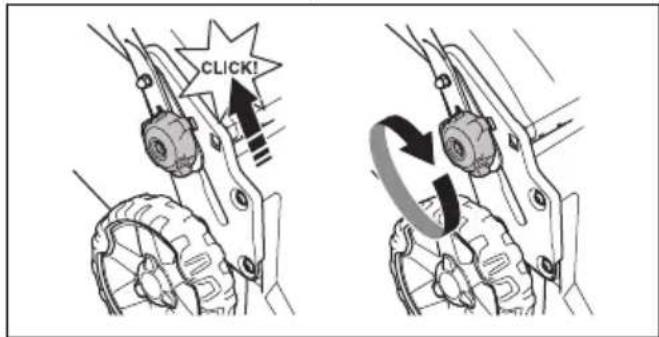
HUSQVARNA LC 247i - Технические данные - 1

text_image CLICK!
  1. Gombíky utiahnite na doraz.

HUSQVARNA LC 247i - Технические данные - 2

natural_image Mechanical assembly diagram showing gear and wheel components with directional arrows (no text or labels)

HUSQVARNA LC 247i - Технические данные - 3

text_image Diagram showing a device panel with four labeled buttons connected to a device casing, indicating a warning or alert mechanism.
LED svetlá Stav batérie
Všetky LED svetlá svietia PlIne nabitá (75 – 100 %)
Svieti LED 1, LED 2, LED 3Batéria je nabitá na 50 % – 75 %
Svieti LED 1, LED 2 Batériaje nabitá na 25 % – 50 %
Svieti LED 1 Batéria je nabitá na 0 % – 25 %.
Bliká LED 1 Batéria je vybitá. Nabite batériu.

Nabíjanie batérie

natural_image Line drawing of a device with a wall-mounted switch and warning symbol, connected to a cable (no text or labels)
natural_image Line drawing of a handheld electronic device with a black arrow pointing to its left side (no text or symbols present)
  1. Ked' svietia všetky indikátory LED na batérii, batéria je plne nabitá. Batériu nabíjajte maximálne 24 hodín.

  2. Pri odpájaní nabíjačky batérií od siet'ovej zásuvky t'ahajte za zástrčku, nie za šnúru.

  3. Vyberte batériu z nabíjačky batérii.

Stav nabíjania batérie

natural_image Diagram showing a car interior with a steering wheel and dashboard, alongside a close-up of the wheel (no text or symbols present)
natural_image Diagram of a mechanical clamp or bracket assembly with a directional arrow indicating motion (no text or symbols present)
natural_image Illustration of two hands operating a tool with a downward arrow indicating motion (no text or symbols)
natural_image Diagram of a car gear shift lever with a close-up inset showing the internal components (no text or symbols)
natural_image Diagram of a mechanical linkage or cable assembly with a directional arrow indicating rotation (no text or symbols present)
natural_image Illustration of hands using a tool to grip a cable or connector, with a downward arrow indicating motion (no text or symbols present)
natural_image Illustration of hands connecting a device to a cable with an arrow indicating rotation (no text or symbols)
text_image Diagram of a car dashboard with labeled buttons and icons, including function keys and navigation controls.
natural_image Interior view of a car dashboard with a circular dial indicator and control buttons (no text or symbols visible)
natural_image Diagram of a mechanical clamp or bracket assembly with directional arrow (no text or symbols)
natural_image Diagram showing a car interior with a steering wheel and dashboard, alongside a close-up of the wheel (no text or symbols present)
natural_image Diagram showing a device with arrows pointing to a central panel, no text or symbols present
natural_image Diagram of a mechanical or electrical component with curved and straight lines, no visible text or symbols
  1. Na ovládacom paneli stlačte tlačidlo ON/OFF (Zap./Vyp.). Všetky diódy LED a symboly na displeji zhasnú.
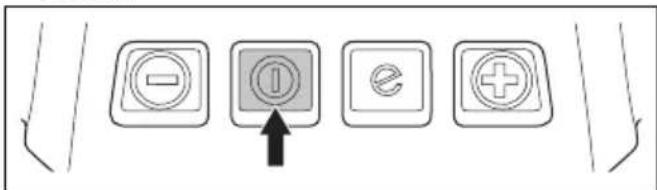
HUSQVARNA LC 247i - Stav nabíjania batérie - 1

text_image Diagram showing four labeled buttons with icons: minus, ⓘ, e, and plus, connected by an arrow pointing to the ⓘ button.
natural_image Technical line drawing of a car gear shift lever with inset showing the internal component (no text or symbols)
natural_image Technical diagram showing a mechanical component being inserted into a gear mechanism (no text or symbols present)
natural_image Diagram of a circular mechanical or electrical component with concentric rings and a central rotating arrow, featuring a wooden block at the bottom (no text or symbols)
natural_image Diagram showing a blade cutting through a curved structure with arrows indicating direction, above grass (no text or symbols)
natural_image Diagram of a circular mechanical or electrical component with a diagonal bar and circular arrow, featuring a wooden block at the base (no text or symbols)
natural_image Mechanical assembly diagram showing two stages of a gear mechanism with no visible text or symbols
  1. Skopte držadlo dopredu.
    HUSQVARNA LC 247i - Stav nabíjania batérie - 2
natural_image Line drawing of a lawn mower with motion arrows indicating clockwise motion (no text or symbols)
text_image Diagram showing two crossed-out recycling bins with a recycling symbol, indicating no waste or non-recyclable disposal.
text_image DANGER KEEP HANDS AND FEET AWAY GARDER MAINS ET PIEDS A DISTANCE

NEVARNOST – Ne približujte rok in nog.

Odgovornost proizvajalca

natural_image Simple line drawing of a mechanical component with a circular body and rectangular plate, no text or symbols present.
natural_image Technical line drawing of a mechanical clamp or bracket assembly (no text or symbols)

- Prepričajte se, da se je izdelek zaustavil. Če se motor ne izklopi v 3 sekundah, mora izdelek preveriti pooblaščeni serviser Husqvarna, ki mora nato nastaviti motorno zavoro.

Preverjanje blokade vžiga

natural_image Diagram of a mechanical clamp or bracket assembly with a directional arrow indicating motion (no text or symbols present)
natural_image Mechanical assembly diagram showing two stages of a gear mechanism with rotational motion arrows (no text or labels)
natural_image Technical line drawing of a mechanical device with an open lid and internal components, showing a directional arrow (no text or symbols)
  1. Spodnji del ogrodja zbiralnika za travo vstavite v utor na dnu zbiralnika za travo.
  2. Vrečo za travo namestite na ogrodje zbiralnika za travo in ga pritrdite z sponkami.
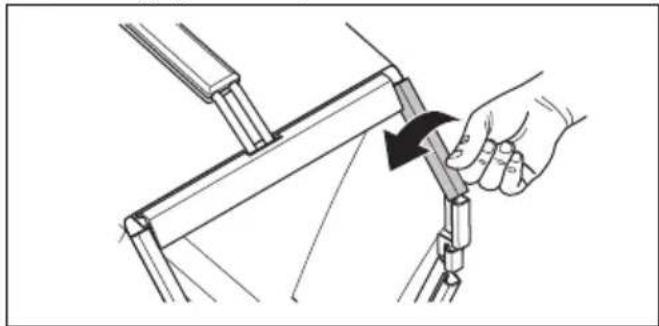
HUSQVARNA LC 247i - Preverjanje blokade vžiga - 1

natural_image Illustration of a hand using a tool to adjust or install a mechanical component, showing a black arrow indicating rotation (no text or symbols present)
natural_image Technical illustration of a mechanical assembly with a box and wheels, showing a directional arrow (no text or symbols)
natural_image Technical illustration of a vehicle's wheel assembly and steering mechanism, showing a key inserted into the lower plate (no text or symbols present)
  1. Rezilo zamenjajte z rezilom za mulčenje, priloženo kompletu za mulčenje. Glejte poglavje Zamenjava rezil na strani 608.

Delovanje

Uvod

HUSQVARNA LC 247i - Uvod - 1

OPOZORILO: Pred uporabo izdelka morate prebrati in razumeti poglavje o varnosti.

Husqvarna Connect

text_image Diagram of a car dashboard with labeled buttons and icons, including battery, battery, and function keys.
natural_image Line drawing of a lawn mower with directional arrows indicating motion (no text or symbols)
natural_image Mechanical assembly diagram showing gear and wheel components with directional arrows (no text or labels)

HUSQVARNA LC 247i - Husqvarna Connect - 1

text_image Diagram showing a device panel with numbered labels and warning indicators, alongside a labeled electronic device.
natural_image Line drawing of a device with a wall-mounted switch and warning symbol, connected to a power adapter (no text or labels)
natural_image Line drawing of a portable electronic device with a black arrow pointing to its top panel (no text or symbols present)
natural_image Diagram showing a car interior with a steering wheel and dashboard, alongside a close-up of the wheel (no text or symbols present)
natural_image Diagram of a mechanical clamp or bracket assembly with a directional arrow indicating motion (no text or symbols present)
  1. Ročico motorne zavore potisnite v smer ročaja.
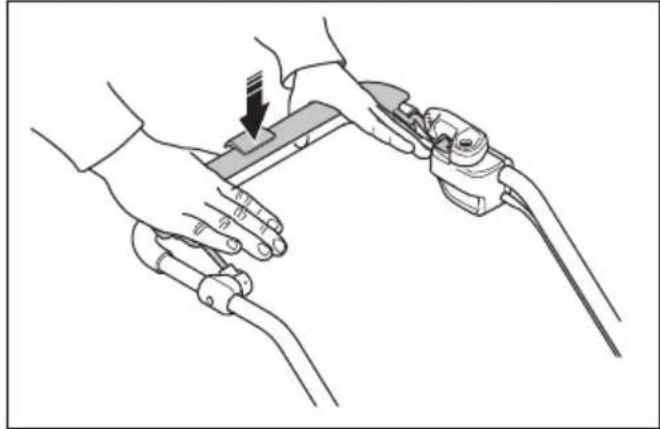
HUSQVARNA LC 247i - Husqvarna Connect - 2

natural_image Illustration of two hands operating a device with a clip, showing a downward arrow (no text or symbols present)

Zagon izdelka (LC 347iVX, LC 353iVX)

natural_image Line drawing of a car interior showing a gear shift and internal components (no text or symbols)
natural_image Diagram of a mechanical device with curved pipes and a lever mechanism, showing a right-hand rule (no text or symbols present)
  1. Ročico motorne zavore potisnite v smer ročaja.
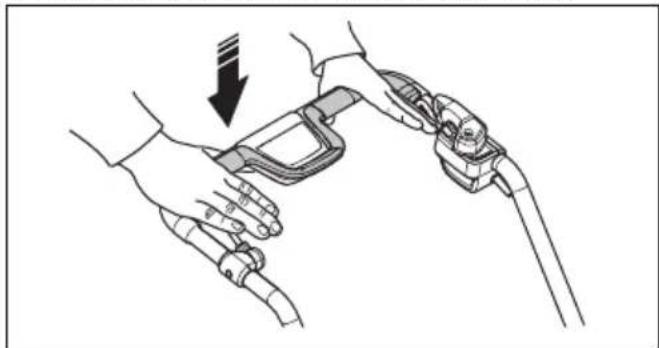
HUSQVARNA LC 247i - Zagon izdelka (LC 347iVX, LC 353iVX) - 1

natural_image Line drawing of two hands holding a device with a black arrow indicating a downward motion (no text or symbols)

Za pogon koles LC 347iVX, LC 353iVX

natural_image Line drawing of two hands holding a device with a cable, showing a right-hand rule for change (no text or symbols present)
text_image Diagram of a car dashboard with labeled buttons and icons, including battery, play, and function buttons.
natural_image Interior view of a car showing the dashboard and steering wheel (no text or symbols visible)
natural_image Diagram of a mechanical clamp or bracket assembly with directional arrow (no text or symbols)
  1. Odprite pokrov baterije in varnostni ključ obrnite v položaj 0.
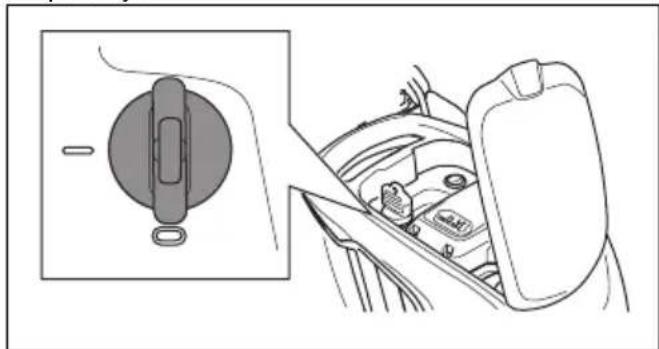
HUSQVARNA LC 247i - Za pogon koles LC 347iVX, LC 353iVX - 1

natural_image Diagram showing a car seatbelt mechanism with a close-up inset of the wheel (no text or symbols)
natural_image Diagram showing a device inside a car intake seat with arrows indicating motion or assembly (no text or symbols present)
natural_image Diagram of a mechanical linkage or cable assembly with an upward arrow indicating motion (no text or symbols present)
text_image Diagram showing four electrical switch symbols: power source, current, voltage, and plus sign with an arrow pointing to the current symbol.
  1. Odprite pokrov baterije in varnostni ključ obrnite v položaj 0.
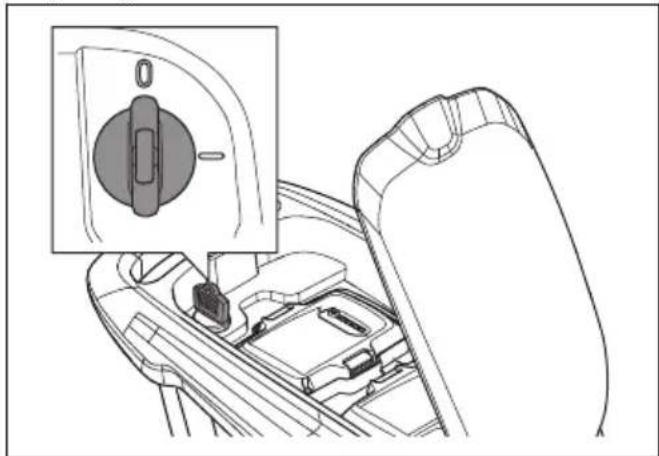
HUSQVARNA LC 247i - Za pogon koles LC 347iVX, LC 353iVX - 2

natural_image Technical line drawing of a car gear shift lever with inset showing the internal component (no text or symbols)
natural_image Technical illustration of a mechanical device with arrows indicating assembly or operation (no text or symbols present)
natural_image Diagram of a circular mechanical or electrical component with concentric rings and a central rotating arrow, featuring a wooden block at the base (no text or symbols)
  1. Odstranite vijak rezila.
  2. Odstranite rezilo.
  3. Preverite, ali sta nosilec in vijak rezila poškodovana.
  4. Preverite motorno gred in se prepričajte, da ni zvita.
  5. Ko pritrdite novo rezilo, usmerite nagnjene strani rezila v smer pokrova rezila.
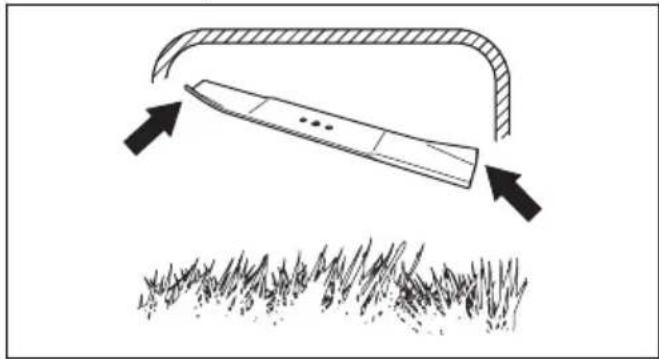
HUSQVARNA LC 247i - Za pogon koles LC 347iVX, LC 353iVX - 3

natural_image Diagram showing a tool interacting with grass under an arch, with arrows indicating direction (no text or symbols)
  1. Prepričajte se, da je rezilo poravnano s središčem motorne gredi.
  2. Rezilo blokirajte z leseno klado. Pritrdite podložko vzmeti in privijte vijak in podložko z zateznim momentom 23–28 Nm.
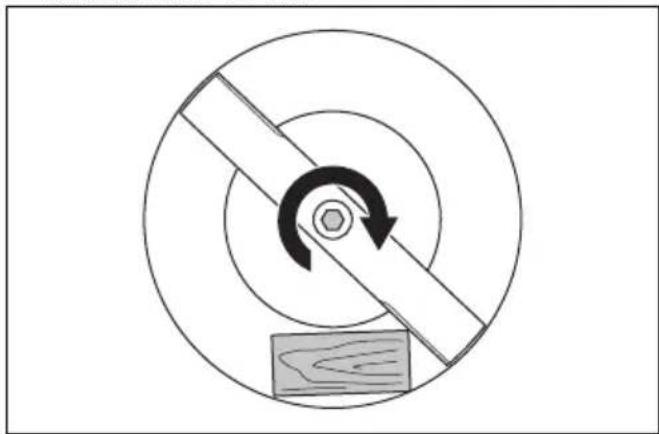
HUSQVARNA LC 247i - Za pogon koles LC 347iVX, LC 353iVX - 4

natural_image Diagram of a mechanical or electrical component with concentric circles and a central rotating arrow, no text or symbols present.
  1. Ročno zavrtite rezilo in se prepričajte, da se prosto obrača.

HUSQVARNA LC 247i - Za pogon koles LC 347iVX, LC 353iVX - 5

natural_image Mechanical assembly diagram showing two stages of a gear mechanism with rotational motion arrows (no text or labels)
natural_image Line drawing of a lawn mower with motion arrows indicating clockwise motion (no text or symbols)
  1. Odstranite zbiralnik za travo.

Prevoz

text_image Diagram showing two waste sorting bins with a recycling symbol and crossed-out bins, indicating no disposal or recycling.

Tehnični podatki

Tehnični podatki

text_image DANGER KEEP HANDS AND FEET AWAY GARDER MAINS ET PIEDS A DISTANCE

OPASNOST – udaljite šake i stopala.

natural_image Simple line drawing of a mechanical component with a circular body and rectangular shaft (no text or symbols)

Provera ručice kočnice motora

Ručica kočnice motora zaustavlja motor. Kada je ručica kočnice motora otpuštena, motor se zaustavlja.

  • Pokrenite proizvod. Pogledajte Rukovanje na stranici 625
  • Otpustite ručicu kočnice motora.

HUSQVARNA LC 247i - Provera ručice kočnice motora - 1

natural_image Technical line drawing of a mechanical clamp or bracket assembly (no text or symbols)

- Uverite se da se proizvod zaustavlja. Ako se motor ne zaustavi u roku od 3 sekunde, neka ovlašćeni Husqvarna servisni agent izvrši podešavanje kočnice motora.

Provera inhibitora pokretanja

Izvršite proveru inhibitora pokretanja kako biste se uverili da sprečava rad motora.

  1. Pritisnite ručicu kočnice motora u smeru upravljača. Inhibitor pokretanja zaustavlja kretanje.
  2. Pritisnite inhibitor pokretanja ka spolja.
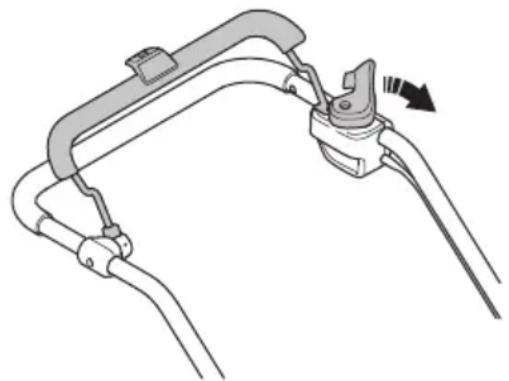
HUSQVARNA LC 247i - Provera inhibitora pokretanja - 1

natural_image Diagram of a mechanical clamp or bracket assembly with no visible text or symbols
natural_image Mechanical assembly diagrams showing gear and cam mechanism (no text or labels)
  1. Stavite ručku u jedan od 2 položaja za visinu.

  2. Pomerite dugmad nagore u smeru ručke dok se ne zaustave i ne čujete klik zvuk.
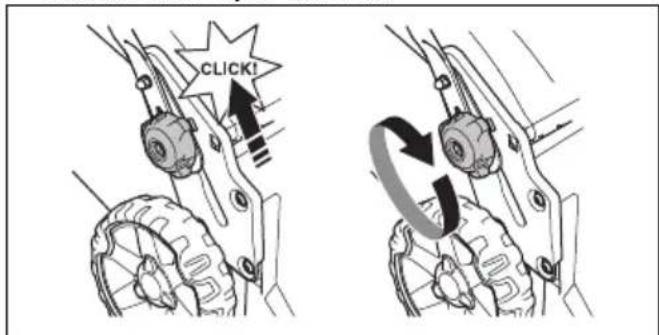
HUSQVARNA LC 247i - Provera inhibitora pokretanja - 2

text_image CLICK!
  1. Potpuno zategnite dugmad.

Sklapanje hvatača trave

natural_image Technical line drawing of a mechanical device with an open lid and internal components, showing a directional arrow (no text or symbols)
  1. Postavite donji deo rama hvatača trave u žleb na dnu hvatača trave.

  2. Pričvrstite okvir vreće za travu spojnicama.
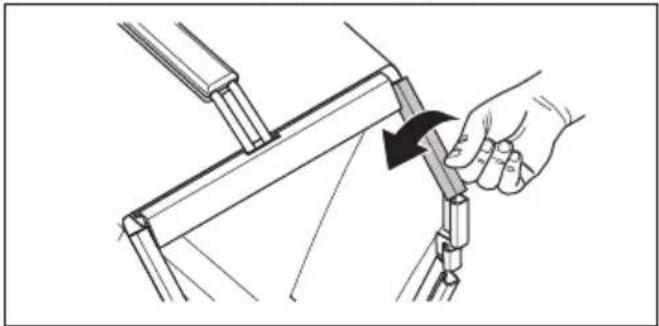
HUSQVARNA LC 247i - Sklapanje hvatača trave - 1

natural_image Illustration of a hand using a tool to adjust or install a mechanical component (no text or symbols visible)
natural_image Technical illustration of a mechanical assembly with a box and wheels, showing a directional arrow (no text or symbols)

Postavljanje zatvarača za usitnjavanje (dodatak)

  1. Podignite zadnji poklopac i uklonite hvatač trave.
  2. Postavite zatvarač za usitnjavanje u kanal za izbacivanje trave.
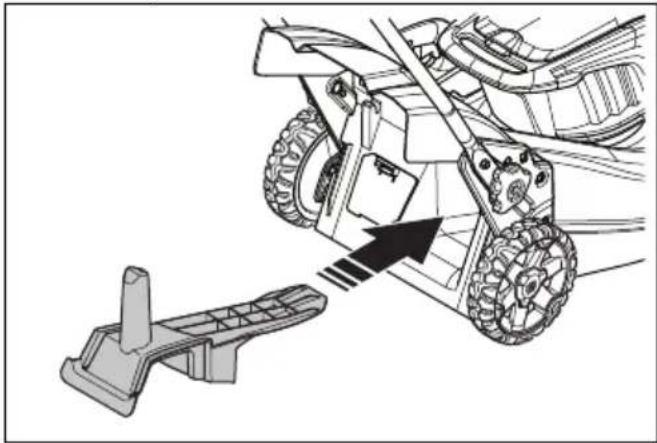
HUSQVARNA LC 247i - Postavljanje zatvarača za usitnjavanje (dodatak) - 1

natural_image Technical illustration of a vehicle's wheel assembly and steering mechanism, showing a bracket and gear assembly (no text or symbols)
  1. Zamenite nož nožem za usitnjavanje iz kompleta za usitnjavanje. Pogledajte Zamena sečiva na stranici 632.

Rukovanje

Uvod

HUSQVARNA LC 247i - Uvod - 1

text_image Diagram of a car dashboard with labeled buttons and icons for battery, battery pack, battery stop, battery flame, battery drop, battery flame, battery flame, battery flame, battery flame, battery flame, battery flame, battery flame, battery flame, battery flame, battery flame, battery flame, battery flame, battery flame, battery flame, battery flame, battery flame, battery flame, battery flame, battery flame, battery flame, battery flame, battery flame, battery flame, battery flame, battery flame, battery flame, battery flame, battery flame, battery flame, battery flame, battery flame, battery flame, battery flame, battery flame
natural_image Line drawing of a lawn mower with directional arrows indicating motion (no text or symbols)
  1. Pomerite dugmad nagore u smeru ručke dok se ne zaustave i ne čujete klik zvuk.
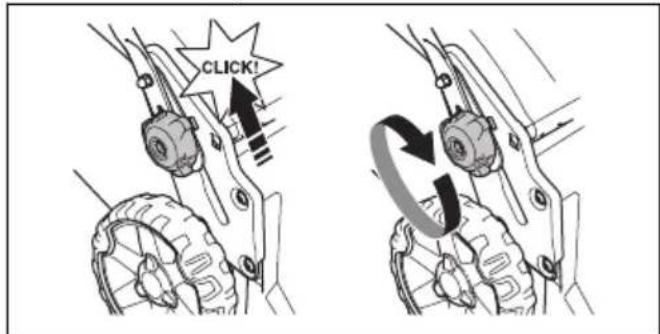
HUSQVARNA LC 247i - Uvod - 2

text_image CLICK!
  1. Potpuno zategnite dugmad.

HUSQVARNA LC 247i - Uvod - 3

UPOZORENJE: Ne koristite proizvod ako ručka nije potpuno otvorena i postavljena u jedan od datih položaja za visinu. Pogledajte Podešavanje ručke na stranici 624.

natural_image Mechanical assembly diagram showing gear and wheel components with directional arrows (no text or labels)

HUSQVARNA LC 247i - Uvod - 4

natural_image Line drawing of a wall-mounted device connected to a terminal block with warning symbol (no text or labels)
natural_image Line drawing of a portable electronic device with a black arrow pointing to its left side (no text or symbols present)
  1. Akumulator je potpuno napunjen kada na njemu svetle sve LED lampice. Punite akumulator najviše 24 sata.
  2. Da biste iskopčali punjač akumulatora iz mrežne utičnice, povucite utikač, a ne kabl za napajanje.
  3. Izvadite akumulator iz punjača akumulatora.

Status punjenja akumulatora

Husqvarna litijum-jonski akumulator se može puniti ili koristiti na svim nivoima punjenja. Akumulator nije oštećen. Potpuno napunjen akumulator neće smanjiti punjenje kada je akumulator ostavljen na punjaču.

LED displej Status punjenja
LED br. 1 trepće 0%-25%
LED br. 1 svetli, LED br. 2 trepće25%-50%
LED br. 1, LED br. 2 svet-le, LED br. 3 trepće50%-75%
LED br. 1, LED br. 2, LED br. 3 svetle, LED br. 4 trepće75%-100%
LED br. 1, LED br. 2, LED br. 3, LED br. 4 svetlePotpuno napunjeno

Pokretanje proizvoda (LC 247i)

  1. Otvorite poklopac akumulatora.
  2. Stavite napunjen akumulator u 1 od odeljaka za akumulator. Za duže vreme rada, stavite drugi napunjen akumulator u drugi odeljak za akumulator.
  3. Okrenite bezbednosni ključ u položaj 1.
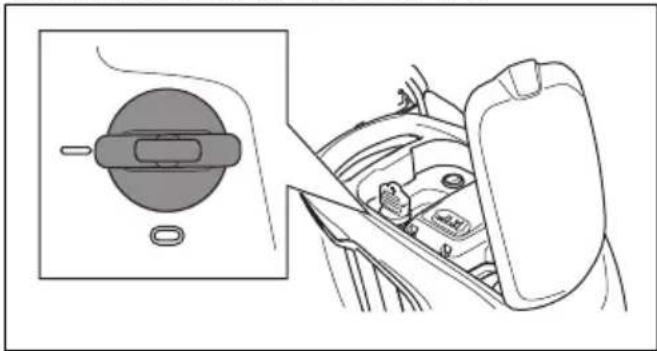
HUSQVARNA LC 247i - Pokretanje proizvoda (LC 247i) - 1

natural_image Diagram showing a car interior with a steering wheel and dashboard, alongside a close-up of the wheel (no text or symbols present)
  1. Stanite iza proizvoda.

  2. Olabavite inhibitor pokretanja.

HUSQVARNA LC 247i - Pokretanje proizvoda (LC 247i) - 2

natural_image Diagram of a car hood with a lever and handle, showing motion direction (no text or symbols)
natural_image Illustration of two hands operating a robotic device with a downward arrow indicating motion (no text or symbols)

Pokretanje proizvoda (LC 347iVX, LC 353iVX)

  1. Otvorite poklopac akumulatora.
  2. Stavite napunjen akumulator u 1 od odeljaka za akumulator. Za duže vreme rada, stavite drugi napunjen akumulator u drugi odeljak za akumulator.
  3. Okrenite bezbednosni ključ u položaj 1.
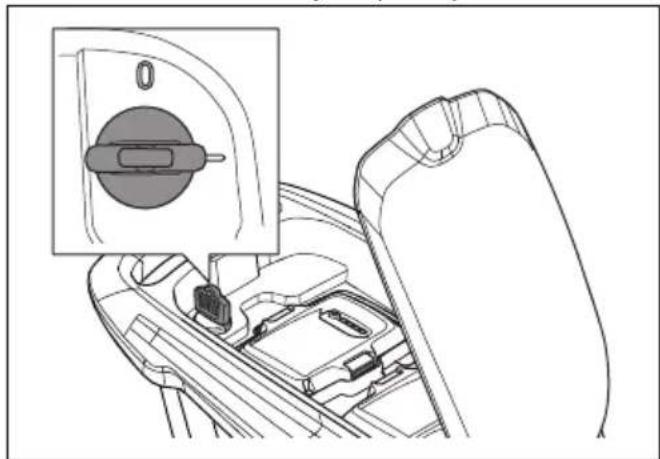
HUSQVARNA LC 247i - Pokretanje proizvoda (LC 347iVX, LC 353iVX) - 1

natural_image Technical line drawing of a car interior showing a gear shift and internal components (no text or symbols)
natural_image Diagram of a mechanical device with curved pipes and a lever mechanism, showing a right-hand rule (no text or symbols)
natural_image Line drawing of a hand holding a medical device with a catheter, showing a downward arrow indicating force or pressure (no text or symbols present)

Korišćenje pogona na točkićima LC 347iVX, LC 353iVX

- Povucite pogonsku osovinu u smeru upravljača da bi se pokrenuo pogon.
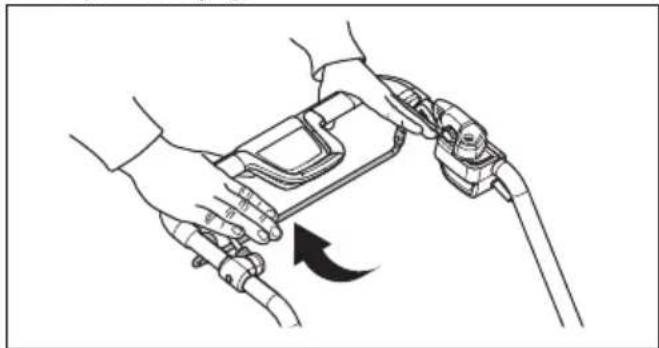
HUSQVARNA LC 247i - Korišćenje pogona na točkićima LC 347iVX, LC 353iVX - 1

natural_image Line drawing of hands holding a device with a cable, showing a curved arrow indicating rotation (no text or symbols)

- Pritisnite + i - na kontrolnoj tabli da biste postavili brzinu pogona u 4 koraka.
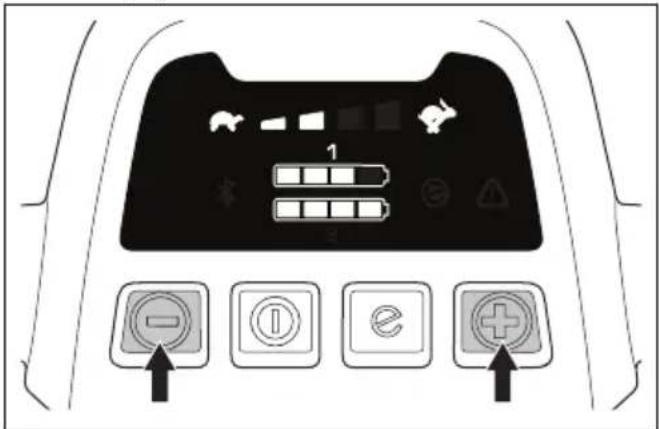
HUSQVARNA LC 247i - Korišćenje pogona na točkićima LC 347iVX, LC 353iVX - 2

text_image Diagram of a car dashboard with labeled buttons and icons, including function keys and navigation controls.

- Otpustite pritiskivač pogona da biste deaktivirali pogon, na primer, kada se nalazite blizu prepreke.

Korišćenje funkcije SavE™ (LC 247i)

Proizvod ima funkciju uštede akumulatora (SavE™) koja pruža duže vreme rada.
- Pritisnite dugme SavE ^TM u položaj 1 da biste pokrenuli funkciju.
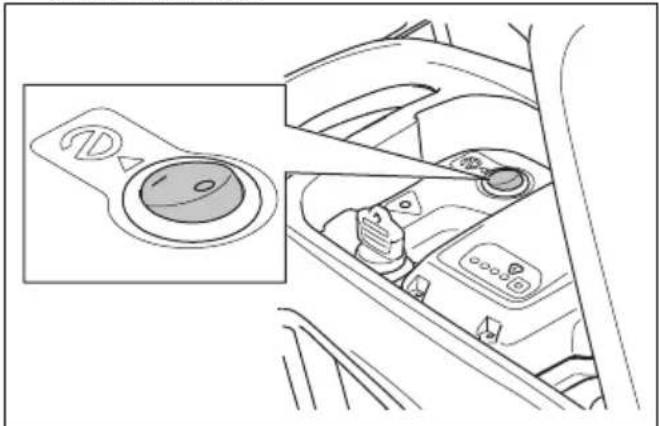
HUSQVARNA LC 247i - Korišćenje funkcije SavE™ (LC 247i) - 1

natural_image Interior view of a car dashboard with a circular dial indicator and control panel (no text or symbols visible)

- Pritisnite dugme SavE ^TM u položaj 0 da biste zaustavili funkciju.

natural_image Diagram of a mechanical clamp or bracket assembly with no visible text or symbols
natural_image Diagram showing a car interior with a circular component and a side view of the dashboard (no text or symbols)
  1. Da biste uklonili akumulator, pritisnite 2 dugmeta za otpuštanje i izvucite akumulator.
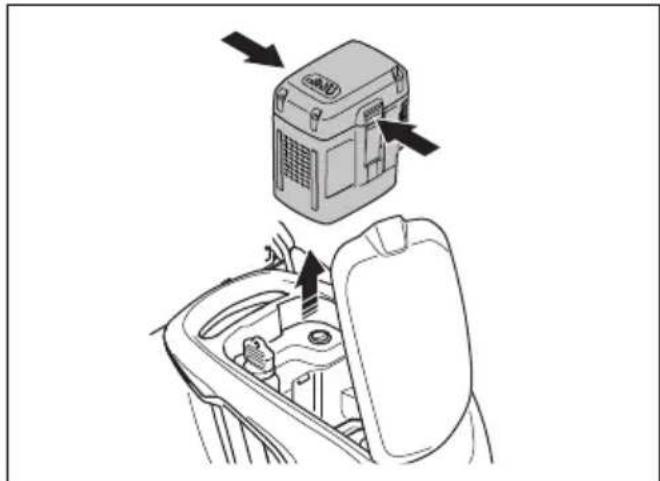
HUSQVARNA LC 247i - Korišćenje funkcije SavE™ (LC 247i) - 2

natural_image Diagram showing a device with directional arrows pointing to a central component, no text or symbols present.
  1. Napunite akumulator ako je prazan. Za više informacija pogledajte Punjenje akumulatora na stranici 627.

Zaustavljanje proizvoda (LC 347iVX, LC 353iVX)

HUSQVARNA LC 247i - Zaustavljanje proizvoda (LC 347iVX, LC 353iVX) - 1

natural_image Diagram of a mechanical linkage or cable assembly with an upward arrow indicating motion (no text or symbols present)
  1. Pritisnite dugme za uključivanje/isključivanje (ON/OFF) na kontrolnoj tabli. Sve LED lampice i simboli nestaju sa displeja.
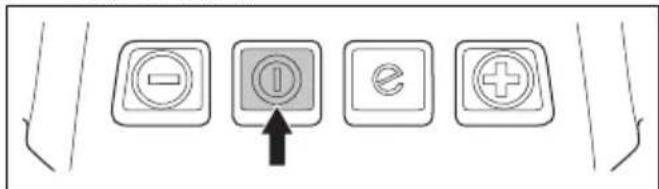
HUSQVARNA LC 247i - Zaustavljanje proizvoda (LC 347iVX, LC 353iVX) - 2

text_image Diagram showing four labeled buttons with icons: minus, ⓘ, ex, and plus, connected by an arrow pointing to the ⓘ.
natural_image Technical line drawing of a car interior showing a gear shift lever and internal components (no text or symbols)
  1. Da biste uklonili akumulator, pritisnite 2 dugmeta za otpuštanje i izvucite akumulator.
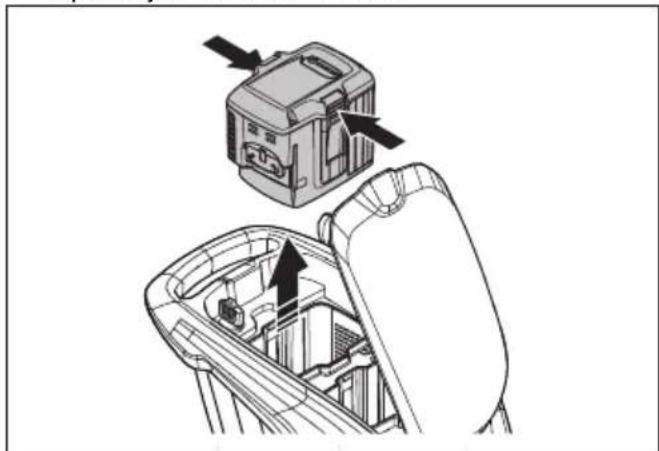
HUSQVARNA LC 247i - Zaustavljanje proizvoda (LC 347iVX, LC 353iVX) - 3

natural_image Technical illustration of a mechanical device with arrows indicating assembly or operation (no text or symbols present)
  1. Napunite akumulator ako je prazan. Za više informacija pogledajte Punjenje akumulatora na stranici 627.

Napomena: Proizvod se automatski zaustavlja ako ne radite sa njim tokom nekoliko minuta. Da biste pokrenuli proizvod, pogledajte Pokretanje proizvoda (LC 347iVX, LC 353iVX) na stranici 628.

Za dobre rezultate

  • Uvek koristite oštro sečivo. Tupo sečivo daje neujednačeni rezultat i pokošena površina trave postaje žuta. Oštro sečivo takođe koristi manje energije nego tupo sečivo.
  • Nemojte kositi više od 13 dužine trave. Prvo kosite sa visokom visinom košenja. Pregledajte rezultat i spustite visinu košenja na prihvatljivi nivo. Ako je trava zaista visoka, vozite polako i kosite dvaput ako bude potrebno.

  • Kosite u različitim smerovima svaki put da biste izbegli pruge na travnjaku.

  • Poklopac košenja mora da bude čist. Naslage trave i prljavštine s unutarnje strane poklopca košenja mogu da umanje rezultate košenja. Pogledajte Čišćenje proizvoda na stranici 632

Košenje trave bez hvatača trave i zatvarača za usitnjavanje

  • Podignite zadnji poklopac i uklonite hvatač trave.
  • Ako su postavljeni zatvarač za usitnjavanje i nož za usitnjavanje, uklonite ih.
  • Zatvorite zadnji poklopac pre rada proizvodom.

Kad koristite proizvod, pokošena trava se izbacuje ispod zadnjeg poklopca.

Održavanje

Uvod

HUSQVARNA LC 247i - Uvod - 1

natural_image Diagram of a circular mechanical or electrical component with concentric rings and a central rotating arrow, no text or symbols present.
  1. Uklonite vijak sečiva.
  2. Uklonite nož.
  3. Pregledajte nosač sečiva i vijak sečiva kako biste videli postoje li oštećenja.
  4. Pregledajte osovinu motora kako biste se uverili da nije savijena.
  5. Kada postavite novo sečivo, usmerite savijene krajeve sečiva u smeru poklopca košenja.
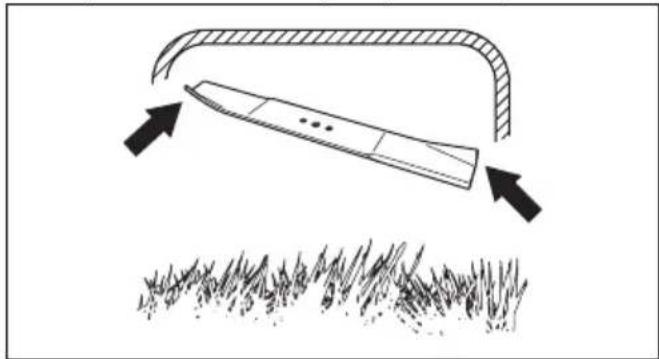
HUSQVARNA LC 247i - Uvod - 2

natural_image Diagram showing a blade under an arch with arrows indicating direction, above grass (no text or symbols)
  1. Pobrinite se da je sečivo poravnato sa sredinom osovine motora.
  2. Blokirajte sečivo pomoću komada drveta. Postavite opružnu podlošku i zategnite vijak i podlošku na moment pritezanja od 23 do 28 Nm.
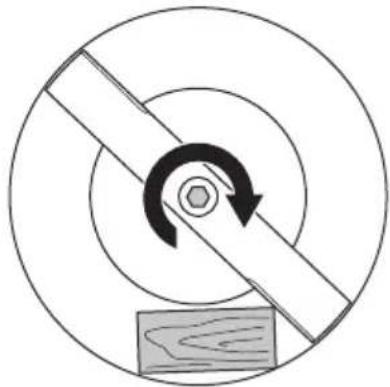
HUSQVARNA LC 247i - Uvod - 3

natural_image Diagram of a mechanical gear or pulley system with rotational arrow and base, no text or symbols present
  1. Povucite sečivo rukom da biste proverili da li se slobodno okreće.

HUSQVARNA LC 247i - Uvod - 4

natural_image Mechanical assembly diagram showing a rotating component with a curved arrow indicating rotation (no text or symbols present)

HUSQVARNA LC 247i - Uvod - 5

natural_image Mechanical assembly diagram showing a gear and motor components (no text or labels)
  1. Sklopite ručku unapred.

HUSQVARNA LC 247i - Uvod - 6

natural_image Line drawing of a lawn mower with motion arrows indicating cycle (no text or symbols)
  1. Uklonite hvatač trave.

Transport

- Zahtevi u pogledu transporta opasnih materija primenjuju se na sadržane litijum-jonske akumulatore.

  • Za komercijalni transport moraju se poštovati posebni zahtevi koji su navedeni na pakovanju i nalepnicama.
  • Pobrinite se da se pridržavate propisa za transport opasnih materija prilikom pripreme proizvoda za transport. Lokalni propisi se mogu primenjivati.
  • Uvek uklonite akumulator pre transporta.
  • Stavite traku na konektore akumulatora i uverite se da se akumulator ne može pomerati tokom transporta.
    • Fiksirajte proizvod tokom transporta.

Skladištenje

  • Pre skladištenja treba sačekati da se proizvod ohladi.
  • Uvek uklonite akumulator pre skladištenja.
  • Kako bi se sprečili nesrećni slučajevi, uverite se da akumulator nije povezan na proizvod tokom skladištenja.
  • Držite punjač akumulatora u zatvorenom i suvom prostoru.
  • Držite akumulator i punjač akumulatora u suvom prostoru gde nema vlage ili mraza.
  • Iskopčajte akumulator sa punjača akumulatora tokom skladištenja.
  • Ne čuvajte akumulator na mestima gde može doći do statičkog pražnjenja. Ne čuvajte akumulator u metalnoj kutiji.
  • Čuvajte proizvod na mestu gde je temperatura između -10 °C i 40 °C.
  • Čuvajte akumulator na mestu gde je temperatura između 5 °C i 25 °C i van direktne sunčeve svetlosti.
  • Čuvajte punjač akumulatora na mestu gde je temperatura između 5 °C i 45 °C i van direktne sunčeve svetlosti.

  • Pobrinite se da je akumulator napunjen na 30% - 50% pre skladištenja na duži vremenski period.

  • Čuvajte proizvod, akumulator i punjač akumulatora na zaključanom mestu izvan domašaja dece i neovlašćenih osoba.
  • Očistite proizvod i uverite se da je hvatač trave prazan.
  • Obavljajte poslove održavanja opisane u ovom korisničkom uputstvu. Pogledajte Održavanje na stranici 631
  • Obavite kompletan servis pre nego što uskladištite proizvod na duži vremenski period.

Odlaganje

Simboli na proizvodu ili njegovom pakovanju ukazuju na to da se ovim proizvodom ne može rukovati kao otpadom iz domaćinstva. On se mora odneti u odgovarajući reciklažni pogon za obnavljanje električne i elektronske opreme.

text_image Diagram showing two crossed recycling bins with a recycling symbol, indicating no waste or reuse.

Tehnički podaci

Tehnički podaci

LC 247i LC 347iVX LC353iVX
Motor košenja
Tip motora BLDC (bez četkica)36 VBLDC (bez četkica)36 VBLDC (bez četkica)36 V
Brzina motora – SavE, o/min 2600/min 2600/min 2600/min
Brzina motora – nominalna, o/min 3000/min 3000/min 3000/min
Brzina motora – veliko opterećenje, o/min 3500/min 3500/min 3500/min
Izlazna snaga motora – maks. kW 0,96 0,96 1,05
Izlazna snaga motora – nominalna, kW 0,75 0,75 0,9
Pogonski motor
Izlazna snaga motora – nominalna, kW Nije dostupno 0,25 0,25
Brzina samostalnog hoda, km/h Nije dostupno3,0-4,5 3,0-4,5
Nivoi podešavanja brzine Nije dostupno 4 4
Težina
Masa bez kese (bez akumulatora), kg 24,5 2628
Masa sa kesom (sa 2 x BLi30), kg 30,5 32,0 34,5
Akumulator
Vrsta akumulatora Husqvarna serija akumulatora
Vreme rada akumulatora
Vreme rada akumulatora, min, (slobodan rad) sa aktiviranom funkcijom SavE, sa jednim Husqvarna 7,7 Ah akumulatorom (BLi30).62 62 46
Vreme rada akumulatora, min, (slobodan rad) sa aktiviranim standardnim režimom, sa jednim Husqvarna 7,7 Ah akumulatorom (BLi30).43 43 28
Emisija buke 98
Nivo zvučne snage, mereno dB (A) 94 94 97
Nivo zvučne snage, garantovano LWA dB (A) 95 95 98
Nivoi zvuka 99
Nivo zvučnog pritiska na uho rukovaoca, dB (A)82 82 86
Nivoi vibracije 100
Ručka, m/s20,42 0,42 2,64
Oprema za rezanje
Visina košenja, mm 20-75 mm 20-75 mm 20-75 mm5 mm
Širina košenja, cm47 47 53
Sečivo StandardCollect 5905934-10Collect 5905934-10Collect 5940757-10
Oprema za sečivoMulch 5907010-10Mulch 5907010-10Mulch 5950072-10
Kapacitet hvatača trave, litara55 55 60
Podaci o radio frekvenciji za Bluetooth®LC 247i LC 347iVX LC 353iVX
Opseg frekvencije, GHz Nije dostupno2,4-2,4835 2,4-2,4835
Izlazna snaga, maks. dBm Nije dostupno4 4
Odobreni akumulatori Tip Kapacitet akumula-tora, AhNapon, V Težina, lb/kg
BLi20 Litijum-jonski 4,0 36 2,6/1,2
BLi30 Litijum-jonski 7,7 36 4,2/1,9
Odobreni punjači za navedene akumulatore, BLi Ulazni na- pon, V Frekvencija, Hz Snaga, W
QC80 100–240 50–60 80
40-C80100–240 50–6068,8
QC250100–240 50–60250

Deklaracija o usaglašenosti

EU deklaracija o usaglašenosti

Mi, Husqvarna AB, SE-561 82 Huskvarna, Švedska, tel: +46-36-146500, izjavljujemo pod punom odgovornošću da je proizvod:

Opis Kosačica za travu
Marka Husqvarna
Tip/model LC 247i
Identifikacija Serijski brojevi od 2021 i nadalje
text_image DANGER KEEP HANDS AND FEET AWAY GARDER MAINS ET PIEDS A DISTANCE
natural_image Simple line drawing of a mechanical component with no text or symbols
natural_image Diagram of a mechanical clamp or bracket assembly with no visible text or symbols
natural_image Diagram of a mechanical clamp or bracket assembly with directional arrow indicating motion (no text or symbols)
natural_image Mechanical assembly diagrams showing gear and cam mechanism (no text or labels)
natural_image Line drawing of a mechanical device with an open lid and internal structure, showing a directional arrow (no text or symbols)
natural_image Illustration of a hand using a tool to adjust or install a mechanical component, showing a black arrow indicating rotation (no text or symbols present)
natural_image Diagram showing a mechanical device with a box and gear assembly, no text or symbols present

Montera mulchingpluggen (tillbehör)

natural_image Technical line drawing of a vehicle's front wheel assembly with a foot pushpin and guide mechanism (no text or symbols)
text_image Diagram of a car dashboard with labeled buttons and icons, including battery, switch, and function buttons.
natural_image Line drawing of a lawn mower with motion arrows indicating clockwise motion (no text or symbols)
natural_image Mechanical assembly diagram showing gear and wheel components with directional arrows (no text or labels)

HUSQVARNA LC 247i - Montera mulchingpluggen (tillbehör) - 1

natural_image Line drawing of a device with a warning symbol and a vertical panel connected to its right arm (no text or labels present)
natural_image Line drawing of a portable electronic device with a black arrow pointing to its left side (no text or symbols present)
natural_image Line drawing of a car interior showing the steering wheel and dashboard (no text or symbols)
  1. Stå bakom produkten.
  2. Lossa startspärren.

HUSQVARNA LC 247i - Montera mulchingpluggen (tillbehör) - 2

natural_image Diagram of a mechanical clamp or bracket assembly with no visible text or symbols
natural_image Line drawing of two hands operating a tool with a clip, showing a downward arrow indicating motion (no text or symbols present)

Starta produkten (LC 347iVX, LC 353iVX)

natural_image Line drawing of a car interior showing a switch and battery component, with no visible text or symbols.
natural_image Mechanical assembly diagram showing a lever mechanism with a curved handle and directional arrow (no text or symbols)
natural_image Illustration of hands holding a tool with a cable, showing a downward force (no text or symbols present)
natural_image Line drawing of hands holding a device with a cable, showing a right-hand rule for change (no text or symbols present)
text_image Diagram of a car dashboard with labeled buttons and icons, including navigation keys and function buttons
natural_image Interior view of a car dashboard with steering wheel and control panel (no text or symbols visible)
natural_image Diagram of a mechanical clamp or bracket assembly with directional arrow (no text or symbols)
natural_image Diagram showing a car interior with a door panel and a side view of the dashboard (no text or symbols)
natural_image Diagram showing a device inside a car intake frame with directional arrows indicating movement (no text or symbols present)
natural_image Diagram of a mechanical linkage or cable assembly with an upward arrow indicating motion (no text or symbols present)
text_image Diagram showing four labeled buttons with icons: minus, circled, minus, and plus, each with an arrow pointing to it.
natural_image Technical line drawing of a car gear shift lever with inset showing the internal component (no text or symbols)
natural_image Diagram showing a device being inserted into a mechanical component, with arrows indicating the process (no text or symbols present)
natural_image Diagram of a circular mechanical or electrical component with concentric rings and a central rotating arrow, featuring a wooden block at the base (no text or symbols)
natural_image Diagram showing a blade cutting through a curved channel with arrows indicating direction, above a grassy field (no text or symbols)
natural_image Diagram of a mechanical or electrical component with concentric circles and a central rotating arrow, no text or symbols present.
natural_image Mechanical assembly diagram showing two stages of a gear mechanism with no visible text or symbols
  1. Vik handtaget framåt.

HUSQVARNA LC 247i - Starta produkten (LC 347iVX, LC 353iVX) - 1

natural_image Line drawing of a lawn mower with directional arrows indicating motion (no text or symbols)
text_image Diagram showing two waste sorting bins with crossed-out recycling symbols, indicating no disposal or recycling.
text_image DANGER KEEP HANDS AND FEET AWAY GARDER MAINS ET PIEDS A DISTANCE
natural_image Simple line drawing of a mechanical component with a circular body and rectangular slot, no text or symbols present.
natural_image Diagram of a mechanical clamp or bracket assembly with no visible text or symbols
natural_image Diagram of a mechanical clamp or bracket assembly with a directional arrow indicating motion (no text or symbols present)
natural_image Mechanical assembly diagram showing two stages of a gear mechanism with no visible text or symbols
natural_image Line drawing of a device with an open lid and internal structure, showing a directional arrow (no text or symbols)
natural_image Illustration of a hand using a tool to adjust or install a mechanical component, showing a black arrow indicating rotation (no text or symbols present)
natural_image Diagram showing a mechanical device connected to a box, with an arrow indicating motion or force direction (no text or symbols present)
natural_image Technical line drawing of a vehicle's wheel assembly with a foot pushpin and guide mechanism (no text or symbols)
text_image Diagram of a car dashboard with control buttons and indicator lights, including battery, battery flame, and function icons.
natural_image Line drawing of a lawn mower with motion arrows indicating clockwise motion (no text or symbols)
natural_image Mechanical assembly diagram showing gear and wheel components with directional arrows (no text or labels)

HUSQVARNA LC 247i - Starta produkten (LC 347iVX, LC 353iVX) - 2

natural_image Line drawing of a device with a warning symbol and cable, no text or labels present
natural_image Line drawing of a portable electronic device with a black arrow pointing to its left side (no text or symbols present)
natural_image Diagram showing a car interior with a steering wheel and dashboard, alongside a close-up of the wheel (no text or symbols present)
natural_image Diagram of a mechanical clamp or bracket assembly with no visible text or symbols
natural_image Illustration of two hands operating a manual tool with a clip, showing a downward force (no text or symbols present)
natural_image Line drawing of a car interior showing a switch and battery component (no text or symbols)
natural_image Mechanical assembly diagram showing a lever mechanism with a curved handle and directional arrow (no text or symbols)
natural_image Illustration of a hand holding a medical device with a catheter, showing a downward arrow indicating force or pressure (no text or symbols present)
natural_image Line drawing of hands holding a device with a cable, showing a right-hand rule for change (no text or symbols present)
text_image Diagram of a car dashboard with labeled buttons and icons, including navigation controls and function keys
natural_image Interior view of a car showing the dashboard and steering wheel (no text or symbols visible)
text_image Diagram of a car front panel with labeled buttons and icons, including labels A and B.
natural_image Diagram of a mechanical clamp or bracket assembly with no visible text or symbols
natural_image Diagram showing a device panel and its internal components, no text or symbols present
natural_image Diagram showing a device inside a car intake canal with arrows indicating flow or movement (no text or symbols present)
natural_image Diagram of a mechanical linkage or cable assembly with an arrow indicating direction (no text or symbols present)
text_image Diagram showing four labeled buttons with icons: minus, I, e, and plus, connected by an arrow pointing to the I button.
natural_image Technical line drawing of a car interior showing a gear shift lever and internal components (no text or symbols)
natural_image Technical diagram showing a mechanical component being inserted into a chair frame, with arrows indicating direction (no text or symbols present)
natural_image Diagram of a circular mechanical or electrical component with concentric rings and a central rotating arrow, no text or symbols present.
natural_image Diagram showing a blade under load with arrows indicating force direction, above grass (no text or symbols)
natural_image Diagram of a mechanical or electrical component with concentric circles and a central rotating shaft, no text or symbols present.
natural_image Mechanical assembly diagram showing two stages of a gear mechanism with no visible text or symbols
natural_image Line drawing of a lawn mower with directional arrows indicating motion (no text or symbols)
text_image Diagram showing two crossed bins with recycling symbols, indicating no waste or non-recyclable disposal.

Tescilli ticari markalar

text_image DANGER KEEP HANDS AND FEET AWAY GARDER MAINS ET PIEDS A DISTANCE
natural_image Simple line drawing of a mechanical component with a circular body and rectangular shaft (no text or symbols)
natural_image Diagram of a mechanical clamp or bracket assembly with no visible text or symbols
natural_image Mechanical assembly diagram showing two stages of a gear mechanism with rotational motion arrows (no text or labels)
natural_image Technical line drawing of a mechanical device with an open lid and internal components, showing a directional arrow (no text or symbols)
natural_image Illustration of a hand using a tool to adjust or install a mechanical component (no text or symbols visible)
natural_image Technical illustration of a mechanical assembly with a box and wheels, showing motion direction (no text or symbols)
natural_image Technical illustration of a vehicle's wheel assembly with a foot pushpin and guide mechanism (no text or symbols)
text_image Diagram of a car dashboard with labeled buttons and icons, including battery, navigation, and function icons.
natural_image Line drawing of a lawn mower with motion arrows indicating blade movement (no text or symbols)
natural_image Mechanical assembly diagram showing gear and wheel components with directional arrows (no text or labels)

HUSQVARNA LC 247i - Tescilli ticari markalar - 1

text_image Diagram showing a device with four labeled buttons connected to a device, one pointing to the right button.
natural_image Line drawing of a device with a warning symbol and a connected cable (no text or labels)
natural_image Line drawing of a portable electronic device with a black arrow pointing to its top panel (no text or symbols present)
natural_image Diagram showing a car interior with a steering wheel and dashboard, alongside a close-up of the wheel (no text or symbols)
natural_image Diagram of a mechanical clamp or bracket assembly with directional arrow indicating motion (no text or symbols)
natural_image Line drawing of two hands operating a tool with a clip, showing a downward force (no text or symbols)
natural_image Diagram of a car interior showing a gear shift and internal components (no text or symbols)
natural_image Diagram of a mechanical linkage or cable assembly with a directional arrow indicating motion (no text or symbols present)
natural_image Illustration of hands holding a handheld device with a downward arrow indicating motion (no text or symbols)
natural_image Line drawing of hands holding a device with a cable, showing a curved arrow indicating rotation (no text or symbols)
text_image Diagram of a car dashboard with labeled buttons and icons, including navigation controls and function keys
natural_image Interior view of a car showing the dashboard and seatbelt with no visible text or symbols
natural_image Diagram of a mechanical clamp or bracket assembly with no visible text or symbols
natural_image Diagram showing a car interior with a steering wheel and dashboard, no text or symbols present
natural_image Diagram showing a device mounted on a car intake frame with directional arrows indicating motion (no text or symbols present)
natural_image Diagram of a mechanical or electrical component with a curved pipe and connector, showing an upward arrow (no text or symbols present)
text_image Diagram showing four labeled buttons with icons: minus, circled, minus, and plus, each pointing to a button with an arrow.
natural_image Technical line drawing of a car gear shift lever with inset showing the internal component (no text or symbols)
natural_image Technical diagram showing a device being inserted into a mechanical component (no text or symbols visible)
natural_image Diagram of a circular mechanical or electrical component with concentric rings and a central rotating arrow, featuring a wooden block at the base (no text or symbols)
natural_image Diagram showing a blade under an arch with arrows indicating direction, above grass (no text or symbols)
natural_image Diagram of a mechanical or electrical component with concentric circles and a rotating arrow, no text or symbols present.
natural_image Mechanical assembly diagram showing two stages of a gear mechanism with no visible text or symbols
natural_image Line drawing of a lawn mower with motion arrows indicating clockwise motion (no text or symbols)
text_image Diagram showing two crossed-out recycling bins with a recycling symbol and no text labels
text_image DANGER KEEP HANDS AND FEET AWAY GARDER MAINS ET PIEDS A DISTANCE

危险-手脚切勿靠近。

产品责任

natural_image Simple line drawing of a mechanical component with a circular body and rectangular slot, no text or symbols present.

检查电机制动手柄

natural_image Diagram of a mechanical clamp or bracket assembly with no visible text or symbols
natural_image Diagram of a mechanical clamp or bracket assembly with a directional arrow indicating motion (no text or symbols present)
natural_image Mechanical assembly diagram showing two stages of a gear mechanism with no visible text or symbols
natural_image Technical line drawing of a mechanical device with an open lid and internal components, showing a directional arrow (no text or symbols)
natural_image Illustration of a hand using a tool to adjust or install a mechanical component, showing a black arrow indicating rotation (no text or symbols present)
natural_image Diagram showing a mechanical device with a box and wheels, connected to a motor (no text or symbols present)

装配地面覆盖插件(附件)

natural_image Technical illustration of a truck's wheel assembly with a mechanical component below (no text or symbols)
text_image Diagram of a car dashboard with labeled buttons and icons for battery, navigation, and function controls

将产品设置在工作位置

  1. 将手柄折起到竖直位置。

HUSQVARNA LC 247i - 将产品设置在工作位置 - 1

natural_image Line drawing of a lawn mower with directional arrows indicating motion (no text or symbols)
natural_image Mechanical assembly diagram showing gear and wheel components with directional arrows (no text or labels)

HUSQVARNA LC 247i - 将产品设置在工作位置 - 2

natural_image Line drawing of a device with a warning symbol and connection point (no text or labels)
natural_image Line drawing of a portable electronic device with a black arrow pointing to its left side (no text or symbols present)
natural_image Diagram showing a car interior with a steering wheel and dashboard, alongside a close-up of the wheel (no text or symbols)
  1. 站在本产品后面。
  2. 松开启动禁止器。

HUSQVARNA LC 247i - 将产品设置在工作位置 - 3

natural_image Diagram of a mechanical clamp or bracket assembly with directional arrows indicating movement (no text or symbols)
  1. 朝手柄杆方向推动电机制动手柄。

HUSQVARNA LC 247i - 将产品设置在工作位置 - 4

natural_image Illustration of hands operating a mechanical device with a downward arrow indicating motion (no text or symbols)
natural_image Technical line drawing of a car gear shift lever with an inset showing the internal component (no text or symbols)
natural_image Diagram of a mechanical device with a lever and handle, showing a curved arm and lever mechanism (no text or symbols)
  1. 朝手柄杆方向推动电机制动手柄。

HUSQVARNA LC 247i - 将产品设置在工作位置 - 5

natural_image Illustration of hands holding a cable with a plug, showing a downward force (no text or symbols)
natural_image Line drawing of hands holding a device with a cable, showing a right-hand rule for change (no text or symbols present)
text_image Diagram of a car dashboard with labeled buttons and icons, including battery, battery pack, and function buttons.
natural_image Interior view of a car showing the dashboard and seatbelt with a magnified inset (no text or symbols visible)
natural_image Diagram of a mechanical clamp or bracket assembly with directional arrow (no text or symbols)
  1. 打开电池盖,将安全钥匙转至 0。

HUSQVARNA LC 247i - 将产品设置在工作位置 - 6

natural_image Diagram showing a car seatbelt switch and its internal components (no text or labels)
natural_image Diagram showing a device inside a car intake frame with arrows indicating motion (no text or symbols)
natural_image Diagram of a mechanical or electrical component with curved and straight pipes, no visible text or symbols
text_image Diagram showing four labeled buttons (circle, square, plus, and letter) with an arrow pointing to the square icon, likely indicating a function or operation.
  1. 打开电池盖,将安全钥匙转至 0。

HUSQVARNA LC 247i - 将产品设置在工作位置 - 7

natural_image Technical line drawing of a car interior showing a gear shift lever and internal components (no text or symbols)
natural_image Technical diagram showing a mechanical device with arrows indicating assembly or operation (no text or symbols present)
natural_image Diagram of a circular mechanical or electrical component with concentric rings and a central rotating arrow, featuring a wooden block at the base (no text or symbols)
natural_image Diagram showing a blade under an arch with arrows indicating direction, above grass (no text or symbols)
natural_image Diagram of a mechanical or electrical component with concentric circles and a central rotating arrow, no text or symbols present.
  1. 用手拉住刀片旋转,确保刀片转动自如。

HUSQVARNA LC 247i - 将产品设置在工作位置 - 8

natural_image Mechanical assembly diagram showing two stages of a gear or cam mechanism with no visible text or symbols
  1. 向前折叠手柄。

HUSQVARNA LC 247i - 将产品设置在工作位置 - 9

natural_image Line drawing of a lawn mower with directional arrows indicating motion (no text or symbols)
  1. 拆下集草袋。

运输

text_image Diagram showing two crossed recycling bins with a recycling symbol and a battery icon, indicating waste management or disposal.

技术参数

技术参数

Table of contents Click a title to access it
Manual assistant
Powered by Anthropic
Waiting for your message
Product information

Brand : HUSQVARNA

Model : LC 247i

Category : Electric mower