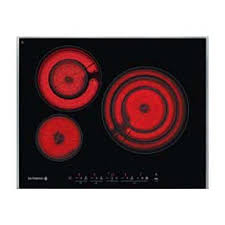
DTV 724 X - Hob DE DIETRICH - Free user manual and instructions
Find the device manual for free DTV 724 X DE DIETRICH in PDF.


| Product type | Ceramic hob |
| Brand | DE DIETRICH |
| Model | DTV 724 X |
| Overall dimensions (W x D) | 65 x 52 cm |
| Cutout dimensions (W x D) | 56 x 49 cm |
| Approximate weight | 10 kg |
| Electrical supply | 230 V / 400 V, 16 A |
| Number of cooking zones | 4 |
| Boost function | Yes, full power on one zone |
| Independent timer | Yes, up to 99 minutes |
| Child safety | Yes, control lock |
| Clean Lock | Yes, temporary lock for cleaning |
| Memo function | Yes, memorises a cooking cycle (up to 5 stages) |
| Residual heat indicator | Yes, « H » display |
| Spill protection | Yes, automatic shut-off |
| Automatic safety shut-off | Yes, after 1 to 10 hours depending on power level |
| Cleaning | Special ceramic hob cleaner, scraper, white vinegar |
| Spare parts | Certified genuine parts, available from customer service |
| Reparability | Repairs by approved qualified professional |
Frequently Asked Questions - DTV 724 X DE DIETRICH
User questions about DTV 724 X DE DIETRICH
0 question about this device. Answer the ones you know or ask your own.
Ask a new question about this device
Download the instructions for your Hob in PDF format for free! Find your manual DTV 724 X - DE DIETRICH and take your electronic device back in hand. On this page are published all the documents necessary for the use of your device. DTV 724 X by DE DIETRICH.
USER MANUAL DTV 724 X DE DIETRICH
Chere Clients, Cher Client
- RELATIONS CONSOMMATEURS
You have just acquired a DE DIETRICH hob and we would like to thank you.
In order to offer you an excellent product, our research teams have created this new generation of appliances for you. Their quality, appearance, functions and technological advances make them exceptional products, showcases of our unique know-how.
In the line of DE DIETRICH products, you will also find a wide range of ovens, microwaves, ventilation hoods, hoods, dishwashers, and refrigerators, all of which can be integrated and all of which can be coordinated with your new DE DIETRICH hob.
Of course, in our ongoing desire to ensure our products satisfy your needs in the best possible way, our customer service department is always at your disposal at our site.
www.dedietrich-electromenager.com
DE DIETRICH
Setting New Values
We are constantly improving our products; for this reason we reserve the right to make all modifications to their technical, functional or aesthetic characteristics, originating from technical developments.

Warning
This product is not foreseen for sale in the USA
Before installing and using your appliance please read this installation and use the guide carefully - it will help you familiarise yourself very rapidly with its operation.
CONTENTS
EN
1 /INSTALLING YOUR APPLIANCE
- Choice of location 19
Build-in 19 - Connection 20
2 / USING YOUR APPLIANCE
Cookware for vitroceramics 21
Description of your top 22
Description of the controls 24
- Switching on 24
- Adjusting the power level 24
- Choosing a cooking area 24
Cooking zone with extension 24
Cooking zone with Boost 24
- Independent timer 24
- Adjusting the timers 25
- Using the "child safety" function 25
Clean lock 25
- Using the Memo touch control 26
- Safety features when operating 27
3 / MAINTAINING YOUR APPLIANCE
Caring for your appliance 28
- Maintaining your appliance 28
4 / SPECIAL MESSAGES, INCIDENTS
- When using for the first time 29
- When switching on 29
During use 29
5 / COOKING CHART
- Cooking chart per dish 30
1 / INSTALLING YOUR APPLIANCE
EN
As shown in this logo, the materials used to package this appliance are recyclable. Recycle them and play a role in protecting the environment by depositing them in local authority containers provided for this purpose.
Appliance recycling organised by your manufacturer will thus be undertaken in optimum conditions, in accordance with European directive 2002/96/CE relating to electrical and electronic equipment waste. Contact your local authority or retailer for how to have used appliances collected or collection points.
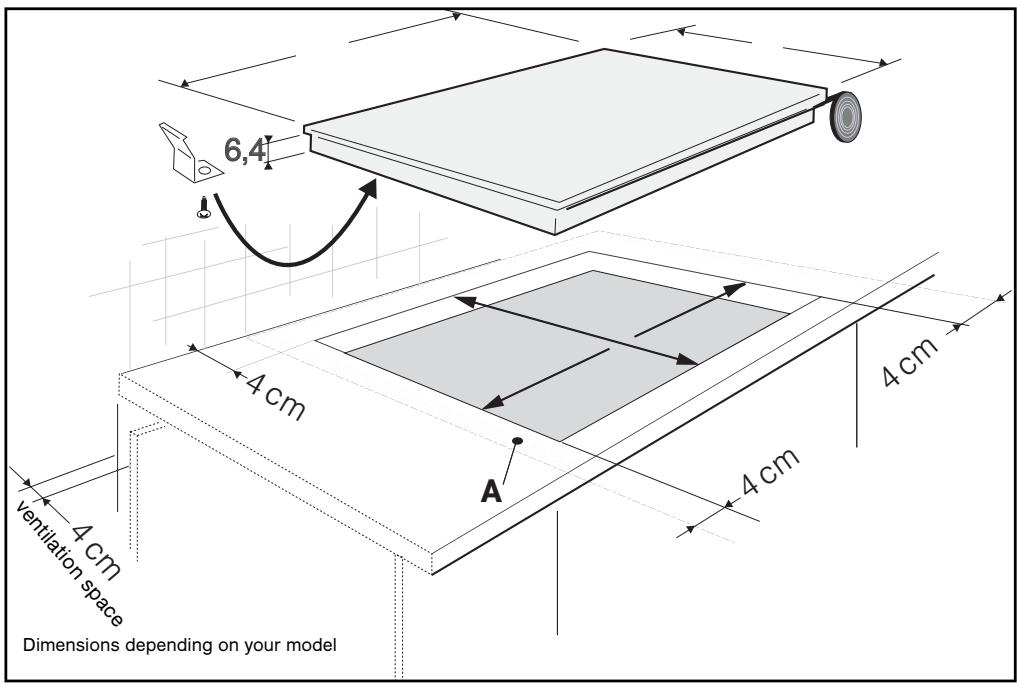
Installation
Your appliance should be positioned so that the mains switch is accessible.
The distance between the edge of your appliance and the wall or partition must be at least 4 cm.
Your appliance can be easily integrated above a cabinet, an oven or a build-in household appliance. (minimum distance 10mm).
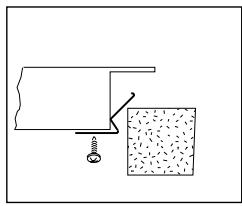
Stick the foam gasket to the bottom of your appliance. This will allow you to achieve an airtight seal with the worktop.
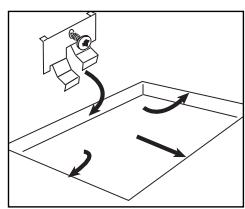
Attach the clips to the hob. (Depending on the model.)
EN
1 / INSTALLING YOUR APPLIANCE
Connection
These hobs must be connected to the mains using a socket in compliance with publication CEI 60083 or an all-pole circuit-breaker device in compliance with the installation rules in force.
When power is first supplied to your hob, or after an extended power cut, an indicator light will appear on the control panel. This information will disappear after 30 seconds.
- Hook-up of 220-240V ~
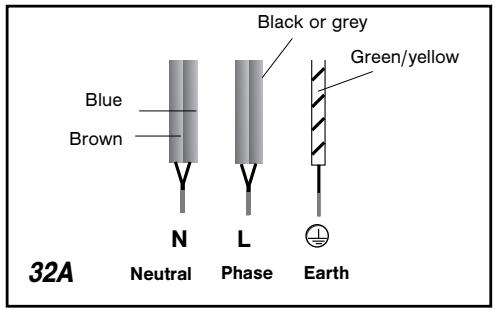
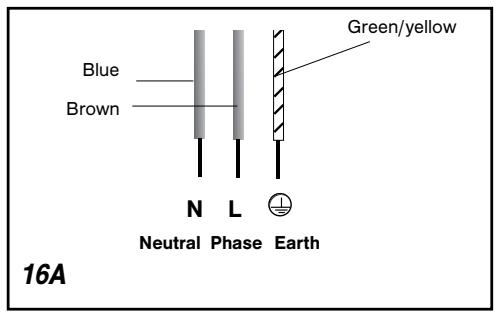
- Hook-up of 2x230V 2L+2N ~ - 16A
Separate the wires before connection.
- Hook-up of 400V 2N ~ - 16A
Separate the 2 phase wires (L1 and L2) before connection.
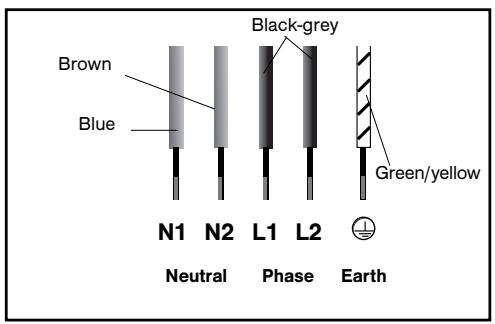
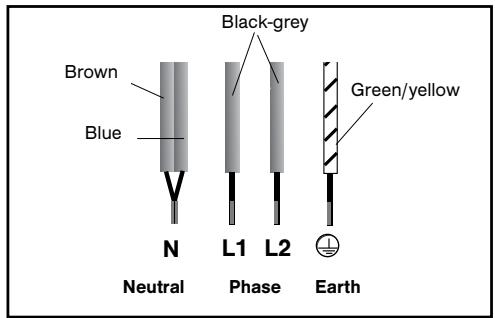
- Hook-up of 400V 3~ - 16A
With hook-up of 400 V 2N three phase, verify that the neutral wire is properly connected.
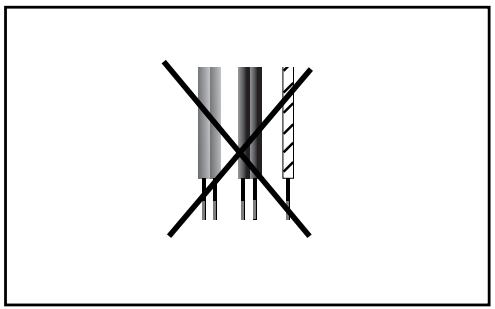

Warning
If the cable is damaged it must be replaced by the manufacturer, its after-sales service or a person with a similar qualification to prevent danger.
2 / USING YOUR APPLIANCE
EN
We have designed this cooking hob for use by private individuals in their homes.
These cooking hobs are intended exclusively for cooking beverages and foodstuffs and do not contain any asbestos-based materials.
COOKWARE FOR VITROCERAMICS
Cookware
It must be designed for electric cooking.
It must have a flat bottom.
Preferably use cookware made of:
- Stainless steel with a thick or "sandwich" three-metal bottom.
- Aluminium with a thick smooth bottom.
- Enamelled steel
Use
A higher setting is required if:
- there are large quantities
- the cookware has no lid
- a glass or ceramic pan is used.
A lower setting is required if:
- cooking food which has a tendency to burn easily (start with a lower setting - the setting can be increased if necessary).
- a spill occurs (remove the lid or remove the pan, then reduce the setting).
- Energy saving:
To finish the cooking, set at position 0, leaving the cookware in position to use the accumulated heat (this will save energy).
Use a lid as often as possible to reduce heat loss by evaporation.
Automatic regulation of rings
The rings are regulated automatically; they switch on and off to maintain the selected power level. The temperature thus remains uniform and appropriate for cooking your food.
The regulation frequency varies according to the selected power level.

Tip
Use cookware of an appropriate size.
The diameter of the bottom of the cook-
ware must be the same as or greater than the printed zone.
Do not leave empty cookware on a cooking zone.
Do not leave cookware containing hot oil or fat unsupervised on a cooking zone.
EN 2 / USING YOUR APPLIANCE
Description of your top
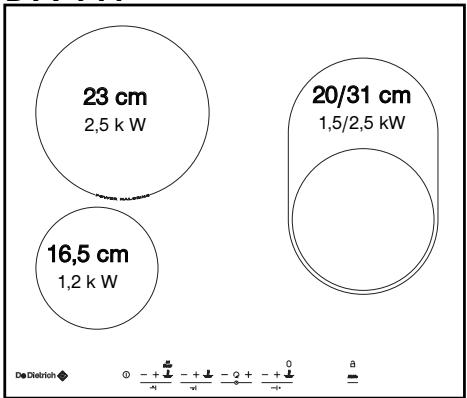
DTV 714
Total dimensions (L x l) -
DTV714 B/X:65×52
Recess cut-out (L' x l')
DTV714 B/X:56x49
DTV 715
Total dimensions (L x l) -
DTV715 B/X:65×52
DTV715 J:63×51
Recess cut-out (L' × L'')
DTV715 B/X:56×49
DTV715 J : 56 x 49
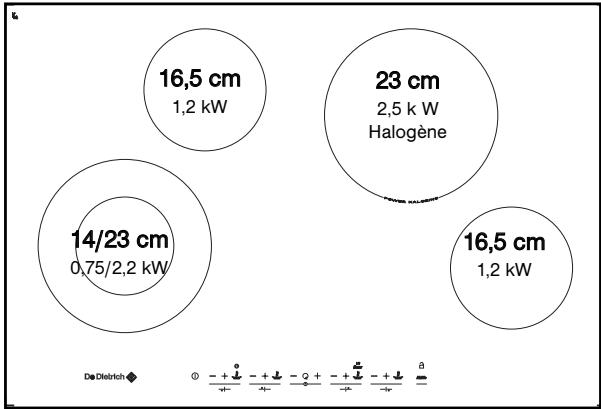
DTV718
Total dimensions (L x l) -
2 / USING YOUR APPLIANCE
Total dimensions (L x l) -
DTV716 X:65×52
Recess cut-out (L' x l')
DTV716 X:56x49
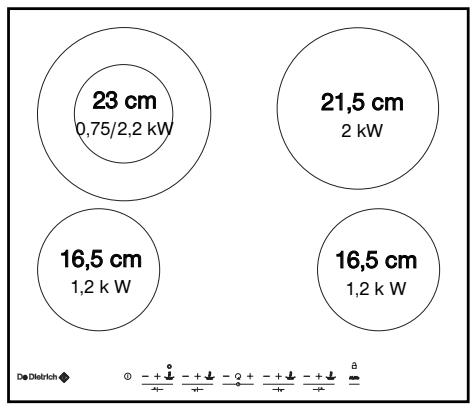
DTV 716
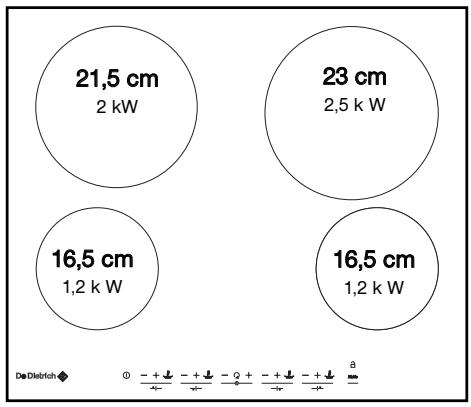
DTV720
Total dimensions (L x l) -
DT1720 X : 65 x 52
DTI720 J:63x51
Recess cut-out (L' × L')
DT1720 X:56x49
DT1720 J:56 x 49
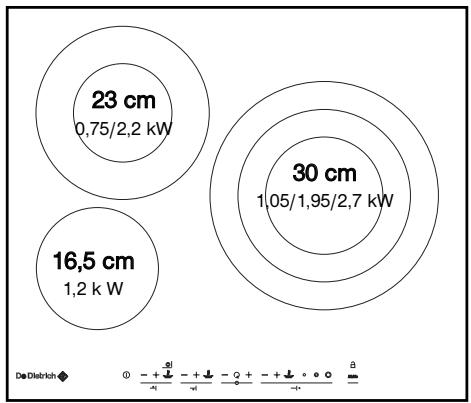
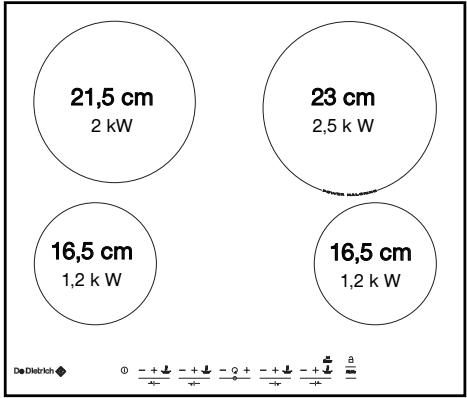
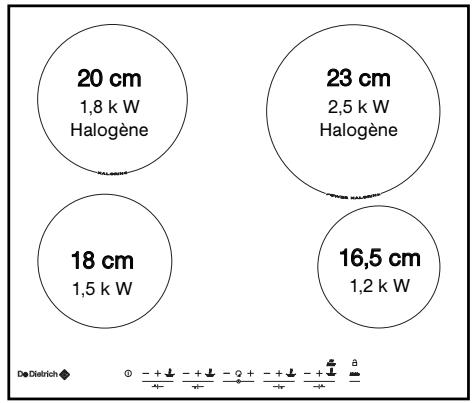
DTV 724
Total dimensions (L x l) -
DTV724 X:65×52
Recess cut-out (L' × L')
DTV724 X:56x49
DTV 725
Total dimensions (L× l) -
DTV725 B/X:65x52
Recess cut-out (L' x l')
DTV725 B/X:56x49
EN 2 / USING YOUR APPLIANCE
DESCRIPTION OF CONTROLS
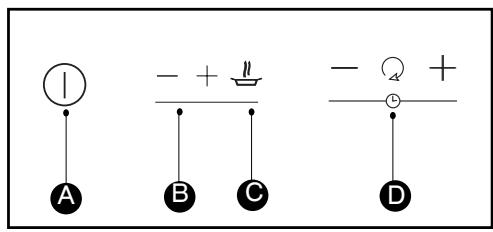
A Hob on/off control.
B Power - + touch controls.
C Direct access touch control
D Timer touch control.
TURING IT ON
Press the hob's start/stop touch control. If you do not select a power level, the cooking zone will automatically switch off.
17 power levels 1, 1., 2, 2. ...to 9 are available. Press the + or - power touch control for the zone you want to use.
Press the touch control ; you will alternately get the direct settings 4 or 9.
TURING OFF A COOKING ZONE
Press the power touch control " - or simulataneously the touch controls " - and " + of the zone you want to turn off; the power display will disappear to confirm the cooking zone has been turned off.
COOKING ZONE WITH BOOST
Press the touch control Boost; you will get full power on the burner.
COOKING ZONES WITH EXTENSION
The cooling zone(s) with extension can be used only when the main zone is on.
In order to use them:
1 - Turn on the heating zone
2 - Select a power level
3 - Press the extension touch control:
For double zones
Use the touch control , a beep will confirm your selection, alternatively the power and an "E" will be displayed.
For triple zones
Use the touch controls 0 for 1,2,or 3 zones.
Dashes light up corresponding to your request and confirm your choice. You can readjust the power setting whenever you want.
To change them
Double cooking zones
Press the touch control , a beep confirms your action and the "E" display disappears; only the central zone is on.
Triple cooking zones
Press the touch control or corresponding to the number of zones you want to use.
The number of lit dashes changes to confirm your action
INDEPENDENT TIMER
- This function allows you to time an event, without cooking.
1-Stop table only

2 - Keep your finger on the touch control until you see displayed..."0".
3-Set the duration up to 99 minutes To stop the timer, press simultaneously the - and +^ of the timer.
Tip You cannot use the independent timer if the cooking zones are on.
2 / USING YOUR APPLIANCE
EN
SETTING THE TIMERS
There is a timer available for each cooking zone to set the cooking time.

By pressing the button repeatedly you can highlight and select the cooking zone to which you wish to apply the timer. The LED displays only for the zones that are on.
To use the timer:
1 - Turn on the cooking zone
2 - set the power level.
3 - Position the rotating symbol on this cooking zone.
4- Set the duration by pressing "+" or "-". When the cooking is finished the zone switches off, the timer starts flashing "0" and a beep sounds to let you know.
5 - Press the touch control "+" pr "- on the timer to stop the beeping.
- To change the timer settings:
1 - Position the rotating symbol by highlighting the cooking zone you want to change.
2 - Press the touch control "+" or "- of the timer.
To stop the timer:
1 - Position the rotating symbol by highlighting the cooking zone you want to change.
2 - Press for several seconds, simultaneously, the touch controls "+" and "- of the timer, or the touch control "- of the timer until 0.
- To set another timer
Set the rotating display to another zone. The display will light up, set the duration.

Warning
When more than one timer is working, the highlight display indicates the zone whose timer can be changed or turned off.
- USING THE "CHILD SAFETY" FUNCTION
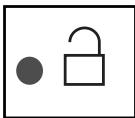
This function allows you to lock your hob when it is shut off or when it is cooking.
To lock:
- Press on the touch control until you hear a beep and the indicator lights up. The indicator will go out automatically after a few moments.
To unlock:
- Press on the touch control until you hear a double beep and the indicator goes out.
Note:
- In locked mode, any action will produce a key symbol on the display. You must unlock your hob before using it.
- If you activate the lock while cooking, the stop display will be prioritised on the lock.
CLEAN LOCK
This function allows you to temporarily lock your hob while cleaning.
To activate Clean lock:
- Your cooking hob must be turned off.
- Press on the touch control briefly ; you will hear a beep and the indicator will start flashing.
- After a predefined time, the lock will automatically disengage. A double beep sounds and the indicator goes out.

Tip
Remember to unlock your hob before reusing it (see section "usiing the child safety function").
EN 2 / USING YOUR APPLIANCE
- USING THE MEMO BUTTON
This touch control allows you to programme the full cooking cycle for a particular preparation. Only one programmed cycle can be carried out at a time.
Operation:
- From 1 to 5 successive cooking phases can be saved in the same "MEMO" cooking cycle. If you exceed 5 phases, a triple beep sounds, and it stops recording.
-
The duration of each phase must be at least 10 seconds for it to be entered into the programme.
-
The timer can only be used during the last phase of programmed cooking.
- To programme a cooking cycle:
1 - Place your cookware on the cooking zone.
2 - Turn on the hob.
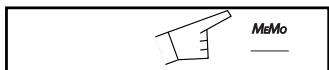
3 - Press briefly the touch control MEMO
4- Set the power level for the first cycle for the burner you have chosen, for which you want to programme a cooking cycle.
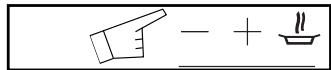
5 - Set the zones with extension if necessary; adding or removing extensions will not be taken into account in the other cycles.
6 - Continue cooking; each new setting will be recorded as well as the cooking time.
7 - The dot keeps flashing so long as you keep programming. Confirm and stop the programming by pressing the stop touch control ①
An indicator ()^ in the timer zone shows the burner you have programmed.

Warning
When using a zone with extension,
you can choose the zone only when setting the first cycle.
Using a programmed cycle:
1 - Place your cookware on the cooking zone.
2 - Turn on the hob.
3 - Press briefly the touch control Memo
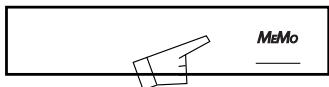
A fixed dot will appear beside the Memo touch control at the burner concerned; the recorded power levels are displayed.
The recorded zone with extension will start automatically.
The power and timer displays become steady; cooking starts.
An indicator in the timer zone shows the burner you have programmed.
NOTE:
- When the cooking finishes, the display shows 0 and a beep sounds about every 5 seconds for a little while.
To cancel these indications, press any touch control for the cooking zone MEMO. - When using MEMo you can return at any time to normal operation (except MEMo) by pressing the touch controls “-, “+” “preselections” to change your setting, or “stop” to stop your cooking.
- Replace an existing cooking cycle program:
1 - Place your cookware on the cooking zone.
2 - Turn on the hob.
3 - Press and hold the touch control Memo
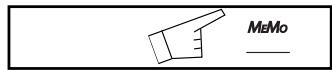
4 Set the power level for the first cycle for the burner you have chosen, for which you want to programme a cooking cycle.
Each new power level setting is then saved as well as how long it will run for.
The dot flashes while you are programming.
Confirm and stop the programming by pressing the stop touch control
2 / USING YOUR APPLIANCE
EN
Safety while using
- Residual heat
After a long cooking period, the zone used can remain hot for several minutes. An "H" flashes during this period. Do not put your hand on the zone.
Warning
Do not touch the cooking zones, you will risk getting burned.
After a prolonged power cut another indicator display may appear; it will go out after any key is pressed. However, the cooking zones may still remain hot.
- Protection against spills
In case of spillage, or of a metallic object or wet cloth placed on the touch controls, the hob turns itself off, the displays light up and a beep sounds. Clean the hob or remove the object, then begin cooking again.
- Auto-Stop system
If you forget cooking is in progress, after a predefined time, this safety function will automatically turn off your hob (from 1 to 10 hours depending on the power setting). "A" displays and a beep sounds for about 2 minutes. Press on the main selector to delete this information. A double beep confirms your setting.
Electrical danger
Ensure that the power cable of a connected electrical appliance near the hob is not in contact with the cooking zones.
If a crack appears in the surface of the glass disconnect your appliance immediately to prevent a risk of electric shock. To do this, remove the fuses or use the circuit breaker.
Do not use your hob until you have replaced the glass worktop.

Warning
Do not stare at the halogen lamps in the cooking zones.
EN
3 / MAINTAINING YOUR APPLIANCE
Preserve your appliance
The vitroceramic glass surface is highly resistant, but not unbreakable. Here are some recommendations for increasing its lifetime:
- Avoid banging or clattering the cookware.
- Avoid putting heating covers on the hob. A suction effect may damage the vitroceramic surface.
- Do not use cookware with bottoms that are rough or dented.
- Do not use your cooking hob as a work surface.
- Never use aluminium foil or paper or aluminium scrubber to clean it. The aluminium melts and damages the top.
-
Never use a steam cleaner to clean your hob.
-
Never directly reheat a tin can. It will have a risk of exploding.
Aesthetic faults, as a result of mistreatment of your hob and which do not entail a lack of function, are not covered by our guarantee.
And for the safety of your kitchen, do not place cleaning items or inflammable objects or products in the kitchen furniture underneath your cooking hob.
Maintaining your appliance
| TYPES OF STAINS/SPOTS | USE | WHAT TO DO? | |
| Light. | Cleaning sponges | Thoroughly moisten the zone to be cleaned with hot water, then wipe off. | |
| Accumulation of baked-on stains/dirt. Sugar spills, melted plastics. | Cleaning sponges Scraper for glass. | Thoroughly moisten the zone to be cleaned with hot water. Use a scraper for glass to remove the large bits, follow with the rough side of a disinfectant sponge, and then wipe off. | |
| Rings and hard water residue. | White vinegar. | Apply warm white vinegar to the stain, let stand, then wipe with a soft cloth. | |
| Shiny metal colourings. Weekly maintenance. | Special vitroceramic glass product. | Apply a cleaning agent for vitroceramic glass (preferable one with silicon for its protective properties) to the surface. | |
| cream | cleaning sponge special for delicate crockery | powder | abrasive sponge |
4 / SPECIAL MESSAGES, DIFFICULTIES
EN
- On first use
| POSSIBLE CAUSES: | WHAT SHOULD YOU DO? | |
| A special lamp appears. | Working normally. | Nothing, the light disappears after 30 seconds. |
| Your installation blows a fuse. | The electrical connection of your hob is incorrect. | Check that it is set up properly. See the “Electrical Connection” section. |
| Only one side works. |
- On switching on
| YOU OBSERVE THAT: | POSSIBLE CAUSES: | WHAT SHOULD YOU DO? |
| The hob does not operate and the indicator lights on the control panel do not light up. | The machine is not connected to the power source. The power source or connection is defective. | Inspect the electrical circuit breaker and fuses. |
| The hob does not function, the information is displayed. | The hob is locked | See chapter on using the child safety system |
While in use
| YOU OBSERVE THAT: | POSSIBLE CAUSES: | WHAT SHOULD YOU DO? |
| The hob has stopped operating and is beeping approximately every 10 seconds and a ● or F7 is displayed. | There was an overflow or an object is in contact with the control panel. | Clean the hob or remove the object, then begin cooking again. |
| A series of small ● or F7 is displayed. | The electronic circuits have overheated. | See “Inserting” section. |

In case of breakage, cracks or even light fissures in the vitroceramic glass, take out the fuses or turn off the circuit breaker for your hob to avoid the risk of electrical shock.
Contact the After-Sales Service Department.
COOKING CHART
| FRY BRING TO A BOIL | COOK/BROWN RETURN TO BOILING BOILING LIGHT BROTHS | COOK/SIMMER | KEEP WARM | ||
| 9 8 | 7 6 | 5 4 3 | 2 1 | ||
| SOUPS | BROTHS | ● | |||
| THICK SOUPS | |||||
| FISH | COURT BOULLON | ● | |||
| FROZEN FOODS | ● | ||||
| SAUCE | THICK, FLOUR-BASED | ||||
| BUTTER-BASED WITH EGGS (BEARNAISE, HOLLANDAISE) PREPARED SAUCES | ● | ||||
| 9 8 | 7 6 | 5 4 3 | 2 1 | ||
| VEGETABLES | ENDIVES, SPINACH | ● | |||
| DRIED BEANS | ● | ||||
| BOILED POTATOES | ● | ||||
| GOLDEN BROWN POTATOES | ● | ||||
| SAUTEED POTATOES | ● | ||||
| DEFROSTING VEGETABLES | ● | ||||
| MEAT | MEAT, NOT TOO THICK | ● | |||
| STEAKS, IN SKILLET | ● | ||||
| GRILLED MEATS (CAST IRON GRILL) | ● | ||||
| FRYING | FROZEN FRENCH FRIES | ● | |||
| FRESH FRENCH FRIES | ● | ||||
| 9 8 | 7 6 | 5 4 3 | 2 1 | ||
| MISCELLA- NEOUS | PRESSURE COOKER (ONCE IT STARTS WHISTLING) | ● | |||
| COMPOTES | |||||
| CRÈPES | ● | ||||
| CRÈME ANGLAISE | ● | ||||
| MELTED CHOCOLATE | |||||
| JAMS | ● | ||||
| MILK | ● | ||||
| EGGS, FRIED | ● | ||||
| PASTA | ● | ||||
| JARS OF BABY FOOD (Double BOILER) | ● | ||||
| MEAT STEW | ● | ||||
| SPANISH RICE | ● | ||||
| RICE PUDDING | |||||
De Dietrich

Distributed by MEA (A Divisions of Hagemeyer Brands Australia)
FOR AUSTRALIAN CUSTOMERS ONLY
PRODUCT WARRANTY
- Subject to the "Statement of Standard Warranty Conditions" this product is covered by the following Warranty.
TWO (2) YEARS WARRANTY from date of purchase, covering all parts and labour.
- The appliance is warranted under normal single family domestic installation and use, as set out in the user manual, against manufacturing defects for the Warranty periods shown above.
- Should service be required under this Warranty, the purchaser should contact an approved DE DIETRICH Service Provider during their normal business hours.
- At no time does DE DIETRICH have liability for any freight or transportation costs or for any damage during transit or for any consequence of failure of this appliance outside of the normal service area, unless such limitation of liability is prohibited by statute.
- This Warranty excludes replacement of parts required due to normal wear and tear including light globes.
- This Warranty only applies, provided the appliance has been used in accordance with the manufacturer's instructions and provided an accident, misuse, neglect or abuse has not damaged the appliance.
- None of the above Warranties purport to exclude, restrict or modify either the application or the exercise of a right conferred by any applicable Statute.
- Please complete the details below, which should be retained for future reference along with your proof of purchase:
Date of Purchase:
Model No:
Serial No:
Notice to Victorian Customers from the Victorian Plumbing Industry Commission.
This product must be installed by a licensed person as required by the Victorian Building Act 1993. Only a licensed person will give you a Compliance Certificate, showing that the work complies with all the relevant standards. Only a licensed person will have insurance protecting their workmanship for 6 years. Make sure you use a licensed person to install this product and ask for your Compliance Certificate.
STATEMENT OF STANDARD WARRANTY CONDITIONS
- The Warranty only applies provided that the appliance has been used in accordance with the manufacturer's instructions and provided that the appliance has not been damaged by an accident, misuse, neglect or abuse of any person other than the manufacturer or MEA or from faulty installation, mis-adjustment or tampering by unauthorised persons.
- When a service inspection reveals the alleged fault or faults are caused by incorrect operation, contrary to the instruction manual, and otherwise the appliance is in good order and working condition, the purchaser shall be liable for a service fee charged by MEA or one of its Service Providers.
- If the appliance is used in Commercial Applications or for Rental purposes, a separate warranty of Twelve (12) months covering all parts with Three (3) months on the labour will apply.
- Subject to the provisions of any applicable statute this Warranty applies to the original retail purchaser only and is not transferable.
- Subject to the provisions of any applicable statute, at no time does MEA have liability for freight, transport or travel costs outside normal service areas.
- None of the above Warranties purport to exclude, restrict or modify either the application or the exercise of a right conferred by any applicable statute.
- Subject to any Warranties implied by statute, at no time will MEA or its Service Providers be liable for any economic loss consequent upon the failure of the appliance.
- This Warranty is only valid for De Dietrich major appliances imported and distributed by MEA, purchased and used in Australia.
Para as zonas duplas

- - RELATIONS CONSOMMATEURS
- CONTENTS
- EN
- /INSTALLING YOUR APPLIANCE
- / USING YOUR APPLIANCE
- / MAINTAINING YOUR APPLIANCE
- / SPECIAL MESSAGES, INCIDENTS
- / COOKING CHART
- / INSTALLING YOUR APPLIANCE
- Installation
- Connection
- Warning
- COOKWARE FOR VITROCERAMICS
- Cookware
- Use
- - Energy saving:
- Automatic regulation of rings
- Tip
- EN 2 / USING YOUR APPLIANCE
- Description of your top
- DESCRIPTION OF CONTROLS
- TURING IT ON
- TURING OFF A COOKING ZONE
- COOKING ZONE WITH BOOST
- COOKING ZONES WITH EXTENSION
- In order to use them:
- For double zones
- For triple zones
- To change them
- Double cooking zones
- Triple cooking zones
- INDEPENDENT TIMER
- SETTING THE TIMERS
- To use the timer:
- - To change the timer settings:
- To stop the timer:
- - To set another timer
- - USING THE "CHILD SAFETY" FUNCTION
- Note:
- CLEAN LOCK
- - USING THE MEMO BUTTON
- Operation:
- - To programme a cooking cycle:
- Using a programmed cycle:
- - Replace an existing cooking cycle program:
- Safety while using
- - Residual heat
- - Protection against spills
- - Auto-Stop system
- Electrical danger
- Preserve your appliance
- Maintaining your appliance
- / SPECIAL MESSAGES, DIFFICULTIES
- COOKING CHART
- De Dietrich
- PRODUCT WARRANTY
- TWO (2) YEARS WARRANTY from date of purchase, covering all parts and labour.
- STATEMENT OF STANDARD WARRANTY CONDITIONS
- Para as zonas duplas
Brand : DE DIETRICH
Model : DTV 724 X
Category : Hob