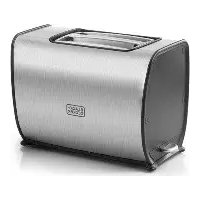
BFET200 - Toaster BLACK & DECKER - Free user manual and instructions
Find the device manual for free BFET200 BLACK & DECKER in PDF.



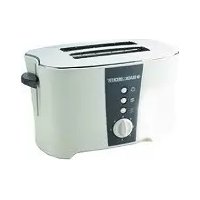
| Product type | 2-slice toaster |
| Brand | Black & Decker |
| Model | BFET200 |
| Power supply | 220-240 V ~, 730-870 W |
| Weight | 1.4 kg |
| Exterior material | Plastic and stainless steel |
| Number of slots | 2 variable-width slots |
| Main functions | Toasting, defrosting, reheating, cancel |
| Browning control | 6 levels (1-6) |
| Control lever | Lowerable lever with automatic shut-off at end of cycle |
| Crumb tray | Removable for easy cleaning |
| Maintenance and cleaning | Wipe with a damp cloth; do not immerse; empty tray regularly |
| Safety | Automatic shut-off, emergency stop (cancel button), overheat protection |
| Spare parts and repairability | Replaceable crumb tray; repair by an authorized technician |
| Warranty | 24 months (excluding professional use) |
| Intended use | Toasting bread, muffins, bagels; domestic use only |
Frequently Asked Questions - BFET200 BLACK & DECKER
User questions about BFET200 BLACK & DECKER
0 question about this device. Answer the ones you know or ask your own.
Ask a new question about this device
Download the instructions for your Toaster in PDF format for free! Find your manual BFET200 - BLACK & DECKER and take your electronic device back in hand. On this page are published all the documents necessary for the use of your device. BFET200 by BLACK & DECKER.
USER MANUAL BFET200 BLACK & DECKER
natural_image
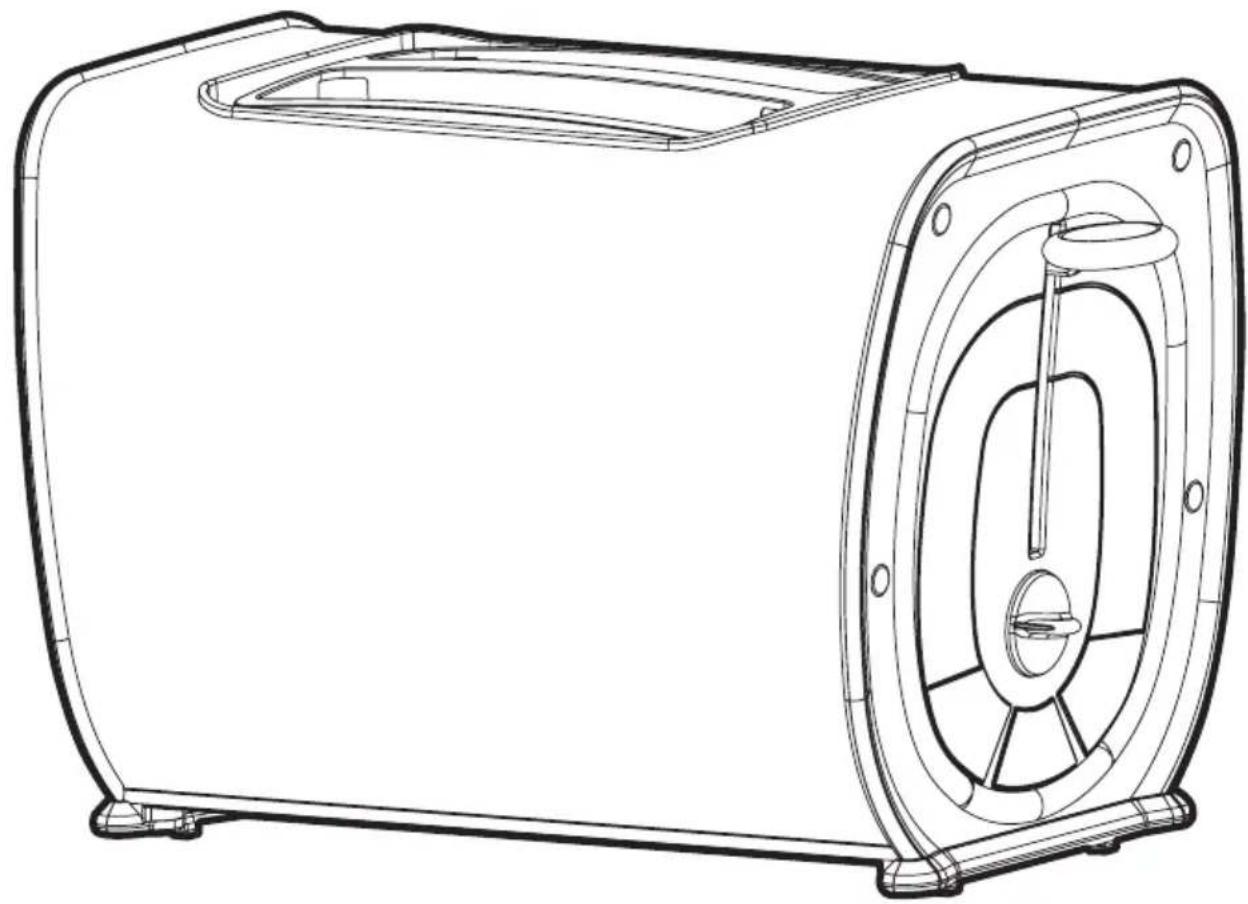
Technical line drawing of a portable toaster with front and back views (no text or symbols)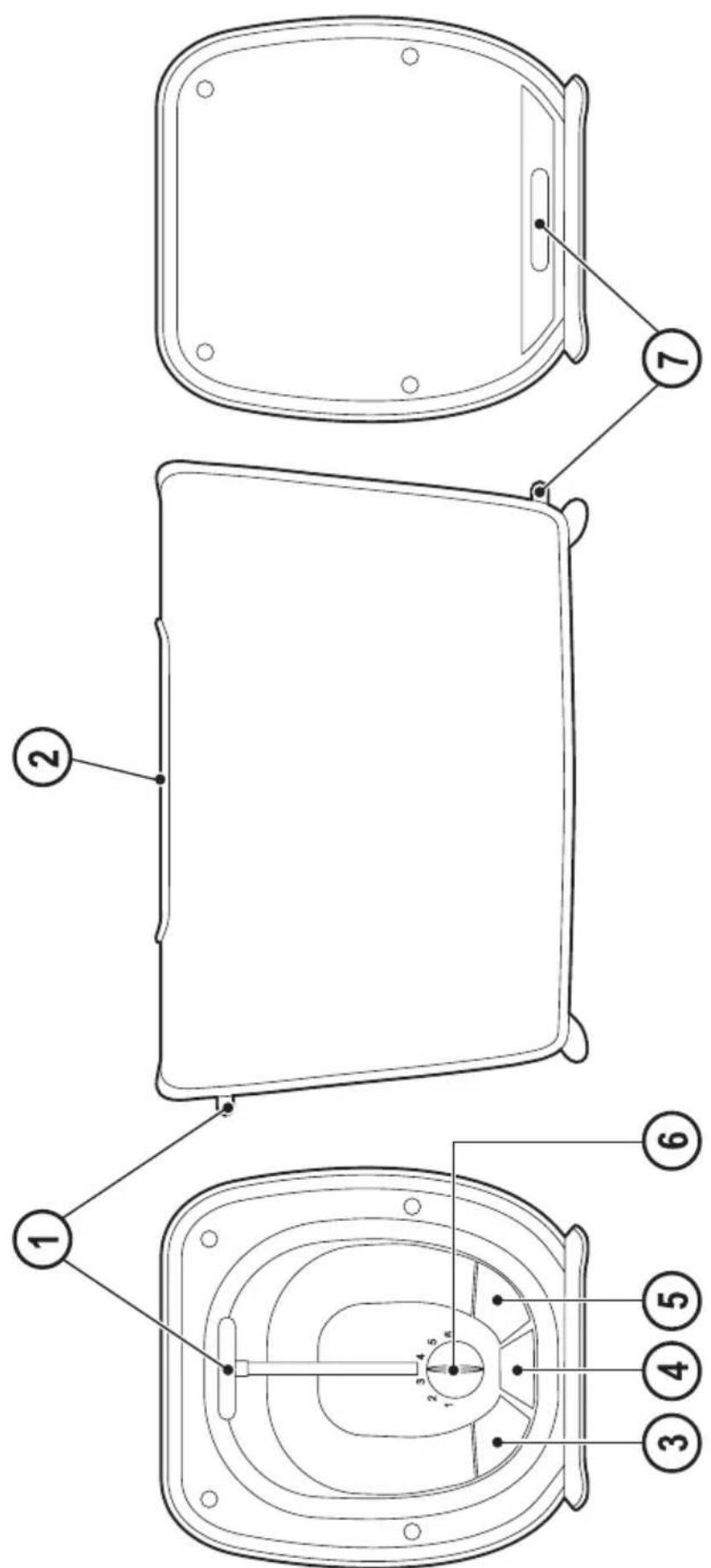
Intended use
Your BLACK+DECKER toaster has been designed for making toast.
This product is intended for household use only.
Thank you for choosing BLACK+DECKER. We hope that you will enjoy using this product for many years.
Safety instructions

Warning! When using mains-powered appliances, basic
safety precautions, including the following, should always be followed to reduce the risk of fire, electric shock and personal injury.

Read all of this manual carefully before using the appliance.
- The intended use is described in this manual. The use of any accessory or attachment or the performance of any operation with this appliance other than those recommended in this instruction manual may present a risk of personal injury.
- Retain this manual for future reference.
Using your appliance
• Always take care when using the appliance.
- Do not use the appliance outdoors.
- Do not operate the appliance if your hands are wet. Do not operate the appliance if you are barefoot.
- Guide the power supply cord neatly so it does not hang over the edge of a worktop and cannot be caught accidentally or tripped over.
- Never pull the power supply cord to disconnect the plug from the socket. Keep the power supply cord away from heat, oil and sharp edges.
- If the power supply cord is damaged during use, disconnect the appliance from the power supply immediately. Do not touch the power supply cord before disconnecting from the power supply.
- Disconnect the appliance from the power supply when not in use and before cleaning.
Safety of others
- This appliance can be used by children aged from 8 years and above and persons with reduced physical, sensory or mental capabilities or lack of experience and knowledge if they have been given supervision or instruction concerning use of the appliance in a safe way and understand the hazards involved. Children shall not play with the appliance. Cleaning and user maintenance shall not be made by children unless they are older than 8 and supervised.
- Keep the appliance and its cord out of reach of children less than 8 years.
• Children should be supervised to ensure that they do not play with the appliance.
After use
- Switch off, remove the plug from the socket and let the appliance cool down before leaving it unattended and before changing, cleaning or inspecting any parts of the appliance.
- When not in use, the appliance should be stored in a dry place. Children should not have access to stored appliances.
Inspection and repairs
- Before use, check the appliance for damaged or defective parts. Check for breakage of parts, damage to switches and any other conditions that may affect its operation.
- Do not use the appliance if any part is damaged or defective.
- Have any damaged or defective parts repaired or replaced by an authorised repair agent.
- Before use, check the power supply cord for signs of damage, ageing and wear.
- Do not use the appliance if the power supply cord or mains plug is damaged or defective.
- If the power supply cord or mains plug is damaged or defective it must be repaired by an authorised repair agent in order to avoid a hazard. Do not cut the power supply cord and do not attempt to repair it yourself.
- Never attempt to remove or replace any parts other than those specified in this manual.
Additional safety instructions for Toasters
Warning! The bread may burn, therefore do not use the toaster near, on, or below combustible material i.e curtains, tea towels etc.
- This appliance is not intended to be operated by means of an external timer or separate remote-control system.
• Always use the appliance on a dry, level surface - Care must be taken not to touch any hot surfaces, do not store or cover the appliance until it has fully cooled down.
- Do not use harsh abrasives or caustic or oven cleaners when cleaning this appliance.
- Do not use the appliance without the crumb tray in place. The crumb tray should be cleaned regularly. Do not allow crumbs to build up in tray.
- Do not use this product with any foodstuff or product containing sugar content or with products containing jam or preserves
- Do not immerse in liquid.
- Unit to be attended during use.
Warning! Product gets hot during use.
Warning! Never attempt to extract jammed toast, muffins, bagels or any other item with a knife or any other object, as contact with live elements may cause electrocution. Allow the appliance to cool down, unplug and carefully remove the object.
Features
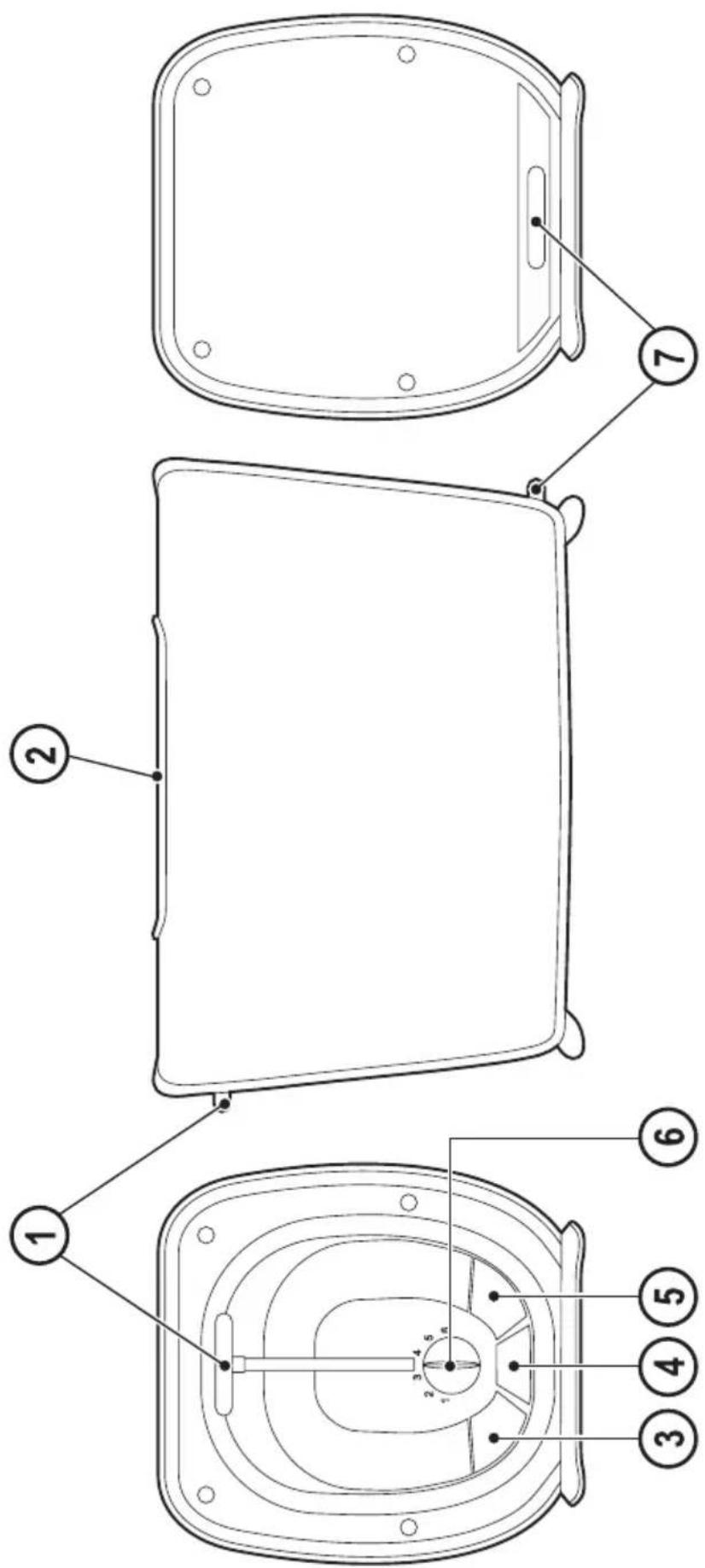
- Carriage Control lever
- Variable Width Toasting Slots
-
Frozen Button
-
Cancel Button
- Reheat Button
- Variable Browning Control
- Crumb Tray
Use
Warning! Do not exceed the maximum capacity of the Appliance.
Operating Toaster
- Insert the plug into a suitable mains supply socket and turn the power on.
- Place up to two slices of bread, muffins or bagels into the bread slots (2).
- Select the desired browning setting from No.1 to No.6 on the Variable Browning Control (6).
Note! When using the toaster for the first time we suggest you toast on No.3. Varying types of bread and personal preference may require a different browning setting.
- Press the Carriage Control lever (1) down until it clicks into place. Toasting cycle will automatically commence.
Note! If the toaster is not plugged in and switched on at the power point the carriage control lever will not click into place.
- The toaster turns off when the desired toast colour is achieved and automatically raises the toast. The toasting process can be stopped at any time by pressing the cancel button (4).
Toasting Frozen Bread
To toast frozen bread, place the bread into the bread slots and select the desired
Browning Setting. Press the carriage control lever down until it clicks into place then press the Frozen Button (3).
Reheating Toast
The toaster allows you to reheat toast without additional toasting. To reheat, place toast into bread slots, lower the carriage control lever until it clicks into place and press the Reheat Button (5).
Care and Cleaning
- Always turn the power off, remove the plug and allow the toaster to cool before cleaning.
- To remove any crumbs from the toaster, slide out the crumb tray from under the toaster, empty and replace in the toaster before using it again.
- Wipe the outside of the toaster with a slightly dampened cloth and polish with a soft dry cloth. Do not immerse in water.
- To clean the interior, turn the toaster upside down over the sink and shake crumbs free.
Technical data
| BFET200 | ||
| Input voltage | VAC 220 | -240V |
| Power input W | 730-870W | |
| Weight kg 1.4 | ||
Protecting the environment

Separate collection. This product must not be disposed of with normal household waste.
Should you find one day that your Black+Decker product needs replacement, or if it is of no further use to you, do not dispose of it with other household waste. Make this product available for separate collection.
- Black+Decker provides a facility for recycling Black+Decker products once they have reached the end of their working life. This service is provided free of charge. To take advantage of this service please return your product to any authorised repair agent who will collect them on our behalf.
- You can check the location of your nearest authorised repair agent by contacting your local Black+Decker office at the address indicated in this manual. Alternatively, a list of authorized Black+Decker repair agents and full details of our after-sales service and contact are available on the Internet at: www.2helpU.com.
Warranty
Black+Decker is confident of the quality of its products and offers an outstanding warranty.
This warranty statement is in addition to and in no way prejudices your statutory rights.
The warranty is valid within the territories of the Member States of the European Union and the European Free Trade Area.
If a Black+Decker product becomes defective due to faulty materials, workmanship or lack of conformity, within 24 months from the date of purchase, Black+Decker warranty to replace defective parts, repair products subjected to fair wear and tear or replace such products to ensure minimum inconvenience to the customer unless:
The product has been used for trade, professional or hire purposes;
The product has been subjected to misuse or neglect;
The product has sustained damage through foreign objects, substances or accidents;
Repairs have been attempted by persons other than authorised repair agents or Black+Decker service staff.
To claim on the warranty, you will need to submit proof of purchase to the seller or an authorised repair agent. You can check the location of your nearest authorised repair agent by contacting your local Black+Decker office at the address indicated in this manual.
Alternatively, a list of authorised Black+Decker repair agents and full details of our after-sales service and contacts are available on the Internet at: www.2helpU.com.
FRANÇAIS
Utilisation prévue
Utilização prevista
Names & Addresses for Black & Decker Service Concessionaries
ALGERIA: Sarl Outillage Corporation, DW, B&D Pet, HHD, 08, Rue Med Boudiaf (ex TELLA Achen) Cheraga, Alger, Tel: 00213-0-21375130/ 00213-0-21375131, Fax: 00213-0-21369667, Email: hakim.merdjadi@outillage-dz.com;
nefissa.merdjadi@outillage-dz.com; sidahmed.merdjadi@outillage-dz.com. AZERBAIJAN: Kontakt - NN LLC, HHD, M.Qashqay 43, Baku Azerbaijan Az1000, Tel: 00994 12 408 20 50, Mob: +994503442204, Fax: 00994 12 411 70 90, eganjaly@hotmail.com. BAHRAIN: Alfouz Services Co. WLL, Tubli, DW, B&D PET, HHD, P.O. Box 26562, Tubli, Manama, Tel: +973-17783562/ 17879987, Fax: 17783479, Email: alfouz@batelco.com.bh. EGYPT: Anasia Egypt for Trading S.A.E. (Mentrade), HHD, P.O. Box 2443, 9, Mostafa Refaat Street, Sheraton Heliopolis 11361, Cairo, Tel: 00202 22684159, Fax: 00202 22684169, Email: wael.salah@anasia.com; nevien.elbeshbishy@anasia.com. ETHIOPIA: Seif Tewfik Sherif, DW, B&D PET, HHD, Arada Sub City, Kebele 01/02, Global Insurance Bldg, 2nd Flr, Room 43, P.O. Box 2525, Addis Ababa, Tel: 00-251-11-1563968/ 1563969, Fax: 00-251-11-1558009, Email: seif@ethionet.et; nawanag@ethionet.et; seifudint@hotmail.com. IRAQ: Financial Links, B&D PET, HHD, Kazzaz Building Arasat Al-Hindia, Block No: 629, Street: 31, Building No: 1, Baghdad, Iraq, Tel: 00964-(0)780-195-2223/ +964-(0)781-3763044, Email: info@financiallinks-truevalue.com. JORDAN: Bashiti Hardware (Palestine), B&D pet, HHD, "93 King Abdullah, 2nd St., Opp ELBA House, P.O. Box 3005, Amman 11953, Tel: 00962-6-5349098, ext.11, Fax: 00962-6-5330731, Email: manal@bashitihardware.com; info@bashitihardware.com;
rami@bashitihardware.com. KENYA: Zylog Enterprises Ltd. (T/A Leading Concepts), HHD, IPS Building, Kaunda Street, P.O. Box 40877-00100, Nairobi, Tel: 00254-20-6905000, Fax: 00254-20-6905111, Email: admin@alibhaishariff.co.ke;
leading@alibhaishariff.co.ke; info@alibhaishariff.co.ke. LEBANON: Aces Service Centre (Est. F.A.Ketaneh SA), HHD, P.O. Box 90-102, Nahr El Mot, Seaside Highway, Pharaon Building, Beirut, Tel: 00961-1-898989/ + 961-(1)-262626, Fax: 0096-1-1245880, Email: Nissrine.hajj@aces.com.lb; Nassim.aziz@Aces.com.lb; Johnny.sailian@Aces.com.lb; Paul.tahan@aces.com.lb. LIBYA: North Africa Trading (El Ghoul Brothers), DW, B&D Pet, HHD, P.O. Box 348, 7 October Street 11, Benghazi, Tel: 00218-061-3383994, Fax: 00218-092-7640688, Email: nagte.ly@gmail.com; CC: nagte.dpt@gmail.com; elghol@technpower.com. North Africa Trading ( El Ghoul Brothers), DW, B&D Pet, HHD, AlBarniq Dewalt Center, Mokhazin-elsukar St., ElFallah, Tripoli, Tel: 00218-021-3606430, Fax: 00218-092-6514813, Email: nagte.ly@gmail.com; cc: (nagte.dpt@gmail.com; elghol@technpower.com. Homeworld Co., HHD, Senidal St. Amr Ibn Elaas Road, Benghazi, Libya, P.O. Box 18182, Salmany, Tel: 00218-61-9094183, ext. 103, Fax: 00218.61.9094123, ext. 108, Email: nagte.ly@gmail.com. MAURITIUS: J.M. Goupille & Co.Ltd. The Brandhouse Ltd., HHD, Rogers Industrial Park 1, Riche Terre, Mauritius, Tel: 00230-2069450/ +230-207-1700, Fax: 00230-2483188/ 00230-2069474, Email: claims(service.centre@goupille.mu; stephanie.bijou@gmail.com; beatrice.li@gmail.com; sharon.laprovidence.jmq@gmail.com, tim.moszuti@goupille.mu; Cc.
Jfrancois.dromart@goupille.mu; mario.catherine@goupille.mu; gerard.gouges@goupille.mu. MOROCCO: UATS, HHD, "No. 37, Lotissement KADIRIA, km 10 Route, Eljadida, LISASSFA, Casablanca, Morocco, Tel: 00212-522652602, Fax: 00212-522652603, Email: farah1406@yahoo.fr; noureddine.uats@gmail.com. OMAN: Oman Marketing & Service Co.(Omasco), Wattayah/ Muscat, HHD, B&D PET, P.O. Box 2734, Behind Honda Showroom, Wattayah, Oman, Tel: +968 24560232/ 24560255, Fax: 24560993, Email: npservice@omasco.com.om; Cc. ashok.balan@omasco.com.om, damodaran.pillai@omasco.com.om; unnikrishnan@omasco.com.om. Oman Marketing & Service Co.(Omasco), Sohar, HHD, B&D PET, Al Ohi, Sohar, Oman, Tel: +968 26846379, Fax: 26846379, Email: sooraj.neeran@omasco.com.om. Oman Marketing & Service Co.(Omasco), Salalah, HHD, B&D PET, Sanaya, Salalah, Oman, Tel: +968 23212290, Fax: 23210936, Email: rajagopal.pr@omasco.com.om. Omar Mohammed Ali Bawain Trading Co., Salalah, Al-Awqadain, PC 217, P.O.Box 112, Salalah, Sultanate of Oman, Tel: +968 23214874, Fax: 23214874/ 23211878, Email: jithin@omartrad.com. PAKISTAN: Ammar Service & Spares, B&D PET, HHD, Office No 6068, 6th Floor Central Plaza, Behind Gul Plaza Marston Road, Karachi, Tel: 0092-21-32426905/ 021-32775252, Fax: 0092-21-32427214, Email: babji93@yahoo.com. QATAR: Al Muftah Service Centre, Doha, HHD, B&D PET, Al Wakrah, Road, P.O. Box 875, Doha, Qatar, Tel: +974 44650880/ 44650110/ 44446868, Fax: 44441415/ 44662599, Email: service@almuftah.com; almuftah@almuftah.com. SAUDI ARABIA: Fawaz Ebrahim Al Zayani Trading Est., Dammam, DW, B&D PET, HHD, P.O. Box 76026, Al Raka: 31952, Tel: +966-3-8140914, Fax: 8140824, Email: dewaltdammam@hotmail.com; (vinoderakatyil@yahoo.com); Website: www.fawazalzayanigroup.com. Fawaz Ebrahim Al Zayani Trading Est., Makkah, DW, B&D PET, HHD, 4753-Wali Alahed, Makkah, 9130-24353 Tel: +966-12-8140914/ 581121778, Fax: 128140914, Email: meraj2515@gmail.com. Banaja Trading Co. Ltd., Riyadh, HHD, P.O. Box 566, Riyadh-11421, Tel: +966-1-4124444, Fax: 4033378, Email: jijophilip@hotmail.com. Banaja Trading Co. Ltd, Jeddah, HHD P.O. Box 366, Jeddah-21411, Tel: +966-2-6511111, Fax: 6503668, Email: afouad@banaja.com; jijophilip@hotmail.com. SOUTH AFRICA: Benray Tool Wholesalers C.C., B&D PET, HHD, 460 Koeberg Road, Cape Town, South Africa, Tel: 021-551-7244, Fax: 021-552-6395, Email: dewaltct@benray.co.za. Stanley Black & Decker-RSA, BED, PET, HHD, 199 Winze Drive Stormill Ext 9 Roodepoort Tel: (2711) 472-0454, Fax: (2711) 472-0482, Email: service@sbdinc.co.za; vincent.roets@sbdinc.co.za; jacquesvincent.roets@sbdinc.com. SRI LANKA: Delmege Forsyth & Co. Ltd, DW, B&D Pet, HHD, Delmege Forsyth & Co. Ltd, Lifestyle Cluster, 101, Vinayalankara Mawatha, Colombo 10, Sri Lanka, Tel: +94-11-2688462/ +94-11-2, Email: dgeservice@delmege.com; Samith.lifestyle@delmege.com cc: Jayantha.lifestyle@delmege.com. TUNISIA: Societe Tunisienne De Maintenance (STM), B&D Pet, HHD, Rue De La Physique. Nouvelle Zone Industrielle Ben Arous.2013 Ben Arous, TUNISIA. Tel: +216-79-389687, Fax: +216-71-385154, Email: importa@stqu.com. UAE: (Abu Dhabi) Galaxy Equipment Trading, Abu Dhabi, DW, B&D PET, HHD, Madinath Zayed (Baada Zaid), Abu Dhabi P.C. 58910, Tel: +971-2-8844279, Fax: 8844297, Email: galaxyeq@eim.ae; galaxyeq@emirates.net.ae. Light House Electrical, Abu Dhabi, DW, B&D PET, HHD, P.O. Box 120, Abu Dhabi, Tel: +971-2-6726131, Fax: 6720667, Email: dewalt_lhe@hotmail.com. Light House Electrical, Musaffah, DW, B&D PET, HHD, P.O. Box 120, Abu Dhabi, Tel: +971-2-5548315, Fax: 5540461, Email: dewalt_lhe@hotmail.com. (Al Ain) Zillion Equipment and Spare Parts Trading LLC. Al Ain, DW, B&D PET, HHD, P.O. Box 19740, Opp. Bin Sadal/ Trimix Redymix Sanaiya, Al Ain Tel: +971-3-7216690, Fax: 7216103, Email: zilliontrdg@gmail.com. (Dubai) BLACK & DECKER (OVERSEAS) GmbH, Dubai, DW, B&D PET, HHD, P.O. Box 5420, Dubai, Tel: +971-4-8127400/ 8127406, Fax: 2822765, Email: service.mea@sbdinc.com. (Ras Al Khaimah) McCoy Middle East LLC, Ras Al Khaimah, DW, B&D PET, HHD, P.O. Box 10584, Ras Al Khaimah, Tel: +971-7-2277095, Fax: 2277096, Email: mccoyrak@gmail.com. (Sharjah) McCoy Middle East LLC, Sharjah, DW, B&D PET, HHD, P.O. Box 25793, Sharjah, Tel: +971-6-5395931, Fax: 5395932, Email: mccoy@emirates.net.ae; mccoydewalt@gmail.com. UGANDA: Anisuma Investment & Service Ltd. (Jacky's Electronics), HHD, J.R Comples, Ware house No.5 Plot No.101. 3rd Industrial Area Jinja Rd Kampala Tel: 00256-414237106 Mob: 00256 779429501 Email:
ha.service.uganda@anisuma.com. YEMEN: Middle East Trading Co. (METCO) DW, B&D Pet, HHD, 5th Flr. Hayel Saeed Anam Bldg. Al-Mugamma St. Taiz, Yemen, Tel: +00967-4-213455, Fax: 00967-4-219869, Email: metco@metcotrading.com; sami@metcotrading.com. Middle East Trading Co. (METCO) DW, B&D Pet, HHD, Mualla Dakka, Aden, Tel: 00967-2-222670, Fax: 00967-2-222670, metco@metcotrading.com; sami@metcotrading.com. Middle East Trading Co. (METCO), DW, B&D Pet, HHD, Hayel st., Sana'a, Yemen, Tel: 00967-1-204201, Fax: 00967-1-204204, Email: metco@metcotrading.com; sami@metcotrading.com.
| >100% |
WARRANTY REGISTRATION CARD
YOUR NAME/الإسم
YOUR ADDRESS العئوان
- Intended use
- Safety instructions
- Using your appliance
- Safety of others
- After use
- Inspection and repairs
- Additional safety instructions for Toasters
- Features
- Use
- Operating Toaster
- Toasting Frozen Bread
- Reheating Toast
- Care and Cleaning
- Protecting the environment
- Warranty
- FRANÇAIS
- Utilisation prévue
- Utilização prevista
- Names & Addresses for Black & Decker Service Concessionaries
- WARRANTY REGISTRATION CARD
Brand : BLACK & DECKER
Model : BFET200
Category : Toaster