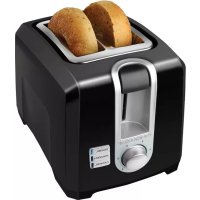
T2569B - Toaster BLACK & DECKER - Free user manual and instructions
Find the device manual for free T2569B BLACK & DECKER in PDF.


| Brand | Black & Decker |
| Model | T2569B |
| Product type | Toaster |
| Power supply | 120 V ~ 60 Hz |
| Main features | Wide slots with self-adjusting guides, food lever, bagel button, frozen food button, cancel button, LED indicator, browning control dial (1-6), removable crumb tray, cord storage |
| Use | Household use only |
| Care and cleaning | Unplug and let cool before cleaning. Crumb tray washable in warm soapy water (not dishwasher safe). Exterior cleaned with a damp cloth. Do not immerse the appliance. |
| Safety | Do not immerse. Hot surfaces: use handles. Do not use metal utensils to remove food. Do not cover the appliance during operation. Unplug after use. |
| Replacement parts | Crumb tray: T2560-01 (white) or T2560B-01 (black) |
| Warranty | Limited 2-year warranty |
| Number of pages in manual | 11 pages |
Frequently Asked Questions - T2569B BLACK & DECKER
User questions about T2569B BLACK & DECKER
0 question about this device. Answer the ones you know or ask your own.
Ask a new question about this device
Download the instructions for your Toaster in PDF format for free! Find your manual T2569B - BLACK & DECKER and take your electronic device back in hand. On this page are published all the documents necessary for the use of your device. T2569B by BLACK & DECKER.
USER MANUAL T2569B BLACK & DECKER
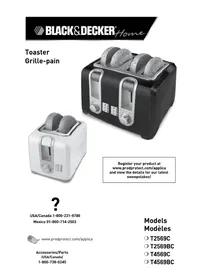
Register your product at www.prodprotect.com/applica and view the details for our latest sweepstakes!

USA/Canada 1-800-231-9786
Mexico 01-800-714-2503
www.prodprotect.com/applica
Accessories/Parts (USA/Canada) 1-800-738-0245
Models Modèles
T2569C
T2569BC
T4569C
T4569BC
Please Read and Save this Use and Care Book
IMPORTANT SAFEGUARDS
When using electrical appliances, basic safety precautions should always be followed, including the following:
Read all instructions.
Do not touch hot surfaces. Use handles or knobs.
To protect against electrical shock do not immerse cord, plugs or appliance in water or other liquid.
Close supervision is necessary when any appliance is used by or near children.
Unplug from outlet when not in use and before cleaning. Allow to cool before putting on or taking off parts, and before cleaning the appliance.
Do not operate any appliance with a damaged cord or plug, or after the appliance malfunctions or has been damaged in any manner. Return appliance to the nearest authorized service facility for examination, repair or adjustment. Or, call the appropriate toll-free number on the cover of this manual.
The use of accessory attachments not recommended by the appliance manufacturer may cause injuries.
Do not use outdoors.
- Do not let cord hang over edge of table or counter, or touch hot surfaces.
Do not place on or near a hot gas or electric burner, or in a heated oven.
Extreme caution must be used when moving an appliance containing hot oil or other hot liquids.
Always attach plug to appliance first, then plug cord into the wall outlet. To disconnect, turn any control to OFF, then remove plug from wall outlet.
Do not use appliance for other than intended use.
Oversized foods, metal foil packages or utensils must not be inserted in a toaster as they may involve a risk of fire or electric shock.
A fire may occur if toasters are covered or touching flammable material, including curtains, draperies, walls and the like, when in operation.
Do not attempt to dislodge food when toaster is plugged in.
SAVE THESE INSTRUCTIONS.
This product is for household use only.
POLARIZED PLUG (120V Models Only)
This appliance has a polarized plug (one blade is wider than the other). To reduce the risk of electric shock, this plug is intended to fit into a polarized outlet only one way. If the plug does not fit fully into the outlet, reverse the plug. If it still does not fit, contact a qualified electrician. Do not attempt to modify the plug in any way.
ELECTRICAL CORD
a) A short power-supply cord (or detachable power-supply cord) is to be provided to reduce the risk resulting from becoming entangled in or tripping over a longer cord.
b) Longer detachable power-supply cords or extension cords are available and may be used if care is exercised in their use.
c) If a long detachable power-supply cord or extension cord is used,
1) The marked electrical rating of the detachable power-supply cord or extension cord should be at least as great as the electrical rating of the appliance,
2) If the appliance is of the grounded type, the extension cord should be a grounding-type 3-wire cord, and
3) The longer cord should be arranged so that it will not drape over the countertop or tabletop where it can be pulled on by children or tripped over.
Note: If the power supply cord is damaged, it should be replaced by qualified personnel; In Latin America, by an authorized service center.
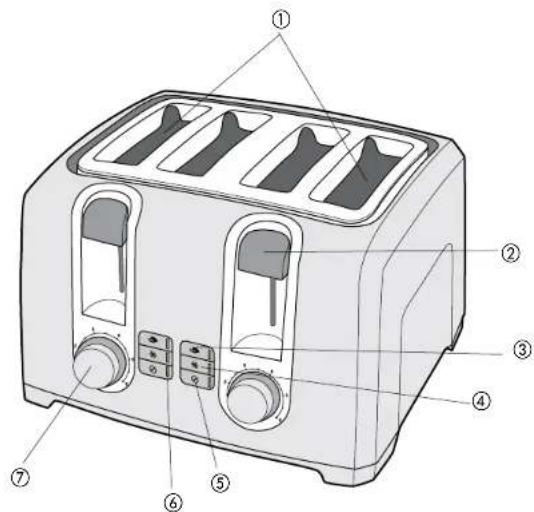
Product may vary slightly from what is illustrated.
-
Extra-wide slots with automatic adjusting guides
-
Toast lever
-
BAGEL button
-
FROZEN button
5.CANCEL button
-
LED indicator light
-
Toast shade selector dial
-
Removable slide-out crumb trays (not shown) Models T2569C, T2569BC [Part# T2560-01 White] (Part# T2560B-01 Black) Model T4569C, T4569BC, [Part# T4560B-01 White] (Part# T4560B-01 Black)
-
Cord wrap (under unit)
Note:† indicates consumer replaceable/removable parts
How to Use
This product is for household use only. GETTING STARTED
- Unpack the unit and remove any packing materials or labels.
- Please go to www.prodprotect.com/applica to register your warranty.
- Wipe the toaster with a damp cloth and dry thoroughly.
- Insert slide-out crumb trays in place in the back of the unit, at the bottom.
- Plug the power cord into a standard wall outlet.
TOAST FUNCTION
Models T4569C and T4569BC only: Your toaster features two sets of independent slots each with individual toast shade selectors, bagel
frozen and cancel buttons. Be sure to adjust each toast shade selector individually so that you can toast two different kinds of foods (for example, waffles on one side, bagels on the other) at once using different settings.
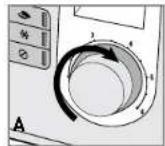
- Adjust the toast shade selector to the desired setting (1 to 6) (A). For first use, set the dial to setting 4. Adjust as desired to suit your taste.
Tip: Toast thin slices on lower settings.
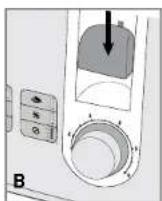
- Place bread slices or other foods in the slots and press down the toast lever until it locks in place (B). The CANCEL button automatically illuminates whenever you press down the toast control lever and remains lit until toasting cycle is finished, or until you press the button.
- The bread guides will automatically adjust to hold thick or thin slices in place.
- When toasting is done, the toast control lever goes up and the unit shuts off.
Important: You must press down the toast control lever before selecting a function. If not, the function will not be activated.
BAGEL ACTION
Use the BAGEL function to toast bagels crispy on the cut side and gently warm on the outside.
- Insert cut bagel into the slots with cut side toward the inside of the toaster.
- Adjust the toast shade selector to the desired setting (1 to 6).
-
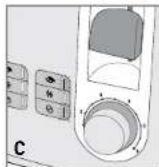
Press down the toast lever until it locks in place then press the BAGEL button (C). The button illuminates until toasting is done or until you press the CANCEL button. Important: If you select the wrong button, you must press the CANCEL button and then select the button you want.
-
The bread guides will automatically adjust to hold thick or thin slices in place.
- When toasting is done, the toast control lever goes up and the unit shuts off.
FROZEN FUNCTION
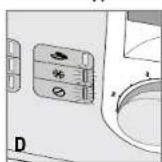
- Place food in the slots and press down the toast control lever until it locks into the down position. The CANCEL button illuminates until toasting is done or you press the button.
- Press the FROZEN button (D). The button illuminates until toasting is done or you press the CANCEL button. When toasting is done, the toast control lever goes up and the unit shuts off.
Important: If you select the wrong button, you must press the CANCEL button and then select the button you want after you press down the toast lever.
HELPFUL TIPS
If food becomes jammed, unplug the cord and move the toast lever up and down a few times to raise jammed food.
- Do not touch the metal area around the slots as it may be hot.
- Never use metal utensils to free food.
- To interrupt toasting at any time, press the CANCEL button.
Care and Cleaning
This product contains no user serviceable parts. Refer service to qualified service personnel.
CLEANING
Always unplug the cord from the electrical outlet and allow the toaster to cool before cleaning. Do not immerse the toaster in water.
Crumb Trays
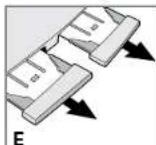
- Grasp the handle[s] at the back of the toaster and slide out the crumb tray[s] (E).
Note: Models T2569C and T2569BC have only one crumb tray. - Dispose of crumbs and wash the tray(s) in warm, sudsy water. The tray(s) are not dishwasher safe. You can remove stubborn spots using a nylon mesh pad.
- Dry tray(s) thoroughly before sliding back into the toaster.
Cleaning Outside Surfaces
The cool-touch exterior on the sides will not burn your hand if accidentally touched. However, the metal top does get hot. Allow the toaster to cool completely before cleaning.
- Wipe the exterior with a damp cloth or sponge and dry with a paper towel.
- Do not use strong cleaners or abrasives that may scratch surfaces and never spray cleaners directly onto the toaster.
STORAGE
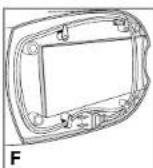
Use the cord wrap on the bottom of the toaster to minimize clutter on you counter and for easy storage (F).
NEED HELP?
For service, repair or any questions regarding your appliance, call the appropriate 800 number on cover of this book. Please DO NOT return the product to the place of purchase. Also, please DO NOT mail product back to manufacturer, nor bring it to a service center. You may also want to consult the website listed on the cover of this manual.
Two-Year Limited Warranty
(Applies only in the United States and Canada)
What does it cover?
Any defect in material or workmanship provided; however, Applica's liability will not exceed the purchase price of product.
For how long?
Two years after date of purchase.
What will we do to help you?
- Provide you with a reasonably similar replacement product that is either new or factory refurbished.
How do you get service?
- Save your receipt as proof of date of sale.
- Visit the online service website at www.prodprotect.com/applica, or call toll-free 1-800-231-9786, for general warranty service.
If you need parts or accessories, please call 1-800-738-0245.
What does your warranty not cover?
- Damage from commercial use
- Damage from misuse, abuse or neglect
- Products that have been modified in any way
- Products used or serviced outside the country of purchase
Glass parts and other accessory items that are packed with the unit - Shipping and handling costs associated with the replacement of the unit
- Consequential or incidental damages [Please note, however, that some states do not allow the exclusion or limitation of consequential or incidental damages, so this limitation may not apply to you.]
How does state law relate to this warranty?
- This warranty gives you specific legal rights. You may also have other rights that vary from state to state or province to province.
BLACK&DECKER is a trademark of The Black & Decker
Corporation, Towson, Maryland, USA
Made in People's Republic of China
Printed in People's Republic of China
IMPORTANT MISES EN GARDE
Copyright © 2009 Applica Consumer Products, Inc.
2009/4-1-5E/F

Printed on recycled paper.
- Models Modèles
- Please Read and Save this Use and Care Book
- IMPORTANT SAFEGUARDS
- SAVE THESE INSTRUCTIONS.
- This product is for household use only.
- POLARIZED PLUG (120V Models Only)
- ELECTRICAL CORD
- How to Use
- This product is for household use only. GETTING STARTED
- TOAST FUNCTION
- BAGEL ACTION
- FROZEN FUNCTION
- Important: If you select the wrong button, you must press the CANCEL button and then select the button you want after you press down the toast lever.
- HELPFUL TIPS
- Care and Cleaning
- CLEANING
- Crumb Trays
- Cleaning Outside Surfaces
- STORAGE
- NEED HELP?
- Two-Year Limited Warranty
- What does it cover?
- For how long?
- What will we do to help you?
- How do you get service?
- What does your warranty not cover?
- How does state law relate to this warranty?
- IMPORTANT MISES EN GARDE
Brand : BLACK & DECKER
Model : T2569B
Category : Toaster