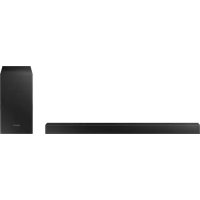
USER MANUAL HWT420 SAMSUNG
Thank you for purchasing this Samsung product.
To receive more complete service, please register
your product at www.samsung.com/register
SAFETYWARNINGS
TO REDUCE THE RISK OF ELECTRIC SHOCK, DO NOT REMOVE THE COVER (OR BACK). NO USER- SERVICEABLE PARTS ARE INSIDE. REFER SERVICING TO QUALIFIED SERVICE PERSONNEL.
Refer to the table below for an explanation of symbols which may be on your Samsung product.
| CAUTION
RISK OF ELECTRIC SHOCK.
DO NOT OPEN. | CAUTION
RISK OF ELECTRIC SHOCK.
DO NOT OPEN. |
| This symbol indicates that high voltage is present inside. It is dangerous to make any kind of contact with any internal part of this product. |
| This symbol indicates that this product has included important literature concerning operation and maintenance. |
| Class II product: This symbol indicates that it does not require a safety connection to electrical earth (ground). If this symbol is not present on a product with a power cord, the product MUST have a reliable connection to protective earth (ground). |
| AC voltage: This symbol indicates that the rated voltage marked with the symbol is AC voltage. |
| DC voltage: This symbol indicates that the rated voltage marked with the symbol is DC voltage. |
| Caution, Consult instructions for use: This symbol instructs the user to consult the user manual for further safety related information. |
WARNING
- To reduce the risk of fire or electric shock, do not expose this appliance to rain or moisture.
CAUTION
- TO PREVENT ELECTRIC SHOCK, MATCH WIDE BLADE OF PLUG TO WIDE SLOT, FULLY INSERT.
- This apparatus shall always be connected to a AC outlet with a protective grounding connection.
- To disconnect the apparatus from the mains, the plug must be pulled out from the mains socket, therefore the mains plug shall be readily operable.
- Do not expose this apparatus to dripping or splashing. Do not put objects filled with liquids, such as vases on the apparatus.
- To turn this apparatus off completely, you must pull the power plug out of the wall socket. Consequently, the power plug must be easily and readily accessible at all times.
PRECAUTIONS
- Ensure that the AC power supply in your house complies with the power requirements listed on the identification sticker located on the bottom of your product. Install your product horizontally, on a suitable base (furniture), with enough space around it for ventilation (7 10 cm) . Make sure the ventilation slots are not covered. Do not place the unit on amplifiers or other equipment which may become hot. This unit is designed for continuous use. To fully turn off the unit, disconnect the AC plug from the wall outlet. Unplug the unit if you intend to leave it unused for a long period of time.
- During thunderstorms, disconnect the AC plug from the wall outlet. Voltage peaks due to lightning could damage the unit.
- Do not expose the unit to direct sunlight or other heat sources. This could lead to overheating and cause the unit to malfunction.
-
Protect the product from moisture (i.e. vases), and excess heat (e.g. a fireplace) or equipment creating strong magnetic or electric fields. Unplug the power cable from the AC wall socket if the unit malfunctions. Your product is not intended for industrial use. It is for personal use only. Condensation may occur if your product has been stored in cold temperatures. If transporting the unit during the winter, wait approximately 2 hours until the unit has reached room temperature before using.
-
The battery used with this product contains chemicals that are harmful to the environment. Do not dispose of the battery in the general household trash. Do not expose the battery to excess heat, direct sunlight, or fire. Do not short circuit, disassemble, or overheat the battery. Danger of explosion if the battery is replaced incorrectly. Replace only with the same or equivalent type.
ABOUT THIS MANUAL
The user manual has two parts: this simple paper, USER MANUAL and a detailed FULL MANUAL you can download.

USER MANUAL
See this manual for safety instructions, product installation, components, connections, and product specifications.

FULL MANUAL
You can access the FULL MANUAL on Samsung's on-line customer support centre by scanning the QR code. To see the manual on your PC or mobile device, download the manual in document format from Samsung's website. (http://www.samsung.com/support)
Design and specifications are subject to change without prior notice.
CONTENTS
01 Checking the Components 2
Inserting Batteries before using the Remote Control (AA batteries X 2) 2
02 Product Overview 3
Front Panel / Top Panel of the Soundbar 3
Bottom Panel of the Soundbar 4
03 Connecting the Soundbar 5
Connecting Electrical Power 5
Connecting the Subwoofer to the Soundbar 5
04 Connecting to your TV 6
Method 1. Connecting with a Cable
- Connecting using an Optical Cable 6
Method 2. Connecting Wirelessly
- Connecting a TV via Bluetooth
05 Connecting an External Device 9
Connecting using an Optical Cable 9
06 Connecting a USB Storage Device 10
07 Connecting a Mobile Device 12
Connecting via Bluetooth 12
08 Using the Remote Control 15
How to Use the Remote Control 15
Adjusting the Soundbar volume with a TV remote control 18
Using the Hidden Buttons (Buttons with more than one function) 19
Output specifications for the different sound effect modes 19
09 Installing the Wall Mount 20
Installation Precautions 20
Wallmount Components 20
10 Software Update 22
Update Procedure 23
If UPDATE is not displayed 23
11 Troubleshooting 24
12 Licence 25
13 Open Source Licence Notice 25
14 Important Notes About Service 25
15 Specifications and Guide 26
Specifications 26
01 CHECKING THE COMPONENTS


Soundbar Main Unit Subwoofer Remote Control / Batteries
Power Cord Wall Mount Guide

Holder-Screw Screw
Bracket-Wall Mount
- For more information about the power supply and power consumption, refer to the label attached to the product. (Label: Bottom of the Soundbar Main Unit)
- To purchase additional components or optional cables, contact a Samsung Service Centre or Samsung Customer Care.
- The appearance of the accessories may differ slightly from the illustrations above.
Inserting Batteries before using the Remote Control (AA batteries X 2)
Slide the back cover in the direction of the arrow until it is completely removed. Insert 2 AA batteries (1.5V) oriented so that their polarity is correct. Slide the back cover back into position.

02 PRODUCT OVERVIEW
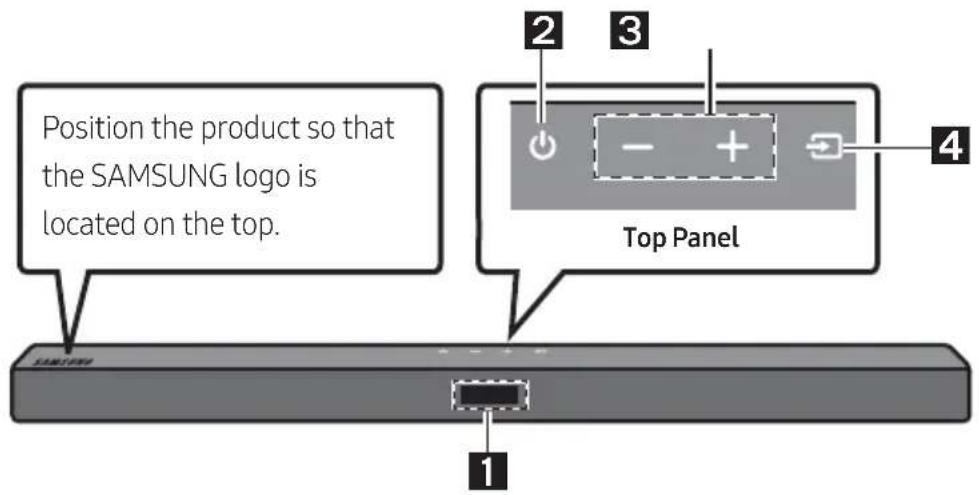
Front Panel / Top Panel of the Soundbar
| 1 | Display
Displays the product's status and current mode. |
| 2 | ● (Power) Button
Turns the power on and off.
● Auto Power Down Function
The unit turns off automatically in the following situations:
- In D.IN / BT / USB Mode: If there is no audio signal for 18 minutes. |
| 3 | -/+ (Volume) Button
Adjusts the volume.
● When adjusted, the volume level appears on the Soundbar's front display. |
| 4 | ● (Source) Button
Selects the source input mode. |
| Input mode Display | |
| Optical Digital input D.IN | |
| BLUETOOTH mode BT | |
| USB mode USB | |
| ● To turn on "BT PAIRING" mode, change the source to "BT" mode, and then press and hold the (Source) button for more than 5 seconds. |
- When you plug in the AC cord, the power button will begin working in 4 to 6 seconds.
- When you turn on this unit, there will be a 4 to 5 second delay before it produces sound.
- If you want to enjoy sound only from the Soundbar, you must turn off the TV's speakers in the Audio Setup menu of your TV. Refer to the owner's manual supplied with your TV.
Bottom Panel of the Soundbar

| 1 | DIGITAL AUDIO IN (OPTICAL)
Connect to the digital (optical) output of an external device. |
| 2 | USB (5V 0.5A)
Connect a USB device here to play music files stored on the USB device through the Soundbar. |
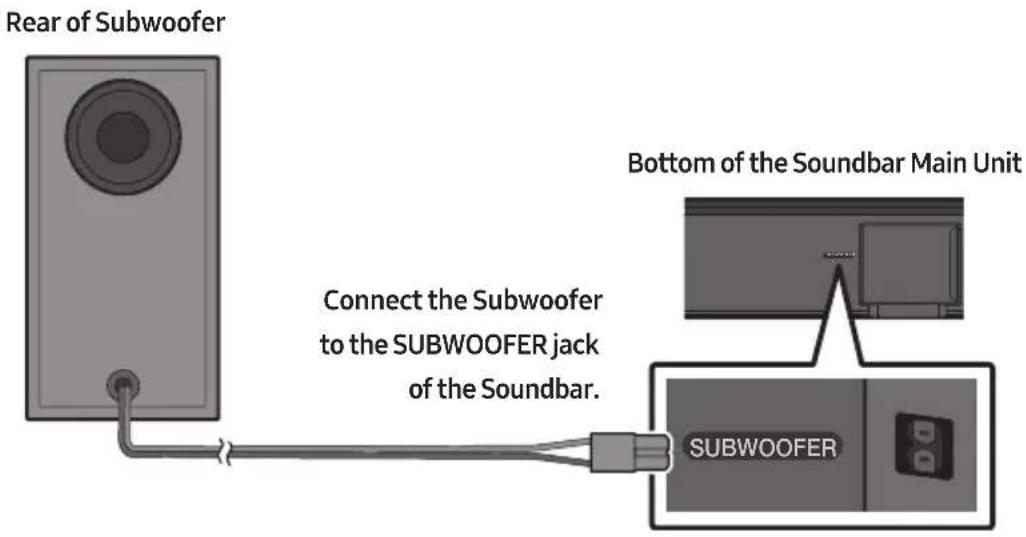
| 3 | SUBWOOFER
Connect the speaker cable on the subwoofer. |
| 4 | POWER
Connect the Soundbar's AC power cable. |
- When disconnecting the power cord from a wall outlet, pull the plug. Do not pull the cable.
- Do not connect this unit or other components to an AC outlet until all connections between components are complete.
03 CONNECTING THE SOUNDBAR
Connecting Electrical Power
For more information about the required electrical power and power consumption, refer to the label attached to the product. (Label: Bottom of the Soundbar Main Unit)

Bottom of the Soundbar Main Unit
Connecting the Subwoofer to the Soundbar
When the subwoofer is connected, you can enjoy rich bass sound.
04 CONNECTING TO YOUR TV
Hear TV sound from your Soundbar through wired or wireless connections.
-
When the Soundbar is connected to selected Samsung TVs, the Soundbar can be controlled using the TV's remote control.
-
This feature is supported by 2017 and later Samsung Smart TVs that support Bluetooth when you connect the Soundbar to the TV using an optical cable.
-
This function also allows you to use the TV menu to adjust the sound field and various settings as well as the volume and mute.
Method 1. Connecting with a Cable
When the audio in a broadcast is encoded in Dolby Digital and the "Digital Output Audio Format" on your TV is set to PCM, we recommend that you change the setting to Dolby Digital. When the setting on the TV is changed, you will experience better sound quality. (The TV menu may use different words for Dolby Digital and PCM depending on the TV manufacturer.)
Connecting using an Optical Cable

- Connect the DIGITAL AUDIO IN (OPTICAL) jack on the Soundbar to the OPTICAL OUT jack of the TV with a digital optical cable (not supplied).
- Press the (Source) button on the top panel or remote control, and then select the "D.IN" mode.
Method 2. Connecting Wirelessly
Connecting a TV via Bluetooth
When a TV is connected using Bluetooth, you can hear stereo sound without the hassle of cabling.
- Only one TV can be connected at a time.

The initial connection
- Press the PAIR button on the remote control to enter the "BT PAIRING" mode.
(OR) a. Press the (Source) button on the top panel and then select "BT".
"BT" changes to "BT PAIRING" in a few seconds automatically or changes to "BT READY" if there is a connect record.
b. When "BT READY" appears, press and hold the (Source) button on the top panel of the Soundbar for more than 5 seconds to display "BT PAIRING".
- Select Bluetooth mode on the TV. (For more information, see the TV's manual.)
- Select "[AV] Samsung Soundbar T4-Series" from the list on TV's screen.
An available Soundbar is indicated with "Need Pairing" or "Paired" on the TV's Bluetooth device list. To connect the TV to the Soundbar, select the message, and then establish a connection.
-
When the TV is connected, [TV Name] → "BT" appears on the Soundbar's front display.
-
You can now hear TV sound from the Soundbar.
If the device fails to connect
- If a previously connected Soundbar listing (e.g. "[AV] Samsung Soundbar T4-Series") appears in the list, delete it.
- Then repeat steps 1 through 3.
NOTE
- After you have connected the Soundbar to your TV the first time, use the "BT READY" mode to reconnect.
Disconnecting the Soundbar from the TV
Press the (Source) button on the top panel or on the remote control and switch to any mode but "BT".
- Disconnecting takes time because the TV must receive a response from the Soundbar.
(The time required may differ, depending on the TV model.)
- To cancel the automatic Bluetooth connection between the Soundbar and TV, press the Left button on the remote control for 5 seconds with the Soundbar in "BT READY" status. (Toggle On → Off)
What is the difference between BT READY and BT PAIRING?
- BT READY: In this mode, you can search for previously connected TVs or connect a previously connected mobile device to the Soundbar.
- BT PAIRING: In this mode, you can connect a new device to the Soundbar. (Press the PAIR button on the remote control or press and hold the Source) button on the top of the Soundbar for more than 5 seconds while the Soundbar is in "BT" mode.)
NOTES
- If asked for a PIN code when connecting a Bluetooth device, enter <0000>.
- In Bluetooth connection mode, the Bluetooth connection will be lost if the distance between the Soundbar and the Bluetooth device exceeds 10m .
- The Soundbar automatically turns off after 18 minutes in the Ready state.
-
The Soundbar may not perform Bluetooth search or connection correctly under the following circumstances:
-
If there is a strong electrical field around the Soundbar.
- If several Bluetooth devices are simultaneously paired with the Soundbar.
-
If the Bluetooth device is turned off, not in place, or malfunctions.
-
Electronic devices may cause radio interference. Devices that generate electromagnetic waves must be kept away from the Soundbar main unit - e.g., microwaves, wireless LAN devices, etc.
05 CONNECTING AN EXTERNAL DEVICE
Connect to an external device via a wired connection or Bluetooth connection to play the external device's sound through the Soundbar.
Connecting using an Optical Cable

- Connect DIGITAL AUDIO IN (OPTICAL) on the main unit to the OPTICAL OUT jack of the Source Device using a digital optical cable (not supplied).
- Select "D.IN" mode by pressing the (Source) button on the top panel or on the remote control.
06 CONNECTING A USB STORAGE DEVICE
You can play music files located on USB storage devices through the Soundbar.


- Connect the USB device to the USB port on the bottom of the product.
- Press the (Source) button on the top panel or on the remote control, and then select "USB".
- "USB" appears in the display screen.
-
Play music files from the USB storage device through the Soundbar.
-
The Soundbar automatically turns off (Auto Power Down) if no USB device has been connected for more than 18 minutes.
| Extension | Codec | Sampling Rate | Bit Rate |
| *.mp3 MPEG 1 Layer | layer2 32kHz ~ 48kHz 32kbps~ | 320kbps | |
| MPEG 1 Layer3 32kHz ~ 48kHz 32kbps~320kbps | | |
| MPEG 2 Layer3 16kHz ~ 24kHz 8kbps~160kbps | | |
| MPEG 2.5 Layer3 8kHz ~ 12kHz 8kbps~160kbps | | |
| *.wma | WMA7/8/9/STD | 8kHz ~ 48kHz | 32kbps~320kbps |
| *.aac AAC | | 8kHz ~ 96kHz | <1728kbps |
| AAC-LC |
| HE-AAC |
| *.ogg | Vorbis codec | (8, 16, 22.05, 32, 44.1, 48)kHz | unsupported ogg:
1. block size 0 < 256,
block size 0 > 1024
2. block size 1 < 512,
block size 1 > 4096
3. codebook counter >
64
4. codebook entry > 640
5. floor counter > 2
6. floor type 0
7. residua counter > 2
8. dimension != 2
9. mapping counter > 2
10. mode counter > 2
11. residue type !=
channel number |
| *.flac | - | 8kHz ~ 192kHz | <5Mbps |
| *.wav | PCM/LPCM/IMA_ADPCM/MPEG/MULAW | 8kHz ~ 192kHz | <5Mbps |
| *.AIFF | Compression type: alwa, ulaw, sowt | (8, 16, 22.05, 32, 44.1, 48, 96, 192)kHz ≤ 2 channels | <5Mbps |
- If there are too many folders and files stored on the USB device, it may take the Soundbar sometime to access and play files.
07 CONNECTING A MOBILE DEVICE
Connecting via Bluetooth
When a mobile device is connected using Bluetooth, you can hear stereo sound without the hassle of cabling.
- You cannot connect more than one Bluetooth device at a time.

The initial connection
- Press the PAIR button on the remote control to enter the "BT PAIRING" mode.
(OR) a. Press the (Source) button on the top panel and then select "BT". "BT" changes to "BT PAIRING" in a few seconds automatically or changes to "BT READY" if there is a connect record.
b. When "BT READY" appears, press and hold the (Source) button on the top panel of the Soundbar for more than 5 seconds to display "BT PAIRING".
-
On your device, select "[AV] Samsung Soundbar T4-Series" from the list that appears.
-
When the Soundbar is connected to the Bluetooth device, [Bluetooth Device Name] → "BT" appears in the front display.
-
Play music files from the device connected via Bluetooth through the Soundbar.
If the device fails to connect
-
If a previously connected Soundbar listing (e.g. "[AV] Samsung Soundbar T4-Series") appears in the list, delete it.
-
Then repeat steps 1 and 2.
NOTE
- After you have connected the Soundbar to your mobile device the first time, use the "BT READY" mode to reconnect.
What is the difference between BT READY and BT PAIRING?
- BT READY: In this mode, you can search for previously connected TVs or connect a previously connected mobile device to the Soundbar.
- BT PAIRING: In this mode, you can connect a new device to the Soundbar. (Press the PAIR button on the remote control or press and hold the Source) button on the top of the Soundbar for more than 5 seconds while the Soundbar is in "BT" mode.)
NOTES
- If asked for a PIN code when connecting a Bluetooth device, enter <0000>.
- In Bluetooth connection mode, the Bluetooth connection will be lost if the distance between the Soundbar and the Bluetooth device exceeds 10 meters.
- The Soundbar automatically turns off after 18 minutes in the Ready state.
-
The Soundbar may not perform Bluetooth search or connection correctly under the following circumstances:
-
If there is a strong electrical field around the Soundbar.
- If several Bluetooth devices are simultaneously paired with the Soundbar.
-
If the Bluetooth device is turned off, not in place, or malfunctions.
-
Electronic devices may cause radio interference. Devices that generate electromagnetic waves must be kept away from the Soundbar main unit - e.g., microwaves, wireless LAN devices, etc.
The Soundbar supports SBC data (44.1kHz, 48kHz).
- Connect only to a Bluetooth device that supports the A2DP (AV) function.
- You cannot connect the Soundbar to a Bluetooth device that supports only the HF (Hands Free) function.
-
Once you have paired the Soundbar to a Bluetooth device, selecting "[AV] Samsung Soundbar T4-Series" from the device's scanned devices list will automatically change the Soundbar to "BT" mode.
-
Available only if the Soundbar is listed among the Bluetooth device's paired devices.
(The Bluetooth device and the Soundbar must have been previously paired at least once.)
- The Soundbar will appear in the Bluetooth device's searched devices list only when the Soundbar is displaying "BT READY".
- The Soundbar cannot be paired to another Bluetooth device if already in Bluetooth mode and paired to a Bluetooth device.
Bluetooth Power On (SOUND MODE)
If a previously paired Bluetooth device tries to pair with the Soundbar when the Bluetooth Power On function is on and the Soundbar is turned off, the Soundbar turns on automatically.
- Press and hold the SOUND MODE button for more than 5 seconds on the remote while the Soundbar is turned on.
- "ON-BLUETOOTH POWER" appears on the Soundbar's display.
Disconnecting the Bluetooth device from a Soundbar
You can disconnect a Bluetooth device from the Soundbar. For instructions, see the Bluetooth device's user manual.
- The Soundbar will be disconnected.
- When the Soundbar is disconnected from the Bluetooth device, the Soundbar will display "BT DISCONNECTED" on the front display.
Disconnecting the Soundbar from the Bluetooth device
Press the (Source) button on the top panel or on the remote control, and then change to any mode except "BT".
- Disconnecting takes time because the Bluetooth device must receive a response from the Soundbar. (Disconnection time may differ, depending on the Bluetooth device)
- When the Soundbar is disconnected from the Bluetooth device, the Soundbar will display "BT DISCONNECTED" on the front display.
NOTES
- In Bluetooth connection mode, the Bluetooth connection will be lost if the distance between the Soundbar and the Bluetooth device exceeds 10 meters.
- The Soundbar automatically turns off after 18 minutes in the Ready state.
More About Bluetooth
Bluetooth is a technology that enables Bluetooth-compliant devices to interconnect easily with each other using a short wireless connection.
- A Bluetooth device may cause noise or malfunction, depending on usage, if:
- A part of your body is in contact with the receiving/transmitting system of the Bluetooth device or the Soundbar.
It is subject to electrical variation from obstructions caused by a wall, corner, or office partition.
- It is exposed to electrical interference from same frequency-band devices including medical equipment, microwave ovens, and wireless LANs.
- Pair the Soundbar with the Bluetooth device while they are close together.
- The further the distance between the Soundbar and Bluetooth device, the worse the quality is. If the distance exceeds the Bluetooth operational range, the connection is lost.
- In poor reception areas, the Bluetooth connection may not work properly.
- The Bluetooth connection only works when it is close to the unit. The connection will be automatically cut off if the Bluetooth device is out of range. Even within range, the sound quality may be degraded by obstacles such as walls or doors.
- This wireless device may cause electric interference during its operation.
08 USING THE REMOTE CONTROL

How to Use the Remote Control
| 1 | Power | Turns the Soundbar on and off. |
| 2 | Source | Press to select a source connected to the Soundbar. |
| 3 | Mute | Press the (Mute) button to mute the sound. Press it again to unmute the sound. |
| 4 | SOUND MODE | You can select the desired sound effect by choosing STANDARD, SURROUND SOUND, GAME, or SMART.
- STANDARD
Outputs the original sound.
- SURROUND SOUND
Provides a wider sound field than standard.
- GAME
Provides stereoscopic sound to immerse you in the action while gaming.
- SMART
Analyzes the content in real time and automatically provides the optimal sound field based on the characteristics of the content.
- DRC (Dynamic Range Control)
Lets you apply dynamic range control to Dolby Digital tracks. Press and hold the SOUND MODE button while the Soundbar is powered off to turn DRC (Dynamic Range Control) on or off. With the DRC turned on, loud sound is reduced. (The sound may be distorted.) |
| | • Bluetooth Power
This feature automatically turns the Soundbar on when it receives a connection request from a previously connected TV or Bluetooth device. The setting is On by default.
- Press and hold the SOUND MODE button for more than 5 seconds to turn off the Bluetooth Power function. |
| 5 | PAIRBluetoothPAIR | Press the PAIR button. "BT PAIRING" appears in the Soundbar's display.
You can connect the Soundbar to a new Bluetooth device in this mode by selecting the Soundbar from the Bluetooth device's search list. |
| 6 | Play/Pause | Press the ➔ button to pause a music file temporarily.
When you press the button again, the music file plays. |
| 7 | Up/Down/Left/Right | Press the indicated areas to select Up/Down/Left/Right.
Press Up/Down/Left/Right on the button to select or set functions.
• Repeat
To use the Repeat function in "USB" mode, press the Up button.
• Music Skip
Press the Right button to select the next music file. Press the Left button to select the previous music file.
• Volume Restriction function
To protect your hearing, the Volume Restriction function restricts the volume to 20 if you turn on the Soundbar when the volume is set higher than 20.
- The default value for the Volume Restriction function is Off. You must turn it on to activate it.
- When turned on, the Volume Restriction function stays on even when the power is turned off.
- To turn Volume Restriction on or off, press and hold the Down button on the remote control for 5 seconds in standby mode. With Volume Restriction off, "V FREE" appears on the front display. With the function on, "V LOCK" appears. |
| 8 | Sound Control | You can select TREBLE, BASS, or AUDIO SYNC.
• To control the volume of the treble or bass sound, press the Sound Control button to select TREBLE or BASS and then adjust the volume between -6~+6 by using the Up/Down buttons.
• Press and hold the (Sound Control) button for about 5 seconds to adjust the sound for each frequency band. 150Hz, 300Hz, 600Hz, 1.2kHz, 2.5kHz, 5kHz, and 10kHz are selectable using the Left/Right buttons and each can be adjusted to a setting between -6 to +6 using the Up/Down buttons.
• If the video on the TV and audio from the Soundbar are not synchronised, press the Sound Control button to select AUDIO SYNC and then set the audio delay between 0~300 milliseconds by using the Up/Down buttons. (Not available in "USB" mode.)
• AUDIO SYNC is only supported for some functions. |
| 9 | WOOFER | Rock the WOOFER button forward or backward to adjust the volume of the subwoofer to -12 or between -6 to +6. To set the subwoofer volume level to 0, press the button in. |
| 10 | VOL | Rock the VOL button forward or backward to adjust the volume.
• Mute
Press the VOL button in to mute the sound. Press it in again to unmute the sound. |
Adjusting the Soundbar volume with a TV remote control
If you have a Samsung TV, you can adjust the Soundbar's volume using the IR remote control that came with your Samsung TV.
First use the TV menu to set the TV audio on your Samsung TV to external speakers, then use your Samsung remote to control the Soundbar's volume. For more information, see the TV's user manual. The default mode for this function is control by a Samsung TV remote. If your TV is not a Samsung TV, follow the directions below to change the settings of this function.
- Turn Off the Soundbar.

- If you do not want to use this function, push up and hold the WOOFER button for 5 seconds repeatedly until "OFF-TV REMOTE" appears in the display.

- If you want to control the Soundbar with your TV's remote, push up and hold the WOOFER button for 5 seconds repeatedly until "ALL-TV REMOTE" appears in the display. Then, use your TV's menu to select external speakers.

- If you want to return the Soundbar to the default mode (control by a Samsung TV remote), push up and hold the WOOFER button for 5 seconds repeatedly until "SAMSUNG-TV REMOTE" appears in the display.

Each time you push the WOOFER button up and hold it for 5 seconds, the mode switches in the following order: "SAMSUNG-TV REMOTE" (Default mode) → "OFF-TVREMOTE" → "ALL-TV REMOTE".
- This function may not be available, depending on the remote control.
- Manufacturers supporting this function: VIZIO, LG, Sony, Sharp, PHILIPS, PANASONIC, TOSHIBA, Hisense, RCA
| Hidden Button | Reference page |
| Remote Control Button Function |
| WOOFER (Up) | TV remote control On/Off (Standby) | page 18 |
| II (Play / Pause) | Initialise (Standby) | page 23 |
| Left | TV Auto connect On/Off (BT Ready) | page 8 |
| Down | Volume Restriction On/Off (Standby) | page 16 |
| (Sound Control) | 7 Band EQ page 17 | |
| SOUND MODE | DRC ON/OFF (Standby) page 15 | |
| Bluetooth Power page 16 | |
Output specifications for the different sound effect modes
| Effect Input | | Output |
| Without Wireless Rear Speaker Kit | With Wireless Rear Speaker Kit |
| SOUND MODE | STANDARD | 2.0 ch | 2.1 ch | 4.1 ch |
| 5.1 ch | 2.1 ch | 4.1 ch |
| SURROUND SOUND | 2.0 ch | 2.1 ch | 4.1 ch |
| 5.1 ch | 2.1 ch | 4.1 ch |
| GAME | 2.0 ch | 2.1 ch | 4.1 ch |
| 5.1 ch | 2.1 ch | 4.1 ch |
| SMART | 2.0 ch | 2.1 ch | 4.1 ch |
| 5.1 ch | 2.1 ch | 4.1 ch |
- The Samsung Wireless Rear Speaker Kit can be purchased separately. To purchase a Kit, contact the vendor you purchased the Soundbar from.
09 INSTALLING THE WALL MOUNT
Wallmount Components

Wall Mount Guide


Holder-Screw Screw
Bracket-Wall Mount
-
Place the Wall Mount Guide against the wall surface.
-
The Wall Mount Guide must be level.
If your TV is mounted on the wall, install the Soundbar at least 5 cm below the TV.

- Align the Wall Mount Guide's Centre Line with the centre of your TV (if you are mounting the Soundbar below your TV), and then fix the Wall Mount Guide to the wall using tape.
If you are not mounting below a TV, place the Centre Line in the centre of the installation area.

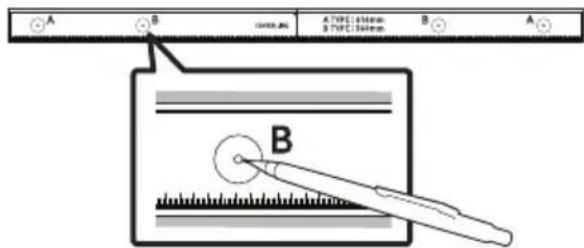
- Push a pen tip or sharpened pencil tip through the centre of the B-TYPE images on each end of the Guide to mark the holes for the supporting screws, and then remove the Wall Mount Guide.

-
Using an appropriately sized drill bit, drill a hole in the wall at each marking.
-
If the markings do not correspond to the positions of studs, make sure you insert appropriate anchors or mollies into the holes before you insert the support screws. If you use anchors or mollies, make sure the holes you drill are large enough for the anchors or mollies you use.
-
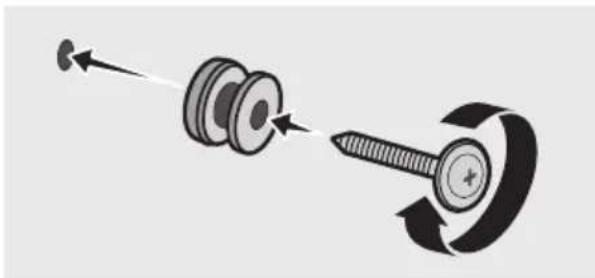
Push a screw (not supplied) through each Holder-Screw, and then screw each screw firmly into a support screw hole.

- Install the 2 Bracket-Wall Mounts in the correct orientation on the bottom of the Soundbar using 2 Screws.

- When assembling, make sure the hanger part of the Bracket-Wall Mounts are located behind the rear of the Soundbar.

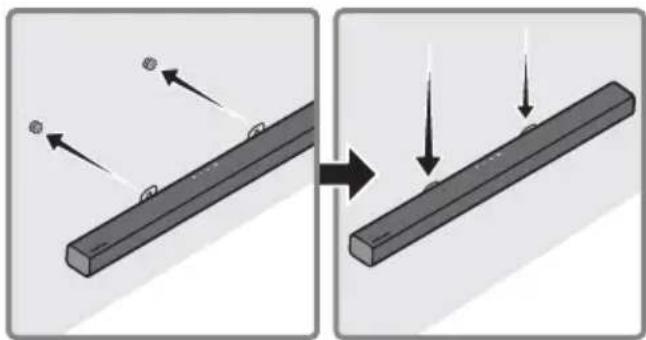
- Install the Soundbar with the attached Bracket-Wall Mounts by hanging the Bracket-Wall Mounts on the Holder-Screws on the wall.
-
Slide the Soundbar down as shown below so that the Bracket-Wall Mounts rest securely on the Holder-Screws.
-
Insert the Holder-Screws into the wide (bottom) part of the Bracket-Wall Mounts, and then slide the Bracket-Wall Mounts down so that the Bracket-Wall Mounts rest securely on the Holder-Screws.

10 SOFTWARE UPDATE
Samsung may offer updates for the Soundbar's system firmware in the future.

If an update is offered, you can update the firmware by connecting a USB device with the firmware update stored on it to the USB port on your Soundbar. For more information about how to download update files, go to the Samsung Electronics website at
www.samsung.com → Support.
Then, select the product type or enter the model number of your Soundbar, select the Software & Apps option, and then Downloads. Note that the option names can vary.
Update Procedure
Important: The updating function erases all user settings. We recommend you write down your settings so that you can easily reset them after the update. Note that updating the firmware resets the subwoofer connection too.
- Connect a USB thumb drive to the USB port on your computer.
Important: Make sure there are no music files on the USB thumb drive. This may cause the firmware update to fail.
- Go to the Samsung website (samsung.com) → select Enter Model Number and enter the model of your Soundbar. Select manuals and downloads and download the latest software file.
- Save the downloaded software to a USB stick and select "Extract Here" to unzip the folder.
- Turn off the Soundbar and connect the USB stick containing the software update to the USB port.
- Turn on the Soundbar and source change to "USB" mode. Within 3 minutes, "UPDATE" is displayed and updating begins.
-
When the update finishes, the Soundbar turns off (or turns off by press the power) button). Press the button on the remote control for 5 seconds. "INIT" appears on the display and then the Soundbar turns off. The update is complete.
-
This product has a DUAL BOOT function. If the firmware fails to update, you can update the firmware again.
-
Restore your settings on the Soundbar.
If UPDATE is not displayed
- Turn off the Soundbar, disconnect and then reconnect the USB storage device that contains the update files to the Soundbar's USB port.
- Disconnect the Soundbar's power cord, reconnect it, and then turn on the Soundbar.
NOTES
- The firmware update may not work properly if audio files supported by the Soundbar are stored in the USB storage device.
- Do not disconnect the power or remove the USB device while updates are being applied.
- After the update is completed, the user setup in the Soundbar is initialised so you can reset your settings. We recommend you write down your settings so that you can easily reset them after the update.
If the software update fails, check if the USB stick is defective.
- Mac OS users should use MS-DOS (FAT) as the USB format.
- Updating via USB may not be available, depending on the USB storage device manufacturer.
11 TROUBLESHOOTING
Before seeking assistance, check the following.
| The unit will not turn on. |
| Is the power cord firmly plugged into the wall outlet?→ Unplug and reconnect the power cord to the wall outlet to make sure the connection is secure. |
| A function does not work when the button is pressed. |
| Is there static electricity in the air?→ Disconnect the power plug and connect it again. |
| Sound dropouts occur in BT mode. |
| → See the Bluetooth connection sections on pages 7 and 12. |
| Sound is not produced. |
| Is the Mute function on?→ Press the (Mute) button to cancel the mute function. |
| Is the volume set to minimum?→ Adjust the Volume. |
| The remote control does not work. |
| Are the batteries drained?→Replace with new batteries. |
| Is the distance between the remote control and Soundbar main unit too far?→ Move the remote control closer to the Soundbar main unit. |
| The subwoofer drones and vibrates noticeably. |
| Try to adjust the vibration of your subwoofer.→ Rock the WOOFER button on your remote control forward or backward to adjust the subwoofer level. (to -12, or between -6 ~ +6). |
12 LICENCE

DOLBY
AUDIO
Manufactured under license from Dolby Laboratories. Dolby, Dolby Audio, and the double-D symbol are trademarks of Dolby Laboratories.


2.0 Channel
For DTS patents, see http://patents.dts.com. Manufactured under license from DTS Licensing Limited. DTS, the Symbol, DTS in combination with the Symbol, and DTS 2.0 Channel are registered trademarks or trademarks of DTS, Inc. in the United States and/or other countries. © DTS, Inc. All Rights Reserved.

Bluetooth
The Bluetooth® word mark and logos are registered trademarks owned by the Bluetooth SIG, Inc. and any use of such marks by Samsung Electronics Co., Ltd. is under license. Other trademarks and trade names are those of their respective owners.
13 OPEN SOURCE LICENCE NOTICE
To send inquiries and requests regarding open sources, contact Samsung via Email (oss.request@samsung.com).
14 IMPORTANT NOTES ABOUT SERVICE
- Figures and illustrations in this User Manual are provided for reference only and may differ from actual product appearance.
- An administration fee may be charged if either
(a) an engineer is called out at your request and there is no defect with the product (i.e. where the user manual has not been read).
(b) you bring the unit to a repair centre and there is no defect with the product (i.e. where the user manual has not been read).
- You will be informed of the administration fee amount before a technician visits.
15 SPECIFICATIONS AND GUIDE
Specifications
| Model Name HW-T420 | |
| USB 5V/0.5A | |
| Weight 1.5 kg | |
| Dimensions (W x H x D) 860.0 x 54.0 x 74.0 mm | |
| Operating Temperature Range +5°C to +35°C | |
| Operating Humidity Range 10 % ~ 75 % | |
| AMPLIFIER
Rated Output power 35W x 2, 6 ohm | |
| Supported play formats
(DTS 2.0 sound is played in DTS format.) | LPCM 2ch, Dolby Audio™
(supporting Dolby® Digital), DTS |
| WIRELESS DEVICE OUTPUT POWER
BT max transmitter power | 100mW at 2.4GHz – 2.4835GHz |
|
| Subwoofer Name PS-T4SWT | |
| Weight 4.1 kg | |
| Dimensions (W x H x D) 181.5 x 343.0 x 272.0 mm | |
| AMPLIFIER
Rated Output power 80W, 3 ohm | |
|
| Overall Standby Power Consumption (W) 2.0W | |
| Bluetooth
Port deactivation method | Press and hold the SOUND MODE button for more than 5 seconds to turn off Bluetooth Power function. |
NOTES
Samsung Electronics Co., Ltd reserves the right to change the specifications without notice.
- Weight and dimensions are approximate.
- Hereby, Samsung Electronics, declares that this equipment is in compliance with Directive 2014/53/EU.
The full text of the EU declaration of conformity is available at the following internet address: http://www.samsung.com go to Support > Search Product Support and enter the model name.
This equipment may be operated in all EU countries.

[Correct disposal of batteries in this product]
(Applicable in countries with separate collection systems)
This marking on the battery, manual or packaging indicates that the batteries in this product should not be disposed of with other household waste at the end of their working life. Where marked, the chemical symbols Hg, Cd or Pb indicate that the battery contains mercury, cadmium or lead above the reference levels in EC Directive 2006/66.
If batteries are not properly disposed of, these substances can cause harm to human health or the environment.
To protect natural resources and to promote material reuse, please separate batteries from other types of waste and recycle them through your local, free battery return system.

Correct Disposal of This Product
(Waste Electrical & Electronic Equipment)
(Applicable in countries with separate collection systems)
This marking on the product, accessories or literature indicates that the product and its electronic accessories (e.g. charger, headset, USB cable) should not be disposed of with other household waste at the end of their working life. To prevent possible harm to the environment or human health from uncontrolled waste disposal, please separate these items from other types of waste and recycle them responsibly to promote the sustainable reuse of material resources.
Household users should contact either the retailer where they purchased this product, or their local government office, for details of where and how they can take these items for environmentally safe recycling.
Business users should contact their supplier and check the terms and conditions of the purchase contract. This product and its electronic accessories should not be mixed with other commercial wastes for disposal.
For information on Samsung's environmental commitments and product specific regulatory obligations e.g. REACH, WEEE, Batteries, visit:
http://www.samsung.com/uk/aboutsamsung/samsungelectronics/corporatecitizenship/data-corner.html
MeToI2.Be3KnUHO CBbp3BaHe 7
- Cbbp3BaHe Ha TeIeBn3Op Upe3 Bluetooth
05 Cbbp3BaHe Ha BbHsHo yctpoiCTBO 9
Cbbp3BaHe ype3 onTnueH ka6eI 9
06 Cbbp3BaHe Ha USB namet 10
07 Cbbp3BaHe Ha Mo6nIHO yCTpoICTBO 12
Cbbp3BaHe ype3 Bluetooth 12
08 I3noI3BaHe Ha dIcTaHcNoHHoTo ynpaBJIeHne 15
Kak da n3noJ3BaTe ndaHcHooHTo ynpabJeHne 15
HactpoBbAne Ha cnlaTa Ha 3Byka Ha Soundbar ype3 nctaHnHO npabLeHne Ha TeIeBn3Op 18
I3noJ3BaHe Ha cKpntte 6yToHn (6yToHn C noBuee OT eHa yHKcua) 19
I3xoJHn cpeunphiKaun 3a pa3JIuHHTe peKIMn 3a 3ByKObn eKeTn 19
09 MoNTipaHe Ha KOH3OJaTa 3a CTeHa 20
IpeiNa3HmepKn npMoHTaX 20
KOMnoHeHTn 3a CTeHcMOnTaX 20
MeToI 1. Cbbp3BaHe uee3 Ka6eI
Korato n3JIbUbaHnTe cIgHaII ca Dolby Digital, a hAcTpoNkata Ha TeJeBn3Opa 3a „LlΦpOB n3XoJeh ayIIO FOopMaT" e PCM, npenOpbYBa ce da npomeHnTe hAcTpoNkata, taKa ye da 6bJe Dolby Digital. Korato hAcTpoNkata ce npomeHn, moKeTe da cIyWate 3ByK c No-do6po KaueCTBO. (MeHIoTO ha TeJeBn3Opa MoKe Da n3Ioi3Ba pa3IiUnHi dUmN 3a Dolby Digital n PCM B 3aBucmocT ot npOn3BoDInTeJI Na TeJeBn3Opa.)
Cbbp3BaHe ype3 onTnueH ka6eJ

- CBbpxkTe Jka DIGITAL AUDIO IN (OPTICAL) Ha Soundbar KbM Jka OPTICAL OUT Ha TeIeBn3Opa Upe3 uΦpOB oTnueH Ka6e (He e DocTaBeH).
- Hatachete 6ytoHa (N3TOUHnK) Ha rohnae nnHa dntaHNOHOTO ynpabneHne, cneTobaa n36epete pexim ,D.IN".
Metod 2. Be3xuHcBbP3BaHe
CБьрЗВане на телевизор уретBluetooth
Korato TeleBn3OpbTe cBbP3aH Upe3 Bluetooth, moKeTe da cnUwate Ctepeo 3Byk, 6e3 da nma xaoc c Ka6eInte.
- Camo eINH TeneBn3Op MoKe Ia 6bIe Cbbp3aH B DaJeH MOMENT.

PbboHaayalHo Cbbp3BaHe
- HATINCHETe 6yToH PAIR Ha nCTaHcNoHHoTO yCTpoIcTBO, 3a da BHe3eTe BpeKIM ,BT PAIRING".
(NJN) a. Hatnche 6byToHa (M3toHnK) Ha rOpHnaHen, cIeJ KoETo n36epTe ,BT". "BT" ABtOMaTHUHO Ce npOMEHЯ ,BT PAIRING" cIeJ HraKOJIko ceKHyDn NIIc Ce npOMEHЯ ,BT READY", aKO Ima 3aIINC 3a CBbp3BaHe.
b. Korato ce n3BeTe „BT READY", HaTnCSHeTe n 3aApbXte 6yToHa (N3ToUHnK) Ha roPnnaHen Soundbar 3a noBee oT 5 cekyn, 3a da n3BeTe „BT PAIRING".
2.ИЗбете рекиma Bluetooth Ha TeileBn3opa.(3aДопьнгелнаифорmaцявжтepbkoBOIDTBOTOHaTeileBn3opa.)
-
Изберетe „[AV] Samsung Soundbar T4-Series" OT списька на ekрану на телевизорa. Нличниот Soundbar ce ообзсанва с „Need Pairing" и „Paired" в списька на Bluetooth усточьота на телевизорa. 3a за свържete Soundbar, Изберетe сьошению и устовete връзka.
-
Korato TeleBn3OpbT ce cBbpxe, [Ime Ha TeleBn3Op] → "BT" ce noBBA Ha npedHna nucnnne Ha Soundbar.
-
Beue mokeTe da yBaTe 3Byka Ha TeleBn3opa ot Soundbar.
Ako yctpoiCTBOTO He ycnee da ce cBbpxe
- Ако пешихов сбьрзаняТ Soundbar (нар. „[AV] Samsung Soundbar T4-Series") ce поBNв CBnscbKa, n3trniTe ro.
CneiToBa nobTopeTe cTbNKn O1do3.
3ABEJIEXKKA
CneI KaTO 3a NbPbN NbT CbBpXeTe Soundbar KbM TeJeBn3Opa, n3NoJ3BaIte peKIM "BT READY" 3a NOBTOPO CBbP3BaHe.
KoMNoHeTn 3a CTeHeH MoHTaJx

Bodau 3a MOHTIPAHe Ha cTeHa


Дьрkau-BnHTВH
Cko6a 3a MOHTax Ha CTeHa
- NocTaBete Bodau 3a MoHTnpaHe Ha cTeHa Bbpxy NOBbpxHOCTTa Ha cTeHaT.
BodayaMOHTnpaHeHaCTeHaTpaBdaepaBen.
- Ako TeLeBn3OpbT Bn e MOHTnpaH KbM CTehata, MoHTnpaTe Soundbar HaI-MaIko Ha 5 cm NOd TeLeBn3opa.


2.Подравнete ueHTpaHata liHHnaHa BOdau 3a MOHTipaHe Ha CTeHa C ueHTbpa Ha Baunra TeLeBn3Op (ako MOHTipaTe Soundbar noTteBn3opa) n cneTToBa ΦNKcnpaIte BoaU 3a MOHTipaHe Ha CTeHa Ha CTeHaTa C NOMOuTa Ha TIKCo.
- Ако He монтураTe пд телевизор,пocтавeteЦentрална линь вцentыразиHa 30HaTa 3a монтураHe.

3.Пьхhte Вьрха Ha XIMIKaI Ил NOIOCTpeH MOnINBпe3цENTbpaHa n3O6paXKeHnra T B-TYPE BvB BCEkn KpaI Ha BOdaYa, 3aДa МарКирATE OTBOPITE 3a NOДьрkaUNTe BInTOBe,CleI TOBa MAXHeTe BoaY3a MOHTIPAHe Ha CTeHa.
-
KaTo n3POn3BaTe CBpeIIO C NOxOJaU pa3Mep, npo6nIte OTBop B CTeHaTa Bbpxy BCa MapKnipOBka.
-
Ako MapknpoBknte He cBbnaadat Ha
no3nunite Ha rpeinte, noctabete
noxodn ankepn nn DIO6en B
OTBOPTE, npei Da noCTaBNTe ONOpHNTe
BHTOBe. Ako n3no3BaTe ankepn nn
IIO6en, yBepTe ce, ye OTBOPTE, KONTO
npoNBate, ca doCTaTbHrO rOIem 3a
anKePte nn IIO6eNITE, KONTO
NO3BaTe.
-
BkapaTe BnHT (He e doctabeh) npe3 BCEKn Dbpkau-BnHT n CneI TOBa 3aBnHTe TcEKN BnHT 3dpaBO B OTbopa 3a ONopeH BnHT.
- MoNTpaIte 2 MoTaxHn eIeMeHTa cKo6a-CTeHa B npaBnHaTa opHeTauN OTo IOnHaTa CtpaHa Ha Soundbar, KaTo n3No13BaTe 2 BnHTa.

-Пи crлобаянeto ce ybepeTe, Ye 3akayalkaTа Ha KOH3OJI 3a OKaYBaHe Ha CTeHa e pa3noJoxKeHa 3aД 3aIHaTa YacT Ha Soundbar.

Дecen Край Ha Soundbar
- MoNTipaIte Soundbar c npNKpeHneTe KOH30JI 3a OKaYBaHe Ha CTeHa, KaTO 3aKaHTe KOH30JI 3a OKaYBaHe Ha CTeHa Ha DbPkaY-BNHTOBeTe Ha CTeHaT.

8.Пьзhte Soundbar haOу,kaKTo e noka3aHo no-dOу,taKaYe MoNTaXHn eIeMeHTa cko6a-CTeHaДа 3aCTaHAT cTaNHO BvB BInTOBe 3a Dbpxka.
BkapaTe BnHTOBe 3a DbPkaA B shnpokata (dolna) act Ha MoNTaXHnTe eIeMeHTN cko6a-CTeHa, cJeKoETo nIb3HeTe MoTaNHrte eIeMeHTN cko6a-CTeHa HADOny, TaKa Ye da 3aCTaHaT CTA6NIHO BB BnHTOBete 3a DbPkaA.

10 AKTYAJIIN3NPAHE HA COΦTYEP
Samsung Moxe da npedloxn aKtuaaun Ha cnCTeMHna bpyep Ha Soundbar B 6bdeune.

Ako ce npedna aKtyaIina, moKeTe da aKtyaIina3npate fbpmyepa, kaTo cbbpkeTe USB yCTpoiCTBO c aKtyaIina3aunra Ta Ha fbpmyepa, cbxpaneha B Hero, KbM USB npota Ha Baunr Soundbar. 3a dOpbHnHTeHa nHΦopMaunr OTHOcH O3TEgJIHeTO Ha faJIOBe c aKtyaIina3auu, nocetete ye6caTt ha Samsung Electronics Ha aDpec www.samsung.com → Support.
CleTToBa n36epTe TnHa npOdyKta nIbBVeJeTe Homepa Ha MoJeHa BaIaN
Soundbar, n36epTe onuYra CoFtyePn npIoJKeHn I cIeTToBa IVTeTJIHn.ObbpHeTe BHMaHne, Ye Ha3BaHnTa Ha OOnIte MoKe da ca pa3NIuHN.
Ako He ce nokajke UPDATE
1.ИЗклю悔eSoundbar,ИЗвадеTeиСБьржete OTHOBOSUBCTNka,KoITo CbДьржа Файнооветe caktyaJIIN3aUIn,КbMUSB npota HaSoundbar.
2.ИЗклочete зхранвашия кавел ha Soundbar, cneТОВа Г CBьржete OTHOBO n BKлочete Soundbar.
BENEXKNI
- Aktyализиранeto Na Фырмуера може за несяп поразвино,aco aydnoфайLOBete подьржаноТ Soundbar,ca cbxpaneni C USB CTИКа.
He n3KJIIOUBAIte 3axpaHbAHeTo n He n3BaJdaIte USB yctpoiCTBoto,doKaTo ce n3PbJIHbAaKTyaJIIN3aCInTe.
- Cnéi KaTo aKtuaIIN3aIuIra Ta e npNKIIouNla, noTpe6nTeJcKaTa HacTpoIka B Soundbar e HNlUaJIIn3IpaHa, Taka Ye MoKeTe Da Bb3CTaHOBInTe BaIInTe HaCTPOIKN.
IpeopbVbme da cn 3aHnSeTe BaunTe
HaCTpOKn, TaKa ye IecHO da MoKeTe Da rN
Bb3CTaHOBInTe CLeiakTuaJIIN3aCnIa.
AkoakTuaJIIN3aCnIraHa coΦTyepa e
HeycneuHa, npOBepe daII NSB cTnKbT He
e DeΦeKTeH.
- Потpe6nteIteHa Mac OS trpa6Ba da
n3noJ3BaT MS-DOS (FAT) kaTo USB φopMaT.
- AktyализирaitoЧрз USB може да не снынв В за висимост OT понибдпеля на USB снka.
11 OTCTPAHЯBAHE HA HEN3ПРABHOCTN
Ipei da nonckate cepBn3HO o6cnykBaHe, npOBepTe cneHTo.
YcTpoIcTBOTHe Ce BkLIOUyBa.
3axpaHbauT Ka6eI do6pe Ie BkIIOueH BCTeHHa KOHTaKT?
→ИЗкlioуeteи Вкlioуete OTHOBO 3axpaHbaцяka6eB CTeHHNЯ KOHTaKT,3aДа CTe CNrpyHn,чe Bpb3KaTa e HaJeKdHa.
IaHeHa FyHKnH He pa60TN, KOraTO ce HATNChe 6yToHbT.
IIma IIn cTaNtUHO eNeKTpNueCTBO BbB Bb3Dyxa?
→ИЗключeteиселаHa3axpaHbauиKa6eIOTKoHTaKtAиCleIToBa rO BKlIOUcTe OTHOBO.
Bpekm BT ce noaBbaT npeKbCbaHn Ha 3Byka.
→ BnKTe pa3deneIte 3a Bluetooth cBbP3BaHe Ha cTpaHn7 n 12.
He Ce Bb3npOn3BExKda 3ByK.
AknBpHaHn e yHKuTAta 3a 3aIyUbaHe Ha 3Byka?
→HATINCHETe 6yToH (3aRnyuBaHa He Ha 3ByKa) 3a OTMnHa Ha yHKnIyTa 3a 3aTlNyUbaHe.
Hactpoeh nE 3ByKbT KbM MNHMMym?
→HactpoIte cnilata Ha 3Byka.
DnctaHcnoHHOTo ynpabHeHne He pa60tN.
I3TOUeHJIINca6aTePnITe?
→3aMeHeTe c HOBn 6aTepeHn.
Pa3CTOaHHeTo MExdy DnCTaHcNoHHoTo ynpabLeHne N OCHOBHOTo yCTpoiCTBO Ha Soundbar TBbpDe rolmo Ie?
Manufactured under license from Dolby Laboratories. Dolby, Dolby Audio, and the double-D symbol are trademarks of Dolby Laboratories.


2.0 Channel
For DTS patents, see http://patents.dts.com. Manufactured under license from DTS Licensing Limited. DTS, the Symbol, DTS in combination with the Symbol, and DTS 2.0 Channel are registered trademarks or trademarks of DTS, Inc. in the United States and/or other countries. © DTS, Inc. All Rights Reserved.

Bluetooth
The Bluetooth® word mark and logos are registered trademarks owned by the Bluetooth SIG, Inc. and any use of such marks by Samsung Electronics Co., Ltd. is under license. Other trademarks and trade names are those of their respective owners.
13 Белека 3A ЛицензА 3A OTBOPEH KOD
3a n3npaanshe Ha 3aINTBaann I 3aYBKn BbB Bpb3Ka C n3TOUHnIte C OTBOpEn KOD Ce CBpXeTe cbc Samsung ype3 ImeJ (oss.request@samsung.com).
14BAJKHN BENEJKN3A OBCJIyXBAHETO
- Lüncpinte n nIIOCTpaunite B TOBa
pbkoBOIDCTBO 3a NOTpe6nteJra Ca
npeIOCTaBeHn cAmO 3a CnpabKa n MoRaT da
ce pa3JIuHaBt OT DeIcTBNTeJIHHa
n3dJIneIeTO.
- XKeJaCeHaucnTaKca3a aDMHNCTpnpaHe, aKO:
(a) e n3BnKaH TexnK no BaIe HaCToBaHe n HЯMa DeΦeKT B npOdykTa (T.e. He cTe npOyei npkoBOdCTBOTO 3a Notpe6ntela)
(b) 3aHecTe ypeDa B cepBn3eH ueHTbp nHaMa DeΦeKT B npOdyKta (T.e. He cTe npOyei pBkoBOdCTBOTO 3a notpe6ntela).
Cymata 3a Ta3n TaKc3a aMmHnCTpnpaHe
Ie BN 6bJe Cbo6uHa, Ppei Da ce
INBbPun KaKBato N da e 6nlo pa60ta nn
NoceUe HBe.
Ako 6aTeepnte He ce n3XbPnT npaBnH0, Te3n BeuectBa MoT da IpeiN3BnKaT yBpeKdaHe Ha OBeWKOTO 3dpaB e Nn Ha OKoJHaTa CpeJa.
3a da npednate npnpodnte pecypcn n 3a da cbdeicbate 3a MHOROKpaHaTa ynoTpe6a Ha MaTePnAhnTe pecypcn, moJr OTeJeIe 6aTePnIe OT DpyrIne BnuOBe OTnaDbHn PpoDyKtn I rPeuKnipaiTe nocpeDCTBOM BaWata lokaHa cncTeMa 3a 6e3PiATHO BpbuaHe Ha 6aTePnI.

IpaBnHTo TpeTnpaHe Ha n3denneto Cnei KpaHa eKcnnoatauOHnMy XHBOT (OtnaDbu, npedctablaBaun eJektpnuecko n eJektpoHNo 06OpyDbaHe)
(HaIInuHO B CtpaHn CbC CnCTeMn 3a pa3JeHNO CMeTOcb6HpAne)
To3n 3NaK, noCTaBeH Bbpyx n3dJIeNtO, HeROBn npHaJLeJXHO nIi neaTHn MaTePnaJI, O3NaUBa, Ye npOyKbT n npHaJAdJeXHoCTHe (HaNPmep 3apJdHO yctpoiCTBO, clyuAaIK, USB ka6eI) He 6NBa da ce n3XBbPnT 3aeIDNo C dpyrInTe 6bTOBn OTNaDbuN, KORato n3Teue ekCpIoatauONHHnT My XNBOT. OTdEJaTe Te3n yCTpoiCTBa OT dpYrInTe BVIOBn OTNaDbuN I rnpedabaiTe 3a peunknapaHe. Cna3Baikn TOBa npABnlo He n3laRatHe NaacHO tdpABeTo Ha dpyrn Xopa n PpeDpa3BaTe OKoJHaTa CpeDa ot 3aMbpcaBaHe, PpeIN3BvkaHO OT 6e3KoHTpOJIHO n3XBbPnHe Ha OTNaDbuN. OCBEN TOBA, NOIO6HO OTROBOpHO NOBeDEHne CB3daBA Bb3MOXHOCT 3a NOBtOPHO (ekOJOruHc bO6pa3HO) IN3POJ3BaHe Ha MaTePnaJIHNTE pecypcn.
ДомашнITEnotpe6nteIITp6BaJaCECBpbKAtCTbproBeaHaJpe6Ho,OTKOrToCa3aKyNiln
N3deJIneTO,IINCbCSbOTBETHATAMeCTHaDbpxkABHaareHcun,3aJaNoJyCatnoDpo6HnHnCTpyKcunKbDe
INKORA MOrAT Da3aHeCatTe3N yCtpoiCTBa 3a peuKlnpahe,6e3OncHOaOKoHNata CpeDa.
Kopnpatubnnte npotpe6nteIcnleBa da ce CbpxkaT cdoctabuNka cn n da npobepaT ycnoBnraTaHa
dorobopa 3a nokynka. Toba n3deJne I HeroBnTe eJeKtpoHn pInHaJdLeXHoCTn He 6nBa da ce cmecTBaC
dpyrnte OTnaDbun Ha TbprOBCKOTO npednpnaytnie.
3a Информация оТносно aHraжименте Ha Samsung по оТношени Ha OKолна среда и спесифчнite за пожута ретулаторни залькеши, наразимер REACH, WEEE, 6atepin, noceteTe: http://www.samsung.com/uk/aboutsamsung/samsungelectronics/corporatecitizenship/data-corner.html
SIGURNOSNA UPOZORENJA
DA BISTE SMANJILI OPASNOST OD ELEKTRICNOG UDARA, NE ODSTRANJUJE POKLOPAC (ILI POLEDINU).
U UNUTRAŠNJOSTI NEMA DIJELOVA KOJE MOZE SERVISIRATI KORISNIK. PREPUSTITE SERVISIRANJE KVALIFICIRANOM SERVISNOM OSOBLJU.
Objašnjenje simbola koji se mogu nalaziti na vašem proizvodu Samsung potražite u donjoj tablici.
| 4 | OPREZ
OPASNOST OD
ELEKTRICNOG UDARA NE
OTVARAJTE | |
| 5 | Ovaj simbol znači da je struja u
unutrašnjosti visokog napona. Opasno je
dolaziti u bilo kakav doticaj s unutarnjim
sklopopova proizvoda. |
| 7 | Ovaj simbol naznačuje da je uz urežaj
priložena važna dokumentacija o
njejgovom radu i odžavanju. |
| 10 | Proizvod II. razreda: Ovaj simbol
označava da.nije potrebna sigurnosna
veza s uzemljenjem. Ako se taj simbol ne
nalazi na proizvodu s kabelom za
napajanje, proizvod MORA imati
pouzdan spoj na zašitno uzemljenje. |
| ~ | AC napon: Ovaj simbol označava da
nazivni napon označen navenedenim
simbolom predstavlja AC napon. |
| --- | DC napon: Ovaj simbol označava da
nazivni napon označen navenedenim
simbolom predstavlja DC napon. |
| i | Oprez, pogledajte upute za upotrebu:
Ovaj simbol upićuje korisnika da potraži
dodatne informacije u pogledu
sigurnosti u korisničkom prisćniku. |
UPOZORENJE
- Da biste smanjili opasnost od požara ili elektricnog udara, ne izlažite uredaj kisi ili vlazi.
OPREZ
DA BISTE SPRIJEČILI ELEKTRICNI UDAR, NAMJESTITE ŠIROKE KONTAKTE UTIKAÇA U SIOK UTOR, UMETNUT DO KRAJA.
- Ovaj uredaj treba uvijek biti spojen na uticnicu izmjenične struje sa zašitnim uzemljenjem.
- Da biste isključili urežaj iz struje, morate izvuci utikač iz strujne utičnice. Stoga strujni utikač treba biti spreman za rad.
- Ne izlažite ovaj urešaj kapanju ili prskanjutekućina. Ne stavljajte predmete punetekućine, poput vaza, na urešaj.
- Da biste potpuno isključili ovaj uredaj, morate izvuci utikač za napajanje iz zidne uticnice. Stoga utikač mora uvijek biti lako dostupan.
MJERE OPREZA
SamsungUNCTS
Samsung iPhone 5, 6, 7, 8, 9, 10, 11, 12, 13, 14, 15, 16, 17, 18, 19, 20, 21, 22, 23, 24, 25, 26, 27, 28, 29, 30, 31, 32, 33, 34, 35, 36, 37, 38, 39, 40, 41, 42, 43, 44, 45, 46, 47, 48, 49, 50, 51, 52, 53, 54, 55, 56, 57, 58, 59, 60, 61, 62, 63, 64, 65, 66, 67, 68, 69, 70, 71, 72, 73, 74, 75, 76, 77, 78, 79, 80, 81, 82, 83, 84, 85, 86, 87, 88, 89, 90, 91, 92, 93, 94, 95, 96, 97, 98, 99

USB priključak
Ako je ponudeno ažuriranje, možete ažurirati opremu povezivanjem uredaja USB na kojem je pohranjeno ažuriranje s priključkom za USB na vašem uredaju Soundbar. Za više informacija o preuzimanju dokumenata za ažuriranje pogledajte mrežnu stranicu Samsung Electronics na (www.samsung.com → Support).
Zatim odaberite tip proizvoda ili unesite broj
modela sustava Soundbar, odaberite opciju
Softver i aplikacije, a zatim opcjju Preuzimanja.
Imajte na umu da se nazivi opcija mogu
razlikovati.
Postupak ažuriranja
Vazno: Funkcjom ažuriranja brišu se sve korisnicke postavke. Preporucjemo da zapišete sve svoje postavke kako biste ih mogli Jednostavno ponovno postaviti nakon ažuriranja. Imajte na umu da se ažuriranjem firmvera resetira i priključak subwoofera.
- Spojite USB štapić na USB priključak na računalu.
Manufactured under license from Dolby Laboratories. Dolby, Dolby Audio, and the double-D symbol are trademarks of Dolby Laboratories.


2.0 Channel
For DTS patents, see http://patents.dts.com. Manufactured under license from DTS Licensing Limited. DTS, the Symbol, DTS in combination with the Symbol, and DTS 2.0 Channel are registered trademarks or trademarks of DTS, Inc. in the United States and/or other countries. © DTS, Inc. All Rights Reserved.

Bluetooth
The Bluetooth® word mark and logos are registered trademarks owned by the Bluetooth SIG, Inc. and any use of such marks by Samsung Electronics Co., Ltd. is under license. Other trademarks and trade names are those of their respective owners.
13 OBAVIJESTO LICENCIZA UPORABU SOFTWARE KODA
Za slanje upita i zahtjeva u vezi otvorenih izvora obratite se tvrtki Samsung putem e-poste (oss.request@samsung.com).
14 VAŽNA NAPOMENA VEZANA UZ SERVIS
- Slike u ovom korisničkom priručniku služe kao samo kao referencec i mogu se razlikovati od stvarnog izgleda proizvoda.
- Moguca je naplata administrativne pristoje u slučaju
(a) poziva inženjera na vaš zahtjev, a nema oštećenja na proizvodu (tj. ako niste pročitali korisnički prirucnik)
(b) da做一些te Jedinicu na popravak u servis, a nema ostecenja na proizvodu (tj. akoniste prociitali korisniicki prisncnik)
- S visinom administrativne pristoje bit cete upoznati prije poduzimanja bilo kakvih radnji ili kućnog posjeta.
15 TEHNICKI PODACI I VODIC
Tehnicki podaci
| Naziv modela HW-T420 | |
| USB 5V/0,5A | |
| Težina 1,5 kg | |
| Dimenzije (Š x V x D) 860,0 x 54,0 x 74,0 mm | |
| Raspon radne temperature +5°C do +35°C | |
| Raspon vlažnosti 10 % ~ 75 % | |
| POJACALO
Nazivna izlazna snaga | 35W x 2, 6 ohm |
| Podržani formati za reprodukciju
(Zvuk DTS 2.0 se reproducira u formatu DTS.) | LPCM 2ch, Dolby Audio™
(podržava Dolby® Digital), DTS |
| IZLAZNA SNAGA BEŽICNOG UREDAJA
Maks. snaga BT odašiljača 100mW | pri 2,4GHz - 2,4835GHz |
|
| Naziv subwoofera PS-T4SWT | |
| Težina 4,1 kg | |
| Dimenzije (Š x V x D) 181,5 x 343,0 x 272,0 mm | |
| POJACALO
Nazivna izlazna snaga | 80W, 3 ohm |
|
| Ukupna potrošnja energije u stanju mirovanja (W) | 2,0W |
| Bluetooth
Način isključivanja ulaza | Pritisnite i držite gumb SOUND MODE dulje od
5 sekundi da biste isključili funkcjju Bluetooth
Power. |
NAPOMENE
Samsung Electronics Co., Ltd pridržava pravo promjene specifikacija bez prethodne obavijesti.
- Težina i dimenzije su približni.
Manufactured under license from Dolby Laboratories. Dolby, Dolby Audio, and the double-D symbol are trademarks of Dolby Laboratories.


2.0 Channel
For DTS patents, see http://patents.dts.com. Manufactured under license from DTS Licensing Limited. DTS, the Symbol, DTS in combination with the Symbol, and DTS 2.0 Channel are registered trademarks or trademarks of DTS, Inc. in the United States and/or other countries. © DTS, Inc. All Rights Reserved.

Bluetooth
The Bluetooth® word mark and logos are registered trademarks owned by the Bluetooth SIG, Inc. and any use of such marks by Samsung Electronics Co., Ltd. is under license. Other trademarks and trade names are those of their respective owners.
13 POZNÁMKA K LICENCI OTEVRENEHO SOFTWARE
Das Benutzerhandbuch hat zwei Teile:这其中, there are two basic concepts. The first is the concept of a handbuch. It is a book that has been written by a number of authors and which includes a description of the basic concepts and their definitions. The second is a text about how to use these concepts.

BENUTZERHANDBUCH
Manufactured under license from Dolby Laboratories. Dolby, Dolby Audio, and the double-D symbol are trademarks of Dolby Laboratories.


2.0 Channel
For DTS patents, see http://patents.dts.com. Manufactured under license from DTS Licensing Limited. DTS, the Symbol, DTS in combination with the Symbol, and DTS 2.0 Channel are registered trademarks or trademarks of DTS, Inc. in the United States and/or other countries. © DTS, Inc. All Rights Reserved.

Bluetooth
The Bluetooth® word mark and logos are registered trademarks owned by the Bluetooth SIG, Inc. and any use of such marks by Samsung Electronics Co., Ltd. is under license. Other trademarks and trade names are those of their respective owners.
13 BEKANNTMACHUNG ZU OPEN SOURCE LIZENZEN
Manufactured under license from Dolby Laboratories. Dolby, Dolby Audio, and the double-D symbol are trademarks of Dolby Laboratories.


2.0 Channel
For DTS patents, see http://patents.dts.com. Manufactured under license from DTS Licensing Limited. DTS, the Symbol, DTS in combination with the Symbol, and DTS 2.0 Channel are registered trademarks or trademarks of DTS, Inc. in the United States and/or other countries. © DTS, Inc. All Rights Reserved.

Bluetooth
The Bluetooth® word mark and logos are registered trademarks owned by the Bluetooth SIG, Inc. and any use of such marks by Samsung Electronics Co., Ltd. is under license. Other trademarks and trade names are those of their respective owners.
13 AVATUD LÄHTEKOODI LITSENTSI TEATIS
Manufactured under license from Dolby Laboratories. Dolby, Dolby Audio, and the double-D symbol are trademarks of Dolby Laboratories.


2.0 Channel
For DTS patents, see http://patents.dts.com. Manufactured under license from DTS Licensing Limited. DTS, the Symbol, DTS in combination with the Symbol, and DTS 2.0 Channel are registered trademarks or trademarks of DTS, Inc. in the United States and/or other countries. © DTS, Inc. All Rights Reserved.

Bluetooth
The Bluetooth® word mark and logos are registered trademarks owned by the Bluetooth SIG, Inc. and any use of such marks by Samsung Electronics Co., Ltd. is under license. Other trademarks and trade names are those of their respective owners.
13 AVIS DE LICENCE LIBRE
Manufactured under license from Dolby Laboratories. Dolby, Dolby Audio, and the double-D symbol are trademarks of Dolby Laboratories.

dt
2.0 Channel
For DTS patents, see http://patents.dts.com. Manufactured under license from DTS Licensing Limited. DTS, the Symbol, DTS in combination with the Symbol, and DTS 2.0 Channel are registered trademarks or trademarks of DTS, Inc. in the United States and/or other countries. © DTS, Inc. All Rights Reserved.

Bluetooth
The Bluetooth® word mark and logos are registered trademarks owned by the Bluetooth SIG, Inc. and any use of such marks by Samsung Electronics Co., Ltd. is under license. Other trademarks and trade names are those of their respective owners.
13 EIDONOIHSEH TIA TIEADECIEXPHESI ANIGMIKOY ANOXTOY KQAIKA
Tva oTeiAeE epWtnoEic kai altnmuata oxetik a µ loyouko avoixou kwdelta, nikoovno µ Tn Samsung uos noektpovkou
taxoupoeiou (oss.request@samsung.com).
H eapia Samsung Electronics Co., Ltd eipuaosotou kawatoa v a tponoie Tnpoiaypaoxwic i0n0i0n.
Oltupecapouc kal nleupwv eval kata npooeyyion.
H Samsung Electronics δηλων oTl oEv loyw EoTlOmuoc Oumuopfvetal e Tnv oynia 2014/53/EK.
Manufactured under license from Dolby Laboratories. Dolby, Dolby Audio, and the double-D symbol are trademarks of Dolby Laboratories.


2.0 Channel
For DTS patents, see http://patents.dts.com. Manufactured under license from DTS Licensing Limited. DTS, the Symbol, DTS in combination with the Symbol, and DTS 2.0 Channel are registered trademarks or trademarks of DTS, Inc. in the United States and/or other countries. © DTS, Inc. All Rights Reserved.

Bluetooth
The Bluetooth® word mark and logos are registered trademarks owned by the Bluetooth SIG, Inc. and any use of such marks by Samsung Electronics Co., Ltd. is under license. Other trademarks and trade names are those of their respective owners.
13 NYICT FORRASKODU LICENC MEGJEGYZES
Manufactured under license from Dolby Laboratories. Dolby, Dolby Audio, and the double-D symbol are trademarks of Dolby Laboratories.


2.0 Channel
For DTS patents, see http://patents.dts.com. Manufactured under license from DTS Licensing Limited. DTS, the Symbol, DTS in combination with the Symbol, and DTS 2.0 Channel are registered trademarks or trademarks of DTS, Inc. in the United States and/or other countries. © DTS, Inc. All Rights Reserved.

Bluetooth
The Bluetooth® word mark and logos are registered trademarks owned by the Bluetooth SIG, Inc. and any use of such marks by Samsung Electronics Co., Ltd. is under license. Other trademarks and trade names are those of their respective owners.
13 AVVISO DI LICENZA OPEN SOURCE
http://www.samsung.com/it/aboutsamsung/sustainability/environment/our-commitment/data/
DROŠIBAS BRIDINAJUMI
LAI SAMAZINATU ELEKTRISKAS STRAVAS
TRIECIENA RISKU, NENONEMIET PARSEGU (VAI KORPUSA AIZMUGURI).
11 PROBLEMU NOVER'SANA
Manufactured under license from Dolby Laboratories. Dolby, Dolby Audio, and the double-D symbol are trademarks of Dolby Laboratories.


2.0 Channel
For DTS patents, see http://patents.dts.com. Manufactured under license from DTS Licensing Limited. DTS, the Symbol, DTS in combination with the Symbol, and DTS 2.0 Channel are registered trademarks or trademarks of DTS, Inc. in the United States and/or other countries. © DTS, Inc. All Rights Reserved.

Bluetooth
The Bluetooth® word mark and logos are registered trademarks owned by the Bluetooth SIG, Inc. and any use of such marks by Samsung Electronics Co., Ltd. is under license. Other trademarks and trade names are those of their respective owners.
13 PAZINOJUMS PAR ATVERTA PIRMKODA LICENCI
Manufactured under license from Dolby Laboratories. Dolby, Dolby Audio, and the double-D symbol are trademarks of Dolby Laboratories.


2.0 Channel
For DTS patents, see http://patents.dts.com. Manufactured under license from DTS Licensing Limited. DTS, the Symbol, DTS in combination with the Symbol, and DTS 2.0 Channel are registered trademarks or trademarks of DTS, Inc. in the United States and/or other countries. © DTS, Inc. All Rights Reserved.

Bluetooth
The Bluetooth® word mark and logos are registered trademarks owned by the Bluetooth SIG, Inc. and any use of such marks by Samsung Electronics Co., Ltd. is under license. Other trademarks and trade names are those of their respective owners.
13 ATVIROSIOS PROGRAMINES IRANGOS LICENCIJOS PRANEŠIMAS
Noredami siusti uzklausas ir prasymus, susijusius su atviraja programine jranga, susisiekite su „Samsung" el. pastu (oss.request @samsung.com).
14 SVARBI PASTABA APIE TECHNINE PRIEŽIÜRÅ
Manufactured under license from Dolby Laboratories. Dolby, Dolby Audio, and the double-D symbol are trademarks of Dolby Laboratories.


2.0 Channel
For DTS patents, see http://patents.dts.com. Manufactured under license from DTS Licensing Limited. DTS, the Symbol, DTS in combination with the Symbol, and DTS 2.0 Channel are registered trademarks or trademarks of DTS, Inc. in the United States and/or other countries. © DTS, Inc. All Rights Reserved.

Bluetooth
The Bluetooth® word mark and logos are registered trademarks owned by the Bluetooth SIG, Inc. and any use of such marks by Samsung Electronics Co., Ltd. is under license. Other trademarks and trade names are those of their respective owners.
Manufactured under license from Dolby Laboratories. Dolby, Dolby Audio, and the double-D symbol are trademarks of Dolby Laboratories.


2.0 Channel
For DTS patents, see http://patents.dts.com. Manufactured under license from DTS Licensing Limited. DTS, the Symbol, DTS in combination with the Symbol, and DTS 2.0 Channel are registered trademarks or trademarks of DTS, Inc. in the United States and/or other countries. © DTS, Inc. All Rights Reserved.

Bluetooth
The Bluetooth® word mark and logos are registered trademarks owned by the Bluetooth SIG, Inc. and any use of such marks by Samsung Electronics Co., Ltd. is under license. Other trademarks and trade names are those of their respective owners.
13 NOTIFICARE DE LICENTÀ OPEN SOURCE
Pentru a trimite intrebari si solicitari referitoare la software-ul open source, contactaSamsung prin e-mail (oss.request@samsung.com).
14 NOTÄ IMPORTANT DESPRE SERVICE
11 RIESENIE PROBLEMOV
Manufactured under license from Dolby Laboratories. Dolby, Dolby Audio, and the double-D symbol are trademarks of Dolby Laboratories.


2.0 Channel
For DTS patents, see http://patents.dts.com. Manufactured under license from DTS Licensing Limited. DTS, the Symbol, DTS in combination with the Symbol, and DTS 2.0 Channel are registered trademarks or trademarks of DTS, Inc. in the United States and/or other countries. © DTS, Inc. All Rights Reserved.

Bluetooth
The Bluetooth® word mark and logos are registered trademarks owned by the Bluetooth SIG, Inc. and any use of such marks by Samsung Electronics Co., Ltd. is under license. Other trademarks and trade names are those of their respective owners.
13 POZNÁMKA K LICENCI S OTVORENÍM ZDROJOVÍM KÓDOM
Manufactured under license from Dolby Laboratories. Dolby, Dolby Audio, and the double-D symbol are trademarks of Dolby Laboratories.


2.0 Channel
For DTS patents, see http://patents.dts.com. Manufactured under license from DTS Licensing Limited. DTS, the Symbol, DTS in combination with the Symbol, and DTS 2.0 Channel are registered trademarks or trademarks of DTS, Inc. in the United States and/or other countries. © DTS, Inc. All Rights Reserved.

Bluetooth
The Bluetooth® word mark and logos are registered trademarks owned by the Bluetooth SIG, Inc. and any use of such marks by Samsung Electronics Co., Ltd. is under license. Other trademarks and trade names are those of their respective owners.
13 OBVESTILO O ODPRTOKODNIH LICENCAH
© 2020 Samsung Electronics Co., Ltd. All rights reserved.
If you have any questions or comments relating to Samsung products, please contact the SAMSUNG customer care Centre.
| Area Contact Centre | Web Site |
| ■Europe |
| UK 0333 000 0353 | www.samsung.com/uk/support |
| IRELAND (EIRE) 0818 717100 | www.samsung.com/ie/support |
| GERMANY 06190 77 555 77 | www.samsung.com/de/support |
| FRANCE 01 48 63 00 00 | www.samsung.com/fr/support |
| ITALIA 800-SAMSUNG (800.7267864) | www.samsung.com/it/support |
| SPAIN 91 175 00 15 | www.samsung.com/es/support |
| PORTUGAL 808 207 267 | www.samsung.com.pt/support |
| LUXEMBURG 261 03 710 | www.samsung.com/be_fr/support |
| NETHERLANDS 088 90 90 100 | www.samsung.com/nl/support |
| BELGIUM 02-201 24-18 | www.samsung.com/be/support (Dutch)www.samsung.com/be_fr/support (French) |
| NORWAY 216290 99 | www.samsung.com/no/support |
| DENMARK 707 01 970 | www.samsung.com.dk/support |
| FINLAND 030-6227 515 | www.samsung.com/fi/support |
| SWEDEN 0771 726 786 | www.samsung.com/se/support |
| POLAND 801-172-678* lub +48 22 607-93-33*Specialistyczna infolinia do obstugi zapytań dotycznych Telefonów komórkowych: 801-672-678* (oplata wedlug taryfya operatora) | http://www.samsung.com/pl/support/ |
| HUNGARY 0680SAMSUNG (0680-726-7864) | www.samsung.com/hu/support |
| AUSTRIA 0800 72 67 864 (0800-SAMSUNG) | www.samsung.com/at/support |
| SWITZERLAND 0800 726 786 | www.samsung.com/ch/support (German)www.samsung.com/ch_fr/support (French) |
| Area Contact Centre | Web Site |
| CZECH | 800 - SAMSUNG (800-726786) |
| SLOVAKIA | 0800 - SAMSUNG (0800-726786) |
| CROATIA | 072 726 786 |
| BOSNIA | 055 233 999 |
| NORTH
MACEDONIA | 023 207 777 |
| MONTENEGRO | 020 405 888 |
| SLOVENIA | 080 697 267 (brezplačna stevilka) |
| SERBIA | 011 321 6899 |
| KOSOVO | 0800 10 101 |
| ALBANIA 045 620 | 020 |
| BULGARIA | *3000 Lěha na edin rpadská párazovop
0800 111 31 Bežilatěn za BCSHNI
öpepôtni |
| ROMANIA | *8000 (apel in retea)
08008-726-78-64 (08008-SAMSUNG)
Apel GRATUIT
Atenţie: Dacă efectuţi apelul din
rețaua Digi (RCS/RDS), că rugăm și
ne contactătî formân dumărul.
Telverde fâră ultimele două cître,
astfel: 0800872678. |
| CYPRUS | 8009 4000 only from landine, toll free |
| GREECE | 80111-SAMSUNG (80111 726 7864) only
from land line (+30) 210 6897691 from mobile and land line |
| LITHUANIA 8-800 | -77777 |
| LATVIA | 8000-7267 |
| ESTONIA | 800-7267 |