NQ70M6650DS - Microwaves SAMSUNG - Free user manual and instructions
Find the device manual for free NQ70M6650DS SAMSUNG in PDF.


User questions about NQ70M6650DS SAMSUNG
0 question about this device. Answer the ones you know or ask your own.
Ask a new question about this device
Download the instructions for your Microwaves in PDF format for free! Find your manual NQ70M6650DS - SAMSUNG and take your electronic device back in hand. On this page are published all the documents necessary for the use of your device. NQ70M6650DS by SAMSUNG.
USER MANUAL NQ70M6650DS SAMSUNG
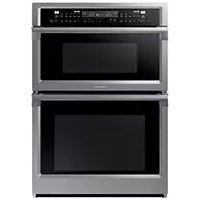
Built-In Microwave Combi Oven
User manual
NQ70M6650D*
SQ30466691DS_AA_1E55-4444-02-ENand 1179727 18216 AM
Regulatory Notice
PRECAUTIONS TO AVOID POSSIBLE EXPOSURE TO EXCESSIVE MICROWAVE ENERGY
A. Do not attempt to operate this microwave oven with the door open since open-door operation can result in harmful exposure to microwave energy. It is important not to defeat or tamper with the safety interlocks.
B. Do not place any object between the oven front face and the door or allow soil or cleaner residue to accumulate on the sealing surface.
C. Do not operate the microwave oven if it is damaged. It is particularly important that the oven door close properly and that there is no damage to the:
1) Door (bent),
2) Hinges and latches, (broken or loosened),
3) Door seals and sealing surface.
D. The microwave oven should not be adjusted or repaired by anyone except properly qualified service personnel.
1. FCC Notice
CAUTION
FCC CAUTION: Any changes or modifications not expressly approved by the party responsible for compliance could void the user's authority to operate the equipment.
This device complies with Part 15 of FCC Rules. Operation is Subject to following two conditions:
1) This device may not cause harmful interference, and
2) This device must accept any interference received including interference that cause undesired operation.
For products sold in the US and Canadian markets, only channels 1~11 are available. You cannot select any other channels.
FCC STATEMENT:
This equipment has been tested and found to comply within the limits for a Class B digital device, pursuant to part 15 of the FCC Rules. These limits are designed to provide reasonable protection against harmful interference in a residential installation.
This equipment generates, uses, and can radiate radio frequency energy and, if not installed and used in accordance with the instructions, may cause harmful interference to radio communications. However, there is no guarantee that interference will not occur in a particular installation. If this equipment does cause harmful interference to radio or television reception, which can be determined by turning the equipment off and on, the user is encouraged to try to correct the interference by one or more of the following measures:
Reorienting or relocating the receiving antenna
- Increasing the separation between the equipment and receiver
- Connecting the equipment to an outlet that is on a different circuit than the radio or TV
- Consulting the dealer or an experienced radio/TV technician for help.
FCC RADIATION EXPOSURE STATEMENT:
This equipment complies with FCC radiation exposure limits set forth for an uncontrolled environment. This equipment should be installed and operated so there is at least 8 inches (20 cm) between the radiator and your body. This device and its antenna(s) must not be co-located or operated in conjunction with any other antenna or transmitter.
2. IC Notice
The term "IC" before the radio certification number only signifies that Industry Canada technical specifications were met. Operation is subject to the following two conditions: (1) this device may not cause interference, and (2) this device must accept any interference, including interference that may cause undesired operation of the device.
This Class B digital apparatus complies with Canadian ICES-003. For products sold in the US and Canadian markets, only channels 1~11 are available. You cannot select any other channels.
IC RADIATION EXPOSURE STATEMENT:
This equipment complies with IC RSS-102 radiation exposure limits set forth for an uncontrolled environment. This equipment should be installed and operated so there is at least 8 inches (20 cm) between the radiator and your body. This device and its antenna(s) must not be co-located or operated in conjunction with any other antenna or transmitter.
ContentsContents
Important safety instructions 5
Introducing your new oven 19
Overview What's included with your oven 19
Before you begin 20
Energy saving tips 20
Turntable (For microwave oven) 20
Water reservoir 21
Basic operations 22
Control panel 22
Setting the clock 24
Setting the kitchen timer 24
Control Lockout 25
Timed Cooking 25
Minimum and maximum settings 26
Microwave Oven (Upper Oven)
Microwave 26
Convection 27
B?01 27
Speed Convection 27
Screw Displacement 28
Bencor 28
Defrost 28
Sensor Cook 29
Auto Cook 33
Soften/Melt 36
Oven (Lower Oven) 37
Timed Cooking 37
Delay Start 37
Turning the light on and off 37
Using the oven racks 38
Using the Giding Rack 39
Baking 40
Convection baking 41
Convection roasting 42
No Preheat 42
Broiling 43
Steam baking and roasting 44
Using Bread Proof 45
Using the Temp Probe 45
Using Smart Control (Lower oven only) 47
Using Options 48
Using the Sabbath feature 50
Maintaining your appliance 51
Self-cleaning (Lower oven only) 51
Hybrid Cleaning (lower oven only) 52
Descale 54
Braing 53
Care and cleaning of the oven 56
Removing the oven door (Lower oven only) 58
Replacing the oven door (Lower oven only) 59
Changing the oven light (Lower oven only) 60
Troubleshooting 60
Control Display 60
For the Microwave Oven 61
For the Lower Oven 64
Information codes 66
Warranty (U.S.A) 67
Warranty (CANADA) 69
Appendix 70
Open Source Announcement 70
4 English

Important safety instructions
Read and follow all instructions before using your oven to prevent the risk of fire, electric shock, personal injury, or damage when using the oven. This guide does not cover all possible conditions that may occur. Always contact your service agent or the manufacturer about problems that you do not understand.
WHAT YOU NEED TO KNOW ABOUT SAFETY INSTRUCTIONS
Warnings and important safety instructions in this manual do not cover all possible conditions and situations that may occur. It is your responsibility to use common sense, caution, and care when installing, maintaining, and operating your oven.
Important safety symbols and precautions
What the icons and signs in this user manual mean:
WARNING
Hazards or unsafe practices that may result in severe personal injury or death.
CAUTION
Hazards or unsafe practices that may result in minor personal injury or property damage.
CAUTION
To reduce the risk of fire, explosion, electric shock, or personal injury when using your oven, follow these basic safety precautions.
Do NOT attempt.
Do NOT disassemble.
Do NOT touch.
Follow directions explicitly.
Unplug the power plug from the wall socket.
Make sure the machine is grounded to prevent electric shock.
Call a Samsung service center for help.
Note
These warning signs are here to prevent injury to you and others. Please follow them explicitly.
After reading this section, keep it in a safe place for future reference.
STATE OF CALIFORNIA PROPOSITION 65 WARNING (US ONLY)
WARNING : This product contains chemicals known to the State of California to cause cancer and birth defects or other reproductive harm.
SAVE THESE INSTRUCTIONSSAVE
Important safety instructions (Microwave Oven)
WARNING
To reduce risk of burns, electric shock, fire, personal injury or exposure to excessive microwave energy:
1. Read all safety instructions before using the appliance.
2. Read and follow the specific "Precautions to avoid possible exposure to excessive microwave energy" on page 2.
3. This appliance must be grounded. Connect only to properly grounded outlets. See Important "Grounding instructions" on page 7 of this manual.
4. Install or locate this appliance only in accordance with the provided installation instructions.
5. Some products such as whole eggs and sealed containers (for example, closed glass jars) can explode if heated rapidly. Never heat them in a microwave oven.
6. Use this appliance only for its intended use as described in the manual. Do not put corrosive chemicals or vapors in or on this appliance. This type of microwave oven is specifically designed to heat, cook, or dry food. It is not designed for industrial or laboratory use.
7. As with any appliance, close supervision is necessary when it is used by children. Keep children away from the door when opening or closing it as they may bump themselves on the door or catch their fingers in the door.
8. Do not operate this appliance if it has a damaged cord or plug, if it is not working properly, or if it has been damaged or dropped.
9. This appliance should be repaired or serviced only by qualified service personnel. Contact the nearest authorized service facility for examination, repair, or adjustment.
10. Do not cover or block any openings in the appliance.
11. Do not tamper with or make any adjustments or repairs to the door.
12. Do not store this appliance outdoors. Do not use this product near water, for example, near a kitchen sink, in a wet basement, near a swimming pool, or similar locations.
- Do not immerse the cord or plug in water.
- Keep the cord away from heated surfaces (including the back of the oven).
- Do not let the cord hang over edge of a table or counter.
- When cleaning surfaces of the door and oven that come together when the door closes, use only mild, nonabrasive soaps, or detergents applied with a sponge or soft cloth. Unplug the plug before cleaning the unit.
-
To reduce the risk of fire in the oven cavity:
-
Do not overcook food. Carefully attend the appliance when paper, plastic, or other combustible materials are placed inside the oven to facilitate cooking.
-
Remove wire twist-ties from paper or plastic bags before placing the bags in the oven.
-
If materials inside the oven ignite, keep the oven door closed, turn the oven off, and disconnect the power cord, or shut off the power at the fuse or circuit breaker panel. If the door is opened, the fire may spread.
- Do not use the cavity for storage purposes. Do not leave paper products, cooking utensils, or food in the cavity when not in use.
- Liquids, such as water, milk, coffee, or tea can be overheated beyond the boiling point without appearing to be boiling. Visible bubbling or boiling when the container is removed from the microwave oven is not always present. THIS COULD RESULT IN VERY HOT LIQUIDS SUDDENLY BOILING OVER WHEN THE CONTAINER IS DISTURBED OR A SPoon OR OTHER UTENSIL IS INSERTED INTO THE LIQUID. To reduce the risk of injury:
Do not overheat liquid
- Stir liquid both before and halfway through heating it.
- Do not use straight-sided containers with narrow necks.
After heating, let containers with liquid stand in the microwave oven for a short time before removing.
- Use extreme care when inserting a spoon or other utensil into a container holding liquid.
SAVE THESE INSTRUCTIONS SAVE THESE INSTRUCTIONS
6 English

- Oversized foods or oversized metal utensils should not be inserted into the microwave oven as they may create a risk of fire or electric shock.
- Do not clean with metal scouring pads. Pieces can burn off the pad and touch electrical parts creating a risk of electric shock.
- Do not store any materials, other than manufacturer's recommended accessories, in this microwave when not in use.
- Do not cover the racks or any other part of the microwave oven with metal foil. This will cause overheating of the microwave.
GROUNDING INSTRUCTIONS
This appliance must be grounded. In the event of an electrical short circuit, grounding reduces the risk of electric shock by providing an escape wire for the electrical current. This appliance is equipped with a cord that includes a grounding wire and a grounding plug. The plug must be plugged into an outlet that is properly installed and grounded.
WARNING
Improper use of the grounding plug can result in a risk of electric shock.
- Plug into a grounded 3 prong outlet. Do not remove the third (grounding) prong. Do not use an adaptor or otherwise defeat the grounding plug.
- Consult a qualified electrician or service person if you do not understand the grounding instructions or if you are not sure if the appliance is properly grounded.
- We do not recommend using an extension cord with this appliance. If the power-supply cord is too short, have a qualified electrician or serviceman install an outlet near the appliance. However, if it is necessary to use an extension cord, read and follow the "Use of Extension Cords" section below.
USE OF EXTENSION CORDS
A short power supply cord is provided to reduce the risk of your becoming entangled in or tripping over a longer cord. Longer cord sets or extension cords are available and you can use them if you exercise care. If you use a long cord or extension cord:
- The marked electrical rating of the cord set or extension cord should be at least as great as the electrical rating of the appliance.
- The extension cord must be a grounding-type 3-wire cord and it must be plugged into a 3-slot outlet.
- The longer cord should be arranged so that it will not drape over the counter top or tabletop where it can be pulled on by children or tripped over accidentally. If you use an extension cord, the interior light may flicker and the speed of the blower may vary when the microwave oven is on. Cooking times may be longer too.
SAVE THESE INSTRUCTIONSSAVE
English 7


Important safety instructions (Oven)
FOR YOUR SAFETY
When using electrical appliances, you should follow basic safety precautions, including the following:
CAUTION
- Use this appliance only for its intended purpose as described in this Owner's Manual.
Potentially hot surfaces include the oven vent opening, surfaces near the opening, and crevices around the oven door.
Proper Installation - Be sure your appliance is properly installed and grounded by a qualified technician.
User servicing - Do not repair or replace any part of the appliance unless specifically recommended in this manual. All other servicing should be referred to a qualified technician.
Always disconnect the power to the appliance before servicing by removing the fuse or switching off the circuit breaker.
Do not enter the oven.
- Do not leave children alone. Never leave children alone or unattended in an area where this appliance is in use. They should never be allowed to sit or stand on any part of the appliance.
- Never use your appliance for warming or heating the room.
- Do not use water on grease fires. Turn off the oven to avoid spreading the flames. Smother the fire or flames by closing the door or use a dry chemical, baking soda, or foam-type extinguisher.
- Avoid scratching or striking the glass doors and the control panel. Doing so may lead to glass breakage. Do not cook on a product with broken glass. Shock, fire, or cuts may occur.
SAVE THESE INSTRUCTIONS SAVE THESE INSTRUCTIONS
8 English


- If there is a fire in the oven during self-cleaning, turn the oven off and wait for the fire to go out. Do not force the door open. The introduction of fresh air at self-cleaning temperatures may lead to a burst of flame from the oven. Failure to follow these instructions may result in severe burns.
If the oven is heavily soiled with oil, self-clean the oven before using the oven again. Leaving the oil in place creates a risk of fire. - Wipe up heavy soil on the oven bottom with a paper towel or rag before self-cleaning. Self-cleaning the oven when there is heavy soil on the oven bottom requires longer cleaning cycles and produces more smoke.
Storage in or on the appliance. Do not store flammable materials in the oven or near the surface units. Be sure all packing materials are removed from the appliance before operating it. Keep plastics, clothes, and paper away from parts of the appliance that may become hot. - Wear proper apparel. Never wear loose-fitting or hanging garments while using the appliance.

- Use only dry potholders. Placing moist or damp potholders on hot surfaces may result in burns from steam. Do not let the potholder touch hot heating elements. Do not use a towel or other bulky cloth instead of a potholder.
- Teach children not to play with the controls or any other part of the oven.
- For your safety, do not use high-pressure water cleaners or steam jet cleaners to clean any part of the oven.
If the power cord is damaged, it must be replaced by the manufacturer, its service agent, or similarly qualified persons to avoid creating a hazard.
The appliance is not intended for use by persons (including children) with reduced physical, sensory or mental capabilities, or lack of experience and knowledge, unless they have been given supervision or instruction concerning use of the appliance by a person responsible for their safety.
SAVE THESE INSTRUCTIONSSAVE
English 9


Important safety instructions (Oven)
ELECTRICAL SAFETY
Use only the factory installed flexible power cord to connect to the power supply. Do not use a 3rd party power supply cord kit.
-
The appliance should be serviced only by qualified service personnel. Repairs carried out by unqualified individuals may cause injury or a serious malfunction. If your appliance is in need of repair, contact a Samsung authorized service center. Failure to follow these instructions may result in damage and void the warranty.
-
Flush - mounted appliances may be operated only after they have been installed in cabinets and workplaces that conform to the relevant standards. This ensures that the appliances are installed in compliance with the appropriate safety standards.
If your appliance malfunctions or if fractures, cracks, or splits appear:
- Switch off the oven.
- Unplug the oven from the AC wall outlet.
- Contact your local Samsung service center.
WARNING
- Ensure that the appliance is switched off before replacing the lamp to avoid the possibility of electric shock.
CHILD SAFETY
WARNING
This appliance is not intended for use by young children or infirm persons without the adequate supervision of a responsible adult.
- Young children should be supervised to ensure that they do not play with the appliance.
- Keep children away from the door when opening or closing it as they may bump themselves on the door or catch their fingers in the door.
- During self-cleaning, the surfaces may get hotter than usual. Keep small children away from the oven when it is in the self-cleaning mode.
WARNING
Accessible parts may become hot during use. To avoid burns, young children should be kept away.
SAVE THESE INSTRUCTIONS SAVE THESE INSTRUCTIONS
10 English

OVEN

DO NOT TOUCH THE HEATING ELEMENTS OR INTERIOR
SURFACES OF THE OVEN. Heating elements may be hot even though they are dark in color. Interior surfaces of an oven become hot enough to cause burns. During and after use, do not touch or let clothing or other flammable materials contact the heating elements or interior surfaces of the oven until they have had sufficient time to cool. Other surfaces of the appliance may become hot enough to cause burns. Among these surfaces are oven vent openings and surfaces near these openings, the oven door, and the window of the oven door.
- Do not heat unopened food containers. The build-up of pressure may cause the container to burst and result in injury.
- Do not use the oven to dry newspapers. If overheated, newspapers can catch fire.
- Do not use the oven for a storage area. Items stored in an oven can ignite.

Use care when opening the door. Let hot air or steam escape before you remove food from or put food into the oven.
- Protective liners. Do not use aluminum foil to line the oven bottoms, except as suggested in this manual. Improper installation of these liners may result in a risk of electric shock or fire.
- Placement of oven racks. Always place oven racks in the desired location while the oven is cool. If the rack must be moved while the oven is hot, use potholders. Do not let the potholders come in contact with the hot heating element in the oven.
- Do not allow aluminum foil or a meat probe to contact the heating elements.
During use, the appliance becomes hot.
Care should be taken to avoid touching heating elements inside the oven.
- Do not use harsh abrasive cleaners or sharp metal scrapers to clean the oven door glass. They can scratch the surface which may result in the glass shattering.
SAVE THESE INSTRUCTIONSSAVE
English 11


Important safety instructions (Oven)
CAUTION
Do not attempt to operate the oven during a power failure. If the power fails, always turn the oven off. If the oven is not turned off and the power returns, the oven may begin to operate again. Food left unattended could catch fire or spoil.
SELF-CLEANING OVENS

Do not clean the door gasket. The door gasket is essential for a good seal. Care should be taken not to rub, damage, or move the gasket.

- Never keep pet birds in the kitchen. Birds are extremely sensitive to the fumes released during an oven self-clean cycle. Fumes may be harmful or fatal to birds. Move birds to a well-ventilated room.
Clean only the parts listed in this manual in the self-clean cycle. Before self-cleaning the oven, remove the partition, rack, utensils, and any food.
Before operating the self-clean cycle, wipe grease and food soils from the oven. Excessive amounts of grease may ignite, leading to smoke damage to your home.

- Do not use any commercial oven cleaner or oven liner protective coating of any kind in or on the outside of the oven.
- Remove the nickel oven shelves from the oven before you begin the self-cleaning cycle or they may discolor.
- If the self-cleaning mode malfunctions, turn the oven off and disconnect the power supply. Have it serviced by a qualified technician.
- Excess spillage must be removed before you run the self-cleaning cycle.
VENTILATING HOOD

- Clean ventilating hoods frequently. Do not let grease accumulate on the hood or filter.
- When flaming foods under the hood, turn the fan on.
SAVE THESE INSTRUCTIONS SAVE THESE INSTRUCTIONS
12 English

CRITICAL INSTALLATION WARNINGS
WARNING
This appliance must be installed by a qualified technician or service company.
- Failing to have a qualified technician install the oven may result in electric shock, fire, an explosion, problems with the product, or injury.
- Unpack the oven, remove all packaging material and examine the oven for any damage such as dents on the interior or exterior of the oven, broken door latches, cracks in the door, or a door that is not lined up correctly. If there is any damage, do not operate the oven and notify your dealer immediately.
- Keep all packaging materials out of the reach of children. Children may use them for play and injure themselves.
This appliance must be properly grounded.
- Do not ground the appliance to a gas pipe, plastic water pipe, or telephone line.
- This may result in electric shock, fire, an explosion, or problems with the product
- Do not cut or remove the ground prong from the power cord under any circumstances.
- Connect the oven to a circuit that provides the correct amperage.
- Do not install this appliance in a humid, oily or dusty location, or in a location exposed to direct sunlight or water (rain drops).
This may result in electric shock or fire. - Do not use a damaged power cord or loose wall socket.
This may result in electric shock or fire. - Do not pull or excessively bend the power cord.
- Do not twist or tie the power cord.
- Do not hook the power cord over a metal object, place a heavy object on the power cord, or insert the power cord between objects.
This may result in electric shock or fire.
If the power cord is damaged, contact your nearest Samsung service center.
SAVE THESE INSTRUCTIONSSAVE
English 13

Important safety instructions (Oven)
CRITICAL USAGE WARNING
CAUTION
If the appliance is flooded by any liquid, please contact your nearest Samsung service center. Failing to do so may result in electric shock or fire.
If the appliance produces a strange noise, a burning smell, or smoke, unplug the power plug immediately and contact your nearest Samsung service center.
- Failing to do so may result in electric shock or fire
In the event of a gas leak (such as propane gas, LP gas, etc.), ventilate the area immediately. Do not touch the power cord. Do not touch the appliance.
A spark may result in an explosion or fire.
Take care not to contact the oven door, heating elements, or any of the other hot parts with your body while cooking or just after cooking.
- Failing to do so may result in burns.
If materials inside the oven should ignite, keep the oven door closed, turn the oven off and disconnect the power cord, or shut off power at the fuse or circuit breaker panel. If the door is opened, the fire may spread.
Always observe safety precautions when using your oven. Never try to repair the oven on your own - there is dangerous voltage inside. If the oven needs to be repaired, contact an authorized Samsung service center near you.
If you use the appliance when it is contaminated by foreign substances such as food waste, it may result in a problem with the appliance.
Take care when removing the wrapping from food taken out of the appliance.
If the food is hot, hot steam may be emitted abruptly when you remove the wrapping and this may result in burns.
-
Do not attempt to repair, disassemble, or modify the appliance yourself.
-
Since a high voltage current enters the product chassis, it may result in electric shock or fire.
-
When a repair is needed, contact your nearest Samsung service center.
If any foreign substance such as water has entered the appliance, contact your nearest Samsung service center.
- Failing to do so may result in electric shock or fire.
SAVE THESE INSTRUCTIONS SAVE THESE INSTRUCTIONS
14 English


- Do not touch the power cord with wet hands.
This may result in electric shock. - Do not turn the appliance off while an operation is in progress.
This may cause a spark and result in electric shock or fire. - Do not let children or any person with reduced physical, sensory, or mental capabilities use this appliance unsupervised.
Make sure that the appliance's controls and cooking areas are out of the reach of children. - Failing to do so may result in electric shock, burns, or injury.
- Do not touch the inside of the appliance immediately after cooking. The inside of the appliance will be hot.
- Failing to do so may result in burns.
- Do not use or place flammable sprays or objects near the oven.
- Flammable items or sprays can cause fires or an explosion.

- Do not insert fingers, foreign substances, or metal objects such as pins or needles into inlets, outlets, or holes. If foreign substances are inserted into any of these holes, contact your product provider or nearest Samsung service center.
- Do not tamper with or make any adjustments or repairs to the door. Under no circumstances should you remove the door or outer shell of the oven.
- Do not store or use the oven outdoors.
-
Never use this appliance for purposes other than cooking.
-
Using the appliance for any purpose other than cooking may result in fire.
-
Open the cap or stopper of sealed containers (herb tonic tea bottle, baby bottle, milk bottle and so on) before heating them. Make a hole in food items that have shells (eggs, chestnuts, etc) with a knife before cooking them.
- Failing to do so may result in burns or injury.
- Never heat plastic or paper containers and do not use them for cooking.
- Failing to do so may result in fire.
SAVE THESE INSTRUCTIONSSAVE
English 15


Important safety instructions (Oven)

- Do not heat food wrapped in paper from magazines, newspapers, etc.
This may result in fire. - Do not open the door when the food in the oven is burning.
If you open the door, it causes an inflow of oxygen and may cause the food to ignite. - Do not apply excessive pressure to the door or the inside of the appliance. Do not strike the door or the inside or the appliance.
- Hanging on to the door may result in the product falling and cause serious injury.
If the door is damaged, do not use the appliance. Contact a Samsung service center. - Do not hold food in your bare hands during or immediately after cooking.
Use cooking gloves. The food may be very hot and you could burn yourself. - As the handle and oven surfaces may be hot enough to cause burns after cooking, use cooking gloves to protect your hands from burns.
USAGE CAUTIONS

CAUTION

If the surface is cracked, turn the appliance off. Failing to do so may result in electric shock
- Dishes and containers can become hot. Handle with care.
Hot foods and steam can cause burns. Carefully remove container coverings, directing the steam away your hands and face.
- Remove lids from baby food jars before heating. After heating baby food, stir well to distribute the heat evenly. Always test the temperature by tasting before feeding the baby. The glass jar or the surface of the food may appear to be cooler than the interior, which can be hot enough to burn an infant's mouth.
Take care as beverages or food may be very hot after heating.
- Especially when feeding a child, make sure the food or beverage has cooled sufficiently.
SAVE THESE INSTRUCTIONS SAVE THESE INSTRUCTIONS
16 English


Take care when heating liquids such as water or other beverages.
Make sure to stir during or after cooking.
- Avoid using a slippery container with a narrow neck.
- Wait at least 30 seconds after heating before removing the heated liquid.
- Failing to do so may result in an abrupt overflow of the contents and cause burns.

-
Do not stand on top of the appliance or place objects (such as laundry, an oven cover, lighted candles, lighted cigarettes, dishes, chemicals, metal objects, etc.) on the appliance.
-
Items, such as a cloth, may get caught in the door.
This may result in electric shock, fire, problems with the product, or injury. -
Do not operate the appliance with wet hands.
This may result in electric shock. - Do not spray volatile substances such as insecticide onto the surface of the appliance.
As well as being harmful to humans, it may also result in electric shock, fire, or problems with the product.

- Do not put your face or body close to the appliance while cooking or when opening the door just after cooking.
Take care that children do not come too close to the appliance. -
Failing to do so may result in children burning themselves.
-
Do not place food or heavy objects over the edge of the oven door.
If you open the door, the food or object may fall and this may result in burns or injury.
- Do not abruptly cool the door, the inside of the appliance, or a dish by pouring water over it during or just after cooking.
-
This may result in damage to the appliance. The steam or water spray may result in burns or injury.
-
Do not operate while empty except for self-cleaning.
- Do not defrost frozen beverages in narrow-necked bottles. The bottles can break.
- Do not scratch the glass of the oven door with a sharp object.
- This may result in the glass being damaged or broken.
- Do not store anything directly on top of the appliance when it is in operation.
SAVE THESE INSTRUCTIONSSAVE
English 17

Important safety instructions (Oven)

- Do not use sealed containers. Remove seals and lids before cooking. Sealed containers can explode due to the build up of pressure even after the oven has been turned off.
Take care that food you are cooking in the oven does not come into contact with the heating element.
This may result in fire. - Do not over-heat food.
Overheating food may result in fire. - Use caution when opening or closing the door. Your fingers may be pinched, resulting in physical injury.
- The door has wires at the bottom for connecting LED lights. Be careful not to pull or cut the wires when handling the door.
CRITICAL CLEANING WARNINGS

CAUTION

- Do not clean the appliance by spraying water directly on to it.
- Do not use benzene, thinner, or alcohol to clean the appliance.
This may result in discoloration, deformation, damage, electric shock, or fire.
SAVE THESE INSTRUCTIONS SAVE THESE INSTRUCTIONS
18 English

Take care not to hurt yourself when cleaning the appliance (externally or internally).
- You may hurt yourself on the sharp edges of the appliance.
- Do not clean the appliance with a steam cleaner.
This may result in corrosion.
- Keep the inside of the oven clean. Food particles or spattered oils stuck to the oven walls or floor can cause paint damage and reduce the efficiency of the oven.

Introducing your new oven
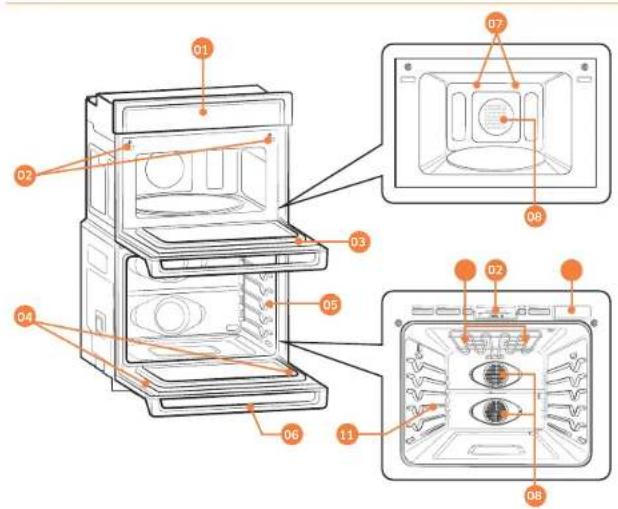
Overview
01 Control panel
02 Door latch
03 MWO door
04 DoorLEDlight
05 Oven gasket
06 Oven door
07 LED Lamp
08 Convection tan
09 Halogen lamp
10 Water Reservoir 11 Shelf position
What's included with your oven
This oven ships with different kinds of accessories that help you cook what you want.
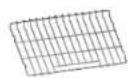
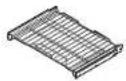
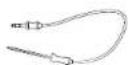
Wire racks (2) Gliding rack (1) Temp Probe (1)*
Accessories for oven
| Wire racks | Use these racks in the oven when baking and broiling. |
| Gliming rack | The fully extendable Gliming Rack makes food preparation easier, especially when you are preparing heavier dishes. |
| Temp Probe | The Temp Probc lets you cook meat to the exact internal temperature you want, taking the guess work out of determining whether a piece of meat is done or not. |
BefouduyingbeginnBefouoeyoubegin
Accessories for microwave
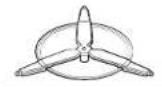
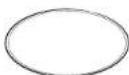
Roller ring Turntable Hot plate*
m = 311 ;
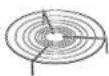
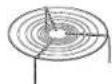
Low rack High rack
| Roller ring | Put in the center of the base, it supports the turntable. |
| Turntable | Put on the roller ring with the center fitting of the coupler. It serves as a cooking base. |
| Racks | Use one of these racks as appropriate to cook two dishes simultaneously. A smaller dish on the turntable, and the other on the selected rack. You can use these racks with Broil or Convection function. |
| NOTEDo not use wire racks with Microwave mode except where specifically noted in this manual. | |
| Hot plate | Put on the turntable. Use this to brown food, or to keep pastries or pizza crisp. |

NOTE
Do not use the turntable without the roller ring.
If you need an accessory marked with a 'you can buy it from the Samsung Contact Center (1-800-726-7864).
Before using the top and bottom ovens for the first time, remove all the accessories, and then clean the ovens thoroughly. Then, set the lower oven to Bake, and run it at 400°F for 1 hour. Next, set the microwave (top) oven to Convection, and then run it at 400°F for 1 hour. There will be a distinctive odor. This is normal.
Energy saving tips
During cooking, the oven door should remain closed except when you turn food over. Do not open the door frequently during cooking to maintain the oven temperature and to save energy.
If cooking time is more than 30 minutes, you can switch the oven off 5-10 minutes before the end of the cooking time to save energy. The residual heat will complete the cooking process.
To save energy and reduce the time needed for re-heating the oven, plan oven use to avoid turning the oven off between cooking one item and the next. Whenever possible, cook more than one item at a time.
Turntable (For microwave oven)
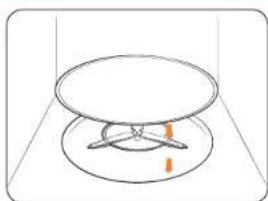
Remove all packing materials inside the oven. Install the roller ring and turntable. Check that the turntable rotates freely.
20 English

Water reservoir
The water reservoir is used for the Steam Bake, Steam Roast, and Hybrid Clean functions and also to remove water scale that may form on the oven walls, especially after Steam Baking, Steam Roasting, and Hybrid cleaning. Fill it with water in advance of Steam cooking or descaling.
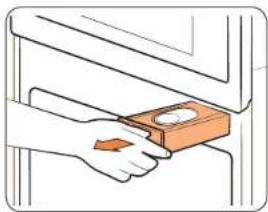
- Locate the water reservoir. The water reservoir is on the right side of the oven, just above the oven opening. Touch Reservoir on the control panel. The oven ejects the water reservoir. Grasp the front of the reservoir, and then slide it out to remove it.
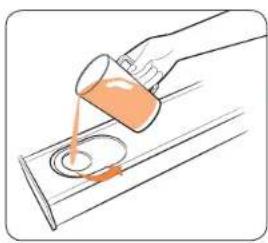
- Open the reservoir cap, and then fill the reservoir with 22 oz. (650 ml) of drinkable water.
NOTE
You can open the reservoir by removing the rubber cap or by removing the clear plastic top.
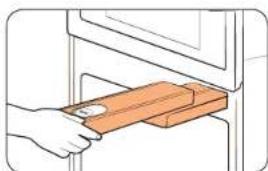
- Replace the cap or the clear plastic top, and then slide the water reservoir back into the reservoir slot.
- Push the reservoir in. There will be soft click when it is in place correctly. Touch Reservoir The oven retracts the water reservoir.
- Close the oven door.
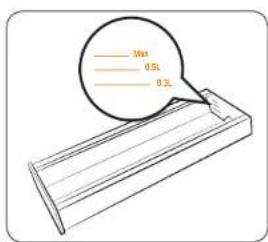
NOTE
Do not exceed the max line.
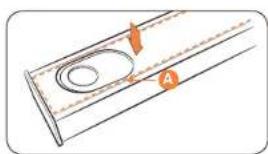
NOTE
Make sure the cap and the upper portion of the water reservoir (labeled A) are closed before using the oven.
BeforeperatbeginBasic operations
CAUTION
The water reservoir becomes hot during the cooking. Make sure you wear oven gloves to remove or refill the water reservoir.
NOTE
If Reservoir on the control panel is blinking, the water reservoir is not closed properly. Close the reservoir completely.
If 'Hot' appears on the display, be careful. The oven and the water reservoir are hot.
Control panel
READ THE INSTRUCTIONS CAREFULLY BEFORE USING THE OVEN. For satisfactory use of your oven, become familiar with the various features and functions of the oven as described below. Detailed instructions for each feature and function follow later in this user manual.
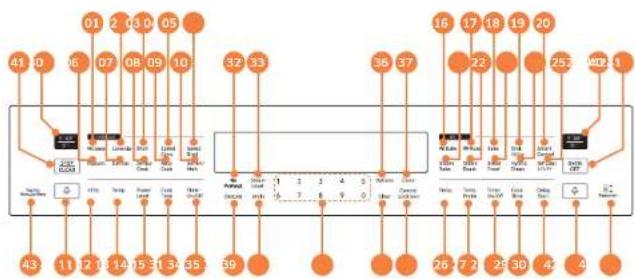
01 Microwave: Use to select the Microwave function.
02 Convection. Use to select the Convection function.
03 Broil Use to select the Broil function
04 Speed Conv: Use to select the Convection+Microwave (Speed Conv) function.
05 Speed Broil: Use to select the Braill+Microwave (Speed Broil) function.
06 Popcorn: Use to select the Popcorn function.
07 Defrost Use to select the Defrost function
08 Sensor Cook: Use to select the Sensor Cook function.
09 Auto Cook Use to select the Auto Cook function.
10 Soften/Melt: Use to select the Soften/Melt function.
11 +30s: Press to add operation time during Microwave, Broil, Speed Conv, Speed Broil mode.

12 Temp. Use to change the temperature when the upper oven is in convection or combi mode (upper microwave oven).
13 Power Level: Use to change the Microwave power level.
14 Cook Time: Touch and then use the number pad to set the amount of time you want your food to cook. The oven will shut off when the cooking time has run out (upper microwave oven).
15 Timer On/Off: Use to set or cancel the kitchen timer. The kitchen timer does not start or stop cooking (upper microwave oven).
16 Bake (Convection Bake): Use to select the Convection Bake function. (Additionally, use to activate the No Preheat function in this mode.)
17 Roast (Convection Roast): Use to select the Convection Roast function. (Additionally, use to activate the No Preheat function in this mode.)
18 Bake:Use to select the Bake function.
19 Broil Hi/Lo: Use to select the Broil function.
20 Smart Control: Use to select the Smart Control feature.
21 Steam Bake: Use to select the Steam Bake function.
22 Steam Roast: Use to select the Steam Roast function.
23 Bread Proof: Use to select the Bread Proof function.
24 Hybrid Clean: Use to select the Hybrid Clean function.
25 Self Clean 2/3/5h. Use to select the Self-cleaning function. While Self-cleaning is running in one oven, you cannot use the other oven for any function.
26 Temp. Use to change the temperature when the oven is operating (lower oven).
27 Temp. Probe: Use to activate the Temp Probe mode.
28 Timer On/Off: Use to set or cancel the kitchen timer. The kitchen timer does not start or stop cooking (lower oven).
29 Cook Time: Touch and then use the number pad to set the amount of time you want your food to cook. The oven will shut off when the cooking time has run out (lower oven).
30 Delay Start: Use to set the oven to start and stop automatically at a time you set.
31 Descale: Use to select the Descale function.
32 No Preheat. Use to activate the No Preheat function in the Convection Bake and Convection Roast modes (lower oven).
33 Steam Level: Use to select a steam level (Lo, Med, Hi).
34 Drain: Use to select the drain function.
35 Number Pad: Use to set any function requiring numbers such as the time of day on the clock, the timer, the oven temperature, the start time, and the length of operation for timed cooking, etc.
36 Options: Use to bring up the User Preference menu in the display.
37 Clock: Use to set the time of day.
38 Clear: Use to cancel a previously entered temperature or time.
39 Control Lock(3sec): Use to disable all oven functions.
40 START/SET: Use to start any cooking or cleaning function in the oven.
41 STOP/CLEAR / OVEN OFF: Use to cancel all oven operations except the clock and timer.
42 Lamp: Use to turn the light (Oven and Door) on or off.
43 Touch to Wake-Up/Sleep: Use to activate or deactivate buttons and functions on the display.
44 Reservoir. Use to open the water reservoir for Steam Bake, Steam Roast and Hybrid Clean cleaning.

Basic operations
Sleep Mode
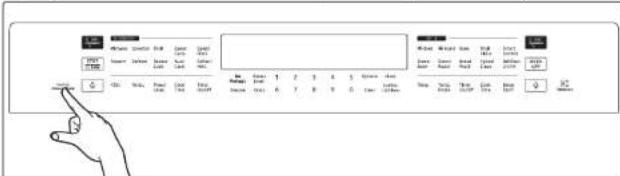
Your control panel will remain in a sleep mode when not in use. Only the clock will display. You will need to wake the control panel to begin or select any function.
Wake Mode
To wake the control panel, touch Touch to Wake-Up/Sleep. After 2 minutes without activity (or one minute when the oven is operating in standby mode), the control panel will return to Sleep mode.
Oven or Microwave Oven
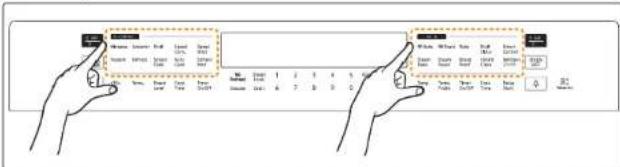
The Combi Oven provides two operation modes: Oven and Microwave Oven. To select either Oven and Microwave Oven, touch the desired operation mode. Then, the control panel will be activated.
Setting the clock
The clock must be set to the correct time of day for the automatic oven timing functions to work properly.
The time of day cannot be changed during timed cooking, delay-timed cooking, or a self-cleaning cycle.
- You can choose between a 12-hour or 24-hour display. The default is 12-hour.
How to set the clock
1. Touch Clock
Touch Clock to select AM or PM. (Skip this step if you are setting the clock to 24 hour display mode.)
3. Touch keys in the number pad to set the current time of day.
Touch Clock or START/SET to save the changes.
Setting the kitchen timer
The kitchen timer serves as an extra timer that will beep when the set time has elapsed. It does not start or stop cooking functions. You can use the kitchen timer with any of the other oven functions.
How to set the timer
- Touch Timer On/Off
- Touch number keys in the number pad to set the hours and minutes. The timer can be set for any amount of time from 1 minute to 9 hours and 58 minutes. If you make a mistake, touch Clear, and then enter the amount of time again.
- Touch Timer On/Off or START/SET
- When the set time has elapsed, the oven will beep and the display will show End until you touch Timer On/Off. You can cancel the timer at any time by touching Timer On/Off.

Control Lockout
Control Lockout lets you lock the buttons on the touch pad so they cannot be activated accidentally. Control Lockout also locks only lower oven doors so they cannot be opened. You can only activate Control Lockout when the oven is in standby mode.
How to activate the Control Lockout
- Cancel or turn off all other functions.
- Touch Control Lock(3sec) for 3 seconds.
The oven will display "Loc" and the lock icon along with the current time.
② NOTE
Control Lockout is available only when the oven temperature is under 400^
All other functions must be cancelled before you activate Control Lockout.
How to unlock the controls
Touch Control Lock(3sec) for 3 seconds.
"Loc" and the lock icon will disappear from the display.
NOTE
It may take up to 10 seconds for the doors to unlock.
Setting the power level
- Tap Power Level to set the power level of the microwave.
- Enter the power level you want by using the number pad.
You can set the power level from 10% to 100% in 10% increments.
Timed Cooking
In Timed Cooking mode, the oven turns on immediately and cooks for the length of time you select. At the end of the cooking time, the oven turns off automatically.
- You can use the Timed Cooking only with another cooking operation (Microwave, Convection, Broil, Speed Convection, Speed Broil).
How to set the oven for Timed Cooking
- Touch the pad for the cooking operation you want, eg. Microwave Enter the power level or temperature you want, for example, 100% using the number pad.
- Touch Cook Time. Enter the number of hours/minutes you want the oven to stay on using the number pad. You can set the cooking time for any amount of time from 1 second to the maximum time for each function.
- Touch START/SET to begin cooking. The oven will continue to cook until the set amount of time has elapsed, then turn off automatically.
- You can cancel a cook time at any time by Touch STOP/CLEAR

When Timed Cooking is done, the oven will be open.

Minimum and maximum settings
All the features listed in the table below have minimum and maximum times, temperatures, and power level settings. A beep will sound each time a pad on the control panel is pressed and the entry is accepted. An error tone will sound in the form of a long beep if the entered temperature or time is below the minimum or above the maximum setting for the feature.
Upper Microwave Oven
| FEATURE TEMP. POWER RANGE MAX. TIME | ||
| Microwave Oven 10 | 100% 1 Hr. 30 min. | |
| Convection | 100-450 °F (40-230 °C) | 2 Hr. |
| Brioil | 1 Hr. 30 min. | |
| Speed Conv. | 100-450 °F (40-230 °C) 10-70% | 1 Hr. 30 min. |
| Speed Broil | 10-70% | 1 Hr. 30 min. |
Lower Oven
| LOWER OVEN | |||
| 1 | Convection Bake | 175°F (80°C) | 550°F (285°C) |
| 2 | Convection Roast | 175°F (80°C) | 550°F (285°C) |
| 3 | Bake | 175°F (80°C) | 550°F (285°C) |
| 4 | Broil | LO | HI |
| 5 | Steam Bake | 230°F (110°C) 550°F (285°C) | |
| 6 | Steam Roast 230°F (110°C) 550°F (285°C) | ||
| ① | Hybrid Clean | 2 Hr. | |
Microwave Oven (Upper Oven)
Microwave
Microwaves are high-frequency electromagnetic waves that can be used to cook or reheat food without changing either the form or color of the food.
- Put food in a microwave-safe container, and then place the container in the center of the turntable. Close the door.
- Touch Microwave.
- Touch Power Level, and then use the number pad to input a desired power level.
- Touch Cook Time, and then use the number pad to input a desired cook time. You can also use the +30s button to add cooking time in 30 second increments. (Maximum cooking time is 1 hr, 30 min)
- Touch START/SET to start cooking.
- If you want to cancel Microwave cooking or if Microwave cooking is finished, touch STOP/CLEAR.
Power level
| 100% (High) 50% (Medium) | ||
| 90% (Sauté) 40% (Medium low) | ||
| 80% (Reheat) 30% (Low) | ||
| 70% (Medium high) 20% (Defrost) | ||
| 60% (Simmer) 10% (Warm) |

Use only microwave-safe cookware.
Do not use wire racks with Microwave mode.

Convection
The heating elements generate heat, which is evenly distributed inside the oven by the convection fan. You can use the oven racks or a combination of the rack and Hot plate on the turntable. Use this mode for biscuits, individual scones, rolls, and cakes as well as fruit cakes, choux pastries, and souffles.
- Put the rack or the combination of the rack and the Hot plate on the turntable.
- Touch Convection, and then use the number pad to input a des
temperature between 100°F and 450°F (default: 350°F).

To preheat, simply touch START/SET.
When preheating is done, the oven will beo.
3. Touch Cook Time, and then use the number pad to specify a cooking time.
(Maximum cooking time is 2 hr.)
4. Touch START/SET to start cooking.
5. If you want to cancel Convection cooking or if Convection cooking is finished,
touch STOP/CLEAR.

Use oven gloves when taking out food.
Broll
- Put the rack or the combination of the rack and the Hot plate on the turntable.
- Touch Broll. If preheating is preferred, simply touch START/SET.

You cannot set the temperature in Broil mode.
- Touch Cook Time, and then use the number pad to specify a cooking time.
(Maximum cooking time is 1 hr, 30 min.)
- Touch START/SET to start cooking.
- If you want to cancel Broiling or if Broiling is finished, touch STOP/CLEAR.

Use oven gloves when taking out food.
Speed Convection
This combination mode combines microwave energy with hot air, resulting in reduced cooking time and producing a brown, crispy surface on the food. Use this mode for all kinds of meat and poultry as well as casseroles and gratin dishes, sponge cakes and light fruit cakes, pies and crumbles, roast vegetables, scones, and breads.
- Put the rack or the combination of the rack and the Hot plate on the turntable.
- Touch Speed Conv, and then use the number pad to specify a temperature between 100^ and 450^ (default: 350^ ).
- Touch Power Level, and then use the number pad to specify a power level between 10% and 70%.
- Touch Cook Time, and then use the number pad to set the cooking time. (Maximum cooking time is 1 hr. 30 min.)
- Touch START/SET to start cooking.
- If you want to cancel Speed Convection cooking or if Speed Convection cooking is finished, touch STOP/CLEAR.

Use only microwave safe cookware.
Use oven gloves when taking out food.

Microwave Oven (Upper Oven)
Speed Broil
The heating elements generate heat, which is reinforced by the microwave energy. 1. Put the rack or the combination of the rack and the Hot plate on the turntable.
2. Touch Speed Broil

You cannot set the temperature in Speed Broll mode.
- Touch Power Level, and then use the number pad to specify a power level between 10% and 70%.
- Touch Cook Time, and then use the number pad to set the cooking time. (Maximum cooking time is 1 hr, 30 min.)
- Touch START/SET to start cooking.
- If you want to cancel Speed Broiling or if Speed Broiling is finished, touch STOP/CLEAR.

Use only microwave-safe cookware.
Use oven gloves when taking out food.
Popcorn
You do not need to set either the cooking time or the power level. Once you have selected Popcorn and touched START/SET, the oven automatically sets the cooking time and starts to cook. The gas sensing animation effect shows the status of the sensing process.
- Touch Popcorn
- Touch START/SET to start cooking.
- If you want to cancel the Popcorn function or if the Popcorn function is finished, touch STOP/CLEAR.

Use only microwave-safe cookware.
Use oven gloves when taking out food.
| Code/Food Amount Instructions | ||
| Popcorn | 3.0 3.5 oz. 1 package | Use only one microwave popcorn bag at a time. Be careful when removing the heated bag from the oven and when opening it. |
Defrost
The oven provides 4 different defrosting programs for your convenience. The time and power levels are automatically adjusted according to your selection.
- Put food in suitable cookware, then put the cookware on the turntable and close the door.
- Touch Defrost, and then use the number pad to select a program.
- Touch START/SET to move to the next step.
- Use the number pad to select the weight of food.
- Touch START/SET to start cooking.
- If you want to cancel Defrost or if Defrost is finished, touch STOP/CLEAR.

Use only microwave-safe cookware.
Use oven gloves when taking out food.
| Code/Food Amount | Instructions | |
| 1 Meat | 0.1-3.5 lbs. Sheld the edges with aluminium foil. Turn the meat over when the oven beeps. This program is suitable for lamb, pork, steaks, chops, and ground meat. For ground meat, place the meat directly on the turntable tray on wax paper. Do not use an extra tray. Let stand, covered with foil, for 5-10 minutes. | |
| 2 Poultry | 0.1-3.5 lbs. Sheld the leg and wing tips with aluminium foil. Turn the poultry over when the oven beeps. This program is suitable for whole chicken as well as for chicken portions. | |
28 English

| Code/Food Amount Instructions | |
| 3 Fish | 0.1-3.5 lbs. Sheld the tail of a whole fish with aluminium foil. Turn the fish over when the oven beeps. This program is suitable for whole fish as well as for fish fillets. |
| 4 Bread | 0.1 2.0 lbs. Put bread on a piece of paper towel. Turn over as soon as the oven beeps. This program is suitable for all kinds of bread, sliced or whole, as well as for bread rolls and bagueties. Arrange bread rolls in a circle. |
Sensor Cook
The 15 Sensor Cook features include/provide pre-programmed cooking times
You do not need to set either the cooking time or the power level. Once you have selected a program and touched START/SET, the oven automatically sets the cooking time and starts to cook. The gas sensing animation effect shows the status of the sensing process.
- Put the food in the center of the turntable and close the door.
- Touch Sensor Cook, and then use the number pad to select a program.
- Touch START/SET to start cooking.
- If you want to cancel Sensor Cook or if Sensor Cook is finished, touch STOP/ CLEAR
CAUTION
Use only microwave-safe cookware.
Use oven gloves when taking out food.
| Code/Food Amount Instructions | ||
| 1 Potato | 1 to 5 ea. Pierce | each potato several times with a fork. Place on the turntable in a spoke-like fashion. After cooking, let the potatoes stand for 3-5 minutes. Let the oven cool for at least 5 minutes before using it again. |
| 2 Pizza | 1 to 4 slices Place 1-4 pizza slices on a microwave safe plate with the wide ends of the slices towards the outside edge of the plate. Do not let the slices overlap. Do not cover. Let the oven cool for at least 5 minutes before using it again. | |
Microwave Oven (Upper Oven)
| Code/Food Amount | unt Instructions | |
| 3 Beverage | 6 to 8 oz. Use | a measuring cup or mug and do not cover. Place the beverage in the oven. After heating, stir well. Let the oven cool for at least 5 minutes before using it again. |
| 4 Dinner Plate | 1 serving Use | only precooked, refrigerated foods. Cover the plate with vented (1 inch vent) plastic wrap or waxed paper tucked under the plate. If the food is not as hot as you would like after using the "Sensor" function, continue heating using additional time and power. Contents: • 3-4 oz. meat, poultry, or fish (up to 6 oz. with bone) • 1/2 cup starch (potatoes, pasta, rice, etc) • 1/2 cup vegetables (about 3-4 oz.) |
| 5 Casserole | 1 to 4 servings | Cover the plate with vented (1 inch vent) plastic wrap. If the food is not as hot as you would like after using the "Sensor" function, continue heating using additional time and power. Stir the food once before serving. Contents: Casseroles: refrigerated |
| Code/Food Amount Instructions | ||
| 6 Pasta | 1 to 4 servings C | Cover the plate with vented (1 inch vent) plastic wrap. If the food is not as hot as you would like after using the "Sensor" function, continue heating using additional time and power. Stir the food once before serving. Contents: Pasta: canned spaghetti |
| 7 Soup | 1 to 4 servings C | Cover the plate with vented (1 inch vent) plastic wrap. If the food is not as hot as you would like after using the "Sensor" function, continue heating using additional time and power. Stir the food once before serving. Contents: Soup: refrigerated |
| 8 Frozen Breakfast | 4 to 8 oz. Use | This button for frozen sandwiches, breakfast entrees, pancakes, waffles, etc. Follow the package instructions for covering and standing. Let the oven cool for at least 5 minutes before using it again. |
| 9 Frozen Dinner | 13 to 18 oz. Remove | Move the food from its wrapping and follow the instructions on the box for covering and letting stand. Let the oven cool for at least 5 minutes before using it again. |
| Code/Food Amount | Instructions | |
| 10 Rice | 1 to 2 cups Add 1 cup of cold water for 1 cup of rice. Use a large glass pyrex bowl. Cover with vented (1 inch vent) plastic wrap. Rice doubles in volume during cooking. After the cooking time is over, stir before standing time, and then salt or add herbs and butter. | |
| 11 Mini Ravioli | 8 to 14 oz. Put mini ravioli evenly into a microwave safe glass bowl. Cover with vented (1 inch vent) plastic wrap. Let stand for 2-3 minutes. Stir the food once before serving. | |
| 12 Fresh Vegetables | 1 to 4 servings Place the fresh vegetables (broccoli florets, cauliflower florets, zucchini, egg plants etc.) in a microwave safe ceramic, glass, or plastic dish and add 2-4 tbs. water. Cover with vented (1 inch vent) plastic wrap while cooking and stir before letting stand. Let the oven cool for at least 5 minutes before using it again. | |
| 13 Fresh Root Vegetables | 1 to 4 servings Place the fresh vegetables (carrots, leeks, potatoes, beet etc.) in a microwave safe ceramic, glass, or plastic dish and add 2-4 tbs. water. Cover with vented (1 inch vent) plastic wrap while cooking and stir before letting stand. Let the oven cool for at least 5 minutes before using it again. | |
| Code/Food Amount Instructions | |
| 14 Frozen Vegetables | 1 to 4 servings Pace the frozen vegetables in a microwave safe ceramic, glass, or plastic dish and add 2-4 tbs. water. Cover with vented (1 inch vent) plastic wrap to cook. Stir before letting stand for 3-5 minutes. Let the oven cool for at least 5 minutes before using it again. |
| 15 Canned Vegetables | 1 to 4 servings Pace the canned vegetables in a microwave safe ceramic, glass, or plastic dish. Cover with vented (1 inch vent) plastic wrap while cooking and stir before letting stand. Let the oven cool for at least 5 minutes before using it again. |
Microwave Oven (Upper Oven)
Auto sensor cooking instructions
The Auto Sensor cooks your food automatically by detecting the amount of gases generated from the food while it is cooking.
- When food is cooked, many kinds of gases are generated. The Auto Sensor determines the proper time and power level by detecting these gases, eliminating the need to set the cooking time and power level.
- When you cover a container with its lid or plastic wrap during Sensor Cooking, the Auto Sensor will detect the gases generated after the container has been saturated with steam.
NOTE
If using cling film or plastic wrap, leave a small opening (vent) near the edge of the dish for ventilation or pierce the plastic with a knife or fork in several places.
- Shortly before cooking ends, the remaining cooking time will begin its count down. This will be a good time for you to rotate or stir the food for even cooking if it is necessary.
Before Auto Sensor cooking, food may be seasoned with herbs, spices, or browning sauces. A word of caution though: Salt or sugar may cause burn spots on food so these ingredients should be added after cooking.
Utensils & cover
To obtain good cooking results with the Auto Sensor function, follow the directions for selecting appropriate containers and covers in the charts in this manual.
Always use microwave-safe containers and cover them with their lids or with plastic wrap. When using plastic wrap, turn back one corner to allow steam to escape at the proper rate.
Always cover your microwave safe dish or container with its matching lid. If the dish or container does not have its own lid, use plastic wrap.
- Fill containers at least half full.
Foods that require stirring or rotating should be stirred or turned toward the end of the Sensor Cook cycle, after the time has started to count down on the display.
CAUTION
- After installing the oven and plugging it into an electrical outlet, do not unplug the power cord for 24 hours. The gas sensor needs time to stabilize in order to cook satisfactorily.
- It is not advisable to use the Auto Sensor cooking feature continuously, i.e. one cooking operation immediately after another.
Install the oven in a well ventilated location for proper cooling and airflow and to ensure the sensor will operate accurately.
To avoid poor results, do not use the Auto Sensor cooking function when the room ambient temperature is above 90°F or below 45°F. - Do not use volatile detergent to clean your oven. Cas resulting from this detergent may affect the sensor.
- Avoid placing the oven near high moisture or gas emitting appliances, since this will interfere with the proper performance of the Auto Sensor.
Always keep the inside of the oven clean. Wipe all spills with a damp cloth. This oven is designed for household use only.
Auto Cook
You do not need to set either the cooking time or the power level. You can adjust the size of the serving.
- Put the food in the center of the turntable and close the door.
- Touch Auto Cook, and then use the number pad to select the appropriate food code.
- Touch START/SET to go to the next step.
- Use the number pad to specify amount of servings.
- Touch START/SET to start cooking.
- If you want to cancel Auto Cook or if Auto Cook is finished, touch STOP/CLEAR
CAUTION
Use only microwave-safe cookware.
Use oven gloves when taking out food.
| Code/Food Amount Instructions | ||
| 1 Bacon | 1 serving: 2 slices 2 servings: 4 slices 3 servings: 6 slices | Layer 2 paper towels on a microwave safe plate and arrange the bacon on the towels. Do not overlap bacon. Cover with an additional paper towel. Remove the paper towel immediately after cooking. |
| 2 Hot Dog | 1 serving: 2 each 2 servings: 4 each | Pierce the hot dogs 3 times with a fork. Place the hot dogs on the hot plate, then place the plate on the low rack when the microwave beeps, add the buns and press start to continue. |
| Code/Food Amount Instructions | ||
| 3Oatmeal | 1 scrving: 1 pack2 servings: 2 packs | Follow the package directions for the recommended amount of water needed. Stir well before and afterwards. |
| 4Nachos | 1 serving Arrange | the tortilla chipsuniformly on a microwave safe plate, then place the plate on the high rack. Sprinkle evenly with cheese.Contents:* 4 to 5 oz. tortilla chips* 1/2 cup grated cheese |
| 5Baked Potato | 1 serving: 2ea.2 scrving: 4ea. | Pierce the potatoes 3 times with a fork. Place the potatoes on the low rack. After cooking, let the potatoes stand for 3-5 minutes. |
| 6Quinoa | 1 scrving: 1 cup2 scrving: 2 cups | Follow the package directions for the recommended amount of water needed. Stir well before and afterwards. |
| 7Brownie Mix | 1 package Pour the batter into an 8x8 inch microwave safe pan, then place the pan on the low rack. | |
Microwave Oven (Upper Oven)
| Code/Food Amount Instructions | |
| 8 Meatloaf | 2.5 lbs. Ingredients:1 1/2 lbs. ground beef, 1 egg, 1 onion (chopped), 1 cup milk, 1 cup dried bread crumbs, salt and pepper to tasteMethod:In a large bowl, combine the beef, egg, onion, milk and bread crumbs. Season with salt and pepper to taste and place in a lightly greased 5 x 9 inch loaf pan. Place the pan on the low rack. |
| Code/Food Amount | Instructions | |
| 9 Homemade Lasagna | 40 oz. Ingredients: | 0.7 lb. minced beef, 2 tbsp olive oil, 8 oz. tomato sauce, 4 oz. beef stock, 8 Lasagna sheets, 1 onion (chopped), oregano and basil to taste, 8 oz. grated mozzarella cheese |
| Method: Saucc: Heat the oil in a frying pan, then cook the minced beef and chopped onion for about 10 min until browned all over. Combine with the tomato sauce and beef stock, add the dried herbs. Bring to a boil, then simmer for 30 minutes. Cook Lasagna noodles according to the package directions. Layer noodle, meat sauce, and cheese then repeat. Sprinkle the remaining cheese evenly on the top layer. Place the oven dish on the low rack. After cooking, let stand for 2-3 minutes. | ||
| 10 Frozen Soft Pretzels | 1 serving: 2 ea. 2 servings: 4 ea. | Place the pretzels on the hot plate, then place the plate on the high rack. |
| 11 Frozen Buffalo Wings | 1 serving: 12 oz. 2 serving: 16 oz. | Place the frozen chicken wings on the hot plate, then place the plate on the high rack. |
| 12 Frozen Potato Chips | 12 oz. 16 oz. | Place the frozen potato chips on the hot plate, then place the plate on the high rack. |
| 13 Frozen Chicken Nuggets | 8 oz. 16 oz. | Place frozen chicken nuggets on the hot plate, then place the plate on the high rack. |
| 14 Frozen Pizza, 6 inch | 6 inch Place the pizza on the high rack. | |
| 15 Frozen Pizza, 12 inch | 12 inch Place the pizza on the low rack. | |
| 16 Bone-In Chicken Pieces | 1.0 lb. 2.0 lbs. | Brush the chicken pieces with oil and seasonings. Place the pieces skin side down on the high rack. When the microwave beeps, turn over bone-in chicken pieces, and then press Start to continue. |
| 17 Hamburger | 1 serving: 2 ea. 2 servings: 4 ea. (1 ca. = 4 oz.) | Place the hamburgers on the hot plate. Place the plate on the high rack. When the microwave beeps, turn the hamburgers over, and then press Start to continue. |
| 18 Salmon Steak | 2 servings: 2 ea. 4 servings: 4 ea. (1 ea. = 5 to 6 oz.) | Brush the salmon fillets with oil and seasonings. Place the salmon fillets on the hot plate, then place the plate on the high rack. |
| Code/Food Amount Instructions | |
| 19 Sirloin Steak, Medium | 1 inch. 1.0 lb. Place the steak on the high rack. When the microwave beeps, turn over the steak, and then press Start to continue. Let the steak rest for 5 minutes before slicing. Brush the steaks with oil and seasonings. |
| 20 Sirloin Steak, Well Done | 1 inch. 1.0 lb. Place the steak on the high rack. When the microwave beeps, turn over the steak, and then press Start to continue. Let the steak rest for 5 minutes before slicing. Brush the steaks with oil and seasonings. |
| 21 Boneless Pork Chops | 2 servings: 2 ea. 4 servings: 4 ea. (1 ea. = 5 to 6 oz.) Place the pork chops on the high rack. When the microwave beeps, turn over the pork chops, and then press Start to continue. Brush the pork chops with oil and seasonings. |
| 22 Homemade Mac and Cheese | 12 oz. Put oven dish on the low rack and cook. |
Microwave Oven (Upper Oven)
Soften/Melt
You do not need to set either the cooking time or the power level.
- Put the food in the center of the turntable and close the door.
- Touch Soften/Melt to select a program.
- Touch START/SET to go to the next step.
- Use the number pad to specify the weight of food.
- Touch START/SET to start cooking.
- If you want to cancel Soften/Meit or if Soften/Meit is finished, touch STOP/CLEAR.
CAUTION
- Use only microwave-safe cookware.
Use oven gloves when taking out food.
| Code/Food Amount | Instructions | |
| 1 Melt Butter | 0.25 lb. (1 stick) 0.5 lb. (2 sticks) | Unwrap the butter and cut the butter into several pieces. Place the butter on a microwave safe dish and cover with wax paper. Stir well afterwards. |
| 2 Soften Butter | 0.25 lb. (1 stick) 0.5 lb. (2 sticks) | Remove the butter from the packaging and place on a microwave safe dish. |
| 3 Melt Chocolate | 1 cup chips Place | the chocolate chips in a microwave safe dish. When the microwave beeps, stir well, and then press Start to continue. Unless stirred, the chocolate chips will keep their shape even when the heating time is over. |
| Code/Food Amount Instructions | ||
| 4 Soften Ice Cream | 1 serving: 1 pint 2 servings: 1.5 quarts | Remove the lid of the carton. Place the carton in the center of the microwave. |
| 5 Soften Cream Cheese | 4 oz. 8 oz. | Unwrap the cream cheese and place on a microwave safe dish. |
| 6 Melt Cheese | 4 oz. 8 oz. | Place the cheese in a microwave safe bowl and cover with wax paper. Stir well afterwards. |
| 7 Melt Marshmallows | 5 oz. 10 oz. | Place the marshmallows in a large microwave safe dish. Stir well afterwards. |
| 8 Melt Caramel | 4 oz. 8 oz. | Place the caramel in a large microwave safe dish. Stir well afterwards. |
Oven (Lower Oven)
Timed Cooking
In Timed Cooking mode, the oven turns on immediately and cooks for the length of time you select. At the end of the cooking time, the oven turns off automatically.
- You can use the Timed Cooking only with another cooking operation (Convection Bake, Convection Roast, Bake, Steam Bake, Steam Roast).
How to set the oven for Timed Cooking
- Touch the pad for the cooking operation you want, eg. Bake. Enter the temperature you want, for example, 400^ using the number pad. (The default temperature is 350°F).
- Touch Cook Time. Enter the number of hours/minutes you want the oven to stay on using the number pad. You can set the cooking time for any amount of time from 1 minute to 9 hours and 59 minutes.
- Touch START/SET to begin cooking. The temperature display will start to change once the oven temperature reaches 175°F. The oven will continue to cook until the set amount of time has elapsed, then turn off automatically.
- You can cancel a cook time at any time by setting the cook time to 0 minutes. (Touch Cook Time -> set cook time to 0 min -> touch START/SET)
When Timed Cooking is done, the oven will beep.
CAUTION
Use caution with the Timed Cooking or Delay Start features. You can use these features to cook cured or frozen meats and most fruits and vegetables. For food that can easily spoil, such as milk, eggs, and unfrozen or fresh fish, meat, or poultry, chill them in the refrigerator first. Even when chilled, they should not stand in the oven for more than 1 hour before cooking begins, and should be removed promptly when cooking is completed. Eating spoiled food can result in sickness from food poisoning.
Delay Start
With Delay Start, the oven's timer turns the oven on and off at times you select in advance.
- You can use the Delay Start only with another cooking operation (Convection Bake, Convection Roast, Bake, Steam Bake, Steam Roast, Self Clean).
- You can set the oven for a delay start before setting other cooking operations.
The clock must be set to the current time.
How to set the oven for delay start
- Position the oven rack(s) and place the food in the oven.
- Touch the pad for the cooking operation you want, eg. Bake. The default temperature is 350 F.
- Enter the temperature you want, eq. 375 °F, using the number pad.
- Set the cooking time if you want. (Refer to the section on the Timed Cooking feature on page 37).
- Touch Delay Start. Use the number pad to set the time
- Touch START/SET. At the set time, a short beep will sound. The oven will begin to cook.
Turning the light on and off
The oven light turns on and door light turns off automatically when the door is opened.
The oven light turns off automatically when the door is closed.
You can turn the oven and door light on and off manually by touching the
Oven (Lower Oven)
Using the oven racks
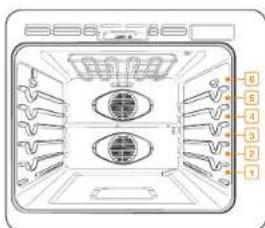
Oven rack positions
Recommended rack position for cooking
| TYPE OF FOOD RACK | POSITION |
| Broiling hamburgers 6 | |
| Broiling meats or small cuts of poultry, fish | 3-5 |
| Bundt cakes, pound cakes, frozen pies, casseroles | 4 or 3 |
| Angel food cakes, small roasts | 2 |
| Turkey, large roast, hams, fresh pizza | 1 |
This table is for reference only.
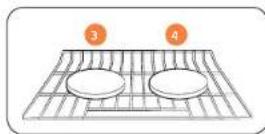
Rack and Pan placement
Single Oven Rack
Centering baking pans in the oven as much as possible will produce better results. If baking with more than one pan, place the pans so each has at least 1^ to 112^ of air space around it.
When baking on a single oven rack, place the oven rack in position 3 or 4.
See the figure on the left.
When baking cakes and cookies on multiple racks, place the oven racks in positions 3 and 5.
Type of Baking Rack Positions
Cakes and cookies 3 and 5
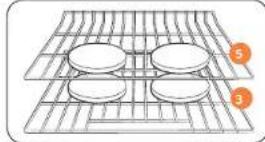
Multiple Oven Rack
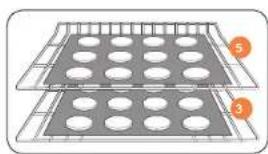
Multiple Oven Rack
Before using the racks
Each rack has stops that need to be placed correctly on the supports. These stops will keep the rack from coming completely out.
REMOVING THE RACKS
- Pull the rack straight out until it stops.
- Lift up the front of the rack, and then pull it out.
REPLACING THE RACKS
- Place the end of the rack on the support.
- Tilt the front end up and push the rack in.
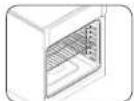
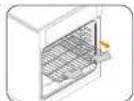
CAUTION
Do not cover a rack with aluminum foil or place aluminum foil on the oven bottom. This will hamper heat circulation, resulting in poor baking, and may damage the oven bottom.
- Arrange the oven racks only when the oven is cool.
Using the Gliding Rack
The fully extendable Cliding Rack makes food preparation easier, especially when you are preparing heavier dishes. The Cliding Rack has 2 glide tracks that allow you to extend the rack well out of the oven without touching the sides of the oven walls.
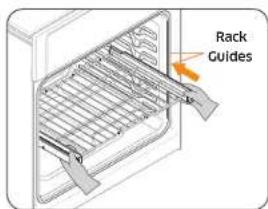
Installing the Gliding rack
With the Gliding Rack in the "Closed" position and the oven off, carefully insert the Gliding Rack between the guides until the rack reaches the back.
When using the Gliding Rack in the oven, be sure to pull on the handle of the rack only to slide it in and out. If you grasp the frame while using the rack, the entire Gliding Rack will be removed. Make sure you use oven mitts when handling the Gliding Rack during cooking.
Oven (Lower Oven)
Removing the Gliding Rack
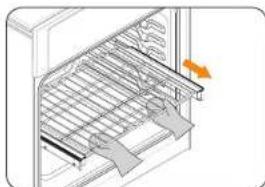
With the gliding rack in the "Closed" position and the oven off and cool, grasp the rack and frame and pull both forward to remove.
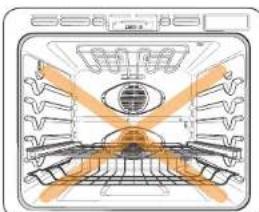
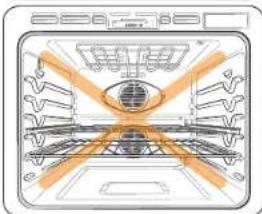
CAUTION
Do not install the Gilding Rack directly above the Flat Rack and Recessed rack. You will not be able to install it properly and the rack could fall.

NOTE
You can install the Giding Rack in any rack positions except the lowest (level 1) rack position in the oven.
Baking
The oven can be programmed to bake at any temperature from 175°F to 550°F. Baking temperature and time will vary depending on the ingredients and the size and shape of the baking pan used. Dark or nonstick coatings may cook faster with more browning.
How to set the oven for baking
- Touch Bake.
- Enter the temperature you want using the number pad, eg. 3, 7, 5.
- Touch Cook Time, and then use the number pad to set the cooking time.
- Touch START/SET. The temperature display will start to change once the oven temperature reaches 175^ .
- If you want to cancel baking or if you have finished, touch OVEN OFF

Place food in the oven after preheating if the recipe calls for it. Preheating is very important for good results when baking cakes, cookies, pastry, and breads. After the oven has reached the desired temperature, the oven will beep 6 times.

NOTE
For performance reasons, the convection fan may turn on or off during baking.
If you are using an oven thermometer in the oven cavity, the temperature registered by the thermometer may differ from the actual set oven temperature.
How to adjust the temperature while cooking
- Touch Temp. The display will show the present temperature, eg. 375^ .
- Enter the temperature you want, eg. 425^ , using the number pad.
- Complete the entry by touching START/SET.
English

Convection baking
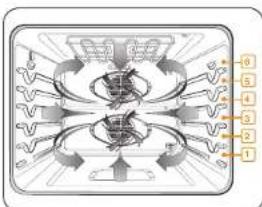
By using Convection Bake, you will be able to cook faster. Convection baking uses a fan to circulate the oven's heat evenly and continuously within the oven. This improved heat distribution allows for even cooking and excellent results when you are using multiple racks at the same time. Foods cooked on a single oven rack will generally cook faster and more evenly with convection baking. Multiple oven rack cooking may have slightly increased cooking times for some foods, but the overall result is time saved. Breads and pastries brown more evenly. You can program the oven for convection baking at any temperature between 175°F and 550°F.
Tips for convection baking
The amount of time you save will vary depending on the amount and type of food you are cooking. When baking cookies or biscuits, you should use pans with no sides or very low sides to allow the heated air to circulate around the food. Using a pan with a dark finish will produce faster cooking times. When using convection baking with a single rack, place the oven rack in position 3 or 4. If cooking on multiple racks, place the oven racks in positions 3 and 5. When baking a cake, using the bake mode (not the convection bake mode) will produce better results.
How to set the oven for convection baking
- Touch Bake.No Preheat key is activated on the control panel.Touch No Preheat if you want to use the No Preheat feature. (Refer to the No Preheat section on page 42.)
- Enter the temperature you want, eg. 400^ , using the number pad.
- Touch Cook Time, and then use the number pad to set the cooking time.
- Touch START/SET. The temperature display will start to change once the oven temperature reaches 175°F. The oven will beep 6 times when the oven reaches the adjusted oven temperature.
- If you want to cancel convection baking or if baking is finished, touch OVEN OFF.
The convection oven fan shuts off when the oven door is opened. DO NOT leave the door open for long periods of time while using convection cooking or you may shorten the life of the convection heating element.

If you leave the oven door open for more than 2 minutes when the oven is on, all heating elements will shut off automatically.
- When you have finished cooking, the cooling fan will continue to run until the oven has cooled down.
For performance reasons, the convection fan may turn on or off during baking.
If you are using an oven thermometer in the oven cavity, the temperature registered by the thermometer may differ from the actual set oven temperature.

Oven (Lower Oven)
Convection roasting
Convection roasting is good for cooking large tender cuts of meat uncovered. Heat comes from the top heating element. The convection fan circulates the heated air evenly over and around the food. Meat and poultry are browned on all sides as if they were cooked on a rotisserie. The heated air seals in juices quickly for moist and tender results while, at the same time, creating a rich golden brown exterior.
How to set the oven for convection roasting
- Touch Roast. No Preheat is activated on the control panel. Touch No Preheat if you want to use the No Preheat feature. (Refer to the No Preheat section on this page.)
- Enter the temperature you want, eg. 400^ , using the number pad.
- Touch Cook Time, and then use the number pad to set the cooking time.
- Touch START/SET. The temperature display will start to change once the oven temperature reaches 175°F. The oven will beep 6 times when the oven reaches the adjusted oven temperature.
- If you want to cancel convection roasting or if roasting is finished, touch OVEN OFF.
The convection oven fan shuts off when the oven door is opened. DO NOT leave the door open for long periods of time while using convection cooking or you may shorten the life of the convection heating element.

NOTE
If you leave the oven door open for more than 2 minutes when the oven is on, all heating elements will shut off automatically.
- when you have finished cooking, the cooling fan will continue to run until the oven has cooled down.
For performance reasons, the convection fan may turn on or off during roasting.
If you are using an oven thermometer in the oven cavity, the temperature registered by the thermometer may differ from the actual set oven temperature.
No Preheat
Use No Preheat to cook without the pre-heating cycle.
This function is only available for Convection Bake and Convection Roast.
How to set the oven for No Preheat
- Touch Bake or Roast.No Preheat is activated on the control panel
- Touch No Preheat
- Enter the temperature you want, eq. 400 F, using the number pad.
- Touch START/SET
- The temperature display will show the set temperature.

NOTE
For best performance, we recommend cooking on a single rack.
| Type Rack Positions | |
| Baking 3 or 4 | |
| Roasting 1 or 2 |
- Place food in the oven before you start cooking when using the No Preheat feature.
For best performance, preheat the oven when baking rising bakery products such as angel food cakes, Bundt cakes, or puff pastries.
42 English

Broiling
Broiling is a method of cooking tender cuts of meat by direct heat under the broil element of the oven.
The high heat cooks quickly and gives a rich, brown outer appearance. Broil mode is best for meats, fish, and poultry up to 1" thick.
How to set the oven for broiling
- Touch Broil once for Hi or twice for Lo. Use Lo to cook foods such as poultry or thick cuts of meat thoroughly without over-browning them.
- To start broiling, touch START/SET.
Broil one side until the food is browned. Turn over and broil the other side. - Touch OVEN OFF once you have finished cooking or if you want to cancel braiding.

NOTE
This oven is designed for CLOSED DOOR broiling. The oven door must be closed during broiling.
If you leave the oven door open for more than 2 minutes when the oven is on, all heating elements will shut off automatically.
- When you have finished cooking, the cooling fan will continue to run until the oven has cooled down.
If you are using an oven thermometer in the oven cavity, the temperature registered by the thermometer may differ from the actual set oven temperature.
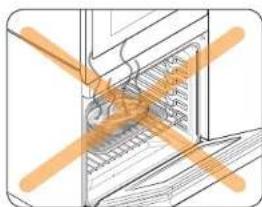
CAUTION
Always broil with the oven door closed. Use care when opening the door. Let hot air or steam escape before you remove food from or put food into the oven.
Brolling recommendation guide
The size, weight, thickness, starting temperature, and your doneness preference will affect broiling times. This guide is based on meats at refrigerator temperature. Always use a broiler pan and its grid when broiling. Always preheat the oven for 5 minutes before broiling.
| Food Done | ness Size | Thicknes Level | Rack positon | Cooking time (min.) | |||
| 1st side 2nd side | |||||||
| Hamburgers | Medium 9 | patties 3/4" Hi 6 3:00 | 2:00 | ||||
| Medium 9 | patties 1" Hi 6 3:20 | 2:00 | |||||
| Beef steaks | Rare | - | 1" | Hi | 5 | 5:00 | 4:00 |
| Medium | - | 1- 1 1/2" | Hi | 5 | 6:00-6:30 | 4:30-4:00 | |
| Well done | - | 1- 1 1/2" | Lo | 4 | 7:00-8:00 | 4:00-5:00 | |
| Chicken pieces | Well done | 4.5 lbs. | 1/2-3/4" | Lo | 3 | 16:00-18:00 | 13:00-15:00 |
| Well done | 2 lbs. | 1/2-3/4" | Lo | 3 or 4 | 15:00-16:00 | 10:00-12:00 | |
| Pork chops | Well done | 1 lbs. | 1" | Lo | 3 | 8:00-10:00 | 6:00-8:00 |
| Fish fillets | Well done | - | 1/4-1/2" | Lo | 3 or 4 | 7:00-8:00 | 4:00-5:00 |
English 43


Oven (Lower Oven)
Steam baking and roasting
Steam Bake provides excellent baking conditions for breads, pastries, and desserts by increasing moisture content and improving texture and flavor. Steam Roast provides excellent cooking conditions for roasted meats or poultry by maintaining a crispy surface while sealing in the juices for a moist and tender result.
- Open the oven door, and then touch Reservoir
- The oven ejects the reservoir. Grasp the front of the reservoir, and then pull it all the way out of the slot.
- Fill the water reservoir with 22 oz. (650 ml) of water.

NOTE
You can open the reservoir by removing the rubber cap or by removing the clear plastic top.
- Replace the rubber cap or clear plastic top.
- Return the reservoir to the slot, and then push it in. There will be a soft click when it is in place correctly. Touch Reservoir The oven retracts the water reservoir.
- Close the oven door.
- Touch Steam Bake or Steam Roast
- Touch Steam Level once for Hi, twice for Lo, or 3 times for Med. (Default is Med.) The display will show and the steam level.
- Enter the temperature you want, eg.400 °F, using the number pad.
- Touch Cook Time, and then use the number pad to set the cooking time.
- Touch START/SET
The temperature display will start to change once the oven temperature reaches 175°F. The oven will keep 6 times when the oven reaches the set oven temperature.
- If you want to cancel steam baking or steam roasting or if cooking is finished, touch OVEN OFF.

NOTE
- When Steam Bake or Steam Roast is enabled and the water reservoir runs out of water, the display will show "Water Supply".
The oven continues to operate but the steam generator stops operation until you refill the water reservoir with water.
Make sure to drain the remaining water after using Steam Bake and Steam Roast. Once the oven starts draining, please wait until the draining cycle is complete. - When Steam Bake and Steam Roast is complete, you must empty the water reservoir because the remaining water can affect other cooking modes.

The convection oven fan shuts off when the oven door is opened.
DO NOT leave the door open for long periods of time while using convection cooking or you may shorten the life of the convection heating element.

NOTE
If you leave the oven door open for more than 2 minutes when the oven is on, all heating elements will shut off automatically.
- When you have finished cooking, the cooling fan will continue to run until the oven has cooled down.
For performance reasons, the convection fan may turn on or off during cooking.
If you are using an oven thermometer in the oven cavity, the temperature registered by the thermometer may differ from the actual set oven temperature.

Steam cook recommendation guide
| Steam mode Level Foods | |
| Steam Bake High | Rye breads, Desserts (Flan caramel) |
| Med Croissants, Pies, Reheats (Pizza, Casserole) | |
| Low Pastries | |
| Steam Roast High | |
| Med Meats, Poultry | |
| Low Turkey, Large meats | |
Using Bread Proof
Bread Proof provides an optimal temperature for the bread proofing process, and therefore does not require a temperature adjustment. For the best results, always start the Bread Proof option with a cool oven.
- Touch Bread Proof.
- Touch START/SET
2.1001/STAKI/SET. - Touch OVEN OFF at any time to turn off Bread Proof

NOTE
Use rack position 3 for Bread Proof.
Using the Temp Probe
For many foods, especially roasts and poultry (beef, chicken, turkey, pork, lamb, etc), measuring the internal temperature is the best way to determine if the food is properly cooked.
The Temp Probe lets you cook meat to the exact internal temperature you want, taking the guess work out of determining whether a piece of meat is done or not. This function can be used with Bake, Convection Bake, or Convection Roast. After the internal temperature of the food reaches 100^ , the increasing internal temperature will be shown in the display.
How to use the Temp Probe
- Push the tip of the temp probe into the meat as fully as possible, so that the tip is in the center of the meat.
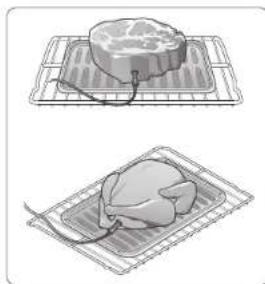
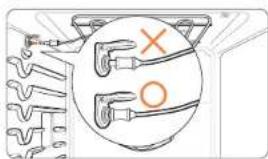
Insert the probe completely into the meat as shown in the illustrations. It should not touch bone, fat, or gristle.
If you do not fully insert the probe into the meat, the Temp Probe function will not work correctly because the probe will sense the oven temperature, not the temperature of the meat.
For bone-in meats, insert the probe into the center of the lowest and thickest portion of the piece.
For whole poultry (turkey, large chickens, etc.), insert the probe into the thickest part of the inner thigh, parallel to the leg.

Oven (Lower Oven)
- Insert the temo probe plug into the socket on the top side wall of the oven as far as it will go:
- Select the desired cooking function (Bake, Convection Bake, or Convection Roast) and temperature.
- Touch Temp. Probe to set the desired internal temperature.
- Set the desired internal temperature using the number pad,
Available temperatures 100 F to 200 F
- If you want to use Cook Time, or Delay Start, set each function.
- Touch START/SET
- When the desired internal temperature is reached, the function automatically stops and an alarm sounds.
CAUTION
To protect the Temo Probe's tip, be careful not to insert the probe so that the tip protrudes through the surface of the meat. Make sure that the tip is in or near the center of the meat.
Do not store the probe in the oven.
Do not leave the probe inside the oven during a self-cleaning or broiling cycle.
You can permanently damage the probe and it will no longer work.
To avoid breaking the probe's tip, defrost your food completely.
- Do not use tongs when inserting or removing the probe. Tongs can damage the probe.
Use the Temp Probe for Temp. Probe function cooking only. Do not use the Temp Probe for any other purpose.
NOTE
If you remove the Temp Probe while the Temp. Probe function is operating or insert the Temp Probe while baking or cooking normally, cooking will stop after 1 minute.
If you use the probe to cook frozen food, there are times when it cannot be detected. (The Temp. Probe icon doesn't show in the display.)
Temp Probe table
| Type of Food Internal temperature | ||
| Beef / Lamb | Rare 140°F | |
| Medium 160°F | ||
| Well done 170°F | ||
| Park 170°F | ||
| Poultry 180-185°F | ||
NOTE
If you cover the meat with aluminum foil and allow it to stand for 10 minutes after cooking, the Internal temperature will rise 5-10 degrees.
Removing the Temp Probe
Remove the temp probe plug from the socket.
CAUTION
After cooking, the Temp Probe is hot enough to cause burns.
46 English

Using Smart Control (Lower oven only)
To use the oven's Smart Control, you must download Samsung's Smart Home app to a mobile device. Functions that can be operated using Samsung's Smart Home app may not work smoothly if communication conditions are poor or the oven is installed in a place with a weak Wi-Fi signal.
Please refer to the following table for the main functions that can be operated from the app.
| When Smart Control on the oven is off | Monitoring (Oven, Probe), Oven off |
| When Smart Control on the oven is on. | Monitoring (Oven, Probe), Oven start, Oven off, Error check |
How to connect the oven
- Download and open the Samsung Smart Home app on your smart device
- Follow the app's on-screen instructions to connect your oven.
- Once the process is complete, the connected Iron located on your oven displays and the app will confirm you are connected.
- If the connection icon does not turn on, follow the instruction in the app to reconnect.
To start the oven remotely
Touch Smart Control. appears in the display. The oven can now be started and controlled remotely by a connected mobile device.
When Smart Control is on you can:
- Remotely change oven settings (mode, time, temperature) using your mobile device.
- Remotely start the oven.
- Remotely turn off the oven.
Once cooking starts, you can change the cooking time and temperature remotely.

Important: Self clean mode cannot be started remotely.
Opening the oven door or touching Smart Control will delete from the display and prevent you from turning the oven on or controlling the oven remotely.
If is not shown in the display, you can still monitor the oven's status and turn the oven off.
- When oven cooking is finished or cancelled, turn off.

Oven (Lower Oven)
Using Options
This function lets you control various electronic control options. These options include Temp Adjust, Temp Unit, Auto Conversion, Time of Day, 12 hour energy saving, Sound On/Off, and Demo mode.
The option menu is only available when the oven is not being used (not cooking).
| Options Feature |
| 1. Temp Adjust Lets you correct the temperature in the oven. |
| 2. Temp Unit Lets you program the oven control to display temperatures in Fahrenheit or Centigrade. |
| 3. Auto Conversion Lets you set the Auto Conversion feature so that the oven automatically converts entered regular baking temperatures to convection baking temperatures, and then displays the convection temperatures. |
| 4. Time of Day Lets you set the clock to display the time of day in the 12 hour or 24 hour mode. |
| 5. 12 hour energy saving This feature automatically turns off the oven after 12 hours during baking functions or after 3 hours during a broil function. |
| 6. Sound On/Off Lets you set the oven controls to operate silently. |
| 7. Wi-Fi On/Off Lets you activate and de-activate the oven's wi-fi connection. |
| 0. Demo mode This option is for use by retail establishments for display purposes only. |
Temp Adjust
The temperature in the oven has been calibrated at the factory. When first using the oven, be sure to follow recipe times and temperatures. If you think the oven is too hot or too cool, you can correct the temperature in the oven. Before correcting, test a recipe by using a temperature setting that is higher or lower than the recommended temperature. The baking results should help you to decide how much of an adjustment is needed.
The oven temperature can be adjusted ± 35^ ( ± 19^ ).
How to correct the oven temperature
-
Touch Options, and then 1 on the number pad.
-
Touch Options to set the temperature higher or lower than the current temperature.
-
Enter the adjustment you want to make using the number pad. (± 35)
-
Touch START/SET to save the changes.

This adjustment will not affect the broiling or the self-cleaning temperatures. The adjustment will be retained in memory after a power failure.
Temp Unit (Fahrenheit or Celsius temperature selection)
You can program the oven control to display the temperature in Fahrenheit or Celsius. The oven has been preset at the factory to display in Fahrenheit.
How to change the display from Fahrenheit to Celsius or Celsius to Fahrenheit
- Touch Options, and then 2 on the number pad.
- Touch 1 (Fahrenheit) or 2 (Celsius) on the number pad.
- Touch START/SET to save the changes.
Auto Conversion
When you use the auto conversion feature, the convection auto conversion feature will automatically convert entered regular baking temperatures to convection baking temperatures.
If this feature is activated, the display will show the actual converted (reduced) temperature. For example, if you enter a regular recipe temperature of 350^ and touch Oven Start/Set, the display will show the converted temperature of 325^ . (Default setting: off)
How to enable or disable the auto conversion feature
- Touch Options, and then 3 on the number pad.
- Touch 1 (On) or 2 (Off) on the number pad.
- Touch START/SET to save the changes.
Time of Day (12hr/24hr)
The oven control can be programmed to display time of day in the 12 hour or 24 hour mode.
The oven has been preset at the factory to display in the 12 hour mode. How to change between the 12 and 24 hour time of day display
- Touch Options, and then 4 on the number pad.
- Touch 1 (12hr) or 2 (24hr) on the number pad.
- Touch START/SET to save the changes.
12 hour energy saving
If you accidentally leave the oven on, this feature will automatically turn off the oven after 12 hours during baking functions or after 3 hours during a broil function.
How to turn the 12 hour energy saving feature on or off
- Touch Options, and then 5 on the number pad.
- Touch 1 (On) or 2 (Off) on the number pad.
- Touch START/SET to save the changes.
Sound On/Off
Using Sound On/Off, you can set the oven controls to operate silently.
How to turn the sound on or off
- Touch Options, and then 6 on the number pad.
- Touch 1 (On) or 2 (Off) on the number pad
- Touch START/SET to save the changes.
WI-Fl On/Off
You can turn the oven's Wi-Fi connection on or off. How to turn the Wi-Fi on or off
- Touch Options, and then 7 on the number pad.
- Touch 1 (On) or 2 (Off) on the number pad
- Touch START/SET to save the changes.
NOTE
When you turn the oven's Wi-Fi connection off, you won't be able to use Smart Control.
Demo mode
This option is for use by retail establishments for display purposes only. (When Demo mode is on, the heating element is disabled and does not operate.)
How to enable or disable the demo mode
- Touch Options, and then 0 on the number pad.
- Touch 1 (On) or 2 (Off) on the number pad.
- Touch START/SET to save the changes.

Oven (Lower Oven)
Using the Sabbath feature
(For use on the Jewish Sabbath & Holidays)

For further assistance, guidelines for proper usage, and a complete list of models with the Sabbath feature, please visit http://www.star-k.org.
You can use the Sabbath feature with baking only. The oven temperature may be set higher or lower after you set the Sabbath feature. (The oven temperature adjustment feature should be used only during Jewish holidays.) The display, however, will not change and tones will not sound when a change occurs. Once the oven is properly set for baking with the Sabbath feature active, the oven will remain on continuously until the Sabbath feature is cancelled. This will override the factory preset 12 hour energy saving feature. If the oven light is needed during the Sabbath, touch before activating the Sabbath feature. Once the oven light is turned on and the Sabbath feature is active, the oven light will remain on until the Sabbath feature is turned off. If the oven light needs to be off, be sure to turn the oven light off before activating the Sabbath feature.
How to use the Sabbath feature
- Touch Bake.The default temperature is 350^
- Enter the temperature you want, eg. 375^ , by using the number pad.
- Touch START/SET
The temperature display will start to change once the oven temperature reaches 175°F.
- Touch Bake and Touch to Wake-Up/Sleep at the same time for 3 seconds. The display will show SAb. Once SAb appears in the display, the oven will not beep or display any further changes.
You may change the oven temperature once baking has started. Remember that the oven will not beep or display any further changes once the Sabbath feature is engaged.
- You can turn the oven off at any time by touching OVEN OFF. This will turn only the oven off. If you want to deactivate the Sabbath feature, hold down Bake and Touch to Wake-Up/Sleep at the same time for 3 seconds. SAb will disappear from the display.
Do not to attempt to activate any other program feature except Bake while the Sabbath feature is active. ONLY the following key pads will function correctly with the Sabbath feature on: Number, Temp., START/SET and OVEN OFF. All other keys should not be used once the Sabbath feature is activated.
You can change the oven temperature, but the display will not change and tones will not sound when a change occurs. After changing the temperature while the unit is in Sabbath mode, there is a 15 second delay before the unit recognizes the change.
You can set the Cook time function before activating the Sabbath feature.
Should there be a power failure or interruption, the oven will shut off. when power is returned, the oven will not turn back on automatically. SAb will be displayed in the oven control display, but the oven will not operate. Food may be safely removed from the oven while it is still in the Sabbath mode, however the oven cannot be turned back on until after the Sabbath/ Holidays. After the Sabbath observance, turn OFF the Sabbath mode. Touch and hold both Bake and Touch to Wake-Up/Sleep for at least 3 seconds simultaneously to turn the Sabbath mode off. The oven can then be used with all normal functions.
Do not open the oven door or change the oven temperature for about 30 minutes after you have started Sabbath mode to allow the oven to reach the set temperature. Note that, for best performance, the oven fan operates only when the oven temperature is rising.
50 English

Maintaining your appliance
Self-cleaning (Lower oven only)
This self-cleaning oven uses high temperatures (well above cooking temperatures) to burn off leftover grease and residue completely or reduce them to a finely powdered ash that you can wipe away with a damp cloth.
CAUTION
During the self cleaning cycle, the outside of the oven will become very hot to the touch. Do not leave small children unattended near the appliance.
Some birds are extremely sensitive to the fumes given off during the selfcleaning cycle of any oven. Move birds to another well-ventilated room.
Do not line the oven walls, racks, bottom, or any other part of the oven with aluminum foil. Doing so will result in poor heat distribution, poor baking results, and cause permanent damage to the oven interior. Aluminum foil will melt and adhere to the interior surface of the oven.
The oven door locks during self-cleaning. Do not force the oven door open. This can damage the automatic door locking system. Use care when opening the oven door after the self-cleaning cycle is complete. Stand to the side of the oven when opening the door to allow hot air or steam to escape. The oven may still be VERY HOT.
Before a self-cleaning cycle
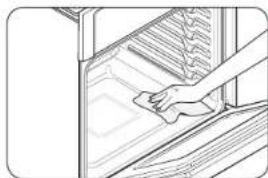
Fig.1
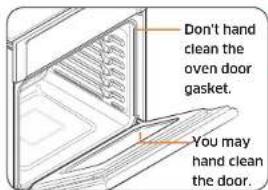
Fig. 2
We recommend venting your kitchen with an open window or using a ventilation fan or hood during the selfcleaning cycle.
- Remove the wire rack, broil pan, broil pan insert, all cookware, and any aluminum foil from the oven.
- Wipe up debris from the oven bottom (Fig. 1)
The silver-colored oven racks can be self-cleaned, but they will darken, lose their luster, and become hard to slide.
Residue on the front frame of the oven and outside the gasket on the door will need to be cleaned by hand. Clean these areas with hot water, soap-filled steel-wool pads, or cleansers such as Soft Scrub. Rinse well with clean water and dry.
Do not clean the gasket. The fiberglass material of the oven door gasket cannot withstand abrasion. It is essential for the gasket to remain intact. If you notice it becoming worn or frayed, have it replaced. (Fig. 2)
Make sure the oven light cover is in place and the oven light is off.

move oven racks and accessories before starting the self-clean mode.
Maintaining your appliance
How to run a self-cleaning cycle
- Select the length of time for the self-cleaning operation, eg. 3 hours. Touch Self Clean 2/3/5h once for a 3 hour clean time, twice for a 5 hour clean time, or 3 times for a 2 hour clean time. (The default setting is 3 hours.)
- Touch START/SET to start the self-cleaning cycle. The motor-driven door lock will engage automatically.
IMPORTANT: Both doors lock when you run a self cleaning cycle on either oven.
NOTE
-
You will not be able to start a self-cleaning cycle if the Control Lockout feature is activated or if the oven's temperature is too hot.
The oven doors lock automatically. The display will show the cleaning time remaining. You cannot to open the oven doors until the temperature drops to a safe/cool temperature.
The self-clean feature can be used in only one oven at a time. While one oven is in self-cleaning mode, you cannot use the other oven for cooking. -
When the self cleaning cycle is done, End will appear in the display and the oven will beep 6 times.
How to delay the start of self-cleaning
- Touch Self Clean 2/3/5h
Select the desired self-clean time by touching Self Clean 2/3/5h. - Touch Delay Start
- Enter the time you want the self-clean cycle to start.
- Touch START/SET
The display will show Delay, Self clean, and the Lock icon. The motor-driven door lock will engage automatically.
- The Self-Cleaning cycle will turn on automatically at the set time.
How to turn off the self-cleaning feature
If you need to stop or interrupt a self-cleaning cycle:
1. Touch OVEN OFF
2. You will be able to open the oven door once the oven has cooled down for approximately 1 hour.
After a self-cleaning cycle
- You may notice some white ash in the oven. Wipe it up with a damp cloth after the oven cools. (If white spots remain, remove them with a soap-filled steel wool pad and rinse thoroughly with a vinegar and water mixture.)
If the oven is not clean after one cycle, repeat the cycle.
You cannot set the oven for cooking until the oven is cool enough for the door to unlock.
Hybrid Cleaning (lower oven only)
The Hybrid cleaning function saves time and energy by removing leftover grease and residue that you can then wipe away with a damp cloth.
CAUTION
Do not line the oven walls, racks, bottom, or any other part of the oven with aluminum foil. Doing so will result in poor heat distribution, poor baking results, and cause permanent damage to the oven interior. Aluminum foil will melt and adhere to the interior surface of the oven.
The oven door locks during Hybrid cleaning. Do not force the oven door open. This can damage the automatic door locking system. Use care when opening the oven door after a Hybrid Cleaning cycle is complete. Stand to the side of the oven when opening the door to allow hot air or steam to escape.
52 English

Before a Hybrid cleaning cycle
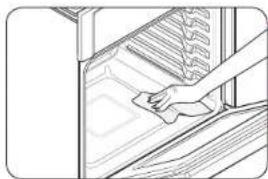
Fig. 1
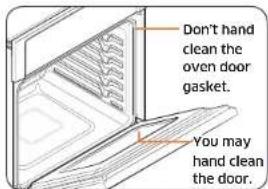
Fig. 2
- Remove the wire rack, broil pan, broil pan insert, all cookware, and any aluminum foil from the oven.
Wipe up debris from the oven bottom. (Fig. 1)
The silver-colored oven racks can be Hybrid Cleaned, but they will darken lose their luster, and become harder to slide. - Residue on the front frame of the oven and outside the gasket on the door will need to be cleaned by hand. Clean these areas with hot water, soap-filled steel-wool pads, or cleansers such as Soft Scrub. Rinse well with clean water and dry.
Do not clean the gasket. The fiberglass material of the oven door gasket cannot withstand abrasion. It is essential for the gasket to remain intact. If you notice it becoming worn or frayed, have it replaced. (Fig. 2)
Make sure the oven light cover is in place and the oven light is off.

NOTE
Remove oven racks and accessories before starting the Hybrid clean mode.
How to run a Hybrid cleaning cycle
- Remove all accessories from the oven.
- Open the oven door, and then touch Reservoir. The oven ejects the water reservoir. Grasp the front of the reservoir and pull it all the way out of the slot.
- Pour approximately 20 oz. (600 ml) of water into the water reservoir. Use normal water only, not distilled water.

NOTE
You can open the reservoir by removing the rubber cap or by removing the clear plastic top.
- Replace the rubber cap or clear plastic top.
- Return the reservoir to the slot, and then push it in. There will be slight click when it is in place correctly. Touch Reservoir BC. The oven retracts the water reservoir.
- Close the oven door.
- Touch Hybrid Clean. Touch Hybrid Clean once for a 20 min clean time, twice for a 90 min clean time. (The default setting is 20 min.)
- Touch START/SET. The motor driven door lock will engage automatically. When the operation is complete, the display will blink and a beep will sound.

the
- Touch OVEN OFF
- Clean the oven's interior. There will be a significant amount of water remaining on the bottom of the oven after a Hybrid cleaning cycle. Remove the residual water with a sponge or soft dry cloth.

NOTE
For Hybrid Cleaning. use exactly 20 oz. (600 ml) of water since this produces the best results.

Maintaining your appliance
After a Hybrid cleaning cycle
Take care when opening the door after a Hybrid cleaning procedure has ended. The water on the bottom is hot.
- Open the oven door and remove the remaining water with a sponge. Do not leave the residual water in the oven for any length of time. Wipe the oven clean and dry with a soft cloth. Do not forget to wipe under the oven door seal.
Use a detergent soaked sponge, a soft brush, or a nylon scrubber to wipe the oven interior. Remove stubborn residue with a nylon scourer. You can remove lime deposits with a cloth soaked in vinegar.
- If the oven remains dirty, you can repeat the procedure once the oven has cooled.
For heavy residue, such as grease left over from roasting, we recommend that you rub detergent into the residue before activating the Hybrid cleaning function.
After cleaning, leave the oven door ajar at a 15^ angle to allow the interior enamel surface to dry thoroughly.

NOTE
You will not be able to start a Hybrid cleaning cycle if the control lockout feature is activated or if the oven's temperature is too hot.
The oven doors lock automatically. The display will show the cleaning time remaining. You cannot to open the oven doors until the temperature drops to a safe/cool temperature.
The Hybrid clean feature can be used in only one oven at a time. While one oven is in Hybrid cleaning mode, you cannot use the other oven for cooking.
If the oven is not clean after one cycle, repeat the cycle.
- You cannot set the oven for cooking until the oven is cool enough for the door to unlock.
Descale
If you use Steam Bake or Steam Roast frequently, we recommend descaling regularly to remove minerals from the oven that may affect the taste or quality of food cooked. When running a descaling cycle, use only descaling agents that are specific to steam ovens or coffee machines.

NOTE
If you use Steam Bake or Steam Roast functions for more than a total of 12 hours, the Descale indicator turns on. You can still enable the Steam Bake or Steam Roast functions for the next two hours without descaling. However, after those two hours are up, the Steam Bake or Steam Roast functions will be disabled until you run a descending cycle.
- Open the oven door, and then touch Reservoir. The oven ejects the reservoir. Crasp the front of the reservoir and pull it all the way out of the slot.
- Empty and clean the water reservoir, and then fill it with 1.7 oz. (50 ml) of descaling agent and 13.5 oz. (400 ml) of water.

NOTE
You can open the reservoir by removing the rubber cap or by removing the clear plastic too.
- Replace the rubber cap or clear plastic top.
- Return the reservoir to the slot, and then push it in. There will be slight click when it is in place correctly. Touch Reservoir. The oven retracts the water reservoir.
- Close the oven door.

6. Touch Descale
- Touch START/SET. The oven starts descending.
The Descaling cycle has 5 steps. The display will notify you as each step occurs.
are Steps 1 through 3.
| Step 1 Apply descending agents Approx. 2 min. | |
| Step 2 Descaling Approx. 3 hrs. | |
| Step 3 Draining Approx. 4 min. |
- When the oven reaches step 4, you will see "Out" on the display. Remove and empty the water reservoir, and then refill it with 22 oz. (650 ml) of drinkable water. Reinsert the reservoir. The "In" message that appears momentarily will disappear. Close the oven door.
- Touch START/SET. The oven continues to rinse and drain for 5 minutes, and then moves to stop 5.
- When Step 5 is complete, you will see "Out" on the display. Remove and clean the water reservoir, and then reinsert. Close the oven door.
- Touch START/SET. The oven beeps, indicating descending is complete.
WARNING
Use only descending agents that are specific to steam ovens or coffee machines.
CAUTION
The Water Supply LED blinks and the oven stops operating if the water reservoir runs out of water during the descending cycle. If this happens, refill the reservoir so that the reservoir contains 22 oz. (650 ml) of drinkable water. Do not overfill the reservoir. Otherwise, water may leak from the water reservoir.
Do not cancel descending while it is in process. If you stop it, you must restart the descending cycle and complete it within the next three hours to enable the Steam Bake or Steam Roast functions.
To avoid accidents, keep children away from the oven.
For the correct ratio of water and the descending agent, follow the agent manufacturer's instructions. If the ratio of water to descending agent differs from the instructions here (8 to 1), use the ratio indicated in the instructions for the descending agent.
NOTE
Although the oven automatically starts descending in 5 seconds without your confirmation, we recommend that you confirm your selection. This is to prevent descending from starting by mistake.
Draining
When a steam function is complete, you must drain the remaining water to prevent the water from affecting other cooking modes.
To drain the water, follow these steps:
- Touch Drain
The oven drains water from the steam generator to the water reservoir.
- When draining is complete open the oven door, and then touch Reservoir The oven ejects the water reservoir. Use oven gloves to remove and empty the water reservoir.
- When done, re insert the reservoir, push it in until there is a soft click, and then touch Reservoir The oven retracts the reservoir.
- Close the oven door.
Maintaining your appliance
Care and cleaning of the oven
Cleaning painted parts and decorative trim
- For general cleaning, use a cloth with hot, soapy water.
For more difficult residue and built up grease, apply a liquid detergent directly onto the area and leave for 30 to 60 minutes. Wipe with a damp cloth and dry. Do not use abrasive cleaners on any oven surface. They can be scratched.
Cleaning stainless steel surfaces
- Shake a bottle of stainless steel appliance cleaner or polish well.
- Place a small amount of stainless steel appliance cleaner or polish on a damp cloth or damp paper towel.
- Clean a small area, rubbing with the grain of the stainless steel if applicable.
- Dry and buff with a clean, dry paper towel or soft cloth.
- Repeat as necessary.
NOTE
- Do not use a steel-wool pad. It will scratch the surface.
- If a mineral oil-based stainless steel appliance cleaner has been used before to clean the appliance, wash the surface with dishwashing liquid and water prior to using the stainless steel appliance cleaner or polish.
Oven racks
If the racks are left in the oven during a self-cleaning cycle, their color will turn slightly blue and the finish will be dull. After the self cleaning cycle is complete and the oven has cooled, rub the sides of the racks with wax paper or a cloth containing a small amount of oil. This will help the racks glide more easily on their tracks.
- Cliding racks may be cleaned by hand with an abrasive cleaner or steel wool. During cleaning, be careful not to allow water or cleaner to enter the slides on the sides of rack.
自NOTE
Do not clean in a dishwasher
If the rack becomes hard to remove or replace, lightly wipe the oven rack guides with cooking oil. Do not wipe cooking oil on the slides.
If the rack becomes difficult to slide, the rack may need to be lubricated using a graphite lubricant.
To order graphite lubricant, call Samsung customer care at 1800-SAMSUNG (726-7864) or visit our homepage (www.samsung.com/us/support, www. samsung.com/ca/support, or www.samsung.com/ca_fr/support) and search for part number DG81 01629A.
If you want to buy directly, go to http://www.samsungparts.com.
To lubricate the slides of the gliding rack
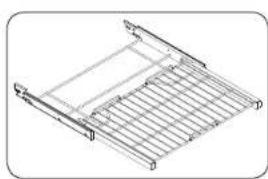
- Remove the rack from the oven. See removing the gliding rack in the Using the Gilding Rack section.
- Fully extend the rack on a table or countertop. Newspaper may be placed underneath the rack for easy cleanup.
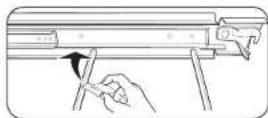
- If there is debris in the slide tracks, wipe it away using a paper towel. (Any graphite lubricant wiped away must be replaced - See steps 4 through 7.
56 English
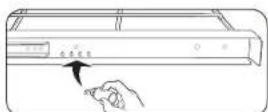
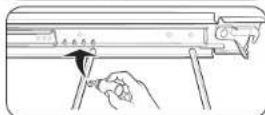
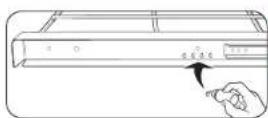
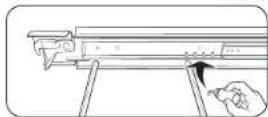
- Shake the graphite lubricant before opening it. Starting with the left (front and back) slide mechanism of the rack, place four (4) small drops of lubricant on the two (2) bottom tracks of the slide close to the bearing carriers.
- Repeat for the right (front and back) slide mechanism of the rack.
- Open and close the rack several times to distribute the lubricant.
- Replace the cap on the lubricant and shake it again. Tum the rack over and repeat steps 3, 4, 5 and 6.
- Close the rack, turn the rack right-side-up, and then place in the oven. See installing the gliding rack in Using the Gliding Rack on page 39.
NOTE
Do not spray the gliding rack with cooking spray or other lubricant sprays.
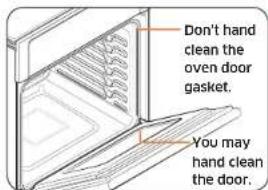
Oven door
Use soap and water to thoroughly clean the top, sides, and front of the oven door. Rinse well. You may use a glass cleaner on the outside glass of the oven door. DO NOT immerse the door in water. DO NOT spray or allow water or the glass cleaner to enter the door vents. DO NOT use oven cleaners, cleaning powders, or any harsh abrasive cleaning materials on the outside of the oven door.
DO NOT clean the oven door gasket. The oven door gasket is made of a woven material which is essential for a good seal. Care should be taken not to rub, damage, or remove this gasket.
Maintaining your appliance
Removing the oven door (Lower oven only)

CAUTION
The door is very heavy. Be careful when removing and lifting the door.
Do not lift the door by the handle.
Use two hands to remove an oven door.

WARNING
You can't remove the upper oven door for safety reason.
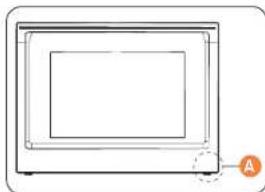
A. Wire Harness
- Prior to removing the oven door, prepare a surface where you will place it. This surface should be flat and covered with a soft blanket. You can also use the corner posts from your packaging material.
- Disconnect the LED light's Wire Harness from the bottom right of the door.
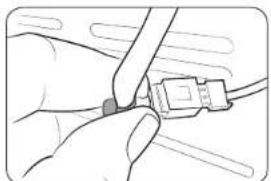
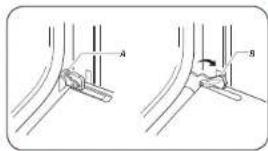
A. Oven door hinge lock in locked position
B. Oven door hinge lock in unlocked position
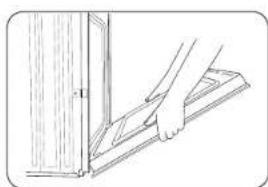
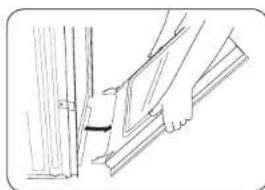
- Open the oven door.
- Locate the oven door hinge locks in both corners of the oven door, and then rotate the hinge locks toward the oven door to the unlocked position. If the door hinge lock is not rotated fully (see illustration B on the left for an example of full rotation), you will not be able to remove the door properly.
- Partially close the door to engage the door latch locks.
The door will stop at this point.
- Set the oven door aside on the prepared covered work surface with the oven door resting on its handle.

Replacing the oven door (Lower oven only)

CAUTION
The door is very heavy. You may need help lifting the door high enough to slide it into the hinge slots. Do not lift the door by the handle.

WARNING
You can't replace the upper oven door for safety reason.
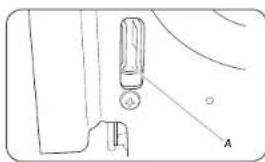
A Slot in the oven cavity for the door hinge lock
- Using two hands, grasp the side edges of the door at the midpoint. Face the oven cavity.
- Locate the slots on each side of the oven cavity for the door hinge locks.
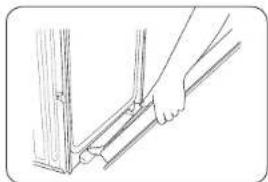
- Hold the door at a 45° angle, and then align the door hinges with the slots in the lower front of the oven cavity. Slowly insert the door, making sure you maintain the 45° angle. You will know the door is engaged in the slot when you feel a slight drop.
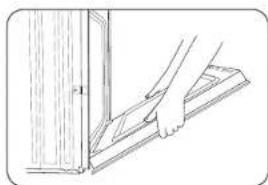
- Lower the oven door to the fully open position. If the oven door does not open to a full 90^ , repeat steps 1 through 3.
- Locate the oven door hinge locks in the corners of the oven door, and rotate the hinge locks toward the oven cavity to the locked position.
See Step 3 (Illustration A) in the "Removing the oven door" section for the proper locked position.
- Close the oven door.
- When the hinges are properly installed and the door is closed, there should be an even gap between the door and the control panel. If one side of the oven door is hanging lower than the other, the hinge on that side is not properly installed.
- Reconnect the Wire Harness and then re-install the rubber cap (for the upper oven door).

CAUTION
After replacing the door, make sure to reconnect the wires. Push them inward to arrange them as they were before you removed the door. Wires that are not connected or arranged correctly can be caught in the door or damaged by heat.

Changing the oven light (Lower oven only)
The oven light is a standard 40-watt appliance halogen bulb. It comes on when the oven door is open. When the oven door is closed, touch turn the light on or off. It will not work during a self-cleaning or Hybrid Cleaning cycle.
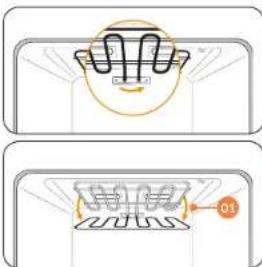
- To change the halogen bulb, you must tilt the broil heater down. To do this, turn the circular nut on the support counterclockwise while holding the broil heater. The broil heater should loosen and tilt down.
NOTE
Important: The broil heater is not a removable part. Do not force the broil heater down. Do not let it drop down.
- Remove the glass cover.
- Remove the halogen bulb cover.
- Replace the halogen bulb
- when done, replace the halogen bulb cover, replace the glass cover, and then follow Step 1 above in the reverse order to return the broiler to its correct position.
CAUTION
Before changing your oven light, disconnect the electrical power to the oven at the main fuse or circuit breaker panel. Make sure the oven and the halogen bulb are cool.
Troubleshooting
Samsung works hard to ensure that you don't have problems with your new electric oven. If you run into unexpected trouble, look first for a solution in the tables starting below. If you're still having trouble after trying the suggested solution, call Samsung at 1-800-SAMSUNG (1-800-726-7864).
Control Display
| Symptom Possible cause Solution | ||
| The display goes blank. | A fuse in your home may be blown or the circuit breaker tripped. | Replace the fuse or reset the circuit breaker. |
| The buttons cannot be pressed properly. | There is foreign matter caught between the buttons Touch model: There is moisture on the exterior The lock function is set | Remove the foreign matter and try again Remove the moisture and try again Check whether the lock function is set. |
For the Microwave Oven
| Symptom Cause | Action | |
| General | ||
| The buttons cannot be pressed properly. | Foreign matter may be caught between the buttons. | Remove the foreign matter and try again. |
| For touch models: Moisture is on the exterior. | Wipe the moisture from the exterior. | |
| Child lock is activated. Dead Activate Child lock. | ||
| The oven does not work. | Power is not supplied. Make sure power is supplied. Make sure the oven is plugged in. Check if a fuse has been blown or circuit breaker has been tripped. | |
| The door is open. Close the door and try again. | ||
| The door open safety mechanisms are covered in foreign matter. | Remove the foreign matter and try again. | |
| The oven stops while in operation. | The user has opened the door to turn food over. | After turning over the food, press the Start button again to start operation. |
| Symptom Cause | Action | |
| The power turns off during operation. | The oven has been cooking for an extended period of time. | After cooking for an extended period of time, let the oven cool. |
| The cooling fan is not working. | Listen for the sound of the cooling fan. | |
| Trying to operate the oven without food inside. | Put food in the oven. | |
| There is not sufficient ventilation space for the oven. | There are intake/exhaust outlets on the front and rear of the oven for ventilation. Keep the gaps specified in the product installation guide. | |
| Several power plugs are being used in the same socket. | Designate only one socket to be used for the oven. | |
| There is a popping sound during operation, and the oven doesn't work. | Cooking sealed food or using a container with a lid may cause popping sounds. | Do not use sealed containers as they may burst during cooking due to expansion of the contents. |
| The oven exterior is too hot during operation. | There is not sufficient ventilation space for the oven. | There are intake/exhaust outlets on the front and rear of the oven for ventilation. Keep the gaps specified in the product installation guide. |
| Objects are on top of the oven. | Remove all objects on the top of the oven. | |
| The door cannot be opened properly. | Food residue is stuck between the door and oven interior. | Clean the oven and then open the door. |
English 61
Troubleshooting
| Symptom Cause | Action | |
| Heating including the Warm function does not work properly. | The oven may not work, too much food is being cooked, or improper cookware is being used. | Put one cup of water in a microwave-safe container and run the microwave for 1-2 minutes to check whether the water is heated. Reduce the amount of food and start the function again. Use a cooking container with a flat bottom. |
| The thaw function does not work. | Too much food is being cooked. | Reduce the amount of food and start the function again. |
| The interior light is dim or does not turn on. | The door has been left open for a long time. | The interior light may automatically turn off when the Eto function operates. Close and reopen the door or press the Cancel button. |
| The Interior light is covered by foreign matter. | Clean the inside of the oven and check again. | |
| A beeping sound occurs during cooking. | If the Auto Cook function is being used, this beeping sound means it's time to turn over the food during thawing. | After turning over the food, press the Start button again to restart operation. |
| The oven is not level. | The oven is installed on an uneven surface. | Make sure the oven is installed on flat, stable surface. |
| There are sparks during cooking. | Metal containers are used during the oven/thawing functions. | Do not use metal containers. |
| Symptom Cause | Action | |
| When power is connected, the oven immediately starts to work. | The door is not properly closed. | Close the door and check again. |
| There is electricity coming from the oven. | The power or power socket is not properly grounded. | Make sure the power and power socket are properly grounded. |
| 1. Water drips.2. Steam is emitted through a door crack.3. Water remains in the oven. | There may be water or steam in some cases depending on the food. This is not an oven malfunction. | Let the oven cool and then wipe with a dry dish towel. |
| The brightness inside the oven varies. | Brightness changes depending on power output changes according to function. | Power output changes during cooking are not malfunctions. This is not an oven malfunction. |
| Cooking is finished, but the cooling fan is still running. | To ventilate the oven, the cooling fan continues to run for about 3 minutes after cooking is complete. | This is not an oven malfunction. |
| Turntable | ||
| While turning, the turntable comes out of place or stops turning. | There is no roller ring, or the roller ring is not properly in place. | Install the roller ring and then try again. |
| The turn table drags while turning. | The roller ring is not properly in place, there is too much food, or the container is too large and touches the inside of the microwave. | Adjust the amount of food and do not use containers that are too large. |
| The turn table rattles while turning and is noisy. | Food residue is stuck to the bottom of the oven. | Remove any food residue stuck to the bottom of the oven. |
| Briolng | ||
| Smoke comes out during operation. | During initial operation, smoke may come from the heating elements when you first use the oven. | This is not a malfunction, and if you run the oven 2-3 times, it should stop. |
| Food is on the heating elements. | Let the oven cool and then remove the food from the heating elements. | |
| Food is too close to the grill. | Put the food a suitable distance away while cooking. | |
| Food is not properly prepared and/or arranged. | Make sure food is properly prepared and arranged. | |
| Symptom Cause | Action | |
| Convection | ||
| The oven does not heat. | The door is open. Close the door and try again. | |
| Smoke comes out during preheating. | During initial operation, smoke may come from the heating elements when you first use the oven. | This is not a malfunction, and if you run the oven 2-3 times, it should stop. |
| Food is on the heating elements. | Let the oven cool and then remove the food from the heating elements. | |
| There is a burning or plastic smell when using the oven. | Plastic or non heat resistant cookware is used. | Use glass cookware suitable for high temperatures. |
| There is a bad smell coming from inside the oven. | Food residue or plastic has melted and stuck to the interior. | Use the steam function and then wipe with a dry cloth. You can put a lemon slice inside and run the oven to remove the odor more quickly. |
| The oven does not cook properly. | The oven door is frequently opened during cooking. | If you open the door often, the interior temperature will be lowered and this may affect the results of your cooking. |
| The oven controls are not correctly set. | Correctly set the oven controls and try again. | |
| The broil heater or other accessories are not correctly inserted. | Correctly insert the accessories. | |
| The wrong size or wrong type of cookware is used. | Use suitable cookware with flat bottoms. | |

Troubleshooting
For the Lower Oven
| Symptom Possible cause Solution | |
| The oven will not turn on. | The oven is not completely plugged into the electrical outlet. |
| A fuse in your home may be blown or a circuit breaker may have tripped. | |
| The oven controls have been set improperly. | |
| The oven is too hot. Allow the oven to cool. | |
| Incomplete service wiring. Call for service. | |
| Power outage. Check to see if the house lights will turn on. If necessary, call your local electric company for service. | |
| The oven light will not turn on. | The light is loose or defective. |
| Tighten or replace the lamp. Call for service if the door light does not turn on. | |
| The switch operating the light is broken. |
| Symptom Possible cause Solution | ||
| The oven smokes excessively during broiling. | The oven controls have not been set properly. | Refer to the section on operating the oven starting on page 22. |
| The meat has been placed too close to the element. | Reposition the rack to provide proper clearance between the meat and the element. Preheat the broil element for searing. | |
| The meat has not been properly prepared. | Remove excess fat from the meat. Cut away fatty edges that may curl, leaving the lean intact. | |
| Crease has built up on oven surfaces. | Regular cleaning is necessary when broiling frequently. | |
| Food does not bake or roast properly. | The oven controls have not been set correctly. | See the chapter on operating the oven starting on page 22. |
| The oven rack has been positioned incorrectly or is not level. | See the section on using the oven racks on page 38. | |
| Incorrect cookware or cookware of improper size is being used. | ||
| The oven temperature needs to be adjusted. | See the Temp Adjust section on page 48. | |
| Food does not broil properly. | The serving size may not be appropriate. | Refer to the broiling recommendation guide for serving sizes on page 43, and then try again. |
| The rack has not been properly positioned. | See the broiling recommendation guide on page 43. | |
| The cookware is not suited for broiling. | Use suitable cookware. | |
| In some areas, the power (voltage) may be low. | •Preheat the broil element for 10 minutes. •See the broiling recommendation guide on page 43. | |
| The oven temperature is too hot or too cold. | The oven temperature needs to be adjusted. | See the section on adjusting the temperature on page 48. |
| There is water dripping. | You may see water or steam in some cases depending on the food you are cooking. This is not a product malfunction. | Let the oven cool and then wipe with a dry dish towel. |
| There is steam coming through the crack between the oven body and the door. | ||
| Water is remaining in the oven. | ||
| Symptom Possible cause Solution | ||
| I can hear water boiling during steam cooking. | Water is being heated by the steam heater. | This is not a product malfunction. |
| The oven will not self-clean. | The oven temperature is too high to start a self-clean operation. | Allow the oven to cool and then reset the controls. |
| The oven controls have been set incorrectly. | See the section on self-cleaning on page 51. | |
| A self-cleaning cycle cannot be started if the oven lockout feature has been activated. | Deactivate the oven lockout (see page 25). | |
| Excessive smoking during a self-cleaning cycle. | There is excessive soiling in the oven. | Touch OVEN OFF. Open the windows to rid the room of smoke. Wait until the self-cleaning cycle is canceled. Wipe up the excessive soil and then start the self-cleaning cycle again. |
| The oven door will not open after a self-cleaning cycle. | The oven is too hot. Allow the oven to cool. | |
| The oven is not clean after a self-cleaning cycle. | The oven controls were not set correctly. | See the section on self-cleaning on page 51. |
| The oven was heavily soiled. We pe up heavy spillovers before starting the self-cleaning cycle. Heavily soiled ovens may need to be self-cleaned again or for a longer period of time. | ||
English 65
Troubleshooting
| Symptom Possible cause Solution | ||
| Steam is coming out of the vent. | When using the convection feature, it is normal to see steam coming out of the oven vent. | This is normal operation and not a system failure.Use the oven as usual. |
| As the number of racks or amount of food being cooked increases, the amount of visible steam will increase. | ||
| A burning or oily odor is coming from the vent. | This is normal for a new oven and will disappear in time. | To speed the process,set a self-cleaning cycle for a minimum of 3 hours.See the section on self-cleaning on page 51. |
| Strong odor. An odor coming from the insulation around the inside of the oven is normal for the first few times the oven is used. | Operate the oven empty on the bake setting at 400°F for 1 hour. | |
| Fan noise. A convection fan may automatically turn on and off. | This is not a system failure but normal operation. | |
| The oven racks are difficult to slide. | The shiny, silver-colored racks were cleaned in a self-cleaning cycle. | Apply a small amount of vegetable oil to a paper towel, and then wipe the edges of the oven racks with the paper towel. |
| The oven door is locked. | The circuit breaker has been tripped or there was a power failure while the oven door was locked. | Activate Control Lockout, and then unlock the control. See the Control Lockout section on page 25. |
Information codes
Oven
| Displayed Code | Possible cause Solution | |
| C-d0 | This code occurs if the control key is short for 1 minute. | Clean the buttons and make sure there is no water on/around them. Turn off the oven and try again. If the problem continues, contact a local Samsung service center. |
| C-d1 | This code occurs if the door lock is mispositioned. | Touch OVEN OFF, and then restart the oven. If the problem persists, disconnect all power to the oven for at least 30 seconds and then reconnect the power. If this does not solve the problem, call for service. |
| C-F0 | This code occurs if communication between the Main and Sub PBA is interrupted. | |
| C-F2 | This code occurs if communication between the Main and Touch is interrupted. | |
| C-20 | The oven sensor is open when the oven is operating. | |
| The oven sensor is short when the oven is operating. |

Warranty (U.S.A)
| Displayed Code | Possible cause Solution | |
| C-21 | This code occurs if the internal temperature rises abnormally high. | Touch OVEN OFF, and then restart the oven. If the problem persists, disconnect all power to the oven for at least 30 seconds and then reconnect the power. If this does not solve the problem, call for service. |
| C-23 | The temp probe sensor is short when the oven is operating. | |
| C-30 | The PCB sensor is open when the oven is operating. | |
| The PCB sensor is short when the oven is operating. | ||
| C-31 | This code occurs if the PCB temperature rises abnormally high. | Call for service. |
| C-70 | The Steam sensor is open when the oven is operating. | Touch OVEN OFF, and then restart the oven. If the problem persists, disconnect all power to the oven for at least 30 seconds and then reconnect the power. If this does not solve the problem, call for service. |
| The Steam sensor is short when the oven is operating. | ||
| C-72 | There are drain system-related problems. | |
| C-A2 | The cooling motor is operating abnormally. | Call for service. |
SAMSUNG ELECTRIC OVEN
LIMITED WARRANTY TO ORIGINAL PURCHASER
This SAMSUNG brand product, as supplied and distributed by SAMSUNG ELECTRONICS AMERICA, INC. (SAMSUNG) and delivered new, in the original carton to the original consumer purchaser, is warranted by SAMSUNG against manufacturing defects in materials and workmanship for a limited warranty period of:
ONE (1) YEAR PARTS AND LABOR, TEN (10) YEARS PARTS WARRANTY FOR MAGNETRON
This limited warranty begins on the original date of purchase, and is valid only on products purchased and used in the United States. To receive warranty service, the purchaser must contact SAMSUNG for problem determination and service procedures. Warranty service can only be performed by a SAMSUNG authorized service center. The original dated bill of sale must be presented upon request as proof of purchase to SAMSUNG or SAMSUNG's authorized service center. Samsung will provide in-home service during the warranty period at no charge subject to availability within the contiguous United States. In home service is not available in all areas. To receive in home service, the product must be unobstructed and accessible to the service agent. If service is not available Samsung may elect to provide transportation of the product to and from an authorized service center. SAMSUNG will repair or replace this product, at our option and at no charge as stipulated herein, with new or reconditioned parts or products if found to be defective during the limited warranty period specified above. All replaced parts and products become the property of SAMSUNG and must be returned to SAMSUNG. Replacement parts and products assume the remaining original warranty, or ninety (90) days, whichever is longer.

English 67

Warranty (U.S.A)
This limited warranty covers manufacturing defects in materials and workmanship encountered in normal, noncommercial use of this product and shall not apply to the following: damage which occurs in shipment; delivery and installation; applications and uses for which this product was not intended; altered product or serial numbers; cosmetic damage or exterior finish; accidents, abuse, neglect, fire, water, lightning or other acts of nature; use of products, equipment, systems, utilities, services, parts, supplies, accessories, applications, installations, repairs, external wiring or connectors not supplied or authorized by SAMSUNG which damage this product or result in service problems; incorrect electrical line voltage, fluctuations and surges; customer adjustments and failure to follow operating instructions, maintenance and environmental instructions that are covered and prescribed in the instruction book; product removal and reinstallation; problems caused by post infestations, and overheating or overcooking by user. This limited warranty shall not cover cases of incorrect electric current, voltage or supply, light bulbs, house fuses, house wiring, cost of a service call for instructions, or fixing installation errors. SAMSUNG does not warrant uninterrupted or error-free operation of the product.
EXCEPT AS SET FORTH HEREIN THERE ARE NO WARRANTYES ON THIS PRODUCT EITHER EXPRESS OR IMPLIED AND SAMSUNG DISCLAIMS ALL WARRANTIES INCLUDING, BUT NOT LIMITED TO, ANY IMPLIED WARRANTYES OF MERCHANTABILITY, INFRICENTMENT OR FITNESS FOR A PARTICULAR PURPOSE. NO WARRANTY OR GUARANTY GIVEN BY ANY PERSON, FIRM OR CORPORATION WITH RESPECT TO THIS PRODUCT SHALL BE BINDING ON SAMSUNG SAMSUNG SHALL NOT BE LIABLE FOR LOSS OF REVENUE OR PROFITS, FAILURE TO REALIZE SAVINGS OR OTHER BENEFITS, OR ANY OTHER SPECIAL, INCIDENTAL OR CONSEQUENTIAL DAMAGES CAUSED BY THE USE, MISUSE OR INABILITY TO USE THIS PRODUCT. REGARDLESS OF THE LEGAL THEORY ON WHICH THE CLAIM IS BASED, AND EVEN IF SAMSUNG HAS BEEN ADVISED OF THE POSSIBILITY OF SUCH DAMAGES, NOR SHALL RECOVERY OF ANY KIND AGAINST SAMSUNG BE GREATER IN ANOUNT THAN THE PURCHASE PRICE OF THE PRODUCT SOLD BY SAMSUNG AND CAUSING THE ALLEGED DAMAGE. WITHOUT LIMITING THE FOREGOING PURCHASER ASSUMES ALL RISK AND LIABILITY FOR LOSS, DAMAGE OR INJURY TO PURCHASER AND PURCHASER'S PROPERTY AND TO OTHERS AND THEIR PROPERTY ARISING OUT OF THE USE, MISUSE OR INABILITY TO USE THIS PRODUCT. THIS LIMITED WARRANTY SHALL NOT EXTEND TO ANYONE OTHER THAN THE ORIGINAL PURCHASER OF THIS PRODUCT. IS NONTRANSFERABLE AND STATES YOUR EXCLUSIVE REMEDY.
Some provinces or territories may or may not allow limitations on how long an implied warranty lasts, or the exclusion or limitation of incidental or consequential damages, so the above limitations or exclusions may not apply to you. This warranty gives you specific legal rights, and you may also have other rights which vary from state to state. User Replaceable Parts may be sent to the customer for unit repair. If necessary, a Service Engineer can be dispatched to perform service. To obtain warranty service, please contact SAMSUNG at:
68 English

Warranty (CANADA)
PLEASE DO NOT DISCARD. THIS PAGE REPLACES THE WARRANTY PAGE IN THE USE & CARE GUIDE
SAMSUNG ELECTRIC OVEN
LIMITED WARRANTY TO ORIGINAL PURCHASER
This SAMSUNG brand product, as supplied and distributed by SAMSUNG ELECTRONICS CANADA, INC. (SAMSUNG) and delivered new, in the original carton to the original consumer purchaser, is warranted by SAMSUNG against manufacturing defects in materials and workmanship for a limited warranty period of:
ONE (1) YEAR PARTS AND LABOR, FIVE (5) YEARS PARTS WARRANTY FOR MAGNETRON
This limited warranty begins on the original date of purchase, and is valid only on products purchased and used in the CANADA. To receive warranty service, the purchaser must contact SAMSUNG for problem determination and service procedures. Warranty service can only be performed by a SAMSUNG authorized service center. The original dated bill of sale must be presented upon request as proof of purchase to SAMSUNG or SAMSUNG's authorized service center. Samsung will provide in-home service during the warranty period at no charge subject to availability within the contiguous CANADA. In home service is not available in all areas. To receive in home service, the product must be unobstructed and accessible to the service agent. If service is not available Samsung may elect to provide transportation of the product to and from an authorized service center.
SAMSUNG will repair or replace this product, at our option and at no charge as stipulated herein, with new or reconditioned parts or products if found to be defective during the limited warranty period specified above. All replaced parts and products become the property of SAMSUNG and must be returned to SAMSUNG. Replacement parts and products assume the remaining original warranty, or ninety (90) days, whichever is longer. This limited warranty covers manufacturing defects in materials and workmanship encountered in normal, noncommercial use of this product and shall not apply to the following: damage which occurs in shipment; delivery and installation; applications and uses for which this product was not intended; altered product or serial numbers; cosmetic damage or exterior finish; accidents, abuse, neglect, fire, water, lightning or other acts of nature; use of products, equipment, systems, utilities, services, parts, supplies, accessories, applications, installations, repairs, external wiring or connectors not supplied or authorized by SAMSUNG which damage this product or result in service problems; incorrect electrical line voltage, fluctuations and surges; customer adjustments and failure to follow operating instructions, maintenance and environmental instructions that are covered and prescribed in the instruction book; product removal and reinstallation; problems caused by pest infestations, and overheating or overcooking by user. This limited warranty shall not cover cases of incorrect electric current, voltage or supply, light bulbs, house fuses, house wiring, cost of a service call for instructions, or fixing installation errors. SAMSUNG does not warrant uninterrupted or error-free operation of the product.

English 69
AppendixWarranty (CANADA) Appendix
EXCEPT AS SET FORTH HEREIN THERE ARE NO WARRANTYES ON THIS PRODUCT OTHERWISE EXPRESS OR IMPLIED AND SAMSUNG DISCLAIMS ALL WARRANTIES INCLUDING, BUT NOT LIMITED TO, ANY IMPLIED WARRANTYES OF MERCHANTIBILITY, INFRINGEMENT OR FITNESS FOR A PARTICULAR PURPOSE. NO WARRANTY OR GUARANTY GIVEN BY ANY PERSON, FIRM OR CORPORATION WITH RESPECT TO THIS PRODUCT SHALL BE BINDING ON SAMSUNG. SAMSUNG SHALL NOT BE LIABLE FOR LOSS OF REVENUE OR PROFITS, FAILURE TO REALIZE SAVINGS OR OTHER BENEFITS, OR ANY OTHER SPECIAL, INCIDENTAL OR CONSEQUENTIAL DAMAGES CAUSED BY THE USE, MISUSE OR INABILITY TO USE THIS PRODUCT, REARDLESS OF THE LEGAL THEORY ON WHICH THE CLAIM IS BASED, AND EVEN IF SAMSUNG HAS BEEN ADVISED OF THE POSSIBILITY OF SUCH DAMAGES. NOR SHALL RECOVERY OF ANY KIND AGAINST SAMSUNG BE GREATER IN AMOUNT THAN THE PURCHASE PRICE OF THE PRODUCT SOLD BY SAMSUNG AND CAUSING THE ALLEGED DAMAGE. WITHOUT LIMITING THE FOREGOING PURCHASER ASSUMES ALL RISK AND LIABILITY FOR LOSS, DAMAGE OR INJURY TO PURCHASER AND PURCHASER'S PROPERTY AND TO OTHERS AND THEIR PROPERTY ARISING OUT OF THE USE, MISUSE OR INABILITY TO USE THIS PRODUCT. THIS LIMITED WARRANTY SHALL NOT EXTEND TO ANYONE OTHER THAN THE ORIGINAL PURCHASER OF THIS PRODUCT, IS NONTRANSFERABLE AND STATES YOUR EXCLUSIVE REMEDY.
Some states do not allow limitations on how long an implied warranty lasts, or the exclusion or limitation of incidental or consequential damages, so the above limitations or exclusions may not apply to you. This warranty gives you specific legal rights, and you may also have other rights which vary from state to state. To obtain warranty service, please contact SAMSUNG at:
Samsung Electronics Canada Inc.
2050 Derry Road West, Mississauga, Ontario L5N 0B9 Canada
1-800-SAMSUNG (726-7864) and www.samsung.com/ca/support (English)
www.samsung.com/ca_fr/support (French)
Open Source Announcement
The software included in this product contains open source software. You may obtain the complete corresponding source code for a period of three years after the last shipment of this product by sending an email to mailtoxoss.request@samsung.com.
It is also possible to obtain the complete corresponding source code in a physical medium such as a CD-ROM; a minimal charge will be required.
The following URL http://opensource.samsung.com/opensource/SimpleConnectTP/seq/0 leads to the download page of the source code made available and open source license information as related to this product. This offer is valid to anyone in receipt of this information.
Memo
English 71
SAMSUNG
Scan the QR code' or visit www.samsung.com/spsn to view our helpful How-to Videos and Live Shows - Requires reader to be installed on your smartphone
Please be advised that the Samsung warranty does NOT cover service calls to explain product operation, correct improper installation, or perform normal cleaning or maintenance.
QUESTIONS OR COMMENTS?
| COUNTRY CALL OR VISIT US ONLINE AT | ||
| U.S.A Consumer Electronics | 1-800-SAMSUNG (726-7864) www.samsung.com/us/support | |
| CANADA 1-800-SAMSUNG (726-7864) | www.samsung.com/ca/support (English) www.samsung.com/ca_fr/support (French) | |

DE68-04446A-00

Horno combinado de microondas empotrable
Manual del usuario
NQ70M6650D
SQV00669D8A.AA.DBAS-0444A-01.MENIND 1111111111111111
Derretir/Ablandar 36
85 Challenger Road, Ridgefield Park, NJ 07660
1-800-SAMSUNG (726-7864) y www.samsung.com/us/support
Garantia (CANADÁ)
NO LA DESECHE. ESTA HOJA REEMPLAZA LA PÁGINA DE GARANTÍA EN LA GUIA DE USO Y MANTENIMIENTO
HORNO ELECTRICO SAMSUNG
GARANTÍA LIMITADA PARA EL COMPRADOR ORIGINAL
Samsung Electronics Canada Inc.
2050 Derry Road West, Mississauga, Ontario L5N 0B9 Canada
1-800-SAMSUNG (726-7864) y www.samsung.com/ca/support (English)
www.samsung.com/ca_fr/support (French)
demarrer le four a distance;
85 Challenger Road, Ridgefield Park, NJ 07660
1-800-SAMSUNG (726-7864) et www.samsung.com/us/support
Garantie (CANADA)
VEUILLEZ NE PAS JETER. CETTE PAGE REMPLACE LA PAGE DE GARANTIE CONTENUE DANS LE GUIDE D'UTILISATION ET D'ENTRETIEN.
FOUR ÉLECTRIQUE SAMSUNG
GARANTIE LIMITEA A L'ACHETEUR INITIAL
Samsung Electronics Canada Inc.
2050 Derry Road West, Mississauga, Ontario L5N 0B9 Canada
1-800-SAMSUNG (726-7864) et www.samsung.com/ca/support (English)
www.samsung.com/ca_fr/support (French)