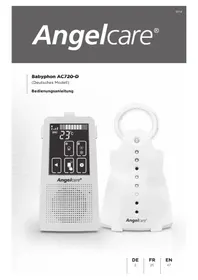
AC720 - Baby monitors ANGELCARE - Free user manual and instructions
Find the device manual for free AC720 ANGELCARE in PDF.



| Product type | Audio monitor with touch screen |
| Brand | Angelcare |
| Model | AC720 |
| Free field range | Up to 250 meters |
| Transmission frequency | 1880-1900 MHz (DECT) |
| Parent unit power supply | 2 rechargeable AAA batteries (included) + mains adapter 100-240 V AC, 5 V DC |
| Baby unit power supply | 2 alkaline AA batteries (not included) + mains adapter 100-240 V AC, 5 V DC |
| Battery type for parent unit | NiMH rechargeable AAA only |
| Battery type for baby unit | Alkaline AA only |
| Main functions | Two-way audio monitoring, touch screen, ECO mode, integrated nightlight, locator, temperature alarm, mute, out-of-range indicator |
| ECO mode | Reduces electromagnetic emissions in standby (radio transmission deactivated) |
| Temperature alarm | Adjustable from 5 °C to 19 °C for low threshold and from 22 °C to 35 °C for high threshold |
| Display | LCD touch screen with standby mode after 30 seconds of inactivity |
| Parent-baby communication | Communication button to talk to baby |
| Sound levels | 5 adjustable levels on parent unit |
| Nightlight | High or low brightness, controlled from parent unit or baby unit |
| Care and cleaning | Unplug before cleaning; use a dry cloth; do not immerse or spray products |
| Safety precautions | Keep cords more than 1 m from crib; do not use extension cords; keep out of reach of children |
| Operating temperature | 10 °C to 40 °C |
| Spare parts / repairability | Rechargeable AAA batteries and mains adapters provided; AA batteries not included; do not attempt self-repair |
| Customer service | Germany, Austria, Switzerland: +49 (0)211 / 44 03 16 -13 ; info@angelcare.de |
| Compliance | Directive 1999/5/EC; intended use in Germany, Austria, and Switzerland |
Frequently Asked Questions - AC720 ANGELCARE
User questions about AC720 ANGELCARE
0 question about this device. Answer the ones you know or ask your own.
Ask a new question about this device
Download the instructions for your Baby monitors in PDF format for free! Find your manual AC720 - ANGELCARE and take your electronic device back in hand. On this page are published all the documents necessary for the use of your device. AC720 by ANGELCARE.
USER MANUAL AC720 ANGELCARE
RAUSCHEN, STÖRGERÄUSCHE (DURCH ANDERE
Angelcare Babyphon AC423-D

Unite des parents rechargeable
Chargeur
AUCUN SON N'EST TRANSMIS
Sound Monitor AC720-D
Instruction manual

This owner's manual applies to the German model of the Angelcare® Sound Monitor AC720-D. Beyond the narrow limits of copyright law, any use of this owner's manual, and particularly any duplication hereof, without the consent of Funny Handel GmbH & Co. KG, is prohibited and subject to prosecution.
TABLE OF CONTENT
Warnings 49
Out of range indicator function 52
AC720-D SETUP REQUIREMENTS 53
STEP 1 - Charging the Parent Unit 54
STEP 2 - Setting up the Nursery Unit 55
STEP 3 - Turning on your Monitor. 56
STEP 4 - Testing and getting to know your Monitor 57
STEP 5 - Activating and deactivating additional functions. 60
Troubleshooting 65
Technical specifications 67
Technical Customer Service / Contact 68
GERMAN 2
FRENCH 25
EU Declaration Of Conformity 69
OWNER'S MANUAL
KEEP YOUR OWNER'S MANUAL FOR FUTURE REFERENCE.
PLEASE READ THE WARNINGS AND INSTRUCTIONS CAREFULLY BEFORE ASSEMBLING & USING THE PRODUCT.
FAILURE TO FOLLOW THE WARNINGS AND THE INSTRUCTIONS COULD RESULT IN SERIOUS INJURY OR DEATH OR DAMAGES TO THE PRODUCT.

WARNING
Adult assembly required.
Keep small parts away from children when assembling.
WARNINGS
- THIS PRODUCT CANNOT REPLACE RESPONSIBLE ADULT SUPERVISION. This product is designed to aid in the monitoring of your child. When using the monitor, you must still provide the supervision necessary for the continued safety of your child.
- WARNING Strangulation Hazard - Children have STRANGLED in cords. Keep

adapter cords out of the reach of children (more than 1 m away).
- Never use extension cords with AC adapters. ONLY use the AC adapters provided.
- When an AC Adapter is plugged into an electrical outlet, DO NOT touch the exposed end.
- ALWAYS be sure that both the transmitter and receiver are working properly and are within range of each other. Test monitor before first use, periodically and when changing location of the Nursery Unit.
- DO NOT use monitor near water (such as bath tub, sink, etc.).
CAUTION
RISK OF ELECTRIC SHOCK DO NOT OPEN
DO NOT EXPOSE TO RAIN OR MOISTURE
- Keep monitor AWAY from heat sources (such as stoves, radiators, etc.).
- ALWAYS place both the Nursery Unit and Parent Unit on a flat surface in an upright position and allow for proper ventilation.
DO NOT place on sofas, cushions, beds, etc. which may block ventilation.
- This monitor uses public airwaves to transmit signals. The Parent Unit may pick up signals or interference from other nursery monitors in your area. Your monitor may even be picked up by other households. To protect your privacy, make sure both units are turned OFF when not in use.
- This product is NOT a toy. DO NOT allow children to play with it.
- This product contains small parts. Adult assembly required. Exercise care when unpacking and assembling the product and keep small parts away from children.
- When using the monitor, the room temperature should be between 10^ and 40^ .
BATTERY WARNING
- Use ONLY AAA RECHARGEABLE batteries for the Parent Unit. DO NOT mix old and new batteries. DO NOT mix alkaline, standard or rechargeable batteries. Insert batteries with correct polarity. DO NOT short-circuit supply terminals. ONLY use the recommended batteries or equivalent (volts and size) and the correct adapter. Remove batteries when product is stored for long periods of time or when batteries are exhausted. Dispose exhausted batteries properly. DO NOT recharge non-rechargeable batteries. Rechargeable batteries are ONLY to be charged under adult supervision. Keep all batteries away from children.
14. IMPORTANT SAFETY INSTRUCTIONS
14.1 Read these instructions - All the safety instructions should be read before the product is operated.
14.2 Keep these instructions. The safety and operating instructions should be retained for future reference.
14.3 Heed all warnings - All warnings on the product and in the operating instructions should be adhered to.
14.4 Follow all instructions - All operating and use instructions should be followed.
14.5 Water and moisture - DO NOT use this apparatus near water. For example, near a bath tub, wash bowl, kitchen sink, laundry tub, in a wet environment or near a swimming pool and the like. Care should be taken so that objects do not fall onto units and that liquids are not spilled into either unit through its openings.
14.6 Cleaning - Disconnect all units before cleaning. DO NOT immerse in water any part of the Nursery Unit, Parent Unit, or Charging Cradle. Clean only with dry cloth. DO NOT spray with cleaning products or solvents.
14.7 Ventilation - DO NOT block any ventilation openings. Allow for proper ventilation when units are in use. DO NOT cover the Nursery Unit or Parent Unit with any object such as a blanket. DO NOT place it in a drawer or in any location which would muffle the sound or interfere with the normal flow of air.
14.8 Heat sources - DO NOT install near any heat sources such as radiators, heat registers, stoves, TVs or other apparatus (including amplifiers) that produce heat. Heat can damage the case or electrical parts.
14.9 Power cord protection - Protect the cord and Adapter's power cord from being walked on or pinched by furniture or other items - Power supply cords should be routed so that they are not likely to be walked on or pinched by items upon or against them, paying particular attention to cords and plugs, convenience receptacle, and the point where they exit from the product.
14.10 Accessories - Only use attachments/ accessories specified by the manufacturer. DO NOT place this product on an unstable cart, stand, tripod, bracket or table. The product may fall, causing serious injury to a child or adult and serious damage to the product. Use ONLY with a cart, stand, tripod, bracket or table recommended by
the manufacturer or sold with the product. Any mounting of the product should follow the manufacturer's instructions.
14.11 Unplug this appliance during lightning storms or when not used for long periods of time.
14.12 Servicing - DO NOT attempt to service this product yourself as opening or removing covers (except battery covers) may expose you to dangerous voltage or other hazards.
14.13 Replacement parts - When replacement parts are required, be sure the replacement parts specified by the manufacturer have the same characteristic as the original part. Unauthorized substitution may result in fire, electric shock or other hazards.
14.14 Usage - This baby monitor is intended as an aid. It is NOT a substitute for responsible and proper adult supervision and should not be used as such. Use this appliance ONLY for its intended use as described in this manual.
14.15 Power Sources - Operate this product only from the type of power source indicated on the type plate of the adaptor. If you are unsure of the type of power supply to your home, consult your dealer or local power company.
14.16 Overloading - DO NOT overload wall outlets, extension cords or integral convenience receptacles as this can result in a risk of fire or electric shock.
14.17 Object and Liquid Entry - NEVER push objects of any kind into this product through casing slots as they may touch dangerous voltage points or short out parts that could result in a risk of fire or electric shock. NEVER spill liquid of any kind on the product.
14.18 Antenna - The antenna used for this transmitter must be installed to provide a separation distance of at least 20~cm from all persons and must not be collocated or operating in conjunction with any other antenna or transmitter.
14.19 Power Lines - An outside antenna system should NOT be located in the vicinity of overhead power lines or other electric light or power circuit, or where it can fall into such power lines or circuits as contact with them may be fatal.
14.20 WARNING Strangulation Hazard - Children have STRANGLED in cords. Keep

adapter cords out of the reach of children (more than 1 m away).
15. IMPORTANT SAFETY INSTRUCTIONS RELATED TO USE OF BATTERIES
14.21 Interference - This monitor uses public airwaves to transmit signals. The Parent Unit may pick up signals or interference from other nursery monitors in your area. Your monitor may even be picked up by other households. To protect your privacy, make sure both units are turned OFF when not in use.
15.1 Use ONLY the type and size of batteries specified in the owner's manual. There is a risk of explosion if batteries are replaced with an incorrect type.
15.2 Use ONLY AAA rechargeable batteries and/or the AC Adapters provided for the Parent Unit. You must use only rechargeable batteries in the Parent Unit. DO NOT use alkaline batteries or you will severely damage the unit.
15.3 Charge the batteries for 15 hours prior to first use. Be sure to have the monitor in the OFF position during this period. ONLY use the AC Adapters included with your monitor.
15.4 DO NOT use these adapters with any other equipments.
15.5 When unplugging the AC Adapter from the Nursery Unit, be sure it is switched to the OFF position. If it isn't, the unit will revert to battery mode if batteries are installed.
15.6 DO NOT use rechargeable batteries in the Nursery Unit. Use alkaline batteries ON LY.
15.7 DO NOT dispose batteries in fire. They may explode. Check with local regulations for possible special disposal instructions.
15.8 Exercise care in handling batteries in order not to short out the batteries with conducting materials such as rings, bracelets and keys. Overcharging, short
circuiting, reverse charging, mutilation, or incineration of batteries must be avoided to prevent one or more of the following occurrences: release of toxic materials, release of hydrogen and/or oxygen gas, rise in surface temperature.
15.9 DO NOT attempt to recharge batteries provided with or identified for use with this product that are not intended to be charged. The batteries may leak corrosive electrolyte or explode.
15.10 DO NOT attempt to rejuvenate the batteries provided with or identified for use with this product by heating them. Sudden release of battery electrolyte may occur, causing burns or irritation to eyes or skin.
15.11 If and when necessary, the batteries must be replaced with identical new ones or equivalent (volts and size). If a battery to be replaced is connected with other batteries in series, replace the other batteries at the same time as well. DO NOT mix old and new batteries.
15.12 Reverse polarity installation of the batteries in the end product must be avoided. Reverse insertion of batteries can cause charging, and that may result in leakage or explosion.
15.13 Remove batteries from this product if you store the product over 30 days because the batteries could leak and damage the product.
15.14 Discard 'dead' batteries as soon as possible since 'dead' batteries are more likely to leak in a product. If a battery has leaked or vented, it should be replaced immediately using protective gloves.
15.15 DO NOT store this product, or the batteries provided with or identified for use with this product, in high-temperature areas.
OUT OF RANGE INDICATOR FUNCTION
The "Out of Range" indicator function will alert you when the units are not communicating with each other. Out of range situations can be caused by distance or by physical interferences. The Out of Range Indicator function is automatically activated in Normal mode. It is automatically disabled in ECO mode. (See ECO mode Chapter on page 61)
To avoid electrosmog resulting from the regular transmission of signals between the transmitter and receiver which is necessary to control the distance between them, it is recommended to use the monitor in ECO mode if possible.
Range: Up to 250 meters (open field)
SETUP REQUIREMENTS
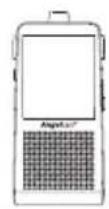
INCLUDED:
Rechargeable Parent Unit
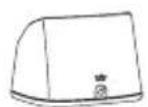
Charging Cradle
TOUCHSCRE
SOUND MONITOR
Model AC720

Belt Clip


2 AC Adapters Nursery Unit 2 AAA Rechargeable
Batteries
for Parent Unit
WHAT YOU WILL NEED (NOT INCLUDED):

2 AA Alkaline
Batteries
for Nursery Unit

Miniature Phillips
Screwdriver
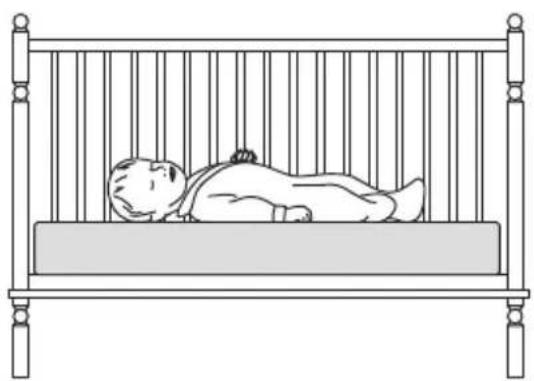
BABY'S ROOM:
IMPORTANT
Install the Nursery Unit on a flat, stable surface facing the crib at a distance of at least 1 meter.

IMPORTANT
Keep
at least
1m

| WARNING Never use regular alkaline batteries in the Parent Unit; they may explode. |


1) Unscrew the battery cover and insert 2 AA Alkaline Batteries (not included).
2) Place the Nursery Unit at a minimum of 1 m away from the crib.
3) Connect the AC Adapter to the Nursery Unit and plug into an electrical outlet.
NOTE:
The batteries maintain power supply in case of power outage.
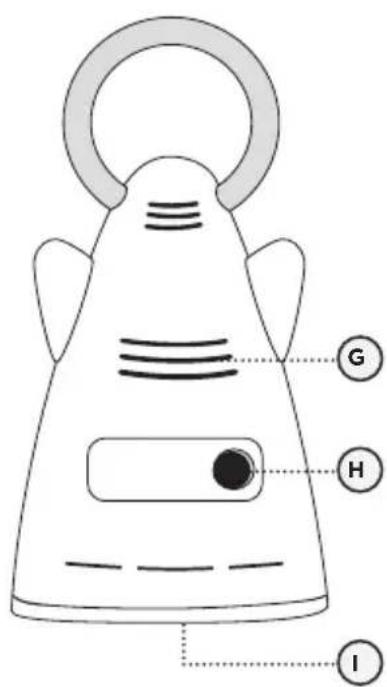
NURSERY UNIT:
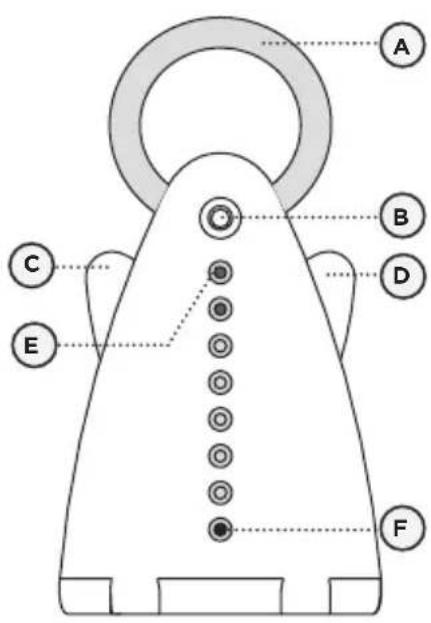
Front View
Rear View
1) Press the Parent Unit ON/OFF button to open and display normal mode.
2) Push and hold the Nursery Unit left 'wing' button for 2 seconds.
The LCD monitor has 30 second timeout and then will go to power saving mode (dimmer illumination). Press any key to wake up.

When the Parent Unit is turned ON and the Nursery Unit is OFF, the Parent Unit will be searching for connection with the Nursery Unit. The Connection icon will scan in the following cycle.


If there is a lost connection between the 2 units (refer to troubleshooting):
The Out-of-Range icon will appear on the screen and the Parent Unit will beep.
For more informationen on the out of range indicator function, please refer to page 52.
IMPORTANT ICONS

Temperature icon: Indicates room temperature

Sound icon: Indicates sound is active
Battery Level icon: Indicates battery level

Level Bar: Indicates sound level from Nursery Unit.

Empty


Full

Settings Icons: Access to settings

ECO icon: Indicates ECO function is active*

Temperature Alarm icon: Indicates Temperature Alarm is active
Connection icon: Indicates the connection quality between the Parent Unit and Nursery Unit.




*In ECO mode, there is no signal strength bar

WARNING

STRANGULATION HAZARD.
Children have STRANGLED in cords.
- Keep adapter cords out of the reach of children (more than 1 m away).
- Because of the serious strangulation risk to infants and toddlers, parents and caregivers should never place the nursery unit within 1m of a crib.
- NEVER use extension cords with AC adapters. ONLY use the AC adapters provided. This product is not a toy. Never allow children to play with it.
STEP 4 - TESTING AND GETTING TO KNOW YOUR MONITOR
The Angelcare monitor can be used with the pre-program factory settings or you can also customize your settings to your preference.
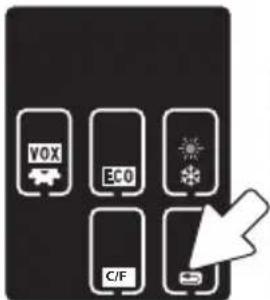
NOTE:
All changes and adjustments made in the settings mode will not be activated unless you confirm them by pressing the return icon. A short beep will confirm your modification.
IMPORTANT
When in settings mode, sound transmission between Parent and Nursery Units will be temporarily deactivated.
4.1 - SOUND
Press + or - buttons to adjust the volume level.

Raise volume level (+)
Lower volume level (-)
Level 1
L1
Level 2
L2
Level 3
L3
Level 4
4
Level 5
L5
PUT IN TALK BACK MODE

Press and hold the Talk Back button to speak to your baby.
TO TEST THE SOUND:
Ask someone to speak into the Nursery Unit or place the unit near a radio to ensure that sound is being picked up.
IMPORTANT
To avoid feedback (whistling), keep both units at least 3 m apart.
- Check that both units are switched on.
- Check that both units are plugged into a working electrical outlet.
- Check the batteries in both units (replace or recharge them as necessary per unit).
- Bring the Parent Unit closer to the Nursery Unit.
4.2 - BATTERIES
HOW TO CHECK THE BATTERIES:
Unplug the AC Adapters from both units.
- If the green light on the Nursery Unit does not show, replace the batteries.
- If the Parent Unit and its screen do not light up, recharge the batteries.
HOW TO CHARGE THE BATTERIES IN THE PARENT UNIT:
Leave the Parent Unit in the Charging Cradle to fully charge the unit. Although the batteries at 1/3 capacity works normally, we recommend that you fully recharge them.


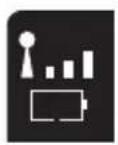
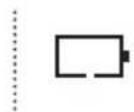
PARENT UNIT BATTERY ALARM
- Alarm activates when batteries need to be recharged.
- Parent Unit will emit a beep sound every 20 seconds.
- Battery icon will flash on Parent Unit screen.
YOU ARE NOW READY
TO USE YOUR MONITOR
The Angelcare® monitor can be used with the pre-program factory settings or you can also customize your settings to your preference.
DEFAULT SETTINGS

Sound Mode: ON
Speaker Volume: Level 3 (of 5)

Temperature Alarm: OFF
Temperature Alarm Settings:
High Temperature Limit*: 30 °C
Low Temperature Limit*: 19 °C
ECO Mode: ON

- High/Low Temperature Setting preset values might be different for various countries.
IMPORTANT
- Test your monitor before first use.
- Test your monitor regularly to ensure it is functioning correctly.
| Level 1 | |
| Level 2 | |
| Level 3 | |
| Level 4 |
5.2 - ECO MODE
Allows you to reduce the electro-smog.
TO ACTIVATE ECO MODE:

In Standby mode, when the ECO mode is ON, the radio frequency transmission of the Nursery and the Parent Units are completely OFF. In other words, there is no electromagnetic emission in standby mode. The radio transmission will turn back ON if one of the following event happens:
- The settings are adjusted via the parent unit screen
- The VOX activates
- The night light or the Pager are activated via the nursery unit
- The temperature alarm goes ON. In this case, the temperature will show again on the screen until the alarm stops.
1) Press the Settings icon to access setting mode.
2) Press the ECO icon to activate or deactivate the ECO function.

3) Press the Return icon to confirm your choice and return to normal screen.

NOTE: When the ECO mode is set ON, a small ECO icon appears beside the antenna icon and:
- the signal strength bar is OFF
- the Temperature display is OFF but the temperature alarm will remain working if selected
Please note that in ECO standby mode, the out of range warning tone alarm is disabled, but if the Radio Frequency transmission turns ON, because of one of the four events above, the out of range alarm will be triggered, if the parent and nursery units are not linked at that time.
The monitor will automatically return to standby mode with zero electromagnetic emission in approximately 45 seconds after the end of the events above. Similarly, 45 seconds is needed after activating the ECO mode manually on the parent unit screen for the standby mode to be ON.
5.3 - TEMPERATURE CONTROL
TO CHANGE THE MEASUREMENT UNIT:
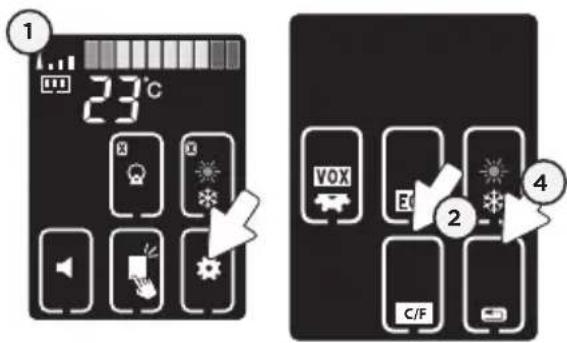
1) Press the Settings icon to access setting mode.
2) Press C/F icon.
3) Press C/F icon to change from Celsius to Fahrenheit.

4) Press the Return icon to confirm your choice and return to normal screen.
TO ACTIVATE THE TEMPERATURE ALARM:
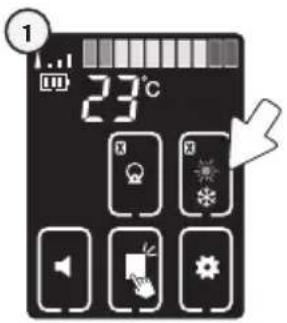
1) Press the Temperature Alarm icon to activate or deactivate the high and low temperature alarm.

TO SET TEMPERATURE RANGE:
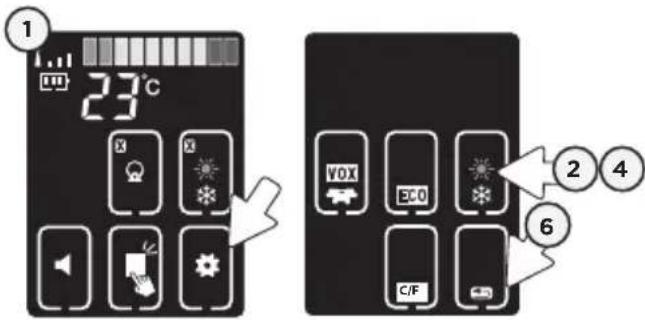
1) Press the Settings icon to access setting mode.
2) Press the Temperature Alarm icon.
3) High Temperature (SUN) icon will blink, press (+) or (-) to set the high temperature alarm (22 to 35^
4) Press the Temperature Alarm icon again.
5) Low Temperature (SNOWFLAKE) icon will blink, press (+) or (-) to set low temperature alarm (5 to 19 °C).
6) Press the Return icon to confirm your choice and return to normal screen.


High Temperature

Low Temperature

TEMPERATURE ALARM
- Alarm activates when the temperature reaches a maximum or minimum set temperature.
- Parent Unit will emit 3 consecutive beeps and/or vibrate every 5 seconds depending on the type of alarm chosen.
- Temperature Alarm icon will show on LCD screen with the Low/High icon blinking.
NOTE:
in ECO mode, the temperature displayed on the Parent Unit is disabled but the temperature alarm remains functional when selected
5.4 - KEY TONE
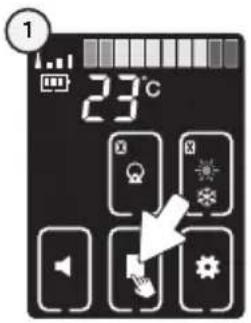
Press the Key Tone Icon
ON

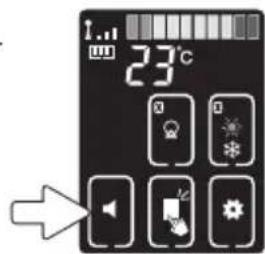
5.5 - MUTE
Allows you to activate the MUTE function.
TO ACTIVATE MUTE:
Press the Sound Icon.
TO DEACTIVATE MUTE:
Press the Sound Icon to deactivate.


5.6-NIGHT LIGHT
Allows you to use your monitor as a night light.
TO ACTIVATE THE LIGHT:
Push the right 'wing' of the Nursery Unit or press the Night Light icon on the Parent Unit to select light level.
NOTE:
The Night Light function will be disabled if the Nursery Unit is in battery mode.


OFF

Low High

5.7 - PAGER
Allows you to locate the Parent Unit.
TO LOCATE PARENT UNIT:
Press and release the Nursery Unit Pager button to the front of the Nursery Unit.
The Parent Unit will emit a paging sound for one minute.

TO STOP THE PAGING SOUND:
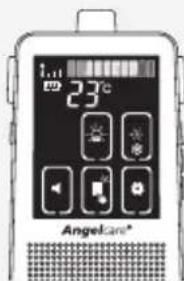
Press the Parent Unit screen or any buttons


Press the Nursery Unit's Page button
5.8 - PARENT UNIT STANDBY MODE
After 30 seconds of inactive use of Parent Unit, the LCD screen backlight will dim. This means the Parent Unit is in standby mode. To turn off standby mode, press any function key.
- Ensure that you fully charge your batteries for 15 hours before their first use.
- To maintain maximum battery life it is recommended that you fully discharge your batteries periodically. Battery performance can be diminished by leaving the batteries constantly charging on the charging cradle. If your parent unit is not in use, please turn it off.
- Inadequate battery power can impair the performance of your monitor. If you are not happy with the performance of your Parent Unit/Monitor please replace the rechargeable batteries (2 x NiMH Rechargeable Batteries).
- It is advisable to change the batteries every 6 months.
LOSS OF CONNECTIVITY
In the case of loss of connectivity, the first step is to bring the Parent Unit and Nursery Unit closer together and make sure that both units are ON to restore the connection. If there is still no connection and no out of range warning after the above has been done, then and only then should the re-connection procedure below be done.

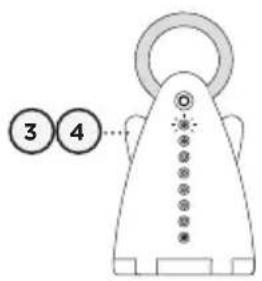

Re-connection procedure:
1) Turn on the Parent Unit and hold the Talk button down for 2 seconds until the Nursery Unit icon shows at the center of the screen.
2) By pressing the Nursery Unit Icon button the Parent Unit will be set in to connectivity mode (the icon will flash).
After 1 minute of non-operation, the Parent Unit will exit the connectivity mode and you will need to start this process again.
3) Press the Power button to turn on the Nursery Unit. The Power LED will light.
4) Then press the Power button 4 times within 30 seconds. The Power LED will blink. The connection procedure should be completed within 10 seconds.
5) When the Parent Unit and Nursery Unit are connected, H1 (or H2) will be displayed on the Parent Unit and then be followed by the normal mode screen.
NOTE:
By doing the re-connection procedure you will reset the monitoring system back to original presets.
NO SOUND IS BEING TRANSMITTED
- Ensure that both units are switched ON.
- If there is no power to any unit check/replace the batteries, recharge the Parent Unit & check the AC Adaptors are working. Change electrical outlets if required.
- Check on the Parent Unit screen to see if the monitor is in MUTE mode instead of ON mode. Refer to step 5.5. and increase volume level.
- Bring the Parent Unit and Nursery Unit closer together.
NURSERY UNIT POWER ON INDICATOR (GREEN LIGHT) DOES NOT LIGHT UP
- Check the connections or change to another electrical outlet.
- Push and hold the left 'wing' for 2 seconds to turn the Nursery Unit ON.
WEAK RECEPTION
- Bring the units closer together.
- Change the position of one or both units.
- Place the units on a flat surface away from baby's reach.
- Replace the batteries or recharge the Parent Unit.
STATIC, DISTORTION, INTERFERENCES
(FROM OTHER MONITORS, WIRELESS PHONES, WALKIE-TALKIES, ETC...)
- Rotate the Parent Unit or move it away from source of interference.
FEEDBACK (LOUD NOISES EMITTED FROM THE PARENT UNIT)
- Move the units farther apart (at least 3 meters apart).
- Decrease volume on the Parent Unit.
THE PARENT UNIT SCREEN IS BLACK (PARENT UNIT IS OFF)
- Turn the Parent Unit back ON by pushing and holding the Power button.
- Replace the batteries or recharge the Parent Unit.
TECHNICAL SPECIFICATIONS
Range:
Open field: up to 250m
Power Supply:
2 AA Alkaline batteries (not included) or 100-240VAC/5VDC Adapter for Nursery Unit.
2 AAA rechargeable batteries and 100-240VAC/5VDC AC adapter for Charging Base for the Parent Unit.
Caution: To reduce the risk of electric shock, do not expose this product to rain or moisture.
Risk of explosion if battery is replaced by an incorrect type. Dispose of used batteries according to the instructions.
Danger of explosion if batteries are incorrectly replaced. The included Batteries are 2 AAA NIMH rechargeable batteries, manufactured by GPI INTERNATIONAL LIMITED (GN60AAAHC, 1.2V 600mAh) or by HIGHPOWER TECHNOLOGY CO., LTD (HFR-44AAAJ600, 1.2V 600mAh).
They may only be replaced by 2 AAA NIMH rechargeable batteries.
Batteries:
DO NOT mix old and new batteries.
DO NOT mix alkaline standard (carbon-zinc), or rechargeable (NI-CD, NIMH, etc) batteries.
Transmission:
Data transmission between the Parent Unit and Nursery Unit is made on a frequency between 1880 and 1900MHz (the exact frequency band varies among countries).
Hereby, Angelcare Monitors Inc, declares this baby monitor is in compliance with the essential requirements and other relevant provisions of Directive 1999/5/EC.
The EU declaration of conformity can be found on page 69 in this instruction manual.
IMPORTANT: Please do not return this product to the store!
If you have questions or need help, please contact us directly. Just a quick phone call - we will call you back. Often, operating errors or justified complaints can be cleared up directly on the phone and we can send you the necessary spare parts immediately where appropriate:
+49 (0)211 / 44 03 16 -13 Technical Customer Service: +49 (0)211 / 44 03 16 -18 +49 (0)211 / 44 03 16 -0 E-Mail: info@angelcare.de
THIS DEVICE IS INTENDED FOR USE IN GERMANY, AUSTRIA AND SWITZERLAND. Exclusive sale in Germany, Austria and Switzerland:
This electronic equipment contains reusable material and must not be disposed with domestic waste. Please take it to a collecting point for electric and electronic equipment (ask your local authorities for details).
ErP COMPLIANCE
GERMANY
Use only Angelcare® Brand power supply - model number: T05005F002
EU Declaration of Conformity
Issue Date: 16th December 2013
Device(s): Angelcare Model AC701, AC 720, AC 701-D, AC 720-D
Description: Baby monitor
Manufacturer: Angelcare Monitors Inc. 9975 Avenue De Catania, Local B Brossard, Quebec J4Z 3V6 CANADA
In accordance with the following Directives:
Directive 1999/5/EC on radio equipment and telecommunications terminal equipment and the mutual recognition of their conformity.
Clause 1 & 2 in Annex II - Ecodesign requirement of the commision regulation (EC) implementing regulation 1275/2008 and its underlying framework directive 2009/125/EC.
Directive 2011/65/EU on the restriction of the use of certain hazardous substances in electrical and electronic equipment.
Directive 2006/95/EU on low voltage devices
Standards Applied:
EN60950-1:2006+A11:2009+A1:2010+A12:2011
EN 62479:2010
EN 301489-6 V1.3.1(2008-08)
EN 301 489-1 V1.1.9.2 (2011-09)
EN 301 406 V2.1.1 (2009-07)
Declaration:
We declare under are own responsibility that the product to which this declaration refers conforms with the relevant requirements set out in the above referenced directives and standards.
Year CE marking was affixed: 13
Authorized Signatory:
Elliott Levy, Quality Program Director, Angelcare Monitors Inc.)