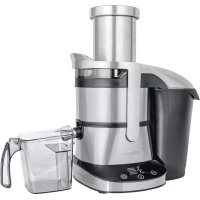
LO7070 - Juicer Concept - Free user manual and instructions
Find the device manual for free LO7070 Concept in PDF.




| Product Type | Juice Extractor |
| Brand | Concept |
| Model | LO7070 |
| Power supply | 220-240 V ~ 50/60 Hz |
| Power | 800 W |
| Noise level | ≤78 dB |
| Maximum continuous operating time | 15 minutes |
| Required cooling time | 10 minutes |
| Number of preset programs | 5 (Soft Fruit, Soft Veg, Med Fruit, Hard Fruit, Hard Veg) |
| Types of programs | Soft fruit, soft vegetables, medium-firm fruit, hard fruit, hard vegetables |
| Material of rotating sieve | Stainless steel (estimated) |
| Pulp container capacity | Not specified (estimated 1 L) |
| Juice container capacity | Not specified (estimated 1 L) |
| Control | On/Off buttons, program (+/-), ON/OFF |
| Safety features | Lockable lid, locking clip, automatic shut-off in case of overload (not confirmed) |
| Maintenance and cleaning | Removable parts washable with warm water, cleaning brush provided |
| Included accessories | Pusher, cleaning brush, pulp container, juice container |
| Warranty | 24 months |
| After-sales service | Authorized service center (address in manual) |
| Usage | Household only |
Frequently Asked Questions - LO7070 Concept
User questions about LO7070 Concept
0 question about this device. Answer the ones you know or ask your own.
Ask a new question about this device
Download the instructions for your Juicer in PDF format for free! Find your manual LO7070 - Concept and take your electronic device back in hand. On this page are published all the documents necessary for the use of your device. LO7070 by Concept.
USER MANUAL LO7070 Concept
natural_image
Exterior view of a modern stainless steel juice brush and cup (no text or symbols visible on the device itself)CZ
HU LV DE FRENSK PL
IT ES
RO


Poděkování
n
it
1.
7
y
7
í
1
Displej
Displej
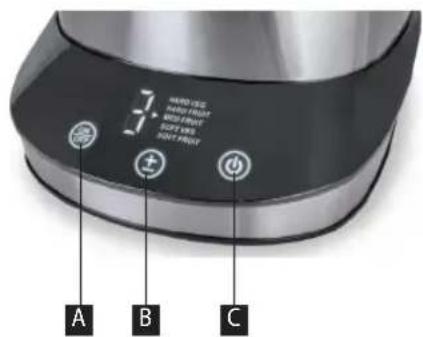
A Tlačidlo On/OFF
B "+/-" tlačidlo vol'by programu
C Tlačidlo zapnutia/vypnutia
NÁVOD NA OBSLUHU
UPOZORNENIE
Wyświetlacz
Kijelző
Displejs
Thank you for purchasing a Concept product. We hope you will be satisfied with our product throughout its service life.
Please study the entire Operating Manual carefully before you start using the product. Keep the manual in a safe place for future reference. Make sure other people using the product are familiar with these instructions.
| TECHNICAL PARAMETERS | |
| Voltage 220–240 V ~ 50/60 Hz | |
| Power input 800 W | |
| Noise level ≤78 dB | |
| Time of continuous operation (KB) max. | 15 min. |
IMPORTANT SAFETY INSTRUCTIONS:
- Use the unit only as described in this operating manual.
- Remove all the packaging and marketing materials from the unit before the first use.
- Make sure the mains voltage corresponds to the values on the rating plate. Use grounded wall outlets only.
- Do not leave the unit unattended while it is turned on or even only plugged into the wall outlet.
- Before plugging in or unplugging the unit from the wall outlet, make sure the switch is OFF.
- When disconnecting the unit from the wall outlet, never pull the power cord. Grasp the plug and disconnect it by pulling.
- Do not allow children or unskilled people to handle the unit. Use the unit out of the reach of these individuals. Persons with limited movement capacities, reduced sensory perception, insufficient mental capacity or those who are unaware of the proper handling should use the product only under the supervision of a responsible, aware person. Take extra care when using the unit near children.
- Don't let anyone use the unit as a toy.
- Turn the unit off, unplug the power cord from the wall outlet, and let the unit cool before cleaning and after use.
- Do not let the power cord hang loosely over the edge of the work area. Make sure the power cord does not touch hot surfaces.
EN
concept
- Do not let the unit hang loosely on the power cord.
- Do not use the unit if the rotating sieve is damaged.
- Do not use the unit without a correctly mounted pulp container.
- The unit contains sharp parts. Extra care should be taken when cleaning the unit.
- Never remove the upper cover until the rotating sieve has stopped completely.
• Always use the tamper to push food through the opening. Never push in food using your fingers, a fork, spoon, knife or any other object.
- Do not use abrasive or chemically aggressive substances to clean the unit.
- Do not use the unit if it does not operate properly, or if it has been dropped, damaged or exposed to any liquids. Refer the unit to an authorized service center for testing and repair.
- Never use an appliance with a damaged power cord or plug. Contact an authorized service center immediately to have defective components repaired or replaced.
• The unit is not designed for outdoor use.
- The unit is suitable for domestic use only. It is not designed for commercial operation.
- Do not immerse the power cord, plug, or appliance in water or any other liquid.
- Use only accessories recommended by the manufacturer.
- Put the appliance on a flat, steady surface.
- Do not repair the appliance yourself. Contact an authorized service center.
- This appliance may be used by children 8 years of age and older and by persons with physical or mental impairments or by inexperienced persons if they are properly supervised or have been informed about how to use of the product in a safe manner and understand the potential dangers. Children must not play with the appliance. This appliance may be cleaned by children 8 years of age and older if they are properly supervised. Keep this appliance and the power cord out of reach of children younger than 8 years of age.
Failure to follow the manufacturer's instructions may lead to refusal of warranty repair.
concept
EN
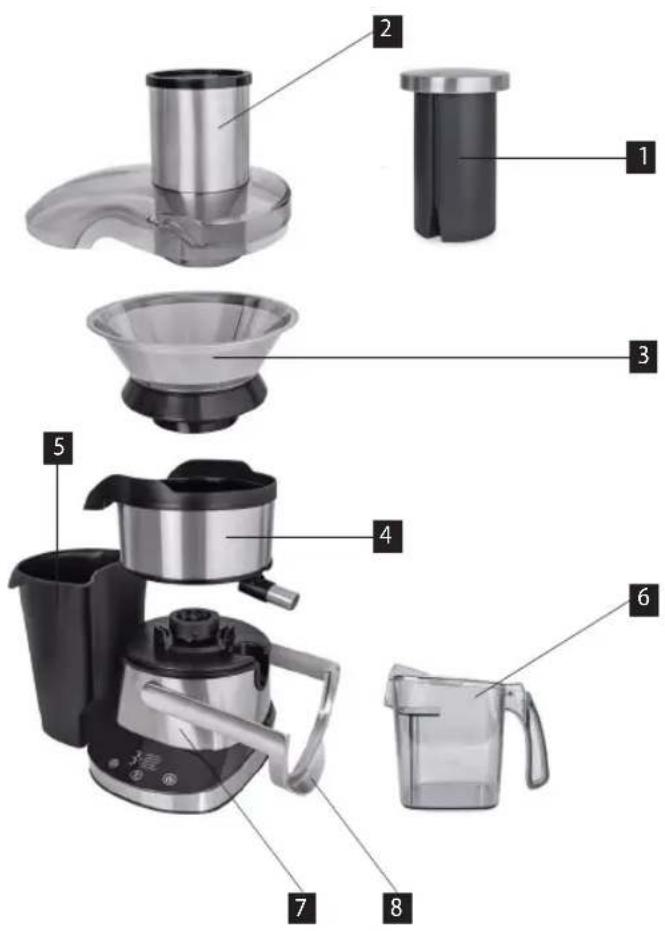
PRODUCT DESCRIPTION
- Tamper
- Lid
- Rotary strainer filter
- Bowl with juice outlet
- Pulp container
- Juice container
- Body of the unit
- Safety clamp
Display
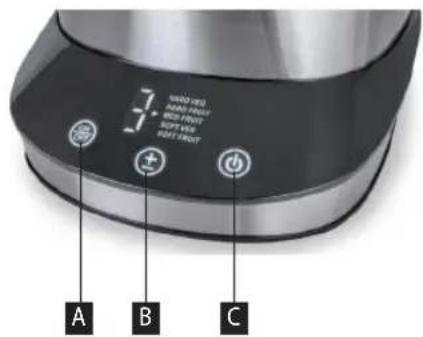
A ON/OFF button
B "+/-" button for program selection
C Power button
EN
concept
OPERATING INSTRUCTIONS
NOTE
Prior to using a new unit, wipe the surface with a wet cloth and wash the removable accessories in warm water for hygienic reasons.
The unit contains sharp parts. Extra care should be taken while cleaning the unit.
The unit and its accessories are not suitable for use in a microwave oven.
The maximum operating time of this appliance is 15 minutes. After this time, allow it to cool down for 10 minutes. If you juice large batches of fruit and vegetables, do not leave the appliance in continuous operation for more than 10 seconds.
Juicing tips
- Buy only the freshest fruits and vegetables
- Fruits and vegetables contain valuable vitamins and minerals that degrade when exposed to oxygen and light. Drink the juice immediately after extraction.
- If the juice must be stored for several hours, put it in a fridge in crockery or glass kitchenware. You may improve the preservation features by adding lemon juice.
- You can use the pulp for the preparation of other food (jam, fruit salad, etc.).
• If the fruit is very watery (melons, etc.), insert it slowly in order to extract as much juice as possible. - If you use very ripe fruits, there can be very little juice. In such case it is necessary to process the fruit very slowly, so that the juice drains easily, and the rotating sieve does not clog.
- It is common that when processing apples and bananas no juice is extracted.
Assembling the appliance
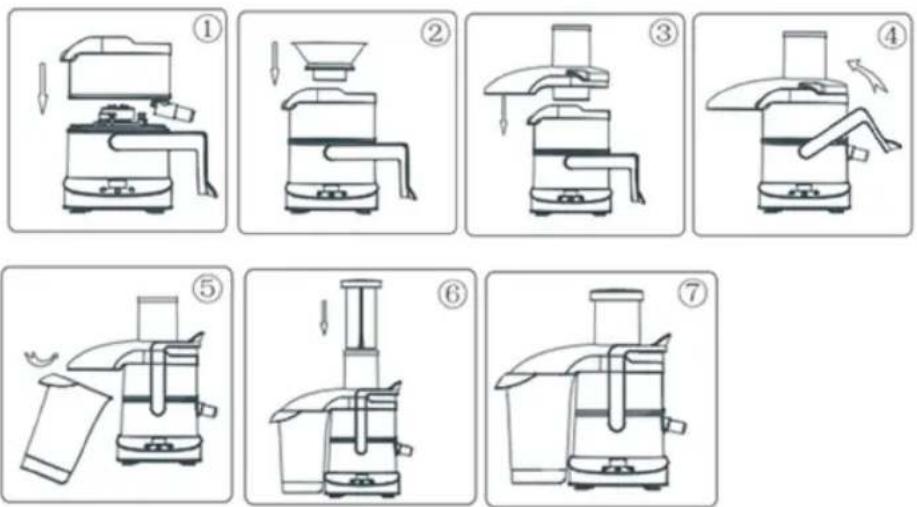
concept
EN
Juicing
- Plug the assembled appliance into an electrical outlet.
- Press the Power button.
- Select 1 of 5 programs with the +/- button.
1) SOFT FRUIT – soft fruit
2) SOFT VEG – soft vegetables
3) MED FRUIT – medium hard fruit
4) HARD FRUIT – hard fruit
5) HARD VEG – hard vegetables
- By pressing the ON/OFF button, the appliance starts working in the selected program. By pressing the ON/OFF button again, the appliance stops working.
- Press the Power button to switch off the appliance.
- Slowly insert washed pieces of fruit and vegetables into the inlet. You can insert whole apples and pears or cut into large pieces. You don't have to peel them or remove the core. Remove the peel from the citrus fruits, insert only individual balls of grapes. When juicing currants, you can insert whole bunches.
It is difficult to obtain juice from bananas, avocados, blackberries, figs, aubergines, strawberries, etc.
Warning: Always use a supplied pusher to push food through the inlet. Never push food with your fingers, fork, spoon, knife or other object.
- Continuously check the amount of pulp in the pulp container, the amount of pulp stuck to the top lid, and the throughput of juice outlet. There must be no clogging of the juice outlet. Wait until the rotary strainer filter stops before opening the top lid. Then, by opening the safety clamp, loosen the lid, clean it, empty the pulp container, clean the rotary strainer filter and remove the pulp residue from the bowl with juice outlet.
CAUTION!
If there is a significant increase in noise during the juicing process or stronger vibrations occur, switch off the appliance immediately and clean it!
- After use, switch off the appliance, disconnect it from the electrical outlet, remove the remaining pulp and clean the individual components (see the Cleaning and maintenance section)
Warning: The finished juice is intended for immediate consumption because it oxidises very quickly in the air, which may deteriorate its taste, change colour and, above all, reduce its nutritional value. Apple or pear juice turns brown quickly, you can slow down the process by adding a few drops of lemon juice.
The juice container is not designed to preserve juice or other foods!
When juicing fruit or vegetables that contain little water (older apples, kiwis, etc.), it is recommended to continuously insert harder fruit and vegetables, such as carrots, to clean the container, strainer filter and pulp outlet.
EN
concept
CLEANING AND MAINTENANCE
Before cleaning the unit, always disconnect the power cord from the wall outlet!
The surface of the unit may only be cleaned using a wet cloth. Do not use any detergents or hard objects, as they may damage the unit's surface!
Wash the removable parts in warm water. Use the supplied brush.
Never clean the unit under running water, do not rinse it, and do not submerge it in water!
- Open the upper cover.
- Release the juice drain cover upwards together with the rotating sieve.
- Remove and clean the pulp container.
- After you finish cleaning the removable parts, follow the reverse steps to reassemble
TROUBLESHOOTING
| Problem Cause Solution | ||
| Motor does not run. Plug inserted into the mains outlet incorrectly or insufficiently. | Check the plug connection. | |
| The mains outlet is not live. Check for voltage, e.g. by connecting another appliance. | ||
| Wrongly assembled upper cover or closing clip. | ||
| Supply cable is damaged. Refer the unit to an authorized service center for testing and repair. | ||
| Motor is noisy. Incorrectly mounted rotating sieve. | Check the assembly of the unit. | |
| Clogged rotation sieve.Disconnectthe cable from the socket.Release the upper lid, empty the pulp container and clean the rotating sieve. | ||
SERVICE CENTRE
Extensive maintenance or repair, which requires access to internal parts of the product, has to be performed by a qualified specialist or the service centre.
ENVIRONMENTAL CONCERNS
- Packaging materials and old appliances should be recycled.
- Packaging materials may be disposed of as sorted waste.
- Dispose the plastic bags made of polyethylene (PE) of as sorted waste.
Recycling of the appliance at the end of its lifespan:

This appliance is labelled in accordance with European Directive 2012/19/EU concerning used electrical and electronic appliances (waste electrical and electronic equipment - WEEE). The symbol on the product or on its packaging indicates that this product may not be treated as household waste. Instead it should be taken to the appropriate collection point for the recycling of electrical and electronic equipment. By ensuring this product is disposed of correctly, you will help prevent potential negative consequences for the environment and human health, which could otherwise be caused by inappropriate waste handling of this product. The disposal of such material has to be done according to the recycling regulations. For more detailed information about recycling of this product, please contact your local council, your household waste disposal service or the shop where you purchased the appliance.

The product meets all the necessary requirements of the EU directives applicable to the specific product.
Changes in text, design, and technical specifications are subject to change without prior notice and we reserve the right to change them.
concept
Danksagung
Display
Écran
Display
Pantalla
e
u st fi ii u
Display
A Buton ON/OFF
B "+/-" buton selectare program
C Buton pornire/oprire
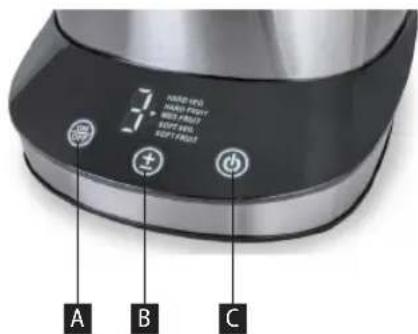
LO7070
85
RO
concept
MANUAL DE UTILIZARE
ATENTIONARE
CONCEPT POLSKA sp. z o.o.
The manufacturer (or importer) is responsible for ensuring the product complies with the requirements of applicable legal regulations as well as those of the relevant technical standards. Moreover, they are responsible for ensuring the product has the properties the manufacturer described in documents related to the goods or those reasonably expected by the customer with regard to the nature of the goods or based on advertising produced by the manufacturer, and further they are responsible for ensuring the product is fit for the purpose proposed by the manufacturer or that a product of the same type is normally used for.
The quality warranty term is 24 months from product takeover by the customer.
The warranty does not apply to wear and tear caused by regular use. The customer shall not be entitled to any warranty claims if, prior to taking the product over, they knew the product contained a defect or if the defect is attributable to the customer.
The warranty specifically does not apply:
- if the product installation, operation and service conditions stipulated in the product operating manual have not been adhered to,
• to malfunctions caused due to mechanical, heat or chemical damage, short circuit, over voltage or incorrect installation,
• to malfunctions caused by an inexpert third-party intervention,
• to malfunctions caused by natural disaster,
- to malfunctions caused by insufficient or inappropriate maintenance in violation of the operating manual, including malfunctions caused by water and other sediments,
• to changes in colour of the heating surface or to scratching of the surface caused as a result of using the products in an unusual manner,
• to appearance and functional changes caused by exposure to sunlight, thermal radiation of water and other sediments,
- if the service life of certain product parts expires, e.g. for accumulators, bulbs, etc.
The warranty does not apply to any products and services provided along with the product (gifts, promotional articles, etc.).
Filing a complaint
A complaint against a product defect must be filed as soon as identified, yet no later than before the end of the warranty term.
The customer must file a product complaint with the dealer from which they have purchased the product, or with any authorised service centre, a list of which is included in the product package, or available at www.my-concept.com.
While filing a product complaint, the product must be duly cleaned and securely packed so as to prevent any damage during its transport to an authorised service centre, where relevant, unless the product is delivered in person.
The customer must submit proof of having concluded a purchase contract for the product by producing the receipt.
While filing their complaint, the customer must indicate the noted defect and identify the preferred complaint application method.
Complaints processing
As long as the noted defect may be removed, the user has the right to have the defect duly removed free of charge on a timely basis.
Where such a procedure is not reasonable with regard to the nature of the defect, the user may require to be supplied a new defect-free product (replacement), or, where the defect applies to a part of the product only, replacement of the part concerned. However, if replacement of the product or any part thereof is not proportionate with regard to the nature of the defect, especially if the defect can be removed without undue delay, the customer has the right to have the defect removed free of charge.
concept
If the noted defect is not removable, or if the customer becomes entitled to replacement of the product or a part thereof, yet the replacement is not possible, for example due to the product having been sold out, the customer has the right to return the product (withdrawal from the contract).
The customer shall have the right to a new product (replacement) or to replacement of a part of the product even if the defect can be removed, provided they cannot properly use the product due to repeated occurrence of the defect or due to a high number of such defects. In such a case, the customer also has the right to return the product (by withdrawing from the contract).
If the product is not returned (the customer does not withdraw from the contract), or if the customer does not apply the right to a new defect-free product (replacement), to replacement of a part thereof or to repair of the product, they may request a reasonable discount. The customer also has a right to a reasonable discount if a new defect-free product cannot be supplied to them, or if a product part cannot be replaced or the product repaired unless the situation is remedied within a reasonable time limit, or if remedying the situation would create major discomfort on the part of the customer.
The seller, authorised service centre or a staff member authorised by them must decide about each complaint immediately or within three business days in complicated cases. This term does not include a reasonable period of time, depending on the type of product concerned,
required for the defect to be assessed by an expert. A complaint, including defect removal, must be dealt with without any undue delay, yet no later than within 30 calendar days of the complaint filing date, unless the seller and the customer agree on a later deadline.
On returning the product (withdrawing from the contract) the customer must return any accessories and documents supplied along with the product.
The customer does not have the right to keep the defective parts and components of the product replaced as part of a repair of the product.
This shall be without prejudice to any other rights the customer may have in relation to the purchase of the product.
Remark: Complaints against products damaged in transport are governed by the carrier's complaints procedure.
Manufacturer
Jindřich Valenta - Concept
Vysokomýtská 1800, 565 01 Choceň
Czech Republic
tel.: +420 465 471 400
fax +420 465 473 304
Company ID No. 13216660
email: servis@my-concept.cz
www: www.my-concept.com
Product data
| Model: | |
| Production number: | |
| Date of purchase: Seal and signature of vendor: | |
DE GARANTIEBEDINGUNGEN
Garantie
FR CONDITIONS DE GARANTIE
Garantie
CONCEPT POLSKA sp. z o.o.
Ostrowskiego 30, 53-238 Wroclaw Tel.: +48 713 390 444, Fax: 713 390 414 www.my-concept.pl
esbr Kft.
2481 Velence, Nyar u. 2/A Tel.: +36 70 881 0167, email: info@esbr.hu
IV Verners VT Ltd.
Piedrujas iela 5a, Riga, Latvia Tel. + 371 67021021, fakss + 371 67021000 e-pasts: info@verners.lv, www.verners.lv
HP Horvat elektronika d.o.o.
Dravska 8, HR-40305 Pušćine servis@horvat-elektronika.hr Hotline: +385 040 895 500



- Poděkování
- Displej
- NÁVOD NA OBSLUHU
- UPOZORNENIE
- Wyświetlacz
- Kijelző
- Displejs
- IMPORTANT SAFETY INSTRUCTIONS:
- EN
- concept
- PRODUCT DESCRIPTION
- Display
- OPERATING INSTRUCTIONS
- NOTE
- Juicing tips
- Assembling the appliance
- Juicing
- CAUTION!
- The juice container is not designed to preserve juice or other foods!
- CLEANING AND MAINTENANCE
- SERVICE CENTRE
- ENVIRONMENTAL CONCERNS
- Recycling of the appliance at the end of its lifespan:
- Danksagung
- Écran
- Pantalla
- RO
- MANUAL DE UTILIZARE
- ATENTIONARE
- Filing a complaint
- Complaints processing
- Manufacturer
- DE GARANTIEBEDINGUNGEN
- Garantie
- FR CONDITIONS DE GARANTIE
- CONCEPT POLSKA sp. z o.o.
- esbr Kft.
- IV Verners VT Ltd.
- HP Horvat elektronika d.o.o.
Brand : Concept
Model : LO7070
Category : Juicer