GT300 - Coffee machine BLACK & DECKER - Free user manual and instructions
Find the device manual for free GT300 BLACK & DECKER in PDF.



| Product Type | HomeCafé Pod Coffee Maker |
| Brand | Black & Decker |
| Model | GT300 |
| Power Supply | 120 V AC, 60 Hz |
| Dimensions (approx.) | 30 x 20 x 30 cm |
| Weight (approx.) | 2,5 kg |
| Reservoir Capacity | 437 ml (14 oz) |
| Available Cup Sizes | 7 oz (218 ml), 9 oz (281 ml), 14 oz (437 ml), Creamy (7 oz) |
| Pod Type | HomeCafé Folgers or Millstone Pods Only |
| Included Pod Holders | Standard, Double, Creamy |
| Main Functions | Brew regular coffee, double, creamy, tea; auto shut-off; descaling |
| Safety | Lid lock during brewing, shut-off on failure, polarized plug |
| Maintenance and Cleaning | Dishwasher-safe parts, monthly descaling recommended |
| Replacement Parts | Reservoir (GT300-03), reservoir lid (GT300-01), pod holders (GT300-04/05/06), splash guard (GT300-07), brew tray (GT300-08), drip tray (GT300-09) |
| Warranty | 1 year limited (United States and Canada) |
| Customer Service | 1-800-231-9786 (USA/Canada), 01-800-714-2503 (Mexico) |
Frequently Asked Questions - GT300 BLACK & DECKER
User questions about GT300 BLACK & DECKER
0 question about this device. Answer the ones you know or ask your own.
Ask a new question about this device
Download the instructions for your Coffee machine in PDF format for free! Find your manual GT300 - BLACK & DECKER and take your electronic device back in hand. On this page are published all the documents necessary for the use of your device. GT300 by BLACK & DECKER.
USER MANUAL GT300 BLACK & DECKER
PLEASE READ AND SAVE THIS USE AND CARE BOOK.
POR FAVOR LEA ESTE INSTRUCTIVO ANTES DE USAR EL PRODUCTO.
VEUILLEZ LIRE ET CONSERVER CE GUIDE D'ENTRETIEN ET D'UTILISATION.

BLACK&DECKER

To order more coffee pods,
- Visit your favorite retailer
Go online www.homecafe.com
Call 1-800-HomeCafe (466-3223)
Accessories/Parts (USA/Canada)
Accosorios/Partes (EEUU/Canada)
Accessoires/PIeces (E.-U./Canada)
1-800-738-0245
Models
Modelos
Modèles
□GT300
□GT300W
□GT305
□GT320
IMPORTANT SAFETY INSTRUCTIONS
Read all instructions.
Do not touch hot surfaces. Use handles or knobs.
To protect against fire, electric shock and injury to persons do not immerse cord, plugs, or unit in water or other liquid.
- Close supervision is necessary when any appliance is used by or near children.
Unplug from outlet when not in use and before cleaning. Allow to cool before putting on or taking off parts, and before cleaning the appliance.
- Do not operate any appliance with a damaged cord or plug or after the appliance malfunctions, or has been damaged in any manner. Return appliance to the nearest authorized service facility for examination, repair or adjustment.
The use of accessory attachments not recommended by the appliance manufacturer may result in fire, electric shock or injury to persons.
Do not use outdoors.
Do not let cord hang over edge of table or counter, or touch hot surfaces.
Do not place on or near a hot gas or electric burner, or in a heated oven.
To disconnect, press the STOP button, then remove plug from wall outlet.
Do not use appliance for other than intended use.
SAVE THESE INSTRUCTIONS.
POLARIZED PLUG (120V Models Only)
This appliance has a polarized plug (one blade is wider than the other). To reduce the risk of electric shock, this plug is intended to fit into a polarized outlet only one way. If the plug does not fit fully into the outlet, reverse the plug. If it still does not fit, contact a qualified electrician. Do not attempt to modify the plug in any way.
ELECTRIC CORD
a) A short power-supply cord (or detachable power-supply cord) is to be provided to reduce the risk resulting from becoming entangled in or tripping over a longer cord.
b) Longer detachable power-supply cords or extension cords are available and may be used if care is exercised in their use.
c) If a long detachable power-supply cord or extension cord is used,
1) The marked electrical rating of the detachable power-supply cord or extension cord should be at least as great as the electrical rating of the appliance,
2) If the appliance is of the grounded type, the extension cord should be a grounding-type 3-wire cord, and
3) The longer cord should be arranged so that it will not drape over the countertop or tabletop where it can be pulled on by children or tripped over.
TAMPER-RESISTANT SCREW
Warning: This appliance is equipped with a tamper-resistant screw to prevent removal of the outer cover. To reduce the risk of fire or electric shock, do not attempt to remove the outer cover. There are no user-serviceable parts inside. Repair should be done only by authorized service personnel.
Note: If the power supply cord is damaged, it should be replaced by qualified personnel or in Latin America by an authorized service center.
Thank you for purchasing our new Black and Decker® Home Café™ coffeemaker. Now you can enjoy perfectly brewed coffeehouse-style beverages in a variety of flavors and cup sizes to suit your taste—right in your home or on the go.
Your Home Café cofeemaker has been specifically designed to use with Folgers and Millstone coffee pods. In order to avoid damage to your unit, do not use other brands of coffee pods.
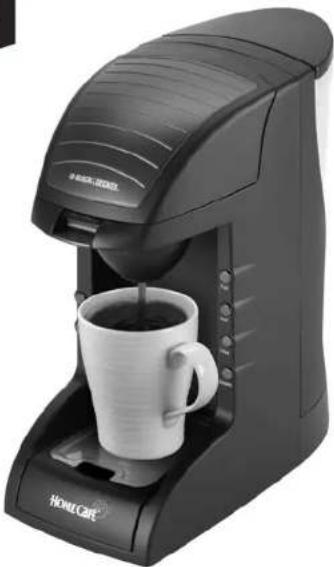
Product may vary slightly from what is illustrated.
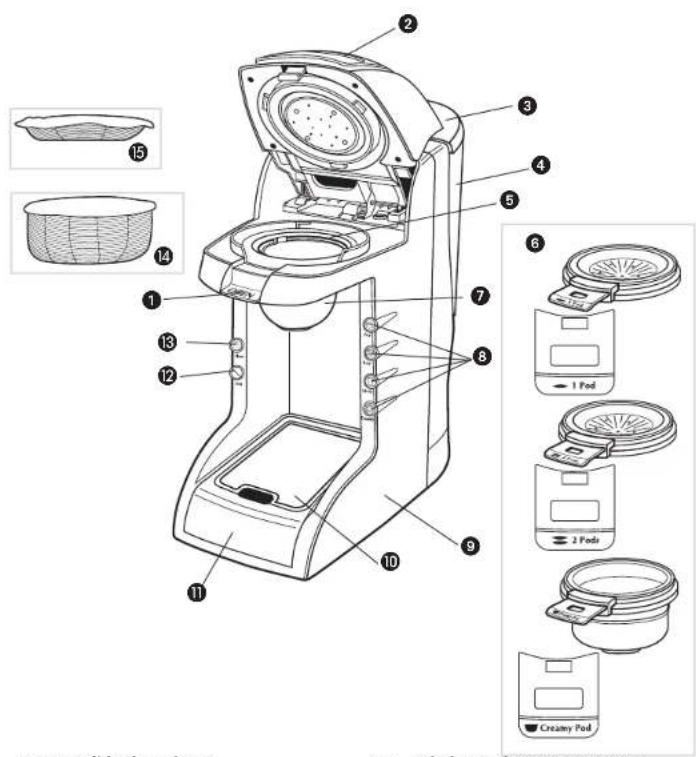
GETTING FAMILIAR WITH YOUR UNIT
- OPEN lid release lever
2.Lid
- Water reservoir lid (Part #GT300-01(B) Part #GT300-02(W)
- Water reservoir with markings (Part #GT300-03)
- Coffee pod holder compartment
- Single pod holder (Part #GT300-04) Double-pod holder (Part #GT300-06) Creamy pod holder (Part #GT300-05)
+7.Splash guard (Part #GT300-07)
8. Brew buttons
9. Main housing
+10.Cup tray (Part #GT300-08)
+11. Drip tray (Part #GT300-09)
12. Stop button
13. Clean button
14. Creamy coffee pod
15. Single coffee or tea pod
† Consumer replaceable/removable parts
CONTROL PANEL BUTTONS

7oz
Use for regular-size cups with one pod. Also use when priming the unit.

9oz
Use for larger cups or mugs with 1 pod.

14 oz
Use for tall cups or mugs with 2 pods.
Use only for a 7-oz cup with creamy pods for specialty coffees like cappuccinos and lattes.

Creamy
Use to stop brewing or use to unlock the lid to interrupt brewing cycle or when there is a power failure.
Stop
Use for running a cleaning cycle (descaling).

Clean
How to Use
This appliance is for household use only.
Wash removable parts as instructed in the Care and Cleaning section.
PREPARING UNIT FOR FIRST USE
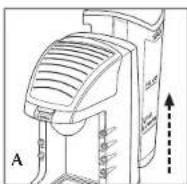
- Remove the water reservoir from the back of the unit (A).
- Remove reservoir lid and fill reservoir with water to the MAX line. Do not overfill.
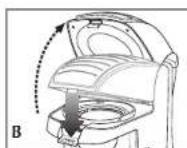
- Press the OPEN lid release lever to unlock the lid (B).
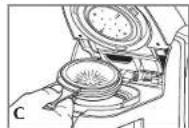
- Insert a pod holder without using any coffee pods (C).
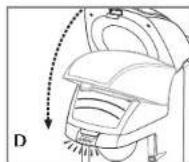
- Close the lid by pressing down until you hear it snap in place (D).
- With lid in place, slide reservoir down securely.
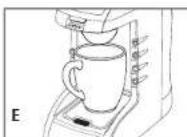
- Place a 14-oz. or larger cup on the cup tray (E).
- Plug in the unit.
- Press the CLEAN button. The blue indicator light blinks then changes to steady blue. Once the priming cycle is finished the unit beeps 3 times and the blue light goes out.
Note: During the priming cycle, the unit may be loud and create a larger than normal amount of steam. This is normal.
Now your unit is ready for use!
BREWING A CUP OF COFFEE
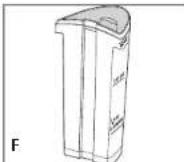
- Remove the water reservoir and fill with water to desired size (F).
- Insert water reservoir back into the unit.
- Unlock the lid by pressing the OPEN release lever to the open position.
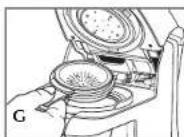
- Place appropriate pod holder in the unit (G) (see Brewing Tips chart on page 7).
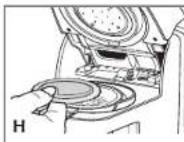
- Insert appropriate pod into the pod holder (H) (see Brewing Tips chart on page 7).
IMPORTANT: Only an individual Home Café™ creamy pod can be used in the creamy pod holder. Otherwise, unit malfunction can occur.
DO NOT USE a single regular coffee pod in a creamy pod holder or in combination with a creamy pod.
6.Close the lid.
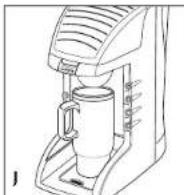
7. Place cup on the cup tray. If using a tall cup or mug, remove the drip tray (J).
Caution: Cup tray might get hot from previous brew; be sure it has cooled completely before touching it.
8. Press the desired brew button. The brew button light blinks then it remains on until the brewing cycle is finished.
Important: Make sure that your cup size matches your brew selection (for example; use a 9 ounce cup for a 7-oz. brew selection), otherwise you might have an overflow (for example; do not use 8 ounces for a 14-oz. brew selection).
- When the brew button indicator light goes out, remove the filled cup from the cup tray.
- To dispose of used pod, unlock lid and remove the pod.
Important Tip
The lid on your unit automatically stays locked during the brewing cycle, if there is a power failure or if it stops unexpectedly.
To unlock the lid:
- Wait until the flashing light goes out and you hear the unit beep, then press the OPEN release lever on the lid. The lid opens.
- Insert a new pod, close the lid and start a new brew cycle with an empty cup to avoid overflow.
Brewing Tips

7oz7oz9oz14oz


Regular


Strong


Extra Strong

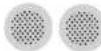
Strong


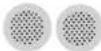
Regular
- Do not use the same pod twice. The best coffee flavors are extracted the first time water passes through the pod.
- Do not use damaged pods.
- Your Home Café " coffeemaker has been specifically designed to use with Folgers and Millstone coffee pods. In order to avoid damage to your unit, do not use other brands of coffee pods.
- To enjoy true coffee flavor, always run a cycle with water every time you brew a different coffee flavor.
Care and Cleaning
This product contains no user-serviceable parts. Refer service to qualified service personnel.
CLEANING
- Before cleaning, unplug the unit and allow it to cool completely.
- Press the OPEN lid release lever and open the lid.
- Remove the pod holder and discard the pod.
-
Remove the splash guard by turning it clockwise then pull out.
-
Wipe the unit surface with a clean, damp cloth. Do not use abrasive cleaners, as they may scratch the surface.
-
Never clean the unit by flushing it with the lid open.
-
Never immerse unit/base in water.
-
Wash the water reservoir and lid, splash guard, pod holders, cup tray and drip tray in the dishwasher.
- Dry all parts thoroughly.
Replacing Splash Guard
Tip: Tilt back the unit so you can see where to insert the splash guard.
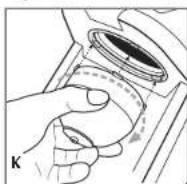
Insert splash guard underneath the pod holder (K).
a. Align the splash guard labs with the side openings on the unit.
b. Turn splash guard counterclockwise until securely in place.
REMOVING MINERAL DEPOSITS (DESCALING)
After continual use, mineral deposits may form in the unit.
If mineral deposits are not removed, they can impair the operation and product life of the unit.
To prolong the life of your Home Cafe coffeemaker, it is recommended to perform descaling once a month or after 30 brews.
- Fill the water reservoir at least to the 14-oz. line with 50% white vinegar, 50% water and place back in the unit.
- Make sure the pod holder and splash guard are both inserted in place (refer to steps 4 and 6 under Preparing Unit for First Use) and that there is no pod in the holder.
- Place a 14-oz. cup on the cup tray.
- Press the Clean button and let cleaning solution run through.
Important: When you use the Clean button, the unit expels 14 ounces of liquid into your cup.
- When unit stops, empty the cup and return it to the cup tray.
- Fill water reservoir with 14-oz. fresh, cold water.
- Press Clean button again to flush out the remaining solution. Empty the cup and return it to the cup tray.
- Wash the pod holder and splash guard as instructed in the Care and Cleaning section.
STORAGE
Make sure water reservoir is empty.
Unplug unit and let it cool completely.
- Store unit in a clean, dry place.
Questions & Answers
Q. How is the Home Café brewer different from the coffeemaker I use now?
A. Home Café brewer uses premium, pre-measured coffee pods and unique pressure-brewing normally found in coffeehouses. Home Café" brewer makes both regular coffees and specialty coffees.
Q. Does the Home Café brewer make espresso?
A. While the Home Café brewer does not make espresso, you can use 2 single pods with the 7 oz. (218 ml) setting to achieve a stronger beverage.
Q. What if I push the wrong brew button?
A. If you press STOP in the middle of a brew cycle and then select another brew button, you may have overflow. It is best to allow the initial brew cycle you selected to complete and then begin again with a fresh cup and pod.
Q. Can I use other coffees, besides Folgers and Millstone, in the Home Café brewer?
A. Your Home Café brewer is specially designed to work with Folgers and Millstone pods. Using other brands of coffee pods or using loose grounds with a filter may clog or damage your Home Café unit.
Q. Can I use loose ground coffee or instant coffee in the pod holder? Even if I use a filter?
A. No. Your Home Café brewer and pods are specially designed to work with Folgers and Millstone pods. Instant coffee, ground coffee, and regular filters will not give you the same great results with Home Café brewer.
Q. Can the Home Café brewer make other types of beverages besides coffee?
A. Yes. Your Home Café brewer is designed to also brew tea using a single pod.
Q. What can I do about the coffee splash I sometimes experience when brewing?
A. There may be a small amount of splashing, depending on the size of the mug used. To reduce splashing, use a taller coffee mug. If you see splashing, do not stand right next to the unit so that you will avoid skin contact.
Q. Why does the appliance come with three different pod holders?
A. The single-pod holder is for single pods. The double-pod pod holder fits two pods and the deeper, specialty pod holder is specifically designed for specialty coffee pods. Go to www.homecale.com for more information.
Q. Can I brew single-pods in the specialty pod holder?
A. No. Specialty pods will only fit in the specialty pod holder.
Q. Can I brew specialty pods in the single-pod holder?
A. No. Only specialty pods will fit in the creamy pod holder.
Q. Can I make a 9-oz. or 14-oz. specialty beverage?
A. Creamy pods must be brewed with the creamy brew size to maximize flavor and consistency.
Q. How often should I clean the pod holder and splash guard?
A. You should clean the pod holder and the splash guard after every use, especially when using creamy pods.
Q. Can I reuse a pod?
A. Reuse of coffee pods is not recommended. The best coffee flavors are extracted the first time water passes through the pod.
Q. Why does my Home Café brewer make a strange noise after brewing a specialty pod?
A. The creamy brew size has a unique brew process to brew specially beverages.
Q. Can I use a tea bag in my Home Café brewer to make tea?
A. Yes. Your Home Café brewer is designed to also brew tea using a single pod.
Q. Can I use other brands of coffee pods in your machine?
A. No. Your Home Café " has been specifically designed to use with Folgers® and Millstone® coffee pods. Using other brands of coffee pods can damage your unit.
Troubleshooting Guide
Problem Reason Possible Solution
I see the "Red" You may have interrupted - Please wait approx.
STOP button is ON the brew/cleaning process. 30seconds until "Red" light
OR turns off.
You may have opened the lid - When unit beeps, you can
after the brew cycle but before restart your brewing/
or in the middle of the 3 beeps. cleaning cycle.
- Open lid and close it
again.
Press any of the brew size
buttons
Note: Always start a new
brew cycle with an empty
cup to avoid overflow.
I see both the You may have run out of water - Add sufficient water to the
"7" & "9" oz blue in the reservoir or forgot to reservoir.
bultons Flash. add water.
Unit may need reselling or servicing.
I see both the "Stop"
& "Clean" buttons
Flash, OR both the
"14" & "Creamy"
buttons Flash.
Unit may need resetting or
an overheating event
pprox. 30 seconds
until lights turn off.
- When unit beccps, you can
restart your brewing/
cleaning cycle.
Open lid and close it.
again.
- Press any of the brew size buttons.
Perform the above
procedure.
If doing this does not solve
the problem, first try
rescting the unit by
unplugging it, wait
5 seconds, plug in
and retry.
If this does not solve the
problem after about
3 resets, unit needs to be
serviced by the
manufacturer, Please call
1-800-231-9786.
Same as above.
In case of an overhealing
event, please unplug unit.
let it cool for 30 min, and
Problem Reason Possible Solution
The unit's lid is
locked and I
cannot unlock it.
You may have experienced
a power interruption or
glitch during brew. When this happens, the lid
automatically stays locked
during power interruption.
- When power resumes,
wait until the flashing light(s) go(es) out and you hear the unit beep. -
Open lid and close it
-
Press any of the brew size
buttons.
Note: Always start a new
brew cycle with an empty
cup to avoid overflow.
I press a brew button.
but nothing happens.
Unit may be unplugged, Plug unit, add water
without water, or the lid or lock lid and try again.
may be unlocked.
If there is still no power
to the unit please call
1-800-231-9786
I observe an unusual
level of pressure, steam
or noise.
The pod holder or splashguard Press the STOP button
may be clogged. wait until you hear
Unit may or may not overflow. 3 beeps and unit turns
-
Open the lid.
-
Remove and wash the pod
holder and splashguard.
- Throw away the coffee
pod.
- Open the lid and wipe off
the water holes on the
underside of the lid.
Reinsert splashguard.
Perform a "Cleaning" cycle
as instructed in this
manual.
Reinsert pod holder and
a fresh coffee pod.
Note: Make sure there is
water in the reservoir and
resume brewing.
The pod holder is Same as above.
clogged and the unit
overflows.
Same as above.
Problem Reason Possible Solution
My coffee is not This may also happen when Adjust your brewing strong enough, the pod is not positioned preferences. Refer to correctly. Brewing Tips in this
Manual.
- Use either two mild blend coffee pods or try darker roast pod.
- Use a smaller brew size. Do not use the same coffee pod twice. The best coffee flavors are extracted the first time water passes through the pod.
- Also, make sure to position coffec pod flat-side-up and correctly seated in pod carrier.
My coffee is This may happen when you Adjust your brewing too strong. use two pods. preferences. Refer to
Brewing Tips in this Manual.
I have lost/damaged You may purchase Please call 1-800-HomeCafe a removable replacement parts. (466-3223) or go appliance part. to www.ho
to www.homecafe.com for replacement parts.
Gracias por comprar lareshareshareshareshareshareshareshareshareshareshareshareshareshareshareshareshareshareshareshareshareshareshareshareshareshareshareshareshareshareshareshareshareshareshareshareshareshareshareshareshareshareshareshareshareshareshareshareshareshareshareshaheshashashashashashashashashashashashashashashashashashashashashashashashashashashashashashashashashashashashashashashashashashashashashashashashashashashashashashashashashashashashashashashashashashashashashashashashashashashashashashashashashashashashashashashashashashashashashashashashashashashashashaheshaheshaheshaheshaheshaheshaheshaheshaheshaheshaheshaheshaheshaheshaheshaheshaheshaheshaheshaheshaheshaheshaheshaheshaheshaheshaheshaheshaheshaheshaheshaheshaheshaheshaheshaheshaheshaheshaheshaheshaheshaheshaheshahshaheshaheshahshaheshahshahshahshahshahshahshahshahshahshahshahshahshahshahshahshahshahshahshahshahshahshahshahshahshahshahshahshahshahshahshahshahshahshahshahshahshahshahshahshahshahshahshahshahshahshahshahshahshahshahshah
IMPORTANT MISES EN GARDE

m = 311 ;

Stop
For service, repair or any questions regarding your appliance, call the appropriate "800" number on the cover of this book. Do not return the product to the place of purchase. Do not mail the product back to the manufacturer nor bring it to a service center. You may also want to consult the website listed on the cover of this manual.
One-Year Limited Warranty
(Appplies only in the United States and Canada)
What does it cover?
- Any defect in material or workmanship; provided; however, Applica's liability will not exceed the purchase price of the product
For how long?
One year after the date of original purchase
What will we do to help you?
- Provide you with a reasonably similar replacement product that is either new or factory refurbished
How do you get service?
-
Save your receipt as proof of the date of sale.
-
Check our on-line service site at www.prodprotect.com/applica, or call our toll-free number, 1-800-231-9786, for general warranty service
If you need parts or accessories, please call 1-800-738-0245.
What does your warranty not cover?
-
Damage from commercial use
-
Damage from misuse, abuse or neglect
-
Products that have been modified in any way
-
Products used or serviced outside the country of purchase
Glass parts and other accessory items that are packed with the unit
-
Shipping and handling costs associated with the replacement of the unit
-
Consequential or incidental damages (Please note, however, that some states do not allow the exclusion or limitation of consequential or incidental damages, so this limitation may not apply to you.)
How does state law relate to this warranty?
- This warranty gives you specific legal rights, and you may also have other rights that vary from state to state or province to province.
JNECESITA AYUDA?
Guatemala City, Guatemala
Tel.:(502)331-5020
360-0521
Honduras
Lady Lee
Centro Comercial Mega Plaza
Carretera a la Lima
San Pedro Sula, Honduras
Tel.: (504) 553-1612
Mexico
Authorized Service Center
Electrodomésticos, S.A.
33 Independence Square,
Port of Spain
Trinidad,W.I.
Tel.: (868) 623-4696
Venezuela
R.F.C.AME-001026-PE3.
Col. Centro, Mexico D.F., CP 06050
is a trademark of The Black & Decker Corporation, Towson, Maryland, USA
Marca registrada de The Black & Decker Corporation, Towson, Maryland, E.U.
HomeCafe" is a trademark of The Procter & Gamble Company
Folgers and Millstone are registered trademarks of The Procter & Gamble Company
Folgers y Millstone son marcas registradas de The Procter & Gamble Company
The Proctor & Gamble Company.
1400W120V60Hz

R32005/4-20-40E/S/F
Copyright © 2005 - 2006 Applica Consumer Products, Inc.
Pub.No.1000001930-00-RV03
Made in People's Republic of China
Printed in People's Republic of China
Importado por:
Applica de Mexico S. de R.L. de C.V.
Blvd. Manuel Avila Camacho 2900-902, Fracc Los Pirules
p. de Mexico.C.P.54040