BCHB101 - Coffee machine BLACK & DECKER - Free user manual and instructions
Find the device manual for free BCHB101 BLACK & DECKER in PDF.


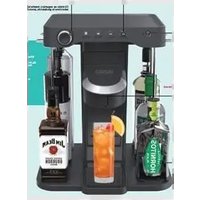
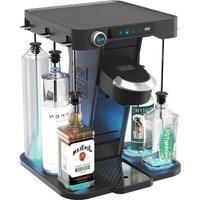
| Product Type | Cocktail Machine |
| Brand | Black & Decker |
| Model | BCHB101 |
| Power Supply | 18 V (20 V max) lithium-ion battery pack and 120 V~, 60 Hz AC adapter |
| Bottle Capacity | 6 bottles, max 750 ml each |
| Beverage Types | Alcoholic cocktails or mocktails (non-alcoholic) |
| Capsules | Bartesian capsules (not included) |
| Alcohol Strength Selector | 4 levels: mocktail, low, normal, strong |
| LED Lighting | Multicolor with Party mode, adjustable via dial |
| Operating Modes | On/Off, pause (2 min), standby (30 min), automatic cleaning |
| Battery Pack Charge Indicator | 3 white LEDs showing charge level |
| Safety | Protection against overload, overheating, deep discharge; hot/cold delay |
| Material | Plastic and metal |
| Cleaning | Removable parts dishwasher safe (top rack); monthly line cleaning via cleaning mode |
| Included Accessories | 6 straws, 6 tips, 6 locks, 6 caps, 1 water bottle, 1 straw cleaner, 1 capsule cup, 1 drip tray, 1 glass tablet, 1 battery pack, 1 power supply |
| Intended Use | Residential only, by adults of legal drinking age |
| Warranty | 2 years |
| Dimensions | Not provided |
| Weight | Not provided |
Frequently Asked Questions - BCHB101 BLACK & DECKER
User questions about BCHB101 BLACK & DECKER
0 question about this device. Answer the ones you know or ask your own.
Ask a new question about this device
Download the instructions for your Coffee machine in PDF format for free! Find your manual BCHB101 - BLACK & DECKER and take your electronic device back in hand. On this page are published all the documents necessary for the use of your device. BCHB101 by BLACK & DECKER.
USER MANUAL BCHB101 BLACK & DECKER
1 Battery pack
2 Battery release button
3 Battery compartment
4 Battery compartment door
5 Power supply
6 Plug port
7 Drip tray
8 Drip tray insert
9 Drip tray cover
10 Drip tray cover finger hole
11 Glass shelf
12 Bottle platform
13 Straws (6)
14 Straw tips (6)
15 Straw locks (6)
16 Straw slots (6)
17 Straw plug (6)
18 Straw plug notch (6)
19 Bottle stoppers (6)
20 Power switch
21 Battery charge indicator
22 Strength LEDs (4)
23 Shaker LED
24 Bottle LEDs (6)
25 Tower
26 Capsule (not included)
27 Capsule holder
28 Capsule holder lid
29 Capsule cup
30 Capsule tab
31 Capsule LED
32 Drink LED
33 Strength selector dial
34 Mix button
35 Lighting button/dial
36 Cleaning mode button
37 Water bottle
38 Straw cleaner
Composants
WARNING: Read all safety warnings and all instructions. Failure to follow the warnings and instructions may result in electric shock, fire and/or serious injury.

WARNING: To reduce the risk of injury, read the instruction manual.
Intended Use
This appliance is intended for residential use only for mixing cocktails by adults of legal drinking age.
DO nOT let children come into contact with the appliance.
Definitions: Safety Alert Symbols and Words
This instruction manual uses the following safety alert symbols and words to alert you to hazardous situations and your risk of personal injury or property damage.
DAJINGER: Indicates an imminently hazardous spection which, if not avoided, will result in death or serious injury.
WARNING: Indicates a potentially hazardous situation, if not avoided, could result in death or serious injury.
CANTION: Indicates a potentially hazardous situation which, if not avoided, may result in minor or moderate injury.
NOTICE: Indicates a practice not related to personal injury which, if not avoided, may result in property damage.
(Used without word) Indicates a safety related message.
IMPORTANT SAFEGUARDS
WARNING: Read all safety warnings and instructions. Failure to follow the warnings and instructions may result in electric shock, fire and/or serious injury.
WARNING: When using electrical appliances, basic safety precautions should always be followed to reduce the risk of fire, electric shock, and/or injury, including the following:
- Read and save all safety warnings, instructions, and cautionary markings for appliance, alcohol, and capsules.
- For use only with BLACK+DECKER battery pack.
- This appliance is intended for adults of legal drinking age. This appliance is not intended for use by persons (including children) with reduced physical, sensory, or mental capabilities, or lack of experience and knowledge, unless they are closely supervised and instructed concerning use of the appliance by a person responsible for their safety. Close supervision is necessary when any appliance is used by or near children. Children should be supervised to ensure that they do not play with the appliance.
• Always drink responsibly.
• To protect against risk of electrical shock do not put the body of appliance in water or other liquid. Do not use the appliance in the bathroom, near water, or in adverse weather conditions. - Turn the appliance OFF, then unplug from the outlet when not in use, before assembling or disassembling
parts and before cleaning. To unplug, grasp the plug and pull from the outlet. Never pull from the power cord.
- Avoid contacting moving parts.
- Do not abuse the cord. Use the plug, never the cord, for unplugging the appliance. Contact service center to replace power supply.
- Do not operate any appliance with a damaged cord or plug or after the appliance malfunctions or is dropped or damaged in any manner. Contact the manufacturer at their customer service telephone number (1-800-544-6986) for information on examination, repair, or adjustment.
- Do not use broken, chipped, or cracked bottles of alcohol.
- The use of attachments not recommended or sold by the appliance manufacturer may cause fire, electric shock, or injury; do not use attachments or appliances for anything other than intended use.
- This appliance is not intended for commercial, professional, or industrial use. It is designed and built exclusively for household use.
- Do not place appliance on, near, or in a hot item such as a stove, oven, pot, or container.
- Do not touch puncturing needles inside the pod holder. The needles are sharp. Handle carefully with your hands away from cutting edge. Always store out of reach of children with the pod holder closed.
- Do not use the appliance with wet hands.
- Never modify the appliance, attachments, or any parts thereof.
- Do not expose appliance to rain, snow, or moisture. Store indoors.
- Do not use in rain or wet conditions.
- Use an acceptable adaptor. See page 2-5 for further directions.
- Do not let cord hang over edge of table or counter.
- Do not use an extension cord. Plug charger directly into an electric outlet.
- Only use the power supply S056DU280020 provided with this appliance.
- The power supply S056DU280020 is not intended for any uses other than with this battery-operated appliance.
- Do not attempt to use this power supply with any other product. Likewise, do not attempt to charge this appliance with any other charger.
- Do not incinerate this appliance even if it is severely damaged. The batteries can explode in a fire.
- Prevent unintentional starting. Ensure the switch is in the off position before connecting to battery pack, picking up or carrying the appliance. Carrying the appliance with your finger on the switch or energizing appliance that have the switch on invites accidents.
- Disconnect the battery pack from the appliance before making any adjustments, changing accessories, or storing appliance. Such preventive safety measures reduce the risk of starting the appliance accidentally.
- Recharge only with the charger specified by the manufacturer. A charger that is suitable for one type of
battery pack may create a risk of fire when used with another battery pack.
- Use appliances only with specifically designated battery packs. Use of any other battery packs may create a risk of injury and fire.
- When battery pack is not in use, keep it away from other metal objects, like paper clips, coins, keys, nails, screws or other small metal objects, that can make a connection from one terminal to another. Shorting the battery terminals together may cause burns or a fire.
- Under abusive conditions, liquid may be ejected from the battery; avoid contact. If contact accidentally occurs, flush with water. If liquid contacts eyes, additionally seek medical help. Liquid ejected from the battery may cause irritation or burns.
- Do not use a battery pack or appliance that is damaged or modified. Damaged or modified batteries may exhibit unpredictable behavior resulting in fire, explosion or risk of injury.
- Do not expose a battery pack or appliance to fire or excessive temperature. Exposure to fire or temperature above 265^ may cause explosion.
- Follow all charging instructions and do not charge the battery pack or appliance outside of the temperature range specified in the instructions. Charging improperly or at temperatures outside of the specified range may damage the battery and increase the risk of fire.
- Have servicing performed by a qualified repair person using only identical replacement parts. This will ensure that the safety of the product is maintained.
- Do not modify or attempt to repair the appliance or the battery pack (as applicable) except as indicated in the instructions for use and care.
The label on your tool may include the following symbols. The symbols and their definitions are as follows:
V.....volts
Hz hertz
min ...... minutes
= - - - or DC.....direct current
Class I Construction (grounded)
.../min.....per minute
BPM.....beats per minute
≈ or AC/DC.... alternating or direct current
Class II Construction (double insulated)
n_0 .....no load speed
n .....rated speed
PSI.....pounds per square inch
± ......earthing terminal
⚠️ ......safety alert symbol
▲......visible radiation—do not stare into the light
E....wearrespiratory protection
⑦ wear eye protection
○....wearhearing protection
read all documentation
do not expose to rain
BATTERIES AND POWER SUPPLY
The battery pack is not fully charged out of the carton. Before using the battery pack and power supply, read the safety instructions below and then follow charging procedures outlined. When ordering replacement battery packs, be sure to include the catalog number and voltage.
READ ALL INSTRUCTIONS
Important Safety Instructions for All Battery Packs
WARNING: Read all safety warnings, instructions, and cautionary markings for the battery pack, power supply and product. Failure to follow the warnings and instructions may result in electric shock, fire and/or serious injury.
- Do not charge or use the battery pack in explosive atmospheres, such as in the presence of flammable liquids, gases or dust. Inserting or removing the battery pack from the product may ignite the dust or fumes.
- NEVER force the battery pack into the product. DO NOT modify the battery pack in any way to fit into a non-compatible charger as battery pack may rupture causing serious personal injury.
- Charge the battery packs only in BLACK+DECKER chargers or this product.
- Consult the chart at the end of this manual for compatible battery packs and chargers.
- DO NOT splash or immerse in water or other liquids.
- DO NOT allow water or any liquid to enter battery pack.
- Do not store or use the tool and battery pack in locations where the temperature may reach or exceed 104 °F (40 °C) (such as outside sheds or metal buildings in summer). For best life store battery packs in a cool, dry location.
NOTE: Do not store the battery packs in a tool with the trigger switch locked on. Never tape the trigger switch in the ON position.
- Do not incinerate the battery pack even if it is severely damaged or is completely worn out. The battery pack can explode in a fire. Toxic fumes and materials are created when lithium-ion battery packs are burned.
- If battery contents come into contact with the skin, immediately wash area with mild soap and water. If battery liquid gets into the eye, rinse water over the open eye for 15 minutes or until irritation ceases. If medical attention is needed, the battery electrolyte is composed of a mixture of liquid organic carbonates and lithium salts.
- Contents of opened battery cells may cause respiratory irritation. Provide fresh air. If symptoms persist, seek medical attention.
- Battery liquid may be flammable if exposed to spark or flame.
- Never attempt to open the battery pack for any reason. If the battery pack case is cracked or damaged, do not insert into the product. Do not crush,
ENGLISH
drop or damage the battery pack. Do not use a battery pack, charger, or power supply that has received a sharp blow, been dropped, run over or damaged in any way (e.g., pierced with a nail, hit with a hammer, stepped on). Damaged battery packs should be returned to the service center for recycling.
Storage Recommendations
The best storage place is one that is cool and dry, away from direct sunlight and excess heat or cold. Store the fully charged battery pack out of the product.
Battery Pack Cleaning Instructions
Dirt and grease may be removed from the exterior of the battery using a cloth or soft non-metallic brush. Do not use water or any cleaning solutions.
Transportation
WARNING: Fire hazard. Do not store, carry, or transport the battery pack so that metal objects can contact exposed battery terminals. For example, do not place the battery pack in aprons, pockets, tool boxes, product kit boxes, drawers, etc., with loose nails, screws, keys, coins, hand tools, etc. When transporting individual battery packs, make sure that the battery terminals are protected and well insulated from materials that could contact them and cause a short circuit. NOTE: Li-ion battery packs should not be put in checked baggage on airplanes and must be properly protected from short circuits if they are in carry-on baggage.
WARNING: Remove battery pack and bottles from the email maker before transporting.
The RBRC® Seal
Please take your spent battery packs to an authorized BLACK+DECKER service center or to your local retailer for recycling. In some areas, it is illegal to place spent battery packs in the trash. You may also contact your local recycling center for information on where to drop off the spent battery pack. Do not place in curbside recycling. For more information visit www.call2recycle.org or call the toll-free number in the RBRC® Seal.
RBRC ^® is a registered trademark of Call 2 Recycle, Inc.

Important Safety Instructions for All Battery Charging Devices
WARNING: Read all safety warnings, instructions, and cautionary markings for the battery pack, power supply and product. Failure to follow the warnings and instructions may result in electric shock, fire and/or serious injury.
- DO NOT attempt to charge the battery pack with any chargers other than a BLACK+DECKER charger. BLACK+DECKER chargers and battery packs are specifically designed to work together.
-
The power supply is only meant to be used with this appliance.
-
Do not charger battery packs other than those specified in this manual. Doing so may cause them to overheat and burst, resulting in personal injury, property damage, fire, electric shock or electrocution.
- Do not expose the power supply to rain, snow, or moisture.
- Do not allow water or any liquid to enter the power supply.
- Pull by the plug rather than the cord when disconnecting the power supply. This will reduce the risk of damage to the electric plug and cord.
- Make sure that the cord is located so that it will not be stepped on, tripped over or otherwise subjected to damage or stress.
- Do not use an extension cord unless it is absolutely necessary. Use of improper extension cord could result in risk of fire, electric shock or electrocution.
- Appliance is suitable for outdoor use when powered only by battery and cannot be exposed to rain.
- Do not place any object on top of the power supply. Place the power supply in a position away from any heat source.
- Do not operate the power supply with a damaged cord or plug—replace power supply immediately.
- Do not operate the power supply if it has received a sharp blow, been dropped or otherwise damaged in any way. Take it to an authorized service center.
- Do not disassemble the power supply; take it to an authorized service center when service or repair is required. Incorrect reassembly may result in a risk of electric shock, electrocution or fire.
- The power supply is designed to operate on standard 120V household electrical power. Do not attempt to use it on any other voltage. This does not apply to the vehicular charger.
- Foreign materials of a conductive nature, such as, but not limited to, grinding dust, metal chips, steel wool, aluminum foil or any buildup of metallic particles should be kept away from the power supply cavities.
SAVE THESE INSTRUCTIONS.
This product is for household use only.
Charging a Battery (Fig. B)
- Place the cocktail maker upright on a flat, level, stable surface.
- Insert the jack plug end of the power supply 5 into the plug port 6.
- Plug the other end of the cord into an outlet.
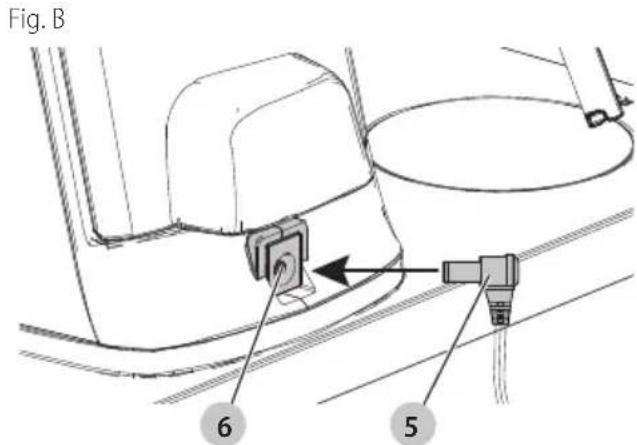
- Insert and fully seat battery pack 1 into the battery compartment 3 as described in the INSTALLING AND REMOVING THE BATTERY PACK section.
WARNING: Only charge batteries in air temperature C = 9^ (4^) and below 104^ (40^) .
- This appliance will not charge a faulty battery pack, which may be indicated by the battery charge indicator flashing red. Take the appliance, power supply, and battery pack to an authorized service center if light stays OFF or red light rapidly blinks.
NOTE: Refer to indicator chart below for blink patterns.
State of Charge Indicator
This appliance includes a battery charge indicator 21 which consists of three white LED lights that indicate the level of charge remaining in the battery. This feature is only activated when the unit is powered on (by the battery, power supply, or both).
The battery charge indicator is an indication of approximate levels of charge remaining in the battery pack according to the following indicators (dependent on whether the appliance is charging a battery or in use).
While Charging
The battery charge indicator will slowly breathe on and off as it charges the battery.
| 1 breathing bar < 339 |  | |
| 1 solid bar,second breathing |  | 33 - 66% charged |
| 2 solid bars,third breathing |  | 66 - 99% charged |
| 3 solid bars 100% cha |  | |
| Red flashingoutline |  | Defective battery.Battery will not charge. |
When the battery is fully charged, all lights will turn solid for 5 seconds before turning off. The battery pack1 can be left in product or removed.
While Using
The battery charge indicator will flash as the battery depletes.
| White flashing outline |  | No battery installed / battery fully depleted |
1 flashing bar < 10%  | ||
1 solid bar < 33 % ch  | ||
2 solid bars < 66% ch  | ||
3 solid bars 66 - 100%  ped ped |
Check State of Charge
To check the battery's state of charge when the battery charge indicator 21 is off, turn the strength selector dial 33 to the left until the battery charge indicator comes on.
NOTE: The battery charge indicator will remain on if a battery is the only power source being used.
Hot/Cold Pack Delay
When the appliance detects a battery pack that is too hot or too cold, it automatically starts a Hot/Cold Pack Delay, suspending charging until the battery pack has reached an appropriate temperature. The appliance then automatically switches to the pack charging mode. This feature ensures maximum battery pack life.
A cold battery pack may charge at a slower rate than a warm battery pack.
Electronic Protection System
Li-Ion tools are designed with an Electronic Protection System that will protect the battery pack against overloading, overheating or deep discharge. The tool will automatically turn off and the battery pack will need to be recharged.
Important Charging Notes
-
The power supply and battery pack may become warm to the touch while charging. This is a normal condition, and does not indicate a problem. To facilitate the cooling of the battery pack after use, avoid placing the power supply or battery pack in a warm environment such as in a metal shed or an uninsulated trailer.
-
If the battery pack does not charge properly:
a. Check operation of receptacle by plugging in a lamp or other appliance;
b. Check to see if receptacle is connected to a light switch, which turns power off when you turn out the lights;
c. If charging problems persist, take the appliance, battery pack, and power supply to your local service center.
- You may charge a partially used pack whenever you desire with no adverse effect on the battery pack.
English
Power Supply Cleaning Instructions
WARNING: Shock hazard. Disconnect the power supply from the AC outlet before cleaning. Dirt and grease may be removed from the exterior of the power supply using a cloth or soft non-metallic brush. Do not use water or any cleaning solutions.
SAVE THESE INSTRUCTIONS FOR FUTURE USE
ASSEMBLY AND ADJUSTMENTS
WARNING: To reduce the risk of serious personal injury, turn unit off and disconnect it from power source and remove the battery pack before making any adjustments or removing/installing attachments or accessories. An accidental start-up can cause injury.
Installing Bottles (Fig. C)
WARNING: Only use water in the supplied water bottle. Use of other liquids or substances in the water bottle may result in damage to the appliance.
CAUTION: Avoid spills while installing bottles.
NOTE: It is recommended to use 750 ml bottles or smaller to ensure all bottles sit on the bottle platform 12 without hanging off the platform.
nOTE: Bottles must fit between the bottle platform and the top of the cocktail maker while standing.
- Slide a straw 13 into a bottle so the straw tip 14 sits on the bottom of the bottle.
- Slide the bottle stopper 19 down the straw until it sits fully in the top of the bottle.
- Ensure the straw lock 15 is up.
- Align the straw plug notch 18 with the straw slot 16.
- Slide the straw plug 17 all the way into the straw slot, allowing the bottle to sit freely in its designated space. Ensure the straw plug is fully seated in the slot
- To lock it into place, push the straw lock down until it clicks. Ensure the lever is fully down.
- Repeat for all bottles.
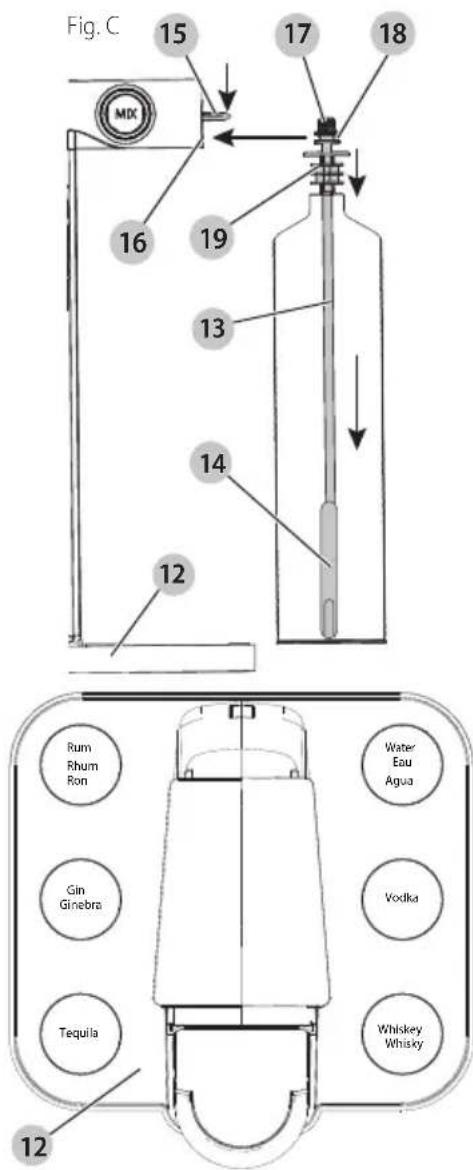
iIMPORTAnT: Bottles must be placed in their designated space to ensure the correct drink is dispensed. Names of the liquids are located in each spot, indicating the appropriate liquid.
iIMPORTAnT: The following are the only liquids that should be used with the appliance.
• Water
• Gin
- Rum
• Vodka
- Tequila
- Whiskey
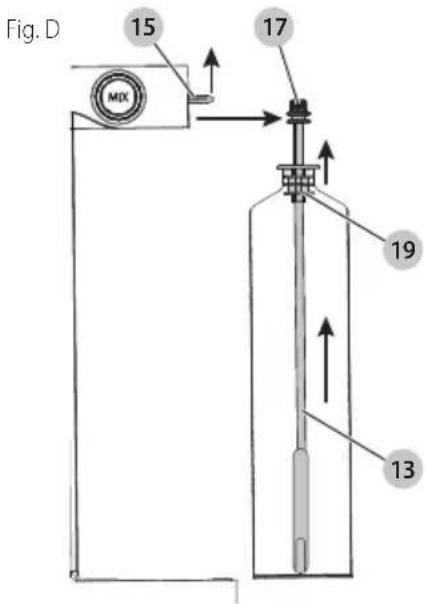
Removing Bottles (Fig. D)

- Lift the straw lock 15.
- Slide the straw plug 17 and bottle off the cocktail maker.
- Pull the bottle stopper 19 out of the bottle and remove the straw 13.
NOTE: If the cocktail maker pauses for an empty bottle and you press mix without replacing the bottle, it will skip to the next bottle in the recipe. If that bottle is empty, it will pause again. Refer to the PAUSE MODE section for more information.
OPERATION
WARNING: To reduce the risk of serious personal injury, turn unit off and disconnect it from power source and remove the battery pack before making any adjustments or removing/installing attachments or accessories. An accidental start-up can cause injury.
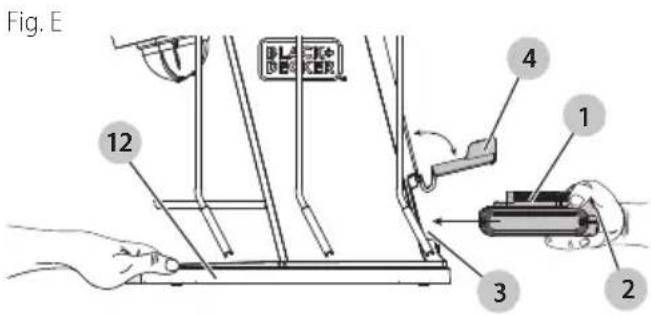
Installing and Removing the Battery Pack (Fig. E)
WARNING: Ensure the appliance is in the off position before inserting the battery pack.
WARNING: Appliance will slide forward when inserting battery, which may cause serious injury, as well as damage the appliance.
NOTE: For best results, make sure your battery pack is fully charged.
NOTE: Ensure the battery compartment door 4 is closed unless inserting or removing battery pack 1.
- Remove bottles before inserting battery pack as described in the REMOVING BOTTLES section.
-
To install the battery pack into the appliance:
a. Lift the battery compartment door and align the battery pack with the rails inside the battery compartment 3.
b. Place your other hand on the front of the bottle platform 12 to keep the appliance from sliding.
c. Slide the battery pack in until it is firmly seated in the appliance, and ensure that it does not disengage. -
To remove the battery pack from the appliance, press the battery release button 2 and firmly pull the battery pack out of the appliance.
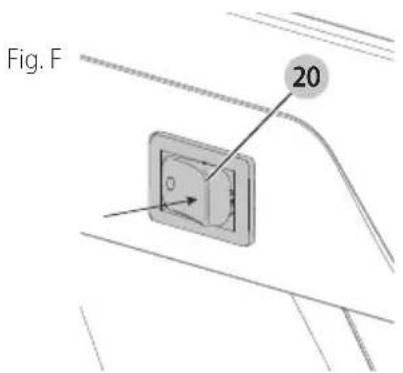
On/Off (Fig. F)
WARNING: Do not interact with the cocktail maker which is operating.
• The cocktail maker can be operated with:
- Just the battery pack installed - Just the power supply plugged in - Battery pack installed and power supply plugged in. This will also charge the battery pack.
- To turn the cocktail maker on, push the "I" side of the power switch 20. The 4 strength LEDs 22 and 6 bottle LEDs 24 will blink. When they become solid, the cocktail maker is ready to use.
- To turn the cocktail maker off, push the "O" side of the power switch. All LEDs will turn off.
Choose a Glass Tray (Fig. G)
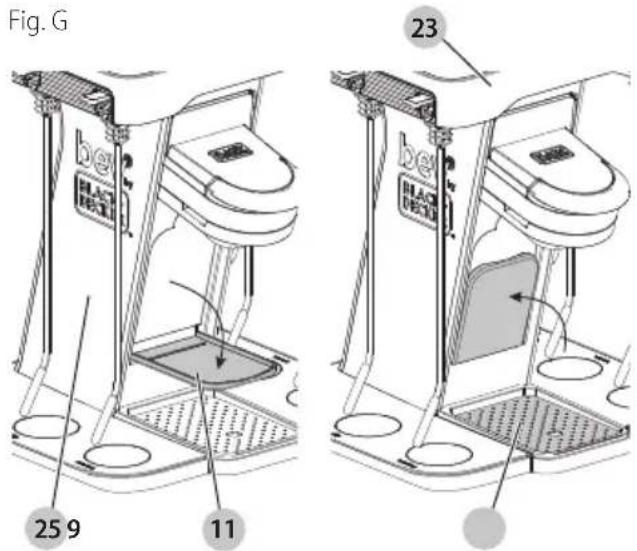
Place a glass or shaker on either the glass shelf 11 or drip tray cover 9, depending on the height of the glass being used. Refer to the cocktail image on the capsule 26 for glass style.
NOTE: A glass or shaker must be in place before making a drink to avoid spillage.
Short glass:
- Pull the glass shelf down so it stands straight out from the tower 25.
- Place a small glass on the glass shelf.
Tall glass:
- Push the glass shelf up so it hides away in the tower.
- Ensure the drip tray cover is in place.
- Place a tall glass on the drip tray cover.
Shaker:
The shaker LED 23 will light when a drink needs to be shaken. In this case, use a shaker instead of a tall glass.
- Push the glass shelf up so it hides away in the tower.
- Ensure the drip tray cover is in place.
ENGLISH
- Place a shaker on the drip tray cover.
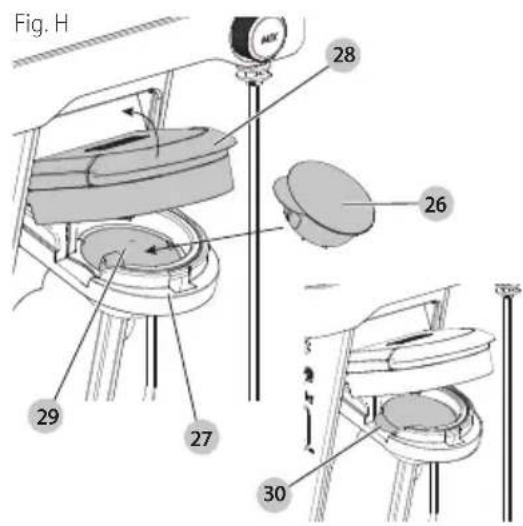
Inserting a Capsule (Fig. A, H, I)
WARNING: Cut Hazard. Do not probe capsule holder cured with fingers.
WARNING: Pinch point. Keep away from capsule holder when closing capsule holder lid.
WARNING: Use only Bartesian capsule. Use with any other capsule may result in damage to the appliance.
IMPORTANT: Do not open capsule 26.
IMPORTANT: Once the capsule is punctured, it may drip liquid. To avoid this, place a capsule in the capsule holder 27 just before mixing a drink.
- Before inserting a capsule, place a glass or shaker on the glass shelf 11 or drip tray 7 as described in the CHOOSE A GLASS TRAY section
- Select the capsule you wish to use.
- To open the capsule holder, lift the capsule holder lid 28 until it clicks into place. The capsule LED 31 will turn on.
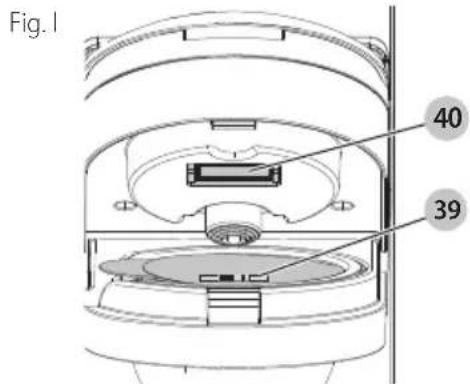
- Ensure the bar code 39 is clean from liquid and debris. Wipe your thumb across the bar code before inserting capsule into capsule holder.
- Place the capsule in the capsule cup 29 located in the holder. Ensure the capsule tab 30 faces to the left. The cocktail maker will not operate if the capsule is inserted any other way.
- Ensure the capsule sits fully in the capsule cup.
NOTE: The scanner inside the capsule holder scans the code on top of the capsule. This allows the cocktail maker to pull from the correct bottles so it dispenses the correct drink.
- Push the capsule holder lid down to close the capsule holder until it clicks. Ensure the lid is fully closed before operating.
NOTE: If the capsule code is successfully read, the mix button 34 will illuminate. The bottle LEDs 24 will light under the bottles required for the recipe and under each bottle as it is being dispensed. Ensure each bottle is in its correct place.
NOTE: If mix button does not illuminate, lift the capsule holder lid 28 and use a clean, dry towel to wipe the barcode scanner 40 and the capsule barcode 39 as shown in Fig. I. Then, repeat step 6.
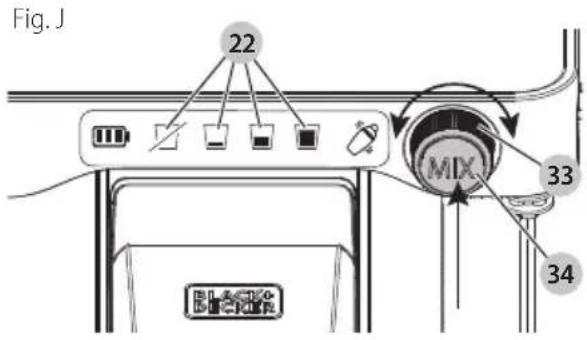
Select Alcohol Strength (Fig. J)
To select the amount of alcohol to be dispensed into the drink, turn the strength selector dial 33.
- Left: less alcohol
• Right: more alcohol
The strength LEDs 22 will turn on and off as you turn the selector, indicating the strength of the drink.
- mocktail (no alcohol)
- light alcohol content
- regular alcohol content
- strong alcohol content
Making a Drink (Fig. F–J)
WARNING: To ensure liquor is not dispensed while making a mocktail, lift straw locks 15 for the alcohol bottles and keep the water bottle straw lock down.
- Turn the cocktail maker on as described in the ON/OFF section.
- Place a glass or shaker on the glass shelf 11 or drip tray cover 9 depending on its height as described in the CHOOSE A GLASS TRAY section.
- Insert the desired capsule 26 into the capsule holder 27 as described in the INSERTING CAPSULE section.
- Turn the strength selector dial 33 to set the alcohol content as described in the SELECT ALCOHOL STRENGTH section.
- Press the mix button 34 once. The mix button will pulse. The bottle LEDs 24 under each bottle will light as its liquid is being dispensed.
- When completed, the mix button and bottle LEDs will go off and the drink LED 32 will turn on.
- Remove the capsule before removing the glass. The capsule may drip when it is being removed or if left in the holder.
NOTE: While making a drink, if the power button is turned off, the appliance is unplugged, or after two minutes in pause mode, the mixing process will be reset, ending the mixing of the current drink. If this happens, a small amount of alcohol may remain in the internal lines. To ensure the next drink is not mixed with this remaining alcohol, clean the lines as described in the CLEANING MODE section before mixing another drink. To resume making the drink while in pause mode, refer to the PAUSE MODE section.
NOTE: If the cocktail maker continues to dispense to the point of overflow, turn the appliance off, lift the straw lock, or lift the capsule holder lid 28.
Bottle Runs Out During Mixing (Fig. C, D)
If a bottle runs out of liquid while the cocktail maker is mixing a drink:
- The cocktail mixer will enter pause mode for 2 minutes to allow you to replace the empty bottle. Refer to the PAUSE MODE section for more information.
- Do not turn the power switch 20 off. Turning it off will reset the mixing process and the cartridge will no longer be able to be used.
NOTE: The unit will not flush the lines while the capsule holder lid 28 is lifted.
To replace the empty bottle:
- Remove the bottle as described in the REMOVING BOTTLES section.
- Install the a new bottle as described in the INSTALLING BOTTLES section.
- Press the mix button 34 to resume mixing the drink from where it left off.
Pause Mode
Pause mode lasts for 2 minutes. The strength LEDs 22 will light to indicate the time remaining.
| 3 solid, 1 flashing 1:30 - 2 min. remaining |
| 2 solid, 1 flashing 1 - 1:30 min. remaining |
| 1 solid, 1 flashing 30 sec. - 1 minute remaining |
| 1 flashing less than 30 sec. |
- Press and hold the mix button for 3 seconds to cancel pause mode.
- If the LED countdown finishes before the drink mixing resumes or pause mode is cancelled, the unit will pump a small amount of water to flush the lines. The cocktail maker will reset to its original mode and the drink will no longer be mixed. If there is no water loaded into the cocktail maker, the unit will flush the lines with air.
NOTE: The unit will not flush the lines while the capsule holder lid 28 is lifted.
Pause mode is triggered three ways.
• The mix button is pressed.
- Press the mix button once more to resume.
• The capsule holder lid is open.
- Close the lid and press the mix button.
• A bottle runs out of liquid
- Replace the empty bottle as described in the BOTTLE RUNS OUT DURING MIXING section.
Sleep Mode
The cocktail maker will go to sleep after 30 minutes. Any interaction will reset the sleep timer (e.g. lifting capsule holder lid 28 or turning the power switch 20 off and on).
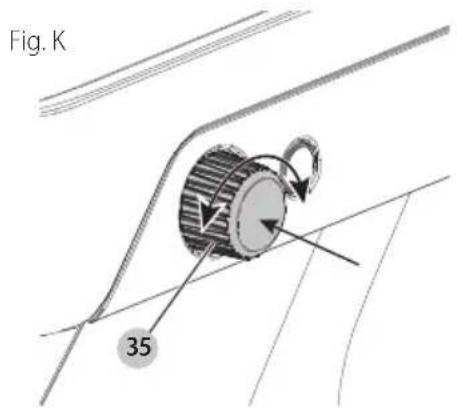
Setting Lighting Mode LEDs (Fig. K)
The lighting mode button/dial 35 allows you to turn LEDs on and off, and set LED color.
- Turn the lighting dial to adjust the LED colors, including the multi-color option.
- Press the lighting button once for Party Mode.
- Press the lighting button a second time to turn bottle LEDs off.
- Press the lighting button a third time to return all bottle LEDs to on.
To return the LEDs to default settings, press and hold the lighting button for 3 seconds.
English
MAINTENANCE
WARNING: To reduce the risk of serious personal injury, turn unit off and disconnect it from power source and remove the battery pack before making any adjustments or removing/installing attachments or accessories. An accidental start-up can cause injury.
Your BLACK+DECKER appliance has been designed to operate over a long period of time with a minimum of maintenance. Continuous satisfactory operation depends upon proper appliance care and regular cleaning.
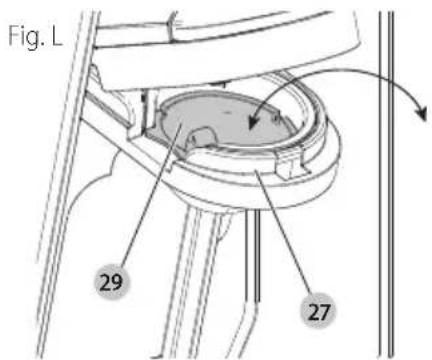
Cleaning (Fig. L)
WARNING: Turn unit off and disconnect it from power source and remove the battery pack before cleaning appliance.
WARNING: Never use solvents or other harsh chemicals for cleaning the non-metallic parts of the appliance. These chemicals may weaken the plastic materials used in these parts. Use a cloth dampened only with water and mild soap. Never let any liquid get inside the appliance; never immerse any part of the appliance into a liquid.
CAUTION: Straws, bottle stoppers, capsule cup, drip tray insert, drip tray cover, and water bottle are top-rack dishwasher safe. It is recommended that you manually rinse the attachments before placing them in the dishwasher.
- Clean the inside of the straws with warm water, mild soap, and the provided straw cleaner 38.
- Clean all external parts with a cloth dampened with warm water and mild soap.
• To clean the capsule cup 29, remove it by pulling it up and out of the capsule holder 27. To reinstall the cup, slide it into the capsule holder and press down. Ensure the cup sits fully and securely inside the capsule holder.
Cleaning Mode (Fig. D, H, L, M)
It is recommended to clean the liquid lines of the cocktail maker at least once a month.
- Turn the cocktail maker on as described in the ON/OFF section.
- Remove the capsule 26 from the capsule holder 27. Ensure the capsule cup 29 remains in place.
- Place a large glass that holds at least 10 oz (300 ml) on the drip tray 7.
- Remove the bottles as described in the REMOVING BOTTLES section.
- Fill a glass with at least 2 oz (60 ml) of water.
- Place a straw 13 in the glass and install the straw as described in the INSTALLING BOTTLES section.
- Repeat steps 1 - 5 for all bottles.
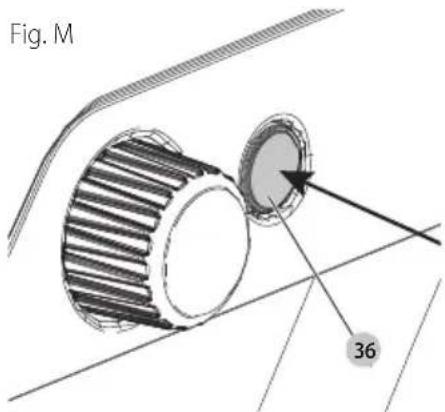
- Press the cleaning mode button 36 for 3 seconds.
- Once the unit starts pumping water, let go of the cleaning mode button.
- The bottle LEDs 24 will light one at a time to indicate which line is being cleaned. Once all LEDs turn on, the process is complete.
- Water may splash on the barcode scanner 40. Use a clean, dry towel to wipe the barcode scanner and surrounding area.
- Install the bottles as described in the INSTALLING BOTTLES section.
Accessories
WARNING: Since accessories, other than those offered by BLACK+DECKER, have not been tested with this product, use of such accessories with this product could be hazardous. To reduce the risk of injury, only BLACK+DECKER recommended accessories should be used with this product.
Recommended accessories for use with your product are available at extra cost from your local dealer or authorized service center. If you need assistance in locating any accessory, please contact BLACK+DECKER. Call
1-800-544-6986.
Storage
- Clean out the liquid lines as described in the CLEANING MODE section.
- Switch off the appliance.
• Always disconnect from power supply and remove battery pack. - Store in a place that is as cool and dry as possible.
- Store in a place where it cannot be accessed by children or unauthorized persons.
- Remove all bottles, capsules, straws, and stoppers from the appliance when storing for long periods of time.
- Check the appliance for damage before use after long periods of storage.
Transport
WARNING: Only transport for short distances on a sturdy, unseeded cart over smooth, level surface after first turning off and disconnecting from power supply. Otherwise,
• Always disconnect from power supply and remove battery pack.
- Turn power switch to the off position.
- Check the appliance for damage before use after transport
- Remove all bottles, capsule, straws, and stoppers from the appliance for transport.
- Do not transport with bottles installed.
Register Online
Thank you for your purchase. Register your product now for:
- WARRANTY SERVICE: Registering your product will help you obtain more efficient warranty service in case there is a problem with your product.
- CONFIRMATION OF OWNERSHIP: In case of an insurance loss, such as fire, flood or theft, your registration of ownership will serve as your proof of purchase.
- FOR YOUR SAFETY: Registering your product will allow us to contact you in the unlikely event a safety notification is required under the Federal Consumer Safety Act.
- Register online at www.BlackandDecker.com/NewOwner.
Two-Year Limited Warranty
For warranty terms, go to https://www.blackanddecker.com/support/warranty-policy.
To request a written copy of the warranty terms, contact: Customer Service at Black & Decker, 701 East Joppa Road, Towson, MD 21286 or call 1-800-544-6986.
LATIN AMERICA: This warranty does not apply to products sold in Latin America. For products sold in Latin America, check country-specific warranty information contained in the packaging, call the local company or see the website for such information.
Imported by: Black & Decker (U.S.) Inc.
701 E. Joppa Rd.
Towson, MD 21286

BlackandDecker.com
(1-800-544-6986)
portezdes protections auditives
..... lisez toute la documentation
* Maximum initial battery voltage (measured without a workload) is 20 volts. Nominal voltage is 18.
IING: Use of any other battery packs may create a risk of injury and fire.