Contemporary FA06003Y - Watch ORIENT - Free user manual and instructions
Find the device manual for free Contemporary FA06003Y ORIENT in PDF.



User questions about Contemporary FA06003Y ORIENT
0 question about this device. Answer the ones you know or ask your own.
Ask a new question about this device
Download the instructions for your Watch in PDF format for free! Find your manual Contemporary FA06003Y - ORIENT and take your electronic device back in hand. On this page are published all the documents necessary for the use of your device. Contemporary FA06003Y by ORIENT.
USER MANUAL Contemporary FA06003Y ORIENT
Thank you for choosing our product. To ensure prolonged use and optimum performance, please read this instruction manual carefully and familiarize yourself with the terms of the guarantee.
Please keep this Instruction Manual handy for future reference.
SAFETY PRECAUTIONS
Make absolutely sure to observe the demarcated contents indicated below to prevent any possible physical danger and property damage to you as well as other people concerned.
... A demarcation with this symbol represents the contents assuming possibility for death or serious injury when the product is used in any manner different from given instructions.

... A demarcation with this symbol represents the contents assuming possibility of causing human injury or material damage only when a product is used in any manner different from given instructions.
IN HANDLING THE WATCH
(1) Water-resistance
| Type\Conditions of use | Underwater operation of crown and operation of crown with drops of water on it | Exposure to small amounts of water (face-washing, rain, etc.) | Water sports (swimming, etc.), frequent contact with water (car-washing, etc.) | Skin diving (air tanks are not used) | Scuba diving (air tanks are used) | Mixed-gas Diving (using helium gas) | ||
| Non water resistant | Without WATER RESISTANT (WATER RESIST) | × × | × × | × × | ||||
| Water resistant watches | Water resistant for daily life | WATER RESISTANT (WATER RESIST) | × | ○ | × × × × × | |||
| Reinforced water resist-ance for daily life I | WATER RESISTANT (WATER RESIST) 50m (5bar) | × | ○ | ○ | × × × × | |||
| Reinforced water resist-ance for daily life II | WATER RESISTANT (WATER RESIST) 100m (10bar) 200m (20bar) | × | ○ | ○ ○ | × | × | ||
| Diver's watches | Diver's watch for Air Diving | AIR DIVER'S 100m / 150m 200m | × | ○ | ○ ○ | ○ | × | |
| Diver's watch for Mixed-gas Diving | He-GAS DIVER'S 200m / 300m /... | × | ○ | ○ ○ | ○ | ○ | ||
- It is recommended that you use the watch correctly following the above-mentioned scope of usage after ascertaining water resistance precautions marked on the dial or caseback.
WARNING
① A watch with water resistance for daily life 30m (3 bar) can be used during face-washing, etc. but cannot be used in an environment in which it will be submerged in water.
② A watch with reinforced water resistance for daily life I 50m (5 bar) can be used while swimming, etc. but cannot be used during any type of diving including skin diving.
(3) A watch with reinforced water resistance for daily life II 100m or 200m (10 or 20 bar) can be used while skin diving, but cannot be used while scuba diving using oxygen tanks or saturation diving using helium gas, etc.
CAUTION
④ Keep the crown pushed in at all times (in the normal position) while using the watch. If the crown is the screwed-down type, check that it is securely screwed down.
⑤ Do not operate the crown underwater, or while the watch is wet. Water may enter the interior of the watch and defeat the water resistance.
⑥ If your watch is non-water resistant, beware of splashes of water (during face washing, rain, etc.) and sweat. If the watch becomes wet from water or sweat, wipe the moisture off with a dry, soft cloth.
⑦ Even with a water resistant watch for everyday use, avoid directing strong jets of mains water onto the watch. Water pressure above the limit can apply, which may defeat the water resistance.
⑧ With a water resistant watch for everyday use, rinse sea water off the case after exposure, then wipe it thoroughly to avoid corrosion and other effects.
The interior of the watch contains some amount of moisture, which may cause fogging on the inside of the glass when the outside air is cooler than the internal temperature of the watch. If the fogging is temporary it causes no harm inside the watch, but if prolonged, or if water enters the watch, consult your place of purchase and do not leave the problem untreated.
(2) Shock
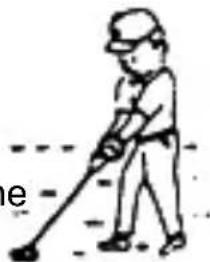
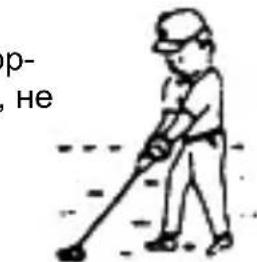
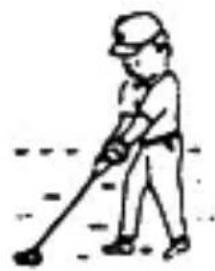
① Be sure not to carry the watch when you engage in strenuous sports, whereas playing such light sports as golf, etc., will not adversely influence the watch.
② Avoid a violent shock such as dropping the watch on the floor.
(3) Magnetism
① If the watch is left at a location with strong magnetism for an extended period of time, the components may be magnetized, resulting in malfunction. Be careful.
② The watch may temporarily speed up or slow down when exposed to magnetism. Precision is restored when placed away from magnetism. In such a case, reset the time.
(4)Vibration
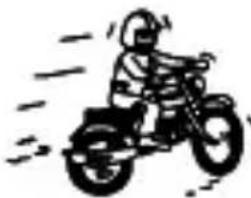
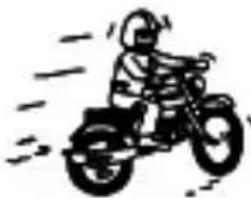
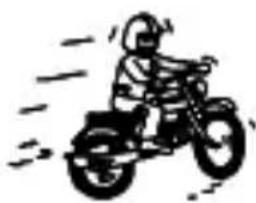
The watch may lose precision if subjected to strong vibrations such as from riding motorcycles, using jackhammers, chain saws, etc.
(5) Temperature
In environments below and above normal temperatures (5^ - 35^) , the watch may malfunction and stop.
CAUTION
Do not use the watch at high temperatures, such as in a sauna. The watch may heat and cause burns.
(6) Chemicals, Gases, etc.
Utmost caution must be exercised when coming into contact with gases, mercury, chemicals (paint thinner, gasoline, various solvents, detergents containing such components, adhesives, paint, drugs, perfumes, cosmetics, etc.), and so forth. Such may cause discoloration of the watchcase, watchband, and dial face. Discoloration, deformation, and damage to various resin-based component parts may also occur.
(7) About accessory parts
Do not attempt to disassemble or modify this product.
Store the bracelet/strap pin and other small parts out of the reach of chil - dren.
If any small parts are swallowed, immediately contact a doctor.
(8) Allergic reactions

If you develop a skin rash or your skin becomes abnormally irritated due to contact with the watch or strap, stop wearing the watch immediately and consult a doctor.
(9) About "luminous light"
Some watch have luminous light on the hands and dial.
The luminous light is a safe paint that stores sunlight and artificial light without using any radioactive material, and emits that light in a dark setting. As the paint discharges the stored light, it will become dimmer over time. The amount of light emitted and the time that light is emitted depends on various factors when the light is stored, such as the shape of the glass, the thickness of the paint, surrounding brightness level, the distance from the watch to the light source, and the light absorption level. Please note that when not enough light energy is stored, the watch may emit weak light or emit light for only a short time.
(10) Water resistant watchband
Some products employ leather and nylon bands on which a special treat - ment to resist perspiration and water absorption have been applied. Please understand that the water resisting effect of this watchband can be lost depending on the period and conditions of use.
HOW TO IDENTIFY THE CALIBER NUMBER
Check the caliber number by referring to the model number of your watch or the case code on the watch's case back.
1. Searching by 10-digit model number
Check the 10-digit model number on the guarantee supplied with your watch. You can also see the number on the product tag put on the watch. Its second and third digits indicate the caliber number of your watch.
Example: If the model number is "□DH00001B□", the caliber number is "DH".
2. Searching by the case code
See the case code on the case back of your watch.
The first two digits indicate the caliber number.
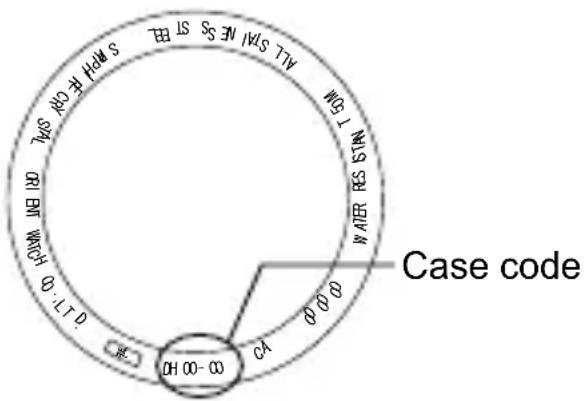
Example:
When the case code is "DH00-C0", the caliber number is "DH".
- The place of case code may vary and its letter size may be small and difficult to see depending on the characteristics of watches.
- The pictures and illustrations on this manual may differ from the actual appearance of your watch but the functions and operation procedures are the same.
SPECIFICATIONS
| Caliber Features | Number of jewels | Date indicator | 24-hour hand | Second hand halt mechanism | Daily accuracy | Remark 1* | |
| DH | 48K Dual Time 21 | Hand indicat-ing type | - | ○ | +25 - -15 sec/day | 10:00 PM ~ 2:00 AM | |
| EY | 46H World Time 23 | Hand indicat-ing type | - | - | +25 - -15 sec/day | 10:00 PM ~ 2:00 AM | |
| FA | 46K World Time 21 | Hand indicat-ing type | - | - | +25 - -15 sec/day | 10:00 PM ~ 2:00 AM | |
| FB | 46L World Time 21 | Hand indicat-ing type | Ring indicating type | ○ | +10 - -5 sec/day | 10:00 PM ~ 2:00 AM | |
(1)Vibrations:21,600 vibrations/hour
(2) Running time: More than 40 hours
(3) Shock-proof bearings to protect the balance with hairspring from shocks.
The stated daily accuracy is in the following coditions:
- After 24 hours at room temperature with the mainspring wound fully and the dial facing up.
- Due to the characteristics of the automatic winding watch, the time may deviate from the stated "daily accuracy" depending on the following conditions: amount of time the watch is worn each day, position of the watch, movement of your arm, winding condition of the mainspring.
Product specifications may change without notice, for improvement.
CAUTION
- Avoid setting the date between 10:00 p.m. and 2:00 a.m. since the calendar changes during this time. If the date is set during this time period, the date may not change or the watch may malfunction. Be sure to move the hour and minute hands away from this time period when setting the date. (Remark 1)
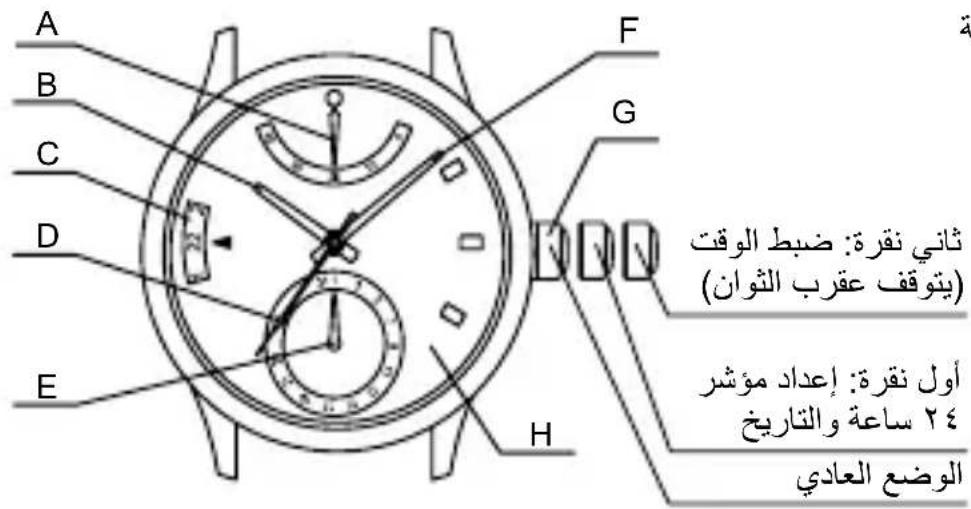
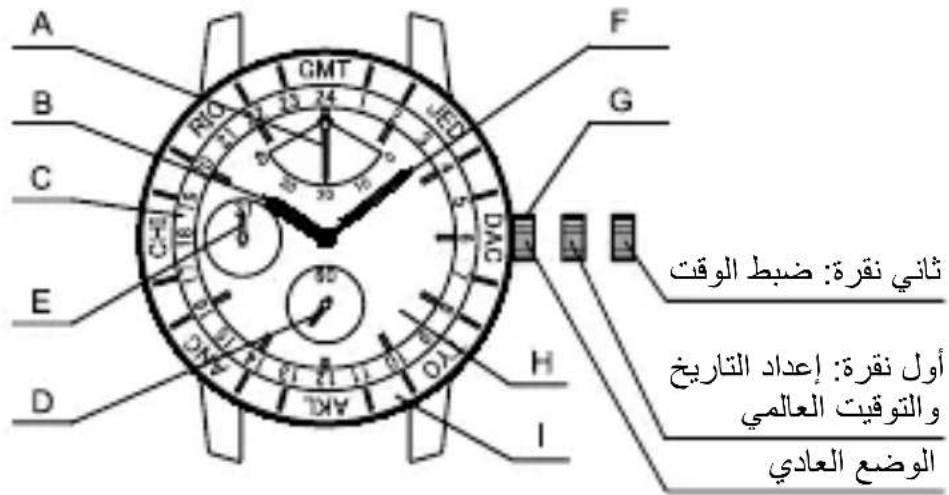
NAMES AND FUNCTIONS OF INDIVIDUAL COMPONENT PARTS
A: Power reserve hand
B: Hour hand
C: Rotating indicator ring
D: Second hand
E: Date hand
F: Minute hand
G: Crown
H: Dial
I: Bezel (or outer indicator ring)
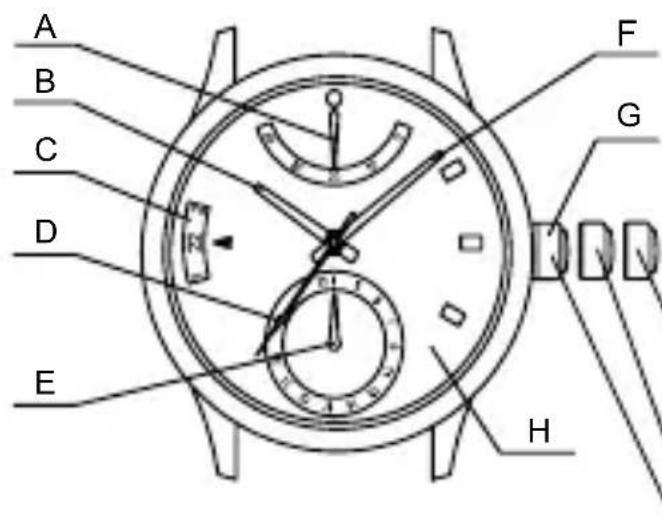
Second click: Time setting (The second hand stops)
First click: Date and 24-hour indication setting
Normal position
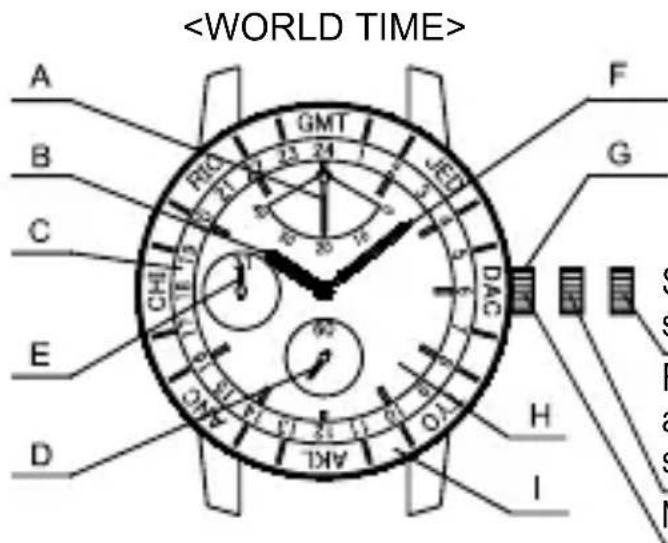
Second click: Time setting
First click: Date and world time setting
Normal position
- Some models display dual time using times, and some display world times using city names.
- On some models, city names for corresponding times (or times for corresponding city names) displayed on the rotating indicator ring are displayed on the bezel; on other models, they are displayed on the dial.
- The position of the crown, date indicator, etc. may vary on some models.
AUTOMATIC WINDING MECHANISM
(1) This is an automatic winding mechanical watch.
(2) The mainspring is wound by natural movements of your arm when wearing the watch on your wrist.
(3) If your watch stops, swing the watch back and forth ten or more times to re-start the second hand. After it starts moving, set the date and time (dual time or World time).
(4) This watch will run approximately 40 hours after it is fully wound. If it is not wound enough, the watch may lose ac
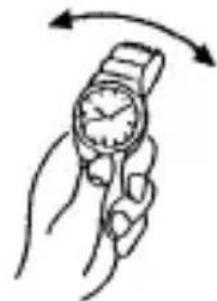
curacy. In order to maintain the watch's accuracy, we recommend wearing the watch at least 8 hours a day.
MODELS WITH SCREWED-DOWN CROWN
Depending on the model, you may not be able to pull the crown out without unscrewing it (models with screwed-down crown).
Operate this type of watch as follows:
(1) Before setting the date and time (dual time), first turn the crown to the left to loosen the screw lock.
(2) After setting the date and time (dual time), turn the crown to the right while pressing in, until it stops turning to securely tighten the screw.
POWER RESERVE INDICATOR
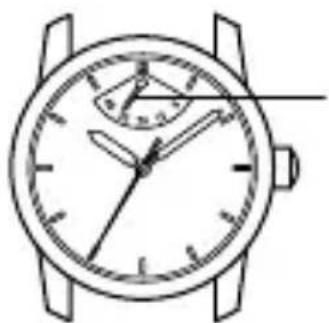
The power reserve indicator shows how much the watch is wound, allowing you to see how much longer the watch will run at a glance. The time pointed to by the power reserve hand is the remaining time.
The remaining time shown is only an approximation. The time shown may be different from actual remaining time.
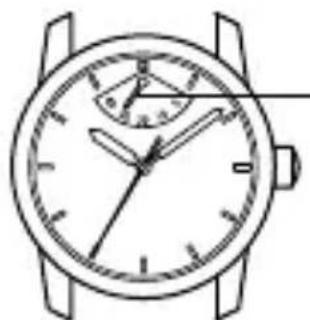
- Power reserve hand
This product has an automatic-winding system which comes with a power reserve indicator function. The mainspring will be automatically wound by your natural arm movements while you wear it on your wrist. The power reserve hand is pointing to the fully-wound position (40H). The amount the watch is wound will change with the frequency of your arm movements and the length
of time you wear the watch, so the hand will not always point to the fully wound position. If you remove the watch from your arm and do not wind manually, the power reserve hand will move toward zero as time passes.
HOW TO SET THE TIME
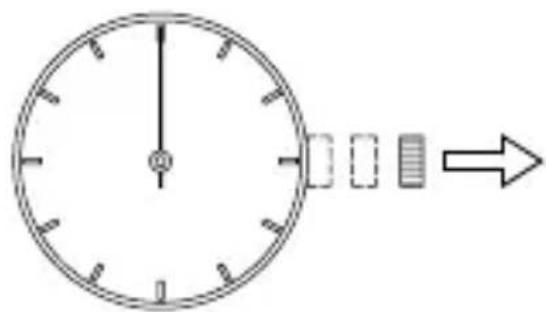
(1) Pull out the crown to the second click. The second hand does not stop.
On calibers DH and FB, the second hand stops. Pull the crown when the hand reaches the 12 o'clock position.
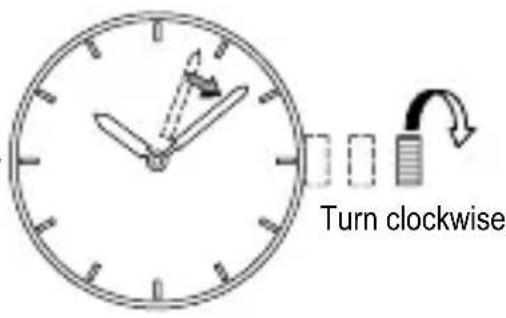
(2) Turn the crown clockwise and set the current time.
Since this watch comes with a calendar, make sure that you set either a.m. or p.m. without fail.
The date changes at [twelve o'clock midnight].
When setting the time, first bring the hand back slightly later the actual time and then move it forward to the actual time.
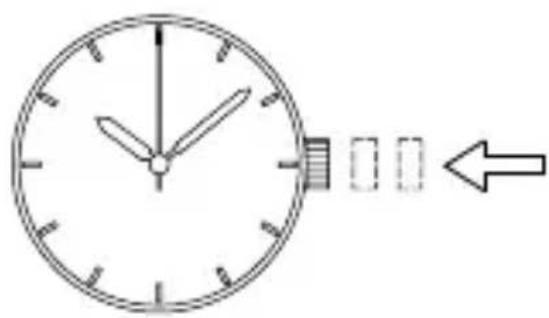
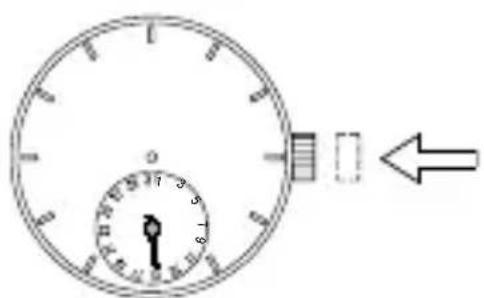
(3) Press the crown in to the normal position.
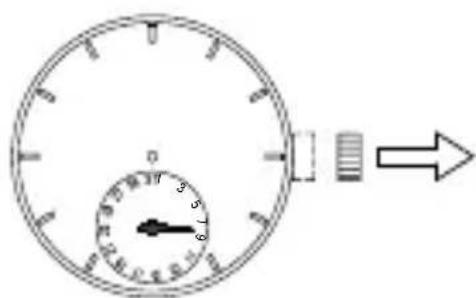
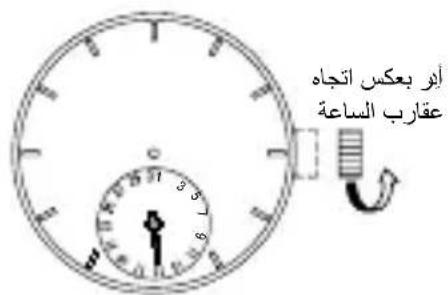
HOW TO SET THE DATE
(1) Pull the crown out to the first click. The crown on this watch can be pulled out to the first and second clicks.
(2) Turn the crown counterclockwise until you reach today's date.
(3) Press the crown in to the normal position.
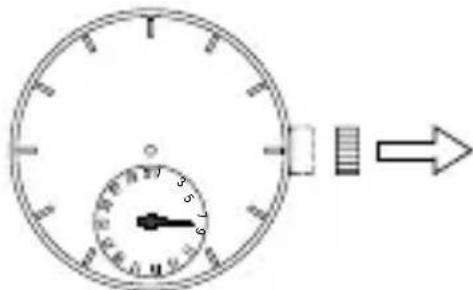
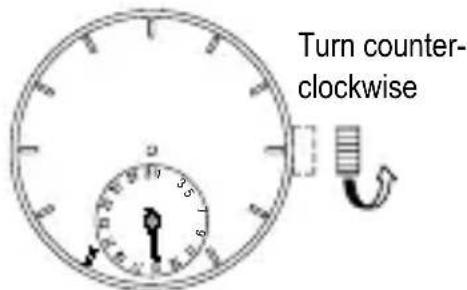
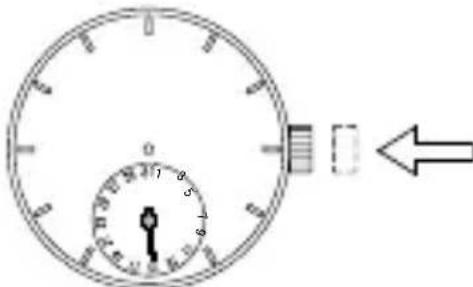
The position of the crown, date indicator, etc. may vary on some models.
About date correction at month's end:
Date correction is necessary for months with 30 days or less. Set the date to the [1st day] on the first day of the next month.
HOW TO USE THE DUAL TIME FUNCTION [DH (48K)]
By the dual time function, two different times can be displayed at the same time. This watch indicates the two times with the hands and 24-hour indicator.
(1) How to set the 24-hour indicator
Ensure the time indication is correct before setting the 24-hour indicator. The 24-hour indication moves synchronously with the time indication. Set the time before adjusting the indicator. (See [How to set the time].)
① Pull the crown out to the first click. The crown of this watch can be pulled out two clicks.
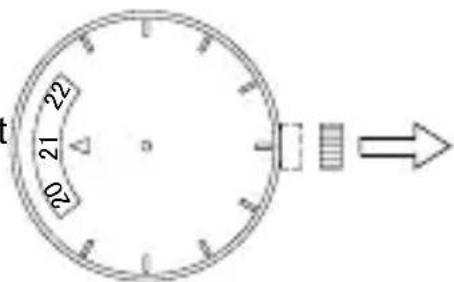
② Turn the crown clockwise and set the 24-hour indicator to the time you want. (The 24-hour indication advances by 30 minutes.)
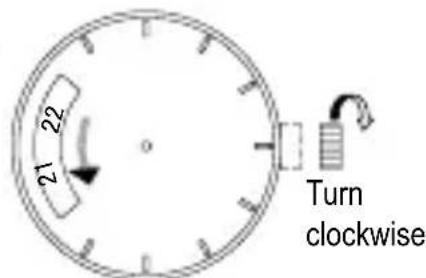
(3) Press the crown in to the normal position.
- The position of the crown and 24-hour indicator may vary on some models.
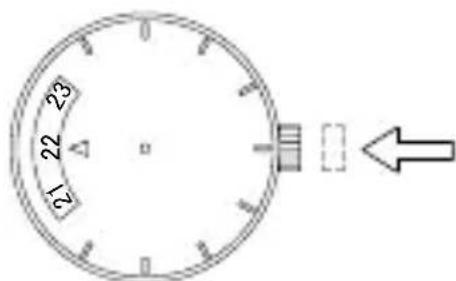
(2) Example of dual time use
To set the 24-hour indicator to indicate the GMT
(Greenwich Mean Time) as the secondary time at 5:00 p.m. Japan time Set the 24-hour indicator to 8:00 a.m. as the time difference is 9 hours. (See "How to set the 24-hour indicator".)
Refer to "Comparison table of standard times" to check time differences.
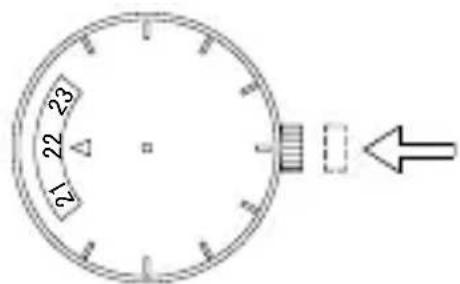
HOW TO USE THE ROTATING INDICATOR RING (WORLD TIME FUNCTION) [EY (46H), FA (46K), FB (46L)]
When you turn the rotating indicator ring and align the city names with the times, you can read the respective times of the cities right away.
(1) Models on which times are indicated on the rotating indicator ring
① Be sure that the watch shows the correct time.
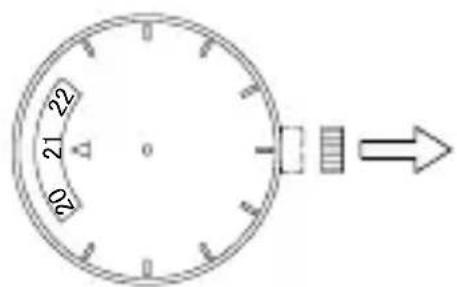
② Pull the crown out to the first click.
* The crown on this watch can be pulled out to the first and second clicks.
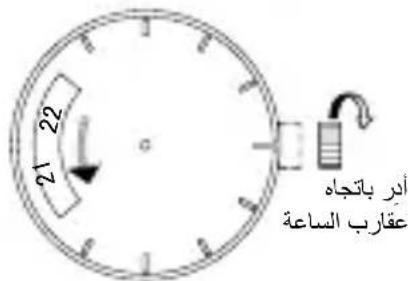
③ Turn the crown clockwise, and set the current time of the rotating indicator ring to the city in which you are currently located. (The rotating indicator ring turns counterclockwise by 30 minutes.)
④ Press the crown in.
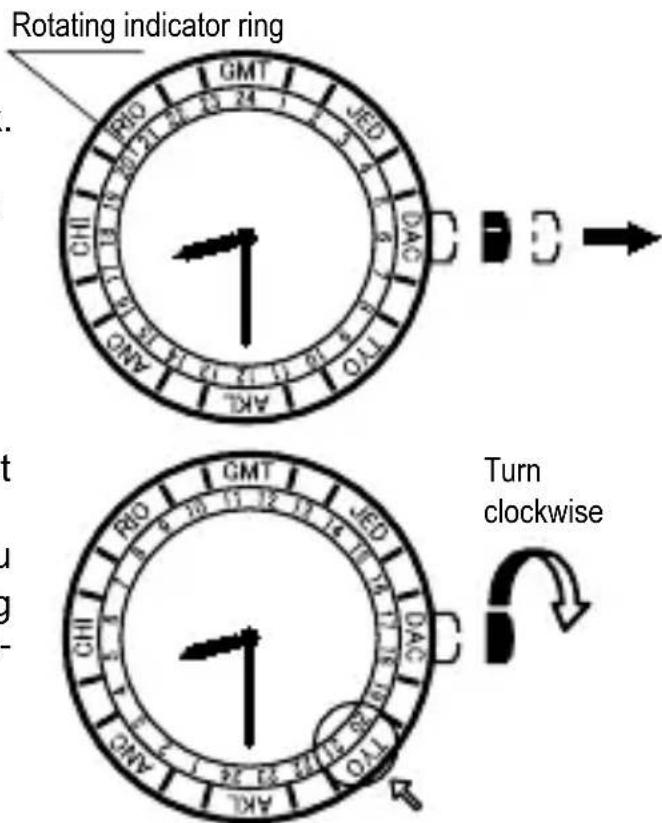
Example: When using in Japan Set TOKYO (TYO) on the rotating indicator ring to the current time. In case of 8:30 p.m. in Japan, set TOKYO (TYO) on the rotating indicator ring between 20:00 and 21:00.
(2) Models on which city names are indicated on the rotating indicator ring
① Be sure that the watch shows the correct time.
② Pull the crown out to the first click.
- The crown on this watch can be pulled out to the first and second clicks.
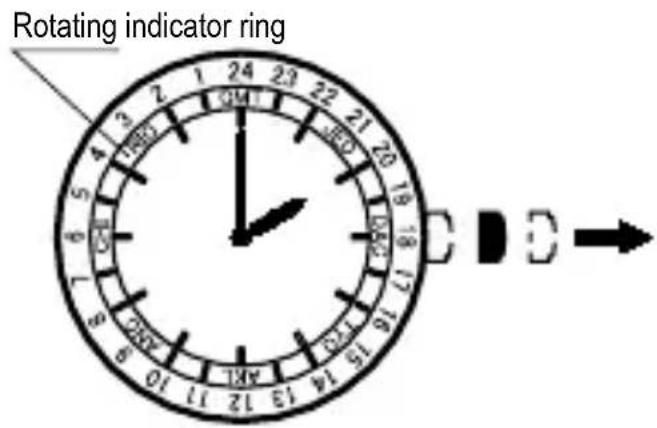
③ Turn the crown clockwise, and set the name of the city where you are currently located on the rotating indicator ring to the current time. (The rotating indicator ring turns counterclockwise by 30 minutes.)
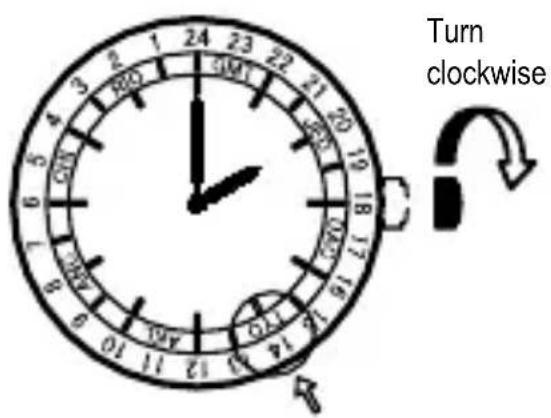
(4) Press the crown in.
Example: When using in Japan
Set TOKYO (TYO) on the rotating indicator ring to the current time.
In case of 2:00 p.m. in Japan, set TOKYO (TYO) of the rotating bezel to 14:00 hrs.
HOW TO USE MODELS WITH A ROTATING CITY NAME INDICATOR (OUTER INDICATOR RING OR BEZEL)
Some models come with a rotating outer indicator ring (displaying the names) or a rotating bezel around the outer circumference of the case (displaying the city names) in addition to the rotating indicator ring.
Double check to confirm which type of model you have and then read and follow the particular instructions for your type given below.
HOW TO USE THE FUNCTION
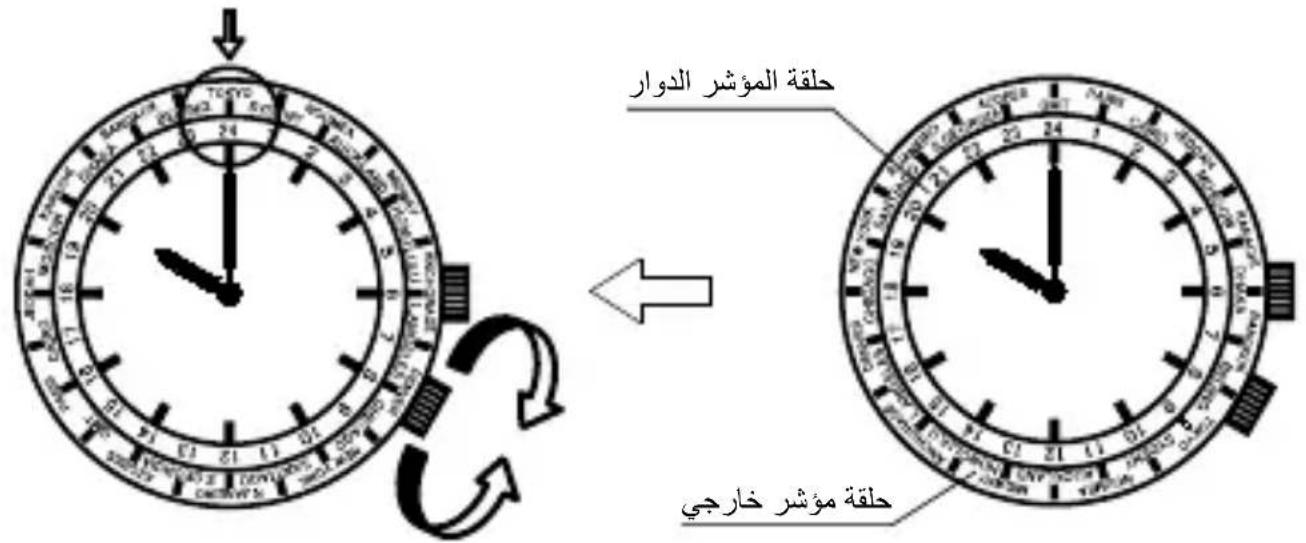
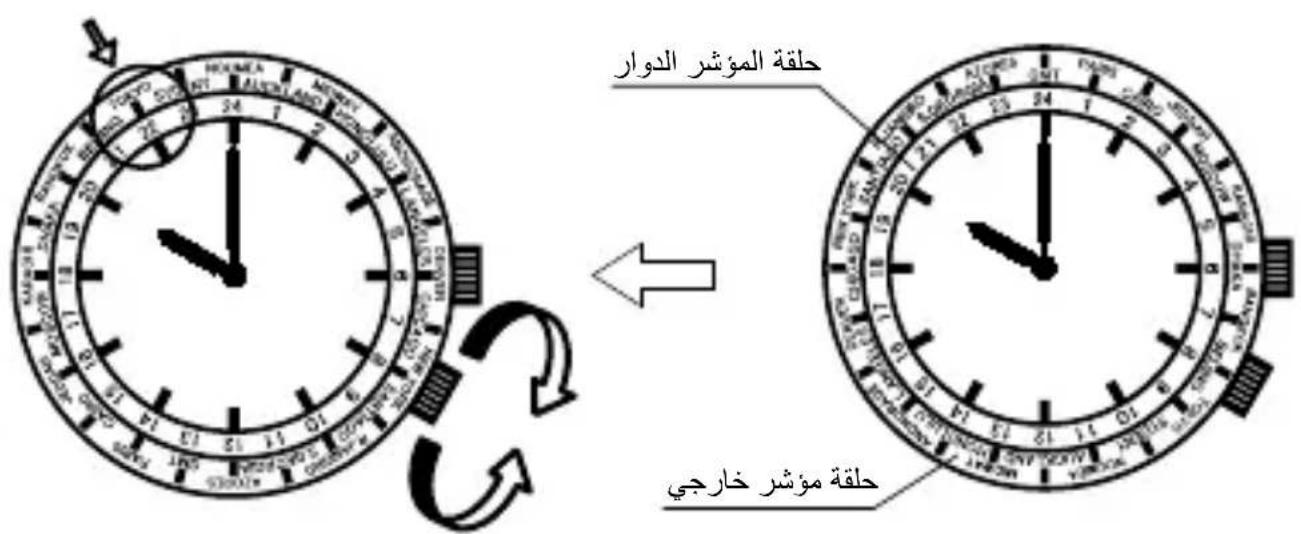
The examples for how to use the dual time function given below are based on usage in Japan. The model shown in the example diagram is a rotating outer indicator ring model with a crown located near 4 o'clock on the dial.
In this example, line up the TOKYO (TYO) on the outer indicator ring (or bezel) with the current time in order to set the time for Tokyo.
For a time of 10:00 p.m. in Japan, line up the TOKYO (TYO) on the outer indicator ring (or bezel) with the number 22 on the rotating indicator ring.
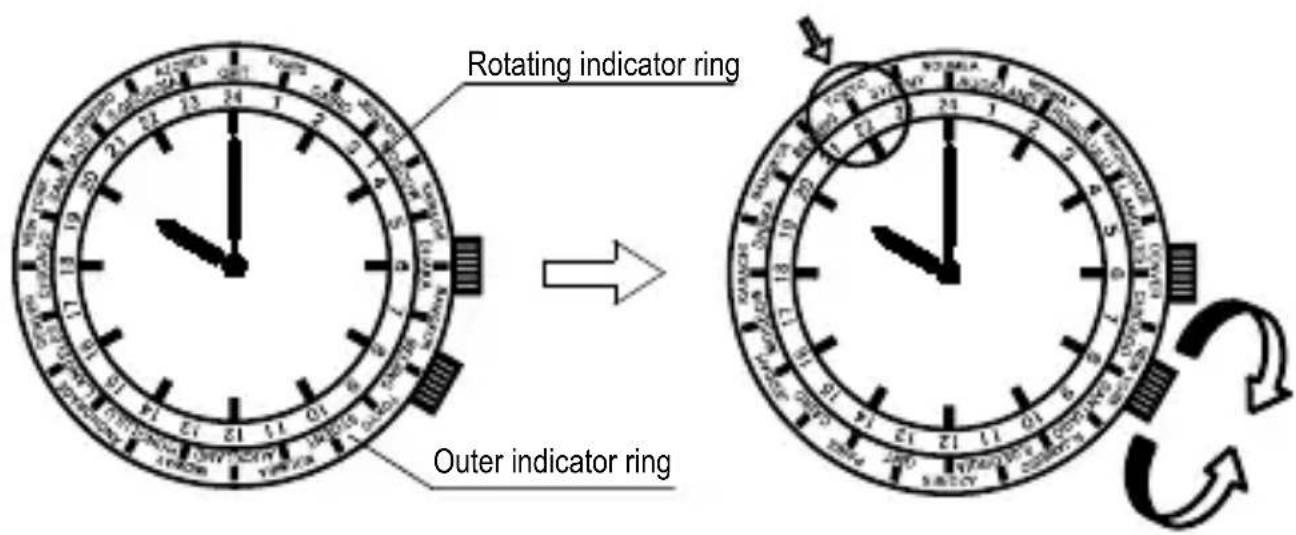
In this case, move TOKYO (TYO) to a more visible and prominent location at the 12 o'clock position and then rotate the rotating indicator ring to line up the time with TOKYO (TYO).
(1) Rotate TOKYO (TYO) on the outer indicator ring (or bezel) to the 12 o'clock position.
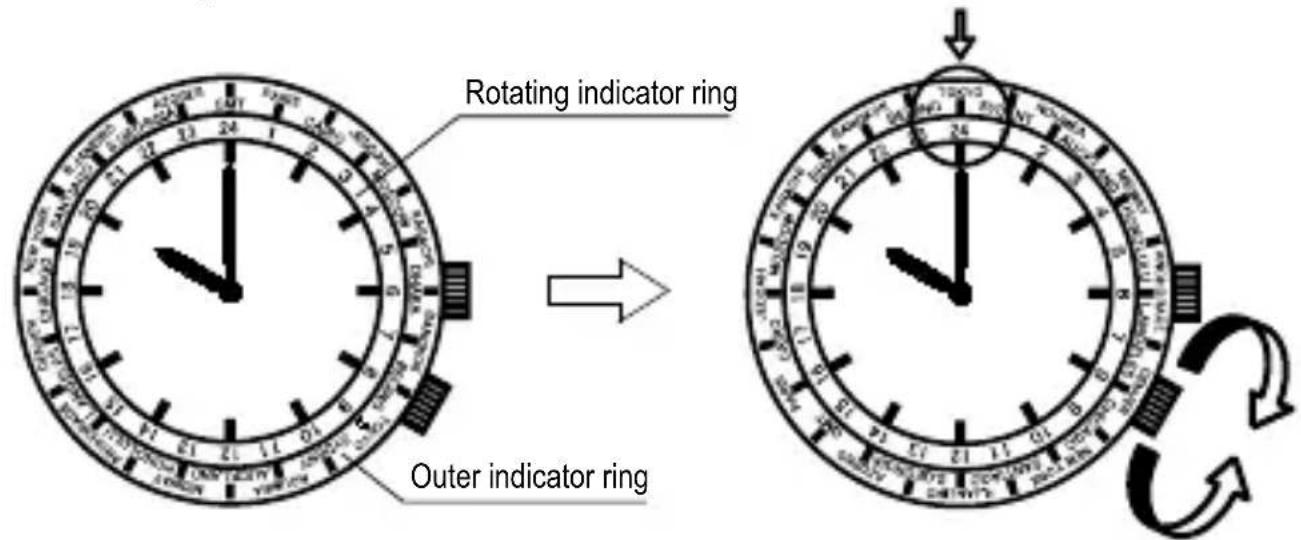
(2) For a time of 10:00 p.m. in Japan, line up TOKYO (TYO) with the number 22 on the rotating indicator ring.
(Refer to HOW TO USE THE ROTATING INDICATOR RING (WORLD TIME FUNCTION) for details.)
Move the city name for the city most frequently used to a more visible and prominent position (to the 12 o'clock position). (The city used is NEW YORK in the example shown.)
(1) Turn NEW YORK (NYC) on the outer indicator ring (or bezel) to the 12 o'clock position.
(2) For a time of 10:00 p.m. in Japan, line up the number 22 on the rotating indicator ring with TOKYO (TYO).
COMPARISON TABLE OF STANDARD TIMES
| City indication Typical city Time differen | ces with GMT | |
| GMT GMT ±0 | ||
| PAR PARIS +1 | ||
| CAI CAIRO +2 | ||
| JED JEDDAH +3 | ||
| MOW MOSCOW +4 | ||
| KHI KARACHI +5 | ||
| DAC DHAKA +6 | ||
| BKK BANGKOK +7 | ||
| BJS BEIJING +8 | ||
| TYO TOKYO +9 | ||
| SYD SYDNEY | +10 | |
| NOU | NOUMEA | +11 |
| AKL AUCKLAND | +12 | |
| MDY | MIDWAY | -11 |
| HNL HONOLULU | -10 | |
| ANC ANCHORAGE | -9 | |
| LAX LOS ANGELES | -8 | |
| DEN DENVER | -7 | |
| CHI CHICAGO | -6 | |
| NYC NEW YORK | -5 | |
| SCL SANTIAGO -4 | ||
| RIO RIO DE JANEIRO | -3 | |
| SGS S.GEORGIA | -2 | |
| PDL AZORES -1 |
- Some countries use daylight savings time. There may be cases where the time difference and daylight savings time change to suit the country's convenience.
- The city names listed are major cities in various countries of the world. Please note in advance that some product specifications are subject to change for product improvement purposes.
- If planning to use the watch in a place not listed in the table above, select a city in the same time zone as the city for which you want to indicate time.
HOW TO USE THE ROTATING INDICATOR BEZEL
Please notice that some models come with a rotating indicator bezel, which should be used properly.
Turn the bezel by pointing the mark to the minute-hand. While certain time goes by, you can measure the elapsed time from the distance between minute-hand and figures on the rotating indicator bezel. You can also set the mark as a desired time to remind you how long time is still remain for an appointment.
You cannot turn the bezel reversely since it comes with a protection mechanism for preventing wrong operation by force or shock. Figures on the bezel could also help you to read the current time easily.
Rotating bezel
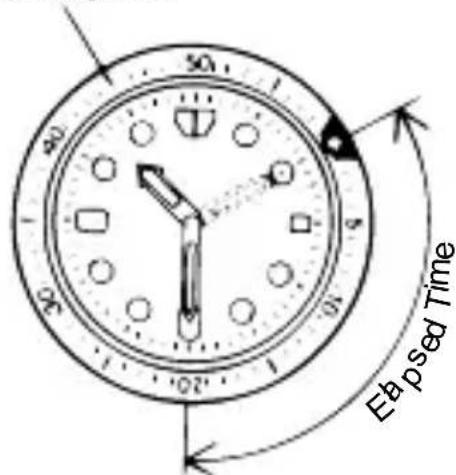
The above shows that 20 minutes have elapsed from 10:10.
- Depending on design, anti-reversely and 1 minute “click” sound mechanism on rotating indicator bezel does not apply to some models.
DEUTSCH
CÓMOr UTILIZAR LA FUNCÍNDE HORA DUAL [DH (48K)]
(ДВОИHOE BPEMЯ И MIMPOBOE BPEMЯ)
HCTPYKUNIPO 3KCNJYATAUIN
MEPbI IPEIOCTOPOXHOCTN
Ctporo co6IoudaTe npBedeHbIe HIXe IHCTpyKcN dIy IpeDoTbpaueHnra IIO6Oro yUepe6a 3dOpOBbIo n IOBpeXdEHHa BaIero mMyIecTba n IMyIecTBA dpyrnx Iu.
...ДаHHын сИМВОЛ O3нauаET BO3MOXHOCTь ЛетальНо�RO ИСХODа ИП СерБе3HbIX TpaBM B CNYuae, ecлДaHHын пpoДуКТ 6удET ИСпОЛьЗOBaTbcя ЛЮБыM CNo-COбOM, OTПИЧьIM OT пИВeDEHнБIX INHCTpyKци.

...ДаннысИМВОЛ O3HааET BO3MOXHOCTb Cepbe3HbIX TpaBM NII MaTePnAInBHorO yUepe6a ToIbKO B TOM cIyae, ecIи ДaHHыйnpoDyKT 6yIeT nCNoIb3OBaTbcr IIO6bIM INHbIM CnOCO6OM, OTJIINuHbIM OT npINBeDEHHbIX INHCTpyKcN.
ПИОБРALEHМСЧАСМ
(1)Воданpoиcaemocь
* PeKOMeHdyETcA NCNoJIb3OBAbT YaacB B COOTBeTCTBn C npNBeDEHHo BblIe KNaCCnФkaUnei, npeDbapntelbHO IpOBepNB MapKnPoBky NO BODoHePOnHuaemocTn Ha uΦep6NaTe Hn Kopnyce.
① YacbI C BOIOHepOnHuaemocTbIO IINI NOBceHHeBHoro NcNoJIb3OBaHn 30 M (36ap)MOrY T NcNOJIb3OBaTbcRA BO BpEMyMbIBaHnI T. N., HO HE MOrY NcNoJIb3OBaTbcRA B yCIOBnAx, PnKOTOpBX OHN 6vDVT NOrpyKaTbcRA BBOV.
② YacbI c ycnneHHoB ODOHepnoHuaemocTbIO dIy NOBceDHeBHOrO NcNoJb3OBaHnRA KJIacCa I 50 M (56ap) Moryr nCNOJb3OBaTbcra BO BpeM nJaBaHnRA T. n., HO He Moryr nCNoJb3OBaTbcra BO BpeM HbipHnRA nn NoDBOHO rNJaBaHnRA.
③ Yacbi C ycnHeHOn BOHOHePOHuaemocTbIO IJn NOBceDHeBHOrO NcNoIb3OBaHnra KnaCCa II 100M nnn 200M (10 nn 206ap) MoryT nCNOb3OBaTbcra BO BpeMa HbIpyHnra IIN NoBOHO rnnnnoBaHnra, HO He MoryT nCNOb3OBaTbcra BO BpeMa NOBDOHO rNaBaHnra C KNCLOpOHbIM 6aIIHOHom nn BblONHeHnra BODoJa3HbIX pa6OT c aBTOHOMHbIMN DbIXaTeJIbHbIMn annapaTaMn Ha Tenn.
4Pn3Kcnnyataun yacOB rONBka DoJnxHa HaxoOnTbCBy TOnJIeHHOM (HOPMaJIbHOM) IIOJOKeHN. EcnnrONoBkOTHOCNTcK TINy 3aBNHNUBAOTUHXc,TO OHa DOnJxHa 6bITb PLOTHO 3aBNHueHa.
He nCnoB3yIte rOIOBky noD BOoI IIN ecnHa yacax mMeetc Bnra.Boa moKeT PDOHKNHTb BHVTb KOpNvCa YAcOB HApVUnTB IX rEPMTNUHOCTb.
⑥ Ecni Baun Yacbi He ABJIOCTc BOOHeNPOHncaeMbIM, To He DOnyckaIte NonaHna Ha Hnx BoaHbIX 6pb3r (BO Bpem yMbBaHnB, B DOxKnByo NorOdy n T. d.), a TaKke 3anOTeBaHn. Pn nonaHaHn Ha Yacbi BOdb IIN npn 3aONTeBaHn ydaJIne Bnary C NOMOuBcVXoM MAnKO TKAHN.
⑦ Daxe ecn Baun yacbl, npedHa3hauehbIe IJn NOBceHBeHOrO nCNoIb3o7BaHnA, 6- JanaT BDOHeNpOHuaEMocTBHO, He DOyckaTe BO3deICTBna HA HNX CnJIbHOt ctpyn Bobl. Pn npebbiweHNIOYCTUMORO ypoBH JaBHeHnBOD MoKet 6bITb HApUWeHa rEDMeTHuHOCTb YACOB.
⑧Пи пonaаданн Ha Baun BOOHePOnHuaembIe Yacbl,пpeHa3HaueHHbIe IJIЯ NOBceHBeH Horo NcnoJb3OBaHnA, MOpCKoB BoDbl, CtpxHInTe BODy I IpOTpInTe KOpNyc Hacyxo, YTO6bl He DONYCTNTb BO3HNKHOBEHnKOPPO3Hn ININ INhBXHErATNBbIX NocJeDCTBn.
BHytpn Kopnyca yacob codepknTcna He6oNbOoe KOnuYeCTBO Bnarn. NToTomy KOrda TemnepaTpya OkpykaHooero Bo3dyxa HnKe TeMnpaTpybI Bo3dyxa BHyTpni Kopnyca yacOB,Ha BHytpHHe IOBePxHOCTn CTKNa MoKet O6pa30BBiBaTbc 3aNoTeBAHne Ecn 3aNoTeBAHne HOCNT BpeMeHHbI XapaKTep, To 3TO He HaHocNT BpeDa Yacam. Ondako ecnn 3anoTeBAHne OCTaETcRa HCteKNe npoJOnXkntelbHOe BpeMa IIN ecnn B acsbI nonana BOda, npokOHcyNbTnpuyTEcb No MeCTy npno6peTeHna YacOB n He ocTabTJaTe 3Ty npo6JIeMy 6e3 BHUMAHNA.
(2) yapopopuHocTb
① CHHMaIte yacbI BO BpeM 3aHrTn 3HeprHbIMN BnDAMN CnOpTa, OHaKo, 3aHrTne TaKIMN BnDAMN CnOpTa, KaK rJbΦ n T. d., He OKaXeT HeratNBHO BO3dEINCTBnR Ha COCTOARHne YacOB.
② N36eraIte cnIbHoro yDapa Tnna naDeHnra YacOB Ha noJ.
(3)Bo3dEeCTBnMaHHTHBIXnoJe
① 3anpeaetcnoBepraT yacbI BO3dEcnCTBnIO CNbHbIX MarHNT-HbIX noJe B TeueHne dInTeJbHoro nepNoDa BpeMeHN, NOCKOJIbky KOMNOHeHTbI YacOB MOryT HamaHHTntbcR, YTO npNBEdET K hapuWeHIO pa60TbI YacOB. Co6JIIOJaTe OCTOPOXHOCTb.
② ПОД BOЗдЕСТВЕМ МагнITHОг NOЛЯ YACBI MORYT BPEMeHNO CNEИNTb ИЛ NOTCTaBaTb.ToUHOCTb NOKa3AHN YAcOB 6yIeT BOCCTaHOBnEHa,ecJIYcTpaHITb BO3dEICTBVE MARGHTHOrO NOJ HA Yacbl. B TAKOM cIyUae NOBTOpHo yCTaHOBnTe BPEM.
(4) Bn6paun
Yacbl MoryT NOTePbToHocTb,ecn6yT NOBepXeHbI CINbHO Bn6paun,HaNPmep,Bbl3bIBaEMOn POe3dkoN Ha MOTOuKJIe,NCNoJb30BaHHeM OT6oHOro MoJOTka,ZeHNOI NJIbI NT.Ⅰ.
(5) Temnepaotypa
YacbI MOryT nDTHn HEnpaBnIbHO nII N OCTaHOBuTbcra npi TeMnepaTypax Hxke nII Bblse HopMaJIbHoro dHaana3OHa (5^ - 35^)
He noIb3yIteCb Yacamn npn BblcOKoTempeaType (HaIpIMep, B cayHe). Yacbl MOryt HArpeBaTbcr N Bbl3bIBaTb OXkOrn.
(6) XmMueckne BeuecTba, Ra3bl T.I.
CneNyET co6IIOdaTb MaKcMaJIbHyIO OCTOpOxHOCTb npN KOHTaKTe C ra3AMn, pTyTbIO, XIMNUeCKMn BeUeCTBaMn (pa36abNTeJem DnI KpackN, 6EH3INHom, pa3NIuHbIMn pacTBOPHTeJAMN, MOUoUMN cpeCTBaMn, COePkaUIMN TaKne BeUeCTBa, KJIeAMN, KpackAmN, IekapCTBeHHbIMN npenapaTaMn, napfOMepNei, KOCMeTNKOH n np.) n T.I. 3TN BeUeCTBa MOryT n3MeHITb CBET KOpnyca YacOB, 6pacNeTa/peMeuKa n Uepe6Lnata. Bo3MOXhbl TaKke n3MeHeHne UeBETA, DeΦopMaunr N IOBpeXdHne NOJIIMePHbIX KOMNOHEHTOB.
(8) Anleprnueckne peakun
BONI NOCTe KOHTaTc 6paCneTOM Ha Koxe NOBnE TcBb NIN pa3dpaxeHne, PpeKpATnte Hocntb Yacbl N He3aMeDInTeJbHO O6paNTeCb K BpaUy.
(9)ЛюмнесcentHoe nOKpbITne
Ha HeKOTOpbIX Yacax IMeETcra IOMHHeCueHTHOe NOKpbITne Ha CTpeJIkax NcI- 6ep6nate. OHO BbINOJIHeHO n3 6e3oNaChOH HepaIIOaKTINBHOJ KpackN, HAKaIIINBaIOUeI COJIHeuHbI IN NCKycCTBeHHbI CBET N OTdAIOUeI ERO B TeMHOTE. OTdABaI HA-KONJIeHHbI CBET, NOKpbITNE NOCTeNEHNO CTAHOBNTCA 6OJe TycKnblM. KoJIyecTBO OTdABAEMORO CBETA IN BpeMRA CEueHnra 3aBnCrt OT pa3NIuHbIX PaKTopOB: fOpMbI CTeKla, TOJIuINbI CNoR KpackN, yPOBnRA PKoCTN OKpyKaIOUeI CpeDbI, PACCTOAHNr OT YAcOB Do NCTOCHNka CBETA IN CTeNEHn NOrloUeHnRA CBETA. POMHITE, YTO ECnn HAKONJIeHO HeMHoro CBETA, Yacbl 6yDyT CBETntbcra Cna6o nn HeDoJIro.
(10) BódoHe npoHuaemb iB 6pacneT
B HeKOTOpbIX MoDeIax NcNoJIb3yIOTc KoxaHbIe I HeJIOHOBblc peMeUKN, NOI-BePrHyTbe CneuaIbHoi 6pb6OKe IJr 3aunTbI OT NToOTdJeHnra I BO3deNCTBnRA BODbl. CBOJCTBO BOHOHePOnucaEMoCTn DaHHoro 6paCneta MoXeT 6bITb NOTepraHO B 3aBNCIMoCTn OT IepnoDa I YcNOBn 3KcIIpyatauIN.
ONPEDEJEHNE HOMEPA KAJINBPA
Пюверът e HOMeр kaIибpa Baunx YacOB nO HOMepy MOneJI N YacOB nI IN KODy KOpnyca Ha 3aDHeN KpbIшke Kopnyca YacOB.
TEXHnueCKXAPAKTEPNCN
KoppeKuaIaTbIB KOHcE Meca:
EcnB Mecae 30 dHei nn Mehse, Heo6xOIMo KoppeKtnpoBaTb daTy. YcTaHOBnTe DaTy Ha [1-e YncNo] cNeDuOnero Mecra.
IcIIOJIb3OBAHNEФYHKUINДBOHOrO BPEMEHN [DH (48K)]
Бeзеле He Moket noBopayBaTbCBy
IPOTNBOJIOJXHOM HApapBJeHn, NockoJIbky OH OChaUeHO 3aUHTbIM MExaHN3MOM, IpeHa3NaueHHbIM JIg 3aUNTbI OT OUn6OuHOn Oepaun B pe3yIbTaTe npInloXeHn Cnbl IIN yIapa. LcΦpbl Ha BpaauoUeMc8 6e3eIe TAKKe MOrYt ynpOuaTb CUnTBiBaHne TeKyuIero BpeMeHn.
![ORIENT Contemporary FA06003Y - IcIIOJIb3OBAHNEФYHKUINДBOHOrO BPEMEHN [DH (48K)] - 1](/content/2026/03/482204/images/8251cbb22f3492860cf843d89f39d9fc64bfd34f581f8717783714f113e53e04.jpg)
Bpaaioiin6e3eIb
Ha pncyHke Bblie noka3aHO, YTO C MOMeHTa, KOrda 6bIIO 10:10, npoJno 20 MInHyT.
*B 3aBnCmOCTn OT KOHCTpyKuIN 3aUNTa OT NOBOPTa B O6paTHOM Ha- npabJIeHNn I-MnHyTbI "UeJyOK" Ha HeKOTOpbIX MoJeJx OTCyTCTByET.
![ORIENT Contemporary FA06003Y - IcIIOJIb3OBAHNEФYHKUINДBOHOrO BPEMEHN [DH (48K)] - 2](/content/2026/03/482204/images/f4460a2acbd68f014b24d3e599af0fa800b27992a3c54e6001571bb330dbe45f.jpg)
Jgglgglgglgglgglgglgglgglgglgglgglgglgglgglgglgglgglgglgglgglgglgglgglgglgglgglgglgglgglgglgglgglgglgglgglgglgglgglgglgglgglgglggl
Jg 1000000000000000000000000000000000000000000000000000000000000000
a a a a a a a a a a a a a a a a a a a a a a a a a a a a a a a a a a a a a
i jll 1 1 1 1 1 1 1 1 1 1 1 1 1 1 1 1 1 1 1 1 1 1 1 1 1 1 1
<.J>
1 1 (TYO) g (TYO) 2
1 1 (TYO) (TYO)
(TYO)g(yj (y)
<.J> 17 acllll (acllll jzj) y (NYC) d n yy (1) 17 acllll y (acllll jzj) y (NYC) d n yy (1)
(1clll jj g a) 10d n d e aol g y b j p aal a
aai 1
Jlalll lalil 1e aolal gall gllllgllg 1j Jg 1a 1
<1 J>
Jl (aclll j) (TYO) 50
J (TYO) 50
J (TYO) 50
J (TYO) 50
J (TYO) 50
J (TYO) 50
aclw 2 yag g jzally jgill
aee 4e eae
aclw 92 wgo bua jia cai gll wgo aas no sli [bua a]j) .wglal bua jia cai gll bu ay bua. cai gll wgo eo jilly aclw 92 wgo aiy
(.
1 ①
(.)
ggl ggl gll gl lgl b
y jgogjlln 5 gagol
()
J 0: aclll lgl gil (g) GMT 8 jLwAeLw 2 wgo h
(“eLwYj
1
#
(1)
()
gill gill gill gill gill gill gill gill gill
()
pI pI JolSly IgiiJ 1y jai acl 2. dJai aclll o (2)
gillj y g jieell lalll 1e blll. g jieel lall jy
J 1
#
a 1
1y
:Ls jbjll J
()
a
a
aalil
Sll aell llaa yI yll yI yall yI gill. Jao acell Iblw yI yI yI yI yI yI yI yI yI yI yI yI yI yI yI yI yI yI yI yI yI yI yI yI yI yI yI yI yI yI yI yI yI yI yI yI yI yI yI yI yI yI yI yI yI yI yI yI yI yI y
aclll aai jy. (aclw 2) alolll aaii g y lly s rall b jac yss
.
aaiiiee eae aiee gglawl
- | x - 1| = | x + 2| .
aculi jie :B
jgall jw gall a :C
gill 1
E
gla:F
G
linall :H
)aclwla j:1
( g + h) + f = 0
<
e aal 1aaiy aaii y i j 1 1 1 1 1 1 1 1 1 1 1 1 1 1 1 1 1 1 1 1 1 1 1 1 1 1 1 1 1 1 1 1 1 1 1 1 1 1 1 1 1

| العربية الحرفية | العربية الحرفية | العربية الحرفية | العربية | ||||||
| العربية 1... | 10-40+ | ○ | - | \( {}^{3} \) | DH48Kg | ||||
| ~ | \( {}^{3} \) | ||||||||
| ~ | \( {}^{3} \) | ||||||||
| ~ | \( {}^{3} \) | ||||||||
| ~ | \( {}^{3} \) | ||||||||
| ~ | \( {}^{3} \) | ||||||||
| ~ | \( {}^{3} \) | EA46Kg | |||||||
| ~ | \( {}^{3} \) | ||||||||
| ~ | \( {}^{3} \) | ||||||||
| ~ | \( {}^{3} \) |
aLl/4j11,7…:JI jaiy1(1)
aLw 1. j5: Jxill (Y)
clalall jyjll jyjlae Jai clalall aegao Jolg (r)
ailllll g jll lglle uuaiaall aagaaal glg aai
y 1 y
a 1000
a a a a a a a a a a a a a a a a a a a
0yjdl j, jzj 1
1 1
J 1
i j 1 1 1 1 1 1 1 1 1 1 1 1 1 1
a 1,5 k < y
1
sikay los aclall g 2jll jaiil lgl d g g g g g g g g g g g g g
y
aC
“DH”HJH0001B□
aclwll jy jy
aagaa aalaa aalaa aabaa aalaa aalaa aalaa aalaa aalaa aalaa aalaa aalaa aalaa aalaa
J 1
()
aJaa aie cuiy Jao Jiae aie aie jao 5i Jai i Jai Jai Jai Jai Jai Jai Jai Jai Jai Jai Jai
①
T
()
a 15
①
Lioie 1yI yI yI yI yI yI yI yI yI yI yI yI yI yI yI yI yI yI yI yI yI yI yI yI yI yI yI yI yI yI yI yI yI yI yI yI yI yI yI yI
j1j()
i 1
(0)
J 1

()
jai jai ji 1
()
e 111111111111111111111111111111111111111111
1
J 30m clll aagaae aee aen J
cllly jiai y i ge laa iy
la y g aai (ab)50m I aygai y
. 200m 100m II agai y jao clll aagaae aee aen J
.
1
2
3
4
5
6
7
8
9
| الص胱 الإستعمال الإستعمال الإستعمال الإستعمال الإستعمال الإستعمال الإستعمال الإستعمال الإستعمال الإستعمال الإستعمال الإستعمال الإستعمال الإستعمال الإستUTION الإستUTION الإستUTION الإستUTION الإستUTION الإستUTION الإستUTION الإستUTION الإستUTION الإستUTION الإستUTION ال,enGLISH الenglish الenglish الenglish الenglish الenglish الenglish الenglish الenglish الenglish الenglish الenglish الenglish الenglish الenglish الenglish الenglish الenglish الenglish الenglish الenglish الenglish الenglish الenglish الenglish الenglish الenglish الenglish الenglish الenglish الenglish الenglish الenglish الenglish الenglish | الص胱 الإستعمال ال,enGLISH الenglish ال,enGLISH الenglish الenglish الenglish الenglish الenglish الenglish الenglish الenglish الenglish الenglish الenglish الenglish الenglish الenglish الenglish الenglish الenglish الenglish الenglish الenglish الenglish الenglish الenglish الenglish الenglish الenglish الenglish الenglish الenglish الenglish الenglish ال/english الenglish الenglish الenglish الenglish الenglish الenglish الenglish الenglish الenglish الenglish الenglish الenglish الenglish الenglish الenglish الenglish الenglish الenglish الenglish الenglish الenglish الenglish الenglish الenglish الenglish الenglish الenglish الenglish الenglish الenglish الenglish الenglish الenglish | |||||||
| XXX | WATER RESISTANT (WATER RESIST) | الص胱 ال,enGLISH الenglish الenglish الenglish الenglish الenglish الenglish الenglish الenglish الenglish الenglish الenglish الenglish الenglish الenglish الenglish الenglish الenglish الenglish الenglish الenglish الenglish الenglish الenglish الenglish الenglish الenglish الenglish الenglish الenglish الenglish الenglish ال english الenglish الenglish الenglish الenglish الenglish الenglish الenglish الenglish الenglish الenglish الenglish الenglish الenglish الenglish الenglish الenglish الenglish الenglish الenglish الenglish الenglish الenglish الenglish الenglish الenglish الenglish الenglish الenglish الenglish الenglish الenglish الenglish الenglish\ | ||||||
| X | X | X | X | O | X | WATER RESISTANT (WATER RESIST) | الص胱 ال,enGLISH الenglish الenglish الenglish الenglish الenglish الenglish الenglish الenglish الenglish الenglish الenglish الenglish الenglish الenglish الenglish الenglish الenglish الenglish الenglish الenglish الenglish الenglish الenglish الenglish الenglish الenglish - | الص胱 ال,enGLISH الenglish الenglish - |
| X | X | X | O | O | X | WATER RESISTANT (WATER RESIST) | الص胱 ال,enGLISH الenglish - | - |
| X | X | O | O | O | X | WATER RESISTANT (WATER RESIST) | - | - |
| X | O | O | O | O | X | AIR DIVER'S 100m / 150m 200m | - | - |
| O O | O O | He-GAS DIVER'S 200m / 300m /... | - | - |

()
山
J 1
J 1
xaiuua aegjll jolii 128 juiiui
aJ 1
J 1
Clll lgl aaiy jbi yj
g 1 g 1
i 1
.
aaii i 1
a
.