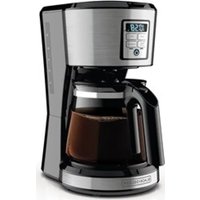
DCM2900W - Coffee machine BLACK & DECKER - Free user manual and instructions
Find the device manual for free DCM2900W BLACK & DECKER in PDF.



User questions about DCM2900W BLACK & DECKER
0 question about this device. Answer the ones you know or ask your own.
Ask a new question about this device
Download the instructions for your Coffee machine in PDF format for free! Find your manual DCM2900W - BLACK & DECKER and take your electronic device back in hand. On this page are published all the documents necessary for the use of your device. DCM2900W by BLACK & DECKER.
USER MANUAL DCM2900W BLACK & DECKER
Please Read and Save this Use and Care Book
Register your product online at www.prodprotect.com/applica, for a chance to WIN $100,000!
Accessories/Parts (USA/Canada)
When using electrical appliances, basic safety precautions should always be followed to reduce the risk of fire, electric shock, and/or injury to persons, including the following:
Read all instructions.
Do not touch hot surfaces. Use handle or knobs.
To protect against electric shock, do not place cord, plug or appliance in water or other liquids.
- Close supervision is necessary when any appliance is used by or near children.
Unplug from outlet when not in use and before cleaning. Allow to cool before putting on or taking off parts and before cleaning the appliance.
- Do not operate any appliance with a damaged cord or plug or after the appliance malfunctions, or has been damaged in any manner. Return the appliance to the nearest authorized service facility for examination, repair, or adjustment. Or, call the appropriate toll-free number on the cover of this manual.
The use of an accessory not evaluated for use with this appliance may cause injuries.
Do not use outdoors.
Do not let cord hang over the edge of table or counter, touch with hot surfaces.
Do not place on or near a hot gas or electric burner or in a heated oven.
To disconnect, turn any control to "off" then remove plug from wall outlet.
- Keep the lid on the carafe when in use.
The carafe is designed for use with the appliance. It must never be used on a range top.
Do not set a hot carafe down on a wet or cold surface.
Do not use the carafe if the glass is cracked or has a loose or weakened handle.
- Do not clean the carafe with abrasive cleansers, steel wool, or other abrasive material.
Do not use this appliance for anything other than intended use.
Scalding may occur if the lid is removed during the brewing cycles.
SAVE THESE INSTRUCTIONS.
POLARIZED PLUG (120V Models Only)
This appliance has a polarized plug (one blade is wider than the other). To reduce the risk of electric shock, this plug is intended to fit into a polarized outlet only one way. If the plug does not fit fully into the outlet, reverse the plug. If it still does not fit, contact a qualified electrician. Do not attempt to modify the plug in any way.
TAMPER-RESISTANT SCREW
Warning : This appliance is equipped with a tamper-resistant screw to prevent removal of the outer cover. To reduce the risk of fire or electric shock, do not attempt to remove the outer cover. There are no user-serviceable parts inside. Repair should be done only by authorized service personnel.
ELECTRICAL CORD
a) A short power-supply cord (or detachable power-supply cord) is to be provided to reduce the risk resulting from becoming entangled in or tripping over a longer cord.
b) Longer detachable power-supply cords or extension cords are available and may be used if care is exercised in their use.
c) If a long detachable power-supply cord or extension cord is used,
1) The marked electrical rating of the detachable power-supply cord or extension cord should be at least as great as the electrical rating of the appliance,
2) If the appliance is of the grounded type, the extension cord should be a grounding-type 3-wire cord, and
3) The longer cord should be arranged so that it will not drape over the countertop or tabletop where it can be pulled on by children or tripped over.
Note: If the power supply cord is damaged, it should be replaced by qualified personnel or in Latin America by an authorized service center.
Product may vary slightly from what is illustrated.
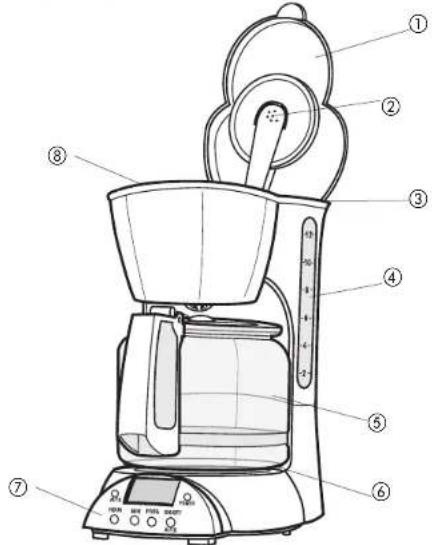
- One-piece cover
- Showerhead
- Water reservoir
-
Water window
†5. Carafe (Part# DCM2900W-03) -
Nonstick Keep Hot plate
-
Control panel (see A for details)
8 . Removable brew basket (inside) Part#DCM2900W-01 -
Consumer replaceable/removable parts
CONTROL PANEL
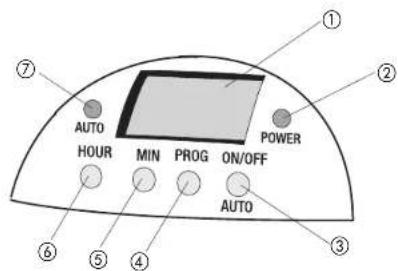
3
A
- Clock display
- Power indicator light
- ON/Off and AUTO brew button
- Program button
- Minute button
- Hour button
- Auto brew indicator light
How to Use
This product is for household use only.
GETTING STARTED
- Remove all stickers, packing material, and literature.
- When selecting a location for the unit, make sure to place it away from your
Setting the Clock
- Plug unit into a standard wall outlet. The digital clock displays 12:00 AM.
- To change the time, press the HOUR button then the MIN button until you reach the desired time.
Tip: When selecting the time, you can press and hold the HOUR or MIN button to speed up the time sequence.
Note: If you unplug the unit or power is interrupted momentarily, the unit will remember the last set time, but after a few seconds, you will need to set the time again.
3. To reset the time, follow steps 1 and 2.
Cleaning Coffeemaker before First Use
- To open the cover, grip the front and lift cover to bring it all the way back until it stays in the up position.
- Pour cold water in the reservoir up to the 12-cup level mark on the water window. Do not overfill.
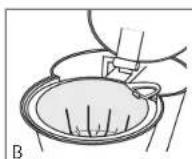
- Grip the brew basket by the handle and insert inside brew basket holder (B). Be sure brew basket is in position inside the brew basket holder, otherwise the cover will not close.
- To close the one-piece cover, press down on the front until it snaps into place.
Important: Make sure the cover snaps securely into place. -
Place the carafe on the Keep Hot plate.
-
Plug in the unit and press the ON/OFF button. The POWER indicator light illuminates and brewing cycle begins.
- When cycle is finished, press the ON/OFF button twice to turn off the unit. The POWER indicator light goes off.
- Discard the water from the carafe and rinse the carafe, carafe lid, and brew basket in warm, sudsy water.
READY TO BREW COFFEE
- Lift the one-piece cover to open.
- Use water markings on carafe to fill water reservoir with cold water.
- Insert a basket style paper filter into the brew basket.
- Add ground coffee (we recommend one or two heaping tablespoons for every cup).
- Insert brew basket into brew basket holder. Be sure brew basket is in position inside the brew basket holder, otherwise the cover will not close.
- To close the cover, press down on the front until it snaps into place.
Important: Make sure the cover snaps securely into place.
-
Place the carafe on the Keep Hot plate.
-
Plug in the unit and press the ON/OFF button. The POWER indicator light illuminates and brewing cycle beings.
-
Once the coffee has finished brewing:
a. Stir it before serving to blend the flavors.
b. Discard the coffee grounds left in the filter. - Remove the carafe to pour coffee.
- Replace the carafe on the "Keep Hot" plate when not serving to keep coffee hot. The coffeemaker will keep coffee warm for 2 hours before it automatically shuts off.
BREWING COFFEE ANYTIME
- Prepare your coffecmaker as instructed in steps 1-7 under Ready to Brew Coffee.
-
To program and set a time for the coffeemaker to begin brewing your coffee.
a. Press the PROG button then press HOUR and MIN buttons to select a time.
b. Press the ON/OFF and AUTO brew button once; the POWER indicator light illuminates.
c. Press the ON/OFF and AUTO brew button again; the AUTO indicator light illuminates and AUTO appears on the digital clock display.
d. To check the time set for AUTO brew, press the ON/OFF button once, then press the PROG button, PROGRAM flashes on the digital display flashes PROGRAM and shows the preset time you selected. -
At the preset time, the POWER indicator will illuminate, the AUTO light will go off and ON appears on the display, indicating the brewing cycle has started.
- To cancel the AUTO brew, press the ON/OFF button; the AUTO indicator light goes off.
SNEAK-A-CUPINTERRUPT FEATURE
While the coffee is brewing, the Sneak-a-Cup® feature allows you to pour a cup of coffee from the carafe. When finished pouring coffee, place the carafe under brew basket. The brewing process continues.
Important: To avoid possible overflow after removing the carafe, be sure to replace the carafe under the brew basket within 30 seconds.
Care and Cleaning
This product contains no user serviceable parts. Refer service to qualified service personnel.
CLEANING
- Be sure the unit is unplugged and has cooled.
- Open the cover.
- To remove the brew basket, grip the handle and lift straight up.
- Discard the paper filter with the coffee grounds.
- Wash the brew basket and carafe with lid in dishwasher, top rack or wash by hand in warm, sudsy water.
- Wipe the unit's exterior surface, control panel and Keep Hot plate with a soft damp cloth.
-
Do not use abrasive cleansers or scouring pads. Never immerse the coffecmaker in water.
-
To clean the inside of the cover, open the cover and leave in the open position.
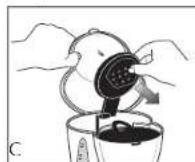
- Pull out the water shower head from the locking tab, wipe surfaces with a damp cloth then push it back to insert firmly in place (C).
Mineral Deposits and Clogging
Mineral deposits left by hard water can clog your coffeemaker. Cleaning is recommended every 3 months.
1. Pour white vinegar into the water reservoir up to the 6- water window. Add cold water up to the 10-cup line.
- Put a paper filter in the brew basket and close the cover. Set the empty carafe on the "Keep Hot" plate.
- Turn on the coffeemaker and let half the cleaning solution brew into the carafe (till water level goes down to around 5^ ). Turn off the coffeemaker and let it soak for at least 15 minutes to soften the deposits.
- Turn on the coffeemaker and brew the remaining cleaning solution into the carafe.
- Turn off the coffeemaker; empty the carafe and discard the soiled filter.
- Fill the reservoir with cold water to the 11-cup line, replace the empty carafe, then turn on the coffeemaker for a complete brew cycle to flush out the remaining cleaning solution. You may have to repeat this to eliminate the vinegar smell/taste.
- Wash the brew basket and carafe as instructed in "Cleaning."
INSTRUCCIONES IMPORTANT DES SEGURIDAD
IMPORTANT MISES EN GARDE
For service, repair or any questions regarding your appliance, call the appropriate "800" number on the cover of this book. Do not return the product to the place of purchase. Do not mail the product back to the manufacturer nor bring it to a service center. You may also want to consult the website listed on the cover of this manual.
One-Year Limited Warranty
(Appplies only in the United States and Canada)
What does it cover?
- Any defect in material or workmanship; provided; however, Applica's liability will not exceed the purchase price of the product.
For how long?
One year after the date of original purchase.
What will we do to help you?
- Provide you with a reasonably similar replacement product that is either new or factory refurbished.
How do you get service?
- Save your receipt as proof of the date of sale.
- Check our on-line service site at www.prodprotect.com/applica, or call our toll-free number, 1-800-231-9786, for general warranty service.
If you need parts or accessories, please call 1-800-738-0245.
What does your warranty not cover?
- Damage from commercial use
- Damage from misuse, abuse or neglect
- Products that have been modified in any way
- Products used or serviced outside the country of purchase
Glass parts and other accessory items that are packed with the unit - Shipping and handling costs associated with the replacement of the unit
- Consequential or incidental damages (Please note, however, that some slates do not allow the exclusion or limitation of consequential or incidental damages, so this limitation may not apply to you.)
How does state law relate to this warranty?
- This warranty gives you specific legal rights, and you may also have other rights that vary from state to state or province to province.
NECESITA AYUDA?
San Jose, Costa Rica
Tel.: (506) 257-5716
223-0136
Ecuador
Servicio Master Ecuador
Tumbam Puerto Boulevard
El Dorado
Panama.
Tel. (507) 2360 236
(507)2360159
Perú
Servicio Tecnico Central
Fast Service
33 Independence Square,
Port of Spain
Trinidad, W.L.
Tel.: (868) 623-4696
Venezuela
Inversiones BDR CA
Av. Casanova C.C.
City Market
Nivel Plaza Local 153
Diagonal Hotel Melia.
Caracas
Tel. (582) 324 0969
Col. Centro, Mexico D.F., CP 06050
BLACK&DECKERis a trademark of The Black & Decker Corporation, Towson, Maryland, USA
Marca registrada de The Black & Decker Corporation, Towson, Maryland, E.U.
Copyright © 2007 Applica Consumer Products, Inc.
Made in People's Republic of China
Printed in People's Republic of China
Importado por:

Applica Consumer Products, Inc.
2007/1-11-29E/S/F
Applica de Mexico S. de R.L. de C.V.
Blvd. Manuel Avila Camacho 2900-902, Fracc Los Pirules
Tlalnepantla, Edo. de Mexico. C.P. 54040