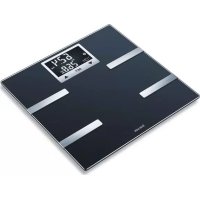
BF 720 - Scale BEURER - Free user manual and instructions
Find the device manual for free BF 720 BEURER in PDF.



| Product type | Digital impedance body fat scale |
| Brand | Beurer |
| Model | BF 720 |
| Dimensions | 30 x 30 x 2.5 cm |
| Weight | 1.6 kg |
| Power supply | 3 AAA 1.5 V batteries |
| Maximum capacity | 180 kg (396 lb, 28 st) |
| Graduation | 100 g for weight, 0.1% for body rates |
| Units | kg, lb, st |
| Main functions | Weight, BMI, body fat percentage, body water percentage, muscle mass, bone mass, basal metabolic rate (BMR), active metabolic rate (AMR) |
| User memory | 8 users, up to 30 measurements per user |
| Connectivity | Bluetooth Low Energy (compatible with iOS 10+ and Android 5+ with Bluetooth 4.0+) |
| App | beurer HealthManager (free) |
| Display | LCD with user initials |
| User recognition | Automatic (based on weight, +/- 3 kg) |
| Activity levels | 5 levels for AMR calculation |
| Safety | Do not use with medical implants, during pregnancy; do not exceed 180 kg; do not step on with wet feet |
| Maintenance and cleaning | Clean with a damp cloth, do not immerse, do not use solvents |
| Warranty | 5 years |
| Batteries | 3 AAA 1.5 V batteries, non-rechargeable |
| Package contents | Scale, 3 AAA batteries, quick start guide, instruction manual |
Frequently Asked Questions - BF 720 BEURER
User questions about BF 720 BEURER
0 question about this device. Answer the ones you know or ask your own.
Ask a new question about this device
Download the instructions for your Scale in PDF format for free! Find your manual BF 720 - BEURER and take your electronic device back in hand. On this page are published all the documents necessary for the use of your device. BF 720 by BEURER.
USER MANUAL BF 720 BEURER
EN Diagnostic bathroom scale
Instructions for use. 15
FR Pese-personne impedancemetre
Mode d'emploi 27
ES Báscula diagnóstica
www.beurer.com/web/we-landingpages/de/cdeclarationofconformity.php.
12. Garantie/Service
Read these instructions for use carefully and keep them for later use, be sure to make them accessible to other users and observe the information they contain.
Dear customer,
Thank you for choosing a product from our range. Our name stands for high-quality, thoroughly tested products for applications in the areas of heat, weight, blood pressure, body temperature, pulse, gentle therapy, massage, beauty, baby and air.
With kind regards,
Your Beurer team
Contents
- Included in delivery.. 16
- Signs and symbols 16
- Intended use 17
4.Warnings and safety notes.. 17 - Device description 18
-
Initial use 19
-
Usage 20
- Cleaning and maintenance 24
9.What if there are problems? 24 - Disposal 25
- Technical specifications 25
12.Warranty/service. 26
Getting to know your device
Functions of the device
This digital scale is intended for weighing and providing a diagnosis of your personal fitness data. It is intended for private use.
The scale is equipped with the following functions, which can be used by up to 8 people:
- Body weight measurement and BMI,
- Body fat percentage calculation,
- Body water content,
- Muscle percentage,
- Bone mass,
Basal and active metabolic rate.
The scale also includes the following additional features:
- Switch between kilograms "kg", pounds "Ibs" and stones "st",
Automatic switch-off function, - Low battery indicator,
Automatic user recognition, - LCD display of 3 user initials,
Storage of the last 30 measurements for 8 users, if the data cannot be transferred to the app.
The measurement principle
This scale works on the principle of B.I.A. (bioelectrical impedance analysis). This involves the calculation of body content in a matter of seconds, using a current that cannot be felt, is completely harmless and does not pose any risk.
When this measurement of the electrical resistance (impedance) is considered alongside constants and/or individual values (age, height, gender, activity level), the body fat percentage and other variables in the body can be calculated. Muscle tissue and water conduct electricity well and therefore have a lower resistance. In contrast, bones and fat tissue have low conductivity as the fat cells and bones are barely able to conduct the current due to very high levels of resistance.
Please note that the values calculated by the diagnostic bathroom scale only represent an approximation of the actual medical analytical values for the body. Only a specialist doctor can precisely establish the body fat, body water, muscle percentage and bone structure using medical methods (e.g. computer tomography).
1. Included in delivery
Check that the device packaging has not been tampered with and make sure that all contents are present. Before use, ensure that there is no visible damage to the device or accessories and that all packaging material has been removed. If you have any doubts, do not use the device and contact your retailer or the specified Customer Services address.
Quick guide
BF 720 diagnostic bathroom scale
- 3 × 1.5 ~V AAA batteries
These instructions for use
2. Signs and symbols
The following symbols are used on the device, in these instructions for use, on the packaging and on the type plate for the device:
| WARNING Warning notice indicating a risk of injury or damage to health. | ||
| IMPORTANT Safety note indicating possible damage to the device/accessory. | ||
| Note Note on important information | ||
| Observe the instructions for use | ||
| Disposal in accordance with the Waste Electrical and Electronic Equipment EC Directive - WEEE | ||
| 20 PAP | Disposition of packaging in an environmentally friendly manner | |
| CE | This product satisfies the requirements of the applicable European and national directives. | |
| The device may not be used by people with medical implants (e.g. pacemakers), as this may affect their functionality. | ||
| Manufacturer | ||
| 180 kg | Do not load the scale beyond 180 kg/396 lb/28 st. | Danger of slipping: do not step on the scale with wet feet. |
| Danger of tipping: position yourself in the centre of the weighing surface. | Place the scale on an even surface. |
3. Intended use
The device is only intended for weighing humans and for recording your personal fitness data. The device is only intended for private use, and not for medical or commercial purposes.
4.Warnings and safety notes

WARNING
- The scale may not be used by people with medical implants (e.g. pacemakers), as this may affect their functionality.
- Do not use during pregnancy.
- Do not step onto the outer edge of the scale on just one side: danger of tipping!
- Swallowing batteries can be extremely dangerous. Keep the batteries and scale out of the reach of small children. Should a battery be swallowed, seek medical assistance immediately.
- Keep packaging material away from children (risk of suffocation).
- Important: do not step onto the scale with wet feet or if the surface of the scale is damp - danger of slipping!
Notes on handling batteries
- If your skin or eyes come into contact with battery fluid, rinse the affected areas with water and seek medical assistance.
- Choking hazard! Small children may swallow and choke on batteries. Therefore, store batteries out of the reach of small children!
- Observe the plus (+) and minus (-) polarity signs.
- If a battery has leaked, put on protective gloves and clean the battery compartment with a dry cloth.
- Protect the batteries from excessive heat.
Risk of explosion! Do not throw batteries into a fire. - Do not charge or short-circuit batteries.
- If the device is not to be used for a relatively long period, take the batteries out of the battery compartment.
- Use identical or equivalent battery types only.
Always replace all batteries at the same time. - Do not use rechargeable batteries!
- Do not disassemble, open or crush the batteries.
i General notes
- Please note that measuring tolerances are possible for technical reasons, as this scale is not calibrated for use in a professional medical context.
- The scale's maximum capacity is 180kg (396 lb/28 st). The results for the weight measurement and bone mass calculation are displayed in 100-g increments (0.2 lb).
- Measurements of body fat, body water and muscle content are displayed in increments of 0.1% .
The calorie requirement is indicated in increments of 1 kcal. - When supplied to the customer, the scale is set to weigh and measure in "cm" and "kg". You can change the unit settings during initial use with the app.
-
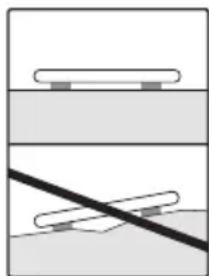
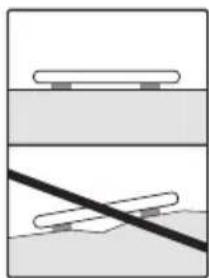
Place the scale on an even, hard surface; a hard surface is crucial for achieving accurate measurements.
-
Repairs may only be carried out by Beurer Customer Services or authorised retailers. Before submitting a complaint, please check the batteries first and replace them if necessary.
Storage and maintenance
The accuracy of the measurements and service life of the device depend on its careful handling:

IMPORTANT
- The device should be cleaned from time to time. Do not use any abrasive cleaning products and never submerge the device in water.
- Make sure that no liquids come into contact with the scale. Never submerge the scale in water. Never rinse it in running water.
- Do not place any objects on the scale when it is not in use.
- Do not press the button violently or with pointed objects.
- Do not expose the scale to high temperatures or strong electromagnetic fields (e.g. mobile telephones).
- Protect the device from knocks, damp, dust, chemicals, marked temperature fluctuations and nearby sources of heat (ovens, heaters).
General tips
- As far as possible, weigh yourself at the same time every day (ideally in the morning), after having been to the toilet, on an empty stomach and without clothing, in order to obtain results which can be compared.
- Important point regarding the measurement: the calculation of body fat may only be made when barefoot; the soles of the feet may be lightly dampened where appropriate.
Results may be unsatisfactory if the soles of the feet are completely dry or have a large amount of hard skin since conductivity will be impaired. - Stand up straight and still during the measurement.
- Wait a few hours after any physical exertion to which your body is unaccustomed.
- Wait approx. 15 minutes after getting up so that the water stored in the body can disperse.
- Remember that only the long-term trend is important. Short-term changes in weight within a few days are normally caused by loss of fluids; however, body water plays an important role in terms of well-being.
Limitations
When calculating body fat and the other values, unusual and implausible results may occur in the case of:
Children under approx. 10 years of age
Performance athletes and body-builders
- Persons with a fever, persons undergoing dialysis, persons with oedema symptoms and persons suffering from osteoporosis
- Persons taking cardiovascular medicine (affecting the heart and vascular system)
- Persons taking vasodilative or vasoconstrictive medication
- Persons with significant anatomical abnormalities in their legs compared with their overall body height (leg length significantly shorter or longer).
5. Device description
Rear
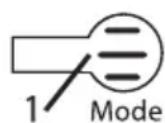
1.Mode button
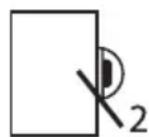
2. Battery compartment
Display
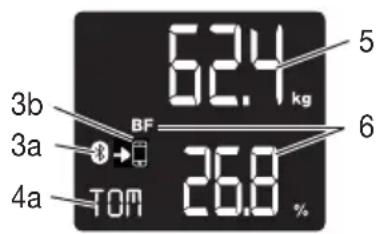
3a. Bluetooth® symbol for connection between scale and smartphone
3b. Synchronisation symbol when transferring measurements
4a. Initials of the user, e.g. TOM
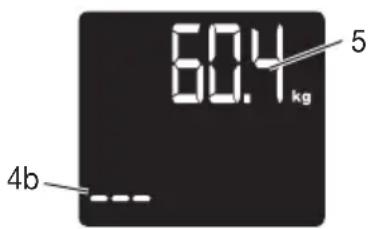
4b. Unknown measurement "--
- Body weight
- Body data e.g. BMI, body fat etc.
6. Initial use
Inserting the batteries
Remove the batteries from the protective packaging and insert the batteries into the scale ensuring that the battery polarity is correct. If the scale does not function, remove the batteries completely and reinsert them.
Positioning the scale
Place the scale on an even, hard surface; a hard surface is crucial for achieving accurate measurements.
6.1 Initial use with the app
To be able to calculate your body fat percentage and additional body values, you must save the personal user data on the scale.
The scale has 8 user memory spaces which allow, for example, you and your family members to save personal settings.
It is also possible to activate users via other mobile end devices on which the "beurer HealthManager" app has been installed or by changing the user profile in the app (see the app settings).
Keep the smartphone close to the scale in order to maintain an active Bluetooth® connection during initial use.
- Download the free "beurer HealthManager" app from the Apple App Store (iOS) or from Google Play (Android™).
- Start the app and follow the instructions.
- Select BF 720 in the app.
- Enter the BF 720-related data.
The following settings must be set or entered in the "beurer HealthManager" app:
| User data Set values | |
| Initials/abbreviation of name Max. 3 letters or numbers | |
| Height 100 to 220 cm (3'3.5" to 7'2.5") | |
| Age 10 to 100 years | |
| Gender Male ( ), female ( ) | ♂ ♀ |
| Activity level 1 to 5 | |
Activity levels
The medium-term and long-term perspective is decisive when selecting the activity level.
| Activity level | Physical activity |
| 1 | None. |
| 2 | Low: little and light physical exertion (e.g. going for walks, light gardening, simple gymnastics). |
| 3 | Medium: physical exertion, at least 2 to 4 times a week for 30 minutes each. |
| 4 | High: physical exertion, at least 4 to 6 times a week for 30 minutes each. |
| 5 | Very high: intensive physical exertion, intensive training or hard physical work for at least 1 hour every day. |
- Assign the user when requested to do so by the app.
For automatic personal recognition, the first measurement must be assigned to your personal user data. Follow the app instructions for this. Step onto the scale with bare feet and ensure that you are standing still with equal weight distribution and with both feet on the electrodes.

Note: Only the measurements displayed on the scale may be used for further observations.
6.2 Initial use without the app (alternative)

Note:
We recommend using the "beurer HealthManager" app for initial use and implementing all settings. Therefore, only carry out this step if initial use is to be carried out entirely without the app. If you have performed initial use with the app, go directly to the "Taking measurements" chapter.
- After inserting the batteries, "USE APP" will flash in the display. Press the SET button to set the year/ month/day, as well as hour/minute.
To do this, press the buttons.
Confirm with the SET button. "0.0" appears in the display.
- Now press the SET button again. The display will show "P-01" or the number of the scale user memory which was most recently used.
Select your user memory (P-01 to P-08) with the / buttons and press the SET button to confirm. - Implement your settings such as gender and initials, height, etc. (See "Initial use with the app" (table)).
Confirm each setting by pressing the SET button. - The 4-digit user PIN appears once you have finished entering your details. This will be required for logging into the app at a later time. "0.0" will then appear in the display, along with your initials.
- For automatic personal recognition, the first measurement must be assigned to your personal user data.
Step onto the scale, ideally with bare feet, and ensure that you are standing still with equal weight distribution, with both feet on the electrodes.

Note on logging into the app at a later time:
If you have carried out the initial use of the scale without the app, you can add your existing scale user memory to the "beurer HealthManager" app. This requires you to enter your 4-digit user PIN. This process is described in the app.
7. Usage
7.1 Taking measurements
Place the scale on an even, hard surface; a hard surface is crucial for achieving accurate measurements.
Measuring your weight, carrying out diagnostics
Step onto the scale with bare feet and ensure that you are standing still with equal weight distribution and with both feet on the electrodes.

Note: The measurement result will be incorrect if the measurement is taken with socks on.
The scale begins to take measurements straight away. First, the weight is displayed.
If a user has been assigned, the BMI, body fat, water, muscle, bone, BMR and AMR are shown. This is the case if the initials are shown.
The following appears:
- Weight in kg with BMI
- Body fat in % (BF)
- Body water in % ≈
- Muscle percentage in %
- Bone mass in kg
- Basal metabolic rate in kcal (BMR)
- Active metabolic rate in kcal (AMR)

Note: If two or more users have potentially been recognised, the display switches between them. Select your user by pressing the SET button.
If no user is recognised, only the weight and "--" will be displayed. You can then select your user using the buttons, and confirm with the SET button. Otherwise the measurement will not be saved.
Only measuring weight
Now step onto the scale wearing shoes. Stand still with your weight distributed equally on both feet. The scale begins to take measurements straight away.
If a user has been assigned, the BMI will be displayed. This is the case if the initials are shown.
If the user is not recognised, only the weight can be shown and no initials appear "-"
Switching off the scale
The scale switches itself off automatically.
7.2 Evaluating the results
Body fat percentage
The following body fat percentages serve as a guideline (for further information please consult your doctor).
Male Female
| Age Low | Normal | Moderate | High | Age Low | Normal | Moderate | High | |||
| 10-14 <1 | 1% | 11-16 | % | 16.1-21% | >21.1% | 10-14 <16% | 16-21% | 21.1-26% | >26.1% | |
| 15-19 <1 | 2% | 12-17 | % | 17.1-22% | >22.1% | 15-19 <17% | 17-22% | 22.1-27% | >27.1% | |
| 20-29 <1 | 3% | 13-18 | % | 18.1-23% | >23.1% | 20-29 <18% | 18-23% | 23.1-28% | >28.1% | |
| 30-39 <1 | 4% | 14-19 | % | 19.1-24% | >24.1% | 30-39 <19% | 19-24% | 24.1-29% | >29.1% | |
| 40-49 <1 | 5% | 15-20 | % | 20.1-25% | >25.1% | 40-49 <20% | 20-25% | 25.1-30% | >30.1% | |
| 50-59 <1 | 6% | 16-21 | % | 21.1-26% | >26.1% | 50-59 <21% | 21-26% | 26.1-31% | >31.1% | |
| 60-69 <1 | 7% | 17-22 | % | 22.1-27% | >27.1% | 60-69 <22% | 22-27% | 27.1-32% | >32.1% | |
| 70-100 | <18% | 18-23% | 23.1-28% | >28.1% | 70-100 | <23% | 23-28% | 28.1-33% | ||
Values will often be lower for fitness enthusiasts. Depending on the sporting activities performed, the training intensity and the physical constitution, the results may still be below the stated standard values. Please note, however, that there may be a risk to health in the case of extremely low values.
Body water content
The body water content in % is normally within the following ranges:
Male
| Age | Poor | Good | Very good |
| 10–100 | <50% | 50–65% | >65% |
Female
| Age | Poor | Good | Very good |
| 10-100 | <45% | 45-60% | >60% |
Body fat contains relatively little water, therefore body water content may be below the standard values in persons with a high body fat percentage. On the other hand, endurance athletes may exceed the standard values due to having low levels of fat and a high muscle percentage.
The body water calculation performed using this scale is not suitable for drawing medical conclusions, for example in the case of age-related water retention. Consult your doctor where necessary. A high body water content is generally desirable.
Muscle percentage
The muscle percentage is normally within the following ranges:
Male Female
| Age Low Normal High Age Low Normal High | |||||||
| 10-14 <44% 44-57% >57% 10-14 <36% 36-43% | >43% | ||||||
| 15-19 <43% 43-56% >56% 15-19 <35% 35-41% | >41% | ||||||
| 20-29 <42% 42-54% >54% 20-29 <34% 34-39% | >39% | ||||||
| 30-39 <41% 41-52% >52% 30-39 <33% 33-38% | >38% | ||||||
| 40-49 <40% 40-50% >50% 40-49 <31% 31-36% | >36% | ||||||
| 50-59 <39% 39-48% >48% 50-59 <29% 29-34% | >34% | ||||||
| 60-69 <38% 38-47% >47% 60-69 <28% 28-33% | >33% | ||||||
| 70-100 <37% 37-46% >46% 70-100 <27% 27-32% | >32% | ||||||
Bone mass
Like the rest of our body, our bones are subject to natural growth, shrinking and ageing processes. Bone mass increases rapidly during childhood and reaches its peak between the ages of 30 and 40. As we age, our bone mass then begins to reduce. You can combat this reduction to an extent with the help of a healthy diet (particularly calcium and vitamin D) and regular physical exercise. The stability of your skeleton can be further increased by means of targeted muscle build-up. Please note that this scale does not identify the total bone mass, but rather just the mineral content of the bone (without water content and without organic substances). It is very difficult to influence the bone mass, although it does fluctuate slightly within the scope of influencing factors (weight, height, age, gender). There are no recognised guidelines or recommendations.

IMPORTANT:
Please do not confuse bone mass with bone density.
The bone density can only be determined by means of a medical examination (e.g. computer tomography, ultrasound). It is therefore not possible to draw conclusions on changes to bones and bone hardness (e.g. osteoporosis) using this scale.
BMR
The basal metabolic rate (BMR) is the amount of energy required by the body at complete rest in order to maintain its basic functions (e.g. when lying in bed 24 hours a day). This value is primarily dependent on weight, height and age.
It is displayed on the diagnostic bathroom scale in the kcal/day unit and is calculated using the scientifically recognised Harris-Benedict equation.
This is the amount of energy that is required by your body under all circumstances and must be re-supplied to the body in the form of food. If your energy intake is below this level in the longer term, this can result in damage to health.
AMR
The active metabolic rate (AMR) is the amount of energy that the active body consumes each day. An individual's energy requirement increases when the level of physical activity increases; the diagnostic bathroom scale calculates this by means of the activity level (1-5) that has been entered.
To maintain the current weight, the energy that the body uses must be replaced in the form of food and drink.
If less energy is taken in than is used over a long period of time, the body primarily takes the difference from the fat stores, with resulting weight loss. However, if the amount of energy taken in exceeds the calculated active metabolic rate (AMR) for a longer period, the body cannot burn off the excess energy. The excess is stored in the body as fat, leading to weight gain.
Temporal context of the results
Note: Please note that only the long-term trend is important. Brief deviations in weight within a few days are normally caused by loss of fluids.
The interpretation of the results is based on changes in total body weight, percentage of body fat, body water and muscle content, as well as on the length of time over which these changes occur.
Rapid changes within the scope of a few days are to be considered separately from medium-term changes (in the scope of weeks) and long-term changes (months).
It can be said as a basic rule that short-term changes in weight are almost entirely changes in water content, whereas medium-term and long-term changes may also relate to the fat percentage and the muscle percentage.
- If your weight drops in the short term but your body fat percentage increases or stays the same, you have only lost water, for example following a training session, visit to the sauna or a diet aimed only at fast weight loss.
- If your weight increases in the medium term and your body fat percentage drops or stays the same, you may have built up valuable muscle mass.
- If your weight and body fat percentage both fall at the same time, then your diet is working - you are losing fat mass.
- Ideally, you should support your diet with physical activity, fitness or strength training. This enables you to increase your muscle percentage in the medium term.
- Body fat, body water and muscle percentages should not be totalled (muscle tissue also contains components made of body water).
7.3 Other functions
User assignment
It is possible to assign up to 8 scale users for a weight-only measurement (with shoes) and for a diagnosis measurement (bare feet).
For a new measurement, the scale assigns the measurement to the user whose most recently saved measurement falls within +/- 3kg . If two or more users have potentially been recognised, the display switches between them. Select your user by pressing the button.
Saving the assigned measurements on the scale
If the app is open and there is an active Bluetooth connection to the scale, newly assigned measurements are transferred immediately to the app. In this case, the values are not saved on the scale.
If the app is not open, the newly assigned measurements are saved on the scale. A maximum of 30 measurements per user can be saved on the scale. The saved measurements are transferred automatically to the app when you open the app within the Bluetooth range.
It is possible to automatically transfer data when the scale is switched off.
The synchronisation symbol on the scale display appears when new measurements are being transferred to the app. It does not appear if no new measurements have been saved or assigned for this user.
Deleting scale data
If you would like to completely delete all measurements and old user data on the scale, switch on the scale and press the Mode button on the rear of the scale for approx. 6 seconds.
"CLR" will appear on the display for several seconds.
This is necessary if you would like to delete scale users who have been set up incorrectly or are no longer required, for example.
You must then carry out the actions in chapter 7 (on user assignment) again.
Deleting individual users
Switch on the scale, select the user using the UP button and wait until "0.0 kg" appears; press the Mode button for 6 seconds until "DEL" appears.
Replacing the batteries
Your scale is equipped with a low battery indicator. If you operate the scale with flat batteries, "Lo" will appear on the display and the scale will automatically switch off. In this case, the batteries must be replaced (3 x 1.5 V AAA).

NOTE:
- When replacing the batteries, use batteries of the same type, make and capacity.
- Do not use rechargeable batteries.
- Use batteries free from heavy metals.
8. Cleaning and maintenance
The device should be cleaned from time to time.
This should be done using a damp cloth and, if necessary, a small amount of detergent.

IMPORTANT
- Never use abrasive solvents or cleaning products!
- Never submerge the device in water!
- Do not clean the device in a dishwasher!
9. What if there are problems?
If the scale encounters an error during measurement, the following is displayed:
| Display Cause Solution | ||
| “”Unknown measurement | as it is outside the user assignment limit or a unique assignment is not possible. | Select your user by pressing the▲ button. |
| BF-Err | The proportion of fat is outside the measurable range (less than 3% or greater than 65%). | Please repeat the measurement barefoot, or with the soles of the feet lightly dampened if necessary. |
| Err | Maximum weight capacity of 180 kg exceeded. | Loads must not exceed 180 kg. |
| Err or incorrect weight is displayed. | No even, hard surface. Place the scale on an even, hard surface. | scale on an even, hard surface. |
| Err or incorrect weight is displayed. | Not standing still. Stand as still as possible. | |
| Incorrect weight is displayed. | Incorrect zero point of scale. Wait until the scale switches itself off. Activate the scale, wait for “0.0 kg” to appear and take the measurement again. | |
| No Bluetooth® con- nection (symbol is missing). | Device outside the range. | The minimum range in the open is approx. 10 m. Walls and ceilings reduce the range. Other radio waves may interfere with the transmission. Therefore, do not position the scale near devices such as WiFi routers, microwaves, induction hobs etc. |
| No connection to the app. | Completely close the app (including in the background). Switch Bluetooth® off and back on again. When doing so, please note that the scale must not be connected from the Bluetooth settings of the operating system. If need be, remove it from the devices list in the Bluetooth settings, and then use the “beurer HealthManager” app. Switch the smartphone off and back on again. Remove the batteries in the scale for a short period and reinsert them. | |
| Measurements are not transferred to the app (+symbol is missing) | No measurement for the user or no Bluetooth connection. | The initials which appear on the scale display must be assigned to the scale in your app settings. Only these measurements can be transferred. Therefore, check your initials and your app settings. |
| FULL User memory space | is full. No more measurements can be saved. | Open the app within the Bluetooth® range. The data will be transferred automatically. This may take up to one minute. |
| Lo | The batteries in the scale are empty. | Replace the batteries in the scale. |
10. Disposal
Empty, completely flat batteries must be disposed of through specially designated collection boxes, recy
cling points or electronics retailers. You are legally required to dispose of the batteries.
The codes below are printed on batteries containing harmful substances:
Pb = Battery contains lead,
Cd = Battery contains cadmium,
Hg = Battery contains mercury.
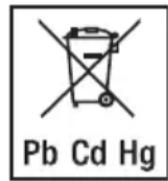
For environmental reasons, do not dispose of the device in the household waste at the end of its service life. Disposal of the device at a suitable local collection or recycling point in your country.
Dispos of the device in accordance with EC Directive - WEEE (Waste Electrical and Electronic Equipment). If you have any questions, please contact the local authorities responsible for waste disposal.
Dispose of packaging in an environmentally friendly manner.


11. Technical specifications
| Model: BF 720 | |
| Dimensions: 30 x 30 x 2.5 cm | |
| Weight: 1.6 kg | |
| Measurement range: 5-180 kg | |
| Data transfer via Bluetooth® low energy technology | The product uses Bluetooth® low energy technology, frequency band 2402 - 2480 MHz, max. 5 dBm transmission power, compatible with Bluetooth® ≥ 4.0 smartphones/tablets |
| A list of compatible smartphones, information on software and details on the devices can be found at the following link: connect.beurer.com | |
| System requirements for the “beurer HealthManager” app | iOS ≥ 10.0, Android™ ≥ 5.0 Bluetooth® ≥ 4.0. |
Subject to technical changes.
We hereby confirm that this product complies with the European RED Directive 2014/53/EU. The CE Declaration of Conformity for this product can be found under:
www.beurer.com/web/we-landingpages/de/cedeclarationofconformity.php.
12. Warranty/service
Beurer GmbH, Söflinger Straße 218, 89077 Ulm, Germany (hereinafter referred to as "Beurer") provides a warranty for this product, subject to the requirements below and to the extent described as follows.
The warranty conditions below shall not affect the seller's statutory warranty obligations which ensue from the sales agreement with the buyer.
The warranty shall apply without prejudice to any mandatory statutory provisions on liability.
Beurer guarantees the perfect functionality and completeness of this product.
The worldwide warranty period is 5 years, commencing from the purchase of the new, unused product from the seller.
The warranty only applies to products purchased by the buyer as a consumer and used exclusively for personal purposes in the context of domestic use.
German law shall apply.
During the warranty period, should this product prove to be incomplete or defective in functionality in accordance with the following provisions, Beurer shall carry out a repair or a replacement delivery free of charge, in accordance with these warranty conditions.
If the buyer wishes to make a warranty claim, they should approach their local retailer in the first instance: see the attached "International Service" list of service addresses.
The buyer will then receive further information about the processing of the warranty claim, e.g. where they can send the product and what documentation is required.
A warranty claim shall only be considered if the buyer can provide Beurer, or an authorised Beurer partner, with
- a copy of the invoice/purchase receipt, and
- the original product.
The following are explicitly excluded from this warranty:
- deterioration due to normal use or consumption of the product;
- accessories supplied with this product which are worn out or used up through proper use (e.g. batteries, rechargeable batteries, cuffs, seals, electrodes, light sources, attachments and nebuliser accessories);
- products that are used, cleaned, stored or maintained improperly and/or contrary to the provisions of the instructions for use, as well as products that have been opened, repaired or modified by the buyer or by a service centre not authorised by Beurer;
- damage that arises during transport between manufacturer and customer, or between service centre and customer;
- products purchased as seconds or as used goods;
- consequential damage arising from a fault in this product (however, in this case, claims may exist arising from product liability or other compulsory statutory liability provisions).
Repairs or an exchange in full do not extend the warranty period under any circumstances.
FRANÇAIS

Chere cliente, cher client,
www.beurer.com/web/we-landingpages/de/cedeclarationofconformity.php.
12. Garantie/maintenance
www.beurer.com/web/we-landingpages/de/cedeclarationofconformity.php.
| Età Bassa | normale alta | Età Bassa normale alta | |
| 10-14 | < 44% | 44-57% | >57% |
| 15-19 | < 43% | 43-56% | >56% |
| 20-29 | < 42% | 42-54% | >54% |
| 30-39 | < 41% | 41-52% | >52% |
| 40-49 | < 40% | 40-50% | >50% |
| 50-59 | < 39% | 39-48% | >48% |
| 60-69 | < 38% | 38-47% | >47% |
| 70-100 | < 37% | 37-46% | >46% |
| 10-14 | <36% | 36-43% | >43% |
| 15-19 | <35% | 35-41% | >41% |
| 20-29 | <34% | 34-39% | >39% |
| 30-39 | <33% | 33-38% | >38% |
| 40-49 | <31% | 31-36% | >36% |
| 50-59 | <29% | 29-34% | >34% |
| 60-69 | <28% | 28-33% | >33% |
| 70-100 | <27% | 27-32% | >32% |
Massa ossea
www.beurer.com/web/we-landingpages/de/cdeclarationofconformity.php.
www.beurer.com/web/we-landingpages/de/cdeclarationofconformity.php.
12. Garanti/servis
BecbI NmEOT cLeyuOuJe cyHKUIN, KOToPbIMN MOrT nOJIb3OBaTBcA Do 8 HeIOBeK:
- n3MpeHneMaccbI TeJa n IMT;
OppeJeHne DOnn JxipoBoM Maccbl;
-ДОЛТКанЕВОЙ XИДКОCTN;
DOJIMMbIWeHONMaccbI;
MaccbI KOCTeN;
3HaueHn OCHOBHOrO OMeHa BeIeCTb N OMeHa BeIeCTB C yHeTOM fN3uYeCKo aKtNBHOCTn.
Kpome TOrO,doCTyHbI cIeJeUoIue yHKuN:
- NepekeKIOUeHne Mekdy eDINHnIaMn I3MepeHnIy: KUNoIrpamM kg, cyHT Ib n cToyH st;
- aBTOMaTnueCKoe OTKJIoueHne;
- INHdkaLgna Heo6xOdMOCn 3aMeHbI 6aTapeek, ecIn OHn pa3pndnncb;
- aBTOMaTInueckoe paCnO3HaBaHHe NOLb3OBaTeJIa;
- XXK-индикаду Тр exинцалов NOьь3OBaTeJI;
XpaHeHne daHHbIX 30 nocJeHNix u3MepeHn dIg 8 ueIOBeK, eCNI HET BO3MOxHOCTN nepeHOca daHHbIX B npNJIOKeHne.
PpHcHn H3MepeHn
DaHbIe Bcbl pa6oTaOT no npHunny BIA (6nOuMneHaHcometpna). 3a CHTaHHbIe cKyHdbI c NOMOsbIO He3aMeTHoro n a6COJIOTHO 6e3Onachoro 3NeKtpnueeckoTOKa onpeJeTcra CoCTab TeJa YeNoBeka.
IocpeCTBOM n3MepeHnna 3JeKtpnueCKoro COnpOTNBHeHn (mneHaC) C yyeTOM NOCTOHHbIX BELINHn Hnn INHnBnDyalbHbIX 3NaueHn (BO3pact, poCT, nol, CTeneHb aKTNBHOCTn) MOXHO ONpeJNTb DOJI KInPOBOi Maccbl nn Dpyrnx npaMeTpOB B opraHn3Me. MbIweHn TkaHb N BOda ImeOT XopoWyo 3JeKtpnueCKyIO pNOBOIMOCtB, PO3TOMy ypoBeHb COnpOTNBHeHn 3deCb HeBeNIk. KocTN JxIpOBa TKAh, HAO6OpOT, IMeHT He6oJbWyo 3JeKtpnueCKyo pNOBOIMOCtB, TaK KaK JxIpOBbIE KJIeTKN I KOCTN N3-3a OceHb BlicOKOTO COnpOTNBHeHn PpaKTNUeCKn He pNOBOjT TOK.
YuHTbIaIe, YTO 3NaueHnI, OnpedeJIeHHbIe DnaIarHOCTUeCKMn BEcAMn, AByJIOTcR JIiUb np6JIxJeHHbIM K peaJIbHbIM MeINzHckIM 3NaueHnI M, NOLyueHHbIM B pe3yJIbTaTe aHaJIIN3a. IOnIO XInPOB0Maccbl, TKAHeBOJ XnIKoCTN, MbISeHNO Maccbl n CTpoEHne KOCTe MoXeT ONpeJIINrToJIbKO Bpaq, INCNoJIb3yraMeINzHckne MeToDbI (HaNPImep, KOMNbIoTEpHyIO TOMOrpaΦnIO).
6.1 BbO B 3KcNpyaTuH npn nmoOn npnloXeHna
YTo6bI onpeDenHb DoJIIO JxipoBOi MaccB I OprAH3Me I pyrNe fN3nueckne NOKa3aTeJI, Heo6XODIMO COxpaHTb B nAMrTn BEcOB JInHbIe DaHHbIe NOnb3OBaTeJI. Becbl OCHaSeHbI 8 JaeyKamn nAmrTI, B KOToPbIX Bbl, HApPImep, YJeHbI BaWeI cEmBu CMOKeTe XpaHTb JInHbIe DaHHbIe.
Kpome Toro, noIb3OBaTeH MOryT noKJIouaTbcra C nOMOuMo MObNbHbIX yCTpoiCTB C yCTaHOBJIeHHbIM npIoXeHnEM Beurer HealthManager nIu nyTeM n3MeHeHn IpoΦnI rnoIb3OBaTeJr B npIoXeHn (cM. NaCTPOkN npIoXeHn).
YTo6bI npn noJrTOBKe np6opA K pa6oTe coeHHeHne Bluetooth® ocTaBaJIOcB aKTINHBIM, dpeKHTe cMapTfoH Ha doCTaTOUHO 6m3KOM pacCTOHN OT BEOB.
- 3arpy3nte 6ecnlaTHe npuIoxHeBeRer HeaithManager B Apple App Store (iOS) ninn Google Play (AndroidTM).
- 3anyctnte npnloxeHne n cJeynTe nHcTpyKzmaM.
- BbI6epTeB npnloXeHn BF 720.
- BBeIte daHhble, kacaiounec BF 720.
B npiloxeHn Beurer HealthManager doJXhbl 6bTb BbIbpaHbI cJeDyUOune HaCtpoiKn:
7.1 BbInOpHeHne n3MepeHn
YcTaHOBnTe BecbHa POBHyIO TBepyIO NOBepXHocTb; TBepdA IOBepXHOCTb RAJIaETc HEO6xOIMMbIM ycIobnEM dIra ToHOrO n3MepeHn.
I3mepenHe Beca, npoBeJeHne dnaarHOCTnKu
BcTaHbTe Ha BeCbI 6ocbIMn Horamn. CToIte cNoKoHn Ho Ha 3JeKTpOaX, paBHomepHo pacpeJeINB Bec Ha oBe HOrn.
i Yka3aHne: EcnBbl npoBOnTe n3MepeHne Maccbl, He cHraB HOckn, pe3yIbTaTbI n3MepeHn6dyr HnpaBnIbHbIMN.
BecbI HeMeIeHNo HaunHaOT n3MepHeNc. ChauJa oTo6paXkaeTcR Bec.
Ecn yka3ah nolb3OBaTeNb, To Ha dncnlee oTo6paXaOTcra IMT, XnpoBa MaCCa, TkaHeBa JxNkoCTb, MblueHna Macca, KocTHaMaCCa, ypoBeH ocHOBHO r aKtNBHO OMeHa BeIeCTB. B 3Tom cIyae TaKke oTo6paXaOTcra HnIuaJIb.
IPOBNTCCTCNEUYUOaYHNDKauy:
- Bec B Kc IMT
2.Доляжиробов масьв %(BF)
3.ДоляТканевоиЖИДКОCTNВ%
4.Доя Мьшем MaccbI B % - Macca KocTeB Kf
- Ckopoocb oCHOBHOro 6meHa BeueCTB Kkan (BMR)
- Ckopoocb o6MeHa BeuecTB c yyeTOM fH3nueckOaKTHBHOCTN B KkA1 (AMR)
Uka3aHne: Ecnn ecTb Dba nII 60Jee BO3MOXhBIX O6HapyKeHHbIX NOIb3OBaTeJI, NOIb3OBaTeJI nepeKIOuYaeTc H aDcNlEE. Bbl6epnte noIb3OBaTeJI, Haxab KHOkny SET. EcnI noIb3OBaTeJI He o6HapyKeH, 6dyT OTO6paKaTbcra TOnIbKO Bec N 一 ^ 一 . C nOMOUIIO KlaBNI A/Bbl MOxete Bbl6paTb CBOero noIb3OBaTeJI n IOdTBePdITb erO KHOkoi SET. B npOTUBHom clyuae 3TO I3MepeHne He 6yDet coXpaHeNo.
ToIbKO n3MepeHne BeCa
Teneb BCTaHbTe Ha BeCb I O6yBn. CToIte cNoKOiHo, paBHomepHo pacnPpeJia Rn. Bec Hn. Bcbl HemeJeHHo NaHHaOT n3MepeHne.
Ecn noIb3OBaTeIb 6bl onpeJeH, To 6ydt OTo6paKaTbcra IMT. B 3tOM cnyae taKke oTo6paKaIoTcra HnHuaJIb.
EcnnoIb3oBaTeIb He onpeJeTcra, To Ha nucnnee OTo6paXaETcra ToIbKO n3MepeHHbI BEc, HnuaJIbHe OTo6paXaIOCTcra.
BbIKJIOUeHne BecOB
Becbi BBIKJIIOUaOTc aBTOMaTnueckn.
7.2 OueHka pe3yIbTaTOB
Доля КИРОВ МAccbI
OpneHTnpomЯBJIOTcI CJIeDyUOuIe 3HaueHnJ XInpOBoM MaccbI B % (3a DoIOnHntelbHOHnΦOpMaunEoi6paTntecb K Bpauy).
MxKuHa XeHunHa
| Возpaced | Нзкая | Хорma- лbethа | Умени- ная | Выcio- ковя |
| 10-14 | < 11% | 11-16% | 16,1-21% | >21,1% |
| 15-19 | < 12% | 12-17% | 17,1-22% | >22,1% |
| 20-29 | < 13% | 13-18% | 18,1-23% | >23,1% |
| 30-39 | < 14% | 14-19% | 19,1-24% | >24,1% |
| 40-49 | < 15% | 15-20% | 20,1-25% | >25,1% |
| 50-59 | < 16% | 16-21% | 21,1-26% | >26,1% |
| 60-69 | < 17% | 17-22% | 22,1-27% | >27,1% |
| 70-100 | < 18% | 18-23% | 23,1-28% | >28,1% |
| Воз pact | Нзкая | Hорma-льная | Умерен-ная | Бытокая |
| 10-14 | < 16% | 16-21% | 21,1-26% | >26,1% |
| 15-19 | < 17% | 17-22% | 22,1-27% | >27,1% |
| 20-29 | < 18% | 18-23% | 23,1-28% | >28,1% |
| 30-39 | < 19% | 19-24% | 24,1-29% | >29,1% |
| 40-49 | < 20% | 20-25% | 25,1-30% | >30,1% |
| 50-59 | < 21% | 21-26% | 26,1-31% | >31,1% |
| 60-69 | < 22% | 22-27% | 27,1-32% | >32,1% |
| 70-100 | < 23% | 23-28% | 28,1-33% | >33,1% |
Y cnoptcmeHOB 3NaueHn aacto 6bIbAOT Hxke. B 3aBucmocTn OT BnDa Cnopta, INHTeHCNBHOCTN TpeHnpOBOK I KOHCTNTUyTeJa 3HaueHn MOryt 6bITb Hxke yKa3aHHbIX OpneHTnpOBOuHbIX 3HaueHn. OdHako yUnTBaIte, YTO Upe3BbIaHn Hn3Kne NOKa3aTeJI MOryt 6bITb ONaCHbl Dnla 3doPOBBy.
OJRATKaHEBOXKIOCTN
ДояТКаHEBOJЖИКОCTNВ%обиHNo HaxOДNTСВ CJIeDyIouxДиana3OHax:
Myykunha XeHnHa
He nytaIte KOCTHyIO MAccy C IIOTHOCTbIO KOCTN.
ПлOTHOCь KОCTи ONpeDEJIЯETCЯ TOЛБК ПИ МEDиHCKOM UCCNeIeOBAHIN (HaNPIMep, KOMNbIOTepHOJ TOMOrpaФи, YNbTpa3ByKOBOM UCCNeIeOBAHIN). ПОТOMу DeIaT b KaKHe-JIb60 3akIIOUeHnO 6 N3MeHEnx KOCTe I TBePdoCTN KOCTn (HaNPIMep, OCTeONOpO3e) Pn I NOMUIn DaHHbIX BECOB HeBO3MOXHO.
BMR (ypoBHe b OCHOBHoro 06MeHa BeueCTB)
Скорoctь ochOBHOrO obMeHa BeIeCTB (BMR = Basal Metabolic Rate) - эTO KoJIuYeCTBO əHeprIn, KOTOpoe Tpe6yeTcR opraHn3My B COCToHn IONHO rnoNOKoI NOdEprXaHn OCHOBhIx ΦyHKcIi (HanpIMep, ecII KpyIbIe cyTKI JexaTb B nocTeII). DaHHe 3NaUeHne B 3NaHTeJbHO n CTeNeHn 3aBNCIT OT BEca, poCTa N BO3pacta.
Ha dnaHocTnuecknx Becax daHHoe 3NaHeHne OTo6paXaeTcB eHNuax «Kkai/JeHb» n paCCHTbIbaeTc corlaacHO hayHo np3HaHHo fOpMyJe Xappica-BeHeDenkTa.
3TOT oBbem 3Heprn Hno6xOIM BaWemy orpAHImy B IIO6OM cIyae n DoJXeH NOCTynaTb B opraHn3M C eOn. EcIn Bbl npoJIXteJIbHOe BpeM noJYaeTe MehJWee KOINueCTBO 3Heprn, 3TO MOKeT HeratNBHO OTPaNTbcr Ha BaWem 3DOpOBBe.
AMR (o6meh BeuecTB C yueTOM n3nuecko aKTHBHOCTN)
Obmen Beuectb C yueToM fN3nuecko aKTHBHOCTn (AMR - Active Metabolic Rate) - 3TO KOINueCTBO 3Hepn, KOTOpoe oPraHmEgeJHeBHO paCXOyET B aKTHBOM COCTOHN. PaXoJ 3Hepn y YeNoBeKa NOBIIaTcB MecTe C yBEnuHem Ero fN3nuecko aKTHBHOCTn IN ONpeJeTcRA Na dHaarHOCTNUeCKNX Becax corIacHo 3aDaHHo CTeneHn aKTHBHOCTn (1-5).
Ipy noepkaHn ImeoceOcBeca 3aTpaehHa 3Heprna DoJxHa 6bITb BO3BpaueHa B opraHn3M C nIe Hn HnNTkAMN.
EcnB TeueHne npoJxntbHoro BpeMeHN B opraH3M Bo3BpaaTcR MeHbIe 3HeprH, Yem pacxOyTeCn, OpraH3M NaHnaet BO3MeuTaB 3Tu pa3HnUy B OCHOBHom 3a CHT HAKONJIeHHbIX XInPOBbIX OTLOXKeHn, B pe3yNbTaTe Bec ChnKaEtC. Ecn, HapotINB, B TeueHne npoJxntbHoro BpeMeHN 3HeprN NOCTyNaET 60JbWe, Yem paccuHaHoe 3NaueHne OMeHa BeIecTB C yyeTOM n3NuYeCKoJ AKTNBHOCTn (AMR), n3nnKn 3Heprn B opraH3Me He CxNraOTcR, a COxpaHraOTcR B fOpMe XInPOBbIX OTLOXKeHn, B pe3yNbTaTe Bec yBeIuHBaETcR.
B3aHMOCBRA3b pe3yIbTaTOB BO BpeMeHN

Yka3aHne: YUHTte, yTO 3NaueHne IMeOT TOnbKO DOJIOBpeMeHHbe TEHeHcN. KpaTKOBpeMeHHbE OTKIOHeHnBA BceA B TeueHne HeCKOJIbKnx DHeN, KaK npabIno, oByCIOBJeHbI NOTepei XnIDKocTn.
HHTeppeTaIpaPe3yIbTaTob DOJXHa yuITbIbTa Ib 3MeHeHne O6eMaccB Tea N npOeHTHOJn XHPoBOm MaccB, TkaHEBOJ XnKoCTn N MbIeYHoN MaccB, a TaKxE BpEm, 3a KOTOpoe Ipon30UJI IN3MeHeHn.
CJeIyET pa3JIuHaTb 6bICTpbIE I3MeHeHnB TeYeHne HeCKoJIbKnx DHeN n I3MeHeHn, PpOcXoJaUe Co CpeHn (B TeyeHne HeJeB) mAlOn (B TeyeHne MecaeB) CKOpocTbIO.
3a OCHOBHOI npHcHII npHIMaeTcra TOT paKT, YTO KpaTKocpoHbIE N3MeHHeN NOHTN BcerDa CBra3aHbIC N3MeHHeM COePkaHn BObl B OprAHn3Me, B TO BpeM KaK N3MeHHeN, PpONCXoJUne CO CpeHNeM MaIOCKOPOCTbIO, MOryT Kacatbcra N3MeHHeN DOJI NN KInPOBOI N MbIWeHOn MaCCbl.
- Ecni 3a KopoTkoB Bpem Bc CHXkaeTcA, a DOnJ XnpoBOi Maccbl YBeHnUBAeTcN Nn COxpaHReTcB, BaI opraHm3M Bcero IINb NoTePAn JnDkoCTb (HaNPIMep, NocJe TpeHnpOBKn, NocSeHnCayHbI INn DInetbl, HapBaJIeHHoH Na 6bICTpoe ChNXKeHne Beca).
- Ecnn Bec yBeneuHbaeTc co cpeHne ckopocTbIO, dona xkpobOIMaccbl yMeHbwaTc nIi coxpanaetcna Tom Ke ypOBHe, To Bbl, Bo3MOXHO, HapotNB, pno6peNl ceHHyIO mbIweHyIO Maccy.
- Ecni BeC n IdoJy KInPOBmaccbI yMeHbHaOTcOndHOBpeMeHHo, Ba7a deta pa6oTaET: Bbl TepReTe XInPOBvIO MAccy.
BnIeane BbI OJXHbI NOIDepXnBaTb 3ΦΦeKTHBHOCTb DneTbI npN NOMOuN ΦN3UeCKo aKTNBHOCTN, 3aHTn IHTHECOM NIN CNUOBIMu BuaAMn CnpTa. TaKIM o6pa3OM Bbl MoKeTe yBeiNuHTb DoJIIOMbIWeHOn MaCCbI B cpeHecPoOHbI nepNoD.
3NaueHnI DoneJ XnpoBmaccbl,TKaHeBOJ XndKocTn IIN MblSeHOn MaCCbl He CneJeT CKJaDbBaTb (MBIeHON TKAHN TaXKe COepKaTcR KOMNOHEtbl, B COCTaBe KOTOpBX IMeETcR TkaHeBaJ KIOCTb).
7.3 Ppoyne yHKm
PncBcOeHne pe3yIbTaTOB noJIb3OBaTeJe
PncBcOeHne pe3yIbTaTOB MaKcMmYbOCbMn 3aIporpaMMnpoBaHHbIX NOJb30BaTeJIe BECOB BO3MOXHO npn IpocTOM B3BeUmbAHn (B o6yBn) n npn dnaIarHOCTnueckOM n3MepeHN (6ocNKOM).
Pn HOBOM n3MepeHnn BecbI 3aNNcBbAIOT pe3yNbTaTb I B aYeKe NaMRTN TOrO N0lb3OBaTeJIy, y KOTOPORo NocJeHHe n3MepeHHoe 3NaeHHe MaccB TeJa OTNIuAeTCr OTe pe3yNbTaTa He 60nbwe cH Ma +/- 3 Kr.
Ecni ecTb Dba nn 6oJee BO3MOXHbIX O6HapyXeHHbIX NOIb3OBaTeJI, NOIb3OBaTeJI nepeKIOUaETcHa dnCnlee. Bbl6epnte noIb3OBaTeJI, Haxab KhoNky A/ET.
CoxpaHeHne npncBOeHHbIX 3HaueHm B namrTb BecOB
Ecn n OTKpbIto npnIOxHHe Ha cMapTfoHe, n yCTaHOBJeHO aKTINBHOe Bluetooth-coeHNHe nce C BecAMn, HObIe npncBOeHHBe pe3yIbTaTbI n3MepeHn cpa3y OTnpabJIOTcB npnIOxHne. B 3tOM cnUyae 3HaueHn He COxpaHJOTcB namrTn BEcoB.
Ecn npnIOxHHe OTKpbITo, HOBle npncBOeHHbIe pe3yJbTaTbI n3MepeHm COXpaHryOTcB namrTBecoB. Ha Becax moKHO xpaHTb Do 30 pe3yJbTaTOB n3MepeHm dN kKaJdOro noJb3ObaTeJIa.
CoXpaHeHHbIe N3MepeHHbIe 3NaHeHnA ABToMaTuHeckN nepeaOTcB n npIoXeHne, ecIn Bbl OTKpoTe ero B npedeJax DeiCTBn Bluteoth-coEHNHeHn.
Bo3MOKeH aBtOMaTnueckn IpeHoc daHHbIX npN BbIKIOueHHbIX BeCaX.
CnBON CnHxPOHn3aun Ha DnCnJee BEcOB NORBnEeTc, KOrDa HOBbIe N3MepeHn IpepaOTc B npINOKeHne. OH He 6ydt OTO6pKaTbcra, ecIn HOBbIe N3MepeHn He 6blnn COxpanHebl nn npNCBOeHbI 3tOMy nOlb30BaTeJIIO.
YdaJIeHHe DaHHbIX N3 NaMaTn BeCOB
EcnBbXOTnTe NOHocTbU ydaNTb BCE noIb3OBaTeJbCKne daHHbIe N 3MepeHnaN pAmrTaBecOB, BKIOHTe BeCbI uYdePxNBaITe KHOPIKy Mode Ha o6paTHoCtOpe HBeCOB hXaToI npImepHo B TeueHHe 6 cekyHd.
Ha 3kpaHnHeckoJIbKOceKyHnNoBnTcNnDnKaIaIg“CLR”
3TaФyHKUH Heo6xOUMa,ecn BbXOTuTe,HanpIMep,ydAnITb HnPaBnIbHO HaCTpoEHhie NnHEHyKHbIe DaHHbIe NOlb3OBaTeJI.
Iocne 3Toro CHOBA BbINONHnTE DeiCTBnA, ONuCAHHbE B rI.7 (Ha3NaHeHne noJb3OBaTeNe).
YdaJIbTb OTdJIbHbIX NOJIb3OBaTeJei
BknouTe Becbl, Bb6epnte noIb3oBaTeJc nOmoUbIO KnaBnBn BBEPX nnoOxDITE Do nHdkaun 0.0kg , haxmte u ydepkmbaiTe KhoNky Mode B TeueHne 6 cekyHd, noka He nOraBnTcN Hdkaun DEL
3aMeHa 6aTapeek
Becbi noka3bIbaIOT, KOrda Heo6xOJIMo 3aMeHITb 6aTapeiKn. EcIn 6aTapeiKn pa3pIINcB, Ha dncnlee OTo6paXaETcRA Lo" I BeCbi aBTOMaTHueCKN OTKJIIOUaHTcR. B 3tOM clyuae Heo6xOJIMo 3aMeHITb 6aTapeiKn (3 wT. no 1,5 B, tIn AAA).

YKA3AHNE:
- Pnp 3amehe 6aTapeek nCnoB3yIe 6aTapeKu TORO JKe TUNa, TOJ JKe MapKn I TaKo JKe emKOCTN.
He nCnoB3yIte nepe3apxkaemble aKKymyIaTOpbl. - IcnojIb3yIte 6aTapeiKn, He copeXaUne TAgKeJIbIX MeTAnIOB.
8.Очирkaи ухOD
Bpemr ot Bpemehn npnbop Heo6xOJmo OunuTaB.
Iy nctkN hnoB3yTe BnaXHyO caTky, Ha KOTopyIO npn Heo6xOIMOCTN MOKHO HaHeCTN HEMHORO MOUeero CpeCTBa.

BHIMAHNE
He nCnoJIb3VITe CNJbHOeIcTBYIOUne pACTBOpNTeIN I uHCTaUne CpeIcTBA!
He norpykaaTe npnbop B bOdy!
He MoIte pIb6Op B IocvIOMoeHOn MaunHe!
www.beurer.com/web/we-landingpages/de/cedeclarationofconformity.php.
12. rapaHTn/cepBnchoe 6cnyXnBaHne
Bone noDpo6hna HnΦopMaqra No rapaHTm/CepBucy HaxoNTcB R rapaHTmHOM/CepBucHOM TaHOHe, KOtOpb BxOHT B KOMJIeKT NOCTaBK.
POLSKI

www.beurer.com/web/we-landingpages/de/cedeclarationofconformity.php.
The Bluetooth® word mark and logos are registered trademarks owned by Bluetooth SIG, Inc. and any use of such marks by Beurer GmbH is under license. Other trademarks and trade names are those of their respective owners.
Apple and the Apple logo are trademarks of Apple Inc., registered in the U.S. and other countries. App Store is a service mark of Apple Inc., registered in the U.S. and other countries.
Google Play and the Google Play logo are trademarks of Google LLC.
Android is a trademark of Google LLC.
