CI500S - Glue gun BLACK & DECKER - Free user manual and instructions
Find the device manual for free CI500S BLACK & DECKER in PDF.



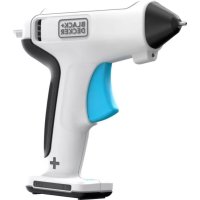
| Product Type | Dual temperature iron for craft projects (glue gun) |
| Brand | Black & Decker |
| Model | CI500S |
| Power Supply | 120 V, 60 Hz (polarized plug) |
| Temperature Settings | 2 settings: Low (I) 260 °C (500 °F), High (II) 482 °C (900 °F) |
| Heat-up Time | Approximately 5 minutes to reach low temperature, visual indicator |
| Included Tips | Universal, drop, round, conical, soldering, metal blade, mini-fer |
| Tip Storage | Removable integrated storage tray |
| Stand | Coiled spring stand, protective base |
| Additional Accessories | 2 flexible clamping clamps, tip cleaning sponge |
| Main Uses | Wood burning, soldering, image transfer, stencil cutting, crafts on fabric, leather, plastic |
| Safety | Hot end, do not touch; use on refractory surface; do not leave unattended |
| Maintenance and Cleaning | Clean with mild soap and damp cloth; do not immerse; moistened sponge for tip |
| Repairability | Repairs by authorized Black & Decker service centers only |
| Warranty | 2 years for household use |
| Country of Import | Imported by Black & Decker (Canada) / Mexico |
| Approximate Weight | 500 g |
| Approximate Dimensions | Length: 20 cm, width: 5 cm, height: 10 cm (with stand) |
Frequently Asked Questions - CI500S BLACK & DECKER
User questions about CI500S BLACK & DECKER
0 question about this device. Answer the ones you know or ask your own.
Ask a new question about this device
Download the instructions for your Glue gun in PDF format for free! Find your manual CI500S - BLACK & DECKER and take your electronic device back in hand. On this page are published all the documents necessary for the use of your device. CI500S by BLACK & DECKER.
USER MANUAL CI500S BLACK & DECKER
SAVE THIS MANUAL FOR FUTURE REFERENCE.
VEA EL ESPANOL EN LA CONTRAPORTADA.
POUR LE FRANÇAIS, VOIR LA COUVERTURE ARRIÈRE.
INSTRUCTIVO DE OPERACION, CENTROS DE SERVICIO Y POLIZA DE GARANTIA. ADVERTENCIA: LEASE ESTE INSTRUCTIVO ANTES DE USAR EL PRODUCTO.
Welcome to the Wonderful World of Black & Decker Craft Products.
Your new Dual Temp Craft / Soldering Iron is designed to apply two different temperature settings to almost any surface using a variety of different tips. You'll find dozens of uses in the workshop and around the house for this versatile tool.
For personal safety and for proper operation of your Craft Iron, please take the time to carefully read and understand all of the safety rules and instructions in this booklet.
Thank you for selecting Black & Decker!
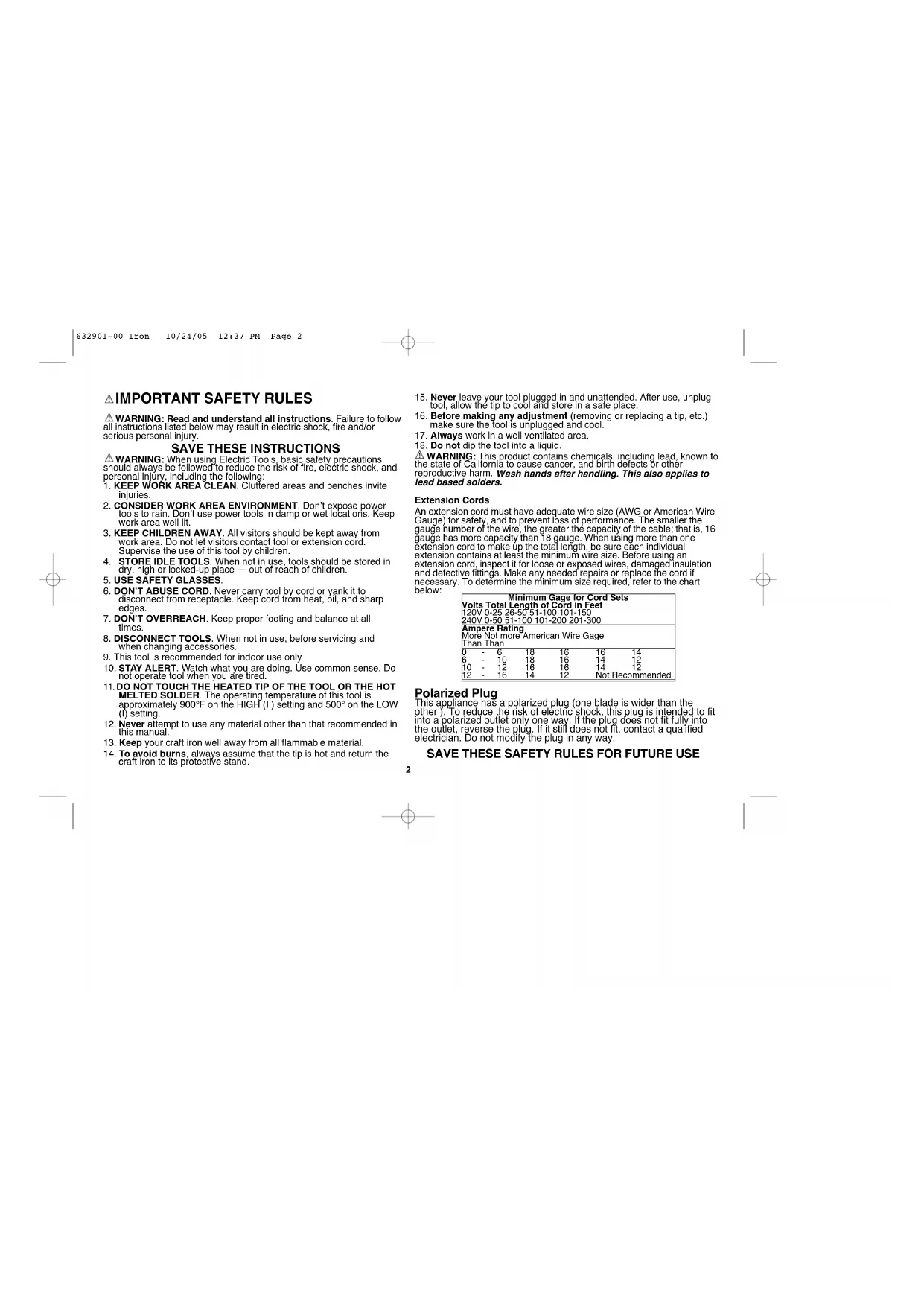
IMPORTANT SAFETY RULES
WARNING: Read and understand all instructions. Failure to follow all instructions listed below may result in electric shock, fire and/or serious personal injury.
SAVE THESE INSTRUCTIONS
WARNING: When using Electric Tools, basic safety precautions should always be followed to reduce the risk of fire, electric shock, and personal injury, including the following:
1. KEEP WORK AREA CLEAN. Cluttered areas and benches invite
2. CONSIDER WORK AREA ENVIRONMENT. Don't expose power tools to rain. Don't use power tools in damp or wet locations. Keep work area well lit.
3. KEEP CHILDREN AWAY. All visitors should be kept away from work area. Do not let visitors contact tool or extension cord. Supervise the use of this tool by children.
4. STORE IDLE TOOLS. When not in use, tools should be stored in dry, high or locked-up place - out of reach of children.
5. USE SAFETY GLASSES
6. DON'T ABUSE CORD. Never carry tool by cord or yank it to disconnect from receptacle. Keep cord from heat, oil, and sharp edges.
7. DON'T OVERREACH. Keep proper footing and balance at all times.
8. DISCONNECT TOOLS. When not in use, before servicing and when changing accessories.
9. This tool is recommended for indoor use only
10. STAY ALERT. Watch what you are doing. Use common sense. Do not operate tool when you are tired.
11. DO NOT TOUCH THE HEATED TIP OF THE TOOL OR THE HOT MELTED SOLDER. The operating temperature of this tool is approximately 900^ on the HIGH (II) setting and 500^ on the LOW (I) setting.
12. Never attempt to use any material other than that recommended in this manual.
13. Keep your craft iron well away from all flammable material.
14. To avoid burns, always assume that the tip is hot and return the craft iron to its protective stand.
- Never leave your tool plugged in and unattended. After use, unplug tool, allow the tip to cool and store in a safe place.
- Before making any adjustment (removing or replacing a tip, etc.) make sure the tool is unplugged and cool.
- Always work in a well ventilated area.
- Do not dip the tool into a liquid.
WARNING: This product contains chemicals, including lead, known to the state of California to cause cancer, and birth defects or other reproductive harm. Wash hands after handling. This also applies to lead based solders.
Extension Cords
An extension cord must have adequate wire size (AWG or American Wire Gauge) for safety, and to prevent loss of performance. The smaller the gauge number of the wire, the greater the capacity of the cable; that is, 16 gauge has more capacity than 18 gauge. When using more than one extension cord to make up the total length, be sure each individual extension contains at least the minimum wire size. Before using an extension cord, inspect it for loose or exposed wires, damaged insulation and defective fittings. Make any needed repairs or replace the cord if necessary. To determine the minimum size required, refer to the chart below:
| Minimum Gage for Cord Sets | |||||
| Volts Total Length of Cord in Feet | |||||
| 120V 0-25 | 26-50 | 51-100 | 101-150 | ||
| 240V 0-50 | 51-100 | 101-200 | 201-300 | ||
| Ampere Rating | |||||
| More Not more American Wire Gauge | |||||
| Than Than | |||||
| 0 | 6 | 18 | 16 | 16 | 14 |
| 6 | 10 | 18 | 16 | 14 | 12 |
| 10 | 12 | 16 | 16 | 14 | 12 |
| 12 | 16 | 14 | 12 | Not Recommended | |
Polarized Plug
This appliance has a polarized plug (one blade is wider than the other). To reduce the risk of electric shock, this plug is intended to fit into a polarized outlet only one way. If the plug does not fit fully into the outlet, reverse the plug. If it still does not fit, contact a qualified electrician. Do not modify the plug in any way.
SAVE THESE SAFETY RULES FOR FUTURE USE
Use your Craft Iron for a variety of applications including Woodburning, Soldering, Scrapbooking and Image Transfer.
Use your Dual Temp Craft Iron to decorate and personalize a variety of different materials. Hi temperature (II) for wood, leather, gourds, heavy weight paper, paper mache, wicker-rattan and heavy plastics. Low (I) for lighter paper, no-nap fabric, thin plastics, foam, candle wax, and soaps.
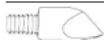
UNIVERSAL - Ideal for wide and thin lines in a variety of materials.
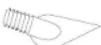
TEAR DROP - Use for detail or large area shading. Make an easy flower design with this petal shape.
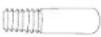
ROUND - Ideal for dots, curves and cursive writing. Make a border on your next scrapbook page.

Use the craft iron in Hi (ll) temperature to cut stencil blanks or thick plastics. The tapered tip can also be used for detail work on all the materials listed above.
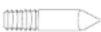
TAPERED - Use for stencil cutting or detail wood burning applications.

Use the soldering tip in Hi (II) temperature for soldering glass, metal and wire
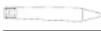
SOLDERING - Use for stained glass, jewelry making & repair, small electronics and hi-fi.

The hot knife is perfect for hot cutting and carving a variety of materials. Leather, rope, styrofoam, foam core, matte board, plastics, candle wax & soap. Also use the hot knife to fuse recently cut materials to prevent fraying.
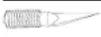
HOT KNIFE - Use a non heat conducting straight edge for straight cutting foam core or use the knife tip to detail carve artificial pumpkins.

Use the mini-iron in Low (I) temperature to detail press paper, ribbon or fabrics. Also in Low (I) temperature, the mini iron will transfer the toner from any black & white or color photocopy or printout onto wood, glass, ceramic, paper or fabric. Emboss fabrics with images from rubber stamps by placing fabric "right side down" on stamp covering with piece of paper and heating until rubber stamp image appears on paper.
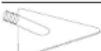
MINI-IRON - Use for iron-ons, fusible webbing and tapes, applique quilting, seams and hems, paper crafts and image transfer.

Assembly
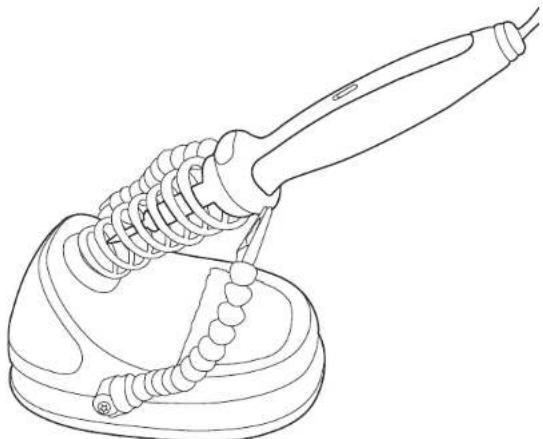
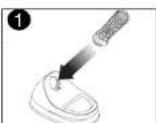
Insert the coiled spring support into the Craft Iron (figure 1) base by aligning the protrusions on the support with the slots in the opening. Push the support straight in until it "clicks" into place.
Operation
WARNING: Be aware that this product may ignite material. Where this is a concern, test a piece of scrap material. Also protect what is under the workpiece with a heat resistant material to avoid heat damage to a table, etc.
Turning The Unit On
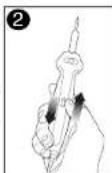
Note: The channel around the bottom of the base serves as a cord wrap for the cord. To turn the Craft Iron On, plug the cord into an appropriate 120V outlet. The tip will begin to heat up as soon as the Craft Iron is plugged in. Push the switch shown in figure 2 to select either the LOW (I) setting or HIGH setting (II). Use the HIGH setting (III) for woodburning and soldering applications and the LOW setting (I) for iron-on/plastics, paper and fabric.
Ready For Use Indicator
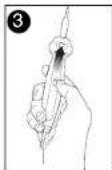
A "ready for use" indicator shown in figure 3 is built-in to the handpiece of the Craft Iron. The indicator starts out solid gray at room temperature. When the window shows solid yellow the tip has reached the LOW (I) temperature (approximately 5 minutes). When the window shows solid red the tip has reached the HIGH (II) temperature.
Tip Storage
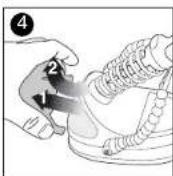
A handy storage bin is built-in to the Craft Iron. To remove the bin from the base of the unit, press in on the sides and pull out as shown in figure 4.
WARNING: Allow tips to cool before changing and before storing tips.
Knife Point Assembly
WARNING: Cut hazard. Knife blade is razor sharp. Use extra care when handling knife blade at all times.
Note: Knife blade is replaceable through your local hobby and art supplies stores.
Refer to figure 5 for the assembly of the hot knife point.
Place the knife into the holder, then place the holder into the sleeve. Carefully thread the assembly onto the Craft Iron handle.
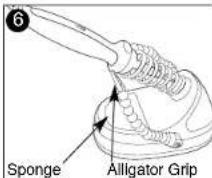
3rd Hand Grippers and Sponge Fig. 6
Your Craft Iron includes two flexible arm grippers which are helpful when working with small items. Note that the alligator clips which grip the item being heated may become quite hot. Allow ample time for the clips to cool before touching the grips or storing the Craft Iron.
The sponge located in the base of the Craft Iron is helpful in keeping the interchangeable tips clean.
CAUTION: Sponge must be thoroughly dampened before use and checked frequently to make sure that it has not dried out. Do not touch a dry sponge with a hot iron point. Avoid hot tip contact with plastic parts of base.
Basic Soldering Tips
Note: The process of "tinning" the soldering tip is helpful to insure a good soldering joint. A tinned tip has a thin layer of solder applied to it and is free of solder flux. "Flux" is the chemical contained in most solder wire which helps to clean the area about to be joined. When purchasing solder check to see that it contains flux or else apply flux to the joint area as directed.
-
Set Craft Iron to Hi (II) and wait until Ready to Use Indicator shows solid "RED" indicating iron has reached desired temperature.
-
When working with small pieces, use the 3rd hand grippers to arrange the 2 pieces being soldered so they are in contact. Insure that the material under the grippers is heat resistant and will not be harmed by any excess solder. For larger pieces, insure that your workpiece is resting on a heat resistant surface to avoid heat damage to a table, etc.
-
Wipe the tip on the moistened sponge to remove old solder.
-
Touch solder to the hot tip to just coat or tin the tip.
-
Hold the soldering tip against the larger workpiece near the joint area. The objective is to heat the 2 work pieces until they are hot enough to melt the solder. In stained glass work, lightly touch the tip of the iron to the copper foiled seam.
-
Hold the solder against the workpiece near the joint, but not touching the soldering tip.
-
When the workpiece is hot enough, the solder will flow into the joint.
-
Remove the Craft Iron as soon as the solder flows.
Cleaning
Use only mild soap and a damp cloth to clean the tool. Many household cleaners contain chemicals which could seriously damage the plastic. Also, do not use gasoline, turpentine, lacquer or paint thinner, dry cleaning fluids or similar products. Never let any liquid get inside the tool; never immerse any part of the tool into a liquid.
Important
To assure product SAFETY and RELIABILITY, repairs, maintenance and adjustments should be performed by Black & Decker Service
Centers or other qualified personnel. This tool contains no customer serviceable components.
Service Information
Whether you need technical advice, repair, or genuine factory replacement parts, contact the Black & Decker location nearest you. To find your local service location, refer to the yellow page directory under "Tools-Electric" or call: 1-800-54-HOW TO (544-6986).
Full Two-Year Home Use Warranty
Black & Decker (U.S.) Inc. warrants this product for two years against any defects in material or workmanship. The defective product will be replaced or repaired at no charge in either of two ways:
The first, which will result in exchanges only, is to return the product to the retailer from whom it was purchased (provided that the store is a participating retailer). Returns should be made within the time period of the retailer's policy for exchanges (usually 30 to 90 days after the sale). Proof of purchase may be required. Please check with the retailer for their specific return policy regarding returns that are beyond the time set for exchanges.
The second option is to take or send the product (prepaid) to a Black & Decker owned or authorized Service Center for repair or replacement at our option. Proof of purchase may be required. Black & Decker owned and authorized service centers are listed under "Tools-Electric" in the yellow pages of the phone directory.
This warranty does not apply to accessories. This warranty gives you specific legal rights and you may have other rights which vary from state to state. Should you have any questions, contact the manager of your nearest Black & Decker Service Center. This product is not intended for commercial use.
FREE WARNING LABEL REPLACEMENT: If your warning labels become illegible or are missing, call 1-800-544-6986 for a free replacement.

Black & Decker (U.S.) Inc., 701 E. Joppa Rd. Towsdon, MD 21286 U.S.A.
See 'Tools-Electric' - Yellow Pages - for Service & Sales

BLACK&DECKER
CI5000-FERPOURA TEMPERATUREEDOUBLEPOUR PROJETSARTISANAUXETTA SOUDURE
MODE D'EMPLOI
AVANT DE RETOURNER CE PRODUIT POUR
QUELQUE
RAISON QUI SOIT, VEUILLEZ APPELER AU
1-800-54-HOW-TO (544-6986)
& Decker Canada Inc. 108 Capital Avenue
Col. Americana Sector Juarez
Col. Centro
MEXICO, D.F.
Local D. Col. Obrera
MERIDA, YUC
Calle 63 #459-A
(999)9285038
Col. Centro
QUERETARO, QRO
Av.Madero 139
(442) 214 1660
Col. Centro
SAN LUIS POTOSI, SLP Col. Centro
BOSQUES DE CIDROS ACCESO RADIATAS NO.42
COL. BOSQUES DE LAS LOMAS.
05120 MEXICO, D.F.
TEL.55-5326-7100
ESPECIFICACIONES
120V-50/60Hz-25W
900^ alta 500^ baja
Cat.No.C1500FormNo.632901-00Rev.1OCT.2005
Copyright © 2005 Black & Decker Printed in China
632901-00Iron 10/24/05 12:37PM Page 19
一
632901-00Iron 10/24/05 12:37PM Page 20
一
632901-00Iron 10/24/05 12:37PM Page 21
一