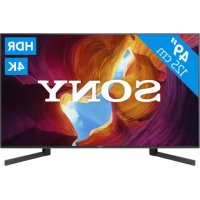
KD49XH9505 - TV SONY - Free user manual and instructions
Find the device manual for free KD49XH9505 SONY in PDF.



| Technical Specifications | Screen size: 49 inches (123 cm), Resolution: 4K Ultra HD (3840 x 2160), Display technology: LED, Backlight type: Full Array LED, Refresh rate: 120 Hz, HDR: HDR10, Dolby Vision, HDMI: 4 ports, USB: 3 ports, Wi-Fi: Yes, Bluetooth: Yes |
|---|---|
| Usage | Ideal for watching movies, series, and video games, Compatible with streaming apps, Intuitive user interface, Remote control with voice commands |
| Maintenance and Repair | Clean the screen with a soft cloth, Software update via system menu, Technical support available online |
| Safety | Complies with electrical safety standards, Avoid exposure to moisture, Do not block vents to prevent overheating |
| General Information | Weight: 13.5 kg (without stand), Dimensions (W x H x D): 109.6 x 70.5 x 25.5 cm (with stand), Warranty: 2 years, Color: Black |
Frequently Asked Questions - KD49XH9505 SONY
User questions about KD49XH9505 SONY
0 question about this device. Answer the ones you know or ask your own.
Ask a new question about this device
Download the instructions for your TV in PDF format for free! Find your manual KD49XH9505 - SONY and take your electronic device back in hand. On this page are published all the documents necessary for the use of your device. KD49XH9505 by SONY.
USER MANUAL KD49XH9505 SONY
This TV comes with the following manuals. Please retain the manuals for future reference.
Setup Guide
- TV installation and setup.
Reference Guide (this manual) / Safety Documentation
- Safety information, remote control, troubleshooting, wall-mount installation, specification, etc.
Help Guide (On screen Manual)
- Settings, Android TV functions, Internet connection, troubleshooting, etc.
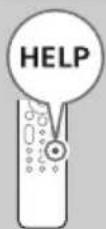
- To open it, press the HELP button on the remote control and select Help Guide.
- You can refer to the Help Guide with your smartphone.

https://rd1.sony.net/help/tv/haep1/h_aep/
IMPORTANT - Read the End User Software Licence
Agreement before using your Sony product. Using your product indicates your acceptance of the End User Software Licence Agreement. The software licence agreement between you and Sony is available online at Sony website (http://www.sony.net/tv-software-licenses/) or on your product screen. Go to [Settings] [Device Preferences] [About] [Legal information] [Notices and licences].
Note
- Before operating the TV, please read the "Safety Information".
- Read the supplied safety documentation for additional safety information.
Images and illustrations used in the Setup Guide and this manual are for reference only and may differ from the actual product.
The "xx" that appears in the model name corresponds to a numeric digit, related to design, colour or TV system.
Location of the identification label
Labels for the TV Model No., Production Date (year/month) and Power Supply rating are located on the rear of the TV or package.
IMPORTANT NOTICE
Notice for Radio Equipment
Hereby, Sony Corporation declares that the radio equipment types KD-85XH9505, KD-49XH9505 are in compliance with Directive 2014/53/EU. The full text of the EU declaration of conformity is available at the following internet address: https://www.compliance.sony.eu/
Notice for customers: the following information is only applicable to equipment sold in countries applying EU directives.
For this radio equipment, the following restrictions on putting into service or of requirements for authorization of use apply in AT, BE, HR, CY, CZ, DK, EE, FI, FR, DE, EL, HU, IE, IT, LV, LT, LU, MT, NL, PL, PT, SK, SI, ES, SE, UK, IS, LI, NO, CH, BG, RO, TR, AL, BA, MK, MD, RS, ME, Kosovo :
5150 - 5350 MHz band is restricted to indoor operations only.
Safety Information
Installation/Set-up
Install and use the TV set in accordance with the instructions below in order to avoid any risk of fire, electric shock or damage and/or injuries.
Installation
- The TV set should be installed near an easily accessible mains socket.
- Place the TV set on a stable, level surface to prevent it from falling over and causing personal injury or property damage.
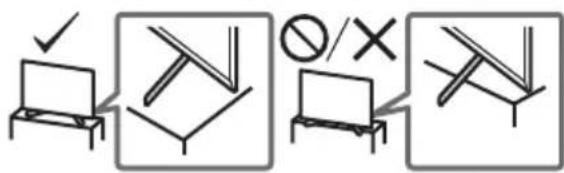
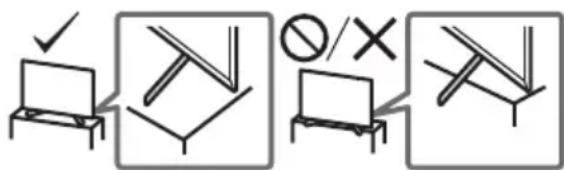
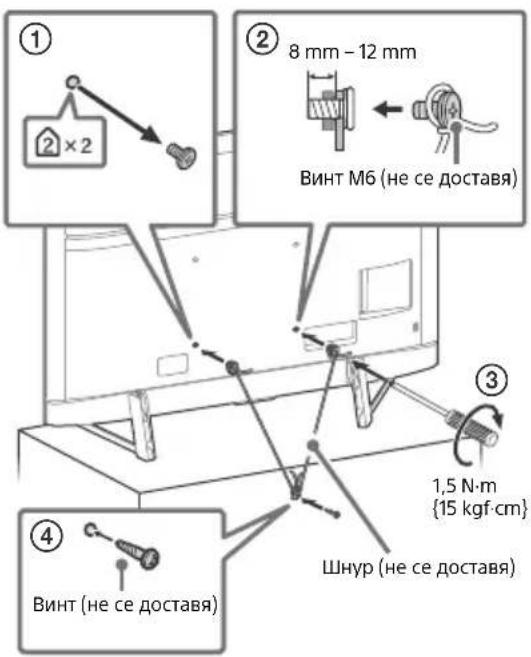
Install the TV where it cannot be pulled, pushed, or knocked over. - Install the TV so that the TV's Table-Top Stand does not protrude out from the TV stand (not supplied). If the Table-Top Stand protrudes out from the TV stand, it may cause TV set to topple over, fall down, and cause personal injury or damage to the TV.
Transporting
- Before transporting the TV set, disconnect all cables.
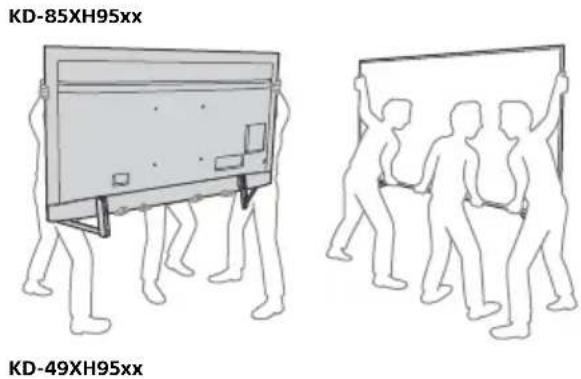
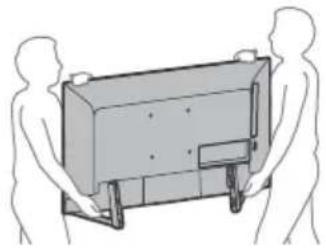
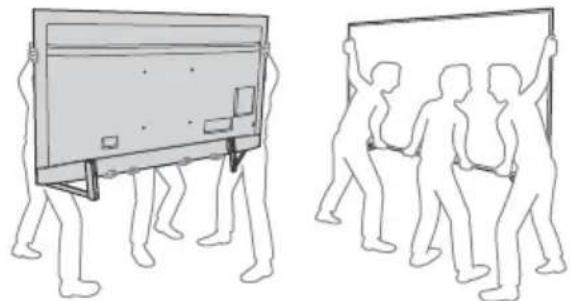
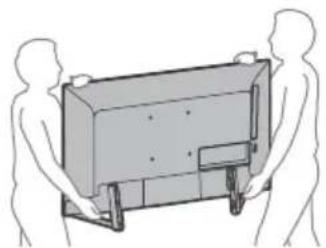
- Two or more people (three or more people for KD-85XH95xx) are needed to transport a large TV set.
- When transporting the TV set by hand, hold it as shown below. Do not put stress on the LCD panel and the frame around the screen.
- When transporting the TV set, do not subject it to jolts or excessive vibration.
- When transporting the TV set for repairs or when moving, pack it using the original carton and packing material.
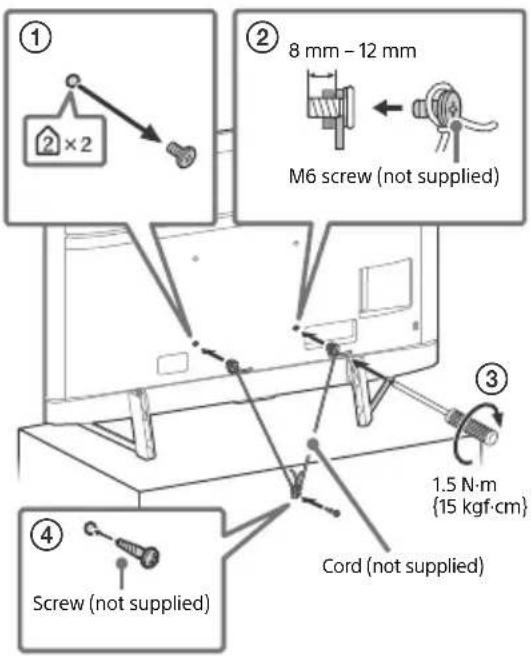
Topple prevention
Remote Control and TV
The remote control shape, location, availability and function of remote control buttons may vary depending on your region/ country/TV model.
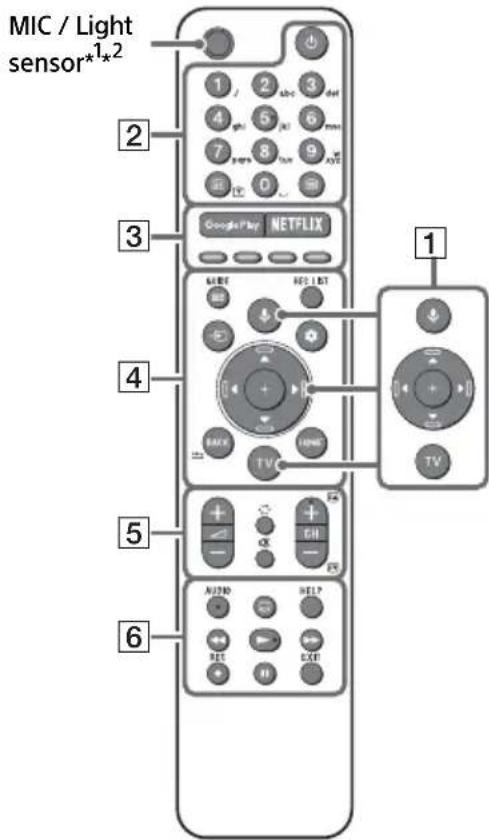
1 (Microphone): Use the Google Assistant*3*4 or voice search*4. For hints on how to control your TV press (Microphone) button and speak the phrase "voice hints".
/ / / / On screen menu navigation and selection.
TV: Display TV channel list or switch to input.
2 (TV standby)
Number buttons
+/Info/Text reveal): Display information.
目 (Text) :Display text information.
3 Google Play / NETFLIX³ / Colour buttons
GUIDE: Display the digital programme guide of TV or TV box*3*5.
REC LIST: Display the Rec list of USB HDD/ DVR*5.
Input select): Display and select the input source, etc.
Quick settings): Display Quick Settings.
BACK/
HOME
5 +/-(Volume)
(Jump)
(Mute)*6
CH + / - / 选:Select the channel, or next
()/previous()page.
6 AUDIO: Select the sound of multilingual source or dual sound (depend on programme source).
(Subtitle setting)
HELP: Display the Help menu.
←/→/→/11
REC: Record the currently viewed programme on USB HDD/DVR*
EXIT
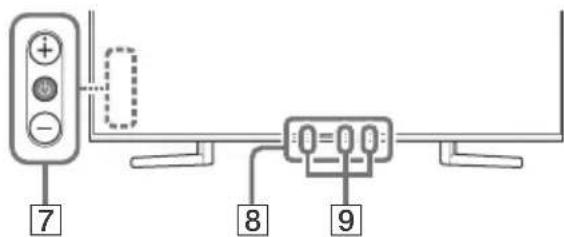
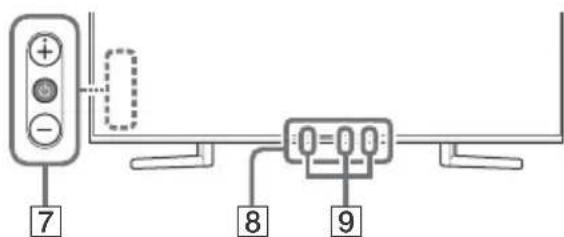
7 (Power)/+/-
Remote Control sensor / Light sensor / Illumination LED
Built-in MIC3*47 / LED
To enable the built-in MIC, press (MIC) button on the remote control and follow the on-screen instructions.
1 Light sensor works when used in the dark, and light up the remote control buttons. The built-in backlight can be turned off.
2 RMF-TX611E only. To see the model name of the remote control, open the remote control cover and see the label on the remote control.
3 Only on limited region/country/TV model/ language.
4 The Google Assistant or voice search requires an Internet connection.
5 [TV box setup] setting is required.
6 Accessibility shortcut is available by pressing and holding (Mute).
*7 Standby power consumption will increase because the built-in MIC is always listening when it is enabled.
For more information, refer to the Help Guide.
Installing the TV to the Wall
Using the optional Wall-Mount Bracket (SU-WL450)* (not supplied)
To Customers:
For product protection and safety reasons, Sony strongly recommends that installation of your TV be performed by Sony dealers or licensed contractors. Do not attempt to install it yourself.
To Sony Dealers and Contractors:
Provide full attention to safety during the installation, periodic maintenance and examination of this product.
Wall-Mount Bracket Installation Information
This TV's instruction manual only provides the steps to prepare the TV for Wall-Mount installation before it is installed on the wall. For instructions on Wall-Mount Bracket installation, see the Installation Information (Wall-Mount Bracket) on the product page for your TV model. https://www.sony.eu/support
Preparing for Wall-Mount Installation
Make sure to attach the Table-Top Stand before installing the TV to the wall by referring to the Setup Guide.
- Prepare the TV for the Wall-Mount Bracket before making cable connections.
- Follow the instruction guide provided with the Wall-Mount Bracket for your model. Sufficient expertise is required in installing this TV, especially to determine the strength of the wall for withstanding the TV's weight.
- Be sure to entrust the attachment of this product to the wall to Sony dealers or licensed contractors and pay adequate attention to safety during the installation. Sony is not liable for any damage or injury caused by mishandling or improper installation.
- The screws for Wall-Mount Bracket are not supplied.
-
Only qualified service personnel should carry out wall-mount installations.
-
For safety reasons, it is strongly recommended that you use Sony accessories, including:
- Wall-Mount Bracket SU-WL450
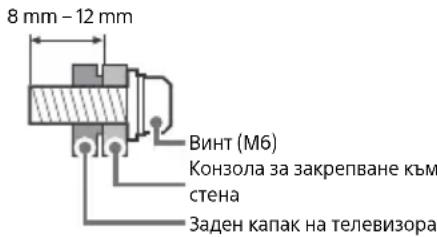
- Be sure to use the screws supplied with the Wall-Mount Bracket when attaching the Wall-Mount Bracket to the TV set. The supplied screws are designed as indicated by illustration when measured from the attaching surface of the Wall-Mount Bracket.
The diameter and length of the screws differ depending on the Wall-Mount Bracket model. Use of screws other than those supplied may result in internal damage to the TV set or cause it to fall, etc.
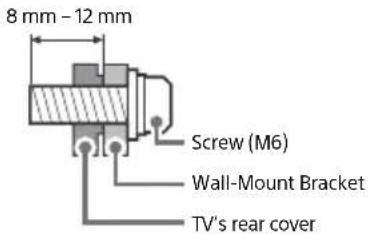
- Be sure to store the unused screws and Table-Top Stand in a safe place until you are ready to attach the Table-Top Stand. Keep the screws away from small children.
- Only on limited region/country/TV model.
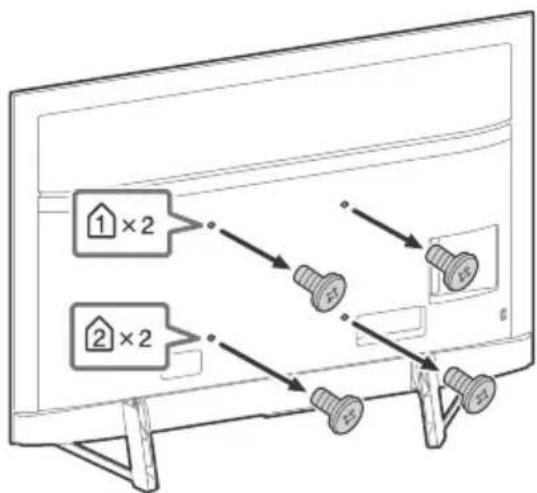
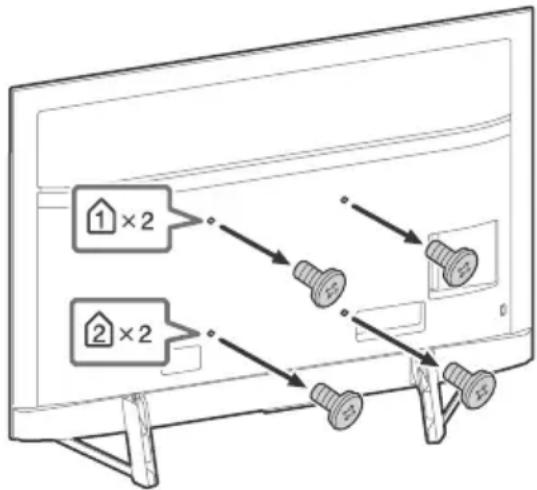
Remove the screws from the rear of the TV.
Troubleshooting
General troubleshooting for issues like: black screen, no sound, frozen picture, TV does not respond, or network is lost, do the following steps.
1 Restart your TV by pressing the power button on the remote control for about five seconds. The TV will restart. If the TV does not recover, try unplugging the mains lead. Then press the power button on the TV, and release it. Wait for two minutes, and plug in the mains lead.
2 Refer to the Help menu by pressing HELP on the remote control.
3 Connect your TV to the Internet and perform a software update. Sony recommends you to keep your TV software updated. Software updates provide new features and performance improvements.
4 Visit Sony support website (information provided at the end of this manual).
When you plug in the TV, the TV may not be able to turn on for a while even if you press the power button on the remote control or the TV.
It takes time to initialize the system. Wait for about one minute, then operate it again.
The remote control does not function.
- Replace the batteries.
The parental lock password has been forgotten. - Enter 9999 for the PIN and enter the new PIN.
For more information on troubleshooting, refer to the Help Guide.
Specifications
System
Panel system: LCD (Liquid Crystal Display) Panel, LED Backlight
TV system: Depending on your country/area selection/TV model
Analogue: B/G, D/K, I
Digital: DVB-T/DVB-C/DVB-T2
Satellite*1: DVB-S/DVB-S2
Colour system: PAL/SECAM/NTSC3.58 (Video only)/NTSC4.43 (Video only)
Channel coverage: Depending on your country/
area selection/TV model
Analogue: UHF/VHF/Cable
Digital: UHF/VHF/Cable
Satellite*1:IF Frequency 950-2,150 MHz
Sound output: 10W + 10W
Wireless technology
Protocol IEEE 802.11a/b/g/n/ac
Bluetooth® Version 4.2
Frequency band(s)
| Frequency range Output power | |
| Wireless LAN (TV) | |
| 2400-2483.5 MHz | 20.0 dBm |
| 5150-5250 MHz | < 23.0 dBm |
| 5250-5350 MHz | < 20.0 dBm |
| 5470-5725 MHz | < 20.0 dBm |
| 5725-5850 MHz | < 13.9 dBm |
| Bluetooth® (TV) | |
| 2400-2483.5 MHz < 10.0 dBm | |
| Bluetooth® (Remote control) | |
| 2400-2483.5 MHz < 10.0 dBm | |
Input/Output jacks
Antenna (aerial)/cable
75 ohm external terminal for VHF/UHF
Satellite antenna*1
Female F Type Connector, 75 ohm.
DiSEqC 1.0, LNB 13 V/18 V & 22 kHz tone, Single
Cable Distribution EN50494.
一 /一 AVIN
Video/Audio input (mini jack)
HDMI IN 1/2/3/4 (support 4K resolution, HDCP
2.3-compatible)
Video:
4096 × 2160p (50, 60 Hz)*²*, 4096 × 2160p
(24Hz)^*2 3840×2160p (50,60 Hz)*3,3840×
2160p (24, 25, 30 Hz), 1080p (30, 50, 60, 100,
120 Hz), 1080/24p, 1080i (50, 60 Hz), 720p
(30, 50, 60 Hz), 720/24p, 576p, 480p, PC
Formats*4
Audio:
In eARC (Enhanced Audio Return Channel)
mode
Refer to the Help Guide for details.
Except eARC mode
5.1 channel linear PCM: 32/44.1/48/88.2/
96/176.4/192 kHz 16/20/24 bits, Dolby
Audio, Dolby Atmos, DTS
eARC/ARC (Enhanced Audio Return Channel/
Audio Return Channel) (HDMI IN 3 only)*5
In eARC mode
Refer to the Help Guide for details.
In ARC mode
Two channel linear PCM: 48 kHz 16 bits,
Dolby Audio, Dolby Atmos, DTS

DIGITAL AUDIO OUT (OPTICAL)
Digital optical jack (Two channel linear PCM:
48 kHz 16 bits, Dolby Audio, DTS)
USB device port (3 USB HDD device for REC feature)
USB port 1 and 2 support High Speed USB
(USB 2.0)
USB port 3 supports Super Speed USB (USB 3.1
Gen 1)

AM (Conditional Access Module) slot

BASE-T/100BASE-TX connector (Depending on the operating environment of the network,
connection speed may differ. The
communication rate and quality are not
guaranteed.)
Power, Product Fiche and others
Power requirements
220V-240VAC,50Hz
Energy Efficiency Class
KD-85XH95xx: B
KD-49XH95xx: B
Screen size (measured diagonally) (Approx.)
KD-85XH95xx: 214.8 cm / 85 inches
KD-49XH95xx: 123.2 cm / 49 inches
Power consumption
In [Standard] mode
KD-85XH95xx: 282 W
KD-49XH95xx:119W
In [Vivid] mode
KD-85XH9505:438W
KD-49XH9505:203W
Annual energy consumption7
KD-85XH95xx: 391 kWh per year
KD-49XH95xx: 165 kWh per year
Standby power consumption89
0.50 W (27 W in software/EPG update mode)
Display resolution
3,840 dots (horizontal) × 2,160 lines (vertical)
Output Rating
USB 1/2
5V=500mA MAX
USB3
5V=900mA MAX
Dimensions (Approx.) (w× h× d) (cm)
with Table-Top Stand (without Table-Top Stand)
KD-85XH95xx: 191.0 × 117.9 × 41.2 (191.0 × 109.9
× 7.4)
KD-49XH95xx: 109.3 × 69.9 × 26.1 (109.3 × 62.9
× 6.9)
Mass (Approx.) (kg)
with Table-Top Stand (without Table-Top Stand)
KD-85XH95xx: 49 (46)
KD-49XH95xx: 14.4 (13.3)
Others
Optional accessories
Wall-Mount Bracket: SU-WL450
Operating temperature: 0^ - 40^
Operating humidity: 10% -80% RH
(non-condensing)
1 Not all the TV sets have DVB-T2 or DVB-S/S2 technology or satellite antenna terminal.
2 When 4096 × 2160p is input and [Wide mode] is set to [Normal], the resolution is displayed as 3840 × 2160p . To display 4096 × 2160p , set [Wide mode] setting to [Full 1] or [Full 2].
3 To support 18 Gbps, set [HDMI signal format] to [Enhanced format].
4 Refer to the online Help Guide for details.
5 Connect your audio system to the HDMI IN 3 to route TV audio to your audio system.
6 Only on limited region/country/TV model.
7 Energy consumption in kWh per year, based on the power consumption of the television operating 4 hours per day for 365 days. The actual energy consumption will depend on how the television is used.
8 Specified standby power is reached after the TV finishes necessary internal processes.
*9 Standby power consumption will increase when your TV is connected to the network.
Note
- Optional accessories availability depends on countries/region/TV model/stock.
- Design and specifications are subject to change without notice.
- Subscriptions for services and applications may be required and additional terms, conditions and/or charges may apply when using the Google Assistant.
Notes on Digital TV function
- Digital TV (DVB terrestrial, satellite and cable), interactive services and network functions may not be available in all countries or areas. Some functions might not be enabled or might not operate correctly with some providers and network environments. Some TV service providers may charge a fee for their services.
- This TV supports digital broadcasting using MPEG-2, H.264/MPEG-4 AVC and H.265/HEVCODECs, but compatibility with all operator/service signals, which may change over time, cannot be guaranteed.
Trademark information
- The terms HDMI, HDMI High-Definition Multimedia Interface, and the HDMI Logo are trademarks or registered trademarks of HDMI Licensing Administrator, Inc.
- Dolby, Dolby Vision, Dolby Atmos, Dolby Audio, and the double-D symbol are trademarks of Dolby Laboratories. Manufactured under license from Dolby Laboratories. Confidential unpublished works. Copyright © 2012-2018 Dolby Laboratories. All rights reserved.
- Gracenote, the Gracenote logo and logotype, "Powered by Gracenote" logo are either registered trademarks or trademarks of Gracenote, Inc. in the United States and/or other countries.
- Google, Google Play, Chromecast, YouTube, Android TV and other related marks and logos are trademarks of Google LLC.
- For DTS patents, see http://patents.dts.com. Manufactured under license from DTS, Inc. DTS, the Symbol, DTS and the Symbol together, and Digital Surround are registered trademarks or trademarks of DTS, Inc. in the United States and/or other countries. © DTS, Inc. All Rights Reserved.
- Netflix is a registered trademark of Netflix, Inc.
-
DiSEqCTM is a trademark of EUTELSAT. This TV supports DiSEqC 1.0. This TV is not intended for controlling motorized antennas.
-
TUXERA is a registered trademark of Tuxera Inc. in the US and other countries.
- All other trademarks are the property of their respective owners.
https://rd1.sony.net/help/tv/haep1/h_aep/
Analogue: B/G, D/K, I
2160p (24, 25, 30 Hz), 1080p (30, 50, 60, 100,
120 Hz), 1080/24p, 1080i (50, 60 Hz), 720p
(30, 50, 60 Hz), 720/24p, 576p, 480p,
Formats PC*4
Audio :
En mode eARC (Enhanced Audio Return
Channel)
eARC/ARC (Enhanced Audio Return Channel/
Audio Return Channel) (HDMI IN 3
uniquement)*5
En mode eARC
KD-85XH95xx : 191,0 × 117,9 × 41,2 (191,0 ×
109,9×7,4)
https://rd1.sony.net/help/tv/haep1/h_aep/
https://www.sony.eu/support
Digital: UHF/VHF/Cable
2160p (24, 25, 30 Hz), 1080p (30, 50, 60, 100,
120 Hz), 1080/24p, 1080i (50, 60 Hz), 720p
(30, 50, 60 Hz), 720/24p, 576p, 480p,
Formatos de PC*4
Audio:
En el modo eARC (Enhanced Audio Return
Channel)
eARC/ARC (Enhanced Audio Return Channel/Audio Return Channel) (solo HDMI IN 3)*5
En el modo eARC
DIGITAL AUDIO OUT (OPTICAL)
Toma digital optica (PCM lineal de dos canales: 48 kHz 16 bits, Dolby Audio, DTS)
(imitoma estereo)
Auricular
1,2-3(HBD-RE C)*6
Puerto para dispositivo USB (dispositivo HDD)
https://rd1.sony.net/help/tv/haep1/h_aep/
https://www.compliance.sony.eu/
2160p (24, 25, 30 Hz), 1080p (30, 50, 60, 100,
120 Hz), 1080/24p, 1080i (50, 60 Hz), 720p
(30, 50, 60 Hz), 720/24p, 576p, 480p,
Pc-formaten*4
Audio:
In eARC (Enhanced Audio Return
Channel)-modus
eARC/ARC (Enhanced Audio Return Channel/
Audio Return Channel) (alleen HDMI IN 3)*5
In eARC-modus
Tweekanaals lineaire PCM: 48 kHz 16 bits,
Dolby Audio, Dolby Atmos, DTS
DIGITAL AUDIO OUT (OPTICAL)
https://rd1.sony.net/help/tv/haep1/h_aep/
2160p (24, 25, 30 Hz), 1080p (30, 50, 60, 100,
120 Hz), 1080/24p, 1080i (50, 60 Hz), 720p
(30, 50, 60 Hz), 720/24p, 576p, 480p,
Computerformate*
Audio:
Im eARC (Enhanced Audio Return
Channel)-Modus
eARC/ARC (Enhanced Audio Return Channel/
Audio Return Channel) (nur HDMI IN 3)*5
Im eARC-Modus
DIGITAL AUDIO OUT (OPTICAL)
https://rd1.sony.net/help/tv/haep1/h_aep/
(Saltar) (Sem som)*6
CH + / - / 三 / : SeLECTIONA o canal ou a páginaseguinie()/anterior()
https://www.sony.eu/support
2160p (24, 25, 30 Hz), 1080p (30, 50, 60, 100,
120 Hz), 1080/24p, 1080i (50, 60 Hz), 720p
(30, 50, 60 Hz), 720/24p, 576p, 480p,
Formatos PC*4
Áudio:
No modo eARC (Enhanced Audio Return
Channel)
eARC/ARC (Enhanced Audio Return Channel/
Audio Return Channel) (Apenas HDMI IN 3)*5
No modo eARC
DIGITAL AUDIO OUT (OPTICAL)
Tomada digital otica (PCM linear deinous canais: 48 kHz 16 bits, Dolby Audio, DTS)
(Mini-tomada estereo)
Auscultador
1,2-3(HBD-REC)* 6
Portado dispositivo USB (3dispositivo
USB HDD para a funcionalidade REC)
As portas USB 1 e 2 suportam High Speed USB (USB 2.0)
A porta USB 3 suporta Super Speed USB
(USB 3.1 Gen 1)

Ranhura CAM (Modulo de Acesso Condiencial)
LAN
https://rd1.sony.net/help/tv/haep1/h_aep/
https://www.sony.eu/support
2160p (24, 25, 30 Hz), 1080p (30, 50, 60, 100,
120 Hz), 1080/24p, 1080i (50, 60 Hz), 720p
(30, 50, 60 Hz), 720/24p, 576p, 480p, Format PC*4
Audio:
eARC/ARC (Enhanced Audio Return Channel/Audio Return Channel) (solo HDMI IN 3)*5
In modalità eARC
DIGITAL AUDIO OUT (OPTICAL)
https://rd1.sony.net/help/tv/haep1/h_aep/
Se Hjalpguiden for men information.
2160p (24, 25, 30 Hz), 1080p (30, 50, 60, 100,
120 Hz), 1080/24p, 1080i (50, 60 Hz), 720p
(30, 50, 60 Hz), 720/24p, 576p, 480p,
PC-format*4
Ljud:
I eARC (Enhanced Audio Return
Channel)-lage
Se Hjalpguiden for mer detailjer.
Forutom eARC-lage
5,1-kanals linjar PCM: 32/44,1/48/88,2/96/
176,4/192 kHz 16/20/24-bitars, Dolby
Audio, Dolby Atmos, DTS
eARC/ARC (Enhanced Audio Return Channel/
Audio Return Channel) (Endast HDMI IN 3)*5
I eARC-lage
Se Hjalpguiden for mer detaljer.
IARC-lage
Tvákanalig linjár PCM: 48 kHz 16-bitars,
Dolby Audio, Dolby Atmos, DTS
DIGITAL AUDIO OUT (OPTICAL)
https://rd1.sony.net/help/tv/haep1/h_aep/
2160p (24, 25, 30 Hz), 1080p (30, 50, 60, 100,
120 Hz), 1080/24p, 1080i (50, 60 Hz), 720p
(30, 50, 60 Hz), 720/24p, 576p, 480p,
Pc-formater*4
Lyd:
I eARC (Enhanced Audio Return
Channel)-tilstand
eARC/ARC (Enhanced Audio Return Channel/
Audio Return Channel) (kun HDMI IN 3)*5
I eARC-tilstand
To-kanals linear PCM: 48 kHz 16 bit, Dolby
Audio, Dolby Atmos, DTS

DIGITAL AUDIO OUT (OPTICAL)
Digitalt optisk stik (to-kanals lineaer PCM:
48 kHz 16 bit, Dolby Audio, DTS)
(Stereo-minijack)
Hovedtelefoner

-1,2-3(HBDREC)
6
USB-port (3 USB HDD-enhed for
REC-funktion)
I [Standard] tilstand
KD-85XH95xx: 282 W
KD-49XH95xx:119 W
I [Kraftig] tilstand
KD-85XH9505:438W
KD-49XH9505:203W
https://rd1.sony.net/help/tv/haep1/h_aep/
2160p (24, 25, 30 Hz), 1080p (30, 50, 60, 100,
120 Hz), 1080/24p, 1080i (50, 60 Hz), 720p
(30, 50, 60 Hz), 720/24p, 576p, 480p,
PC-muodot*4
Audio:
eARC (Enhanced Audio Return
Channel)-tilassa
eARC/ARC (Enhanced Audio Return Channel/
Audio Return Channel) (Vain HDMI IN 3) ^5
eARC-tilassa
DIGITAL AUDIO OUT (OPTICAL)
https://rd1.sony.net/help/tv/haep1/h_aep/
hurtiginnstillinger.

HOME
5 +/-(Volum)
(Hopp)
※ (Demp)*6
CH + / - / 三 / 三 : Velg kanal, ellr neste (E) / forrige (v) side.
(Teksting-innstilling)
HELP: Vis Hjelp-menyen.

https://www.sony.eu/support
Forberede veggmontering
2160p (24, 25, 30 Hz), 1080p (30, 50, 60, 100,
120 Hz), 1080/24p, 1080i (50, 60 Hz), 720p
(30, 50, 60 Hz), 720/24p, 576p, 480p,
PC-formater*4
Lyd:
I eARC (Enhanced Audio Return
Channel)-modus
eARC/ARC (Enhanced Audio Return Channel/
Audio Return Channel (kun HDMI IN 3)*
I eARC-modus
DIGITAL AUDIO OUT (OPTICAL)
Digital optisk kontakt (tokenans lineær PCM:
48 kHz 16 biter, Dolby Audio, DTS)
(minijack, stereo)
Hodetelefon

1,2-3(HBD-REC)* 6
USB-enhetsport (3 USB HDD-enhet for
REC-funksjon)
https://rd1.sony.net/help/tv/haep1/h_aep/
https://www.sony.eu/support
2160p (24, 25, 30 Hz), 1080p (30, 50, 60, 100,
120 Hz), 1080/24p, 1080i (50, 60 Hz), 720p
(30, 50, 60 Hz), 720/24p, 576p, 480p, formaty
komputerowe*4
Audio:
W trybie eARC (Enhanced Audio Return
Channel)
eARC/ARC (Enhanced Audio Return Channel/
Audio Return Channel) (tylko HDMI IN 3)*5
W trybie eARC
DIGITAL AUDIO OUT (OPTICAL)
Porty USB 1 i 2 obsluguja standard High Speed
USB (USB 2.0)
Port USB 3 obsluguje standard Super Speed
USB (USB 3.1 Gen 1)

W trybie [Zywy]
KD-85XH9505: 438 W
KD-49XH9505: 203 W
https://rd1.sony.net/help/tv/haep1/h_aep/
DULEZITE - Pridouzitim Vami zakoupeneho vyrobku firmy
Sony si prectete Licencni smlouvnu na software s koncovym uzivatelem. Pouzivanim vyrobku potvrzujete, ze souhlasite s Licencni smlouvou na software s koncovym uzivatelem. Licencni smlouva na software mezi vami a spelecnosti Sony je k dispozici online na webovych strankach spelecnosti Sony (http://www.sony.net/tv-software-licenses/) nebo na obrazovce Vami zakoupeneho vyrobku. Prejdete na [Nastaveni] [Predvolby zaifeni] [O zaifeni] [Pravni informace] [Upozorneni a licence].
Poznámka
https://www.sony.eu/support
2160p (24, 25, 30 Hz), 1080p (30, 50, 60, 100,
120 Hz), 1080/24p, 1080i (50, 60 Hz), 720p
(30, 50, 60 Hz), 720/24p, 576p, 480p, PC formáty*4
Audio:
V režimu eARC (Enhanced Audio Return
Channel)
eARC/ARC (Enhanced Audio Return Channel/
Audio Return Channel) (pouze HDMI IN 3)*5
V rezimu eARC
DIGITAL AUDIO OUT (OPTICAL)
https://rd1.sony.net/help/tv/haep1/h_aep/
DOLEZITE - Pred pouzitim vyrobku Sony si precfajte licencnuzmluvu tkykucu sa softveru koncoveho pouzivatela. Pouzivanie vasho vyrobku znamena, ze suhlasite s licencnou zmluvou tkykucu sa softveru koncoveho pouzivatela. Licenca zmlvua tkykucsa softveru medzi vami a spolocnostou Sony je k dispozici online na webovej stranke spolochnosti Sony (http://www.sony.net/tv-software-licenses/) alebo na obrazovke vasho vyrobku. Prejdite na [Nastavenia] [Predvolby zariadenia] [Informacia] [Pravne informacia] [Upozornenia a licencie].
Poznámka
https://www.sony.eu/support
2160p (24, 25, 30 Hz), 1080p (30, 50, 60, 100,
120 Hz), 1080/24p, 1080i (50, 60 Hz), 720p
(30, 50, 60 Hz), 720/24p, 576p, 480p,
Formaty PC*4
Audio:
V režime eARC (Enhanced Audio Return
Channel)
Podrobnosti najdete v Priruce.
Okrem režimu eARC
eARC/ARC (Enhanced Audio Return Channel/
Audio Return Channel) (Len model HDMI IN 3)*5
V rezime eARC
Podrobnosti najdete v Priručke.
V rezime ARC
Dvojkanálový lineárny PCM: 48 kHz 16 bitov, Dolby Audio, Dolby Atmos, DTS
DIGITAL AUDIO OUT (OPTICAL)
Prevadzková vlhost: 10% - 80% RH
(nekondenzovana)
https://rd1.sony.net/help/tv/haep1/h_aep/
https://www.sony.eu/support
2160p (24, 25, 30 Hz), 1080p (30, 50, 60, 100,
120 Hz), 1080/24p, 1080i (50, 60 Hz), 720p
(30, 50, 60 Hz), 720/24p, 576p, 480p, PC formátumok*
Audio:
eARC (Enhanced Audio Return Channel)
üzemmodban
eARC/ARC (Enhanced Audio Return Channel/
Audio Return Channel) (csak HDMI IN 3)*5
eARC üzemmodban
DIGITAL AUDIO OUT (OPTICAL)
https://rd1.sony.net/help/tv/haep1/h_aep/
https://www.sony.eu/support
Analogic: B/G, D/K, I
Digital: DVB-T/DVB-C/DVB-T2
Satelit*1:DVB-S/DVB-S2
Sistemculoare: PAL/SECAM/NTSC3.58 (Numai video)/NTSC4.43 (Numai video)
Analogic: UHF/VHF/Cablu
Digital: UHF/VHF/Cablu
Satelit*1: Frecventa IF 950-2.150 MHz
lesire audio: 10 W + 10 W
Tecnologie wireless
Protocol IEEE 802.11a/b/g/n/ac
Bluetooth® versusnea 4.2
Bandä (benzi) de frecventa
| Gama de freventa Putere de ieire | |
| LAN wireless (Televizor) | |
| 2.400-2.483,5 MHz | < 20,0 dBm |
| 5.150-5.250 MHz | < 23,0 dBm |
| 5.250-5.350 MHz | < 20,0 dBm |
| 5.470-5.725 MHz | < 20,0 dBm |
| 5.725-5.850 MHz | < 13,9 dBm |
| Bluetooth® (Televizor) | |
| 2.400-2.483,5 MHz < 10,0 dBm | |
| Bluetooth® (Telecomandă) | |
| 2.400-2.483,5 MHz < 10,0 dBm | |
Mufe intrare/iesire
2160p (24, 25, 30 Hz), 1080p (30, 50, 60, 100,
120 Hz), 1080/24p, 1080i (50, 60 Hz), 720p
(30, 50, 60 Hz), 720/24p, 576p, 480p,
Formate PC*4
Audio:
In modul eARC (Enhanced Audio Return
Channel)
Pentru detali, consulta 日 ghidul de asistenta.
eARC/ARC (Enhanced Audio Return Channel/
Audio Return Channel) (Numai HDMI IN 3)*5
In modul eARC
Pentru detailii, consultati ghidul de asistenta.
In modul ARC
PCM liniar pe doua canale: 48 kHz 16 biti,
Dolby Audio, Dolby Atmos, DTS
DIGITAL AUDIO OUT (OPTICAL)
Mufa optica digitala (PCM liniar pe doua canale: 48 kHz 16 biti, Dolby Audio, DTS)
(Mini mufa stereo)
Castei
1,2-3(HBD-REC)* 6
Port disposizitiv USB (dispositive HDD USB pentru caracteristica REC)
https://rd1.sony.net/help/tv/haep1/h_aep/
BAXKHO -PpeHn Da n3noJbBaTe Baun npOyKT Sony, npOyeTe IuueH3NOHHTo Cnpa3ymHe 3a coOFTep c kpaHn noTpe6nte. N3noJ3BaHeTo Ha Baun npOyKT O3HaUba, Ye pIneMaTe IuueH3NOHHTo Cnpa3ymHe 3a coFTep c KpaHn noTpe6nte. IuueH3NOHHTo Cnpa3ymHe 3a coFTep mExy Bac n Sony e DocTBnHO OHauH Na ye6caTa Ha Sony (http://www.sony.net/ tv-software-licenses/) nn Ha ekpHa Ha Baun npOyKT. OTnDEt H [HaCTpoiKn] [PpeINoHTaHn 3a yCTPOINCTBOTO] [IVHOpMaun] [PpaBHa IHOpMaun] [YBeDOMLeHnN iNuEHN].
3a6eJexKa
-Ппдддддддддддддддддддддддддддддддддддддддддддддддддддддддддддддддддддддддддддддддддддддддддддддддддддд徳аэггсггггггггg.
-ПючeteTeДанeHaТa ДOKумЕтuaЗЯ 3a 6e3oNaCHOCT3a DONbHnTEHn CBeDEHn 3a 6e3oNaCHOCTT.
- I3o6paKeHnTa n HIOCTpaUHnTE, INoJbBAHN B PbKOBOCTBTO 3a HAcTpoNka u B TOBa PbKOBOCTBO, Ca CaMO 3a CnpaBAKu MoKe Da ce pa3JIuHaBaT O DeIcTBNTeJIHnra npOdyKT.
3HaKbT"XX”,KOITO CE NOBRA B IMETO HA MODENa, CbOTBeTCTBa Ha HOMep,CBbp3aH C Dn3aHa,UBeTa NN CNCTemata Ha TEJIeBUN3OpA.
MЯCTOHaIeHTnΦNkaUOHnE tUKET
EtkeTe 3a Homep Ha MoEla, DaTa Ha npOn3BODCTBO (roDHa/ Meceu) u Klnac Ha 3axpaHbAHe, ca pa3nOIOKeHN Ha Tbp6a Ha TeleBn3opa nn OnakOBkata.
BAKHA 3A6EJIEXKA
3a6eJekka 3a paIIO o6OpyDbaHe
C HactoToTO Sony Corporation deKnapipa, Ye TnnoBete
paHIOO6OpyBaHe KD-85XH9505, KD-49XH9505 cbOTBeTCTBA
Ha DnpeKTHBa 2014/53/EC. LAnocTHnAeTeKCT Ha EC
deKnapauaTa 3a cbOTBeTCTBne MoKeJa Ce HamepHa CNeDnHa
INThepHeT aDpec: https://www.compliance.sony.eu/
3a6eJkKa 3a noTpeBntEn: CnEHaTa HhOpMaunCe OTHacr cAmo 3a o6OpyDbaHe, npOdaBaHO B CTpaHn, KbTeTo ce npuNarat DInpeKtNBte Ha EC.
3a ToBa paIIO o6OpyDBeH BaxKaT CJIeIHNHe OOrpaHnueHn 3a BBbExdane B EKcNIOatauHn IIN 3a pa3peIeHne 3a yNoTpeBa AT, BE, HR, CY, CZ, DK, EE, FI, FR, DE, EL, HU, IE, IT, LV, LT, LU, MT, NL, PL, PT, SK, SI, ES, SE, UK, IS, LI, NO, CH, BG, RO, TR, AL, BA, MK, MD, RS, ME, Kocobo:
5150-5350MHz yectota e orpaHnueHa cmo 3a pa6oTa Ha 3akpntO.
HΦopMaζη 3a 6e3oanchoCT
HCTaJauHaCtpoKa
HCTaIpaTe n3noJIbAaTe TeleBnOpa B cBoTBeTcBne C HHTpyKUInTe, ONuCAHnNo-DOJy, 3a Da n36BerHeTe pnck OT NOxap, TOKOB ydAp nn Nobpea N/nn HapaHaBaHna.
Hnctanaia
TeBnObT Tp6Ba Da 6bIe HCTaIIpaH 6IIN3o Do IecHOIOCTbPeH KOHTAKT.
- NocTabete TeIeBn30pa Ha CTabINHa, paBa HnoBbpxHocT, 3a Da n36BerHeTe NaDaHeTo MY, KOEt MOKe Ja npuHn HapaHraBaHe Ha YOBek INN NOBpeHa HA MMyEcTBO.
- MoHTnpaIte TeneBn3Opa Ha MRCTo, KbJeTO He MoKe Da 6bJe DpbNHaT, 6yTHaT Nnn PpeObbPHaT.
- NocTabeTe TELBn3Opa TaKa, Ye CToKata 3a Maca Ha TB Da He e CTbpyoT MaCata, Ha KOrTO e NoCTabEH TELBn3OpBT (He ce DoctAB). Ako CToKata 3a Maca e N3daEHa HAbbH CnpMoMaCata, Ha KOrTO e NoCTabEH TELBn3Opa, TOBA MoKe da DOBeDe IO npeo6pIuHa IIN NaJaHe HA TELBn3Opa I Da DOBeDe IO HapaHbAHe HA YOBek IIN NobPeDa HA TELBn3Opa.
IpeHacnHe
- Ppei Da MeCTIe TeIeBn3Opa, n3KJIIOUeTe BCNUKn Ka6eNt OTHero.
-Ппен acнгето Ha roляtm TeleBn3op n3ncBa Dbama nnn noBee duwn (tpma nn noBee duyn 3a KD-85XH95xx).
Korato MeCTte TeLEBUN3opa Ha pBue, DpBXTe ro, KaKTo e nokazahno no-dony. He hatnckaTte LCD naHena npamkata okono ekpaHa.
KD-85XH95xx
KD-49XH95xx
Pn npheacane He n3naarate Te TeneBn3opa Ha cbtpceHn nnnpekaneHn B6paun.
Korato npheacTe TeneBn3Opa npimpeMOHT nIIN npu CmRAHa Ha KJInuieTo, NaKeTnpaIte Ro, KaTO nIINoN3BaTe opUNHaHnHaTa onAKOBKA MATEpNAn 3a NaKeTnpaHe.
PpeoTbpaTaBaHe Ha naDaHe
2 (TB roTOBHOCT) ByToHn c uΦpN
i/(Mhfo/Noka3BaHeHaTeKCT): Noka3Ba HhOopMaquna.
(TeKCT): Noka3Ba TEKCTOBA HΦOPMaζη.
3 Google Play / NETFLIX³ / ΚВeТнИ 6уTOHn
4GUIDE/:Ioka3Ba cnpaBOUHnKaHa cnΦpoBnTe npoPamHa TeJIeBn3Opa nJIu Ka6eJHnra/CateJInteH DeKOepe*3*5.
REC LIST: Ioka3Ba cncsbK cbc 3aHcHn npedabaHn oT USB HDD/DVR*5.
(N36op Ha BxOД): Noka3Ba n n36npa BXOHN HN N3TOHnK n np.
(Бьрзи Habtpoikn): Пoka3Ba Бьрзи Habtpoikn.
BACK/ HOME
5 +/-(CnnaHa3Byka)
(Ппескаянe)
(3arnyuwaBaHe)*6
CH+/-/E/3v:N3bnpaKaHaJa nn cnEeBaua()/npednHa()CTpaHnca.
6 AUDIO: N36epeTe CbOTBeTHn8 3ByK OT MHORoe3nHn8 n3TOUHnK nJIN DBOHn8 3ByK (3aBNCN OT n3TOUHnKa Ha npoPpamata).
(HactpoHa Ha cy6TuTpne)
HELP:ПокаЗВА ПОМΟЦНМЕЦ.
<</>>
REC: 3a\PuCBA rIeJaHaTa B MOpEHTa nporpama Ha USB HDD/DVR*5. EXIT
7 (3axpaHbaHe)/+/-
8 CeH3Op 3aДиCTaHcUHOHHOTO ynpabJIeHne / CBeTJIuHEn ceH3Op/LED oCBetJIeHne
9 BrpaedH mKpOoH*4*7/LED
3a da aKTbBpate BrpaednMaMKpofoH, HaTNCHeTe 6yToHa (MIC) Ha INCTaHcNoHHOTO ynpabJeHne n CJIeDbaiTe HNCTpyKuNTe Ha ekpaHa.
*CBETNIHHNHT CEH3Op ce 3aJeCTBa, KOrato ce pa60Tu Ha TbMHO, IN ToI OCBETRA 6yToHnte Ha INCTAHUINHO TOYpABHeHne. BrpaTeHaT NOCDBeTKMOKe Da 6bJe N3KJIIOueHa.
^2 Camo RMF-TX611E.3a da BnDnte NMeTo Ha MoJena Ha dNCTaHcNOHHOTO ynpabJeHne, OTBopTe Kanaka Ha dNCTaHcNOHHOTO ynpabJeHne n BNXTe eTUKeTa Bbpxy dNCTaHcNOHHOTO ynpabJeHne.
^3 Camo 3a onpegelehen npnoHn/ctpaHn/Moenn TeneBn3Opn/e3n.
4 Google AcnCTeHT nnn rnaCObo TbpcHe n3nckBa nHTepHET Bpb3ka.
5 Heo6xOma e HacTpoiKaTa [HacTpoiKa Ha Ka6eHnra/CaTeNtHnRAdeKoep].
^*6 Ппекитпьт 3а дocтбн e дocтбненчpe3 haTnCKaHe n 3aIbpxkaH e Ha (3arLywaBaHe).
*7KoHcyMaunraHa eHepnBpeKIM rTOBHOCT ue Ce yBeJnH,IOHeXe BpRaeHnT MkPooH NOCTOHHNoPnEma,KOraTo eAKTNBnpaH.
3a NOBuee HOpMaun BuxTe B IOMoUHOT OpbKOBOdCTBO.
Mоntах ha TeleBu3opa Ha cTeHa
N3noJ3BaHe Ha onuHaHaTa KOH30la 3a 3aKpenBaHe KbM CteHa (SU-WL450)* (He ce doCTaB)
Do noTpe6nteJnte:
OT cbo6paXeHn 3a 6e3oNaChoc n 3a 3aunTa Ha npOdykTa, Sony npenOpbUba MOHTaKbT Ha Baunr TeJeBn3Op da 6bIe n3BbPweH OT dNCTpN6yTop Ha Sony nn OT LnueH3npaH noDn3NbJHnTeI. He ce onntBaIte da ro MOHTupate camn.
Do TbproBunTe N doCTaBUnTe Ha Sony:
Iopxoadete c nopuepTaHO BHMaHne KbM 6e3oNaChocTtA NO BpeMe Ha MOHTaxa, nepnoDnHaTApDpBxxKa n npOBepKaTa Ha TO3n IpOdyKT.
HΦopMaζηa 3a MOHTaχ Ha KOH3OJa 3a3aKpεnBaHe KbM CTeHa
B TOBa pBkoBOIDCTBO 3a yIOTpe6a e nOKa3aHa cAmo IODrOToBkata Ha TeJeBn3Opa 3a MOHTaK Ha CTeHa, Ppei ToJ da 6bJe MOHTnpaH Ha CTeHa. 3a INCHPTyKcUN OTHOCHO MOHTnpaHeTO Ha KOH3OJaTa 3a 3aKpenBaHe KbM CTeHa BNXTe HΦOpMaun 3a MOHTax (KOH3OJa 3a 3aKpenBaHe KbM CTeHa) Ha CTPaHnCaTa 3a BaShnMoDeI TeJeBn3Op.
https://www.sony.eu/support
Ioprotobka 3a MoHTnpaHe Ha cTeHa
YBepete ce, ye ce npKpeNnIIOCTaBkata 3a Maca, npEIN da MOHTnpaTe TeLeBnOpa KbM CTeHa, KaTO CJIeDbATE pBKOBOdCTBOTO 3a INHCTaIau.
-Подговете Телевизopa 3а КонзолаТа 3a 3akpenBaHe KbM CTeHa,прdi Na CBbpxKeTe Ka6elenTe.
CneIbAInTe HnCTpyKuInTe, npEIOcTaBeHn C KOH3OJaTa 3a 3akpeINBaHe KbM CTeHa 3a BaWnMaOeJ. 3a MOHTaKa Ha TO3N TeJIeBn3Op Ce n3UckBa 3HaunTEJeH ONIT, OCO6eHO 3a ONpeJeJHe Ha 3dpaBnHaTa Ha CTeHaTAt, KOrTO Tp8Ba Da n3DbpxN TeKeCTTa Ha TEJIeBn3Opa.
- Ha BCЯka ueHa NOBepeTe 3aKpeNBaHeTo Ha To3n IpoDyKT KbM CTeHa Ha DnCTpN6bTyOpn Ha Sony nIu NlueH3npaHn NODIN3NbJHnTeiN n IIO BpeMe Ha MOHTaxa Ka OsbPheTe OC06eHO BHMaHne Ha MepKITE 3a 6e3OnacHocT. Sony He Hocn OTROBOPHOCT 3a NOBpeDi NII HApaHЯBaHn, pniUHeHn OT He npabUNH MaHInylaCNI IN MoHTax.
BnHTOBeTe 3a KOH3OJaTa 3a 3aKpenBaHe KbM CTeHa He Ca npEDoCTaBeHN.
- MoHTaXbT Ha yCTpoiCTBOTO KbM CTeHaTa TpI6Ba Da Ce n3BbpHn CaMO OT KBaIIHΦnUpaH nepcoHai.
- 3a no-roJMa 6e3OJaacHOCT Bn
прелорьВаме Да ИЗПОЛЗВATE opИгИнHAJIHHTe
akcecoap Na Sony, BKluChIteHNo:
-KoH3OJa 3a 3aKpeINBaHe KbM CTeHa
SU-WL450
- Ha BCSKa ueHa n3nOJ3BaIte BVHTOBeTe npInIOXeHn KbM KOH3OJaTa 3a 3akpeINBaHe KbM CTeHa, KOrATo 3aKaayate KoH3OJaTa 3a 3akpenBaHe KbM CTeHa KbM TeJeBn3Opa. IpnIOXeHnte BVHTObe ca npoeKtupan KaKTo e NOKa3aHO Ha NJIocTpaunraTa, N3MepBaHeTo e HApPaBeHo cnprMo 3aKaUBaJAta TNOBbPxHOct Ha KOH3OJaTa 3a 3akpenBaHe KbM CTeHa.
ДиamEtbpTиДьлЖиHaTHa BnHTOBeTe ce pa3JIuYaBAt B 3aBnCmOCT OT MoJeNa Ha KOH3OJaTa 3a 3akpeNbaHe KbM CTeHa. I3IOn3BaHTo Ha BnHTObE, pa3JIuYHn OT Te3N B KOMPJIeKTA Ha KOH3OJaTa, MOKe Ja DoBede IO BbTpEshn NOBpeDi Ha TeJIeBn3Opa NIn Da CTaHe PruYHa 3a NaJaHTo My n T.H.
3ana3eOpunHnHaJHnTe BnHTOBe n NOCTaBkata 3a Maca Ha CnpypHo MxCTo, B cnyuai,Ye XeJaete OTHOBa3aKaUHTe NOCTaBkata 3a Maca. DpbXTe BnHTOBete HAcTpaHOn OT MaJIKN Deua.
* Camo 3a onpeJeHn perNoHn/CTpaHn/MoJeN TeJeBnOpu.
CbaIeTe BnHToBeTe OT 3aHaTa CtpaHa Ha TeLeBu3opa.
KoHeKTOp TnF,KeHcKn,750Ma.
DiSEqC 1.0, LNB 13 V/18 V & 22 kHz TOH,
Pa3npedeJnne no 1 ka6eJ EN50494.
一 /一 AVIN
Bndeo/ayndno BXoJ (MmHn JkaK)
HDMI IN 1/2/3/4 (noДьрka 4K pezoIouЯ, CbBMeCTnC HDCP 2.3)
Bvneo:
4096 × 2160p (50, 60 Hz) ^2*3 , 4096 × 2160p
(24Hz)^ 2 3840× 2160p (50, 60 Hz)*3, 3840 ×
2160p (24, 25, 30 Hz), 1080p (30, 50, 60, 100,
120 Hz), 1080/24p, 1080i (50, 60 Hz), 720p
(30, 50, 60 Hz), 720/24p, 576p, 480p, PC ΦopMaTu*4
Aydno:
B pexm eARC (Enhanced Audio Return Channel)
3a noBue HhOpMaun BuxTe IOMoHOTOpbKOBOCTBO.
Cn3KJIIOUeHneHapeXm eARC
5,1 kaHaeJnHeeH PCM: 32/44,1/48/
88,2/96/176,4/192 kHz 16/20/24 Šита,
Dolby Audio, Dolby Atmos, DTS
eARC/ARC (Enhanced Audio Return Channel/
Audio Return Channel) (camo HDMI IN 3)*5
Bpexum eARC
3a noBuee nHΦopMaζnBnKTe NOMOuHOTOpbKOBOdCTBO.
BpekmARC
DIGITAL AUDIO OUT (OPTICAL)
LHΦpOB ONTnueH JαK (ДуKaHaJIeN LInHeePCM: 48 kHz 16 6nta, Dolby Audio, DTS)
(CTepeo MmHn XaK) Cnywaan
1, 2, 3 (HDD REC)*6
nopT 3a USB yctpoiCTBO (3 USB HDD
yCTPOINCTBO 3a yHKUINRA REC)
USB nopT 1 n 2 noДьржat High Speed USB (USB 2.0)
USB nopT 3 noДьрka Super Speed USB (USB 3.1 Gen 1)
CAM (modyn 3a ycnoBEN doctbI) rHe3do
品 LAN
10BASE-T/100BASE-TX KOHEKTop (B
3aBcIMOCTOTyCNOBnTaHa pa6oTaHa
Mpekata,CKOpocTtHa npeHoc Ha daHHnTe MoKe Da ce pa3JIuYaba.KanaunTebT N KaueCTBOTO Ha KOMyHnKaUraTa He ca rapaHTnpaHn.)
3axpaHbAHe, HnHa npOdyKta n DpyrN
ИЗИСКВАнга 3a 3axpaHbAHeTo220V-240VAC,50Hz
EheprnEn Knae
KD-85XH95xx: B
KD-49XH95xx: B
Pa3mep Ha ekpaHa (n3mepen no daarOHaJa) (npn6J.)
KD-85XH95xx: 214,8 cm / 85 nHua
KD-49XH95xx:123,2cm/49nHua
KohcymaunHa eHepnra
B [CtahapTeH]peXnM
KD-85XH95xx: 282 W
KD-49XH95xx:119W
B [ApbK] pexm
KD-85XH9505:438W
KD-49XH9505:203W
TOnuHa KOHCmaunHa eHepn*7
KD-85XH95xx:391kWh roDnUHo
KD-49XH95xx: 165 kWh roDnIshO
KohcymaunHa eheprnBpeknm TOTOBHOCT*8*9
0,50 W (27 W B pexm Ha aKtyaIinaZnaHa coΦTyep/EPG)
Pe30Iounna Ha ducnnne
Pa60Tha BnaXHOCT: OTHOCHTeJIHa BnaXHOCT
10% - 80% (6e3 06pa3yBaHe Ha KOHdeH3)
*1 He BCnUkTeIeBn3Opn mMat DVB-T2 nIu DVB-S/S2 TexHOLOrna IUN KOHeKTop 3a caTeJIuTHa aHTeHa.
*2 Korato ce noДаВa 4096 × 2160p и [ШирокоЕкpenепекиm] e NaCtpoeн Ha [HopmaJIeH], pe3OJIuцЯТа ce noka3Ba KaTo 3840 × 2160p. 3a noka3BaHe Ha 4096 × 2160p сLoKeTe NaCtpoiKaTa [ШирокоЕкpeneн рекиm] Ha [Пьлeн 1] ИИ [Пьлeн 2].
*3 3a noДьрхане Ha 18 Gbps HabtpoIte [Формат на HDMI сигнада] Ha [Поюбpen Формат].
^*4 3a noBee uHΦopMaun BnKTe OHnaH POMOuHTo pBkoBOdCTBO.
*5 CBbpxKeTe ayDnO cnCTemata cn KbM HDMl IN 3, 3a Da HaCOuHTe TeJIeBUNOHNIAyDnO CNrHaI KbMa BaWAtA ayDnO cnCTema.
*6 Camo 3a onpeJeHn perNoHN/CTpaHn/MoJeN TeJeBu3OpN.
*7ToDnHata KOHCymaunHa eHepnBkWh e 6a3npaHa Ha KOHCymaunTa Ha TeJeBu3Op, KOITO pa60Tu 4 yaca Ha den, 365 dH. DeiCTbnteHata KOHCymaunHa eHepnB3abuCOn OT TOBa KaK ce n3NOJ3BA TEJEBU3Opa.
*8 Yka3aHaT a KOHCyMaCnHa eHeprna B pexkM TOT OBHOCT Ce IOCTnra CneI KaTO TeJeBn3OpbT npNKIOU HEO6XoDmNTe BbTpewH NPOceCN.
*9 KoHcyMaunraTa Ha eHeprna B pexkM rotOBHOCT ue Ce yBENu, KOraTO BaUNrT TeJeBN3Op e Cbbp3aH KbM MpeXa.
3a6eJekka
HaJIuHHeTo Ha IOnbIHNHTeHNn AkceCoapn 3aBnCn OT IbpxAbata/perNoHa/MoJeHa TeNeBuN3Opa n HAIuHOCCTTa.
-Ди3aHbTиCneuФkaUNTe NOIeXaT Ha npomHa 6e3 npedynpeJdeHne.
- Moxe da ce n3nCKBaT abOHaMeHTn 3a ycnyn n npINOxKeHn y MoTa Da ce npNarat DOnbHInTeHN cPOKoBe, ycNoBn r N/nn TaKcN npNn3nON3BaHe Ha Google AcnCTeHT.
3a6eJekka 3a cnΦpObata yHKnHa TaTeIeBn3opa
- LcHpoBa TeJeBn3n (DVB Ha3eMHO, caTeJIHTHO n Ka6eJIHO), INHTepaKTbHN yCJyTn mpeKOBn fYHKUIM MoKe Da He ca DOCTbHN BbB BCNUCKn CTpaHn NLI paNoH. HrkON fYHKUIM MoKe Da He ca aKTbNpuHn NLI MOKe Da He pa6OTn pabUNHO C HrkON DOCTaBuNtNi MpeKOBn CpeDN. HrkON DOCTaBuNtNi Ha TeJeBn3NOHHN yCJyTN MoKe Da NaHCJIBArTaKCa 3a YCJyRrTe CN.
To3n TeIeBn3Op noIdbpKka uΦpoBO npedabane, n3noI3BaIkn MPEG-2, H.264 / MPEG-4AVC n H.265/HEVC KoIeun, Ho He MOxKe da 6bJe rapaHTnpaHa cBbMeCTUMOCTTa C BCnUKn CnHaN Ha ONepaTopn/YcIyN, KOnTO MoXe Da ce npomehrT C TeueHne Ha BpeMeTO.
HΦopMaζηa 3a TbproBcKn MapKn
- Tepminhte HDMI undertepfeic 3a Myltmeia CBVCoka pa3deJIteHa cnoc6hocr HDMl (HDMl-High-Definition Multimedia Interface), kaKTo n IoroTo HDMl ca 3anaeHn MapKn Ha HDMl Licensing Administrator, Inc. B CbeDInHeHnte uatn undpyn Dpbxabn.
Dolby, Dolby Vision, Dolby Atmos, Dolby Audio, И симьльт на Довино "D" ca Tьрвски Маркни Dolby Laboratories. Понзveдени по Лиценни Dolby Laboratories. Конфпундецални Неники вани Трудowe. Авторско пабо © 2012-2018 Dolby Laboratories. Всчkn права заразецни. - Gracenote, Лoroto и Логоти NBт Gracenote, К akTo и Лoroto "Powered by Gracenote" ca PeructpupaHи Тьровский Марки Илп Тьровский Марки на Gracenote, Inc.В CAU n/Илдуг Дьржави.
- Google, Google Play, Chromecast, YouTube, Android TV и дугни сбьрзани марки и лога са за пашилни марки на Google LLC.
- 3a DTS nateHTn, BuxTe http:// patents.dts.com. ПрИЗБeДeHo no ЛицeH3 Ha DTS, Inc. DTS, CmBOBt, DTS u CmBOBt3aEDNo n Digital Surround ca perncTpnpaHn TbproBcKn МарКn ИИ N TbproBcKn МарКn Ha DTS, Inc.,В CALU, n/nIIN dpyrN cTpaHn. © DTS, Inc. BcunKn npaba 3ana3eHn.
-
Netflix e perinctpupaHa TbproBcka Mapka Ha Netflix, Inc.
-
DiSEqCTM e TbproBcKa Mapka Ha EUTELSAT. To3n TeIeBn3Op NpDlbpxKa DiSEqC 1.0. To3n TeIeBn3Op He e npEHa3NaueH 3a ynpabJIeHHe Ha aHTeHc C MOTop.
TUXERA e pernctpupaHa TbproBcKa Mapka Ha Tuxera Inc. B CAU, n npu cTpaHn. - BCnUKN DpyrN TbPBOBcKn MapKn ca npntExKaHne Ha CbOTBeTHHe Nm CO6CTBeHnU.
https://rd1.sony.net/help/tv/haep1/h_aep/
EHMANTIKO -AiaBaoTe Tn SuuWvia aElaic xphoNc
Loyioikou TEIAKU xpnoT npotou xpnoPOnolnoeTo
TPOIOV Sony. H xphoT cou pioovtoc uTObNawvei Tnv
aTOBOxHnTnc SuuWviaac aElaic xphoNc Loyioikou TEIAKOU
xpnoTn. H ouuWvia aElaic xphoNc loyioikou avaeoAo
EOAC KAI Tn Sony biATIEaI nAEkTpvika oTnv toTOeia
web Tn SONY (http://www.sony.net/TV-software-licenses/) n
OTNV ObovTu NPOIOVOC,MetaBeTE OTO OTOXeIO
[puoiie] [potiunoeic oukeuuc] [nnpopopiEc] [NouiKec PAnpoOpoeic] [nueiwocakai aEieC xprionc].
Σημειωση
Ipootoueote aeitoupya tyn tnleopaon,iaaote nvevtnta"nnpopoeic oxetukaeyn aoaaleia
Ia nepootepe c npoopiec oxetka e Tnv aofoaleia, aatpeTe otnv evotnta "Eyypao n tekunpiwn oxtik ae tvn aofoaleia"
Oi Eikovc KaT ypaiknou xpnouotoiouvt aToV O8nyo EkyataoanC KaE auto To Exyelipio napexovtau mvo ia loyou cavopac kai Evexetal va diapepoua to TpaymuKIOPOIv.
To ou 0 "xx"nou eumafviciat oto ovotaou movteau avtoaiei e eva apiunntko yphiio, noy eticetau e to xedio, to xpua n to ouotma tnaeopaonc.
Oeon tnc aavaywpiotiknC Etiketac
OEtiketc me tov AotmuovTeau,tnV Hepoynvia npaywync (Etoc/nuac) kai tnV Ovoaotkn tni toxoc iokovta oTn iaw epcntnc ntou aekou.
ZHMMANTIKH ZHMEIOZH
2160p (24, 25, 30 Hz), 1080p (30, 50, 60, 100,
120 Hz), 1080/24p, 1080i (50, 60 Hz), 720p
(30, 50, 60 Hz), 720/24p, 576p, 480p, PC
MopΦες unολογιστή
'Hxoc:
eARC/ARC (Enhanced Audio Return Channel/
Audio Return Channel) (óvo yiα HDMI IN 3)*5
DIGITAL AUDIO OUT (OPTICAL)
IIaepoopiec yia to eunopiko onu
https://rd1.sony.net/help/tv/haep1/h_aep/
https://www.sony.eu/support
Dijital: UHF/VHF/Kablolu
Uydu*1:IF Frekansi 950-2.150 MHz
Ses ciksi: 10 W + 10 W
2160p (24, 25, 30 Hz), 1080p (30, 50, 60, 100,
120 Hz), 1080/24p, 1080i (50, 60 Hz), 720p
(30, 50, 60 Hz), 720/24p, 576p, 480p, PC
Formatlari*4
Ses:
eARC (Enhanced Audio Return Channel)
modunda
Ayrintilar icin Yardim Kilavuzuna bakin.
eARC modulo harci
5,1 kanalogrusal PCM: 32/44,1/48/88,2/
96/176,4/192 kHz 16/20/24 bit, Dolby
Audio, Dolby Atmos, DTS
eARC/ARC (Enhanced Audio Return Channel/
Audio Return Channel) (sadece HDMI IN 3)*5
eARC modunda
Ayrintilar icin Yardim Kilavuzuna bakin.
ARC modunda
iki kanal dogrusal PCM: 48 kHz 16 bit, Dolby
Audio, Dolby Atmos, DTS
DIGITAL AUDIO OUT (OPTICAL)
Dijital optik jak (iki kanal dogrusal PCM: 48 kHz
16 bit, Dolby Audio, DTS)
(Stereo Mini Jak)
Kulaklik
1,2,3(HBD-REC)
USB cihaz portu (3Kayit ozelligi icin USB HDD cihazi)
1 ve 2 USB portu High Speed USB'yi (USB 2.0)
destekler
3 USB portu Super Speed USB'yi (USB 3.1
Gen 1) destekler

CAM (Kosullu Erisim Modulu) yuvasi
LAN
https://www.roy.eu/support
