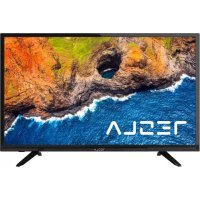
49S317BF - TV TESLA - Free user manual and instructions
Find the device manual for free 49S317BF TESLA in PDF.



| Product type | LED TV |
| Brand | Tesla |
| Model | 49S317BF |
| Screen size | 49 inches (124 cm) |
| Screen resolution | 1920 x 1080 pixels (Full HD) |
| Dimensions without stand (W x H x D) | 974.5 x 575.6 x 85.8 mm |
| Weight without stand | 8.8 kg |
| Power supply | 100-240 V~ 50/60 Hz |
| Power consumption (standby) | < 0.5 W (estimate) |
| Video inputs | 2 x HDMI, 1 x AV (Composite), 1 x USB |
| Audio inputs | 1 x antenna/cable/satellite (coaxial) |
| Audio outputs | 1 x digital audio output (S/PDIF), 1 x headphone |
| Main functions | Teletext, Electronic Program Guide (EPG), Freeze frame, Channel list, Audio description, NICAM, Sleep timer |
| USB playback formats | MPEG, AVI, MKV, MP3, JPEG (common) |
| VESA standard | 100 x 100 mm |
| Energy class | Not specified (estimate A+ - F) |
| Remote control | Yes, with supplied AAA batteries |
| Included accessories | Table stand, screws, power cord, quick start guide, warranty card |
| Care and cleaning | Unplug the device, clean with a dry soft cloth. Do not use abrasive products. |
| Safety | Do not expose to moisture, do not obstruct ventilation openings, use a suitable wall mount, keep out of reach of children (batteries) |
| Spare parts and repairability | Contact authorized service center for parts. Repair must be carried out by a qualified professional. |
| General information | Use in tropical or temperate climate. Operating temperature: 5°C to 45°C. Humidity: 20% to 80%. |
Frequently Asked Questions - 49S317BF TESLA
User questions about 49S317BF TESLA
0 question about this device. Answer the ones you know or ask your own.
Ask a new question about this device
Download the instructions for your TV in PDF format for free! Find your manual 49S317BF - TESLA and take your electronic device back in hand. On this page are published all the documents necessary for the use of your device. 49S317BF by TESLA.
USER MANUAL 49S317BF TESLA
Remote control
- Battery AAA size, 2pcs
- Quick Start Guide
Warranty Card
- Base stands (2pcs)
- Screws (2pcs) 32"
- Screws (4pcs) 40"-55"
- AC Line Cord x 1
Note: for some models, AC cable may be already connected with the TV set and can't be removed.
Note
- The graphics in this file are only for reference.
- Your TV may be slightly different from that shown herein.
- The information in this document is subject to change without notice. The manufacturer accepts no liability for damage resulting directly or indirectly from faults, incompleteness or discrepancies between the user manual and the product described.
- In dry environment due to static electricity, the product may restart and return to the main OSD Interface, USB player interface or the previous source mode. Please continue to operate the TV as you will.
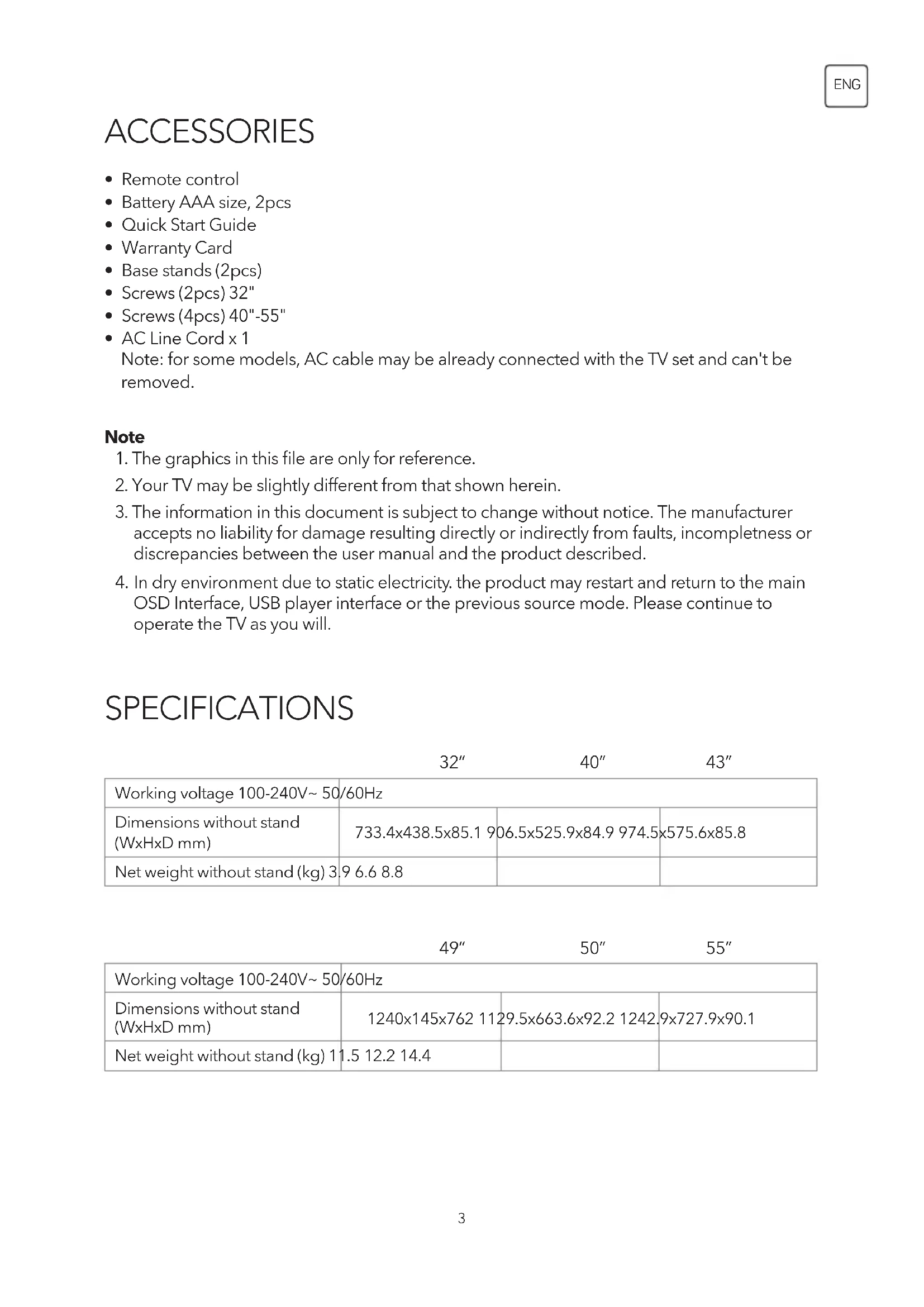
SPECIFICATIONS
| 32" 40" 43" | |||
| Working voltage 100-240V~ 50/60Hz | |||
| Dimensions without stand (WxHxD mm) | 733.4x438.5x85.1 | 06.5x525.9x84.9 974.5 | x575.6x85.8 |
| Net weight without stand (kg) 3.9 6.6 8.8 | |||
| 49" 50" 55" | |||
| Working voltage 100-240V~ 50/60Hz | |||
| Dimensions without stand (WxHxD mm) | 1240x145x762 11 | 29.5x663.6x92.2 1242 | 9x727.9x90.1 |
| Net weight without stand (kg) 11 | 1.5 12.2 14.4 | ||
POSITIONING THE TV SET
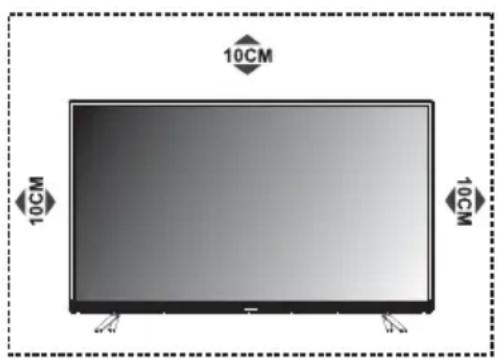
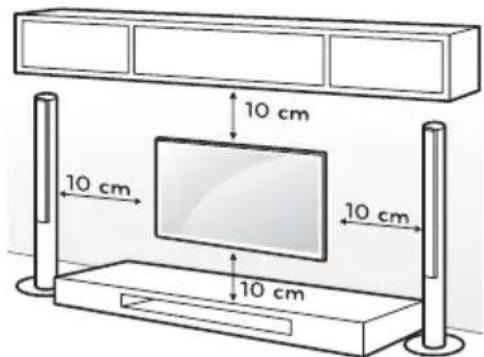
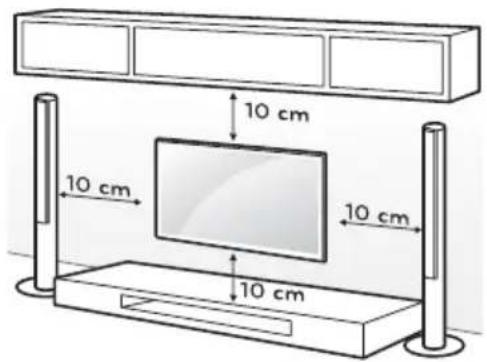
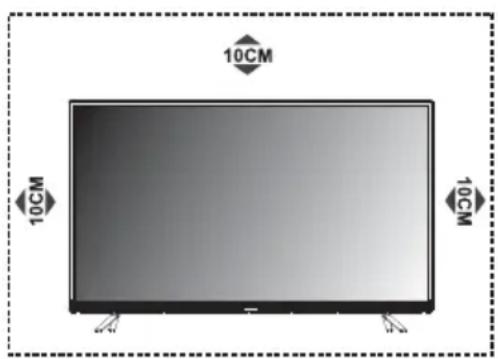
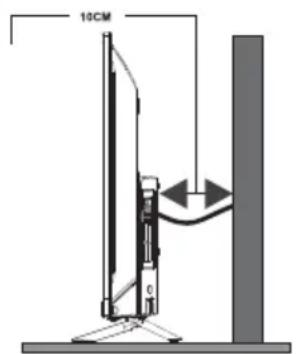
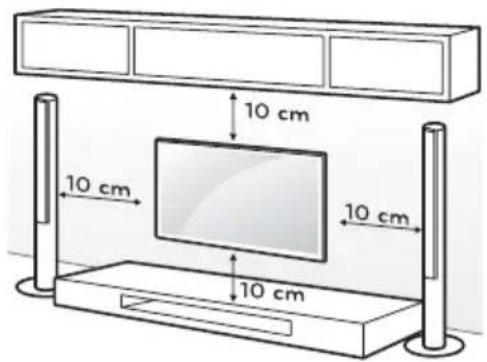
- Install Display on solid horizontal surface such as a table or desk. For ventilation, leave a space of at least 10cm free all around the set. To prevent any fault and unsafe situations, please do not place any objects on top of the set. This apparatus can be used in tropical and/or moderate climates.
Fixing the rear of enclosure to wall. (only for AU market)

-
Environment (only for Tropical climates zone): Working temperature: 5^ - 45^ Working humidity: 20% -80% Storage temperature: -15^ - 50^ Storage humidity: 10% -90%
-
Environment (only for Moderate climates zone): Working temperature: 5^ - 35^ Working humidity: 20% -80% Storage temperature: -15^ - 45^ Storage humidity: 10% -90%
Never place a television set in an unstable location. A television set may fall, causing serious personal injury or death. Many injuries, particularly to children, can be avoided by taking simple precautions such as:
- Using cabinets or stands recommended by the manufacture of the television.
- Only using furniture that can safely support the television.
- Ensuring the television is not overhanging the edge of the supporting furniture.
- Not placing the television on tall furniture (for example, cupboards or bookcases) without anchoring both the furniture and the television set to a suitable support.
- Not placing the television set on cloth or other materials that may be located between the television set and supporting furniture.
- Educating children about the dangers of climbing on furniture to reach the television or its controls.
If your existing television set is being retained and relocated, the same considerations as above should be applied (Only for the TV with mass exceed 7kg ).
- An optional wall mount can be used with your television. Consult with your local dealer for a wall mount that supports the VESA standard used by your TV model.
Carefully attach the wall mount bracket at the rear of the TV. Install the wall mount bracket on a solid wall perpendicular to the floor. If you are attaching the TV to other building materials, please contact qualified personnel to install the wall mount.
Detailed instructions will be included with the wall mount. Please use a wall mount bracket where the device is adequately secured to the wall with enough space to allow connectivity to external devices.
CAUTION
- Disconnect the power before moving or installing the TV. Otherwise electric shock may occur.
- Remove the stand before installing the TV on a wall mount by performing the stand attachment in reverse.
- If you install the TV on a ceiling or slanted wall, it may fall and result in severe injury. Use an authorized wall mount and contact the local dealer or qualified personnel. Otherwise it is not covered by the warranty.
- Do not over tighten the screws as this may cause damage to the TV and void your warranty
- To prevent injury, this apparatus must be securely attached to the floor/wall in accordance with the installation instructions.
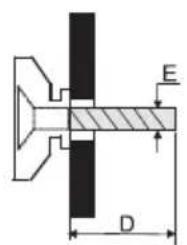
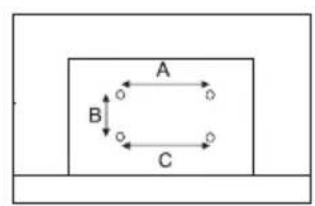
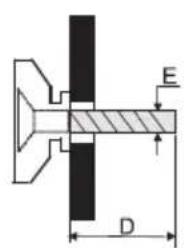
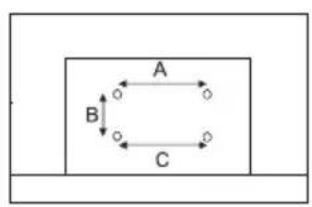
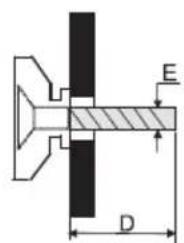
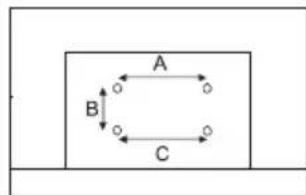
- Use the screws and wall mounts that meet the following specifications. Any damages or injuries by misuse or using an improper accessory are not covered by the warranty.
| Model Size: 32" Top Down | ||||
| Screw | Diameter (mm) "E" M4 | M4 | ||
| Depth (mm) "D" | Max 9 9 | |||
| Min 6 6 | ||||
| Quantity 2 2 | ||||
| VESA (AxBxC) 100x100x100 | ||||
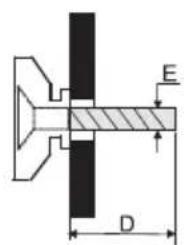
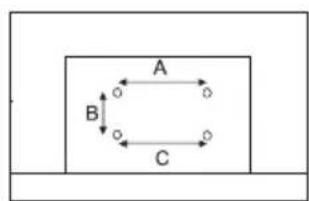
Note:
1) The pictures are for reference only.
2) For the TV sets with terminals towards the wall, in order to leave enough space to use the terminals, a rubber cushion is needed together with the screw to fix the wall mount. It is a small hollow pillar whose internal diameter is 8mm , external diameter is 18mm and height is 30mm .
TERMINALS
Note: The terminals may differ by model or region, and please select the terminals according to the actual TV you have.
| 1 CI | CI card port. | |
| 2 AV IN | Connect audio and/or video signal from signal source such as DVD. | |
| 3 HDMI1/2 | Connect HDMI input signal from signal source such as DVD. | |
| 4 DIGITAL AUDIO OUT | Use a SPDIF cable to connect your TV to a compatible audio receiver. | |
| 5 EARPHONE | Audio output, speakers will be muted when earphone is plugged. | |
| 6 USB USB port | ||
| 7 ANTENNA IN (ANT.) | Connect a coaxial cable to receive signal from the antenna, AIR/CABLE/LNB cable or satellite. | |
| 8 SERVICE | Debugging interface only for professional technician | |
BUTTON
Note: The graphics are for representation only.
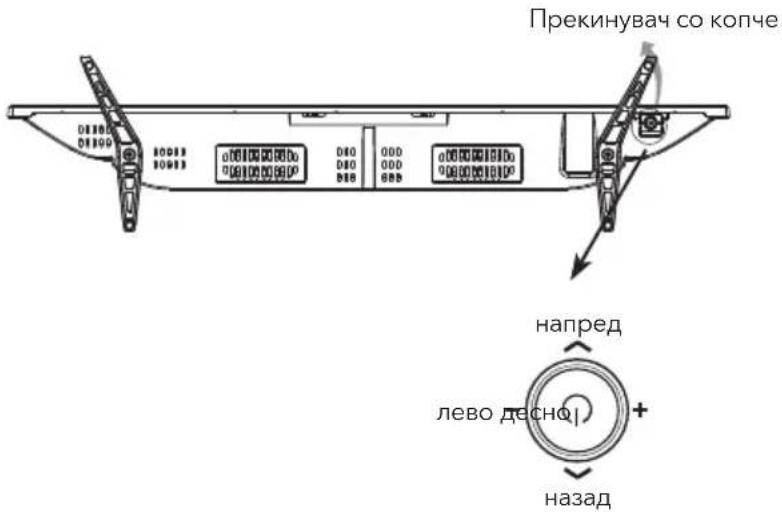
Bottom view
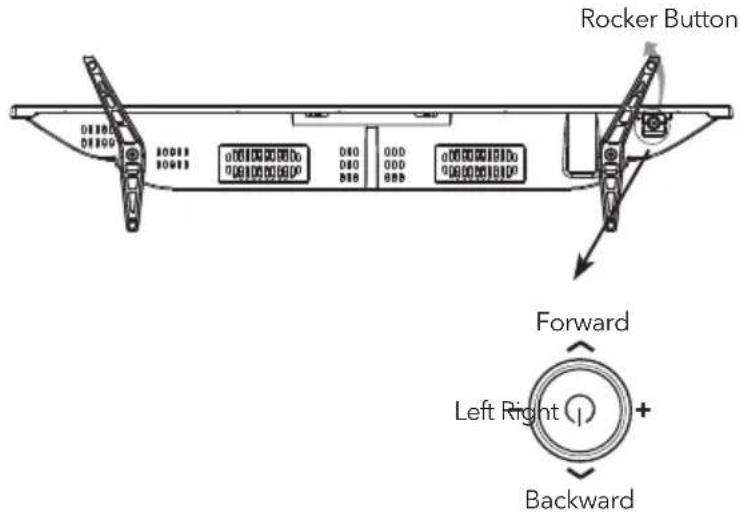
Press middle button:
- In standby mode, press it to turn on the TV;
- Without OSD, short press it to access source menu; long press to turn the TV to standby;
- With OSD, short press it to confirm a selection; long press it to return or exit.
Push left: decrease volume or go to left.
Push right: increase volume or go to right.
Push forward: channel up or go to above.
Push backward: channel down or go to below.
REMOTE CONTROL
Note: Some button may be invalid, when you press this kind of button, the TV screen will not respond or pop out a message to show that this function does not exist.
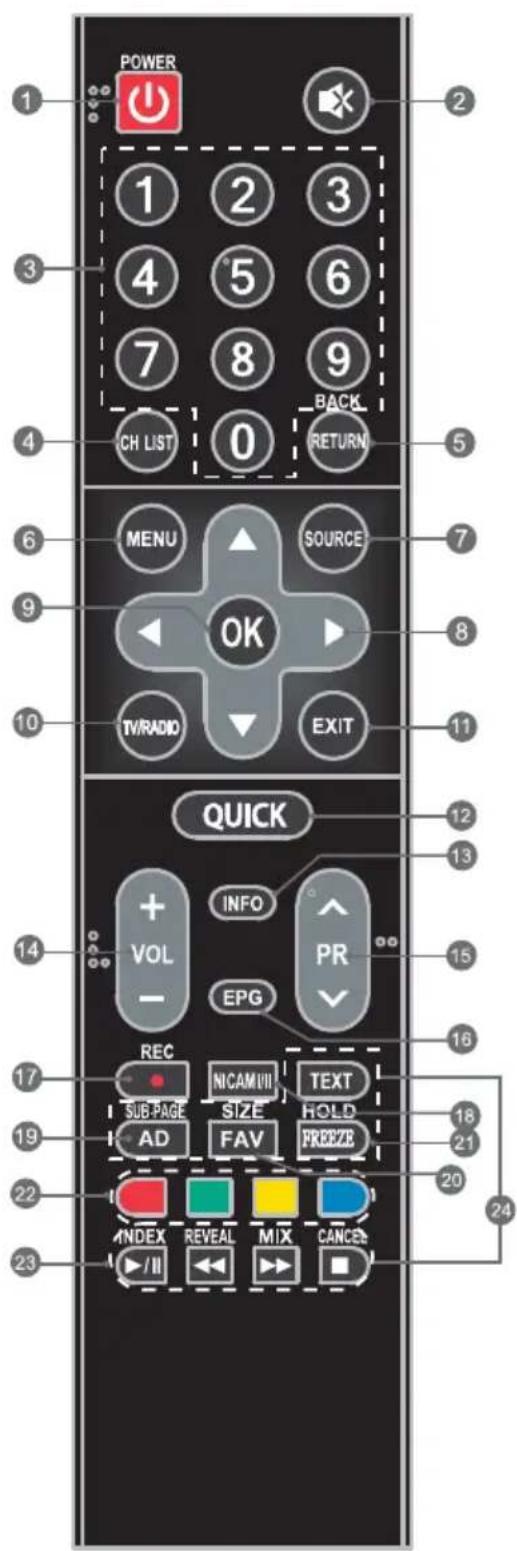
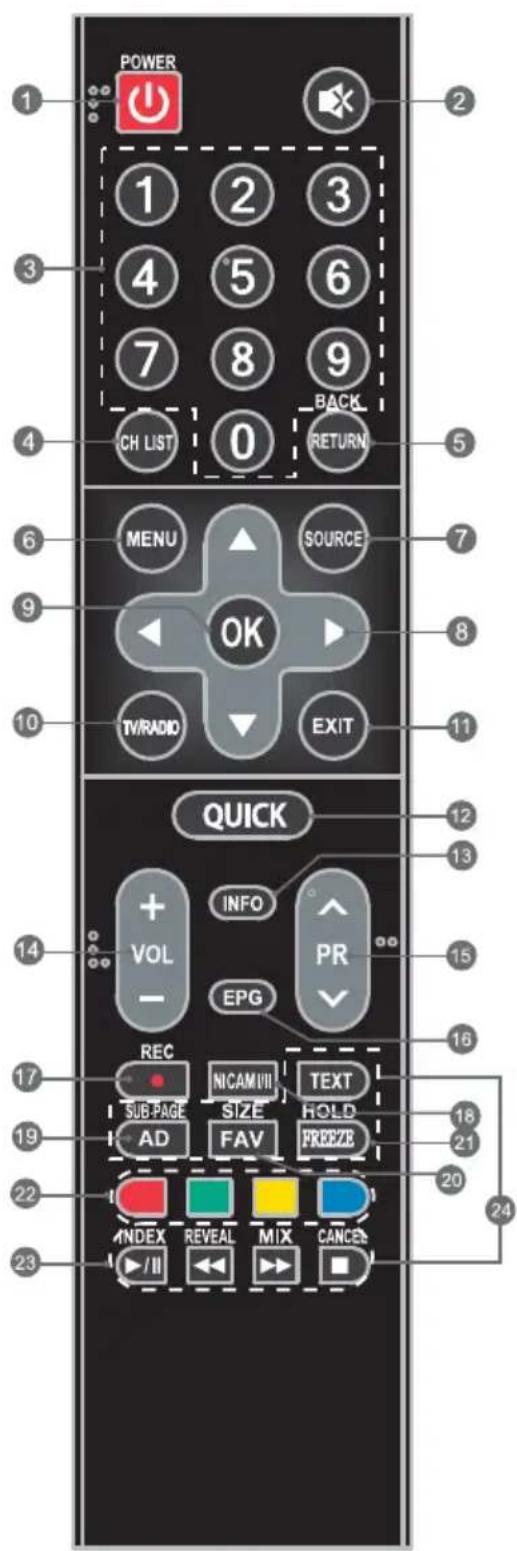
- POWER ( ) Press to tum the TV on or standby.
- MUTE ( ) Press to mute or restore the volume.
- Number buttons Choose channel directly.
- CHN LIST Press to access the channel list.
- RETURN (BACK) Press to return to previous viewed channel.
- MENU Open the menu options.
- SOURCE Select the input source mod
- Up/Down/Left/Right (▲ /▼/▲ /▶) Navigate the menu.
- OK Confirm the selection.
- TV/RADIO Press to switch between TV and radio.
- EXIT Exit the current menu.
- QUICK Access the quick menu.
- INFO Display information about current source.
- Volume Up/Down (VOL+/VOL-) Adjust the volume up or down.
- Program Up/Down (PR+/PR-) Change the programs up or down.
- EPG Press to display the current EPG information in DTVmode.
- REC (Record) Press to record the current program (Only worked in DTV mode).
- NICAM (1/11) Press to select desired sound output depending on the broadcasting channel.
- AD Press to turn on audio description, a narrator will describe what is happening on the screen for blind or visually impaired viewers. Press again will turn it off (Only available in DTV mode).
- FAV Press to view your assigned favorite channels. Press Up/Down buttons to cycle through your assigned favorite channels, press OK to confirm.
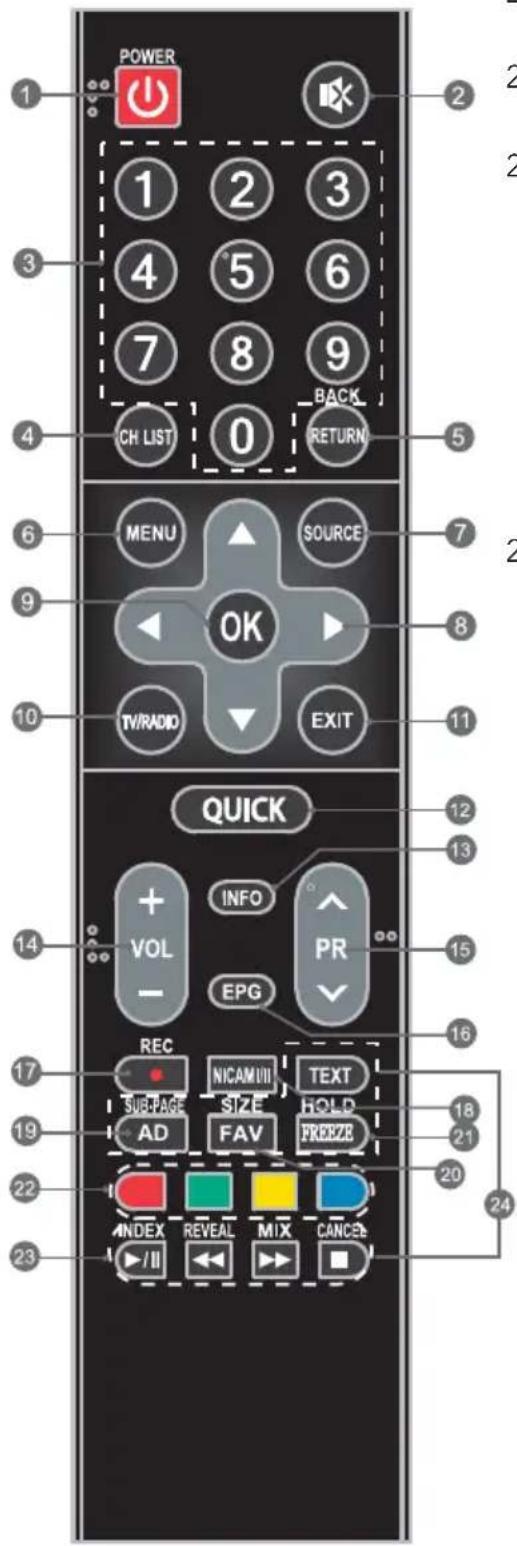
- FREEZE Freeze or unfreeze the image on the screen (Not available in USB mode).
- Colored buttons Press to execute the prompt function in TV or DTVmode.
- USB Play Control Buttons Play & Pause (▶II)
Press to pause playback, press again to continue playback.
Stop (
Press to stop playback.
Fast Backward Button (
Press to fast reverse.
Fast Forward (
Press to fast forward.
- TELEPHONE BUTTONS TEXT
Press to enter or exit the teletext menu.
SIZE
Enlarge the teletext display: Press this button once to enlarge upper half of the screen. Press this button again to enlarge lower half of the screen. Press this button again to resume to normal screen size.
HOLD
Press to hold the teletext page on screen without update and changes. Press again to release the hold state.
SUB.PAGE
Press this button to enter or exit subpage mode (if subpage is available). Press Red I Green buttons to select the desired subpage.
INDEX
Display index page.
REVEAL
Display concealed information such as solutions to riddles or puzzles or remove the information from the display.
MIX
Superimpose the teletext over the TV program or return to normal teletext mode.
CANCEL
Return to TV program temporarily while searching for a Teletext page. When the search is done, the page number will be displayed on the upper left of the screen. Press again to return to the Teletext page.
HOW TO USE THE MANUAL
Operating instructions are built into your TV and can be displayed on the screen. To learn more about your TV features, access your E-Manual by referring to below information.
- Press MENU button to access the menu list. There is a display "E-Manual" at the bottom.
- Press Blue button to access the e-Manual interface.
- Remote control buttons in the e-Manual are described by words instead of icons, refer to below information to help you operate the TV.
| 0-9 Number Buttons Select Page | |
| OK | Go to page |
| Press to the previous page. | |
| Press to the next page. | |
| Blue button Enter or exit the E-manual interface. | |
TROUBLESHOOTING
Note: Below troubleshooting list is only for reference, some models may not have all functions and the actual problem may differ from it. If the problem persists after solutions, please contact your local support center.
| General Problem | |
| Issues Solutions and Explanations | |
| Remote control does not work. | 1. Check the remote sensor on the remote control. 2. Change the batteries. 3. Batteries are not installed correctly. 4. Main power is not connected. |
| Poor signal | This is usually caused by interference from cell phones, walkie-talkie, automotive ignition system; neon, electric drill or other electronic equipment or radio interference sources. |
| Multimedia Player | |
| Issues Solutions and Explanations | |
| Audio is normal but video is abnormal. | 1. The media file maybe damaged, Check if the file can be played on the PC. 2. Check if video and audio codec is supported. |
| Video is normal but audio is abnormal. | 1. The media file maybe damaged, Check if the file can be played on the PC. 2. Check if video and audio codec is supported. |
| Picture and Sound | |
| Issues Solutions and Explanations | |
| No picture, no sound. | 1. Check the signal source. 2. Plug another electrical device into the outlet to make sure it is working or turned on. 3. Power plug is bad contact with the outlet. 4. Check the signal. |
| Abnormal picture | 1. For no color or bad picture quality, you may: 1) Adjust the color option in menu settings. 2) Keep the TV at a sufficient distance from other electronic products. 3) Try another channel, maybe exist broadcasting signal problem. 2. Bad TV signal (Display mosaic or snowflakes) 1) Check the signal cable and adjust the antenna. 2) Fine tune the channel. 3) Try another channel. |
| Normal picture, no sound | 1. If no sound, unmute or increase the sound volume. 2. Open the sound menu and adjust "Balance". 3. Check if a headphone has been inserted in, if so, pull out the headphone. |
SAFETY INFORMATION
Note: Read all of the instructions before operating the set. Keep these instructions well for later use.
- Read these instructions -All the safety and operating instructions should be read before this product is operated.
- Keep these instructions - The safety and operating instructions should be retained for future reference.
- Heed all warnings - All warnings on the appliance and in the operating instructions should be adhered to.
- Follow all instructions- All operating and use instructions should be followed.
- Do not use this apparatus near water - The appliance should not be used near water or moisture - for example, in a wet basement or near a swimming pool, and the like.
- Clean only with dry cloth.
- Do not block any ventilation openings. Install in accordance with the manufacturer's instructions.
- Do not install near any heat sources such as radiators, heat registers, stoves, or other apparatus (Including amplifiers) that produce heat.
- Do not defeat the safety purpose of the polarized or grounding plug. A polarized plug has two blades with one wider than the other. A grounding plug has two blades and a third grounding prong. The wide blade or the third prong is provided for your safety. If the provided plug does not fit into your outlet, consult an electrician for replacement of the obsolete outlet.
- Protect the power cord from being walked on or pinched particularly at the plugs, convenience receptacles, and at the point where they exit from the apparatus. Only use attachments/accessories specified by the manufacturer.
- Use only with the cart, stand, tripod, bracket, or table specified by the manufacturer, or sold with the apparatus. When a cart or rack is used, use caution when moving the cart/apparatus combination to avoid injury from tip-over.
- Unplug the apparatus during lightning storms or when unused for long periods of time.
- Refer all servicing to qualified personnel. Servicing is required when the apparatus has been damaged in any way, such as power supply cord or plug is damaged, liquid has been spilled or objects have fallen into the apparatus, the apparatus has been exposed to rain or moisture, does not operate normally, or has been dropped.
- CAUTION: These servicing instructions are for use by qualified service personnel only. To reduce the risk of electric shock, do not perform any servicing other than that contained in the operating instructions unless you are qualified to do so.
- Do not install this equipment in a confined or building-in space such as a book case or similar unit, and remain a well ventilation conditions at open site. The ventilation should not be impeded by covering the ventilation openings with items such as newspaper, tablecloths, curtains etc.
- Caution - To prevent electric shock hazard, replace grille.
- Please refer the information on rear enclosure for electrical and safety information before installing or operating the apparatus.
-
To reduce the risk of fire or electric shock, do not expose this apparatus to rain or moisture.
-
The apparatus shall not be exposed to dripping or splashing and that no objects filled with liquids, such as vases, shall be placed on the apparatus.
- For the terminals marked with symbol of " " may be of sufficient magnitude to constitute a risk of electric shock. The external wiring connected to the terminals requires Installation by an instructed person or the used of ready-made leads or cords.
- To prevent injury, this apparatus must be securely attached to the floor/wall in accordance with the installation instructions.
- Danger of explosion if battery is incorrectly replaced. Replace only with the same or equivalent type.
- The battery (battery or batteries or battery pack) shall not be exposed to excessive heat such as sunshine, fire or the like.
- Excessive sound pressure from earphones and headphones can cause hearing loss. Listening to music at high volume levels and for extended durations can damage one's hearing. In order to reduce the risk of damage to hearing, one should lower the volume to a safe, comfortable level, and reduce the amount of time listening at high levels. (Only for German).
- The mains plug/appliance coupler/direct plug-in adapter is used as disconnect device, the disconnect device shall remain readily operable.
- When not in use and during movement, please take care of the power cordset, e.g. tie up the power cordset with cable tie or something like that. It shall be free from sharp edges and the like that can cause abrasion of the power cordset. When put into use again, please make sure the power cord set being not damaged, If any damages found, please look for the service person to replace the power cord set specified by the manufacturer or have the same characteristics as the original one.
- Attention should be drawn to environmental aspects of battery disposal.
- No naked flame sources, such as lighted candles, should be placed on the apparatus. To prevent the spread of fire, keep candles or other open flames away from the apparatus at all times.
- If the apparatus have the symbol in its rating label and the power cord has two pins, it means that the equipment is a Class II or double insulated electrical appliance. It has been designed in such a way that it does not require a safety connection to electrical earth.
- The following information are recommended to be included as far as applicable where applicable:
| ~ | Refers to alternating current (AC) |
| --- | Refers to direct current (DC) |
| □ | Refers to ClassII equipment |
| ○ | Refers to stand-by |
| I | Refers to power ON. |
| 4 | Refers to dangerous voltage |
- Warning for Apparatus containing COIN/BUTION CELL BATTERIES (Below instruction only used for the apparatus containing a user-replaceable coin/button cell battery)
WARNING
Do not ingest the battery, Chemical Bum Hazard (The remote control supplied with) This product contains a coin button cell battery. If the coin button cell battery is swallowed, it can cause severe Internal burns in just 2 hours and can lead to death. Keep new and used batteries away from children. If the battery compartment does not close securely, stop using the product and keep it away from children. If you think batteries might have been swallowed or placed inside any part of the body, seek immediate medical attention.
WEEE Directive

- Correct Disposal of this product. This marking indicates that this product should not be disposed with other household wastes throughout the EU. To prevent possible harm to the environment or human health from uncontrolled waste disposal, recycle it responsibly and promote the sustainable reuse of material resources. To return your used device, use use the return and collection systems or contact the retailer where the product was purchased. They can take this product for environmental safe recycling.
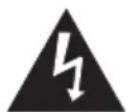
CAUTION
RISK OF ELECTRIC SHOCK DO NOT OPEN

This lightning flash with arrowhead symbol within an equilateral triangle is intended to alert the user to the presence of non-insulated "dangerous voltage" within the product's enclosure that may be of sufficient magnitude to constitute a risk of electric shock. To reduce the risk of electric shock. Do not remove cover (or back). No user serviceable parts inside. Refer to qualified service personnel. The exclamation point within an equilateral triangle is intended to alert the user to the presence of important operating and maintenance instructions in the literature accompanying the appliance.
Licences

HIGPOFINIONMULTMEDIAINTERPACE
The terms HDMI and HDMI High-Definition Multimedia Interface, and the HDMI logo are trademarks or registered trademarks of HDMI Licensing LLC in the United States and other countries.

DOLBY AUDIO
Manufactured under license from Dolby Laboratories.
Dolby, Dolby Audio and the double-D symbol are DOLBY AUDIO trademarks of Dolby Laboratories.
EU DECLARATION OF CONFORMITY
For the following equipment:
LED-TV
(Product Name)
(Model name/Brand name)
is herewith confirmed to comply with the requirements set out in the Council Directive on the Approximation of the Laws of the Members states relating to Radio Equipment Directive(2014/53/EU),Erp Directive(2009/125/EC) and RoHS(2011/65/EU).For the evaluation regarding the Directive, the following standards were applied:
| Type Standards | |
| Safety EN 60065:2014 | |
| EMC | EN55020:2007+A11:2011; EN55024:2010+A1:2015; EN55032:2012; EN61000-3-2:2014; EN61000-3-3:2013 |
| Radio Spectrum | ETSI EN 303 340 V1.1.2 ETSI EN 303 372-2 V1.1.1 |
| Health EN 62479:2010 | |
| Erp | EN 50564:2011; EN 62087:2012; IEC 62087:2011; IEC 62301:2011 |
| RoHS EN 50581: 2012 |
The following manufacturer is responsible for this declaration:
(Company Name)
(Company Adress)
(Contract Name)
(Position/Title)
Place of issue
Date of issue
Signature of Authorized Person
AKSESORE
- Telekomandës
Bateria (AAA madhësi, 2 cope) - Udhezues per fillim te shpejte
- Kartela e garancionit
- Mbaijtese baz (2 cope)
- Vidha (2 cope) 32"
- Vidha (4 cope) 40^ - 55^
Kordoni irrymes AC x 1
Lageshtia punuese: 20% - 80%
Temperatura e ruajtjes: -15°C-45°C
Lagështia e ruajtjes: 10%-90%
| Model Size: 32" Top Down | ||||
| Screw | Diameter (mm) "E" M4 | M4 | ||
| Depth (mm) "D" | Max 9 9 | |||
| Min 6 6 | ||||
| Quantity 2 2 | ||||
| VESA (AxBxC) 100x100x100 | ||||
Shenim:
Push left: decrease volume or go to left.
Push right: increase volume or go to right.
Push forward: channel up or go to above.
Push backward: channel down or go to below.
TELEKOMANDA
Pa6oTHa BlaJxHocT: 20% - 80%
TempepatyaHa cxbxpanHeHne: -15°C-50°C
Blaackhoc npn cxbxpaHene: 10% - 90%
- Okolna cpega
(cam03a3oHa cymepen KImMaT):
Pa6oTha TeMnepaTypa: 5^ - 35^
Pa60Tha BnaXnOCT: 20% - 80%
TemnepaTypaHa cxbxpaHHeH: -15 ^ C -45 ^ C
BlaakHoCT npu cxbxpaHeHne: 10% - 90%
Hnkora He noctabraye Telebeu3opa Ha Hecta6nHno Macto. Telebeu3opbT MoKe Da naHe, Koeto 6n MorNo da npuHn cepno3HO HapaHraBaHe nIi cmbpt. MoKeTe da n36erHeTe peNuca HapaHraBaHn, OcOBeHo Ha deua, KaTo npedpneMeTe HAKON JecHn npedna3Hm MepKn, KaTO Hanpimep:
- I3noJ3BaTe ɪkaφObe ɪnɪ CTɔkɪn, ṬpènpəþaHɪ O T Ἢροι3BoɪnteJIЯ Na TeJIeBɪʒOpa.
- I3noJ3BaTe cAmo Me6eJn, KOnto MoRaT 6e3OnaCHO da N3dbpXaT TOBapa Ha TeJeBu3opa.
- YBepete ce, Ye TeJIeBn3OpbT He CTbpUH n3BbH pb6OBeTe Ha noDlbpXaIaTa Me6eJI.
He nocTaBnTe TeLeBn3Opa Bbpxy BnCoka Mebe (Ha npimep KxHcNk KafoBe nn paTObe 3aKnHn),6e3 da 3akpenite kaKTo Me6JIne, TaKa n TeLeBn3Opa KbM noDxoJua onopa.
He noctabaTe TeIeBn3Opa Bbpxy NOKpNBka IIN dpyrMaTePnaJI, KOITOMoKe da ca pa3noJIOXeHN MeJdy TeIeBn3Opa IN OndbpxaUaTaMe6eJ.
Pa3aCHeTe Ha deuata KOJko e onaCHO da ce KaUBaT Bbpxy Me6eJIte, 3a da doCTnHnat Do TeJeBn3Opa nIIN DO 6yToHnTe My. Ako 3ana3BaTe n IpemecBaTe Tekyuizn Bn TeJeBn3Op, B3MeTe NOB HnMaHne CbUInTe Cbo6paXeHnKato NocOueHnTe No-rope (cAmO 3a TeJeBn3Op c TerNo haD 7 kg).
Mozete da n3noJ3BaTe onuohalna cToKa 3a cTeHa c Baun TeJeBnOp. KOncyItnpaTte ce C MeCTHnra TbpROBcN npedctabNTe 3a cToKa 3a cTeHa, KOrTO noDbpxka cTaHapTa VESA, n3noJ3BaH OT Baun moJe TeJeBnOp. BHNMaTeJIHO 3akpenete cKo6aTa Ha cToiKaTa 3a cTeHa KbM 3aHaT aacTh Ha TeJeBnOpa. MoHTnpaTe cKo6aTa Ha cToiKaTa 3a cTeHa Bbpy 3dpaba CTHe, nepEnnkyIrpHo Ha nOda. Ako 3akpenBaTe TeJeBnOpa KbM dpyr BnD cPoNTeJH MaepnA, MOn, CBpXeTe Ce C KBaIIuChiupan nepcoHaJI 3a MOHTnpaHe Ha cToiKaTa 3a cTeHa. Pdpo6Hn HnCTpykUns 6bDat BKIOUeHn CbC cToiKaTa 3a cTeHa. MoJr, n3noJ3BaIte cKo6a Ha cToiKaTa 3a cTeHa, KOrato yCTPOINCTBOTo e 3dPaBO 3akpeNeHO KbM cTeHaTa C DOCTaTbUHO npocTpaHCTBO, KoETo No3BOJRA BaCBp3BaHe KbM BbHUNyCTPOINCTBa.
BHIMMAHNE
- ɪЗbaɪdete 3axpaɪbaɪsɪya kæbɪ nɪpeɪn nɪpemeɪtbaɪeɪn mɒHTɪpɑːhe Ha TeJIeBɪzəpa. B npɔtɪvɛh Cnyaɪ e Bb3MOXHO ᵠ Bb3HɪKHe TOKOB yʌap.
- OtctpaheTe cToiKaTa npedn MOHTnpaHe Ha TeJIeBn3opa Bbpxy cToiKa 3a CTeHa, KaTo N3BbPUnTe 3akpeBnBaHTo Ha cToiKaTa B o6pateH peI.
- Ako MOHTnpaTe TeIeBn3Opa Ha TaBaH nIHa HAKIoHeHa CTeHa, ToM MoKe Da naHe I da npuHHcepNo3HO hapaHraBaHe. 13noJ3BaIte npenOpbuaHa cToHa 3a CTeHa n Ce CBpKxTe C MeCTHnRA TbpROBcN ppeCTaBnteI nIc KBaJIuΦnUpaH nepcoHaJI. B npOTnBeH cIyauTobA He ce NOKPnBA OT rapaHcIyTa.
He npesatraTBe BnHTOBeTe, TbKATO TOBa MoKe da nobpeDn TeJeBn3Opa n da aHyInpa rapaHcIyTa.
3a da npedotbpaTne HapaHbaHe, yctpoiCTBOTO Tp6Ba da 6bJe 3dpaBO 3akpeNeHO KbM noDa/ CTehata B CboTBetCTBnE C INHCTpyKcNtTe 3a MOHTaX. - I3noJ3BaIte BnHTOBe n CToKn 3a CTeHa, KOInTO OTROBApT Ha CneHInTe CneuNfKaun. BcKa NaOBpeJa nn HapaHbAHe OT He npabInHa yNotpe6a nn npn nn3NoJ3BaHe Ha rpeWeH akcecoap He ce NOKpIBa OT rapaHcIyTa.
| Размер на модал: 32" Врьх有何у | |||
| ВИNT | Диаметыр (mm) "E" M4 | M4 | |
| Дыбочина (mm) "D" | Макс 9 | 9 | |
| Мин 6 | 6 | ||
| Колчнина 2 2 | |||
| BECA (АхВхС) 100x100x100 | |||
3a6eJekka:
1)CHHmKNTe ca cmo 3a cnpaBka.
2) Пи TeleBUNOpC u3BOOn KbM CTeHaTа, 3a Дa ИMaДОCTaTbUH MЯСTO 3a N3NoJ3BaHe Ha n3BOOnTe, e Heo6xOДIMa ГуMeHa Bb3rJaBnUca 3aEДHo C BnHTa, 3a Дa ce 3akpeN cToiKaTa 3a CTeHa. Toba e MaJIka Kyxa KoJOna C BbTppeWeH dIaMeTbp ot B mm, BbHWeH dIaMeTbp ot 18 mm n BvcouHa 30 mm.
N3BODn
3a6eIexka: IV3BOJITe MoKe Da ce pa3JIuHaBt B 3aBNCIMOCT OT MoJeIa IJI peRHOHa N MOJI, IV3bepTe IV3BOJITe B 3aBNCIMOCT OT TeJIeBn3Opa, KOITo IMaTe.
| 1 CI | Порота СКарта. | |
| 2 AV IN | Свьрзваite щадио и./или видесигнал от ИЗTOЧИК на сигнал, кato наразимер DVD. | |
| 3 HDMI1/2 | Свьрзваite сигнал OT HDMI ВхOD от ИЗTOЧИК на сигнал, кato наразимер DVD. | |
| 4 ДИГITAЛЕН AYДЮ NGI3JIЕЗ | Използваite SPDIF kaбел, за свьржete Телевизopa Кьм СвВмостим щадионпсемнIK. | |
| 5 CJЛУЛДАЛКИ | АydюиЗХОД, 3ВуКБТ OT ВИСOKOROBOPИТЕЛITE У Б自由贸易网上 свьрзвае на случалки. | |
| 6 USB USB пот | ||
| 7 | ANTENNA IN(ANT.) &AIR/CABLE/ LNB | Свьржete koakсанеган kaбел, за дноочавate сигнал OT AntehaTa, kaбela или сATEЛITA. |
| 8 SERVICE | Иntерфейс за отстраве на грешик само за птофayetteонлни Т电商ци | |
BytoH
3a6eJekka: rpaKnte ca camo 3a cnpaBka.
H3rIeO tAOJy

HaTnchete cpeHn66yToH:
- HatncheTe rBpeXIM Ha rTOBHOCT, 3a Da BKIOUHTe TeJIeBN3Opa;
- Be3 ekpaHNO MeHIO, HATNCHETe ro 3a KpaTko 3a DOCTbI NO HaayalHOTo MeHIO; HATNCHETe ro npOdbJXHTeHIO, 3a Da npeBKnIOuHTe TeJIeBuN3Opa B pexIM Ha rotOBHOCT;
- CekpaHNO MeHIO, HATNCHETe ro 3a KpaTKO 3a NOTBbpxKeHne Ha N36Op; HATNCHeTe rpoIbJIxKITeJIHO 3a BpblsAHe UIN N3XoD
HaHcHETe HaJIaBO: HamaJIaBaHe Ha CnlaTa Ha 3ByKa IIn IpemeCTBaHe HaJIaBO.
HaHcHHe HaAaBaHe Ha CnlaTa Ha 3Byka NII npMeCTBaHe HaAaCHO.
HaHcHete HAnpe: KaHaJ Harope nnI npemecTbaHe Harope.
HaTnchete Ha3aД: KaHаI NaIOnJy IJIИ npEmeCTBaHe HaIOnJy.
HaTnchHe 3a BIn3aHe NIn N3In3aHe OT MeHIO To HteJeTeKCT.
SIZE: yrolembahe Ha dncnneHa TeJeTeKCTa: Hatnche To3n 6ytoh BeHbX, 3a da yrolemte rohpata noOBHa ha ekpaHa. Hatnche To3n 6yTOH OTHOBO, 3a Da yrolemnte DOHaT a NOOBHa ha ekpaHa. Hatnche ToHO BO To3n 6yTOH, 3a Da Bb3o6HOBNTe HopMaJIHH pa3Mep Ha ekpaHa.
HOLD:HaTnchete 3a 3aIbpxKaHe Ha cTpaHncaTa Ha TeJIeTeKCTa Ha ekpaHa 6e3 aKTyaIIn3IpaHe I npomEn. HaTnchete OTHOB, 3a Da OCBO6OJnte CbCToHHneTo Ha 3aIbpxKaHe.
SUB.PAGE:HaTnCHTeTo3n6yTOH3aBn3aHe nn n3nn3aHeOTpeKIMHaNoCTpaHnua(aKOIma HaJIuHaNoCTpaHnua).HaTnCHTeYePBeHnte n3eJeHnTe6yTOH3aN3bOpHaXeJHaHata noCTpaHnua.
INDEX
N3BExKaHa HnHdeKCha cTpaHnca.
REVEAL
I3BexdaHe Ha cKpTa HOpMaun, KaTo HanpImeppeHHe Ha rataHKn nn Pb3eInn nn npemaxBaHeHa HOpMaunra O T DnCnJe.
MIX
HacnarBaHe Ha TeIeTeKCTa Bbpy TB nporpama nnBpUaHe KbM HopMaJIeH peXIM Ha TeIeTeKCT.
CANCEL
BpeMeHHo BpbUaHe KbM TB nporpama,doKaTo Tbpcnte cTpaHua Ha TeJeTeKCTa. Korato
PnPKIIOUHTe C TbpcHeTo, HOMepbT Ha CTpaHncaTa 1ue 6bJe n3BeDenB rOpHaTa JIABa YAcT Ha ekpaHa.
HaTnchete OTHOBO,3a Da ce BbPheTe Ha CtpaHncaTa Ha TeJeTEKCTa.
Kak da n3noJ3BaTe eJeKtpoHHOTO pboBOndTBO
HnctpykunTe 3a pa6ota ca Brpaedenn BbB Baunr TeJeBn3Op n Moat da 6bdaT n3BeHn Ha ekpana. 3a da hayuTe noBuee 3a fynKUnTe Ha Baunr TeJeBn3Op, Bne3Te BbB BaWTo eNeKTPOHNO pkoBOdCTBO, KaTO HnpaBnTe cnpabKa c nHopMaunra Tno-dony.
- HATNCHeTe 6yToHa MEnu 3a DoCTbI DO CnCbKa Ha MeHOTo. B DoJIHaTa Yact IMa DnCnJIeN "E-Manual".
- HataeTe CnHna 3a DoctbI DO nHTepceHa eJeKtpoHhTo pkoBOcTBO.
- ByToHnTe Ha nCTaHcNoHHOTO ynpabJIeHne B eJekTPOHHOTo pbKOBoDCTBO ca OnUcaHn C dym, BmecTo c uKOHn, BxKTe INΦOpMaunra Tno-DoJy, KOaTO ue Bu nomorHe np np pa6ota c TeJeBn3Opa.
| 0-9БуточicцфрииЗбор настраница | |
| OK | Опване настраница |
| ←Наточete | ДоPreшилataстраница. |
| →Наточete | До сладвацастраница. |
| СINHБутон | Влизаце или иЗлзаце OT Иntерфейca на[eilektrohhoto ръковозг�о. |
OTCTpaHЯBaHe Ha Heu3PpABHOCTH
3a6eJekka: CnncbKbT 3a OTcpaHraBe Ha HEn3npaBHOCTN NO-DOy e cAmO 3a cnpaBka, HAKO MoeJI MoKeJa He pa3noJaraT BCnUKN yHKUN N DeiCTBNTENHnT npo6Ie MoKe Ja ce pa3NJuAba OT Hero. Ako npo6IeMbT npoDbJnx CnepeWeHnTa, MOJ, CBpXeTe c c Baun MeCTe N eHTbp 3a noDnPbKka.
| Оьш позбLEM | ||
| Пробlems Рецени | разясанни. поберете діstанционни с enchор на діstанционно упра? Смение бастени. 3.Бастение не са постени пра? 4.Oсовно зхранвае не с camb? 4.Осовно зхранвае не с camb. 6Oвш сігнал | Това обикноево се ділжи на сMuшиен OT мбилни Телефони, потувен радnoteleфон, abTomobилни сисем за Запалвае; Heon, eilektpruceckn boрmaшини ял дурове lelektroponho оборudвае ял 3точни на рад nocм? 3Tochteni 6Oвш сігнал |
| Мультимедиен пленыр | |
| Пробlems Решения | разясанения |
| Звкут e hopмален, Но вдегOTO e лошо. | 1. Мультимедиен raft саи можеда e поvereен. П探测ete дали саи саилов. можеда се вьзпpon3векда на КOMПOTьра. 2. П探测ete дали кODEкьт за вдеги и уdino се подьржа. |
| Висоте e hopмално, Но 3вкут e лош. | 1. Мультимедиен raft саи можеда e поvereen. П探测ete дали саи саилов. можеда се вьзпpon3векда на КOMПOTьра. 2. П探测ete дали кODEкьт за вдеги и уdino се подьржа. |
(No3nuiy/DJIbXHOCCT)
ZUBEHÖR
(Modellname/Markenname)
COMMENT UTILISER LE MANUEL DIGITAL
EU DECLARATION OF CONFORMITY
I03nIOHpaHe Ha TeJIeBn3OpOT
- Инстаимрajтго ekранот haцьрстахорозанha nobршина, каду на ример мас. 3a npobetpybahe, OCTabete bapem 10 cm сюбODEн постор okoly телевизорот. 3aда спpeчпс.T He npoPnCHN nI IN He6e36eHN cHTyaCIN, He CTabajte HNKaKBn ppeMeTN BP3 TELEV3OPOrT. OBoj anapaT moxe da ce kopnstn BO TpOncn n/IIIN yMepenK KIMm.
- 3aúBpctyBaHé Ha 3aДнnot KaNaK Ha sɪn. (cAmO 3a aBCTpaɪnɪckn na3ap)
- OkolnHa
Pa6oTHa BnaJxHocT: 20% -80%
TemnepaTypa 3a yBaHBe: -15 ^ C - 45^ C
BlaЖнoc3aЧуBa№: 10%-90%
HnkoraaHe cTabajTe ro TeIeBn3OpOT Ha HeCTabuHIO MeCTO. TeIeBn3OpOT MOMKe da naHne I Da npEi3Bnka cepno3Ha NobpeDa uIN cmPT. Moxe da ce cnpeuat MHOry nobpeNi, oc6eHo kaj Deca, aKO Ce npe3EmAT HeKON eDHOCTABHN MepKn Ha npETNaJINBOCT, KaKO wTO CE:
- KopinCTeHBe kyTn nIi cTaNBn npenopaahn Od npOn3BOoNTeLOT Ha TeJeBu3OpOT.
-Да ce kopnstn caMo Me6eJ Ha KoJ MoKe 6e36eJHo da ce notnnpa TeIeBn3OpOT. - Norpuxke Te Ce TleBn3OpoT Da He CTOn OBeceH Ha pa6OuTe oN otnpen Me6eJ.
He ctabajte ro TeIeBn3OpOT Ha BnCok Me6eJ (Ha npimep opmapu n noJIuCi 3a KnHr) 6e3 da rna3aBpCTnTe n Me6eJot n TeIeBn3OpOT Ha COOdBETHa notKpena.
He nocTaBajTe ro TeJIeBn3OpOT Ha aIiUta IJN dpyrMaTepujaJIn Nomey Hero n NotnpHnot Me6eJ. - Objachete nM ha decaTa 3a onaChocHTe oN KaUyBaHbE Ha Me6eJOT 3a da ro DocnHAT TeLeBn3OpOT nIN HeROBtE KOHTpOJI.
AkoTo 3aJpyBaTe I NOMEcTyBaTe NoCTOeKNOr TJeBn3Op, Tpe6a Da Ce 3emat npeBnIropeHabeDenHeTne npenopakn (cAmo 3a TeJeBn3Op nToekok o7 kg).
3aEDHO CO TeLEBn3OpOT MOKe Da Ce KOpNCTH N3bOpEn SIneH DpXaU. PpOBepTe kaj IokaJIHNOT npOdaBaUdAnIIMAsnDcHApKoJ Ro 3aIOBOJyBa CTAHapDTo VESA KoJtO ro KopNCTH BaINOT MoEJ Ha TeLEBn3Op. BHMaTeJHo pNkayTe ro SInHNO T DpXaU 3a MoHTnpaHe Ha 3aHaTcPapaHa OD TeLEBn3OpOT. NocTabeTe ro SInHNO T DpXaU 3a MoHTnpaHe Ha cBpCT sN HopMaJIHO Ha NoDT. Ako Ro npNkaYBaTe TeLEBn3OpOT Ha dpyrI rpaJeHH MaTepnjAIn, KOHCyIITnpajTe ce Co KBaJIOnfkyBaHn Jnua 3a HnCTanauJa Ha DpXaUT.
3aedno co dpkaot ke 6nata npiloxeH n deTalH ynatCTBa. Kopntte Te snden dpxaay 3a MOHTINpaHe co koj ypeoT ke 6nde cooDBetHO npuBpcteh Ha sNDOT n CO DOBOJHO npocstop 3a NOBp3yBaHe Ha npuHaDBopeuHn ypeiN.
BHIMAHNE
- Ncknyte ja ctpjata nped da ro npemeCTyBaTe nHcTaNpate TeJeBn3OpOT. Hnky moke da doje do ctpyen yap.
- I3BaIeTe ro cTaTnBOT nped Da rO nHCTaJIpaTe TeJIeBn3OpOT Ha sUHeN dpxauch co o6paTHa NOCTaIIKa OJ npIKaYBaHbeto HA cTaTnBOT.
Ako ro nHctaInpate TeleBucopot Ha TaBaH nn HabaJeH sD, MoKe da naHe n da npedn3BnKa cepno3Ha noBpeJa. KopcTeTe oO6peH snJeH dpkau KONTakTupajTe co JokalHnot npoDaBau nn Co KBaHnΦkUyBaHn Lnua. Haky rapaHnjuata HeMa da BaXn.
He npcterhybajTe rnaPaoOBnTe 3aToa Taka MoKe da ce oHTeTn TeNeBn3OpOT n da ce noHnTu rapaunjata.
3a da cnpeuTe NOpe, anapaTOM Mopa Da 6nIe npeun3HO npKauH Ha noIoT/snDcT cnopey ynatCTBaTa 3a MOHTaKa. - Ynotpe6eTe 1pafoBn n snHn dpXaHn 7TO rN 3aOBOJyBaAT cneHNBe cneuKauNN. Cnte OHTeTyBaHa n NOBpeN oNORpeSHo KOpNCteHe Nn KOpNCteHe HecOOdBETHa rAanHTepnJa He ce onfateHn od rapaHunjata.
| Гolemina на м odeл: 32'' Tope | Дόу | |||
| Завrtka | Диаметар (mm) "E" M4 | M4 | ||
| Длобочина (mm) "D" | Макс 9 | 9 | ||
| Мин 6 | 6 | |||
| Колочина 2 2 | ||||
| VEDA (АхВхС) 100x100x100 | ||||
Hanomeha:
1) CnKnte ce cmo 3a pepepeHua.
2) 3a TeIeBn3Opnte co TepMHaJI KOH SIOOT n CO ueJ da CE OCTaBN IOBOJHO IPOCTOP 3a HNBIOKopncTeHe, Tpe6a Da ce KopcTn rymeHa o6Iora 3a Da ce npuBpcTn sIHNOT dpXau. Ce pa60Tu 3a MaJ WyPnIB Hocau Co BHaTpeWeH dNJameTap od 8 mm, HaBopeWeH dNJameTap od 18 mm n BucnHa OD 30 mm.
TepMnHaJIa
HanomeHa: TepMNHaJIte MoKe Ia ce pa3JNKyBaAT cnpeI MoJeI nn peHOn, a BHe n36peTe TepMNHaJIncOpeI TeJIeBn3OpOT ITO rIMate.
| 1 CI | CI пота за karstучka. | |
| 2 AVIN | Повзete щадио и./или видeo сигнал од. ИЗВор на сигнал, какошто e ДВД. | |
| 3 HDM1/2 | Повзete Влесен сигнал заΗΗМОДИЗВор на сигнал, jakошто e ДВД. | |
| 4 ДИГITAЛЕН AYДЮ NO I3JIЕЗ | Уnotpeбete SPDIF-кавел за яdoу поьзete Teileвизорот сokmпатиileнayдюпrimeMHNK. | |
| 5 СЛУШАЛКИ | AydniOnI3JIe3, 3ВчнцITE Нема дa ДаваAT Глac KORA ce priKKлчени снышалкITE за BO уши. | |
| 6 YCb-nорту YCb-nорту | ||
| 7 | ВЛЕЗ 3A AHTEHA (AHT.) & AIR/CABLE/LNB | Повзete koakсиjalen kaбел за яda пrimate сигнал од. АNTeha, kaбел или сateJIIT. |
| 8 CEPBIVC | Интерфеjc за порразаве на грeshкITE смao за прфесионален тхничар | |
Koquence
Hanomeha: rpaΦnukTe npka3n ce caMo 3a npeTcTaByBaHbe.
PorjeoddoJnHaTa cTpaHa
PnTnckaHe Ha cpeHTo konue:
1.Bo pexm Ha noIroTbeHOCT, npITnCHete ro 3a da ro BKnyuTe TeJeBu3OpOT;
2.Бe3 ekpaHcKa cInka, npTnCHTe KpaTko 3a da npCTanITE DO n3BOPHO MeH; npTnCHTe DOJrO 3a Da rnoctabNTe TeJIeBN3OpOT BO pEXIM Ha NOIrotBeHOCT;
3. Co OSD, npntncheTe KpaTko 3a da ro notBpDnTe n36OpOT; npntncheTe dolro 3a da ce BpaNTe nn da n3Je3eTe
PnTnckaBe IeBO: Ce HamaJIyBa rIaCHOCTa NII CE OJN HaJIeBO.
PnTnckaHe Decho: ce 3roJeMyBa rJaCHOCTa IJN Ce OAn HaJeCHO.
PnTnckaHne Hanpei: KaHaI norope nIIe ce OAn HaRope.
PnTnckaHe Ha3a: KaHaI noOJy nIe ce OAn noOJy.
Далецнистусявач
Hanomeha: Hekeo Konue MoKe Da He paobTu Kora Ke npTucHe BaKOB BnD Konue, ekpaHot Ha TeJeBn3OpOT Hema Da pearnpa Nll Ke ce nojabu nopaka Deka OBaa fYHKunja He NoCTOn.
- POWER() ПппснеTe 3a Да Г ВКлчиTeЛевиЗОрТ ИИд a ВлeЗЕ BO ржIM Ha NOДГ罗ТBEHOCT.
- MUTE (K) Пптисе за сюнсклунITE Илида Говатие 3ВукOT.
- Konyuha co 6pojkn IupeKTHO n36epeTe kaHaJI.
- CH LIST pntuChTe 3a da npctanTe Ha cnucOKOT CO KaHaJI.
- RETURN (HA3AД) Пптисе за за се вразиту Ha npetxODHо Гледанnot KaHaI.
- MENU Ce OTbopaat ONUHTe OJ MeHNTO.
- SOURCE IV36epeTe peKIM Ha BJIe3eH IV3BOp.
- Tope/Доу/Лeво/Дecho (▲/▼/<▲/>) Navigate the menu.
- OKTo noTbpDyBa n36opoT.
- TV/RADIO ПуNTиСHTe 3a Да пpeфрлATE MeIy TeIeBn3nJa I paINo.
- EXIT IV3JIe3 OJ TEKOBHOTO MeHn.
- QUICK Ппстан до 6рзо мени.
- INFO Ппкжувинфорmaци 3a TeKOBHnot n3BOp.
- Volume Up/Down (VOL+/VOL-) Ce haroDyBa rnaCHOCTa 3a NOBUCOKa INI NOHNCKa.
- Program Up/Down (PR+/PR-) Ce MeHyBaat прорразиные Harope и наю.
- EPG Пи捜сichte 3a Да се ппкжатTekobнITE Ифорmaци Na eЛeКТронcknot BoДИС (EPG) BO DTV-рекIM.
- REc (Record) IpnTnCHte 3a da ja ja cHmate TeKOBHaTa nporpaMa (pa6oTu caMo BO DTV-pexuM).
- NICAM (1/11) Пптушисту за по n3берете саканnot n3лe3 Ha 3ByK BO 3aBnCHOCT OД Канот wTO ce emTuBa.
- AD Ппнше Te 3a Да BKлучite Oпс Ha aydno, a packakkybaot Ke onиwe StTo ce cnlyuba Ha ekpaHot 3a Clenn Nlua nI IN Tne daun Co hapyuwe H bI. Ппнше Te NOBtOpho 3a Дa ГИСКлучITE (IOCTaHNO caMo BO DTV-peKIM).
20.FAVPnTncHeTe 3a da rN BnDnTe O3NaueHnTe omJIeHN KaHaJI. PnTncHeTe rN KOuHbTa Up/ Down (rope/IOJy) 3a da rN MeHyBaTe BaunTe omJIeHN KaHaJI n npTncHeTe OK (Bo peI) 3a da nOTBpDiTe.
-
FREEZE 3amp3HeTe ja cIikata Ha ekpaHOT (He e doCTaHNO BO YCb-pekM).
-
06oehn konmba Ppntnche Te 3a da ja n3BpuHTe yHKuJaTa BO TV uN DTV-peKm.
23. KoHTpOJIHn KOnUHMba 3a penpoDyKunja npeky YC6 Play & Pause (11)
PnTnCHTe 3a da ja nay3npaTe penpoDyKcnjata, nPnTnCHTe NOBTOpHO 3a da npoDoJXnTe co peNoDyKunja.
Stop (
PnTncHeTe 3a da ja 3anpeTe penpoDyKunjata.
Konque Fast Backward (
PnTncHe 3a 6p3o BpaKaHBe HaHa3a.
Fast Forward (▶)
PnTncHete 3a 6p3o oJeHe hHaHApEi.
24. KONUHbA 3A TEJETEKCT
TEKCT
PnTnCHTe 3a Da BHe3eTe Nnn Da n3Je3eTe OMeHnTO 3a TeJETeKCT.
ROJEMNHA: 3roJemTe ro npKa3OT Ha TeJIeTeKCTOT: npITnCHTe ro OBA KOnue eDHaU 3a da ja 3roJemnte rOpHATA NOJOBnHa OD ekpaHot.
PnTNCHeToOBAKOnYeUWeeHa3aJa ja 3roJeMITE DOJHATA NOJOBnHa Od ekpaHot. PnTNCHeToOBAKOnYeUWeeHa3aJa npoDoJIxNte CO HopMaJHa RoJIeMnHa Ha ekpaHot.
HOLD: npntncheTe 3a da ja 3aapanke CTpaHncaTa 3a TeIeTeKCT Ha ekpaHot 6e3 axypupaHe n npomeH. PpntncheTe NOBTOPO 3a da ja ocno6oJte Taa coctoj6a.
SUB-PAGE: npntncheTe ro Oba KOnue 3a Da BNe3eTe NnN n3Je3eTe od pexnMOT Ha NOTcTpaHnua (ako e DOCTaHa NOTcTaHnua). PnNTncHe Tn KOnuHaTa Ta CpBeHo / 3eJeHo 3a Da ja N36epete cKaHaTa NOTcPaHnua.
INDEX
PnKakn cTpaHnca Ha nHdeKC.
REVEAL
PnPKaKyBa CkPneHn HOpMauN, KaKo 1To cepeWeHja 3a rataHKn Nn 3aTaTKn Nn OTcTpaHyBaHOpMaun Od ekpaHot.
MIX
PnKaXeTe ro TeJeTeKCTOT HaT TeJEBN3NCKaTa npOrpMa nIbBpaTeCe BO HOpMaJIeH peXIM Ha TeJeTeKCT.
CANCEL
BpaTeCe npINBpeMeHO Ha TeJIeBn3NcKaTa npOrpama IdoKea npe6apyBaTe cTpaHua BO TeIeTeKCT. Kora Ke 3aBpUnTe co npe6apyBaHe, 6pojOT Ha cTpaHuaTa Ke ce npKaxe Ha rOpHnot LeB aOJ od ekpaHot. PnITnCHete NOBtOHO 3a Da ce BpaTne Ha cTpaHuaTa OD TeJIeTeKCTOT.
Kako da ro kopincnte eJeKtpoHcKnOT npnpaunK
Ynata 3a pa6otebe ce BrpaedH BO TeJeBn3OpOT MoKe da ce npKaKaT Ha ekpaHot.
3a da do3haete noBeke 3a kapaKTepeNCTnKITE Ha TeJIeBn3OpOT, npIcTaneTe Do eJekTpOHckNtnpuapHnK Ha cJeDHNOT HauH.
- Пи捜сichte на konчete MENU 3a за пистапente до лuctа тд мени.To.HdHOTO nma npika3 "E-Manual".
- Пи捜сichte ro cHOTOKONue 3a da npuctanite do nHTepcjcot Ha eJeKTPoHcKnOT npnpaHnK.
- KonyuHaTa Ha daJeunHcNt ynpaByBaU BO eJekTPOHcNt npnpaunK ce OnuaHcO 36OpOBu HameTo co uKOn, na 3aToa pOunTe rN INΦOpMaunTe IIOJy KaKO NOMoI 3a KOpNCteHe Ha TeLeBn3OpOT.
BEZBEDNOSNA UPUTSTVA
Napomena: Pročitajte sva uputstva pre korišćenja uredaja. Sačuvajte ova uputstva za kasniju upotrebu.
- Procitajte ova uputstva - Pre upotrebe uredaja treba procitati sva bezbednosna i uputstva za upotrebu.
- Čuvajte ova uputstva - Bezbednosna i uputstva za upotrebu treba sačuvati za buduću upotrebu.
- Obratite pažnju na upozorenja - Treba se pridržavati svih upozorenja istaknutih na uredaju i u uputstvima za korišćenje.
- Pratite uputstva - Treba pratiti sva operativna uputstva i uputstva za korišćenje.
- Ne koristite ovaj aparat blizu vode - Urečaj ne bi trebalo koristiti blizu vode ili izvora vlage, na primer, u vlažnom podrumu, blizu bazena i slično.
- Čistiti isključivo suvom tkaninom.
- Ne blokirati otvore za ventilaciju. Instalirati u skladu s uputstvima proizvodača.
- Ne postavljaje uredaj blizu izvora toplate kao sto su radijatori, grejalice, peci ili slični aparati (ukljucujuci i pojačala) koji proizvode toplotu.
- Ne zanemarujte bezbednosnu svruh polarizovanog ili uzemljenog utikača. Polarizovani utikač ima dva jezička, pri Čemu je"Oneširi od drugog. Uzemljeni utikač ima dva jezička i pin za uzemljenje. Siroki jezičak ili treci pin postoj zbog vaše bezbednosti. Ukoliko isporučeni utikač ne odgovara vašoj utičnici, obratite se elektrčaru radi zamene zastarele utičnice.
- Zašite kabl za napajanje od gaženja i nagnječenja, narocito kod utikača, uticnice i na mestugde izlazi iz aparata.
- Koristiti isključivo pribor/dodatke odredene od strane proizvodača.
- Koristiti siamo na polici s tockicima, postolju, tronoscu, nosaçu ili stolu koji su odredeni/označeni od strane proizvodača ili onima koje se prodaju uz uredaj. Pri upotrebi kolica ili stalka treba paziti, narocito prilikom pomeranja stalka i aparata zajedno kako bi se izbegle povrede usled prevrtanja.
- Iskljuciti aparat tokom grmljavine ili ukoliko se ne koristi duži vremenski period.
- Za sve popravke obratite se kvalifikovanom osoblju. Popravka je potrebna u slučaju oštećenja bilo koje vrste, kao što je oštećenje kabla za napajanje ili utikača, ukoliko se tečnost prospe na urežaj ili neki predmet upadne u njega, ako je urežaj bio izložen kiši ili vlazi, ako ne funkcionije normalno ili je ispusten prilikom nošenja.
- UPOZORENJE: Ova uputstva za servisiranje su samo za kvalifikovano servisno osoblje. Da bi se smanjio rizik od elektrichnog udara nikosim za to kvalifikovanih osoba ne bi trebalo da obavlja servisiranje koje nije opisano u uputstvu za upotrebu.
- Opremu nemojte instalirati u ograničenim ili ogradenim prostorima kao što su police za knjige i slični komadi namešaja; urežaju je potrebno otvoreno mesto sa slobodnim protokom vazduha. Ventilacija ne bi smela biti onemogucena prekrivanjem otvora za ventilaciju predmetima poput novina, stolnjaka, zavesa i slično.
- Oprez-Potrebno je zameniti rešetke da bi se sprećio strujni udar.
- Molimo da pre instalacioni i upotrebe aparata obratite pažnju na informacione o elektricnoj bezbednosti na dnu kuciesta.
- Aparat ne izlagati kisi ili vlazi kako bi se sprecio rizik od pozara ili elektricnog udara.
- Aparat ne bi smeo da bude izlozen kapanju ili prskanju i na njemu ne bi trebalo da stoje predmeti, kao sto su vaze, koji su ispunjeni tecnošću.

- Priključci označeni simbolom "¼" mogu biti dovoljno visokog napona da predstavljau rizik od elektricnog udara. Instalaciju speljnog ožičenja povezanog na ovakve priključke treba da obavi strucno lice ili treba koristiti gotove vodove ili kablove.
- Aparat se mora pričvrstiti na pod/zid na bezbedan način u skladu s uputstvima za postavljanje kako bi se sprećilo povrećivanje.
- Postoji opasnost od eksplozije ako je baterija nepravilno zamenjena. Bateriju zameniti istim ili odgovarajućim tipom baterija.
- Bateriju (jednu bateriju ili vise baterija ili pakovanje baterija) ne izlagati prekomernoj toploti kao sto su sunceva svetlost, vatra i slicno.
- Preterano glasan zvuk iz slušalica moze uzrokovati gubitak sluha. Slušanje glasne muzike tokom dužeg vremenskog期内a moze ostetiti sluh. Da bist smanjili rizik od ostećenja sluha trebalo bi da smanjite jacinu zvuka na bezbedan, ugodan nivo i smanjite vremenske期内e provedene u slušanju glasne muzike. (Samo za Nemačku).
- Mrežni utikač i utičnica treba da budu lako dostupni ukoliko se koriste za isključivanje uredaja.
- Kada ne koristite uredaj ili ga pomerate, vodite računa o kablovima, npr. uvezite ih vezicama za kablove ili necim slicnim. Pazite da ne dochu u dodir s ostrim ivicama ili necim slicnim sto bi moglo izazvati njihovo ostecenje. Prilikom ponovne upotrebe proverite da li su kablovi osteceni. Ukoliko primetite bilo kakva ostecenja pozovite servisera kako bi ostecene kablove zamenio onima koje proizvodac preporucije u specifikaciji ili nekim drugim koji poseduju iste funkcjije kao i originalni.
- Prilikom odlaganja baterija treba obratiti paznju na zašituŽivotne sredine.
- Ureăju ne treba pristupati s otvorenim plamenom, npr. upaljenom svećom. Kako bisté sprečili širenje požara, uvek držite sveće ili druge izvore vatre dalje od ovog proizvoda.
- Ako uredaj ima simbol u klasnim oznakama i kabl za napajanje ima dva jezička, to znači da se radi o opremi klase il ili duplo izolovanom elektrčnom aparatu koji je tak dozajniran da ne zahteva bezbednosno povezivanje na elektrčno uzemljenje.
- Preporučljivo je da se sledeće informacije primenjuju gde god je to moguce:

- Note
- SPECIFICATIONS
- POSITIONING THE TV SET
- CAUTION
- Note:
- TERMINALS
- BUTTON
- Bottom view
- Press middle button:
- REMOTE CONTROL
- SIZE
- HOLD
- SUB.PAGE
- INDEX
- REVEAL
- MIX
- CANCEL
- HOW TO USE THE MANUAL
- TROUBLESHOOTING
- SAFETY INFORMATION
- WARNING
- WEEE Directive
- RISK OF ELECTRIC SHOCK DO NOT OPEN
- Licences
- EU DECLARATION OF CONFORMITY
- LED-TV
- AKSESORE
- Shenim:
- TELEKOMANDA
- BHIMMAHNE
- 3a6eJekka:
- N3BODn
- BytoH
- HaTnchete cpeHn66yToH:
- Kak da n3noJ3BaTe eJeKtpoHHOTO pboBOndTBO
- OTCTpaHЯBaHe Ha Heu3PpABHOCTH
- ZUBEHÖR
- COMMENT UTILISER LE MANUEL DIGITAL
- I03nIOHpaHe Ha TeJIeBn3OpOT
- BHIMAHNE
- Hanomeha:
- TepMnHaJIa
- Koquence
- PorjeoddoJnHaTa cTpaHa
- PnTnckaHe Ha cpeHTo konue:
- Далецнистусявач
- KoHTpOJIHn KOnUHMba 3a penpoDyKunja npeky YC6 Play & Pause (11)
- Stop (
- Konque Fast Backward (
- Fast Forward (▶)
- KONUHbA 3A TEJETEKCT
- TEKCT
- Kako da ro kopincnte eJeKtpoHcKnOT npnpaunK
- BEZBEDNOSNA UPUTSTVA
Brand : TESLA
Model : 49S317BF
Category : TV