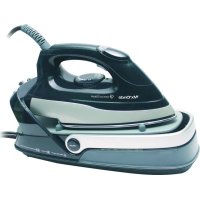
Mx Onda MXCPV2037C - Iron

MXCPV2037C - Iron Mx Onda - Free user manual and instructions

Find the device manual for free MXCPV2037C Mx Onda in PDF.

📄 88 pages English EN 💬 AI Question 9 questions ⚙️ Specs
Notice Mx Onda MXCPV2037C - page 18
Features Details
Device type Iron
Power 2200 W
Soleplate Non-stick
Tank capacity 300 ml
Steam function Yes, with steam adjustment
Vertical steam Yes
Adjustable temperature Yes, for different fabric types
Weight 1.5 kg
Cord length 2 meters
Anti-scale system Yes
Energy saving Yes, auto shut-off function
Maintenance Soleplate cleaning recommended after each use
Warranty 2 years

Frequently Asked Questions - MXCPV2037C Mx Onda

How do I fill the water tank of the Mx Onda MXCPV2037C iron?
To fill the tank, unplug the iron and open the tank cap. Use a jug or glass to pour water up to the maximum indicated level. Do not exceed this mark.
Why is the iron not heating up?
Check if the iron is properly plugged in and if the socket is working. Also make sure the thermostat is set to the correct temperature for the type of fabric you are ironing.
How do I clean the soleplate of the iron?
Unplug the iron and let it cool down. Use a soft, slightly damp cloth or white vinegar to remove residues. Do not use abrasive objects.
What should I do if the iron is leaking?
If the iron is leaking, check the water level in the tank. Do not fill it beyond the maximum level. Also make sure the iron is in an upright position when not in use.
How do I use the steam function of the iron?
To use the steam function, make sure the tank is filled with water and the iron is set to an appropriate temperature. Press the steam button to release steam while ironing.
The iron emits a strange smell, what should I do?
A smell may appear during the first use. This is usually temporary. If the smell persists, unplug the iron and clean the soleplate. Make sure no material is burning.
Is it possible to use tap water in the iron?
Yes, you can use tap water, but it is recommended to avoid very hard water. If you live in an area with hard water, use distilled water.
How do I store the Mx Onda MXCPV2037C iron?
Make sure the iron is completely cooled down. Wrap the cord around the iron and store it in a dry, cool place away from dust.
Does the iron turn off automatically?
Yes, the Mx Onda MXCPV2037C iron is equipped with an automatic shut-off function for safety reasons. If left unused for a certain time, it will turn off automatically.

Questions des utilisateurs sur MXCPV2037C Mx Onda

0 question sur cet appareil. Repondez a celles que vous connaissez ou posez la votre.

Poser une nouvelle question sur cet appareil

L'email reste privé : il sert seulement à vous prévenir si quelqu'un répond à votre question.

Aucune question pour l'instant. Soyez le premier à en poser une.

Download the instructions for your Iron in PDF format for free! Find your manual MXCPV2037C - Mx Onda and take your electronic device back in hand. On this page are published all the documents necessary for the use of your device. MXCPV2037C by Mx Onda.

USER MANUAL MXCPV2037C Mx Onda

  1. Water tank
  2. Folding handle
  3. Anti-lime filter
  4. Sole with ceramic coating
  5. Pilot temperature indicator
  6. Steam button
  7. Temperature selector

  8. Main hose

  9. Power cord
  10. Retention folding handle
  11. Iron stand base
  12. Water pump indicator
  13. Steam flow regulation
  14. On/off switch

ATTENTION!

THIS UNIT RUNS VOLTAGE 230V, TO AVOID POSSIBLE ELECTRIC SHOCK DO NOT ATTEMPT TO OPEN IT. This apparatus has no part that can be repaired by yourself, in case of a malfunction not handle, contact an authorized service MX ONDA.

Waste electrical products must not be disposed of with household waste.

This equipment should be taken to your local recycling centre for safe treatment.

Mx Onda MXCPV2037C - ATTENTION! - 1

This product complies with European Directives RoHS (2011/65/UE), on the restriction of use of certain dangerous substances in electrical and electronic appliances.

Mx Onda MXCPV2037C - ATTENTION! - 2

Cuple con

RoHSV

Mx Onda MXCPV2037C - ATTENTION! - 3

VERY IMPORTANT!

This signal indicates that the area where it is located, can acquire high temperatures due to steam. After using the ironing center do not touch these surfaces and wait for them to cool.

INTRODUCTION

The steam station MX ONDA model MX-CPV2037C has among the following characteristics:

2400 W of maximum power
Water tank with a capacity of 1.5 liters.
- Sole with non-stick ceramic coating with 20 steam vents.
Maximum steam flow: 90 gr./min.
- Adjustable steam flow
- Removable anti-lime filter cartridge
Non-slip support area
- Folding handle that facilitates the transport of the ironing center
- Internal thermal protector

BEFORE CONNECTING THE IRONING CENTER

When electrical appliances are used, basic safety precautions should always be followed to reduce the risk of fire, electric shock and bodily injury. These measures include the following:

  • Read these instructions carefully and keep them for later use.
  • Check that the voltage of your outlet is 230V and that it is equipped with an earth connection.

  • If you need to use an extension cord, use only an extension cord that is in good condition, earthed and suitable for the power of the appliance. If in doubt, consult a qualified electrician.

  • The electrical safety of this device is guaranteed only if it is connected to an effective earth ground as provided by current safety regulations. The manufacturer declines any responsibility for damages resulting from the lack of grounding of the installation. If in doubt, consult a qualified electrician.
  • To protect against the risk of electric shock and personal injury, do not insert the cable, the plug or the appliance itself into water or any other liquid.
  • After removing the packaging, check that the appliance is not damaged. If in doubt, do not use the appliance; Contact the technical assistance staff.
  • Packaging materials (plastic bags, etc.) should not be left within reach of children, as they are a potential danger.
  • The manufacturer declines any responsibility for damages resulting from improper, incorrect or reckless use of the device.
  • The ironing center can produce a noise higher than 70dB when the water tank is empty.
  • Before using the ironing center remove the protection from the sole and clean it with a dry cloth.

SECURITY MEASURES

  • Do not use the appliance in areas with high humidity, such as a bathroom.
  • This device can not be used by children or people with reduced physical, sensory or mental abilities or without experience and knowledge, unless they have received appropriate instructions on the use of the device and are supervised by an adult or responsible person.
  • Do not use the ironing center with very wet fabrics.

  • When the iron is hot, NEVER leave it on fabrics or materials that can burn easily.

  • Use the ironing center only for the purpose that it has been developed. MX ONDA will not accept any liability and the guarantee will be invalid in case of improper use or failure to comply with the instructions.
  • Do not touch the appliance or the mains power cord with wet or damp hands or feet, and never use it in the bathroom.
  • Do not leave the iron exposed to the weather (rain, sun, frost ...).
  • This appliance works at high temperatures, so, during use, hold the iron or the main unit by the handles and use caution when using steam (especially in vertical position).
  • To avoid burns during operation DO NOT touch the non-slip support area of the main unit or the sole of the iron. Be very careful when removing the water tank.
  • Do not overfill the water tank and NEVER add stain removers or similar products to the water.
  • Place the ironing center on a stable and level surface.
  • While the ironing center is connected or still hot, do not neglect your vigilance and keep it out of reach of children. After use, allow it to cool completely and store it out of the reach of children.
  • During operation, avoid that the power cord or hose comes in contact with the sole of the iron and never bend the hose.
  • Unplug the ironing center, whenever you remove or insert the water tank, you are absent from the ironing place, even if for a brief moment, there is a power failure or an automatic jump and before proceeding with the cleaning itself maintenance.

  • To disconnect the steam station from the network, gently pull the plug from the socket. Never do it by pulling the cable.

  • To avoid overloading the electrical network, do not use another high consumption device at the same time in the same socket as the ironing center.
  • In case of failure, anomalies, if the ironing center has fallen, the plug or other parts have deteriorated, or the cable is damaged, turn off the appliance and do not try to repair it on your own. Contact the nearest MX ONDA Official Technical Service.

USE OF THE STEAM STATION

Preparation for use

  1. Check that the voltage of your outlet is 230V with an earth connection.
  2. Remove the protective cardboard that covers the sole of the iron.
  3. Unroll and completely straighten both the power cable 9 as well as the hose 8.
  4. Place the steam station on a horizontal, stable and level surface, place the iron in the support area of the main unit.

Handle for transporting the steam station

The ironing center incorporates a folding handle to facilitate transport. To remove the handle, pull it upwards (Fig.1) until you hear "click", indicating that it is retained. When you want to pick up the handle, press and hold the retention buttons 10 (UNLOCK) on both sides of the main unit, while pushing the handle forward of the main unit (Fig.2).

Mx Onda MXCPV2037C - Handle for transporting the steam station - 1
Fig. 1

Mx Onda MXCPV2037C - Handle for transporting the steam station - 2
Fig. 2

Note: The handle include a internal safety switch, which shuts off the steam station when the handle is raised.

Type of water to use

This ironing center has been designed to work with normal tap water. The use of waters with chemical contents such as softeners, starches, water softeners, etc. they can leave residues or stains on clothes during the vaporization process, especially at high temperatures. It is also not advisable to use distilled water for batteries, or from thawing, condensation, etc.

Filling the water tank

  1. Lift the handle by pressing the retention buttons 10 (UNLOCK).
  2. Remove the anti-lime filter 3 by pulling it upwards (Fig. 7).
  3. Fill the water tank with the dosing cup without exceeding the "MAX" mark.
  4. Replace the anti-lime filter 3 in the hole of the water tank (Fig.9).
  5. During ironing you can fill the water tank as many times as necessary without having to wait for the ironing center to cool down, so follow steps 1 to 4 above.

Mx Onda MXCPV2037C - Filling the water tank - 1
Fig. 7

Mx Onda MXCPV2037C - Filling the water tank - 2
Fig. 8

Mx Onda MXCPV2037C - Filling the water tank - 3
Fig. 9

Refilling the water tank

When the water level in tank 1 reaches a low level or is completely drained, the main unit will begin to produce a noise, because air is entering instead of water. DO NOT continue ironing with steam and fill the water tank as described in the previous section.

IRONING GUIDE

To prevent damage to the garment you want to iron, read the following ironing board carefully. Check the clothing label first and then choose the corresponding temperature. Before ironing directly on the garment try first inside the hem of the same.

Mx Onda MXCPV2037C - IRONING GUIDE - 1

Indicator Temperature International symbolSYNTHETIC Low temperatureWOOL / SILK Medium temperatureCOTTON High temperatureMAX Maximum temperature
Type of tissueSynthetics, nylon, acrylic, acetateWool, polyester, silkCotton, rayon, thread, linenCotton, rayon, thread, linen
Ironing instructionsDry ironing, on the back of the garmentUse a cloth and iron on the back of the garmentIron while the garment is still wetIron while the garment is still wet
Use of steamNOTSteam level LOWSteam level MIDLE-HIGHSteam level HIGH

Before proceeding to iron, we recommend you classify the garments according to the type of fabric (synthetic, silk, wool, cotton, linen, etc.) and so, you can select the appropriate temperature for each of them.

It is quite common, that the labels that incorporate the garments include the international symbol of ironing temperature.

It is recommended that you start your ironing session with those garments whose fabrics require lower temperature (nylon, acrylics, synthetics, etc.) and finish with the most resistant (linen, denim clothes, etc.). In this way you will save time and electricity. Keep in mind that your iron takes less time to warm up than to cool down.

Note:

If the garment to be ironed is composed of the mixture of two or more fabrics (for example, 60% polyester and 40% cotton), you must choose the temperature corresponding to the most sensitive fiber, in the case of the example choose the average temperature WOOL SILK.

If you do not know the material with which the garment you want to iron is made, first try it in a non visible place to obtain the proper ironing temperature.

CONTROL PANEL

The operating indicator of the water pump, the steam flow regulator and the general on / off switch are located on the control panel.

Operating indicator of the water pump

Pressing the steam button 6, this indicator will light up and the water pump will start working, steam coming out through the holes in the sole of the iron.

Mx Onda MXCPV2037C - Operating indicator of the water pump - 1

Note: If the temperature selector is in the low temperature SYNTETIC position, even if the operating indicator of the water pump lights up, it will not work as the temperature is not high enough to produce steam.

Steam flow regulation

Only when the temperature selector is in the position of average temperature WOOL SILK, high temperature COTTON or the maximum temperature MAX, you can obtain steam and regulate the flow rate according to your preferences.

Mx Onda MXCPV2037C - Steam flow regulation - 1

Turn the control clockwise to the position to increase the steam flow or turn it counterclockwise to the position to decrease or cancel the steam flow.

General switch on and off

Momentarily press this button to turn the steam station on or off, when the button is pressed (ON) the ironing center will remain lit and when the button is not pressed (OFF) the ironing center will be off.

Mx Onda MXCPV2037C - General switch on and off - 1

Note: The handle incorporates a safety switch, which shuts off the steam station when the handle is raised, regardless of the position of the general on / off switch.

IRONING WITH STEAM

  • Check that the water tank 1 is full, the anti-lime filter 3 is correctly fitted in its housing and that the handle 2 is collected.
  • Plug the ironing center into a mains power socket
  • To turn on the iron press the main switch 14, the water tank will light indicating that the ironing center is on.
  • Turn the temperature selector 7 to the position marked "● SYNTHETIC", "●● WOOL SILK", "●●● COTTON" or "MAX ", depending on the type of garment to be ironed, see the ironing guide in this manual.
  • The temperature indicator light 5 will light up until the temperature of the sole of the iron reaches the selected temperature.
  • The ironing center will be ready when the temperature indicator light 5 goes off for the first time.

At the start of the ironing job or when filling the tank with water, you must press and hold the steam button 6 ( ) until steam comes out of the holes in the iron. It is normal for a vibration noise to sound in the main unit, this sound is caused by the air into the pump and will disappear a few seconds. If during the steam ironing work you need to press button 6 ( ) for as long as you think appropriate, during this time you will be doing steam ironing. Remember that the steam flow depends on the steam flow regulator 13.

After ironing, turn off the ironing center by means of the main switch and turn the temperature selector 7 to the position marked "MIN", then unplug the ironing center from the mains socket and wait for it to cool down completely before moving or manipulating it.

Before emptying the ironing center, empty the water tank 1 completely. To transport the ironing center, use the folding handle 2, to extract or collect it, see the corresponding section.

Notes:

The ironing center automatically adjusts the steam control according to the chosen temperature, with the low temperature "SYNTHETIC" for synthetic fabrics, acrylics, etc. there will be no steam outlet.

During the ironing operation, the temperature indicator light 5 will turn on and off alternately. This is normal and means that the thermostat is perfectly controlling the temperature of the sole plate.

NEVER bend or twist the hose 8, the water from the water tank circulates inside it.

Very important

At the beginning of the work of ironing or when filling the tank with water, it is normal that when the steam is used, a vibration noise is heard in the main unit. This sound is produced by the entry of air into the pump and will disappear within a few seconds of use.

DRY IRONING

Check that the water tank 1 is empty, the anti-lime filter 3 is correctly fitted in its housing and that the handle 2 is collected.

Plug the ironing center into a mains power socket

To turn on the iron press the main switch 14, the water tank will light indicating that the ironing center is on.

Turn the temperature selector 7 to the position marked "● SYNTHETIC", "●● WOOL SILK", "●●● COTTON" or "MAX ", depending on the type of garment to be ironed, see the ironing guide in this manual.

The temperature indicator light 5 will light up until the temperature of the sole of the iron reaches the selected temperature.

  • The steam station will be ready when the temperature indicator light 5 goes off for the first time, you can carry out the ironing
  • After ironing, turn off the ironing center by means of the main switch and turn the temperature selector 7 to the position marked "MIN", then unplug the ironing center from the mains socket and wait for it to cool down completely before moving or manipulating it.

VERTICAL STEAM

Follow the procedure described for steam ironing. Place the iron in vertical position and at a distance of the garment between 5 and 15 centimeters, then press the button 6 ( ) to perform the vertical ironing. This function is very useful to remove curtains of curtains or clothes hanging on a hanger.

Mx Onda MXCPV2037C - VERTICAL STEAM - 1

Notes:

  • To avoid injury extreme precautions in this mode of use.
  • Do not use the steam function continuously for more than 2 minutes at a time, use the steam function at short intervals of time.

PROTECTIVE DEVICES

This device incorporates several protection circuits, which automatically switch off the ironing center in case of overheating of the iron or water pump. If the appliance stops working during ironing, unplug the ironing center from the mains socket, wait 30 minutes and restart the ironing center. Not before checking that the water tank is full (in the case of ironing with steam) and that the filter and the water tank are correctly coupled.

ANTI-LIME SYSTEM

The anti-lime system cartridge is designed to avoid calcareous formations in the sleeves and inside the plate, which can occur during steam ironing. The use of this filter will prolong the life of your iron and reduce the natural process of calcareous formation. The duration of the anti-scale filter will depend on the type of water used and the use of the steam station. To replace the anti-scale filter, follow the procedure described for filling the water tank.

Mx Onda MXCPV2037C - ANTI-LIME SYSTEM - 1

Note: If you do not have a new cartridge, you can continue working with the ironing center using the old cartridge, but you must take into account that the calcareous formation will take place more quickly.

EMPTYING THE WATER AND STORING THE IRONING CENTER

When finishing the ironing work proceed as indicated below:

  1. Turn off the steam station, unplug it from the mains socket and wait for it to cool completely.
  2. Remove the anti-lime filter 3 and empty the contents of the water tank over a sump.
  3. Replace the anti-lime filter 3 inside the water tank and dry any remaining water in the main unit, the non-slip base and the sole of the iron.
  4. To transport the ironing center, use the folding handle 2, to extract or collect it, see the corresponding section.
  5. Store the ironing center in a dry and dust-free place.

Mx Onda MXCPV2037C - EMPTYING THE WATER AND STORING THE IRONING CENTER - 1

CLEANING AND MAINTENANCE

  • The sole with ceramic non-stick coating facilitates ironing making it more comfortable and with less effort.
  • When not using the iron (during breaks), rest the iron on its back heel or on the non-slip support area.
  • Avoid scratching the sole of the iron; do not pass over buttons, zippers, rivets or hard surfaces.
  • NEVER use abrasive products to clean the sole.
  • The residues of lime, starch or sizing attached to the sole can be cleaned with a wet cotton or with a non-abrasive product when the sole is still warm.
  • For persistent stains there are special cleaning products.
  • Do not use any chemical descalers that could damage the sole with ceramic coating.
  • The plastic surface of the iron housing and the main unit can be cleaned with a damp cloth, do not use abrasive products.
  • After each use and when the sole is still warm, use a soft cloth to clean and dry it. Rub gently to avoid scratching the sole.

PROBLEM SOLVING

ProblemCauseSolution
The iron does not heatThe ironing center has no powerPlug the appliance into the mains and turn on the ironing center by means of the general on / off switch 14.
The selected temperature is very low or is at a minimumTurn the temperature selector 7 and choose the desired temperature
Malfunctioning, different from that described in the instruction manualContact the nearest MX ONDA Official Technical Service
When the appliance is turned on for the first time, there is a slight smoke accompanied by odorDuring the different manufacturing processes some parts of the plate have been lightly greasedThis is normal and will disappear shortly after its use
The steam station does not produce steamThe anti-lime filter is not placed in the water tankInsert the anti-lime filter
The water tank is emptyFill the water tank and press the steam button for at least 30 seconds
The selected temperature is low, temperature selector in the "● SYNTHETIC" positionSelect a higher temperature, see the ironing guide
Water droplets come out of the steam outlet holes of the ironThe selected temperature is not suitable for the type of fabric and the sole of the iron cools slightlySelect the appropriate temperature according to the ironing guide table
The sole of the iron has not reached the proper operating temperatureWait until the temperature indicator light goes off at least a couple of times
The temperature indicator light does not come on regardless of the position of the temperature selectorThe protection device has operated, due to overheating or due to a possible fault.Unplug the steam station, wait 30 minutes and plug it back in again. If the anomaly persists, consult an Official Technical Service MX ONDA

TECHNICAL SPECIFICATIONS

Supply voltage 220-240 V ~ 50/60 Hz.

Power consumption 2000-2400 W

Water tank capacity 1.5 liters

Maximum steam flow 90 gr./minute

Temperature control Mechanical

Power cable length 1.7 m

Hose tube length 1.65 to 1.75m

Dimensions 380× 177× 230mm (l, a, h)

Weight 3.3 Kg

Specifications subject to change without notice.

This product complies with the European Directives 2004/108/EC (EMC - Electromagnetic Compatibility) and the 2006/95/EC (LVD - Low Voltage Directive) relative to Low Tension Security.

"MX, MX ONDA" and its logos are trademarks of MX ONDA, S.A.

Telephone of information and Technical Service: +34 902 551 501

MX ONDA, S.A.

Isla de Java, 37

28034 - MADRID (SPAIN)

E-MAIL: mxsat@mxonda.es

http://www.mxonda.es

MANUAL DE INSTRUÇÉS

Mx Onda

O VAPOR ENGOMAR CENTRO

MODELO: MX-CPV2037C

Mx Onda MXCPV2037C - O VAPOR ENGOMAR CENTRO - 1

C E

ANTES DO SEU USO LEIA ATENTAMENTE Este MANUAL

CONTROLES E ELEMENTOS

Mx Onda MXCPV2037C - CONTROLES E ELEMENTOS - 1

Mx Onda MXCPV2037C - CONTROLES E ELEMENTOS - 2

SISTEMA ANTI-CALCÁRIO

MANUEL D'INSTRUCTIONS

Mx Onda

VAPEUR CENTRE DE REPASSAGE

MODELE: MX-CPV2037C

Mx Onda MXCPV2037C - VAPEUR CENTRE DE REPASSAGE - 1

C E

AVANT D'UTILISER CE MANUEL DE LIRE ATTENTIVEMENT

COMMANDES ET FONCTIONS

Mx Onda MXCPV2037C - COMMANDES ET FONCTIONS - 1

Mx Onda MXCPV2037C - COMMANDES ET FONCTIONS - 2
Panneau de commande

Manual assistant
Powered by ChatGPT
Waiting for your message
Product information

Brand : Mx Onda

Model : MXCPV2037C

Category : Iron