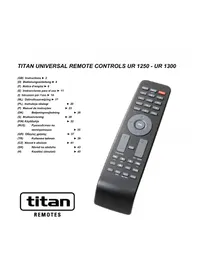
UR 1250 - Remote control TITAN - Free user manual and instructions
Find the device manual for free UR 1250 TITAN in PDF.



| Product Type | Universal Remote Control |
| Brand | TITAN |
| Model | UR 1250 |
| Power Supply | 2 AAA alkaline batteries (R03, UM4) |
| Range | Up to 7 meters |
| Compatibility | Audio/video devices (TV, SAT, DVD, etc.) |
| Programming Methods | Direct code entry, manual search, automatic search |
| Manual Code Search | Press POWER until the device reacts |
| Automatic Code Search | Automatic sending of ON/OFF signals every 2 seconds |
| Code Identification | OK + 1/2/3 to display each digit of the code |
| Volume and Mute Adjustment | Lock (OK+5) and unlock (OK+6) on a specific device |
| Factory Reset | OK+0 until the LED blinks 2 times |
| Warranty | 2 years factory warranty (excluding abnormal use and wear) |
| LED Indicator | Yes, to confirm actions |
| Care and Cleaning | Clean with a soft, dry cloth |
| Safety | Do not expose to moisture or extreme temperatures |
| Spare Parts | AAA batteries (not included) |
| General Information | Indoor use only |
| Note | Not suitable for devices operating at 400 kHz |
Frequently Asked Questions - UR 1250 TITAN
User questions about UR 1250 TITAN
0 question about this device. Answer the ones you know or ask your own.
Ask a new question about this device
Download the instructions for your Remote control in PDF format for free! Find your manual UR 1250 - TITAN and take your electronic device back in hand. On this page are published all the documents necessary for the use of your device. UR 1250 by TITAN.
USER MANUAL UR 1250 TITAN
Inserting the batteries
Open the battery compartment on the underside of the remote.. Then insert 2 AAA batteries. Make sure that the polarity is correct: the "+" and "-" markings on the batteries and in the compartment must match.
- To check functionality, press the POWER button. If everything is correct the red lamp flickers when the button is pressed.
Adapting to appliances
In order to control your appliances you must adapt or set the remote control to them. There are two ways of doing so:
Direct control code entry
| Panama | 003,004,010,023,166,296,308,309,332,37 |
| Panashibai | 376 |
| Panasonic | 023,050,065,066,067,068,102,125,142,143 316,332,356,385,386,397,436 |
| Panavision | 023,332 |
Example: Setting to control a Panasonic television set:
- The attached list gives, for example, the Panasonic Code 436.
- Please make sure you have selected the code from correct list for television sets (TV).
- Press OK button and a appliance button, e.g.
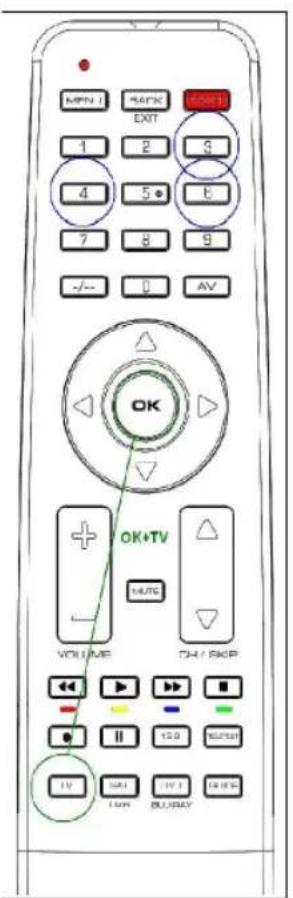
TV, simultaneously until the lamp (LED) lights constantly.
- Then press number buttons (e.g. 436) in sequence.
- Once the numbers have been entered the lamp goes out and the remote control is ready to control your appliance.
- Finally, test the control code setting by trying to control, in this example, your television set. If it does not work at all or not correctly try a different code from the list or the code search (see below).
To set the remote control for other appliances, proceed in the same way. Instead of the TV appliance button, press another button e.g. SAT/DVB (SAT, DECODER) or DVD/BLU RAY (UR 1300 only).
- You terminate the mode by pressing any device button or by code input interruption of more than 10 seconds.
If lamp flashes twice code was not accepted and code input can be started again.
Code search
If the brand of your appliance is not in the list or none of the codes given fits, we recommend a code search.
Manual code search
- Switch on the appliance to be controlled. Program is running.
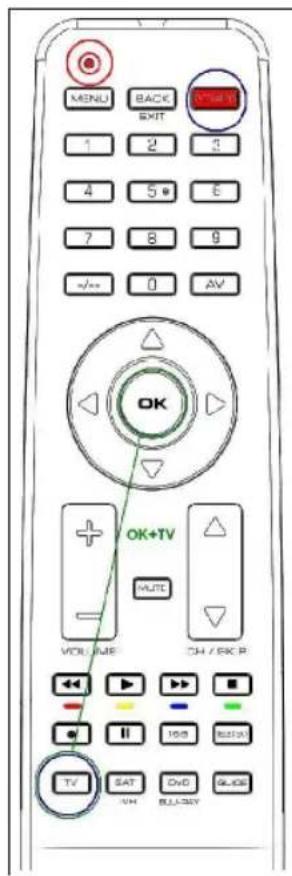
- To prepare code search, press the OK button and the appliance button, e.g. TV, simultaneously until the lamp (LED) lights constantly.
- Then point the remote control at the appliance to be controlled.
- Briefly press the ON/OFF POWER button once. The lamp (LED) blinks.
- Press the ON/OFF POWER button about any second so often until the appliance, e.g. your TV reacts by power off.
- You can invert search direction by pressing the OK button and then POWER again.
- If your appliance has switched itself off, you must switch it back on again, e.g. on the appliance or with the original remote control, to
continue searching.
- When your appliance reacts you can also try out other buttons without interrupting the search. If some buttons do not work properly, simply continue searching pressing ON/OFF POWER again.
- When your appliance reacts correctly, p the appliance button, e.g. TV for end of searching and saving of found code. The lamp (LED) goes out.
- The last code entered remains stored. The search stops after approx. 30 seconds of inactivity.
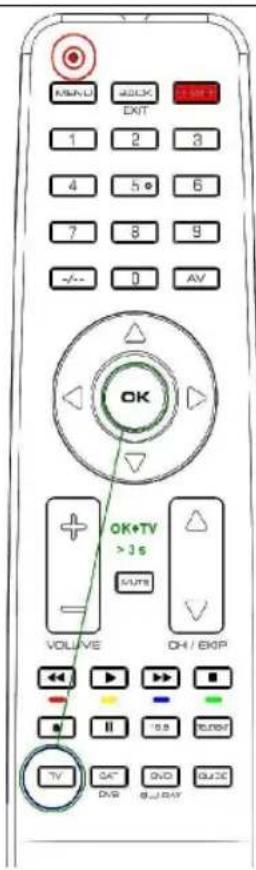
Automatic code search
- Switch on the appliance to be controlled. Program is running.
- To start the code search, press the OK button and the appliance button, e.g. TV, simultaneously for more than 3 seconds until the lamp (LED) goes off briefly.
- Then point the remote control at the appliance to be controlled while the remote control emits a different ON/OFF signal every 1-2 seconds.
- You can reverse search direction at any time by pressing OK button.
- When your appliance reacts, press any button except OK within 1-2 seconds, to end the search and save code..
-
If you ended the search too late, continue to search using the Manual Code Search (see above).
-
Finally, test the control code setting by trying to control, for example, your DVD appliance (UR 1300 only). If it does not work correctly, please try the code search again. The code search then begins with the found code in the sequence.
Remember to switch your appliance, e.g. DVD, back on again if you wish to continue searching.
Code identification
You can read off the 3-digit codes you have OK at any time:
-
Press the appliance button of the appliance which code you want to read off, e.g. TV.
-
Press the OK button and 1,2,3 simultaneously, depending on the part of the code you want to read off. For example, if you press OK+1 and the code 436 (in this example) has been set, the lamp blinks 4 times after OK+1 is pressed to indicate that the hundred figure is 4. All you have to do is to count. The ten figure is indicated after pressing OK+2, e.g. it blinks 3 times for the 3 in 436. The one figure is indicated after OK+3 is pressed, e.g. it blinks 6 times for the 6 in 436.
-
There will be no flash in case of 0 indication.
Assigning volume and mute exclusively to one appliance
Press the appliance button of the appliance that you always want to use for volume control, e.g. TV. To lock, press OK + 5. To unlock, press OK + 6.
Reset To Factory Settings
Press OK+0 button until the lamp blinks twice in order to reset the remote to factory settings.
Operation
You operate your universal remote control basically in exactly the same way as if you were using the original remote control. As the symbols on a universal remote control could differ from those on the original remote controls, you may have to try out all the buttons in order to find the right functions.
Specifications
Batteries: 2x AAA batteries, R03, UM4
Range: max. 7 m
Not for 400 kHz equipment
2-year works guarantee
Should your remote control cease to work within 2 years of purchasing, you will receive a free replacement from Vivanco. Exceptions: missing codes, deliberate destruction and normal wear and tear of the housing and buttons.
| Panamaff | 003,004,010,023,166,296,308,309,332,37 |
| Panashibaff | 376ff |
| Panasonic | 023,050,065,066,067,068,102,125,142,14316,332,356,385,386,397,436ff |
| Papavision | 023,332ff |
| Panama | 003,004,010,023,166,296,308,309,332,37 |
| Panashibai | 376 |
| Panasonic | 023,050,065,066,067,068,102,125,142,143 316,332,356,385,386,397,436 |
| Panavision | 023,332 |
Specifications techniques
Piles: 2 piles rondes, R03, UM4, AAA
Portee: max. 7 m
| Panama | 003,004,010,023,166,296,308,309,332,37 |
| Panashiba | 376 |
| Panasonic | 023,050,065,066,067,068,102,125,142,14316,332,356,385,386,397,436 |
| Panavision | 023,332 |
| Panamaff | 003,004,010,023,166,296,308,309,332,37 |
| Panashibaff | 376ff |
| Panasonic | 023,050,065,066,067,068,102,125,142,14316,332,356,385,386,397,436ff |
| Panavision | 023,332ff |
| Panama | 003,004,010,023,166,296,308,332,37 |
| Panashiba | 376 |
| Panasonic | 023,050,065,066,067,068,102,125,142,14316,332,356,385,386,397,436 |
| Panavision | 023,332 |
| Panama | 003,004,010,023,166,296,308,309,332,37 |
| Panashibai | 376 |
| Panasonic | 023,050,065,066,067,068,102,125,142,143 316,332,356,385,386,397,436 |
| Panavision | 023,332 |
| Panama | 003,004,010,023,166,296,308,309,332,37 |
| Panashibai | 376 |
| Panasonic | 023,050,065,066,067,068,102,125,142,143,316,332,356,385,386,397,436 |
Panavision 023 332
| Panama | 003,004,010,023,166,296,308,309,332,37 |
| Panashibai | 376 |
| Panasonic | 023,050,065,066,067,068,102,125,142,14316,332,356,385,386,397,436 |
| Panavision | 023,332 |
Exempel: fjarrkontrollen skaa stallas in for en Panasonic TV:
| Panamaff | 003,004,010,023,166,296,308,309,332,37 |
| Panashibaff | 376ff |
| Panasonic | 023,050,065,066,067,068,102,125,142,14316,332,356,385,386,397,436ff |
| Panavision | 023,332ff |
| Panama | 003,004,010,023,166,296,308,332,37 |
| Panashiba | 376 |
| Panasonic | 023,050,065,066,067,068,102,125,142,14316,332,356,385,386,397,436 |
| Panavision | 023,332 |
Ppumep: Hacmpouka ducmahcuOHHO2O ynpaeJeHua meJeu3opa fupMbI NaHacoHuk.
1.ИЗ npилхьенho nepeуньblберпte,нанр.,кд 436ДЯПансонka.
IoxaIyucma, y6edumecb e mom, ymo Bbl bblpaNu kOd dner meeneu3opa (TV).
2. Haxmnte OndHOBpeMeHHo Ha KhoNky OK n KhoNky, COOTBeTCTByOuSyU Tnny npnbopa, Hanp., KhoNky TV, YTO6bI CBeToND (CIV) 3arOpener HepepbIBHbIM CbeueHNEM.
3. Nocne 3TOrO HaxMnTe nocJeIOBaTeIbHO uΦpoBbIe KhoNk (HaNP., 436).
4. Nocne BBoDa cnpp NaMnoUka noracHET uycTpoCTBO dncTaHcUNOHHO ynpabJeHnra rOtOBo K ynpabJeHNIO BaAMm np6opom.
- B 3akIIOueHHe npOBepbTe HAcTpoEHbI ynpabJIIOuN KOD, HApP., TeM, YTO Bbl nonpO6yTe ynpabJrB BaWIM TeJIeBN3OpOM. Ecnn 3To He fynKUHOHpyET nIN FyHKUHOHpyET HnpeBaNbHO, TO nnonpO6yTe nCnOJB-3OBaTB DaJIbHeiN KOD n3 nepeHry nIN nONCK KOJa, CMOTpn HIXKe.
YTo6bI NaCTpOntb BaW npIbT dNCTaHcUOnHOro ynpaBneHnHa dpyrHe np6Opbl, NOBTOpTe BblSeONuCAHHyOpoeDpy. ToIbKO BMeCTo KHOKN TV HaXMMTE KHOKNy SAT/DVB (SAT, DECODER) nn DVD/BLU RAY (ToIbKO UR 1300).
Ipekpammbbod koda moKHO, hkaaHa Kakyo-nu6o KhoKy, coomeemcmyouyU muny npubopa, unu cde naay3y boonee yem Ha 10 cekyHd.
Jamna Muazem 2 pa3a, ecJu Bby bBeJn HnpaunbHbi K od. Nocne 3mozo 8oD koda moKHO noEpopumb.
Nouck koda
Ecnm Mapka npnbopa He yka3aHa B nepeyne Hn OdnH n3 yka3aHHbIX KOIOB He IOxOINT, TO B TaKOM Cny- qae peKOMeHdyETcN ONCK Kda.
Pyhoouck koda
- BknoHnTe, noKanyuNcTa, ynpaBnaemb np6op. PporpamMa BblNOJIHReTc.
- HaxMMTe OndHOBpeMeHHo Ha KONky OK i KONky, COOTBeTCTByIOUyTO np6opa, Hnnp., KONky TV, TTo6bl CBeToIOuD (CIN) 3arOpencr HenpepbHbIM CBe-ueHneM
- 3aTeM HnpaBte yCTpoIcTBo DnCTaHcNHOHorO ynpabNeHna HynpabIeMbI np6op.
- OДин pa3 kopoTko HaxaTb POWER (npn6op BkI/OTKn).ЛamnoUka (CД) MmraeT.
-
MhorokpaTHo, npimepHo KaKdyu ckyHny, HauKmMaTe Ha KhoNkY POWER (BKn/OTKn np6Op), noka npnOp He OTpearnpyeT.
-
BblMOXeme U3MeHumb HanpaeJeHue Noucka, Haxae
OK, a 3amem onrmb POWER.
Idehmufukauza koda
- Ecnu npubop bkiuouncra, mo Bam Heo6xodMoBb MoKTe B JIO6oe BpeM npOHTaB yCTaHOJIeHHbI HnP., Ha npubope uNu c nomoubOpuaHaNbHo2pEx3HaHbIKoD:
ycmpoicmea ducmaunuoHNO ynpaBneHn CHO8 eKnIOuymb e0 dner daNbHeuweo noucka. - Ecnu Bau npubop peaupyem, mo Bbl moxeme u cnpobomb maKke u dpyue Knaeuuu, He ebixodra u3 pekuma noucka. Ecnu Hekomopbie Knaeuuu He yHKuOHupyom npaunbHo, mo nouck cnedeym npocm npodonkamb c nomousbIO POWER.
- Ecnn Baun npn6op pearnpye TnpaBnIbHo, To haxmTe npn60pHyu KnaBnUy TV n PpeKpaTne TaKIM 6pa3OM nonck. JAmnoka (CnI) rachet.
- Ype3 npu6n. 30 cek. 6e3deucmbua nouck npepbibaemca.
- HaxaTb KnaBnUy Ha np6ope, Ha KOtOpom Bbl JeIaTe npOHTaTb KoI, Hanp., meNeu3Op.
- HaxaTb OK n DOnONHnTeNbHO 1, 2 nnn 3, B 3aBnCnMocTn OT TORO, KaKo pa3pnd KoDa Bbl KeJnae Te Bbl6paTb. Hanp., ecn Bbl Haxaann OK+1, a BBeDeHHbI KOd, HanpImep, 4 3 6, TO CBeToND mRHT 4 pa3a, noKa3bIBa 3HaueHne 4 nla pa3pda coteH. Bam Hyxho TOnbKO CHTaTb. HaxaTneM OK+2 BblAeTc 3HaueHne dJa DEcTkoB, Hanp., MmRHeT 3 pa3a, NOKa3bIBa 3 n3 436. A HaxaTneM OK+3 NOKa3bIBaETc 3HaueHne pa3pda edHnU, Hanp., MmRHeT 6 pa3, NOKa3bIBa 6 n3 436. - Ppu uHoukauH yJMaMuZaHue omycmcmeyem.
Aemomamuuecku nouck koda
- BkHouHTe, noXaIyIcTa, ynpabJIeMbI np6Op, yTo6bl pa6oTana OHa n3 TeJeBn3IOHHbIX nporpaMM.
- HaxmTe KhoNky OK, a 3aTeM KHOnKy, COOTBeTCTByIouyIO Tnny npnbopa, Hanp., TV, npOIoJXnTeJbHOCTbO6oJee 3 cekyHd, YTO6bl CBeToDIOd (CIN) Ha KopOTKoe BpeMa OTKJIIOUHcR.
- 3aTe HnpaBte yctpoiCTBO nctaHIOHHORo ynpabHeHa ynpabIeMbI np6Op, B TO BpeM KAK dntaHIOHOe ynpabHeHKe KaJbIe 2 ckyHdbI Nocblnaet dpyro CnHAn BKJI/OTKJI.
- Bb moxeme 8 nio6oe epe m u3MeHm b HnpaBneHue noucka, hXkae KhoNky OK.
- Ecnn Baun npn6op pearnpyeT, To HaxMnte Kakyo-HN-6ydb KnaBnuy, Kpome OK, YTO6bl 3aKOHHTb NOCK KOda.
- B 3aKlHouHe HPOBepbTe HaCTPoeHHbI ynpabnIoo- uin KOD. Ecnn OH fYHKUHOHPyET He npabnIbHo, TO no- npo6yIte nOcK KoDa, noXaNyIcTa, eIe Odn pa3. IOnck KoDa 3aynyckaetcB TAKOM Cnyuae CJeDyIOUM KOdOM.- He 3a6yObme Bau npubOp, ecNu Bbl JeNaema npodonkum bnock, noemopHO BKNIOUm h npubope.
Idehmufuucpoeamb apomkocmb u 6ecwymhyo cxemy cneuaJIbHO dna odHOzo npu6opa
HaxmTe np6bpyo KnaBnuy np6opa, KOTOpB Bbl Bcerda jeenaTe nCNoIb3OBAt b dny ynpabneHn 3ByKom, Hap., meeeu3op. 3aTeM dIy 6JOKnPOBKn HaxmTe KnaBnuy OK+5. dIy de6JOKnPOBKn HaxmTe KnaBnuy OK+6.
3aodckue hcmpouku
PnpnoJOnKHTeJIbHOM HaxKaTmN OK+0 (namna doJXHa MNHyTb 2 pa3a) BCE HAcTpOIN C6paCbIBaIOTc Ha CTAHapTHbIe 3aBOIDCKNe yCTaHOBKn.
ynpaeJeHue
Bby ynpabnreTe npakTneckn Baumm npnbopamn TaK Xe, KaK Bam 3TO 3HaKOMO C Baunx opurnhaNbHbIX yctpoiCTB dNCTaHcNOHHoro ynpabNeHn. TaK KaC mBOJbI yHNBepcaIbHO rNtBa TdNCTaHcNOHHoro ynpabHeHn OTINuHaOTcR O CTMBONB Baunx opurnHaNbHbIX yctpoiCTB dNCTaHcNOHHoro ynpabNeHn, BO3MOXHO, YTO DnRA HaxoXDeHn FyHKUIM Bam notpe6yeT
ca ncpo6oBaTb BCE KnaBnSi.
TexHuueckue daHHbie
Batape:2MnKpO3JemeHTa,R03,UM4,AAA Paunyc DeIcTBnA:MaKc.7M He nCnoJIb3yETcIgI np6OpOB 400 KU.
3aodckaa zapanmu 2 2oda
EcnB TeeyHne 2 let nocNe nokynKn Baw yHnBepcaNbHbI pynbT dNCTaHcUHO HrO ynpAbeHn BbIeT n3 cTpo, To B TakOM cNyuae Bbl NOnyHTe OT cnPbVivanco 6ecnNaTHyIO 3aMeHy. NckNoyeHn:OT cyTCTByIOuJe KOdbI, yMbIJIeHHoe pa3pyueHne I HopMaNbHbI n3HOC KOpnyCa nKnabW.
(GR) O8nyiecs xphoncs
Tonoetnon mparapiowv
AvoiEToKATTAKI TnC UTOOxNcTwv MTApatipwV OTo TIOW HEPOC TNS OUAKEUNs, TIEOTa EALAOATAEALAPWSS PocTa KATW KAI TOITIOBETeIOTE TIG 2 AkkalkeGmuKPOPTATAPIEs. PPOeTe TIG EvdeieGdiataegns Twv Ntawov OTWC avaypaoVTai OTIC mTATAPIEs KAI OTNV UTOOxNTW VU pTATAPIW (= +) .-Tia va ELeyEeT nV AEIOUpyIA TAPAKALOUE MIATE To NAnktpo POwER. H Luxvia aavbaosbHVEI, EAV N LEIOUPYia EVai EVtaSeI.
NpOaapouyn oE oukeuec
Ppokieevou va mTopeite va eEyxete Tc oukeuec oac TpeTc va puOmuote kataaAanla to nAeXepiotnpio yia Tc ekaoTote oukeuec. Ia auto utapxouv duovatotntec:
AneuEiaeioaywyynKwdkou
| Panamaff | 003,004,010,023,166,296,308,309,332,37 |
| Panashibaff | 376ff |
| Panasonic | 023,050,065,066,067,068,102,125,142,14316,332,356,385,386,397,436ff |
| Panavision | 023,332ff |
| Panama | 003,004,010,023,166,296,308,309,332,37 |
| Panashibai | 376 |
| Panasonic | 023,050,065,066,067,068,102,125,142,14315,332,356,385,386,397,436 |
| Panavision | 023,332 |
| Panama | 003,004,010,023,166,296,308,309,332,37 |
| Panashibai | 376 |
| Panasonic | 023,050,065,066,067,068,102,125,142,14315,332,356,385,386,397,436 |
| Panavision | 023,332 |
Priklad: Jak nastavit ovladač pro televizor Panasonic:
| Panama | 003,004,010,023,166,296,308,309,332,37 |
| Panashibai | 376 |
| Panasonic | 023,050,065,066,067,068,102,125,142,14315,332,356,385,386,397,436 |
| Panavision | 023,332 |
| Panamaff | 003,004,010,023,166,296,308,309,332,37 |
| Panashibaff | 376ff |
| Panasonic | 023,050,065,065,067,068,102,125,142,14316,332,356,385,386,397,436ff |
| Panavision | 023,332ff |