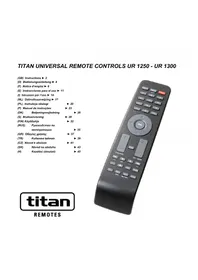
UR 1300 - Remote control TITAN - Free user manual and instructions
Find the device manual for free UR 1300 TITAN in PDF.



| Product Type | Universal Remote Control |
| Brand | TITAN |
| Model | UR 1300 |
| Power Supply | 2 AAA alkaline batteries (R03, UM4) |
| Maximum Range | 7 meters |
| Compatible Devices | TV, SAT/DVB, DVD/Blu-ray |
| Setup Methods | Direct code entry, manual code search, automatic code search |
| Number of Possible Codes | Multiple, depending on brands |
| Identification of Set Code | Yes, via OK+1, OK+2, OK+3 buttons |
| Volume Control Lock | Yes, via OK+5 (lock) and OK+6 (unlock) |
| Factory Reset | Yes, via OK+0 until blinking 2 times |
| LED Indicator | Yes, to confirm operations |
| Warranty | 2 years (free replacement by Vivanco) |
| Maintenance | Clean with a soft, dry cloth |
| Operating Temperature | Not specified, domestic use |
Frequently Asked Questions - UR 1300 TITAN
User questions about UR 1300 TITAN
0 question about this device. Answer the ones you know or ask your own.
Ask a new question about this device
Download the instructions for your Remote control in PDF format for free! Find your manual UR 1300 - TITAN and take your electronic device back in hand. On this page are published all the documents necessary for the use of your device. UR 1300 by TITAN.
USER MANUAL UR 1300 TITAN
(GB) Instructions ▶ 2
Inserting the batteries
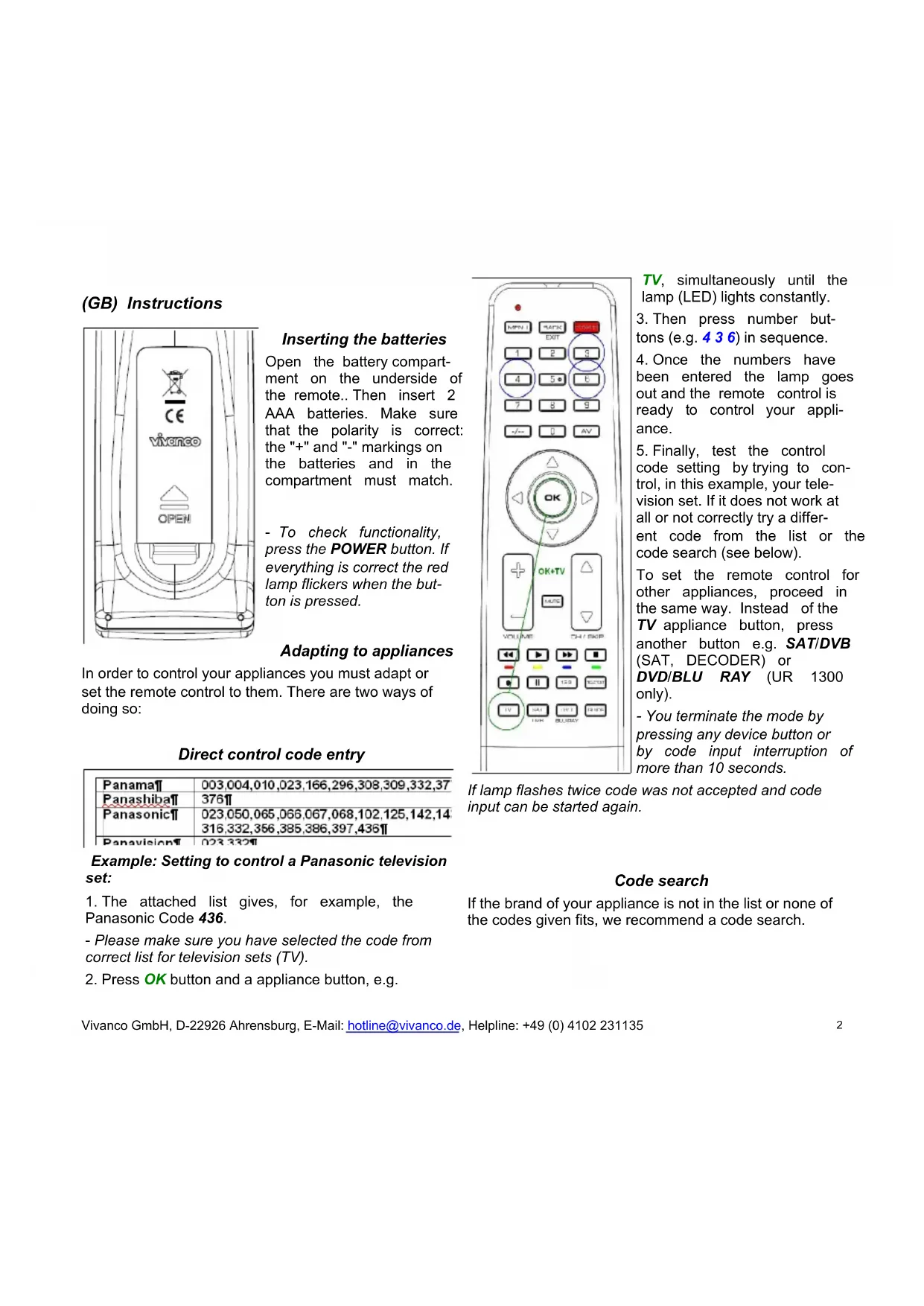
Open the battery compartment on the underside of the remote.. Then insert 2 AAA batteries. Make sure that the polarity is correct: the "+" and "-" markings on the batteries and in the compartment must match.
- To check functionality, press the POWER button. If everything is correct the red lamp flickers when the button is pressed.
Adapting to appliances
In order to control your appliances you must adapt or set the remote control to them. There are two ways of doing so:
Direct control code entry
| Panama¶ | 003,004,010,023,166,296,308,309,332,37 |
| Panashiba¶ | 376¶ |
| Panasonic¶ | 023,050,065,066,067,068,102,125,142,14316,332,356,385,386,397,436¶ |
| Panavision¶ | 023,332¶ |
Example: Setting to control a Panasonic television set:
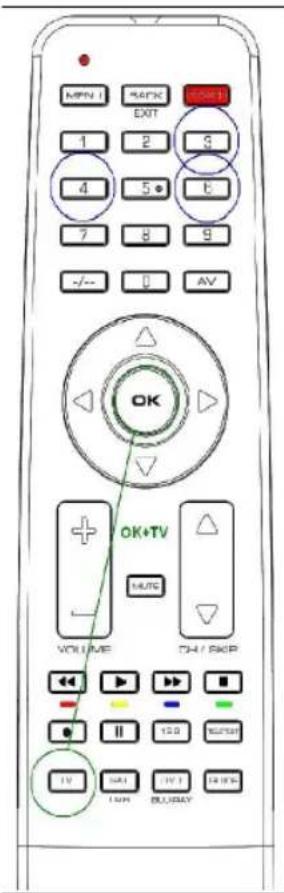
- The attached list gives, for example, the Panasonic Code 436.
- Please make sure you have selected the code from correct list for television sets (TV).
- Press OK button and a appliance button, e.g.
text_image
MPN I S4K EXIT 1 2 5 4 5 6 7 8 9 -/-- 0 AV OK OK+TV VOLUME OH / SKIP TV GAL BUY BUYTV, simultaneously until the lamp (LED) lights constantly.
- Then press number buttons (e.g. 4 3 6) in sequence.
- Once the numbers have been entered the lamp goes out and the remote control is ready to control your appliance.
- Finally, test the control code setting by trying to control, in this example, your television set. If it does not work at all or not correctly try a different code from the list or the code search (see below).
To set the remote control for other appliances, proceed in the same way. Instead of the TV appliance button, press another button e.g. SAT/DVB (SAT, DECODER) or DVD/BLU RAY (UR 1300 only).
- You terminate the mode by pressing any device button or by code input interruption of more than 10 seconds.
If lamp flashes twice code was not accepted and code input can be started again.
Code search
If the brand of your appliance is not in the list or none of the codes given fits, we recommend a code search.
text_image
MENU BACK EXIT OK+TV VOLUME OK VOLUME OK+TV MUTE OH / ECK P TV SAT DVD DH SINCEManual code search
-
Switch on the appliance to be controlled. Program is running.
-
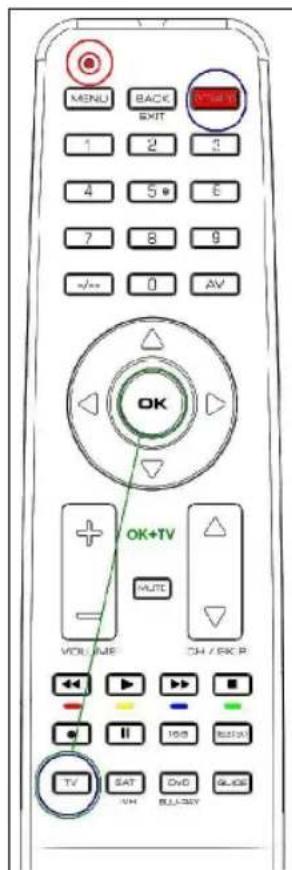
To prepare code search, press the OK button and the appliance button, e.g. TV, simultaneously until the lamp (LED) lights constantly.
-
Then point the remote control at the appliance to be controlled.
-
Briefly press the ON/OFF POWER button once. The lamp (LED) blinks.
-
Press the ON/OFF POWER button about any 1 second so often until the appliance, e.g. your TV reacts by power off.
- You can invert search direction by pressing the OK button and then POWER again.
- If your appliance has switched itself off, you must switch it back on again, e.g. on the appliance or with the original remote control, to
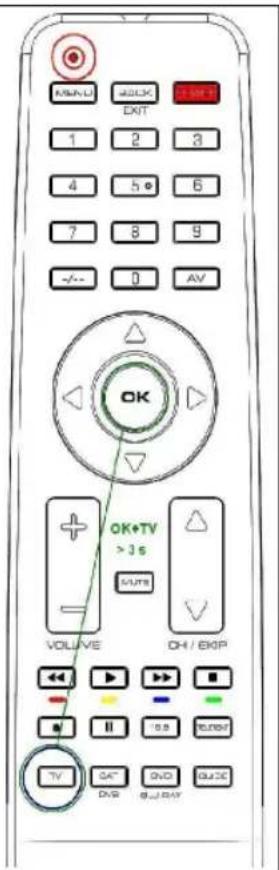
text_image
OK VOLUME OK+TV > 3 s SUMS OH / EXP TV DVD GUO GUOAutomatic code search
-
Switch on the appliance to be controlled. Program is running.
-
To start the code search, press the OK button and the appliance button, e.g. TV, simultaneously for more than 3 seconds until the lamp (LED) goes off briefly.
-
Then point the remote control at the appliance to be controlled while the remote control emits a different ON/OFF signal every 1-2 seconds.
- You can reverse search direction at any time by pressing OK button.
- When your appliance reacts, press any button except OK within 1-2 seconds, to end the search and save code..
- If you ended the search too late, continue to search using the Manual Code Search (see above).
continue searching.
- When your appliance reacts you can also try out other buttons without interrupting the search. If some buttons do not work properly, simply continue searching pressing ON/OFF POWER again.
- When your appliance reacts correctly, p the appliance button, e.g. TV for end of searching and saving of found code. The lamp (LED) goes out.
- The last code entered remains stored. The search stops after approx. 30 seconds of inactivity.
- Finally, test the control code setting by trying to control, for example, your DVD appliance (UR 1300 only). If it does not work correctly, please try the code search again. The code search then begins with the found code in the sequence.
less Remember to switch your appliance, e.g. DVD, back on again if you wish to continue searching.
Code identification
You can read off the 3-digit codes you have OK at any time:
-
Press the appliance button of the appliance which code you want to read off, e.g. TV.
-
Press the OK button and 1,2,3 simultaneously, depending on the part of the code you want to read off. For example, if you press OK+1 and the code 436 (in this example) has been set, the lamp blinks 4 times after OK+1 is pressed to indicate that the hundred figure is 4. All you have to do is to count. The ten figure is indicated after pressing OK+2, e.g. it blinks 3 times for the 3 in 436. The one figure is indicated after OK+3 is pressed, e.g. it blinks 6 times for the 6 in 436.
- There will be no flash in case of 0 indication.
Assigning volume and mute exclusively to one appliance
Press the appliance button of the appliance that you always want to use for volume control, e.g. TV. To lock, press OK + 5. To unlock, press OK + 6.
Reset To Factotry Settings
Press OK+0 button until the lamp blinks twice in order to reset the remote to factory settings.
Operation
You operate your universal remote control basically in exactly the same way as if you were using the original remote control., As the symbols on a universal remote control could differ from those on the original remote controls, you may have to try out all the buttons in order to find the right functions.
Specifications
Batteries: 2x AAA batteries, R03, UM4
Range: max. 7 m
Not for 400 kHz equipment
2-year works guarantee
Should your remote control cease to work within 2 years of purchasing, you will receive a free replacement from Vivanco. Exceptions: missing codes, deliberate destruction and normal wear and tear of the housing and buttons.
| Panama¶ | 003,004,010,023,166,296,308,309,332,37 |
| Panashiba¶ | 376¶ |
| Panasonic¶ | 023,050,065,066,067,068,102,125,142,14316,332,356,385,386,397,436¶ |
| Panavision¶ | 023,332¶ |
| Panama¶ | 003,004,010,023,166,296,308,309,332,37 |
| Panashiba¶ | 376¶ |
| Panasonic¶ | 023,050,065,066,067,068,102,125,142,14316,332,356,385,386,397,436¶ |
| Panavision¶ | 023,332¶ |
text_image
MENU BACK EXIT OK+TV VOLUME OK VOLUME OK+TV MUTE OH / ECK P TV SAT DVD DH SINCHtext_image
MAIN EXIT OK+TV > 3 s VOLUME OH / BOP TV OK DVD &_BAY AV| Panama¶ | 003,004,010,023,166,296,308,309,332,37 |
| Panashiba¶ | 376¶ |
| Panasonic¶ | 023,050,065,066,067,068,102,125,142,14316,332,356,385,386,397,436¶ |
| Panavision¶ | 023,332¶ |
text_image
OK VOLUME DH / EXP TV DVD DVD AV OK+TV > 3 s SUMS| Panama¶ | 003,004,010,023,166,296,308,309,332,37 |
| Panashiba¶ | 376¶ |
| Panasonic¶ | 023,050,065,066,067,068,102,125,142,14316,332,356,385,386,397,436¶ |
| Panavision¶ | 023,332¶ |
| Panama¶ | 003,004,010,023,166,296,308,309,332,37 |
| Panashiba¶ | 376¶ |
| Panasonic¶ | 023,050,065,066,067,068,102,125,142,14316,332,356,385,386,397,436¶ |
| Panavision¶ | 023,332¶ |
text_image
OK VOLUME DH / EXP TV DVD DVD AV AV OK+TV > 3 s SUMS| Panama¶ | 003,004,010,023,166,296,308,309,332,37 |
| Panashiba¶ | 376¶ |
| Panasonic¶ | 023,050,065,066,067,068,102,125,142,14316,332,356,385,386,397,436¶ |
| Panavision¶ | 023,332¶ |
text_image
MENU BACK EXIT OK+TV VOLUME OK VOLUME OK+TV MUTE OH / ECK P TV SAT DVD SINN FULL-DRY SLICE| Panama¶ | 003,004,010,023,166,296,308,309,332,37 |
| Panashiba¶ | 376¶ |
| Panasonic¶ | 023,050,065,066,067,068,102,125,142,14316,332,356,385,386,397,436¶ |
| Panavision¶ | 023,332¶ |
text_image
MENU BACK EXIT OK+TV VOLUME OK VOLUME OK+TV MUTE OH / ECK P TV SAT DVD DH SINCEtext_image
OK VOLUME OK+TV > 3 s SUMS DH / EXP TV SAT DVD GUO GULI DAYtext_image
OK VOLUME OK+TV > 3 s VOLUME OH / BOP TV OK DVD B/DAY| Panama¶ | 003,004,010,023,166,296,308,309,332,37 |
| Panashibaa¶ | 376¶ |
| Panasonic¶ | 023,050,065,066,067,068,102,125,142,14316,332,356,385,386,397,436¶ |
| Panavision¶ | 023,332¶ |
text_image
OK VOLUME DH / EXP TV DVD DVD AV OK+TV > 3 s SUMS| Panama¶ | 003,004,010,023,166,296,308,309,332,37 |
| Panashiba¶ | 376¶ |
| Panasonic¶ | 023,050,065,066,067,068,102,125,142,14316,332,356,385,386,397,436¶ |
| Panavision¶ | 023,332¶ |
text_image
OK VOLUME DH / EXP TV DVD DVD AV OK+TV > 3 s SUMS| Panama¶ | 003,004,010,023,166,296,308,309,332,37 |
| Panashiba¶ | 376¶ |
| Panasonic¶ | 023,050,065,066,067,068,102,125,142,14316,332,356,385,386,397,436¶ |
| Panavision¶ | 023,332¶ |
| Panama¶ | 003,004,010,023,166,296,308,309,332,37 |
| Panashiba¶ | 376¶ |
| Panasonic¶ | 023,050,065,066,067,068,102,125,142,14316,332,356,385,386,397,436¶ |
| Panavision¶ | 023,332¶ |
| Panama¶ | 003,004,010,023,166,296,308,309,332,37 |
| Panashiba¶ | 376¶ |
| Panasonic¶ | 023,050,065,066,067,068,102,125,142,14316,332,356,385,386,397,436¶ |
| Panavision¶ | 023,332¶ |
| Panama¶ | 003,004,010,023,166,296,308,309,332,37 |
| Panashiba¶ | 376¶ |
| Panasonic¶ | 023,050,065,066,067,068,102,125,142,14316,332,356,385,386,397,436¶ |
| Panavision¶ | 023,332¶ |
| Panama¶ | 003,004,010,023,166,296,308,309,332,37 |
| Panashiba¶ | 376¶ |
| Panasonic¶ | 023,050,065,066,067,068,102,125,142,14316,332,356,385,386,397,436¶ |
| Panavision¶ | 023,332¶ |
| Panama¶ | 003,004,010,023,166,296,308,309,332,37 |
| Panashibaf¶ | 376¶ |
| Panasonic¶ | 023,050,065,066,067,068,102,125,142,14316,332,356,385,386,397,436¶ |
| Panavision¶ | 023,332¶ |