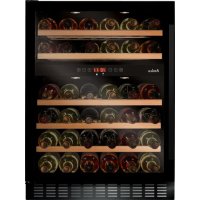
WK 341 110 S - Wine cellar AMICA - Free user manual and instructions
Find the device manual for free WK 341 110 S AMICA in PDF.



| Product type | Wine cellar |
| Brand | Amica |
| Model | WK 341 110 S |
| Power supply | 220-240 V ~ 50 Hz, 10 A |
| Climate class | SN (from +10°C to +32°C) |
| Number of zones | One zone |
| Temperature range | Adjustable (default 12°C / 54°F) |
| Capacity | Up to 30 bottles (Bordeaux type 0.75 L) |
| Interior lighting | LED, switchable via button |
| Operating modes | Silent, dynamic, weekend |
| Additional features | Temperature alarm, digital display, humidity system (optional tray) |
| Cleaning and maintenance | Unplug before cleaning; use warm water and baking soda for interior; do not use abrasive cleaners |
| Safety instructions | Unpack 24h before plugging in; lateral and rear ventilation space; do not cover ventilation openings |
| Warranty | According to warranty card |
| Repairability | Repairs by qualified personnel; LED lighting not user-replaceable |
| Dimensions (approx.) | Height without feet: 84 cm; width: 59 cm; depth: 58 cm |
| Net weight (approx.) | 32 kg |
Frequently Asked Questions - WK 341 110 S AMICA
User questions about WK 341 110 S AMICA
0 question about this device. Answer the ones you know or ask your own.
Ask a new question about this device
Download the instructions for your Wine cellar in PDF format for free! Find your manual WK 341 110 S - AMICA and take your electronic device back in hand. On this page are published all the documents necessary for the use of your device. WK 341 110 S by AMICA.
USER MANUAL WK 341 110 S AMICA
WCF1K / WCB1K / WCU2K / WFBB / WBA / WBB / WFBA / WK 341S
EN- Table of contents
GUIDELINES CONCERNING THE SAFETY OF USE 10
INSTALLATION AND OPERATING CONDITIONS OF THE APPLIANCE 12
CLIMATE RANGE 13
PRACTICAL EVERYDAY TIPS 13
UNPACKING
DISPOSAL OF OLD APPLIANCE 16
CONTROLS
APPLIANCE CONTROLS- SINGLE AND DUAL ZONE 17
TO SWITCH THE POWER ON/OFF 17
TO CHANGE THE TEMPERATURE 17
OPTIMAL TEMPERATURE SELECTION 18
TO USE THE INTERNAL LIGHT 18
INTERNAL HUMIDITY 18
TEMPERATURE DISPLAY 18
SILENT MODE 18
DYNAMIC COOLING MODE 18
WEEKEND MODE
TEMPERATURE ALARM
CARE AND CLEANING
REMOVING THE SHELVES
CLEANING
TROUBLESHOOTING
IF THE APPLIANCE IS NOT WORKING, CHECK
THE APPLIANCE IS WORKING, BUT NOT VERY WELL, CHECK
THE APPLIANCE IS NOISY, CHECK
THE LIGHT DOES NOT WORK, CHECK
THE DOOR WILL NOT CLOSE PROPERLY, CHECK
THE DISPLAY SHOWS "E1" OR "E2"
WARRANTY AND AFTER SALES SERVICE
WARRANTY
15
17
GARANTIE, NACHVERKAUF-SERVICE 36
GARANTIE 36
CS- Obsah
POKNY TYKAJICI SE BEZPECNOSTI POUZIVANI 38 INSTALACE A PROVOZNI PODMINKY SPOTREBICE 40
KLIMATICKA TRIDA 41
PRAKTICKÉ RADY 41
VYBALENI
LIKVIDACE OPOTRBOVANYCH ZARIZENI 44 OVLADACI PRVKY 45
OVLÁDACÍ PRVKY - JEDNA A DVE ZÓNY 45
ZAPNUTI/VYPNUTI NAPAJENI 45
ZMENA TEPLOTY 45
VYBER OPTIMALNTEPLOTY 46
VNITRNI OSVETLENI 46
VNITRNVI VLHKOST 46
DISPLEJ TEPLOTY 46
TICHY REZIM 46
REZIM DYNAMICKÉHO CHLAZENI 46
VIKENDOVY REZIM 47
TEPLOTNI ALARM
CISTENIA UDRZBA
VYTAHOVANI POLIC
CISTENI
SENI PROBLEM
POKUD ZARIZENI NEFUNGUJE, ZKONTROLUJTE 48
POKUD ZARIZENI NEFUNGUJE DOBRE, ZKONTROLUJTE 49
POKUD JE ZARIZENI HLUÇNÉ, ZKONTROLUJTPE 49
POKUD NEFUNGUJE OSVETLENI, ZKONTROLUJTE 49
POKUD DVIRKA NEJSOU DOBRE ZAVRENÁ, ZKONTROLUJTE 49
POKUD NA DISPLEJI SVITI "E1" NEBO "E2" 49
ZARUKA,POPRODEJNISERVIS 50
ZARUKA 50
SK- Obsah
DOLEZITE BEZPECNOSTNÉ POKNY 52
INSTALACIA A PREVADZKOVE PODMIENKY SPOTREBICA 55
KLIMATICKA TRIEDA 56
PRAKTICKÉ RADY 56
ROZBALENIE
LIKVIDÁCIA ZARIADENÍ 58
OVLADACIE PRVKY 59
OVLADACIE PRVKY - JEDNA A DVE ZONY 59
ZAPNUTIE/VYPNUTIE NAPAJANIA 59
ZMENA TEPLOTY 59
VOL'BA OPTIMALNEJ TEPLOTY 60
OSVETLENIE VNUTRA 60
VLHKOST VO VNUTRI 60
DISPLEJ TEPLOTY 60
TICHY REZIM 60
REZIM DYNAMICKÉHO CHLADENIA 60
VIKENDOVY REZIM 61
ALARM TEPLOTY 61
CISTENIE A UDRZBA
62
CISTENIE 62
RIESENIE PROBLEMOV
AK ZARIADENIE NEFUNGUJE 62
AK ZARIADENIE SICE FUNGUJE, ALE NEFUNGUJE PRILIS DOBRE, SKONTROLUJTE 63
AK JE ZARIADENIE PRILIS HLUČNÉ 63
AK NEFUNGUJE OSVETLENIE 63
AK DVERE NIE SU ZATVORENÉ SPRÁVNE, SKONTROLUJTE 63
AK NA DISPLEJI SVIETI "E1" ALEBO "E2" 63
ZÁRUKA, POPREDAJNY SERVIS
ZARUKA 64
KLASA KLIMATYCZNA 84
JESLI NA WYSWIETLACZU SWIECI SIE "E1" LUB "E2" 91
GWARANCJA, OBSŁUGA POSPRZEDAźOWA
GWARANCJA 92
ES- Tabla de Contents
IMPORTANT INSTRUCCIONES DE SEGURIDAD 94
INSTALACION Y CONDICIONES DE TRABAJO DEL APARATO 96
CLASE CLIMÁTICA 97
From now on, your daily housework will be easier than ever before. Your appliance Amica is exceptionally easy to use and extremely efficient. After reading these Operating Instructions, operating the appliance will be easy.
Before being packaged and leaving the manufacturer, the appliance was thoroughly checked with regard to safety and functionality.
Before using the appliance, please carefully read these Operating Instructions. By following these instructions carefully you will be able to avoid any problems in using the appliance. It is important to keep these Operating Instructions and store them in a safe place so that they can be consulted at any time.
Follow these instructions carefully in order to avoid possible accidents.
Sincerely,
Amica
GUIDELINES CONCERNING THE SAFETY OF USE
- The appliance is intended for household use only.
- The manufacturer reserves the right to introduce changes which do not affect the operation of the appliance.
- The Manufacturer shall not be held liable for damage arising from the failure to observe the instructions contained in this manual.
- Keep this manual for future reference, or to pass it over to the next user.
- This appliance is not intended for use by persons (including children) with limited physical or mental capabilities and persons who lack experience or familiarity with the appliance.
- Do not allow children to use the appliance. Do not allow them to play with the appliance. They must not climb inside the drawers and swing on the doors.
- The appliance operates properly at the ambient temperature (see product fiche). Do not use it in the cellar, unheated summer cottage during autumn and winter.
- When placing, moving, lifting the appliance, do not hold the door handles, do not pull the condenser at the rear part of the refrigerator and do not touch the compressor unit.
- Pull the plug out from the mains socket before each maintenance activity. Do not pull on the cord, but hold the body of the plug instead.
- The "cracking" sound, which the appliance may emit is caused by the expansion and contraction of parts as a result of temperature variations.
-
For safety reasons do not repair the appliance yourself. Repairs carried out by persons who do not have the required qualifications may result in serious danger for the user of the appliance.
-
Make sure you do not damage the cooling system, by puncturing the refrigerant pipes in the evaporator or breaking the pipes. The refrigerant is flammable. If the refrigerant makes contact with the eyes, rinse them with clean water and call for medical assistance immediately.
- Important! If the power cord is damaged, it should be replaced by the manufacturer or specialist repair centre or a qualified person in order to avoid danger.
- When performing activities, such as cleaning, maintenance or moving, the appliance must be completely disconnected from power supply (by pulling the plug out from the socket)
- This appliance can be used by children aged 8 years and older or by persons with physical, mental or sensory handicaps, or by those who are inexperienced or unfamiliar with the appliance, provided they are supervised or have been instructed how to safely use the appliance and are familiar with risks associated with the use of the appliance. Ensure that children do not play with the appliance. Cleaning and maintenance of the appliance should not be performed by children unless they are 8 years or older and are supervised by a competent person.
- Do not clean the appliance with steam
- Keep the appliance and its power cord away from children under 8 years old.
- Do not immerse the power cord or plug in water.
- Keep cord away from heated surfaces.
- Do not allow the connection cord hanging over the edge of a table or counter.
- Do not use any electrical appliances inside the chamber
-
Do not use any tools to speed up the defrosting process
-
Regularly clean the ventilation openings (in case of built-in appliances or those installed under the worktop)
- This appliance is not designed to be controlled by electronic timers or other devices that cut off power directly or remotely.
- In case of accidental spillage of liquids on electrical components, immediately unplug your appliance from the power supply.
- Make sure that the power cord is not crushed or damaged during installation.
- Disable the appliance before disposing of it. Unplug the appliance from the power supply and cut off the power cord. To prevent children or animals from being trapped in the appliance, remove the doors, hinges and locks.
INSTALLATION AND OPERATING CONDITIONS OF THE APPLIANCE
- Connect the appliance to the power supply 24 hours after unpacking and setting in the final location.
- Take the product out of the package, remove the scotch tape protecting the door and the equipment. Any remaining adhesive stains may be removed with a mild washing agent.
- Clean the interior surface of the cooler and the elements of the equipment with a washing agent dissolved in lukewarm water, then wipe it dry.
- Place the cooler on an even, flat and stable surface, in dry, aired and shaded room, far from the heat sources such as: oven, hob, central heating radiators, central heating pipes, hot water installation, etc.
- On the exterior surface of the product may be a protective foil, this foils should be removed.
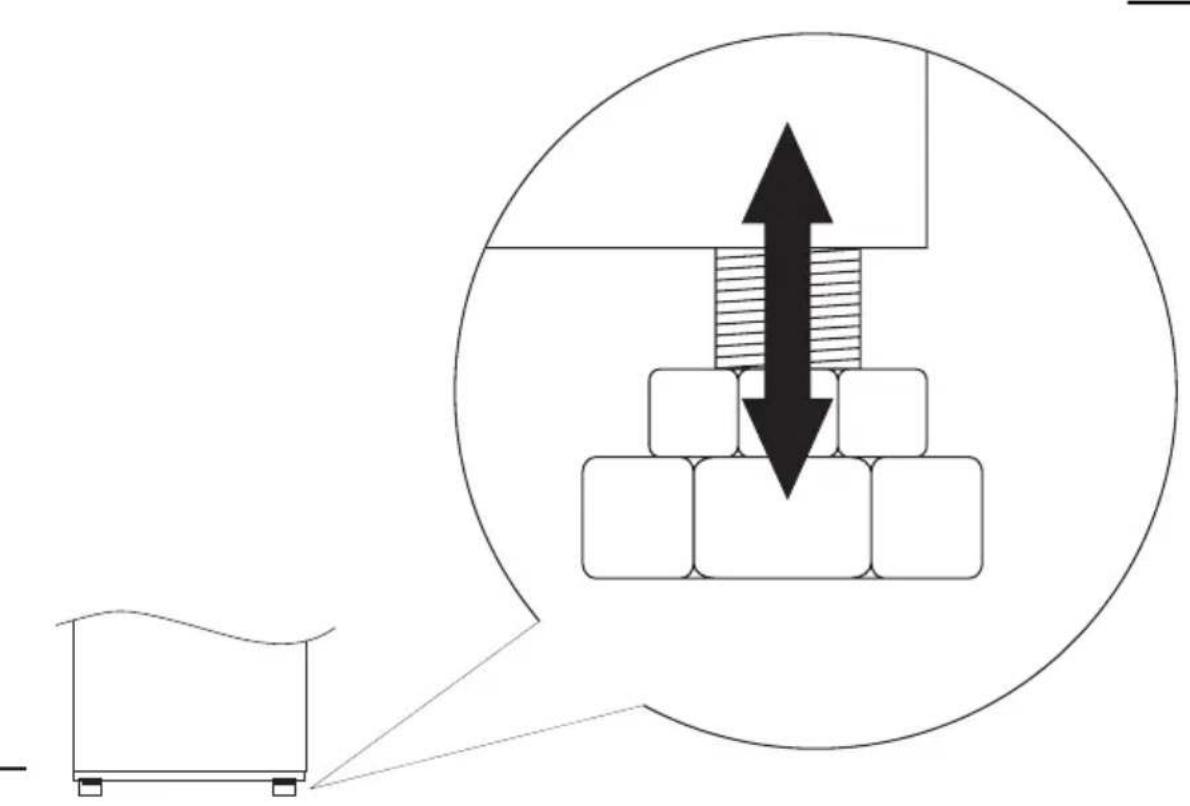
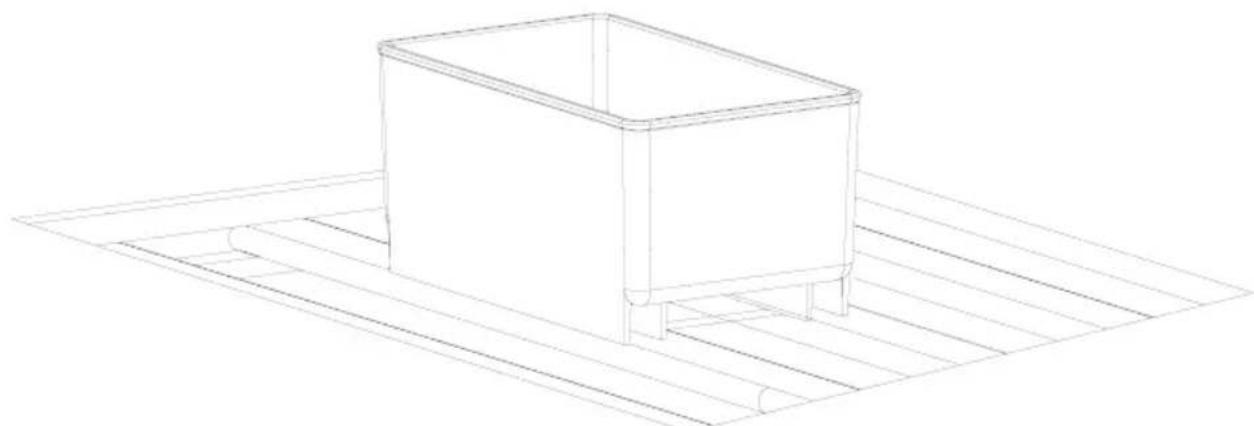
- Make sure the appliance is placed in a horizontal position by screwing in the 2 adjustable front legs (fig. 1)
- Keep free space on the sides and rear of the appliance (see installation drawing)
- When you install your wine cooler inside a furniture cabinet, make sure that the ventilation grille located in the bottom of the appliance is not blocked.
- Odours may be released when you first start your appliance. It will dissipate when the interior of the appliance cools down
-
When you first start your wine cooler, the compressor will run continuously until the desired temperature is reached inside the chamber
-
When you unplug your appliance from the power supply, it is recommended to wait 5 minutes before you plug it back in. This will reduce the risk of damage to the compressor.
- On selected models, the correct temperature will be shown on the display only a few hours after the wine cooler has been put into operation
- This appliance should be connected to AC 220-240V 50Hz supply socket. The socket must be fitted properly, and must be supplied with an earthing conduit and a 10A fuse.
- It is a legal requirement that the appliance is properly earthed. The manufacturer will not be held liable for any damage or injury which may result from the failure to fulfil this requirement.
- Do not use adapters, multiple sockets and two-wire extension leads. If it is necessary to use the extension lead, it must be equipped with a protection ring and a single socket and must have a VDE/GS safety certificate.
- If an extension lead is used (with a protection ring and safety certificate), its socket must be located at a safe distance, away from the sinks, and must not be in a place where it could be flooded by water or waste water.
- Make sure the appliance can be easily disconnected from the mains, either by pulling the plug out of the mains socket, or by switching the two-pole switch off.
Climate range
The information about the climate range of the appliance is provided on the rated plate. It indicates at which ambient temperature (that is, room temperature, in which the appliance is working) the operation of the appliance is optimal (proper).
Climate range Permissible ambient temperature
| SN from +10°C to +32°C |
| N from +16°C to +32°C |
| ST from +16°C to +38°C |
| T from +16°C to +43°C |
PRACTICAL EVERYDAY TIPS
- If the light inside the appliance remains turned on, keep in mind that the temperature inside the appliance will be higher
- Temperature inside the appliance depends on the amount and type of stored wine bottles
- To ensure user safety and high quality of stored wine, do not install the appliance in damp rooms
- Store wine bottles in designated spaces
- Your wine cooler has a limited capacity. Do not place more bottles in your wine cooler than recommended in specification
- Do not open the wine cooler door if it is not necessary
- Do not cover the shelves with aluminium foil or other material. This
blocks the air circulation inside the appliance
- To avoid damage to the door seal, make sure that the door is completely open before pulling out the shelf. The shelves should be inserted as far as possible, otherwise the shelf may deform and damage the door seal.
- Do not extend the loaded shelves beyond the extension limit (about 1/3 of the shelf length)
- This appliance is designed for storing bottles of wine. Do not use it for any other purpose.
- Temperature stability is very important when storing wine.
- Exposing your wine cooler to sunlight, significant temperature fluctuations, high humidity and vibrations may cause the wine to go bad.
- In periods of high humidity, condensed water vapour may appear on the outer surfaces of the glass door. To prevent this, install the appliance in a dry, adequately ventilated room.
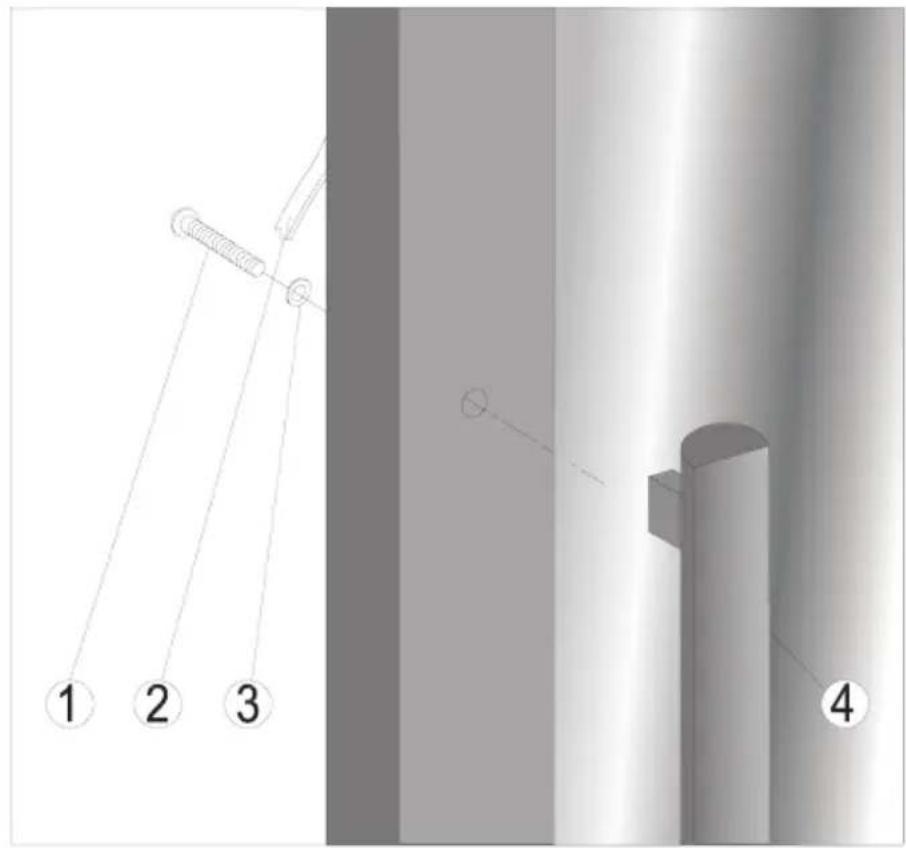
- Selected models have an external handle. You need to install it on your own. Do not use electric tools for this purpose (fig. 3* ).
- The maximum capacity of the appliance is given in the product sheet enclosed with the wine cooler. This capacity applies to standard 0.75 litre bottles of Bordeaux.
- Selected models have an Anti-tip kit. Install it according to the enclosed diagram (fig. 6*).
UNPACKING

During transportation, protective packaging was used to protect the appliance against any damage. After unpacking, please dispose of all elements of packaging in a way that will not cause damage to the environment.
All materials used for packaging the appliance are environmentally friendly; they are 100 % recyclable and are marked with the appropriate symbol.
Important! Packaging materials (bags, polyethylene, polystyrene, etc.) should be kept away from children during unpacking.
DISPOSAL OF OLD APPLIANCE
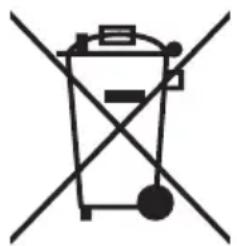

In accordance with European Directive 2012/19/EU and Polish legislation regarding used electrical and electronic goods, this appliance is marked with the symbol of the crossed-out waste container. This marking indicates that the appliance must not be disposed
of together with other household waste after it has been used.
The user is obliged to hand it over to waste collection centre collecting used electrical and electronic goods. The collectors, including local collection points, shops and local authority departments provide recycling schemes.
Proper handling of used electrical and electronic goods helps avoid environmental and health hazards resulting from the presence of dangerous components and the inappropriate storage and processing of such goods.
CONTROLS
Appliance controls- single and dual zone
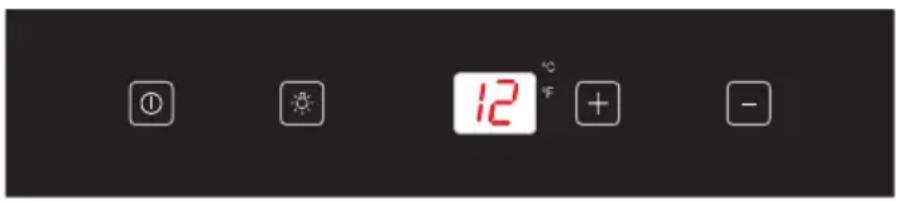
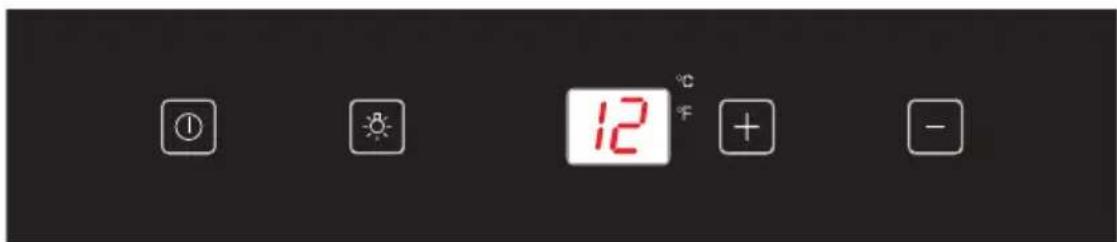
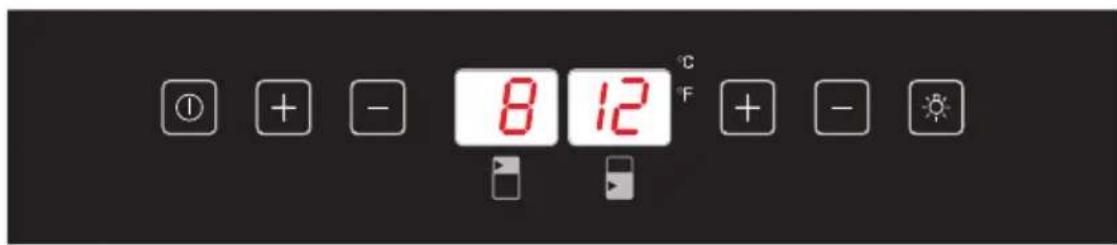
The control panel is shown in figure 4. For reference it is also shown below:
Single zone
Dual zone
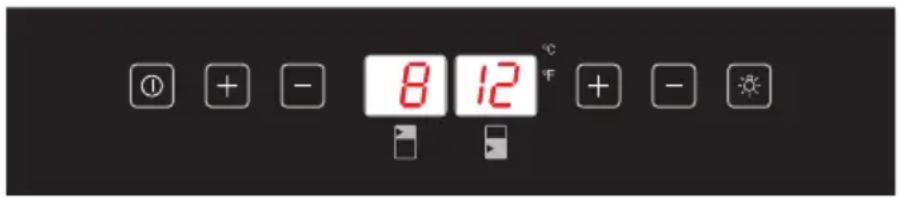
- Power button
- Light button
-
-
- button
-
- -" button
To switch the power on/off
Press and hold the power button for one second to switch the wine cooler on. Press and hold the power button for five seconds to switch the wine cooler off.
To change the temperature
- Press the "+" or "-" buttons until the required temperature is shown on the display.
The Preset temperature is 12°C / 54°F - To change the temperature display from Fahrenheit to Celsius, or Celsius to Fahrenheit, press and hold the light button for five seconds.
- To view the set temperature, touch the "+" or "-" button at any time and the set temperature will flash in the LED display for five seconds.
- The display shows the current internal temperature when the wine cooler is on.
Optimal temperature selection
Whilst wine is best stored at temperatures between 13 and 15°C , your wine can also be stored at drinking temperature. For red wine this is between 15 and 17°C , and for white wine between 12 and 13°C .
To use the internal light
Press the light button to switch the light on or off.
Note: The temperature in the lower zone must be set either the same as or higher than the temperature in the upper zone. For optimal performance, the temperatures in the two zones should differ by at least 4°C .
Internal Humidity
According to the model wine coolers are equipped with a humidity system to maintain optimal humidity within the wine cooler. Fill the humidity reservoir approximately 3/4 full with water. Place the reservoir on the runners on the top shelf as shown in fig. 2. Ensure it is located correctly to prevent water spillage. Check the water level regularly and refill if required.
Temperature display
The temperature display will show the current internal temperature.
The display flashes:
-
When a different temperature is being set
-
If the internal temperature is + / - 5 ° away from the set temperature.
This serves as a warning to prevent damage to the contents of the appliance should the temperature be too high.
Silent mode
Once the required temperature is reached, the appliance will run without the fan. The wine cooler is factory set to silent mode. To change to dynamic cooling mode, touch and hold the " - " button for approximately five seconds (left hand " - " button on 2-Zone coolers). The wine cooler will beep five times to confirm dynamic cooling is on.
Dynamic cooling mode
The fan cycles on and off to circulate the air even after the required temperature is reached. This ensures consistent humidity and temperature distribution in the wine cooler, creating perfect conditions for long term storage.
Using the dynamic mode increases the level of noise in operation.
To change to silent mode, touch and hold the "+" button for approximately five seconds (left hand "+" button on 2-Zone coolers). The wine cooler will beep three times to confirm silent mode is on.
Weekend mode
This will switch off the displays, interior light and audible alarms. The cooling process will continue.
To switch the Weekend mode on, touch and hold the power and light keys simultaneously for five seconds. The indicator light will flash four times and confirm the mode is on. Mode will switch off automatically after 96 hours, but to switch the mode off at any time, touch and hold the power and light keys simultaneously for five seconds.
Temperature alarm
If the temperature rises or falls outside the set temperature range, an alarm will sound and the display will flash. This may be because:
- The wine cooler has not yet reached the set temperature (when first switched on).
- There has been a power failure.
The wine cooler has been overloaded. - The door is not closed properly.
CARE AND CLEANING
Always disconnect the appliance from the mains electrical supply before any cleaning or maintenance.
Removing the shelves
- To remove a shelf from the wine cooler, first remove all bottles from the shelf, then pull the shelf forwards until the groove on either side of the shelf is level with the plastic peg on either side of the cabinet (as shown in fig 5). Then lift the shelf up and pull forwards.
To replace the shelves, follow the steps above in reverse order.
Cleaning
- Do not use abrasive products or detergents. After washing, rinse and dry thoroughly.
- The exterior of the appliance and the door seal should be cleaned using mild soapy water and dried thoroughly.
- The interior cabinet should be cleaned using a solution of bicarbonate of soda and lukewarm water.
- Clean the shelves separately by hand using soap and water. Do not put them in the dishwasher.
- Ensure that the cloth is only moist when cleaning the control panel and electrical parts, and that all water is thoroughly dried off before reconnecting the power.
- Once cleaning is complete, reconnect the mains electrical supply.
- If the appliance is not to be used for prolonged periods of time, unplug and clean the appliance thoroughly. The door should be left slightly ajar to prevent the formation of odours or condensation
TROUBLESHOOTING
If you have any problems with your appliance, you should check the troubleshooting guide prior to calling Call Center to prevent unnecessary service calls and potential cost.
If the appliance is not working, check
- There is power to the appliance
- The house fuses or circuit breakers are intact and the fuse in the plug has not blown.
- The plug socket is functioning correctly. To check this, plug another electrical appliance in to see if the socket is working.
- The ambient temperature is between 16°C to 32°C .
The appliance is working, but not very well, check
The appliance is not overloaded.
- The thermostat is set to an appropriate temperature.
The door is closing properly.
- The door gasket is sealing properly
- There is enough ventilation at the side and rear walls.
- The ambient temperature is between 16°C to 32°C .
The appliance is noisy, check
The appliance is level and stable.
- The cooling gas will make some noise, even when the compressor is not running.
- During operation, it is normal for the fan to run, even when the compressor is not running.
The light does not work, check
- There is power to the appliance.
- The house fuses or circuit breakers are intact and the fuse in the plug has not blown.
- The light button is not set to off.
Please note:
The LED lighting cannot be replaced without a service call
The door will not close properly, check
- The appliance is level and stable.
- If the door has been removed, it may not have been correctly refitted.
The door seal is dirty. - The shelves are not positioned correctly.
The display shows "E1" or "E2"
- The temperature sensor has failed. Please contact Call Center
WARRANTY AND AFTER SALES SERVICE
Warranty
Warranty service as stated on the warranty card. The manufacturer shall not be held liable for any damage caused by improper use of the product.

The manufacturer recommends that all repairs and adjustments be carried out by the Factory Service Technician or the Manufacturer's Authorized Service Point. Repairs should be carried out by a qualified technician only.
Manufacturer's Declaration
The manufacturer hereby declares that this product meets the requirements of the following European directives:
Low Voltage Directive 2014/35/EC
- Electromagnetic Compatibility (EMC) Directive 2014/30/EC
ErP Directive 2009/125/EC
- Directive RoHS 2011/65/EC
and has thus been marked with the symbol and been issued with a declaration of compliance made available to market regulators.
DÔLEŽITÉ BEZPEČNOSTNÉ POKNY
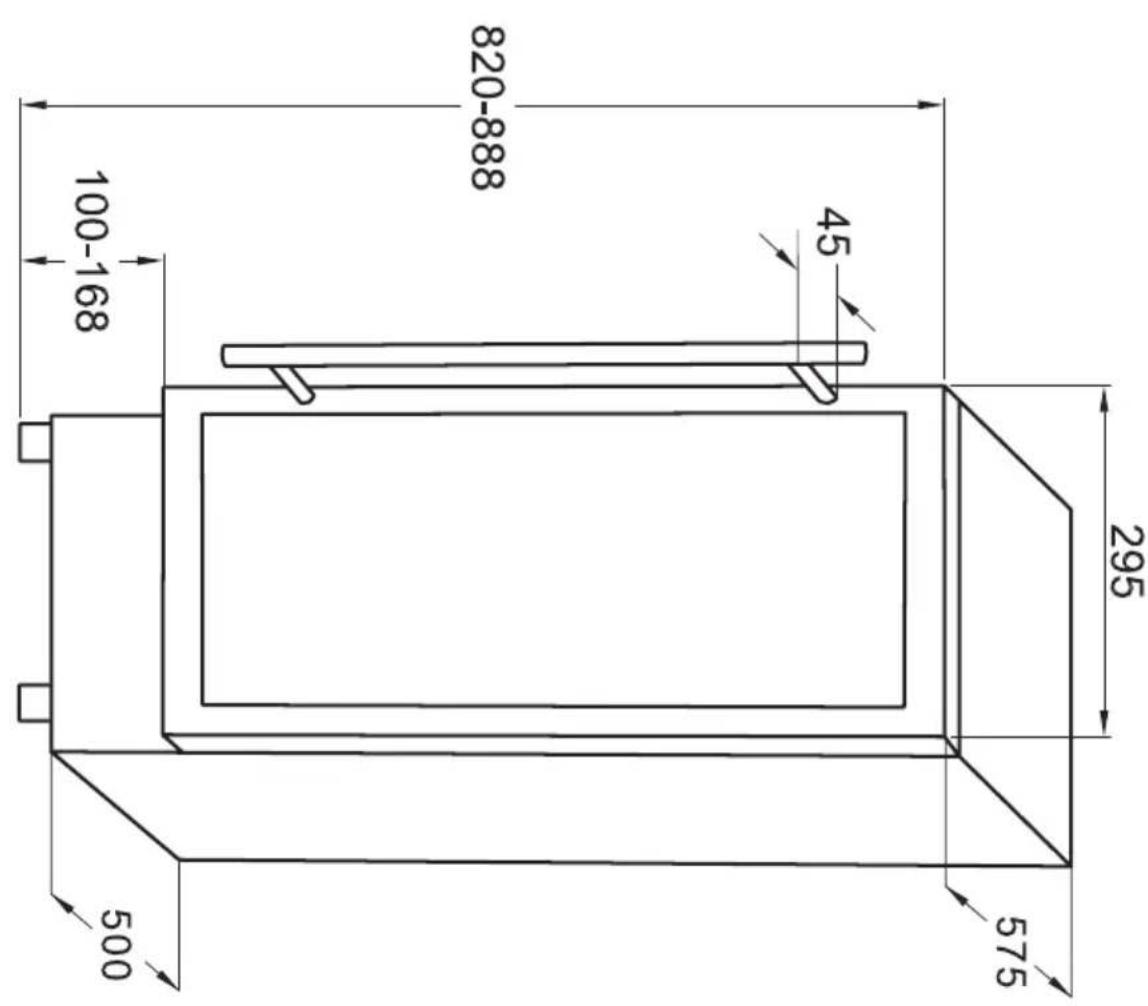
WCF1K30B20.1 / WFBA 2030 DL / WCF1K30S20.1 / WFBA 2030 DX
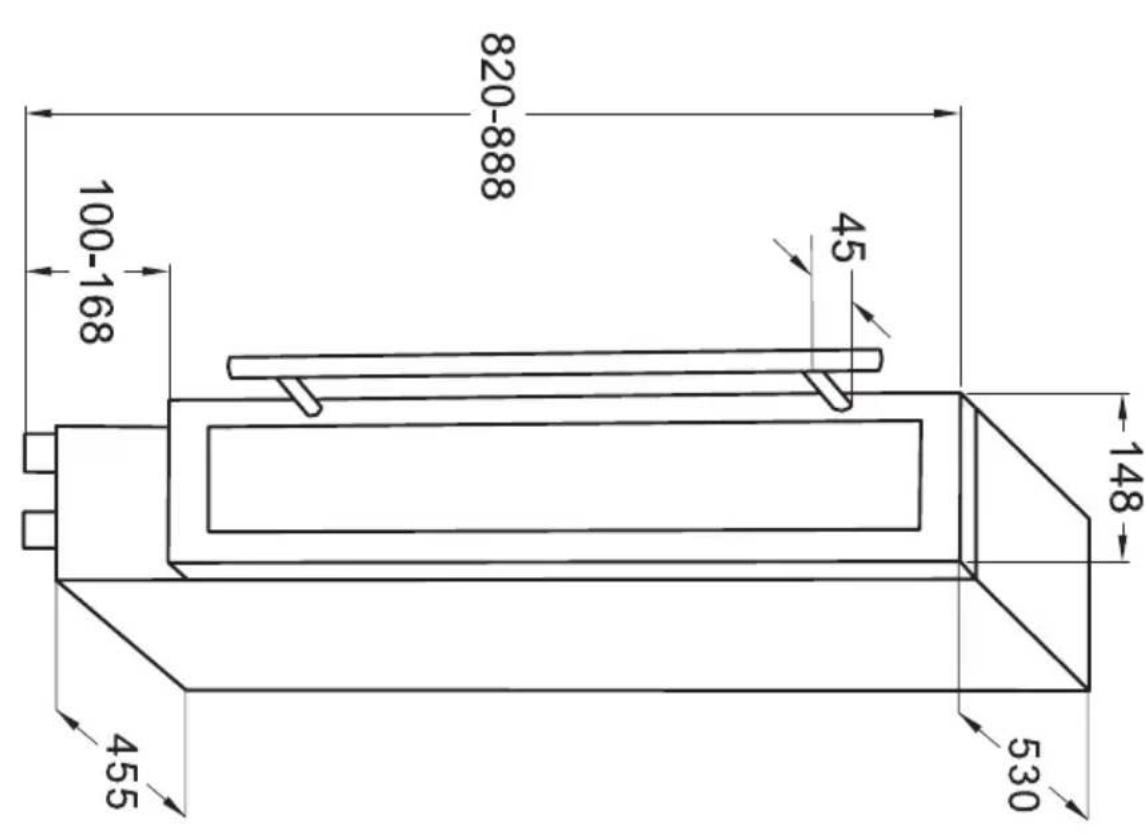
WCF1K15B7.1 / WFBB 715 DB / WCF1K15S7.1 / WFBB 715 DX / WK 341 100 S
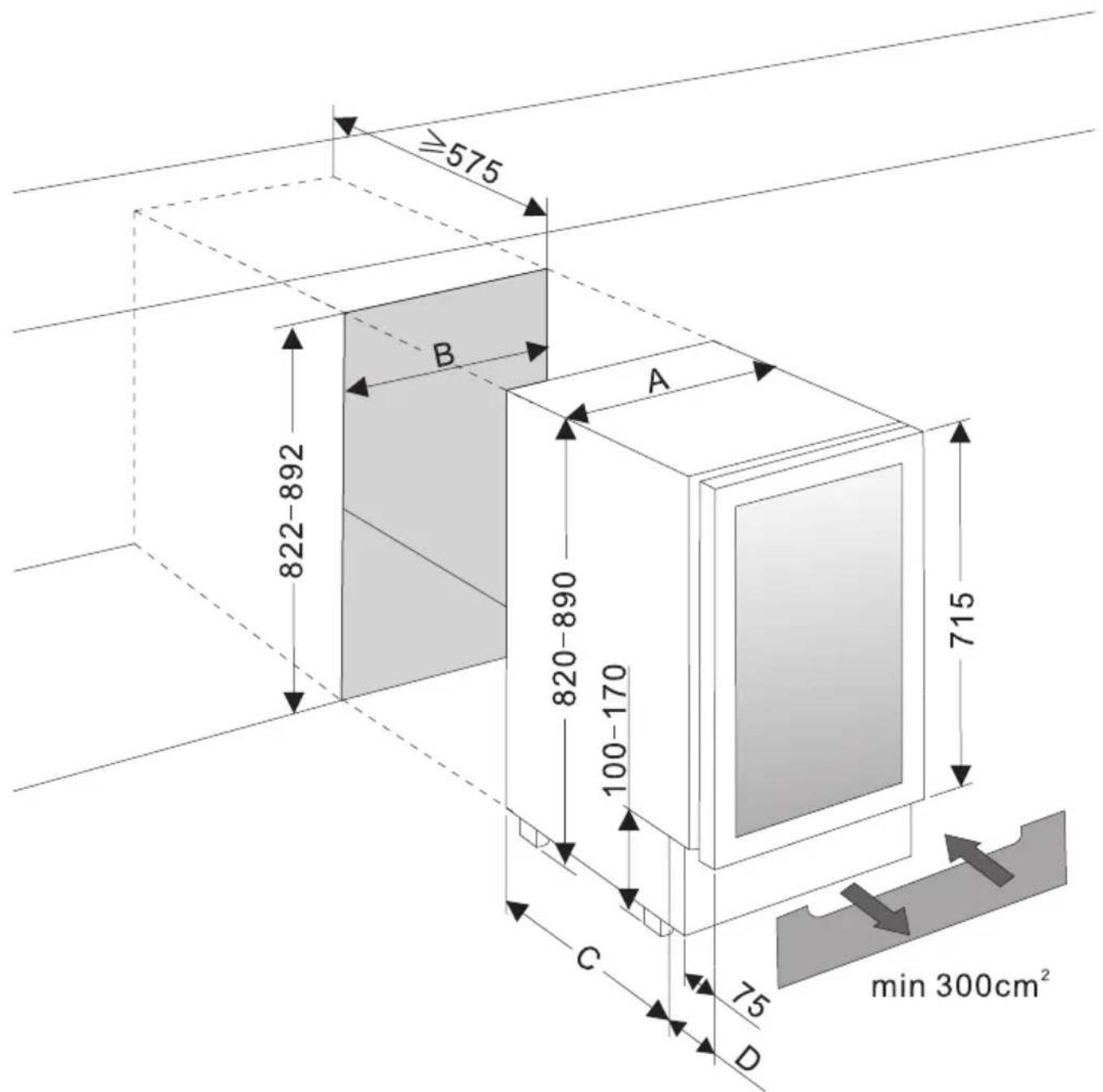
| A [mm] B | [mm] C | [mm] D | [mm] | |
| WCF1K15S7.1 / WFBB 715 DX / WCF1K15B7.1 / WFBB 715 DB / WK 341 100 S | 148 150 | 0 455 75 | ||
| WCF1K30S20.1 / WFBA 2030 DX / WCF1K30B20.1 / WFBA 2030 DL | 295 300 | 0 465 110 | ||
| WCU2K60B45.1 / WBB 4660 DZB / WK 341 110 S | 595 600 | 0 465 110 |
EN- The base under the wine cooler must be cut as instructed / DE- Der Kühlschranksockel muss passend ausgeschritten werden / CS- Podstavec pod chladnickou vchodne orezejte / SK- Sokel pod vinotékou naležitým spösobom vyrežte / FR- Le socle sous le refroidisseur doit être découvert d'une manière appropriée / PL- Cokóf pod chłodziarka nalezy wyciac w odpowiedni sposob / ES- La base por debajo del frigorífico debe ser cortada de manera adecuada

| A [mm] B | [mm] C | [mm] | |
| WCB1K54B24.1 / WBA 2455 DB / WK 341 200 S | 448 45 | 5 455 | |
| WCB1K60B40.1 / WBA 4060 DB / WK 341 210 S | 588 59 | 5 590 |
EN:
-
Since the appliance will be built into a furniture unit, before installing the appliance, prepare a ventilation duct behind the appliance running from the floor to the top of the furniture unit. Ensure there is free space between the back of the appliance and the wall, which is not blocked by furniture. The area of ventilation grille should be at least 200 cm2
-
Note: The appliance height does not include the screw-in feet. The device is installed without feet.
-
To ensure correct appliance operation never cover any ventilation openings. Regularly clean the ventilation grille.
DE:
WCF1K15S7.1 / WFBB 715 DX / WCF1K15B7.1 / WFBB 715 DB / WCF1K30S20.1 / WFBA 2030 DX / WCF1K30B20.1 / WFBA 2030 DL
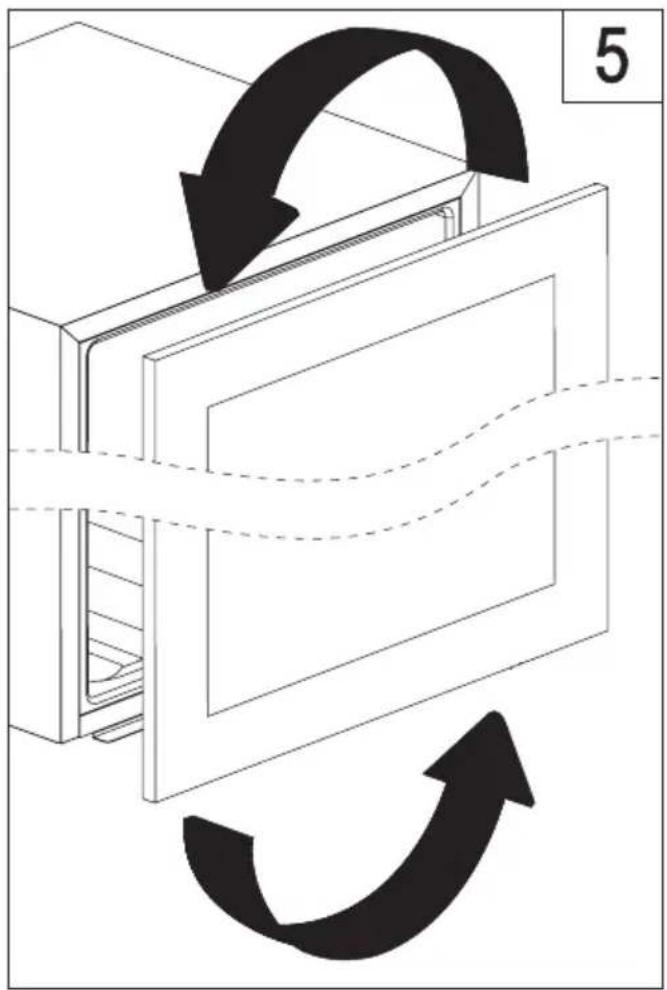
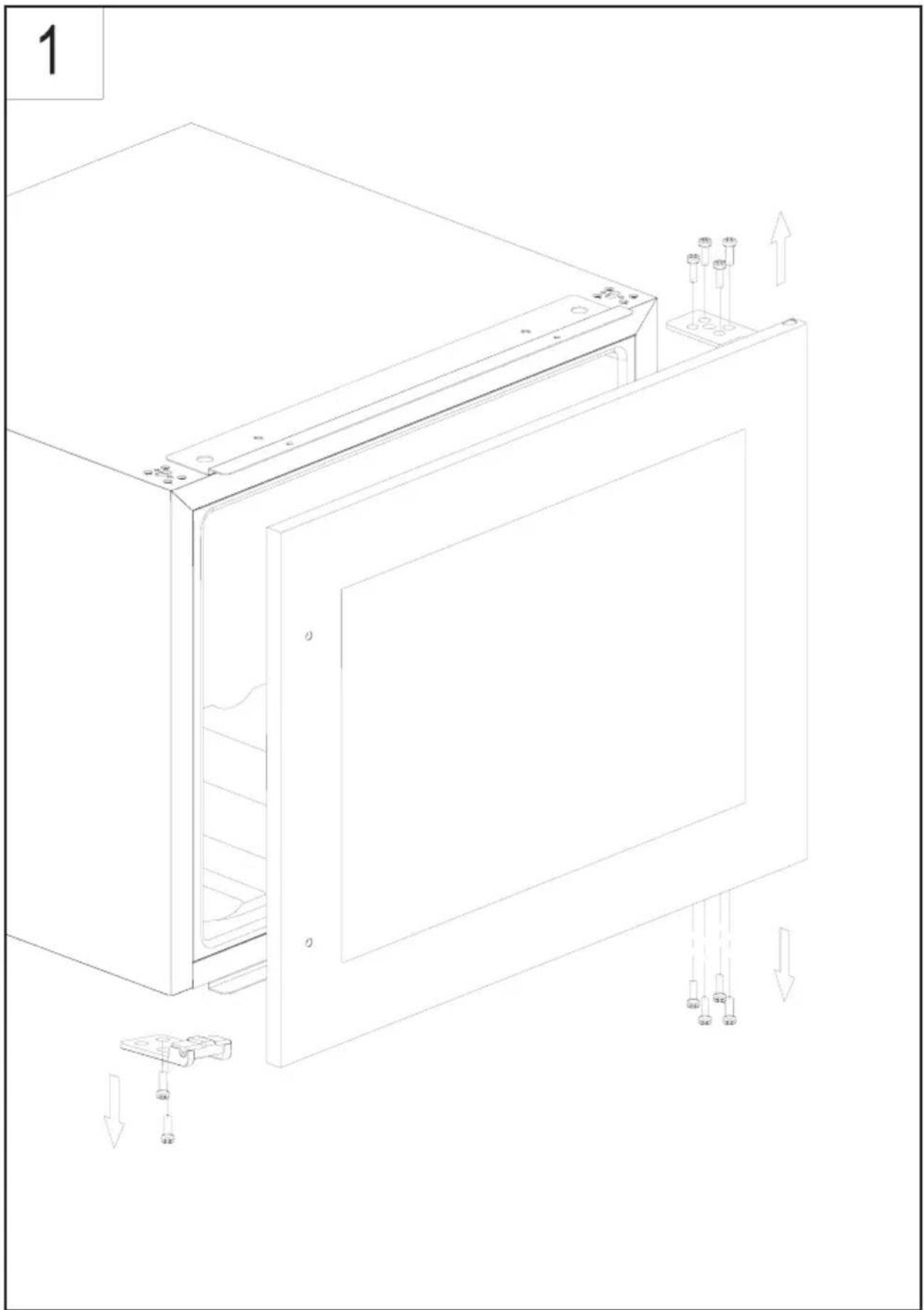
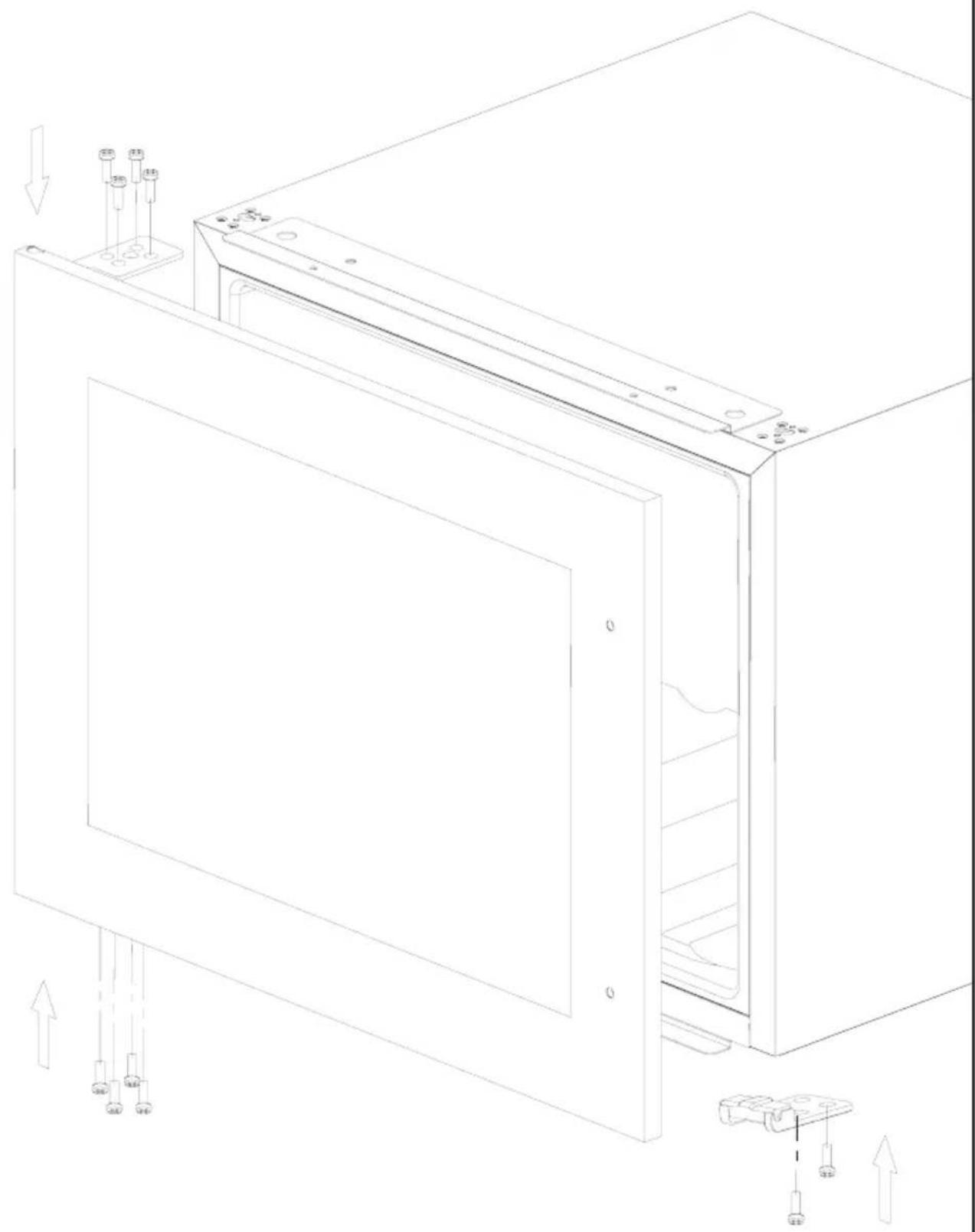
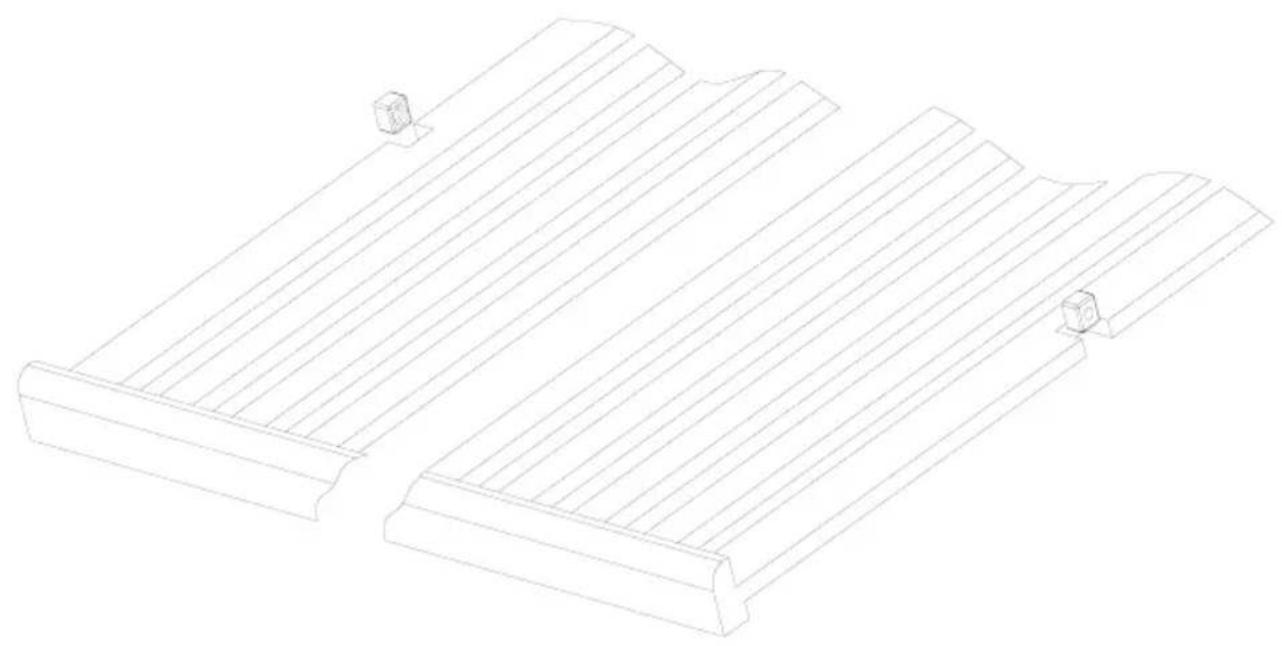
EN- CHANGING THE DIRECTION OF THE DOOR OPENING / DE- WECHSEL DES TÜRANSCHLAGS / CS- ZMENA SMÉRU OTEVÍRÁNÍ DVÍREK / SK- ZMENA SMERU OTVÁRANIA DVIEROK / FR- INVERSION DE SENS D'OUVERTURE DE PORTE / PL- ZMIANA KIERUNKU OTWIERANIA DRZWI / ES- CAMBIO DEL SENTIDO DE APERTURA DE PUERTA
2
1
2
3
4
Amica S.A.
ul . Mickiewicza 52 / 64- 510 WronkiTel. 67 25 46 100 / fax 67 25 40 320
www.amica.pl
Amica International GmbH
Lüdinghauser Str. 52
D-59387 Ascheberg
Tel: 0 25 93 - 95 67- 0
www.amica-group.de



- EN- TABLE OF CONTENTS
- GUIDELINES CONCERNING THE SAFETY OF USE 10
- INSTALLATION AND OPERATING CONDITIONS OF THE APPLIANCE 12
- PRACTICAL EVERYDAY TIPS 13
- DISPOSAL OF OLD APPLIANCE 16
- CARE AND CLEANING
- TROUBLESHOOTING
- WARRANTY AND AFTER SALES SERVICE
- GARANTIE, NACHVERKAUF-SERVICE 36
- CS- OBSAH
- POKNY TYKAJICI SE BEZPECNOSTI POUZIVANI 38 INSTALACE A PROVOZNI PODMINKY SPOTREBICE 40
- PRAKTICKÉ RADY 41
- VYBALENI
- LIKVIDACE OPOTRBOVANYCH ZARIZENI 44 OVLADACI PRVKY 45
- CISTENIA UDRZBA
- SENI PROBLEM
- ZARUKA,POPRODEJNISERVIS 50
- SK- OBSAH
- DOLEZITE BEZPECNOSTNÉ POKNY 52
- INSTALACIA A PREVADZKOVE PODMIENKY SPOTREBICA 55
- PRAKTICKÉ RADY 56
- ROZBALENIE
- LIKVIDÁCIA ZARIADENÍ 58
- OVLADACIE PRVKY 59
- CISTENIE A UDRZBA
- RIESENIE PROBLEMOV
- ZÁRUKA, POPREDAJNY SERVIS
- GWARANCJA, OBSŁUGA POSPRZEDAŹOWA
- ES- TABLA DE CONTENTS
- IMPORTANT INSTRUCCIONES DE SEGURIDAD 94
- INSTALACION Y CONDICIONES DE TRABAJO DEL APARATO 96
- GUIDELINES CONCERNING THE SAFETY OF USE
- INSTALLATION AND OPERATING CONDITIONS OF THE APPLIANCE
- CLIMATE RANGE
- PRACTICAL EVERYDAY TIPS
- UNPACKING
- DISPOSAL OF OLD APPLIANCE
- CONTROLS
- APPLIANCE CONTROLS- SINGLE AND DUAL ZONE
- TO SWITCH THE POWER ON/OFF
- TO CHANGE THE TEMPERATURE
- OPTIMAL TEMPERATURE SELECTION
- TO USE THE INTERNAL LIGHT
- INTERNAL HUMIDITY
- TEMPERATURE DISPLAY
- SILENT MODE
- DYNAMIC COOLING MODE
- WEEKEND MODE
- TEMPERATURE ALARM
- REMOVING THE SHELVES
- CLEANING
- IF THE APPLIANCE IS NOT WORKING, CHECK
- THE APPLIANCE IS WORKING, BUT NOT VERY WELL, CHECK
- THE APPLIANCE IS NOISY, CHECK
- THE LIGHT DOES NOT WORK, CHECK
- THE DOOR WILL NOT CLOSE PROPERLY, CHECK
- THE DISPLAY SHOWS "E1" OR "E2
- WARRANTY
- MANUFACTURER'S DECLARATION
- DÔLEŽITÉ BEZPEČNOSTNÉ POKNY
- EN
- DE
Brand : AMICA
Model : WK 341 110 S
Category : Wine cellar