SER1EB - Receiver TECHNICS - Free user manual and instructions
Find the device manual for free SER1EB TECHNICS in PDF.




| Product Type | Power Amplifier Receiver |
| Brand | Technics |
| Model | SER1EB |
| Dimensions (W × H × D) | 480 mm × 241 mm × 567 mm |
| Weight | Approx. 54 kg |
| Power Supply | AC 220 V to 240 V, 50/60 Hz |
| Power Consumption (On) | 210 W |
| Power Consumption (Standby) | Approx. 0.7 W |
| Power Consumption (Off) | Approx. 0.3 W |
| Output Power (8 Ω, 1 kHz, 0.5% THD) | 150 W + 150 W |
| Output Power (4 Ω, 1 kHz, 0.5% THD) | 300 W + 300 W |
| Frequency Response | 1 Hz to 90 kHz (-3 dB, 8 Ω) |
| THD+N | 0.05% (1 kHz, 75 W, 8 Ω) |
| Load Impedance (A or B, bi-wiring) | 4 Ω to 16 Ω |
| Load Impedance (A+B) | 8 Ω to 16 Ω |
| Input Sensitivity (UNBALANCED/BALANCED) | 1.2 Vrms (ANALOG 0 dB) |
| Analog Inputs | UNBALANCED (jack), BALANCED (XLR) |
| Digital Input | Technics Digital Link (RJ45) |
| Main Functions | PWM digital amplification, GaN-FET driver, LAPC correction, peak power meter |
| Supplied Accessories | 2 AC power cords |
| Maintenance | Unplug before cleaning, soft cloth; do not use solvents |
| Safety | Do not expose to water, do not obstruct ventilation, leave repairs to qualified personnel |
| Repairability | Do not repair yourself; contact an authorized service center |
Frequently Asked Questions - SER1EB TECHNICS
User questions about SER1EB TECHNICS
0 question about this device. Answer the ones you know or ask your own.
Ask a new question about this device
Download the instructions for your Receiver in PDF format for free! Find your manual SER1EB - TECHNICS and take your electronic device back in hand. On this page are published all the documents necessary for the use of your device. SER1EB by TECHNICS.
USER MANUAL SER1EB TECHNICS
Operating Instructions
Bedienungsanleitung
Mode d'emploi
Music is borderless and timeless,
touching people's hearts across cultures and generations.
Each day the discovery of a truly emotive experience
from an unencountered sound awaits.
Let us take you on your journey to rediscover music.
Rediscover Music ™
Technics
Thank you for purchasing this product.
Please read these instructions carefully before using this product, and save this manual for future use.
For the United Kingdom and Ireland customers
Sales and Support Information
Customer Communications Centre
For customers within the UK: 0333 222 8777
For customers within Ireland: 01 447 5229
- Monday-Friday 9:00 am - 5:00 pm, (Excluding public holidays).
For further support on your product, please visit our website: www.technics.com/uk/
Features of this unit
This unit offers the following features:
Full-digital amplifier with a high-precision jitter reduction circuit and PWM conversion circuit
This unit is a full-digital amplifier. Its specially-designed jitter reduction circuit and high-precision PWM conversion circuit eliminate distortion, noise, and jitter.
LAPC (Load Adaptive Phase Calibration)
Adaptive processing of speaker impedance flattens frequency amplitude and phase characteristics. The result is the reproduction of sound with rich spatial expression.
GaN-FET Driver
High-speed, loss-less switching is required to achieve pure amplification of accurately generated PWM signals. For this reason, this unit is provided with a high-speed GaN-FET Driver with super-low ON resistance.
Recommended devices
We recommend using Technics devices (optional) for superior audio quality.
| Product name Model number | |
| Network Audio Control Player SU-R1 | |
| Speaker System SB-R1* |
- This product is set to be released in February 2015. (For European Countries)
Safety precautions
WARNING
Unit
To reduce the risk of fire, electric shock or product damage,
- Do not expose this unit to rain, moisture, dripping or splashing.
- Do not place objects filled with liquids, such as vases, on this unit.
- Use only the recommended accessories.
- Do not remove covers.
- Do not repair this unit by yourself. Refer servicing to qualified service personnel.
- Do not let metal objects fall inside this unit.
- Do not place heavy items on this unit.
AC mains lead
To reduce the risk of fire, electric shock or product damage,
- Ensure that the power supply voltage corresponds to the voltage printed on this unit.
- Insert the mains plug fully into the socket outlet.
- Do not pull, bend, or place heavy items on the lead.
- Do not handle the plug with wet hands.
- Hold onto the mains plug body when disconnecting the plug.
- Do not use a damaged mains plug or socket outlet.
The mains plug is the disconnecting device.
Install this unit so that the mains plug can be unplugged from the socket outlet immediately.
CAUTION
Unit
- Do not place sources of naked flames, such as lighted candles, on this unit.
- This unit may receive radio interference caused by mobile telephones during use. If such interference occurs, please increase separation between this unit and the mobile telephone.
This unit is intended for use in tropical climates. - Do not put any objects on this unit. This unit becomes hot while it is on.
Placement
-
Place this unit on an even surface.
To reduce the risk of fire, electric shock or
product damage, -
Do not install or place this unit in a bookcase, built-in cabinet or in another confined space. Ensure this unit is well ventilated.
- Do not obstruct this unit's ventilation openings with newspapers, tablecloths, curtains, and similar items.
- Do not expose this unit to direct sunlight, high temperatures, high humidity, and excessive vibration.
More than one person is required to move or carry the unit. - Ensure that the placement location is sturdy enough to accommodate the weight of this unit ( 15).
- Do not lift or carry this unit by holding any of its knobs. Doing so may cause this unit to fall, resulting in personal injury or malfunction of this unit.
Safety information for customers in Norway
NORSK
ADVARSEL
Produkt
Caution for AC Mains Lead
(For the AC mains plug of three pins)
For your safety, please read the following text carefully.
This appliance is supplied with a moulded three pin mains plug for your safety and convenience.
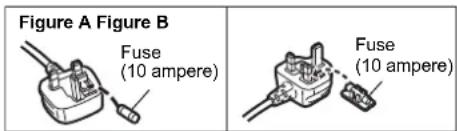
A 10-ampere fuse is fitted in this plug.
Should the fuse need to be replaced please ensure that the replacement fuse has a rating of 10-ampere and that it is approved by ASTA or BSI to BS1362. Check for the ASTA mark 念 or the BSI mark on the body of the fuse.
If the plug contains a removable fuse cover you must ensure that it is refitted when the fuse is replaced.
If you lose the fuse cover the plug must not be used until a replacement cover is obtained.
A replacement fuse cover can be purchased from your local dealer.
Before use
Remove the connector cover.
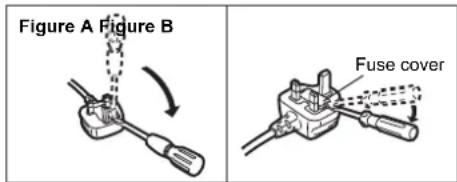
How to replace the fuse
The location of the fuse differ according to the type of AC mains plug (figures A and B). Confirm the AC mains plug fitted and follow the instructions below. Illustrations may differ from actual AC mains plug.
- Open the fuse cover with a screwdriver.
- Replace the fuse and close or attach the fuse cover.
Disposal of Old Equipment
Only for European Union and countries with recycling systems
This symbol on the products, packaging, and/or accompanying documents means that used electrical and electronic products must not be mixed with general household waste.
For proper treatment, recovery and recycling of old products, please take them to applicable collection points in accordance with your national legislation.
By disposing of them correctly, you will help to save valuable resources and prevent any potential negative effects on human health and the environment.
For more information about collection and recycling, please contact your local municipality. Penalties may be applicable for incorrect disposal of this waste, in accordance with national legislation.

Table of contents
Safety precautions. 5
Accessories. 6
Unit care 6
Control reference guide 7
Getting started. 8
Operations 13
Troubleshooting 14
Specifications. 15
About descriptions in these operating instructions
Pages to be referred to are indicated as OO
The illustrations shown may differ from your unit.
Accessories
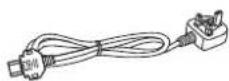
For the United Kingdom and Ireland
For the Middle East

1 AC mains lead (K2CT2YY00109)
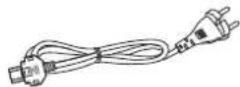
For Continental Europe
1 AC mains lead Except for Switzerland (K2CQ2YY00132)
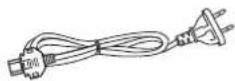
For Continental Europe
1 AC mains lead For Switzerland (K2CS2YY00001)

Product numbers provided in these operating instructions are correct as of November 2014. These may be subject to change.
- Do not use AC mains lead with other equipment.
- In Saudi Arabia, please use the moulded three pin mains plug.
Unit care
Pull out the AC mains lead from the outlet before maintenance. Clean this unit with a soft cloth.
- When dirt is heavy, wring a wet cloth tightly to wipe the dirt, and then wipe it with a soft cloth.
Do not use solvents including benzine, thinner, alcohol, kitchen detergent, a chemical wiper, etc. This might cause the exterior case to be deformed or the coating to come off.
Control reference guide
This unit
Front
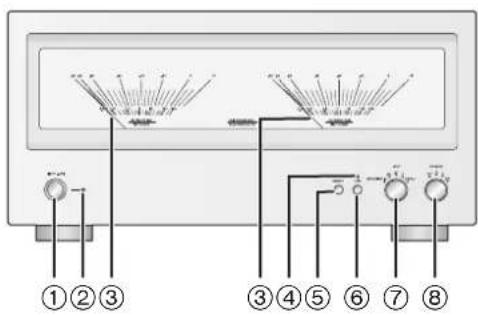
① Unit on/off button OFF 0/1 Use this button to turn the unit on and off.
[off]: The unit is off.
1: The unit is on.
The unit is still using a small amount of power in off mode. Off mode uses less power. ( 15)
② Power indicator The colour of the indicator changes according to the status of this unit.
| Blue The unit is on. | |
| Red | The unit is in standby mode. • To turn on this unit from standby mode, press the unit on/off button on this unit to the [ ] position, and press it again to the [ ] position. |
③ Peak power meter
Display the output level.
④ LAPC indicator (⇒ 13)
⑤ [DIMMER]
Adjust the brightness of the light and the indicators. Each press of this button switches the brightness.
⑥ [LAPC] ( 13)
Measure the characteristics of the amplifier and correct its output.
- The function does not work when the speaker selector knob is set to [OFF].
⑦ Input selector knob (⇒ 13)
Select the input source or gain value.
Speaker selector knob ( 13)
Select the output speakers.
Rear
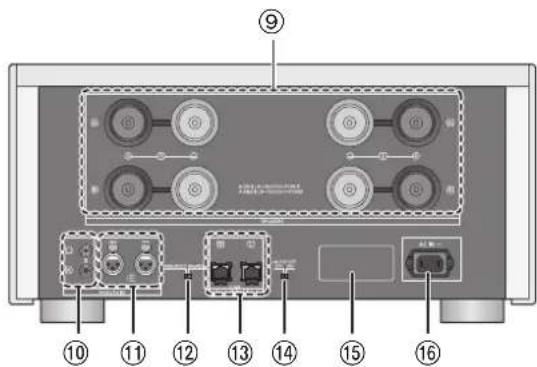
Speaker terminals [SPEAKERS] ( 8)
⑩ Analogue audio input terminal [UNBALANCED] ( 11)
① Analogue audio input terminal [BALANCED] (⇒ 11)
^12 Analogue audio input selector switch ( 11) Switch the analogue audio input.
- This switch does not work when the input selector knob is set to [DIGITAL].
③ System terminal [Technics Digital Link IN] ( 10)
14 Auto off switch [AUTO OFF] Turn on/off auto off function.
- Auto off function:
This unit is designed to conserve its power consumption and save energy. The unit will turn to standby mode automatically if there is no sound and it is not being used for approximately 20 minutes.
- To cancel this function, set to [OFF].
Product identification marking The model number is indicated.
AC IN terminal [AC IN ] ( 12)
Getting started
- Turn off all equipment before connection and read the appropriate operating instructions.
- Do not connect the AC mains lead until all other connections are complete.
- Insert the plugs of the cables to be connected all the way in.
- Do not bend cables at sharp angles.
Speaker connection
Single wiring connection
e.g.,
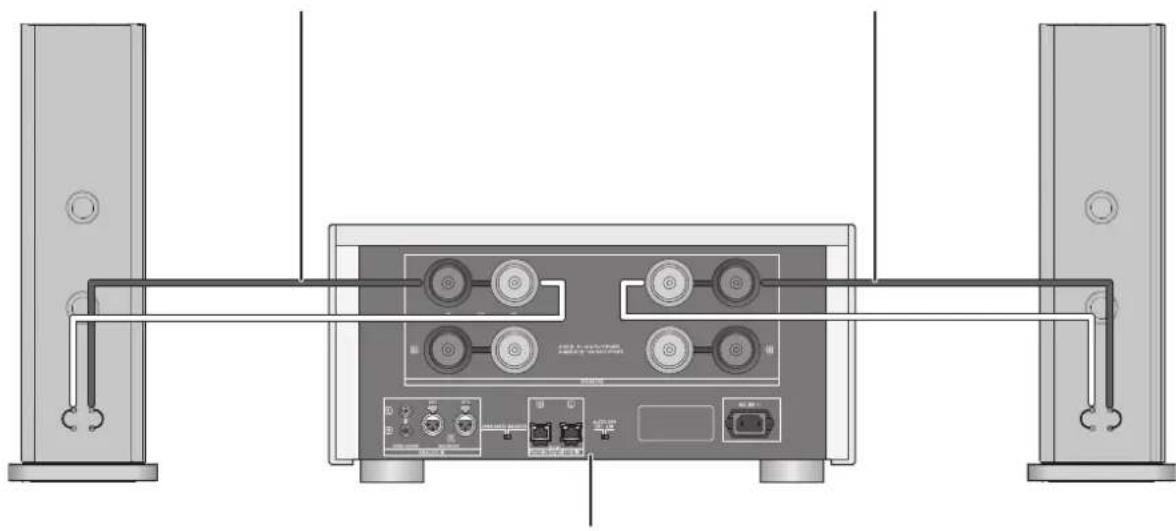
SB-R1 Speaker cable Speaker cable SB-R1
This unit (rear)
- When using single wiring connection, set the speaker selector knob to [A] or [B]. (⇒ 13)
1 Turn the knobs to loosen them, and insert the core wires.
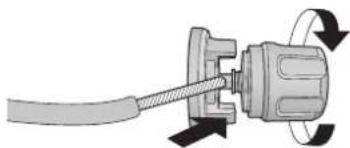
2 Tighten the knobs.
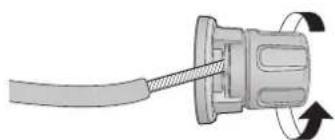
Bi-wiring connection
e.g.,
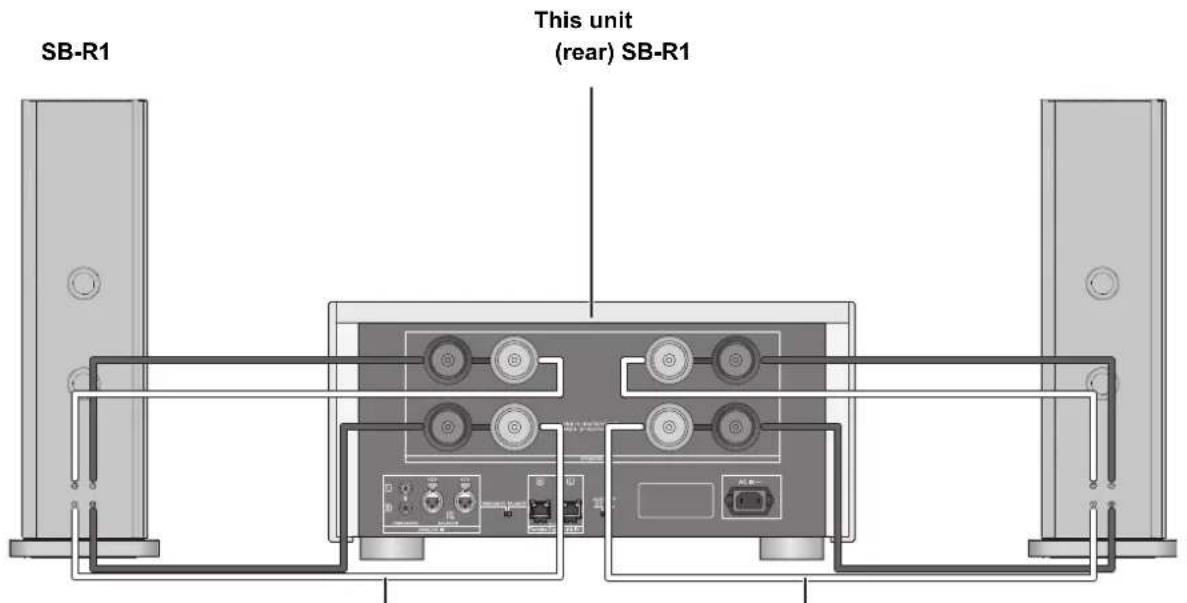
Speaker cable Speaker cable
- When making bi-wiring connections, set the speaker selector knob to [A + B] . (⇒ 13)

- When the connections are completed, pull the speaker cables lightly to check that they are connected firmly.
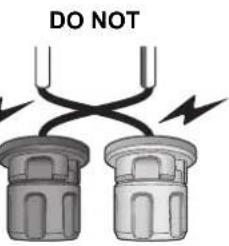
- Be careful not to cross (short-circuit) or reverse the polarity of the speaker wires as doing so may damage the amplifier.
- Wire the polarity (+/-) of the terminals correctly. Not doing so may adversely affect stereo effects or cause malfunction.
- For details, refer to the operating instructions of the speakers.
System control connection to an SU-R1
- You can input digital audio signals to this unit and play back music.
- You can operate this unit and the SU-R1 simultaneously with ease on the remote control of the SU-R1. (⇒ 14)
This unit
(rear) SU-R1
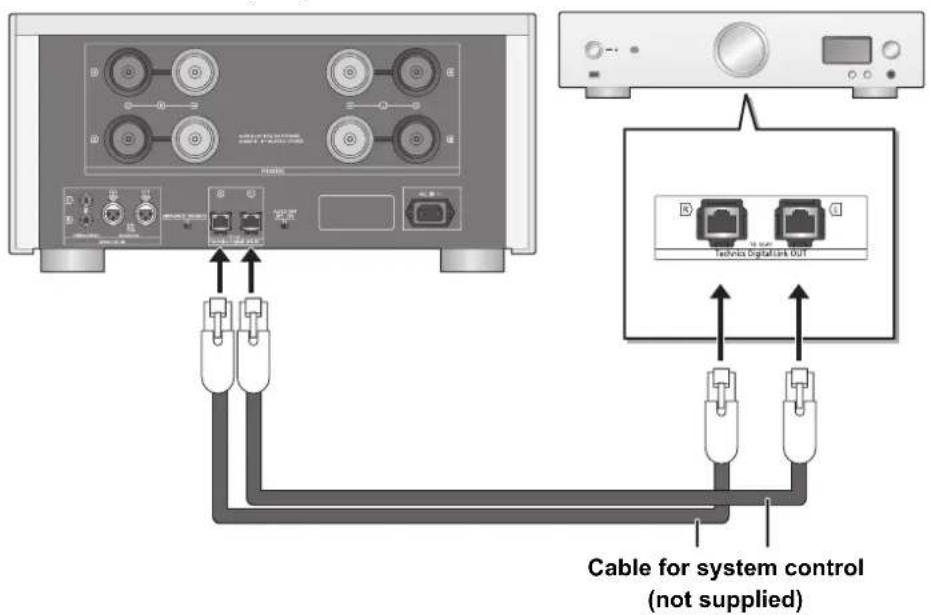

- When using the system control function, set the input selector knob to [DIGITAL]. (→ 13)
Use category 7 or above straight LAN cables (STP) when connecting to peripheral devices.
We recommend using cables with a length of 3m or less. - Do not connect an SU-R1 in any other way than described above.
Connecting to analogue audio output devices
You can input analogue audio signals to this unit and play back music.
e.g.,
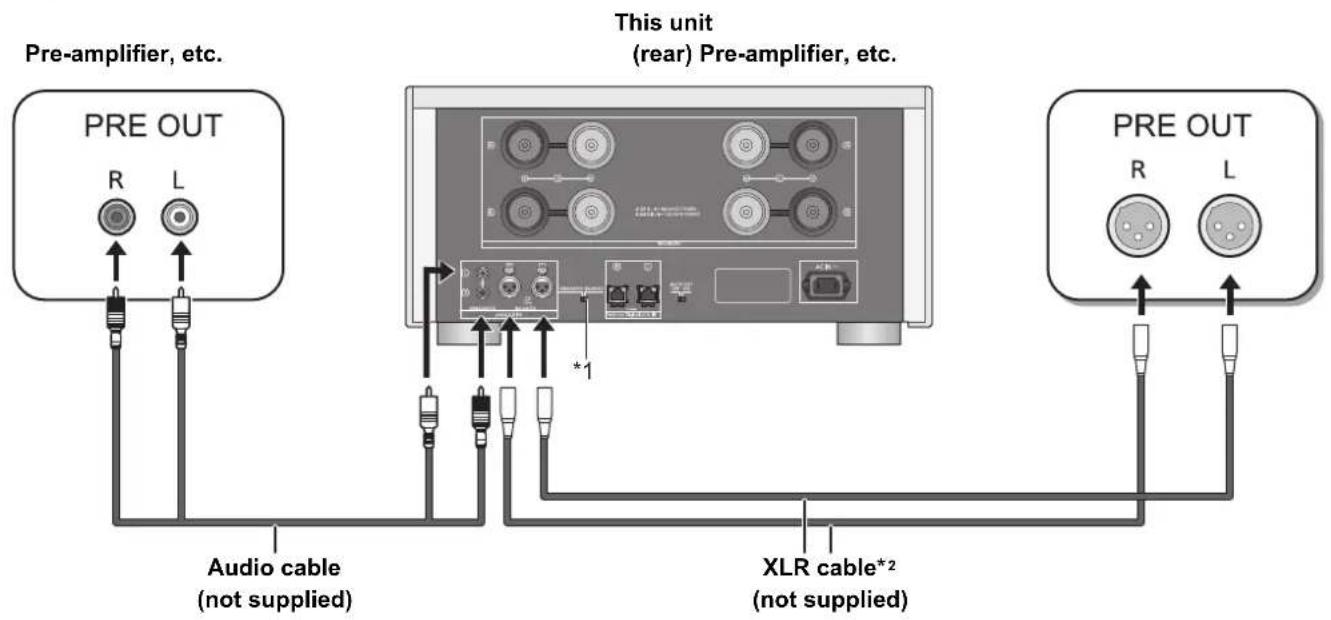
1 Select [BALANCED] or [UNBALANCED]. Set the analogue audio input selector switch to a position that corresponds to the device you want to play.
2 We recommend using cables with a length of 3 m or less.
- When connecting to an analogue audio output device, set the input selector knob to [ANALOG]. (⇒ 13)
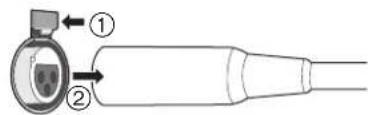
To disconnect the XLR cables
Pull out the XLR cables while pressing [PUSH] at the top of the terminals.
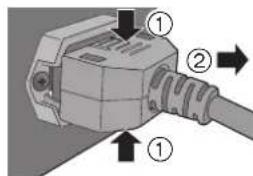
AC mains lead connection
Connect only after all other connections are completed.

To disconnect the AC mains lead from this unit
Pull out the AC mains lead while pressing the top and bottom sides of the connector.

- Although the AC power switch is in the [OFF] position, the unit is not completely disconnected from the mains. Remove the plug from the main electrical outlet if you will not be using the unit for an extended period of time. Place the unit so the plug can be easily removed.
NORSK
Measuring the characteristics of the amplifier and correcting its output
To optimise the audio output, you can measure the amplifier characteristics and correct its output when it is connected to the speakers.
- Set the speaker selector knob to a position that corresponds to the connected speakers. (→ right)
Test tone emitted during measurement
To ensure the measurement accuracy, the speakers output a test tone at regular intervals. (For approximately 4 minutes)
It is not possible to change the volume of the audio being output while the measurement is in progress.
1 Press the unit on/off button to the [ ]0/1 position.
The power indicator lights up in blue.
2 Press and hold [LAPC] until the LAPC indicator on this unit starts to blink.
- This unit will start measuring the characteristics of the amplifier. Check that a test tone is output from both the left and right speakers.
- If you press [LAPC], turn the speaker selector knob or operate other controls while the measurement is in progress, it will be cancelled. The LAPC indicator on this unit will go off.
- When the measurement is complete, amplifier output correction will be automatically turned on. The LAPC indicator on this unit will light up.
Turning on/off the output correction function
Press [LAPC].
Each time you press the button:
| LAPC indicator lights up On |
| LAPC indicator goes off Off |
![TECHNICS SER1EB - Press [LAPC]. - 1](/content/2026/03/466668/images/a408391c9365244d14369fa29d455c031f360d3c963d61328cb5a75e54dc06e0.jpg)
- When the SU-R1 is connected via the system control function, you can operate using the SU-R1's remote control.
The output correction setting is applied separately to each speaker terminal option (A/B/A+B). - Depending on the type of the connected speakers, the effect of the output correction function may be minimal.
- The corrected output remains in effect until you measure the characteristics again. When you use other speakers, redo the measurement.
Operations
1 Press the unit on/off button to the [ ] position.
The power indicator lights up in blue.
2 Turn the input selector knob.
Select a playback device and gain value.
| ANALOG (dB) (-30/-20/-10/0) | Select an optimal setting for the connected device. (⇒ below) |
| DIGITAL | Select this setting when using the system control function. |
3 Turn the speaker selector knob.
Select the speaker terminals from which audio will be output.
| OFF | Does not output audio. |
| A | Outputs audio from the speakers connected to the A terminals. |
| B | Outputs audio from the speakers connected to the B terminals. |
| A+B | Outputs audio from the speakers connected to the A and B terminals. |
4 Operatethe device to be used for playback.
Input selector knob setting during analogue input
For normal operation, set the value to [0].
For playback at low volume levels, lower the gain value of this unit by setting the input selector knob to [-30], [-20] or [-10] of [ANALOG (dB)]. This will minimise analogue/digital conversion errors that occur on this unit.
Using the system control function
You can operate this unit and the SU-R1 simultaneously with ease on the remote control of the SU-R1.
Preparation
① Connect this unit and the SU-R1 with cables for system control. (⇒ 10)
② Set the input selector knob to [DIGITAL]. (⇒ 13)
③ Press the unit on/off button on this unit and the SU-R1 to the [ ] position.
If "Digital Link" is set to "Off" on the SU-R1, change the setting to "On".
Switching this unit and the SU-R1 to on/standby simultaneously
- If you point the SU-R1's remote control at the SU-R1 and press [O] when this unit and the SU-R1 are in standby mode, this unit and the SU-R1 will be turned on simultaneously.
- If you point the SU-R1's remote control at the SU-R1 and press [O] when this unit and the SU-R1 are turned on, this unit and the SU-R1 will simultaneously enter standby mode.
Measuring the characteristics of the amplifier and correcting its output
You can operate using the SU-R1's remote control. (⇒ 13)

- For information on the operations of the SU-R1, please also refer to its operating instructions.
Troubleshooting
Before requesting service, make the following checks. If you are uncertain about some of the check points, or if the solutions indicated in the following guide does not resolve the issue, then consult your dealer for instructions.
To return all settings to the factory defaults
When the following situations occur, reset the memory:
There is no response when buttons are pressed.
- You want to clear and reset the memory contents.
When the unit is off:
① Press and hold [DIMMER].
② While continuing to hold [DIMMER], press the unit on/off button.
- Keep holding [DIMMER] until the power indicator and the LAPC indicator blink twice.
Heat buildup of this unit.
- This unit becomes warm when the volume is high. This is not a malfunction.
A "humming" sound can be heard during playback.
- An AC mains lead or fluorescent light is near the cables. Keep other appliances and cords away from the cables of this unit.
- A strong magnetic field near a TV or other device may adversely affect the audio quality. Keep this unit away from such devices.
- The speakers may output noise when a device nearby is emitting powerful radio waves, such as when a mobile phone is on a call.
No sound.
- Check connections to speakers and other equipment. After checking the connections, measure the characteristics of the amplifier. ( 13)
- Check to see if the correct input source is selected.
- Insert the plugs of the cables to be connected all the way in.
- Set the speaker selector knob to other than [OFF]. (⇒ 13)
The peak power meter does not operate.
In the following cases, this meter does not operate:
- When the peak power meter light is turned off by pressing [DIMMER].
- When this unit is muted by pressing [MUTE] on the SU-R1's remote control. (Only when the input selector knob is set to [DIGITAL].)
- When the speaker selector knob is set to [OFF].
The system control function is not working.
- Connect the cables to the matching LR terminals on this unit and the SU-R1.
The unit turns off automatically.
Is the auto off function turned on? ( 7)
- If the SU-R1 is connected to this unit via the system control function, this unit may automatically enter standby mode when the SU-R1 enters standby mode. ( 10, 14)
- This unit incorporates a protection circuit to prevent damage caused by heat buildup. When you use this unit at a high volume level for a long period of time, it may turn off automatically. Wait for this unit to cool down before turning on this unit again. (For approximately 3 minutes)
Specifications
GENERAL
Power supply
AC 220 V to 240 V, 50/60 Hz
Power consumption 210 W
Power consumption in standby mode Approx. 0.7 W
Power consumption in off mode Approx. 0.3 W
Dimensions (W× H× D)
Mass Approx. 54kg
Operating temperature range
480mm× 241mm× 567mm
Operating humidity range 35% to 80% RH (no condensation)
0^ to +40^
AMPLIFIER SECTION
Output power
150 W + 150 W (1 kHz, T.H.D. 0.5 %, 8 Ω, 20 kHz LPF)
300 W + 300 W (1 kHz, T.H.D. 0.5 %, 4 Ω, 20 kHz LPF)
Frequency response
1 Hz to 90 kHz (-3 dB, 8 Ω)
THD+N
0.05% (1 kHz, 75 W, 8 Ω, 20 kHz LPF)
Input sensitivity/Input impedance
UNBALANCED
1.2 Vrms / 47 kΩ (ANALOG 0 dB)
BALANCED
1.2 Vrms / 47 kΩ (ANALOG 0 dB)
GAIN
29 dB (ANALOG 0 dB)
Load impedance
A or B, Bi-Wire
4 Ω to 16 Ω
A+B
8Ω to 16Ω
TERMINALS SECTION
Analog input
UNBALANCED
Pin jack
BALANCED
3 Pin XLR
Digital input
Technics Digital Link

- Specifications are subject to change without notice.
Mass and dimensions are approximate.
LAPC (Load Adaptive Phase Calibration)
0.05% (1 kHz, 75 W, 8 Ω, 20 kHz LPF)
LAPC (Load Adaptive Phase Calibration)
BALANCED XLR 3 broches
LAPC (Load Adaptive Phase Calibration)
Connessione mono-wiring
es.
Connessione bi-wiring
es.
150 W + 150 W (1 kHz, T.H.D. 0,5%, 8Ω, 20 kHz LPF)
300 W + 300 W (1 kHz, T.H.D. 0,5%, 4Ω, 20 kHz LPF)
Rispostainfrequenza
1 Hz a 90 kHz (-3 dB, 8 Ω)
THD+N
0.05% (1 kHz, 75 W, 8 Ω, 20 kHz LPF)
LAPC (Load Adaptive Phase Calibration)
De 35% a 80% RH (sin condensation)
150 W + 150 W (1 kHz, T.H.D. 0,5 %, 8 Ω, 20 kHz LPF)
300 W + 300 W (1 kHz, T.H.D. 0,5%, 4Ω, 20 kHz LPF)
1 Hz a 90 kHz (-3 dB, 8 Ω)
0.05% (1 kHz, 75 W, 8Ω, 20 kHz LPF)
1,2 Vrms / 47 kΩ (ANALOG 0 dB)
1,2 Vrms / 47 kΩ (ANALOG 0 dB)
29 dB (ANALOG 0 dB)
a 16Ω
8Ωa16Ω
Clavija
3 pines XLR
LAPC (Load Adaptive Phase Calibration)
LAPC (Load Adaptive Phase Calibration)
150 W + 150 W (1 kHz, T.H.D. 0,5%, 8Ω, 20 kHz LPF)
300 W + 300 W (1 kHz, T.H.D. 0,5%, 4Ω, 20 kHz LPF)
Frequentierresponds
1 Hz tot 90 kHz (-3 dB, 8 Ω)
THD+N
0.05% (1 kHz, 75 W, 8 Ω, 20 kHz LPF)
Ingangsgveoeligheid/Ingangsimpedantie
UNBALANCED
1,2 Vrms / 47 kΩ (ANALOG 0 dB)
BALANCED
1,2 Vrms / 47 kΩ (ANALOG 0 dB)
GAIN
29 dB (ANALOG 0 dB)
Laadimpedantie
A of B,twee draden
4 Ω tot 16 Ω
A+B
8 Ω tot 16 Ω
AANSLUITINGEN
Analoge ingang
UNBALANCED
BALANCED
Digitale ingang
Penstekker
3 Pinnen XLR
Technics Digital Link

LAPC (Load Adaptive Phase Calibration)
LAPC (Load Adaptive Phase Calibration)
Delivering the Ultimate Emotive Musical Experience to All
At Technics we understand that the listening experience is not purely about technology but the magical and emotional relationship between people and music.
We want people to experience music as it was originally intended and enable them to feel the emotional impact that enthuses and delights them.
Through delivering this experience we want to support the development and enjoyment of the world's many musical cultures. This is our philosophy.
With a combination of our love of music and the vast high-end audio experience of the Technics team, we stand committed to building a brand that provides the ultimate emotive musical experience by music lovers, for music lovers.
Director
Michiko Ogawa
Headquarter Address: Panasonic Corporation
Kadoma, Osaka, Japan
Importer for Europe: Panasonic Marketing Europe GmbH
Panasonic Testing Centre
Winsbergring 15, 22525 Hamburg, Germany
Panasonic Corporation
Web Site: http://panasonic.net
EnGeFr IT Sp Da Du Sw R

- For the United Kingdom and Ireland customers
- Sales and Support Information
- Features of this unit
- Full-digital amplifier with a high-precision jitter reduction circuit and PWM conversion circuit
- LAPC (Load Adaptive Phase Calibration)
- GaN-FET Driver
- Recommended devices
- Safety precautions
- WARNING
- Unit
- AC mains lead
- CAUTION
- Placement
- Safety information for customers in Norway
- NORSK
- ADVARSEL
- Produkt
- Caution for AC Mains Lead
- (For the AC mains plug of three pins)
- Before use
- How to replace the fuse
- Disposal of Old Equipment
- Only for European Union and countries with recycling systems
- Table of contents
- About descriptions in these operating instructions
- Accessories
- For the United Kingdom and Ireland
- For the Middle East
- For Continental Europe
- Unit care
- Control reference guide
- This unit
- Front
- Rear
- Getting started
- Speaker connection
- Single wiring connection
- Bi-wiring connection
- System control connection to an SU-R1
- Connecting to analogue audio output devices
- To disconnect the XLR cables
- AC mains lead connection
- To disconnect the AC mains lead from this unit
- Measuring the characteristics of the amplifier and correcting its output
- Test tone emitted during measurement
- Press the unit on/off button to the [ ]0/1 position.
- Press and hold [LAPC] until the LAPC indicator on this unit starts to blink.
- Turning on/off the output correction function
- Press [LAPC].
- Operations
- Press the unit on/off button to the [ ] position.
- Turn the input selector knob.
- Turn the speaker selector knob.
- Operatethe device to be used for playback.
- Input selector knob setting during analogue input
- Using the system control function
- Preparation
- Switching this unit and the SU-R1 to on/standby simultaneously
- Troubleshooting
- To return all settings to the factory defaults
- When the unit is off:
- Heat buildup of this unit.
- A "humming" sound can be heard during playback.
- No sound.
- The peak power meter does not operate.
- The system control function is not working.
- The unit turns off automatically.
- Specifications
- GENERAL
- AMPLIFIER SECTION
- TERMINALS SECTION
- Connessione mono-wiring
- Connessione bi-wiring
- AANSLUITINGEN
- Delivering the Ultimate Emotive Musical Experience to All
Brand : TECHNICS
Model : SER1EB
Category : Receiver