USER MANUAL IAN 275195 AURIOL
Operation and Safety Notes
DK
VEJRSTATION
Description of parts and features ....... Page 6
Technical data.. 8
Safety 9
General safety information.. Page 9
Safety instructions for batteries... Page 10
Before initial use.. Page 11
General information.. Page 11
Preparing to use the outdoor sensor... Page 12
Preparing the temperature station for use... Page 12
Temperature station.. 15
External sensor.. Page 15
Setting the language/time zone/ time/date manually.. Page 15
Displaying summer time.. 17
Calling up the time zone.. Page 17
Setting the alarm time... Page 18
Calling up the alarm times.. 18
Switching the alarm on/off...... Page 18
Using the snooze button . Page 19
Displaying temperature.. Page 20
Calling up the minimum / maximum values.. 20
Displaying temperature trends... Page 21
Battery state display.. Page 21
Replacing the batteries... Page 21
Troubleshooting.. Page 21
Cleaning and maintenance... Page 23
Disposal.. 23
Warranty 25
Temperature station
Introduction
We congratulate you on the purchase of your new device. You have chosen a high quality product. The instructions for use are part of the product. They contain important information concerning safety, use and disposal. Before using the product, please familiarise yourself with all of the safety information and instructions for use. Only use the unit as described and for the specified applications. If you pass the product on to anyone else, please ensure that you also pass on all the documentation with it.
- Properuse
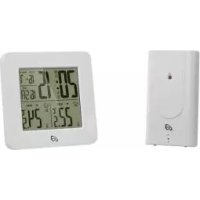
The temperature station displays the indoor and outdoor temperatures in Celsius (^) or Fahrenheit (^) and their maximum and minimum values. The temperature station also displays the time in 12 / 24-hour clock modes and the date. In addition, the temperature station has an alarm function. The device is not intended for commercial use.
Description of parts and features
LC display
| 1 | Temperature trend (outdoor temperature) |
| 2 | Outdoor temperature |
| 3 | symbol (outdoor sensor) |
| 4 MAX- / MIN display for indoor
temperature |
| 5 Temperature trend (indoor temperature) |
| 6 Indoor temperature |
| 7 symbol (temperature station) |
| 8 Time |
| 9 Z symbol (snoopze function) |
| 10 Seconds display |
| 11 symbol |
| 12 Day of the week display |
| 13 Date display (day / month) |
| 14 DST display (summer time) |
| 15 symbol (Alarm 1 / Alarm 2) |
| 16 2nd time zone (ZONE) |
| 17 MAX- / MIN display (outdoor temperature) |
Temperature station
| 18 | Z/Z/REGISTER button (snoopze function/
REGISTER) |
| 19 | SELECT button |
| 20 | SET/RESET button |
| 21 | ALARM button |
| 22 | CLOCK button |
| 23 | Hanging slot |
| 24 | Battery compartment |
| 25 | Stand |
| 26 | Screw (ø 3 mm) |
| 27 | Dowel (ø 7.7 mm) |
Outdoor sensor
| 28 | Control LED |
| 29 | Hanging slot |
| 30 | Battery compartment |
31 Screw (0 3 mm)
32 Dowel (ø 7.7 mm)
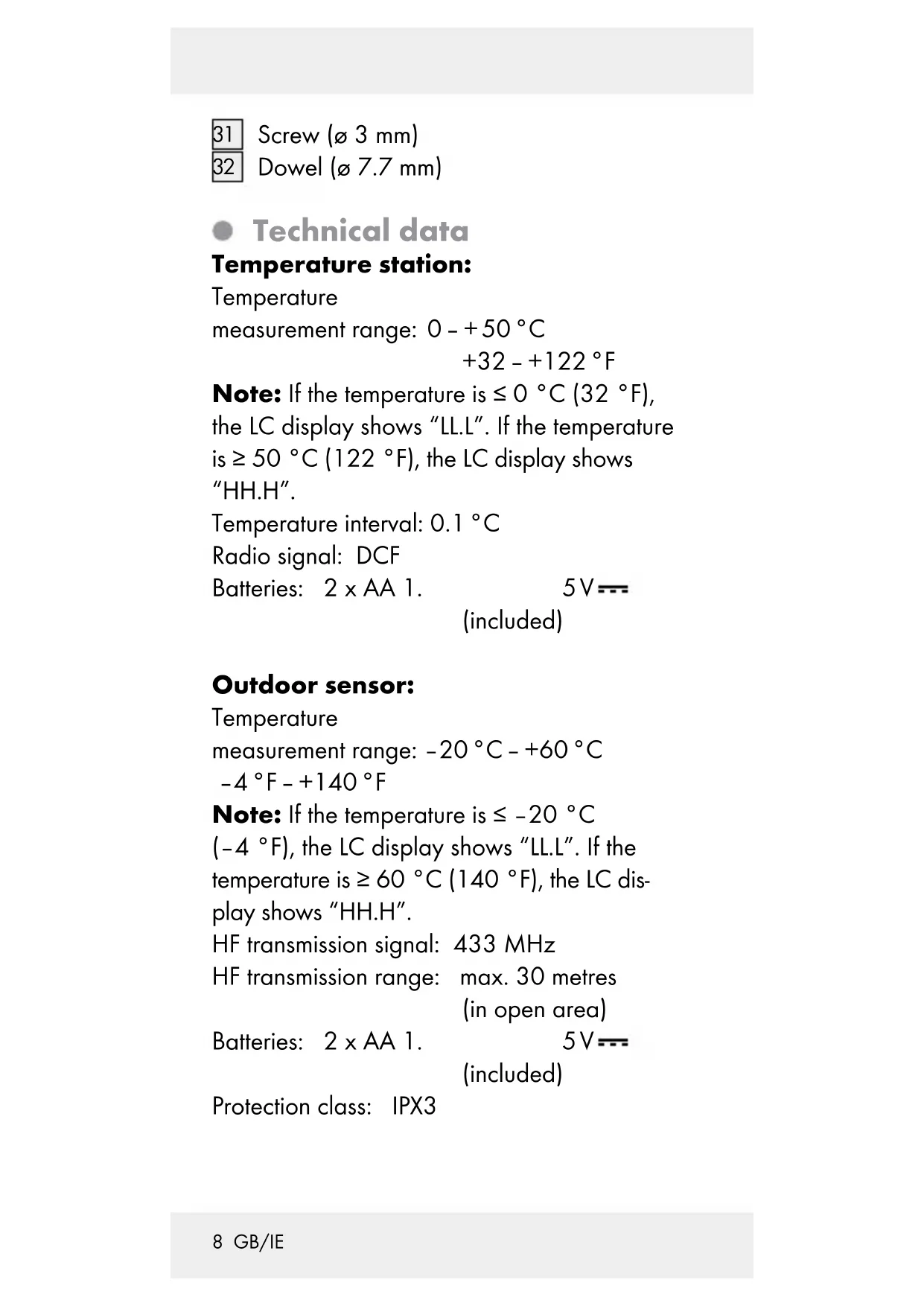
Technical data
Temperature station:
Temperature
measurement range: 0 - + 50^
$$
+ 3 2 - + 1 2 2 ^ {\circ} \mathrm {F}
$$
Note: If the temperature is ≤ 0^ (32°F), the LC display shows "LL.L". If the temperature is ≥ 50^ (122°F), the LC display shows "HH.H".
Temperature interval: 0.1^ C
Radio signal: DCF
Batteries: 2 × AA 1 . 5V (included)
Outdoor sensor:
Temperature
measurement range: -20^ + 60^
$$
- 4 ^ {\circ} F - + 1 4 0 ^ {\circ} F
$$
Note: If the temperature is ≤ - 20^ C
(-4^) , the LC display shows "LL.L". If the temperature is ≥ 60^ (140°F), the LC display shows "HH.H".
HF transmission signal: 433 MHz
HF transmission range: max. 30 metres (in open area)
Batteries: 2 × AA 1 . 5V (included)
Protection class: IPX3

Safety
YOU SHOULD STORE ALL SAFETY INFORMATION AND INSTRUCTIONS IN A SAFE PLACE IN CASE YOU NEED TO REFER TO THEM AGAIN IN THE FUTURE!

This appliance can be used by children aged from 8 years and above and persons with reduced physical, sensory or mental capabilities or lack of experience and knowledge if they have been given supervision or instruction concerning use of the appliance in a safe way and understand the hazards involved. Children shall not play with the appliance. Cleaning and user maintenance shall not be made by children without supervision.
- Do not expose the device to an extremely high electromagnetic field. This may impair the correct functioning of the device.
Please note that the guarantee does not cover damage caused by incorrect handling, non-compliance with the operating instructions or interference with the device by unauthorised individuals.

Safetyinstructions for batteries
WARNING! DANGER TO LIFE!
Batteries can be swallowed, which may represent a danger to life. If a battery has been swallowed, medical help is required immediately.
Remove the batteries from the device if they are not going to be used for a prolonged period.
CAUTION! DANGER OF
EXPLOSION!Never recharge
batteries which are not
rechargeable.
- When inserting the batteries, ensure the correct polarity! This is shown in the battery compartments.
Remove spent batteries immediately from the device. There is an increased danger of leaks!
- Keep batteries away from children do not throw the batteries in the fire, short-circuit them or take them apart.
Always replace all the batteries at once.
Use batteries of the same type only. Otherwise there is a risk of an explosion.
If the batteries have leaked inside your device, you should remove them immediately in order to prevent damage to the device!
- Avoid contact with the skin, eyes and mucous membranes. Any parts of the body
coming into contact with battery acid should be rinsed off with copious amounts of water and / or a doctor contacted if necessary!
- Before initial use
Put the batteries first into the outdoor sensor, then into the temperature station.
Note: Before initial use, remove the protective film from the device display.
CAUTION! When choosing where to position the temperature station, make sure that it is not exposed to direct sunlight, vibrations, dust, heat, cold or moisture. Do not place the temperature station or external sensor near to heat sources, e.g. radiators, as this may result in damage to the instruments.
Place the temperature station on the accompanying stand 25.
Please ensure that neighbouring devices are not operated at the same frequency of 433 MHz. Such devices may cause interference to the radio connection.
Do not place the devices next to or on metal plates. Otherwise the quality of radio wave transmission may be reduced.
Radio signal (DCF):
The DCF signal (time signal transmitter) is made up of time pulses transmitted from one of the highest precision clocks in the world close to Frankfurt / Main in Germany - it varies by 1 second in 1 million years.
In ideal conditions, your temperature station can pick up this signal over a distance of up to approx. 1,500 km around Frankfurt / Main.
Preparing to use the outdoor sensor
Inserting the batteries:
Remove the battery compartment cover from the back of the outdoor sensor.
Insert two 1. 5V = batteries (AA) (included) into the battery compartment 30
Note:Make sure you fit the batteries the right way round (polarity). This is shown in the battery compartment (see. fig D).
The outdoor sensor is now ready for use and the control LED 28 illuminates briefly.
- Close the battery compartment cover.
If this does not work, carry out a restart, if necessary. To do this, press and keep pressed the Z^Z / REGISTER button 18
Preparing the temperature station for use
Inserting the batteries:
Open the battery compartment 24 on the back of the temperature station.
Insert two 1.5 V batteries (AA) (included) into the battery compartment
Note: Make sure you fit the batteries the right way round (polarity). This is shown on the battery compartment (see. fig B).
- Close the battery compartment cover.
Connecting the temperature station with the outdoor sensor and the DCF radio signal:
After the batteries have been inserted, the temperature station attempts to establish a connection with the outdoor sensor. This process can take a few minutes. The symbol flashes. Once the device has successfully connected to the external sensor, the symbol stops flashing and the temperature is shown in the LC display.
Note: If the temperature station does not receive the signal from the outdoor sensor within 3 minutes, the temperature station automatically starts with the reception of the radio time signal.
After successful reception of the outdoor sensor signal or after 3 minutes, the temperature station starts with the reception of the radio time signal. This process can take up to 5 minutes and is indicated in the LC display by the flashing symbol [11].
After successful reception of the DCF radio signal, the symbol is displayed continuously in the LC display.
Note: Do not move the temperature station while it is receiving the signal. Otherwise this could interfere with reception.If synchronisation is not possible when the temperature station is being first set up, try changing the location (e.g. place the temperature station near to a window).
Reception may be considerably reduced by obstructions (e.g. concrete walls) or sources of interference (e.g. other electrical devices).
If the reception of the radio signal continues to be interrupted, you can set the time and date manually (see "Setting the language / time zone/time/date manually").
Mounting the temperature station and / or the outdoor sensor on a wall:
Note: You will require an electric drill and a crosshead screwdriver for this step.
CAUTION! DANGER TO LIFE, RISK OF INJURY AND MATERIAL DAMAGE!
Read the operating and safety instructions for your drill carefully.
WARNING! DANGER TO LIFE!
Take care that you do not hit electricity, gas or water lines when you drill into the wall. If necessary, check with a pipe and cable detector before drilling.
Temperature station
Mark the position of the hole ( approx. 7.7mm ) on the wall.
Drill the hole with an electric drill.
Insert the dow into the drilled hole.
Using a crosshead screwdriver, screw the screw 26 into the dowel.
Hang the temperature station by placing the hanger 23 on the screw.
External sensor
Mark the position of the hole ( approx. 7.7mm ) on the wall.
Drill the hole with an electric drill.
Insert the dow into the drilled hole.
Using a crosshead screwdriver, screw the screw 31 into the dowel.
Hang the external sensor by placing the hanger 29 on the screw.
Note: Ensure that the external sensor does not come into contact with water or direct sunlight. Electronic devices may adversely affect the wireless signal reception.
Setting the language/time zone/time/date manually
The reception of DCF radio signal where the temperature station has been positioned may become degraded or interrupted. If this happens you can set the device manually.
-
Press and hold down the CLOCK button 22 for about 3 seconds.
-
Press the SET / RESET button to switch between the 12- and 24-hour clock display modes.
- Press the CLOCK button to confirm your settings. The language option flashes. Tip: If you press and hold down the SET / RESET button, you accelerate the process and reach the desired value more quickly. This quicker method can also be used for making the following settings. If during a period of 30 seconds no buttons are pressed, the LC display returns automatically to the default display.
- Press the SET / RESET button to set the desired language (GE = German, FR = French, SP = Spanish, IT = Italian, EN = English).
- Press the CLOCK button to confirm your settings. The time zone display flashes.
- Press the SET / RESET button to set the desired time zone for time zone 2 (-12 hours to +12 hours).
Note: Should you be in a country in which the DCF signal can be received but the time is different to your current local time, you can use the time zone setting to have the clock display your current local time. If you find yourself in a country in which, for example, the local time is an hour ahead of Central European Time (CET), you set the time zone to +01. The clock is now still controlled by DCF but shows the time as one hour ahead of
CET. If you wish to know what the time is in the USA for example, then simply by setting the time zone value to e.g. -10 you will obtain the current local time in Los Angeles etc.
- Press the CLOCK button to confirm your settings. The hour display flashes.
- Press the SET / RESET button to set the desired value.
- Press the CLOCK button to confirm your settings.
- Repeat steps 6 and 7 to set the values for, minutes, seconds [10], year and date [13] (day/month).
Note: The seconds display can only be reset to 00.
- After this, the LC display returns to the default display.
- Displaying summer time
Summer time is indicated by the DST symbol [14] in the LC display. The temperature station automatically detects from the DCF radio signal whether it is summer time or not.
- Calling up the time zone
The default display shows the time zone according to the information provided by the DCF signal.
Press the CLOCK button 22 The time zone 16 appears in the LC display.
Press the CLOCK button again to return to the default display.
- Setting the alarm time
You can set two different alarm times.
- Press and hold down the ALARM button 21 for about 3 seconds.
Note: If an alarm time has been set before, then that previously set alarm time appears in the LC display. If not, then the display shows 0:00 or AM 12:00.
- The hour display flashes. Press the SET / RESET button 20 to set the desired value.
- Press the ALARM button to confirm your settings. The minute display flashes.
- Press the SET / RESET button to set the desired value.
- Press the ALARM button to confirm your settings.
- Repeat steps 2 to 5 to set the time for Alarm 2.
- Calling up the alarm times
Press ALARM button 21 once or twice to call up the set time for Alarm 1 or Alarm 2 respectively.
Press the ALARM button again to return to the default display.
- Switching the alarm_on / off
Press the SET / RESET button 20 once to activate Alarm 1. Press the SET / RESET
button twice to activate Alarm 2. Press the SET / RESET button three times to activate Alarm 1 and Alarm 2.
Note: The symbol or appears in the LC display.
The alarm signal sounds as soon as the set alarm time is reached. The alarm signal ceases automatically after a period of 2 minutes.
Press the ALARM button 21 to switch off the alarm signal before it switches off automatically.
Note: The alarm signal sounds every day at the set time.
Press the SET / RESET button three times to deactivate Alarm 1. Press the SET / RESET button twice to deactivate Alarm 2. Press the SET / RESET button once to deactivate Alarm 1 and Alarm 2.
PresstheZ Z/REGISTER button 18 while the alarm signal is sounding to activate the snooze function.
The alarm signal is silenced and the displays or and Z flash.
The alarm signal sounds again after approx. 5 minutes.
Press the SELECT button 19 to deactivate the snooze function.
- Displaying temperature
The LC display shows the indoor temperature 6 and the outdoor temperature 2.
Press and hold down the SELECT button 19 for approx. 3 seconds. The ^ display flashes.
Press the SET / RESET button 20 to switch between the ^ C (Celsius) and ^ F (Fahrenheit) temperature scales.
Press the SELECT button to confirm your settings.
- Calling up the minimum / maximum values
The temperature station stores the maximum and minimum values of the outdoor sensor and of the temperature station itself.
Press the SELECT button 19 to display the maximum values of the indoor and outdoor temperature.
Press the SELECT button again to display the minimum values of the indoor and outdoor temperature.
Press the SET / RESET button 20 while the maximum and minimum values, are being displayed to reset the values.
Press the SELECT button, to return to the default display.
-Displayingtemperature trends
After successfully connecting with the outdoor sensor, the temperature station can display the temperature trend (outdoor) 1 and the temperature trend (indoor) 5
You may see the following displays:
The temperature is rising.
The temperature is constant.
= The temperature is falling.
Battery state display
The 3 and 7 symbols appear in the temperature station's LC display if the batteries in the outdoor sensor or the temperature station are weak.
- Replacing the batteries
Open the battery compartment 24 or 30
Remove the exhausted batteries.
Insert two new 1.5 V-batteries (AA) into the battery compartments.
Note:Make sure you fit the batteries the right way round (polarity). This is shown in the battery compartments (see Figs. B + D).
- Close the battery compartments.
Troubleshooting
Note: This appliance has delicate electronic components. This means that if it is placed near
an object that transmits radio signals, it could cause interference.
If the display indicates a problem, move such objects away from it or remove the batteries for a short while and then replace them.
Obstacles such as concrete walls can also cause that the reception is disturbed. In this case, change the location (eg near a window). Please take note that the external sensor should always be set up within max. 30 meters (open space) from the base station. The specified range is the free-field range and means that no obstacle should be between the remote sensor and the base station. A "visual contact" between remote sensor and base station often improves the transmission.
Cold (outdoor temperatures below 0^ ) can reduce the battery power of the outdoor sensor and thereby negatively impair the radio transmission.
Another factor that may cause harmful interference, are dead or weak batteries in the outdoor sensor. Replace them by new ones.
If your temperature station is not working correctly, please remove the batteries for a short while and then replace them.
Cleaning and maintenance
The device should only be cleaned on the outside with a soft dry cloth.
Under no circumstances should you spray the outdoor sensor, e.g. with a garden hose. The outdoor sensor is only protected against rain from above.
- Disposal

The packaging is made entirely of recyclable materials, which you may dispose of at local recycling facilities.
Contact your local refuse disposal authority for more details of how to dispose of your worn-out product.
To help protect the environment, please dispose of the product properly when it has reached the end of its useful life and not in the household waste. Information on collection points and their opening hours can be obtained from your local authority.
Faulty or used batteries must be recycled in accordance with Directive 2006/66/EC and its amendments. Please return the batter
ies and / or the device to the available collection points.
Environmental damage through incorrect disposal of the batteries!
Batteries may not be disposed of with the usual domestic waste. They may contain toxic heavy metals and are subject to hazardous waste treatment rules and regulations. The chemical symbols for heavy metals are as follows: Cd = cadmium, Hg = mercury, Pb = lead. That is why you should dispose of used batteries at a local collection point.
We, OWIM GmbH & Co. KG, Stiftsbergstraße 1, D-74167 Neckarsulm, hereby declare under our sole responsibility that the product: Temperature station, model no.: HG00073A / HG00073B, Version: 03 / 2016, to which this declaration refers, complies with the standards/normative documents of 1999/5/EC.
The complete declaration of conformity can be viewed at: www.owim.com
Warranty
The device has been manufactured to strict quality guidelines and meticulously examined before delivery. In the event of product defects you have legal rights against the retailer of this product. Your legal rights are not limited in any way by our warranty detailed below.
The warranty for this device is 3 years from the date of purchase. Should this device show any fault in materials or manufacture within 3 years from the date of purchase, we will repair or replace it - at our choice - free of charge to you.
The warranty period begins on the date of purchase. Please keep the original sales receipt in a safe location. This document is required as your proof of purchase. This warranty becomes void if the device has been damaged or improperly used or maintained.
The warranty applies to faults in material or manufacture. This warranty does not cover product parts subject to normal wear, thus possibly considered consumables (e.g. batteries) or for damage to fragile parts, e.g. switches, rechargeable batteries or glass parts.
CE
Indledning. 27
Tip: Hvis temperature under -20^
(-4^) , vises der "LL.L". Hvis temperaturen er
over 60^ (140^) , vises der "HH.H".
HF sendesignal: 433 MHz
Signal de transmission HF:433 MHz
Amplitude de
Signal radio (DCF) :
WAARSCHUWING! LEVENSGE
WAARSCHUWING! LEVENSGE-
- Temperaturestation
- Temperaturestation