ST2000 - Toaster BLACK & DECKER - Free user manual and instructions
Find the device manual for free ST2000 BLACK & DECKER in PDF.



| Product Type | Toaster |
| Brand | Black & Decker |
| Model | ST2000 |
| Technology | Infrawave™ (radiant heat) |
| Cooking Time | About 1 minute, up to 50% faster |
| Capacity | 2 slices |
| Slots | Wide with self-centering guides |
| Toast Settings | 7 levels (1 light to 7 dark) |
| Functions | Toast, defrost, reheat |
| Preset Food Types | Bread, bagel, waffle, toaster pastry |
| Display | Digital screen |
| Controls | Power/Cancel button, degree (+/-), Select, Mode |
| Food Lever | Yes, with latch |
| Operation Indicator | Yes |
| Crumb Tray | Removable, dishwasher safe (hand wash recommended) |
| Safety | Automatic shutoff, grounded plug |
| Power Cord | Short, with possibility of grounded extension cord |
| Use | Household only |
| Cleaning | Do not immerse, wipe with a damp cloth |
| Spare Parts | Crumb tray (part ST2000-01) |
| Warranty | 1 year (US and Canada) |
Frequently Asked Questions - ST2000 BLACK & DECKER
User questions about ST2000 BLACK & DECKER
0 question about this device. Answer the ones you know or ask your own.
Ask a new question about this device
Download the instructions for your Toaster in PDF format for free! Find your manual ST2000 - BLACK & DECKER and take your electronic device back in hand. On this page are published all the documents necessary for the use of your device. ST2000 by BLACK & DECKER.
USER MANUAL ST2000 BLACK & DECKER
Please Read and Save this Use and Care Book
natural_image
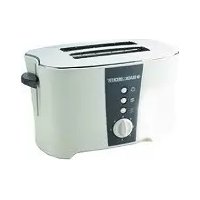
Black and white photo of a modern toaster with two side grilles, enclosed in a circular frame (no visible text or symbols)
USA/Canada 1-800-231-9786
Mexico 01-800-714-2503
www.blackanddecker.com
Accessories/Parts (USA/Canada)
1-800-738-0245
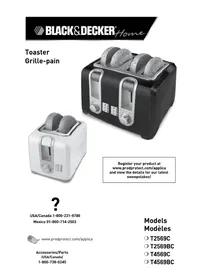
Register your product online at www.prodprotect.com/applica, for a chance to WIN \$100,000! Registre su producto en la Internet en el sitio Web www.prodprotect.com/applica y tendrá la oportunidad de GANAR \$100,000! Inscrivez votre produit en ligne à l'adresse www.prodprotect.com/applica et courez la chance de GAGNER 100 000 \$!
Model
Modelo
Modèle
ST2000
IMPORTANT SAFEGUARDS
When using electrical appliances, basic safety precautions should always be followed including the following:
Read all instructions.
☐ Do not touch hot surfaces. Use handles or knobs.
☐ To protect against electrical shock, do not immerse cord, plug, or appliance in water or other liquid.
☐ Close supervision is necessary when any appliance is used by or near children.
☐ WARNING - To prevent electric shock, unplug before cleaning.
☐ Unplug from outlet when not in use and before cleaning. Allow to cool before putting on or taking off parts.
☐ Do not operate any appliance with a damaged cord or plug or after the appliance malfunctions or has been damaged in any manner. Return the appliance to an authorized service facility for examination, repair, or adjustment.
☐ The use of accessory attachments not recommended by the appliance manufacturer may cause injuries.
☐ Do not use outdoors.
☐ Do not let cord hang over edge of table or counter or touch hot surfaces.
☐ Do not place on or near a hot gas or electric burner or in a heated oven.
☐ To disconnect, turn any control to "off", then remove plug from wall outlet.
☐ Do not use appliance for other than intended use.
☐ Oversized foods, metal foil packages, or utensils must not be inserted in a toaster, as they may create a fire or risk of electric shock.
☐ A fire may occur if the toaster is covered or touching flammable material, including curtains, draperies, walls and the like, when in operation.
☐ Do not attempt to dislodge food when toaster is plugged in.
SAVE THESE INSTRUCTIONS.
GROUNDED PLUG
As a safety feature, this product is equipped with a grounded plug, which will only fit into a three-prong outlet. Do not attempt to defeat this safety feature. Improper connection of the grounding conductor may result in the risk of electric shock.
Consult a qualified electrician if you are in doubt as to whether the outlet is properly grounded.
ELECTRICAL CORD
a) A short power-supply cord (or detachable power-supply cord) is to be provided to reduce the risk resulting from becoming entangled in or tripping over a longer cord.
b) Longer detachable power-supply cords or extension cords are available and may be used if care is exercised in their use.
c) If a long detachable power-supply cord or extension cord is used,
1) The marked electrical rating of the detachable power-supply cord or extension cord should be at least as great as the electrical rating of the appliance,
2) If the appliance is of the grounded type, the extension cord should be a grounding-type 3-wire cord, and
3) The longer cord should be arranged so that it will not drape over the countertop or tabletop where it can be pulled on by children or tripped over.
Note: If the power supply cord is damaged, it should be replaced by qualified personnel or in Latin America by an authorized service center.
Congratulations on your purchase of the Black & Decker® Infrawave™ Speed Toaster
- the latest in toasting technology!
With your Infrawave" Speed Toaster you will enjoy:
- Faster toasting times
- Easy-to-use electronic controls
- Programmed settings to perfectly Toast, Defrost or Reheat your favorite Breads, Bagels, Waffles or Toaster Pastries with delicious results!
Innovative Infrawave™ technology uses highly efficient radiant heat. It toasts bread in about a minute, up to 50% faster than conventional toasters.
Product may vary slightly from what is illustrated.
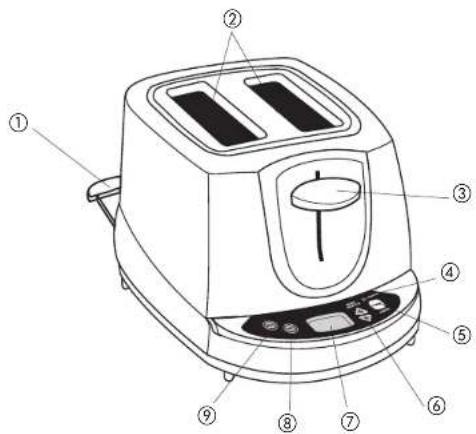
† 1 . Removable slide-out crumb tray (Part #ST2000-01)
- Wide slots with self-centering guides
- Toast lever
- Operating indicator light
- POWER/CANCEL button
- Shade selector buttons
- Digital display
- SELECT button (Bread, Bagel, Waffle, Pastry)
- MODE button (Toast, Defrost, Reheat)
† Consumer replaceable/removable parts
3
CONTROL PANEL
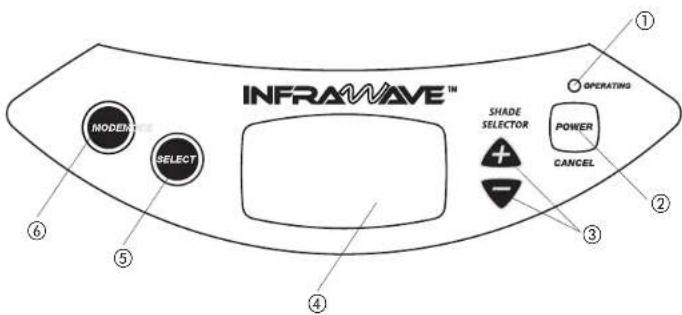
- Operating indicator light: Illuminates to indicate the unit is operating.
- button: Press to turn on the unit. Press to cancel all functions or to shut off the unit. The unit beeps once indicating that it is shutting down.
- Shade selector buttons : Use to select toast shade level for all functions--from light to dark (1 - 7). Press (+) to increase shade level. Press (-) to decrease shade level.
- Digital display
Shows:
-
Shade level (1-7).
• Mode selected (Toast, Defrost, Reheat)
• Function selected (Bread, Bagel, Waffle, Pastry) -
bSelection: Use to select Bread, Bagel, Pastry or Waffle function.
- b: Selects Defrost, Reheat or Toast mode.
How to Use
This unit is for household use only.
GETTING STARTED
- Unpack the unit and remove any packing materials or labels.
- Wipe the toaster with a damp cloth and dry thoroughly.
- Plug unit into electrical outlet.
HELPFUL INFORMATION ABOUT YOUR TOASTER
- When using for the first time, you may notice smoke and a slight odor. This is normal and is not a cause for concern.
- Press the toast lever down to activate the unit.
- You can cancel any function by pressing the button. Do not use the toast lever to cancel a function.
- For best results when toasting frozen foods, first defrost and then toast.
TOASTING
Important: When toasting frozen foods, first defrost and then toast. Refer to Defrosting section.
Bread
- Insert bread slice(s) into toaster slots.
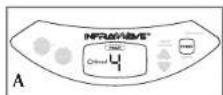
- Press the button. Digital display shows TOAST, ◇Bread, 4 as the default settings (A).
Note: Every time you turn on the unit, the display will default to above settings.
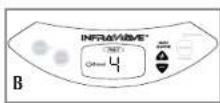
- Press ♠ button to select desired shade level (B). For best results, select setting 4 for your first cycle then adjust lighter or darker to suit your taste.
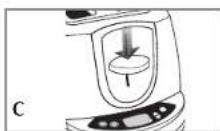
- To begin toasting, press down the toast lever until it locks into position (C).
• The bread slices are automatically centered.
- Operating indicator light illuminates.
- All heating elements glow.
Note: You can cancel the toasting cycle any time by pressing the button.
- At the end of the toast cycle, the toaster automatically stops, the lever releases and lifts up.
- You can manually shut unit off by pressing the button or wait for unit to automatically shut off.
Bagels
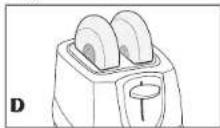
- Insert bagel halves into toaster slots with cut side facing the center of the toaster (D).
-
Press the button to turn on the unit. The digital display shows default settings.
-
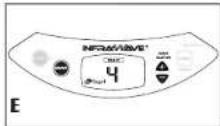
To change default settings, press button until digital display shows setting and press or button to select desired shade level (E). For best results, select setting 4 for your first cycle then adjust lighter or darker to suit your taste.
-
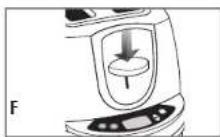
To begin toasting, press down the toast lever until it locks into position (F).
• The bagel halves are automatically centered.
- Operating indicator light illuminates.
- The outer heating elements shut off after a while, the center heating elements continue to glow.
arms the outside of the bagel.
Note: You can stop the toasting cycle any time by pressing the button.
5. At the end of the toast cycle, the toaster automatically stops, the lever releases and lifts up.
6. You can manually turn unit off by pressing the button or wait for unit to automatically shut off.
Waffles and Toaster Pastries
- Insert waffles or pastries into toaster slots.
-
If waffles or pastries are frozen, first defrost and then toast. Refer to Defrosting section.
-
Press button to turn on the unit. The digital display shows default settings.

- To change default settings:
a. For Waffles, press the button until WAFFLE appears (G1).
b. For Pastries, press the button until PASTRY appears (G2).
- Press 🔒 button to select desired toast shade level from 1-7.
-
Press down the toast lever until it locks into position.
-
At the end of the toast cycle, the toaster automatically stops, the lever releases and lifts up.
Note: You can stop the toasting function any time by pressing the button.
8. You can manually turn unit off by pressing the button or wait for unit to automatically shut off.
DEFROST
Use only for frozen foods made for the toaster.
To use:
- Press the button. Digital display shows TOAST, , 4 as the default settings . Note: Every time you turn on the unit, the display will default to above settings.
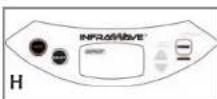
- Press button to select DEFROST (H).
- Press Button to select type of food to defrost.
- Press down the toast lever until it locks into position.
- Once defrosting cycle is completed, toast as instructed in the TOASTING section.
REHEAT
Use to warm food that has been toasted and has cooled.
To use:
- Press the button. Digital display shows TOAST, , 4 as the default settings.
Note: Every time you turn on the unit, the display will default to above settings.
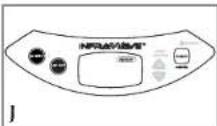
- Press button to select REHEAT (J).
- Press button to select type of food to reheat.
- Press down the toast lever until it locks into position.
- At the end of the toast cycle, the toaster automatically stops, the lever releases and lifts up.
Care and Cleaning
This product contains no user serviceable parts. Refer service to qualified service personnel.
Always unplug the cord from electrical outlet and allow toaster to cool before cleaning. Do not immerse the unit in water.
Cleaning Crumb Tray
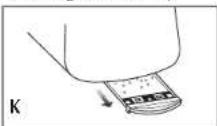
- Slide out the tray completely and discard crumbs (K).
- Wash the tray in warm, sudsy water. Stubborn spots can be removed with a nylon mesh pad. The tray is dishwasher safe, but hand washing is recommended.
- Dry the tray thoroughly before replacing in position.
Cleaning Outside Surfaces
- Unplug the unit and let cool completely.
- Wipe the outside of the unit with damp cloth or sponge. Dry thoroughly with a soft cloth or paper towel.
- Do not use strong cleaners or abrasives that may scratch the surface.
- Never spray cleaners directly onto the unit.
With your Infrawave ^™ Speed Toaster you will enjoy:
For service, repair or any questions regarding your appliance, call the appropriate "800" number on the cover of this book. Do not return the product to the place of purchase.
Do not mail the product back to the manufacturer nor bring it to a service center. You may also want to consult the website listed on the cover of this manual.
One-Year Limited Warranty
(Applies only in the United States and Canada)
What does it cover?
- Any defect in material or workmanship; provided; however, Applica's liability will not exceed the purchase price of the product.
For how long?
• One year after the date of original purchase.
What will we do to help you?
- Provide you with a reasonably similar replacement product that is either new or factory refurbished.
How do you get service?
- Save your receipt as proof of the date of sale.
- Check our on-line service site at www.prodprotect.com/applica, or call our toll-free number, 1-800-231-9786, for general warranty service.
- If you need parts or accessories, please call 1-800-738-0245.
What does your warranty not cover?
- Damage from commercial use
• Damage from misuse, abuse or neglect
- Products that have been modified in any way
- Products used or serviced outside the country of purchase
- Glass parts and other accessory items that are packed with the unit
- Shipping and handling costs associated with the replacement of the unit
- Consequential or incidental damages (Please note, however, that some states do not allow the exclusion or limitation of consequential or incidental damages, so this limitation may not apply to you.)
How does state law relate to this warranty?
- This warranty gives you specific legal rights, and you may also have other rights that vary from state to state or province to province.
¡NECESITA AYUDA?
San Jose, Costa Rica
Tel.: (506) 257-5716
223-0136
Ecuador
Castelcorp
Km 2-1/2 Avenida Juan T.
Guatemala City, Guatemala
Tel.: (502) 331-5020
360-0521
Honduras
Lady Lee
Centro Comercial Mega Plaza
Carretera a la Lim
San Pedro Sula, Honduras
Tel.: (504) 553-1612
México
Authorized Service Center
Electrodomésticos, S.A.
33 Independence Square,
Port of Spain
Trinidad, W.I.
Tel.: (868) 623-4696
Venezuela
Centro Comercial City Market
Diagonal al hotel Melia,
Sabana Grande, Mivel plaza
local 153
Caracas Venezuela
Tel. 0212-3240969 y
0412-5926308.
Col. Centro, Mexico D. F., CP 06050
Copyright © 2006. Applica Consumer Products, Inc.
Pub. No. 1000003285-00-RV00
Made in People's Republic of China
Printed in People's Republic of China
Importado por:
- IMPORTANT SAFEGUARDS
- SAVE THESE INSTRUCTIONS.
- GROUNDED PLUG
- ELECTRICAL CORD
- How to Use
- GETTING STARTED
- HELPFUL INFORMATION ABOUT YOUR TOASTER
- TOASTING
- Waffles and Toaster Pastries
- DEFROST
- To use:
- REHEAT
- Care and Cleaning
- Cleaning Crumb Tray
- Cleaning Outside Surfaces
- One-Year Limited Warranty
- (Applies only in the United States and Canada)
- What does it cover?
- For how long?
- What will we do to help you?
- How do you get service?
- What does your warranty not cover?
- How does state law relate to this warranty?
- ¡NECESITA AYUDA?
- Ecuador
- Honduras
- México
- Venezuela
- Importado por:
Brand : BLACK & DECKER
Model : ST2000
Category : Toaster