10032002 - Air purifier Klarstein - Free user manual and instructions
Find the device manual for free 10032002 Klarstein in PDF.


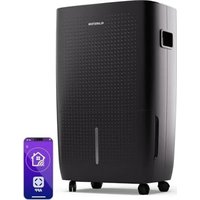
| Product type | Air purifier |
| Brand | Klarstein |
| Model | 10032002 |
| Power supply | 220-240 V ~ 50 Hz |
| Power | 50 W |
| Filtration system | Pre-filter, activated carbon, HEPA (99.97%), UV-C lamp (TiO2) |
| Fan speeds | 5 levels (1 = silent, 5 = fast) |
| Timer | 1 to 8 hours (auto shut-off) |
| Filter replacement indicator | HEPA indicator light + 30-second beep |
| UV lamp replacement indicator | Flashing blue circle on front |
| Filter type | Combined filter (pre-filter + activated carbon + HEPA) |
| Pre-filter / activated carbon cleaning | Vacuum with brush (monthly) |
| HEPA filter cleaning | Replace when gray or black (do not wash) |
| Combined filter replacement | When HEPA indicator flashes (30s beep) |
| UV-C lamp replacement | When blue circle flashes (press UV for 3s) |
| Number of filters | 1 combined filter + 1 UV-C lamp |
| Chassis maintenance | Soft dry cloth |
| Repairs | By qualified professional only |
| Declaration of conformity | EMC, LVD, RoHS directives |
| Color | Not specified in the manual (probably white) |
Frequently Asked Questions - 10032002 Klarstein
User questions about 10032002 Klarstein
0 question about this device. Answer the ones you know or ask your own.
Ask a new question about this device
Download the instructions for your Air purifier in PDF format for free! Find your manual 10032002 - Klarstein and take your electronic device back in hand. On this page are published all the documents necessary for the use of your device. 10032002 by Klarstein.
USER MANUAL 10032002 Klarstein
Congratulations on purchasing this equipment. Please read this manual carefully and take care of the following hints to avoid damages. Any failure caused by ignoring the mentioned items and cautions mentioned in the instruction manual are not covered by our warranty and any liability.
CONTENT
Technical Data 12
Declaration of Conformity 12
Safety Instructions 13
Product Description and Keys 14
Air Cleaning Layers 15
Before first Use 16
Use and Operation 16
Care and Cleaning 19
Troubleshooting 19
Hints on Disposal 20
TECHNICAL DATA
| Item number 10032001, 10032002 | |
| Power supply 220-240 V ~ 50 Hz | |
| Power consumption 50 W |
DECLARATION OF CONFORMITY

Producer:
Chal-Tec GmbH, Wallstraße 16, 10179 Berlin, Germany.
This product is conform to the following European Directives:
2014/30/EU (EMC)
2014/35/EU (LVD)
2011/65/EU (RoHS)
SAFETY INSTRUCTIONS
- Read all instructions before using appliance.
- Do not attempt to defeat this safety feature.
- To avoid fire or shock hazard, plug the appliance directly into a 220~240V AC electrical outlet.
- Keep the cord out of heavy traffic areas. To avoid fire hazard, NEVER put the cord under rugs, near heat registers, radiator, stoves or heaters.
- To protect against electrical hazards, DO NOT immerse in water or other liquids. Do not use near water.
- Children cannot recognize the hazards associated with the usage of electrical appliances. For this reason, always supervise children when they are near the unit.
- Always unplug the air purifier before moving it, opening the grill, changing filters, cleaning or whenever the air purifier is not in use. Be sure to pull by the plug and not the cord.
- NEVER drop or insert any object into any openings.
DO NOT run cord under carpeting.
DO NOT cover cord with throw rugs, runners, or similar coverings. - DO NOT route cord under furniture or appliances. Arrange cord away from traffic area and where it will not be tripped over.
- DO NOT operate any appliance with a damaged cord or plug, if motor fan fails to rotate, after the appliance malfunctions, or if it has been dropped or damaged in any manner.
- Use appliance only for intended household use as described in this manual. Any other use not recommended by the manufacturer may cause fire, electric shock or injury to persons.
DO NOT use outdoors.
DO NOT place anything on top of unit. - NEVER block the air openings, grills/outlets or place on a soft surface such as a bed or sofa, as this could cause the unit to tip over, blocking the air intake or outtake opening.
- DO NOT attempt to repair or adjust any electrical or mechanical functions on this unit. Doing so will void your warranty. The inside of the unit contains no user serviceable parts. All servicing should be performed by qualified personnel only.
- WARNING: To reduce the risk of fire or electric shock, do not use this fan with any solid-state speed control device.
PRODUCT DESCRIPTION AND KEYS
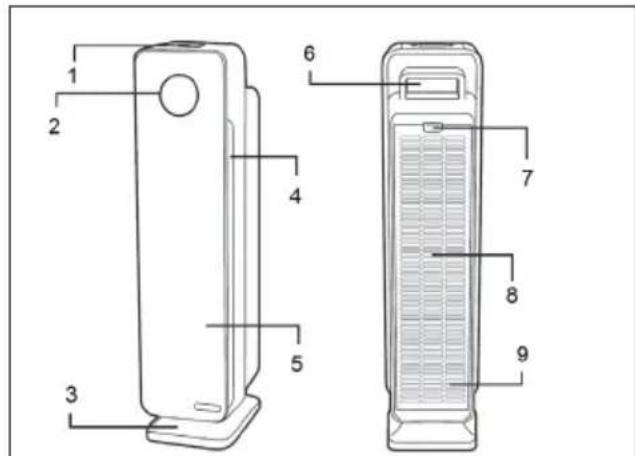
Product
1 Control Panel
2 Blue UV-C Ring
3 Base
4 Air Outlet
5 Body
6 Handle
7 Lock & Release Button (for accessing Filter and Bulb)
8 Filter Access Cover
9 Air Inlet
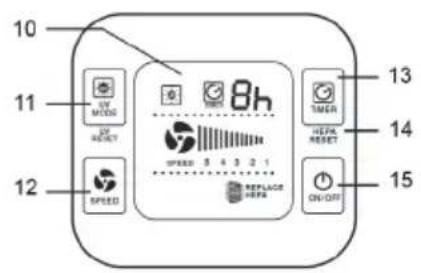
Control Panel
10 Display
11 UV-C On/Off
12 Fan Speed Selection
13 Timer Set Button
14 HEPA Reset Light
15 Power On/Off
AIR CLEANING LAYERS
Improve your indoor air quality with your new Air Cleaning System. Multiple levels of cleaning include a combination True HEPA filter that captures allergens, and Charcoal filter to remove odors. UV-C light technology enhances germ-killing.
- Pre-Filter: Captures initial dust and allergen particles. Pre-Filter and Charcoal Filter are combined into one layer that attaches to the HEPA Filter.
- Charcoal Filter (aka Activated Carbon): Charcoal/Activated Carbon contributes to the control and prevention of the growth of bacteria, germs and mold.
True HEPA Filter: Captures 99.97% of dust and allergens.
UV-C Light: UV-C light technology works with Titanium Dioxide (TiO2) to enhance the elimination of airborne germs. TiO2 is activated by the UV-C light to decompose remaining odor molecules caused by smoking, cooking and pets.
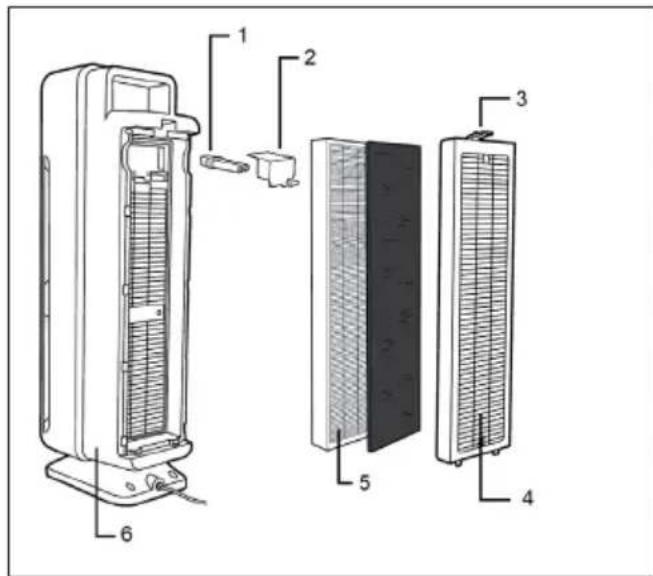
Layer Overview
1 UV-C Bulb
2 UV-C TiO2 Treated Metal Shield
3 Lock & Release Button
4. Main Unit
5 Combination Filter includes Pre, Charcoal & True HEPA filter
6 Rear Cover with Air Inlet Grill
Installing & removing combination filter
The Air Cleaner will beep for 30 seconds and the Replace HEPA light will flash continuously indicating that it is time to replace your filter. Replace the filter according to directions then restart the system.
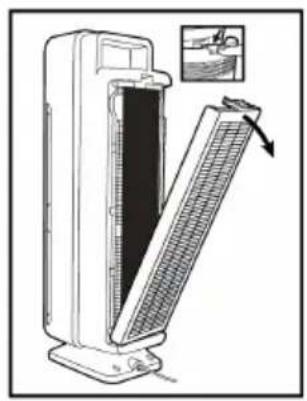
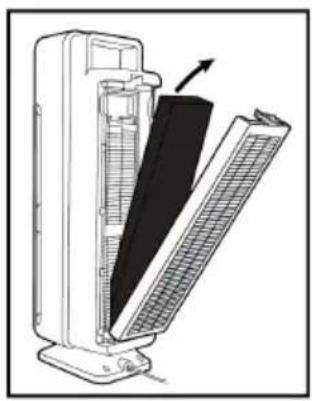
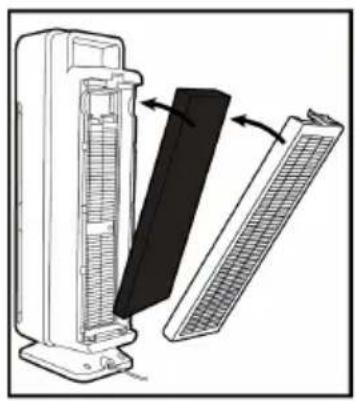
- Turn off and unplug the unit.
- Press the Lock & Release Button and remove the Rear Cover from the unit.3
3 Remove the used Combination Filter (Filter C) and dispose of it in
4 Insert filter system into the unit. Consult the arrow on the filter for correct installation direction. Reattach the Rear Cover of the unit and securely latch into place.
BEFORE FIRST USE
1 Select a firm, level and flat location for the air purifier. For proper air flow, locate the unit at least 1 foot from any wall or furniture. Make sure none of the grills are blocked.
2 Plug the power cord into a 220~240V AC outlet.
NOTE: When moving the air purifier, always lift unit by the carrying handle located on back.
USE AND OPERATION
Key Functions
| Turn unit power ON. |
| Select fan speed MODE 1 - 5 (1 = low, ultra quiet sleep mode 5 = high speed allergen control). Default setting is 5. |
| Select UV-C ON or OFF using UV-C Mode Button. |
| TIMER: If you prefer to run the purifier for a specific number of hours, you can select between 1 and 8 hours on the display. |
Indicators and Sounds
- Filter replacement Indicator: The Replace HEPA light on the control panel will illuminate and flicker indicating that it is time to replace your filter. Replace the filter according to directions (E-6) then press and hold the Timer button for 3 seconds to restart the system.
UV Bulb Replacement Indicator: The circular blue light on the front panel of the purifier will flicker when it's time to replace the bulb. Replace the bulb according to directions (E- 8), then press and hold UV-C Mode button for 3 seconds to reset the system. Reattach the Rear Cover of the unit and securely latch into place. - Control Panel Beep/Sound: The sound emitted from pressing the buttons on the control panel can be turned off/on by holding the Speed button for 3 seconds.
Installing & Removing UV-C Bulb
| Remove the Rear Cover of the unit by pushing Lock & Release Button. | After removing the Rear Cover from the unit, remove the Combination Filter. | After removing the Combination Filter, use a Philips head screwdriver to remove 2 screws and detach the UV-C Metal Shield |
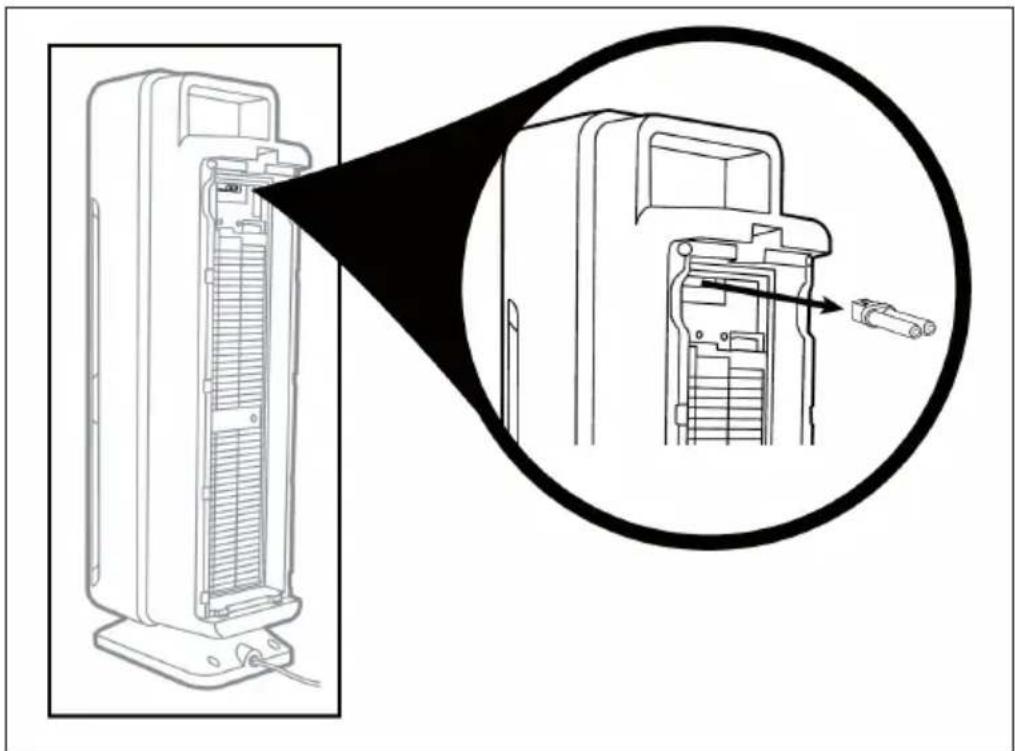
The UV-C Bulb is removed by carefully grasping the bulb with a clean cloth or tissue and pulling the bulb straight out of the unit. NOTE: Bulb is NOT visible until the UV-C METAL SHIELD has been removed.
The UV-C Bulb is reinstalled by sliding it, horizontally, back into the slots at the top of the unit.
CARE AND CLEANING
The air purifier should be cleaned at least once every month and the outer Pre-/ Charcoal Filter attached to the HEPA Filter should be cleaned every month. More frequent cleaning may be required depending on environmental conditions.
Pre-/Charcoal Filter
Clean with the brush attachment of your vacuum cleaner. This will remove lint and dirt.
True HEPA Filter
Remove the Combination Filter from the back of unit. Remove the Pre-/Charcoal Filter to expose the HEPA filter. When the HEPA Filter turns from white to grey or black it should be replaced with a new one. If the HEPA filter is still white, it does NOT need to be replaced.
IMPORTANT: Do NOT try to wash and re-use the Combination Filter. The Combination Filter is one filter system. The multiple layers include: the Pre-/Charcoal Filter and the True HEPA Filter.
Air Purifier
Use a clean, dry, soft cloth to wipe the external surface of the unit.
TROUBLESHOOTING
| Problem Possible cause | and solution approach |
| Unit does not operate. Check that the unit is plugged in. | |
| Unit shuts off unexpectedly. | Check that the unit is plugged into a working electrical outlet. Check that the HEPA Filter is firmly in place. |
| Check that the Rear Cover is latched firmly in place. | |
| Überprüfen Sie, ob die wichtere Abdeckung richtig sitzt. | |
| No air circulating from unit. | Unplug unit. Check Pre-/Charcoal and HEPA Filters. Clean Pre-/Charcoal Filter if necessary. |
| Replace HEPA Filter if necessary. | |
| Ersetzen Sie den HEPA-Filter, falls möglich. | |
| Increase in noise level. Make sure the filters are clean. Replace if necessary. | |
| Red light is flashing. Replace filter and reset system. | |
| Blue ring on product is flashing. | Replace bulb and reset system. |
HINTS ON DISPOSAL

According to the European waste regulation 2012/19/EU this symbol on the product or on its packaging indicates that this product may not be treated as household waste. Instead it should be taken to the appropriate collection point for the recycling of electrical and electronic equipment. By ensuring this product is disposed of correctly, you will help prevent potential negative consequences for the environment and human health, which could otherwise be caused by inappropriate waste handling of this product. For more detailed information about recycling of this product, please contact your local council or your household waste disposal service.
Estimado cliente,

- CONTENT
- TECHNICAL DATA
- DECLARATION OF CONFORMITY
- SAFETY INSTRUCTIONS
- PRODUCT DESCRIPTION AND KEYS
- Product
- Control Panel
- AIR CLEANING LAYERS
- Layer Overview
- Installing & removing combination filter
- BEFORE FIRST USE
- USE AND OPERATION
- Indicators and Sounds
- Installing & Removing UV-C Bulb
- CARE AND CLEANING
- Pre-/Charcoal Filter
- True HEPA Filter
- Air Purifier
- TROUBLESHOOTING
- HINTS ON DISPOSAL
- Estimado cliente,
Brand : Klarstein
Model : 10032002
Category : Air purifier