Grace KE 1726 - Kitchen scales ADE - Free user manual and instructions
Find the device manual for free Grace KE 1726 ADE in PDF.



User questions about Grace KE 1726 ADE
0 question about this device. Answer the ones you know or ask your own.
Ask a new question about this device
Download the instructions for your Kitchen scales in PDF format for free! Find your manual Grace KE 1726 - ADE and take your electronic device back in hand. On this page are published all the documents necessary for the use of your device. Grace KE 1726 by ADE.
USER MANUAL Grace KE 1726 ADE
text_image
ADE UNIT | T/ψBedienungsanleitung
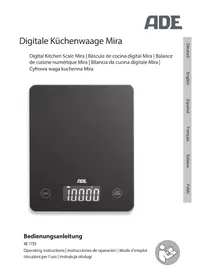
KE 1723 | KE 1724 | KE 1725 | KE 1726
Operating instructions | Instrucciones de operación | Mode d'emploi Istruzioni per l'uso | Instrukcja obsługi

natural_image
Icon of a person using a computer (no text or symbols)text_image
1 2 ADE 3 UNIT | T/O 5 4natural_image
Illustration of a hand using a device to press down an electronic component with a black arrow indicating the process (no text or symbols present)22089 Hamburg, Germany
22089 Hamburg, Germany

Entsorgen
You have chosen to purchase a high-quality product from the brand ADE, which combines intelligent functions with an exceptional design. These kitchen scales are a practical companion for kitchen and household. The many years of experience of the brand ADE ensures a high technical standard and proven quality.
We hope you are happy with your scales and wish you success when weighing!
Your ADE Team
General information
About this manual

This operating manual describes how to safely use and care for your products. Keep this operating manual in a safe place in case you would like to refer to it later. If you pass this item on to someone else, pass on this manual as well.
Failure to observe the recommendations in this operating manual can lead to injuries or damage to your product.
Explanation of symbols
This symbol, combined with the word DANGER, warns against serious injury.

This symbol, combined with the word WARNING, warns against moderate and mild injuries.

This symbol, combined with the word NOTE, warns against material damage.

This symbol signifies additional information and general advice.
Table of Contents
General information....12
Guarantee 13
Intended Use....14
Safety 14
At a glance (scope of delivery) 16
Scope of delivery....16
Inserting/changing batteries....17
Operation....18
Weighing....18
Set the scale to zero....18
Using the tare function (TARA)....18
Switching off the scales....19
Resetting the scales....19
Cleaning....19
Fault/Remedy....20
Technical Data 20
Declaration of Conformity 21
Disposal 21
Guarantee
The company Waagen-Schmitt GmbH guarantees for 3 years from the purchase date the cost-free rectification of defects on the basis of material or fabrication errors through repair or exchange.
In the event of a guarantee claim, please return the product with the proof of purchase (stipulating the reason for claim) to your dealer.
The scales are designed for weighing food and objects in the home in the quantities that are usual in that context. The maximum load capacity of 5 kg must not be exceeded.
The scales are unsuitable for commercial use, e.g. in bakeries, restaurants, etc.
Safety
- This item can be used by children 8 years of age and above, as well as by persons with reduced physical, sensory, or mental capacities or lacking experience and knowledge, if they are supervised or have been instructed in the safe use of the item and understand the dangers that may arise.
- Children must not play with the item.
- Cleaning and user maintenance must not be carried out by children, unless they are 8 years of age or older and are being supervised.
- Batteries, when swallowed, can be life-threatening. You should therefore keep the batteries and scales out of reach of small children. If a battery is swallowed, medical assistance must be sought immediately.
DANGER for children
- Keep children away from packaging material. Risk of choking if swallowed. Also beware that children do not pull the packaging material over their heads.
RISK of fire/burning and/or explosion
- Risk of explosion if batteries are improperly exchanged. Replace the batteries only with those of the same or an equivalent type. Pay attention to the "Technical Data".
- Batteries must not be recharged, reactivated by other means, dismantled, thrown into fire, or short-circuited. Otherwise there is an increased risk of explosion and of leakage; furthermore, gases may escape.
- Avoid contact of the battery fluid with skin, eyes, and mucosa. If you do come into contact with it, rinse the affected areas immediately and thoroughly with clean water and consult a doctor immediately.
WARNING against risk of injury
- If the scales fall and shatter, there is a risk of injury from glass splinters.
BEWARE of material damage
- Place the scales on a stable, even surface.
- Do not overload the scales. Pay attention to the "Technical Data".
- Place objects on the scales exclusively for the purpose of weighing.
- Protect the scales from sharp jolts and vibrations.
- Remove the batteries from the scales if they have been used up or if you are not going to use the scales for a long time. You will thus avoid damage that may result from the leakage of battery acid.
- When inserting and changing batteries, pay attention to the correct polarity (+/-).
- Do not subject the batteries to extreme conditions by, for example, storing them on heaters or under direct sunlight.
Increased risk of leakage!
- Clean the battery and device contacts, as needed, before inserting the battery.
- Only insert batteries of the same type; do not use different types or used and new batteries with each other.
- Do not make any modifications to the item. Only allow repairs to be carried out at a specialist workshop. Repairs carried out incorrectly can considerably endanger the user.
- Do not place the scales in the vicinity of devices that emit electromagnetic radiation, such as mobile phones, wireless devices, and the like. This can lead to incorrect display indicators or malfunctions.
- Do not place any objects on the scales when you are – for example – storing them in a cupboard. The sensitive measuring electronics in the scales could be damaged by heavy objects.
- There are feet on the underside of the scales. Since surfaces are made from various materials and are treated with diverse care products, the possibility cannot be completely excluded that some of these substances contain ingredients that attack and soften the feet of the device. If necessary, place an anti-slip underlay beneath the scales.
At a glance (scope of delivery)
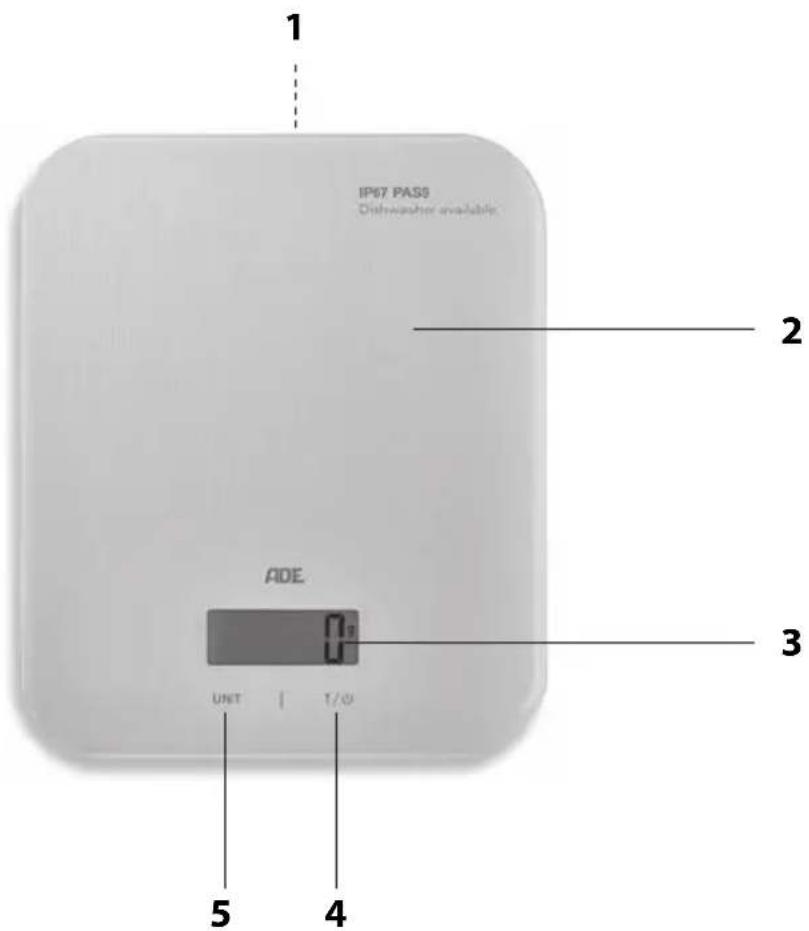
text_image
IP67 PAS0 Dishwasher available ADE UNT | 1/0 1 2 3 4 51 Battery compartment (underside)
2 Weighing surface
3 Display
4 T/①: Switch off the scales, reset value (weighing function)
5 UNIT: Select the weighed product type (solid or liquid) and the measurement unit
Scope of delivery
- Kitchen scales
- Battery type CR2032, 3 ¥ = (2x)
- Operating Manual

NOTE on material damage
- When screwing down the battery compartment cover, make sure that the gasket is present and inserted properly. Otherwise the scales may not be cleaned and immersed in water, as it can damage the electronics.
To use the scales, you require 2 batteries of the type CR2032, 3V (included in scope of delivery). The battery compartment is located on the underside of the device.
- Loosen the fastening screw of the battery compartment cover using a fine Phillips screwdriver.
- Remove the battery compartment cover.
- Push the batteries towards the contact springs under the big, angular retaining plates and then press them down. The batteries then snap into the opposite retaining collars, such that the batteries sit firmly in their retainers.
Pay attention to the correct polarity (+/-). The plus pole (+) for both batteries must point upwards.

natural_image
Illustration of a hand using a device to press down an electronic component, with a black arrow indicating the process (no text or symbols present)- Check the exact fit of the gasket (see arrow) and screw the battery compartment cover back on.
- Make sure that the battery compartment cover is seated flush and screwed safely.

Notes on changing the battery:
- The batteries need to be changed when "LO" or nothing is shown on the display.
- Only use the type of battery that is specified in the "Technical Data".
- Always exchange all of the batteries at the same time.
- Dispose of batteries in an environmentally appropriate way (see "Disposal").
Weighing
- Place the scales on an even, firm, and dry surface. Carefully position the scales in order to avoid hard impacts to the sensors/feet and therefore to avoid damage.
- Switch on the scales by pressing with a little force on the weighing surface for 2 seconds. Wait a moment until "0" appears on the display.
- Choose the desired unit of measurement by repeatedly touching UNIT.
You can choose between "g" (grams), "Oz" (ounces), "lb" (pounds), and "ml" (millilitres). Pay attention to the indicator on the display.

Choose "ml" if you would like to weigh liquids.
- If you want to weigh something in a container, now place the container without anything in it onto the weighing surface. Otherwise, proceed as described in point 6.
- Press T / ⏻.
Depending on the selected unit, "0 g", "0.0 Oz", "0.000 oz" or "0 ml" is displayed.
- Put the substance to be weighed in the container or place it on the weighing surface.
The measured weight is shown on the display.
- Read off the measured weight and remove the item or substance from the container or the weighing surface.
Set the scale to zero
If the display still shows values even if the weighing surface is empty (e.g. if the scales are not optimally positioned or a TARE value is still displayed, see next section), you must set the scales to zero.
-Briefly press T /① 1x.
Using the tare function (TARA)
This function is practical, for example, when baking, if you would like to add another ingredient to the ingredients already on the scales.
- Press T / ⏻ in order to set the scales back to "0".

If the weight on the weighing surface is greater than 100 grams, "TARE" is shown on the display (tare function).
-
Add the new substance. The weight of the added substance is shown on the display.
-
Repeat the process whenever you want to add more ingredients. The process can be repeated as often as needed until the capacity limit (5 kg) is reached.
Switching off the scales
- Hold down T / ⏻ until the display and light go out.

The scales automatically switch off if they are not used for approx. 60 seconds.
Resetting the scales
Reset the scales to factory settings if unusual or obviously incorrect values are shown on the display.
- Remove the batteries from the battery compartment and wait a moment.
- Re-insert the batteries.
Pay attention to the correct polarity of the batteries (+/-).
After switching the scales on, you can start weighing as usual.
Cleaning

NOTE on material damage
- Do not under any circumstances use harsh, scraping, or abrasive cleaning agents or the like to clean the scales. If you do, the surface could be scratched.
The scales should be cleaned immediately after use, especially if they have come into contact with fat or oil, spices, vinegar, and other strongly spiced and/or coloured foodstuffs.
- Wipe down the scales as needed using a lightly dampened, soft cloth. Avoid contact with citric acid.
- As an alternative, you can also clean the scales in a dishwasher or in mild washing-up liquid. The correctly assembled battery compartment cover makes the scales watertight (IP67).
Fault/Remedy
| Fault Possible Cause | |
| No function | Are the batteries empty or have they been inserted incorrectly? |
| “EEEE” is shown on the display. | The maximum capacity of the scales (5 kg) has been exceeded. |
| The scales appear to be displaying false weighing results | Are the scales standing on a firm, even surface?Is a device that can cause electromagnetic disturbances located in the vicinity of the scales?Remove the batteries from the scales and wait a moment. Re-insert the batteries. |
| “LO” is shown on the display. | The batteries are empty (see “Inserting/ changing batteries”). |
Technical Data
Model: "Grace" kitchen scales KE 1723 (silver), KE 1724 (gold),
KE 1725 (copper), KE 1726 (black)
Battery:
2x CR2032/3 V ---
Rated current: 10 mA
Measuring range: max. 5 kg
Variance: 1 % +/-
Indicator division 1 g
Weight: approx. 0.6 kg
Dimensions of scales: approx. 170 x 210 x 19 mm
Protection class: IP67
The first digit (6): dust-tight
The second digit (7): watertight (immersible)
(no service address): Hammer Steindamm 27-29
22089 Hamburg, Germany
Our products are constantly being developed and improved.
For this reason, design and technical modifications are possible at any time.
Declaration of Conformity
These scales have been manufactured in accordance with the harmonised European standards. The product complies with the following EC Directives:
2014/30/EU EMC Directive
2011/65/EU RoHS Directive
in the currently valid versions.
This declaration loses its validity if modifications are made to the product without our approval.
Hamburg, March 2017
Waagen-Schmitt GmbH
Hammer Steindamm 27-29
22089 Hamburg, Germany

Disposal
Disposing of the packaging

Dispose of the packaging with similar materials. Put cardboard with waste paper, films with recyclable materials.
Disposing of the product
Dispose of the product in accordance with the regulations that apply in your country.
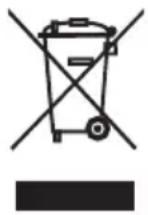
Devices must not be disposed of in normal household waste.
At the end of its life, the product must be disposed of in an appropriate way. In this way, valuable materials contained in the device will be recycled and the burden on the environment avoided. Hand in the old device at a collection point for electronic waste or at a recycling depot.
For more information, contact your local waste disposal firm or your local administrative body.
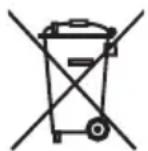
Recyclable and disposable batteries do not belong in household waste.
All batteries must be handed in at a collection point in your community, suburb, or at the retailer. Such batteries can thus be disposed of in an environmentally friendly way.
natural_image
Illustration of a hand using a device to press down an electronic component with a black arrow indicating the process (no text or symbols present)natural_image
Illustration of a hand using a device to press down an electronic component, with a black arrow pointing to the component (no text or symbols present)- Directive CEM 2014/30/EU
- Directive RoHS 2011/65/EU
natural_image
Illustration of a hand using a device to press a component with a black arrow pointing to it (no text or symbols present)text_image
IP67 PAS0 Dishwasher available ADE UNT | 1/0 1 2 3 4 5natural_image
Hand inserting a component into a device casing with a black arrow indicating the direction (no text or symbols present)22089 Hamburg, Germany
22089 Hamburg, Germany