EcoLine II 150WS - Flash Dörr - Free user manual and instructions
Find the device manual for free EcoLine II 150WS Dörr in PDF.


User questions about EcoLine II 150WS Dörr
0 question about this device. Answer the ones you know or ask your own.
Ask a new question about this device
Download the instructions for your Flash in PDF format for free! Find your manual EcoLine II 150WS - Dörr and take your electronic device back in hand. On this page are published all the documents necessary for the use of your device. EcoLine II 150WS by Dörr.
USER MANUAL EcoLine II 150WS Dörr
THANK YOU for choosing this DORR quality product.
Please read the instruction manual and safety hints carefully before first use. Keep this instruction manual together with the device for future use. If other people use this device, make this instruction manual available. This instruction manual is part of the device and must be supplied with the device in case of sale.
DORR is not liable for damages caused by improper use or the failure to observe the instruction manual and safety hints.
CAUTION! Please note the following important hints before first use:
- For initial use and/or after storage of up to 1 year and longer, please do not release more than 3 flashes per minute for the first approx. 30 flash releases!
- Not suitable for flash sequences of 10 or more releases in quick succession. After flash sequences, cool down the studio flash for at least 2 minutes in order to avoid damages to the flash condenser.
- The modelling light is only designed to illuminate the object while the camera settings are made. It is not suited as a permanent light since it produces high temperatures which can harm flash accessories. In combination with conical snoots, softboxes, honey combs or other flash accessories the modelling light must not be used for more than 10 minutes.
01 AFETY HINTS
- The flash tube and the modelling light produce high temperatures, which is also transferred to the reflector. While operation never touch the ignition wire, the flash tube, the modelling light and the reflector - risk of burns and of electric shock!
Cool down the studio flash before making any installations or before you store it. - Do not trigger the studio flash directly in front of the eyes of humans or animals. This may cause an irreversible damage to the retina. Keep a minimum distance of 2,5m and make sure that people or animals do not look directly into the studio flash.
- Do not touch the modelling light and the flash tube with bare hands. Greasy fingerprints may cause the bursting of the lamps during operation! Wear thin gloves e.g. made of cotton or microfiber or use a cloth for inserting or replacing the lamps.
- Make sure that the studio flash is mounted stable and secure and cannot tip over. Risk of fire! Take care that that nobody stumbles over the cable connections.
- Keep away from flammable materials.
- Only for the illumination for photographic purposes. Not suited for permanent room lighting.
- If the unit has been triggered continuously for e.g. 10 times or more in a short period, please interrupt the operation for about 2 minutes in order to avoid overheating.
- If you notice a smell of burning, switch off the studio flash immediately at the main switch and disconnect from power. Risk of fire! Please contact your dealer.
- Protect the device from rain, moisture, direct sunlight and extreme temperatures.
- Do not touch or operate the device with wet hands or when standing on wet floor.
- Ensure sufficient ventilation during operation. Never cover the ventilation slots.
- Turn off the device after use and disconnect from power source.
Do not use an extension cord. - Protect the device against impacts. Do not use the device if it has been dropped. In this case a qualified electrician should inspect the device before you use it again.
- Inside the studio flash may occur high voltage. Do not attempt to repair the device by yourself. Risk of electric shock! When service or repair is required, contact qualified service personnel.
- Do not use the device nearby mobile phones and devices that generate strong electromagnetic fields (e.g. electric engines).
People with physical or cognitive disabilities should use the device with supervision. - People with cardiac pacemakers, defibrillators or any other electrical implants should maintain a minimum distance of 30~cm , as the device generates magnetic fields.
- This device is not a toy. To prevent accidents and suffocation keep the device, the accessories and the packing materials away from children and pets.
- Protect the device against dirt. Never use aggressive cleansing agents or benzine to clean the device. We recommend a soft, slightly damp microfiber cloth to clean the outer parts of the device. Make sure to take off the device from power before cleaning!
- Store the device in a dust-free, dry and cool place.
- If the device is defective or without any further use, dispose of the device according to the Waste Electrical and Electronic Equipment Directive WEEE. For further information, please contact your local authorities.
02 | PRODUCT DESCRIPTION
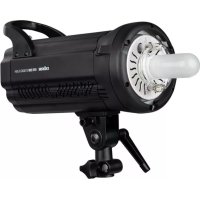
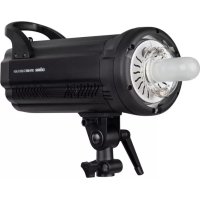
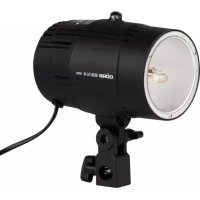
The DORR EcoLine II series is well suited for first studio photography experience, as well as for professional use in smaller photo studios. With the proven technology, the clear features and the easy handling, you will achieve professional image results effortlessly. The DORR accessory range offers a large number of various light formers to create perfect shots.
03 FEATURES
Available with flash power of 110Ws or 150Ws
- Stepless flash power from 1/16 to full power
- Incorporated photocell and test button
Additional halogen modelling light
- Robust plastic flash housing
DS mount for various light formers (optionally available from DORRI)
Fits onto any light stand (optionally available from DORR)
Low weight and small dimensions
04|NOMENCLATURE
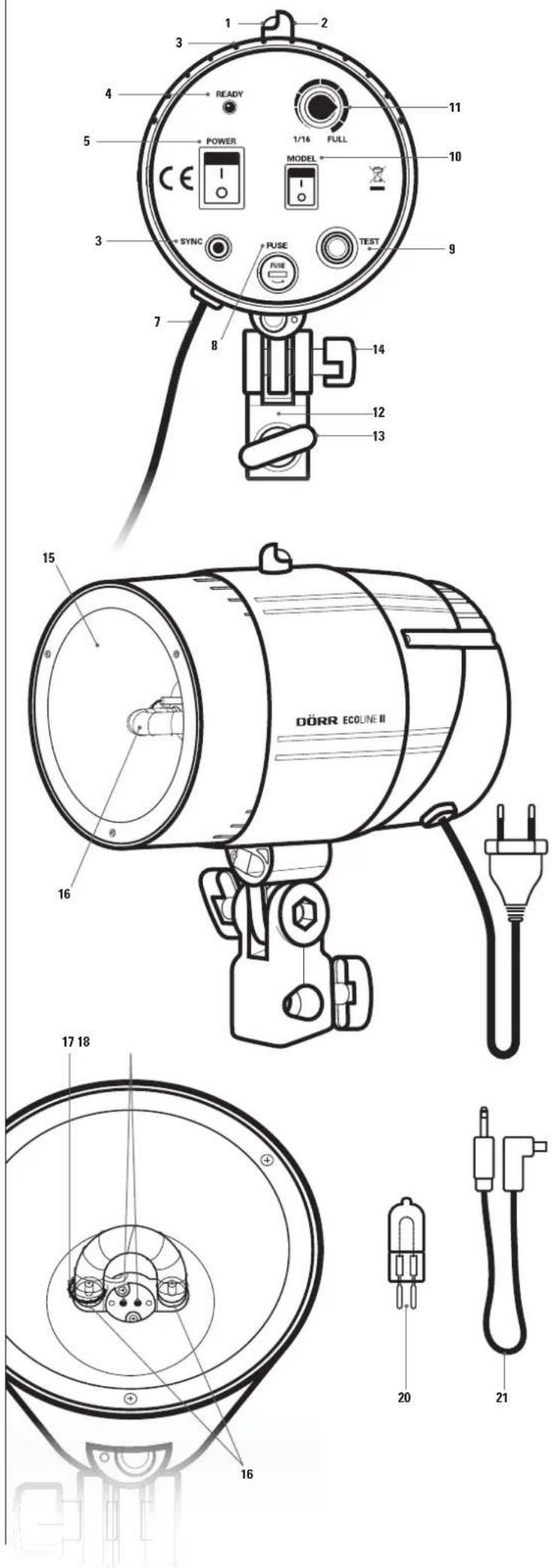
1 Photocell
2 Turnable shielding cap
3 Ventilation slots
4 Power indicator (READY)
5 Main switch I=On/0-Off (POWER)
6 Socket for sync cord (SYNC)
7 Power cable
8 Fuse compartment with pre-installed fuse (FUSE)
9 Test button (TEST)
10 On/Off switch modelling light
11 Power control 1/16 to full power (FULL)
12 Tripod socket
13 Locking screw tripod socket
14 Locking screw tilt angle
15 Reflector
16 Flash tube
17 Ignition wire
18 Modelling light socket
19 Flash tube socket
20 Modelling light
21 Sync cord
05.1 Installation of the modelling light
CAUTION
In order to avoid burns, cool down the studio flash before replacing the modelling light!
CAUTION
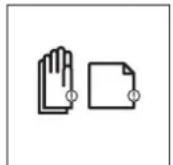
Do not touch the modelling light and the flash tube with bare hands. Greasy fingerprints may cause the bursting of the lamps during operation! Wear thin gloves (special microfi ber cloth available from DORR) or use a cloth for inserting or replacing the lamps.
- Make sure to switch off the studio flash with the main switch (5) and to disconnect from main power supply.
- Insert the long plug-in contacts of the modelling light (20) into the 2 holes of the modelling light socket (18) and gently push the modelling light down.
CAUTION
The modelling light is only designed to illuminate the object while the camera settings are made. It is not suited as a permanent light since it produces high temperatures which can harm flash accessories. In combination with conical snoots, softboxes, honey combs or other flash accessories the modelling light must not be used for more than 10 minutes.
05.2 Mounting onto a light stand
Suitable light stands optionally available from DORR or included in your kit.
Put the tripod socket (12) over the spigot of your light stand and fi x the locking screw (13). To adjust the tilt angle, loosen the locking screw (14), adjust to the desired angle and tighten the locking screw (14) afterwards.
CAUTION
Make sure that the studio flash is mounted stable and secure and cannot tip over. Risk of fire! Take care that that nobody stumbles over the cable connections.
05.3 Connecting to the camera
Plug the 3,5mm jack of the sync cord (21) into the socket (6) of studio flash. Insert the sync plug of cord into the sync socket of your camera. If your camera is not equipped with a sync socket, please contact your specialized retailer for the purchase of an optional flash sync adapter (available from DÖRR).
05.4 Power connection
Connect the power cable (7) to the main power supply and switch on the studio flash with the main switch (5) (position 1 = ON).
05.5 Test button
By pressing the test button (9), the studio fl ash is triggered manually e.g. to check the proper function of the studio fl ash or to give off excess energy after reducing the fl ash power (see also chapter 06, point 3 'Please note').
CAUTION
While operation never touch the ignition wire, the flash tube, the modelling light and the reflector - risk of burns and of electric shock! Never cover the ventilation slots.
- Switch on the studio flash with the main switch (5). Set your camera to program mode M for manual settings (for details see the instruction manual of your camera).
- Set the correct exposure time according to your camera's instruction manual. We suggest to set the camera to an exposure of 1/125s or 1/60s.
- For an optimum exposure, we recommend to test various aperture settings (for details see the instruction manual of your camera) and to vary the flash power. The flash power can be adjusted variably from 1/16 to full power by turning the power control (11) of studio flash. We recommend starting with a medium aperture (e.g. 8) and a low flash power.
Please note:
After reducing the fl ash power, you must give off excess energy left in the fl ash condenser in order to avoid an overexposure of the subsequent picture. To do so, you have to press the test button (9) once or release the fl ash e.g. with a wireless fl ash trigger (optionally available from DORR).
Note
For quick and proper determination of the correct aperture setting, we recommend to use a f1 ash exposure meter (optionally).
06.1 Modelling light
The modelling light (20) assists you in finding out the correct illumination. It does not influence the final illumination while shooting. To save energy and in order to avoid overheating, please switch off the modelling light after your test shootings (On/Off switch (10) to 0 position = Off).
CAUTION
The modelling light (20) assists you in finding out the correct illumination. It does not influence the final illumination while shooting. To save energy and in order to avoid overheating, please switch off the modelling light after your test shootings (On/Off switch (10) to 0 position = Off).
06.2 Photocell (Slave)
The incorporated photocell (1) allows simultaneous triggering of the studio fl ash with a main fl ash, e.g. a system fl ash unit (see chapter 07).
Kindly note that the photocell reacts on great differences in brightness. In case that the photocell is exposed to intensive light like e.g. strong sunlight, the function of photocell may be limited as the photocell is not able to detect a sufficient difference in brightness anymore.
Please take care that the photocell is not covered by a softmax or other accessories.
In order to prevent undesired flashes released by photocell (e.g. triggered by another photographer), cover the photocell with the shielding cap (2).
CAUTION
Switch off the studio flash with the main switch (5) after each usage.
07|WORKING WITH SEVERAL STUDIO FLASHES
In case you want to use 2 or more EcoLine II studio II ashes, there are the following options to trigger them synchronically:
07.1 Sync cord and photocell
Connect one EcoLine II studio flash to your camera using the sync cord (see chapter 05.3).
When shooting, the connected studio fl ash will be triggered and the other studio fl ashes will be released simultaneously by their photocell.
07.2 Wireless flash trigger (recommended)
Connect a radio sender to your camera and each EcoLine II studio fl ash with a radio receiver (radio sender and receiver optionally available from DORR) and all the connected studio fl ashes will fire simultaneously. As an alternative, only one studio fl ash can be connected to a radio receiver and the additional studio fl ashes are triggered simultaneously by their photocell.
07.3 System flash units
Note
To use a TTL system flash unit (optionally available from DORR) as main flash, set the TTL flash unit to a low manual power e.g. 1/128. This will prevent measuring pre-flashes, which would trigger the EcoLine II studio flash too early. In this case the EcoLine II studio flash could not recharge fast enough, to trigger together with the TTL main flash.
Connect your system flash unit to your camera (for details see the instruction manual of your camera/system flash). Point the flash reflector to the top or to the side so that it won't affect the image result. Adjust flash power to the lowest power level manually (e.g., 1/128). While shooting, the system flash is now used as main flash and triggers all EcoLine II studio flash simultaneously via their photocells.
Note
It is not recommended to use the incorporated camera flash to trigger the photocell, since most digital camera models fire one or more pre-flashes.
CAUTION
Switch off all studio flashes with their main switch (5) after each usage.

MAINTANCE
08.1 Replacing the fuse

CAUTION
Switch off the studio flash with the main switch (5) and disconnect from main power supply before replacing the fuse!
If the fuse is defective, switch off the studio flash at the main switch (5) and disconnect from main power supply. Unscrew the screw cap of the fuse compartment (8). Replace the fuse type F10AL 250V 10A (optionally available). Close the fuse compartment with the screw cap.

CAUTION
To ensure safe protection against overstress, only use a fuse type F10AL 250V 10A
08.2 Replacing the modelling light
Please refer to capture 5.1 'Inserting the modelling light'.
08.3 Replacing the flash tube

CAUTION
In order to avoid burns, cool down the studio flash before replacing the flash tube!

CAUTION
Do not touch the flash tube with bare hands. Greasy fingerprints may cause the bursting of the flash tube during operation! Wear thin gloves (special microfibr cloth available from DORR) or use a cloth for inserting or replacing the flash tube.
-
Switch off the studio flash with the main switch (5) and disconnect from main power supply.
-
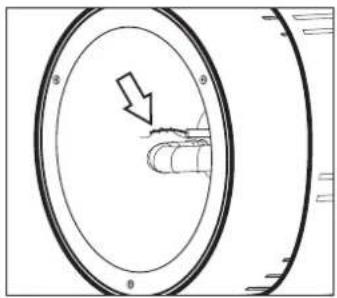
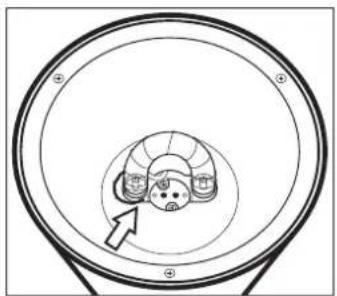
Press the thicker ignition wire (17) from the flash tube.
-
The ignition wire (17) is wrapped with a thin wire and connected to the flash tube. Unwrap this thin wire carefully from the ignition wire.
-
The flash tube is equipped with 2 metal pins which rest in the flash tube socket (19).
To pull out the flash tube please use thin gloves or a cloth. Carefully pull out the flash tube.
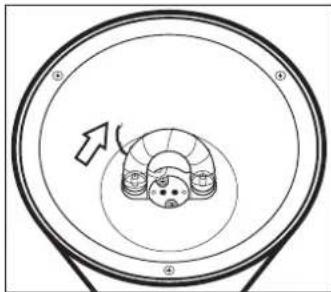
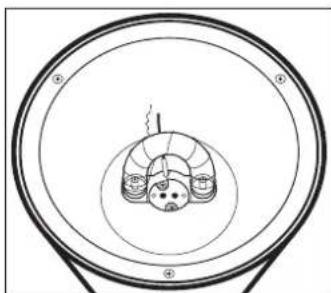
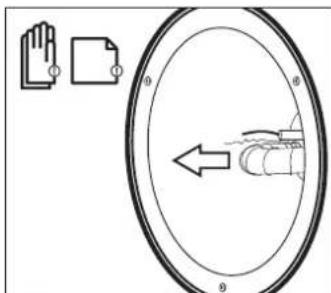
- Insert the new flash tube into the flash tube socket (19) and gently push the flash tube down - use thin gloves or a cloth as well.
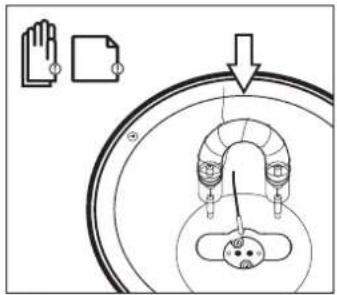
- Wrap the thin wire of the flash tube around the ignition wire (17).
- Press the thicker ignition wire (17) around the flash tube.
09 | SPARE PARTS AND ACCESSORIES (OPTIONAL)
Item No Description GTIN.
372895 DORR U-Type Flash Tube 110Ws 4000461070846
372896 DORR U-Type Flash Tube 150Ws 4000461070853
372916 DORR Modelling Light 50W 4000461055621
For various light formers with DS mount more studio accessories please refer to our homepage www.doerrfoto.de
10 CLEANING AND STORAGE
Never use aggressive cleansing agents or benzine to clean the device. We recommend a soft, slightly damp microfibrer cloth to clean the outer parts of the device. Make sure to take off the device from power before cleaning! Store the device in a dust-free, dry and cool place. This device is not a toy - keep it out of reach of children. Keep away from pets.
11|TECHNICAL SPECIFICATIONS
| Model EcoLine II 110 Ws EcoLine II 150 Ws | |
| Item No. 371190 371191 | |
| Flash power 110 Ws | 150 Ws |
| Power range | stepless 1/16 - full power |
| Recycling time | approx. 2,3 s |
| Flash duration | approx. 1/500 s |
| Modelling light | 50 W |
| Colour temperature | 5500 K |
| Flash triggering | Sync cord, photocell, test button optional: radio flash trigger |
| Operating voltage | AC 220-240V ~ 50 Hz |
| Fuse | F10AL 250V (5 x 20 mm 10 A) |
| Sync cord | 3,5 mm jack |
| Dimensions | approx. 180 x 180 x 100 mm |
| Weight | approx. 735 g approx. 750 g |
12 SCOPE OF DELIVERY
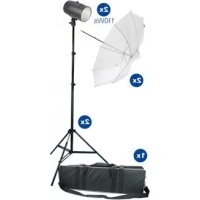
1x Studio fl ash
1x Flash tube (pre-installed)
1x Modelling light
1x Fuse(pre-installed)
1x Sync cord
1x Instruction manual
12 DISPOSAL,CE MARKING

WEEE INFORMATION
The Waste Electrical and Electronic Equipment Directive (WEEE Directive) is the European community directive on waste electrical and electronic equipment, which became European law in February 2003. The main purpose of this directive is to prevent electronic waste. Recycling and other forms of waste recovery should be encouraged to reduce waste. The symbol (trash can) on the product and on the packing means that used electrical and electronic products should not be disposed of with general household waste. It is your responsibility to dispose of all your electronic or electrical waste at designated collection points. Disposing of this product correctly will help to save valuable resources and it is a signifi cant contribution to protect our environment as well as human health. For more information about the correct disposal of electrical and electronic equipment, recycling and collection points please contact your local authorities, waste management companies, your retailer or the manufacturer of this device.
ROHS CONFORMITY
This product is compliant with the European directive 2011/65/EU of June 08, 2011 for the restriction of use of certain hazardous substances in electrical and electronic equipment (RoHS) and its amendments.
CE MARKING The CE mark
The CE marking complies with the European directives.
EcoLine II
Tete de flash de studio
12 | GESTION, MARCA CE