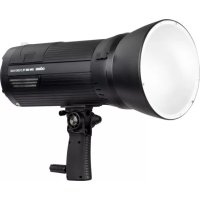
DMX600 - Flash Dörr - Free user manual and instructions
Find the device manual for free DMX600 Dörr in PDF.


User questions about DMX600 Dörr
0 question about this device. Answer the ones you know or ask your own.
Ask a new question about this device
Download the instructions for your Flash in PDF format for free! Find your manual DMX600 - Dörr and take your electronic device back in hand. On this page are published all the documents necessary for the use of your device. DMX600 by Dörr.
USER MANUAL DMX600 Dörr
LCD DISPLAY IM MANUELLEN MODUS M "SYNC"
LCD DISPLAY IM MANUELLEN MODUS M "SYNC" MULTI
THANK YOU for choosing this DORR quality product.
Please read the instruction manual and safety hints carefully before first use.
Keep this instruction manual together with the device for future use. If other people use this device, make this instruction manual available. This instruction manual is part of the device and must be supplied with the device in case of sale.
DORR is not liable for damages caused by improper use or the failure to observe the instruction manual and safety hints.
01 SAFETY HINTS
CAUTION
Please note the following important hints before first use:
- Do not trigger the studio flash directly in front of the eyes of humans or animals. This may cause an irreversible damage to the retina. Keep a minimum distance of 2,5m and make sure that people or animals do not look directly into the studio flash.
- The flash tube produces high temperatures, which is also transferred to the reflector. While operation never touch the ignition wire, the flash tube and the reflector - risk of burns and of electric shock!
- Do not touch the flash tube with bare hands. Greasy fingerprints may cause the bursting of the lamps during operation! Wear thin gloves e.g. made of cotton or microfiber or use a cloth for inserting or replacing the lamp.
Cool down the studio flash before making any installations or before you store it. - Make sure that the studio flash is mounted stable and secure and cannot tip over. Risk of fire!
- Only operate with the supplied original cables. Do not use an extension cord.
Take care that that nobody stumbles over the cable connections. - Only operate with the supplied DORR Li-ion battery and the supplied charger. Never leave the battery charger unattended while charging the battery. After charging disconnect the charger from power supply.
- Keep away from flammable materials.
- Only for photographic purposes. Not suited for permanent room lightning.
If you notice a smell of burning, switch off the studio flash immediately at the main switch and disconnect from power. Risk of fire! Please contact your dealer. - Do not touch or operate the device with wet hands or when standing on wet floor.
- Ensure sufficient ventilation during operation. Never cover the ventilation slots.
After use turn of the device at the main switch and disconnect from power source. - Inside the studio flash may occur high voltage. Do not attempt to repair the device by yourself. Risk of electric shock! When service or repair is required, contact qualified service personnel.
- Protect the device against impacts. Do not use the device if it has been dropped. In this case a qualified electrician should inspect the device before you use it again.
- Protect the device from rain, moisture, direct sunlight and extreme temperatures.
- Do not use the device nearby mobile phones and devices that generate strong electromagnetic fields.
People with physical or cognitive disabilities should use the device with supervision. - People with cardiac pacemakers, defibrillators or any other electrical implants should maintain a minimum distance of 30~cm , as the device generates magnetic fields.
- This device is not a toy. To prevent accidents and suffocation keep the device, the accessories and the packing materials away from children and pets.
- Protect the device against dirt. Never use aggressive cleansing agents or benzine to clean the device. We recommend a soft, slightly damp microfiber cloth to clean the outer parts of the device. Make sure to take off the device from power before cleaning!
- Store the device in a dust-free, dry and cool place.
- If the device is defective or without any further use, dispose of the device according to the Waste Electrical and Electronic Equipment Directive WEEE. For further information, please contact your local authorities.
02 SAFETY HINTS FOR BATTERY
- Only operate with the supplied DORR Li-lon battery. When inserting the battery, please respect the correct polarity. Please remove battery when device is not in use for a longer period.
- Do not throw the battery into fire, do not short-circuit and do not disassemble - risk of explosion!
- Remove leaking battery from the device immediately. Risk of battery acid burn! Clean the contacts before inserting fresh battery. In case of contact with battery acid, rinse the affected area immediately with water and contact a doctor.
- To avoid deep-discharge of the Li-Ion battery when device is not in use for a longer period, please charge the Li-Ion battery approx. every 3 month.
- Keep the battery away from small children and pets. Do not dispose of the battery in household waste (see also chapter "Disposal of Batteries/Accumulators").
03 | PRODUCT DESCRIPTION
The DORR DMX-600 studio flash is a powerful TTL studio flash with battery. It is designed for optimal illumination of all possible photo scenes in photo studios. The powerful battery makes you independent from any other power source. Exchangeable light formers make it easy to cope with the different requirements of photography.
- TTL flash control - ensures optimal light performance on every picture
- Radio control - wireless control of the most important features (DORR DMX-flash trigger optional)
- Battery operated - flexible and almost limitless use
- Powerful - master all challenges of todays' photographic tasks
- Bowens Bayonet - numerous light formers (optional) allow to play with hard as well as with soft light
Built-in umbrella holder - for use of reflector and diffuser umbrellas - Robust metal housing with guide handle - perfect for a busy studio schedule
- Dimmable modelling light - see how shadows fall before releasing
04|NOMENCLATURE
SIDE VIEW
- Housing
- Reflector with diffuser
- Release knob for light former
- Main switch O = Off / I = On
- Hand grip with tripod socket 5a) Safety screw thread
6.Battery
- Photo cell/slave cell
- Ventilationslot
- Locking screw tripod socket
FRONT VIEW (WITHOUT REFLECTOR)
- Bayonet
- Flash tube
- LED modelling light
- Locking lever
- Umbrella holder
- Locking screw umbrella holder
CONTROL PANEL
- LCD display
- Menu button
- Control key 1
- Control key 2
- Control key 3
- Control key 4
- On/Off button/Flash test button
- Power adjustment wheel/confirmation button
- Mini USB socket
- SYNC socket
LCD DISPLAY IN TTL RADIO MODE
- "Radio" trigger mode
- TTL flash mode icon
- Acoustic standby signal icon
- Power adjustment indicator
- Battery capacity indicator
- Modelling light power indicator
- Icon group setting
- Icon modelling light/ Acoustic standby signal icon
- Icon radio channel setting
- Channel indicator
- ID indicator
LCD DISPLAY IN MANUAL MODE M "PHOTO CELL/SLAVE CELL"
- "Slave" trigger mode
- Flash mode M icon
- Power adjustment indicator
- Icon power setting +/-
LCD DISPLAY IN MANUAL MODE M "SYNC"
- "SYNC" trigger mode
- Flash mode M
- Icon MODE
LCD DISPLAY IN MANUAL MODE M "SYNC" MULTI
- MULTITrigger mode
- Flash number indicator
- Flash frequency indicator
LI-ION BATTERY
- Li-lon battery
- Battery release buttons
- Charging cable socket
- Battery contact pins
BATTERY CHARGER
- Mains plug
- Plug for Li-Ion battery
- LED status indicator
05BEFOREUSE
05.1 CHARGE LI-ION BATTERY
Before first use, fully charge the Li-ion battery (47) with the charger provided.
Connect the plug for Li-1on battery (52) with the charging cable socket (49) of the Li-1on battery (47) and plug into mains. The LED status indicator (53) lights up in red during charging.
After battery is fully charged, the LED status indicator (53) lights up green. Disconnect the charger from the power source. Place the Li-Ion battery (47) into the flash - the Li-Ion battery snaps in automatically when it is placed correct position.

CAUTION
Never let the charger unattended during charging. After charging disconnect the charger from electric outlet.
NOTE
When Li-Ion battery is not used for a longer period, charge it every 3 month to prevent it from deep discharge.
We recommend a second Li- ion battery (optional: DORR Lithium- ion battery for DMX-600 Item No. 371341).
05.2 MOUNTING THE STUDIO FLASH
DThe hand grip (5) allows the photographer or an assistant to easily hold the studio flash. In order to adjust the tilt angle of the studio flash, loosen the locking lever (13). Set desired angle and tighten the locking lever (13) again. The hand grip (5) provides an incorporated tripod socket. Unscrew the tripod socket locking screw (9). The studio flash may now be placed onto a studio light stand. For safe hold secure the tripod socket locking screw (9) into the safety screw thread (5a).
05.3 USE OF LIGHT FORMERS (OPTIONAL ACCESSORIES)
The DORR DXM-600 comes with a standard reflector and incorporated diffuser plate (2) for soft light. Use light formers to play with light. Depending on the light former, picture results may vary. Use light formers to create hard or soft light. The DORR DMX-600 studio flash offers a Bowens bayonet to attach light formers.
You may use all light formers with Bowens bayonet. Within our DORR accessories assortment we carry a wide choice of DORR light formers as well as an optional Bowens adapter (Item No. 372960).
Remove the standard reflector (2) from studio flash. Slide the release knob (3) in arrow direction and hold it like this - at the same time move the standard reflector counter clockwise and remove it.
Place the light former onto the bayonet (10) matching the 3 connecting pins over the 3 bayonet fittings and move the light former clockwise until you hear the connectors snap into place.

CAUTION
Let the flash cool down before attaching or removing any light former.
05.4 USE OF REFLECTOR AND DIFFUSER UMBRELLAS (OPTIONAL ACCESSORIES)
Open the reflector or diffuser umbrella. Place the umbrella bar in the umbrella holder (14) and tighten the umbrella holder locking screw (15).
CAUTION
Mind the minimum distance of 30cm between umbrella and flash bulb - Risk of fire!
DORR offers a wide choice of reflector and diffuser umbrellas.
06 | OPERATION
06.1 TURNING ON
Turn on the flash by switching the power button (4) to position I = On . Press On/Off button (22) for about 2 seconds to activate the studio flash. The LCD Display (16) shows all relevant settings. Press the On/Off button/Flash test button (22) to release a test flash.
06.2 LED MODELLING LIGHT
The DORR DMX-600 studio flash is equipped with a modelling light (12). This helps to judge shadows before releasing a picture. Turn on or off the modelling light (12) by pressing the control key 2 (19). The power adjustment wheel (23) is used to adjust the brightness of the modelling light. The LCD Display (16) shows the current power level (31).
06.3 FLASH READINESS
When all control panel buttons (17-22) on the backside of the studio flash light up in blue, the flash is ready to trigger again.
06.4 ACOUSTIC STANDBY SIGNAL
The DORR DMX-600 studio flash offers an acoustic standby signal. Press the control key 2 (19) for about 2 seconds, in order to turn on or off the acoustic standby signal. The acoustic standby signal is activated when Icon for acoustic standby signal (28) is shown in LCD display. You will hear a beep sound when the flash is ready to trigger again.
07 | FLASH MODE IN TTL RADIO FUNCTION
CAUTION
Some of the following functions only work with an optional DORR DMX flash trigger.
DORR TTL flash trigger DMX-C Canon
Item No. 371342
DORR TTL flash trigger DMX-N Nikon
Item No. 371343
NOTE
Carefully read the instruction manual of your DORR DMX TTL flash trigger, which is available for download on www.doerr-foto.de.
- Place the DMX flash trigger onto the hot shoe of your camera and turn it on.
- Press menu button (17) on the studio flash repeated until TTL icon (27) is shown in LCD display (16).
The icon for active radio transmission (26) is shown in LCD display.
07.1 GROUP SETTING
Choose group for each studio flash by pressing control key 1 (18). When using more than 1 studio flash, you are able to set the studio flashes in 3 groups total: A, B and C. Each group may have different specific settings.
E.g.:
Group A: flash in TTL mode
- Group B: flash in TTL mode with a minus correction factor 2/3 aperture steps
Group C: manual flash mode with 1/4 flash power
Above mentioned settings can only be made with a DORR DMX flash trigger.
07.2 SETTING CHANNEL AND ID NUMBER
Choose channel and ID number by pressing control key 4 (21). Press control key 4 (21) once and the channel indicator (35) is highlighted - choose your radio channel from CH01 to CH15 with help of the power adjustment wheel (23). Pressing control key 4 (21) again saves the current channel and moves forward to the ID indicator (36). Choose your ID number from ID00 to ID99 with adjustment wheel (23) and save the setting by pressing control key 4 (21).
NOTE
Mind to set studio flash and flash trigger to same channel and same ID. To prevent your flash from foreign radio signals which cause false trigger, choose another channel or ID on both devices.
07.3 TAKING PICTURES IN TTL MODE
In TTL mode the amount of light is controlled automatically, to illuminate the motif correctly. The emitted light is reflected by the motif and measured Through The Lens (= TTL) by the camera. When reaching the correct amount of light, a signal is sent to the studio flash which stops the light output.
08 | MANUAL FLASH MODE
08.1 FLASH TRIGGERING WITH PHOTO CELL/SLAVE CELL
The DORR DMX-600 studio flash is equipped with a photo cell/slave cell (7). The photo cell/slave cell reacts to emitted light of other flashes and triggers your DMX-600 at the same time. This way you are able to trigger several studio flashes simultaneously.
Press menu button (17) repeatedly until icon M (38) appears in the LCD display and the icon for photo cell/slave cell (37) lights up.
In manual flash mode M the setting of flash power is done manually.
08.2 FLASH TRIGGERING TROUGH IR FLASH (OPTIONAL)
An IR flash (optional) emits light in infrared spectrum. IR light is invisible for human eyes; nevertheless it will be recognized by the incorporated photo cell/slave cell (7) and triggers the flash simultaneously.
NOTE
The photo cell and IR flash need to be in direct line of sight to trigger reliable. Any object within the line of sight might cause the flash not to trigger.
08.3 FLASH TRIGGERING WITH ON-CAMERA FLASH (OPTIONAL)
The DORR DMX-600 studio flash may be triggered e.g. with an on-camera flash (optional). Mind to turn off the pre-flash function of your on-camera flash as the photo cell/slave cell (7) will be triggered by this signal. Make sure to turn the power of the camera flash to a minimum, e.g. 1/128. This setting allows using the light of the on-camera flash only to trigger the DORR DMX-600 studio flash, without having another disturbing light source.
NOTE
The photo cell and IR flash need to be in direct line of sight to trigger reliable. Any object within the line of sight might cause the flash not to trigger.
08.4 TAKING PICTURES IN MANUAL FLASH MODE M
08.4.1 Setting flash power
Press control key 1 (18). The power adjustment indicator is highlighted. Use the power adjustment wheel (23) to set the flash power which is shown in the power adjustment indicator (39). Set 1/1 for full flash power and 1/128 for minimum power. Press confirmation button (23) to save the current setting. Alternatively press control key 1 (18) to confirm the setting.
08.5 MANUAL FLASH MODE M VIA SYNC/PC-SOCKET
The DORR DMX-600 is equipped with a SYNC/PC-socket (25) to connect cameras with SYNC jack via remote release or sync cable. If your camera does not provide a SYNC socket, you will need an additional flash SYNC adapter (all optionally available from DORR).
Press menu button (17) repeatedly until icon M (38) appears in the LCD display and the icon for SYNC/PC (37) lights up. In manual flash mode M the setting of flash power is done manually.
08.6 MANUAL FLASH MODE M "SYNC" MULTI
For special flash effects the DORR DMX-600 offers the MULTI setting. This is a stroboscopic flash, which releases several flashes during an exposure. This way you may shoot sportive motion sequences. Choose your exposure time not too short so all flashes must be released during exposure.
Example:
Press menu button (17) repeatedly, until icon M (42) appears in the LCD display and the symbol SYNC/PC (41) is shown. Press control key 3 (20) and symbol MODE (43) appears in the LCD display.
In flash mode MULTI the power flash setting is done manually. Choose from power level 1/8 to 1/128.
08.6.1 Setting flash power
Press control key 1 (18). The power level indicator (39) is highlighted. Use the power adjustment wheel (23) to set the flash power which is shown in the power adjustment indicator (39). Choose from power level 1/8 to 1/128.
Press confirmation button (23) to save the current setting. Alternatively press control key 1 (18) to confirm the setting.
08.6.2 Setting number of flashes
Press control key 4 (21) until flash number indicator {45} is highlighted. Use the power adjustment wheel (23) to choose the number of flashes released during an exposure. Press confirmation button (23) to save the current setting. Alternatively press control key 4 (21) to confirm the setting. The maximum number of flashes is related to flash frequency and power level (see below chart).
08.6.3 Setting flash frequency
The flash frequency is the time/interval within the flashes are released. The interval of 1 corresponds to 1 second, 2 to 12 second, 4 to 14 second etc.
Press control key 4 (21) until flash frequency indicator (46) is highlighted. Use the power adjustment wheel (23) to choose the flash frequency. Press confirmation button (23) to save the current setting. Alternatively press control key 4 (21) to confirm the setting.
See below chart to check the possible combinations of flash quantity, flash frequency and flash power
| 1/128 & 1/64 FLASH POWER | |
| Max. Flashes Frequency | |
| 90 1 - 3 | |
| 80 4 | |
| 70 5 | |
| 56 6 | |
| 44 7 | |
| 36 8 | |
| 32 9 | |
| 28 10 | |
| 24 11 - 100 | |
| 1/32 FLASH POWER | |
| Max. Flashes Frequency | |
| 60 1-3 | |
| 50 4 | |
| 40 5 | |
| 32 6 | |
| 28 7 | |
| 24 8 | |
| 22 9 | |
| 20 10 | |
| 12 11-100 | |
| 1/16 FLASH POWER | |
| Max. Flashes Frequency | |
| 30 1-3 | |
| 20 4-7 | |
| 10 8-9 | |
| 8 10-100 | |
| 1/8 FLASH POWER | |
| Max. Flashes Frequency | |
| 14 1-2 | |
| 12 3 | |
| 10 | 4 |
| 8 | 5 |
| 6 6-7 | |
| 5 8-9 | |
| 4 10-100 | |
Example: Flashing in MULTI mode requires only small amount of surrounding light. For best results the background should be uni colour and rich in contrast from the main motif..
09 | MAINTENANCE
09.1 REPLACING FLASH TUBE

CAUTION
- Let the flash cool down completely to avoid burns!
- Make sure to turn off the studio flash at the main switch (4).
- Never touch the flash tube with your bare hands. Greasy residue my cause splintering of the flash tube during use! Always wear cotton gloves (microfiber cloth available from DORR) or use a clean cloth when replacing the flash tube.
- Use pliers to wind off the thick flash wire from the brackets.
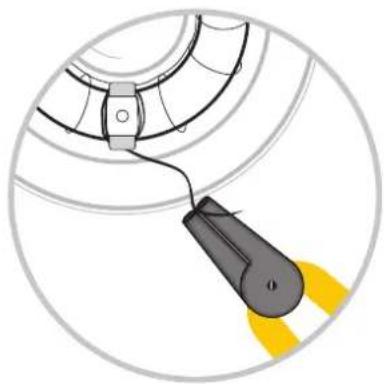
- Unplug the flash tube by carefully pulling out the upper two flash tube connectors.
- Plug in the new flash tube. Connect the two flash tube connectors again with the base.
- Wrap the thick flash wire around the bracket again.
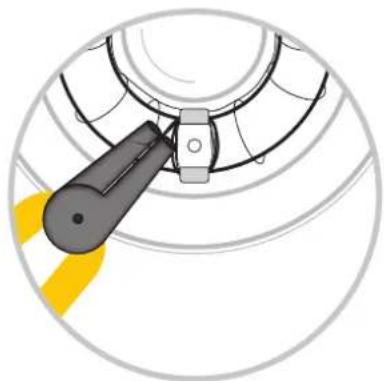
You are welcome to contact our DORR service staff upon any question in regard of the replacement of flash tube or modelling light.
09.2 CLEANING AND STORAGE
Never use aggressive cleansing agents or benzine to clean the device. We recommend a soft, slightly damp microfiber cloth to clean the outer parts of the device. Before cleaning make sure to remove the battery. Store the device in a dust-free, dry and cool place. This device is not a toy - keep it out of the range of children. Keep away from pets.
10 | TECHNICAL SPECIFICATIONS
| DMX-600 | |
| Flash power 600 Ws | |
| Guide No. (ISO 100/2m) 45 | |
| Power range 1/128~1/1±0.3 EV | |
| Recycling time approx. 0,01~2,5 s | |
| Flash synchronization High Speed Sync (HSS) up to 1/8000 s | |
| Flash duration approx. 1/20000 s~1/800 s (High Speed Flash) | |
| Modelling light LED 10 W | |
| Colour temperature 5500 K ± 200 | |
| Flash triggering | Photocell, test button (optional: sync cord, wireless flash trigger) |
| Number of flashes 500 (with full power) | |
| Flash modes TTL/M/MULTI | |
| TTL System | E-TTL & I-TTL |
| Flash exposure compensation | ✓ |
| Radio receiver | Built-in, frequency 2,4 GHz, range up to 100 m |
| Overheating protection | ✓ |
| Power source | Lithium Ion battery 11.1 V/6600 mAh (9*18650C LB-01) |
| Battery charging time | approx.5 hours |
| Dimensions approx. | 11 x 22 x 28 cm w/o standard reflector 15 x 15 x 32,7 cm with standard reflector |
| Weight approx. | 2700 g |
11 | SCOPE OF DELIVERY
Studio flash with standard reflector
Lithium-lon battery
Charger
Bag
Safety instructions
12 | DISPOSAL, CE MARKING, SIMPLIFIED EU DECLARATION OF CONFORMITY

12.1 DISPOSAL OF BATTERIES/ACCUMULATORS
Batteries are marked with the symbol of a crossed out bin. This symbol indicates that empty batteries or accumulators which can no longer be charged should not be disposed of with household waste. Waste batteries may contain harmful substances that can cause damage to health and to the environment. Please use the return and collection systems available in your country for the disposal of the waste batteries.

12.2 WEEE INFORMATION
The Waste Electrical and Electronic Equipment Directive (WEEE Directive) is the European community directive on waste electrical and electronic equipment, which became European law in February 2003. The main purpose of this directive is to prevent electronic waste. Recycling and other forms of waste recovery should be encouraged to reduce waste. The symbol (trash can) on the product and on the packing means that used electrical and electronic products should not be disposed of with general household waste. It is your responsibility to dispose of all your electronic or electrical waste at designated collection points. Disposing of this product correctly will help to save valuable resources and it is a significant contribution to protect our environment as well as human health. For more information about the correct disposal of electrical and electronic equipment, recycling and collection points please contact your local authorities, waste management companies, your retailer or the manufacturer of this device.
12.3 ROHS CONFORMITY
This product is compliant with the European RoHS directive for the restriction of use of certain hazardous substances in electrical and electronic equipment and its amendments.

12.4 CE MARKING
The CE marking complies with the European standards and indicates that the product meets the requirements of the applicable EU directives.
12.5 SIMPLIFIED EU DECLARATION OF CONFORMITY
Hereby, DORR GmbH declares that the radio equipment type [371340] is in compliance with Directive 2014/53/EU. The full text of the EU declaration of conformity is available at the following internet address:
http://www.doerr-foto.de