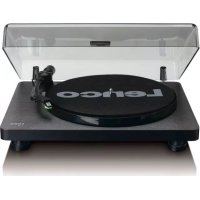
L30BK - Turntable LENCO - Free user manual and instructions
Find the device manual for free L30BK LENCO in PDF.

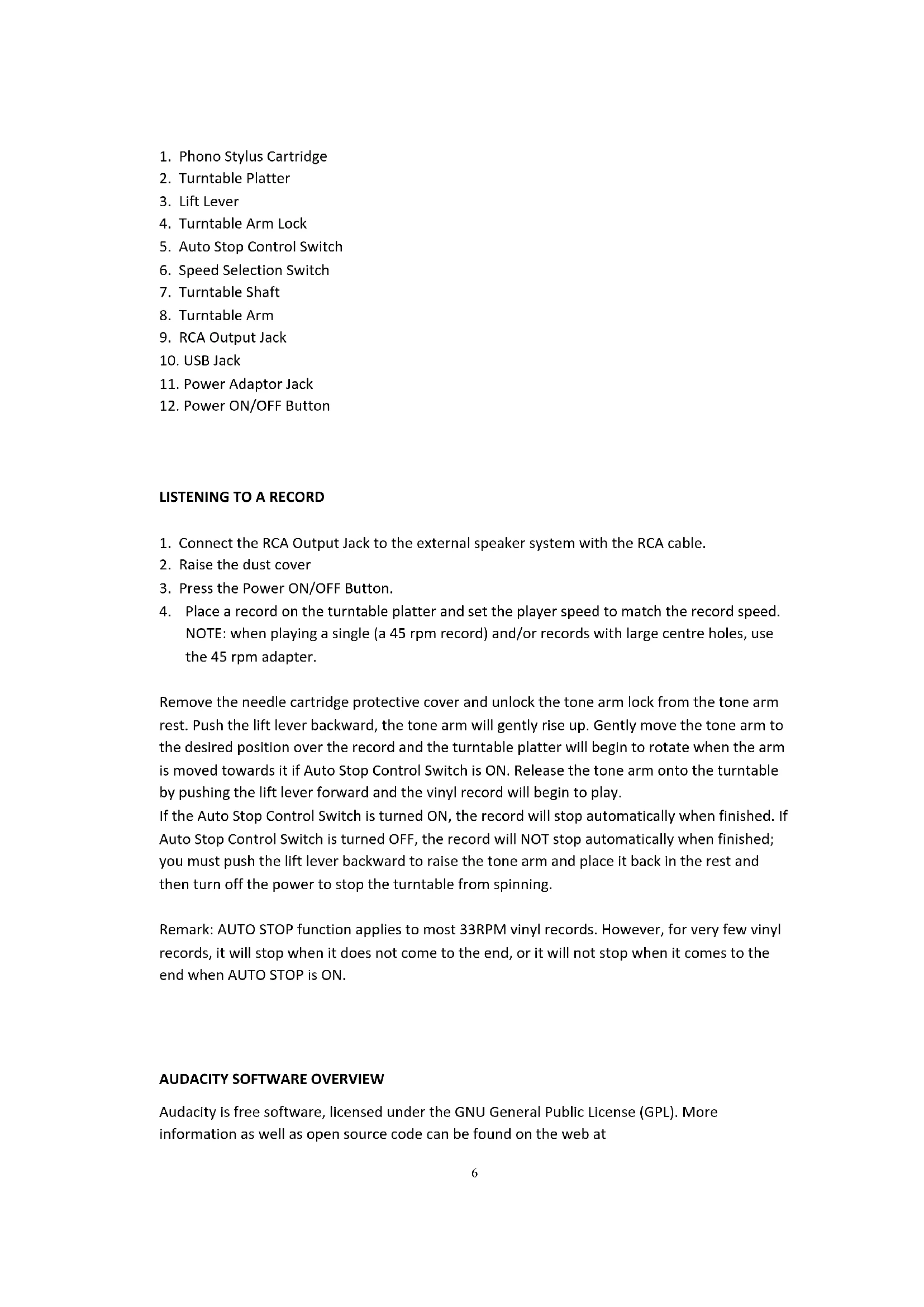


| Product type | Belt-drive vinyl turntable |
| Model | Lenco L30BK |
| Color | Black |
| Dimensions | 410 × 330 × 116 mm |
| Net weight | Approximately 3.1 kg |
| Power supply | AC adapter 100-240 V~50/60 Hz, output 12 V 1 A |
| Power consumption | 2.4 W |
| Playback speeds | 33 1/3 rpm and 45 rpm |
| Motor | DC motor |
| Stylus cartridge | Audio Technica AT-3600L, moving magnet (MM) type |
| Optimal tracking force | 2.5 to 3.5 g |
| Audio output | RCA line output (400 to 600 mV) |
| USB port | Yes, for MP3 conversion via PC |
| Automatic stop | Yes, switchable (ON/OFF) |
| Disc diameter | Up to 300 mm (30 cm) |
| Included accessories | 45 rpm adapter, RCA cable, AC adapter, dust cover |
| Included software | Audacity (free, to download) |
| Operating temperature range | 0 °C to 35 °C |
| Maintenance and cleaning | Soft dry cloth; avoid solvents |
| Warranty | Compliant with European legislation, warranty valid through the retailer |
| Adapter manufacturer | Dongguan Blue Iron Enterprise, model BI12T-120100-I |
Frequently Asked Questions - L30BK LENCO
User questions about L30BK LENCO
0 question about this device. Answer the ones you know or ask your own.
Ask a new question about this device
Download the instructions for your Turntable in PDF format for free! Find your manual L30BK - LENCO and take your electronic device back in hand. On this page are published all the documents necessary for the use of your device. L30BK by LENCO.
USER MANUAL L30BK LENCO
natural_image
White Lerico radio with black dials and a small stand, no visible text or symbols on the device itself.USER MANUAL Wooden turntable with MMC cartridge and PC encoding
Usage of controls or adjustments or performance of procedures other than those specified herein may result in hazardous radiation exposure.
KEEP THESE INSTRUCTIONS IN MIND:
- Do not cover or block any ventilation openings. When placing the device on a shelf, leave 5 cm (2") free space around the whole device.
- Install in accordance with the supplied user manual.
- Keep the device away from heat sources such as radiators, heaters, stoves, candles and other heat-generating products or naked flame. The device can only be used in moderate climates. Extremely cold or warm environments should be avoided. Working temperature between 0^ and 35^ C.
- Avoid using the device near strong magnetic fields.
- Electrostatic discharge can disturb normal usage of this device. If so, simply reset and restart the device following the instruction manual. During file transmission, please handle with care and operate in a static-free environment.
- Warning! Never insert an object into the product through the vents or openings. High voltage flows through the product and inserting an object can cause electric shock and/or short circuit internal parts. For the same reason, do not spill water or liquid on the product.
- Do not use in wet or moist areas such as bathrooms, steamy kitchens or near swimming pools.
- The device shall not be exposed to dripping or splashing and make sure that no objects filled with liquids, such as vases, are placed on or near the apparatus.
- Do not use this device when condensation may occur. When the unit is used in a warm wet room with damp, water droplets or condensation may occur inside the unit and the unit may not function properly; let the unit stand in power OFF for 1 or 2 hours before turning on the power: the unit should be dry before getting any power.
- Although this device is manufactured with the utmost care and checked several times before leaving the factory, it is still possible that problems may occur, as with all electrical appliances. If you notice smoke, an excessive build-up of heat or any other unexpected phenomena, you should disconnect the plug from the main power socket immediately.
- This device must operate on a power source as specified on the specification label. If you are not sure of the type of power supply used in your home, consult your dealer or local power company.
- Keep away from animals. Some animals enjoy biting on power cords.
- To clean the device, use a soft dry cloth. Do not use solvents or petrol based fluids. To remove severe stains, you may use a damp cloth with dilute detergent.
- The supplier is not responsible for damage or lost data caused by malfunction, misuse, modification of the device or battery replacement.
- Do not interrupt the connection when the device is formatting or transferring files. Otherwise, data may be corrupted or lost.
- If the unit has USB playback function, the USB memory stick should be plugged into the unit directly. Don't use an USB extension cable because it can cause interference resulting in failing of data.
- The rating label has been marked on the bottom or back panel of the device.
- This device is not intended for use by people (including children) with physical, sensory or mental disabilities, or a lack of experience and knowledge, unless they're under supervision or have received instructions about the correct use of the device by the person who is responsible for their safety.
- This product is intended for non professional use only and not for commercial or industrial use.
- Make sure the unit is adjusted to a stable position. Damage caused by using this product in an unstable position vibrations or shocks or by failure to follow any other warning or precaution contained within this user manual will not be covered by warranty.
-
Never remove the casing of this device.
-
Never place this device on other electrical equipment.
-
Do not allow children access to plastic bags.
-
Only use attachments/accessories specified by the manufacturer.
-
Refer all servicing to qualified service personnel. Servicing is required when the device has been damaged in any way, such as the power supply cord or the plug, when liquid has been spilled or objects have fallen into the device, when the device has been exposed to rain or moisture, does not operate normally, or has been dropped.
-
Long exposure to loud sounds from personal music players may lead to temporary or permanent hearing loss.
-
If the product is delivered with power cable or AC power adaptor:
-
If any trouble occur, disconnect the AC power cord and refer servicing to qualified personnel.
- Don't step on or pinch the power adaptor. Be very careful, particularly near the plugs and the cable's exit point. Do not place heavy items on the power adaptor, which may damage it. Keep the entire device out of children's reach! When playing with the power cable, they can seriously injure themselves.
● Unplug this device during lightning storms or when unused for a long period.
● The socket outlet must be installed near the equipment and must be easily accessible. - Do not overload ac outlets or extension cords. Overloading can cause fire or electric shock.
● Devices with class 1 construction should be connected to a main socket outlet with a protective earthed connection.
● Devices with class 2 construction do not require a earthed connection.
● Always hold the plug when pulling it out of the main supply socket. Do not pull the power cord. This can cause a short circuit. -
Do not use a damaged power cord or plug or a loose outlet. Doing so may result in fire or electric shock.
-
If the product contains or is delivered with a remote control containing coin/cell batteries: Warning:
-
“Do not ingest battery, Chemical Burn Hazard” or equivalent working.
● [The remote control supplied with] This product contains a coin/button cell battery. If the battery is swallowed, it can cause severe internal burns in just 2 hours and can lead to death. - Keep new and used batteries away from children.
- If the battery compartment does not close securely, stop using the product and keep it away from children.
-
If you think batteries might have been swallowed or placed inside any part of the body, seek immediate medical attention.
-
Caution about the use of Batteries:
● Danger of explosion if battery is incorrectly replaced. Replace only with the same or equivalent type.
● Battery cannot be subjected to high or low extreme temperatures, low air pressure at high altitude during use, storage or transportation.
● Replacement of a battery with an incorrect type that can result in an explosion or the leakage of flammable liquid or gas.
- Disposal of a battery into fire or a hot oven, or mechanically crushing or cutting of a battery, that can result in an explosion.
● Leaving a battery in an extremely high temperature surrounding environment that can result in an explosion or that leakage of flammable liquid or gas.
● A battery subjected to extremely low air pressure that may result in an explosion or the leakage of flammable liquid or gas.
● Attention should be drawn to the environmental aspects of battery disposal.
INSTALLATION
- Unpack all parts and remove protective material.
- Do not connect the unit to the mains before checking the mains voltage and before all other connections have been made.
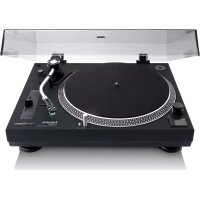
TURNTABLE PARTS:
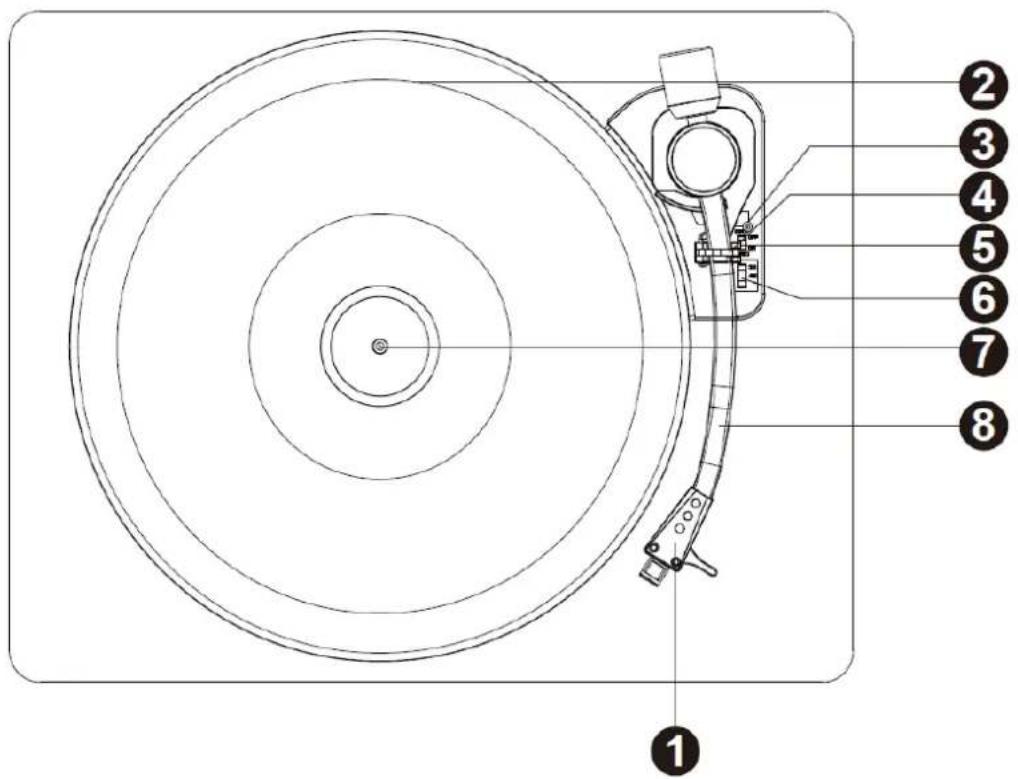
- Phono Stylus Cartridge
- Turntable Platter
- Lift Lever
- Turntable Arm Lock
- Auto Stop Control Switch
- Speed Selection Switch
- Turntable Shaft
- Turntable Arm
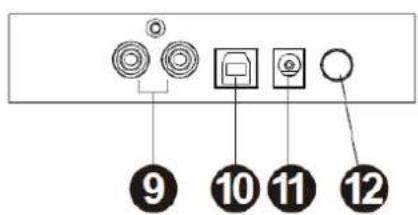
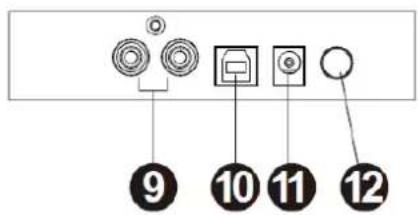
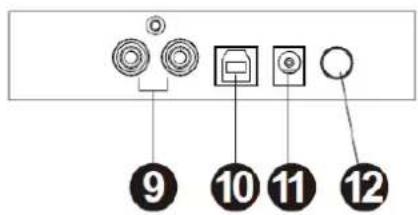
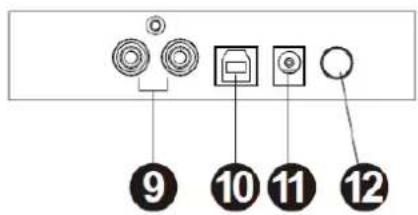
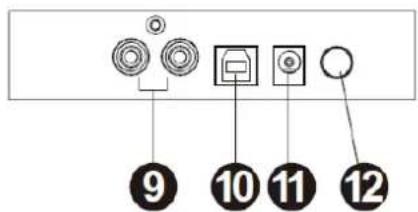
- RCA Output Jack
- USB Jack
- Power Adaptor Jack
- Power ON/OFF Button
- Connect the RCA Output Jack to the external speaker system with the RCA cable.
- Raise the dust cover
- Press the Power ON/OFF Button.
- Place a record on the turntable platter and set the player speed to match the record speed. NOTE: when playing a single (a 45 rpm record) and/or records with large centre holes, use the 45 rpm adapter.
Remove the needle cartridge protective cover and unlock the tone arm lock from the tone arm rest. Push the lift lever backward, the tone arm will gently rise up. Gently move the tone arm to the desired position over the record and the turntable platter will begin to rotate when the arm is moved towards it if Auto Stop Control Switch is ON. Release the tone arm onto the turntable by pushing the lift lever forward and the vinyl record will begin to play.
If the Auto Stop Control Switch is turned ON, the record will stop automatically when finished. If Auto Stop Control Switch is turned OFF, the record will NOT stop automatically when finished; you must push the lift lever backward to raise the tone arm and place it back in the rest and then turn off the power to stop the turntable from spinning.
Remark: AUTO STOP function applies to most 33RPM vinyl records. However, for very few vinyl records, it will stop when it does not come to the end, or it will not stop when it comes to the end when AUTO STOP is ON.
AUDACITY SOFTWARE OVERVIEW
Audacity is free software, licensed under the GNU General Public License (GPL). More information as well as open source code can be found on the web at
* Please ensure you have installed the software before starting.
Setting up your PC to work with Audacity
- Connect an input source to the unit.
- Connect the USB lead to your computer.
- Install the Audacity recording software.
- Open the Audacity program.
- Select Preference from the Edit tab in the Audacity Menu.
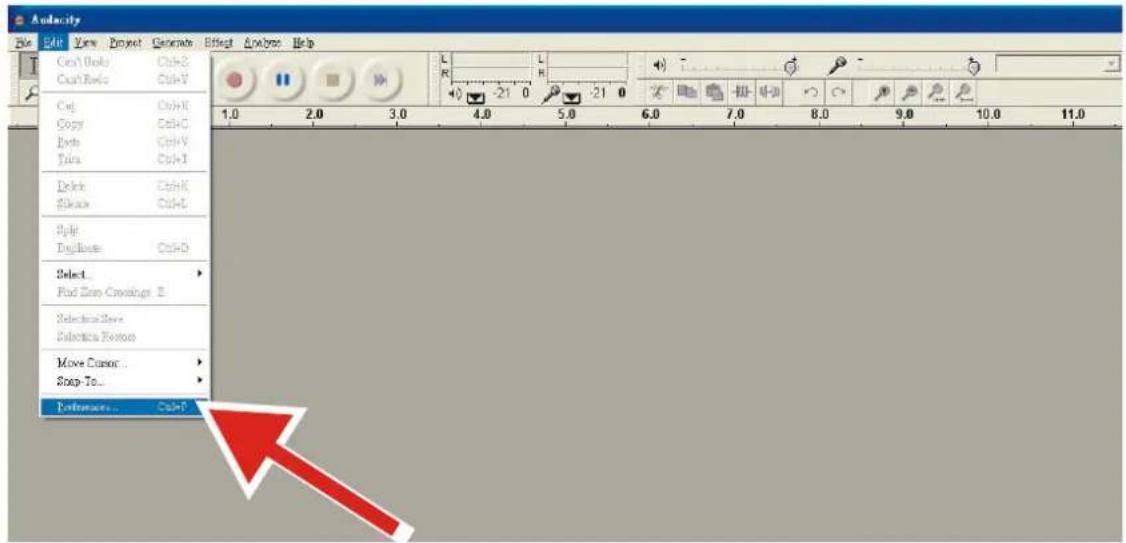
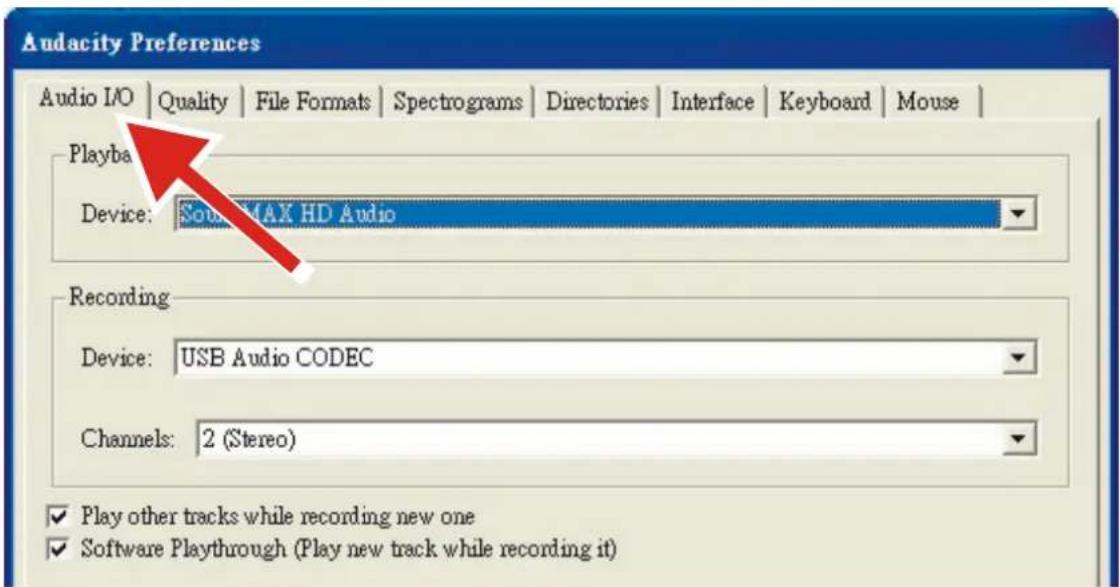
- Select Audio I/O tab at the top left.
• Under Playback, Device, select your internal sound card.
• Under Recording, Device, select USB Audio CODEC.
• Under Recording, Channels, select 2 (Stereo).
- Check the box marked Play other tracks while recording new one.
- Check the box marked Software Playthrough.
Recording Albums with Audacity
1. Saving a project
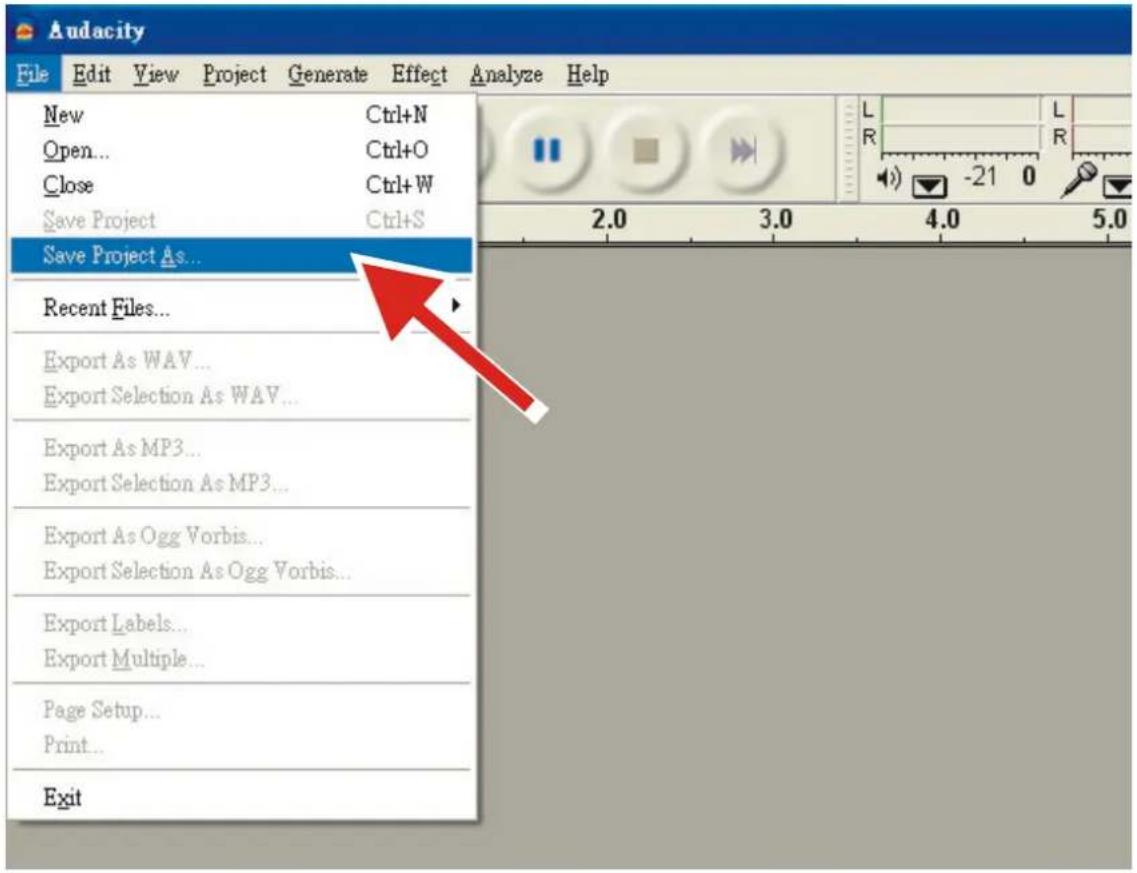
- Audacity writes all the changed and recorded audio to a directory called Projectname_data, which is located right where you saved the project file itself.
- Thus, select Save Project as from your Audacity File tab and choose a location and filename for your project.
- Please note that when you startup Audacity fresh, only the "Save As..." menu option is available.
2. How to record
- Set your USB turntable up to play the song or album you want to record.
- Click on the red Record button

to begin recording.
- Lower tone arm on USB turntable onto album and track you want to record.
- Click on the blue Pause button

to pause the recording. Press it again to continue.
- Click on the yellow Stop button.

That's it. You can now play around with your recording and explore the editing capabilities of Audacity. Remember that you can use the Undo function almost without limits while the project is open.
NOTE: CD's cannot be burned directly from the Audacity application. Other CD burning applications should be used.
Remark: For advanced operation, refer instructions inside CD.
TIPS FOR BETTER TURNTABLE PERFORMANCE
- When opening or closing the turntable cover, handle it gently, gripping it either at the centre or at each side.
- Do not touch the needle tip with your fingers; avoid bumping the needle against the turntable platter or record edge.
- Gently wipe the dust cover and turntable housing with a soft cloth. Use only a small amount of mild detergent to clean the turntable and dust cover.
- Never apply harsh chemicals or solvents to any part of the turntable system.
Power supply adaptor
Manufacturer: Dongguan Blue Iron Enterprise
Model number: BI12T-120100-I
Use only original AC adaptor
Use only the power supply listed in the user instructions
| Information | Value and and precision |
| Manufacturers name or trade mark, commercial registration and address | - Dongguan Blue Iron Enterprise |
| Model Identifier | - BI12T-120100-I |
| Input voltage | 100-240V, 50/60H, 0.5A |
| Input AC frequency | 100-240V |
| Output voltage | 3.0-24.0V |
| Output current | 0.01-2.4A |
| Output Power | 12W |
| Average active efficiency | 84.1% |
| Efficiency at low load (10%) | 79.27% |
| No load Power consumption | 0.08W |
| Lenco | |
| Turntable | L-30 / L-101 |
| Type | Belt drive auto-stop |
| Drive Motor | DC motor |
| Speed | 33 1/3rpm,45rpm |
| Wow and flutter | < 0.35% |
| Turntable platter | 300mm |
| Cartridge | |
| Type | Audio Technica AT-3600L |
| Stylus | 0.6mil |
| Optimum tracking force | 2.5-3.5gr |
| Output | 2.4mv±3db |
| Frequency response | -1.5±6db(10KHz) |
| Crosstalk | 16db(1KHz) |
| Signal-to-noise ratio(S/N) | 40db |
| General | |
| ADAPTOR | input AC100-240V~50/60Hz0.5A |
| output DC12V1000mA | |
| PRODUCT | DC12V200mA |
| Audio output(Line Out) | 400-600mv |
| Power consumption | 2.4W |
| Dimension | 410*330*116MM |
| Net weight | approx 3.1KGS |
1. Guarantee
Commaxx B.V. offers service and warranty in accordance to European law, which means that in case of repairs (both during and after the warranty period) you should contact your local dealer.
Important note: It is not possible to send products that need repairs to Commaxx B.V. directly.
Important note: If this unit is opened or accessed by a non-official service center in any way, the warranty expires.
This device is not suitable for professional use. In case of professional use, all warranty obligations of the manufacturer will be voided.
2. Disclaimer
Updates to Firmware and/or hardware components are made regularly. Therefore some of the instruction, specifications and pictures in this documentation may differ slightly from your particular situation. All items described in this guide for illustration purposes only and may not apply to particular situation. No legal right or entitlements may be obtained from the description made in this manual.
3. Disposal of the Old Device
natural_image
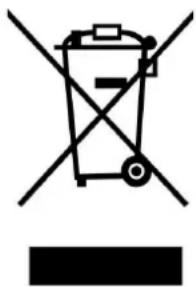
Symbol of a trash bin crossed out by two crossed lines, with a blank rectangular base below (no text or symbols)This symbol indicates that the relevant electrical product or battery should not be disposed of as general household waste in Europe. To ensure the correct waste treatment of the product and battery, please dispose them in accordance to any applicable local laws of requirement for disposal of electrical equipment or batteries. In so doing, you will help to conserve natural resources and improve standards of environmental protection in treatment and disposal of electrical waste (Waste Electrical and Electronic Equipment
Directive).
4. CE Marking
Hereby, Commaxx B.V. Wiebachstraat 37, 6466 NG Kerkrade, The Netherlands, declares that this product is in compliance with the essential EU directive requirements.
The declaration of conformity may be consulted via techdoc@commaxxgroup.com

5. Service
For more information and helpdesk support, please visit www.lenco.com
Commaxx B.V. Wiebachstraat 37, 6466 NG Kerkrade, The Netherlands.
Nederlands
LET OP:
4. Opnemen
natural_image
Symbol of a trash bin crossed out by two crossed lines, with a solid black rectangle below (no text or labels)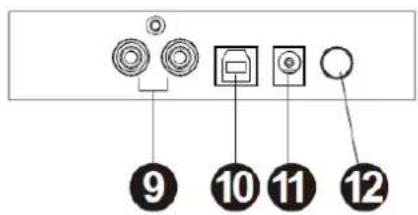
6. Aufnahme
natural_image
Symbol of a trash bin crossed out by two diagonal lines, representing no waste or discharge (no text or labels)
natural_image
Symbol of a trash bin crossed out by two diagonal lines (no text or numbers present)
10. Cómo grabar
natural_image
Symbol of a trash bin crossed out by two crossed lines, with a solid black rectangle below (no text or labels)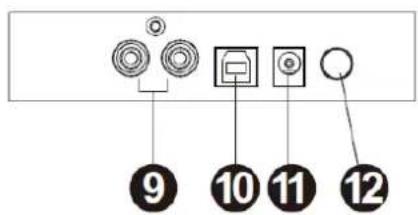
- Панель инструментов
Шумоподавление
natural_image
Audio waveform visualization with no text or symbols, showing a waveform pattern across three vertical bands (no labels or text)После «Cut»
natural_image
Audio waveform visualization with no text or symbolsnatural_image
Symbol of a trash bin crossed with a diagonal line and a horizontal line, representing waste sorting or disposal (no text or labels)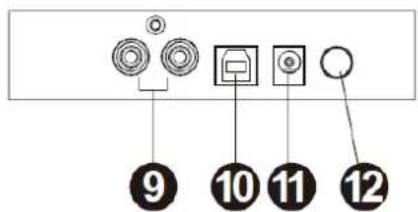
Optagelse af albums med Audacity
2. Sådan optager du
Producent: Dongguan Blue Iron Enterprise
Modelnr.: BI12T-120100-I
Brug kun den originale strømforsyning
natural_image
Simple line drawing of a trash bin with crossed lines indicating no waste or discharge (no text or symbols)
natural_image
Symbol of a trash bin crossed out by two crossed lines, with a blank rectangular base below (no text or labels)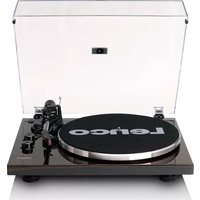
- KEEP THESE INSTRUCTIONS IN MIND:
- INSTALLATION
- AUDACITY SOFTWARE OVERVIEW
- Setting up your PC to work with Audacity
- Recording Albums with Audacity
- Saving a project
- How to record
- TIPS FOR BETTER TURNTABLE PERFORMANCE
- Power supply adaptor
- Guarantee
- Disclaimer
- Disposal of the Old Device
- CE Marking
- Service
- Nederlands
- LET OP:
- Opnemen
- Aufnahme
- Cómo grabar
- Optagelse af albums med Audacity
- Sådan optager du
Brand : LENCO
Model : L30BK
Category : Turntable