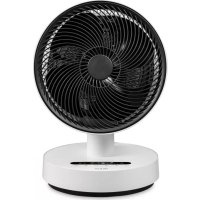
Stream - Heating DUUX - Free user manual and instructions
Find the device manual for free Stream DUUX in PDF.



| Type of product | Heating and cooling fan |
| Brand | Duux |
| Model | Stream |
| Main functions | Heating (2 levels), cooling (4 speeds), horizontal oscillation, timer, natural wind mode, night mode |
| Max air flow | 1200 m³/h |
| Wind range | 7 meters |
| Noise level | ~30 dBA |
| Horizontal oscillation angle | 80 degrees |
| Vertical tilt | 4 positions, up to 30° upward |
| Timer | From 1 to 8 hours |
| Filter | Activated carbon filter (replacement recommended every 5000 hours or ~1 year) |
| Filter cleaning | Every month with vacuum cleaner |
| Exterior maintenance | Soft cloth, possibly moist with mild detergent |
| Remote control | Included, CR2032 battery, storage at the back of the device |
| Remote control battery | CR2032 (included) |
| Power supply | Mains, standard plug |
| Safety | Do not cover, do not use near water, overheating protection (automatic shutdown) |
| Recommended use | Indoor, well-insulated spaces, occasional use |
| Spare parts | Available from the point of sale or authorized distributor |
| Warranty | Not specified, contact customer service |
Frequently Asked Questions - Stream DUUX
User questions about Stream DUUX
0 question about this device. Answer the ones you know or ask your own.
Ask a new question about this device
Download the instructions for your Heating in PDF format for free! Find your manual Stream - DUUX and take your electronic device back in hand. On this page are published all the documents necessary for the use of your device. Stream by DUUX.
USER MANUAL Stream DUUX
Thank you for choosing Duux.
We're so glad you decided to read the Instructions to your new Duux heating I cooling fan. Many Usersusually find instructions and seek up [figure it out] on their own. But studies show that people who read instructions will get up to speed more quickly and efficiently than those who spoke around with trial and error.
At 12:00 we believe in the Importance of a comfortable and healthy living environment. Enhancing your well-being by designing appealing, functional and effective products is the passion that drives us every day. With our range of innovative air treatment products we aim to provide you the best possible indoor air quality.
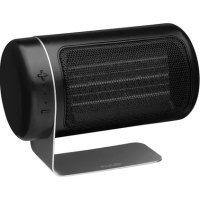
Perfect comfort throughout every season . Fits can be used all year round with it ' s 4 cooling specsand 2 heating settings . The activated carbon filter removes odors and smoke to ensure clean air output .The black LED touch bar offers convenient operation while the compact remote control can be stored inthe back of the device With 7 meters wind reach and 1200m³/hr air flow , Stream provides a very powerfulperformance with extremely silent operation down to 300BA . The natural wind and night moobs addsextra convenience for ultimate comfort during the day and night .
Read this letter carefully to get the trust out of your Stolen Carrying
Table of contents
1.Product overview 4
2. Installation & use 5
3. Functions 7
4. Maintenance 11
5. Technical specifications 13
5. FAQ 14
1. Product overview 2. Installation and use
| Front grill | Fan blades | Rear cover |
| Rear shell | ||
| Upper base | LED touch bar | Remote control |
| Touch keys | ||
| Oscillation platform | Stand-by switch | |
Note: Please take notice of histone instructions and the separately included warning sheet before using the protocol.
Installation
Before use, please check whether the voltage used matches the indicated voltage on the rating label.
This device can be used by children aged from 8 years and above and persons with reduced physical, sensory or mental capabilities or lack of experience and knowledge if they have been given supervision or instruction concerning use of the device in a safe way and understand the hazards involved. Children shall not play with the device. Cleaning and user maintenance should not be performed by children without supervision.
Children younger than 3 years should be kept away from the device unless continuously supervised.
Children older than 3 years and younger than 8 years shall only switch onto the device provided that it has been placed or installed in its intended normal operating position and they have been given supervision or instruction concerning use of the device in a safe way and understand the hazards involved. Children aged from 3 years and less than 8 years shall not plug in, regulate and
clear the device or perform user maintenance.
Caution: Some parts of this device can become very hot and cause burns. Promotional attention must be given where children and vulnerable people are present.
- If the powder curl is damaged, it must be replaced by the manufacturer, its service agent or similarly qualified persons in order to avoid a hazard.
This marking indicates that the product cannot be covered with anything.
Warning: In order to avoid overheating, do not cover the ash.
- The device must not be located immediately below a wall outlet.
Do not use this device in the immediate surroundings of a bath, a shower or a swimming pool.
Warning: This device is not equipped with a sensor to control the room temperature. Do not use this device in small rooms when they are occupied by persons not capable of leaving the room on their own, unless consistent supervision is provided.
- This product is only suitable for well insulated spaces or occasional use.
Warning: satisfies contain materials that are harmful to the environment and must be removed from the device before disposal and disposed properly.
When the device is not in use, please turn off the device by pushing the stand-by switch on the base of the device or remove power plug. Do not leave the device in stand-by mode for a long period of time.
- Do not place the power cord under the liens or cover the power cords. Place the power cord properly to prevent tripping over it.
- Place the device on a flat and secure surface before using product.
- Remove the power plug when the device is not in use. "Never pull the power cord to remove the plug."
Please ensure that this product does not run into any obstructions.
- Do not put your fingers or other objects into the air inlet and outlet when the fan is running.
- When the product is operating, do not put any soft items such as hairs, window/door curtains on the device that might get caught between the fan blades.
- Stop using the device when the power cord or plug is damaged; or the devices damaged after being dropped.
Do not use this device outdoors. This device is only for household and indoor use.
Do not use this device near a window or exposure.
to direct sunlight.
This device cannot be used without a base and is should always be placed horizontally by
- Do not use this device in a place where gasoline, paint or otherflammable materials are stored.
- Remove the power plug before cleaning, repairing or moving the device.
- Remove the power plug when this device is not in use.
Please use this device according to the instructions provided in this manual.
Do not disassemble the device yourself. If the repair is retained, please return it to your point of purchase or service center.
- Products should be less cloummant regularly maintained.
- Do net use extension cords.
Installing the device
Unpack the device and remove the packing materials from the device store the packing materials for possible future transportation.
Insert the power plug into a wall outlet and press the safety switch to position. You will hear a double confirmation beep.
Press the power button to switch on this device and the LED touch bar will illuminate and operate in cooling mode all low speed.
3. Functions
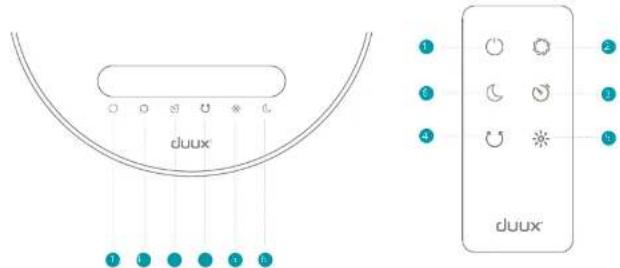
LED touch bar
Power
Change speed
Time
4 Oscillation
Healing mode
Natural wind & night mode
A. Note: If the display has been擦拭ed for 1 minute, the rights will be granted by 80%.
Remote control
Power
Change speed
TACI
Citation
Heeling mass?
Natural wind & night mode

Power
Touch the key to switch on the device. The display will illuminate and operate in coding mode at low wind speed by default. Press again to switch off in standby by mode:
Note: Make sure the stand-by switch is in position in order to switch on the device. If the stand-by switch is in O position, all buttons are disabled.

Change speed
Press that key to increase or decrease the wind speed in the following sequence. Low (1) > Medium (2) > High (3) > Strong (4). Default setting is Low (1) speed. The icons of the LLD display will change accordingly.

Timer
Timer is deactivated when using the device for the first time. Press the key to activate the timer mode. You can switch the timer in the following order: 1h > 2h > 4h > 8h . The corresponding indicators will illuminate on the display. You can also reset the timer count down on the display (e.g. if 4h timer is activated, the display will change to 2h after 2h and so on). After the timer is completed, the device will switch to stand-by mode.

Oscillation
Oscillation is deactivated when using the device for the first time. By pressing the key, the device will automatically oscillate horizontally up to 80 degrees. The indicator on the display will illuminate accordingly. The vertical angle can be adjusted manually in 4 positions, up to 90^ .

Heating mode
Healing mode is deactivated when using the device for the first time. Press the key to turn on this healing mode. Once pressed, the healing mode will start in Medium (2) speed mode and the corresponding indicator on the display will illuminate. Pressing again will increase the healing power to Hign (3) speed mode.
Note: It's not possible to manually adjust the speed of the heating mode. When pressing the key, the device will return in cooling mode.
Pressing this key again will activate ECO mode When the room temperature is below 18% the high (5) speed heating mode will turn on automatically. When the room temperature is between 18% and 22% the low (2) speed heating mode will be turned off. When the room temperature is above 22% the heating mode will start working, to
continue in cooling mode, switch on the fan by pressing the button. Pressing this key for a 4th time will return to cooling mode.

Natural wind & night mode
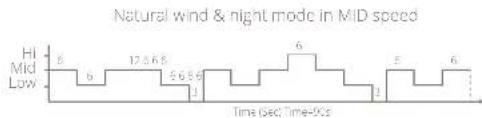
Night mode is discontinued when using the device for the first time. Press the key to activate natural wind & night mode. The corresponding editor will illuminate on the display. Press again to deactivate this mode.
Note: The natural wind & night mode cannot be used in combination with the heating mode. Once natural wind & night mode is activated, pressing the heating mode key will automatically activate the natural wind & night mode.
The natural wind & night mode works according to the following programming:


Installing the battery
Remove the battery cover of the remote control, place the 8V CR202 in the battery compartment for use.
During use, point the remote control towards infrared receiver. Obstructions along the path will hinder the performance of the remote control. When not used, the remote control can be placed in the holder for easier accessibility.
For battery replacement please refer to the figure below. Press the button on the side of pull out the battery tray. Please take notice of the negative and positive symbols on the table
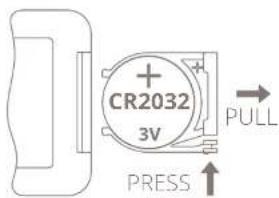
Bacteres contan materials that are harmful to the environment and must be removed from the equipment before disposal and disposed properly.
Vertical angle adjustment
The head of the device can be tilted in 4 different positions to adjust the wind angle, in which the last one is 90^ facing upwards.
4. Maintenance
A. Important: Be sure to remove the power plant from the outer before carrying out maintenance.
- Important: Do not soak or rinse the power plug or the device's water.
Cleaning
Please use a soft cloth to wipe the dust on the body; if the surface is too dirty, it is better to wipe it clean with a clamped cloth mixed with neutral detergent.
- Dont use gasoline, thinner and any others chemical substances as it will easy damage the surface.
Carbon filter
If there is too much dust on the carbon filter it may influence the devices' efficiency. We recommend cleaning the filter every month.
Unscrew the 3 screws from the rear cover and remove it from the device.
Use a vacuum cleaner with soft brush extension to clean the cotton filter. Never use liquid cleaner or water to clean.
Insert the carton fill or back in the near cover and re-attach the near cover to the near shell on the outside.
The carbon filter lifespan 3600 hours (approx. 1 year). Please check ducloscom for replacement carbon filters (art.no.DXHCFF01).
Spare parts
Spare parts and accessories can be requized at the point of purchase or sold distribution.

5. Technical specifications
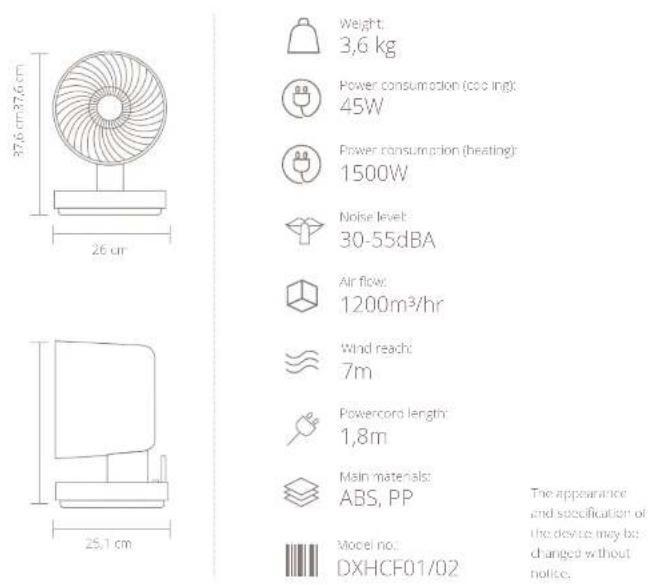
6. FAQ
Q. How often should I replace the carbon filter?
A. You don't have to replace any of the filters. See chapter 4 for maintenance instructions for repairing the carbon filter.
Q. Why can't I manually adjust the wind speed in heating mode?
A. The wind speeds in heading mode are fixed to 2 speeds: Medium (2) and Higt (3). This is to assure safe usage of the heading element.
Q. I smell a strange odor. Is this normal?
A. This small is generated by the heating element when first time use. This is normal and will be reduced gradually during use. It can also occur when dust accumulates on the heating element.
ERP table
Model identifier(s):
| Habitat type | Symbol | Value | Unit | Type of heat input, for electronic storage and space heaters only (select one) | ||
| Hot output | Type of heat input, for electronic storage and space heaters only (select one) | |||||
| Vapor phase output | P vapor | 1000 | kW | Vapor phase heat control with integrated inductance | NA | |
| Vapor phase heat output induced heat | P vapor | 0.5226 | kW | Vapor phase heat control with inductance under outdoor temperature feedback | NA | |
| Water contact current, test output | I water | -3.11 | kW | Jacketed heat transfer control with room temperature sensor or other work | NA | |
| pistonary heating efficiency | η | uncontrolled heat output | NA | |||
| A constant heat input | h heat | kW | kW | Type of heat output/room temperature control (select one) | ||
| A constant heat output | h heat | kW/kW | Single-stage heat input control with temperature control | No | ||
| inattentive mode | P in | 1000kW | W | W is temperature-controlled, the output temperature is control | No | |
| W is temperature-controlled temperature control | No | |||||
| W is temperature-controlled temperature control | Yes | |||||
| Electronic room temperature control (use every time) | No | |||||
| Electronic room temperature control (use once/week time) | No | |||||
| Other control options (multiple selections possible) | ||||||
| Room temperature control with power source detected | No | |||||
| Room temperature control with room temperature detector | No | |||||
| W is temperature control input | No | |||||
| W is temperature control output | No | |||||
| W is cooling time limitation | Yes | |||||
| W is block bulb temperature | No | |||||
hns mze haneiing good an aesurip Stream warrings ene kocingsilator taker
Inhouds opgave

Natural wind & night mode in H speed

Natural wind & night mode in MID speed

Natural wind & night mode in LOW speed
Sroomverbruk(yerwaring) 1500W
Geluidnweat 30-55dBA
Luchtstrom 1200m3/hr
Derek windstrocm 7m
Lengt stroom/tae 1,8m

Model: DXHCF01/02
| Hot output | Type of heat input, for select heating space heaters only (select one) | ||||
| Normal heat output | P1max | S1000 | KW | Normal heat change control with impacted thermal load | NA |
| Normal heat output (induced) | P1min | S1200 | KW | Normal heat change control with reac onset equivalent temperature feedback | NA |
| Normal heat control output | P1max | S1300 | KW | Junction heat change control with room temperature to maintain net surface heat load | NA |
| Airflow heat input | Unscaled heat output | NA | |||
| A normal heat output | Smax | Smax | KW | Type of heat output/room temperature control (select one) | NA |
| A maximum heat output | Pmin | Smax | KW | Single heat heat output and control temperature control | No |
| Inverselyropic | Pavg | Aerosol | KW | Wet heat transfer control, no cost temperature control | No |
| Wet heat transfer control temperature control | No | ||||
| Wet heat transfer control control | Yes | ||||
| Electronic waveguide control braking time | No | ||||
| Junction heat control control of work time | No | ||||
| Other control options (multiple selections possible) | |||||
| Room temperature control with lowering of the wall | No | ||||
| Room temperature control with upper heating/detention | No | ||||
| Wet discharge control vent | No | ||||
| Wet discharge control | No | ||||
| Wet cooling time limitation | Yes | ||||
| Wet block/bolt sensor | No | ||||

Natural wind & night mode in HI speed

Natural wind & night mode in MID speed

Natural wind & night mode in low speed
Model identifier(s):
| Habitat type | Symbol | Value | Unit | Type of heat input, for electronic storage and space heaters only (select one) | |
| Heat output | |||||
| Normal heat output | Pheat | 1000 | WJ | Nominal heat change control with integrated inductance | NA |
| Turbulent heat output induced heat | Pturb heat | 0.5228 | WJ | Nominal heat change control with room temperature control board | NA |
| Turbulent convection heat control | Pturb heat | -0.371 | WJ | Junctional heat change control with room temperature control board | NA |
| Pulsifying energy dissipation | Penergy dissipation | - | - | Unscaled heat output | NA |
| A normal heat input | hheat | 100 | WJ | Type of heat output/room temperature control (select one) | NA |
| A normal heat output | hheat | 0.44W | - | Single-stage heat input control temperature control | No |
| Incompressible fluids | Pins | 10000 | WJ | Wall temperature control, e.g., room temperature control | No |
| - | - | Wires and/or transverse direction control | No | ||
| - | - | Wires and/or transverse direction control | Yes | ||
| - | - | Electrical power source control | No | ||
| - | - | Electrical power source control bus voltage | No | ||
| - | - | Electrical power source control bus work time | No | ||
| - | - | Other control options (multiple selections possible) | |||
| - | - | Room temperature control with power to be detected | No | ||
| - | - | Room temperature control with room temperature detector | No | ||
| - | - | Wires and/or transverse direction | No | ||
| - | - | Wires and/or transverse direction | No | ||
| - | - | Wires and/or transverse direction | Yes | ||
| - | - | Wires and/or transverse direction | No | ||
Notal to s pabllo n no essoo inesioe duorance 10 minutes, at times asseetation on 28 BG
Mando a distancia
Fencendia
Cambisryveloddad
Tenerlior
Caldlanen
Meda:
Modo nocturno y de brise natural
Encendido
Natural wind & night mode in 11 speed

Natural wind & night mode in MID speed

Natural wind & flight mode in 100 mph

| Habitat | Type of heat input, for elective storage land space heaters only (select one) | |||
| Heat output | Type of heat input, for elective storage land space heaters only (select one) | |||
| Volatile heat output | P102 | S100 | W9 | Volatile heat charge control with integrated inductance |
| Volatile heat output indicated | P103 | S102 | W8 | Volatile heat charge control with thermocouple and/or outdoor temperature sensor (SoBed) |
| Volatile heat current and current input | P1025 | S101 | W9 | Junction current charge control with room temperature sensor (room temperature sensor) |
| Airflow ventilation | Unsensed heat output | |||
| Aerosol bed input | Type of heat output/room temperature control (select one) | |||
| Aerosol bed output | P101 | S100 | W9 | Single-stage heat input control temperature control |
| Inflow/outflow | P101 | S100/1 | W9 | Water temperature control, e.g. room temperature control |
| Wen temperature control temperature control | ||||
| Wen temperature control temperature control | ||||
| Electron- room temperature control (unsaturation time) | ||||
| Electron- room temperature control (unsaturation time) | ||||
| Other control options (multiple selections: possible) | ||||
| Room temperature control with oven or radiant fan | ||||
| Room temperature control with oven or radiant fan | ||||
| Wen temperature control | ||||
| Wen temperature control | ||||
| Wen cooling time limitation | ||||
| Wen block bulb tension | ||||

Natural wind & right mode in H speed

Nae of wind & night mode in Mio spceu

Natural wind & light mode in LOW speed
| Habitat type | Symbol | Value | Unit | Type of heat input, for electronic storage and space heaters only (select one) | |
| Heat output | |||||
| Normal heat output | Pheat | 1000 | WJ | Nominal heat change control with integrated inductance | NA |
| Turbulent heat output induced heat | Pturb heat | 0.5228 | WJ | Nominal heat change control with room temperature control board | NA |
| Turbulent convection heat control | Pturb heat | -0.371 | WJ | Junctional heat change control with room temperature control board | NA |
| Pulsifying energy dissipation | Penergy dissipation | Unscaled heat output | NA | ||
| A normal heat output | hheat | 100 | WJ | Type of heat output/room temperature control (select one) | NA |
| A normal heat output | Pnormal heat output | 100 | WJ&WJ | Single-stage heat input control temperature control | No |
| Incompressible fluids | Pin | 10000 | WJ | Wall temperature control, e.g., room temperature control | No |
| Wet surface temperature control | No | ||||
| Wall temperature control | Yes | ||||
| Electrical power source control | No | ||||
| Electrical power source control bus voltage | No | ||||
| Electrical power source control bus work time | No | ||||
| Other control options (multiple selections possible) | |||||
| Room temperature control with power supply control | No | ||||
| Room temperature control with room temperature detector | No | ||||
| Wet surface temperature control | No | ||||
| Wet surface contact control | No | ||||
| Wet cooling time limitation | Yes | ||||
| Wet block/bolt sensor | No | ||||
| Constant pressure | Pressure | 100 | WJ | ||
Notes/notities/les notes/notas/Notitzen Notes/notities/les notes/notas/Notitzen
Designed in The Netherlands bij Duux BV. Made in P.R.C. Duux BV, P.O. Box 145, 5400 AC Uden Netherlands, www.duux.com
© 2019 Duux. All rights reserved.
DUUX® is a trademark of Duux BV,
registered in the EU and other countries.
The brand cited belongs exclusively to the respective owners.
Specifications are subject to modification without notice.

- Thank you for choosing Duux.
- Table of contents
- Product overview 2. Installation and use
- Installation
- Installing the device
- Functions
- LED touch bar
- Remote control
- Power
- Change speed
- Timer
- Oscillation
- Heating mode
- Natural wind & night mode
- Installing the battery
- Vertical angle adjustment
- Maintenance
- Cleaning
- Carbon filter
- Spare parts
- Technical specifications
- FAQ
- ERP table
- Inhouds opgave
- Mando a distancia
- Encendido
Brand : DUUX
Model : Stream
Category : Heating