MX 600 Smart - Blender STEBA - Free user manual and instructions
Find the device manual for free MX 600 Smart STEBA in PDF.



| Brand | Steba |
| Model | MX 600 Smart |
| Product Type | Blender |
| Power | 600 W |
| Maximum Capacity (Solids) | 1 250 ml |
| Maximum Capacity (Liquids) | 1 750 ml |
| Bowl Material | Glass |
| Main Functions | SMART Control automatic, Pulse, crushed ice |
| Automatic Program | Speed and time adjustment according to consistency |
| Safety Lock | Automatic stop if lid is opened |
| Overheat Protection | Yes, with stop and cooling |
| Maximum Running Time | 2 minutes, then 1 minute rest |
| Display Type | LED (Power button and SMART Control) |
| Motor Unit Cleaning | Wipe with a damp cloth |
| Bowl and Lid Cleaning | Washable with warm water and detergent, rinse thoroughly |
| Blades | Sharp blades, caution |
| Power Supply | 220-240 V ~ 50/60 Hz |
| Power Cord | Removable? No, fixed |
| Weight | Approx. 3.5 kg |
| Dimensions (L x W x H) | Approx. 20 x 20 x 40 cm |
| Included Accessories | Bowl, lid with insert |
| Repairability | Repairs by authorized service center |
| Warranty | Legal warranty + after-sales service |
| Usage | Domestic and similar (kitchen, office, etc.) |
Frequently Asked Questions - MX 600 Smart STEBA
User questions about MX 600 Smart STEBA
0 question about this device. Answer the ones you know or ask your own.
Ask a new question about this device
Download the instructions for your Blender in PDF format for free! Find your manual MX 600 Smart - STEBA and take your electronic device back in hand. On this page are published all the documents necessary for the use of your device. MX 600 Smart by STEBA.
USER MANUAL MX 600 Smart STEBA
Instructions for use 8
Mode d'emploi 14
This appliance is for private and indoor use only and must not be used commercially. Please read the instruction manual carefully and keep it at a safe place. When the appliance is given to another person the instruction manual should be passed to that person, too. Only use the appliance as described in the instruction manual and pay attention to the safety information. No liability for damages or accidents will be accepted, which are caused by not paying attention to the instruction manual. Remove all packaging and sticker. Wash up all parts carefully (see cleaning).
Safety information
- Connect and operate the appliance in accordance with the specifications shown on the rating label.
- Do not use if the plug cord is damaged. Verify before every use.
- Do not plug with wet hands.
- Connect the power plug to a properly installed and easily accessible socket only.
- To unplug the power plug, always pull the plug – not the cable.
Plug off the appliance after each use or in case of failure. - Do not pull at the cord. Don't pull it over edges and don't bend it too much.
-
Keep the cord away from hot parts.
The appliance can be used by children aged 8 and above and persons with limited physical, sensory or mental capabilities or lack of experience/knowledge, provided that are supervised or have been provided with instruction in the safe use of the appliance and have understood the resulting dangers. Children must not use the packaging as a toy. Cleaning and user maintenance must not be carried out by children unless they are 8 years or older and are supervised.
Children under the age of 8 must be kept away from the appliance and the connecting cable.
Children should be supervised to ensure that they do not play with the appliance or packaging material (e.g. Plastic Bags). -
The appliance must not be operated using a timer or a separate remote system!
-
Never leave the appliance unattended when in use.
-
Do not leave the appliance outdoors or in a damp area.
-
Never immerse the unit in water.
-
Never use the device after a malfunction, e.g. if it felt down or has been damaged in any other manner.
-
The manufacturer is not liable for damage which is occurring due to the usage of the appliance in a different way as described or a mistake in the handling has been made.
-
To prevent injury, repairs such as replacing a damaged cord, should only be carried out by a customer service. Only original spare parts have to be used.
-
Only use the device as described in this manual.
-
This appliance is intended to be used in household and similar applications such as:
o staff kitchen areas in shops, offices and others working environments
o by clients in hotels, motels and other residential type environments
o bed and breakfast type environments.
- Before initial use: clean all parts carefully and leave to dry.
- If an extension cable is used, it has to have a cross-section of 1.5mm^2 . A cable drum must always be unwound.
- If a GS-tested 16 A multi-pin extension is used, it may not be charged with more then 3680 watts due to fire hazard.
- Make sure that children do not tease the cable or that a trip hazard occurs.
- The device must always be disconnected from the power supply if it is not supervised and before assembling, disassembling or cleaning.
Hygiene: Please always clean the device to avoid bacteria and mold formation.
Safety shutdown: if the lid is opened during operation, the device turns off.
Cleaning
Attention! Pull the plug before cleaning.
- Never immerse the unit into water.
- Food residues must be removed for reasons of hygiene.
- Put warm water with some detergent in the glass jar and mix for a while. Then rinse thoroughly.
Clean and dry the lid and the lid insert. - Attention! Blades are sharp!
- Clean the housing with a damp cloth.
- Do not use abrasive or acidic cleaning agents, as well as steel sponges.
Workplace
Important:
Never place this device on or next to hot surfaces (e.g. hot stoves). Only use it on a even, stable and a heat resisting surface. It is important that no inflammable items are near to the device. Do not place the device on the edge of the table so that it cannot be touched by children or fall down when touched.
Getting started

Never let the device run empty, the motor may overheat.
-
Only fill the appliance with solid food up to 1250ml and add some liquid. Liquid food can be mixed up to 1750ml .
-
Place the glass jar with its 2 grooves on the motor part.
- Put the lid on top and engage with rotary motion to the handle.
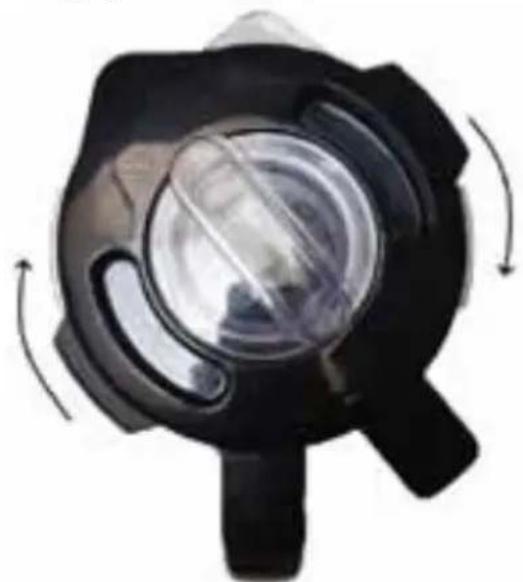
- Only open the refill opening in the lid during mixing if liquids or spices are to be able.
- The maximum mixing time should not exceed 2 minutes, then let the device cool down for 1 minute.
- If the overtemperature protection of the motor triggers, pull the plug and allow the device to cool down.
Mixing
- Plug in the device, the power button flashes. If the button is pressed, the LED lights up.
If the SMART Control button is pressed, the LED flashes. - The automatic program runs with different speeds and mixing times. Depending on the type and quantity of food (hard or soft), the device determines the optimum consistency and turns off automatically once it is obtained.
After mixing, press the power button and pull the plug. - Note: empty the glass jar after mixing. Do not store food in it for a longer time and carefully clean the jar.
Pulse / Crushed Ice
- By briefly pressing the Pulse button, ingredients (such as spices) can be mixed in without running the entire program again.
To crush ice, fill the glass jar with ice cubes or frozen fruits. - Press the power button, the LED lights up.
- By pressing the Pulse button, you determine the working interval yourself (the device works as long as the button is pressed).
- If you press the button twice in quick succession, the automatic program will be started (mix for 3 seconds, pause for 2 seconds, 10x in succession).
Troubleshooting
Dear Client,
Thank you for buying this STEBA product. The following table will help you with problems that may occur when using your device. For many problems there is a simple solution, because not everything that appears like a malfunction must be serious.
Please check the following list before contacting our customer service.
| Problem Reason Suggestion | ||
| Device does not start | ·It is not connected ·Lid is not closed properly | ·Plug in the device ·Check the fuse ·Safety shutdown on the motor not properly triggered |
| Device turns off | ·Motor is overcharged | ·Unplug the device and let it cool down for approx. 20 minutes, then restart it |
Correct Disposal of this product
This marking indicates that this product should not be disposed with other household wastes throughout the EU. To prevent possible harm to the environment or human health from uncontrolled waste disposal, recycle it responsibly to promote the sustainable reuse of material resources. To return
your used device, please use the return and collection systems or contact the retailer where the product was purchased. They can take this product for environmental safe recycling.
Packaging disposal: Do not throw away the package materials. Please put it in the recycling bin.

Gift box: Paper, should be put to the old paper collection point. Plastic packaging material and foils should be collected in the special collection containers.
Service and Repair:
If the appliance must be repaired, please get in touch with your trader or with the manufacturer: