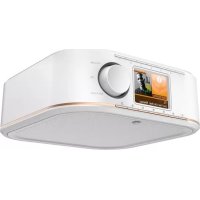
IR350M - Radio HAMA - Free user manual and instructions
Find the device manual for free IR350M HAMA in PDF.



| Brand | Hama |
| Model | IR350M |
| Category | Internet Radio |
| Product Type | Internet Radio with integrated alarm clock |
| Dimensions (approx.) | 200 x 120 x 100 mm |
| Weight (approx.) | 0.5 kg |
| Power Supply | Power adapter (included) |
| Connections | WiFi, AUX IN jack (3.5 mm), Headphone jack (3.5 mm) |
| Main Functions | Internet Radio, DAB+ (via update), FM (if available), 7 preset keys, Navigation menu |
| Display | LCD with information display |
| Remote Control | Not included (control via keys on the device) |
| Interface Languages | French, German, English, etc. |
| Firmware Update | Via WiFi (update port on the back) |
| Maintenance and Cleaning | Clean with a slightly damp, lint-free cloth, without harsh detergents |
| Safety Instructions | Household use only, protect from moisture and overheating, do not open the device, unplug if not used for extended periods |
| Spare Parts and Repairability | No spare parts available, repair by qualified technician |
| Package Contents | IR350M Radio, power adapter, user manual, assembly by clamping and screwing |
| Warranty | In accordance with applicable legislation |
Frequently Asked Questions - IR350M HAMA
User questions about IR350M HAMA
0 question about this device. Answer the ones you know or ask your own.
Ask a new question about this device
Download the instructions for your Radio in PDF format for free! Find your manual IR350M - HAMA and take your electronic device back in hand. On this page are published all the documents necessary for the use of your device. IR350M by HAMA.
USER MANUAL IR350M HAMA
Further information and features are available on:
Controls and Displays
Radio
Front
- [POWER] button
2.[MENU]button - [PRESET] button
- [INFO] button
- [MODE] button
- [HOME] button
- [BACK] button
8.[PRESET1]button
9.[PRESET2]button - [PRESET 3] button
- [PRESET 4] button
- [PRESET 5] button
- [PRESET 6] button
14.[PRESET7]button - Display
- [VOLUME] / [OK] / [NAVIGATE]
Rear
- Update port
- AUX-In socket
- Headphone socket
- Mains power supply

Important note - Operating instructions:
- This is a quick guide to provide you with the most important basic information, such as safety warnings and how to get started using the product.
- For the sake of protecting the environment and saving resources, Hama dispenses with printed operating instructions and provides them only in the form of PDF files / eManuals on www.hama.com.
- Use the search function with the item number of yo product to easily find the product documentation.
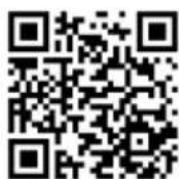
- Alternatively, scan the QR code below to be taken directly to the location of the operating instructions.
- Save the operating instructions to your computer's hard drive for future reference, or print it out if necessary.
1. Explanation of Warning Symbols and Notes

Warning
This symbol is used to indicate safety instructions or to draw your attention to specific hazards and risks.

Note
This symbol is used to indicate additional information or important notes.

Risk of electric shock
This symbol indicates product parts energized with a dangerous voltage of sufficient magnitude to constitute a risk of electric shock.
2. Package Contents
Hama IR350
Power supply unit
- Quick Start Guide
- Clip mount
Screw mount
3. Safety Notes
- The product is intended for private, non-commercial use only.
- Protect the product from dirt, moisture and overheating and use it in dry rooms only.
- As with all electrical devices, this device should be kept out of the reach of children.
- Do not drop the product and do not expose it to any major shocks.
- Do not operate the product outside the power limits given in the specifications.
- Keep the packaging material out of the reach of children due to the risk of suffocation.
- Dispose of packaging material immediately according to locally applicable regulations.
- Do not modify the device in any way. Doing so voids the warranty.

Risk of electric shock
- Do not open the device or continue to operate it if it becomes damaged.
- Do not use the product if the AC adapter, adapter cable or power cable is damaged.
- Do not attempt to service or repair the device yourself. Leave any service work to qualified experts.

Warning - Batteries:
- When inserting batteries, note the correct polarity (+ and - markings) and insert the batteries accordingly. Failure to do so could result in the batteries leaking exploding.
- Do not allow children to change batteries without supervision.
- Do not mix old and new batteries or batteries of a different type or make.
- Remove the batteries from products that are not being used for an extended period
- Do not short-circuit batteries.
- Do not charge batteries.
- Do not throw batteries in a fire.
- Keep batteries out of the reach of children.
4. Before starting
Setting up a network connection 4.1 WLAN (wireless network)
- Ensure that the router is switched on, is functioning correctly and that there is a connection to the internet.
- Activate the WLAN function of your router.
- Follow your router's operating instructions as regards the correct functioning of the WLAN connection.
- Then proceed directly as described under section 5,Getting started'.
5. Getting started
5.1 Switching the device on
- Connect the power cable to a properly installed power socket.

Warning
- Only connect the product to a socket that has been approved for the device. The electrical socket must always be easily accessible.
-
Disconnect the product from the power supply using the on/off switch - if this is not available, unplug the power cord from the socket.
-
Wait until the radio initialisation procedure has finished.
- Press the [POWER] button to switch the radio on.
5.2 Language and setup wizard
The first time the system starts the radio uses English. To change this, proceed as follows:
Press [MENU] > System settings > Language > Select language
Confirm your selection by pressing the [ENTER] or [OK] button.

Note
- You can choose from the following languages: English, German, Danish, Dutch, Finnish, French, Italian, Norwegian, Polish, Portuguese, Spanish, Swedish, Turkish, Czech and Slovak.
6. Care and Maintenance
- Only clean this product with a slightly damp, lint-free cloth and do not use aggressive cleaning agents.
- If you do not use the product for a long time, turn off the device and disconnect it from the power supply. Store it in a clean, dry place out of direct sunlight.
7. Warranty Disclaimer
Hama GmbH & Co. KG assumes no liability and provides no warranty for damage resulting from improper installation/ mounting, improper use of the product or from failure to observe the operating instructions and/or safety notes.
8. Service and Support
Please contact Hama Product Consulting if you have any questions about this product.
Hotline: +49 9091 502-115 (German/English)
Further support information can be found here: www.hama.com
9. Recycling Information
Note on environmental protection:
After the implementation of the European Directive 2012/19/EU and 2006/66/EU in the national legal system, the following applies: Electric and electronic devices as well as batteries must not be
disposed of with household waste. Consumers are obliged by law to return electrical and electronic devices as well as batteries at the end of their service lives to the public collecting points set up for this purpose or point of sale. Details to this are defined by the national law of the respective country. This symbol on the product, the instruction manual or the package indicates that a product is subject to these regulations. By recycling, reusing the materials or other forms of utilising old devices/Batteries, you are making an important contribution to protecting our environment.
10. Declaration of Conformity

Hama GmbH & Co. KG hereby declares that the device complies with the essential requirements and other relevant provisions of Directive 2014/5
EU. See www.hama.com for the declaration of conformity with the relevant directive.
4
0054851
Baxhoe npimechne -PykoBoCTBO no1yatau:
- ΘTO KpaTkoe pyKOBOcTBO, B KOTOpOM copejxATcBAxHbIe 6a3OBbIe CBeJeHnA, TaKne KaK yKa3aHnN NO TexHnke 6e3oNaChOCTn IN BBOy B 3KcPnlyatauHNo YcTpoiCTBa.
- I3 coo6paxhen oxpaHbI OKpykaHoue CpeBn N ekOHOMnn ceHHbIX cbIpBeBbIX pecypcoB cnpMa Hama OTKa3bIbaetc rO NTcNOJIb3OBaHnNEaTHbIX pyKOBOdCTB NO KcNJIyatauNN npedlaeraTnx NCKJIOUHTeJIbHO dIa 3arpy3Kn B opMaTe PDF nIN B VIne 3JeKTPoHnHO pyKOBOdCTBa Ha caIte WwW. hama.com.
- TTo6bl IerYe HauHn HyxHyIO IHΦopMaunIO, NcNoIb3yInTe cyHKuIO nonCKa. B cTPOKe nonCKa BBeDNTe HOMep n3dJIIMRA, TTo6bl nOlyHTb DoCTyn K DOkUMeHtauIN IO 3TOMy n3dJIINHO.
Kpome toro, nIyneHnIOCTyna K pyKOBOdCTBy no 3KcNpyataun MOxHO NcNoB3OBaTb yKa3aHHb HnXe QR-ko.
CoxpaHnTe HactoIe pyKOBOCTBO NO 3KcNlyatauHa KOMMbItepe, T06bl npn Heo6xOIMMOCTB BceJa 6bla BO3MOXHOCTb IM BOCIOJIb3OBaTbcr, IN PO BO3MOXHOCTn paCneYataIte erO.
1.ПпдунрдnteьньгпкTORpamMbI INHCTpyKcnn

BHIMAHHe
Даньим 3начКOM OTмeчБи INHCTpyKцИ, Heco6JIIOHeHne KOTOpbIX MoXeT npINBeCTn K OnaCHO CNTyaцИ.

PpumeyaHne
IOnonHnteJbHaNJIiBaXHaNOpMaun.

Onachoctb nopaxeHn 3JIeKtpueecknM TOKOM
3NaOK npEynpexJaet 06 onaCHOCTn nopaKnBbICOKIM HAnpJxKeHnEM B Cnyuae KacaHnHeN3OJIINPOBaHHbIX TOKOBeNyuxn DeTalei.
2. KomnJIeKr NOcTabKu
Hama IR350
BLOK NITAHIN
KpaTkoe pyKOBoIDCTBO NOJIb3OBATeIa
3axmHoe coeHHHeHne
- Pe3b60BOe coeINHeHne
3. TexHnka 6e3oNaCHOCTN
-ИЗделпpeннэнчehоТолькОДЯДOMaшHERO npIMeHEnH.
-BepebOTrpaBn,BnaIINneperpeBaHn.3KcNlyaTnpoBaTbTOJbKOBCyXNX NOMeueHnx.
He naBaT neTAM!
- He poHraTb. Bepey b OT CnIbHbIX yIapOB.
CobJIOaTbTexHueckne xapaKTepcntuKN.
- YnakOBky He nBaBb DeTAM: ONaCHOCTb acfNkCm.
- YTNJIN3NpOBaTb yNaKOBky B COOTBETCTBUN C MECTHbIMN HOPMaMn.
3anpeaaetcBHOCTb N3MeHeHnB KOHCTpyKUIO. B npotNBOM cnyae rapaHTnHbIe o6aTeNbCTBa aHHyInpuyOTc.

Onachoctb nopaxeHHa TOKOM
- N3dennne He OTKpbIBaTb. 3anpeuaetcnaKcnnyatnpoBaTb HncnpaBHOe N3dennne.
3aPpeaaetc3Kcnjyaataun npHneCnpabHom 6Ioke nHTAHn nn NOBpexdeHHOM ka6ene nHTAHn.
3anpeaetc caMOCTOReTbHO BbINOJIHrTb TexHHueckoe 06CnyXnBaHne Nnn peMOHT yCTpOHTBa. IIObIe paOToI NO TexHHueCKOMy 06CnyXnBAHNIO nn peMOHTy pa3peWaeTcBbINOJIHrTb TOnbKO KbAnuNupOBaHHomy nepcoHaJy.
4.Дeнтвипегн haayanom pa60tbl
Co3dHne cTeBOro coeHHeHn
4.1 WLAN (6ecnpoBdHa cTeb)
- Y6eIntecb, yTO MapuPyTu3aTOp BKnHoueH, npaBnJIbHO pa6oTaET n eCTb NODKNIOUeHne K INHTepHeTy.
- Aktubnyte yHKUno WLAN mapupytn3aTopa.
-Дя obecneueHЯ npabNJIbHoi pa6oTbI coeINHeHnWLAN co6IIOdaIte pyKOBoIDCTBO nO kCnIpyaTuuMapupyTu3aTopa.
3aTeM nepexoNTe K BbIIOJIHeHIO DeIcTBn, ONICAHbIX B pa3JeIe 5. BBOD, B EKcnJyatauHO
5.BBOD B 3KcnnyatauHIO
5.1 BkIIOUeHne
-ПолсоeДинHTe cTeBOI Ka6eJIb KHaДлЕжaUIM OБраЗOM yCTaHOBJIeHHOур3eTke.

PpeynpeKdneHne
- Pπu6op pa3peaetcnoKJIOUaTb TOnbKO K COOTBeTCTByOUsE p03eTe 3JIeKTpocEtN. Po3eTKa 3JIeKTPOCETn DOJXHa 6bITb JERKO IOCTynHa.
- OTKJIIOUaIte yCTPOINCTBO C NOMOuBbIKIOUaTeJIA 3JIeKTPoCETN, a npn erO OTCyTCTBm BbITaUNe IpOBOD n3 p03eTKN.
-Дохдntecb,пoka 3аВерштся Иицалзauя paДио.
- Haxmnte KhoNky [POWER], yTo6bl BKNoCHtB paAnOpnpnemHnk. (HaxaTne Jeboro peryIaTopa.)

PpmeaHne - Pnp nepBOM BKJIOeHN
- Пи повом Вкючени abTomatчeckn 3anyckaetcmaCTep nactpoKn (Setup Wizard).
MacTeP HAcTpoiKn BbIIOJIHReTcHa aHrnnckom 3bIke.
Pa60Ty MaCTepa MoXHO npOnyCTnTb n 3aTeM BHOBb Bbl3BaTb ero.
5.2 Ra3bIK n MaCTep HacTpOuKn
Pn nepBOM 3anycke paHIOnpHmHka nCNOJb3yeTc aHrlnckn 3bIK. YTo6bl N3MeHHTb 3bIK, BblNOJIHHTe yKa3aHHbIe HNKe DeIcTBnI.
Bb6epntoocIeIOBaTeJbHOB[MEUN] Systemeinstellungen (CnCTeMHbIe HacTpoKn) Sprache (R3bIK) Sprache auswahlen (Bb6paTb Ra3bIK)
YTO6bI NOITBepNTb CBOI Bbl6Op, HaxMnte KhoNky [ENTER] nn [OK].

PpmeuHne
Ha Bbl6op DocTyhbl CLeDyOuIne RaBkN: aHflnckn, HemeKn, DAtcKn, rOlJaHdCKn, fHckn, PpaHcy3ckn, nTaJIbHckn, HopBexckn, noIbckn, nopTuRaIbckn, nCpHaHckn, WBeJckn, typeckn, Yewckay n CNoBaIczak
6. YxOu n Texo6cnyxuBaHne
- YnCTky n3dEJIy npOn3BOOHTb TOnbKO 6e3BOPCOBoi Cnerka BnaXHoI caNpTeKo. 3aPpeAeTcR npImeHrTa arpeCCNBhIe YnCTaUne cpeCTBa.
- Ecnn n3dJIe He nCnOJb3yETcH Na npOTaXeHN IOnIro BpeMeH, BblKJIIOHTe erO n OTKJIIOHTe ot cetn. XpaHnte ero B uCTOM cyxom MeCTe, HeNOCTynHOM dIra npAmoro COJIHeHOrO n3JnyeHn.
7. OTKa3 OT rapaHTmHbIX 063aTeNbCTB
KoMaHnHa Hama GmbH & Co. KG He HeceT OTBeCTBeHHOCTb 3a yUeep6, BO3HKnIuB BCJeDCTBHe He npaBnIbHoro MOHTaxa, NOkLIOueHn I NcNoJIb3OBaHn I3dEInr He No Ha3NaeHnO, a TaKKe BCJeDCTBne Heco6JIIODeHn INcTpkyuNn PO EKnIyatauN n TexHnK 6e3OnaCHOCTn.
8. OTen Texo6nyKbAHNA
No Bopocam pemonta nn 3amehbl HeucnpabHbIX n3eJn o6paauTecb K npoDABuy nn B cepBncHyO cnjxby kOmnaHn Hama.
Fopuaa liHHnO tDeNa Texo6CnyxuBaHnA:
+49 9091 502-115 (Hemeuzk, aHrnnckn)
Poiop6Hee cmOTpnte 3decb: www.hama.com
9.Инструкции no ytunnaци Oxpana okpykaiooien cpebl:
CMOMeHTa nepexOda HaunHOJIbHOro 3aKOHODaTeJIbCTBa Ha eBpOneIckne HOpMaTINBbl 2012/19/EU u 2006/66/EU DeNCTBnTeJIbHo cJeNyUoUee: 3JekTpUueckne n 3JekTpOHHbIe
np60bI, a taKxe 6aTapeu 3anpeuaetc yTuIN3npoBaTb C o6bUHbIM Mycopom. Iotpe6ntelb, corlacho 3akoHy, 683AH yTuIN3nPOBaTb 3JeKTPnueckne n 3JeKTPoHHbIe np60bI, a TaKxe 6aTapeu n akKymyTAOpBtIOcNe IH NCNOJb3OBaHnB CneuaJIbHO npEHa3HaueHHbIX dJIg 3TOO nyHKtax c6opa, Jn6o B NpHKtax npOdaXn. DeTalbHae perIamEnTaunr 3TNx Tpe6oBaHn OcyUeCTBnAETCBOM. Heo6xoDMOCb CO6IoDeHn DAHHbIX npEInCaHn OB03Haayetc r Oco6bIM 3HaYKom Ha 3dJIInn, INCTpykUnn NO 3KcNlyataunn INn yNaKOBKe. Ppi nepepaBOTke, NOBTOPHOM NCNoJb3OBaHn MaTePnaJIOB INn pRn dpm FOpMe yTuIN3aunn 6bIBuNX B ynotpe6LeHn np60pOB Bbl NOMraete OxpHe OKpykaioe Cpebl. B COOTBetCTBnC npEIncaHnMaMn NO O6paueHIO C 6batapeMn, B TepMaHnn BblSeHa3BaHHbIe HOpMaTNBbl DeNCTBYOT DJIa yTuIN3aunn 6batape n akKymyTAOpOB.
10.Декларачи npOn3BODnteIa
KOMnHaHamaGmbH&Co.KG HactoIIM NOITBepXdaet,HTO DaHHoe N3dEne IIOHOCTbIO COOTBeTCTByET OCHOBHbIM IN DpyHM COOTBeTCTByHOUIm HopMaTHBaM DInpeKTbBi 2014/53/EC. DeKlapaun o COOTBeTCTBn TOBapa HopMaTHBaM CMOTpuTe Ha Be6caIte www.hama.com.
Hotline: +49 9091 502-115 (Ger/Ang)
Alte informati de suport gasi aici: www.hama.com
Hermed erklærer Hama GmbH & Co. KG, at dette
86652 Monheim/ Germany
www.hama.com
The Spotify software is subject to third party licenses found here: www.spotify.com/connect/third-party-licenses
All listed brands are trademarks of the corresponding companies. Errors and omissions excepted, and subject to technical changes. Our general terms of delivery and payment are applied.

- Further information and features are available on:
- Controls and Displays
- Radio
- Front
- Rear
- Important note - Operating instructions:
- Explanation of Warning Symbols and Notes
- Warning
- Note
- Risk of electric shock
- Package Contents
- Safety Notes
- Warning - Batteries:
- Before starting
- Setting up a network connection 4.1 WLAN (wireless network)
- Getting started
- Switching the device on
- Language and setup wizard
- Care and Maintenance
- Warranty Disclaimer
- Service and Support
- Recycling Information
- Note on environmental protection:
- Declaration of Conformity
- Baxhoe npimechne -PykoBoCTBO no1yatau:
- 1.ПпдунрдnteьньгпкTORpamMbI INHCTpyKcnn
- BHIMAHHe
- PpumeyaHne
- Onachoctb nopaxeHn 3JIeKtpueecknM TOKOM
- KomnJIeKr NOcTabKu
- TexHnka 6e3oNaCHOCTN
- Onachoctb nopaxeHHa TOKOM
- 4.Дeнтвипегн haayanom pa60tbl
- Co3dHne cTeBOro coeHHeHn
- WLAN (6ecnpoBdHa cTeb)
- 5.BBOD B 3KcnnyatauHIO
- BkIIOUeHne
- PpeynpeKdneHne
- PpmeaHne - Pnp nepBOM BKJIOeHN
- Ra3bIK n MaCTep HacTpOuKn
- PpmeuHne
- YxOu n Texo6cnyxuBaHne
- OTKa3 OT rapaHTmHbIX 063aTeNbCTB
- OTen Texo6nyKbAHNA
- 9.Инструкции no ytunnaци Oxpana okpykaiooien cpebl:
- 10.Декларачи npOn3BODnteIa
Brand : HAMA
Model : IR350M
Category : Radio