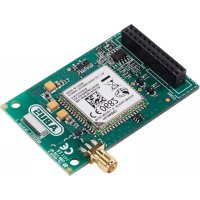
FUMO50001 - Electronic module ABUS - Free user manual and instructions
Find the device manual for free FUMO50001 ABUS in PDF.



| Brand | ABUS |
| Model | FUMO50001 |
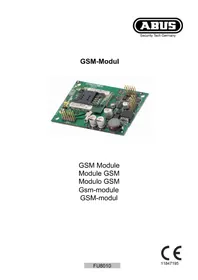
| Product type | GSM module for Secvest wireless alarm system |
| Dimensions (L x W x H) | 63 x 40 x 12 mm |
| Frequency range | 850/900/1800/1900 MHz |
| Max. output power | EGSM 850/900 Class 4 (2W), EGSM 1800/1900 Class 1 (1W) |
| SIM card type | Micro SIM (3FF) 1.8V / 3.0V, 15 x 12 mm |
| Mobile network | 2G (GSM) |
| Environmental class | II |
| Operating temperature | -10 to +55 °C |
| Air humidity | 93% max. (non-condensing) |
| Power consumption (standby) | 15 mA |
| Power consumption (active) | 140 mA |
| Antenna cable length | approx. 300 cm |
| Antenna connector | MMCX (on cable) 50 Ohm |
| Antenna socket on module | MMCX 50 Ohm |
| Main functions | GSM communication for alarms, voice calls, SMS, transmission of analog control panel protocols |
| Mounting | Inside the Secvest alarm control panel (connector on main board) |
| Antenna | Internal or external (switching via installation menu) |
| Required control panel software version | V2.00.00 or higher |
| Maintenance and cleaning | No specific maintenance required. Clean with a dry cloth. |
| Safety | Disconnect the control panel and backup battery before installation. Preferably use contract SIM cards. |
| Spare parts and repairability | GSM antenna, mounting hardware included. Repair by manufacturer or authorized dealer. |
| Warranty | 2 years |
| Disposal | Compliant with WEEE directive (2012/19/EU) |
Frequently Asked Questions - FUMO50001 ABUS
User questions about FUMO50001 ABUS
0 question about this device. Answer the ones you know or ask your own.
Ask a new question about this device
Download the instructions for your Electronic module in PDF format for free! Find your manual FUMO50001 - ABUS and take your electronic device back in hand. On this page are published all the documents necessary for the use of your device. FUMO50001 by ABUS.
USER MANUAL FUMO50001 ABUS
Security Tech Germany
natural_image
Isometric line drawing of an electronic circuit board with integrated circuits and components (no text or symbols)natural_image
Line drawing of a digital telephone device with keypad and control buttons (no text or symbols)Abb. 01
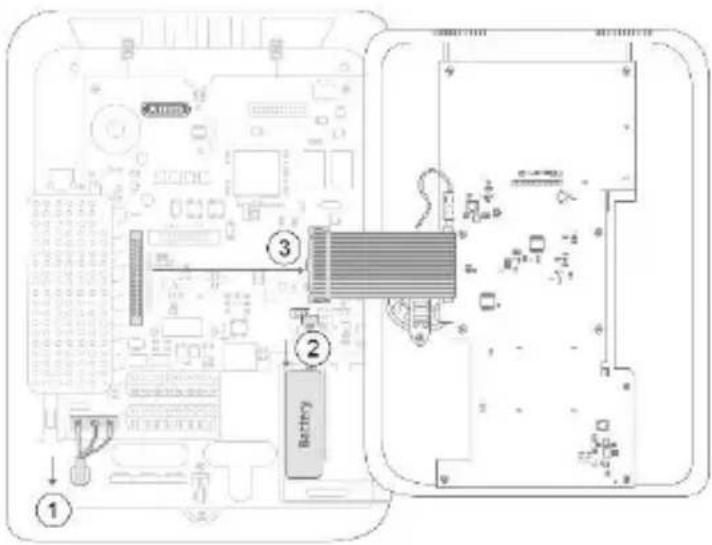
Abb. 02
natural_image
Technical line drawing of an electronic circuit board with two cylindrical components and a labeled section (no text or symbols beyond label)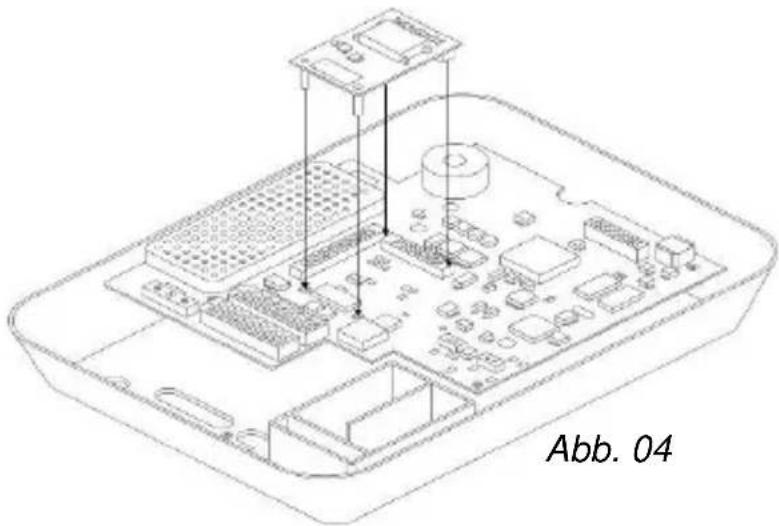
natural_image
Isometric line drawing of a Raspberry Pi with labeled components (no text or symbols beyond label)Montage
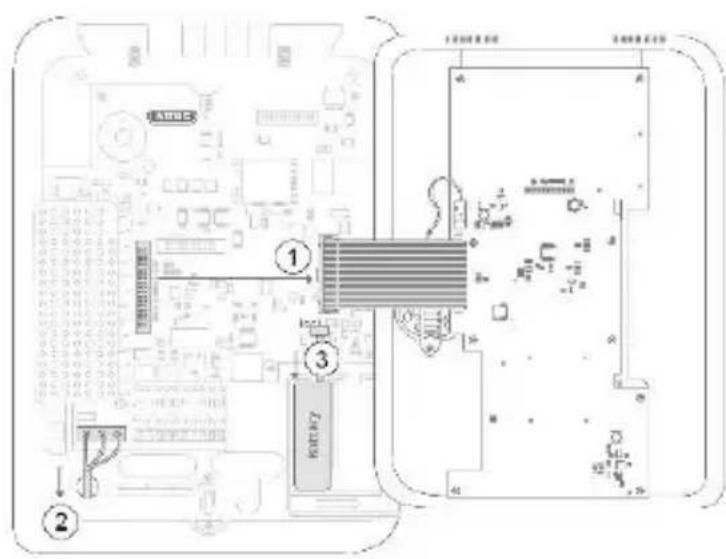
Abb. 05
natural_image
Line drawing of a rectangular electronic device with a digital display and keypad (no text or symbols)Abb. 06
Security Tech Germany
natural_image
Isometric line drawing of an electronic device chassis with integrated circuits and components (no text or symbols)EN Installation instructions and user guide
CE _14
Version 8.1
BOM 12892815
Contents
Introduction 3
Safety information .... 4
Scope of delivery 5
Technical data .... 5
Functional principle and features .... 5
Installation 8
Displays and functions.... 13
Warranty.... 15
Disposal 16
Declaration of conformity 16
Introduction
Introduction
Information on User Guide
Dear customer,
Thank you for purchasing this product. This device is built with state-of-the-art technology.
These instructions contain important installation and operation information. Follow the directions and instructions in this user guide to ensure safe operation. Store this guide in a safe place for future reference. This guide constitutes part of the device. If you pass the device on to third parties, please remember to include this guide with the device.
Intended use
Only use the device for the purpose for which it was built and designed. Any other use is not considered to be the intended use.
Limitation of liability
Everything possible has been done to ensure that the content of these instructions is correct. However, neither the author nor ABUS Security-Center GmbH & Co. KG can be held liable for loss or damage caused by incorrect or improper installation and operation or failure to observe the safety instructions and warnings. No liability can be accepted for resulting damage. No part of the product may be changed or modified in any way. If you do not follow these instructions, your guarantee claim becomes invalid.
Subject to technical modifications.
© ABUS Security-Center GmbH & Co. KG, 05/2017
Safety information
Explanation of symbols
The following symbols are used in this manual and on the device:
| Symbol | Signal word | Meaning |
 | Caution | Indicates a risk of injury or health hazards. |
 | Caution | Indicates a risk of injury or health hazards caused by electrical voltage. |
 | Important | Indicates possible damage to the device/accessories. |
 | Note | Indicates important information. |
Packaging

Caution
- Keep packaging material and small parts away from children - danger of suffocation!
- Remove all packaging material before using the device.
Scope of delivery | Technical data
Scope of delivery
- Secvest GSM module
- GSM antenna
• Installation instructions and user guide
- Mounting material
Technical data
- Dimensions (L x W x H)
63 x 40 x 12 mm
- Frequency range
850/900/1800/1900 MHz
• Maximum output power
EGSM 850 Class4/2 W, EGSM 900 Class4/2 W
- SIM card type
EGSM 1800 Class1/1 W, EGSM 1900 Class1/1 W
- Mobile network
Micro SIM (3FF) 1,8V / 3,0V, 15 x 12 mm
• Environmental class
- Operating temperature
SIM card and network operator supporting 2G
- Humidity
||
• Power consumption
-10°C to 55°C
- Antenna cable length
Max. 93% (non-condensing)
- Antenna connector
GSM standby:15 mA
- Antenna socket
GSM in use: 140 mA
Approx. 300 cm
MMCX (on the cable) 50 Ohm
MMCX (on the module) 50 Ohm
Functional principle and features
Functional principle and features
General
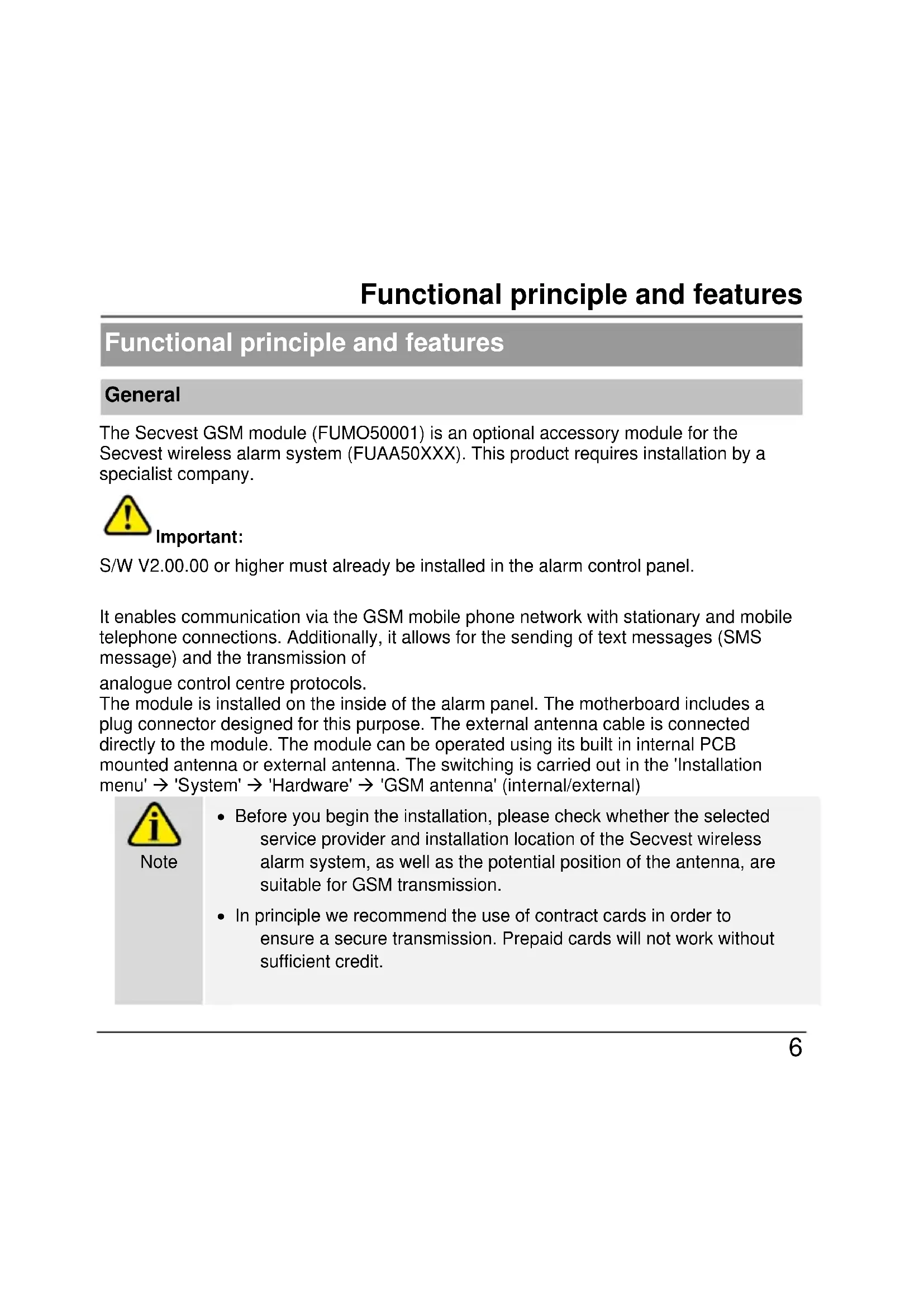
The Secvest GSM module (FUMO50001) is an optional accessory module for the Secvest wireless alarm system (FUAA50XXX). This product requires installation by a specialist company.

Important:
S/W V2.00.00 or higher must already be installed in the alarm control panel.
It enables communication via the GSM mobile phone network with stationary and mobile telephone connections. Additionally, it allows for the sending of text messages (SMS message) and the transmission of
analogue control centre protocols.
The module is installed on the inside of the alarm panel. The motherboard includes a plug connector designed for this purpose. The external antenna cable is connected directly to the module. The module can be operated using its built in internal PCB mounted antenna or external antenna. The switching is carried out in the 'Installation menu' → 'System' → 'Hardware' → 'GSM antenna' (internal/external)

Note
- Before you begin the installation, please check whether the selected service provider and installation location of the Secvest wireless alarm system, as well as the potential position of the antenna, are suitable for GSM transmission.
- In principle we recommend the use of contract cards in order to ensure a secure transmission. Prepaid cards will not work without sufficient credit.
Functional principle and features
| The external antenna – which is used to improve poor GSM levels – may only be installed outside of the alarm panel. As the module already has an internal antenna, this is optional but its use is recommended. | |
| Incorrect or unclean installation work may lead to erroneous interpretation of signals. The consequences of which may include false alarms. The costs incurred by potential dispatches of rescue services, such as the fire service or police, must be borne by the operator of the system. | |
 Caution Caution | The alarm panel must be powered off to install the module, and in order to do this the backup battery must be unplugged. No liability is accepted for any damage caused in the event of non-observance. Any guarantee claims will also be invalidated in the event of non-observance. |
Functional principle and features
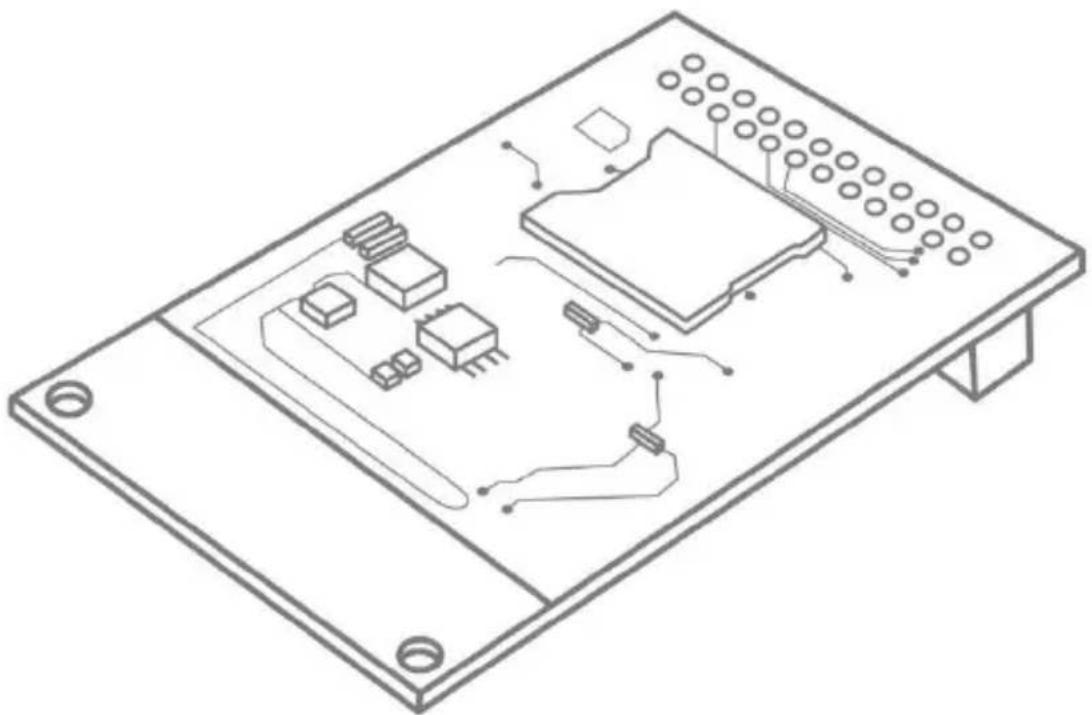
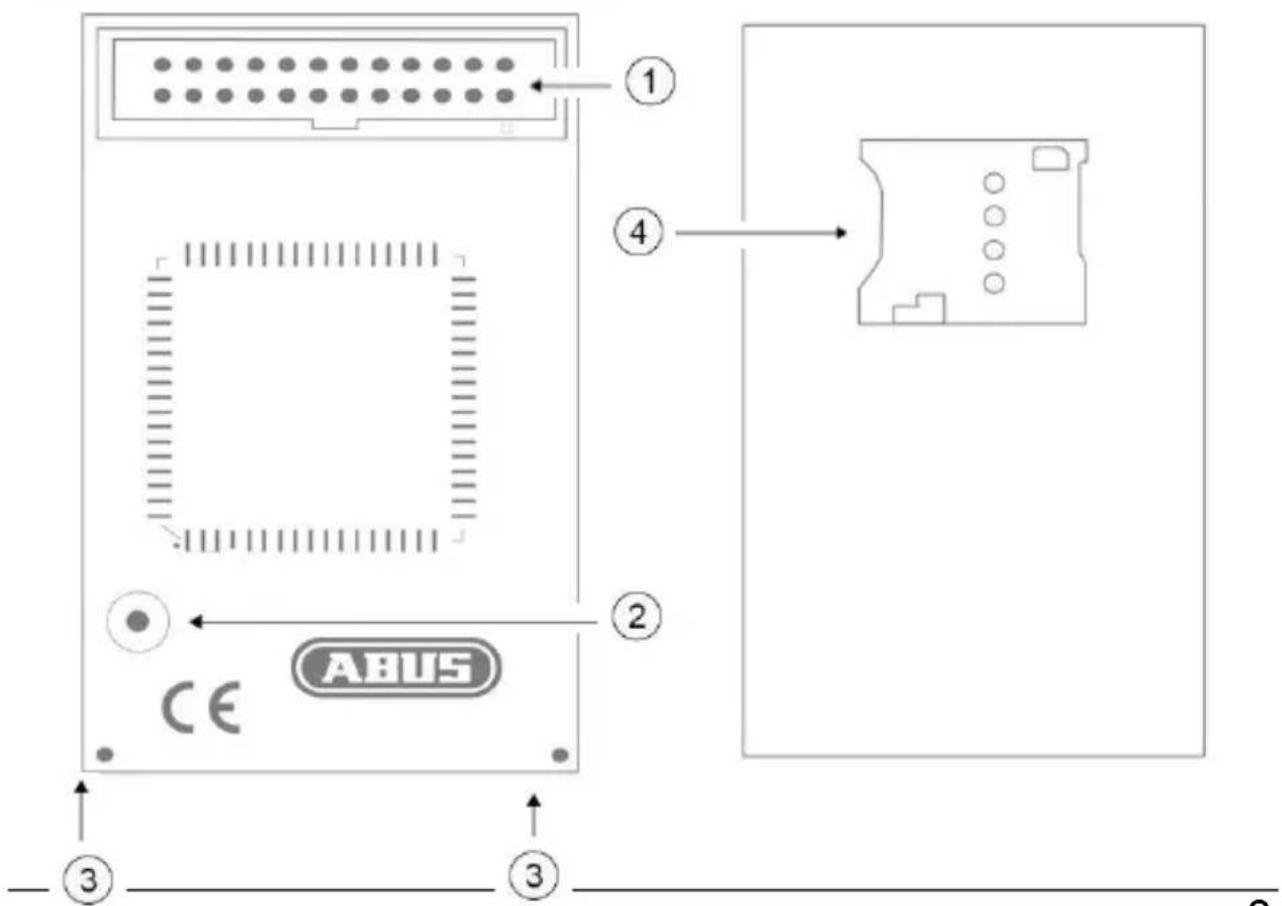
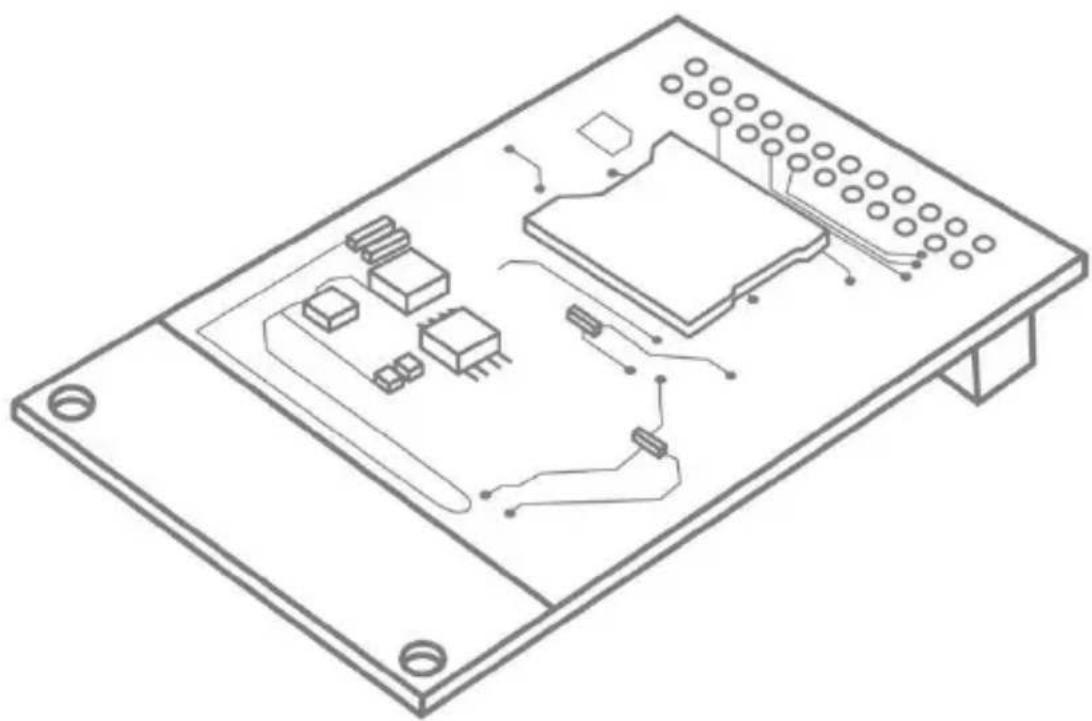
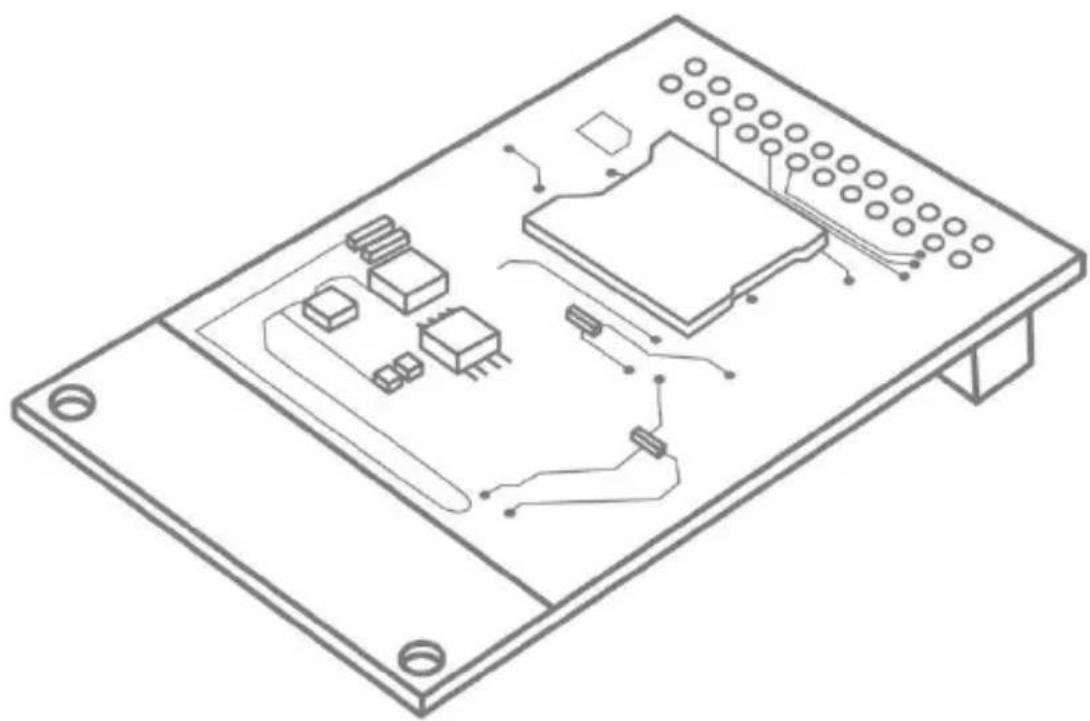
Device description
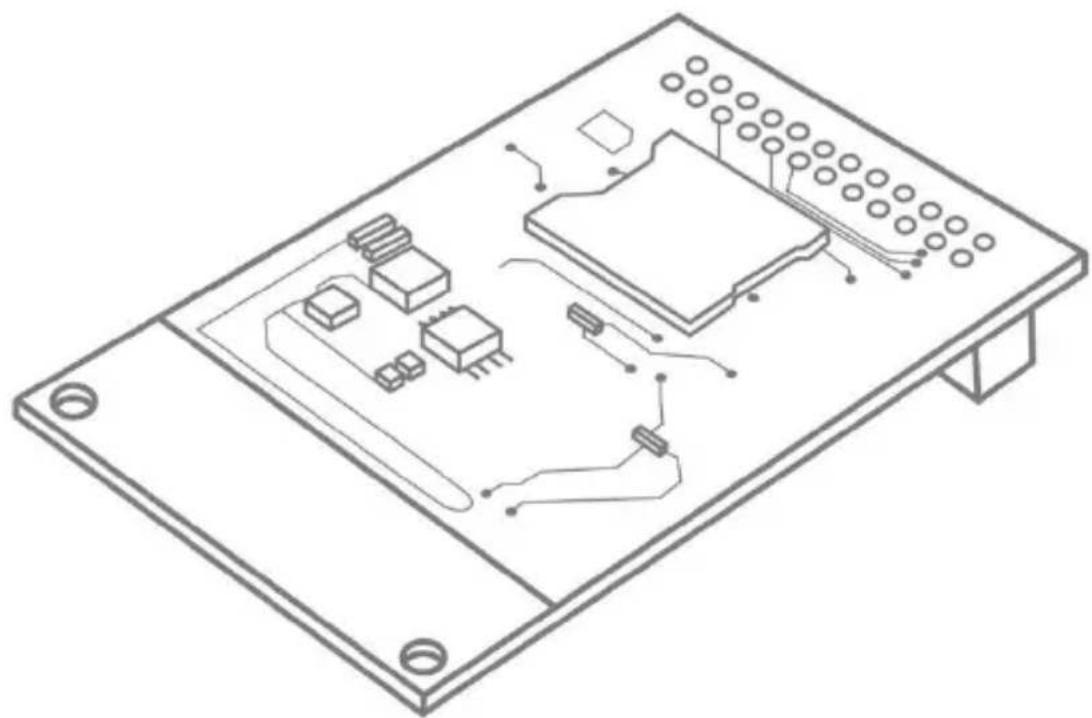
| 1 | Connection strip |
| 2 | Connection socket for the external GSM antenna |
| 3 | Holes for plastic support pillars |
| 4 | SIM card holder |
Rear
Front
Installation
Positioning of the antenna
Before you begin installing the GSM module, please decide on a suitable position for the antenna. When doing so, pay attention to the antenna's cable length.
The following points will enhance signal strength and must be considered:

Note
• Install the antenna so it is as high as possible.
• Install the antenna so it is as far as possible from the alarm system.
- Maintain a distance of at least one metre from metallic objects (steel beams in the wall, lines, pipes, metal cabinets etc.).
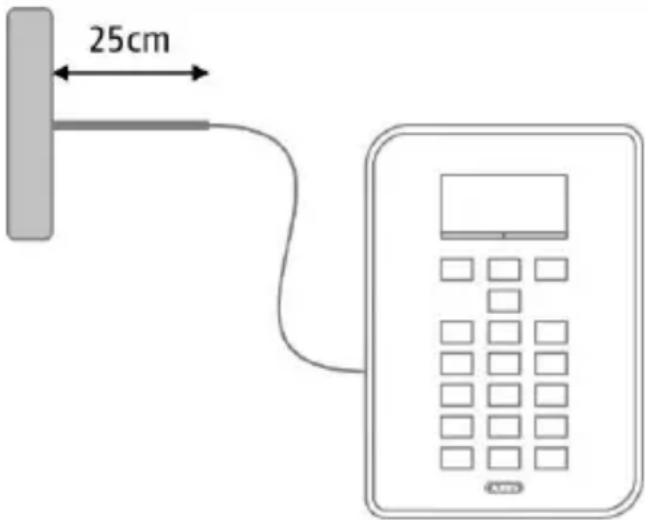
- Make sure that at least 25 cm of the cable leads horizontally from the antenna. (See figure)
Signal strength pre-test
There are two ways to test the signal strength in advance:
1. Via temporary installation of the GSM module in the alarm system
For this method, please observe the steps described for the use of the module in this user guide. Before doing this, ensure that the SIM card that is used has been registered. Make sure that the SIM card is not blocked with a PIN.
2. By using a mobile phone
For this method, ensure that the SIM used for the test is from the same provider, or temporarily use the SIM card that will ultimately be used in the GSM module in the mobile phone. Hold the phone in the exact place in which you want to install the GSM antenna and check the signal strength.

Note
If you have found a position with good signal strength (at least 2 bars on the phone), ensure that the centre of the antenna is located within 2 cm of this point, because the GSM wavelength is very short and even small discrepancies may lead to a significant deterioration of the signal. This could significantly effect operation, in particular when the level is generally poor, and may prevent the registration of the module in the GSM network.
Use of the GSM module

Note
If the alarm panel is already in operation, put the panel into installation mode. This ensures that opening the housing will now not trigger a sabotage alarm.
Installation
| 1. | Open the housing of the Secvest wireless alarm system. |
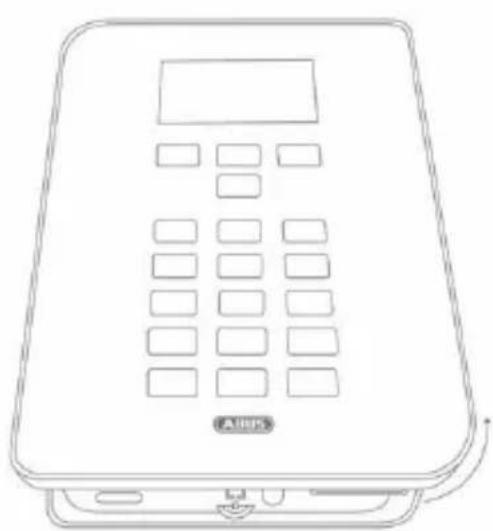
| 2 | Carefully lift the cover of the Secvest wireless alarm system away from the base of the housing. (Fig. 01) |
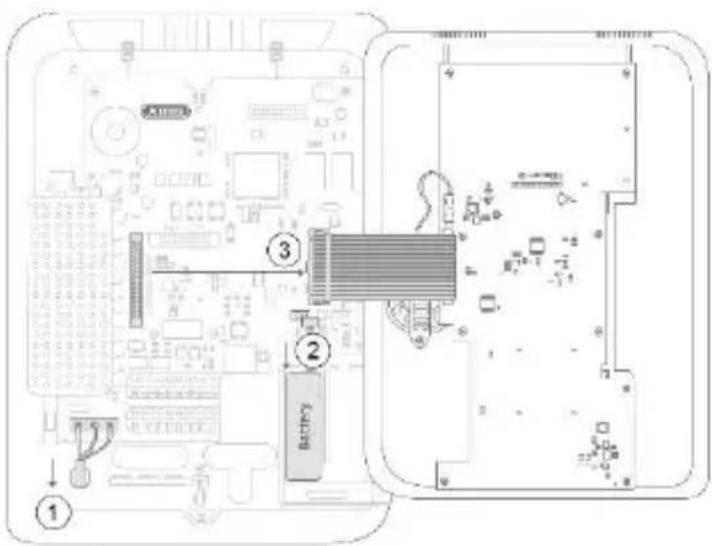
| 3 | Power off the panel and carefully remove the ribbon cable which connects the cover and the motherboard. (steps 1-3 in Fig. 02) |
| 4 | Lead the antenna cable from the outside through the cable openings into the inside of the housing. Secure the antenna outside the housing. |
| 5 | Connect the GSM antenna onto the GSM module. |
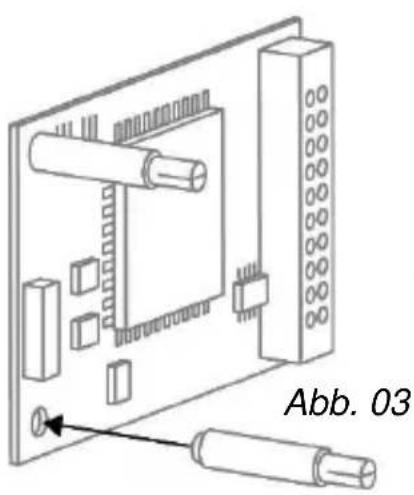
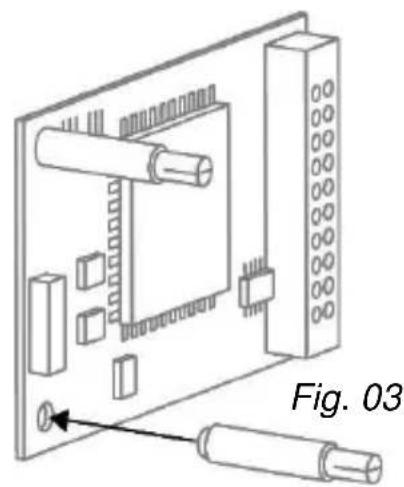
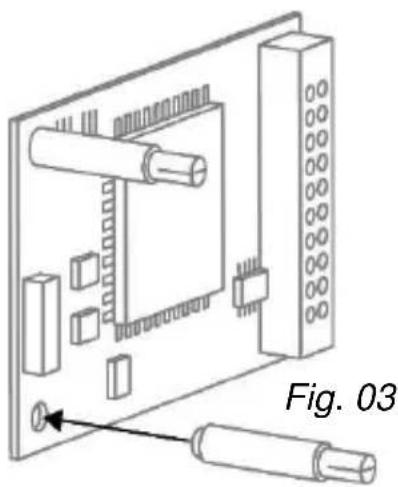
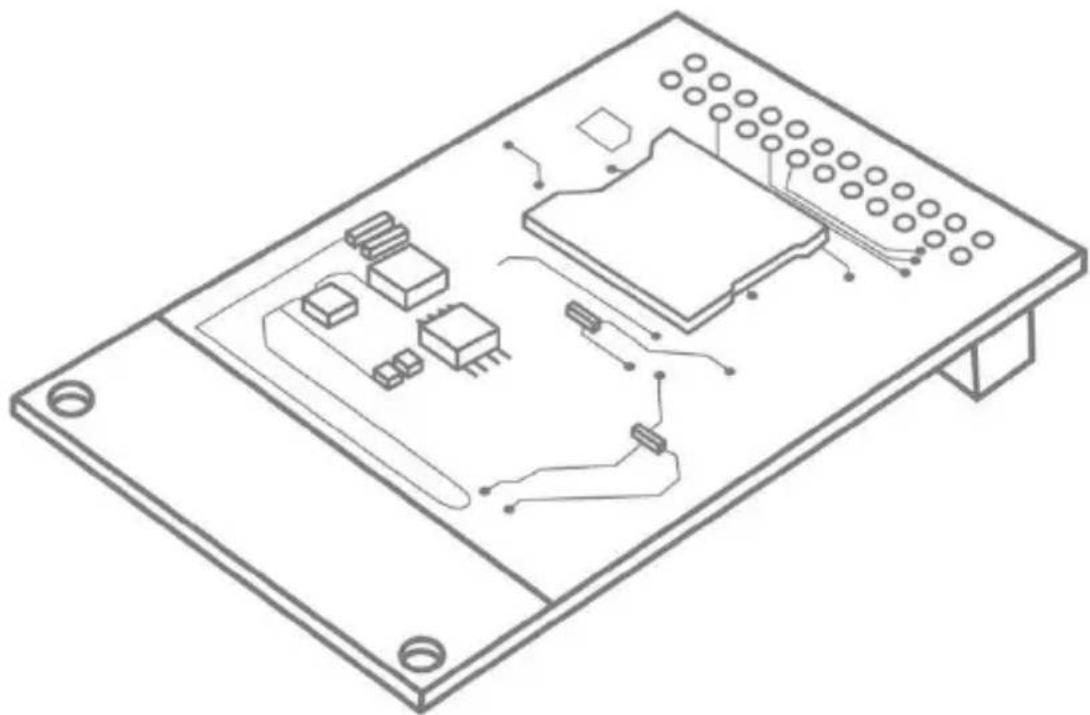
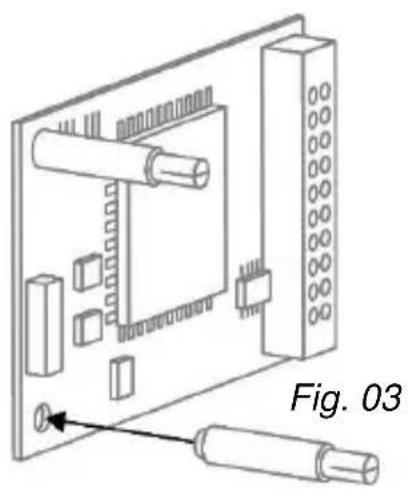
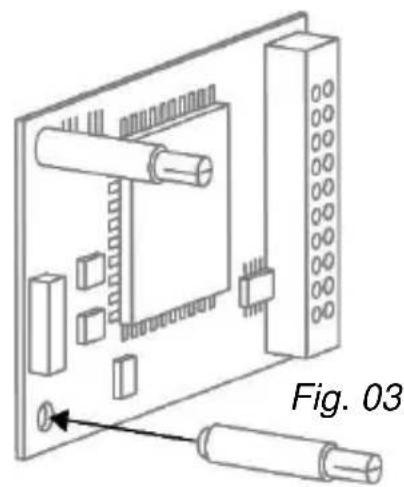
| 6 | Insert the SIM card into the card holder of the GSM module. The code of the SIM card must be switched off or set to "0000". (Fig. 03) The code of the SIM card must be switched off or set to "0000". (Fig. 03) |
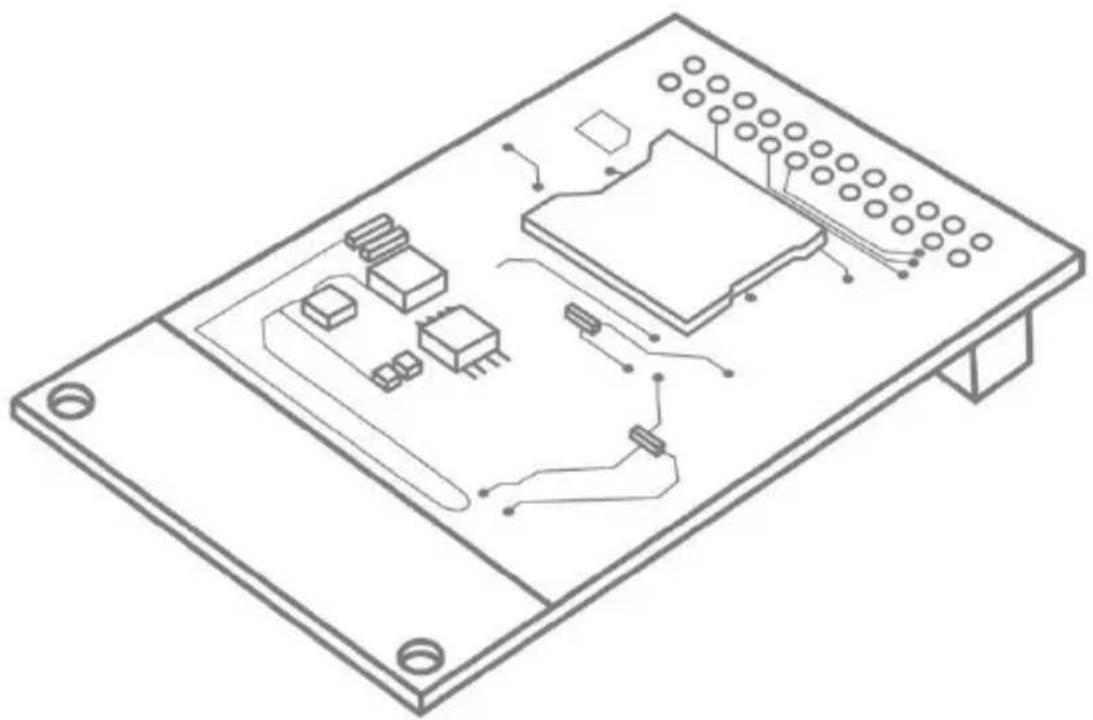
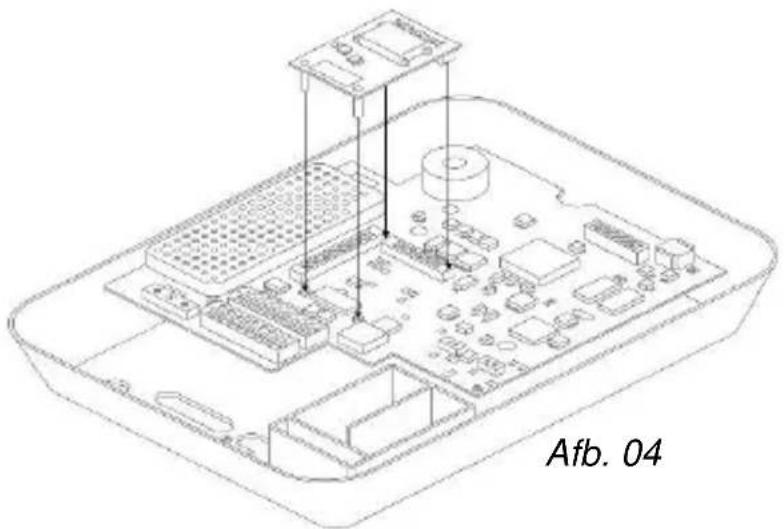
| 7 | Equip the GSM module with the supplied plastic holders.Now carefully place the GSM module on the plug connectors of the motherboard and press down firmly. Ensure that the pins do not get bent. (Fig. 04) |
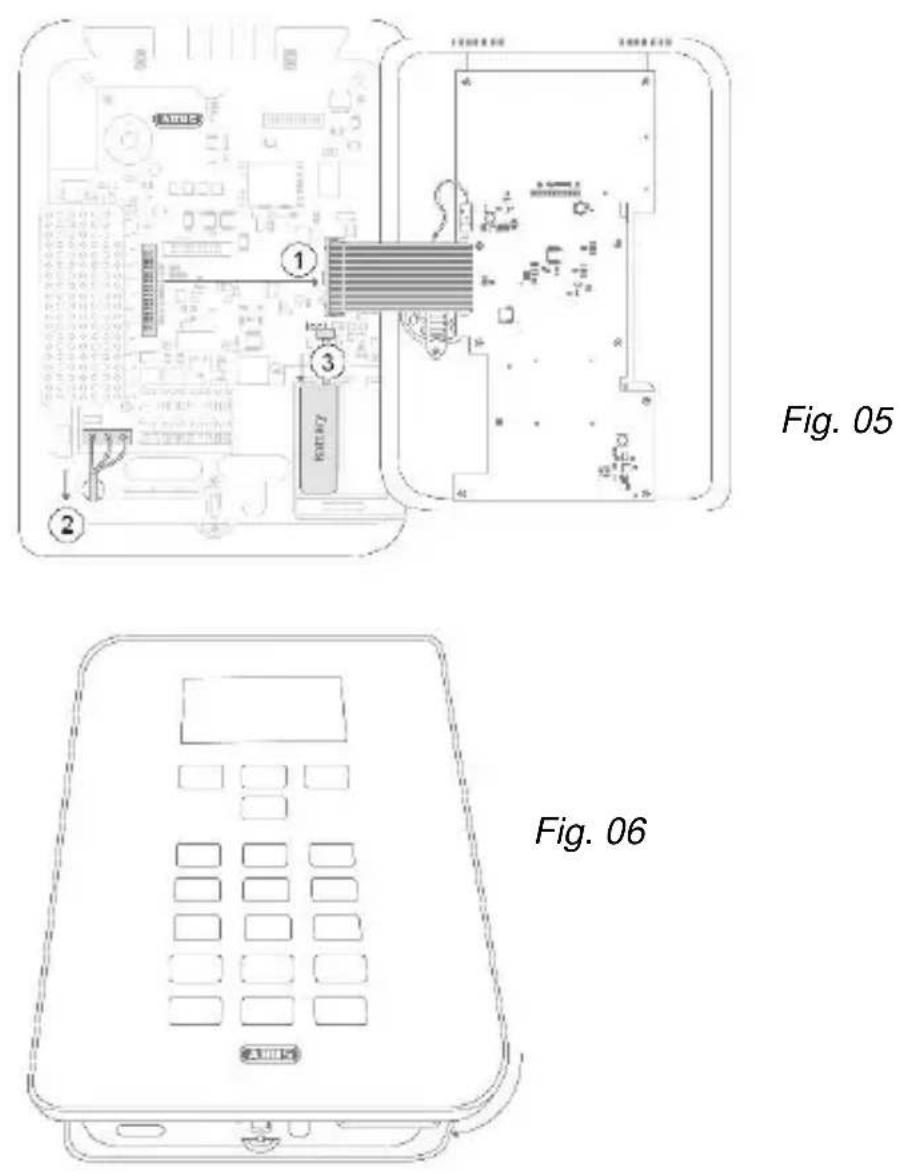
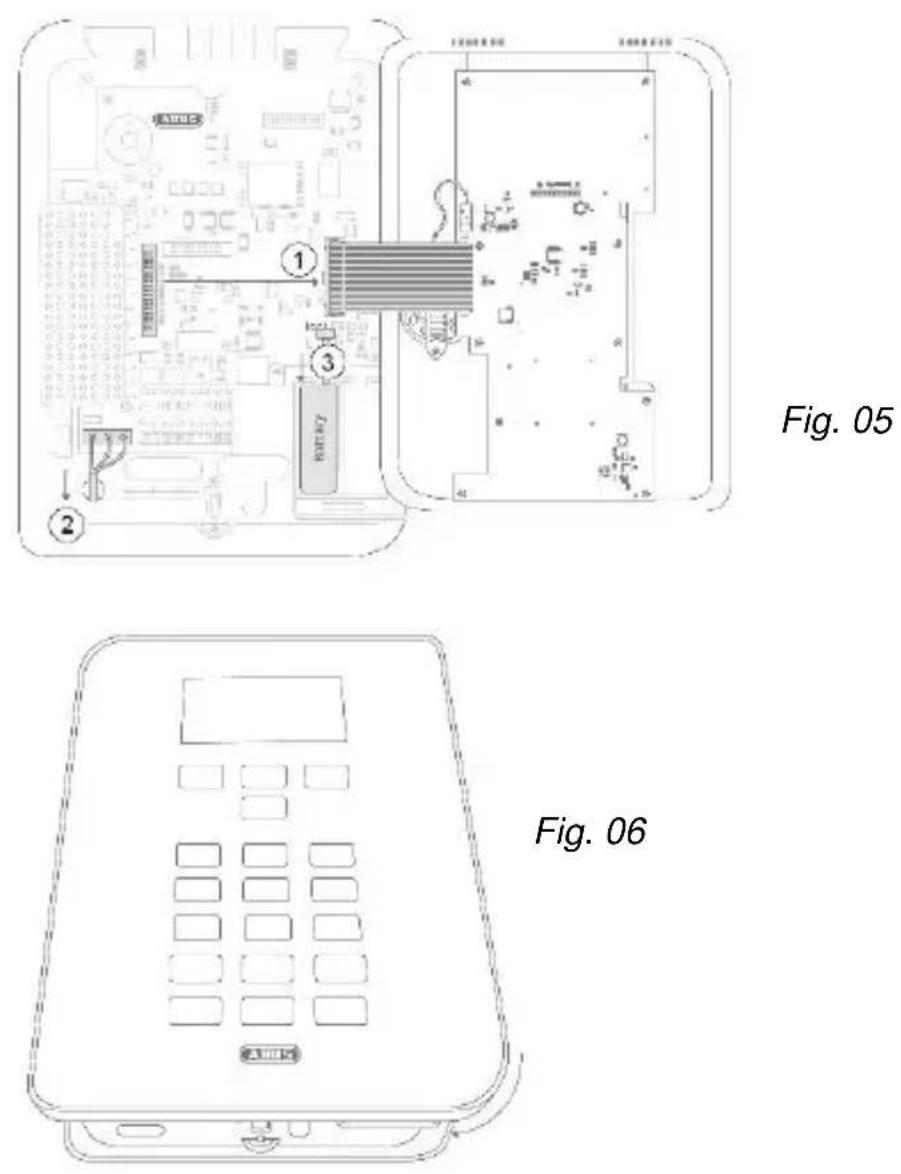
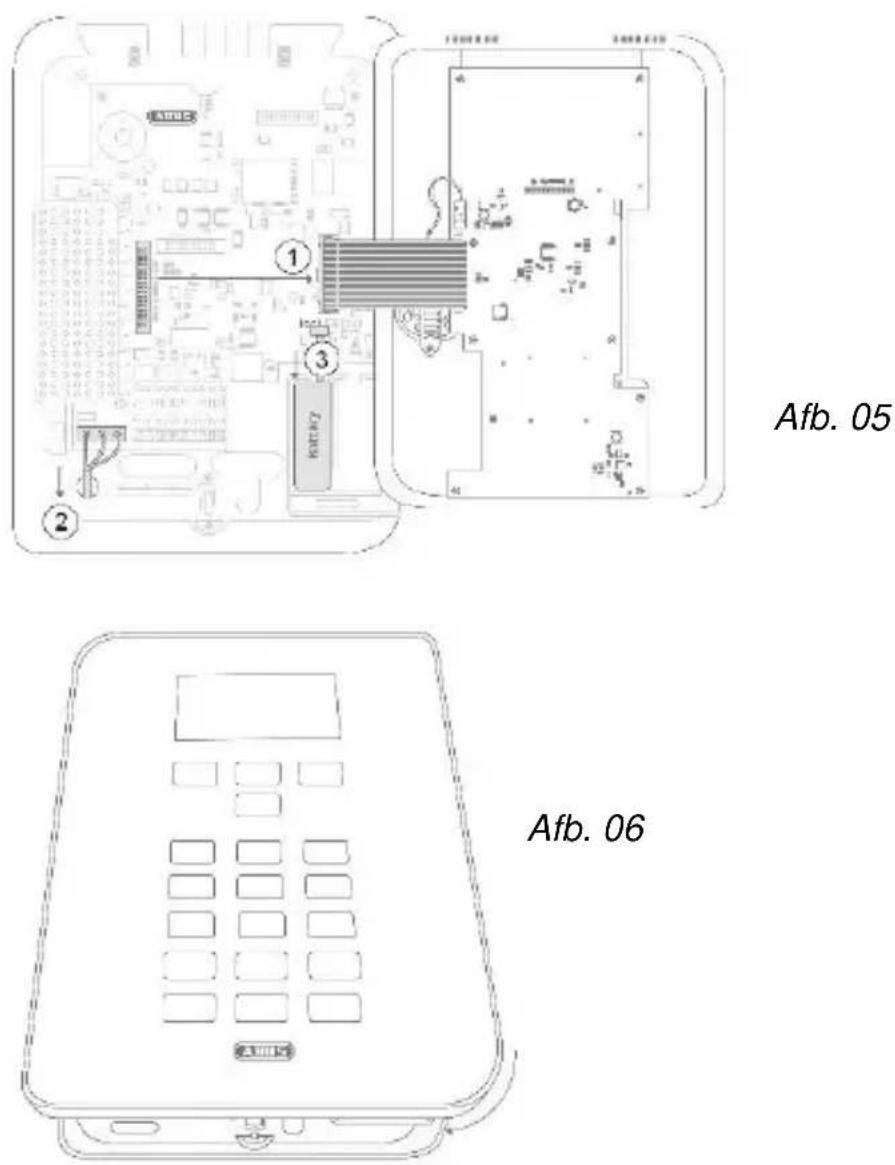
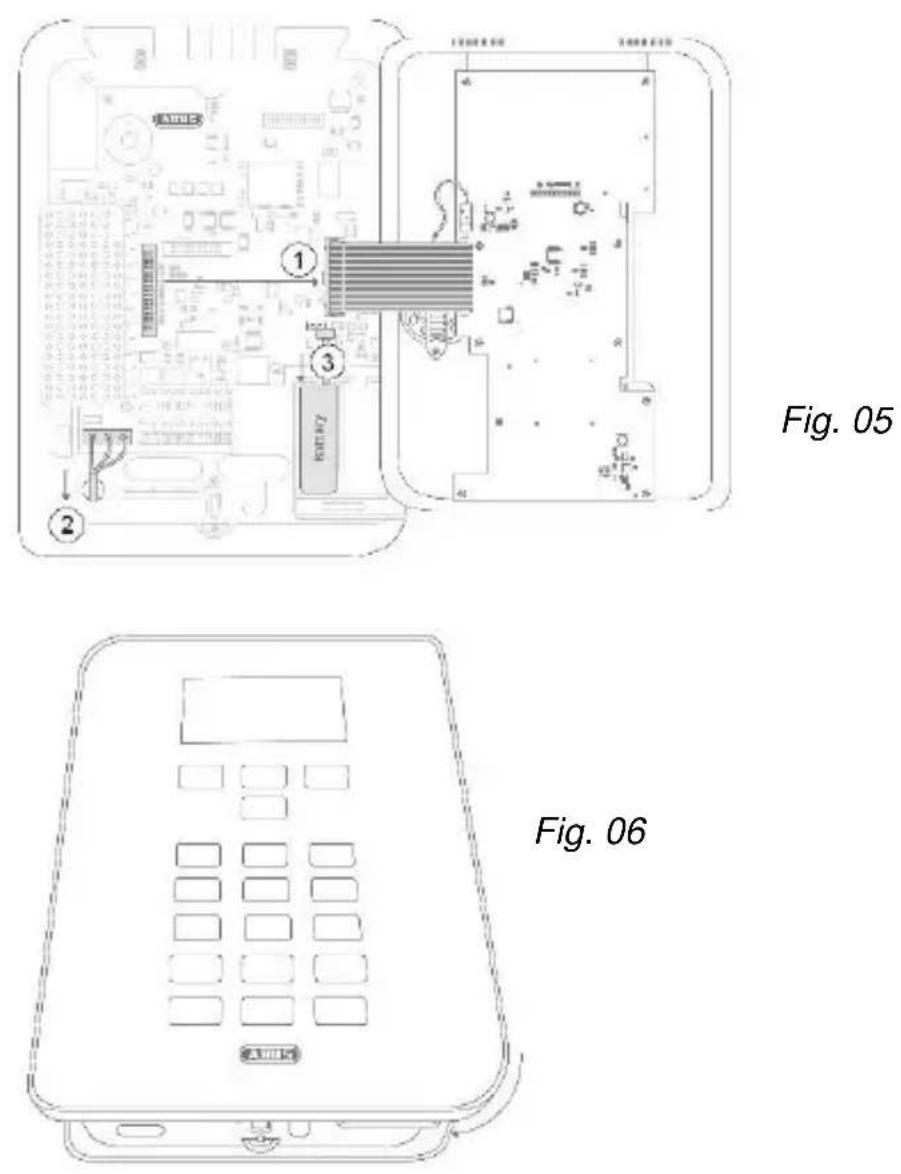
| 8 | Now connect the cover to the motherboard. Connect the power to the Secvest again and reattach the backup battery (steps 1-3 in Fig. 05) |
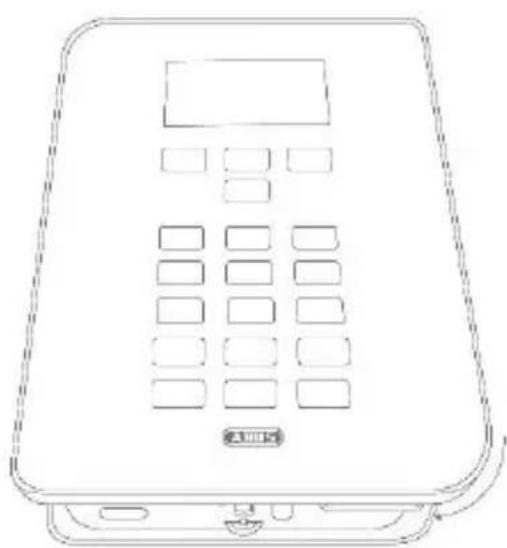
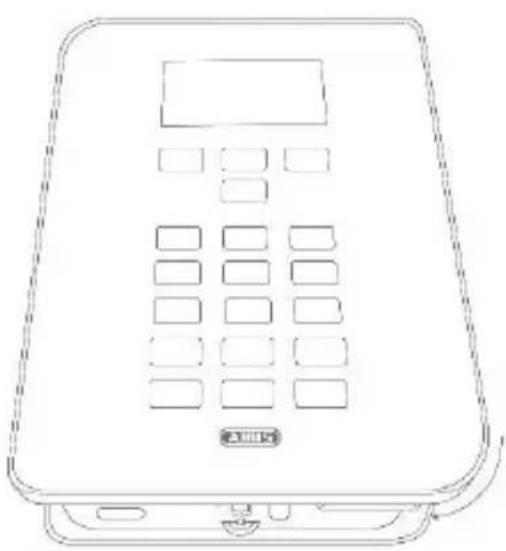
| 9 | Place the cover on the base of the housing and tighten the locking screw. (Fig. 06) |
| 10 | Select the required settings on the wireless alarm system in the installation menu. Check that the GSM module is functioning correctly in the test menu of the alarm system. |
natural_image
Line drawing of a portable electronic device with a digital display and control buttons (no text or symbols)Fig. 01
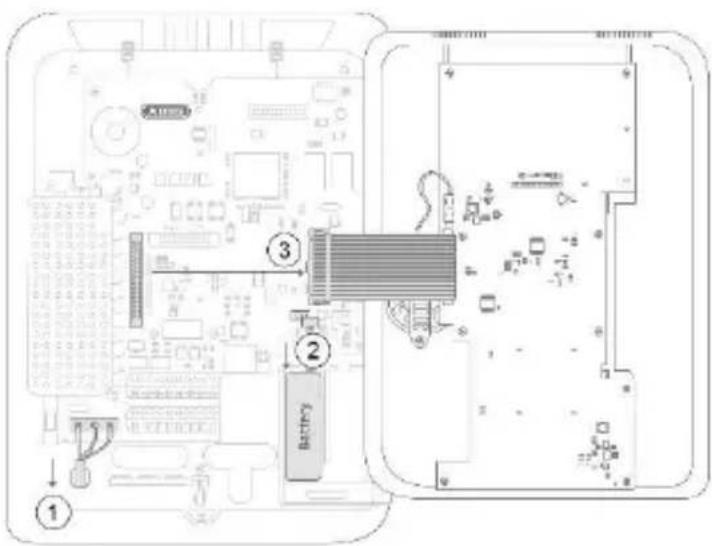
Fig. 02
natural_image
Technical line drawing of an electronic circuit board with two connectors and a central component (no text or symbols)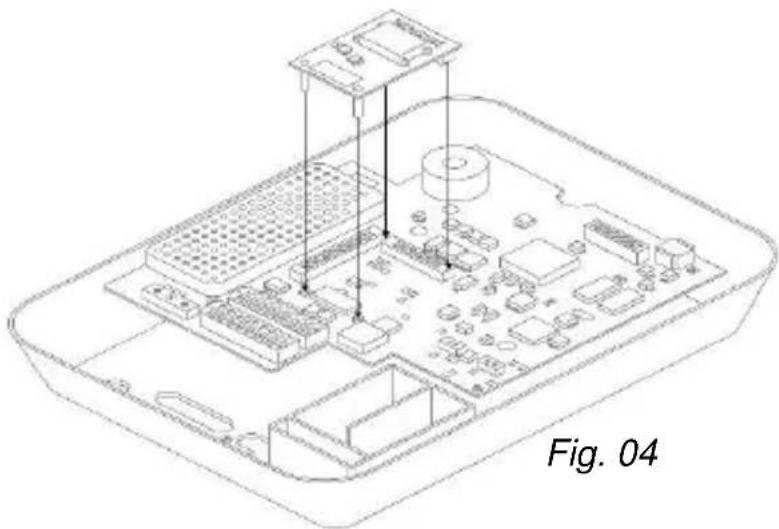
natural_image
Isometric line drawing of an Apple's internal circuit board with labeled components (no text or symbols beyond label)Installation
Displays and functions
Installation and programming
In order to complete programming on the alarm panel, please observe the installation and user guide for the alarm panel. The options for programming of communication for the alarm system can be found in the installation menu under 'Communication'. Ensure that the alarm panel does not display setting options for the GSM module if it is not inserted.
If the alarm panel recognises the GSM module, then 'GSM' is displayed in the installation menu of the Secvest under the item 'Info' → 'Communication'.
In addition to this, you will be shown the GSM network name with the current signal strength, the IMEI, the telephone number of the SIM card, the IMSI and the version number of the module.
The SIM card telephone number is only displayed if your service provider has saved the telephone number on the card.

If the signal strength is too weak, then the alarm panel should be installed in a different location or the supplied antenna should be installed so that there is optimum signal strength. Please find out about your service provider's network coverage in advance, and change providers if necessary.
Testing for correct functioning using the alarm panel
Go to 'Test' in the installation menu in order to test the functionality of the GSM module. The programmed NSL telephone numbers will appear in the 'NSL Reporting' → 'GSM' menu item. These will need to have been programmed in advance. You can test the transmission of the selected control centre protocol here. Test that voice telephony is functioning correctly by entering a telephone number under 'Voice dialler' → 'GSM'. The
Display and function
'SMS' menu item allows for the sending of a test SMS via the GSM network after entering a phone number.
You can carry out a standard test call in the user menu under 'Test'.
Subsequently, you can also top-up any prepaid card that may be used with credit at this point. The keys '*' and '#' are also available for the designation of functions during the top-up process.
Register SIM card
Choose the option 'Test' → 'Telephone call' in the user menu. Dial the telephone number specified by the provider and follow the service provider's instructions. Check that the GSM module cannot playback any incoming SMS from the provider. The keys '*' and '#' can also be designated for manual activation.
 Note Note | The following error messages are shown on the display if problems occur during the registration of the SIM card: | |
| 'Not Reg.' | Not registered; the GSM module is not looking for a new service provider. | |
| 'Reg. Home' | Registered; home network ('Reg. Home' is replaced with the provider name as soon as this becomes available). | |
| 'Searching...' | Not registered; the GSM module is looking for a provider | |
| 'Reg. Denied' | Registration denied | |
| 'Reg. Unknown' | Unknown | |
| 'Reg. Roam' | Registered; roaming network ('Reg. Roam') is replaced with '*' roaming provider name as soon as this becomes available). | |
Display and function
Information on service providers
First and foremost, follow the information from the provider on the registration of the SIM card. We recommend that the card should be registered via a mobile phone before installation, because lots of providers use SMS responses during the registration process.

Use the following table in order to record the relevant data for your GSM module.
IMEI no:
Serial number of the SIM card:
GSM telephone number:
Warranty

Note
- ABUS products are designed and manufactured with the greatest care and tested according to the applicable regulations.
- The warranty only covers defects caused by material or manufacturing errors at the time of sale. If there are demonstrable material or manufacturing errors, the module will be repaired or replaced at the guarantor's discretion.
- In such cases, the warranty ends when the original warranty period of 2 years expires. All further claims are expressly rejected.
- ABUS will not be held liable for defects and damage caused by external influences (e.g. transport, use of force, operating errors), inappropriate use, normal wear and tear or failure to observe the instructions in this manual.
Disposal | Conformity
- In the event of a warranty claim, the original receipt with the date of purchase and a short written description of the problem must be supplied with the product.
- If you discover a defect on your GSM module which existed at the time of purchase, contact your dealer directly within the first two years following purchase.
Disposal
Dispose of the device in accordance with EU Directive 2012/19/EU – WEEE (Waste Electrical and Electronic Equipment). If you have any questions, please contact the municipal authority responsible for disposal. You can get information on collection points for waste equipment from your local community and city government, from local waste disposal companies or your dealer.
Declaration of conformity
Hereby, ABUS Security-Center GmbH & Co. KG declares that the radio equipment type FUMO50001 is in compliance with Directive 2014/53/EU. The full text of the EU declaration of conformity is available at the following internet address: www.abus.com >> Search >> FUMO50001 >> Downloads
The Declaration of Conformity can also be obtained from the following address:
Security Tech Germany
Module GSM Secvest
natural_image
Isometric line drawing of an electronic circuit board with integrated circuits and components (no text or symbols)natural_image
Line drawing of a portable electronic device with a digital display and control buttons (no text or symbols)Fig. 01
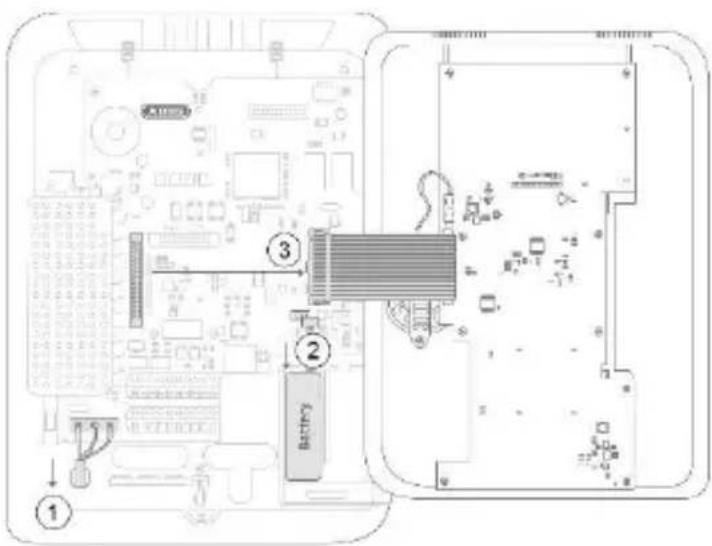
Fig. 02
natural_image
Technical line drawing of an electronic component with labeled parts, showing a circuit board and two cylindrical connectors (no text or symbols present)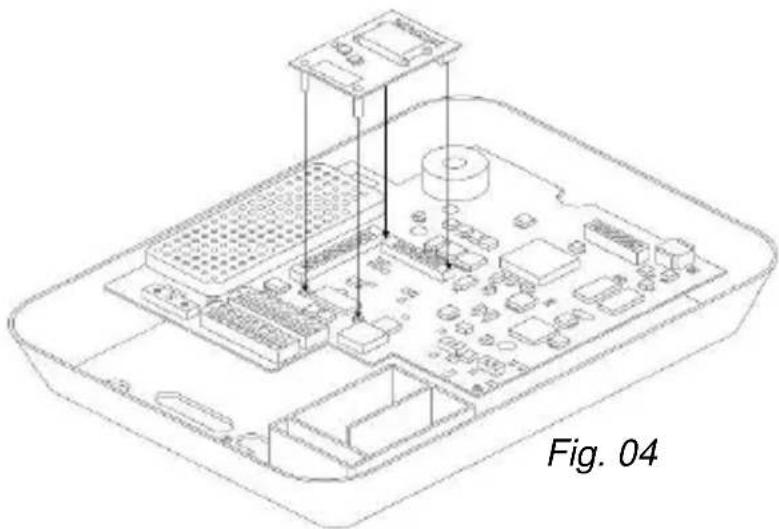
natural_image
Isometric line drawing of an Apple's internal circuit board with labeled components (no text or symbols beyond label)Montage
Security Tech Germany
natural_image
Isometric line drawing of an electronic circuit board with integrated circuits and components (no text or symbols)NL
natural_image
Line drawing of a portable electronic device with a digital display and control buttons (no text or symbols)Afb. 01
Afb. 02

natural_image
Isometric line drawing of an electronic device chassis with labeled components (no text or symbols beyond label)Montage
Afb. 05
Afb. 06
Security Tech Germany
natural_image
Isometric line drawing of an electronic circuit board with integrated circuits and components (no text or symbols)DA
natural_image
Line drawing of a digital telephone device with keypad and front panel (no text or symbols)Fig. 01
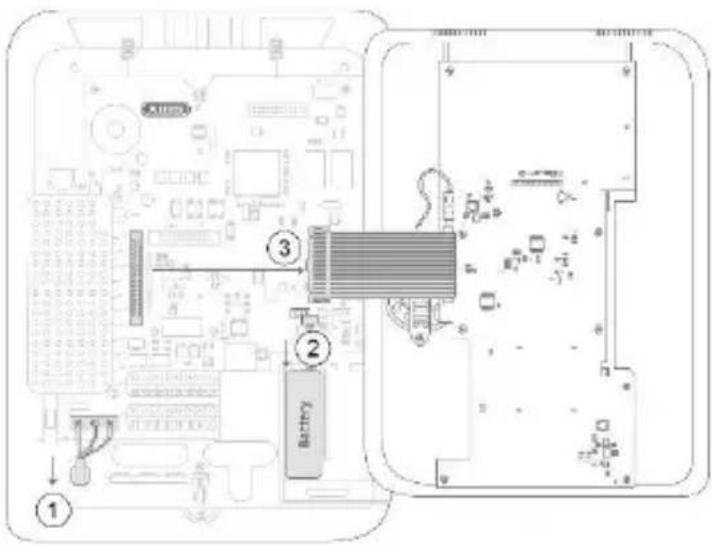
Fig. 02
Montering
natural_image
Technical line drawing of an electronic circuit board with two cylindrical components, labeled Fig. 03 (no text or symbols on the diagram itself)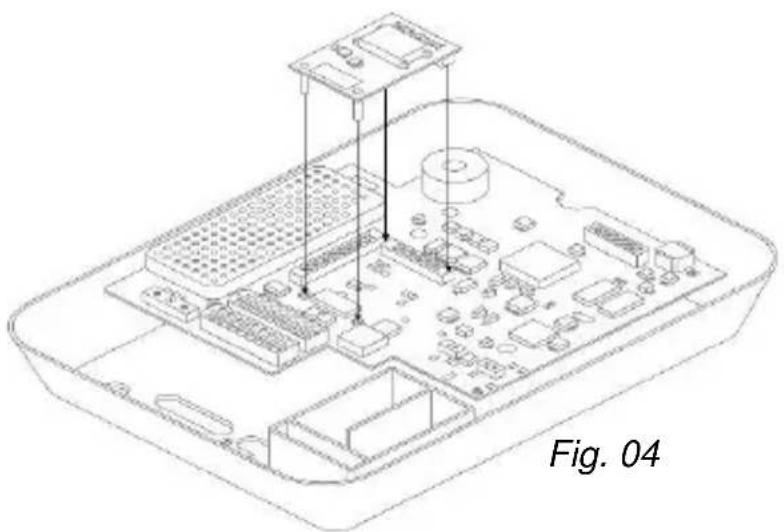
natural_image
Isometric line drawing of an Apple Pi connected to a motherboard, showing internal components and connections (no text or symbols)Montering
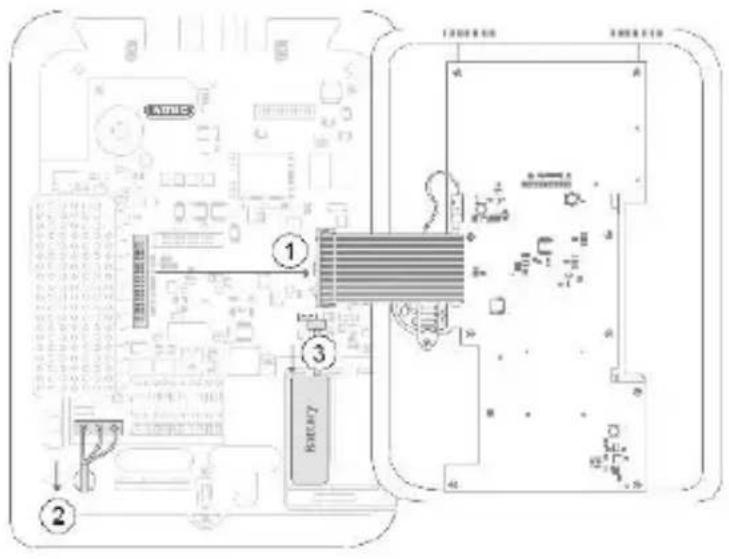
Fig. 05
natural_image
Line drawing of a rectangular electronic device with a digital display and keypad (no text or symbols)Fig. 06
Security Tech Germany
natural_image
Isometric line drawing of an electronic device chassis with integrated circuits and components (no text or symbols)Concrete GSM in stand-by: 15mA
natural_image
Line drawing of a portable electronic device with a digital display and control buttons (no text or symbols)Fig. 01
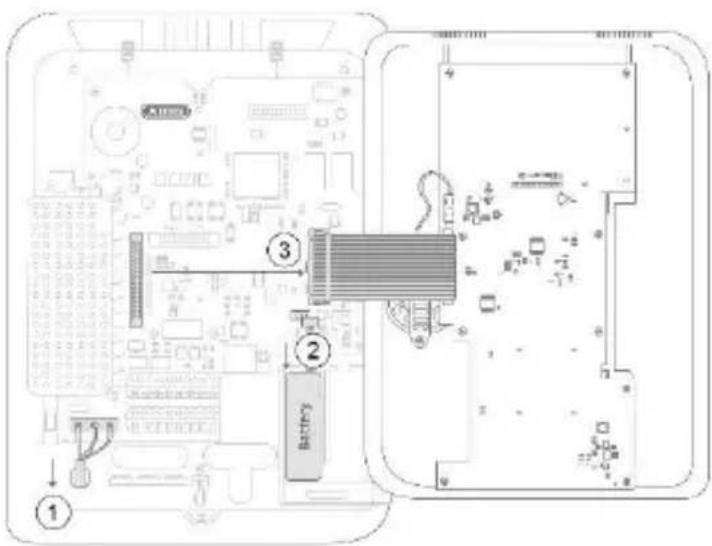
Fig. 02
natural_image
Technical line drawing of an electronic circuit board with two cylindrical components and a labeled section (Fig. 03), no readable text or symbols present.
natural_image
Isometric line drawing of an electronic device chassis with labeled components (no text or symbols beyond label)Montaggio
- Montage
- Contents
- Introduction
- Information on User Guide
- Intended use
- Limitation of liability
- Safety information
- Explanation of symbols
- Packaging
- Scope of delivery | Technical data
- Scope of delivery
- Technical data
- Functional principle and features
- General
- Important:
- Installation
- Positioning of the antenna
- Signal strength pre-test
- Via temporary installation of the GSM module in the alarm system
- By using a mobile phone
- Use of the GSM module
- Displays and functions
- Installation and programming
- Testing for correct functioning using the alarm panel
- Display and function
- Register SIM card
- Information on service providers
- Warranty
- Disposal | Conformity
- Disposal
- Declaration of conformity
- Module GSM Secvest
- Montering
- Montaggio
Brand : ABUS
Model : FUMO50001
Category : Electronic module