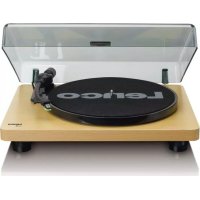
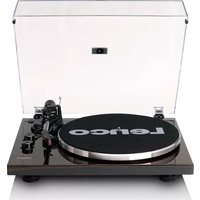
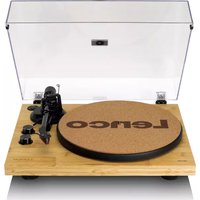
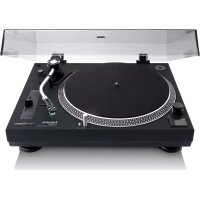
L30 - Turntable LENCO - Free user manual and instructions
Find the device manual for free L30 LENCO in PDF.

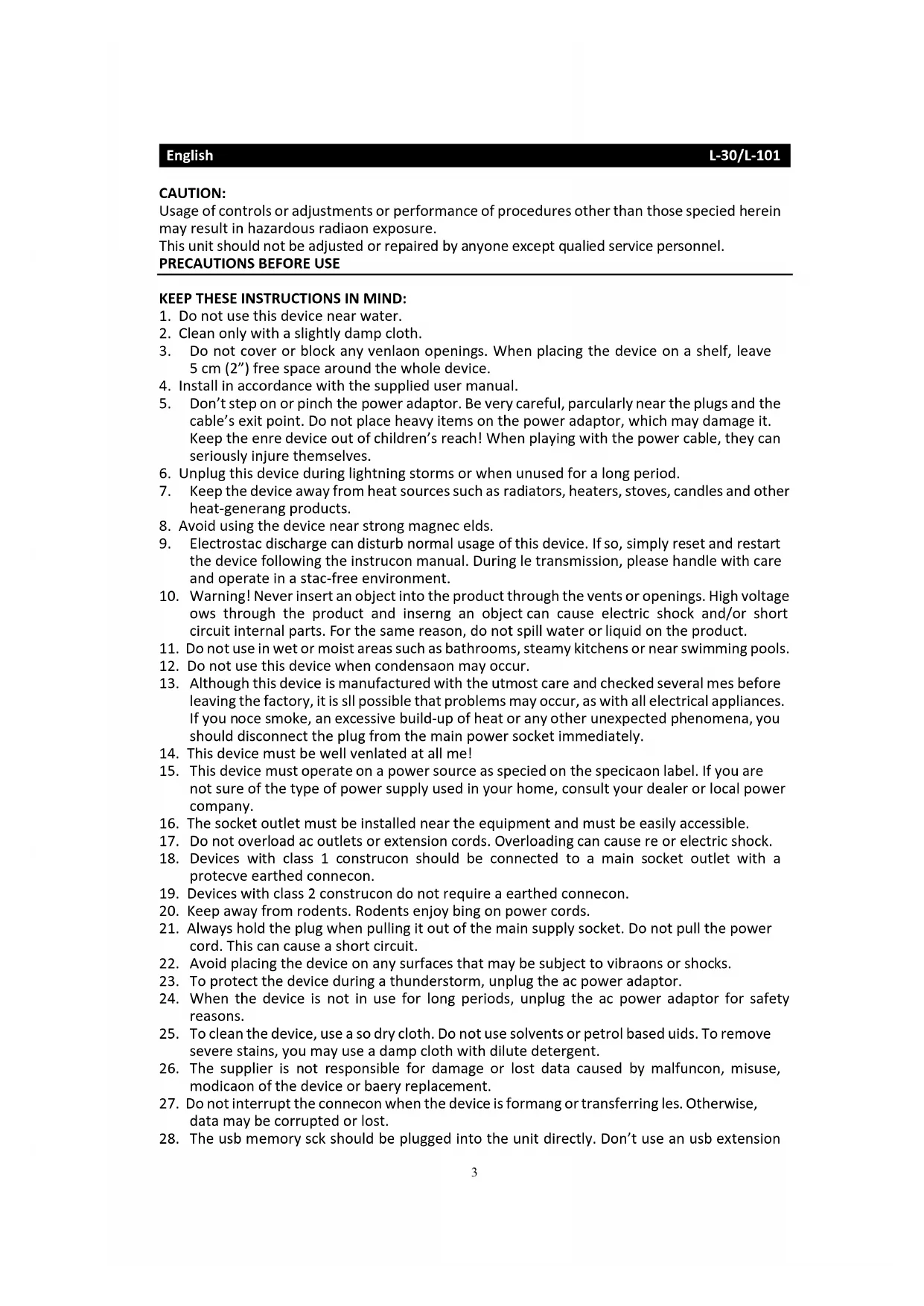


| Product type | Belt-driven turntable |
| Brand | Lenco |
| Model | L30 |
| Playback speeds | 33 1/3 and 45 rpm |
| Cartridge | Chuden MG-2590, moving magnet (MM) |
| Stylus | 0.6 mm |
| Recommended tracking force | 2.5 to 3.5 g |
| Audio output | 400 to 600 mV (line) |
| Signal-to-noise ratio | 40 dB |
| Connections | RCA output, USB port |
| Automatic shut-off | Yes, switchable |
| Power supply | 12 V / 1 A power adapter (230 V~) |
| Power consumption | 2.4 W |
| Dimensions (W x D x H) | 410 x 330 x 116 mm |
| Net weight | Approximately 3.1 kg |
| Main features | Vinyl playback, MP3 recording to PC via USB (Audacity software included) |
| Care and cleaning | Soft, dry cloth; avoid solvents |
| Safety | Unplug during storms; do not open |
Frequently Asked Questions - L30 LENCO
User questions about L30 LENCO
0 question about this device. Answer the ones you know or ask your own.
Ask a new question about this device
Download the instructions for your Turntable in PDF format for free! Find your manual L30 - LENCO and take your electronic device back in hand. On this page are published all the documents necessary for the use of your device. L30 by LENCO.
USER MANUAL L30 LENCO
Usage of controls or adjustments or performance of procedures other than those specied herein may result in hazardous radiaon exposure.
This unit should not be adjusted or repaired by anyone except qualified service personnel.
KEEP THESE INSTRUCTIONS IN MIND:
- Do not use this device near water.
- Clean only with a slightly damp cloth.
- Do not cover or block any venlaon openings. When placing the device on a shelf, leave 5cm (2^ ) free space around the whole device.
- Install in accordance with the supplied user manual.
- Don't step on or pinch the power adaptor. Be very careful, particularly near the plugs and the cable's exit point. Do not place heavy items on the power adaptor, which may damage it. Keep the enre device out of children's reach! When playing with the power cable, they can seriously injure themselves.
- Unplug this device during lightning storms or when unused for a long period.
- Keep the device away from heat sources such as radiators, heaters, stoves, candles and other heat-generang products.
- Avoid using the device near strong magnec elds.
- Electrostac discharge can disturb normal usage of this device. If so, simply reset and restart the device following the instrucon manual. During le transmission, please handle with care and operate in a stac-free environment.
- Warning! Never insert an object into the product through the vents or openings. High voltage ows through the product and inserting an object can cause electric shock and/or short circuit internal parts. For the same reason, do not spill water or liquid on the product.
- Do not use in wet or moist areas such as bathrooms, steamy kitchens or near swimming pools.
- Do not use this device when condensaon may occur.
- Although this device is manufactured with the utmost care and checked several mes before leaving the factory, it is still possible that problems may occur, as with all electrical appliances. If you noc smoke, an excessive build-up of heat or any other unexpected phenomena, you should disconnect the plug from the main power socket immediately.
- This device must be well venlated at all me!
- This device must operate on a power source as specied on the specicaon label. If you are not sure of the type of power supply used in your home, consult your dealer or local power company.
- The socket outlet must be installed near the equipment and must be easily accessible.
- Do not overload ac outlets or extension cords. Overloading can cause re or electric shock.
- Devices with class 1 constructor should be connected to a main socket outlet with a protecve earthed connecn.
- Devices with class 2 construcon do not require a earthed connecn.
- Keep away from rodents. Rodents enjoy bing on power cords.
- Always hold the plug when pulling it out of the main supply socket. Do not pull the power cord. This can cause a short circuit.
- Avoid placing the device on any surfaces that may be subject to vibraons or shocks.
- To protect the device during a thunderstorm, unplug the ac power adaptor.
- When the device is not in use for long periods, unplug the ac power adaptor for safety reasons.
- To clean the device, use a so dry cloth. Do not use solvents or petrol based uids. To remove severe stains, you may use a damp cloth with dilute detergent.
- The supplier is not responsible for damage or lost data caused by malfuncon, misuse, modicaon of the device or baery replacement.
- Do not interrupt the connecn when the device is formang or transferring les. Otherwise, data may be corrupted or lost.
- The usb memory sck should be plugged into the unit directly. Don't use an usb extension
cable because it can cause interference resulting in failing of data.
- The apparatus shall not be exposed to dripping or splashing and make sure that no objects lled with liquids, such as vases, are placed on or near the apparatus.
- To completely disconnect the power input, the mains plug of the apparatus shall be disconnected from the mains, as the disconnect device is the mains plug of apparatus.
- The mains plug of the apparatus should not be obstructed or should be easily accessed during intended use.
- Baery shall not be exposed to excessive heat such as sunshine, re or the like.
- Minimum distance of 10cm around the apparatus is needed for sucient venlaons.
- The venlaon should not be impeded by covering the venlaon openings with items such as newspapers, table-cloths, curtains etc.
- No naked ame sources such as lighted candles should be placed on the apparatus.
- Aenon should be drawn to the environmental aspects of baery disposal.
- The apparatus can only be used in moderate extremely cold or climates warm environments should be avoided.
- The rang label has been marked on the boom panel of the apparatus.
- This device is not intended for use by people (including children) with physical, sensory or mental disabilities, or a lack of experience and knowledge, unless they're under supervision or have received instrucons about the correct use of the device by the person who is responsible for their safety.
- This product is intended for household use only and not for commercial or industrial use.
- Make sure the unit is adjusted to a stable posion. Damage caused by using this product in an unstable posion or by failure to follow any other warning or precaution contained within this user manual will not be covered by warranty.
- Never remove the casing of this apparatus.
- Never place this apparatus on other electrical equipment.
- Do not use or store this product in a place where it is subject to direct sunlight, heat, excessive dust or vibraon.
- Do not clean this product with water or other liquids.
- Do not block or cover the slots and holes in the product.
- Do not push foreign objects into the slots or holes in the product.
- Do not allow children access to plasc bags.
- Please check that the voltage on the type plate of your appliance corresponds with your house electricity supply (type plate is located on the back of the unit).
- Protect the power cord from being walked on or pinched, particularly at plugs, convenience receptacles, and the point where they exit from the apparatus.
- Only use aachments/accessories specied by the manufacturer.
- Refer all servicing to qualified service personnel. Servicing is required when the apparatus has been damaged in any way, such as the power supply cord or the plug, when liquid has been spilled or objects have fallen into the apparatus, when the apparatus has been exposed to rain or moisture, does not operate normally, or has been dropped.
- Do not use a damaged power cord or plug or a loose outlet. Doing so may result in re or electric shock.
Warning: prolonged exposure to loud sounds from personal music players may lead to temporary or permanent hearing loss.
INSTALLATION
- Unpack all parts and remove protective material.
- Do not connect the unit to the mains before checking the mains voltage and before all other connecns have been made.
- Do not cover any vents and make sure that there is a space of several cenmeters around the unit for venlaon.
BEFORE USE
- Choose a safe locaon and avoid placing the unit in direct sunlight or near any heat source.
- Avoid environments subject to vibraon, excessive dust, cold or moisture.
- Due to the risk of electrical shock, do not open the cabinet. Should a foreign object accidentally nd its way into the interior of the unit, contact your local dealer.
- Do not aempt to clean the unit with chemical solvents as this might damage the nishing. A clean, dry cloth is recommended for cleaning.
- Keep this manual for future reference.
TURNTABLE PARTS:
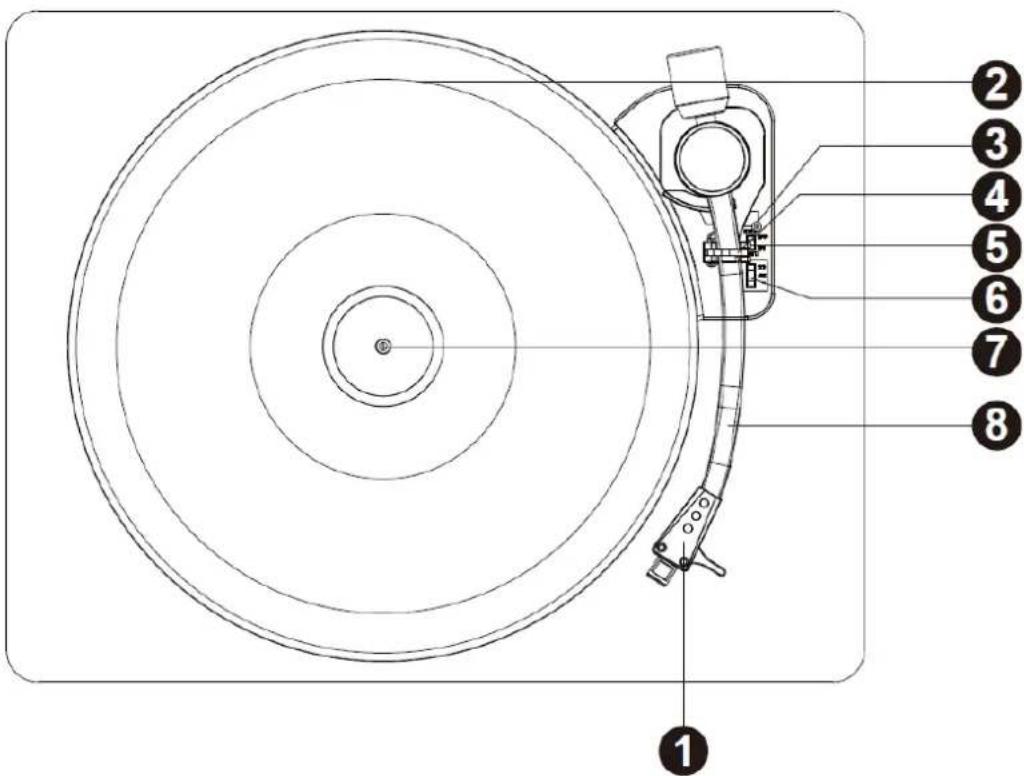
- Phono Stylus Cartridge
- Turntable Plaer
- Li Lever
- Turntable Arm Lock
- Auto Stop Control Switch
- Speed Telecon Switch
- Turntable Sha
- Turntable Arm
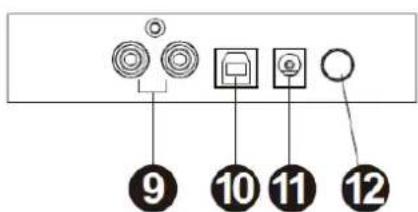
- RCA Output Jack
- USB Jack
- Power Adaptor Jack
- Power ON/OFF Buon
- Connect the RCA Output Jack to the external speaker system with the RCA cable (not included).
- Raise the dust cover
- Press the Power ON/OFF Buon.
- Place a record on the turntable plaer and set the player speed to match the record speed.
NOTE: when playing a single (a 45 rpm record) and/or records with large centre holes, use the 45 rpm adapter.
Remove the needle cartridge protecve cover and unlock the tone arm lock from the tone arm rest. Push the li lever backward, the tone arm will gently rise up. Gently move the tone arm to the desired posion over the record and the turntable plaer will begin to rotate when the arm is moved towards it if Auto Stop Control Switch is ON. Release the tone arm onto the turntable by pushing the li lever forward and the vinyl record will begin to play.
If the Auto Stop Control Switch is turned ON, the record will stop automatically when nished. If Auto Stop Control Switch is turned OFF, the record will NOT stop automatically when nished; you must push the li lever backward to raise the tone arm and place it back in the rest and then turn on the power to stop the turntable from spinning.
Remark: AUTO STOP funcon applies to most 33RPM vinyl records. However, for very few vinyl records, it will stop when it does not come to the end, or it will not stop when it comes to the end when AUTO STOP is ON.
RECORD YOUR VINYL TO YOUR WINDOWS PC
1. Setup
Connect the USB cable with your turntable and your computer. No extra driver is required.
2. Audacity Installaon
Insert the installaon CD. Your computer will auto-run the program. Follow the instrucons to complete installaon.
If your computer does not auto run, click on the "Start" menu, select "Run" and choose the CD located on your computer and run "Setup.exe"
3. Run Audacity Program
Double-click on the Audacity program and the Audacity interface window will be displayed on your computer screen.
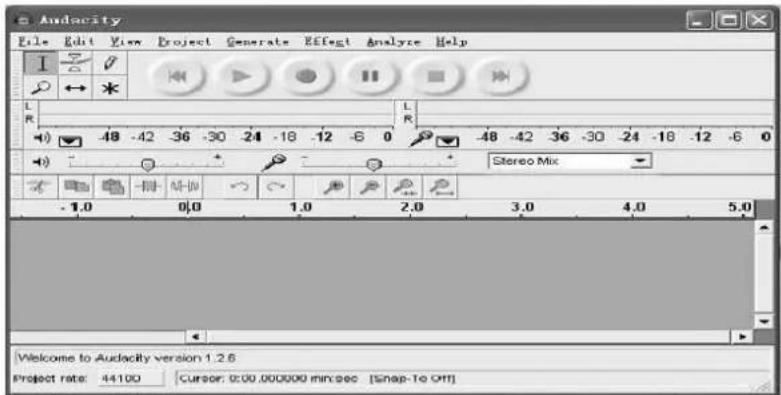
4. Playback Control Toolbar
Audacity will display a control toolbar for you to edit and manage your recordings.
| Buon | Acon |
| moves the cursor to the start of the project. | |
| plays your project from the posion of the cursor. Use to listen to the audio in your project. | |
| pressing the record buon will record a new track from your computer's sound input device. | |
| pause playback or recording. Press again to unpause. |
stops playback or recording.

moves the cursor to the end of the project.
5. Playing Your Record
Play the record you want to record by following the procedure described in the secon "LISTENING TO A RECORD"
6. Adjusng Input and Output
Adjust the output and input volume.
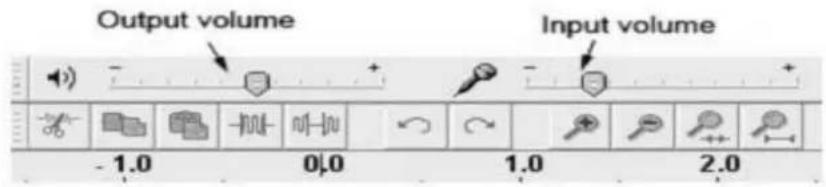
| EN | EN |
| Output volume | Output volume |
| Input volume | Input volume |
7. Recording
- Select the RECORD buon to start recording while your record is playing.
You will need to posit the needle on the record for a few seconds before the track starts, so that you select the RECORD buon at the beginning of your track.
Start playback on the USB turntable. You will see the waveform of the audio on the screen as it is recording. You will hear the audio coming from the output of your computers soundcard.
No Audio? - go back to the preference menu and make sure you have "Soware Playthrough" selected and the speaker volume up on your computer.

Press Stop

SAVE YOUR FILE NOW by clicking on "File" followed by "Save Project" Select the desnaon and le name for the project and click "Save"
Once nished recording, your screen should display your recording as below.
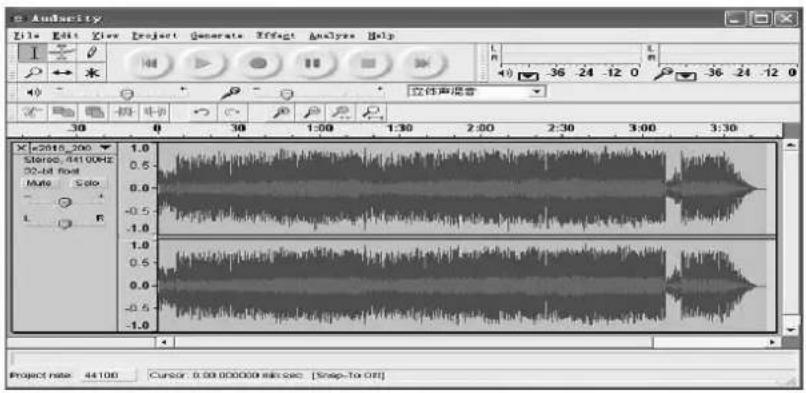
9. Editing your Recording
Audio Levels
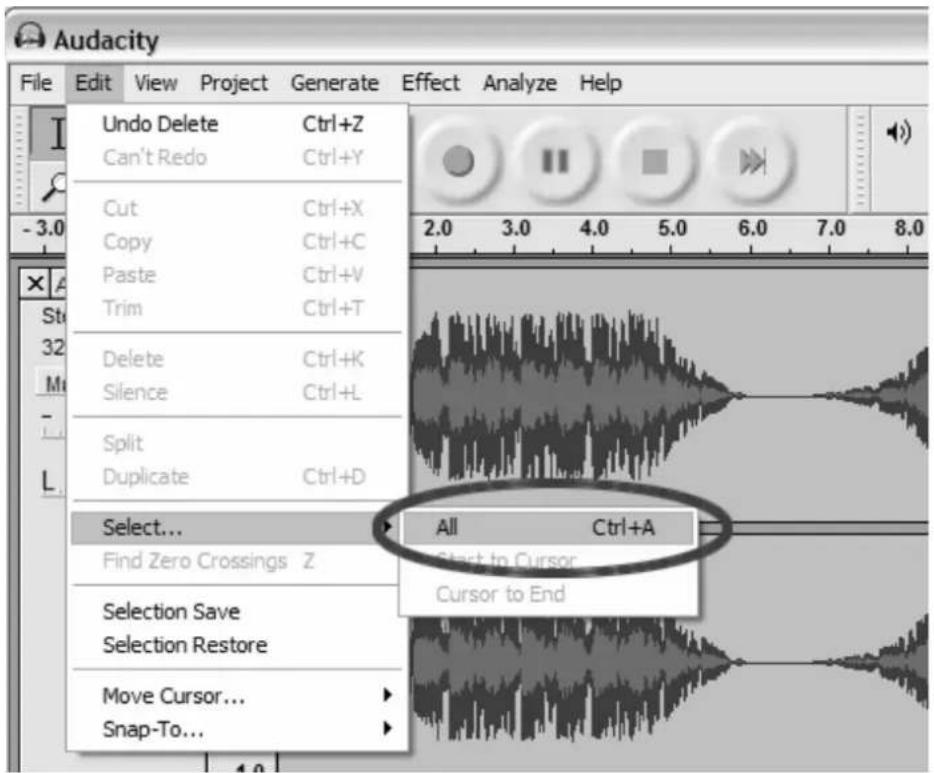
Select your entire recording by selecng "Edit," then "Select..." then click "All."
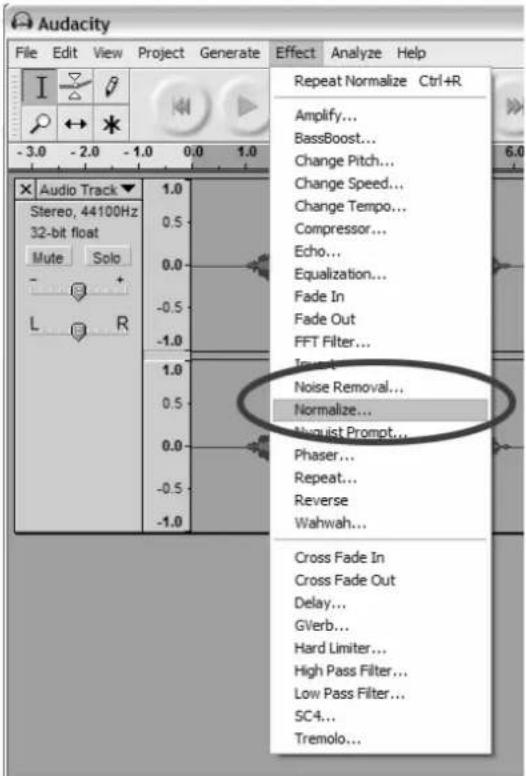
Select the "Eect" menu and choose the desired eect. There are various types of eects which are described further on Audacity's website.
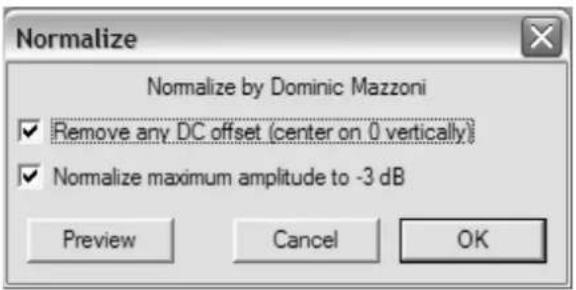
Selecng "Normalize" should be used to have Audacity auto-correct volume on the recording.
Noise Reducon
Drag your cursor over a poron of the audio track which contains unwanted noise. We recommend using the beginning or end of a track where there is no music and only noise.
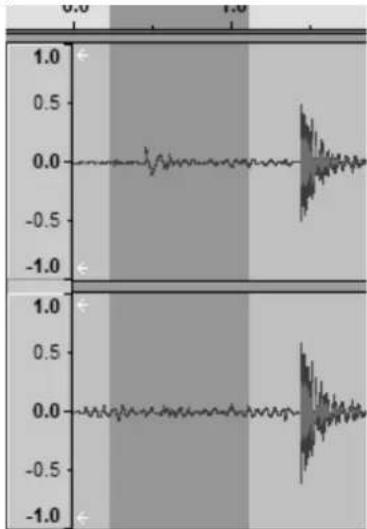
- Select "Erect" and then "Noise Removal" from the drop down menu to bring up the "Noise Removal Window"
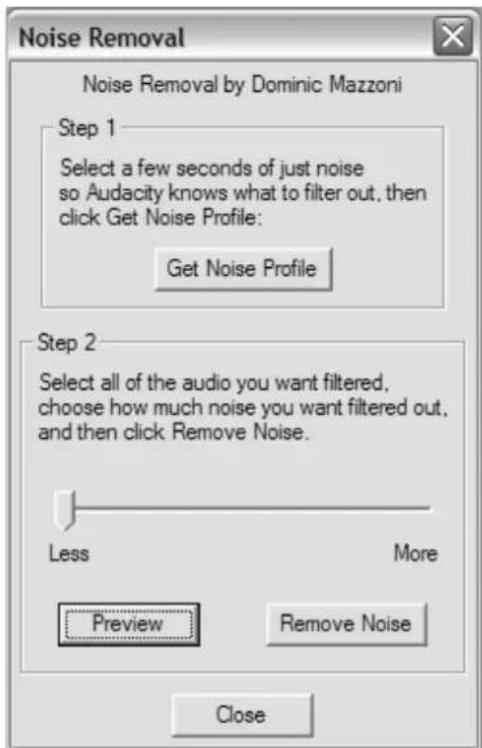
- Click "Get Noise Prole" and the window will close automatically.
- Select the enre track of audio you wish to remove noise from.
- Adjust the amount of audio that you would like to liter by moving the slider in the "Noise Removal" window. We recommend using the minimum noise removal for opmum sound. Note: you can preview the audio before removing the noise by clicking on 'Preview'.
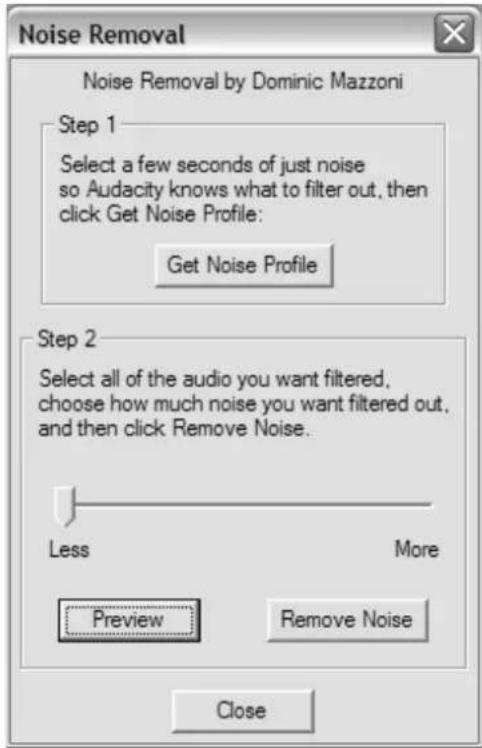
- Click on 'Remove Noise'.
The Editing Toolbar
| Buon | Acon |
| The Cut buon | removes selected audio data and places it on the clipboard. |
| The Copy buon | copies the selected audio data to the clipboard without removing it from the track. |
| The Paste buon | pastes whatever is in the clipboard into the track at the posion of the selecon cursor. |
| The Trim buon | deletes all of the track except the current selecon. |
| The Silence buon | replaces the current selecon with silence instead of removing it completely. |
| The Undo buon | undo the last editing operaoon performed. |
| The Redo buon | redo any editing operands that were just undone. |
| The Zoom In buon | zooms in on displayed tracks displaying less me and giving a more detailed view of the track. |
| The Zoom Out buon | zooms out displaying more me and a less detailed view of tracks. |
| The Fit Selecon buoy | ts selected audio into the width of the screen to show the selecon in more detail. |
| The Fit Project buoy | shows enre project in one screen. |
The Tools Toolbar
| Buon | Acon |
| I The Selecon Tool | use to select seconds of an audio track to work on. |
| The Envelope Tool | this tool allows you to control how tracks fade in and out. |
| The Draw Tool | allows you to draw on the waveforms of individual tracks. |
| The Zoom Tool | zooms in or out of a specic part of the audio. |
| The Timeshi Tool | allows you to change the posioning of tracks relave to one another in me. |
Before editing, you must make a selecon of the recording you would like to cut or copy. This will trim any music from the previous track, or any silence on the record between tracks.
-
To select the part you wish to cut, copy or paste, use the selecon tool. If it is not acvated, do so by clicking on it in the toolbar.
-
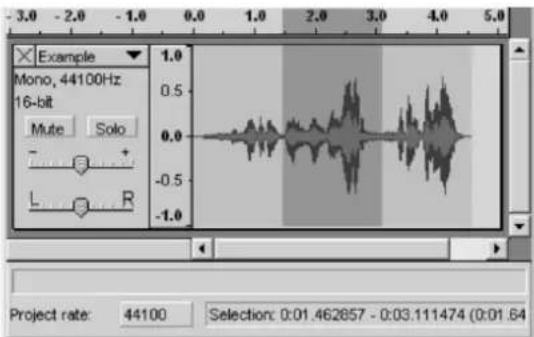
Press and hold the le mouse buon while you drag the mouse to a marked area.
This area is darker than the surrounding area of the clip. Note, even though you can mark an area larger than or extending beyond the actual audio clip in the track, the operands will only work on the actual clip. Playback however will work outside the clip.
- Press the space bar to listen to the audio in the marked area.
-
To extend or contract your selecon, hold down the SHIFT buon and click on the area you wish your selecon to extend or contract to.
-
If you click at a spot that is on the right hand side from the middle of the current selecon, you will set the right hand boundary of your new selecon.
Now you must cut your selecon. Select "Cut" from the "Edit" menu.
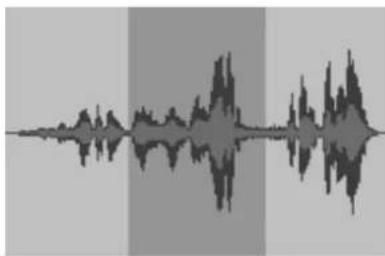
Before the Cut
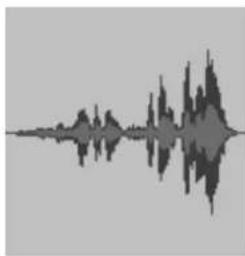
Aer the Cut
Create a new le and paste your cut into the new le.
10. Exporng to MP3
To export your recording to mp3 format, select "Export As" from the "File" menu. You will need to choose which format to export to. Choose ".mp3" as your le extension. When exporting, do not choose your Desktop as the desnation folder. You can only choose "My Documents" folder. Aer export, you can move the les as desired.
For additional software informaon, please refer http://audacity.sourceforge.net for detailed operang instrucons.
TIPS FOR BETTER TURNTABLE PERFORMANCE
- When opening or closing the turntable cover, handle it gently, gripping it either at the centre or at each side.
- Do not touch the needle p with your ngers; avoid bumping the needle against the turntable plaer or record edge.
- Gently wipe the dust cover and turntable housing with a so cloth. Use only a small amount of mild detergent to clean the turntable and dust cover.
- Never apply harsh chemicals or solvents to any part of the turntable system.
Power supply adaptor
Manufacturer: SHENZHEN SHI GUANGKAIYUAN TECHNOLOGY., LTD.
Model number: GKYPS0100120EU1
Use only original AC adaptor
Use only the power supply listed in the user instrucons
| Lenco | |
| Turntable | L-30 / L-101 |
| Type | Belt drive auto-stop |
| Drive Motor | DC motor |
| Speed | 33 1/3rpm,45rpm |
| Wow and uer | < 0.35% |
| Turntable plaer | 300mm |
| Cartridge | |
| Type | Chuden MG-2590 MM |
| Stylus | 0.6mil |
| Opmum tracking force | 2.5-3.5gr |
| Output | 2.4mv±3db |
| Frequency response | -1.5±6db(10KHz) |
| Crosstalk | 16db(1KHz) |
| Signal-to-noise rao(S/N) | 40db |
| General | |
| ADAPTOR | input AC100-240V~50/60Hz0.5A |
| output DC12V1000mA | |
| PRODUCT | DC12V200mA |
| Audio output(Line Out) | 400-600mv |
| Power consumpon | 2.4W |
| Dimension | 410*330*116MM |
| Net weight | approx 3.1KGS |
Guarantee
Lenco oers service and warranty in accordance with the European law, which means that in case of repairs (both during and aer the warranty period) you should contact your local dealer.
Important note: It is not possible to send products that need repairs to Lenco directly.
Important note: If this unit is opened or accessed by a non-ocial service center in any way, the warranty expires.
This device is not suitable for professional use. In case of professional use, all warranty obligaons of the manufacturer will be voided.
Disclaimer
Updates to Firmware and/or hardware components are made regularly. Therefore some of the instrucon, specicaons and pictures in this documentaon may differ slightly from your parcular situaon. All items described in this guide for illustraon purposes only and may not apply to parcular situaon. No legal right or entitlements may be obtained from the descripon made in this manual.
Disposal of the Old Device
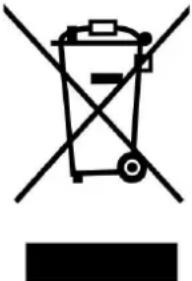
This symbol indicates that the relevant electrical product or baery should not be disposed of as general household waste in Europe. To ensure the correct waste treatment of the product and baery, please dispose them in accordance to any applicable local laws of requirement for disposal of electrical equipment or baeries. In so doing, you will help to conserve natural resources and improve standards of environmental protecon in treatment and disposal of electrical waste (Waste Electrical and Electronic Equipment Directive).
CE Marking
Products with the CE marking comply with the EMC Directive (2014/30/EU) and the Low Voltage Directive (2014/35/EU) issued by the Commission of the European Community.
Hereby, Lenco Benelux BV, Thermiekstraat 1a, 6361 HB Nuth, The Netherlands, declares that this product is in compliance with the essenal requirements.
The declaraon of conformity may be consulted via techdoc@lenco.com
9. Service
For more informaon and helpdesk support, please visit www.lenco.com
Lenco Benelux BV, Thermiekstraat 1a, 6361 HB Nuth, The Netherlands.
LET OP:
Lenco Benelux BV, Thermiekstraat 1a, 6361 HB Nuth, The Netherlands.
ATTENTION :
m = 311
- KEEP THESE INSTRUCTIONS IN MIND:
- INSTALLATION
- BEFORE USE
- TURNTABLE PARTS:
- RECORD YOUR VINYL TO YOUR WINDOWS PC
- Setup
- Audacity Installaon
- Run Audacity Program
- Playback Control Toolbar
- Playing Your Record
- Adjusng Input and Output
- Recording
- Press Stop
- Editing your Recording
- Noise Reducon
- Exporng to MP3
- TIPS FOR BETTER TURNTABLE PERFORMANCE
- Power supply adaptor
- Guarantee
- Disclaimer
- Disposal of the Old Device
- CE Marking
- Service
- LET OP:
- ATTENTION :
Brand : LENCO
Model : L30
Category : Turntable