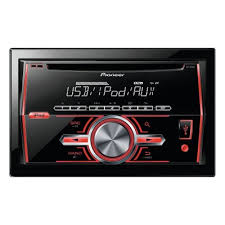
FH-460UI - Car stereo PIONEER - Free user manual and instructions
Find the device manual for free FH-460UI PIONEER in PDF.


| Product type | Car stereo |
| Brand | Pioneer |
| Model | FH-460UI |
| Dimensions (DIN chassis) | 178 mm × 100 mm × 157 mm |
| Dimensions (DIN front panel) | 188 mm × 118 mm × 25 mm |
| Dimensions (D chassis) | 178 mm × 100 mm × 165 mm |
| Dimensions (D front panel) | 170 mm × 96 mm × 17 mm |
| Weight | 1.2 kg |
| Power supply | 14.4 V DC (10.8 V to 15.1 V acceptable) |
| Maximum current consumption | 10.0 A |
| Maximum output power | 50 W × 4 + 70 W × 1/2 (subwoofer) |
| Continuous output power | 22 W × 4 (50 Hz – 15,000 Hz, THD 5%, 4 Ω) |
| Load impedance | 4 Ω (4 Ω to 8 Ω acceptable) |
| Max preamp output level | 2.0 V |
| Radio bands | FM (87.5 – 108.0 MHz), MW (531 – 1602 kHz), LW (153 – 281 kHz) |
| Supported audio formats | CD, CD-R/RW, MP3, WMA, WAV, USB, iPod/iPhone |
| Main features | RDS, PTY, Sound Retriever, 5-band equalizer, physiological correction, AUX input, USB port, iPod control |
| Maintenance and cleaning | Clean with a soft cloth; avoid liquids; do not disassemble |
| Safety | Class 1 laser product; do not open; disconnect battery before installation |
| Spare parts and repairability | Optional accessories available (USB cable CDU50E, iPod cable); contact an authorized center for any repairs |
Frequently Asked Questions - FH-460UI PIONEER
User questions about FH-460UI PIONEER
0 question about this device. Answer the ones you know or ask your own.
Ask a new question about this device
Download the instructions for your Car stereo in PDF format for free! Find your manual FH-460UI - PIONEER and take your electronic device back in hand. On this page are published all the documents necessary for the use of your device. FH-460UI by PIONEER.
USER MANUAL FH-460UI PIONEER
REPRODUCTOR DE CD CON RECEPTOR RDS
CD RDS-EMPFÄNGER
CD RDS-ONTVANGER
CD RDS ПРИЕМнИK
FH-460UI
Made for

iPod iPhone
Owner's Manual
Mode d'emploi
PykoBOIDCTBO NOIb3OBaTeJIa
Before you start
Thank you for purchasing this PIONEER product
To ensure proper use, please read through this manual before using this product. It is especially important that you read and observe WARN INgs and CAUTIONs in this manual. Please keep the manual in a safe and accessible place for future reference.

If you want to dispose this product, do not mix it with general household waste. There is a separate collection system for used electronic products in accordance with legislation that requires proper treatment, recovery and recycling.
Private households in the member states of the EU, in Switzerland and Norway may return their used electronic products free of charge to designated collection facilities or to a retailer (if you purchase a similar new one).
For countries not mentioned above, please contact your local authorities for the correct method of disposal.
By doing so you will ensure that your disposed product undergoes the necessary treatment, recovery and recycling and thus prevent potential negative effects on the environment and human health.
About this unit
The tuned frequencies on this unit are allocated for use in Western Europe, Asia, the Middle East, Africa and Oceania. Use in other areas may result in poor reception. The RDS (radio data system) function only works in areas that broadcast RDS signals for FM stations.
WARNING
- Do not attempt to install or service this product by yourself. Installation or servicing of this product by persons without training and experience in electronic equipment and automotive accessories may be dangerous and could expose you to the risk of electric shock, injury or other hazards.
- Do not attempt to operate the unit while driving. Make sure to pull off the road and park your vehicle in a safe location before attempting to use the controls on the device.
CAUTION
- Do not allow this unit to come into contact with liquids. Electrical shock could result. Also, damage to this unit, smoke, and overheating could result from contact with liquids.
The Pioneer CarStereo-Pass is for use only in Germany.
Always keep the volume low enough to hear outside sounds. - Avoid exposure to moisture.
Before you start
CAUTION
This product is a class 1 laser product classified under the Safety of laser products, IEC 60825-1:2007.
CLASS 1 LASER PRODUCT
If you experience problems
Should this unit fail to work properly, please contact your dealer or nearest authorized PIONEER Service Station.
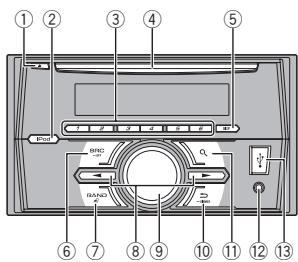
Head unit
① (eject)
② iPod
③ 1/△to6
④ Disc loading slot
⑤ DISP
⑥ SRC/OFF
⑦ BAND/(iPod control)
⑧
9 MULTI-CONTROL (M.C.)
(10) (back)/DIMMER (dimmer)
11 0(list)
AUX input jack (3.5 mm stereo jack)
13 USB port

CAUTION
Use an optional Pioneer USB cable (CD-U50E) to connect the USB storage device as any device connected directly to the unit will protrude out from the unit, which could be dangerous.
Display indication
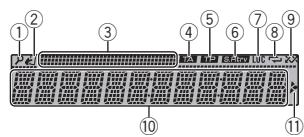
① p(list)
(iPod control)
② This unit's iPod function is operated from your iPod.
③ Sub information section
④ TA (traffic announcements)
⑤ TP (traffic program identification)
⑥ S.Rtrv (sound retriever)
⑦ LOC(local seek tuning)
(8) (repeat)
(9) (random)
Main information section
Tuner: band and frequency
RDS: program service name, PTY infor
⑩ mation and other literal information
- CD player, USB storage device and iPod: elapsed playback time and text information

1) Appears when a lower tier of folder or menu exists.
Set up menu
1 After installation of this unit, turn the ignition switch to ON.
SET UP appears.
Using this unit
2 Turn M.C. to switch to YES.
- If you do not use the unit for 30 seconds, the set up menu will not be displayed.
- If you prefer not to set up at this time, turn M.C. to switch to NO.
3 Press M.C. to select.
4 Follow these steps to set the menu.
To proceed to the next menu option, you need to confirm your selection.
LANGUAGE (multi-language)
This unit can display the text information from a compressed audio file even for information embedded in English, Russian or Turkish.
- If the embedded language and the selected language setting are not the same, text information may not display properly.
- Some characters may not be displayed properly.
1 Turn M.C. to select the desired setting. ENG (English)—PYC (Russian)—TUR (Turkish)
2 Press M.C. to confirm the selection.
CLOCK SET (setting the clock)
Turn M.C. to adjust hour.
2 Press M.C. to select minute.
3 Turn M.C. to adjust minute.
4 Press M.C. to confirm the selection.
FM STEP (FM tuning step)
Use FM STEP to set FM tuning step options (seek step settings).
Turn M.C. to select the FM tuning step. 100 (100 kHz) -50 (50 kHz)
② Press M.C. to confirm the selection. QUIT appears.
The manual tuning step is fixed at 50kHz
- When AF and TA are turned off, the seek step is fixed at 50kHz even if set to 100.
5 To finish your settings, turn M.C. to select YES.
- If you prefer to change your setting again, turn M.C. to switch to NO.
6 Press M.C. to select.
Notes
- You can set up the menu options from the system menu and initial menu. For details about the settings, refer to System menu on page 8 and Initial menu on page 9.
- You can cancel set up menu by pressing SRC/OFF.
Basic operations
Turning the unit on
1 Press SRC/OFF to turn the unit on.
Turning the unit off
1 Press and hold SRC/OFF until the unit turns off.
Selecting a source
1 Press SRC/OFF to cycle between: RADIO—CD—USB/iPod—APP (application)—AUX
- USB MTP displays while the MTP connection is in use.
- When there is an iPod connected and a source other than iPod is selected, you can switch to iPod by pressing iPod.
Adjusting the volume
Turn M.C. to adjust the volume.
Note
When this unit's blue/white lead is connected to the vehicle's auto-antenna relay control terminal, the vehicle's antenna extends when this unit's source is turned on. To retract the antenna, turn the source off.
Using this unit
Frequently used menu operations
Returning to the previous display
Returning to the previous list (the folder one level higher)
Press DIMMER
Returning to the ordinary display
Canceling the main menu
1 Press BAND/
Returning to the ordinary display from the list
Press BAND/
Radio
Basic operations
Selecting a band
1 Press BAND/4 until the desired band (FM1, FM2, FM3 for FM or MW/LW) is displayed.
Switching preset stations
1 Pressor
- Select PCH (preset channel) under SEEK to use this function.
Manual tuning (step by step)
Pressor
- Select MAN (manual tuning) under SEEK to use this function.
Seeking
Press and hold or and then release. You can cancel seek tuning by briefly pressing or .
While pressing and holding or , you can skip stations. Seek tuning starts as soon as you release or .
Notes
-
For details about SEEK, refer to SEEK (left/right key setting) on page 5.
-
This unit's AF (alternative frequencies search) function can be turned on and off. AF should be off for normal tuning operation (refer to AF (alternative frequencies search) on page 4).
Storing and recalling stations for each band
Using preset tuning buttons
1 To store: Press and hold down one of the preset tuning buttons (1 / to 6 / 一 ) until the number stops flashing.
2 To recall: Press one of the preset tuning buttons (1 / to 6 / =) .
Switching the display
Selecting the desired text information
1 Press DISP to cycle between the following:
FREQUENCY (program service name or frequency)
BRDCST INFO (program service name/PTY information)
CLOCK (source name and clock)
Notes
- If the program service name cannot be acquired in FREQUENCY, the broadcast frequency is displayed instead. If the program service name is detected, the program service name will be displayed.
Depending on the band, text information can be changed.
Text information items that can be changed depend on the area.
Using PTY functions
You can tune in to a station using PTY (program type) information.
Using this unit
Searching for an RDS station by PTY information
Press (list).
2 Turn M.C. to select a program type. NEWS/INFO—POPULAR—CLASSICS—OTHERS
Press M.C. to begin the search. The unit searches for a station broadcasting that type of program. When a station is found, its program service name is displayed.
To cancel the search, press M.C. again.
- The program of some stations may differ from that indicated by the transmitted PTY.
- If no station is broadcasting the type of program you searched for, NOT FOUND is displayed for about two seconds and then the tuner returns to the original station.
PTY list
For more details about PTY list, visit the following site:
http://www.pioneer.eu/eur/product/25/121/tech/CarAudio/PTY.html
Function settings
1 Press M.C. to display the main menu.
2 Turn M.C. to change the menu option and press to select FUNCTION.
3 Turn M.C. to select the function.
Once selected, the following functions can be adjusted.
- If MW/LW band is selected, only BSM. LOCAL and SEEK are available.
FM SETTING (FM sound quality settings)
The sound quality level can be set to match the broadcast signal conditions of the FM band signal.
Press M.C. to display the setting mode.
2 Turn M.C. to select the desired setting.
STANDARD-This is the standard setting.
HI-FI - This is the setting to use to prioritize the high quality of stereo sound.
- STABLE - This is the setting to use to prioritize the low noise of monaural sound.
BSM (best stations memory)
BSM (best stations memory) automatically stores the six strongest stations in the order of their signal strength.
1 Press M.C. to turn BSM on. To cancel, press M.C. again
REGIONAL (regional)
When AF is used, the regional function limits the selection of stations to those broadcasting regional programs.
Press M.C. to turn the regional function on or off.
LOCAL (local seek tuning)
Local seek tuning allows you to tune in to only those radio stations with sufficiently strong signals for good reception.
1 Press M.C. to select the desired setting. FM: OFF—LV1—LV2—LV3—LV4 MW/LW: OFF—LV1—LV2
The highest level setting allows reception of only the strongest stations, while lower levels allow the reception of weaker stations.
TA (traffic announcement standby)
Press M.C. to turn traffic announcement standby on or off.
AF (alternative frequencies search)
Using this unit
Press M.C. to turn AF on or off.
NEWS (news program interruption)
Press M.C. to turn the NEWS function on or off.
SEEK (left/right key setting)
You can assign a function to the left and right keys of the unit.
Select MAN (manual tuning) to tune up or down manually or select PCH (preset channel) to switch between preset channels.
1 Press M.C. to select MAN or PCH.
CD/CD-R/CD-RW and USB storage devices
MTP connection
MTP-compatible Android devices (running Android OS 4.0 or higher) can be connected by MTP connection using the USB source. To connect an Android device, use the cable that came with the device.
Note
This function is not compatible with WAV.
Basic operations
| Playing a CD/CD-R/CD-RW 1 Insert the disc into the disc loading slot with the label side up. |
| Ejecting a CD/CD-R/CD-RW 1 Press▲. |
| Playing songs on a USB storage device 1 Open the USB port cover. 2 Plug in the USB storage device using a USB cable. |
Stopping playback of files on a USB storage device
You may disconnect the USB storage device at any time.
Selecting a folder
1 Press 1/ or 2/V.
Selecting a track
Pressor
Fast forwarding or reversing
Press and hold or
- When playing compressed audio, there is no sound during fast forward or reverse.
Returning to root folder
Press and hold BAND/4.
Switching between compressed audio and CD-DA
1 Press BAND/
Switching between playback memory devices
You can switch between playback memory devices on USB storage devices with more than one Mass Storage Device-compatible memory device.
Press BAND/
- You can switch between up to 32 different memory devices.
Note
Disconnect USB storage devices from the unit when not in use.
Using this unit
Switching the display
Selecting the desired text information
1 Press DISP to cycle between the following: CD-DA
- ELAPSED TIME (track number and playback time)
CLOCK (source name and clock)
SPEANA (spectrum analyzer)
CD-TEXT
- TRACK INFO (track title/track artist/disc title)
- ELAPSED TIME (track number and playback time)
CLOCK (source name and clock)
SPEANA (spectrum analyzer)
MP3/WMA/WAV
- TRACK INFO (track title/artist name/album title)
FILE INFO (file name/folder name) - ELAPSED TIME (track number and playback time)
CLOCK (source name and clock)
SPEANA (spectrum analyzer)
Selecting and playing files/ tracks from the name list
1 Press to switch to the file/track name list mode.
2 Use M.C. to select the desired file name (or folder name).
Selecting a file or folder
Tum M.C.
Playing
1 When a file or track is selected, press M.C.
Viewing a list of the files (or folders) in the selected folder
When a folder is selected, press M.C.
Playing a song in the selected folder
1 When a folder is selected, press and hold M.C.
Operations using special buttons
Selecting a repeat play range
1 Press 6/← to cycle between the following: CD/CD-R/CD-RW
ALL-Repeat all tracks
- ONE - Repeat the current track
FLD-Repeat the current folder
USB storage device
ALL-Repeat all files
- ONE - Repeat the current file
FLD-Repeat the current folder
Playing tracks in random order
1 Press 5 to turn random play on or off. Tracks in a selected repeat range are played in random order.
To change songs during random play, press to switch to the next track. Pressing restarts playback of the current track from the beginning of the song.
Pausing playback
1 Press 4/PAUSE to pause or resume.
Enhancing compressed audio and restoring rich sound (sound retriever)
1 Press 3/S.Rtrv to cycle between:
1-2-OFF (off)
1 is effective for low compression rates, and 2 is effective for high compression rates.
Function settings
1 Press M.C. to display the main menu.
Using this unit
2 Turn M.C. to change the menu option and press to select FUNCTION.
Once selected, the function below can be adjusted.
S.RTRV (sound retriever)
Automatically enhances compressed audio and restores rich sound.
1 Press M.C. to select the desired setting. For details, refer to Enhancing compressed audio and restoring rich sound (sound retriever) on page 5.
iPod
Basic operations
Playing songs on an iPod
1 Open the USB port cover.
2 Connect an iPod to USB input. Playback is performed automat
Selecting a song (chapter)
Pressor
Selecting an album
1 Press 1/ or 2/V.
Fast forwarding or reversing
1 Press and hold or
Notes
- The iPod cannot be turned on or off when the control mode is set to CTRL AUDIO.
- Disconnect headphones from the iPod before connecting it to this unit.
The iPod will turn off about two minutes after the ignition is switched off.
Switching the display
Selecting the desired text information
Press DISP to cycle between the following:
- TRACK INFO (track title/artist name/album title)
- ELAPSED TIME (track number and playback time)
CLOCK (source name and clock)
SPEANA (spectrum analyzer)
Browsing for a song
1 Press to switch to the top menu of list search.
2 Use M.C. to select a category/song.
Changing the name of the song or category
1Turn M.C.
Playlists—artists—albums—songs—podcasts—genres—composers—audiobooks
Playing
1 When a song is selected, press M.C.
Viewing a list of songs in the selected category
When a category is selected, press M.C.
Playing a song in the selected category
When a category is selected, press and hold M.C.
Searching the list by alphabet
1 When a list for the selected category is displayed, press to switch to alphabet search mode.
- You also can switch to alphabet search mode by turning M.C. twice.
2 Turn M.C. to select a letter.
3 Press M.C. to display the alphabetical list.
To cancel searching, press DIMMER.
Using this unit
Notes
- You can play playlists created with the computer application (MusicSphere). The application will be available on our website.
- Playlists that you created with the computer application (MusicSphere) are displayed in abbreviated form.
Operations using special buttons
Selecting a repeat play range
Press 6 / 一 to cycle between the following:
- ONE - Repeat the current song
- ALL - Repeat all songs in the selected list
- When the control mode is set to CTRL iPod, the repeat play range will be same as what is set for the connected iPod.
Selecting a random play range (shuffle)
1 Press 5/ to cycle between the following:
- SNG - Play back songs in the selected list in random order.
- ALB - Play back songs from a randomly selected album in order.
- OFF - Not play back in random order.
Playing all songs in random order (shuffle all)
1 Press and hold 5 / 20 to turn shuffle all on.
To turn off shuffle all, select OFF in shuffle. For details, refer to Selecting a random play range (shuffle) on page 6.
Pausing playback
Press 4/PAUSE to pause or resume.
Enhancing compressed audio and restoring rich sound (sound retriever)
1 Press 3/S.Rtrv to cycle between:
1-2-OFF (off)
1 is effective for low compression rates, and 2 is effective for high compression rates.
Playing songs related to the currently playing song
You can play songs from the following lists.
- Album list of the currently playing artist
Song list of the currently playing album - Album list of the currently playing genre
1 Press and hold to switch to link play mode.
2 Turn M.C. to change the mode; press to select.
- ARTIST - Plays an album by the artist currently playing.
- ALBUM - Plays a song from the album currently being played.
GENRE - Plays an album from the genre currently being played.
The selected song/album will be played after the currently playing song.
Notes
- The selected song/album may be canceled if you use functions other than link search (e.g., fast forward and reverse).
Depending on the song selected to play, the end of the currently playing song and the beginning of the selected song/album may be cut off.
Using this unit's iPod function from your iPod
This unit's iPod function can be controlled by using the connected iPod.
CTRL iPod is not compatible with the following iPod models.
- iPod nano 1st generation
-
iPod with video
-
Press BAND/ to switch the control mode.
-
CTRL iPod - This unit's iPod function can be operated from the connected iPod.
Using this unit
- CTRL AUDIO - This unit's iPod function can be controlled by using this unit.
You can also switch the control mode by pressing iPod.
Notes
- Switching the control mode to CTRL iPod pauses song playback. Use the iPod to resume playback.
- The following operations are still accessible from the unit even if the control mode is set to CTRL iPod.
— Pausing
Fast forward/reverse
- Selecting a song (chapter)
- The volume can only be adjusted from this unit.
Function settings
1 Press M.C. to display the main menu.
2 Turn M.C. to change the menu option and press to select FUNCTION.
3 Turn M.C. to select the function.
Once selected, the following functions can be adjusted.
- AUDIO BOOK is not available when CTRL iPod is selected in the control mode. For details, refer to Using this unit's iPod function from your iPod on page 6.
AUDIO BOOK (audiobook speed)
Press M.C. to display the setting mode.
2 Turn M.C. to select your favorite setting.
- FASTER - Playback at a speed faster than normal
NORMAL-Playback at normal speed - SLOWER - Playback at a speed slower than normal
S.RTRV (sound retriever)
Press M.C. to select the desired setting. For details, refer to Enhancing compressed audio and restoring rich sound (sound retriever) on page 6.
Using connected device applications
You can use this unit to perform streaming playback of and control tracks in iPhone applications or just for streaming playback.
Important
Use of third party apps may involve or require the provision of personally identifiable information, whether through the creation of a user account or otherwise, and for certain applications, the provision of geolocation data. ALL THIRD PARTY APPS ARE THE SOLE RESPONSIBILITY OF THE PROVIDERS, INCLUDING WITHOUT LIMITATION COLLECTION AND SECURITY OF USER DATA AND PRIVACY PRACTICES. BY ACCESSING THIRD PARTY APPS, YOU AGREE TO REVIEW THE TERMS OF SERVICE AND PRIVACY POLICIES OF THE PROVIDERS. IF YOU DO NOT AGREE WITH THE TERMS OR POLICIES OF ANY PROVIDER OR DO NOT CONSENT TO THE USE OF GEO-LOCATION DATA WHERE APPLICABLE, DO NOT USE THAT THIRD PARTY APP.
Information for compatibility of connected devices
The following is the detailed information regarding the terminals required to use the application for iPhone on this unit.
Using this unit
For iPhone users
- This function is compatible with iPhone and iPod touch.
The device has iOS 5.0 or higher.
Notes
Please check our website for a list of supported iPhone applications for this unit.
- Pioneer is not liable for any issues that may arise from incorrect or flawed app-based content.
- The content and functionality of the supported applications are the responsibility of the App providers.
Starting procedure for iPhone users
1 Connect an iPhone to USB input.
2 Switch the source to APP.
3 Start up the application on the iPhone and initiate playback.
Basic operations
Selecting a track
1 Press or
Fast forwarding or reversing
1 Press and hold or
Pausing playback
1 Press BAND to pause or resume.
Switching the display
Selecting the desired text information
Press DISP to cycle between the following:
- TRACK INFO (track title/artist name/album title)
APP NAME (application name)
ELAPSED TIME (playback time)
CLOCK (source name and clock)
SPEANA (spectrum analyzer)
Function settings
1 Press M.C. to display the main menu.
2 Turn M.C. to change the menu option and press to select FUNCTION.
3 Turn M.C. to select the function.
Once selected, the following functions can be adjusted.
PAUSE (pause)
1 Press M.C. to pause or resume.
S.RTRV (sound retriever)
1 Press M.C. to select the desired setting, 1-2-OFF (off)
1 is effective for low compression rates, and 2 is effective for high compression rates.
Audio adjustments
1 Press M.C. to display the main menu.
2 Turn M.C. to change the menu option and press to select AUDIO.
3 Turn M.C. to select the audio function. Once selected, the following audio functions can be adjusted.
- FADER is not available when SUB.W/SUB.W is selected in SP-P/O MODE. For details, refer to SP-P/O MODE (rear output and preout setting) on page 9.
- SUB.W and SUB.W CTRL are not available when REAR/REAR is selected in SP-P/O MODE. For details, refer to SP-P/O MODE (rear output and preout setting) on page 9.
- SUB.W CTRL is not available when SUB.W is selected in OFF. For details, refer to SUB.W (subwoofer on/off setting) on page 8.
Using this unit
SLA is not available when FM is selected as the source.
FADER (fader adjustment)
Press M.C. to display the setting mode.
Turn M.C. to adjust the front/rear speaker balance.
BALANCE (balance adjustment)
Press M.C. to display the setting mode.
Turn M.C. to adjust the left/right speaker balance.
EQ SETTING (equalizer recall)
Press M.C. to display the setting mode.
2 Turn M.C. to select the equalizer. POWERFUL-NATURAL-VOCAL-CUSTOM1-CUSTOM2-FLAT-SUPER BASS
The equalizer band and equalizer level can be customized when CUSTOM1 or CUSTOM2 is selected.
If selecting CUSTOM1 or CUSTOM2, complete the procedures outlined below. If selecting other options, press M.C. to return to the previous display.
- CUSTOM1 can be set separately for each source. However, USB, iPod and APP are all set to the same setting automatically.
- CUSTOM2 is a shared setting used in common for all sources.
3 Press M.C. to display the setting mode.
4 Press M.C. to cycle between the following: Equalizer band—Equalizer level
5 Turn M.C. to select the desired setting. Equalizer band: 80HZ—250HZ—800HZ—2.5KHZ—8KHZ Equalizer level: +6 to -6
LOUDNESS (loudness)
Loudness compensates for deficiencies in the low-frequency and high-frequency ranges at low volume.
Press M.C. to select the desired setting. OFF (off)-LOW (low)-MID (mid)-HI (high)
SUB.W (subwoofer on/off setting)
This unit is equipped with a subwoofer output which can be turned on or off.
1 Press M.C. to select the desired setting. NOR (normal phase)—REV (reverse phase)—OFF (subwoofer off)
SUB.W CTRL (subwoofer adjustment)
Only frequencies lower than those in the selected range are outputted from the subwoofer.
1 Press M.C. to display the setting mode.
2 Press M.C. to cycle between the following: Cut-off frequency—Output level—Slope level Rates that can be adjusted will flash.
3 Turn M.C. to select the desired setting. Cut-off frequency: 50HZ—63HZ—80HZ—100HZ—125HZ—160HZ—200HZ
Output level: -24 to +6
Slope level: -12 -- 24
BASS BOOST (bass boost)
Press M.C. to display the setting mode.
Turn M.C. to select a desired level. 0 to +6 is displayed as the level is increased or decreased.
HPF SETTING (high pass filter adjustment)
Using this unit
Use this function when wanting to listen only to high-frequency sounds. Only frequencies higher than the high-pass filter (HPF) cutoff are output from the speakers.
Press M.C. to display the setting mode.
2 Press M.C. to cycle between the following: Cut-off frequency—Slope level
3Turn M.C.to select the desired setting. Cut-off frequency:OFF—50HZ—63HZ—80HZ 100HZ—125HZ—160HZ—200HZ Slope level:-12-24
SLA (source level adjustment)
This function prevents the volume from changing too dramatically when the source switches.
- Settings are based on the FM volume level, which remains unchanged.
- The MW/LW volume level can also be adjusted with this function.
- USB, iPod and APP are all set to the same setting automatically.
1 Press M.C. to display the setting mode.
Turn M.C. to adjust the source volume. Adjustment range: +4 to -4
System menu

Important
PW SAVE (power saving) is canceled if the vehicle battery is disconnected and will need to be turned back on once the battery is reconnected. When PW SAVE (power saving) is off, depending on connection methods, the unit may continue to draw power from the battery if your vehicle's ignition doesn't have an ACC (accessory) position.
1 Press M.C. to display the main menu.
2 Turn M.C. to change the menu option and press to select SYSTEM.
3 Turn M.C. to select the system menu function.
Once selected, the following system menu functions can be adjusted.
LANGUAGE (multi-language)
1 Press M.C. to select the desired setting. ENG (English)—PYC (Russian)—TUR (Turkish)
CLOCK SET (setting the clock)
Press M.C. to display the setting mode.
Press M.C. to select the segment of the clock display you wish to set. Hour-Minute
3 Turn M.C. to adjust the clock.
12H/24H (time notation)
Press M.C. to select the desired setting. 12H (12-hour clock) -24H (24-hour clock)
AUTO PI (auto PI seek)
The unit can automatically search for a different station with the same programming, even during preset recall.
1 Press M.C. to turn Auto PI seek on or off.
AUX (auxiliary input)
Activate this setting when using an auxiliary device connected to this unit.
1 Press M.C. to turn AUX on or off.
DIMMER (dimmer)
Press M.C. to turn the dimmer on or off. You can also change the dimmer setting by pressing and holding DIMMER.
MUTE MODE (mutemode)
Using this unit
Sound from this system is automatically muted or attenuated when a signal from equipment with a mute function is received.
1 Press M.C. to display the setting mode.
2 Turn M.C. to select the desired setting.
MUTE-Muting
20dB ATT - Attenuation (20dB ATT has a stronger effect than 10dB ATT)
10dB ATT - Attenuation
PW SAVE (power saving)
Switching this function on enables you to reduce the consumption of battery power.
- Turning on the source is the only operation allowed when this function is on.
Press M.C. to turn the power save on or off.
Initial menu
1 Press and hold SRC/OFF until the unit turns off.
2 Press and hold SRC/OFF until the main menu appears in the display.
3 Turn M.C. to change the menu option and press to select INITIAL.
4 Turn M.C. to select the initial menu function.
Once selected, the following initial menu functions can be adjusted.
FM STEP (FM tuning step)
Press M.C. to select the FM tuning step. 100 (100 kHz)—50 (50 kHz)
SP-P/O MODE (rear output and preout setting)
The rear speaker leads output and the RCA output of this unit can be used to connect a full-range speaker or subwoofer. Select a suitable option for your connection.
1 Press M.C. to display the setting mode.
2 Turn M.C. to select the desired setting.
- REAR/SUB.W - Select when there is a full-range speaker connected to the rear speaker leads output and there is a subwoofer connected to the RCA output.
- SUB.W/SUB.W - Select when there is a subwoofer connected directly to the rear speaker leads output without any auxiliary amp and there is a subwoofer connected to the RCA output.
- REAR/REAR - Select when there is a full-range speaker connected to the rear speaker leads output and the RCA output. If there is a full-range speaker connected to the rear speaker leads output and the RCA output is not used, you may select either REAR/SUB.W or REAR/REAR.
System menu
1 Press and hold SRC/OFF until the unit turns off.
2 Press and hold SRC/OFF until the main menu appears in the display.
3 Turn M.C. to change the menu option and press to select SYSTEM.
4 Turn M.C. to select the system menu function.
For details, refer to System menu on page 8.
Using an AUX source
1 Insert the stereo mini plug into the AUX input jack.
Using this unit
2 Press SRC/OFF to select AUX as the source.
Note
AUX cannot be selected unless the auxiliary setting is turned on. For more details, refer to AUX (auxiliary input) on page 8.
Switching the display
Selecting the desired text information
Press DISP to cycle between the following:
- Source name
Source name and clock
If an unwanted display appears
Turn off the unwanted display using the procedures listed below.
1 Press M.C. to display the main menu.
2 Turn M.C. to change the menu option and press to select SYSTEM.
3 Turn M.C. to display DEMO OFF and press to select.
4 Turn M.C. to switch to YES.
5 Press M.C. to select.
Installation
Connections

Important
- When installing this unit in a vehicle without an ACC (accessory) position on the ignition switch, failure to connect the red cable to the terminal that detects operation of the ignition key may result in battery drain.

ACC position

No ACC position
- Use of this unit in conditions other than the following could result in fire or malfunction.
Vehicles with a 12-volt battery and negative grounding.
— Speakers with 50 W (output value) and 4 to 8 (impedance value). - To prevent a short-circuit, overheating or malfunction, be sure to follow the directions below.
- Disconnect the negative terminal of the battery before installation.
- Secure the wiring with cable clamps or adhesive tape. Wrap adhesive tape around wiring that comes into contact with metal parts to protect the wiring.
- Place all cables away from moving parts, such as the shift lever and seat rails.
- Place all cables away from hot places, such as near the heater outlet.
- Do not connect the yellow cable to the battery by passing it through the hole to the engine compartment.
Cover any disconnected cable connectors with insulating tape.
Do not shorten any cables. -
Never cut the insulation of the power cable of this unit in order to share the power with other devices. The current capacity of the cable is limited.
Use a fuse of the rating prescribed. -
Never wire the negative speaker cable directly to ground.
-
Never band together negative cables of multiple speakers.
-
When this unit is on, control signals are sent through the blue/white cable. Connect this cable to the system remote control of an external power amp or the vehicle's auto-antenna relay control terminal (max. 300 mA 12 VDC). If the vehicle is equipped with a glass antenna, connect it to the antenna booster power supply terminal.
- Never connect the blue/white cable to the power terminal of an external power amp. Also, never connect it to the power terminal of the auto antenna. Doing so may result in battery drain or a malfunction.
- The black cable is ground. Ground cables for this unit and other equipment (especially, high-current products such as power amps) must be wired separately. If they are not, an accidental detachment may result in a fire or malfunction.
This unit
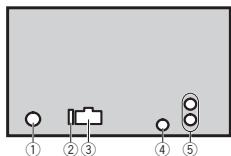
① Antenna input
② Fuse(10A)
③ Power cord input
④ Wired remote input
Hard-wired remote control adapter can be connected (sold separately).
⑤ Rear output or subwoofer output
Installation
Power cord
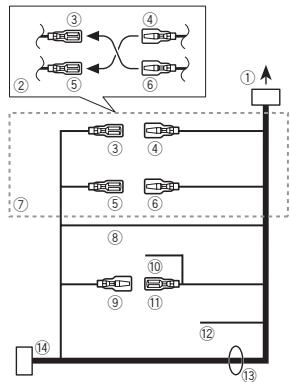
① To power cord input
② Depending on the kind of vehicle, the function of ③ and ⑤ may be different. In this case, be sure to connect ④ to ⑤ and ⑥ to ③
③ Yellow
Back-up (or accessory)
④ Yellow
Connect to the constant 12 V supply terminal.
⑤ Red
Accessory (or back-up)
⑥ Red
Connect to terminal controlled by ignition switch (12 V DC).
⑦ Connect leads of the same color to each other.
⑧ Black (chassis ground)
⑨ Blue/white
The pin position of the ISO connector will differ depending on the type of vehicle. Connect 9 and 11 when Pin 5 is an antenna control type. In another type of vehicle, never connect 9 and 11.
10 Blue/white
Connect to system control terminal of the power amp (max. 300 mA 12V DC).
1 Blue/white
Connect to auto-antenna relay control terminal (max. 300 mA 12 V DC).
12 Yellow/black
If you use an equipment with Mute function, wire this lead to the Audio Mute lead on that equipment. If not, keep the Audio Mute lead free of any connections.
⑬ Speaker leads
White: Front left
White/black:Front left
Gray: Front right
Gray/black: Front right
Green: Rear left or subwoofer
Green/black: Rear left or subwoofer
Violet: Rear right or subwoofer
Violet/black: Rear right or subwoofer
ISO connector
In some vehicles, the ISO connector may be divided into two. In this case, be sure to connect to both connectors.
Notes
- Change the initial menu of this unit. Refer to SP-P/O MODE (rear output and preout setting) on page 9. The subwoofer output of this unit is monaural.
- When using a subwoofer of 70W(2) , be sure to connect the subwoofer to the violet and violet/black leads of this unit. Do not connect anything to the green and green/black leads.
Installation
Power amp (sold separately)
Perform these connections when using the optional amplifier.
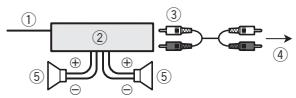
① System remote control
Connect to Blue/white cable.
② Power amp (sold separately)
③ Connect with RCA cables (sold separately)
④ To Rear output or subwoofer output
⑤ Rear speaker or subwoofer
Installation

Important
- Check all connections and systems before final installation.
- Do not use unauthorized parts as this may cause malfunctions.
- Consult your dealer if installation requires drilling of holes or other modifications to the vehicle.
-
Do not install this unit where:
-
it may interfere with operation of the vehicle.
it may cause injury to a passenger as a result of a sudden stop.
- The semiconductor laser will be damaged if it overheats. Install this unit away from hot places such as near the heater outlet.
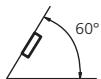
Optimum performance is obtained when the unit is installed at an angle of less than 60^ .
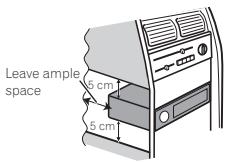
- When installing, to ensure proper heat dispersal when using this unit, make sure you leave ample space behind the rear panel and wrap any loose cables so they are not blocking the vents.
- Use commercially available parts when installing.
How to install
This unit can be installed properly using either of the methods in the below list.
Installation with the holder
- Installation using the screw holes on the side of the unit
Before installing this unit
1 Remove the trim ring.
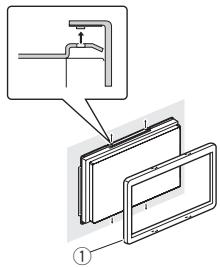
① Trim ring
Installation
2 Insert the supplied extraction keys into both sides of the unit until they click into place.
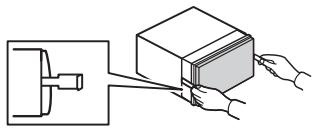
3 Pull the unit out of the holder.
Remove the holder.
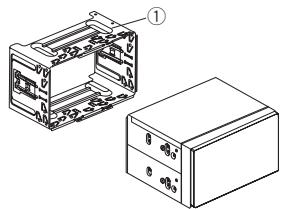
① Holder
(factory-supplied part)
Installation with the holder
1 Install the holder into the dashboard.
After inserting the holder into the dashboard, select and bend the tabs appropriate to the thickness of the dashboard material. (Install this unit as firmly as possible using the top and bottom tabs. To secure this unit, bend the tabs 90 degrees.)
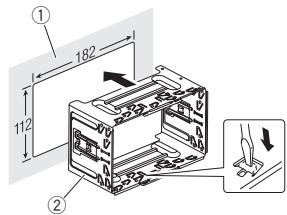
① Dashboard
② Holder
2 Install this unit.
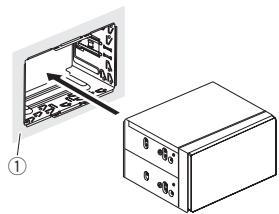
① Dashboard
Installation
3 Attach the trim ring.
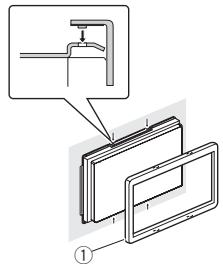
① Trim ring
Removing the holder
The procedure is the same as that for Before installing this unit. For details, refer to Before installing this unit on page 11.
Installation using the screw holes on the side of the unit
- Fastening the unit to the factory radiomounting bracket.
Position the unit so that its screw holes are aligned with the screw holes of the bracket, and tighten the screws at three locations on each side.
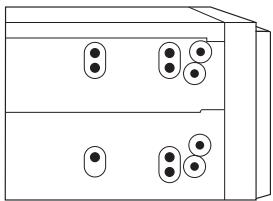
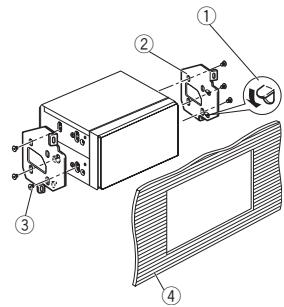
① If the pawl gets in the way, bend it down.
② Factory radio mounting bracket
③ Truss (5mm× 8mm) screws
④ Dashboard or console
Additional information
Troubleshooting
Symptoms are written in bold and causes in regular, non-indented text. Regular, indented text is used to indicate actions to be taken.
The display automatically returns to the ordinary display.
You did not perform any operation within about 30 seconds.
Perform operation again.
The repeat play range changes unexpectedly.
Depending on the repeat play range, the selected range may change when another folder or track is being selected or during fast forwarding/reversing.
Select the repeat play range again.
A subfolder is not played back.
Sub folders cannot be played when FLD (folder repeat) is selected.
Select another repeat play range.
NO XXXX appears when a display is changed (NO TITLE, for example).
There is no embedded text information.
Switch the display or play another track/file.
The unit is malfunctioning.
There is interference.
You are using a device, such as a cellular phone, that may cause audible interference.
Move electrical devices that may be causing the interference away from the unit.
Error messages
When you contact your dealer or your nearest Pioneer Service Center, be sure to note the error message.
Error messages are written in bold and causes in regular, non-indented text. Regular, indented text is used to indicate actions to be taken.
Common
AMP ERROR
This unit fails to operate or the speaker connection is incorrect; the protective circuit is activated.
Check the speaker connection. If the message fails to disappear even after the engine is switched off/on, contact your dealer or an authorized Pioneer Service Station for assistance.
CD player
ERROR-07,11,12,17,30
The disc is dirty.
Clean the disc.
The disc is scratched.
Replace the disc.
ERROR-07, 10, 11, 12, 15, 17, 30, A0
There is an electrical or mechanical error.
Turn the ignition switch OFF and back ON, or switch to a different source, then back to the C player.
ERROR-15
The inserted disc is blank.
Replace the disc.
ERROR-23
Unsupported CD format.
Replace the disc.
Additional information
FORMATREAD
Sometimes there is a delay between the start of playback and when you start to hear any sound.
Wait until the message disappears and you hear sound.
NO AUDIO
The inserted disc does not contain any playable files. Replace the disc.
SKIPPED
The inserted disc contains DRM protected files. The protected files are skipped.
PROTECT
All the files on the inserted disc are embedded with DRM. Replace the disc.
USB storage device/iPod
FORMATREAD
Sometimes there is a delay between the start of playback and when you start to hear any sound.
Wait until the message disappears and you hear sound.
NO AUDIO
There are no songs.
Transfer the audio files to the USB storage device and connect.
The connected USB storage device has security enabled.
Follow the USB storage device instructions to disable the security.
SKIPPED
The connected USB storage device contains DRM protected files.
The protected files are skipped.
PROTECT
All the files on the connected USB storage device are embedded with DRM.
Replace the USB storage device.
N/A USB
The connected USB device is not supported by this unit.
- Connect a USB Mass Storage Class compliant device.
- Disconnect your device and replace it with a compatible USB storage device.
CHECK USB
The USB connector or USB cable has short-circuited.
Check that the USB connector or USB cable is not caught in something or damaged.
CHECK USB
The connected USB storage device consumes more than maximum allowable current.
Disconnect the USB storage device and do not use it. Turn the ignition switch to OFF, then to ACC or ON and then connect only compliant USB storage devices.
CHECK USB
The iPod operates correctly but does not charge.
Make sure the connection cable for the iPod has not shorted out (e.g., not caught in metal objects). After checking, turn the ignition switch OFF and back ON, or disconnect the iPod and reconnect.
ERROR-19
Communication failed.
Perform one of the following operations.
-Turn the ignition switch OFF and back ON.
-Disconnect the USB storage device.
-Change to a different source.
Then, return to the USB source.
Additional information
iPod failure.
Disconnect the cable from the iPod. Once the iPod's main menu is displayed, reconnect the iPod and reset it.
ERROR-23
USB storage device was not formatted with FAT12, FAT16 or FAT32.
USB storage device should be formatted with FAT12, FAT16 or FAT32.
ERROR-16
The iPod firmware version is old.
Update the iPod version.
iPod failure.
Disconnect the cable from the iPod. Once the iPod's main menu is displayed, reconnect the iPod and reset it.
STOP
There are no songs in the current list. Select a list that contains songs.
NOT FOUND
No related songs.
Transfer songs to the iPod.
Application
STARTUPAPP
The application has not started running yet.
Follow the instructions that appear on the screen.
Handling guidelines
Discs and player
Use only discs that feature either of the following two logos.

DIGITAL AUDIO

DIGITAL AUDIO
TEXT
Use 12-cm discs.
Use only conventional, fully circular discs.
The following types of discs cannot be used with this unit:
DualDiscs
- 8-cm discs: Attempts to use such discs with an adapter may cause the unit to malfunction.
- Oddly shaped discs

Discs other than CDs
- Damaged discs, including discs that are cracked, chipped or warped
CD-R/RW discs that have not been finalized
Do not touch the recorded surface of the discs.
Store discs in their cases when not in use.
Do not attach labels, write on or apply chemicals to the surface of the discs.
To clean a CD, wipe the disc with a soft cloth outward from the center.
Condensation may temporarily impair the player's performance. Let it rest for about one hour to adjust to a warmer temperature. Also, wipe any damp discs off with a soft cloth.
Additional information
Playback of discs may not be possible because of disc characteristics, disc format, recorded application, playback environment, storage conditions, and so on.
Road shocks may interrupt disc playback.
When using discs that can be printed on label surfaces, check the instructions and the warnings of the discs. Depending on the discs, inserting and ejecting may not be possible. Using such discs may result in damage to this equipment.
Do not attach commercially available labels or other materials to the discs.
- The discs may warp making the disc unplayable.
- The labels may come off during playback and prevent ejection of the discs, which may result in damage to the equipment.
USB storage device
Connections via USB hub are not supported.
Do not connect anything other than a USB storage device.
Firmly secure the USB storage device when driving. Do not let the USB storage device fall onto the floor, where it may become jammed under the brake or accelerator pedal.
Depending on the USB storage device, the following problems may occur.
Operations may vary.
- The storage device may not be recognized.
- Files may not be played back properly.
- The device may cause audible interference when you are listening to the radio.
iPod
Do not leave the iPod in places with high temperatures.
Firmly secure the iPod when driving. Do not let the iPod fall onto the floor, where it may become jammed under the brake or accelerator pedal.
About iPod settings
- When an iPod is connected, this unit changes the EQ (equalizer) setting of the iPod to off in order to optimize the acoustics. When you disconnect the iPod, the EQ returns to the original setting.
- You cannot set Repeat to off on the iPod when using this unit. Repeat is automatically changed to All when the iPod is connected to this unit.
Incompatible text saved on the iPod will not be displayed by the unit.
Compressed audio compatibility (disc, USB)
WMA
File extension: .wma
Bit rate: 48 kbps to 320 kbps (CBR), 48 kbps to 384 kbps (VBR)
Sampling frequency: 32kHz 44.1 kHz, 48 kHz
Windows Media™ Audio Professional, Lossless, Voice/DRM Stream/Stream with video: Not compatible
MP3
File extension:.mp3
Bit rate: 8 kbps to 320 kbps (CBR), VBR
Additional information
Sampling frequency: 8 kHz to 48 kHz (32 kHz, 44.1 kHz, 48 kHz for emphasis)
Compatible ID3 tag version: 1.0, 1.1, 2.2, 2.3, 2.4 (ID3 tag Version 2.x is given priority over Version 1.x)
M3u playlist: Not compatible
MP3i (MP3 interactive), mp3 PRO: Not compatible
WAV
File extension:.wav
Quantization bits: 8 and 16 (LPCM), 4 (MS ADPCM)
Sampling frequency: 16kHz to 48kHz (LPCM), 22.05kHz and 44.1kHz (MS ADPCM)
- You cannot use this function with USB MTP.
Supplemental information
Only the first 32 characters can be displayed as a file name (including the file extension) or a folder name.
Russian text to be displayed on this unit should be encoded in one of the following character sets:
Unicode (UTF-8, UTF-16)
- A character set other than Unicode that is used in a Windows environment and is set to Russian in the multi-language setting
This unit may not work properly depending on the application used to encode WMA files.
There may be a slight delay at the start of playback of audio files embedded with image data or audio files stored on a USB storage device that has numerous folder hierarchies.
Disc
Playable folder hierarchy: up to eight tiers (A practical hierarchy is less than two tiers.)
Playable folders: up to 99
Playable files: up to 999
File system: ISO 9660 Level 1 and 2, Romeo, Joliet
Multi-session playback: Compatible
Packet write data transfer: Not compatible
Regardless of the length of blank sections between the songs from the original recording, compressed audio discs play with a short pause between songs.
USB storage device
Playable folder hierarchy: up to eight tiers (A practical hierarchy is less than two tiers.)
Playable folders: up to 500
Playable files: up to 15000
Playback of copyright-protected files: Not compatible
Partitioned USB storage device: Only the first partition can be played.
There may be a slight delay when starting playback of audio files on a USB storage device with numerous folder hierarchies.

CAUTION
- Pioneer cannot guarantee compatibility with all USB mass storage devices and assumes no responsibility for any loss of data on media players, smart phones, or other devices while using this product.
Additional information
- Do not leave discs or a USB storage device in any place that is subject to high temperatures.
iPod compatibility
This unit supports only the following iPod models.
Made for
- iPod touch (5th generation)
- iPod touch (4th generation)
- iPod touch (3rd generation)
- iPod touch (2nd generation)
- iPod touch (1st generation)
- iPod classic
- iPod with video
- iPod nano (7th generation)
- iPod nano (6th generation)
- iPod nano (5th generation)
- iPod nano (4th generation)
- iPod nano (3rd generation)
- iPod nano (2nd generation)
- iPod nano (1st generation)
iPhone5
iPhone 4S
iPhone 4
iPhone 3GS
iPhone 3G
iPhone
Depending on the generation or version of the iPod, some functions may not be available.
Operations may vary depending on the software version of iPod.
Users of iPod with the Lightning Connector should use the Lightning to USB Cable (supplied with iPod).
Users of iPod with the Dock Connector should use CD-IU51. For details, consult your dealer.
About the file/format compatibility, refer to the iPod manuals.
Audiobook, Podcast: Compatible
CAUTION
Pioneer accepts no responsibility for data lost on the iPod, even if that data is lost while this unit is used.
Sequence of audio files
The user cannot assign folder numbers and specify playback sequences with this unit.
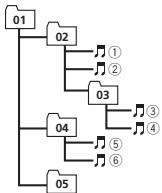
Example of a hierarchy
Level 1 Level 2 Level 3 Level 4
:Folder
Compressed
audio file
01 to 05: Folder
number
① to ⑥: Playback
sequence
Disc
Folder selection sequence or other operation may differ depending on the encoding or writing software.
USB storage device
Playback sequence is the same as recorded sequence in the USB storage device.
To specify the playback sequence, the following method is recommended.
Create a file name that includes numbers that specify the playback sequence (e.g., 001xxx.mp3 and 099yyy.mp3).
Put those files into a folder.
Additional information
3 Save the folder containing files on the USB storage device.
However, depending on the system environment, you may not be able to specify the playback sequence.
For USB portable audio players, the sequence is different and depends on the player.
Russian character chart
| D: C | D: C | D: C | D: C | D: C |
| A:A | B:B | B:B | F:F | J:D |
| E:E,E | J:X | J:3 | H:N, N | K:K |
| A:N | H:M | H:H | G:O | F:I |
| P:P | C:C | T:T | Y:Y | Φ:Φ |
| X:X | U:L | Y:Y | J:L, U | ' : b |
| H:bl | b:b | J:θ | K:IO | J:J |
D:Display C:Character
Copyright and trademark
MP3
Supply of this product only conveys a license for private, non-commercial use and does not convey a license nor imply any right to use this product in any commercial (i.e. revenue-generating) real time broadcasting (terrestrial, satellite, cable and/or any other media), broadcasting/ streaming via internet, intranets and/or other networks or in other electronic content distribution systems, such as pay-audio or audio-on-demand applications. An independent license for such use is required. For details, please visit http://www.mp3licensing.com.
WMA
Windows Media is either a registered trademark or trademark of Microsoft Corporation in the United States and/or other countries.
This product includes technology owned by Microsoft Corporation and cannot be used or distributed without a license from Microsoft Licensing, Inc.
iPod & iPhone
iPhone, iPod, iPod classic, iPod nano, and iPod touch are trademarks of Apple Inc., registered in the U.S. and other countries.
Lightning is a trademark of Apple Inc.
"Made for iPod" and "Made for iPhone" mean that an electronic accessory has been designed to connect specifically to iPod or iPhone, respectively, and has been certified by the developer to meet Apple performance standards. Apple is not responsible for the operation of this device or its compliance with safety and regulatory standards. Please note that the use of this accessory with iPod or iPhone may affect wireless performance.
AndroidTM
Android is a trademark of Google Inc.
Additional information
Specifications
General
Power source 14.4 V DC (10.8 V to 15.1 V Allowable)
Grounding system Negative type
Maximum current consumption 10.0a
Dimensions (W× H× D)
DIN
Chassis 178mm × 100mm × 157 mm
Nose 188mm × 118mm × 25mm D
Chassis 178mm × 100mm × 165mm
Continuous power output 22W× 4 (50 Hz to 15 000 Hz, 5 % THD, 4 load, both channels driven)
Load impedance 4Ω (4Ω to 8Ω allowable)
Preout maximum output level 2.0V
Loudness contour +10 dB (100 Hz), +6.5 dB (10 kHz) (volume: -30 dB)
Equalizer (5-Band Graphic Equalizer):
Frequency 80 Hz/250 Hz/800 Hz/2.5 kHz/ 8 kHz
Equalization range. ± 12 dB (2 dB step)
Subwoofer (mono):
Frequency 50 Hz/63 Hz/80 Hz/100 Hz/ 125 Hz/160 Hz/200 Hz
Slope -12 dB/0ct, -24 dB/0ct
Gain +6dBto-24dB
Phase Normal/Reverse
CD player
System Compact disc audio system
Usable discs Compact disc
Signal-to-noise ratio 94 dB (1 kHz) (IEC-A network)
Number of channels 2 (stereo)
MP3 decoding format ...... MPEG-1 & 2 Audio Layer 3
WMA decoding format .... Ver. 7, 7.1, 8, 9, 10, 11, 12 (2 ch audio)
(Windows Media Player)
WAV signal format ......... Linear PCM & MS ADPCM
(Non-compressed)
USB
USB standard specification USB 2.0 full speed
Maximum current supply
1A
USB Class .MSC (Mass Storage Class)
File system FAT12,FAT16,FAT32
MP3 decoding format ...... MPEG-1 & 2 Audio Layer 3
WMA decoding format .... Ver. 7, 7.1, 8, 9, 10, 11, 12 (2 ch audio)
(Windows Media Player)
WAV signal format ......... Linear PCM & MS ADPCM
(Non-compressed)
FM tuner
Frequency range 87.5 MHz to 108.0 MHz
- 9 dBF (0.8 V/75Ω mono, S/N: 30 dB)
Signal-to-noise ratio 72 dB (IEC-A network)
MWtuner
Frequency range 531 kHz to 1602 kHz
Usable sensitivity 25 V (S/N: 20 dB)
Signal-to-noise ratio 62 dB (IEC-A network)
LWTuner
Frequency range 153 kHz to 281 kHz
Usable sensitivity 28uV (S/N: 20 dB)
Signal-to-noise ratio 62 dB (IEC-A network)
Note
Specifications and the design are subject to modifications without notice.
Avant de commencer
FF. OFF-LV1-LV2 LV3-LV4 MW/LW (PO/GO): OFF-LV1-LV2
1-2-OFF (hors service)
S.RTRV (sound retriever)
1-2-OFF (hors service)
S.RTRV (sound retriever)
S.RTRV (sound retriever)
1-2-OFF (hors service)
BASS BOOST (accentuation des graves)
MUTE MODE (mode sourdine)
Retireez le support.
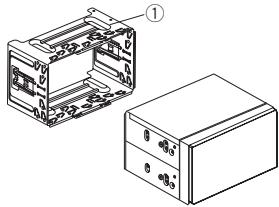
① Support
(piece fournie)
ERROR-07, 10, 11, 12, 15, 17, 30, A0
Lecture multi-session: compatible
Phase Normale/Inverse
Lecteur de CD
Ver. 7, 7.1, 8, 9, 10, 11, 12 (2 ca
naux audio)
(Windows Media Player)
Format du signal WAV ....
(Non compressé)
USB
Specification standard USB
Ver 7, 7.1, 8, 9, 10, 11, 12 (2 canaux audio) (Windows Media Player)
Format du signal WAV ....
(Non compressé)
Syntoniseur FM
http://www.pioneer.eu/eur/products/25/121/tech/
CarAudio/PTY.html
FM: OFF—LV1—LV2—LV3—LV4
MW/LW: OFF—LV1—LV2
ERROR-07, 11, 12, 17, 30
ERROR-07, 10, 11, 12, 15, 17, 30, A0
Estensione file: .wma
Velocity in bit: da 48 kbps a 320 kbps (CBR), da 48 kbps a 384 kbps (VBR)
Estensione file:.mp3
Velocita in bit: da 8 kbps a 320 kbps (CBR), VBR
| D: C | D: C | D: C | D: C | D: C |
| A:A | B:B | B:B | F:F | F:D |
| E:E,E | Z:Z | Z:3 | H:N,N | K:K |
| A:Π | H:M | H:H | G:O | F:Γ |
| P:P | C:C | T:T | Y:Y | Φ:Φ |
| X:X | U:U | Y:Y | M:U, M | '':b |
| H:bI | b:b | J:Θ | H:JO | η:Я |
Consumo massimo 10,0 A
Dimensioni (× × ) DIN
94 dB (a 1 kHz) (rete IEC-A)
Ver. 7, 7.1, 8, 9, 10, 11, 12 (2 ca
nali audio)
(Windows Media Player)
Formato segnale WAV
PCM lineare & MS ADPCM
(Non compresso)
USB
Specifiche standard USB
Ver. 7, 7.1, 8, 9, 10, 11, 12 (2 ca
nali audio)
(Windows Media Player)
ERROR-07, 10, 11, 12, 15, 17, 30, A0
| D: C | D: C | D: C | D: C | D: C |
| A:A | B:B | B:B | F:F | F:D |
| E:E,E | F:M | F:3 | H:N, N | K:K |
| A:N | H:M | H:H | G:O | H:I |
| P:P | C:C | T:T | Y:Y | Φ:Φ |
| X:X | U:U | Y:Y | M:M, M | '':'b |
| H:bI | b:b | J:J | H:I | J:J |
(Windows Media Player)
Formatode signal WAV.....PCM lineal & MS ADPCM
(No comprimido)
USB
Especification de la norma USB
Ver. 7, 7.1, 8, 9, 10, 11, 12
.audio 2 canales)
(Windows Media Player)
Formatode signal WAV.....PCM lineal & MS ADPCM
(No comprimido)
Sintonizador de FM
ERROR-07, 11, 12, 17, 30
ERROR-07, 10, 11, 12, 15, 17, 30, A0
| D: C | D: C | D: C | D: C | D: C |
| A:A | B:B | B:B | F:F | J:D |
| E:E,E | J:M | J:3 | H:N, N | K:K |
| A:N | H:M | H:H | G:O | F:N |
| P:P | C:C | T:T | Y:Y | Φ:Φ |
| X:X | U:U | Q:Q | J:L, U, Μ | ...b |
| H:bI | b:b | J:Θ | H:IO | Q:J |
D:Anzeige C:Zeichen
Equalizer (5-Band Graphic Equalizer):
Frequenz 80 Hz/250 Hz/800 Hz/2.5 kHz/8 kHz
KLASSE 1 LASERPRODUCT
Bij problemen
12 AUX-ingang (3,5mm-stereoplug)
USB-poort
A LET OP
http://www.pioneer.eu/eur/products/25/121/tech/
CarAudio/PTY.html
S.RTRV (sound retriever)
S.RTRV (sound retriever)
S.RTRV (sound retriever)
BASS BOOST (bass boost)
HPF SETTING (high pass filter aanpassen)
ERROR-07, 10, 11, 12, 15, 17, 30, A0
Geen verwante songs.
| S: T | S: T | S: T | S: T | S: T |
| A: A | B: B | B: B | F: F | J: J |
| E: E, E | J: JK | J: 3 | H: H, N, I | K: K |
S: Scherm T: Teken
| S: T | S: T | S: T | S: T | S: T |
| \( \lambda : \Pi \) | \( \mu : \mathbf{M} \) | \( \nu : \mathrm{H} \) | \( \vartheta : \mathrm{O} \) | \( \varphi : \Pi \) |
| \( P: P \) | \( \varepsilon : \mathrm{C} \) | \( \gamma : \mathrm{T} \) | \( y : \mathrm{Y} \) | \( \varphi : \Phi \) |
| \( \pi : X \) | \( \iota : \iota \iota \) | \( \psi : \psi \) | \( \sharp : \mathrm{{\Pi}}, \) \( \mathrm{{\Pi}} \) | \( \ddot{\pi} : \mathrm{b} \) |
| \( \beta : \mathrm{{bl}} \) | \( b : b \) | \( \exists : \exists \) | \( \eta : \mathrm{{IO}} \) | \( \eta : \eta \) |
Copyright en handelsmerken
MP3
Chassis 178mm x 100mm x 165mm
Voorkant 170mm×96mm×17mm
Gewicht 1,2 kg
Audio
EcnB TeneHHe 30 cekHyd yctpoIcTHo He IocnIb3yETC,YCTaHOBOHoe MeHIO He 6yDet BvBOITbC.
- ECNI BYt XOHTBE BInONHHTB HCTPOKNY NO3KZE, NOBEPHIH M.C., TTO6BI BYb5PbT NO.
3 HaxmTe M.C.ДЯЯ BbI6opa.
4 HactoRte MEHO C NOMObIO OINCAHnBIX HNIXE DEICTBN.
Дампекраха Кс endуhoemy PMHKTMy MEHO6xOIMO NOtBTerpIbY BbObP.
LANGUAGE (Bb6op Ra3bika)
JaHnHOe yCTPOJcTBO MOKET OTo6paKaTb TEKCTOy BIu HNΦOpMaIIO M3 CkAByx aayINOaHIOB, TOM YNCIE HNΦopMaIO HA aHTIINCKOM, pyc-CKOM IYTEUKO K8bIKAK.
ПИЗ HECOBMECTMNOCTAHTOPOB BCTPOPEHHO-TOI YIb6aHHOTRA3bika BO3MOKHBi ICKaKeHENI PnI BbBODE TEKTObxIbCOO6UeHNI.
HEKOTOPBE CMBONBly MGYT OTO6paKaTbCBAHepaBnIbHO.
1Повораивайе M.C.дяь Вьбора Нстpoи. K. ENG (aHrnnckn)—PUC (pycckn)—TUR (tpeukn)
2 HaxmTe M.C., yTo6bI NoTBePdNtB Bb6Op.
CLOCK SET (yCTaHOBka yacob)
1 Поворашива对接 M.C., Ктобы установы.
Часы.
JHAKIMAIte M.C.,YTO6bI Bb5bPat yCTaHOBKY MMHT.
3 [M]yHHTbI.
4 HaxmTe M.C., yTo6bI NoTBePdNtB Bb6Op.
FM STEP (laar hactpoikn B FM-dunaana3one)
CoxpaHHeN N BbI3OB H3 NaMЯrTn padnoctaHcN dIg KaKdOrO dnana30Ha
NcnoIb3OBAHne KHOIOK npedBaPnteBhoH NaCTPOKn
1 CoxpanenHe: haxmte n yapedkmbaTe OdHy n3 KhoNOK npedBaPntelbHO Ha cTpOKn (c 1/Ano 6/),noka Homep He npekpatn Mrtatb.
2 BbI3OB: HaxMMTe Ody N3 KhoNOK IpeBaPHTeBHOH NaCTPOKN (c 1/∧ no 6/¬).
IpeeknoueHne dncnner
BbIop TeKCTOBoNnHOpMaun
1 Hachmaie DEISPnA Bb6opa3nCneDyioxHx DYNKII:
FREQUENCY (Cnyk6b0e NsabaHne pO- rPamMbI INN CACTOTa)
BRDCSTINFO (cnyk6hoe Na3BaBnne nporpammh/Hinopormaun PTY)
CLOCK(HA3BHaHHe NCTOCHNka CnTHana n TaCb)
PpmeaHn
Ecnn cnjyke6Hoe H3BaHHe npOrpammblB none FREQUENCY OTCYTCTBYET, BMeTO hero OTobpaKaTeC kAHan. Ecnn cnjyke6Hoe H3BaHHe npOrpammblb 6hApHyKeHo, OHO 6yDet OTobpaKaTbczr.
TEKTOBAR INHOPMauzIN MOKET MEHytBa B 3ABiICMOTN OJIMNAOHA.
B30MOXHOCTbHECEHIN3MHEHENBTEKCTBOYIO INHFOPMALIO 2ABCNOT OT PERNOHA.
NcnoIb3ObaHneФyHKcIpyPTY
Mozho haoctpontbcna hao paiaoctanuoc n o mozbu Hnfoopmaun PTY (tina nporpammbi).
IcnoIb3OBAHne daHHoro yctpoiCTBa
PNT
1 HaKMnTe (CNUCOK).
2 KhoNkO M.C. BbIeBpTe TIN npOrpaMMbl. NEWS/INFO-POPULAR-CLASSICS-OTHERS
3 HacKMte M.C.,Tc6bMyHauhBtNoNc. UyctpoCTBO HauHMaet NoNcK padIoCTaHmI, nepedaoUoAaXdHnBuT NmI pOgAM. PmI o6bApuyKeHHaPdIoCTaHmI HaDcNpEe 6ydtNok3aHaO H3aBaHme DaHNOI npOrpaM MbI.
ДЯ OTMнБИ NOICKA HAKMNTE M.C. eue pa3.
- PnorgpamMbI HekotopBx paIaIOCTaHcIy MOrT yOtUHcTaCBy O nporpamM, yka3aHbX B nepeDabaEMOM kOE PTY.
EcnHn HOna I3 cTaNCHNe He nepedae TnporpammbHyNcHOro Tnna,To Ha NcDnpee B TceHeNe pImeMeHO DBye CxKhyNb6d YeBnOKa3AHO NOT FOUND, N 3aTeM ToHep EpeNd B peKIM pIeMa TcAnHmC, C KOtopoB bHJ Nauat PONCK.
Cnncok PTY
Bollee noDpo6HyIO HnFopMaIIO O cNtCKe
PTY MOxHNO NOnyUHTb Ha Be6-caIte:
http://www.pioneer.eu/eur/products/25/121/tech/
CarAudio/PTY.html
HactpoiKa fynKzni
1 HaxMMTE M.C., YTO6bI OTKpbITr rnaBHe MEHO.
2ПоворачиВаITEМ.C.DЯн npOKpyTKI nyHKTOB MeHIO;HAKMITE,YTObI BbIbpaTb FUNCTION.
3ДиьБИбОраФункIMи nobopauHBAIte M.C.
CnEyduoHue BbIePAnHbIe FyHKUIN MOKHO HcTpaHab.
ABOMATMueCknyuHaAeT KaueCTBO 38yKa CkaTbIx ayDnOaHIOB N BOCCTAHABNtBaET NOINOTY 38YAHUY.
1 HaKMMeTME.C.M.ДЯгБИбОРУнЖСНОH NaK.
PnObo6HyIOHΦOpMaIHO CM B LyTsyIeHne KauCeCTBa 3yBa kCstbX ayIIOaIIOB IN BOCSTAHOBENHE NpIoHTb 3yUaYHIA (TeXHOIOTIR npEo6P3aOBAHmI 3yHa) Na cTb.108.
iPod
OchOBhble onepaunn
Bocnpoun3BeDHeHne My3bIKn Ha iPod
1 OTKpoTe KpbIuKy nopTa USB.
2 PoiKJIIOUHTe iPod K pa3bemy USB.
Bocnpo3BedeHHe NaHHaETcABYOTMHTeCKn.
Bb60KOMnO3n(pa3eia)
1 HaxMnte KhoNky uH
Bb6op anb6oma
1 HaxmTe KhONky 1/Ann2/V.
Yckopenhna nepemotka Bnepeid nHa3a
1 Haxmte u ydepxmbaTe KhONky nJIn
Ppimechan
- iPod MOXHOK BVKIOHNTb INI BIKIIOHNTb, ecNI Bb6paH pexMH ynpaBHeNIA CTRL AUDIO.
- Peedok ndkIohneHnEM PodK da HanyMoY cTropoCTby TcOeDAHInTe OHTe HAYUHNKa.
BbIIOHcHHe I Pod npOcxOHTnpIMepHO cep3 DBe MmHyTbI pOcNE BbIKIOHcHn 3a- KIgAHIN.
IpekeJIIOUeHHe IucnIeR
Bb6Op TEKCTOBOHnHΦopMaUN
1 Hachimmaire DSP对阵毆b6opa3nclényuioxphyukhui:
- TRACK INFO (H3aBaHWE DOpOxKw/IMMa IcNoHNTHeYI/H3aBaHWe IbA6Mo)
ELAPSED TIME (HOMEP DOPOKKIN IN BPEM ABOCPONB3EENNA)
CLOCK(HA3BaHMeIcTOCHNHaICMnHAnaIyab) - SPEANA (aHaIIm3aTop cneKtpa)
PONCK KOMN03n
1Длпа repexoJa K rnaBHOMy mEHIO NOIcKa no cNtKy HAKMITE a.
2 C nmooubMo.C. BbIbePHTe Kateropno/ KOMON3HNUO.
Bb6op Ha3BaHnK KOMno3uIN JIN KaTeROpN
1 TOBopaHbAaTe M.C.
ПийшпьгИСИСИСИСИСИСИСИСИСИСИСИСИСИСИСИСИСИСИСИСИСИСИСИСИСИСИСИСИСИСИСИСИСИСИСИСИСИСИСИСИS
Bocnpon3BedeHne
1 BbI6epNTe KOMnO3nHn HaxMnTe M.C.
Поссмтс рснска КСМОЗИЙВ ВьБбанно КАТERPIN
BbIepeHTe KaTeOpHIO n HaxMITE M.C.
IcnojB3OBAHne daHHoro yctpoiCTBa
Bocnpom3BedeHNE KOMIOZHIN B Byb6panHO KaTeroPOM
[1]BüBeprütte Kateropino, 3aTeM hakmiteи yudepkbnaite M.C.
Ponck B cncke no anpabuty
1 Korda cinnck Bly6panhno kateropnn 0to6pa3NTcHa nDCnptee, HAKMNTE q, YTObbl BKIOHTb pekxim NONCK no anfapBity.
ДавдыноврMHMC.,MOKHO nepetniBу ржим NOHCA noI anDabity
2ДЯВыбopa6yKbblNobopaHBAIteM.C.
3<|im_start|>Mnme M.C. pour 0to6paeHHN cnsckna no anfambyt.
-ДЯТОМЕНБI NOИСКАHAЖMNTe /DIMMER.
PpIMeuaHn
- MoXHO BOCPON3BODINb CnCKN BOCPON3BDEHn, CoZdAHnle C nOMOuIb PnIOXeHnIaI KOMTbIOTepa (MusicSphere).PnIOXeHne MOxHO cKaATb Ha NaHemCaiIe.
CncknBocnpoBaeHEny,co3aHbHe C noMoBoI npInOKeHHa(MusicSphere),6byT OTo6pakatbC BcOKaJIeHHOM BVide.
Mochxo BOCPNOBDOBHT KOMPO3NIH IN CNEIyOuNX CNICCKO.
CnOICoB aIbMOBAPrHCTA, KOMONIaIIOKTOPORBOPCNPOIN3BDIOHTCA BDAHHBI MOENT
CINCHOK KOMON3HNI,OTHOZIMXCK BOCPOPNB3DIMOYMBADHNI MOMEHTAflb6MOY
CINICOK anbBOMOB,OTHOSRAXXCR BOCPON3- BODIMOMYB daHHbI MOMEHT My3bIaJIbHOMy KaHpy
1 HauKmte N ydepXnBaIe KhONky .dnynepeKnIOUeHnB PexHM BocPon3BeHnno kATerOpIN.
2ДЯИЗМЕHENIЕ рекIMа врацайтЕ M.C.,ДЯБИБОа -НAKMITE.
- ARTIST - BOCNPOU3BEdENHe AINb6Ma aPTNTa, KOMN03nIaKOTOPO BOCNPOU3BOIDITCR B DAHNBI MOMENT.
- ALBUM - Bocnpon3BedeHne Ie KOMPOn3IuINn 13 aIb6bMa, KOToTpBI BOCpON3BDoNTcB DAHNbMOMEHT.
GENRE-BocnpoBaeDeneAJIb6OmaB XaHpe,KOTOpBIOBCpOIN3BOIDTCB DaHn HbMOMeHT.
Bb6pHAnHaKOMo3nIHyIaIb50b 6yEdT BOCpOIN3BOoITbCnPcNE OkOHuaHnB OBCpOIN3BeDEhN TeKuIeJI KOMNo3nIz.
PpmeaHna
B03MOxHA OTMHeA BOcPOnBaBeHEny Bbl-6paHHOI KOmO3nIIN/AJb6oMa,ecNl BblCnOJIb3yeTe IIObIe Dpyrme FyHKuIN, KpOme NocKaNo KatoTerOpn (HaNPmep,pePemOTKa BnepeNd nn Haaad).
B 3aBvNCMOCTN to TOrO, KAKaK KOMNo3uJNA Bb6pHa, KOHeT EKtuEe KOMnO3uJn Ha- aHao Bb6paHNO KOMNo3uJn/Anb6oMa MOrYT 6b7b O6pe3aHb.
IcnoIb3OBAHneФyHKcIi iPod dAnHOro yCTpOiCtBa Ha BaIeM iPod
YnpaBnHEnHe yHKnIIMMn iPod daHHoro yCTpOHTBa MoKet IPOIN3BOIDNTBCr C NOkNIOHEHHORo iPod.
PekHMCTR IPOD HecOBMeCTM CO cIeIyOHIIM MOpEnMIY IPOD:
- iPod nano 1-ro nokoJIeHnA
- iPod c noidepkkk Bndeo
Ipekehjouhenie Mekdy pekhammi ynpab
brenna npns3bdntca hahktaenBAN/EDI.
AUDIO BOOK (CKOPoCTb BOCnPOn3BedeHnay- DIOKHN)
Bb6Op TEKCTOBHnHOpMaUN
1 Haimaime DIPE DnA Bb6opa 3n cndyiouixx fynku
- TRACK INFO (наньану дорожкч/NмИ сповп thenan/наньану abel6ma)
APP NAME (Ha3BaHHe npJIOXeHHa)
ELAPSED TIME (Верma Восточдемп)
CLOCK(h3aBHHeNIECTOHNIKAcHnHAnA n aCb)
SPEANA (aHaHn3atop cNeKtpa)
HactpoiKa fynKm
1 HaKMMTE M.C., YTO6bI OTKpbITr rnaBHOe MEHO.
2 IIOBOPaHbAte M.C.ДЯ nPOKpyTkn nyHKTOB MeHIO; HAKMITE, YTO6bI BbIb4pTaB FUNCTION.
3ДЯьыборуфнйповорчаньTe M.C.
Cnedyuohue BvIbpaHhIbe FyHKUIMoKHO Ha-ctpamBaB.
PAUSE (nay3a)
HAXMATE M.C., YTO6B BKNIOHYB NAY3Y IIN 8036HOHNB TOBCPOH3BDEHNI.
S.RTRV (sound retrieveer, texholognra preno6ba3-OBANBA byaKa)
1 HauKMITE M.C.ДЯг BAбОРа HuaKHOH NaCTPOJ KN.
1—2—OFF(Bblk.)
HactoPnka 13ΦΦeKTHBna forФainOB cN3KOH CTENEHcKbTaN, a HactoPnka 2 - dNfAIOB c BVCOKOCTENEHcKTHN.
Perylnipobkni npaMeTPOB 3Byka
1 HaxMMTE M.C., YTO6bI OTKpbITr IaBHOE MEHO.
2 IIOBOPaHbAte M.C.ДЯ nIPOkpyTkn nyHKTOB MeHIO; HAKMITE, TcObI BbIbOpTaB AUDIO.
3ДлБИБОаудиоФУнкIM NOВОЧИBAIITE M.C.
CnDyuOJIme Bb6panHbIe ayuNDOfYHKmI MOKHO HaCTPANBtB.
ФУншкіDAFERNEHODOTNYA,ecnви БрахіМЕ SP-P/O MODE BvybpaHO SUB.W/SUB.W.Поюрб breee.M.baраздe SUB.P-0 MODE (HastroPcna bvyxoza da3nHero KaHana u npedBaprntelbHorO ycnuHHTN) na Chp.113.
YHUKIMSUB.WuSUB.WCTRLHeIOCTyN HbI,ecJIMBpeKIMeSP-P/O MODE BbIpaHO REAR/REAR.ПорбоСсм.Варазел SP-P/O MODE (HaTcPoiKa BvIxoJa 3aJHero KaHana nI pIeBaPurTeNbHorO yCmIITenJI)Ha cTp.113.
-ФункцИМ SUB.W CTRL HeNoCTyHnHa,ЕСВ N B peKHeMME OFF bIb6PAno SUB.W.ПОдрбо hedge cM.В раддeNe SUB.W(BkIIOYHmE/BykIIOYOHe nae calbypepa) ha ctr.10p.
YKHNLLSA LDAHNOCTNYA,ecnIN BKAeCTBECTHOCTNHKA CNTHANA BuBpANO FM.
FADER (peynpovbKa 6aHaHca)
[1] Μιοῦ οθορακενΗΝΙ ΚΥΤΑΝΟΒΑΚΟ ΜΕΜΟ ḀλκΜΑτε M.C.
2 Haxmmte M.C., Ytob6 otperynpoBaTb 6a- nacn nepednHx n 3aDnHx romKOROBOPTeN.
BALANCE (perynipobka 6anaHca)
EQ SETTING (BbI3OB HAcTPOeK 3KBAJIaI3epa)
IcnoJb3OBAHne daHHoro yctpoiCTBa
IДАг OTOбжЕнИУCTAHOBOCHORMO HENHXMITE M.C.
Haxmite Hkmony M.C., YTOb6blb6pa8b3kaBnaIaep.
POWERFUL-NATURAL-VOCAL-CUSTOM1-CUSTOM2-FLAT-SUPER BASS
Ponocy u ypo8bHb 3kBaIa3ePa MoXHO otpeRyInpoBaT, eCNI bYb6paHO CUSTOM1 nIINCUSTOM2.
PnBbOpe CUSTOM1 INCUSOM2 BblNnHtme DeTbInn, ONiCAhNHte Hnke. PnBbOpe dpytnx hactpoek Haxmte M.C., YTOsbE BerpHTbck C npdeBdUcEm DmncNoe.
CUSTOM1 MOXHO Bb6pabT OTdEhBO DnI KAKDOI NCTOCHNIA CmHNA。OJHakoI NDR USB, iP0d APPBOMATUcckn YCTaHaBnBnAIOCTOj OJHAKOBBLE HACTPOKNI.
CUSTOM2-30O6JIaHnAePOIka,INCIOJIb3yEmaJ DnI BCEX INCTOHNKOB CINHaJa.
31 ПОТОБРАЖЕЦ YCTAHOBOTHORO MEHNO HA KMITE M.C.
4 Haximaiye M.C. dny Bb6opa m3 cneyuioxh yphiKn:
CLOCK SET (yCTaHOBKa yacob)
JIMTO OTOBAPKGEHNAYCTAHOBOPHO MEO HANXMATEM.C.
2 HaximmaTe M.C., YTo6b bbl6p8b CemENT DmCnIeA yacob, KOtopb HxHO yCTAHOBITb. Yacb--MmHytbl
[1]Повачinasе М.С.,Чтобл差别уншковыrtb.
12H/24H (ΦoPmAt OTo6paxKeHnBpeMeHn)
AUX (BCNOMORAteNBbB BxOd)
IcnoIb3OBAHne daHHoro yctpoiCTBa
Auktbnpuyte 3ty hactpoky npni Npoknouhen K daHHOMY yctpoCTBY BCNOMORATEbHO rYcPOI-CTBA.
HAKMITE M.C., YTO6bI BYKNOHTB INI BYKNOHTO HHTy DfHKNUO AUX.
DIMMER (perynyTop ocBeeHocTN)
1 HAKMITE M.C., TOTb6I BKNIOHTB INH BIKNOHTB PERYANTOP OCEBSEHOHNCTO.
BbTaKaeMoMeTe BbOpBaTb DpyTuO HacToPOn KypeyIaTOpA ocBeuHNoCTn, yDapeMBAH NaKaTH OKHNO DIMMER.
MUTE MODE (pexim npnrrnyeHn 3Byka)
3Byk/ypobeHb 3BykoBOrO cInHaNa daHHoN CnCTeMbI abOTOMaTHeCKN NOHIXaTcR pRi nOlyuYehmCInHaNoT o6bOpDobAHnC pHyKUne nprrIyUeHNHe 3Byka.
[1] ネトロOSTбареконハUCTAHOBOHORO MEHO HA-KMITE M.C.
2 [Повачиьке М.С. Дя Вьбoga Нсточи. ]
MUTE- npnnyuweHne 3Byka
- 20dB ATT - OCSaBneHMe YUPOBHa CnTHana (20dB ATT IMeET 6OJIeE CNIbHbN 3Φ-ΦeKT, HcM 10dB ATT)
10dB ATT-ocna6nneHyePOBHcRHaHa
PW SAVE (3hepros6pegehene)
BKNUQHHe 30T ΦYHKM NIOBBOJET CHN3HTB nOTpe6JIeMyO MOUHOCT bAkyMlyIaTOHNO 6a-tapei.
PIMBKNIOHENHOTOJYNHUNE EINHCTBEHNHO B3MOKHOI ONEPAIeN IABTETC RBNIO-CHHE MTOCTHNIKA CNTHNA.
1 HAKMITE M.C.,TOCTb BHKIOHHTI INI INB KIOHOHTI BY FHKUHIO 3HEEROPCBEKEXHNA.
CtapTOBoe MeHIO
1 HaxMMTEu yapedkmbaete KhoNKY SRC/ OFF, Noka yctpOCTeBO He bLknIOUHTcN.
2 HauKMITE KhoNKy SRC/OFN y UpeRkBnAe Te ne, Oka eO tKpOeTc STaPTOBE MHeNo.
1 HaxMMTE u depkxmbaire KOHNK SRC/ OFF, noka yctpOCTB NO he BkIKNIOVTCH.
2 HauKMITE KhoNkIy SRC/OFU yheKpBnAie Te ne, Ioka OteKPOTeC tCTAPTOBE MEHO.
3 Поворачьаве М.С.dЯnpokутkin nyнков MeHIO; NaKmITE, YTObI bbl6paTb SYSTEM.
4ДЯБыбopaФункшMuMuMuMuMuMuMuMuMuMuMuMuMuMuMuMuMuMuMuMuMuMuMuMuMuMuMuMuMuMuMuMuMuMuMuMuMuMuMuMuMuMuMuMuMuMuMuMuMuMuMuMuMuMuMuMuMuMuMuMuMuMuMuMuMuMuMuMuMuMuMuMuMuMuMuMuMuMuMuMuMuMuMuMuMuMuMuMuMuMuMuMuMuMuMuMuMuMuMuMuMoMnOcHpOuMaUcMoBMeHoCmBuMeHoCmTeMbHaNCTp.
IcnoJb30BaHne
dONOLHNTeJbHOrO
NCTOUYHnKa CnRHaJa (AUX)
1 Bctabte MHHWTEKep CTepeoka6JIaB rH3doAUX.
2 Jakhmte KhoNKy SRC/Off, Tc6bIb Bbl-6pBAt AUX A KCHETee MCTocHnHa CIRHNA.
PpmeaHne
Hebo3MOxHO Bb6paTb AUX,ecnHne BkJIOHeHa BCNOmORAteBnBa HacToPka. TnpO6Hyo NHΦOPMaUcMo Cm. pAbdeAUX (BCNOMORATeBbHbXBD)Ha ctp. 12.
IpeeknoueHne dncnner
Bb6op TeKCTOBH INHΦOpMaun
1 Haukmaie DEISPnAByb6opaH3 nCednyoouxH yhknu
Ha3BaHne nCTOuHnKa
Ha3BaHHe nCTOuHnKa CnHnA n YacBi
EcIn OTKpbIINcHHeBepHbI 3KpaH
OTKLOHHTe HEBPbI KpAH, KAK OINCAHO HIXE.
1 HakuMITE M.C., YTO6bI OTKpbITr IaBHOE MEHO.
2 IIOBOPaHbAitE M.C.ДЯ nIPOKpyTkn nyHKTOB MeHIO; HAKMITE, YTObI BbIbOpTa b SYSTEM.
3 NobepHnTE M.C.,Tt6bI ot6p3aHTb DEMO OFF, 3atEM HAXMNTe.
4 NOBeRnTe M.C.ДЯ BbI6opa YES.
5 HaxmTe M.C. nIy BbI6opa.
YCTaHOBKa
Coeinnen
Baxho
- Pnq yctahOBke daHHoro ycTpoCTBa B aBTOMOBNE, B KOTOPOM OTCyTCTBYET NONOJEHNEKIIOa3aXirgAHNA ACC,KpachbKa6ebI0JIeKHe 6bItb NpIKIOHeN K KEMMe, KOTOPaRAnOpEeJrTaPbOeHne NONOJEHNEKIIoA3aXIRgAHNA;B I pOITNBOM C1yaeMOKeT Bo3NHkHTb YeTeKA TOKa AkkyMylTropHO6atapei.

Пложжени ACC

Положбени ACCOTCYCTBYET
- 3Kcnpnyataunia daHnHO yCtpoCTBa B ycNoBnA,OTINHbIX OTINCAHbIX HNOXe,MOKETpNBBeCTn K NOxapary INI c6Oo B pa6Ote yCtpoCTBa.
TPhAHCNOPTRHbEcpdCTBaC12-BOfIbTOBbIM AKKyMylITOpOMn3a3eMEnHeHmOTPNiHaTeBbHOrO NOIOcA.
- FGMOFOBOPBHTENc 50BTB(BVxOBD HAOMOHbTb) HOT 4Ω 08 Ω2 (CONPOTMBTHNE).
Bo m36bckanhe KOPOTKORO 3aMblkAnHne, nepeRpeBa HnncpabNcOteh o83aTeBbNo co6nIaIe cNeDyUOncYka3AHn
-
Pereycta tahabOKBor OTOeOJIHINITE ORTPUCA-telbHyIO KIEMMY AKKYMYNITOPA.
3aKpEnIte npObOda pRi NOMOoi 3aXIMOB ININIOJIauIOHOJNEHtB.IJN3aUHTb IPOBOKIN3aIN3OIIpyTE npObOda B MecTax INCOPRIKOCBOHEMRC METAIIHcECKMN DeTALMM.
—Pa3MeCTIe BCE KaBeHb I ydaJIeHNoT noD-BWKbIXdTeJIeN, TAKHX KAK bYpur nepeKJIIOUeHNI nepeDauch HnapBaJrOuJe NcDEHN.
—PazmeCTte 此e Ka6enB ydaIeHnO tHaRpeBaIOuXcR TaTeAe, TAKxK K apeWetka 06orpebatena. -
3aIpeaaTc noDkIIOuATb XeITb npoBd IINCNIIeR AKKyMnYrTOpHOn B6aTapee ABTOMoBNIYepe3CBPeNHeOE OTeBPCTNe BOTCeK DEBmTEnA.
HbNIOyPye KOHNbIe BcE He NOIOOeIDINHEHbN KAbSeBnIOAIOUHOHHNHeTn.
He ykopauBaIte Ka6eJI.
Hnkorga He cpeaaeIeonlaio co shnypa nntanHHa dAnHoro YcTpoiCTBa c zebIo noa-n HnTTAHHa h dyrooe yctpoiCTBO. Oynctm Mharpyka kabena no TKO orpahnueha.
I- NcnoJIbYte npReOxpaHHTe b c Yka3AHHbIMn napAMETpAMi.
3a- 2AepeuaeeTcN aHpMaYo 3a3emMaTb OTPnIaTeBnHb bYbOoD pRMOKOBOPrInei. -
3anpuaetcBc8bivbBMeceOTrhoia-tenhIbeKaebnHeckoJIbKx rPOMKOrOBOpHien.
-
PnB KBNIOHEN NITAHNA YCTPOCTBA ynpabIbHOUO CINHAN NOAETC UPE3 CINHE6BNI PPBOOD. PNOKNIOTHE 3OT PNOBOK K KLEMME PYNbTA YNPABNEHNA BHEWHERY CYNLTEN MOnHOCTN INN KLEMME pENE ynpaBHEN AHTENHc B3NEKTPOPNIBODM (MaKc. 300 MA 12 B NOCTOHN HORA To) Ecn ABTOMOBINMb OOBOPDAnB BCTPOEHHO B OKOHNOE CTKEJIO AHTENHO, NOCDEOHNTE BOKOD K KLEMME NITAHNA YCINNTEN AHTENHb.
3aapeaetaCnOcdeHnBt CnHe-6bIy kAbelb K KEMME NITAHN BHEINHO YcNII TENA MOUHCTo. TaKze aepaeTcNOc coeHNHTb DAnHHb npOBd K KEMME nITAHN AHTEHblc cAlekTpnpBODom.B npOTNBOM CNyuae MoKET Bo3HKHTyb TeKA ToKa AkkymJrTOPHO 6TapeH ININ HA HeCNpABHOCTb.
YCTaHOBKa
- UepHbI Ka6eBb RaJIaTec3a3eMnHOUIM. 3a3eMnHOuIe K a6eNn DaHOrO yTOpOCTBa NduPyHX uYcPOTHCB (OCo6eHHO yCtPOCTB, PnpDAH3auHbHbIX DkECLNpyAuaqnn PN 60JIbXhN Tokax, TAKNX KAc yCHINTEb MOUHOCTN) DOJIKHbMOHTIPOBATBCr OTeNbHO. B pOITMHOBcm Cnyae IH CNYaHoe OTcoEHNHEHNE MoKET pINBECTN K NOXApy INHe HcnpabHOCTN.
Danhoe yctpoIcTBo
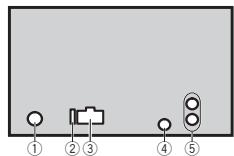
① THe3Do aHTeHHbI
② Плавский лредохарNTeNB(10A)
③ THe3Do UHypa nHTAHn
BxOJ npOBnHO rIyIbTa nCTAnuHNOHOrnypanenH
CnykntI nndoNIOHcHnnaPpOBOHOro aadTepa npbTa dncTaHNOHORo ynpabHnner (nnpo6pbaetcaOTdEhNo).
⑤ BbIXo3aJHero KaHana nn BbIXo3 ca6By-Φepa
Unyp nntanra
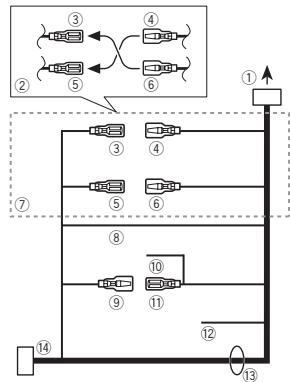
① Krhe3dy shhpy nntanna
② B3ABCIMMOCTOITNATAABOMOIBIANyHKUIN ③ N ⑤ MOYTOTNIHAAbCBA. B 3OTCM CUYAE cNEUYET NOKIOHNOHTB ④ K ⑤ N ⑥ K ③
③ KeTTbI
Pezehrbni pa3bem (Hn pa3bem dOponHntelhoro 60obyDobanria)
④ KeTTbI
Пдкнгдд К кншимЕ nctoун��а noctoяногу ToK 126
⑤ KpacbIy
Pazbem DonopNHITbHoro 60obpyoBaHnA (nju p3eBPhbIpa3BeB)
⑥ KpacbIy
ПовдкючITEКККЕМп,НаКOTOPУЮДАETСИЗнэген(12ВиocToTSHHOrOТOKA)PBNKIOHENN3ZKINHIA.
YctaHOBKa C KpoHHTeHOM
1 UctaHOBInTe KpOHUnTe Hn AnPm6OpHyo naHEnb.
Pocne yctahOBKn KPOHHTeHa Ha npNboOpHyo naHeBbYbIbeRnTeNoDxOaJHneΦHKCaTOpbl, NcXDoA h3 ToTlUINh MaTePnAa NpB6OpHn naHeHn, nNoDOrHnTe IVX. (C nOmoZbHo BerxpHnx HnHXKnHsΦHKCaTOpB aKApEPIte DaHnOE yCTpoiCTBO KAKMOHn HAdKeHze.ДЯ NaHaeKHOΦHKCaunu YtcoiECTBa Heo6OdHMo NoDoTHyTBΦHKCaTOpbl Ha 90 rpaYcob.)
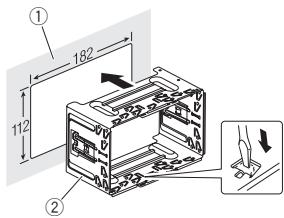
① Пиборная пань.
② KpoHwTeHH
(BXOJNT B KOMNNEKT NOCTABKN)
2 YctaHOBnTe yCtpoNCTBO.
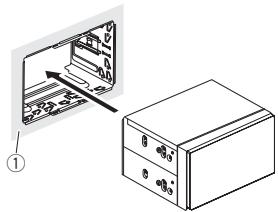
① PπB6OpHnaηnHeB
3 YcTaHOBnTe paMKy.
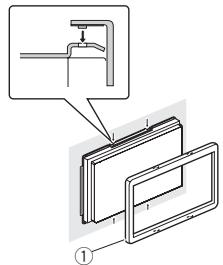
①ДекopaTNBna paMka
N3BLeueHHe KpOnuTeHa
Iopadok DeiCTBn tot Jx, YTO nepej yctaHOB- KOY cTPOiCTBa. IOpO6Hee CM. B pazene Ipej yctaHOBKO daHHoro yctpoiCTBa Ha cTp. 115.
YctaHOBka
YCTAHOBKa C NOMOuBIOpe3b60BbIX OTBepCTnHa6OKOBbIX NaHeJx YCTpoIcTBA
KpnlenHe yctropeTbHa 3aBocKOY yctAHOBOyHk PkoHTuH.
Paclonokhtye yctpoiCTBO TAKIM o6pa3OM, cy0bIe epe3bOBeBIE OTBepTnC BOvADANIC pe3bOBeIMN OTBepCTNMI KPOHTeHeHa, 3a-THInHeNo TpNI BHTA HA KAqDoT cTOPOHE.
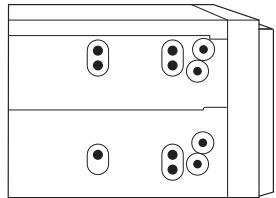
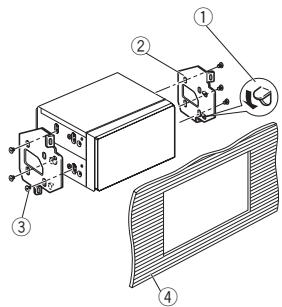
1 ΜρογΟΝΑΤΕ θακχΜ, εςη Θ Μεμαετ ΚγτΑθόΒΚE.
② 3aBOckOy yCTaHOBOHybKPOHHTeIN
③ KpeNexKhble(5MM×8MM) BHTbl
④ Pπb6opHа nAeHb nI IN KOHcOJIb
DOnonHnTeJbHa HOpMaun
YctpaHHeHne HEnCnpaBHOCTe
CnMNTMbI BbIeHEnJI KIHPbIM UpiNΦTOM; PPINHbI NOKa3aHbI ObUHbIM UpiNΦTOM 6e3 OTCTyNA.CnOc0bI yctpaHEnI NOKa3aHbI ObuHbIM UpiNΦTOM COTCTYNOm.
Icnnnepb aBOMATHueCKN BO3BpaaTcE B XUCDhB pexMH.
B TceHHe 30 cekyund He bIyIO bIyoJIeHO hIKaKIXn opeauim. Iobotprite onepauuio.
Iaonao3no HOBTOPOBO CnBPOH3BeDHHaCMAOPOB3BOHIO NHEMRETC.
B 3abciMmOCTOn TbVbpaHnHO mIaIa3oHa BOCpON3BeDEHnOH MOpKET N3MeHHTbc npN BvBopeDpyrTO nAniHn DOpOKn, aTakke nprepeMeOTKeBeped/Ha3ad, BvBepTe dIa3oHa nobTOHPOBCnpON3BeDEHnEe pae p3.
Bnoxehna nanka He Bocpon3BOIDTCa.
BtoxoeHbIe nanki HE bocnpn3BODTcRA,ecNI bIb-6pan dana3oH FLD (noBtrophoe Bocnpn3BedeHne nanki).
Bb6e9te dpyroyn diaana30n nobtoporHO Bocnpo3BeDhen.
ПИЗМЕнEHIMСЛТОБРАЖALEТСО XXXXX (HANPHME, NO TITLE)
TeKCTOBAA HNDOPMAIg OTCYCTBET.
PiEeKIOUHITe DnCIIeN IUI BKNIOHTe
BOcPONB3BeDHeN DEyRTO DPOJOKK/daJIna.
UcTpoCTBOQyHNUOHNHPyET C OuH6KAMN. IMeHToC TOMEXH.
HcNtbnbEyTcYyOCTBO, HANpIMep, COTOBbl TepeOH, KOTOPOE MOKET Bbl3blBAt WJMOBbl NOME-XM.
Y6bpeirnp60bblb8aouoijnomexhOT3T0rO yctpoiCTBa.
Coo6eHn8 o6 oun6kax
PpeKde cem o6patntbocr K toprobomy nped-CTaBNTENIO INN B 6nIkaHNI cepRNCbHI CEHTP Pioneer, o83aTeBNo 3anOMHtRe coo6-ueHne 06 ouu6ke.
Coo6eHnHa 06 oOn6kax BbyDeneHb XInpHbIM wipNtOM; pnpHbIb NOKa3Ab bOsbHbIM wipNtOM 6e3 OCTyna. CnoCobb yctpaHEHn NOKa3Ab bOsbHbIM wipNtCM cOTCTYNom.
06zne
AMP ERROR
UCTPOICTBO He paObTaET IIN HENpaBIVHNo NO- coeDInHen pRomKorOBOpRtEnb; cpaBOTana ceNb 3a- nHTbl.
PnOpeBte, noDKnIOUeH nI rPoMkoRObOpTeNb.
Ecnio coo6uHene He mCce3aet dAke jnoocle
BbIKIOUeHn/BeIKIOUeHn 3aKizraHnAn.
CBxRHTcB c DInIepCRkM CEtHpOM INI
aBTOPIOBAHnBm CEPBIM CBtHpOM Pioneer.
PpOINrpBbATEbKOMNaKT-DnCKOB
ERROR-07, 11, 12, 17, 30
ERROR-07, 10, 11, 12, 15, 17, 30, A0
3NeKTPMueckaeIIMeMAxHueckaeHENCnPABHOCTb.
YctahOBITE KIOU 3aKINAHN B NOJOKHHe OFF, a 3aTEM -B NOJOKHnE ON IINI nepeKIOHtEc bHa npTyOINCTOHN CINHala,a 3aTEM o6pAHO Ha npOurpbIbATEb KOMnAKTINCKOB.
ERROR-15
BCTABENH IyctOI DINCK 3AMEHNTI DINCK
ERROR-23
IcnoB3yTeToBkoObbHbE KpyTbIe DnCKI.
CnDyUOHe TNbI DnCKOB HEnb3a HcNpB3oBaTb HaDHOMC yCTPOKCTBe:
- Dnckn φopmata DualDisc
8-CM DKKN: NONBTKH INCNOIb3OBaT TaKHe DNCK C NOMOUsbHOaADITpeA MOYr PnIBeCTN K HENCPABHOCTN YCTPOINCTBA. - DnCKn Hne06bIyHbIX φoPm


-ДиСкИДургИХФормАТВ,КРОМСCD
PozhejeDhenBHeIe NcKb, B.T.Y.C TpeuHAMiC, OTKOJIOTbIMK KAPMn IINfeOpDMPOBaHBeN
Дмис CD-R/RW,зарис на Которьх he 6ыla загавшика
He npiKacaiTseb K 3aJIncAHNOI NOBEXHOCHTN DIKO8.
KordaIcknHeIcnOpb3yOtC8,xaHInTe IxB yfnIrpax.
He npriKIIeBaiTe 3IaIKeTOK, He pIIiWite I He HauHOCITE XMMUeCKHX BEECTB Ha IOBePbXHOCTB. DnCKOB.
ДагчИСКУМСКТ-ДСКСА ПОТРITE ДМСК МФКЕТКHAHBOI OTOLEHTKA KPAHO.
KoHdEHCaZMa MOKet BVPeMeHHO yXyDUnIb pa60Tny pOnrpBbAten. OCTabte eTo dJa aadantauin K 60lee BbCOKo TMepaType npMmepHO na cac.Takke ydaNtBe BNary c NDCOB c NOMOJIb MRAKO TKAHI.
Bocnpon3BedeHne DnCKOB MOKET 6bTb HeBO-3MOKO H3-3a xapakTePNCtIK DnCKA, FOPMATA DNCKA, pnpIOXeHHN, pnpIOMOu KOTOPOr BOIINHANBa3IcMb, yCNOB BoCpON3BedeHHN, yCNOB XpaHEHHN ANDyRTHx FkTOPOB.
Touhki OT hOBPOBCTO DApORMOY Tb3BaTb npbEBHBA BOCPON3EDEHNDA KCA.
ПгИнСЮЛБТОВАHINДСКOB,HA NOБЕХСНБТКOTOPьX MOrTG YAHOCHTSCB3TNTKTHN,MHTyUHTENHCTPYKUNI NpRdYNPReKDEHINJDA TSTHXDNCOB.UGaTHOBaN Iu3BNeEHNHE NeKTOPBtX DNICOBMOTYbTbHEBO3MOxHb.INcNoJIb3OBAHIne TAKIXDNICOB MOKeT pINBECTN K NOBpeJDeHINO O6OpyDOBANH.
He npnKnbBte Na HNCKN 3TNKETNI NpDyTne MATEPnbl.
3TOMOKETdeOpOPMnOparbTaDCN,BpezynbTaTe yeroHIOBCTPOHO3BeHHeMe6yETeHEoBOMKxHBIM.
ETKNEKTHMOYT OTKNBENTbO B0BPEMBOCPOIN3BEDENHnN3aTpDnHnHbN3BHeHNHeN DnKOB, a TAKOE NOBpeDntb OobpyDANHe.
3anomnhaouoeyctpoictbo USB
PnKIOKIOHENIEype3EUB-KONUENTpOHT He NOI- dedXBAaETC.
He noqknoihae dpyrne yucrpoctBA, kponme 3a-nomnHaioxuhs yucrpoct USB
DOnOHHTeJIbHa INΦOpMaun
Windows Media™ Audio Professional, Lossless, Voice/DRM Stream/Stream c nopepkk boe: He nopepkxbaertc
MP3
PacunepHe: .mp3
CKOpocb5 nepaDeaA daHnBu: OT 8 K6Nt/C do 320 K6Nt/C (noCToHaHH), nepeMeHHA
Yactota dncKpeTn3auim: 08 kTdo 48kTc (32kT,44,1kT,48kTnKOBa)
CoMeTImaM BepCnI TeroB ID3:1.0,1.1,2.2, 2.3,2.4(TerriID3BepCn2xIMeHOTnpmOpHTet nepedBepCn1.x.)
Спник BOCPONIBEДENI M3U: He podderpknBAIOTC
MP3i (HHTePAKTHBnH MP3), mp3 PRO: He noD-dePexkBAaOTCR
DOnOHHTeIbHa HOpMaun
WAV
PacunpeHne:wav
PapaHIOCTb KBAHTOBANH:8n16(LPCM),4 (MS ADPCM)
Yactota dncKpeTn3aun: ot 16 kTn do 48 kT (LPCM), 22,05 kT n 44,1 kTc (MS ADPCM)
- Tfa pyhckla He pa60taet,ecnn BbIbpaHO USB MTP.
DOnoJIHHTeIbHa IHHOpMaunr
B KauchéCTBE NátsbAHINI DajNA IINI NAPKIN MORYT OTObpaXaTbcr TóIbKO nepbIe 32 CIMBONA (BKNIOYAR PACCIPENHE).
Дамотобрахень в Даноном утостов的服务дурпорвka русckoroTekстдо дожа COOTSTCBOTBaTbOdOMHуСчEDYUHxN HABOPOB CIMBOBOL:
- IOHnKoI (UTF-8, UTF-16)
- OtrnHbIOTIOHKoDaHa6Op CmBONOB,NCnOB3yUoiuCBA CpeDeWindows,dJaKotopoRbBa3bKOBOH NACTPoiKe 3aadn Pycckn Ra3blk
KoHHeCTBO BOCpON3BODIMbX npAnok: He 600ee 99
KolnheTBOBcnpOn3BodIMbXΦaJIIOB:He 600ee 996
YUnbIaBJIe,THO B HEKOTOpBX CImCTEMHbIX CpeAaX HeBO3MOxHO YCTAHOBITb IopJADOK BOCpON3BDEHINIA
NocneBObateIbHOCbT BocnIOu3BEdENHaJIoB Ha nopTaIbNHOM ayDInonPieepe USB Moket NImEHtBaY a3BcINOT OT TiNa IInpeea.
Ta6JIHua CnMBOJIOB dIpyCCKOra 3bIka
| Д:Б | Д:Б | Д:Б | Д:Б | Д:Б |
| A:A | Б:B | Б:B | Γ:Γ | Б:Д |
| E:E,E | Б:Ж | Б:З | H:N,И | K:К |
| A:П | H:M | H:H | Б:О | П:П |
| P:P | C:C | T:T | y:Y | Φ:Φ |
| x:X | u:U | y:Y | ü:ü,ü,ü | ü:b |
| H:bl | b:b | J:ə | H:Ю | η:Я |
A:ДиспеловБыква
Abtopckoe npabOu nTOBapHbIe 3HaKn
MP3
IocTabka 3TOrO I3dEJIINaAeT npABo TOJbKOHa
ero TaCTHO HeKOMMEpHECKOE nCnIOb3OBAH
He N e pIepoCTabJraTe IInueH3nn Hne NOpa3
ZyMeBaET npABo INcONLb3OBAHn 3TO
I3dEJIINB LIObX KOMMEpCeckNX (t.e. pNHO
cuaXn Pn6bMb) npBmX TpAnCLJuaHX (TeneB
BIOHOHbX, CNYTHNKOBx, Ka6EBNbX H/INn
IIObX bpyrX), BeuAHIN/nOTOKOBn nepeJaue
Yepe3 INHTepHeT, NOKaIBNbX CETAx n/INn dpyr
YcTeR BnDpyrX 3NeKTPoONbHx CnTeMaX
PacnPoCTPAHEny, TAKsK KAc CTeMBy II NaTHo
OayuMo aUymo No zanpoCy. DnTa kato MC
IOb3OBAHn HeOBXoDMma CneuaNaBna
IIuJeH3N. DOnONHITBeHyO INhOpMaCuNo CM.
Ha caTe
http://www.mp3licensing.com.
WMA
Windows Media - 370 3aerntcpinobanhaTTOPBORAmpaNwTINTOPBORAmpaKMcOsforCorporation B CIIJA w/nnn dpyrnx cTpaHax.
DOnOHHTeJIbHa INΦOpMaun
B daHHOM 3dEINM INcNoIb3yOITcTeXHoNOrNI, npHnAdneKauIme Kopnpaunm Microsoft, KOTOpPbIe He pa3peWaaetcNcNOIb3oBaTb IINp pacnpoctpaanrTb 6e3 NIIueENsITm oT Microsoft Licensing, Inc.
iPod n iPhone
iPhone, iPod, iPod classic, iPod nano i iPod touch哑BnBTOCT TOBAPbIMN 3HakAMN KOMNAHm Apple Inc., aperetncptpobAHbIMN B CLLA N dpyrux ctpahanx.
LightningyIaIeTcS TOpROBbIM 3hAnKOM KOMnAHHI Apple Inc.
"Made for iPod" and "Made for iPhone" ona hauaet, QTO 3NEkTNPOHn II pNb6b II pa3a6oTah c CenbIIO NpOKnIOHEn OnpedeneHNO K IPod WII INi iPnEcoBETCTBENHO, I IMeETcCepTmNiu KsauApa3a6oTbNA O COOTBETCBNc TEXNHueCKMn XapakTePNCtHKamn Apple. Apple He Hecet oEBTCTBEHNCTN a 3a PObTy DAnHOro YcTPOINCTBA III erO COOTBETCTBNE Co CTaNAdaptMa n IO TEsKHe N63OpAChOStNn IINI peryIANTNBHMn HOMPMn. PoXaynjctA, o6pATITVE BHNMaHne, QTO ICNoNl3BaHNe daHNOr oPiNbopa c i POD wII INi iPnO MeKet OTPiAteJIHo Cka3bBaTcBa n KaCeTBe 6ecPBOBDH C83RI.
AndroidTM
Android JRETCS TOBAPbIM 3HAKOM KOMIaHIM Google Inc.
DOnOHHTeIbHa HOpMaun
CepnHbH Homep
Ha 3TOM pncyHke noka3aHa INΦopMaunO mecae I roe N3ROTOBHeNry yCTPOIcTBa.

Aata n3rTOBJIeHnO6OpyIOBaHn
P1-ΓoI n3rOToBJIeHnI
| Год | 2001 | 2002 | 2003 | 2004 | 2005 | 2006 | 2007 | 2008 | 2009 | 2010 |
| Симв点亮 | A | B | C | D | E | F | G | H | I | J |
| Год | 2011 | 2012 | 2013 | 2014 | 2015 | 2016 | 2017 | 2018 | 2019 | 2020 |
| Симboл | К | L | M | N | O | P | Q | R | S | T |
P2-Mecrau n3rTOBHeHn
| Мессяц | 1 | 2 | 3 | 4 | 5 | 6 | 7 | 8 | 9 | 10 | 11 | 12 |
| Симв养老金 | A | B | C | D | E | F | G | H | I | J | K | L |
DOnOHHTeIbHa IHHOpMaun
TexHnueckne xapaKTepeNCTNKn
067ne
- B NOCTHNO TOKA (DnyctHMn dmaa30n OH 10,8 B Do 15,1B)
HOMHaJIbHa BbIXoHHa MOUHOCTb
22Bt×4(ot50Γu,do
15000Iu,cymmaephe3hueaHMe Ko3ΦmUeHTA HENHeHBxNCKaKeHH 5%,Harpyka4ΩДЯnOбoxK KaHOB
ConpoTnBneHne Harpy3Kn
4Ω(doynctmo-ot 4Ω do 8Ω)
MakcimlhaBbVbOxHbMaOuHocb 2.0B
KoTHyp rPOMKCTN 10dE (100fU),+6.5dB(10kTf)(rPOMKCTb-:30dB)
3Kbalaan3ep(5-1oiochbI rpaΦmeckn 3Kbalaan3ep):
Yactora. 80 u / 250 u / 800 u / 2.5 U 8Ku
Yactota 50T/63T/80T/100T/
125T/160T/200T
Kpytn3Ha xapaKTepeNCTnKn
-12d/0KT,-24d/0KT
YcInenHe +6d5do-24d5
Φa3a HopmaIbHa/06paTHa
PpOurpbIbATEnb KOMnakT-DnCKOB
CHNTEMA AaDIOOCNCTEMAC C KOMNAKT-DINCKOM
IcnoB3yEmble DNCKn .... KomnakT-Dnck
OTHOWEHNE CnHaJI/WM
ΦopMaT DeKoOpOBaHnI ΦaIIIOB WMA
Bercn7,7.1,8,9,10,11,12
(ДБУХКАнЛьНБИ 3ВYК)
(Windows Media Player)
Φopmat cnHana WAV .... Linear PCM u MS ADPCM
(6e3 kOmnpceccn)
USB
CTaHapTna CneuФkaua USB
USB 2.0 nonhockopocthoH
MaKcHMaJIbHbI TOK IITaHnIa
1A
Knacc USB .MSC (Mass Storage Class)
(Windows Media Player)
ΦopMaT ciHana WAV ....... Linear PCM u MS ADPCM
(6e3KoMnpceccn)
FM-TIOHEP
Duaanao hactot 87,5Mgduo108,0Mg
Pone3HnA yBCTBNTeJIbHOCTb
9DΦ(0.8MKB/75Ω,MOHO THOUSHME CMHAN/uyM: 30d5)
OTHOWEHNE CINHNAI/UM
72d5 (ceTB IEC-A)
DononHntelbna HhOpMaun
MW-TioHep
Dnana3OH qactot . 531Ku do 1602Ku
Pone3na yBCTbntenbHOCTb
25MKB (OTHOSEHNE CnHaJI/
Wym:20d6)
OTHOWeHne CnHnA/JWym
62d5 (ceTB IEC-A)
LW-ThOHeP
DuaanaoHacToT .153KfUdo281KfU
Pone3na yBCTbntenbHOCTb
28MKB (OTHOUeHne CnHaJI/
ym:20dB)
OTHOWeHne CnHnAJI/WHM
62d5 (ceTB IEC-A)
Приимеанne:
B COOTBETCTMN CO sTaTbe 5 3aKoHa PocCnCKOΦepeauuN «O 3aunite npab noTpe6bnteNe N IOCTAHOBnEHEmnpabTeNbCTBa PocCNckoF PepeauuN 720 ot 16.06.97 KOMPnHna Pioneer Europe NV orOBApaertcIeDyUoUs cspOK cnky6bln3denn, OOFmuaBHO nocTbAReMbix h poCCsckn pshOk.
AbTomO6nIbHaN 3NeKtPoHnka: 6 Iiet
PnOuHn3dIeNn (HayuHnKm, MknroDfoHbI n.t.n.): 5.net
PpmeaHn
XapaktepeTNIK IN KOHCTPYKIIa MORYT 6bITb N3MeHeBb 6e3 npEdbAPTeBbHO yBeDoMJIeHn.
ДанhoeуctpoIbTO pOIN3BEdHO B TaNanHe.


http://www.pioneer.eu
Visit www.pioneer.co.uk (or www.pioneer.eu) to register your product.
Pioneer CarStereo-Pass
Please fill out immediately after purchase.
PIONEER ELECTRONICS (USA) INC.
P.O.Box 1540, Long Beach, California 90801-1540,U.S.A.
TEL: (800) 421-1404
PIONEER ELECTRONICS OF CANADA, INC.
340 Ferrier Street, Unit 2, Markham, Ontario L3R 2Z5, Canada
TEL: 1-877-283-5901
TEL: 905-479-4411
PIONEER ELECTRONICS ASIACENTRE PTE. LTD.
253 Alexandra Road, #04-01, Singapore 159936
TEL: 65-6472-7555
PIONEER ELECTRONICS AUSTRALIA PTY. LTD.
5 Arco Lane, Heatherton, Victoria, 3202 Australia
TEL: (03) 9586-6300
PIONEER ELECTRONICS DE MEXICO, S.A. de C.V.
Blvd. Manuel Avila Camacho 138 10 piso
Col.Lomas de Chapultepec, Mexico, D.F. 11000
TEL: 55-9178-4270
先锋股份有限公司
台北市内湖區瑞光路407號8樓
電話:886-(0)2-2657-3588
先鋒電子(香港)有限公司
香港九龍長沙灣道909號5樓
電話:852-2848-6488