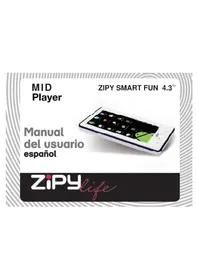
Smart Fun 4.3 - Tablet Zipy - Free user manual and instructions
Find the device manual for free Smart Fun 4.3 Zipy in PDF.



| Product Type | Touchscreen Tablet |
| Brand | Zipy |
| Model | Smart Fun 4.3 |
| Operating System | Android (Android Market compatible) |
| Screen Size | 4.3 inches |
| Wireless Connectivity | Wi-Fi 802.11 b/g/n |
| Internal Storage | NAND Flash Memory (capacity not specified) |
| External Storage | Memory card slot (format not specified) |
| Ports | USB port (likely micro-USB) |
| Battery | Rechargeable lithium-ion (estimated capacity 2000 mAh) |
| Power Supply | 5V/1A AC adapter (estimated) |
| Weight | Approximately 300 g |
| Dimensions (estimated) | Approximately 130 x 80 x 12 mm |
| Care and Cleaning | Clean with a soft, dry cloth. Avoid moisture and magnetic fields. |
| Safety | Do not open, use original charger and battery. Keep 15 cm away from pacemakers. Avoid heat sources. |
| Warranty | 2 years (according to conditions in the manual) |
| Repairability | Repair exclusively by Zipy authorized technicians. Any unauthorized opening voids the warranty. |
Frequently Asked Questions - Smart Fun 4.3 Zipy
User questions about Smart Fun 4.3 Zipy
0 question about this device. Answer the ones you know or ask your own.
Ask a new question about this device
Download the instructions for your Tablet in PDF format for free! Find your manual Smart Fun 4.3 - Zipy and take your electronic device back in hand. On this page are published all the documents necessary for the use of your device. Smart Fun 4.3 by Zipy.
USER MANUAL Smart Fun 4.3 Zipy
Waste management for all of your containers and domestic packagings that you deposit in the recycling bin
The packaging contains removable materials in order to treat them later in waste management
Do not deposit the device or the battery in the bin. Please, put it in a recycling
bin or carry it to your local nearby store
Deposit the packaging materials in the yellow bin
This device conforms to the EU directives
This unit conforms to the ROHS regulations
Symbol of frequency restriction in some countries of European Union
Sequence: Menu > Settings > Wireless & networks > Wi-Fi.
CONDITIONS DE GARANTIE AID
Safety precautions for Mobile Internet Devices (MID)
Your device emits radiofrequency energy (RF) that could interfere with some electronic devices inadequately protected. As a precautionary measure, switch it off whenever you are near these devices: pacemakers, hearing aids, medical devices or hospital equipment, on board an airplane.
Please respect the recommendations of Wireless Technology Research (WTR), an independent organization, maintaining a minimum distance of 15 centimeters between the Zipy device and a pacemaker to avoid any possible interference.
Your Zipy product is a sophisticated electronic device. Please, handle it carefully. Protect your device from falls and blows. Avoid exposing the MID to violent movements. Do not sit on it.
Do not use protector covers with magnetic closure. Do not allow your device to remain in prolonged contact with electromagnetic fields.
Only Zipy technicians are qualified to open and repair your Zipy device. Any use unrelated to Zipy may void the warranty of your device.
Use only rechargeable batteries and battery chargers from Zipy brand, developed for this product, otherwise any damage done to the product will void the warranty.
Never place your Zipy device within or above any heat source or high pressure element (within a car or bag under the sun, stove, etc.). Overheated batteries run the risk of exploding.
Do not use the device with wet hands or expose it to moisture (rain, steam, etc.) because in addition to damage it, you could cause an accident.
Zipy is not responsible for any damage or loss of data resulting from misuse or downloading software onto the device.
For devices that contain digital pen, you should not use the digital pen as a pointer on the touch screen because the screen may be damaged, which will result in the cancellation of your guarantee.
Quick Start Guide
Your MID
The important keys & connectors
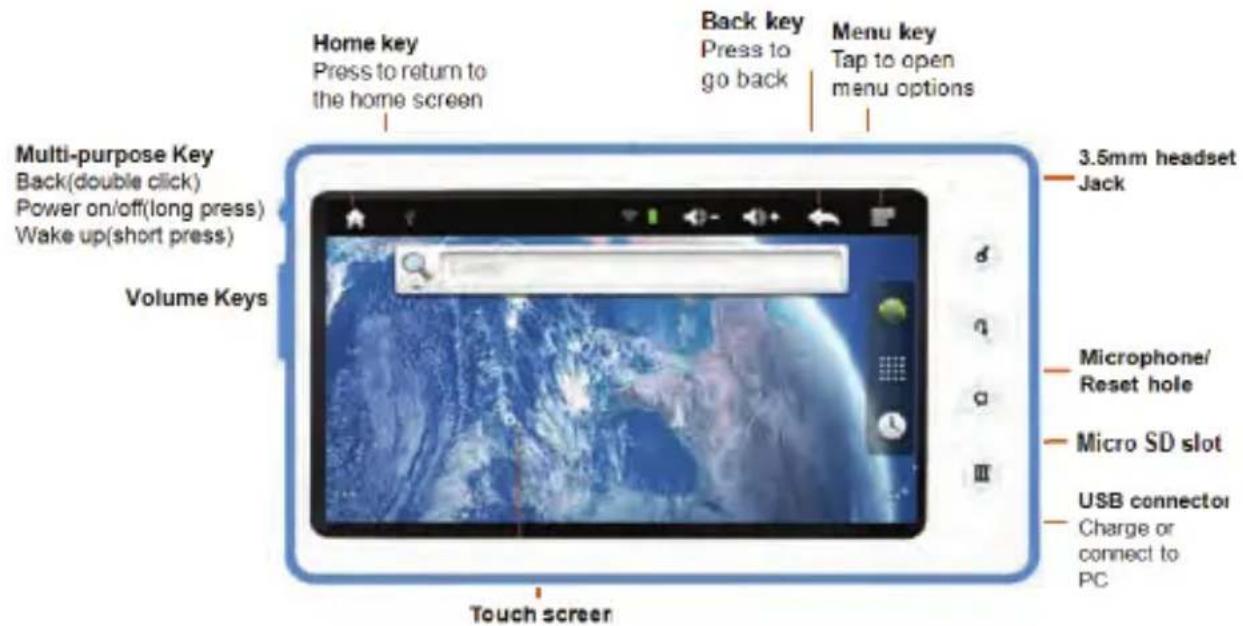
Let's go
Turn it on & off & Standby
To turn on your MID, press and hold Power (Multi-purpose key).
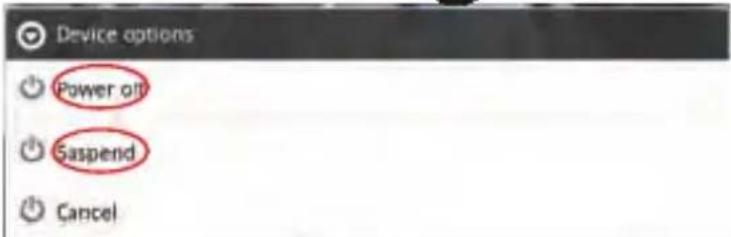
To turn off your MID, press and hold Power D , then tap Power off.
Go standby, press and hold Power, then tap Suspend.
To unlock your MID, Slide up.

ZiPY MANUAL DEL USUARIO
Wi-Fi connect
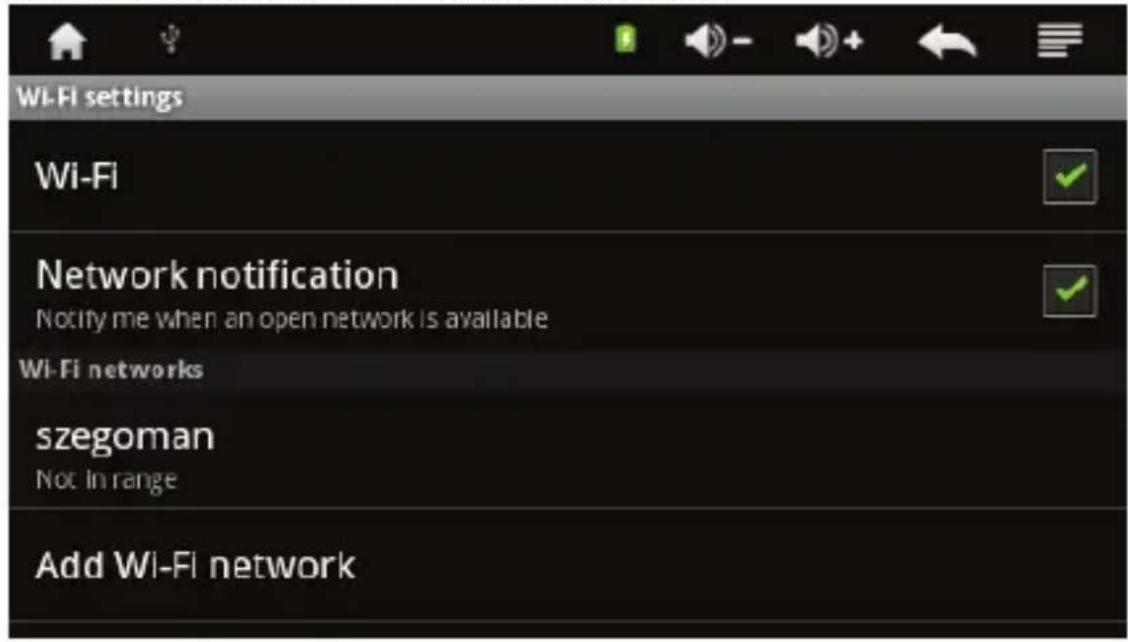
If you want to use a Wi-Fi computer network for even faster Internet access, press Home > Menu > Settings > Wireless & networks, tap Wi-Fi to turn on, and tap Wi-Fi settings.
Content & more
Browse and download thousands of the coolest apps on the planet from Android Market
Your MID comes with a Nand Flash — you can load it up with photos, videos and music from your computer. While connecting your MID with PC, it can identify the USB storage automatically. You can also turn off the USB storage manually.
Touch screen & keys
A few essentials
Touch tips
Here are some tips on how to navigate around your MID.
Tap
To choose an icon or option, tap it.
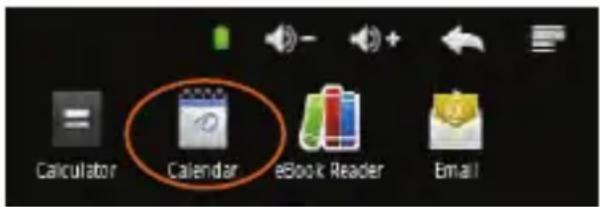
Wi-Fi
Home, office or hotspot
Quick start: Wi-Fi
Find it: Home > Menu > settings > Wireless & networks > Wi-Fi settings
Use a wireless network for fast Internet access and to download data.
ZiPy MANUAL DEL USUARIO
Turn Wi-Fi on or off
Find it: Menu > Settings > Wireless & networks > Wi-Fi.
Note: To extend battery life, turn off Wi-Fi power when not in use.
Wi-Fi search & connect
To find networks in your range:
- Press Menu > Settings > Wireless & networks > Wi-Fi.
- Tap Wi-Fi to turn on and scan. If Wi-Fi is already on, tap Wi-Fi settings, then press Menu > Scan. Your MID lists the networks it finds within range.
Tip: To see your MID's MAC address or other Wi-Fi details, press Menu > Advanced. - Tap a network to connect.
- If necessary, enter Network SSID, Screen unlock pattern and Wireless password, and tap Connect.
When your MID is connected to the network, the wireless indicator

appears in the status bar.
Tip: When you are in range and Wi-Fi is on, you will automatically reconnect to available networks you've connected to before.
USB & Memory
Connect your MID and computer, then drag & drop
USB drag & drop
You can transfer your pictures, videos, music, ringtones and more, from your computer to your MID-FLASH.
- Connect USB cable from your MID's USB port to a USB port on your computer. Your MID should show

in the status bar.
Note: Make sure you connect the MID to a high power USB port. Typically, these are located directly on your computer.
Note: Your MID supports Windows XP, Windows Vista, Windows 7 and Apple Macintosh. Other operating systems may not be compatible.
- Your MID shows a USB connection dialog, at the top of the screen. Flick down, then tap Turn off USB storage. You can't use the files on your MID-flash or memory card while it is connected.
- Tap Turn on USB storage (if asked) to connect your memory card.
- Find "MID-FLASH" in the "My Computer" window.
- Drag and drop your pictures, videos, music, ringtones and more, to your MID folder.
- When you're done, use the "Safely Remove Hardware" feature to finish.
To format your memory card, tap Format MID-Flash or SD card.
Warning: All data on your memory card will be deleted.
Troubleshooting
We're here to help
Crash recovery
In the unlikely event that your MID stops responding to taps and key presses, try a quick reset. Poke the reset hole, then switch your MID on as usual.
Factory data reset
To reset your MID to factory settings and erase all the data on your MID, press Menu > Settings > Privacy > Factory data reset > Reset device.
Warning: All data on your MID will be deleted
AD WARRANTY CONDITIONS
AID, in compliance with the Customer Protection Law (Ley 23/2003, July 10th, of Warranty in the Sale of Consumer Goods, BOE no. 165, 11/07/2003), offers Direct Warranty to Spain and Portugal customers for all our brands' products: ZIPY, MUSE, NEW ONE, AC-RAYAN, TNB, BARKAN, BRASFORMA, THE COMPLEMENTS, and GO BY ZIPY, under the following conditions:
A - Our products have a two year warranty. During the first year original defects that may be detected are repaired. In those cases stipulated by law, the buyer will be entitled to the replacement of the device by a new one, provided that the defects are not due to the negligence or exclusive fault of the buyer in handling the device. During the second year the buyer will need to prove that the malfunctioning of the device is due to a manufacturing defect. In both cases the warranty will apply provided that:
- The product has been used for its destined purpose alone.
- It was not opened, manipulated or altered in any way by someone other than the Official Technical Service.
- It has not undergone shock, flood, overheating, electric overcharge or any other external circumstance that may constitute a possible reason of INVALIDATING the warranty.
- The product will be returned to AID in proper packaging together with the receipt where the brand and type of product, the date of the purchase, the name and address of the shop that sold it and the reason for the malfunctioning should be clearly stated.
Any of the following circumstances invalidates the present warranty:
- Breaking the ports, the screen or the glass.
- Loss of liquid from the screen.
- Wearing out, obvious marks of incorrect manipulation, inappropriate use, ill-treatment, shock, falls, dirt, and so on.
- The data contained in the products are under no circumstances covered by any warranty whatsoever, nor are they to be considered during the physical repairing process of the products. AID guarantees absolute confidentiality of the data.
- AID does not cover the incorrect configuration or installation of the software / hardware on the part of the client, neither as a component nor as a peripheral, included prives / controllers included.
- The legislation on guarantees sets certain limits. "the guarantee does not cover additional components such as batteries, nor any elements that are subject to maintenance due to its use such as earphones". These accessories have a 6 months guarantee.
- Waterproof bags have a 48-hour trial period, such as indicated on the product itself, therefore once this time period is elapsed they will no longer be covered by any guarantee.
- Final users do not need to send us the device accessories, especially if they are not the original ones, since we will not be held responsible for them.
CASES:
- If the product is out our guarantee, the AID technical department will facilitate a budget for the repair by fax or e-mail. Said budget will need to be authorized in writing, sealed and signed, and the user will have to satisfy the repair fee as well as the freight.
ZiPy MANUAL DEL USUARIO
-
If the budget is not accepted a diagnosis fee will be charged. (6€)
-
Repairs have a 90 days guarantee, provided that the breakdown is under the same concept and in the case of budgeted breakdowns alone.
B - All the freight costs for the product will be covered by AID using only the transportation company designed by AID following the authorization procedure.
The expenses derived from incorrect or unjustified returns on the part of the client will be covered by the client alone.
C - Any incidence detected at the moment of the reception of the merchandise must be immediately notified at the AID Post-Sales Department: maria@accessosdigital.com in compliance with Article 366 from the Code of Commerce, AID will not consider complaints about breakages, shocks or absence of boxes or pieces 24 hours after the delivery of the merchandise.
In the case of shipments originated in Canarias, Ceuta and Melilla, AID will not pay the customs tax nor any kind of reimbursable expenses.
DECLARATION OF CONFORMITY
ACCESORIOS INTELIGENTES DIGITAL S.A.
C/CARPINTEROS, 6, OF-13 VILLAVICIOSA DE ODON. 28670 MADRID
We declare under our sole responsibility that the product:
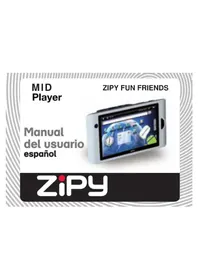
MID PLAYER: ZIPY SMART FUN 4.3, which belongs to the brand Zipy, made in China

0891

Conforms with the requirements of the Directives below by compliance with the following standards listed:
EN 55002: 2006+A1:2007
EN55024:1998+A1:2001+A2:2003
EN61000-3-2:2006+A2:2009
EN61000-3-3:2008
EN60950-1:2006+A11:2009
EN60950-1+A11
EN301 489-1/-17
EN300 328
In accordance with the provisions of the Directive 99/05/EC, European Parliament and Council on March 9, 1999, transposed into Spanish legislation by Royal Decree 1890/2000, of November 20, 2000.
Place and date of issue: Signed by: Miguel Fauro
Madrid, October 18, 2011
AIDigital
- CONDITIONS DE GARANTIE AID
- Safety precautions for Mobile Internet Devices (MID)
- Quick Start Guide
- Your MID
- Let's go
- ZiPY MANUAL DEL USUARIO
- Touch screen & keys
- Touch tips
- Tap
- Wi-Fi
- Quick start: Wi-Fi
- Turn Wi-Fi on or off
- Wi-Fi search & connect
- USB & Memory
- USB drag & drop
- Troubleshooting
- Crash recovery
- Factory data reset
- AD WARRANTY CONDITIONS
- CASES:
Brand : Zipy
Model : Smart Fun 4.3
Category : Tablet