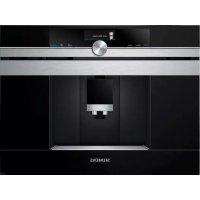
CT636LES6 - Coffee maker BOSCH - Free user manual and instructions
Find the device manual for free CT636LES6 BOSCH in PDF.


| Product type | Automatic espresso machine |
| Brand | Bosch |
| Model | CT636LES6 |
| Dimensions (H x W x D) | 455 x 495 x 375 mm |
| Empty weight | 19-20 kg |
| Power supply | 220-240 V ~ 50/60 Hz, 1600 W |
| Pump pressure | 19 bars (max.) |
| Water tank capacity | 2,4 L (without filter) |
| Bean container capacity | 500 g |
| Power cord length | 1,7 m |
| Grinder type | Ceramic grinder |
| Main functions | Whole bean coffee, ground coffee, milk-based drinks (cappuccino, latte macchiato, etc.), hot water, milk froth, two cups simultaneously, personalization (myCoffee), aromaDouble Shot |
| Connectivity | Built-in Wi-Fi (Home Connect), control via smartphone app |
| Display | Touchscreen with menu guidance |
| Customizable settings | Coffee strength, temperature, quantity, grind level, up to 8 myCoffee profiles |
| Maintenance programs | Descaling, cleaning, calc'nClean (combined), special rinse |
| Milk system cleaning | Automatic rinse after each milk-based drink, weekly manual cleaning |
| Brew unit | Removable, hand-washable |
| Water filter | Compatible (part number TZ70003), indicator replacement |
| Safety | Child safety, adjustable auto shut-off (15 min to 8 h), permanent magnets (precautions for implants), frost protection |
| Included accessories | Measuring spoon, water hardness test strip, milk hose (set), milk container |
| Spare parts | Cleaning tablets (TZ80001N), descaling tablets (TZ80002N), water filter (TZ70003), maintenance kit (TZ80004), milk container (TZ80009N) |
| Warranty | According to distributor conditions (see customer service) |
Frequently Asked Questions - CT636LES6 BOSCH
User questions about CT636LES6 BOSCH
0 question about this device. Answer the ones you know or ask your own.
Ask a new question about this device
Download the instructions for your Coffee maker in PDF format for free! Find your manual CT636LES6 - BOSCH and take your electronic device back in hand. On this page are published all the documents necessary for the use of your device. CT636LES6 by BOSCH.
USER MANUAL CT636LES6 BOSCH
siemens-home.bsh-group.com/welcome
Register your product online
| de | Deutsch | 2 |
| en | English | 33 |
| fr | François | 62 |
nI Netherlands 95
A
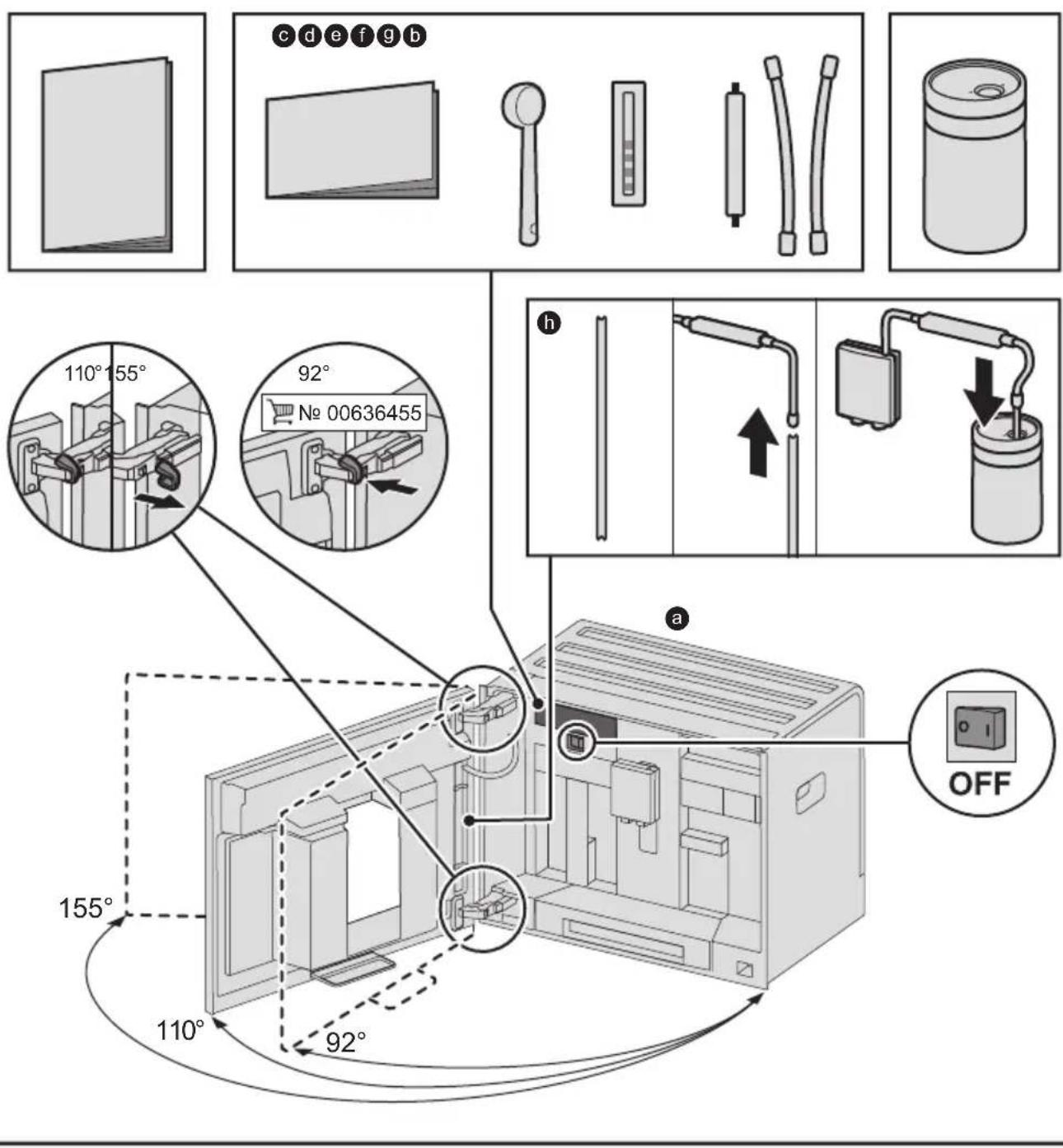
Lieferumfang (siehe Seite 2)
Included in delivery (see page 33)
Contenu de l'emballage (voir page 62)
Leveringsomvang (zie pagina 95)
B
3
C

Inhalt
80^ Gruntee
90^ Schwarztee
Max Früchtetee
Füllmenge

Included in delivery (for use) 33
Congratulations 34
Intended use 35
Important safety information. 35
Overview. 37
Controls 37
Initial use 38
Display 39
Preparing drinks 40
Preparation using coffee beans. 42
Preparation using milk 42
Preparation using ground coffee 43
Dispensing hot water. 44
Personalised drinks 44
Two cups at once 45
Adjusting the grind setting 45
Childproof lock. 45
Menu. 46
Home Connect. 48
Care and daily cleaning. 51
Service programmes 54
Tips on energy saving 57
Frost protection. 57
Storing accessories 57
Accessories 57
Disposal. 57
Guarantee. 57
Simple troubleshooting. 58
Technical specifications. 61
Included in delivery (for use)
(Figure A on the fold-out pages)
Fully automatic coffee machine
Instruction manual
Quick reference guide
Measuring spoon
Water hardness testing strip
Milk tube (set)
Milk container
Suction pipe
Congratulations ...
... on purchasing this fully automatic coffee machine! You have now acquired a high-quality and modern kitchen appliance. It combines innovative technology with a range of functions and is easy to use. It will enable you to prepare a variety of delicious hot drinks quickly and simply – whether you're in the mood for an invigorating espresso, a creamy cappuccino, a smooth latte macchiato or white coffee, or a traditional cup of coffee. At the same time the appliance offers you a wide range of options for adapting it to your individual taste.
To ensure that you can use this fully automatic coffee machine with all its functions and features reliably and safely, we would like you to familiarize yourself with its components, functions, displays and controls. These instructions are designed to help you. So please take the time to read them before you switch on the appliance.
How to use these instructions
You can open up the front cover of this instruction manual. There you will find illustrations of the appliance with each part numbered. These numbers will be referred to throughout the text.
Example: brewing unit (15)
These instructions also show display texts and symbols in a special way. These enable you to clearly see where we refer to texts or symbols that are marked or displayed on the appliance.
Display indicators:
"Espresso"
Buttons and controls on the display:
[ start/stop]
The appliance comes with a quick reference guide where you can find the most important functions at a glance. It can be stored in the accessory drawer of the appliance.
Intended use
Check the appliance after unpacking it. Do not connect the appliance if it has been damaged in transit.
This appliance is intended for domestic use only.
Only use the appliance indoors at room temperature and up to 2000m above sea level.
Important safety information
Please read and follow the operating instructions carefully and keep them for later reference! Enclose these instructions when you give this appliance to someone else.
This appliance can be used by children aged from 8 years and above and by persons with reduced physical, sensory or mental capabilities or lack of experience and knowledge if they have been given supervision or instruction concerning use of the appliance in a safe way and if they understand the hazards involved. Keep children under 8 years of age away from the appliance and connecting cable and do not allow them to use the appliance. Children shall not play with the appliance. Cleaning and user maintenance shall not be made by children unless they are older than 8 years and supervised.
Warning
Risk of electric shock!
The appliance may only be connected to a power supply with alternating current via a correctly installed socket with earthing. Ensure that the protective conductor system of the domestic supply has been correctly installed.
- Connect and operate the appliance only in accordance with the specifications on the rating plate.
- Do not use the appliance if the power cord and/or appliance are damaged.
Only our customer service may repair the appliance, e.g. by replacing a damaged power cord, in order to avoid hazards.
If the supply cord is damaged, it must be replaced by a special cord or assembly available from the manufacturer or its service agent.
- Never immerse the appliance or mains cord in water.
If there is a fault, pull out the mains plug immediately or switch off the power supply.
- Avoid spillage on the connector.
- Please note the special information on cleaning in the instructions.
Warning
Hazard due to magnetism!
The appliance contains permanent magnets which can affect electronic implants such as pacemakers or insulin pumps. Persons wearing electronic implants must maintain a minimum distance of 10 cm from the appliance and from the following parts upon removal: milk container, milk system, water tank and brewing unit.
Warning
Risk of suffocation!
- Do not allow children to play with packaging material.
Store small parts safely as they can be easily swallowed.
Warning
Risk of injury!
- Do not reach into the grinding unit!
■ Be careful not to jam your fingers when closing the door.
A misuse of the appliance can potentially lead to injury.
Warning
Risk of burns!
The beverage outlet gets very hot. After use, always let it cool down before you touch it.
After the use the heating element surfaces can be subjected to residual heat.
- Freshly prepared beverages are very hot. Leave to cool a little if necessary.
Warning
Risk of scalding (Home Connect)!
If an unattended remote start takes place, third parties might be scalded if they reach under the coff ee dispenser during drinks dispensing. You should therefore make sure that with an unattended remote start that there is no risk to other people, in particular not to children, or to property.
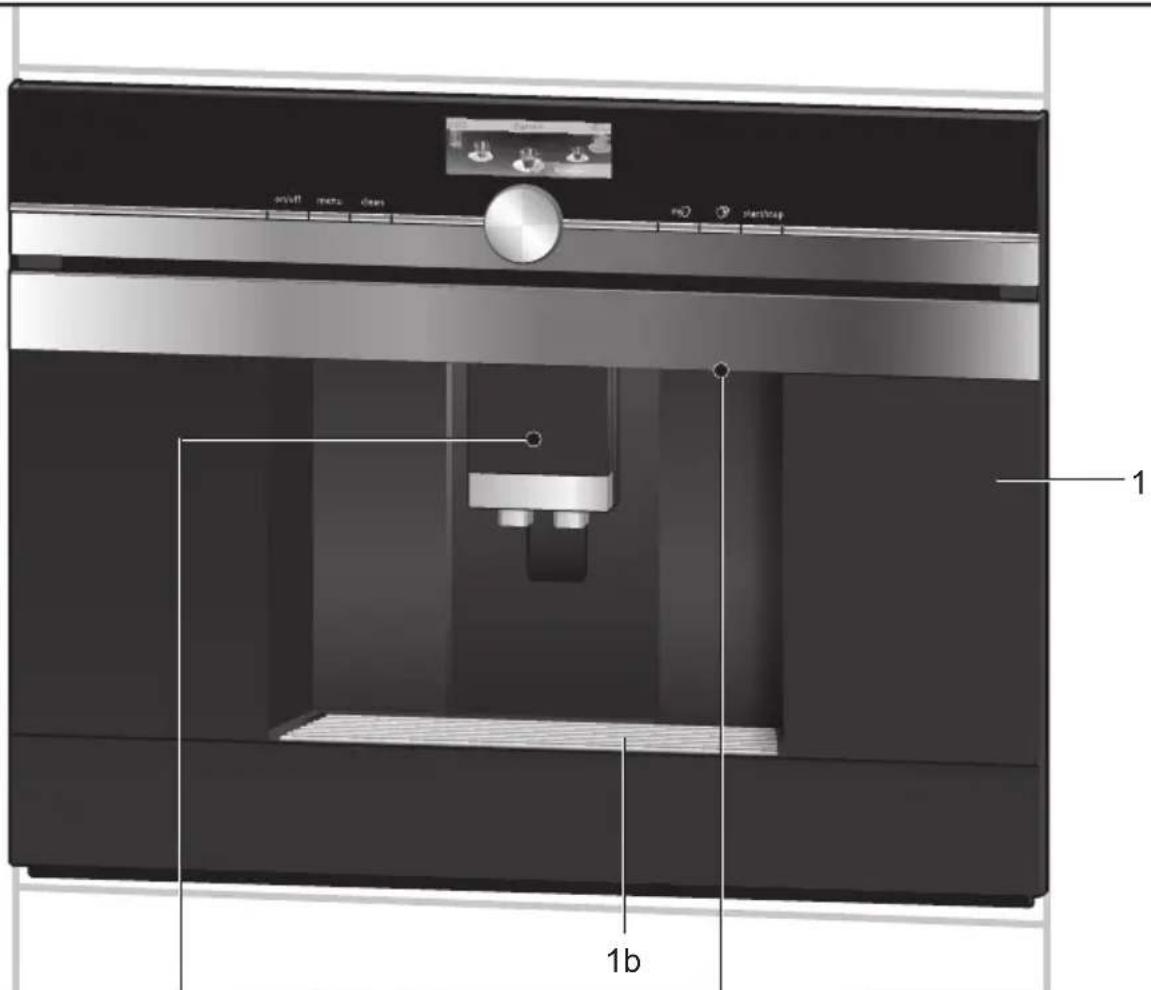
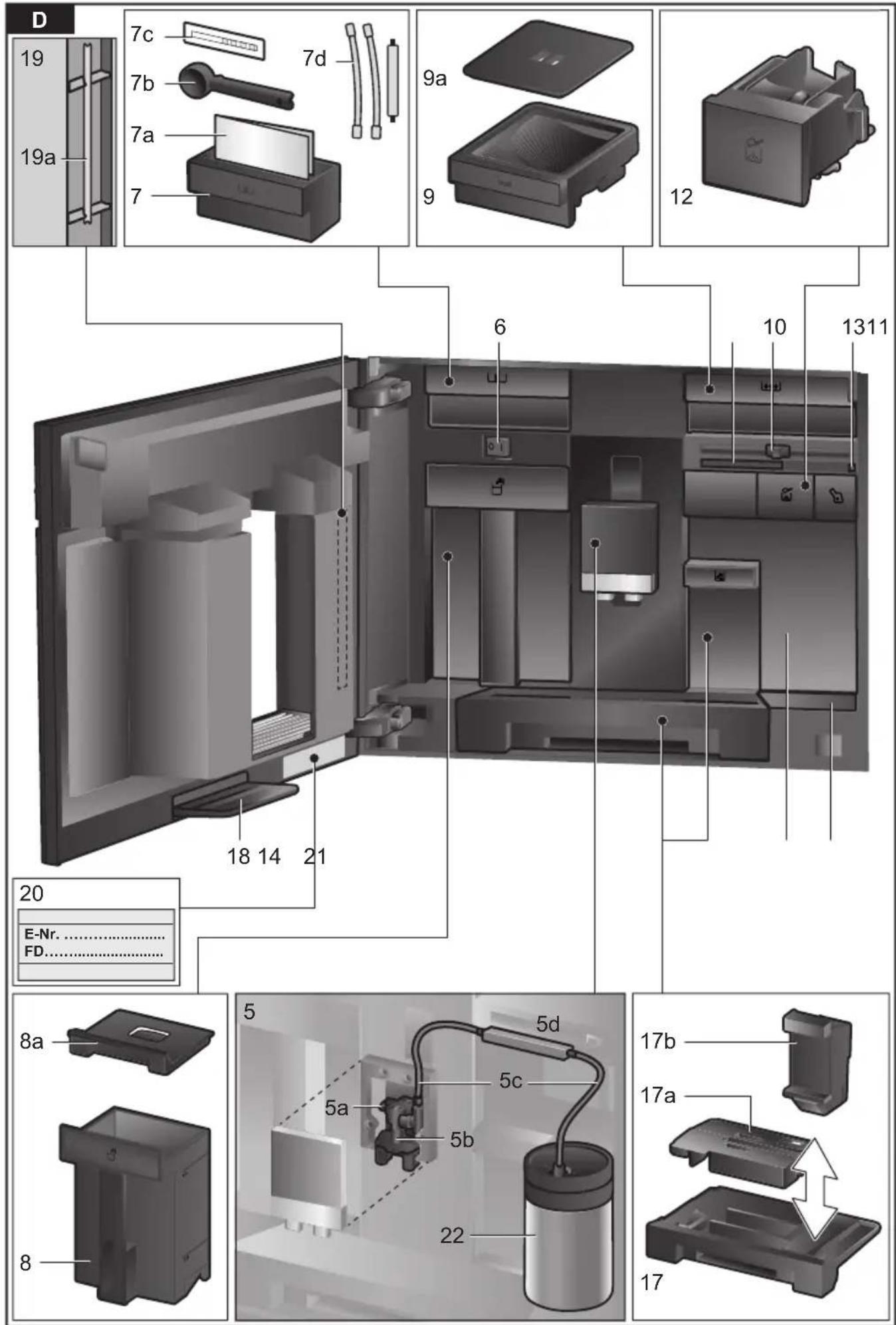
Overview
(Figures B to E on the fold-out pages)
1 Appliance door
a Recessed grip (for opening the door)
b Drip plate
2 Display
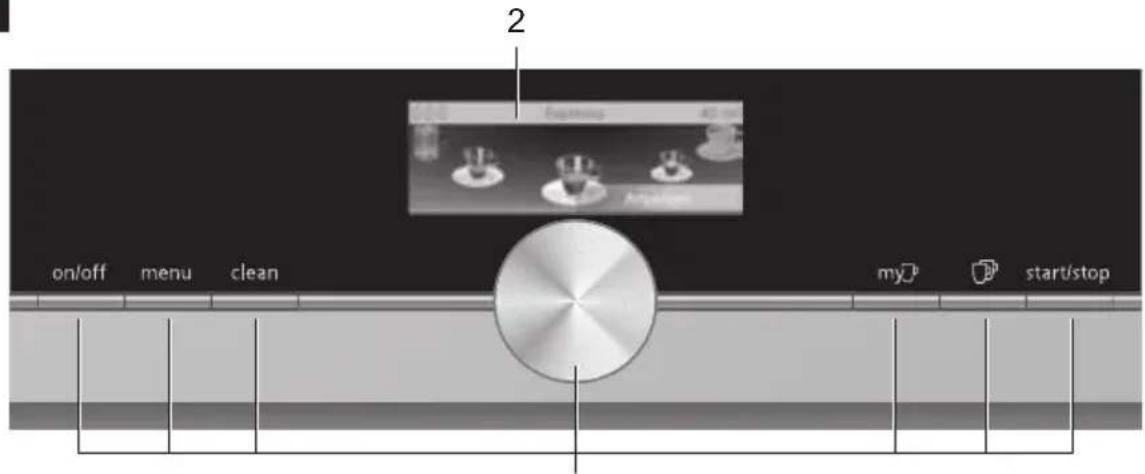
3 Controls
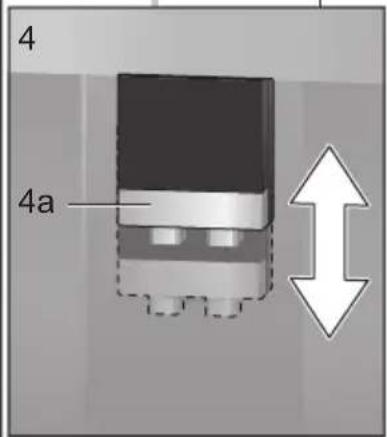
4 Outlet system (coffee, milk, hot water), height-adjustable
a Cover
5 Milk system
a Snap lever
b Beverage outlet (upper part, lower part)
c Milk tube (2 pieces)
d Connecting element, metal (for magnet holder)
6 Mains switch [O/I] (power supply)
7 Accessory drawer
(for quick reference guide and accessories)
a Quick reference guide
b Measuring spoon
c Water hardness strip
d Milk tube (set)
8 Removable water tank
a Lid for water tank
9 Removable bean container
a Lid for bean container
10 Slide regulator for grinding degree setting
11 Magnet holder (for connecting element)
12 Removable drawer (for ground coffee/cleaning tablet)
13 Holder (for milk tube)
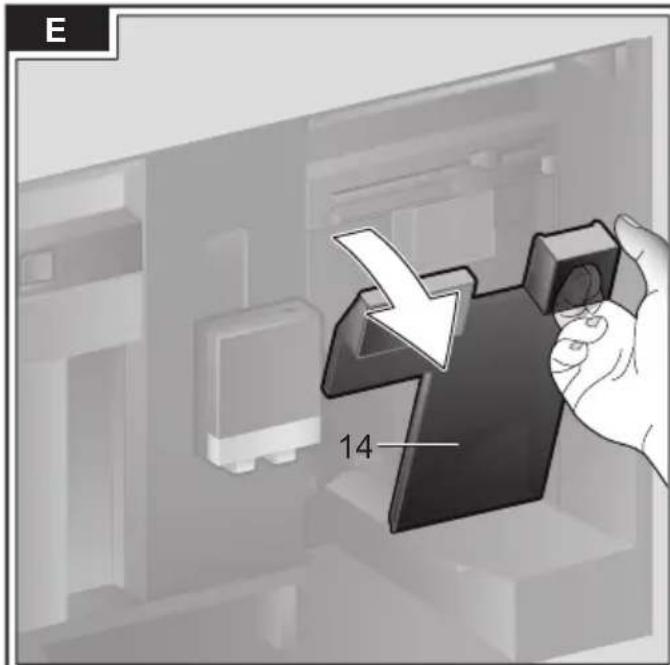
14 Protective cover (for brewing unit)
15 Brewing unit
a Locking mechanism
b Cover
16 Eject lever
17 Removable Drip tray
a Drip tray cover
b Coffee grounds container
18 Collecting tray
19 Holder
a Suction pipe
20 Rating plate (E number, FD)
21 Storage shelf with sensor (for milk container)
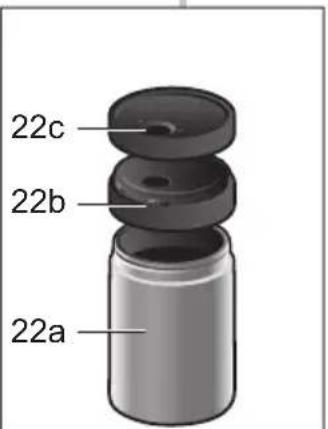
22 Milk container
a Stainless steel container
b Lower part of the lid
c Upper part of the lid
Further information about the appliance, such as how to change the opening angle of the door, can be found in the assembly instructions.
Controls
The appliance features user-friendly menu navigation to ensure that operation is as easy as possible while at the same time offering a wide range of functions. That means a range of options can be selected with just a few operating steps.
Mains switch [O/I]
Use the mains switch [O/I] (to do so open the door) to switch on the appliance, or to switch it off fully (power supply off).
i Important: Do not press the mains switch while the appliance is in use. Switch off the appliance only when it is in energy saving mode, so that it can rinse automatically.
Button [on/off]
Press button [on/off] to switch on the appliance or change it to energy saving mode. The appliance is rinsed automatically.
The appliance does not rinse if:
- if it is still warm when switched on, or
- if no coffee was dispensed before it was switched off.
The appliance is ready for use as soon as the symbols for the drinks selection appear on the display.
Button [menu]
Press button [menu] to open the menu.
Settings can be made, information called up or the appliance connected with "Home Connect" (see section "Menu").
Button [ clean ]
Press button [clean] to open the selection of service programmes. Run the desired programme as described in the section "Service programmes".
Button [my]
Press button [my] to open the selection of "Personalised beverage preparation". Personal settings for coffee drinks can be saved and called up (see the section "Personaliseddrinks").
Button [ ]
Press button [ ] after selecting a drink to prepare two cups simultaneously (see the section "Two cups at once").
![BOSCH CT636LES6 - Button [ ] - 1](/content/2026/03/451106/images/d62d9ae30e8e82015c8b09aef14740e16bc529e7adc252eb253ea66d2d810229.jpg)
Press [menu], [clean], [my] or [ ] again to exit the respective menu.
Button [start/stop]
Press [start/stop] to either begin preparing a drink or launch a service programme. Press [start/stop] again while the drink is being prepared to prematurely halt dispensing.
Rotary selector
Turn the rotary selector to navigate in the display or to change parameters.
Display (Touchscreen)
Information is shown on the display, or settings can be made by touching the touchscreen (see the section "Display").
Initial use
General
Fill the appropriate container using only pure, cold, uncarbonated water and solely roasted beans. Do not use coffee beans that have been glazed, caramelised or treated with other additives containing sugar, since they will block the brewing unit.

Before the appliance can be switched on and used, it must be assembled and connected according to the enclosed assembly instructions.
Setting up the appliance
Remove any protective plastic film.

Important: Only use the appliance in a frost-free room. If it has been transported or stored at temperatures below 0^ , wait at least 3 hours before initial use.
Take hold of the appliance door by the recessed grip and open.
- Remove the water tank, rinse it and fill it with fresh water up to the "max" mark.
- Replace the water tank and click into place.
- Remove the bean container, fill with coffee beans and replace.
- Set the mains switch to I and close the appliance door.
The appliance heats up and is rinsed.
The display is activated.
"Select language" appears.
- Turn the rotary selector to select the desired language and touch [Continue] in the display.
"Set water hardness" appears.

It is important to set the water hardness correctly to enable the appliance to accurately indicate when the descending programme should be run. The preset water hardness is level 4. If a water softener is installed in the house, please set the water hardness to level 3. You can also check the water hardness by asking your local water supplier.
Use the enclosed test strip to determine the water hardness. Briefly dip the test strip in water and check the result after one minute.
Level Water hardness
| German (°dH) | French (°fH) | |
| 1 | 1-7 | 1-13 |
| 2 | 8-14 | 14-25 |
| 3 | 15-21 | 26-38 |
| 4 | 22-30 | 39-54 |
Turn the rotary selector to set the water hardness determined.
Touch ([>]". "Home Connect" appears.
To now connect the appliance to the WLAN network (home network), touch [Home Connect settings].
To connect the appliance to the WLAN network later on, touch [>] . "Complete set-up?" appears.
- Touch [Save]. The settings for Language and Water hardness are saved.

When selecting [Home Connect settings] please read the detailed description in the section "Home Connect".
The appliance is ready to use when the drink symbols are shown on the display.
The integrated fan switches on each time a drink is dispensed and switches off again after a few minutes.
When the appliance is used for the first time after running a service program, or if it has not been operated for a long period, the first beverage will not have the full aroma and should not be consumed.
When the fully automatic coffee machine is first used, a suitably thick and stable "crema" is only achieved after the first few cups have been dispensed.
Switch off appliance
Press the [on/off] button.
The appliance rinses and switches to energy saving mode.
Exception: If only hot water is dispensed, the appliance switches off without rinsing.
To switch the appliance off completely, open the appliance door and set the mains switch to [O].

Important: Do not press the mains switch while the appliance is in use. Switch off the appliance only when it is in energy saving mode, so it can rinse automatically.
The factory settings of the fully automatic coffee machine are programmed for optimal performance. The appliances switches automatically to the energy saving mode after a configured time and rinses (duration can be set, see "Home Connect" in the section "Menu").
The appliance is equipped with a sensor. If there is a milk container, this will be correspondingly shown on the display when switching to the energy saving mode. If there is milk in the container, please keep in the fridge.
Display
Information is shown on the display, or settings can be made by touching the touchscreen.
Display
The display shows the selected drinks, settings and setting options, as well as messages about the appliance's operating status.
Examples:
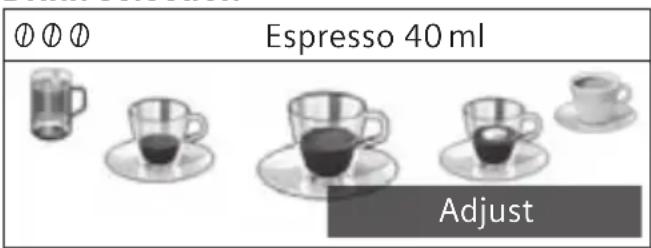
Drink selection
Information
Information disappears after pressing the button or after a short time.
Water tank almost empty
Instead of text, a small symbol appears in the lower left area of the display.

Bean container almost empty

Water tank almost empty

Change water filter

Cleaning programme required

Dscaling programme required

calc'nClean programme required
Prompts to take action
Fill water tank

If the action required was carried out, e.g. filling the water tank, the corresponding message and symbol will disappear.
Operation
Touch texts or symbols combined with turning the rotary selector to navigate within the display (for an example, see section "Drink adjustment").
An audible signal is heard when touching the display. These audible signals can be switched on or off (see the section "Menu - Key tones").
Preparing drinks
This fully automatic coffee machine can be operated using coffee beans or ground coffee (but not instant coffee).
If using coffee beans, they will be freshly ground for each brewing. For optimum quality, store the beans in a cool place in sealed containers.

Important: Fill the water tank with fresh, uncarbonated, cold water every day. The tank should always contain sufficient water for operating the appliance.

Tip: Cups should be prewarmed, e.g. with hot water. This applies particularly to small thick-walled espresso cups.
For some settings, coffee is prepared in two stages (see the section "aromaDouble Shot" and "Two cups at once"). Please wait until the process is completely finished.
Drink selection
Turn the rotary selector to select different drinks:
The symbol for the drink selected is shown in the middle. The name of the drink and the values currently set, e.g. for the strength and volume are shown in upper row.

Espresso 40ml ① ①


Adjust
The following drinks can be selected:
Ristretto
Espresso
Espresso Macchiato
Coffee
Cappuccino
Latte Macchiato
Caffe Latte
Milk froth
Warm milk
Hot water
The drink selected can be directly prepared with the pre-set values or first adjusted to individual taste.

If the appliance is connected to Home Connect, additional drinks can be selected from "Coffeeworld" and adjusted in the app. The last "Coffeeworld" drink selected in the app is shown in the display and can also be adjusted and dispensed directly at the appliance.
Drink adjustment
Touch [Adjust] on the display and different fields will appear, depending on the drink, for adjustment.
The field where the value can be changed has a dark background.
An example:
The values for a cup of coffee can be changed as follows:
Use the rotary selector to select "Coffee".
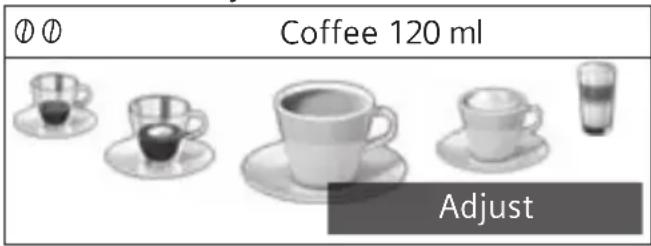
Touch [Adjust].
The fields containing the preset values appear. The active field, e.g. [0] has a dark background.
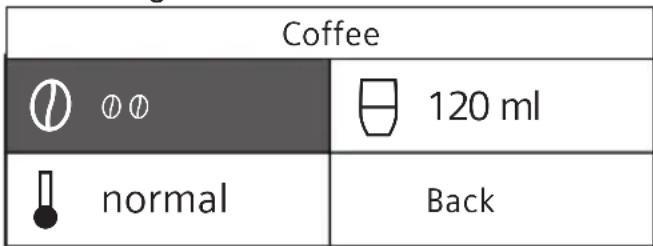
Turn the rotary selector to set the strength of coffee desired, e.g. "0000" (strong).
Touch the field [日]
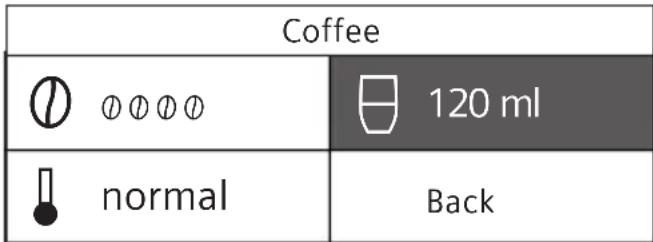
Turn the rotary selector to set the required amount of coffee, e.g. "160 ml".
Touch the field [8].
| Coffee | |
| ∅∅∅∅ | 160 ml |
| normal | Back |
Turn the rotary selector to set the desired temperature, e.g. "high".
| Coffee | |
| ∅ 0∅ 0∅ | 160 ml |
| high | Back |
- Save the settings by touching [Back] or by starting to dispense the drink.
There are different setting options depending on the type of drink. For coffee drinks, for example, the strength, temperature and quantity can be set, for milk only the volume.
The following settings are possible: Coffee strength
Very mild
Mild
Regular
Strong
Very strong
2 × 10 aromaDouble Shot strong
2xO aromaDouble Shot strong+
2xOo aromaDouble Shot strong++
- aromaDouble Shot
The longer the coffee is brewed, the more bitter substances and undesired aromas are released. This has a negative effect on the taste and makes the coffee less easily digestible. So for extra strong coffee, the appliance has a special aromaDouble Shot function. When half the quantity has been prepared, it grinds and brews fresh coffee beans so that only the pleasant, aromatic scents are released.
The aromaDouble Shot function is not available for ristretto, espresso macchiato, and when ground coffee is used.
Drink temperature
Values for coffee drinks:

normal

high

very high
Values for hot water:
70^ C White tea
80^ Green tea
90^ C Black tea
Max Fruit tea
Volume

The volume differs depending on the type of drink and can be set in ml steps.

The volume dispensed can fluctuate depending on the quality of the milk. If no controls are activated for approx. 30 seconds, the appliance will automatically exit the settings mode. The settings made will be automatically stored.
Preparation using coffee beans
The appliance must be ready for use.
- Place a cup underneath the beverage outlet.
Use the rotary selector to select "Ristretto", "Espresso" or "Coffee".
The display shows the selected drink along with the preset values for the strength of the coffee and the amount for this drink.
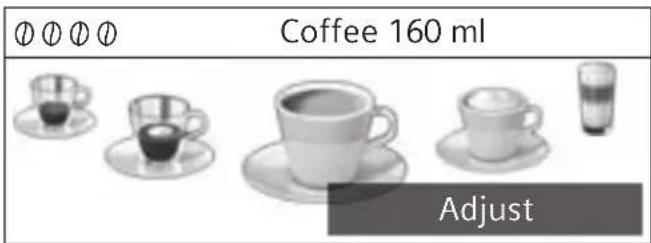

The settings can be changed as described in the section "Drink adjustment".
Press [start/stop] to start dispensing.
The coffee is brewed and then dispensed into the cup.
Press button [start/stop] again to stop dispensing prematurely.
Preparation using milk
This fully automatic coffee machine has an integrated beverage outlet. This can be used to prepare coffee drinks with milk or also milk froth and warm milk.

Risk of burns!
The beverage outlet gets very hot. After use, always let it cool down before you touch it.
Milk container
The milk container has been designed especially for use together with this fully automatic coffee machine. It is intended solely for use in the household and for storing milk in the refrigerator. The insulated container keeps milk cool for a number of hours.

Important: Remove cups or glasses before opening the door in case they fall.
Connecting the milk container or a milk carton:
- Open the appliance door.
- Remove the cover of the beverage outlet towards the front.
Connect and fix the milk tubes and connecting elements as illustrated.
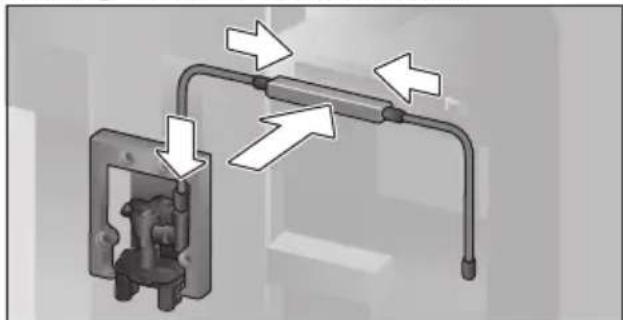
-
Attach the cover firmly from the front on to the beverage outlet.
-
Attach the suction pipe and insert into the milk container or a milk carton.
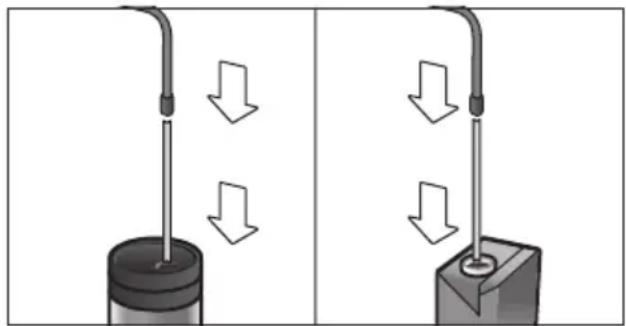
- Close the appliance door.

Dried milk residues are difficult to remove, therefore always clean (see the section "Cleaning the milk system").
Coffee drinks with milk
- Place a cup or glass underneath the beverage outlet.
- Select "Espresso Macchiato", "Cappuccino", "Latte Macchiato" or "Caffe Latte" with the rotary selector.
The display shows the selected drink along with the preset values for the strength of the coffee and the amount for this drink.

The settings can be changed as described in the section "Drink adjustment".
Press [start/stop] to start dispensing. The milk is dispensed into the cup or glass first. Then the coffee is brewed and runs into the cup or glass.
Press button [start/stop] again to stop the current step of the process prematurely.
Milk froth or warm milk
- Place a cup or glass underneath the beverage outlet.
- Select "Milk froth" or "Warm milk" with the rotary selector.

The settings can be changed as described in the section "Drink adjustment".
Press [start/stop] to start dispensing. Milk froth or warm milk is dispensed from the beverage outlet.
Press button [start/stop] again to stop the current step of the process prematurely.
Preparation using ground coffee

When using ground coffee, the setting for the strength of the coffee and dispensing two cups at once is not available.
Important: Remove cups or glasses before opening the door in case they fall.
The appliance must be ready for use.
- Open the appliance door.
- Remove the ground coffee drawer. The removable drawer must be dry.
Put in coffee powder (maximum 2 level measuring spoons); do not press firmly.

Caution!
Do not use whole beans or instant coffee.
Replace the ground coffee drawer.
- Close the appliance door, ≈ will appear on the display.

If coffee is not dispensed within 90 seconds, the brewing chamber empties automatically to avoid an overflow. The appliance is then rinsed.
- Place a cup underneath the beverage outlet.
Using the rotary selector, select a coffee drink or a coffee drink with milk.
The display shows the selected drink along with the preset values for this drink.

The settings can be changed as described in the section "Drink adjustment".
For coffee drinks with milk, please observe the instructions in the section "Preparation using milk".
Press [start/stop] to start dispensing.
The coffee is brewed and then dispensed into the cup. When selecting coffee drinks with milk, the milk is first dispensed and then the coffee brewed.

For another drink with ground coffee, repeat the procedure.
Dispensing hot water

Risk of burns!
The beverage outlet gets very hot. After use, always let it cool down before you touch it.
The appliance must be ready for use.

- Remove the milk tube from the milk container.
- Remove any milk or coffee residue from the outlet.
- Place a cup or glass underneath the beverage outlet.
- Select "Hot water" with the rotary selector.
The settings can be changed as described in the section "Drink adjustment".
Press [start/stop] to start dispensing.
The message appears "Milk tube removed from milk container?"
If still connected, remove the milk tube and touch [Yes] on the display.
Hot water flows out of the beverage outlet. Press button [start/stop] again to stop the procedure prematurely.
Personalised drinks
Press [my] to open the selection for personalised drinks.
Up to 8 storage spaces can be used. Save your favourite drinks that are frequently dispensed here with all their settings.

Press [my] to exit the menu without saving at any time.
Entering or changing drinks
Press [my].
The selection of memory locations appears.
| myCoffee 1 |
| Create beverage |
Using the rotary selector, choose an empty memory location (empty cup) to make a new entry, or an occupied memory location to change or delete a favourite drink.
At an empty memory location [Create beverage] or an occupied memory location [Change beverage].

If [Delete beverage] is selected, the settings for the memory location are deleted and it is again empty.
The menu for adjusting the drinks opens. The last drink dispensed is shown with the last settings selected.
If you do not wish to save last drink dispensed, select another drink with the rotary selector.
- Touch each setting to be changed and adjust the values as desired with the rotary selector.
Other setting options appear depending on the selection.
- Touch [Continue] to make other settings.

For milk drinks, the mixing ratio of coffee and milk can be set.
The settings can be stored under an individual name. Touch [Save name]. The mask for entering the name opens.
| 3456789'__ABCDEFGHIJK | ||
| < | A___________ | ✓ |
| SaveCancel | ||
Using the rotary selector, select a letter or a symbol in the upper row.
- Touch [] to confirm the letter selected on [<] to delete it.
Select other letters or symbols and confirm. - Touch [Cancel] to exit the entry without any modification and open the drinks menu.
- With [Save] the entry is adopted. The selection menu opens.
Press [my] to exit the menu.
Select a personalised drink and dispense
Press [my].
The selection of memory locations opens.
Use the rotary selector to select the desired memory location.
Place a cup or glass underneath the beverage outlet.
Press [start/stop] to start dispensing.
Two cups at once
Press [ ] to prepare two cups of the selected drink simultaneously. The setting is shown by a second cup symbol and as text, e.g. "2 x Espresso".
Use the rotary selector to select the desired drink.
Press [ ]
- Place two cups left and right underneath the beverage outlet.
Press [start/stop] to start dispensing.
The selected drink is prepared and then dispensed into both cups.

The drink is prepared in two stages (two grinding operations).
Please wait until the process is completely finished.
Two cups at once cannot be dispensed for the settings "aromaDouble Shot" or "ground coffee".
Adjusting the grind setting
This fully automatic coffee machine has an adjustable grinding unit. This enables the grinding level of the coffee to be individually changed.
- Open the appliance door.
- Slide the regulator to select the grinding degree setting between finely ground coffee .. and coarsely ground coffee .
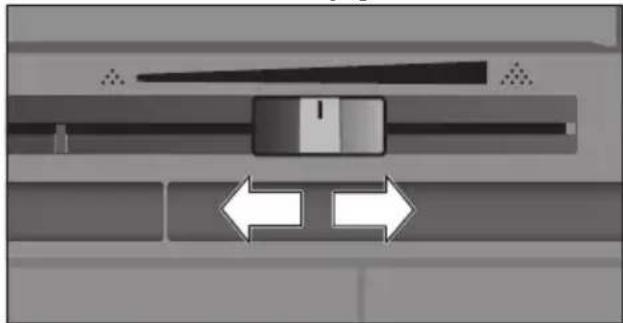
- Close the appliance door again.

For dark roast coffee beans, choose a finer grind, for lighter beans a coarser grind.
Tip: Only make small changes to the grinding degree setting.

The new setting will not become apparent until after the second cup of coffee.
If the display shows the message "Select a coarser degree of grinding", this means that the beans are being ground too finely. Adjust the grinding level to a coarser setting.
Childproof lock
The appliance can be locked to protect children against scalding and burns.
Press and hold the [menu] button for at least 4 seconds.
"Childproof lock activated" briefly appears on the display.
No further operation is now possible; only [on/off] can be pressed.
To deactivate the child lock, press and hold the [menu] button for at least 4 seconds.
"Childproof lock deactivated" briefly appears on the display.
Menu
The menu is used for changing individual settings, accessing information and launching processes.
Press [menu] to open the menu.
The different setting options will appear.
Navigating through the menu:
Press [< ] and [>] to select the various setting options, e.g. "Language".
Turn the selector to set, e.g. "English".
| Settings | 1/12 |
| < Language | > |
| English | |
For example:
Set the appliance at 15 minutes to switch off automatically:
Press button [menu]. The menu opens.
- Touch [>] repeatedly until the display shows "Switch off after".
Turn the rotary selector and select "Oh 15min".
-
Press button [menu]. "Save changes?" appears.
-
Touch [Save]. The setting is saved.
The drink selection appears on the display.

Press [menu] to exit the menu at any time. If no entry is made within approx. 30 seconds, the menu closes automatically and the settings are not saved.
The following settings can be made:
Language
Set the desired language to show the display texts.
Water hardness
Set this to the local water hardness.
Level "1 (soft)" to "4 (very hard)" can be selected. The preset water hardness is "4 (very hard)".
i It is important to set the water hardness correctly to enable the appliance to accurately indicate when the descending programme should be run.
You can check the water hardness using the enclosed test strip or by asking your local water supplier. If a water softening system is installed in the house, please select the "Softening device" setting.
Water filter
If a water filter is inserted, renewed or removed, the setting "Insert", "Replace" or "Remove" must be made in the menu.

A water filter lessens limescale deposits, reduces impurities in water and improves the coffee taste.
Water filters are available from retail outlets or from customer services (see the section "Accessories").
Inserting or renewing a water filter:
A new water filter must be rinsed before it can be used.
- Select either "Insert" or "Replace" with the rotary selector.
Press the water filter firmly into the opening of the water tank.
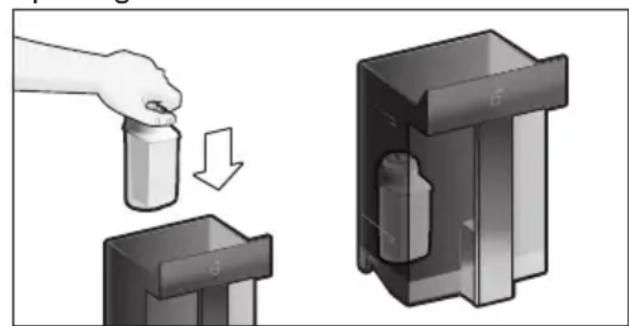
- Fill the water tank with water up to the "max" mark.
- Remove the milk tube from the milk container and close the door.

Caution: Do not jam the tube when closing the door.
- Place a container with a capacity of 0.5 litre under the outlet.
Press button [start/stop].
Water will now flow through the filter to rinse it.
Then empty the container.
The appliance is ready for use again.

Rinsing the filter simultaneously activates the setting for the change filter display.
The filter is no longer effective when the "Replace water filter" display appears, or at the latest after two months. It needs to be replaced for reasons of hygiene and to prevent a build-up of limescale (which could damage the appliance).
If a new filter is not inserted, select the setting "Remove" and press button [start/stop].
The message "Remove filter, reinsert water tank, close door" appears.

If the appliance has not been used for a prolonged period (for example, while you are on holiday), the existing filter should be rinsed before the first time the appliance is used again. To do this, simply dispense a cup of hot water.
Detailed information about the water filter can be found in the manual supplied with the filter.
Home Connect
Settings for connection to WLAN network (home network) and mobile devices (see section "Home Connect").
Switch off after
To set how long the appliance should wait after the last drink was prepared before it automatically rinses and switches itself off. You can specify values from 15 minutes to 8 hours. The factory setting is 30 minutes.
Illumination
Setting the illumination of the beverage outlet. "On", "When in use" or "Off" can be selected.
Brightness illumination
Setting the illumination lightness of the beverage outlet. "Level 1" to "Level 10" can be selected.
Brightness display
Setting the illumination lightness of display.
Key tones
Switch the signal tones on or off.
Clock display
Display option for time and date "Off" or "Digital" (on). The settings for this can be changed in the next menu options.

If the appliance is switched off at the mains or there is a power failure, the settings for the time and date will be lost.
Clock
Setting for the current time.
Date-day
Setting for the current day.
Date-month
Setting for the current month.
Date-year
Setting for the current year.
Frost protection
Service programme to prevent frost damage during transportation and storage.
This programme completely empties the appliance.
- Touch [Start] to begin running the programme.
Empty the water tank and reinsert.
If available remove the milk container and close the door.
The appliance automatically empties all its pipes.
Empty the drip tray and re-insert.
Beverage info
Display shows how many drinks have been prepared since its initial use.
- Touch [Display] to show the information.
Factory settings
Resets your own settings to the condition when delivered.
- Select "Reset" with the rotary selector. The message "Are you sure?" appears.
- Touch [Reset] or [Cancel] to either confirm or interrupt.
Home Connect
This fully automatic coffee machine is Wi-Fi-capable and can be remotely controlled using a mobile device (e.g. tablet PC, smartphone). The Home Connect App offers additional functions which are a perfect complement to the networked appliance. If the appliance is not connected to the WLAN network (home network), it functions in the same way as a fully automatic coffee machine with no network connection and can be operated as usual via the display.
Important information:
The home network router must be operated in the 2.4 GHz frequency range. Please check it and adjust it if necessary.
The availability of the Home Connect function depends on the availability of Home Connect services in your country. Home Connect services are not available in every country. You can find more information on this at www.home-connect.com.

Please ensure that you follow the safety instructions given at the beginning of this instruction manual and that these are also observed when operating the appliance via the Home Connect App and when away from home. Please also follow the instructions in the Home Connect App.

Operation on the appliance itself always takes priority, and during this time it is not possible to operate the appliance using the Home Connect App.
Setting up
To implement settings via Home Connect, you must have installed the Home Connect App on a mobile device (e.g. tablet PC, smartphone). Please observe the supplied Home Connect documents with regard to this. Follow the steps specified by the app to implement the settings.
Login of the appliance in the WLAN network can be carried out on initial set-up of the fully automatic coffee machine either directly or using the menu (first press [menu] to open the menu):
- Touch arrow key [>] repeatedly until the display shows "Home Connect".
- Touch [Home Connect Settings].
- Touch [Wi-Fi Off] to start the wireless connection. "Wi-Fi On" appears in the display.
- Touch [Connect network]. The following selection appears: [Connect automatically] and [Manually connect].

If the router has WPS functionality, please select [Connect automatically].
Connect automatically in the WLAN network (home network)
- Touch [Connect automatically]. The display shows [Automatic network connection].
Press the WPS button on the home network router within a few minutes and wait until the display of the fully automatic coffee machine shows "Network connection successful". - Open the app on the mobile device.
Touch [Next]. - Touch [Connect with app]. The fully automatic coffee machine connects with the app.
Wait until [ Successfully connected with app] lights up briefly in the display. - Touch [Remote start]. A warning message appears.
- Touch [Next] and read the warning message.
- Touch [confirm].
With the mobile device the functions of the fully automatic coffee machine can now be used to their full extent via the app.
i If [Remote start] - [Deactivate] is selected, only the modes of the fully automatic coffee machine are displayed in the Home Connect App. You can specify settings but not start drinks dispensing.
Connect manually in the WLAN network (home network)
- Touch [Manually connect]. The fully automatic coffee machine sets up a separate WLAN network which can be accessed with a tablet or smartphone. The display shows the SSID (the name) and the key (the password) of this network.
- Log the mobile device in to the network of the fully automatic coffee machine with the "HomeConnect" SSID and the "HomeConnect" key.
- Start the app on the mobile device and follow the instructions for network login in the app and the supplied Home Connect documents.
The login process is complete when "Network connection successful" lights up briefly in the display of the fully automatic coffee machine.
-
Touch [Next].
-
Touch [Connect with app]. The fully automatic coffee machine connects with the app.
Wait until [ Successfully connected with app] lights up briefly in the display. - Touch [Remote start]. A warning message appears.
- Touch [Next] and read the warning message.
Touch [confirm].
With the mobile device the functions of the fully automatic coffee machine can now be used to their full extent via the app.
i If [Remote start] - [Deactivate] is selected, only the modes of the fully automatic coffee machine are displayed in the Home Connect App. You can specify settings but not start drinks dispensing.
Switching Wi-Fi on and off
Wi-Fi can be switched "On" or "Off" as required (e.g. when on holiday).

Network information is retained after the appliance is switched off.
After switching on, wait a few seconds until the fully automatic coffee machine has connected to the WLAN network again.
In networked standby mode the appliance requires a maximum of 2W .
Press button [menu] to open the menu.
- Touch arrow key [>] repeatedly until the display shows "Home Connect".
Touch [Home Connect Settings].
- Touch [Wi-Fi] to switch the wireless module "On" and "Off".
Additional settings
Home Connect can be adapted to your individual needs at any time.
Note: The fully automatic coffee machine must be connected to the WLAN network.
Disconnecting
The fully automatic coffee machine can be disconnected from the WLAN network at any time.

If the fully automatic coffee machine is disconnected from the WLAN network, it cannot be operated using Home Connect.
Press button [menu] to open the menu.
- Touch arrow key [>] repeatedly until the display shows "Home Connect".
- Touch [Home Connect Settings].
- Touch [Disconnect from network].
The connection to the network and app is disconnected. Wi-Fi and remote start are switched off.

Information about the WLAN network is cleared.
Connecting with app
The Home Connect App can be installed on any number of mobile devices, which can then be used to connect to the fully automatic coffee machine.
The fully automatic coffee machine must already be connected to the WLAN network.
- Open the app on the mobile device.
Press button [menu] to open the menu. -
Touch arrow key [>] repeatedly until the display shows "Home Connect".
-
Touch [Home Connect Settings].
Touch [Next]. - Touch [Connect with app] to connect to the appliance with the app.
Remote start
If you wish e.g. to start drinks dispensing on the fully automatic coffee machine via a mobile device, Remote start must be activated.

Risk of burns!
If an unattended remote start takes place, third parties might be scalded if they reach under the coffee dispenser during drinks dispensing. You should therefore make sure that with an unattended remote start that there is no risk to other people, in particular not to children, or to property.

The [Remote start] text field is is only visible if connection with Home Connect has been successfully completed.
If Remote start is switched off, only the modes of the fully automatic coffee machine are displayed in the Home Connect App.
Press button [menu] to open the menu.
- Touch arrow key [>] repeatedly until the display shows "Home Connect".
- Touch [Home Connect Settings].
- Touch [Next].
- Touch [Remote start] to switch the function Remote start "On" and "Off".
Device Info
Display for network and device information
- Press button [menu] to open the menu.
- Touch arrow key [>] repeatedly until the display shows "Home Connect".
- Touch [Home Connect Settings].
- Touch [Next].
- Touch [appliance Info]. The SSID, IP, MAC address and serial number of the appliance are displayed for a few seconds.
Display
The top right-hand corner of the display shows the Home Connect status with a symbol:
Connected to the network
Not connected to the network
No connection to server
Remote diagnostics
In the event of faults, customer service can use remote diagnostics to access your appliance. Contact customer service and ensure that your appliance is connected to the Home Connect server and check that the remote diagnostics service is available in your country.
For more information and to check whether the remote diagnostics service is available in your country, please visit the Help & Support area of the Home Connect website for your country: www.home-connect.com
Information on data protection
When the fully automatic coffee machine is connected for the first time to a WLAN network which is connected to the Internet, the appliance transmits the following categories of data to the Home Connect server (initial registration):
- Unique appliance identification (consisting of appliance codes as well as the MAC address of the installed Wi-Fi communication module).
are and daily cleaning
Security certificate of the Wi-Fi communication module (to ensure a secure IT connection).
The current software and hardware version of the fully automatic coffee machine.
Status of any previous resetting to the factory settings.
This initial registration prepares the Home Connect functions for use and is only required when you want to use these Home Connect functions for the first time.

Please note that the Home Connect functions can only be used in conjunction with the Home Connect App. Information on data protection can be accessed in the Home Connect App.
Declaration of Conformity
BSH Hausgeräte GmbH hereby declares that the appliance which features Home Connect functionality is in accordance with the essential requirements and the other relevant provisions of the directive 2014/53/EU. A detailed RED Declaration of Conformity can be found online at www.siemens-home.bsh-group.com on the product page of your appliance with the additional documents.
2,4 GHz Band: 100mW max.
Care and daily cleaning

Risk of electric shock!
Never immerse the appliance in water.
Do not steam-clean the appliance.
Wipe the outside of the appliance with a soft, damp cloth.
Clean the display using a micro- fibre cloth.
- Do not use any cleaning agents containing alcohol or spirits.
- Do not use abrasive cloths or cleaning agents.
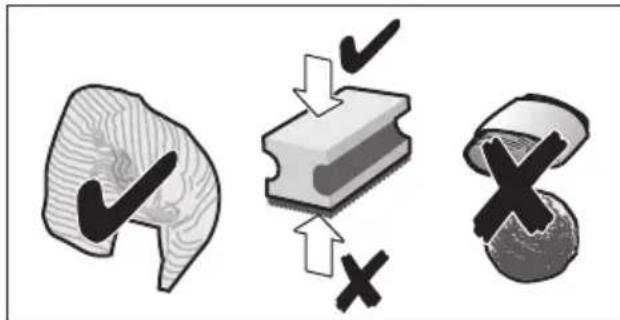
Always remove any limescale, residues of coffee or milk, cleaning or descending solution immediately. It is possible for corrosion to form underneath such deposits.

New sponge cloths may contain salts. Salts can cause rust film on stainless steel and must therefore be washed out thoroughly before use.
- Open the door and pull the drip tray out forwards.
- Remove drip tray cover and coffee grounds container.
Empty, clean and dry individual parts.

Important: The drip tray and coffee grounds container should be emptied and cleaned every day in order to prevent deposits.
- Remove the ground coffee drawer, clean under running water and dry well.
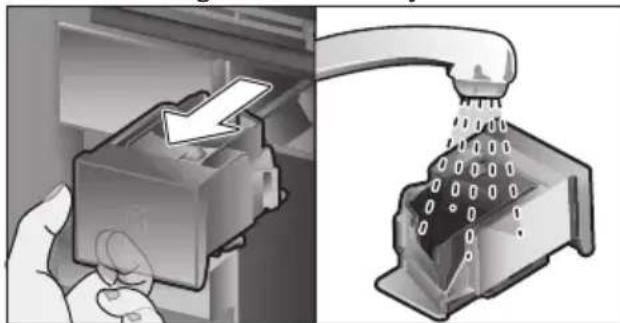
Wipe and dry the inside of the appliance (support, drip tray and the ground coffee drawer) and collecting tray.
- Replace the dried parts, e.g. the ground coffee drawer.

Do not put the following parts in the dishwasher:
Accessory drawer, water tank, lid of the water tank, beverage outlet cover, bean container, lid of the bean container, metal connecting element, ground coffee drawer, protective cover of the brewing unit and the milk container.

The following parts may be cleaned in the dishwasher:
Drip plate, collecting tray, drip tray, drip tray cover, coffee grounds container, milk tubes, suction pipes, individual parts of the beverage outlet, measuring spoon and individual parts of the milk container lid.

If the appliance is cold when switched on, or if it is switched off after dispensing coffee, it rinses automatically. The system is therefore self-cleaning.

Important: If the appliance is not used for a lengthy period (e.g. while you are on holiday), clean the entire appliance thoroughly, including the milk system, the ground coffee drawer and the brewing unit before use.
Cleaning the milk system
The milk system is automatically cleaned with a short jet of steam directly after preparing a milk drink.

Tip: For particularly thorough cleaning, the milk system can be additionally rinsed with water (see the section "Rinsing the milk system").
Important: Clean the milk system manually every week and, if required, also more often (see the section "Cleaning the milk system manually").

Risk of burns!
The beverage outlet gets very hot. After use, always let it cool down before you touch it.
Rinsing the milk system
Press button [clean] and select "Rinse milk system" with the rotary selector.
Press [start/stop] to start the programme.
- Open door and remove suction pipe from the milk tube.
Wipe the suction pipe and insert the end of the suction pipe into the hole on the coffee grounds container.
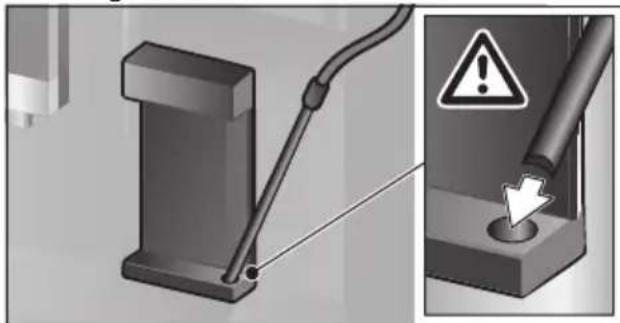
- Close the door. Be careful not to jam the milk tube.
Place an empty glass underneath the beverage outlet.
Press button [start/stop].
The milk system is rinsed with water.
Then empty the glass.
Press [clean] to exit the program.
Cleaning the milk system manually
Take the milk system apart to clean it:
Push the beverage outlet down completely and pull the cover forward to remove.
Press the snap lever to the left of the beverage outlet downwards and pull the beverage outlet forward.
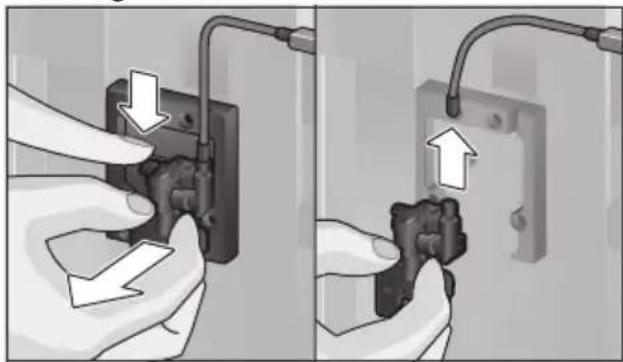
- Remove the milk tube. Dismantle the top and bottom sections of the beverage outlet.
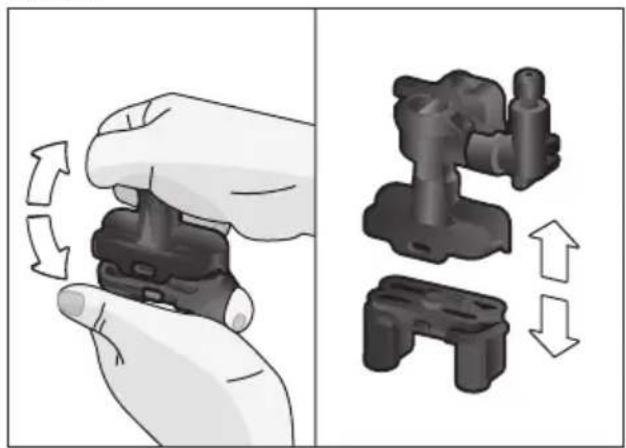
- Separate the milk tubes, connecting element and suction pipe.
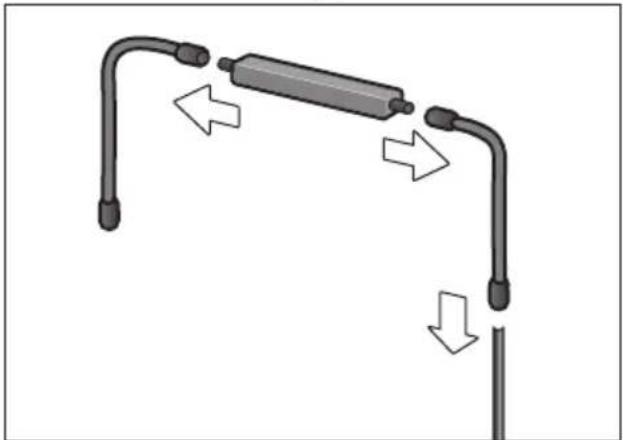
Clean the individual parts with a detergent solution and a soft cloth.
Rinse all parts with clean water and dry them.
Put the individual parts back together again (see also the quick reference guide).
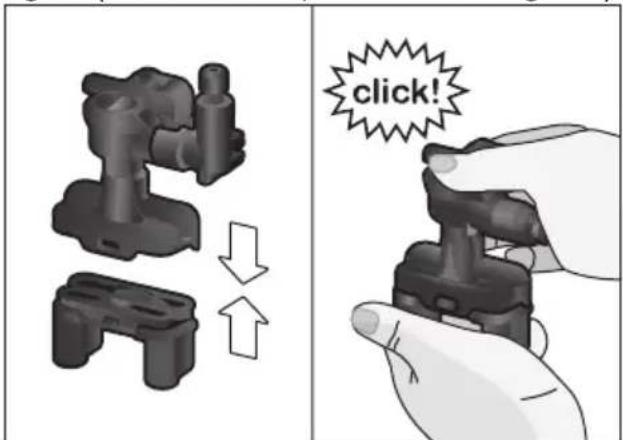
- Attach the beverage outlet directly from the front firmly to the three connections.
Replace the cover.
Cleaning the milk container
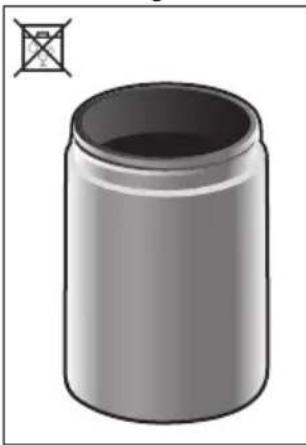
For reasons of hygiene, the milk container should be cleaned regularly. Only the individual parts of the lid are suitable for being cleaned in the dishwasher. Clean the stainless steel milk container by hand with a mild detergent.
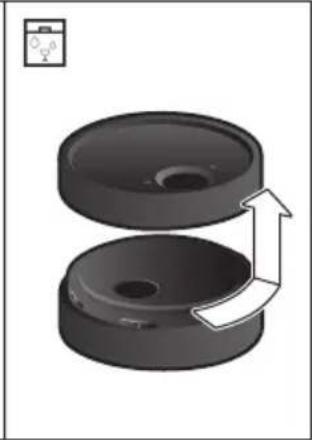
Cleaning the brewing unit
(see also the Quick reference guide) In addition to the automatic cleaning programme, the brewing unit should be removed regularly for cleaning.
- Open the appliance door.
Use the mains switch [O/I] to switch off the appliance completely. - Remove the protective cover of the brewing unit.
- Remove the coffee grounds container.
-
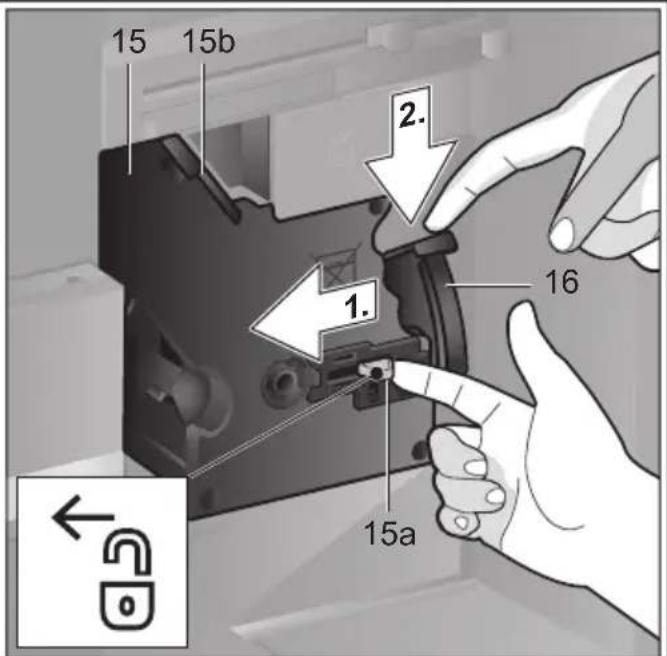
Slide the red latch on the brewing unit all the way to the left.
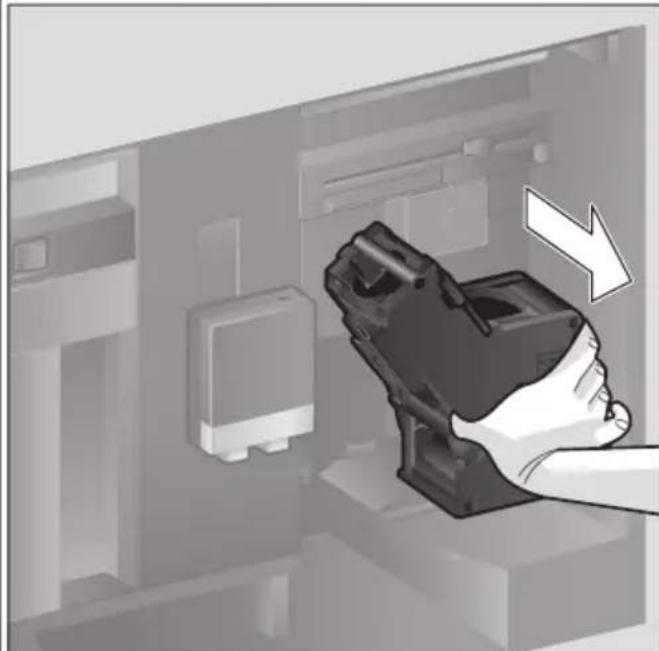
Press the eject lever right down. The brewing unit will be released.
Take hold of the brewing unit by the recessed grips and carefully remove it. -
Remove the cover of the brewing unit and clean thoroughly under running water.
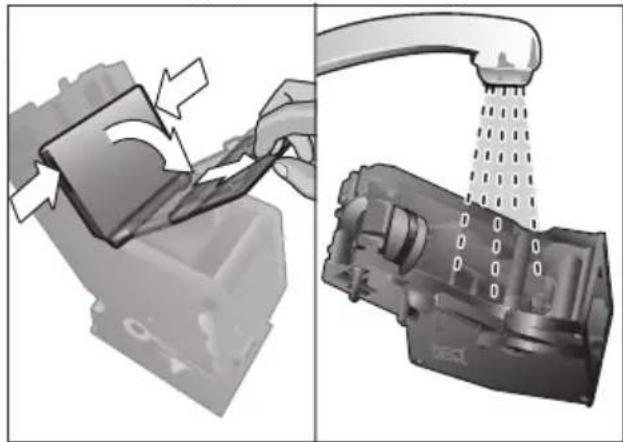
Clean the strainer of the brewing unit thoroughly under the water jet.
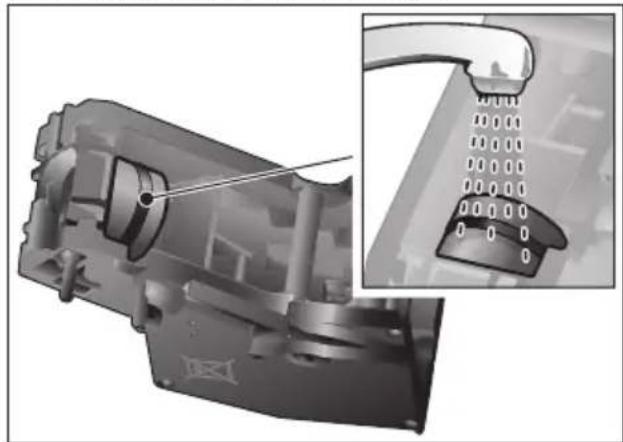
Thoroughly clean the connecting nozzles of the brewing unit.
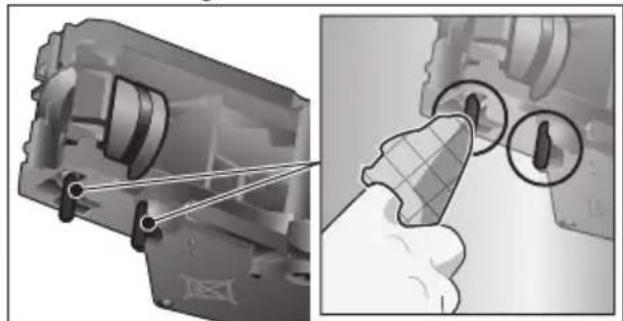

Important: Clean it without using washing-up liquid and do not put it in the dishwasher.
Clean the inside of the appliance thoroughly with a moist cloth, removing any coffee residues.
- Leave the brewing unit and the inside of the appliance to dry.
Place the cover back on the brewing unit.
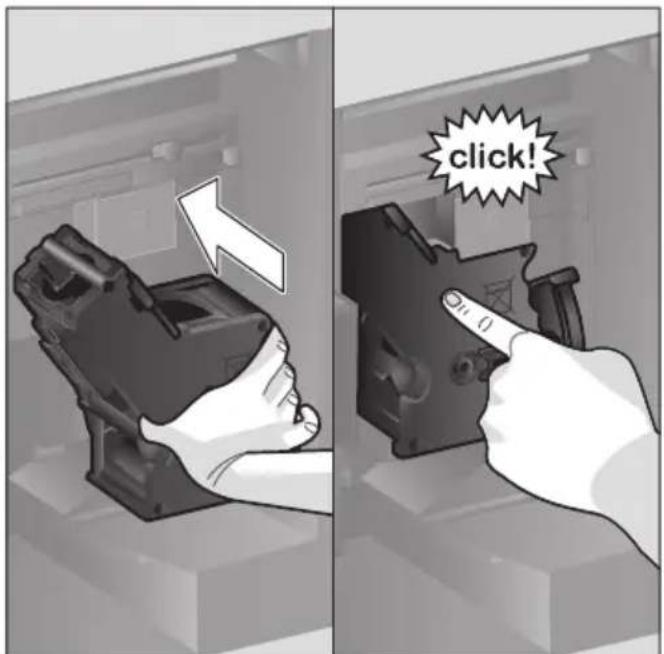
- Push the brewing unit all the way into the appliance and press on the middle until it audibly clicks into place.

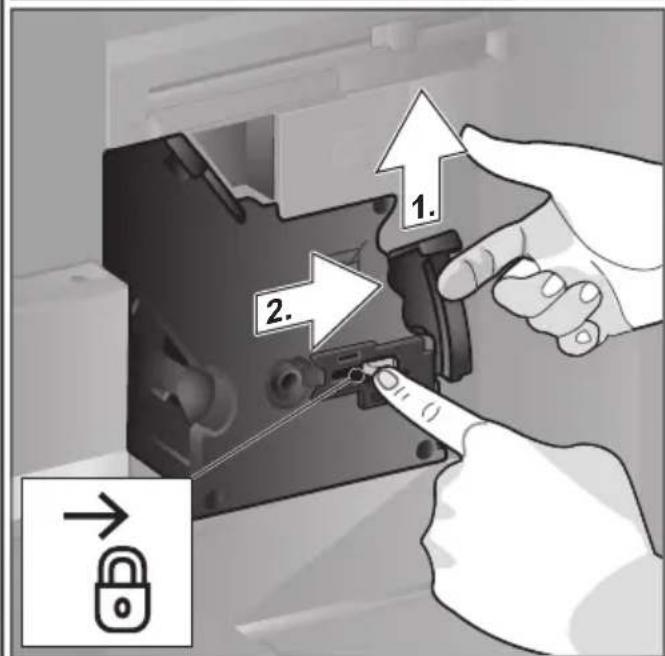
Important: The red latch must be right over at the left at before replacing (see diagram E).
Press the eject lever right up and push the red latch right over to the right to 品
Insert the coffee grounds container.
Replace the protective cover.
- Close the appliance door.
Service programmes
(see also the Quick reference guide) The following messages will appear on the display at certain intervals, either "Descalng programme urgently required!" or
"Cleaning programme urgently required!" or "calc'nClean programme urgently required!". The unit should immediately be cleaned or descaled using the appropriate programme. Alternatively, the two processes Descale and Clean can be carried out together using the calc'nClean function (see the section "calc'nClean"). Failure to carry out the service programme according to the instructions may damage the appliance.

Important: If the appliance is not descaled when it is supposed to be, the message "Dscaling programme is overdue. Device will shortly be locked." will appear. Immediately perform the descaling process in accordance with the instructions. If the appliance is locked, it can only be operated again once the descaling process has been carried out.
To display how many beverages can still be prepared before one of the service programmes needs to be run, proceed as follows:
Press button [clean]
Turn the rotary selector to select "Service info".
Touch [Display] to call up the information.

Warning!
For each of the service programmes, use descaling and cleaning agents as described in the instructions and observe the (relevant) safety information.
Never interrupt a service programme.
Do not drink liquids!
Never use citric acid, vinegar or any vinegar-based agents to descale the appliance. Never place descending tablets or other descending materials in the ground coffee drawer!

Important:
Before starting each service program (Descale, Clean or calc'nClean) remove the brewing unit, clean as instructed and replace it.
Be careful not to jam the milk tube when closing the door.
After completion of each service programme, wipe the appliance immediately with a soft, damp cloth to remove any residues from the descaling and cleaning solution. It is possible for corrosion to form underneath such deposits.
New sponge cloths may contain salts. Salts can cause rust film on stainless steel and must therefore be washed out thoroughly before use.
Clean the beverage outlet, milk tubes and connecting piece thoroughly.
Specially developed, suitable descaling and cleaning tablets are available from retail outlets or from customer services (see the section "Accessories").

Using a water filter increases the intervals until a descending programme needs to be performed.
Dscaling
Takes about 21 minutes.
Press button [clean].
Turn the rotary selector to select "Descale".
Press button [start/stop]. Display indicates progress of the programme.
Empty drip trays and replace.
- Remove water filter(if there is one) and press [start/stop].
Pour lukewarm water into the empty water tank up to the "0.5 l" mark and then dissolve one Siemens descending tablet TZ80002N in it.

If there is not enough descending solution in the water tank, you will be asked to do the following. Refill using uncarbonated water and press [start/stop] again.
- Remove the suction pipe from milk container, wipe it and insert the end of the suction pipe into the hole on the coffee grounds container.
- Close the appliance door.
- Place a container with a capacity of 0.5 litre under the beverage outlet.
Press button [start/stop]. The descending programme will now run for about 19 minutes.
- Remove the container and press [start/stop].
- Rinse the water tank and (if removed) replace the water filter.
- Fill the tank with fresh water up to the "max" indicator.
Replace the water tank and close the door. - Place the container underneath the beverage outlet again.
Press button [start/stop]. The descending programme will now run for about 2 minutes and rinse the appliance.
- Remove the container, empty the drip trays, replace and close the appliance door.
Press [start/stop]. The appliance has finished descaling and is ready for use again.
Press [clean] to exit the program.
Cleaning
Takes about 5 minutes.
Press button [clean].
- Turn the rotary selector to select "Clean".
Press button [start/stop]. Display indicates progress of the programme.
Clean the beverage outlet and replace, empty the drip trays and replace. - Open the ground coffee drawer, drop in a cleaning tablet and close the coffee drawer again.
- Close the appliance door.
- Place a container with a capacity of 0.5 litre under the beverage outlet.
Press button [start/stop]. The cleaning programme will now run for about 5 minutes. - Remove the container, empty the drip trays, replace and close the appliance door.
Press [start/stop]. The appliance has finished cleaning and is ready for use again.
Press [clean] to exit the program.
calc'nClean
Takes about 26 minutes.
calc'nClean combines the functions Descale and Clean. If both programmes are due to be carried out close together, the fully automatic coffee machine will automatically suggest this service programme.
Press button [clean].
Turn the rotary selector to select "calc'nClean".
Press button [start/stop]. The display indicates the progress of the programme.
Clean the beverage outlet and replace, empty the drip trays and replace.
- Open the ground coffee drawer, drop in a cleaning tablet and close the coffee drawer again.
- Remove the water filter (if there is one) and press [start/stop]
Pour lukewarm water into the empty water tank up to the "0.5 l" mark and then dissolve one Siemens descending tablet TZ80002N in it.

If there is not enough descending solution in the water tank, you will be asked to do the following. Refill using uncarbonated water and press [start/stop] again.
- Remove the suction pipe from milk container, wipe it and insert the end of the suction pipe into the hole on the coffee grounds container.
- Close the appliance door.
- Place a container with a capacity of 0.5 litre under the beverage outlet.
Press button [start/stop].
The programme will now run for about 19 minutes.
- Remove the container and press [start/stop].
- Rinse the water tank and (if removed) replace the water filter.
- Fill the tank with fresh water up to the "max" indicator.
- Replace the water tank and close the door.
- Place the container underneath the beverage outlet again.
Press button [start/stop].
The programme will now run for about
7 minutes and rinse the appliance.
- Remove the container, empty the drip trays, replace and close the appliance door.
Press [start/stop]. The appliance is descaled, cleaned and ready for use again.
Press [clean] to exit the program.
Special rinsing

Important: If any of the service programmes is ever interrupted, for instance by a power failure, please proceed according to the information on the display:
-
Rinse the water tank and refill it with fresh water up to the "max" mark.
Press button [start/stop]. The programme will now run for about 2 minutes and rinse the appliance. -
Empty the drip trays, replace and close the appliance door. The appliance is ready for use again.
Press [clean] to exit the program.
Tips on energy saving
Press button [on/off] to switch the appliance to "energy saving mode". The appliances use very little power when in "energy saving mode", but monitors all safety-relevant functions so as to avoid damage.
In the menu under "Switch off after", set the automatic switch off period to 15 minutes.
- Reduce the brightness of the display and the illumination in the menu to save energy.
If possible, do not interrupt the dispensing of coffee or milk froth. Stopping a process prematurely results in higher energy consumption and the drip tray fills up more quickly.
- Descale the appliance regularly to avoid a build-up of limescale. Limescale residues cause higher energy consumption.
Frost protection
To prevent frost damage during transport and storage, completely empty the appliance beforehand (see the section "Menu - Frost protection").
Storing accessories
The fully automatic coffee machine has a special accessory drawer for storing the Quick reference guide and the accessories in the appliance.
Put the measuring spoon and the water filter into the accessory drawer.
Put the Quick Reference Guide into the special support at the front of the accessory drawer.
The long suction pipe can be stored in the holder on the inside of the door.
The connecting element can be fixed to the magnetic holder above the ground coffee drawer.
Accessories
The following accessories are available from retailers or from customer service:
| Accessories Order number | |
| Retail/Customer service | |
| Cleaning tablets TZ80001N/00311807 | |
| Descaling tablets TZ80002N/00576693 | |
| Water filter TZ70003/00575491 | |
| Care set TZ80004/00576330 | |
| Milk container with "freshLock" lid | TZ80009N/00576166 |
| Restrictors for opening angle 92° | 00636455 |
Disposal
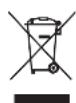
Dispose of packaging in an environmentally-friendly manner. This appliance is labelled in accordance with European Directive 2012/19/EU concerning used electrical and electronic appliances (waste electrical and electronic equipment - WEEE). The guideline determines the framework for the return and recycling of used appliances as applicable throughout the EU. Please ask your specialist retailer about current disposal facilities.
Guarantee
The guarantee conditions for this appliance are as defined by our representative in the country in which it is sold. Details regarding these conditions can be obtained from the dealer from whom the appliance was purchased. The bill of sale or receipt must be produced when making any claim under the terms of this guarantee.
Changes reserved.
Simple troubleshooting
| Problem Cause Solution | |||
| Strongly fluctuating coffee or milk froth quality (e.g. fluctuation in quantity or milk froth spraying). | Build-up of limescale in the appliance. | Descale the appliance according to the instructions, see the section "Service programmes". | |
| The suction pipe is blocked. | Clean the suction pipe. | ||
| Drinks cannot be dispensed. | Beverage outlet or one of the 3 connections are blocked. | Clean the beverage outlet and the connections. | |
| The drink runs out at the entire outlet during dispensing. | Lower part of the beverage outlet is missing. | Attach the lower part, see the section "Cleaning the milk system". | |
| Too little milk froth, none at all, or the milk system is not taking in any milk. | Build-up of limescale in the appliance. | Descale the appliance according to the instructions, see the section "Service programmes". | |
| Beverage outlet or one of the 3 connections are blocked. | Clean the beverage outlet and the connections. | ||
| Milk not suitable for foaming. | Do not use milk that has already been boiled. Use cold milk with a fat content of at least 1.5%. | ||
| Beverage outlet or the milk tubes are not correctly assembled. | Moisten the individual parts and put them together again. | ||
| The suction pipe is blocked. | Clean the suction pipe. | ||
| The personally selected volume is not reached. Coffee dispensing slows to a trickle or stops completely. | Coffee is ground too finely. Preground coffee is too fine. | Adjust the grinding level to a coarser setting. Use a coarser ground coffee. | |
| Heavy build-up of limescale in the appliance. | Descale the appliance according to the instructions, see the section "Service programmes". | ||
| The brewing unit is soiled. Clean | an brewing unit, see chapter "Cleaning the brewing unit". | ||
| Hot water milky or tastes of coffee. | Milk tube has not been removed. | Remove the milk tube from the milk container. | |
| Milk or coffee residue in the beverage outlet. | Clean the beverage outlet. | ||
| Coffee has no "crema". Unsuitable type of coffee. Use a ty | ype of coffee with a higher proportion of robusta beans. | ||
| The beans are no longer fresh. | Use fresh beans. | ||
| The grinding level is not suitable for the beans. | Adjust the grinding unit to a finer setting. | ||
| Coffee is too "acidic". The grinding level is too coarse. Presground coffee is too coarse. | Adjust the grinding unit to a finer setting. Use a finer ground coffee. | ||
| Unsuitable type of coffee. Change the type of coffee. | |||
| Coffee is too "bitter". Coffee is ground too finely. Presground coffee is too fine. | Adjust the grinding level to a coarser setting. Use a coarser ground coffee. | ||
| Unsuitable type of coffee. Change the type of coffee. | |||
| Coffee tastes burnt. The br ewing temperature is too high. | Reduce the temperature, see the section "Drink adjustment". | ||
| Coffee is ground too finely. Presground coffee is too fine. | Adjust the grinding level to a coarser setting. Use a coarser ground coffee. | ||
| Unsuitable type of coffee. Change the type of coffee. | |||
| Coffee is too "weak". Coffee strength selected is too weak. | Raise the strength of the coffee, see the section "Drink adjustment". | ||
| Ground coffee jammed in the coffee drawer. | Remove the ground coffee drawer, clean and dry thoroughly. | ||
| Ground coffee sticks in the coffee drawer. | Ground coffee sticks together. | Do not press the ground coffee firmly into the coffee drawer. | |
| Coffee drawer is damp. Remove the ground coffee drawer, clean and dry thoroughly. | |||
| The water filter does not stay in position in the water tank. | The water filter is not mounted correctly. | Firmly press the water filter straight down into the tank connection. | |
| Bean container sticks when inserting. | There are beans in the housing. | Remove the beans. | |
| The coffee grounds are not compact and are too wet. | The grinding setting is too fine or too coarse, or not enough ground coffee has been used. | Adjust the grinding unit to a coarser or finer setting, or use 2 level measuring spoons of ground coffee. | |
| Grinding level adjustment is stiff. | Too many beans in the grind-ing unit. | Dispensing a drink from coffee beans. Only make any subsequent changes to the grinding level in small steps. | |
| Brewing unit cannot be inserted. | Brewing unit is in the wrong position. | Insert the brewing unit according to the instructions, see the section "Cleaning the brewing unit". | |
| Brewing unit is locked. Unlock the brewing unit, see the section "Cleaning the brewing unit". | |||
| Protective cover of the brewing unit cannot be properlyattached. | Brewing unit is not locked. Lock the brewing unit, see the section “Cleaning the brewing unit”. | ||
| There is water under the drip tray. | This water is condensed. Do not insert drip tray without cover. | ||
| Display shows “12:00” | Power failure or appliance switched off at mains. | Re-enter values; do not switch the appliance off at the mains or select the “Off” option in the Clock display menu. | |
| Display shows “Milk container connected?” despite connected milk container. | Container is outside the range of the sensor. | Position the container at the right edge. | |
| Material e.g. milk carton is not recognised. | Confirm the display request with “Yes” or use the enclosed milk container. | ||
| Display shows “Overvoltage or undervoltage” | Voltage too high or too low. Co ntact electricity or grid pro- vider. Have the power supply checked by an expert. | ||
| Display shows “Leave device to cool” | Appliance is too hot. Switch off | appliance for 30 minutes. | |
| Display shows, for example: “Fault: E0510” | The appliance has a fault. Proced | eed according to the display screen. | |
| Display shows “Fill bean container” although the container is already full, or the grinder is not grinding any beans. | Beans are not falling into the grinding unit (beans too oily). | Gently tap the bean container. Possibly change the type of coffee. When the bean con- tainer is empty, wipe it with a dry cloth. | |
| Display shows “Clean brewing unit” | Brewing unit is soiled. Clean the brewing unit. | ||
| Too much ground coffee in the brewing unit. | Clean the brewing unit. Do not place more than two level measuring spoons of ground coffee in the drawer. | ||
| The mechanism of the brewing unit is stiff. | Clean the brewing unit, see the section “Care and daily cleaning”. | ||
| Display shows “Refill with still water or remove filter” | Water tank wrongly inserted | Insert water tank correctly | |
| Carbonated water in the water tank. | Fill the water tank with fresh tap water. | ||
| Float is stuck in the water tank. | Remove the tank and clean thoroughly. | ||
| New water filter not rinsed according to instructions, or water filter used or defective. | Rinse the water filter according to the instructions and then switch on, or use a new water filter | ||
| Air in the water filter. | Dip the water filter into water until no more air bubbles escape, replace the filter. | ||
| Display shows "Empty drip trays" despite them being empty. | Drip tray is soiled and wet. Clean and dry the drip tray thoroughly. | ||
| Emptying is not detected when the appliance is switched off. | When the appliance is switched on, remove and re-insert the drip tray. | ||
| Display shows "Insert drip trays" even though drip tray in use. | Inside of appliance (tray holder) dirty. | Clean the inside. | |
| The coffee grounds container is not fully inserted. | Push the coffee grounds container all the way in. | ||
| Very frequent display that descending is necessary. | Water is too hard. Insert water filter and configure settings accordingly in the menu. | ||
| Water dripped onto the inner floor of the appliance when the drip tray was removed. | Drip tray was removed too soon. | Wait a few seconds after the last drink was dispensed before removing the drip tray. | |
| Display shows "Please open door, switch off with power switch and then back on after 30 sec!" | Appliance is too warm. Leave the appliance to cool down. | ||
| Dirty brewing unit. Clean the brewing unit. | |||
| Home Connect does not work correctly. | Go to www.home-connect.com | ||
| If you are unable to solve the problem, always call the hotline! You will find the telephone numbers at the back of these instructions. | |||
Technical specifications
| Power connection (voltage - frequency) 220-240V - 50/60 Hz | |
| Power rating | 1600 W |
| Maximum static pump pressure | 19 bar |
| Maximum water tank capacity (without filter) | 2.4 l |
| Maximum capacity of the coffee bean container | 500 g |
| Length of power cable | 1.7 m |
| Dimensions (H x B x D) | 455 x 495 x 375 mm |
| Weight, empty | 19-20 kg |
| Type of grinding unit | Ceramic |
Sommaire
80^ Thevert
90^ Thé noir
Max Tisane fruit
Sous reserve de modifications.
Display (touchscreen)
AE United Arab Emirates,
BSH Home Appliances FZE
Round About 13, Plot Nr MO-0532A
Jebel Ali Free Zone - Dubai
Tel.: 04 881 4401
mailto:service.uae@bshg.com www.siemens-home.bsh-group.com/ae
www.siemens-home.bsh-group.at
Gate 1, 1555 Centre Road Clayton, Victoria 3168
Tel.: 1300 167 425*
Fax: 1300 306 818
mailto:aftersales.au@bshg.com
www.siemens-home.bsh-group.com/au
- Mo-Fr: 24 hours
BA Bosna i Hercegovina, Bosnia-Herzegovina
"HIGH" d.o.o.
Gradačka 29b
71000 Sarajevo
Tel.: 061 10 09 05
Fax: 033 21 35 13
mailto:bosch_siemens_sarajevo@yahoo.com
BE Belgique,Belgié,Belgium
BSH Home Appliances S.A. - N.V.
www.siemens-home.bsh-group.com/be
BH Bahrain
Khalaifat Est.
P.O.Box 5111
Manama
Tel.: 017400553
mailto:service@khalaifat.com
BY Belarus, Bepapcyb
OOO“BCXБbITOBaTexHnka
ten.: 495 737 2962
mailto:mok-kdl@bshg.com
CH Schweiz, Suisse, Svizzera, Switzerland
BSH Hausgeräte AG
www.siemens-home.bsh-group.com/ch
CY Cyprus, Kúπpός
BSH Ikiakes Syskeves-Service
39, Arh. Makaariou III Str.
2407 Egomi/Nikosia (Lefkosia)
Tel.: 77778007
Fax: 022 65 81 28
mailto:bsh.service.cyprus@
cytanet.com.cy
CZ Ceska Republika, Czech Republic
BSH domác spotfbebice s.r.o.
www.siemens-home.bsh-group.com/cz
DK Danmark, Denmark
BSH Hvidevarer A/S
Telegrafvej 4
2750 Ballerup
Tel.: 44898028
BSH-Service.dk@bshg.com
www.siemens-home.bsh-group.com/dk
ES Espana, Spain
siemens-home.bsh-group.com
www.siemens-home.bsh-group.fr
GB Great Britain
BSH Home Appliances Ltd.
Grand Union House
Old Wolverton Road
Wolverton
Milton Keynes MK12 5PT
To arrange an engineer visit, to order spare parts or accessories or for product advice please visit www.siemens-home.bsh-group.com/uk Or call
Tel.: 0344 892 8999
Calls are charged at the basic rate, please check with your telephone service provider for exact charges.
HK Hong Kong 香港
BSH Home Appliances Limited
Unit 1 & 2, 3rd Floor,
North Block, Skyway House,
3 Sham Mong Road
Tai Kok Tsui, Kowloon
Hong Kong
Tel.: 2565 6151
Fax: 2565 6681
mailto: siemens.hk.service@bshg.com
www.siemens-home.bsh-group.com/hk
IE Republic of Ireland
BSH Home Appliances Ltd.
M50 Business Park
Ballymount Road Upper
Walkinstown
Dublin 12
To arrange an engineer visit, to order spare parts and accessories or for product advice please call
Tel.: 01450 2655
www.siemens-home.bsh-group.ie
Calls are charged at the basic rate, please check with your telephone service provider for exact charges.
IL Israel,
C/S/B/ Home Appliance Ltd.
1, Hamasger St.
North Industrial Park
Lod, 7129801
Tel.: 08 9777 222
Fax: 08 9777 245
mailto:csb-serv@csb-ltd.co.il
www.siemens-home.bsh-group.com.il
IN India, Bharat,
BSH Household Appliances
Mfg.Pvt.Ltd.
Arena House,
Main Bldg, 2nd Floor,
Plot No. 103, Road No. 12
MIDC, Andheri East
Mumbai 400 093
Toll Free 1800 209 1850*
www.siemens-home.bsh-group.com/in
- Mo-Sa: 8.00am to 8.00pm
(exclude public holidays)
IS Iceland
Smith & Norland hf.
Noatuni 4
105 Reykjavik
Tel.: 05203000
Fax: 0520 3011
www.sminor.is
IT Italia, Italy
www.siemens-home.bsh-group.com/it
LB Lebanon, Li
Tehaco s.a.r.l.
Boulevard Dora 4043 Beyrouth
P.O.Box 90449
Jdeideh, 1202 2040
Tel.: 01 255 211
mailto:Info@Teheni-Hana.com
LU Luxembourg
www.siemens-home.bsh-group.com/lu
MK Macedonia, Madeonna
GORENEC
Jane Sandanski 69 lok. 3
1000 Skopje
Tel.: 02 2454 600
Mobil: 070 697 463
mailto:gorenec@yahoo.com
MT Malta
Aplan Limited
The Atrium
Mriehel by Pass
BKR3000 Birkirkara
Tel.: 025 495 122
Fax: 021 480 598
mailto:lapap@aplan.com.mt
NL Nederlande, Netherlands
www.siemens-home.bsh-group.nl
NO Norge, Norway
www.siemens-home.bsh-group.com/no
PL Polska, Poland
www.siemens-home.bsh-group.pl
PT Portugal
BSHP Electrodomésticos,
www.siemens-home.bsh-group.com/pt
RO Romania, Romania
BSH Electrocasnice srl.
Sos. Bucuresti-Ploiesti,
nr. 19-21, sect. 1
13682 Bucuresti
Tel.: 021 203 9748
Fax: 021 203 9733
mailto:service.romania@bshg.com
www.siemens-home.bsh-group.com/ro
RU Russia, Pocsn
OOO“BCXБbITOBbIePnp6Opbl
CepBnC OT npOn3BoDnteTn
Mana Kanyckar, 15
119071 MockBa
Tei.: 8 (800) 200 29 62
mailto:mok-kdhl@bshg.com
www.siemens-home.bsh-group.ru
SE Sverige, Sweden
BSH Home Appliances AB
Landsvagen 32
169 29 Solna
Tel.: 0771 195500 local rate
Tel.: 0771 11 22 77 local rate
mailto:Siemens-Service-SE@bshg.com
www.siemens-home.bsh-group.com/se
SK Slovensko, Slovakia
www.siemens-home.bsh-group.com/tr
- Cagli merkezini sabit hatlardan
aramanin bedeli sehir ici ücretlendirme,
Cep telefonlarindan ise kullanilan
www.siemens-home.bsh-group.com/ua
XK Kosovo
SERVICE-GENERAL SH.P.K.
Rruga Mag Prishtine-Ferizaj
70000 Ferizaj
Tel.: 0290 321 434
Tel.: 0290 330 723
mailto:a_service@
gama-electronics.com
ZA South Africa
BSH Home Appliances (Pty) Ltd.
15th Road Randjespark
Private Bag X36, Randjespark
1685 Midrand-Johannesburg
Tel.: 086 002 6724
Fax: 086 617 1780
mailto:applianceserviceza@bshg.com
www.siemens-home.bsh-group.com/za
www.siemens-home.bsh-group.com
AE 048030501
AL 066 206 47 94
AT 0810550522
AU 1300 368 339
BA 033 213 513
BE 070 222 142
BG 029315062
CH 043 455 4095
CN 400889999
Call rates depend on the network used
CZ 0251 095 546
DE 0911 70 440 044
DK 44898985
EE 06278730
ES 902 11 88 21
FI 0207510700
Lankapuhelimitsa 8,28 snt/puhelu + 7 snt/min (alv 24%
Calls charged at local or mobile rate
GR 18 182 (AoTIKxPéwσn)
HR 013028226
HU 003614895461
IE 014502655
0.03 € per minute at peak. Off peak 0.0088 € per minute.
IL 08 9777 222
IS 05203000
IT 800 018 346 (Line Verde)
LI 052741788
LU 26349300
LV 067 425 232
ME 050432575
MK 022454600
NL 0884244020
NO 22660600
PL 801 191 534
PT 214250720
RO 021 203 9748
RU 8 800 200 29 62
SE 0771 11 22 77 (local rate)
SK 0244452041
SL 012007017
TR 444 6688
www.siemens-home.bsh-group.com

- Inhalt
- Füllmenge
- Included in delivery (for use)
- Congratulations ...
- How to use these instructions
- Intended use
- Important safety information
- Warning
- Risk of electric shock!
- Hazard due to magnetism!
- Risk of suffocation!
- Risk of injury!
- Risk of burns!
- Risk of scalding (Home Connect)!
- Overview
- Controls
- Button [ clean ]
- Button [my]
- Button [ ]
- Button [start/stop]
- Rotary selector
- Display (Touchscreen)
- Initial use
- General
- Setting up the appliance
- Switch off appliance
- Display
- Examples:
- Information
- Prompts to take action
- Operation
- Preparing drinks
- Drink selection
- The following drinks can be selected:
- Drink adjustment
- An example:
- The following settings are possible: Coffee strength
- - aromaDouble Shot
- Drink temperature
- Volume
- Preparation using coffee beans
- Preparation using milk
- Milk container
- Coffee drinks with milk
- Milk froth or warm milk
- Preparation using ground coffee
- Caution!
- Dispensing hot water
- Personalised drinks
- Entering or changing drinks
- Select a personalised drink and dispense
- Two cups at once
- Adjusting the grind setting
- Childproof lock
- Menu
- Navigating through the menu:
- For example:
- The following settings can be made:
- Home Connect
- Important information:
- Setting up
- Connect automatically in the WLAN network (home network)
- Connect manually in the WLAN network (home network)
- Switching Wi-Fi on and off
- Additional settings
- Disconnecting
- Connecting with app
- Remote start
- Device Info
- Remote diagnostics
- Information on data protection
- are and daily cleaning
- Declaration of Conformity
- Care and daily cleaning
- Do not put the following parts in the dishwasher:
- The following parts may be cleaned in the dishwasher:
- Cleaning the milk system
- Rinsing the milk system
- Cleaning the milk system manually
- Cleaning the milk container
- Cleaning the brewing unit
- Service programmes
- Warning!
- Important:
- Dscaling
- Cleaning
- calc'nClean
- Special rinsing
- Tips on energy saving
- Frost protection
- Storing accessories
- Accessories
- Disposal
- Guarantee
- Technical specifications
- Sommaire
- AE United Arab Emirates,
- BA Bosna i Hercegovina, Bosnia-Herzegovina
- BE Belgique,Belgié,Belgium
- BH Bahrain
- BY Belarus, Bepapcyb
- CH Schweiz, Suisse, Svizzera, Switzerland
- CY Cyprus, Kúπpός
- CZ Ceska Republika, Czech Republic
- DK Danmark, Denmark
- ES Espana, Spain
- GB Great Britain
- HK Hong Kong 香港
- IE Republic of Ireland
- IL Israel,
- IN India, Bharat,
- IS Iceland
- IT Italia, Italy
- LB Lebanon, Li
- LU Luxembourg
- MK Macedonia, Madeonna
- MT Malta
- NL Nederlande, Netherlands
- NO Norge, Norway
- PL Polska, Poland
- PT Portugal
- RO Romania, Romania
- RU Russia, Pocsn
- SE Sverige, Sweden
- SK Slovensko, Slovakia
- XK Kosovo
- ZA South Africa
Brand : BOSCH
Model : CT636LES6
Category : Coffee maker