USER MANUAL SRP4004 PHILIPS
Register your product and get support at www.philips.com/welcome
SRP4004/86
EN User Manual 3
1 Your SRP4004 3
2 Getting started. 4-8
2.1 Inserting the batteries 4
2.2 Testing the universal remote control 4
2.3 Setting up the universal remote control.. 5-8
3 Using the universal remote control. 8-10
3.1 Keys and functions.. 8-10
3.2 Resetting a key to its original function. 10
4 Service and support 11-13
4.1 Frequently asked questions.. 11-12
4.2 Need help? 13
Helpline 88
Brandlist. 89-102
Information to the consumer 103
1 Your SRP4004
Congratulations on your purchase of the Philips SRP4004 universal remote control. After setting up the remote control you can operate up to 4 different devices with it.
Simple Setup
Improved with Philips patented (pending) Simple Setup technology, the SRP4004 can be set up easily for TV, DVD player / recorder, VCR and all common set-top boxes, such as Sky, British Telecom, Orange, Freebox, TNT, Canal Digital, Telefonica, Premiere, Kabel Deutschland, Belgacom TV, Telenet, Viasat and many more.
Simply follow the instructions in chapter 2.3 to set up the remote control for your devices.
Glow keys
The remote control glow keys (-VOL +, -CH + and numeric keys) light up in the dark, enabling easy use of the remote control, even in a dimly lit room
To fully benefit from the support that Philips offers, register your product at www.philips.com/welcome.
2 Getting started
2.1 Inserting the batteries
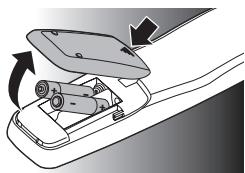
- Insert 2 AAA type batteries, noting the + and - configuration in the battery compartment.

Note
When replacing the batteries, all user settings will be retained in the remote control memory for an unlimited period of time.
2.2 Testing the universal remote control
It is advised to test whether your device(s) already respond(s) to the SRP4004 before setting it up (see chapter
2.3). The example below instructs you how to do this for your TV. You can repeat the same steps for other devices (STB, DVD player/ recorder and VCR) which you want to operate using the SRP4004.
Example: testing the universal remote control on your TV:
1 Turn ON your TV manually or use the original remote control for this. Tune to channel 1.
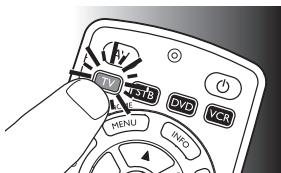
2 Press the device selection key to select TV.
The key lights up.
If the key does not light up, check whether the batteries are properly inserted (see chapter 2.1).
3 Check whether the keys that you need for operating your TV are working. For an overview of the keys and their functions see chapter 3.1.
If the TV responds as it should to all of the key commands, the SRP4004 is ready for use.
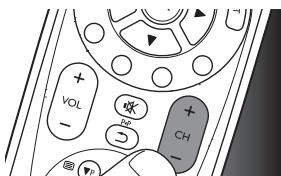
- If the device does not respond at all or not to all of the key commands, follow the instructions in chapter 2.3.
4 EN
2.3 Setting up the universal remote control
This is only necessary if your device does not respond to the SRP4004. If that is the case, the SRP4004 does not recognize the brand and / or model of your device and you need to set up the remote control to do so.
The example below instructs you how to do this for your TV. You can repeat the same steps for other devices (STB, DVD player/recorder and VCR) which you want to operate, using the SRP4004.
The remote control can be set up to operate any 4 of the following devices:
| Device name | Description |
| TV | Traditional TV, flat screen TV and projection TV,TV part of TV / VCR,TV / VCR / DVD and TV / DVD combos |
| STB | Cable box, satellite receiver, Digital Video Broadcasting Terrestrial device (DVB-T), Internet Protocol TV (IPTV), Free To Air TV, High Definition Television decoder (HDTV) |
| DVD | DVD player / recorder (DVDR), DVD / Hard Disk Drive combination (DVDR-HDD), Blu-Ray player, High Definition DVD player (HD-DVD), DVD part of TV / DVD,TV / VCR / DVD and VCR / DVD combos |
| VCR | Video cassette player / recorder,VCR part of TV / VCR,TV / VCR / DVD and VCR / DVD combos |
Example: setting up the universal remote control to operate your TV:
1 Turn ON the TV manually or use the original remote control for this. Tune to channel 1.
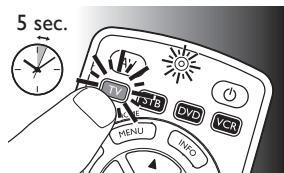
2 Press and hold the device selection key for 5 seconds until the red Setup LED lights up. The remote control is now in setup mode.
EN 5
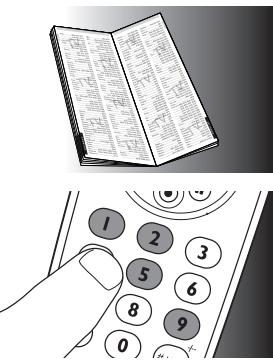
3 Look up the brand of your TV in the brandlist at the back of this user manual. A four-digit code is shown for each brand.
Use the digit keys to enter the code for your brand (e.g. Philips, ② 195).
If the red Setup LED turns off, an invalid code was entered. In this case, try again.
4 Aim the remote control at the TV. Press and hold the key and immediately release it when the TV switches off (standby).
This step normally
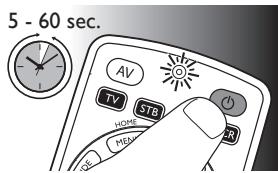
takes between 5 and 60 seconds. In extremecircumstances this step can take up to 15 minutes.
5 Turn ON the TV and check if all keys that you need for operating your TV are working. Try, for example, if the - CH + and digit keys function properly.
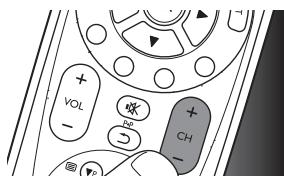
If a key does not function as expected, press and hold it and immediatley release it as soon as it works. For more information, see chapter 2.3.2.
6 Press the device selection key twice to save your settings and exit setup mode.
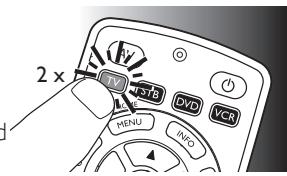
- When no key is pressed for 5 minutes or more, the remote control will
exit setup mode, automatically saving all your settings.

Note
If you wish to restart setup, you can start again from the beginning at any time.
- If the device does not respond at all or not to all of the key commands or if you cannot find the code for your brand, enter '9, 9, 9, 9' in step 3 and continue with step 4. The remote control will now search its full database for a code that works with your TV. Full database search may take up to 15 minutes.
2.3.1 Setting up the remote control for other devices (STB, DVD player / recorder and VCR)
1 Make sure the device is turned on, fully operational and able to respond to remote control commands. E.g. insert a disc in the DVD player / recorder or a video cassette in the VCR.
2 Then follow steps 2 to 6 of 'Setting up the remote control for your TV'. Make sure to use the correct device selection key: , or .
2.3.2 Improving keys
When correctly set up, the remote control should be able to operate all your devices. However, when using the remote control for the first time it might occur that some keys do not yet function as expected.
In this case you can have the remote control search for alternatives.

Note
Improving keys is not possible when the code was found during full database search (with code '9, 9, 9, 9').
During initial setup
1 Make sure the receiving device is able to respond. E.g. when you try to repair the Play key for your DVD player, make sure to insert a DVD into the DVD player otherwise the Play key is not able to function.
2 Press the key that does not function, keep it pressed and immediately release it when the device responds. Repeat this for every key that does not function.
- If the key still does not function as expected, try pressing it again for a longer period of time.
After initial setup
1 Make sure the receiving device is able to respond. E.g. when you try to repair the Play key for your DVD player, make sure to insert a DVD into the DVD player otherwise the Play key is not able to function.
2 Select the device you wish to operate (e.g. DVD). Press the device selection key to select DVD.
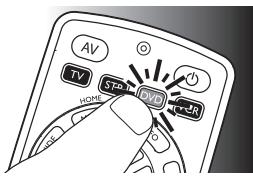
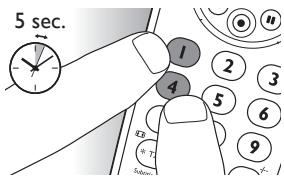
3 Keep keys ① and ④ pressed simultaneously for 5 seconds.
- The red Setup LED @ lights up. The remote control is now in setup mode.
4 Press and hold the key that does not function and immediately release it when the device responds.
If the key still does not function as expected, try pressing it again for a longer period of time.
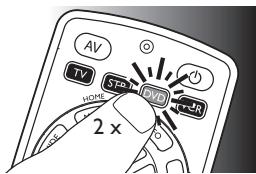
5 Press the device selection key twice to save your settings and exit setup mode.
- When no key is pressed for 5 minutes
or more, the remote control will exit setup mode, automatically saving all your settings.
3 Using the universal remote control
3.1 Keys and functions
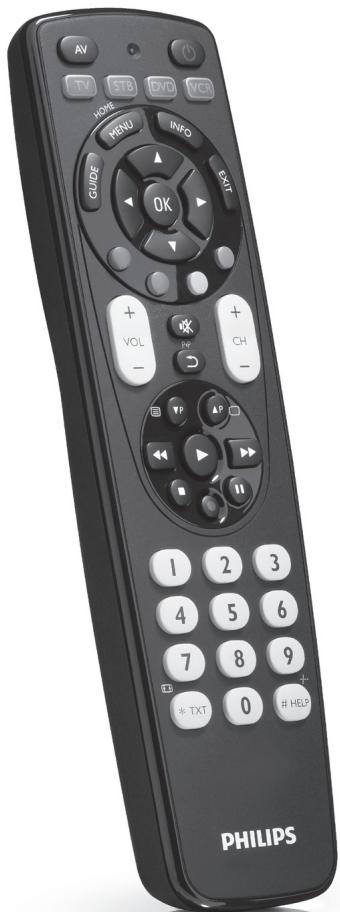
The illustration on page 2 gives an overview of all keys on the remote control. Try out the keys you need for operating your devices.

Notes
- Keys having the same functions as the keys on your original remote control may have different namings on the SRP4004 (e.g. Info / Display).
Only functions that are available on your original remote control can be used for operating your devices with the SRP4004.
1 Setup LED. Lights up red when the remote control is in setup mode.
2 AV switches between external (Audio / video) inputs of your equipment.
3 1T 1ST vDv VcS ...... device selection keys.
- select the device to be operated.
- light up when a remote control command is being sent.
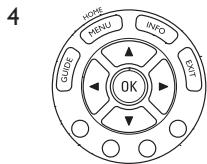
GUIDE...... electronic program guide.
MENU / HOME...menu on / off.
INFO............on-screen channel information.
EXIT exits / clears on-screen menu displays.
.........cursor up, down, left, right in a menu.
OK.........confirms your selection.
Colored keys..... Teletext / context sensitivity keys.
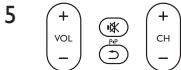
+VOL -............ adjusts TV volume.
※ mutes TV sound.
念 previous program/Last.
- CH - previous / next channel.
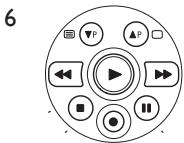
P P . previous ( P) / next ( P) page / track in various modes.
口 /口 teletext on (国) / off (口).
rewind.
play.
fast forward.
stop.
. record.
..pause.
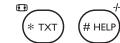
- TXT / ...... wide screen.
- STB: text.
STB:Help.
8 ① ② ③ ......... digit keys for direct channel / track ④ ⑤ ⑥ selection.
7 8 9
0
9 ⑥.........switches the selected device on / off.

Note
For some TV brands / types, this key will only turn off the TV. You will have to press a digit button (direct channel selection) to turn on the TV again.
3.2 Resetting a key to its original function
If an improved key (see chapter 2.3.2.) still does not function as expected, you can always reset the key to its original function.
1 In the current device mode, keep digit keys ① and ⑥ pressed simultaneously for 5 seconds, until the red Setup LED @lights up.
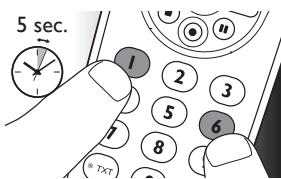
The remote control is now in setup mode.
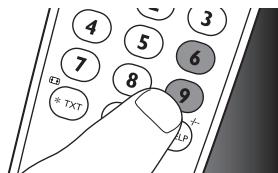
2 Press digit keys ⑨, ⑨, and ⑥, in that order.
After each key press the device selection key blinks once.
3 Press the key you wish to reset twice. E.g. the key.
After each key press the device selection key blinks once.
The device selection key
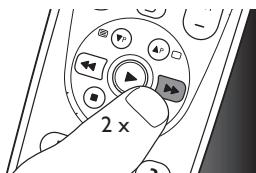
will blink one more time to confirm that the key was successfully reset to its original function.
4 Service and support
4.1 Frequently asked questions
In this chapter you will find answers to the most frequently asked questions about your universal remote control.
Setup
I cannot enter setup mode.
Battery level too low or battery lifetime came to an end.
- Replace the batteries. For this see chapter 2.1.
My TV turns OFF in step 4 but does not turn ON again in step 5.
TVs of some brands (e.g. Panasonic) only turn ON after a long press on one of the digit keys. After a long key press in setup mode the remote control will start trying to improve the key (see chapter 2.3.2) instead of turning ON the TV.
- In this case, turn ON the TV manually or use the original remote control for this. Continue with step 6. After successfully completing setup, the remote control will turn ON the TV with a long key press on one of the digit keys, just as your original remote control.
How do I set the remote control for combo devices (TV / VCR, TV / DVD, DVD / VCR, etc)?
Some combo devices require you to set up two different source selection keys to control both parts of the combo device. For example, if you have a TV / DVD combo, you might need to set up the remote control for both TV and DVD to operate your TV / DVD combo.
Operation
The remote control does not wake up anymore.
Battery level too low or battery lifetime came to an end.
- Replace the batteries. See chapter 2.1.
The device I want to operate does not respond at all / does not respond to all of the key commands.
- Check if the keys you press are available on the original remote control of the device.
Try improving keys. See chapter 2.3.2.
Wrong code selected during setup.
- Set up the remote control again for the device. Always test if the device responds, before leaving setup mode. See chapter 2.2.
It may be that the keys that you are trying to use have a different naming on the original remote control.
Try out all keys to find the one(s) you need.
The Teletext keys do not work.
Find out whether your TV is equipped with Teletext.
Try improving the Teletext keys. See chapter 2.3.2.
- Check whether you are using the correct keys to switch on Teletext. For TV this is the key; for STB this is the key.
Batteries
Will my settings be deleted when I replace the batteries?
No. All user settings will be retained in the remote control memory during battery replacement.
12 EN
4.2 Need help?
We advise you to first read this user manual carefully. It is provided to help you set up and use the remote control.
If, however, you require extra information or have additional questions about setup, usage, spare parts, warranty, etc. of the SRP4004, you can always contact us.
When calling our helpline, make sure to have the SRP4004 at hand when you call, so that our operators can help you determine whether the SRP4004 is working properly.
You will find our contact details at the end of this user manual.
The model number of your Philips universal remote control is SRP4004/86.
Date of purchase:
/
(day/month/year)
For online support go to: www.philips.com/welcome.
- Click 'Support' and follow the on-screen instructions.
Inhaltsverzeichnis
Colored keys...... Teletext/Kontexttasten.
20
DE
5
Improving keys is not possible when the code was found during full database search (with code '9, 9, 9, 9').
The Teletext keys do not work.
Find out whether your TV is equipped with Teletext.
Try improving the Teletext keys.
See chapter 2.3.2.
Text-TV-knapparna fungar ar inte.
2.3.2 Forbedring at taster
In this chapter you will find answers to the most frequently asked questions about your universal remote control.
Opsætning
4.2 Brug for hjaelp?
MENU / HOME...menu on / off.
Black Panther Line.4196
Black Star. 0386
Blacktron. 3526
Blackway. 0388
Blaupunkt. 0390
Blue Sky. 0395
Blue Star. 0396
Boca. 0399
Boghe. 0400
Bondstec. 0403
Boots. 0405
Boston. 0410
BPL. 0413
Brain Wave 3692
Brainwave. 0415
Brandt. 0416
Brinkmann.0423
Brionvega. 0424
Britannia. 0425
British Telecom.0427
Broadcast. 0428
Broco. .0431
Bruns. 0435
BSkyB. 0436
BSR. .0437
BT. 0438
BT Cable. 3995
BT Satellite. 3693
BT Vision. 3742
BTC. 0439
Bubu Sat. 0440
Bush.0445
BVV. 0447
C
Cabletime. 0457
Caihong. 0462
Cambridge. 0469
Cambridge Audio.0470
Cameron. 4032
Camundosat.0474
Canal Digital. 0476
Canal Satellite. 0477
Canal+ .0478
Capsonic. 0486
Carad. 0488
Carena. 0489
Carrefour. 0492
Cascade. 0496
Casio. 0499
CAT. 0500
Catha 4094
Cathay. .0501
Catron. 0502
CCE. 0504
Celestial. 0511
Centrex. 0516
Centrum .0519
Centurion. 0520
Century. .0521
CGE. 0523
CGV. .0524
Changcheng. .0526
Changfei. 0527
Changhai. 0529
Changhong. 0530
Channel Master.0531
Chaparral. .0533
CHEROKEE. 0536
Chess. 0538
Chimei. 3563
Chuangjia. 4096
Chunfeng. 0546
Chung Hsin. 0547
Chunsun. 0549
Cimline. 0552
Cinetec. 0560
CineVision. 0562
City. 0569
CityCom .0570
Clarivox. 0576
Classic. .0580
Clatronic. 0581
Clyde. 0588
Clyde Cablevision. 3694
CMS. .0590
CMS Hightec.0591
CNT. 0594
Coby. 0597
Colombia. 0599
Columbia. 0604
COLUMBUS .0605
Comag. 0606
Comcrypt. 0610
Commlink. 0616
Comtech. 3776
Concorde. 0626
Condor. 0627
Conia .0628
Connexions. 0631
Conrad. 0633
Conrad Electronic. 3695
Conrowa. 0634
Contec. 0635
Continental Edison.0637
Cosat. 0645
Coship. 0646
Cosmel. 0647
Crosley. 0655
Crown. 0658
Cryptovision.0661
CS Electronics.0663
CTC. 0664
C-Tech. 0449
CVG. 3996
CyberHome. 0672
Cybermaxx. 3696
Cybertron. 0675
Cyrus .0679
D
Daenyx. 0690
Daeryung. 0691
Daewoo. 0692
Dainichi. 0694
Dansai. 0699
Dansat. 0700
Dantax .0702
Darty Box. 4228
Datron. 4201
Datsura. .0703
Dawa. .0707
Daytek. 0708
Dayton. 0709
Daytron. 0710
D-Box. 0682
DDC. 0714
De Graaf. 0716
DEC. 0717
Decca. 0718
Decsat. 0719
Deitron.0722
Delega. 3697
Denko .0730
Denon. .0731
Denver. 0733
Denzel. 0734
Desay. 0737
Desmet. 0738
Dew. 0742
Diamant. 0746
Diamond. 0747
Digatron.0751
Digiality. 0755
Digiline .0759
Digipro. 0762
Digitor. 0781
Digiturk.0783
Discoverer.0796
Discovery. 0797
Diseqc. 3698
Diskxpress. 0802
Distratel. 0804
Distrisat. 0805
Ditristrad. 3699
Dixi. 0807
DK Digital. 0808
Dmtech. 0813
DNR. 0815
DNT. 0816
DongDa. 0820
Donghai. 0821
Drake. 0825
Dream. 0832
DSE(Digital) .0833
DStv. 0835
DTS .0837
Dual. 0838
Dual-Tec. 3528
Dumont. 0840
Dune. 0841
Duongjie. 4101
Dux. 0843
D-Vision. 0684
DVX. 0847
Dynasat. .0852
Dynatron.0855
Dynex. 3476
E
Easy Home 3700
Echostar. 0866
Eclipse. 0867
E-Dem. 3624
Einhell .0875
Elap. 0877
Elbe. 0880
Elbe-Sharp. 3529
Elcatech .0882
Elcit. 0883
Electa. 3530
ELECTRO TECH. 3531
Electrohome.0890
Electus. 0894
Elekta .0895
Elektra 0896
Element 3477
ELG. 0900
Elin. 0902
Elite. 0903
Elman. .0907
Elsat. 0908
Elsay. 0909
Elta. 0910
Emanon .0913
Emerson. 0917
Emme Esse. 0919
Emperor.0921
Engel. 0929
Enzer. .0934
Ep Sat. 0935
Epson. 0937
Erres. .0942
ESC. 0945
Etron .0949
Etzuko. 4203
EURIEULT .0950
Eurocrypt. .0952
Eurodec. 0953
Eurofeel .0954
Euroline .0955
Euroman. 0956
Europa. 0957
European. 0958
Europhon. 0959
Eurosat. 0962
Eurosky. 0963
Eurospace. 0964
Eurostar.0965
Eutelsat .0967
Eutra. 0968
Exator. 0974
Expert .0976
Exquisit. 0978
F
Fagor Life. 4102
Feilang. 0990
Feilu .0991
Feiyue .0993
Fenmenti. 4103
Fenner. 0994
Ferguson. 0996
Fidelity. 0998
Filmnet .0999
Filmnet Cablecrypt.....3701
Filmnet Comcrypt. 3702
Filsai 1000
Finlandia. 1003
Finlux. 1004
FinnSat. 1005
Fintec 1006
Firstline. 1008
Fisher. 1009
Flair Mate. 1010
Flint 1014
FNR. 1016
Formenti 1023
Formenti-Phoenix. 1024
Fortress 1027
Foxtel. 1029
Fraba 1030
France Satellite/TV. 3703
France Telecom 1033
Free. 4157
Freebox. 1036
Freecom. 1037
Freesat. 1038
Friac. 1040
Frontech. 1042
FTE 1043
FTEmaximal. 1044
Fuba. 1045
Fugionkyo 1046
Fujitsu. 1052
Fujitsu General 1053
Funai. 1056
G
Galaxy. 1068
Galaxis. 1069
Galaxisat. 1070
Gardiner. 1073
GBC. 1078
Geant Casino.1082
GEC. 1083
Geloso. 1087
General. 1090
General Instrument.....1093
General Technic 1095
Genexxa 1097
Gericom. 1103
GFM. 3820
Giant. 1113
Giec. 1115
Global Solutions. 1120
Global Sphere. 1121
GMI. 1124
Go Video. 1126
Goldbox. 3704
Golden Channel. 1133
Goldhand. 1136
GoldHand 1136
Goldline. 1138
GoldStar. 1140
Gooding. 1141
Goodmans. 1142
Gorenje 1144
GPM 1149
Gradient. 1151
Graetz 1152
Granada. 1154
Grandin. 1156
Great Wall. 4105
Gronic 1160
Grothusen. 1161
Grundig. 1162
Grunkel. 1164
G-Sat. 1067
GVG. 1169
H
H&B. 3635
Haaz 1172
Haier 1175
HaiHong. 1176
Halifax 1179
Hampton 1183
Hanseatic. 1190
Hänsel & Gretel. 1173
Hantarex. 1192
Hantor. 1193
Hanuri. 1194
Harman/Kardon.1198
Home Tech Industries....1266
Homecast. 1268
HomeChoice. 1269
Hongmei. 1272
Hornyphone 1277
Hoshai 1278
Houston. 1280
Huafa. 1287
Huanghaimei. 1288
Huanghe. 1289
Huanglong. 1290
Huangshan. 1291
Huanyu 1292
Huari 1294
Huijiaban. 4108
Humax. 1298
Huth. 1305
Hygashi 1308
Hyper. 1309
HyperVision. 1311
Hypson 1312
Hyundai 1315
1
Iberia 1320
ICE. 1324
ICeS. 1325
ID Digital. 1329
Imex. 1344
Impego 4207
Imperial. 1346
Indesit. 1349
Indiana. 1350
Ingelen. 1354
Ingersol. 1355
Inno Hit 1358
Innovation 1360
Interactive. 3534
Interbuy 1376
Interfunk. 1377
Internal 1379
International. 1380
Interstar. 1383
Intertronic. 1384
Intervention. 1386
InVideo 1388
IR. 4110
Irradio. 1396
Isukai. 1402
ITC. 1404
ITS. 1405
ITT. 1406
ITT Nokia. 1407
ITV. 1408
J
Janeil 1414
IEC. 1426
Jerrold. 1431
Jiahua. 1435
Jinhai 1439
Jinxing. 1442
Johansson. 1449
JOK. 1451
JSR. 1459
VC. 1464
K
L&S Electronic. 1588
Lafayette. 1591
Lasat. 1597
Lawson. 1603
Layco. 4117
Lecson. 1606
Lemon. 1614
Lenco. 1615
Leng. 3708
Lennox. 1616
Lenoir. 1617
Lenson. 1620
Lesa. 1622
Lexus. 3649
Leyco 1627
LG. 1628
LG Alps. 1629
LG/GoldStar. 3536
Liesenk. 3537
Liesenk & Tter. 1630
Liesenkotter 1631
Life 3538
Lifesat. 1632
Lifetec. 1633
Limit. 1637
Lion. 1643
Liteon. 1645
Lloyd's. 1648
Local India TV. 1653
Loewe. 1660
Loewe Opta. 3540
LogicLab 3650
Logik. 1661
Lorenzen. 1666
Lorraine. 1669
Luma. 1674
Lumatron. 1676
Lupus. 1678
Lux May. 1680
Luxor. 1683
Lyonnaise. 3709
M
M&B. 3710
M/A Com. 4229
Macab. 1692
Madison. 1698
Magnadyne 1702
Magnafon. 1703
Magnavox. 1706
Magnex. 1707
Magnum 1709
Majestic. 1713
Manata. 1716
Mandor. 1717
Manesth. 1718
Manhattan 1719
Marantz. 1724
Marelli. 1729
Mark. 1731
Marquant. 1734
Mascom. 1738
Maspro. 1739
Master's. 1742
Masuda. 1744
Matav 1745
Matsui. 1750
Matsushita 1751
Max. 1753
Maxdome. 3586
MB. 3711
McMichael. 1768
Mecotek. 1776
Mediabox. 1779
Mediamarkt. 1781
Mediasat. 1782
Mediator 1784
Mediencom. 1786
Medion. 1787
Medison. 1788
Mega. 1789
Melectronic 3654
Melvox. 1799
Memorex. 1800
Memphis. 1802
Mercury. 1804
Metronic. 1809
Metz. 1810
MiCO. 1813
Micro Com. 3998
Micro electronic. 3656
Micro Technology. 1820
Micromaxx. 1822
Micromedia. 1823
Micromega. 1824
Microstar. 1827
Microtec. 1828
Migros. 1832
Minato 1835
Minerva 1838
Minoka 1840
Minowa. 1843
Mitsubishi. 1855
Mivar. 1857
Mizuda. 1860
Mnet. 1862
Monyka. 1873
Morgan Sydney 3712
Morgans 3970
Morgan's. 1875
Motion 1877
Motorola. 1878
Movie Time. 1880
Mr Zapp. 3713
MTC. 1889
MTEC. 1890
MTlogic. 1892
MuDan. 1896
Multichoice. 1900
Multistandard. 1904
Multisystem. 4121
Multitec. 1906
Multitech. 1907
Muratto 1910
Murphy. 1911
Musikland. 1915
Mustek. 1916
Mx Onda. 1919
Mysat. 1923
Mystral. 1925
N
NAD. 1926
Naiko 1930
Nakamichi 1932
Nakimura. 1933
Naonis. 1936
National. 1942
Navex. 1944
NEC. 1950
Neckermann. 1951
NEI 1952
Nesco. 1960
Netsat. 1966
Network. 1968
Neuf Telecom. 3999
Neufunk.1970
Neuhaus. 1971
Neusat. 1974
Nevir. 1977
New Tech. 1979
New World. 1980
Next Base 1983
NextWave. 1988
Nicamagic. 1994
Nikkai. 1998
Nikko 2000
Noblex. 2013
Nobliko. 2014
Nogamatic. 2016
Nokia. 2017
Nomex. 2018
Noos. 2019
Nordic. 2021
Nordmende. 2022
Nordvision. 3543
Normerel 2024
Northcoast. 2026
Nova 2031
Novaplex. 2034
Novatronic. 2035
Novis. 2036
NTC. 2045
NTL 2047
NU-TEC. 2048
0
Oceanic. 2061
Octagon. 2062
Okana. 4122
Okano. 2065
Omni. 2074
ONCEAS. 3544
Onida. 2081
Onimax. 2082
Onkyo 2085
Ono. 2086
Onwa. 2087
Oopla 2088
Opera. 2090
Optex. 2093
Optim. 2094
Optus. 2100
Orange. 3866
Orava. 2101
Orbit. 2103
Orbitech. 2104
Origo 2110
Orion. 2111
Oritron 2112
Online 2113
Ormond. 2114
Orson. 2115
Orsowe. 2116
Osaki. 2118
Osat. 2119
Osio. 2121
Oso. 2122
Osume. 2123
Otto Versand. 2126
Oulin. 4123
Oxford. 2131
P
P&B. 2132
Pace 2134
Pacific 2135
Packsat 2139
Pael. 2140
Palcom. 2144
Palladium. 2145
Palsat 2146
Palsonic 2147
Panama 2149
Panasat. 2151
Panasonic 2153
Panasonic/National 2153
Panavision 2154
Panda 2155
Pathe Cinema 2168
Pathe Marconi. 2169
Patriot. 2170
Pausa. 2171
peeKTON. 2178
Pensonic 3778
Perdio 2185
Perfekt 2186
Philco 2192
Philharmonic. 2194
Philips. 2195
Philips Magnavox 3715
Phoenix. 2199
Phonola. 2201
Phonotrend. 2202
Pioneer 2212
Pionier. 2213
Plantron. 2219
Playsonic. 2224
Pointer. 2229
Polaroid. 2230
Polsat. 3716
Poppy 2236
Portland. 2238
Powerpoint. 2241
Prandoni Prince. 4125
Precision. 2244
Predki. 2245
Preisner. 2246
Premiere 3666
Priesner. 3717
Prima 2253
Prinz. 2260
Profekt. 4126
Profex. 2269
Profile. 2271
Profilo 2272
Profitronic. 2273
Proline 2274
Promax 2275
Prosat. 2278
Prosonic 2282
Protech. 2284
Protek. 2285
Provision 2291
PVP Stereo
Visual Matrix. 2301
Pye. 2302
Pymi. 2304
Pyxis. 2305
Q
Quadral 2314
Quandra Vision. 3546
Quasar 2320
Quelle. 2322
Questa 2324
Quiero 3718
R
Radialva. 2329
Radio. 4128
Radiola 2330
Radiomarelli 2331
RADIONETTE. 2332
RadioShack 2333
Radiotone. 2334
Radix. 2335
Rainbow 2339
Raite 2340
Rank. 2345
RBM. 2350
RCA 2351
REC. 2357
Recor. 2359
Rectiligne 2362
Rediffusion. 2364
Redpoint 2365
Redstar. 2366
RedStar. 2366
Reflex. 2368
Regency 2371
Reoc. 2379
Revox. 2383
Revoy. 2384
Rex. 2385
RFT. 2386
Rhapsody. 2387
Rimax. 2391
R-Line 2327
Roadstar. 2398
Robotron. 2401
Roch. 2402
Rockdale 2403
Ronin. 2412
Rover 2415
Rowa. 2416
Rownsonic 2417
Royal. 2419
Royal Lux. 2420
RTF. 3548
S
Saba. 2429
Sabaki. 2430
Sabre. 2431
Sagem 2434
Saisho. 2437
Saivod. 2439
Sakura. 2441
Salora. 2443
Sambers 2445
Sampo. 2446
Samsung. 2448
Samurai. 2451
Sandra 2454
Sansui. 2458
Sanwa. 2461
Sanyo 2462
Sanyuan 2464
SAT 2470
SatCruiser. 2472
Sat Partner. 2473
Sat Team. 2474
Satbox. 2476
Satcom. 2477
Satec. 2479
Satel. 2480
Satelco. 2481
Satford. 2483
Satline. 2484
Satmaster. 2485
Satplus. 2486
Saville 2491
SBR. 2492
ScanMagic. 2496
Schacke 3720
Schaub Lorenz. 2500
Schneider. 2501
Schwaiger. 2502
Scientific Atlanta 2503
Scientific Labs. 2504
Scott. 2508
SCS 2510
Sedea Electronique.2518
Seeltech. 2519
Seemann 2521
SEG. 2522
SEI 2524
SEI-Sinudyne 2525
Seleco 2528
Sencora. 2531
Sentra 2534
Sentron. 4216
Septimo. 2536
Serino 2539
Servi Sat. 3721
Shanghai. 2547
Shanshui 4133
Shaofeng. 2549
Sharp. 2550
Shencai. 2553
ShengCai. 4217
Shenyang. 2555
Sherwood. 2557
Shintom. 2563
Shintoshi. 2564
Shivaki 2567
Shorai. 2569
Siam. 2572
Siarem 2573
Siemens. 2574
Siera. 2576
Siesta. 2577
Signatek. 2580
Silva. 2591
Silva Schneider. 2592
Silver 2594
Singer 2599
Sinudyne. 2601
Skantic. 2605
Skantin. 2606
Skardin 2607
Skinsat. 3722
SKR. 2608
Sky. 2610
SKY 2610
Sky Digital. 3723
SkyCable 2617
Skymaster. 2621
Skymax 2622
SkySat 2625
Skyvision. 2630
Skyworth. 2631
SL 2632
Slim Art 2636
SM Electronic. 2639
Smart. 2642
Sogera. 2649
Solavox. 2654
Sonawa 2663
Songdian. 4136
Soniko. 2669
Sonitron. 2671
Sonneclair. 2673
Sonoko. 2675
Sonolor. 2676
Sontec 2677
Sontech. 3435
Sony. 2679
Sound & Vision 2680
Soundmaster. 2685
Soundmax. 2687
Soundwave. 2689
Spectra. 2697
SR. 2704
Srypton. 4138
Standard. 2713
Star Cluster 3724
StarTrak. 2720
Starcom. 2722
Stargate. 2723
Starland. 2726
Starlite 2728
Starmedia 2730
Starring 2733
Stenway. 2739
Stern. 2741
Strato 2745
Strong. 2748
STVI. 2751
Stylandia 2752
Sumida 2756
Sunkai 2762
Sunny Sound. 2765
Sunsat. 2767
Sunstar 2768
Suntronic. 2770
Sunwood 2772
Super Sat. 2775
Superla. 2782
Supermax. 2783
Supersonic 2787
SuperTech. 2789
Supervision. 2791
Supra. 2792
Susumu 2797
Sutron. 2798
Sydney. 2808

Sylvania. 2809
Symphonic. 2810
Synn. 2813
Sysline. 2815
Systec. 2816
Sytong. 2820
T
T.D.E. Systems 2822
Tactus. 2825
Taishan. 2835
Taisho. 2836
Tandberg. 2842
Tandy. 2843
Tantec. 2845
Tashiko 2850
Tatung. 2852
TCL. 2856
TCM. 2857
Teac. 2860
Teachimagen 4140
Tec. 2861
Tech Line 2863
Technica 2865
Technema. 2866
Technics 2869
Technika. 2870
Techniland 2872
TechniSat. 2873
Technology 3726
Technosat. 2877
TechnoTrend 2879
Technowelt. 2881
Teco. 2886
TEDELEX 2889
Tee-Comm 2890
Teknika 2895
Telanor 3727
Telasat. 2897
Tele+1 2900
Teleavia 2901
Teleciel 2903
Telecom. 2906
Telecor 2910
Teledirekt. 2912
Telefonica. 2913
Telefunken. 2914
Telefusion. 2915
Telegazi 2917
Telegant. 2918
Teleka. 2919
Telemaster 2922
Telemeister 2924
Telenet 2925
Telepiu. 2926
Telesat 2928
Telesonic 2930
Telestar. 2931
Teletech. 2934
Teleton 2935
Televes. 2937
Television 2938
Teleview 2939
Televiso 2941
Telewest 2942
Telewire. 2943
Temco. 2946
Tempo. 2949
Tennessee. 2952
Tenosal 2953
Tensai 2954
Tenson. 2955
Tesmet. 3550
Tevion 2962
Texet 2963
Thomson. 2972
Thorens. 2973
Thorn. 2974
Tiankeban. 4142
Tioko. 2989
Tiscali 3442
TNT. 4184
TOBO 2999
Tocom 3000
Tokai 3001
Tokyo 3004
Tomashi 3006
Tonna. 3011
Tonsai. 4223
Top Suxess. 3013
Topfield 3014
Torx 3020
Toshiba 3021
Towada 3028
Towika 4224
Toyoda. 3030
TPS. 3032
Trakton 3036
Trans Continens. 3037
TRANS-continents.3039
Transfec 4143
Transonic 3041
Transtec. 3042
Triad. 3049
Triasat. 3050
Triax. 3051
Trident. 3054
Trio. 3056
Tristar. 3057
Triumph. 3058
TruVision. 3061
TSM. 3065
Tudi 3068
Turnsat. 3071
TVA. 4225
Tvonics. 3080
Twinner. 3083
U
UEC. 3088
Uher 3089
Ultravox. 3095
Umax. 3098
Unic Line. 3100
Uniden 3101
Union 3781
Unisat. 3104
United. 3106
United Cable. 3108
United Quick Star. 4226
Unitor. 3110
Universal. 3113
Universum 3115
Univox. 3116
V
Variosat. 3134
Vector. 3136
Vega 3138
Ventana. 3142
Vestel 3148
Vexa. 3149
Via Digital 3729
Viasat. 3153
Vibrant 3154
Victor 3155
Videologic. 3165
Videologique. 3166
Videon. 4227
Videosat 3170
VideoSystem. 3172
Videotechnic. 3173
Videoton. 3174
Videoway. 3176
VideoWorks 3177
Vidtech. 3179
Viewmaster. 3182
Viewsonic. 3186
Viewstar. 3187
Virgin. 4185
Visiola 3197
Vision 3198
Visionetics 3199
Visionic. 3200
Visiopass. 3203
Visiosat. 3204
Vistar. 3207
Vivanco 3209
Vivid. 3210
Vortec 3217
Voxson. 3220
VTech 3222
W
Waitec. 3227
Waltham 3230
Watson. 3233
Watt Radio. 3234
Wega. 3238
Wegavox. 3239
Wela. 3730
Welltech. 3244
Weltblick. 3245
Weston. 3251
WeTeKom. 3252
Wevasat 3253
Wewa. 3254
Wharfedale. 3255
White Westinghouse.....3258
Windstar. 3266
Winersat. 3269
Wintergarten. 3272
Wisi. 3273
Wittenberg. 3731
Woorisat. 3280
Worldsat. 3283
Woxter. 3286
X
Xbox. 3295
Xcom Multimedia. 4000
Xiahua. 3299
Xiangyu. 3302
Xingfu 3305
Xinghai 3306
Xinrisong. 3308
Xlogic. 3310
XMS. 3312
Xoro. 3315
Xrypton. 3317
XSat. 3318
Xuelian. 3320
Y
Yakumo. 3324
Yamada 3325
Yamaha 3326
Yamakawa 3327
Yamishi 3328
Yokan 3335
Yoko. 3336
Yorx. 3340
Yuhang. 3345
Yukai 3346
Z
Zanussi 3349
Zaunkonig 3352
Zehnder. 3353
Zenith. 3356
Zhuhai 3364
Zinwell 3365
Zodiac. 3366
Zwergnase. 3371
Disposal of your old product
Your product is designed and manufactured with high quality materials and components, which can be recycled and reused.
When this crossed-out wheeled bin symbol is attached to a product it means the product is covered by the European Directive 2002/96/EC.
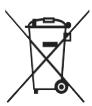
Please inform yourself about the local separate collection system for electrical and electronic products.
Please act according to your local rules and do not dispose of your old products with your normal household waste.
The correct disposal of your old product will help prevent potential negative consequences for the environment and human health.
Your product operates on batteries covered by the European Directive 2006/66/EC, which cannot be disposed with normal household waste.
Please inform yourself about the local rules on separate collection of batteries because the correct disposal will help prevent negative consequences for the environmental and human health.
All rights reserved. Reproduction in whole or in part is prohibited without the prior written consent of the copyright owner.
The information presented in this document does not form part of any quotation or contract, is believed to be accurate and reliable and may be changed without notice. No liability will be accepted by the publisher for any consequence of its use. Publication there of does not convey nor imply any license under patent- or other industrial or intellectual property rights.
Document order number: 313923552181
www.philips.com
RTP/RR/2209





