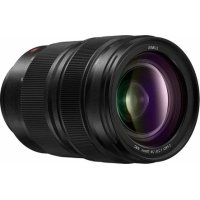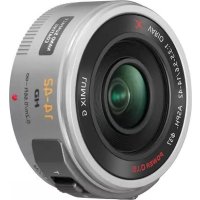
Lumix G X Vario PZ 1442mm f3.55.6 - Camera lens PANASONIC - Free user manual and instructions
Find the device manual for free Lumix G X Vario PZ 1442mm f3.55.6 PANASONIC in PDF.



User questions about Lumix G X Vario PZ 1442mm f3.55.6 PANASONIC
0 question about this device. Answer the ones you know or ask your own.
Ask a new question about this device
Download the instructions for your Camera lens in PDF format for free! Find your manual Lumix G X Vario PZ 1442mm f3.55.6 - PANASONIC and take your electronic device back in hand. On this page are published all the documents necessary for the use of your device. Lumix G X Vario PZ 1442mm f3.55.6 by PANASONIC.
USER MANUAL Lumix G X Vario PZ 1442mm f3.55.6 PANASONIC
Operating Instructions
INTERCHANGEABLE LENS FOR DIGITAL CAMERA
Model No. H-PS14042
Lumix
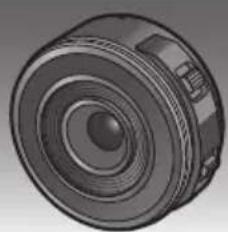
Before use, please read these instructions completely.






E
VQT3S52
Contents
Information for Your Safety. 2
Precautions 4
Supplied Accessories 5
Attaching/Detaching the Lens. 5
Names and Functions of Components 7
Cautions for Use. 8
Troubleshooting 10
Specifications 11
Information for Your Safety
Keep the unit as far away as possible from electromagnetic equipment (such as microwave ovens, TVs, video games, radio transmitters, high-voltage lines etc.).
- Do not use the camera near cell phones because doing so may result in noise adversely affecting the pictures and sound.
- If the camera is adversely affected by electromagnetic equipment and stops functioning properly, turn the camera off and remove the battery and/or the connected AC adaptor. Then reinsert the battery and/or reconnect the AC adaptor and turn the camera on.
The lens can be used with a digital camera compatible with the lens mount standard for the "Micro Four Thirds™ System".
- It cannot be mounted on the Four Third's mount specification camera.
- The digital camera illustrations in these operating instructions show DMC-GF3 as an example.
- The appearance and specifications of products described in this manual may differ from the actual products you have purchased due to later enhancements.
- Micro Four Thirds™ and Micro Four Thirds Logo marks are trademarks or registered trademarks of Olympus Imaging Corporation, in Japan, the United States, the European Union and other countries.
- Four Thirds™ and Four Thirds Logo marks are trademarks or registered trademarks of Olympus Imaging Corporation, in Japan, the United States, the European Union and other countries.
G MICRO SYSTEM is a lens exchange type digital camera system of LUMIX based on a Micro Four Thirds System standard. - Other names of systems and products mentioned in these instructions are usually the registered trademarks or trademarks of the manufacturers who developed the system or product concerned.
-If you see this symbol
ENGLISH
Information on Disposal for Users of Waste Electrical & Electronic Equipment (private households)

This symbol on the products and/or accompanying documents means that used electrical and electronic products should not be mixed with general household waste. For proper treatment, recovery and recycling, please take these products to designated collection points, where they will be accepted on a free of charge basis. Alternatively, in some countries you may be able to return your products to your local retailer upon the purchase of an equivalent new product.
Disposing of this product correctly will help to save valuable resources and prevent any potential negative effects on human health and the environment which could otherwise arise from inappropriate waste handling. Please contact your local authority for further details of your nearest designated collection point.
Penalties may be applicable for incorrect disposal of this waste, in accordance with national legislation.
For business users in the European Union
If you wish to discard electrical and electronic equipment, please contact your dealer or supplier for further information.
Information on Disposal in other Countries outside the European Union
This symbol is only valid in the European Union.
If you wish to discard this product, please contact your local authorities or dealer and ask for the correct method of disposal.
Precautions
Lens Care
- Sand and dust can damage the lens. Make sure that no sand or dust gets inside the lens or the terminals when using the lens on a beach, etc.
- This lens is not waterproof. If drops of water get onto the lens, wipe the lens with a dry cloth.
- Do not press the lens with excessive force.
- When there is dirt (water, oil, and fingerprints, etc.) on the surface of the lens, the picture may be affected. Lightly wipe the surface of the lens with a soft, dry cloth before and after taking pictures.
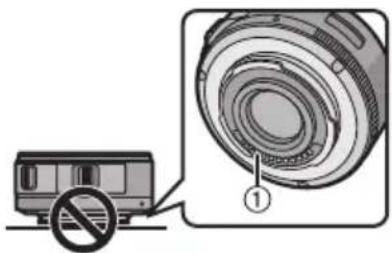
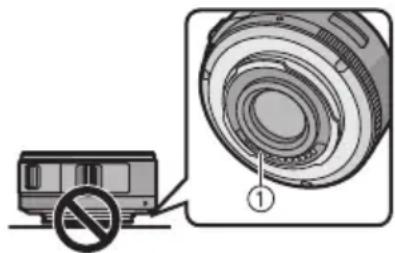
- Do not place the lens mount facing downwards.
Do not allow the lens contact points ① to become dirty.
About Condensation (Fogging of the Lens)
- Condensation occurs when there are differences in temperature and humidity as described below. Condensation can cause the lens to become dirty and lead to mold and malfunctioning, so exercise caution in the following situations:
- When the camera is brought indoors from outside during cold weather
- When the camera is brought into an air-conditioned car
- When cold air from an air conditioner is directly blown onto the lens
Inhumidplaces - Put the camera into a plastic bag to allow it to acclimatize to the surrounding temperature in order to prevent condensation. If condensation occurs, turn the power off and leave it for about two hours. Once the camera acclimatizes to the surrounding temperature the condensation will go away naturally.
Supplied Accessories
[Inspection to be performed when you unpack the unit]
When removing the unit from its packing box, check that the main unit and the supplied accessories are there and also check their external appearance and functions to verify that they have not sustained any damage during distribution and transportation.
If you discover any trouble, contact your vendor before using the product.
Product numbers correct as of September 2011. These may be subject to change.
![PANASONIC Lumix G X Vario PZ 1442mm f3.55.6 - [Inspection to be performed when you unpack the unit] - 1](/content/2026/03/449014/images/4d2aeca876eead037d789f62f73530aa2b4c5088a1ed0b07506c1d554fc683fc.jpg)
1 Lens Storage Bag
2 Lens Cap
3 Lens Rear Cap (The lens rear cap and lens cap are attached to the interchangeable lens at the time of purchase.)
Attaching/Detaching the Lens
Refer also to the camera's operating instructions for attaching and detaching the lens.
Attaching the Lens
- Check that the camera is turned off.
1 Turn the lens rear cap to detach it.
A: Lens Rear Cap
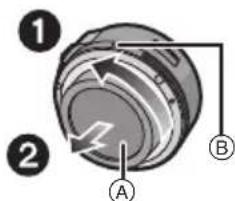
2 Align the lens fitting marks (red marks) on the camera body and the lens and then rotate the lens in the direction of the arrow until it clicks.
- Do not press the lens release button ⑥ when you attach a lens.
- Do not try to attach the lens when holding it at an angle to the camera body as the lens mount may get scratched.
- Check that the lens is attached correctly.
Detaching the Lens
- To protect the lens, turn off the power of the digital camera and confirm that the lens barrel is recessed.
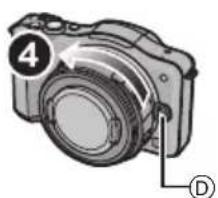
While pressing on the lens release button, rotate the lens toward the arrow until it stops and then remove.
- Attach the lens rear cap so that the lens contact point does not get scratched.
- Attach the body cap to the camera so no dirt or dust will get inside the main unit.
-
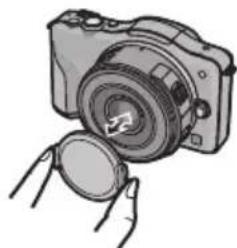
Attaching and Detaching the Lens Cap Pinch the lens cap as shown in the figure to attach or detach.
-
Be careful not to lose the lens cap.
Attaching Filters
- Attach or detach the filter when the lens barrel is recessed.
- Vignetting may occur if using 2 or more MC protectors (optional: DMW-LMCH37), PL filters (optional: DMW-LPL37) or ND filters (optional: DMW-LND37), or if using thick protectors and/or filters.
- The filter may become impossible to remove if excessively tightened, so please refrain from tightening it too strongly.
It is possible to attach the lens cap with the filter already attached. - You cannot attach a conversion lens or adaptor to this lens. (As of September 2011) A filter may be used, but attaching any other element may cause damage to the lens.
Names and Functions of Components
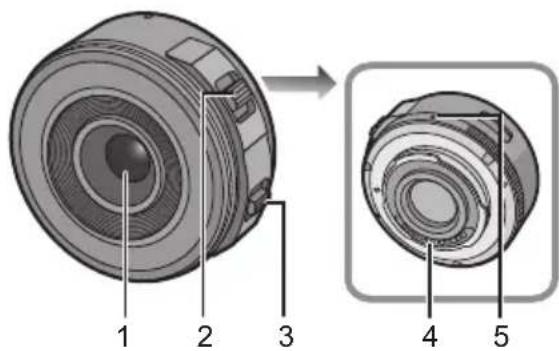
1 Lens surface
2 Zoom lever Move the zoom lever to the [T] (Tele side) or [W] (Wide side). [T]: To make subjects appear closer use (Tele) [W]: To make subjects appear further away use (Wide)
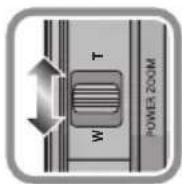
- The zoom speed varies depending on the range over which the zoom lever is moved. Zoom speed will be slower than normal when recording a motion picture.
3 Focus lever Move the Focus lever to the A or B.
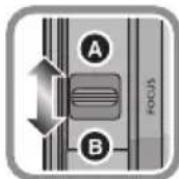
A: Focus on the subject close by
B: Focus on the subject far away
- Speed to focus will change depending on the amount moved.
4 Contact points
5 Lens fitting mark

Note
Sound of lever returning may be recorded when your finger is taken off from the focus lever or zoom lever while recording a motion picture. Move the lever quietly when returning to the original position.
- When flash recording with a close subject, the light of the flash will be blocked by the lens and part of the picture may be dark. Check the distance from the subject when recording.
- There is no indication of focal length on the lens. The focal length is displayed on the screen of the digital camera when attached to the compatible digital camera. Focal length is not displayed on the digital camera that is not compatible. For details on the digital camera used, refer to the website.
http://panasonic.jp/support/global/cs/dsc/
(This Site is English only.)
Cautions for Use
Take care not to drop or knock the lens. Also take care not to put a lot of pressure on the lens.
- Take care not to drop the bag that you inserted the lens in as it may strongly shock the lens. The camera may stop operating normally and pictures may no longer be recorded. Also, the lens may be damaged.
When using pesticides and other volatile substances around the camera make sure that they do not get onto the lens.
- If such substances get onto the lens they can damage the exterior case or cause the paint to peel.
Do not carry the unit when it is still attached to the camera body.
- Under no circumstances should the unit be stored in any of the following locations since doing so may cause problems in operation or malfunctioning.
- In direct sunlight or on a beach in summer
- In locations with high temperatures and humidity levels or where the changes in temperature and humidity are acute
- In locations with high concentrations of sand, dust or dirt
-Where there is fire - Near heaters, air conditioners or humidifiers
- Where water may make the unit wet
-Where there is vibration -
Inside a vehicle
Refer also to the operating instructions of the digital camera. -
When the unit is not going to be used for a prolonged period, we recommend storing with a desiccant (silica gel). Failure to do so may result in performance failure caused by mold, etc. It is recommended that you check the unit's operation prior to use.
- Do not leave the lens in contact with rubber or plastic products for extended periods of time.
- Do not touch the lens contact point. Doing so can cause failure of the unit.
- Do not disassemble or alter the unit.
Do not use benzine, thinner, alcohol or other similar cleaning agents to clean the lens glass or exterior cabinet.
- Using solvents can damage the lens or cause the paint to peel.
- Wipe off any dust or fingerprints with a soft, dry cloth.
- Do not use a household detergent or a chemically treated cloth.
Troubleshooting
A sound is heard when the camera is turned on or off.
- This is the sound of lens or aperture movement and is not a malfunction.
When this lens is attached to digital camera, stabilizer function cannot be turned off or stabilizer function does not work.
- The Optical Image Stabilizer function of this lens only works correctly with supported cameras.
When older Panasonic digital cameras (DMC-GF1, DMC-GH1, DMC-G1) are used, [STABILIZER] in the [REC] mode menu cannot be set to [OFF]. It is recommended to update the firmware of the digital camera at the following website. http://panasonic.jp/support/global/cs/dsc/download/
When using this lens with another make of digital cameras, the Optical Image Stabilizer function will not work. (As of September 2011) For details, contact the respective company.
Specifications
INTERCHANGEABLE LENS FOR DIGITAL CAMERA
"LUMIX G X VARIO PZ 14-42 mm/F3.5-5.6 ASPH./POWER O.I.S."
| Focal length | f=14 mm to 42 mm (35 mm film camera equivalent: 28 mm to 84 mm) |
| Aperture type 7 diaphragm blades/circular aperture diaphragm | |
| Aperture range F3.5 (Wide) to F5.6 (Tele) | |
| Minimum aperture value F22 | |
| Lens construction | 9 elements in 8 groups (4 aspherical lenses, 2 ED Lens) |
| Nano surface coating Yes | |
| In focus distance | 0.2 m (Wide to focal length 20 mm) to ∞ (from the focus distance reference line), 0.3 m (focal length 21 mm to Tele) to ∞ (from the focus distance reference line) |
| Maximum image magnification | 0.17× (35 mm film camera equivalent: 0.34×) |
| Optical image stabilizer Available | |
| [O.I.S.] switch None (Setting of the [S TABILIZER] is done in [REC] mode menu by LUMIX digital cameras.) | |
| Mount "Micro Four Thirds Mount" | |
| Angle of view | 75° (Wide) to 29° (Tele) |
| Filter diameter | 37 mm |
| Max. diameter | Approx. 61 mm |
| Overall length | Approx. 26.8 mm (from the tip of the lens to the base side of the lens mount when the lens barrel is recessed) |
| Mass | Approx. 95 g |
Inhalt
UcTpaHeHHeHcnpaBHOCTe 69
Texnueckne xapaKtepcntkN 70
-Ecnn Bbl yBnDnte TaKo CnMBON
HnΦopMaunno o6paueHnO cOTxoJamn dJn CTpaH, He BxOJaunx B Ebponeckn Coo3


DeiCTBne 3Toro CmBOJa pacnpoctpaHReTc TOnbko Ha Ebponeckn Co103.
Ecni Bb co6npaTecb
Bb6pOcNTb DaHHbI NpOdyKT, y3HaIe B MeCThIx OprHaX BnactN INy DInJIepa, KaC CneJeT NOCTynatb C OTxODAMn TAKOROTnna.
PUCCKIY3bIK
Информацnia张家界 Baшев 6e3oNaChOCTn
XpaHnTe npH6Op BdaJIH OT hCTOuHnKOB 3JIeKTPomarHHTHO r3JyUeHnY (HaNPmep, MKNpOBoNHOBbIX NeeH, TeJIeBN3OpOB, O6OpyDoBaHnA DnI BnDeoHrp, paDNOpEpeDaTChKOB, BBICOKOBbTHbIX JINHH N T.D.).
He noIb3yIteCb foTOkAmePoB B6Jn3N COTOBbIX TeJIefoHOB, TAK KaK TeJIefoHb MOrYT Bbl3BaTb NOMEXN, OTPuCaTeJIbHO Cka3bIBaHOUneCra Ha KaueCTBe CHIMKOB n 3Byka.
- Ecni KaMepa NOdBvBepraetc HeratNBHOMy BJIINHIO 3JIeKTPOMaHTHO N3JUyeHnI nepeCTae pa6OtaTb HopMaNbHO, BbIKIIOHTe KaMepy, n3BNeKeNTe 6aTaapeo n/Inn INOKNIQUeHHbI CEteBOa aAnTep nepemeHHoro TOka. 3aTeM CHOBA BCTaBBte 6aTaapeo n/Inn CHOBA NOkNIQUHTe CeTEBOa aAnTep nepemeHHoro TOka N BkJIIOHTe KaMepy.
ObekTMB MoKET NcNoJb30BaTbC8 C uNΦpOBOI Kamepoi, COBmecTUMo CO CTaHdApTOM KpePJIeHnroObekTUBOB "Micro Four ThirdsTM System".
He npedycmOTpeHa erO yctaHOBka Ha foTOkAmepbI CO CneuΦnKaUeN KpePNeHn Four ThirdsTM.
Ha nIIOCTpaunx uΦpOBoN KAmepbI B daHHbIX HnCTpyKunx NO 3KcPnyatauB KaueCTBe npImepa nokaah DMC-GF3.
BHeuHn BnD n CneunKauu npOyKTOB, ONcaHHbIe B DaHHOM pyKOBoIDCTBe, MOrYT OTJNaTbcr OT paKTnuecknx npNo6peTeHHbIX npOdyKTOB BBnDy 6oJee No3dHx yJyWeHn.
- Micro Four Thirds™и 3нakи Лоротina Micro Four ThirdsяВЯЮТСЯTOВAPHBIMN 3нakами Или 3aperIncTpnpOBaHHbIMN TOBAPHBIMN 3нakами Olympus Imaging Corporation BЯноMu, CoeДиНьIx Uтatax,Еврoneickom COU03e n Дугnx CTpaHax.
Four Thirds™ and 3NaHJ norotuna Four Thirds RAJIOTCA TOBAPHBIM 3HaKaMn ININ 3apeRNCTPNPOBAHHbIMN TOBAPHBIMN 3HaKaMn Olympus Imaging Corporation B JnoHn, CoedInHeHHbIX IToTax, EBponeckom CoO3e IN Dpyrnx CTpaHax.
G MICRO SYSTEM ABNIEcTcCnCTeMoI obBeKtNBOB CMeHHOro TnPa IJNA UINΦpOBoBix KaMep LUMIX, pa3pa6oTaHHoH Ha OCHObe cTaNapTa Micro Four Thirds System.
-Дугпе Ha3BaHnI CnCTeM I npOdyKTOB, ynomyTbIe B daHHo INHCTpyKcIIN NO 3KcIIyatauN, O6bIHyOBJIaOTcR 3apeHnCTpnpoBaHbIMn TOBapHbIMn 3HaKaAMn NJI TOBapHbIMn 3HaKaAMn pOn3BOdnteJei, KOTOpbIe pa3pa60tAnI ynomyHtuYIO CnCTeMy NJI npOdyKT.
Ppabnna 3kcnnyataun
YxOД 3a O6bEeKTHBOM
- NecOK n nbIb MoryT npNBecTu K NOBpeXdeHnO obBeKTuBa. Pn HcNoJIb3OBaHHN ObBeKTuBa Ha nJxKe n T.I. y6eHTeCb, YTO BHyTpN ObBeKTuBa n rHe3d Het necka n nbIiN.
-Данн布局объektнв HeяВлгетсьоюнроницаemblm.Есин ha obьektnB nonaJIKanII BODbl, BbITpnte obьektnB cyxOi TkaHbIO. - Henb3a cnIbHo HaxImaTb Ha 06BeKtNB.
B cnyuae nonaadaHna nobepxHOCTb oBeKTnBa rpa3n (BObl, Macna, OTneaytKOB naIbueB nT. d.) KaueCTBO CHIMKA MOKeT yXuDunTBcR. CJeDyET OCTOPOXHO BItepeTb NOBepxHOCTb OBeKTnBA MmKoI cyXOITKaHbIO nepeD cBeMKoI.
He cTaBbTe obBeKTHM OHTaXHOI NOBepxHOCtBu Bn3. He donyckaTe nonaHaHne 3arp3HeHn Ha MOHTaXHbIe NOBepxHocTn ① oBeKTbBa.
O KOHdEhcau (3aNoTeBaHn o6bekTnBa)
- KoHdEhcaunI npOcXoDnI npI pa3Hnue B TEMnepaTpe n BnaJxHoCTn, KaK OnPcAHO HnKe. KoHdEhcaunI MoKeT npUBeCTn K 3aRpa3HeHnIO o6bekTuBa, NOBLeHnIO PnCeHN HeNCpapBHOCTe, N03tOMy Heo6xOdmo CO6JIoDaTb OCTOpoxHoCTb B CNeDuOuNX cHTyaCUnX:
- npBHeCenKamepbIB NOMEeHne C yIuCbIB XoJOnHyIO nOroDy
- npBHeceHn KaMepb B caNoH aBTOMo6nla, rpepaBoTaeT KOHdNcNoHep
-ecnI NOTOK XOJODHOrO Bo3dyxa n3 KOHNcNoHEpa HAppaBneH npraMo Ha 06bekTNB -BO BJIaXHHbIX MecTaX - Дя пededOTbpaUeHЯ KOнdeHcaUи NOmeCTHTe KaMepy B pIaCTNKOBbl naket, qTO6bl ee TempepaTpa cpaBnAacb C TempepaTypoi OkpykaUoIeRo BO3duxa. Ppr Bo3HnKHOBeHIn KOHeHcaUu BBkJIIOHnte KaMepy N OCTaBBte ee npIMepHo Ha Dba Yaca. KOrda TempepaTypa KaMepbI cpaBnErcr C TempepaTypoi OkpykaUOeRo BO3duxa, 3aNoTeBaHne HcYe3HET ECTeCTBeHHbIM O6pa3OM.
5 MoHTaXHaI NOBepxHOCTb

PpmeaHne
3Byk BO3BpaaHn pyaKa moKet 3aNcaTbcn npy6npaHn nAba c pbaXka fokycnpOBKn nn pbyaXka TpaHcfoKaTopa Bo BpeM 3anCn Bndeo.Bo3BpaaJ pyaXoK B nCXoDHOe noLoXeHne, nepemuaTe erO TnxO.
- Прс CBemke co BCblkOи 6n3ko
pacnoJoxeHHoro obekTa CBET BCblKMOxet
6nOKIpOBaTbCЯ obekTUBOM,ИчAcTb CHIMKa
MOxet 6bITb 3aTeMHeHa.ПрOBepYIte
pacCToHHe Do obekTa Прс CBemke.
Ha obektube HeT o6o3HaueHn foKychoro pacctOraHna. Fokychoe pacctOraHne OTo6paKaaeTcRa Ha 3KpaHe npu ycNoBn npncoeHHeHn K COBMecTmOu cIΦpOBoK kamepe. Ha 3KpaHe HecOBMeCTmOu cIΦpOBoK kamepbI fokychoe pacctOraHne He OTo6paKaaeTc. INfOpMaun no nCnoJb3yEmbIM cIΦpOBbIM kamepam npNBedeHa Ha Be6-caTe. http://panasonic.jp/support/global/cs/dsc/ (3TOT caIT TOlbko aHrJIO83bUHbI.)
PpeoctopoxKHOCTn PpN NCNoIb3OBaHn ΦoToKaMepbl
CTapaItecB He poHraTb I He yIapraTb o6beKTHB.
TakKe cTapaItecB He noDBepratb o6beKTHB
Upe3MepHomy daBneHnIO.
Cneinte 3a TeM, YTo6bI He ypoHnTB B cyMKy, B KOTOpYIO Bbl NIOJXINIO6BeKTHB, NCKOJIbKY 3TO MOxET npNBecTNI NOBpeKDeHNIO O6BeKTHBa. KaMepa MoKET nepeCTaTB HopMaJIbHO pa6oTaTB, I DaJIbHeiHa 3aPiNCb CHIMKOB MOxET OKa3aTbcr HEBO3MOxHoi.
Pn nCnoJb3OBAHnn neCTnUdoB n dpyrnx
JeTyuNX BeuecTB B6n3n KaMepbl y6eHTecb,
yTO OHn He nonadaIOT Ha o6BeKtNB.
- Пи пonaдани Ha obekTNb TaKne BeuecTBa MoryT NOBpeDnTb obekTNb IINI npNBecTN K OTCnaBaHnIO KpaCKN.
He Hocnte ycIpoNCTBO npncOeHHeHHbIM K Kopnyc foToKamepbl.
Kateropnueckn 3anpeaetcnoJb30BaTbcr foTOBCnbIkwONnnXpaHNTbeB CNeDyUOux ycNoBnax, TAK KAK 3TO MOKeT npNBecTu K c6oM B pa6ote nn HnpabunbHO np6ote.
-IOB Bo3dEeCTBnEM npRmbIX COJIHeuHbIX JIyueN Hn Ha nJRAKe JETOM
B MeCTHOCTx C BbICOKO BnaxKHOCTbIO BO3nyxa N BbICOKIMN TempeaTypAMN, INIc pe3KNM NepenapamN TempepatypbIN BnaXHOCTN
B MeCTHOCTX C BBICOKMNI KOHcHTpaUNMNIeCKa, NJIIN NIN rpr3N
- Pn cpa6aTbIbAHN BCNbIuKIN
-Bo3ne o6oRpeBaTeNe, KOHdNcNoHepOB nIN yBJIaXKnHTeNe
-ΓДe BO3MOXHO HAMOKaHne yCTpoIcTBA
- -
-BaBtOMo6nJIe
- CM. TaKke INHCTpyKcUN No 3KcNpYaTaCUN
- UNΦρOBÖN KaMepbl.
- Ecni kamepa He 6ydt NcNoB3OBaTbC8 B TeueHne dIITeJIbHO R BpeMeHN, peKOMeHdyETcX xpaHTb ee BmecTe C BnaTOIOITeJIeM (CNIkaReIeM). HeBbINoHHeNHe daHHoI peKOMeHdaZuIM MOKeT npIBeCTN K HApUWeHIO TexHnueckNX XapaKTepNCtNK BBnDy o6pa3OBaHn IJIeCEHN I T.Д. Пржde Yem nCNoB3OBaTb, peKOMeHdyETcN pOBePrt pa6OTocNOc6HOCTb yCTpoiCTBa NocLe TaKOrO dIITeJIbHO rXpaHeHry.
He octabTnTe oBeKTnB KOHTaKTe C pe3nHOBBIM nJn pIaCTNKOBbIM npOdyKTamn Ha npoJoNKeJIbHbI nepNoD BpeMeHn.
He npikacaiTecb K 3neKtpuYeCKM KOHTaKTam ycTpoiCTba. 3TO MOKeT Bbl3BaTb c6oB Eero pa6Ote.
3anpeuaeTcpa36npaTbnnn BHOCTb 3MeHeHnB aannapat.
He nCnoIb3yIte 6eH3nH, pAcTBOpHTeJIb, cNInr T nDpyrIne nOIO6HbIe MOIOUne cpeDCTBA dJa OoNCTKn annapaTa.
- IcnoJb3OBAHne pactBOpnteNeIMoKET NOBpeDnTb OBeKTNB INI npVBecTN K OTcnaNABaHIO KpaCKN.
- BbItnpaIte nbIb n cIeIbI naIbIeB MraKoI cyXOITKaHbIO.
- 3anpeaetcnaonb3oBaTb mooune cpectba nn XmMueckn o6pa60TaHHy ToKaHb.
YcTpaHHeH HeNCnPaBHOCTe
Pn BkIIOueHnn N BBIKIOueHnn KaMepbI CblweH 3ByK.
3ByK BO3HnKaet B pe3yIbTaTe DBNXeHnAaΦpaTmbl ObBeKTnBa n He RnEETc HEnCnPaBHOCTbIO.
Korda daHbI O6BeKTHB npncOeHNHeN K UcΦpOBo KaMepe, yHKuIO Cta6nJn3aTopa HeIb3r OTKnIOHTb, nIN yHKun CTa6nJn3aTopa He 6yDeT pa6oTaB.
-Функця ONTuceckoro cta6nH3aTopa n3o6paXeHHa DAHHOr O6bEKTuBa npaBnIbHo pa6oTaET TOnbKO C NOdEprKINBaEMbIMn KaMepamN.
PpN nCnOJb3OBaHn CtApbIX uΦpoBbIX KaMep
Panasonic (DMC-GF1,DMC-GH1,DMC-G1)
[CTAENJIN3.] B MeHIO peKIma [3AN.] HeJIb3y
ycTaHOBntb Ha [OFF]. PeKOMeHNdyETc o6HOBNTb
npoWNBky uΦpoBOi KamepbHa Be6-caTe
http://panasonic.jp/support/global/cs/dsc/
download/
→PnncnoJb3ObaHnn daHHoro obKeTnBa c npyro
MapkoI uΦpoBbIX KaMep yHKuIa ONTNueCKoro
CTa6nNt3atopa n3o6paXeHna pa6oTaB He 6ydet.
(No coctoHnIO Ha ceHTa6pb 2011 r.)
Jra noLyueHn IooPo6Ho HΦopMaun
obpaauTeCB B COOTBeTCTByUOyU KOMNaHnIO.
TexHnueckne xapaKTepeNCTnKN
CMEHHbI OObEKTINB IJRA UΦPOBOI ΦOTOKAMEPbI
"LUMIX G X VARIO PZ 14-42 MM/F3.5-5.6 ASPH./POWER O.I.S."
Pursuant to at the directive 2004/108/EC, article 9(2)
Panasonic Testing Centre
Panasonic Marketing Europe GmbH
Winsberging 15, 22525 Hamburg, Germany

VQT3S52
F0911YS0(20000A)
Panasonic Corporation
Web Site: http://panasonic.net
© Panasonic Corporation 2011