Lumix G 14mm f2.5 II ASPH. - Camera lens PANASONIC - Free user manual and instructions
Find the device manual for free Lumix G 14mm f2.5 II ASPH. PANASONIC in PDF.



| Product type | Interchangeable lens |
| Brand | Panasonic |
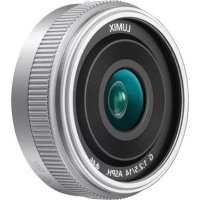
| Model | Lumix G 14mm f2.5 II ASPH. |
| Mount | Micro Four Thirds |
| Focal length | 14 mm (35 mm equivalent: 28 mm) |
| Maximum aperture | F2.5 |
| Minimum aperture | F22 |
| Optical construction | 6 elements in 5 groups (3 aspherical lenses) |
| Number of diaphragm blades | 7 (rounded aperture) |
| Minimum focusing distance | 0.18 m |
| Maximum magnification | 0.1× (35 mm equivalent: 0.2×) |
| Angle of view | 75° |
| Image stabilization | Not available |
| Filter diameter | 46 mm |
| Maximum diameter | Approx. 55.5 mm |
| Total length | Approx. 20.5 mm |
| Weight | Approx. 55 g |
| Supplied accessories | Lens cap, rear cap |
| Care and cleaning | Wipe with a soft, dry cloth; do not use benzene or alcohol |
| Usage precautions | Avoid shocks, dust, humidity; do not expose to sunlight |
| Compatibility | Digital cameras with Micro Four Thirds mount |
Frequently Asked Questions - Lumix G 14mm f2.5 II ASPH. PANASONIC
User questions about Lumix G 14mm f2.5 II ASPH. PANASONIC
0 question about this device. Answer the ones you know or ask your own.
Ask a new question about this device
Download the instructions for your Camera lens in PDF format for free! Find your manual Lumix G 14mm f2.5 II ASPH. - PANASONIC and take your electronic device back in hand. On this page are published all the documents necessary for the use of your device. Lumix G 14mm f2.5 II ASPH. by PANASONIC.
USER MANUAL Lumix G 14mm f2.5 II ASPH. PANASONIC
Operating Instructions
INTERCHANGEABLE LENS FOR DIGITAL CAMERA
Model No. H-H014A
LUMIX
Please read these instructions carefully before using this product, and save this manual for future use.




SQT0455 F0814DT0
Contents
Information for Your Safety. 2
Precautions. 4
Supplied Accessories 51
Names and Functions of Components 6
Attaching/Detaching the Lens. 7
Cautions for Use. 8
Troubleshooting 9
Specifications 10
Limited Warranty (ONLY FOR AUSTRALIA) 11
Information for Your Safety
Keep the unit as far away as possible from electromagnetic equipment (such as microwave ovens, TVs, video games, radio transmitters, high-voltage lines etc.).
- Do not use the camera near cell phones because doing so may result in noise adversely affecting the pictures and sound.
- If the camera is adversely affected by electromagnetic equipment and stops functioning properly, turn the camera off and remove the battery and/or the connected AC adaptor. Then reinsert the battery and/ or reconnect the AC adaptor and turn the camera on.
The lens can be used with a digital camera compatible with the lens mount standard for the "Micro Four Thirds™ System".
- It cannot be mounted on the Four Third's mount specification camera.
The digital camera illustrations in these operating instructions show DMC-GM1 as an example.
The appearance and specifications of products described in this manual may differ from the actual products you have purchased due to later enhancements. - Micro Four Thirds™ and Micro Four Thirds Logo marks are trademarks or registered trademarks of Olympus Imaging Corporation, in Japan, the United States, the European Union and other countries.
- Four Thirds™ and Four Thirds Logo marks are trademarks or registered trademarks of Olympus Imaging Corporation, in Japan, the United States, the European Union and other countries.
G MICRO SYSTEM is an interchangeable lens type digital camera system of LUMIX based on a Micro Four Thirds System standard. - Other names of systems and products mentioned in these instructions are usually the registered trademarks or trademarks of the manufacturers who developed the system or product concerned.
-If you see this symbol
Disposal of Old Equipment Only for European Union and countries with recycling systems

This symbol on the products, packaging, and/or accompanying documents means that used electrical and electronic products must not be mixed with general household waste.
For proper treatment, recovery and recycling of old products, please take them to applicable collection points in accordance with your national legislation.
By disposing of them correctly,
you will help to save valuable resources and prevent any potential negative effects on human health and the environment.
For more information about collection and recycling, please contact your local municipality.
Penalties may be applicable for incorrect disposal of this waste, in accordance with national legislation.
ENGLISH
Precautions
Lens Care
- Sand and dust can damage the lens. Make sure that no sand or dust gets inside the lens or the terminals when using the lens on a beach, etc.
- The lens is neither waterproof nor splashproof. If drops of water get onto the lens, wipe the lens with a dry cloth.
- Do not press the lens with excessive force.
- When there is dirt (water, oil, and fingerprints, etc.) on the surface of the lens, the picture may be affected. Lightly wipe the surface of the lens with a soft, dry cloth before and after taking pictures.
- Do not place the lens mount facing downwards.
Do not allow the lens contact points ① to become dirty.
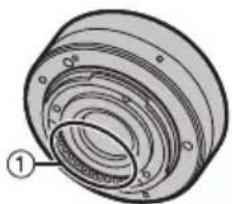
About Condensation (Fogging of the Lens)
- Condensation occurs when there are differences in temperature and humidity as described below. Condensation can cause the lens to become dirty and lead to mold and malfunctioning, so exercise caution in the following situations:
- When the camera is brought indoors from outside during cold weather
- When the camera is brought into an air-conditioned car
- When cold air from an air conditioner is directly blown onto the lens
Inhumidplaces - Put the camera into a plastic bag to allow it to acclimatize to the surrounding temperature in order to prevent condensation. If condensation occurs, turn the power off and leave it for about two hours. Once the camera acclimatizes to the surrounding temperature the condensation will go away naturally.
Supplied Accessories
[Inspection to be performed when you unpack the unit]
When removing the unit from its packing box, check that the main unit and the supplied accessories are there and also check their external appearance and functions to verify that they have not sustained any damage during distribution and transportation. If you discover any trouble, contact your vendor before using the product.
Product numbers correct as of August 2014. These may be subject to change.
![PANASONIC Lumix G 14mm f2.5 II ASPH. - [Inspection to be performed when you unpack the unit] - 1](/content/2026/03/449013/images/21f41308320586b664b39febab8f28cb8287d73e23347b15a84e4921018e078e.jpg)
1 Lens Cap
2 Lens Rear Cap (The lens rear cap and lens cap are attached to the interchangeable lens at the time of purchase.)
Names and Functions of Components
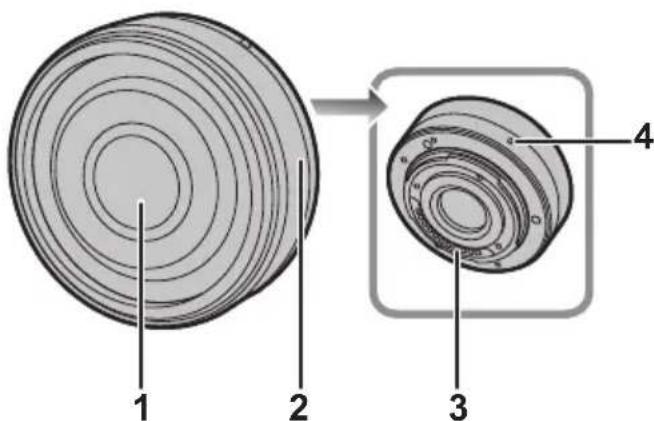
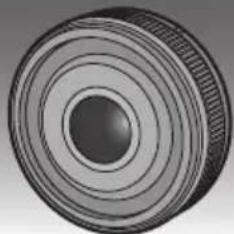
1 Lens surface
2 Focus ring
Rotate to focus when taking pictures with manual focus.
3 Contact points
4 Lens fitting mark
Attaching/Detaching the Lens
Refer also to the camera's operating instructions for attaching and detaching the lens.
Attaching the Lens
- Check that the camera is turned off.
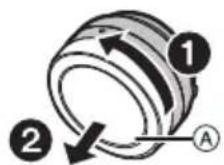
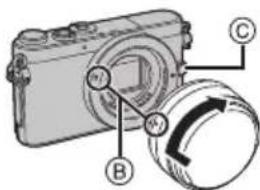
1 Turn the lens rear cap to detach it.
A: Lens Rear Cap
2 Align the lens fitting marks ⑧ on the camera body and the lens and then rotate the lens in the direction of the arrow until it clicks.
- Do not press the lens release button ⑤ when you attach a lens.
- Do not try to attach the lens when holding it at an angle to the camera body as the lens mount may get scratched.
- Check that the lens is attached correctly.
- Be sure to remove the lens cap when recording.
Detaching the Lens
- Check that the camera is turned off.
Press the lens release button while turning the lens as far as possible in the direction of the arrow to detach it.
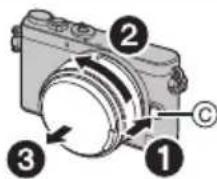
- Attach the lens rear cap so that the lens contact point does not get scratched.
- Attach the body cap to the camera so no dirt or dust will get inside the main unit.
Attaching Filters
- Vignetting may occur if using 2 or more MC protectors (optional: DMW-LMC46), PL filters (optional: DMW-LPL46) or ND filters (optional: DMW-LND46), or if using thick protectors and/or filters.
- The filter may become impossible to remove if excessively tightened, so please refrain from tightening it too strongly.
It is possible to attach the lens cap with the filter already attached.
Conversion lens
- We recommend that you use a conversion lens that is compatible with this unit.
- Wide conversion lens (optional: DMW-GWC1)
Macro conversion lens (optional: DMW-GMC1) - Fish eye conversion lens (optional: DMW-GFC1)
- Use of a non-compatible conversion lens or adaptor may result in breakage or damage to the lens.
- For details, refer to the operating instructions of the relevant conversion lenses.
Cautions for Use
Take care not to drop or knock the lens. Also take care not to put a lot of pressure on the lens.
- Take care not to drop the bag that you inserted the lens in as it may strongly shock the lens. The camera may stop operating normally and pictures may no longer be recorded. Also, the lens may be damaged.
When using pesticides and other volatile substances around the camera make sure that they do not get onto the lens.
- If such substances get onto the lens they can damage the exterior case or cause the paint to peel.
Do not point the lens at the sun or other strong light sources.
- This could cause the lens to collect an excessive amount of light, resulting in fire and malfunction.
Do not carry the unit when it is still attached to the camera body.
-
Under no circumstances should the unit be stored in any of the following locations since doing so may cause problems in operation or malfunctioning.
-
In direct sunlight or on a beach in summer
- In locations with high temperatures and humidity levels or where the changes in temperature and humidity are acute
- In locations with high concentrations of sand, dust or dirt
-Where there is fire - Near heaters, air conditioners or humidifiers
- Where water may make the unit wet
-Where there is vibration - Inside a vehicle
Refer also to the operating instructions of the digital camera.
- When the unit is not going to be used for a prolonged period, we recommend storing with a desiccant (silica gel). Failure to do so may result in performance failure caused by mold, etc. It is recommended that you check the unit's operation prior to use.
- Do not leave the lens in contact with rubber or plastic products for extended periods of time.
- Do not touch the lens contact point. Doing so can cause failure of the unit.
- Do not disassemble or alter the unit.
Do not use benzine, thinner, alcohol or other similar cleaning agents to clean the lens glass or exterior cabinet.
- Using solvents can damage the lens or cause the paint to peel.
- Wipe off any dust or fingerprints with a soft, dry cloth.
- Use a dry dust cloth to remove dirt and dust on the focus ring.
- Do not use a household detergent or a chemically treated cloth.
Troubleshooting
A sound is heard when the camera is turned on or off.
- This is the sound of lens or aperture movement and is not a malfunction.
Specifications
Specifications are subject to change without notice.
INTERCHANGEABLE LENS FOR DIGITAL CAMERA
"LUMIX G 14 mm/F2.5 II ASPH."
| Focal length f=14 mm | (35 mm film camera equivalent: 28 mm) |
| Aperture type 7 diaphragm blades/circular aperture diaphragm | |
| Maximum aperture F2.5 | |
| Minimum aperture value F22 | |
| Lens construction | 6 elements in 5 groups (3 aspherical lenses) |
| In focus distance 0.18 m | to ∞ (from the focus distance reference line) |
| Maximum image magnification | 0.1× (35 mm film camera equivalent: 0.2×) |
| Optical image stabiliser Not available | |
| Mount "Micro Four Thirds Mount" | |
| Angle of view 75° | |
| Filter diameter 46 mm | |
| Max. diameter Approx. 55.5 mm | |
| Overall length Approx. 20.5 mm | (from the tip of the lens to the base side of the lens mount) |
| Mass Approx. 55 g | |
Panasonic Warranty
The product is warranted for 12 months from the date of purchase. Subject to the conditions of this warranty Panasonic or its Authorised Service Centre will perform necessary service on the product without charge for parts or labour, if in the opinion of Panasonic, the product is found to be faulty within the warranty period. This warranty only applies to Panasonic products purchased in Australia and sold by Panasonic Australia or its Authorised Distributors or Dealers and only where the products are used and serviced within Australia or it's territories. Warranty cover only applies to service carried out by a Panasonic Authorised Service Centre and only if valid proof of purchase is presented when warranty service is requested. This warranty only applies if the product has been installed and used in accordance with the manufacturer's recommendations (as noted in the operating instructions) under normal use and reasonable care (in the opinion of Panasonic). The warranty covers normal domestic use only and does not cover damage, malfunction or failure resulting from use of incorrect voltages, incorrect installation, accident, misuse, neglect, build-up of dirt or dust, abuse, maladjustment of customer controls, mains supply problems, thunderstorm activity, infestation by insects or vermin, tampering or repair by unauthorised persons (including unauthorised alterations), introduction of sand, humidity or liquids, commercial use such as hotel, office, restaurant, or other business or rental use of the product, exposure to abnormally corrosive conditions or any foreign object or matter having entered the product.
-
This warranty does not cover the following items unless the fault or defect existed at the time of purchase: (a) Cabinet Part(s) (e) DVD, Blu-ray or Recordable Discs (b) Video or Audio Tapes (f) Video / Audio Heads from wear and tear in normal use (c) SD cards or USB devices (g) Information stored on Hard Disk Drive, USB stick or SD card (d) User replaceable Batteries (h) DTV reception issues caused by TV Aerial / Cabling / Wall socket(s) etc 5. Some products may be supplied with Ethernet connection hardware. The warranty is limited on such products and will not cover (a) Internet and or DLNA connection / setup related problems (b) Access fees and or charges incurred for Internet connection (c) The use of incompatible software or software not specifically stipulated in the product operations manual; and (d) Any indirect or consequential costs associated with the incorrect use or misuse of the hardware, its connection to the internet or any other device.
-
To claim warranty service, when required, you should: Telephone Panasonic's Customer Care Centre on 132600 or visit our website referred to below and use the Service Centre Locator for the name/address of the nearest Authorised Service Centre. Send or take the product to a Panasonic Authorised Service Centre together with your proof of purchase receipt as a proof of purchase date. Please note that freight and insurance to and / or from your nearest Authorised Service Centre must be arranged by you. Note that home or pick-up/delivery service is available for the following products in the major metropolitan areas of Australia or the normal operating areas of the nearest Authorised Service Centres: Plasma/LCD televisions / displays (screen size greater than 103 cm)
- The warranties hereby conferred do not extend to, and exclude, any costs associated with the installation, deinstallation or re-installation of a product, including costs related to the mounting, de-mounting or remounting of any screen, (and any other ancillary activities), delivery, handling, freightiing, transportation or insurance of the product or any part thereof or replacement of and do not extend to, and exclude, any damage or loss occurring by reason of, during, associated with, or related to such installation, de-installation, re-installation or transit. Panasonic Authorised Service Centres are located in major metropolitan areas and most regional centres of Australia, however, coverage will vary dependant on product. For advice on exact Authorised Service Centre locations for your product, please telephone our Customer Care Centre on 132600 or visit our website and use the Service Centre Locator.
In addition to your rights under this warranty, Panasonic products come with consumer guarantees that cannot be excluded under the Australian Consumer Law. If there is a major failure with the product, you can reject the product and elect to have a refund or to have the product replaced or if you wish you may elect to keep the goods and be compensated for the drop in value of the goods. You are also entitled to have the product repaired or replaced if the product fails to be of acceptable quality and the failure does not amount to a major failure. If there is a major failure in regard to the product which cannot be remedied then you must notify us within a reasonable period by contacting the Panasonic Customer Care Centre. If the failure in the product is not a major failure then Panasonic may choose to repair or replace the product and will do so in a reasonable period of time from receiving notice from you.
THIS WARRANTY CARD AND THE PURCHASE DOCKET (OR SIMILAR PROOF OF PURCHASE) SHOULD BE RETAINED BY THE CUSTOMER AT ALL TIMES
If you require assistance regarding warranty conditions or any other enquiries, please visit the Panasonic Australia website www.panasonic.com.au or contact by phone on 132 60 If phoning in, please ensure you have your operating instructions available.
Panasonic Australia Pty. Limited
ACN 001 592 187 ABN 83 001 592 187
1 Innovation Road, Macquarie Park NSW 21113
PRO-031-F11 Issue: 4.0
Inhalt
Pn nCnoB3OBAHnn neCTnUdoB n Dpynx NeTyuNX BeueCTB B6JIn3N KamepbI y6eInTecb, yTO OHn He nonadaIoT Ha oBeKTHB.
- Пп пonaдани Ha obteknв Такne BeuecTba Moryt NOBpeDnTB Obteknв Илп npuBeCTN K OTCnaBaHIO Kpackn.
He HanpaBnIe O6bEeKTHBa H a CoHnue HnN DpyrHe NCTOCHNK CNJbHOro CBeta.
3TO MOKET NpNBECTN K NOCTyNJEnHIO Upe3MepHO KOJInueCTBa CBeTa N Bbl3BaTb BO3ROPaHHe NIN HENCnPaBHOCTb.
He HocHTe yCTpOJCTBO npHcOeHNHeHHbIM K Kopnycy foToKaMepbl.
- KaTeOpnueckn 3aIpeuaaeTcnoIb3ObaTbc8 cTOBcNbIkwOn IIN XpaHNT b ee B CJIeDyIOx yCIOBnX, TAK KAK 3TO MOKeT npNBecT N C6OAM B pa6ote INn HENpabNtboHOn pa6ote.
-IOB BO3DeIcTBnEM IprMbIX COJIHeuHbIX JIyEINJIN Ha IIJaXe JeTOM
-B MeCTHOCTx C BbICOKO BnaxKHOCTbIO BO3dyxa N BbICOKIMN TempeaTpyAMN, INIc pe3KIMN nepenadaMn TempeaTpybl N BnaXHOCTN
B MeCTHOCTX C BBICOKMNI KOHcHTpaUNaMNI necka, Nblnn nnn rpr3n
-ПрсрабаТыВани BCпьшКИ
-Bo3ne o6orpeBaTeNe, KOHdNcNoHepOB nn yBlaXnHTeNe
-ΓДe BO3MOXHO HAMOKaHne yCTPOIcTBA
-Γde npncyTCTBye TBn6paunr
-BaBtOMo6nne
CM. Tke HnCTpyKuIN NO 3KcNpyaTcuIN UPOBOK KamepbI.
- Ecni kamepa He 6ydet NcNoB3OBAbTcB B TeueHne DInTeJbHO BPemEH, peKOMeHyEtC XpaHNTbe ee BmecTe C BlaFOnoNtOTeJIe (CNIKaReIeM). HeBbIOJHHeHne DaHHoI peKOMeHaZn MOKeT npNBecTN K HApUSeHNI ToxHnueckNX xapaKTepNC Tk BBNy O6pa3OBaHn IJIceHn T. d. IpexJe Yem NcNoB3OBAbT, peKOMeHyEtC npOBeprTa pa60ToCnOC6HoCTb yCTpOiCTBa nocNe TaKOrO DInTeJbHO XpaHeHn.
He octabTnTe 0bEeKTHB KOHTaKe C pe3HOBbIM NII INI PAACTNkoOBbIM IPOyKTAMHa npOdoJKNTeNbHbI nepNOD BpemeH.
He npukacaiTecb K 3neKTPnueckm KOHTaKTam yctpoiCTBa.3TO MOxET Bbl3BaTb c60B erpa6oTe.
3aPpeuaeTcpa36npaTbNINBHOCTb N3MeHEnB aannapat.
He nCnoIb3yIte 6eH3nH, pactBOpntJIb, cNnPT n dpyrIne nOIO6HbIe MOIOUne CpeIcTBA dJa oOuCTKn annapaTa.
- IcnoIb3OBAHne pactBOpHTeNe MoKET NOBpeIITb ObBeKTNB INn PnPBeCTN K OTCJANBAHNO KpackN.
- BbItnpaTe nbIb n CJeIbI naJIbCeB MЯrKoN cyXOJ TkaHbIO.
BbItnpaIte rpa3b n nbIb cΦOKycnpoBOHOro KOJIbua cyXOJ TkaHbO dIydaJeHnRA nbIIN. - 37peuaeTcNcNoB3OBaTb MOOune cpeCTBaHnn XmMueeCKn 6pa6oTaHHyTO KaHb.
YcTpaHHeHHeHcnpaBHOCTe
Pn BkIIOUeHm N BbIKIOUeHm KaMepbl CJIbIweH 3ByK.
3ByK BO3HnKaet B pe3yIbTaTe DBNXeHnA daΦpaTmbl ObekTnBa N He RnEETc HEnCnpaBHOCTbO.
TexHnueckne xapaKTepeNCTnKN
TexHueckne xapaKTepeNCTnKMOrYT 6bITb n3MeHehI 6e3 yBeDomJeHHa.
CMEHHbI OBeKTHB IJI UΦPOBOI FOTOKAMEPbI
"LUMIX G 14 MM/F2.5 II ASPH."
Manufactured by: Panasonic Corporation
Kadoma, Osaka, Japan
Importer for Europe: Panasonic Marketing Europe GmbH
Panasonic Testing Centre
Winsbergring 15, 2252 Hamburg, Germany
Panasonic Corporation
Web Site: http://panasonic.net
© Panasonic Corporation 2014