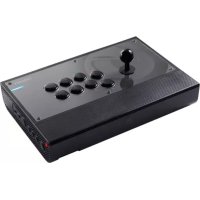
Daija arcade stick - Controller Nacon - Free user manual and instructions
Find the device manual for free Daija arcade stick Nacon in PDF.



| Product Type | Arcade stick for fighting games |
| Brand | NACON |
| Model | Daija Arcade Stick |
| Dimensions | 380 × 261 × 70 mm |
| Weight | Approximately 3.5 kg |
| Power | 5V DC, 500mA |
| Cable length | 3 meters |
| Compatibility | PlayStation 5, PlayStation 4, Windows PC (10/11) |
| Connectivity | USB-C to USB-A |
| Number of buttons | 10 action buttons + system buttons (PS, Options, etc.) |
| Joystick | Digital, switchable between stick and D-Pad mode |
| Headphone output | 3.5 mm jack |
| Customization | Interchangeable ball top, replaceable buttons, customizable faceplate |
| Box contents | Arcade stick, manual, quick start guide, 2 joystick ball tops (pear shape), 2 tools, 2 faceplate designs, stickers, USB cable 3m, warranty |
| Maintenance | Soft, damp cloth, no detergents |
| Safety | Indoor use, avoid liquids, dust, extreme temperatures, shocks |
| Operating temperature | 0°C to 40°C |
| Warning | Not suitable for children under 7 years |
| Repairability | Spare parts available via NACON support; repair by a professional recommended |
| General information | EU compliant, NACON customer support (phone, email, website) |
Frequently Asked Questions - Daija arcade stick Nacon
User questions about Daija arcade stick Nacon
0 question about this device. Answer the ones you know or ask your own.
Ask a new question about this device
Download the instructions for your Controller in PDF format for free! Find your manual Daija arcade stick - Nacon and take your electronic device back in hand. On this page are published all the documents necessary for the use of your device. Daija arcade stick by Nacon.
USER MANUAL Daija arcade stick Nacon
"PlayStation", "PS5", "PS4" and "PlayStation Shapes Logo" are registered trademarks or trademarks of Sony Interactive Entertainment Inc. All other trademarks are the property of their respective owners. Manufactured and distributed under license by Sony Interactive Entertainment.
© 2022 NACON
Made in China
Informations relatives au support technique
Email: support.be@naongaming.com
Site Internet: www.naongaming.com
Adresse: Bigben Interactive Belgium s.a./n.v. Waterloo Office Park / Bâtiment H Drève Richelle 161 bte 15, 1410 Waterloo, Belgium
EMAIL US/CANADA
EN
Email: support.us@naongaming.com
SP
Email: soporte@nacongaming.com
UK Declaration of Conformity
Product: DAIJA Arcade stick for PS5
Manufacturer: Nacon
Nacon declares that this product is in compliance with the United Kingdom legislation:
- Electromagnetic Compatibility Regulations 2016
- The restriction of the use of certain hazardous substances in electrical and electronic equipment regulations 2012
The full text, of the UK Declaration of Conformity, is available at the following website: my.naongaming.com/en-GB/support
FCC: Declaration of Conformity
United states
This product complies with Part 15 of the FCC Rules. Operation is subject to the following two conditions: (1) this device may not cause harmful interference, and (2) this device must accept any interference received, including interference that may cause undesired operation.
Warning: Changes or modifications not expressly approved by the party responsible for compliance could void the user's authority to operate the equipment.
Note: This equipment has been tested and found to comply with the limits for a Class B digital device, pursuant to part 15 of the FCC Rules. These limits are designed to provide reasonable protection against harmful interference in a residential installation. This equipment generates, uses and can radiate radio frequency energy and, if not installed and used in accordance with the instructions, may cause harmful interference to radio communications. However, there is no guarantee that interference will not occur in a particular installation. If this equipment does cause harmful interference to radio or television reception, which can be determined by turning the equipment off and on, the user is encouraged to try to correct the interference by one or more of the following measures:
- Reorient or relocate the receiving antenna.
- Increase the separation between the equipment and receiver.
- Connect the equipment into an outlet on a circuit different from that to which the receiver is connected.
- Consult the dealer or an experienced radio/TV technician for help.
This equipment complies with FCC radiation exposure limits set forth for an uncontrolled environment.
ICES
MANUFACTURER/FABRICANT:
NACON - 396 - 466 Rue de la Voyette, CRT2 - 59273 Fretin, France
DISTRIBUTORS / DISTRIBUTERS :
Waterloo Office Park / Batiment H
Drève Richelle 161 bte 15, 1410 Waterloo, Belgium
Bigben Interactive NEDERLAND b.v.
1124 8TH Street, Kirkland, WA 98033 USA
Nacon Pty. Ltd.
Level 2/20 Bond Street, Sydney NSW 2000 Australia
SUPPORT:
UK, support@naongaming.com
Tel.: +44 08081010970
Mail: support.de@naongaming.com
BELGIQUE, support.be@naongaming.com
NEDERLAND, support.nl@naongaming.com
ESPANA, support.es@naongaming.com
Tel.: +34 900993359
ITALIA, support.it@naongaming.com
Tel:+39 800172494
USA/CANADA, support.us@naongaming.com
AUSTRALIA, support.us@naongaming.com
MEXICO, soporte@naongaming.com

nacon
WWW.NACONGAMING.COM

@NaconGaming

aongaming

on International
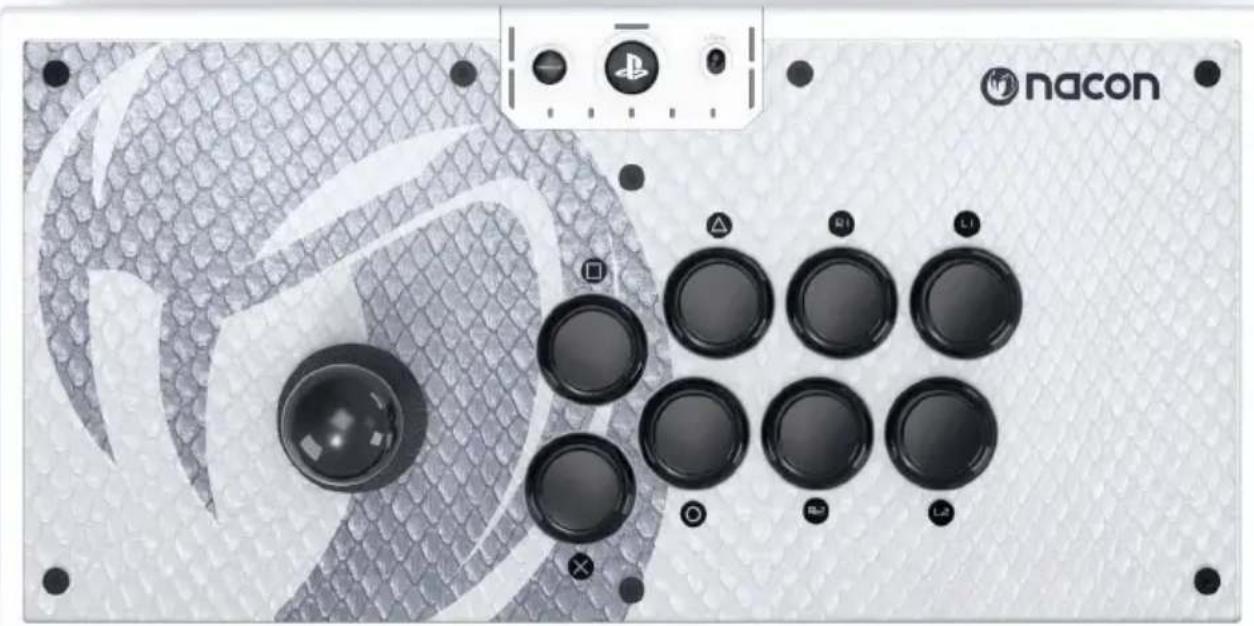

DAIJA
ARCADE STICK
STARTGUIDE
"PlayStation", "PS5", "PS4" and "PlayStation Shapes Logo" are registered trademarks or trademarks of Sony Interactive Entertainment Inc. All other trademarks are the property of their respective owners. Manufactured and distributed under license by Sony Interactive Entertainment.
© 2022 NACON
Made in China
Step into the arena with your NACON™ DAIJA® Arcade Stick!
This product has been designed to improve your comfort and performance when enjoying your favorite combat games. Please keep this user manual for future reference.
Packaging contents
1 x DAIJA Arcade Stick
1 x User manual
1 x Quick Start Guide
1 x Ball-shaped joystick head
1 x Pear-shaped joystick head
2 x Tools
2 x Extra front cover designs
1 x Blank customizable front cover design
1 x Sticker sheet
1 x 3 m USB-A/USB-C detachable cable
1 x Warranty
1 x Precautions for use
1 x Compliance information
Additional information
Dimensions: 380 × 261 × 70 mm
Weight: approx. 3.5kg
Power: 5V = -500mA
: Continuous current power supply
Length of original cable: 3m
Please note: As we aim to continually improve your gaming experience, we are likely to publish firmware updates (also called micro-software) via the DAIJA Arcade Stick application. Regularly check the application for the latest updates.
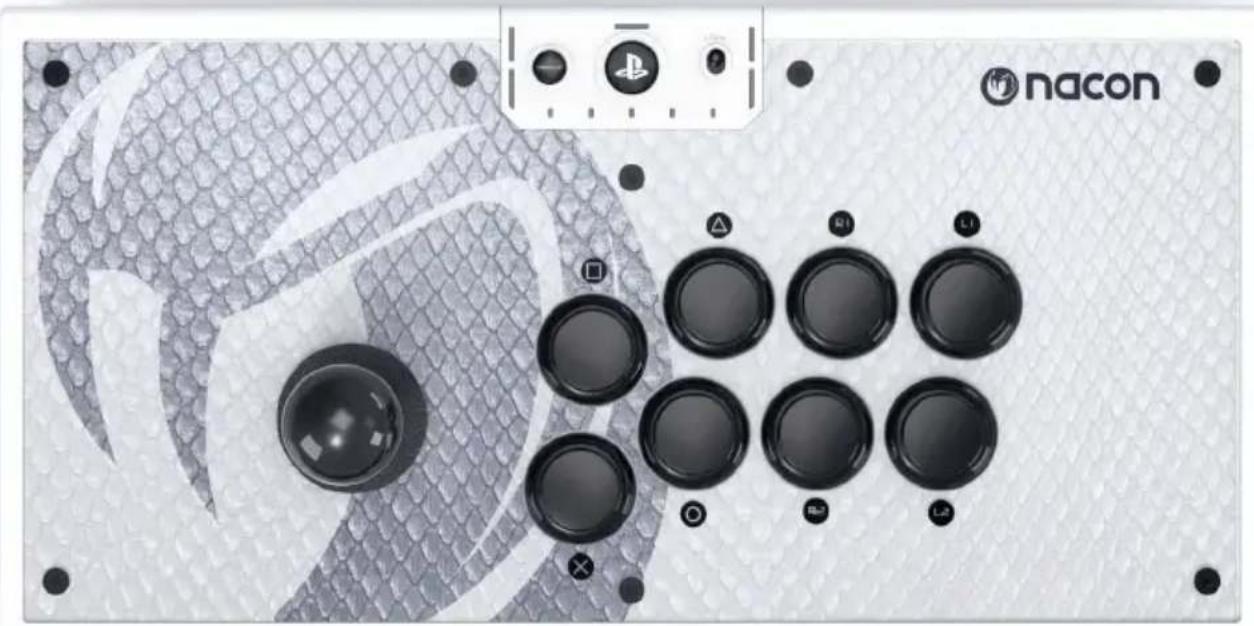
I Description of elements
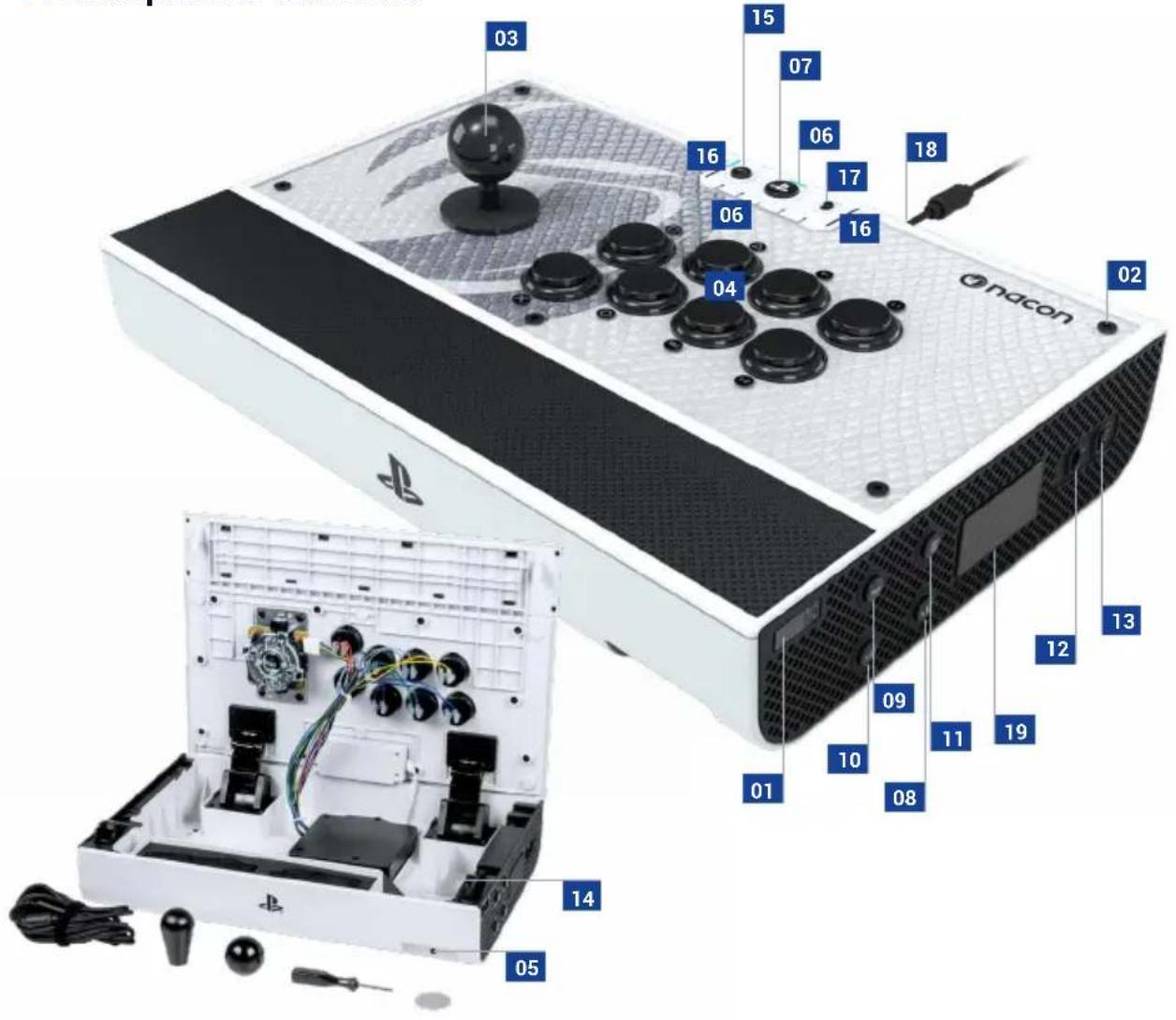
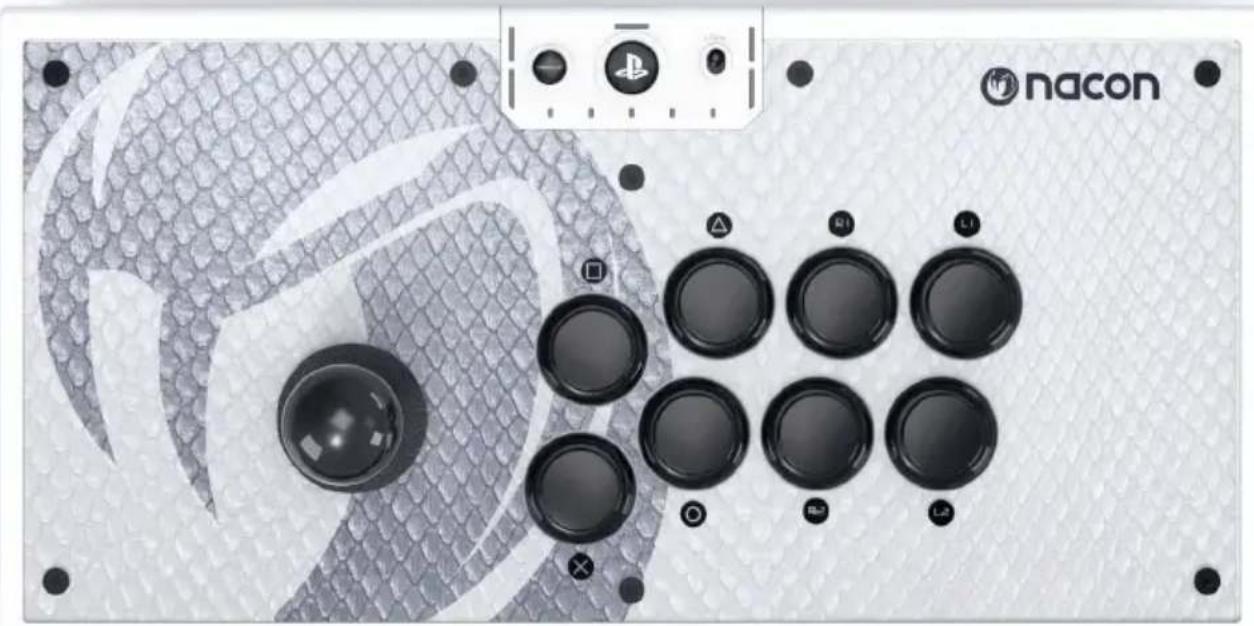
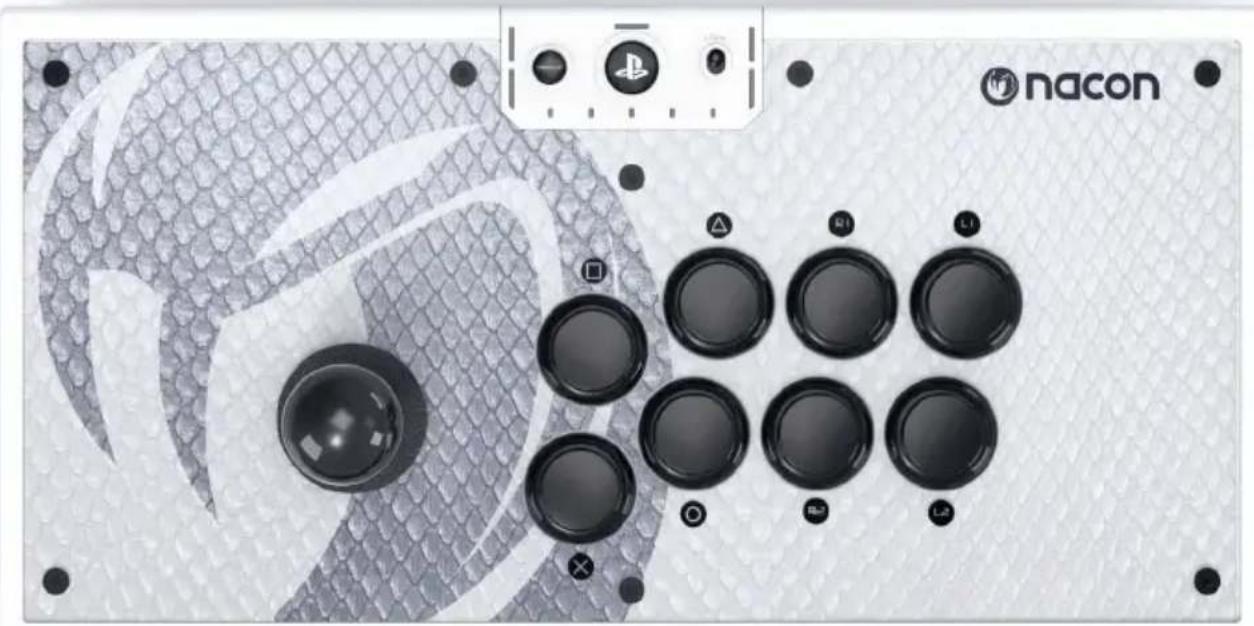
01 Unlock button to open the top casing
02 Front cover screw
03 Joystick (digital mode only)
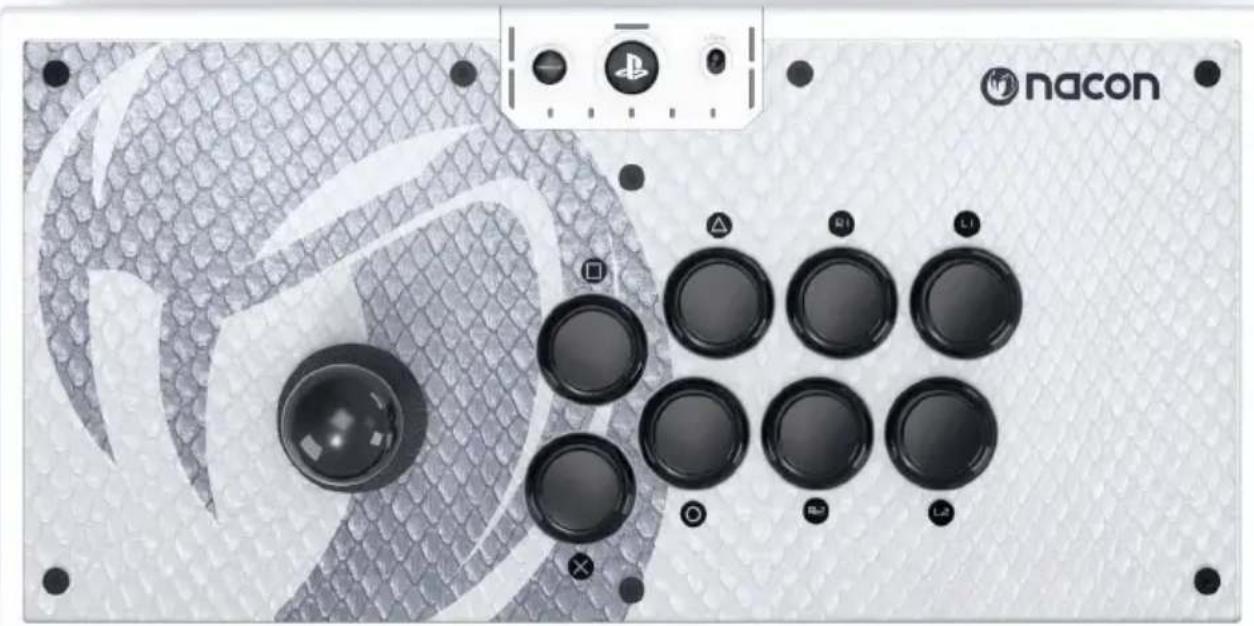
04 Action buttons (Cross, Circle, Square, Triangle / L1 / R1 / L2 / R2)
05 3.5 mm headset jack
06 Player LED
07PSbutton
08 CREATE (Mode PS5TM) / SHARE (Mode PS4TM)
09 RSB button
10 LSB button
11 Options
12 Joystick mode selection
13 Platform selection (PS5TM consoles, PS4TM consoles, PC)
14 Cable storage compartment (inside)
15 Profile button
16 Profile LEDs
17 Lock function (LOCK)
18 USB-C connector
19 Touch pad
Compatibility
The DAIJA Arcade Stick by NACON works with games on PlayStation®5 consoles, PlayStation®4 consoles and Windows PC*. To select your game system, use the dedicated button (13) on the right-hand side of the Arcade Stick.
PlayStation®5 consoles and PlayStation®4 consoles
Use the cable provided with the device and connect the USB-C connector into the port on the Arcade Stick (18). Next, plug the USB-A end of the cable into a free USB port on your PlayStation®5 console or PlayStation®4 console. Switch on your system, then press the PS button (07) on the DAIJA Arcade Stick to connect it. You're now ready to play.
PC
Use the cable provided with the device and connect the USB-C connector into the port on the Arcade Stick (18). Next, plug the USB-A end of the cable into a free USB port on your switched-on PC*.
The DAIJA Arcade Stick is a Plug'n'Play device*. You may need to install a driver when you plug it in for the first time. The process will automatically start up and will only take a few seconds (a Windows message will notify you). You're now ready to play.
*PC compatibility (Windows 10/11) not tested nor endorsed by Sony Interactive Entertainment.
NB: Please note that some games which require a controller with two joysticks are not compatible with the DAIJA Arcade Stick. It should also be noted that it does not support the following functions: analogue joysticks, analogue triggers, adaptive triggers, vibrations.
Joystick operating mode
Use the mode selector button (12) to select the mode of use for your joystick: left joystick, right joystick, or cross-directional (D-Pad).
Accessories and customization
For an optimal gaming experience, the DAIJA Arcade Stick includes high-quality components and various customization options for the buttons, the joystick head or the front cover of your Arcade Stick thanks to the accessories provided.
To open up the top cover
Press the two unlock buttons on the cover (01) located on the side panels of the DAIJA Arcade Stick.
Changing the joystick heads
You can use different joystick shapes which can be stored directly in your device's storage compartment. Access the inside of the Arcade Stick and unscrew the head installed by using the key provided or a flat-headed screwdriver. Next, screw the head you want to use in via the same methods and close the compartment. Your Arcade Stick is ready to use.
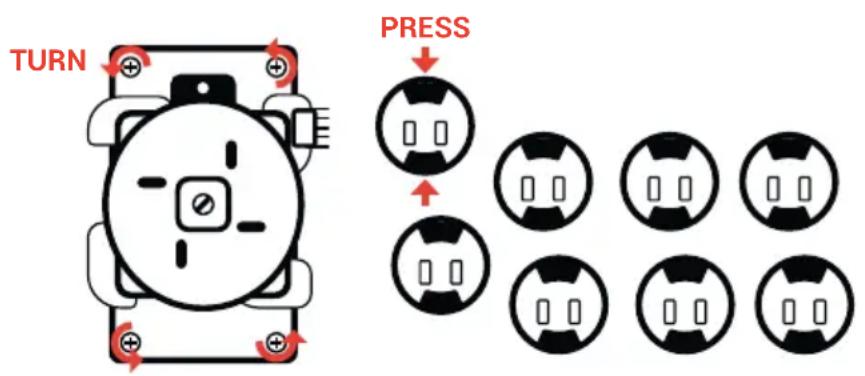
Removing the joystick mechanism and the action buttons
To change the joystick mechanism or the action buttons, access the Arcade Stick's inside compartment by pressing the unlock buttons on the cover (01).
Once you've accessed the inside of your device, locate the cable corresponding to the button you want to change, using the color code provided.
To unplug a button or the joystick, make sure to lift the sleeved part of the cable to avoid damaging it.
Once the cable has been unplugged, simply remove the button by pressing the side springs of the component. To remove the joystick mechanism, you'll need to use a cross-headed screwdriver to unscrew the four holding screws.
You now have the possibility of installing your own components. Make sure to properly plug the cables back in and replace the screws for the joystick mechanism.
Changing the front cover
You can replace the default front cover on your Daija Arcade Stick with the additional design provided or with your own design by using the blank template provided. The blank template can also be downloaded from www.naongaming.com.
Remove the head of the joystick, then use the hexagonal screwdriver provided to remove the nine screws on the protective panel on the surface of the Arcade Stick.
Please note: Make sure to print your template at the right scale, so that it perfectly matches up the dimensions of the Arcade Stick. You'll need an A3 printer.
Recycling
This symbol on the product or on its packaging indicates that this product shall not be treated as household waste. Instead it should be taken to an applicable collection point for the recycling of electrical
and electronic equipment. By ensuring that this equipment is disposed of correctly you will help prevent potential negative consequences for the environment and human health, which could otherwise be caused by inappropriate waste handling of this product. The recycling of materials will help to conserve natural resources. For more information please contact your local council or waste disposal service. EU, UK and Turkey only.
Turkey
If you require further information about this legislation please click on the link http://www.tukcev.org.tr/ assets/yonetmelikler/AEEYonetmeligi.pdf
Important precautions
1/ This product is designed for indoor use only. Do not expose it to direct sunlight or bad weather.
2/ Do not expose the product to splashes, rain, drips or moisture. Do not immerse it in a liquid.
3/ Do not expose to dust, high levels of humidity, extreme temperatures or mechanical shocks.
4/ Do not use and do not open if the equipment is damaged. Do not attempt to repair it.
5/ When cleaning the outside, only use a soft, clean and damp cloth. Detergents can damage the finish and get inside the product.
6/ Do not carry the product while holding it by the cable.
7/ This product is not designed for people (including children) suffering from a physical, sensory or mental disability, or for users without the necessary and relevant experience or knowledge (unless they have been given advice and instructions on how to use the device from a person responsible for the user).
Do not leave the product unattended, do not leave this product within the reach of children. Not suitable for children under 7 (the cable can get wrapped around the neck).
8/ The maximum operating temperature must not exceed 40^
I Ergonomics
Keeping your hand in the same position for a prolonged period of time can result in pain. If this happens repeatedly, please consult your doctor.
As a precaution, take a 15-minute break every hour.
Technical support
UK
Email: support@nacongaming.com
Tel.: (+44)08081010970
Australia
Email: support.us@naongaming.com
Tel.: (+61) 1300512410
Europe
Email: support@naongaming.com
US/Canada email
(English/French)
Email: support.us@naongaming.com
(Spanish)
Email: soporte@nacongaming.com
US/Canada Phone Support
(English/French/Spanish)
Tel.: 1-833-622-6687
EU Declaration of Conformity
Product: DAIJA Arcade stick for PS5
Manufacturer: Nacon
Nacon declares that this product is in compliance with the Union harmonisation legislation:
- Directive 2014/30/EU for Electromagnetic Compatibility
- Directive 2011/65/EU the restriction of the use of certain hazardous substances in electrical and electronic equipment
The full text, of the EU Declaration of Conformity, is available at the following website: my.naongaming.com/en-GB/support
UK Declaration of Conformity
Product: DAIJA Arcade stick for PS5
Manufacturer: Nacon
Nacon declares that this product is in compliance with the United Kingdom legislation:
- Electromagnetic Compatibility Regulations 2016
- The restriction of the use of certain hazardous substances in electrical and electronic equipment regulations 2012
The full text, of the UK Declaration of Conformity, is available at the following website: my.naongaming.com/en-GB/support
FCC: Declaration of Conformity
United states
This product complies with Part 15 of the FCC Rules. Operation is subject to the following two conditions: (1) this device may not cause harmful interference, and (2) this device must accept any interference received, including interference that may cause undesired operation.
Warning: Changes or modifications not expressly approved by the party responsible for compliance could void the user's authority to operate the equipment.
Note: This equipment has been tested and found to comply with the limits for a Class B digital device, pursuant to part 15 of the FCC Rules. These limits are designed to provide reasonable protection against harmful interference in a residential installation. This equipment generates, uses and can radiate radio frequency energy and, if not installed and used in accordance with the instructions, may cause harmful interference to radio communications. However, there is no guarantee that interference will not occur in a particular installation. If this equipment does cause harmful interference to radio or television reception, which can be determined by turning the equipment off and on, the user is encouraged to try to correct the interference by one or more of the following measures:
- Reorient or relocate the receiving antenna.
- Increase the separation between the equipment and receiver.
- Connect the equipment into an outlet on a circuit different from that to which the receiver is connected.
- Consult the dealer or an experienced radio/TV technician for help.
This equipment complies with FCC radiation exposure limits set forth for an uncontrolled environment.
ICES
This equipment complies with IC radiation exposure limits set forth for an uncontrolled environment.
ICES statement: This device complies with Industry Canada's license - exempt RSSs. Operation is subject to the following two conditions: (1) this device may not cause harmful interference, and (2) this device must accept any interference received, including interference that may cause undesired operation."
MANUFACTURER/FABRICANT:
NACON - 396 - 466 Rue de la Voyette, CRT2 - 59273 Fretin, France
DISTRIBUTORS / DISTRIBUTERS :
Waterloo Office Park / Batiment H
Drève Richelle 161 bte 15, 1410 Waterloo, Belgium
Bigben Interactive NEDERLAND b.v.
1124 8TH Street, Kirkland, WA 98033 USA
Nacon Pty. Ltd.
Level 2/20 Bond Street, Sydney NSW 2000 Australia
SUPPORT:
UK, support@naongaming.com
Tel.: +44 08081010970
Mail: support.de@naongaming.com
BELGIQUE, support.be@naongaming.com
NEDERLAND, support.nl@naongaming.com
ESPANA, support.es@naongaming.com
Tel.: +34 900993359
ITALIA, support.it@naongaming.com
Tel:+39 800172494
USA/CANADA, support.us@naongaming.com
AUSTRALIA, support.us@naongaming.com
MEXICO, soporte@naongaming.com

nacon
WWW.NACONGAMING.COM

@NaconGaming

aongaming

Con International

DAIJA
ARCADE STICK
STARTGUIDE
"PlayStation", "PS5", "PS4" and "PlayStation Shapes Logo" are registered trademarks or trademarks of Sony Interactive Entertainment Inc. All other trademarks are the property of their respective owners. Manufactured and distributed under license by Sony Interactive Entertainment.
© 2022 NACON
Made in China
- Electromagnetic Compatibility Regulations 2016
- The restriction of the use of certain hazardous substances in electrical and electronic equipment regulations 2012
1124 8TH Street, Kirkland, WA 98033 USA
Nacon Pty. Ltd.
Level 2/20 Bond Street, Sydney NSW 2000 Australia
SUPPORT:
UK, support@naongaming.com
Tel.: +44 08081010970
Mail: support.de@naongaming.com
BELGIQUE, support.be@naongaming.com
NEDERLAND. support.nl@naongaming.com
ESPANAsupport.es@naongaming.com
Tel.: +34 900993359
ITALIA, support.it@naongaming.com
Tel: +39 800172494
USA/CANADA, support.us@naongaming.com
AUSTRALIA, support.us@naongaming.com
MEXICO, soporte@naongaming.com

nacon
WWW.NACONGAMING.COM
naongamingde @NaconGER NaongamingDE on Deutschland
Licenced for sale in the European Union, United Kingdom, Australia, New Zealand, United States, Canada. Manufactured by Nacon. Licencié pour la vente en Union europeenne, Royaume-Uni, Australia, Nouvelle-Zélande, États-Unis, Canada. Fabrique par Nacon. Lizenziert für den Verkauf in der Europäischen Union, Großbritannien, Australien, Neuseeland, den USA und Kanada. Hergestellt von Nacon. - Verkoopvergunning voor de Europese Unie, het Verenigd Koninkrijk, Australie, Nieuw-Zeeland, de Verenigde Staten en Kanada. Vervaardig door Nacon. Autorizzato para la vente en la Union Europea, Reino Unido, Australia, Nueva Zelanda, Estados Unidos y Canadá. Fabricado por Nacon. Autorizzato alla vendita in Unione Europea, Regno Unito, Australia, Nuova Zelanda, Stati Uniti e Canadá. Prodotto da Nacon. Licenciado para vendita na União Europeia, Reino Unido, Austrália, Nova Zelândia, Estados Unidos. Canadá. Fabricado pela Nacon. All the trademarks belong to their respective owners. Toutes les marques citées appartiennent à leurs propriétaires respectifs.

DAIJA
ARCADE STICK
STARTGUIDE
NC4529
"PlayStation", "PS5", "PS4" and "PlayStation Shapes Logo" are registered trademarks or trademarks of Sony Interactive Entertainment Inc. All other trademarks are the property of their respective owners. Manufactured and distributed under license by Sony Interactive Entertainment.
© 2022 NACON
Made in China
Company Name: S2G Mexico LLC
Address: Av. Antonio Dovali Jaime 70, Torre C Piso 2, Santa Fe, Alvaro Obregon, CDMX.C.P. 01210
Tax ID or RFC (for Mexico): SML 150205M61
MANUFACTURER/FABRICANT:
NACON - 396 - 466 Rue de la Voyette, CRT2 - 59273 Fretin, France
DISTRIBUTORS/DISTRIBUTEURS:
1124 8TH Street, Kirkland, WA 98033 USA
Nacon Pty. Ltd.
Level 2/20 Bond Street, Sydney NSW 2000 Australia
SUPPORT:
UK, support@naongaming.com
Tel.: +44 08081010970
Mail: support.de@naongaming.com
BELGIQUE, support.be@naongaming.com
NEDERLAND. support.nl@naongaming.com
ESPANAsupport.es@naongaming.com
Tel.: +34 900993359
ITALIA, support.it@naongaming.com
Tel: +39 800172494
USA/CANADA, support.us@naongaming.com
AUSTRALIA, support.us@naongaming.com
MEXICO, soporte@naongaming.com

nacon
WWW.NACONGAMING.COM

@NaconGaming

laongaming

Non International

DAIJA
ARCADE STICK
STARTGUIDE
"PlayStation", "PS5", "PS4" and "PlayStation Shapes Logo" are registered trademarks or trademarks of Sony Interactive Entertainment Inc. All other trademarks are the property of their respective owners. Manufactured and distributed under license by Sony Interactive Entertainment.
© 2022 NACON
Made in China
MANUFACTURER/FABRICANT:
NACON - 396 - 466 Rue de la Voyette, CRT2 - 59273 Fretin, France
DISTRIBUTORS/DISTRIBUTEURS:
1124 8TH Street, Kirkland, WA 98033 USA
Nacon Pty. Ltd.
Level 2/20 Bond Street, Sydney NSW 2000 Australia
SUPPORT:
UK, support@naongaming.com
Tel.: +44 08081010970
Mail: support.de@naongaming.com
BELGIQUE, support.be@naongaming.com
NEDERLAND, support.nl@naongaming.com
ESPANA, support.es@naongaming.com
Tel.: +34 900993359
ITALIA, support.it@naongaming.com
Tel:+39 800172494
USA/CANADA, support.us@naongaming.com
AUSTRALIA, support.us@naongaming.com
MEXICO, soporte@naongaming.com

nacon
WWW.NACONGAMING.COM

@NaconGaming

aongaming

Con International

DAIJA
ARCADE STICK
GEBRUIKERSHANDLEIDING
"PlayStation", "PS5", "PS4" and "PlayStation Shapes Logo" are registered trademarks or trademarks of Sony Interactive Entertainment Inc. All other trademarks are the property of their respective owners. Manufactured and distributed under license by Sony Interactive Entertainment.
© 2022 NACON
Made in China
Waterloo Office Park/Batiment H
Drève Richelle 161 bte 15,
1410 Waterloo, Belgium
www.nacongaming.com
MANUFACTURER/FABRICANT:
NACON - 396 - 466 Rue de la Voyette, CRT2 - 59273 Fretin, France
DISTRIBUTORS / DISTRIBUTERS :
Nacon Gaming Inc.
1124 8TH Street, Kirkland, WA 98033 USA
Nacon Pty. Ltd.
Level 2/20 Bond Street, Sydney NSW 2000
Australia
SUPPORT:
Mail: support.de@naongaming.com
BELGIQUE, support.be@naongaming.com
NEDERLAND, support.nl@naongaming.com
ESPANAs, support.es@naongaming.com
Tel.: +34 900993359
ITALIA, support.it@naongaming.com
Tel.:+39 800172494
USA/CANADA, support.us@naongaming.com
AUSTRALIA, support.us@naongaming.com
MEXICO, soporte@naongaming.com

nacon
WWW.NACONGAMING.COM

@NaconGaming

acongaming

Non International
- Informations relatives au support technique
- EMAIL US/CANADA
- UK Declaration of Conformity
- FCC: Declaration of Conformity
- United states
- ICES
- MANUFACTURER/FABRICANT:
- DISTRIBUTORS / DISTRIBUTERS :
- SUPPORT:
- nacon
- DAIJA
- ARCADE STICK
- STARTGUIDE
- Step into the arena with your NACON™ DAIJA® Arcade Stick!
- Packaging contents
- Additional information
- I Description of elements
- Compatibility
- PlayStation®5 consoles and PlayStation®4 consoles
- PC
- Joystick operating mode
- Accessories and customization
- To open up the top cover
- Changing the joystick heads
- Removing the joystick mechanism and the action buttons
- Changing the front cover
- Recycling
- Turkey
- Important precautions
- I Ergonomics
- Technical support
- EU Declaration of Conformity
- DISTRIBUTORS/DISTRIBUTEURS:
- GEBRUIKERSHANDLEIDING
Brand : Nacon
Model : Daija arcade stick
Category : Controller