Revolution X Unlimited - Controller Nacon - Free user manual and instructions
Find the device manual for free Revolution X Unlimited Nacon in PDF.


Pick your language and provide your email: we'll send you a specifically translated version.
| Product type | Wireless controller |
| Brand | Nacon |
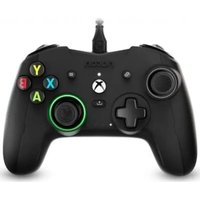
| Model | Revolution X Unlimited |
| Dimensions (L x W x H) | 16.5 x 11 x 6 cm |
| Weight | 330 g (with cable) |
| Power supply | Lithium-Ion battery 1200 mAh |
| Battery life | Up to 10 hours |
| Connectivity | Wireless 2.4 GHz, USB-C |
| Compatible platforms | Xbox Series X|S, Xbox One, PC Windows 10/11 |
| Main functions | Vibration, analog triggers, analog sticks, D-pad, programmable buttons |
| Additional features | Nacon Companion app, audio settings, adjustable weight |
| Materials | ABS plastic, rubber grips |
| Care and cleaning | Clean with a soft, dry cloth. Do not use solvents. |
| Safety | Do not expose to moisture or extreme temperatures. Use the provided charger. |
| Spare parts and repairability | The product is not designed for user repair. Contact Nacon support. |
| General information | Manual available for download at notice-facile.com |
Frequently Asked Questions - Revolution X Unlimited Nacon
How to connect the Revolution X Unlimited controller to an Xbox?
Turn on the controller by holding the Xbox button for 3 seconds. Press the sync button on the console, then press the sync button on the back of the controller. Pairing is done automatically.
How to recharge the controller battery?
Use the provided USB-C cable and plug it into a USB port on your console or a power adapter. The LED indicates the charge level.
Is the controller compatible with PC?
Yes, it is compatible with Windows 10 and 11. Connect it via the USB wireless receiver or the USB-C cable. Download the Nacon Companion app to configure settings.
How to adjust the controller weight?
Remove the back cover and add or remove the provided weights in the designated slots. Close the cover. The weight affects the feel in games.
What to do if the controller does not turn on?
Check the battery charge. Plug the controller in with the USB-C cable. If it still does not turn on, reset it by inserting a paperclip into the reset hole on the back.
How to configure the programmable buttons?
Launch the Nacon Companion app on your console or PC. In the 'Buttons' tab, you can assign macros or modify the assignments of the back buttons.
Does the controller have a headphone jack?
Yes, it has a 3.5 mm audio jack for headphones. You can adjust volume and mixing via the app or dedicated buttons.
How to clean the controller?
Use a soft, slightly damp cloth (not wet) to wipe the surface. Never use chemical or abrasive cleaners. Avoid letting moisture enter the openings.
Where can I find the full manual?
The full manual is available for free download in PDF format at notice-facile.com. Search for 'Nacon Revolution X Unlimited'.
How to update the controller firmware?
Download the Nacon Companion app on your PC. Connect the controller via USB and follow the instructions in the 'Update' tab to install the latest version.
User questions about Revolution X Unlimited Nacon
0 question about this device. Answer the ones you know or ask your own.
Ask a new question about this device
No questions yet. Be the first to ask one.
Download the instructions for your Controller in PDF format for free! Find your manual Revolution X Unlimited - Nacon and take your electronic device back in hand. On this page are published all the documents necessary for the use of your device. Revolution X Unlimited by Nacon.
USER MANUAL Revolution X Unlimited Nacon
Manual assistant
Powered by Anthropic
Waiting for your message
Product information
Brand : Nacon
Model : Revolution X Unlimited
Category : Controller